infotainment AUDI A4 2019 User Guide
[x] Cancel search | Manufacturer: AUDI, Model Year: 2019, Model line: A4, Model: AUDI A4 2019Pages: 392, PDF Size: 99.53 MB
Page 34 of 392
Openingandclosing
Unlockingthevehicle
> Gripthedoorhandle.Thedoorunlocksauto-
matically.
>Pullonthedoorhandletoopenthedoor.
Lockingthevehicle
>Appliesto:vehicleswithautomatictransmis-
sion:Selectthe"P"position,otherwisetheve-
hiclewillnotlock.
>Tolockthevehicle,closethedoorandtouch
thesensorinthedoorhandleonce>fig.22.Do
notholdthedoorhandlewhiledoingthis.
Youcanunlock/lockthevehicleateverydoor.The
vehiclekeycannotbemorethanapproximately
4feet(1.5m)awayfromthedoorhandle.The
functionshouldnotbeimpairedifthevehiclekey
isinyourjacketpocketorinyourbriefcase,for
example.
Ifyouholdthedoorhandlewhilelocking,this
canimpairthelockingfunction.
Thedoor cannotbeopenedforabriefperioddi-
rectlyafterlockingit.Thiswayyouhavethe op-
portunitytocheckifthedoorslockedcorrectly.
ThesettingsintheInfotainmentsystemdeter-
mineiftheentirevehicleoronlyoneofthedoors
isunlockedwhenunlockingthevehicle
=>page33.
ZAWARNING
ReadandfollowingallWARNINGS=>A\inDe-
scriptiononpage28.
@)Tips
Ifyourvehicleisleftstandingforalongperi-
odoftime,notethefollowing:
— Theenergymanagementsystemgradually
turnsoffunnecessaryconveniencefunctions
topreventthevehiclebatteryfromdraining
andtomaintainthevehicle'sabilitytostart
foraslongaspossible.Youthenmayno
longerbeabletounlockyourvehiclewith
thesensors.
32
G)Tips
Unlockingwiththeconveniencekey(keyless
access)canbedeactivatedintheInfotain-
mentsystem>page33.
Centrallockingswitch
a
Ss
2
=%a
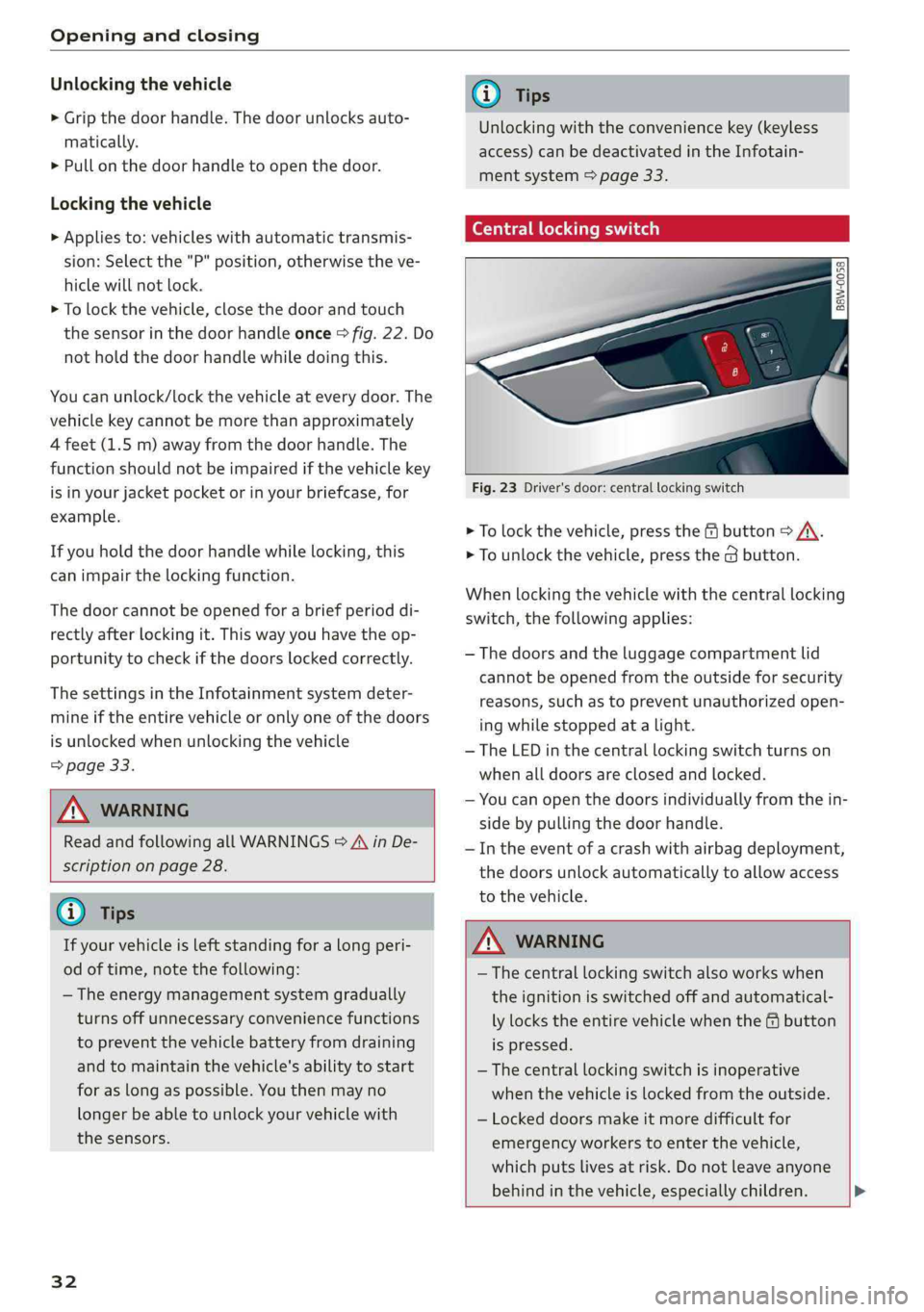
Fig.23Driver'sdoor:centrallockingswitch
>Tolockthevehicle,pressthe@button>/\.
>Tounlockthevehicle,pressthe@button.
Whenlockingthevehiclewiththecentral locking
switch,
thefollowingapplies:
—Thedoorsandtheluggagecompartmentlid
cannotbeopenedfromtheoutsideforsecurity
reasons,suchastopreventunauthorizedopen-
ingwhilestoppedatalight.
—TheLEDinthecentral lockingswitchturnson
whenalldoorsareclosedandlocked.
—Youcanopenthedoorsindividuallyfromthein-
sidebypullingthedoorhandle.
—Intheeventofacrashwithairbagdeployment,
thedoorsunlockautomaticallytoallowaccess
tothevehicle.
ZAWARNING
— Thecentral lockingswitchalsoworkswhen
theignitionisswitchedoffandautomatical-
lylockstheentirevehiclewhenthe&button
ispressed.
—Thecentral lockingswitchisinoperative
when
thevehicleislockedfromtheoutside.
—Lockeddoorsmakeitmoredifficultfor
emergencyworkerstoenterthevehicle,
whichputslivesatrisk.Donotleaveanyone
behindinthevehicle,especiallychildren.>
Page 35 of 392
8W0012721BG
Openingandclosing
—ReadandfollowingallWARNINGS>Ain
Descriptiononpage28.
@Tips
Yourvehiclelocksautomaticallywhenit
reachesaspeedof9mph(15km/h)(Auto
Lock)=page28.Youcanunlockthevehicle
againusingthe@buttoninthecentrallock-
ingswitch.
Settingthecentrallockingsystem
Youcanadjustthecentral lockingsystemtoyour
preferences.Thesettingsdependonthevehicle
equipment.
>SelectintheInfotainmentsystem:[MENU]but-
ton>Vehicle> leftcontrolbutton>Vehicle
settings>Centrallocking.
Doorunlocking-youcandecideifAlldoorsor
onlytheDriver'sdoorshouldunlock.Thelug-
gage compartmentlidalsounlockswhenAllis
selected.IfyouselectDriver'sdoor*inavehicle
withaconveniencekey,onlythedriver'sdoor
willunlockwhenyougraspthedriver'sdoorhan-
dle.Ifyougraspanotherdoorhandle,theentire
vehiclewillbeunlocked.
IfyouselectDriver'sdoor,allthedoorsandlug-
gagecompartmentlidwillunlockifyoupressthe
fbuttononthevehiclekeytwice.
Longpresstoopenwindows-youcanselectif
allwindowsandtheroofshouldopenusingthe
vehiclekey>page41,Convenienceopening
andclosing.Ifyoupressandholdthe&button
onthevehiclekey,allofthewindowsandthe
roofwillclose.
Appliesto:vehicleswithconveniencekey:Open
withconveniencekey-youcandeactivatethe
functionforunlockingviathesensor.Thefunc-
tionforlockingviathesensorwillstillbeenabled
>page31.
Disablerearlidhandle-ifyouselectOn,thelug-
gagecompartmentlidhandleislocked.Inthis
case,theluggagecompartmentlidcanbe
)_Thisfunctionisnotavailableinallcountries.
openedwiththe<3buttononthevehiclekeyor
withtheunlockbuttoninthedriver'sdoor.Inve-
hicleswithaconveniencekey*,youcanstillopen
theluggagecompartmentlidusingthehandleif
anauthorizedconveniencekeyisneartheprox-
imitysensor*.
Foldmirrors-ifyouselectOn,theexteriorrear-
viewmirrorswillfoldinautomaticallywhenyou
pressthe&buttononthevehiclekeyortouch
thesensor*inthehandle.
Tonewhenlocking”)-ifyouselectOn,atonewill
soundwhenyoulockthevehicle.
Mechanicallyunlockingandlockingthe
Cele
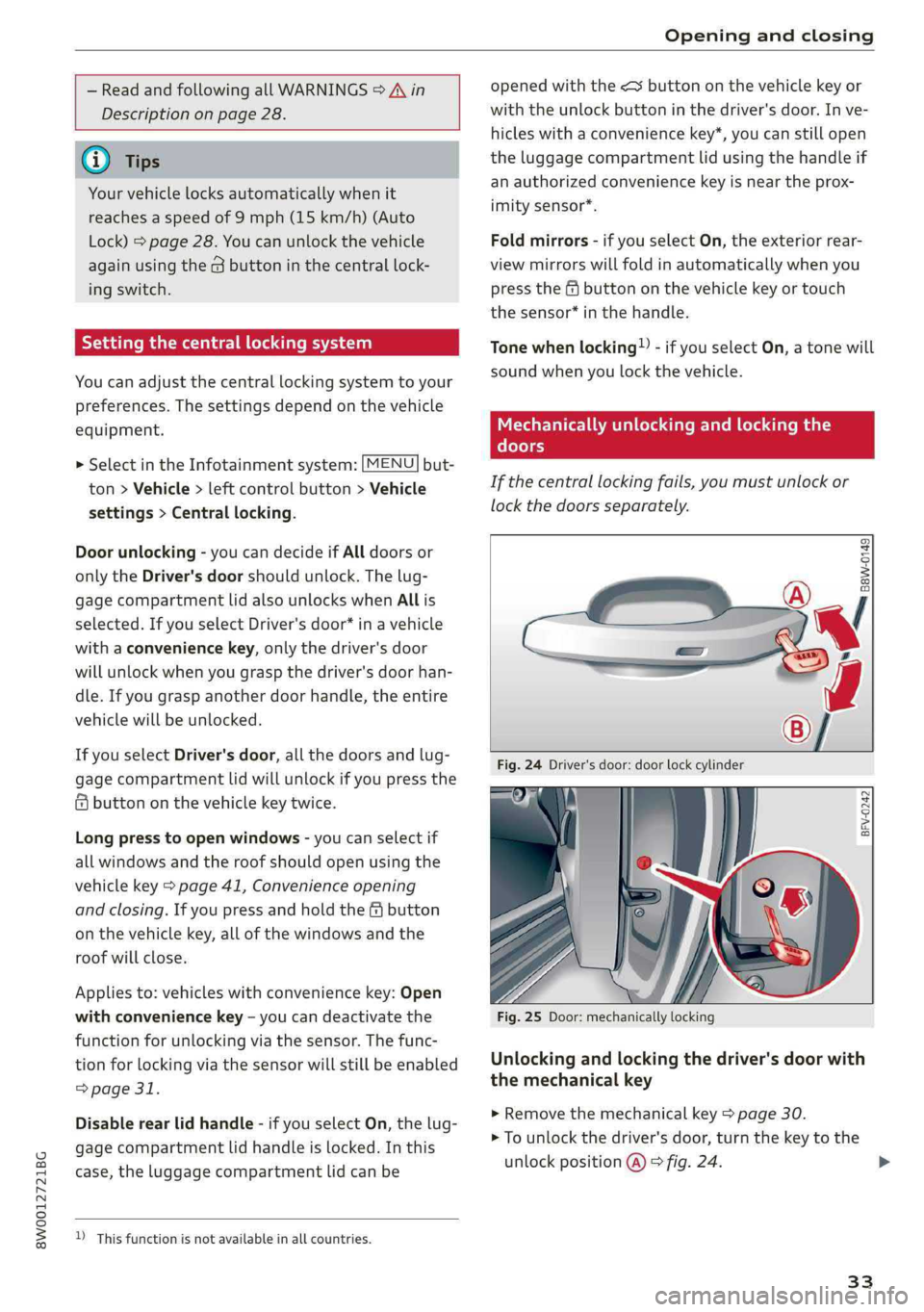
Ifthecentrallockingfails,youmustunlockor
lockthedoorsseparately.
SSS
saw-0149
BFV-0242
Fig.25Door:mechanicallylocking
Unlockingandlockingthedriver'sdoorwith
themechanicalkey
>Removethemechanicalkey>page30.
>Tounlockthedriver'sdoor,turnthekeytothe
unlockposition@)>fig.24.
33
>
Page 37 of 392
8W0012721BG
Openingandclosing
Luggagecompartment
lid
Openingandclosingtheluggage
compartmentlid
eoS S 2
=zta
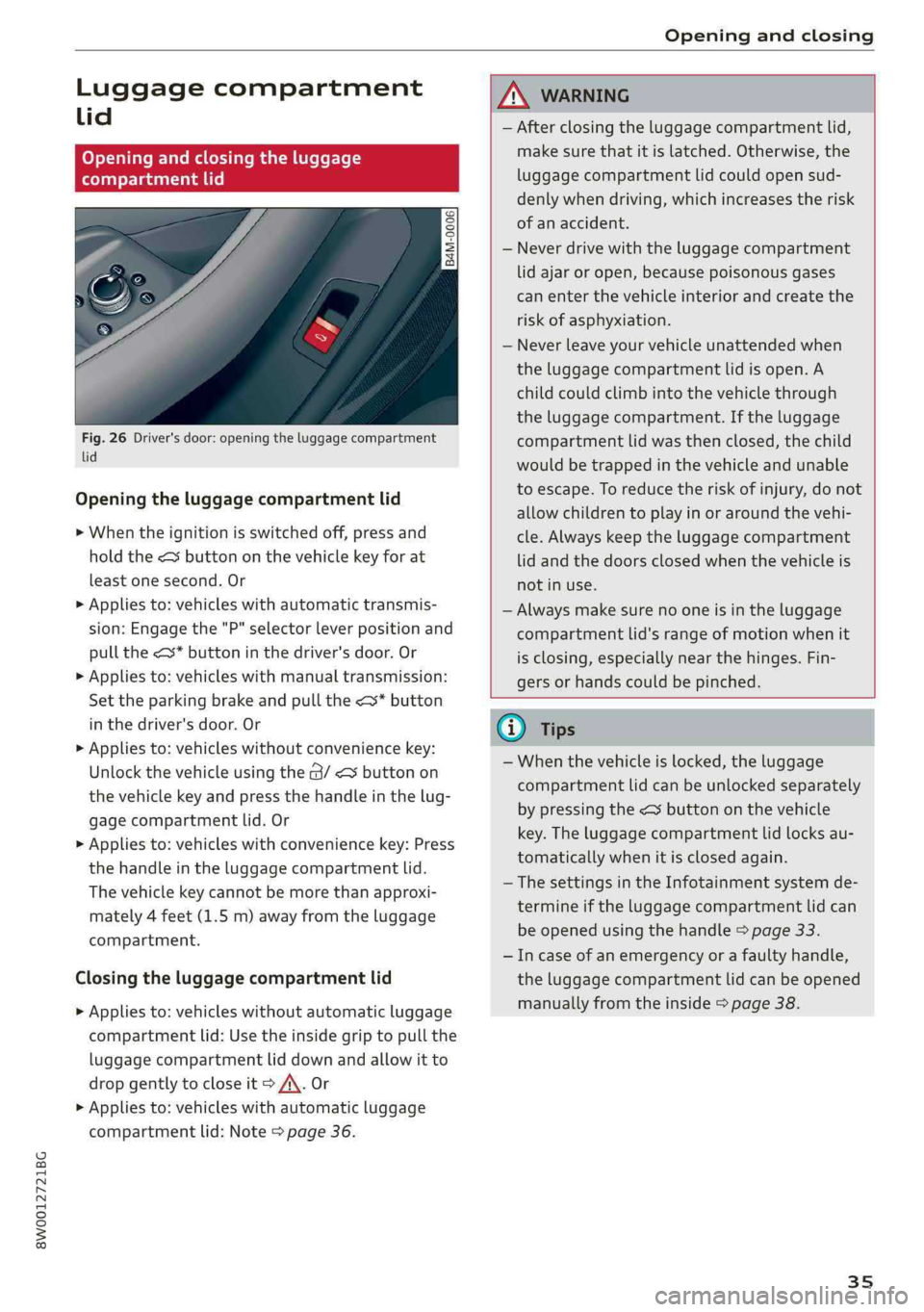
Fig.26Driver'sdoor:openingtheluggagecompartment
lid
Openingtheluggagecompartmentlid
>Whentheignitionisswitchedoff,pressand
holdthe
>Appliesto:vehicleswithautomatictransmis-
sion:Engagethe"P"selectorleverpositionand
pullthe<*buttoninthedriver'sdoor.Or
>Appliesto:vehicleswithmanualtransmission:
Set theparkingbrakeandpullthe<*button
inthedriver'sdoor.Or
>Appliesto:vehicleswithoutconveniencekey:
Unlockthevehicleusingthe@/<¥buttonon
thevehiclekeyandpressthehandleinthelug-
gagecompartmentlid.Or
>Appliesto:vehicleswithconveniencekey:Press
thehandleintheluggagecompartmentlid.
Thevehiclekeycannotbemorethanapproxi-
mately4feet(1.5m)awayfromtheluggage
compartment.
Closingtheluggagecompartmentlid
>Appliesto:vehicleswithoutautomaticluggage
compartmentlid:Usetheinsidegriptopullthe
luggagecompartmentliddownandallowitto
dropgentlytocloseit>A\.Or
>Appliesto:vehicleswithautomaticluggage
compartmentlid:Note>page36.
ZAWARNING
—Afterclosingtheluggagecompartmentlid,
makesurethatitislatched.Otherwise,the
luggagecompartmentlidcouldopensud-
denlywhendriving,whichincreasestherisk
ofanaccident.
—Neverdrivewiththeluggagecompartment
lidajaroropen,becausepoisonousgases
canenterthevehicleinteriorandcreatethe
riskofasphyxiation.
—Neverleaveyourvehicleunattendedwhen
theluggagecompartmentlidisopen.A
childcouldclimbintothevehiclethrough
theluggagecompartment.Iftheluggage
compartmentlid wasthenclosed,thechild
wouldbetrappedinthevehicleandunable
toescape.Toreducetheriskofinjury,donot
allowchildrentoplayinoraroundthevehi-
cle.Alwayskeeptheluggagecompartment
lidandthedoorsclosedwhenthevehicleis
notinuse.
—Alwaysmakesurenooneisintheluggage
compartmentlid'srangeofmotionwhenit
isclosing,especiallynearthehinges.Fin-
gersorhandscouldbepinched.
@)Tips
—Whenthevehicleislocked,theluggage
compartmentlidcanbeunlockedseparately
bypressingthe<
tomaticallywhenitisclosedagain.
—ThesettingsintheInfotainmentsystemde-
termineiftheluggagecompartmentlidcan
beopenedusingthehandle>page33.
—Incaseofanemergencyorafaultyhandle,
theluggagecompartmentlidcanbeopened
manuallyfromtheinside>page38.
35
Page 39 of 392
8W0012721BG
Openingandclosing
—Appliesto:vehicleswithconveniencekey:Press
the
—Youpushthehandleintheluggagecompart-
mentlid,or
—Ifsomethingblockstheluggagecompartment
lidormakesitdifficultforthelidtomove.
Ifyoupressthehandleoroneofthe
luggagecompartmentlidwilleitheropenor
close,dependingonitsangle.
Z\WARNING
—Afterclosingtheluggagecompartmentlid,
makesurethatitislatched.Otherwise,the
luggagecompartmentlidcouldopensud-
denlywhendriving,whichincreasestherisk
ofanaccident.
—Paycarefulattentionwhenclosingthelug-
gage compartmentlid.Otherwise,youcould
causeseriousinjurytoyourselforothersde-
spitethepinchprotection.
—Toreducetheriskofinjuriesbypinching,al-
waysmakesurethatnooneisintheoperat-
ingareaoftheluggagecompartmentlid,in-
cludingthehingeareasandtheupperand
loweredgeoftheluggagecompartmentlid.
—Neverdrivewiththeluggagecompartment
lidajaroropen,becausepoisonousgases
canenterthevehicleinteriorandcreatethe
riskofasphyxiation.
—Ifthereisaluggagerack(suchasabicycle
rack)ontheluggagecompartmentlid,the
luggagecompartmentlidmaynotopen
completelyundercertaincircumstancesorit
couldclosebyitselfifopenduetotheextra
weight.Therefore,theopenluggagecom-
partmentlid mustbegivenadditionalsup-
portorthecargomustfirstberemoved
fromtheluggagerack.
G)Tips
— ThesettingsintheInfotainmentsystemde-
termineiftheluggagecompartmentlidcan
beopenedusingthehandle>page33.
—Thereareaudiblesignalswhenclosingthe
luggagecompartmentlidwiththevehicle
key(vehicleswithconveniencekey*)orwith
the<¥buttoninthedriver'sdoor.
—Whenthevehicleislocked,theluggage
compartmentlidcanbeunlockedseparately
bypressingthe<
tomaticallywhenitisclosedagain.
—Appliesto:vehicleswithconveniencekey:
Theluggagecompartmentlidcanbeclosed
withthevehiclekeyfromadistanceupto
approximately9ft(3m).
—Theluggagecompartmentlidcan beoper-
atedmanuallyifthevehiclebatteryislow.
Itisnecessarytousemoreforcewhendoing
this.Movethelidslowlytoreducethe
amountofforceneeded.
—Whenthetrailersocketisbeingused(for
example,forabicyclerack),theluggage
compartmentlidcanbeopenedandclosed
usingthehandleorthefootmotionactiva-
tion(vehicleswithconveniencekey*).
—Incaseofanemergencyorafaultyhandle,
theluggagecompartmentlidcan beopened
manuallyfromtheinside>page38.
Openingandclosingtheluggage
compartmentlidwithfootmotion(kicking
movement)
Appliesto:vehicleswithsensor-controlledluggagecompart-
mentlid
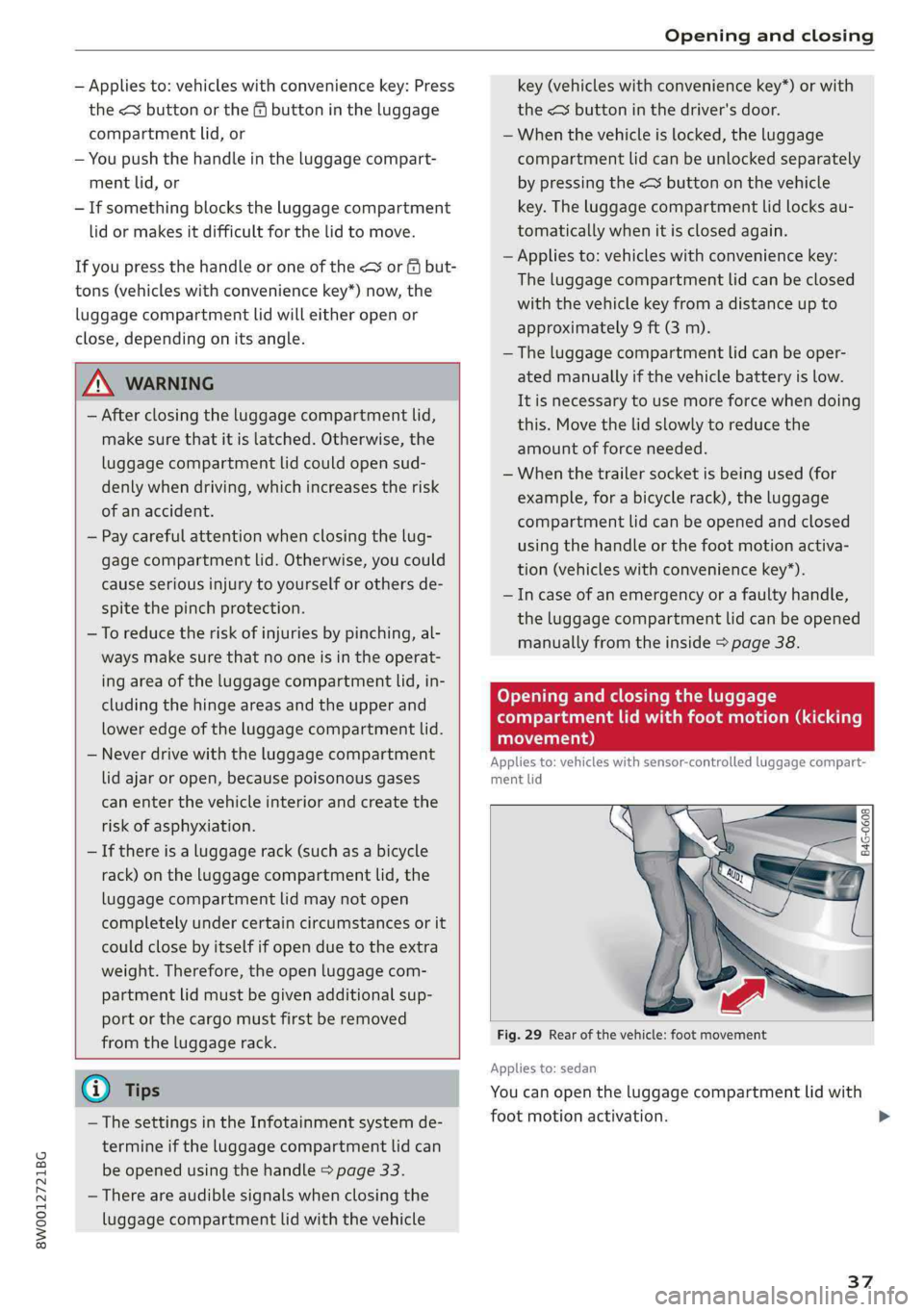
B4G-0608
Fig.29Rearofthevehicle:footmovement
Appliesto:sedan
Youcanopentheluggagecompartmentlidwith
footmotionactivation.
37
>
Page 43 of 392
8W0012721BG
Openingandclosing
Powerwindows
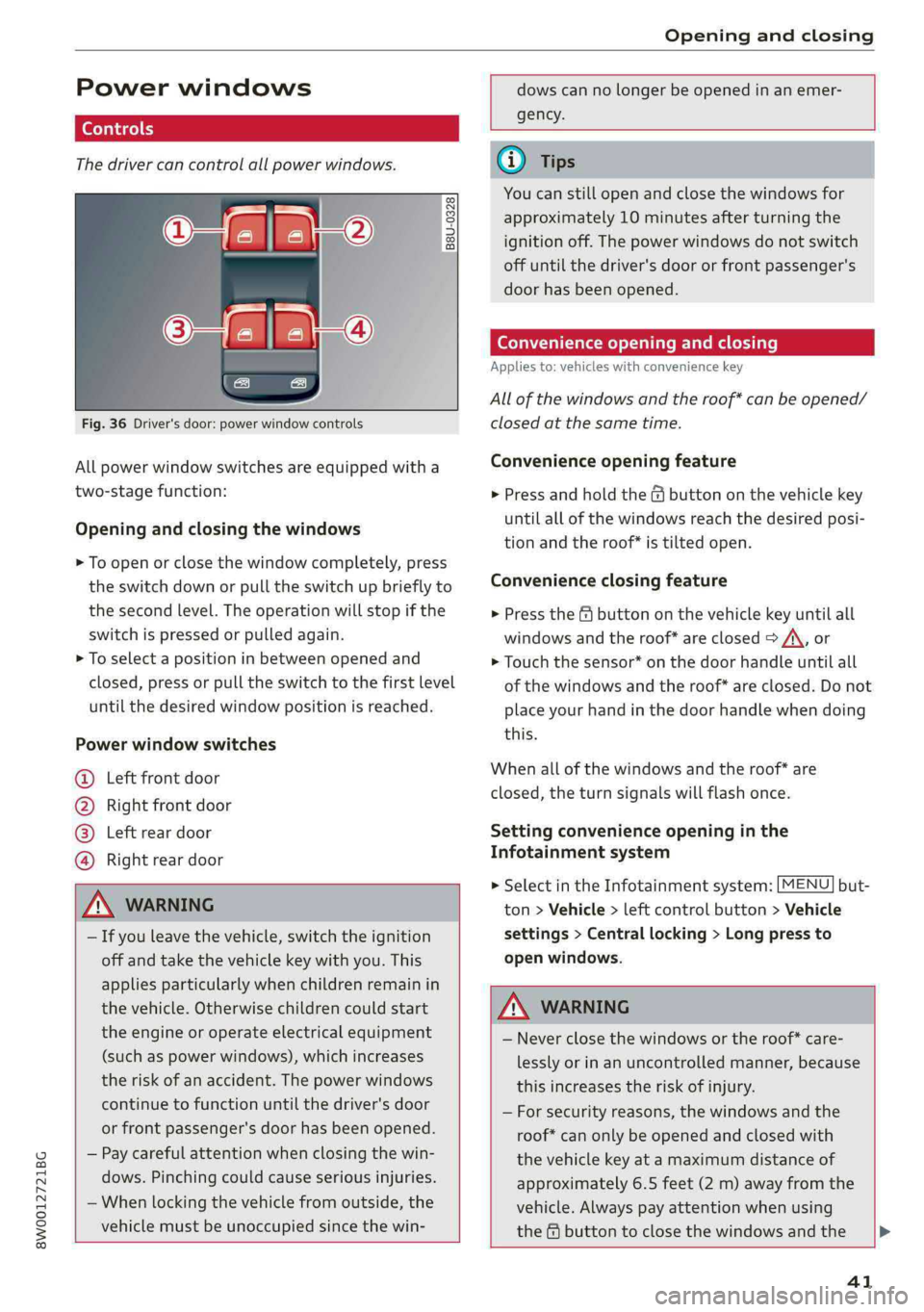
Thedrivercancontrolallpowerwindows.
B8U-0328
Fig.36Driver'sdoor:powerwindowcontrols
Allpowerwindowswitchesareequippedwitha
two-stagefunction:
Openingandclosingthewindows
>Toopenorclosethewindowcompletely,press
theswitchdownorpulltheswitchupbrieflyto
thesecondlevel.Theoperationwillstopifthe
switchispressedorpulledagain.
>Toselectapositioninbetweenopenedand
closed,pressorpulltheswitchtothefirstlevel
until
thedesiredwindowpositionisreached.
Powerwindowswitches
@Leftfrontdoor
@Rightfrontdoor
@®Leftreardoor
@Rightreardoor
ANWARNING
—Ifyouleavethevehicle,switchtheignition
offandtakethevehiclekeywithyou.This
appliesparticularlywhenchildrenremainin
thevehicle.Otherwisechildrencouldstart
theengineoroperateelectricalequipment
(such aspowerwindows),whichincreases
theriskofanaccident.Thepowerwindows
continuetofunctionuntilthedriver'sdoor
orfrontpassenger'sdoorhasbeenopened.
—Paycarefulattentionwhenclosingthewin-
dows.Pinchingcouldcauseseriousinjuries.
—Whenlockingthevehiclefromoutside,the
vehiclemustbeunoccupiedsincethewin-
dowscannolongerbeopenedinanemer-
gency.
@Tips
Youcanstillopenandclosethewindowsfor
approximately10minutesafterturningthe
ignitionoff.Thepowerwindowsdonotswitch
offuntilthedriver'sdooror frontpassenger's
doorhasbeenopened.
Convenienceopeningandclosing
Appliesto:vehicleswithconveniencekey
Allofthewindowsandtheroof*canbeopened/
closedatthesametime.
Convenienceopeningfeature
>Pressandholdthe&@buttononthevehiclekey
untilallofthewindowsreachthedesiredposi-
tionandtheroof*istiltedopen.
Convenienceclosingfeature
>Pressthe@buttononthevehiclekeyuntilall
windowsand theroof*areclosedoA,or
>Touchthesensor*onthedoorhandleuntilall
ofthewindowsandtheroof*areclosed.Donot
placeyourhandinthedoorhandlewhendoing
this.
Whenallofthewindowsandtheroof*are
closed,theturnsignalswillflashonce.
Settingconvenienceopeninginthe
Infotainmentsystem
>SelectintheInfotainmentsystem:[MENU]but-
ton>Vehicle>leftcontrolbutton>Vehicle
settings>Centrallocking>Longpressto
openwindows.
ZA\WARNING
—Neverclosethewindowsortheroof*care-
lesslyorinanuncontrolledmanner,because
thisincreasestheriskofinjury.
—Forsecurityreasons,thewindowsandthe
roof*canonlybeopenedandclosedwith
thevehiclekeyatamaximumdistanceof
approximately6.5feet(2m)awayfromthe
vehicle.Alwayspayattentionwhenusing
thef&@buttontoclosethewindowsandthe>
41
Page 47 of 392
8W0012721BG
Openingandclosing
Operating
Appliesto:vehicleswithgaragedooropener
Requirements:thebuttonintheheadlinermust
beprogrammed=page45andthevehicle
mustbewithinrangeofthesystem, suchasthe
garagedoor.
>Pressthebuttontoopenthegaragedoor.The
LED@)°page45,fig.40blinksorturnson.
>Pressthebuttonagaintoopenthegaragedoor.
G)Tips
Whenopeningorclosingthegaragedoor,do
notpressandholdthebuttonlongertensec-
ondsorthegaragedooropenerwillswitchto
programmingmode.
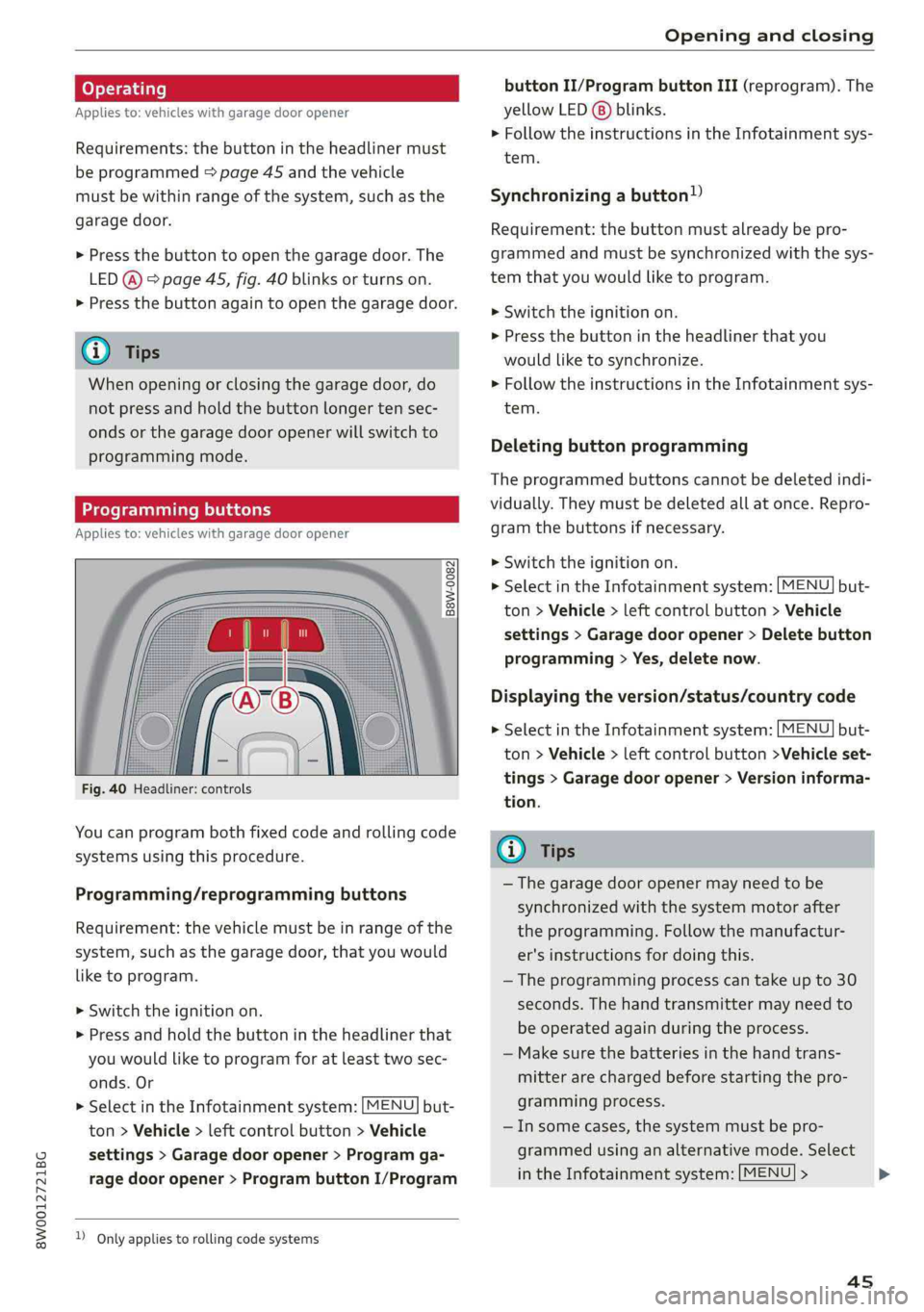
Programmingbuttons
Appliesto:vehicleswithgaragedooropener
Fig.40Headliner:controls
Youcanprogrambothfixedcodeandrollingcode
systemsusingthisprocedure.
Programming/reprogrammingbuttons
Requirement:thevehiclemustbeinrangeofthe
system, such
asthegaragedoor,thatyouwould
liketoprogram.
>Switchtheignitionon.
>Pressandholdthebuttonintheheadlinerthat
youwouldliketoprogramforatleasttwosec-
onds.Or
>SelectintheInfotainmentsystem:[MENU]but-
ton>Vehicle> leftcontrolbutton>Vehicle
settings>Garagedoor opener>Programga-
ragedooropener>ProgrambuttonI/Program
)Onlyappliestorollingcode systems
buttonII/ProgrambuttonIII(reprogram).The
yellowLED(8)blinks.
>FollowtheinstructionsintheInfotainmentsys-
tem.
Synchronizingabutton!)
Requirement:thebuttonmustalreadybepro-
grammedandmustbesynchronizedwiththesys-
temthatyouwouldliketoprogram.
>Switchtheignitionon.
>Pressthebuttonintheheadlinerthatyou
wouldliketosynchronize.
>FollowtheinstructionsintheInfotainmentsys-
tem.
Deletingbuttonprogramming
Theprogrammedbuttonscannotbedeletedindi-
vidually.Theymustbedeletedallatonce.Repro-
gramthebuttonsifnecessary.
>Switchtheignitionon.
>SelectintheInfotainmentsystem:but-
ton>Vehicle> leftcontrolbutton>Vehicle
settings>Garagedooropener>Deletebutton
programming>Yes,deletenow.
MENU
Displayingtheversion/status/countrycode
MENU >SelectintheInfotainmentsystem:but-
ton>Vehicle> leftcontrolbutton>Vehicleset-
tings>Garagedooropener>Versioninforma-
tion.
@Tips
—Thegaragedooropenermayneedtobe
synchronizedwiththesystemmotorafter
theprogramming.Followthemanufactur-
er'sinstructionsfordoingthis.
—Theprogrammingprocesscantakeupto30
seconds.The handtransmittermayneedto
beoperatedagainduring theprocess.
—Makesurethebatteriesinthehandtrans-
mitterarechargedbeforestartingthepro-
grammingprocess.
—Insomecases,thesystemmustbepro-
grammedusinganalternativemode.Select
intheInfotainmentsystem:[MENU]>
45
>
Page 49 of 392
8W0012721BG
LightsandVision
LightsandVision
Exteriorlighting
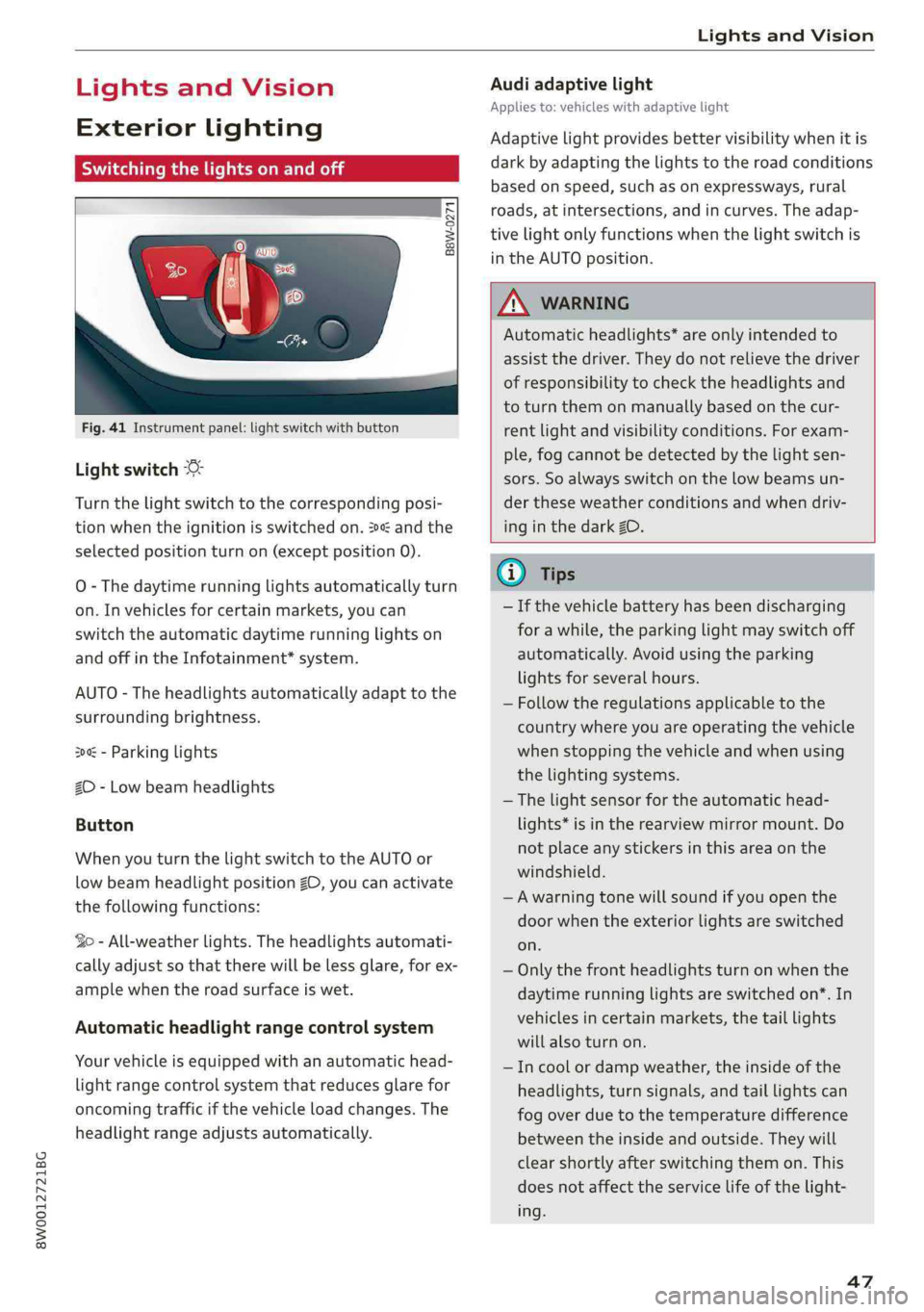
Switchingthelightsonandoff
iSg ge
=o3
Fig.41Instrumentpanel:lightswitchwithbutton
Lightswitch©:
Turnthelightswitchtothecorrespondingposi-
tionwhentheignitionisswitchedon.2andthe
selectedpositionturnon(exceptposition0).
O-Thedaytimerunninglightsautomaticallyturn
on.Invehiclesforcertainmarkets,youcan
switchtheautomaticdaytimerunninglightson
andoffintheInfotainment*system.
AUTO-Theheadlightsautomaticallyadapttothe
surroundingbrightness.
300-Parkinglights
2D-Lowbeamheadlights
Button
WhenyouturnthelightswitchtotheAUTOor
lowbeamheadlightpositionZO,youcanactivate
thefollowingfunctions:
So-All-weatherlights.Theheadlightsautomati-
callyadjustsothattherewillbelessglare,forex-
amplewhentheroadsurfaceiswet.
Automaticheadlightrangecontrolsystem
Yourvehicleisequippedwithanautomatichead-
lightrangecontrolsystemthatreducesglarefor
oncomingtrafficifthevehicleloadchanges.The
headlightrangeadjusts automatically.
Audiadaptivelight
Appliesto:vehicleswithadaptivelight
Adaptivelightprovidesbettervisibilitywhenitis
darkbyadaptingthelightstotheroadconditions
basedonspeed,suchasonexpressways,rural
roads,at intersections,andincurves.Theadap-
tivelightonlyfunctionswhenthelightswitchis
intheAUTOposition.
ZXWARNING
Automaticheadlights”areonlyintendedto
assistthedriver.They donotrelievethedriver
ofresponsibilitytochecktheheadlightsand
toturnthemonmanuallybasedonthecur-
rentlightandvisibilityconditions.Forexam-
ple,fogcannotbe detectedbythelightsen-
sors.Soalwaysswitchonthelowbeamsun-
der theseweatherconditionsandwhendriv-
inginthedarkZO.
G@)Tips
—Ifthevehiclebatteryhasbeendischarging
forawhile,theparkinglightmayswitchoff
automatically.Avoidusingtheparking
lightsforseveralhours.
—Follow theregulationsapplicabletothe
countrywhereyouareoperatingthevehicle
whenstoppingthevehicleandwhenusing
thelightingsystems.
—Thelightsensorfortheautomatichead-
lights*isintherearviewmirrormount.Do
notplaceanystickersinthisareaonthe
windshield.
—Awarningtonewillsoundifyouopenthe
doorwhentheexteriorlightsareswitched
on.
—Onlythefrontheadlightsturnonwhenthe
daytimerunninglightsareswitchedon*.In
vehiclesincertainmarkets,thetaillights
willalsoturnon.
—Incoolordampweather,theinsideofthe
headlights,turnsignals,andtaillightscan
fog
overduetothetemperaturedifference
betweenthe insideandoutside.Theywill
clearshortlyafterswitchingthemon.This
doesnotaffecttheservicelifeofthelight-
ing.
47
Page 50 of 392
LightsandVision
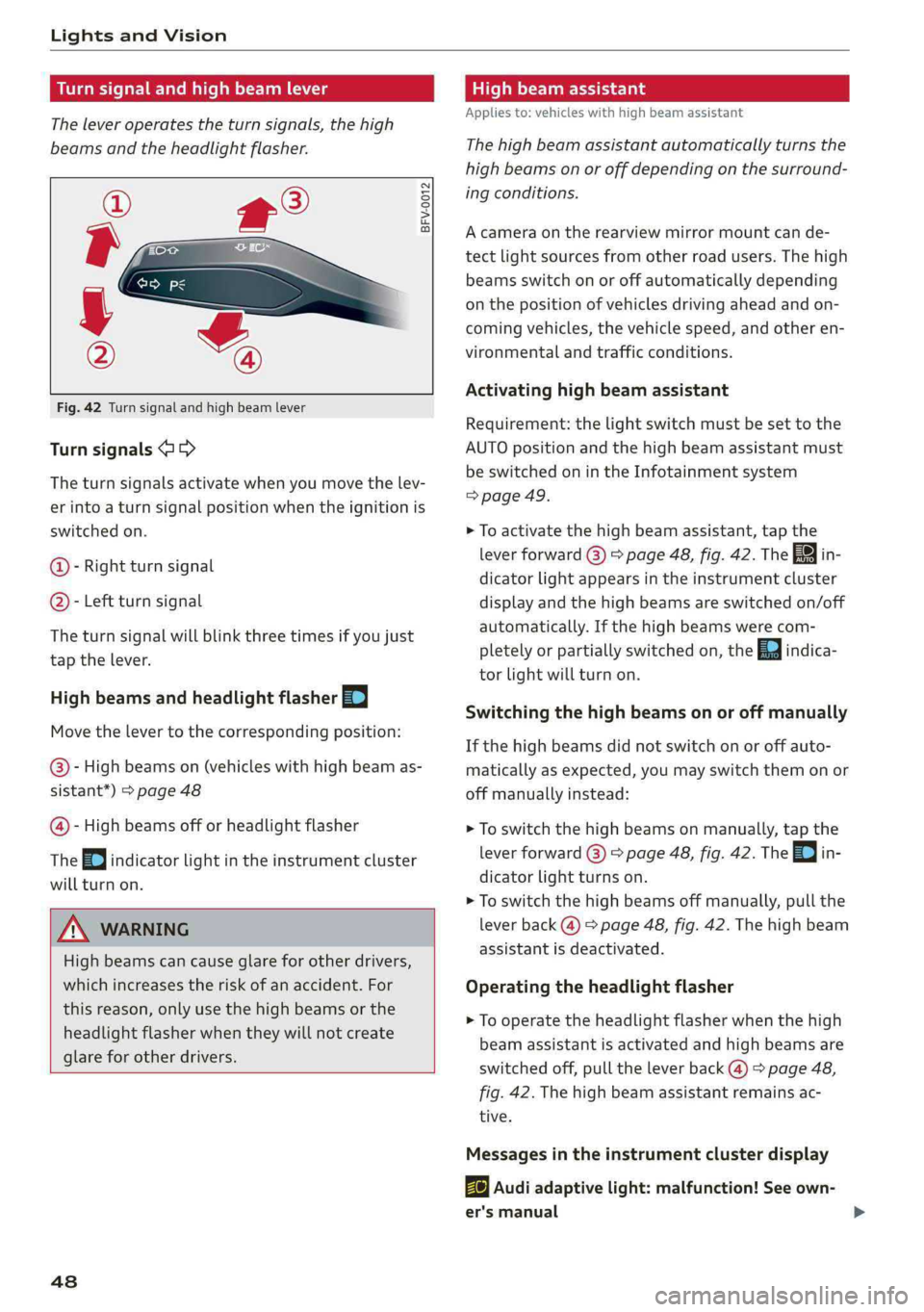
Turnsignalandhighbeamlever
Theleveroperatestheturnsignals,thehigh
beamsandtheheadlightflasher.
©
»
©
Fig.42Turnsignalandhighbeamlever
Turnsignals@>
Theturnsignalsactivatewhenyoumovethelev-
erintoaturnsignalpositionwhentheignitionis
switchedon.
@-Rightturnsignal
@- Leftturnsignal
Theturnsignalwillblinkthreetimesifyoujust
tap thelever.
HighbeamsandheadlightflasherEI
Movethelevertothecorrespondingposition:
@-Highbeamson(vehicleswithhighbeamas-
sistant*)>page48
@-Highbeamsofforheadlightflasher
The=oindicatorlightintheinstrumentcluster
willturnon.
Z\WARNING
Highbeamscancauseglareforotherdrivers,
whichincreasestheriskofanaccident.For
thisreason,onlyuse thehighbeamsorthe
headlight
flasher whentheywillnotcreate
glareforotherdrivers.
48
Highbeamassistant
Appliesto:vehicleswithhighbeamassistant
Thehighbeamassistantautomaticallyturnsthe
highbeamsonoroffdepending onthesurround-
ingconditions.
Acameraontherearview mirrormountcande-
tectlightsourcesfromotherroadusers.Thehigh
beamsswitchonoroffautomaticallydepending
onthepositionofvehiclesdrivingaheadandon-
comingvehicles,thevehiclespeed,andotheren-
vironmentalandtrafficconditions.
Activatinghighbeamassistant
Requirement:thelightswitchmustbesettothe
AUTOpositionandthehighbeamassistantmust
be switchedonintheInfotainmentsystem
=>page49.
>Toactivatethehighbeamassistant,tapthe
leverforward@)>page48,fig. 42.Thefain-
dicatorlightappearsintheinstrumentcluster
displayandthehighbeamsareswitchedon/off
automatically.Ifthehighbeamswerecom-
pletelyorpartiallyswitchedon,theEaindica-
torlightwillturnon.
Switchingthe high beamsonoroffmanually
Ifthehighbeamsdidnotswitchonoroffauto-
matically asexpected,youmayswitchthemonor
offmanuallyinstead:
>Toswitchthehighbeamsonmanually, tap the
leverforward@)>page48,fig. 42.The=0|in-
dicatorlightturnson.
>Toswitchthehighbeamsoffmanually,pullthe
leverback@)>page48,fig. 42.Thehighbeam
assistantisdeactivated.
Operatingtheheadlightflasher
>To operatethe headlightflasherwhenthehigh
beamassistantisactivatedandhighbeamsare
switchedoff,pulltheleverback@)>page48,
fig.42.Thehighbeamassistantremainsac-
tive.
Messagesintheinstrumentclusterdisplay
ByAudiadaptivelight:malfunction!Seeown-
er'smanual
Page 51 of 392

8W0012721BG
LightsandVision
Headlightassistant:malfunction!Seeown-
er'smanual
DrivetoanauthorizedAudidealerorauthorized
AudiServiceFacilityimmediatelytohavethe
malfunctioncorrected.Youcanstillswitchthe
highbeamsonoroffmanually.
Headlightassistant:currentlyunavailable.
Cameraviewrestrictedduetosurroundings.
Seeowner'smanual
Thecameraviewisblocked,forexamplebya
stickerordebris.
Thesensorislocated betweentheinteriorrear-
viewmirrorandthewindshield.Donotplaceany
stickersinthisareaonthewindshield.
ZAWARNING
Highbeamassistantisonlyintendedtoassist
thedriver.Thedriverisstillresponsiblefor
controllingtheheadlightsandmayneedto
switchthemonandoffmanuallydepending
onlightandvisibilityconditions.Itmaybe
necessarytooperatethemmanuallyinsitua-
tionssuchas:
—Inadverseweatherconditionssuchasfog,
heavyrain,blowingsnoworsprayingwater.
—Onroadswhereoncomingtrafficmaybe
partiallyobscured,suchasexpressways.
—Whenthereareroadusersthatdonot have
sufficientlighting,suchasbicyclersorvehi-
cleswithdirtytaillamps.
—Intightcurvesandonsteephills.
—Inpoorlylitareas.
—Withstrongreflectors,suchassigns.
—Iftheareaofthewindshieldnearthesensor
isfoggedover,dirty,icyorcoveredwitha
sticker.
Adjustingtheexterior lighting
ThefunctionsareadjustedintheInfotainment
system.
> SelectintheInfotainmentsystem:[MENU]but-
ton>Vehicle> leftcontrolbutton>Vehicle
settings>Exteriorlighting.
Automaticheadlights
YoucanadjustthefollowingsettingsintheAuto-
matic
headlightsmenu:
Activationtime-youcanadjustiftheheadlights
switchonEarly,MediumorLateaccordingtothe
sensitivityofthelightsensor.
Headlightassistant*-youcanswitchthehigh
beamassistant*onandoff.
Entry/exitlighting
Whenitisdark,theEntry/exitlightingillumi-
natestheareaaroundthevehiclewhenunlocking
the
vehicleandafterswitchingofftheignition
andopeningthedriver'sdoor.
TheEntry/exitlightingonlyworkswhenitisdark
andthelightswitchisintheAUTOposition.
Daytimerunninglights
USAmodels:thedaytimerunninglightscanbe
switchedon/off.SelectOnorOff.
Canadamodels:thisfunctioncannotbe switched
off.Theyactivateautomaticallyeachtimetheig-
nitionisswitchedon.
Emergencyflashers
Fig.43Centerconsole:emergencyflasherbutton
Theemergencyflashersmakesotherdrivers
awareofyourvehicleindangeroussituations.
»PresstheAbuttontoswitchtheemergency
flashersonoroff.
Youcanindicatealanechangeoraturnwhenthe
emergencyflashersareswitchedonbyusingthe
turnsignallever.Theemergencyflashersstop
temporarily.
49
Page 52 of 392
LightsandVision
Theemergencyflashersalsoworkwhentheigni-
tionisturnedoff.
)Tips
Youshouldswitchtheemergencyflasherson
if:
—youarethelastcarinatrafficjamsothat
allothervehiclesapproachingfrombehind
can seeyourvehicle
—yourvehiclehasbrokendownoryouare
havinganemergency
—yourvehicleisbeingtowedorifyouaretow-
inganothervehicle
Interiorlighting
Frontinteriorlighting
B8W-0112
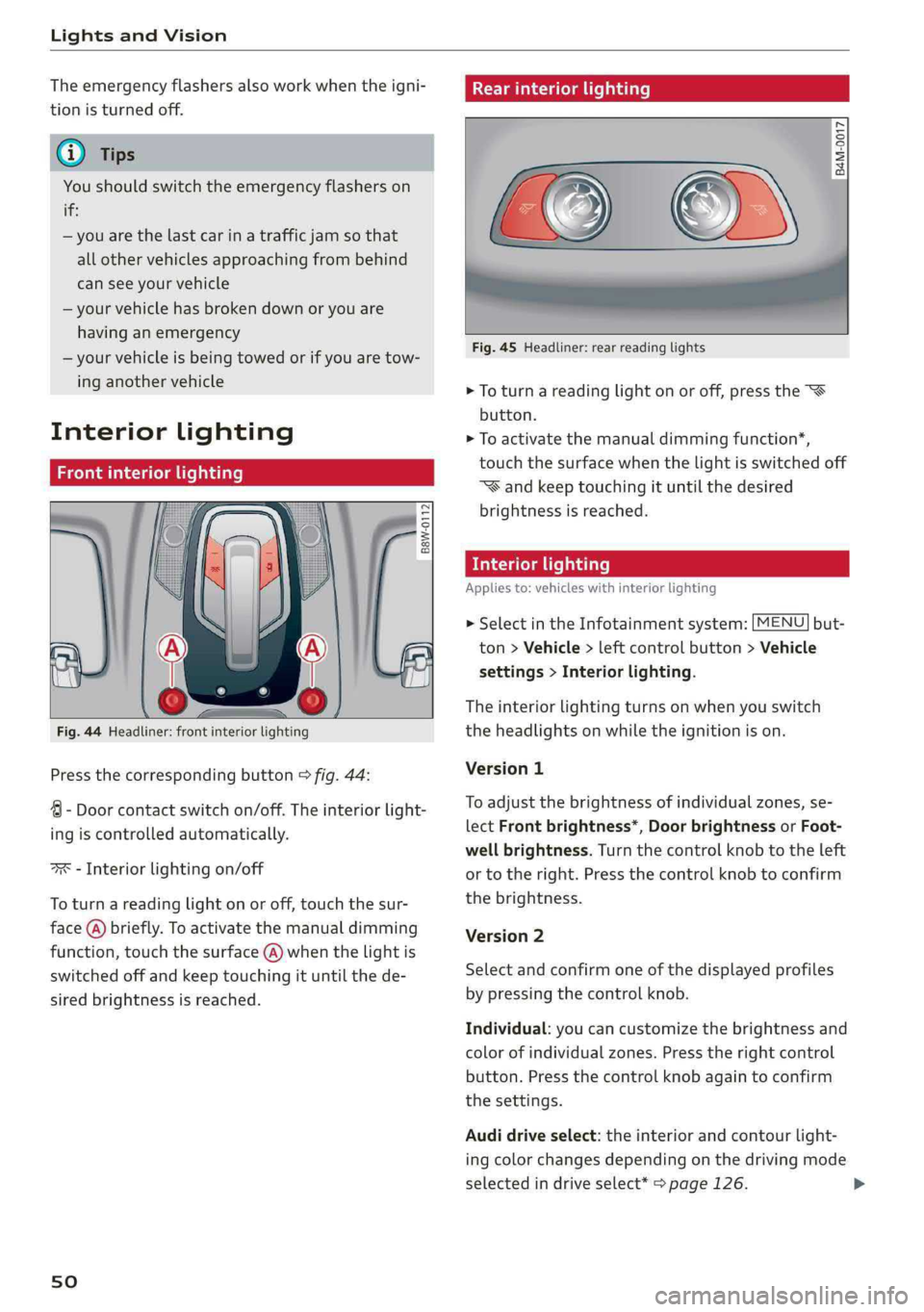
Fig.44Headliner:frontinteriorlighting
Pressthecorrespondingbutton>fig.44:
4-Doorcontactswitchon/off.Theinteriorlight-
ingiscontrolledautomatically.
ax-Interiorlightingon/off
Toturnareadinglightonoroff,touchthesur-
face(@)briefly.Toactivatethemanualdimming
function,touchthesurface(@)whenthelightis
switchedoffandkeeptouchingituntilthede-
siredbrightnessisreached.
sO
Rearinteriorlighting
=
8 2 3
Fig.45Headliner:rearreadinglights
>Toturnareadinglightonoroff,pressthe
button.
>Toactivatethemanualdimmingfunction*,
touchthesurfacewhenthelightisswitchedoff
“Wandkeeptouchingituntilthedesired
brightnessisreached.
Interiorlighting
Appliesto:vehicleswithinteriorlighting
>SelectintheInfotainmentsystem:[MENU]but-
ton>Vehicle>leftcontrolbutton>Vehicle
settings>Interiorlighting.
Theinteriorlightingturnsonwhenyouswitch
theheadlightsonwhiletheignitionison.
Version1
To
adjustthebrightnessofindividualzones,se-
lectFrontbrightness*,DoorbrightnessorFoot-
wellbrightness.Turnthecontrolknobtotheleft
ortotheright.Pressthecontrolknobtoconfirm
thebrightness.
Version2
Selectandconfirmoneofthedisplayedprofiles
bypressingthecontrolknob.
Individual:youcancustomizethebrightnessand
colorofindividualzones.Presstherightcontrol
button.Pressthecontrolknobagaintoconfirm
thesettings.
Audidriveselect:theinteriorandcontourlight-
ingcolorchangesdependingonthedrivingmode
selectedindriveselect*>page126.