infotainment AUDI A4 2019 Workshop Manual
[x] Cancel search | Manufacturer: AUDI, Model Year: 2019, Model line: A4, Model: AUDI A4 2019Pages: 392, PDF Size: 99.53 MB
Page 149 of 392
8W0012721BG
MultiMediaInterface
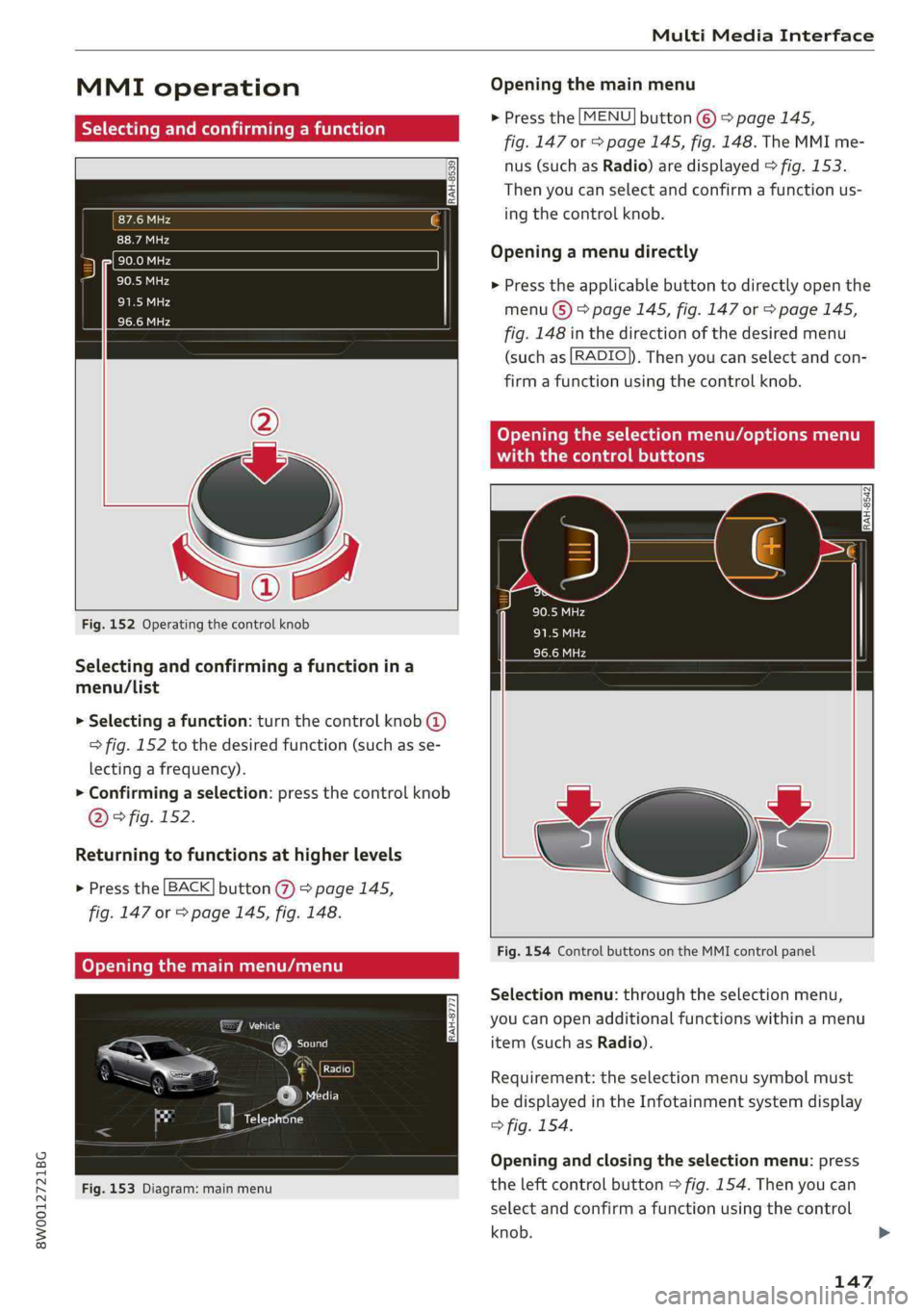
MMIoperation
IRAH-8539
Fig.152Operatingthecontrolknob
Selectingandconfirmingafunctionina
menu/List
>Selectingafunction:turnthecontrolknob@
>fig.152tothedesiredfunction(suchasse-
lectingafrequency).
>Confirmingaselection:pressthecontrolknob
D)>fig.152.
Returningtofunctionsathigherlevels
>Pressthe[BACK]button@%)>page145,
fig.147or>page145,fig. 148.
Fig.153Diagram:mainmenu
Openingthemainmenu
>Pressthe[MENU]button©)>page145,
fig.147or>page145,fig.148.TheMMIme-
nus(suchasRadio)aredisplayed>fig.153.
Thenyoucanselectandconfirmafunctionus-
ing
thecontrolknob.
Openingamenudirectly
>Presstheapplicablebuttontodirectlyopenthe
menu(S)>page145,fig.147or>page145,
fig.148inthedirectionofthedesiredmenu
(suchas[RADIO]).Thenyoucanselectandcon-
firmafunctionusingthecontrolknob.
RAH-8542
Fig.154ControlbuttonsontheMMIcontrolpanel
Selectionmenu:throughtheselectionmenu,
youcanopenadditionalfunctionswithinamenu
item(suchasRadio).
Requirement:theselectionmenusymbolmust
bedisplayedintheInfotainmentsystemdisplay
>fig.154.
Openingandclosingtheselectionmenu:press
theleftcontrolbutton>fig.154.Thenyoucan
selectandconfirmafunctionusingthecontrol
knob.
147
Page 150 of 392
![AUDI A4 2019 Workshop Manual MultiMediaInterface
Optionsmenu:usingtheoptionsmenu,youcan
selectandconfirmcontext-dependentfunctions
aswellas settingswithinamenuitem(suchas
Radio).
Requirement:theoptionsmenusymbol[+]must
bed](/img/6/57555/w960_57555-149.png "AUDI A4 2019 Workshop Manual MultiMediaInterface
Optionsmenu:usingtheoptionsmenu,youcan
selectandconfirmcontext-dependentfunctions
aswellas settingswithinamenuitem(suchas
Radio).
Requirement:theoptionsmenusymbol[+]must
bed")
MultiMediaInterface
Optionsmenu:usingtheoptionsmenu,youcan
selectandconfirmcontext-dependentfunctions
aswellas settingswithinamenuitem(suchas
Radio).
Requirement:theoptionsmenusymbol[+]must
bedisplayedintheInfotainmentsystemdisplay
>fig.154.
Openingandclosingtheoptionsmenu:press
therightcontrolbutton>fig.154.Thenyoucan
selectandconfirmafunctionusingthecontrol
knob.
leurelieelmer
Thisguideshowsyouat aglancethepathsfor
openingadesiredmenuanditssettingsand
functions.
Exampleofapath
>Select:[RADIO]button>leftcontrolbutton>
FM.
Followingthepath
>Pressthe[RADIO]button.
>Presstheleftcontrolbutton.
>Turn thecontrolknobtotheFMmenuitemto
selectit.
>Pressthecontrolknobtoconfirm theselected
FMmenuitem.
>Theselectedandconfirmedfunctionisexecut-
ed.In thisexample,theFMfrequencybandis
set.
148
MMItouch
MMItouchcontrolpad
Appliesto:vehicleswithMMItouch
You canenterdatausinghandwritingrecogni-
tionontheMMItouchcontrolpad.
RAH-8776
Angeles,CA
wntown,LosAngeles,CA
“onKRx
Fig.155Example:enteringanavigationdestinationusing
theMMItouch
TheMMItouchcontrolpadisonthesurfacewith
thecontrolknob>fig.155.
Enteringnumbers,letters,andsymbols
Appliesto:vehicleswithMMItouch
TheMMItouchallowsyoutoenterdataonthe
MMItouchcontrolpadusinghandwritingrecog-
nition.
Fig.156DisplaywhenMMItouchisactive
Page 151 of 392
8W0012721BG
MultiMediaInterface
Requirement:itmustbepossibletoentertext or
numbersandthesymbol@)9fig.156mustap-
pearintheInfotainmentsystemdisplay.
—Initialentry:writeanindividualuppercaseor
lowercaseletterornumber/symbolonthe
MMItouchcontrolpadusingyourfinger.A
symbolthatisrecognizedclearlyby thesystem
isdisplayedintheInfotainmentsystemdisplay
@©page148,fig. 155,confirmedwithanau-
diblesignalifnecessary,andtransferredtothe
inputfield.
—Enteringspaces:moveyourfingeracrossthe
MMItouchcontrolpadfromlefttoright.
—Deletingcharacters:moveyourfingeracross
theMMItouchcontrolpadfromrighttoleft.
—Selectingtheinputsuggestion:pressthecon-
trolknob.
—Switchingdirectlytotheresultslist:turnthe
controlknobtotheright.
—Openingthespeller:selecttherightcontrol
button>Openspeller.Textornumbersare en-
teredusingthespeller>page152.
—MMItouchvolume:presstherightcontrolbut-
ton.
See>page245.
Uemater
Appliesto:vehicleswithMMItouch
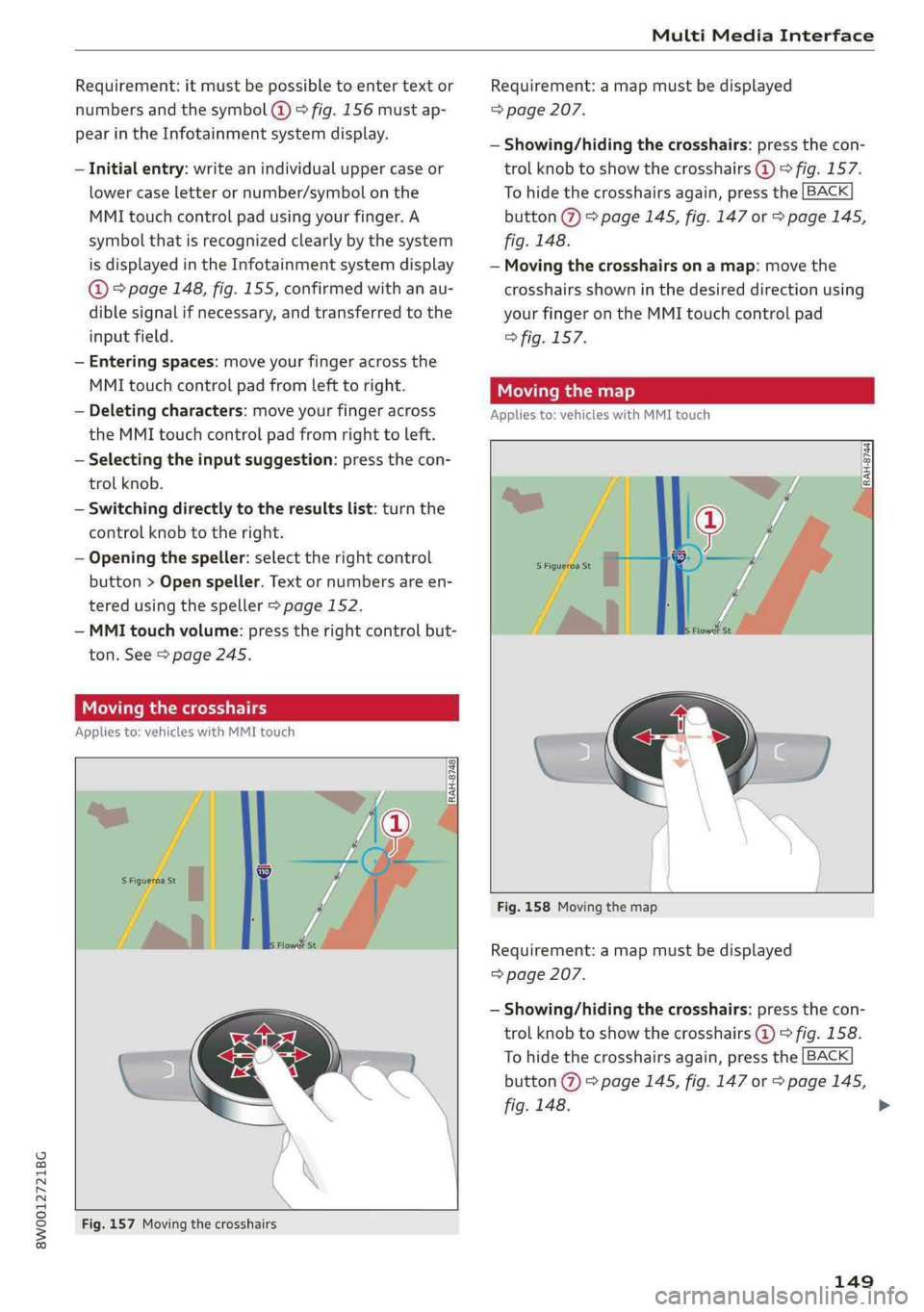
Fig.157Movingthecrosshairs
Requirement:amapmustbedisplayed
=>page207.
—Showing/hidingthecrosshairs:pressthecon-
trolknobtoshowthecrosshairs@)©fig.157.
Tohidethecrosshairsagain,pressthe[BACK
button@)>page145,fig.147or>page145,
fig.148.
—Movingthecrosshairsonamap:movethe
crosshairsshowninthedesireddirectionusing
yourfingerontheMMItouchcontrolpad
>fig.157.
Movingthemap
Appliesto:vehicleswithMMItouch
Fig.158Movingthemap
Requirement:amapmustbedisplayed
=>page207.
—Showing/hidingthecrosshairs:pressthecon-
trolknobtoshowthecrosshairs@)©fig.158.
Tohidethecrosshairsagain,pressthe[BACK
button@)>page145,fig.147or>page145,
fig.148.
149
>
Page 153 of 392
![AUDI A4 2019 Workshop Manual 8W0012721BG
MultiMediaInterface
slidingmenu.Or:Pressthe[BACK]button(7)
=>page145,fig.147or>page145,fig. 148.
Additionalfunctions
Appliesto:vehicleswithjoystickfunction
Displayingtheinputfield/](/img/6/57555/w960_57555-152.png "AUDI A4 2019 Workshop Manual 8W0012721BG
MultiMediaInterface
slidingmenu.Or:Pressthe[BACK]button(7)
=>page145,fig.147or>page145,fig. 148.
Additionalfunctions
Appliesto:vehicleswithjoystickfunction
Displayingtheinputfield/")
8W0012721BG
MultiMediaInterface
slidingmenu.Or:Pressthe[BACK]button(7)
=>page145,fig.147or>page145,fig. 148.
Additionalfunctions
Appliesto:vehicleswithjoystickfunction
Displayingtheinputfield/switchingto
spellerinput
Pushthecontrolknobup>page150,fig.160to
reachthe beginningofalistinthecentralarea or
theinputfield.Iftheinputfieldisalreadyopen,
switchdirectlytothespellerintheinputfieldby
pushingthecontrolknobupagain>page152,
Letter/numberspeller.
Onthemap
Requirement:amapmustbedisplayed
=>page207.
—Displayingtheinputfield:pushthecontrol
knobup.
—Displaying routeguidance:whenrouteguid-
anceisactive,youcanalsodisplaytheroute
guidancebypushingthecontrolknobup
=>page202,fig.185.
—Zoomingin/outonthemap(zoom):turnthe
controlknobtotheright/lefttozoomin/outon
themap.
Appliesto:vehicleswithoutMMItouchwithjoystickfunction
—Showing/hidingthecrosshairs:pressthecon-
trolknob.Thecrosshairsareshownonthemap.
Pressthe[BACK]buttonto hidethecrosshairs.
—Movingthecrosshairs:whenthecrosshairsare
visible,turnthecontrolknobinthedirection
thecrosshairsshouldmove.Pressthecontrol
knob andholdituntilthecrosshairsareinthe
desiredpointonthemap.
—Additionaloptionsonthemap:see
=>page209
Adjustingthesoundfocus
Appliesto:vehicleswithoutMMItouchwithjoystickfunction
Requirement:thebalance/faderfunctionmust
beselected>page244.
—Movingthesoundfocususingthecrosshairs:
thecrosshairscanbemovedhorizontally.Turn
the
controlknobtotheleftortotheright.
Pressthecontrolknobtomovethecrosshairs
vertically.Turnthecontrolknobtotheleftor to
theright.Pressthecontrolknobagaintosave
thesetting.
UsingtheDVDmainmenu
Requirement:aDVDmustbeplaying
=>page229.TheDVDmainmenuisshown.
—Selectingamenuitem:movethecontrolknob
withjoystickfunctionupordownortotheleft
orright.
—Confirmingaselection:pressthecontrolknob.
CoyoXTalemanswers(redColayQelLiClMalemaida)
thecontrolknob
Appliesto:vehicleswithjoystickfunction
¢»
Fig.161Openingtheselection/optionsmenuwith the
controlknob
Requirement:theselectionmenusymbol3must
bedisplayedintheInfotainmentsystemdisplay
=>fig.161.
Openingandclosingtheselectionmenu:push
thecontrolknobtotheleft>fig.161toopen
theselectionmenu.Thenyoucanselectandcon-
firm
afunctionusingthecontrolknob.
Pressthe[BACK]button@>page145,fig.147
or>page145,fig.148toreturn tothefunction
onelevelup.
151
>
Page 154 of 392
![AUDI A4 2019 Workshop Manual MultiMediaInterface
Requirement:theoptionsmenusymbol[+]must
bedisplayedintheInfotainmentsystemdisplay
>fig.161.
Openingandclosingtheoptionsmenu:push
thecontrolknobtotheright>fig.161toopen
theo](/img/6/57555/w960_57555-153.png "AUDI A4 2019 Workshop Manual MultiMediaInterface
Requirement:theoptionsmenusymbol[+]must
bedisplayedintheInfotainmentsystemdisplay
>fig.161.
Openingandclosingtheoptionsmenu:push
thecontrolknobtotheright>fig.161toopen
theo")
MultiMediaInterface
Requirement:theoptionsmenusymbol[+]must
bedisplayedintheInfotainmentsystemdisplay
>fig.161.
Openingandclosingtheoptionsmenu:push
thecontrolknobtotheright>fig.161toopen
theoptionsmenu.Thenyoucanselectandcon-
firm
afunctionusingthecontrolknob.
Pressthe button@)9page145,fig.147
or>page145,fig.148to return tothefunction
onelevelup.
BACK
Shortcutkeys
Frequentlyusedradiostationscanbestoredon
theshortcutkeys.
Appliesto:vehicleswithautomatictransmission
TheshortcutkeysarelocatedontheMMIcontrol
panel@)9page145,fig. 147.
Appliesto:vehicleswithmanualtransmission
Theshortcutkeysarelocatedonthecenter con-
sole(8)>page145,fig.148.
Letter/numberspeller
Storingradiostations:turnthecontrolknobto
thedesiredradiostationinalist(forexample,a
radiostationintheFMstationlist).Pressand
holdthedesiredshortcutkeyforseveralseconds.
Theactiveradiostationwillbestoredonthe
shortcutkey.
Accessingaradiostation:presstheshortcutkey.
Displayingaradiostation:swipeyourfingerover
theshortcutkeys.
Deletingastoredradiostation:resetthe Short-
cut
keystothefactorydefaultsetting
=>page241.
(i)Tips
Itisnotpossibletoenternumbersusingthe
shortcutkeys.Usethenumberspeller
=page 152orMMItouch*>page148to en-
ternumbers.
(SEES,en
.ornrycm
RAH-8666
——e
=°
Crear4
PCaEL
ttle1e
as)
Fig.162Diagram:letter/numberspeller
Youcanenterletters,numbersandsymbolsin
theMMIusingtheletter/numberspeller.Thisop-
tionisavailablewhentheinputfield@isactive
>fig.162.
—Openingandclosingtheletter/numberspell-
er:movethecontrolknobup/downwhenthe
152
inputfieldisactive.Or:selecttherightcontrol
button>Openspeller/Closespeller.
—Enteringcharacters:turnthecontrolknobwith
thecharacterselection@0>fig.162tothede-
siredsymbol.Pressthecontrolknobtoconfirm
thecharacter.Yourinputisdisplayedinthein-
putfield@).Whenyouhaveenteredallofthe>
Page 159 of 392
8W0012721BG
Multifunctionsteeringwheel
Multifunctionsteering
wheel
Introduction
Appliesto:vehicleswith multifunctionsteeringwheel
Inthedriverinformationsystemdisplay,youcan
controlnumerousInfotainmentfunctionsusing
themultifunctionsteeringwheelplus*>page 15
orthemultifunctionsteeringwheel*>page18.
Youcancontrol additionalInfotainmentfunc-
tionsusingtheMMIcontrolpanel>page145in
theInfotainmentsystemdisplay.
ZAWARNING
Directyourfullattentiontodriving.Asthe
driver,youhavecompleteresponsibilityfor
safetyintraffic.Only use thefunctionsinsuch
awaythatyoualwaysmaintaincompletecon-
troloveryourvehicleinalltrafficsituations.
Radio
Appliesto:vehicleswith multifunctionsteeringwheelandra-
dio
Appliesto:vehicleswith multifunctionsteeringwheel
>Pressthe[MODE]buttononthemultifunction
steeringwheelrepeatedlyuntiltheRadio/
Mediatabisdisplayed.
Appliesto:vehicleswith multifunctionsteeringwheelplus
>Pressthe|< >|buttononthemultifunction
steeringwheelrepeatedlyuntiltheRadio/
Mediatabisdisplayed.
>Presstheleftcontrolbutton>page16.
Dependingonvehicleequipment,thefollowing
functions
maybeavailableinthedriverinforma-
tionsystem.
—Selectingthefrequencyband:selectandcon-
firmafrequencyband.
—Selectingastationfromthestationlist:select
andconfirmaradiostation.
—Selectingastationfromthepresetslist:select
andconfirmPresetsandthenaradiostation.
—Openingamediasource:selectandconfirmTo
media.
Additionalsettings
—Select:rightcontrolbutton>desiredentry.
See>page218.
G)Tips
PayattentiontotheInfotainmentsystemdis-
playifnecessary.Dependingontheselected
function,itmaybenecessarytousetheMMI
control panel.
Media
Appliesto:vehicleswithmultifunctionsteeringwheeland
media
Requirement:amediadrivemustcontainaudio/
videofiles>page221.
Appliesto:vehicleswithmultifunctionsteeringwheel
>Pressthe[MODE]buttononthemultifunction
steeringwheelrepeatedlyuntiltheRadio/
Mediatabisdisplayed.
Appliesto:vehicleswithmultifunctionsteeringwheelplus
>»Pressthe[<>]buttononthemultifunction
steeringwheelrepeatedlyuntiltheRadio/
Mediatabisdisplayed.
>Presstheleftcontrolbutton>page16.
Depending onvehicleequipment,thefollowing
functionsmaybeavailableinthedriverinforma-
tionsystem.
—Selectingamediasource:selectandconfirma
sourcesuchastheSDcard.
—Switchingtotheradio:selectandconfirm
Switchtoradio.
—Playinganaudio/videofile:selectandconfirm
afile.
—Pausing/resumingplayback:presstheright
thumbwheel@)>page17,fig.11.Toresume
playback,presstherightthumbwheelagain.
—Openingadditionaltrackinformation:select:
rightcontrolbutton>Show"NowPlaying"
screen.
Foradditionalinformation, see>page232.>
157
Page 160 of 392
Multifunctionsteeringwheel
@Tips
—Alwaysfollowtheinformationfoundin
=>page220.
—Pleasenotethatwithinamediasourcein
thedriverinformationsystem,onlyplaylists
thatwereselectedthroughtheMMIcontrol
panelcanbeplayed>page230.
—PayattentiontotheInfotainmentsystem
displayifnecessary.Dependingonthese-
lectedfunction,itmaybenecessarytouse
theMMIcontrolpanel.
Telephone
Appliesto:vehicleswith multifunctionsteeringwheeland
telephone
AlPe
Calllist
Pe
Weg
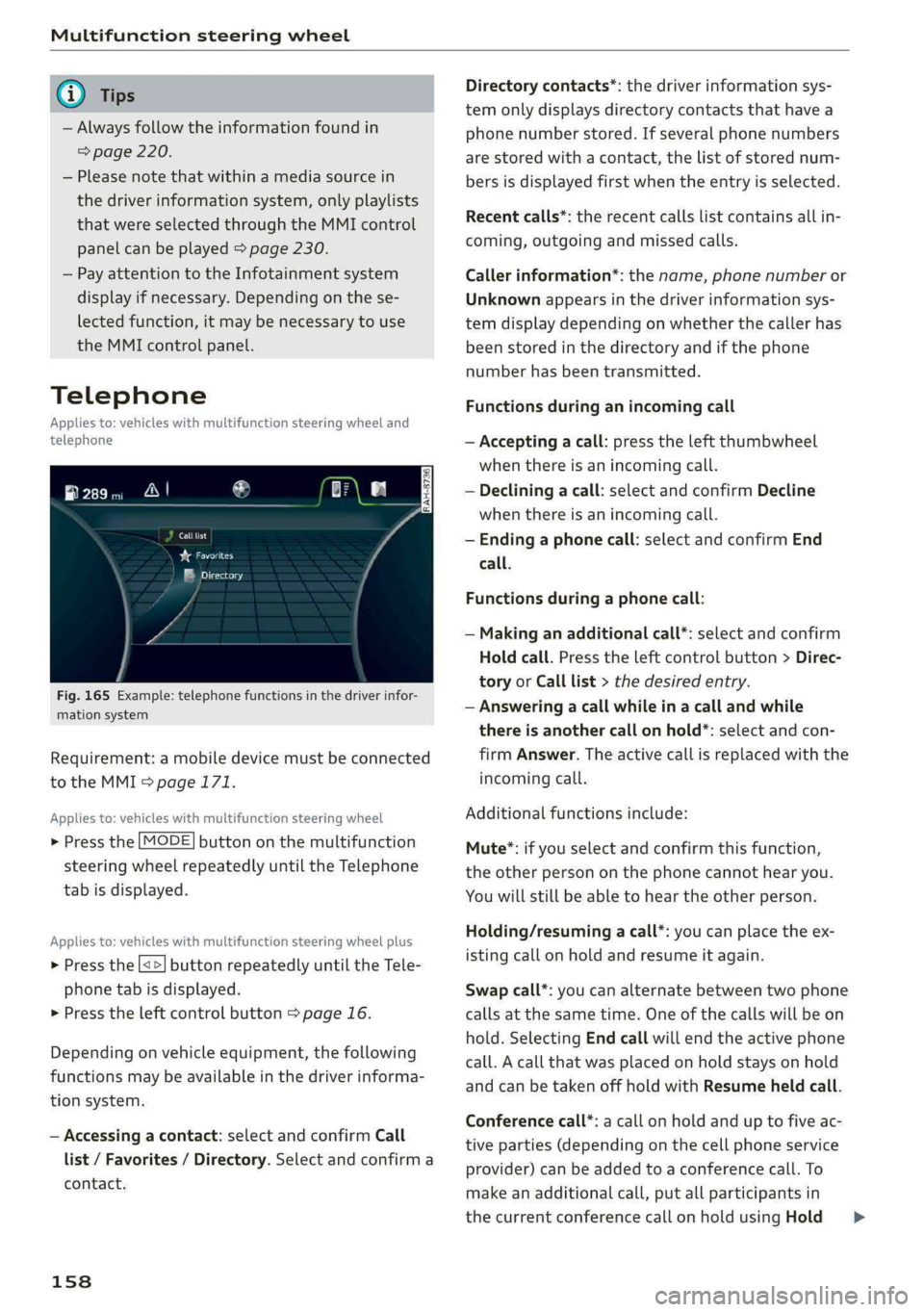
Fig.165Example:telephonefunctionsinthedriverinfor-
mationsystem
Requirement:amobiledevicemustbeconnected
totheMMI>page171.
Appliesto:vehicleswith multifunctionsteeringwheel
>Pressthe[MODE]buttononthemultifunction
steeringwheelrepeatedlyuntiltheTelephone
tabisdisplayed.
Appliesto:vehicleswith multifunctionsteeringwheelplus
> Pressthe[<>]buttonrepeatedlyuntiltheTele-
phonetabisdisplayed.
>Presstheleftcontrolbutton>page16.
Dependingonvehicleequipment,thefollowing
functionsmaybeavailableinthedriverinforma-
tionsystem.
—Accessingacontact:selectandconfirmCall
list/Favorites/Directory.Selectandconfirma
contact.
158
Directorycontacts*:thedriverinformationsys-
temonlydisplaysdirectorycontacts thathavea
phonenumberstored.Ifseveralphonenumbers
arestoredwithacontact,thelistofstorednum-
bersisdisplayedfirstwhentheentryisselected.
Recentcalls*:therecentcallslistcontainsallin-
coming,outgoingandmissedcalls.
Callerinformation*:thename,phonenumberor
Unknownappearsinthedriverinformationsys-
temdisplaydependingonwhetherthecallerhas
beenstoredinthedirectoryandifthephone
numberhasbeentransmitted.
Functionsduringanincomingcall
—Acceptingacall:presstheleftthumbwheel
whenthereisanincomingcall.
—Decliningacall:selectandconfirmDecline
whenthereisanincomingcall.
—Endinga phonecall:selectandconfirmEnd
call.
Functionsduringa phonecall:
—Makinganadditionalcall*:selectandconfirm
Holdcall.Presstheleftcontrolbutton>Direc-
toryorCalllist>thedesiredentry.
—Answeringacallwhileinacallandwhile
thereisanothercall onhold*:selectandcon-
firmAnswer.Theactivecallisreplacedwiththe
incomingcall.
Additionalfunctionsinclude:
Mute®*:ifyouselectandconfirmthisfunction,
theotherpersononthephonecannothearyou.
Youwillstillbeabletohear theotherperson.
Holding/resumingacall*:youcanplacetheex-
istingcallonholdandresumeitagain.
Swapcall*:youcanalternatebetweentwophone
callsatthesametime.Oneofthecallswillbeon
hold.SelectingEndcallwillendtheactivephone
call.Acallthatwasplacedonholdstaysonhold
andcanbetakenoffholdwithResumeheldcall.
Conferencecall*:acallonholdanduptofiveac-
tiveparties(dependingonthecellphoneservice
provider)canbeaddedtoaconferencecall.To
makeanadditionalcall,putallparticipantsin
thecurrentconferencecallonholdusingHold>
Page 166 of 392
Voicerecognitionsystem
Voicerecognitionsystem
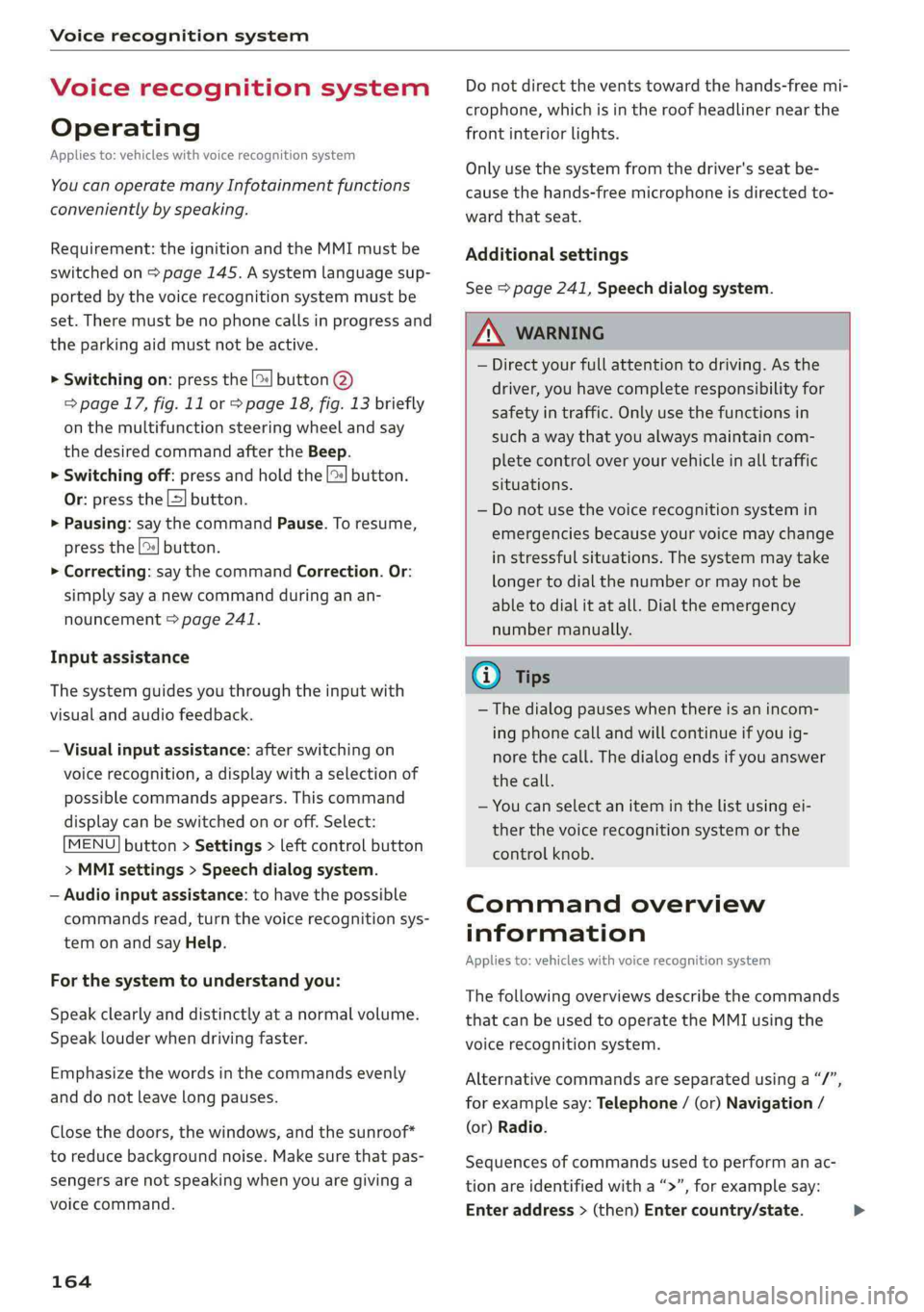
Operating
Appliesto:vehicleswithvoicerecognitionsystem
YoucanoperatemanyInfotainmentfunctions
convenientlybyspeaking.
Requirement:theignitionandtheMMImustbe
switched
on>page145.Asystemlanguagesup-
portedbythevoicerecognitionsystemmustbe
set.Theremustbenophonecallsinprogressand
theparkingaidmustnotbeactive.
>Switchingon:pressthe[%]button@
=>page17,fig.11or>page18,fig.13briefly
onthemultifunctionsteeringwheelandsay
thedesiredcommandaftertheBeep.
>Switchingoff:pressandholdthe|™]button.
Or:pressthe|5|button.
>Pausing:saythecommandPause.Toresume,
pressthe|]button.
>Correcting:saythecommandCorrection.Or:
simplysayanewcommandduringanan-
nouncement>page241.
Inputassistance
Thesystemguidesyouthroughtheinputwith
visualandaudiofeedback.
—Visualinputassistance:afterswitchingon
voicerecognition,adisplaywithaselectionof
possiblecommandsappears.Thiscommand
displaycanbe switchedonoroff.Select:
MENU]button>Settings>leftcontrolbutton
>MMIsettings>Speechdialogsystem.
—Audioinputassistance: tohavethepossible
commandsread,turnthevoicerecognitionsys-
temonandsayHelp.
Forthesystemtounderstandyou:
Speakclearlyanddistinctly atanormalvolume.
Speaklouderwhendrivingfaster.
Emphasizethewordsinthecommandsevenly
anddonotleavelongpauses.
Closethedoors,thewindows,andthesunroof*
toreducebackgroundnoise.Makesurethatpas-
sengersarenotspeakingwhenyouaregivinga
voicecommand.
164
Donotdirecttheventstowardthehands-freemi-
crophone,whichisintheroofheadlinernearthe
frontinteriorlights.
Onlyusethesystemfromthedriver'sseatbe-
causethehands-freemicrophoneisdirectedto-
wardthatseat.
Additionalsettings
See>page241,Speechdialogsystem.
ZAWARNING
—Directyourfullattentiontodriving.Asthe
driver,youhavecompleteresponsibilityfor
safetyintraffic.Onlyusethefunctionsin
suchawaythatyoualwaysmaintaincom-
pletecontroloveryourvehicleinalltraffic
situations.
—Donotuse thevoicerecognitionsystemin
emergenciesbecauseyourvoicemaychange
instressfulsituations.Thesystemmaytake
longertodialthenumberormaynotbe
abletodialitatall.Dialtheemergency
numbermanually.
Gi)Tips
— Thedialogpauseswhenthereisanincom-
ingphonecallandwillcontinueifyouig-
norethecall.Thedialogendsifyouanswer
thecall.
—Youcanselectan iteminthelistusingei-
therthevoicerecognitionsystemorthe
controlknob.
Commandoverview
information
Appliesto:vehicleswithvoicerecognitionsystem
Thefollowingoverviewsdescribethecommands
thatcan beusedtooperatetheMMIusingthe
voicerecognitionsystem.
Alternativecommandsareseparatedusinga“/”,
forexamplesay:Telephone/(or)Navigation/
(or)Radio.
Sequencesofcommandsusedtoperformanac-
tionareidentifiedwitha “>”,forexamplesay:
Enteraddress>(then)Entercountry/state.>
Page 168 of 392
Voicerecognitionsystem
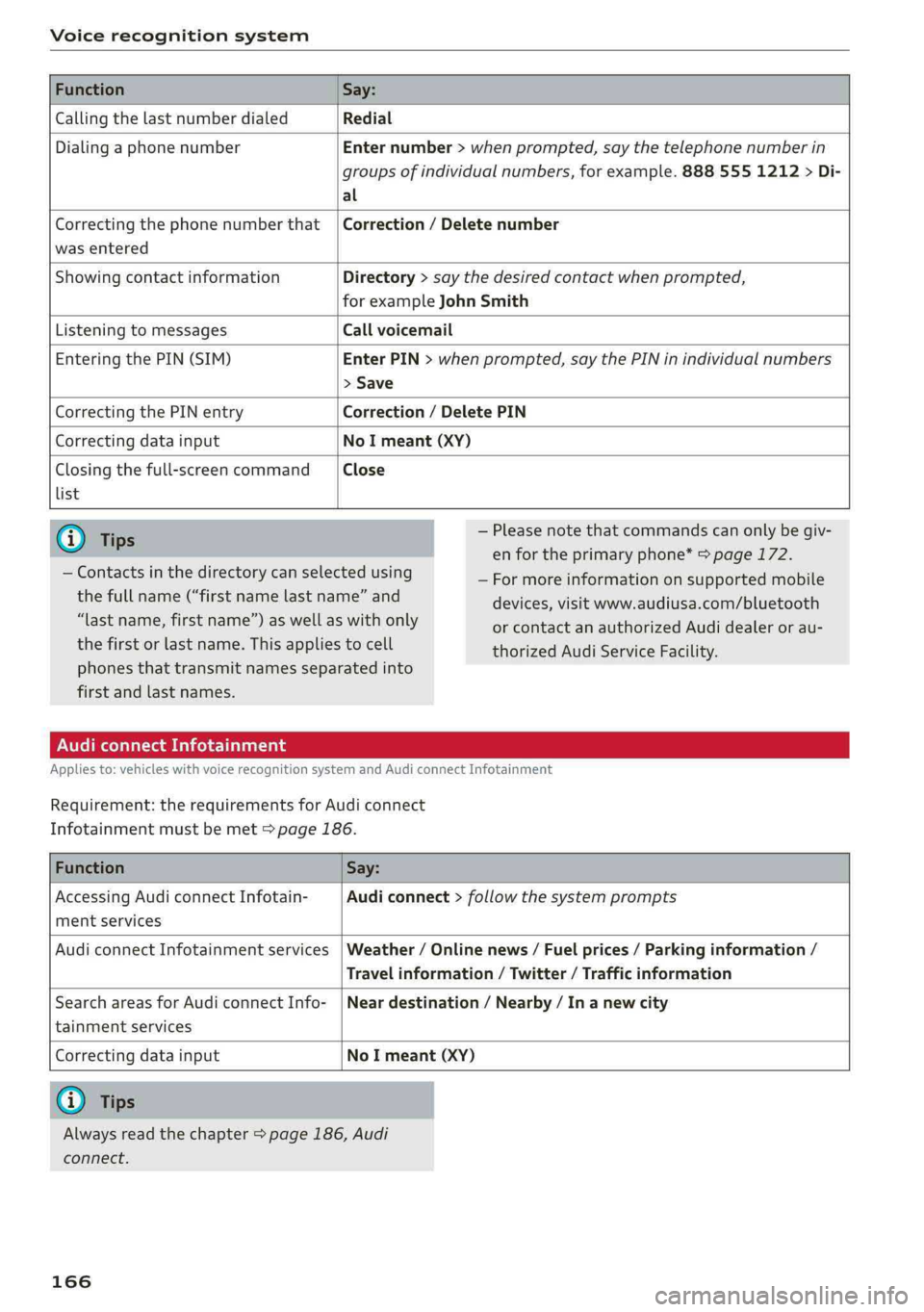
FunctionSay:
CallingthelastnumberdialedRedial
DialingaphonenumberEnternumber>whenprompted,saythetelephonenumberin
groupsofindividualnumbers,forexample.8885551212>Di-
al
Correctingthephonenumberthat
wasentered
Correction/Deletenumber
ShowingcontactinformationDirectory>saythedesiredcontactwhenprompted,
forexampleJohnSmith
ListeningtomessagesCallvoicemail
EnteringthePIN(SIM)EnterPIN>whenprompted,saythePINinindividualnumbers
>Save
CorrectingthePINentryCorrection/DeletePIN
CorrectingdatainputNoImeant(XY)
Closingthefull-screencommand
list
Close
@)Tips
—Contactsinthedirectorycanselectedusing
thefullname(“firstnamelastname”and
“lastname,firstname”)aswellaswithonly
thefirstorlastname.Thisappliestocell
—Pleasenotethatcommandscanonlybegiv-
enfortheprimaryphone*>page172.
—Formoreinformationonsupportedmobile
devices,visitwww.audiusa.com/bluetooth
orcontactanauthorizedAudidealeror au-
thorizedAudiServiceFacility.
phonesthattransmit namesseparatedinto
firstandlastnames.
AudiconnectInfotainment
Appliesto:vehicleswithvoicerecognitionsystem andAudiconnectInfotainment
Requirement:therequirementsforAudiconnect
Infotainmentmustbemet>page186.
FunctionSay:
AccessingAudiconnectInfotain-
mentservices
Audiconnect>follow thesystemprompts
AudiconnectInfotainmentservicesWeather/Onlinenews/Fuelprices/Parkinginformation/
Travelinformation/Twitter/Trafficinformation
SearchareasforAudiconnectInfo-
tainmentservices
Neardestination/Nearby/In anewcity
Correctingdatainput
NoImeant(XY)
@Tips
Alwaysreadthechapter>page186,Audi
connect.
166
Page 169 of 392
8W0012721BG
Voicerecognitionsystem
Messages(AudiconnectInfotainment)
Appliesto:vehicleswithvoicerecognitionsystemandAudiconnectInfotainment
Requirement:acellphonewithanactiveMAP
(MessageAccessProfile)mustbeconnectedto
theMMI>page178.
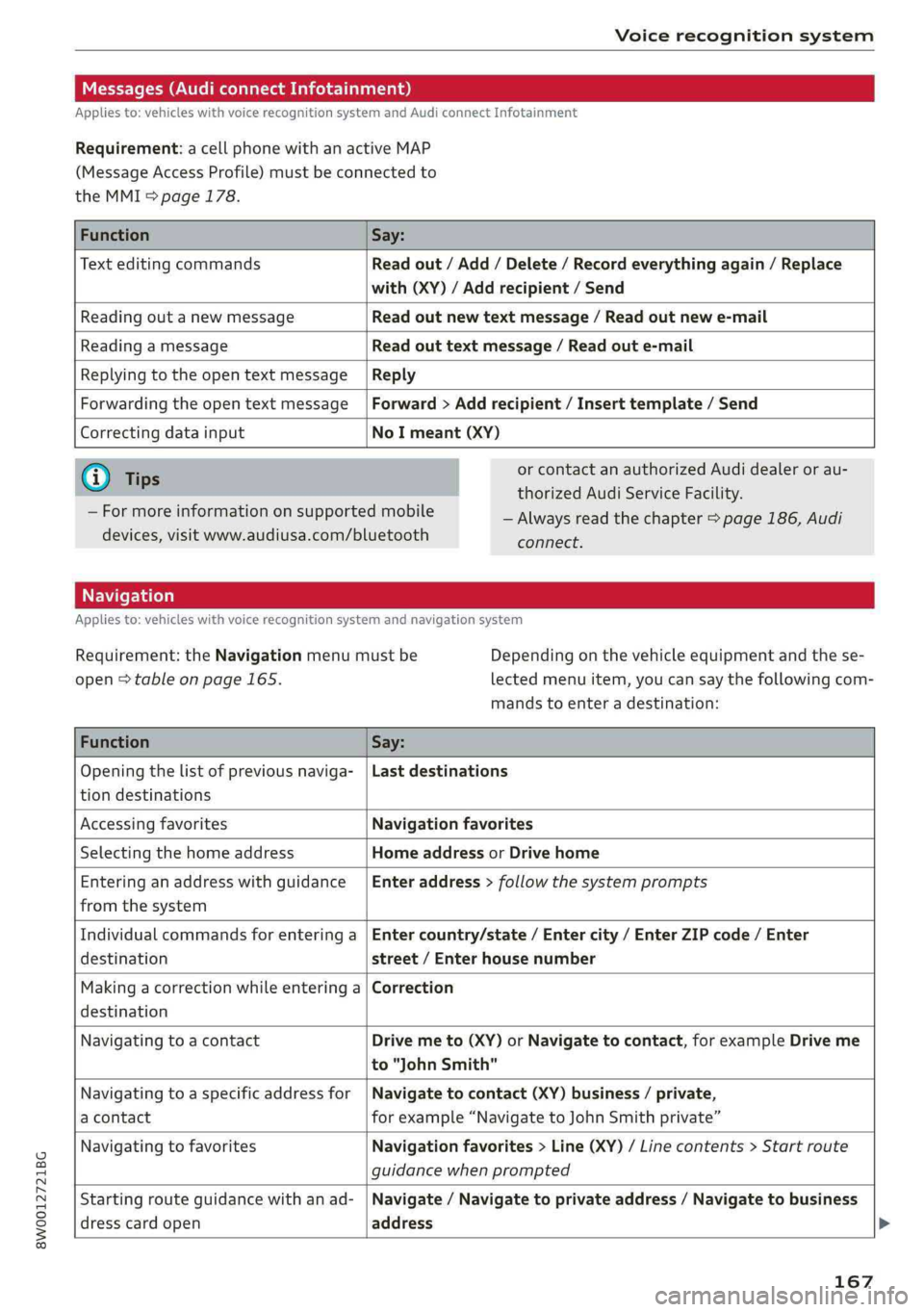
FunctionSay:
TexteditingcommandsReadout/Add/Delete/Recordeverythingagain/Replace
with(XY)/Addrecipient/Send
ReadingoutanewmessageReadoutnewtextmessage/Readoutnewe-mail
ReadingamessageReadouttextmessage/Readoute-mail
ReplyingtotheopentextmessageReply
ForwardingtheopentextmessageForward>Addrecipient/Inserttemplate/Send
Correctingdatainput
NoImeant(XY)
G@)Tips
—Formoreinformationonsupportedmobile
devices,visitwww.audiusa.com/bluetooth
orcontactanauthorizedAudidealeror au-
thorizedAudiServiceFacility.
—Alwaysreadthechapter>page186,Audi
connect.
Appliesto:vehicleswithvoicerecognitionsystem andnavigationsystem
Requirement:theNavigationmenumustbe
open>tableonpage165.
Depending onthevehicleequipmentandthese-
lectedmenuitem,youcansaythefollowingcom-
mandstoenteradestination:
FunctionSay:
Openingthelistofpreviousnaviga-
tiondestinations
Lastdestinations
AccessingfavoritesNavigationfavorites
SelectingthehomeaddressHomeaddressorDrivehome
Enteringan addresswithguidance
fromthesystem
Enteraddress>followthesystemprompts
Individualcommandsforenteringa
destination
Entercountry/state/Entercity/EnterZIPcode/Enter
street/Enterhousenumber
Makingacorrectionwhileenteringa
destination
Correction
NavigatingtoacontactDrivemeto(XY)orNavigatetocontact,forexampleDriveme
to"JohnSmith"
Navigatingtoa specificaddressfor
acontact
Navigatetocontact(XY)business/private,
forexample“NavigatetoJohnSmithprivate”
NavigatingtofavoritesNavigationfavorites>Line(XY)/Linecontents>Start route
guidancewhenprompted
Startingrouteguidancewithanad-
dresscardopen
Navigate/Navigatetoprivateaddress/Navigatetobusiness
address
167