park assist AUDI A4 2019 Owner's Manual
[x] Cancel search | Manufacturer: AUDI, Model Year: 2019, Model line: A4, Model: AUDI A4 2019Pages: 392, PDF Size: 99.53 MB
Page 134 of 392
Parkingaid
—Automatictransmission:the"P"selector
leverpositionisengagedandreleasedagain
Rearviewcamera
Introduction
Appliesto:vehicleswith rearviewcamera
B8V-0629
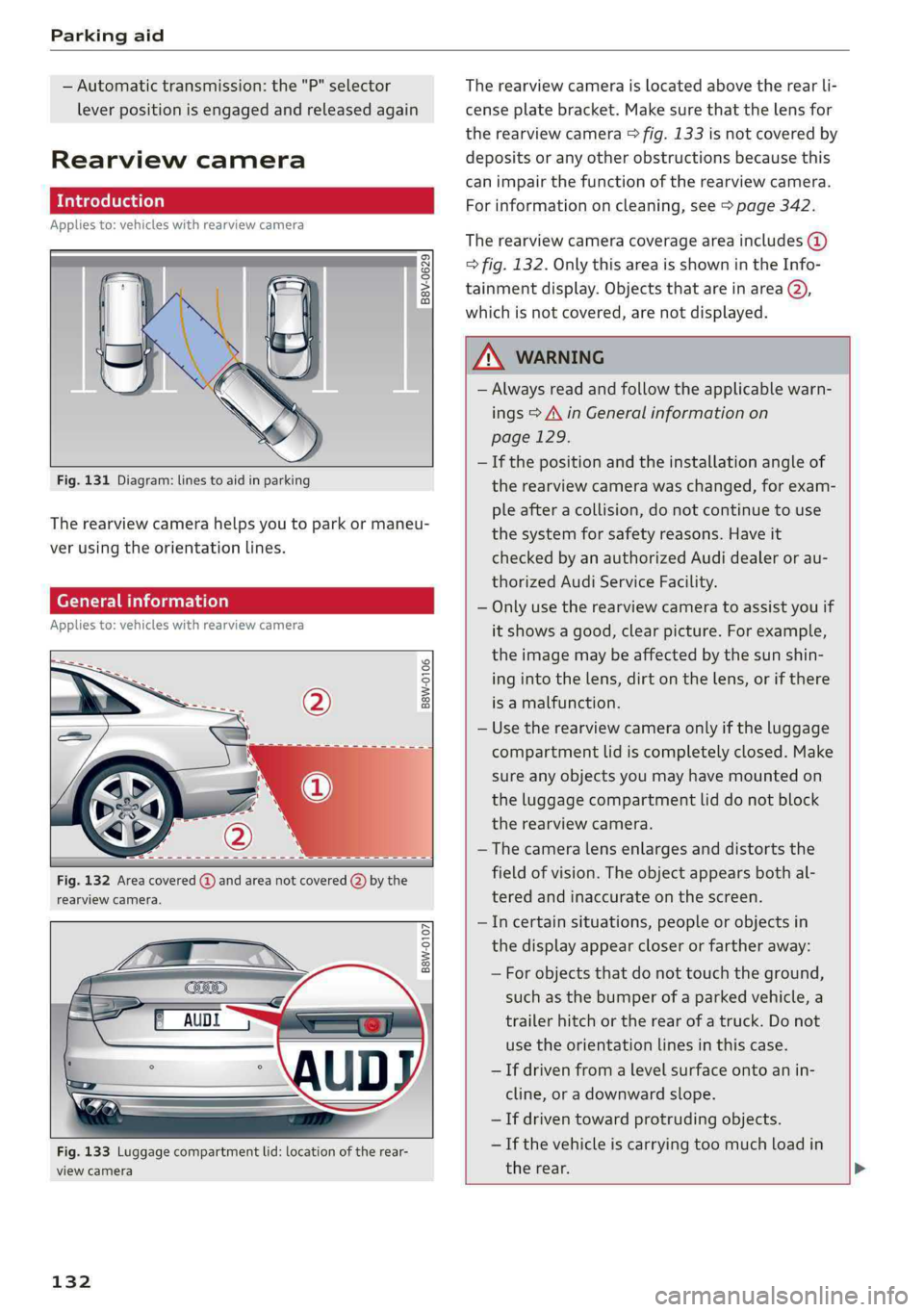
Fig.131Diagram:linestoaidinparking
Therearviewcamerahelpsyoutoparkormaneu-
verusingtheorientationlines.
Generalinformation
Appliesto:vehicleswithrearviewcamera
B8W-0106
Fig.132Areacovered@andareanotcovered(2)bythe
rearviewcamera.
B8W-0107
Fig.133Luggagecompartmentlid:locationoftherear-
viewcamera
132
Therearviewcameraislocatedabovetherearli-
censeplatebracket.Makesurethatthelensfor
therearviewcamera>fig.133isnotcoveredby
depositsoranyotherobstructionsbecausethis
can impairthefunctionoftherearviewcamera.
Forinformationoncleaning,see>page342.
Therearviewcameracoverageareaincludes(@)
>fig.132.OnlythisareaisshownintheInfo-
tainmentdisplay.ObjectsthatareinareaQ),
whichisnotcovered,arenotdisplayed.
ZAWARNING
—Alwaysreadandfollowtheapplicablewarn-
ings>A\inGeneralinformationon
page129.
—Ifthepositionandtheinstallationangleof
therearviewcamerawaschanged,forexam-
pleafteracollision,donotcontinuetouse
the
systemforsafetyreasons.Haveit
checkedby anauthorizedAudidealeror au-
thorizedAudiServiceFacility.
—Onlyusetherearviewcameratoassistyouif
itshowsagood,clearpicture.Forexample,
theimagemaybeaffectedbythesunshin-
ingintothelens,dirtonthelens,orifthere
isamalfunction.
—Usetherearviewcameraonlyiftheluggage
compartmentlidiscompletelyclosed.Make
sureanyobjectsyoumayhavemountedon
theluggagecompartmentliddonotblock
therearviewcamera.
— Thecameralensenlargesanddistortsthe
fieldofvision.Theobjectappearsbothal-
teredandinaccurateonthescreen.
—Incertainsituations,peopleor objectsin
thedisplayappearcloserorfartheraway:
—Forobjectsthatdonottouchtheground,
suchasthebumperofaparkedvehicle,a
trailerhitchortherearofatruck.Donot
use theorientationlinesinthiscase.
—Ifdrivenfromalevelsurfaceontoanin-
cline,oradownwardslope.
—Ifdriventowardprotrudingobjects.
—Ifthevehicleiscarryingtoomuchloadin
therear.
Page 135 of 392
8W0012721BG
Parkingaid
@)Note
—Alwaysreadandfollowtheapplicablewarn-
ings>@inGeneralinformationon
page129.
— Theorange-coloredorientationlinesinthe
Infotainmentdisplayshowthevehiclepath
basedonthesteeringwheelangle.The
frontofthevehicleswings outmorethan
therearofthevehicle.Maintainplentyof
distanceso thatanexteriormirrororacor-
nerofthevehicledoesnotcollidewithany
obstacles.
SicRiemela
Appliesto:vehicleswith rearviewcamera
Switchingonandoff
Requirement:thevehiclespeedmustbeunder
approximately6mph(10km/h).
>PressthePbuttoninthe centerconsole
=>page131,fig.130.Ashortconfirmation
tonesoundsandtheLEDinthe buttonturns
on.
Switchingonautomatically
Thesystemswitchesonautomaticallywhenre-
versegearisengagedwhiletheengineisrun-
ning.Abrieftonewillsound.
Switchingoffautomatically
Thesystemswitchesoffautomaticallywhendriv-
ingforwardfasterthan6mph(10km/h).
Perpendicularparking
Appliesto:vehicleswith rearviewcamera
Thisviewmaybe usedwhenparkinginagarage
orinaparkingspace.
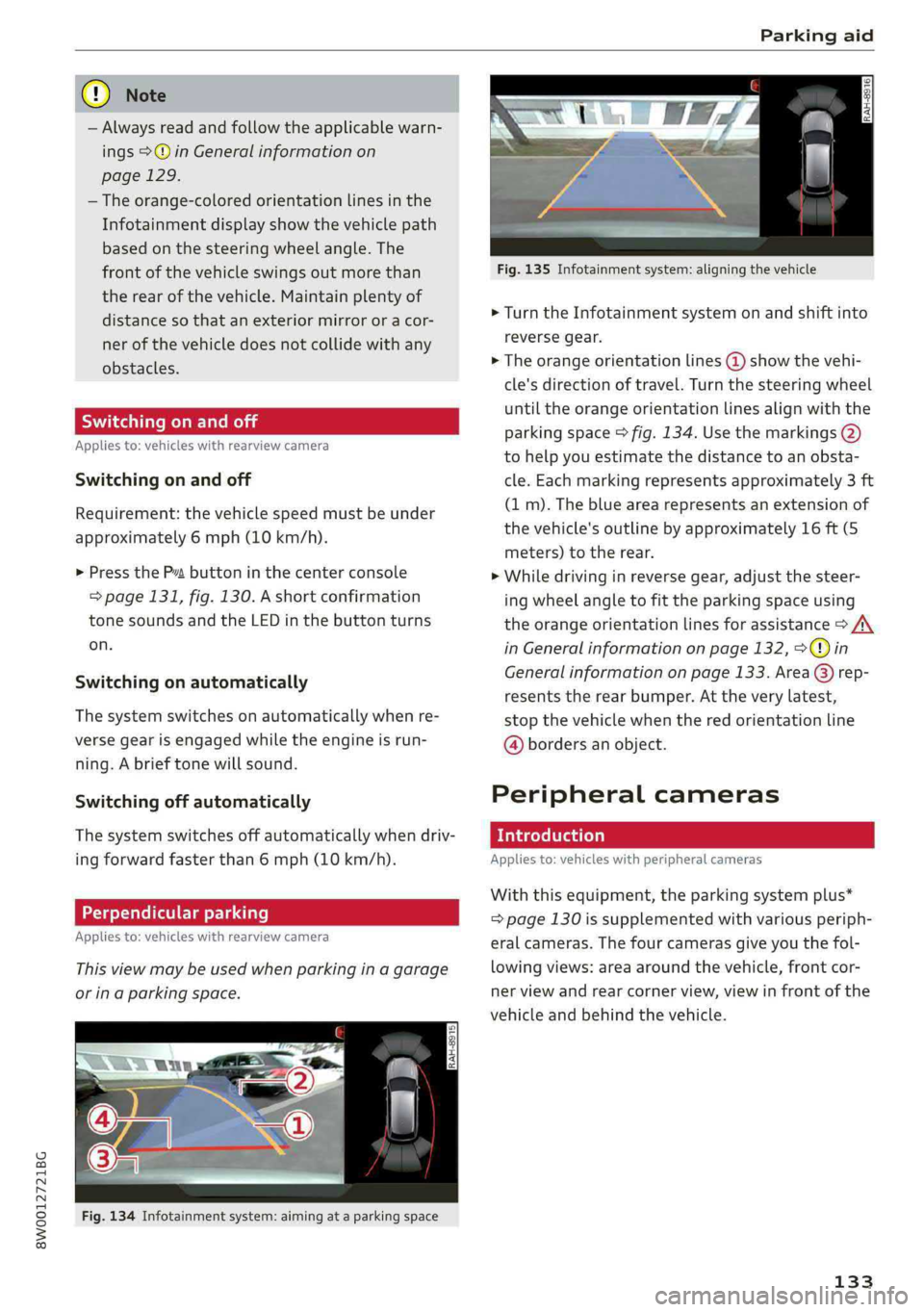
Fig.134Infotainmentsystem:aimingat aparkingspace
Fig.135Infotainmentsystem:aligningthevehicle
>Turn theInfotainmentsystemonandshiftinto
reversegear.
>Theorangeorientationlines@)showthevehi-
cle'sdirectionoftravel.Turnthesteeringwheel
untiltheorangeorientationlinesalignwiththe
parkingspace>fig.134.Usethemarkings@)
tohelpyouestimatethedistancetoanobsta-
cle.Eachmarkingrepresentsapproximately3ft
(1m).Thebluearearepresentsanextensionof
thevehicle'soutlinebyapproximately16ft(5
meters)totherear.
>Whiledrivinginreversegear,adjustthesteer-
ing
wheelangletofittheparkingspaceusing
theorangeorientationlinesforassistance>/\
inGeneralinformationonpage132,>@)in
Generalinformationonpage133. Area@)rep-
resentstherearbumper.Attheverylatest,
stopthevehiclewhentheredorientationline
@bordersanobject.
Peripheralcameras
Introduction
Appliesto:vehicleswithperipheralcameras
Withthisequipment,theparkingsystemplus*
=page130issupplementedwithvariousperiph-
eralcameras.Thefourcamerasgiveyouthefol-
lowingviews:areaaroundthevehicle,frontcor-
nerviewandrearcornerview,viewinfrontofthe
vehicleandbehindthevehicle.
133
Page 137 of 392
8W0012721BG
Parkingaid
Switchingonautomatically
Thesystemswitchesonautomaticallywhenre-
versegearisengagedwhiletheengineisrun-
ning.Abrieftonewillsound.
Switchingoffautomatically
The
systemswitchesoffautomaticallywhendriv-
ingforwardfasterthan6mph(10 km/h).
Selectingthemode
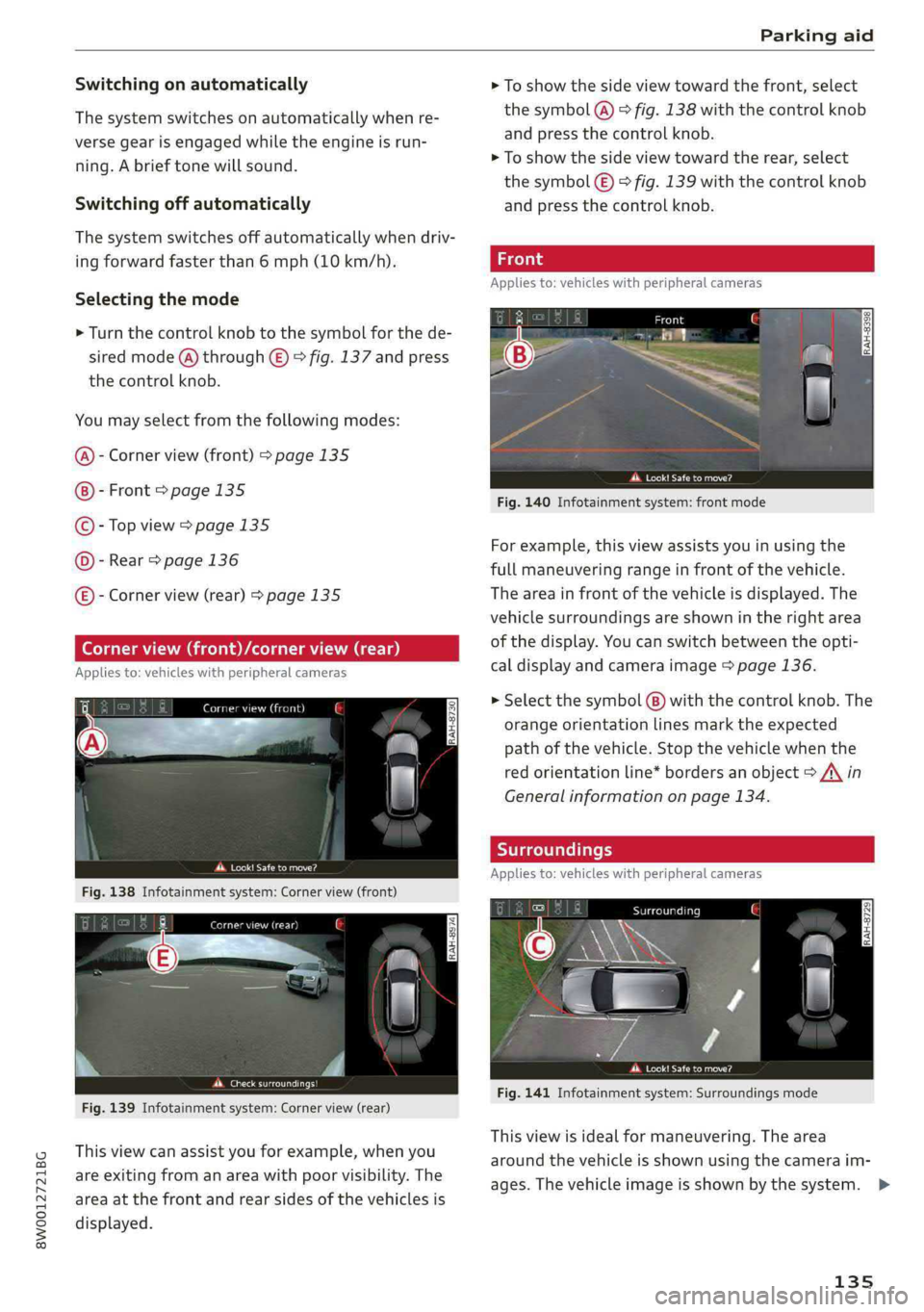
>Turn thecontrolknobtothesymbolforthede-
siredmode(@)through©)©fig.137andpress
thecontrolknob.
Youmayselectfromthefollowingmodes:
Cornerview(front)>page135
Front>page135
Topview>page135
Rear>page136
E)-Cornerview(rear)>page135
precata
Fig.138Infotainmentsystem:Cornerview(front)
Werertener
Fig.139Infotainmentsystem:Cornerview(rear)
Thisviewcanassistyouforexample,whenyou
areexitingfromanareawithpoorvisibility.The
areaatthefrontandrearsidesofthevehiclesis
displayed.
>Toshowthesideviewtowardthefront,select
thesymbol@)©fig.138withthecontrolknob
andpressthecontrolknob.
>Toshowthesideviewtowardtherear,select
thesymbol€)>fig.139withthecontrolknob
and
pressthecontrolknob.
Appliesto:vehicleswithperipheralcameras
eect
Fig.140Infotainmentsystem:frontmode
Forexample,thisviewassistsyouinusingthe
fullmaneuveringrangeinfrontofthevehicle.
Theareainfront ofthevehicleisdisplayed.The
vehiclesurroundingsareshownintherightarea
ofthedisplay.Youcanswitchbetweentheopti-
caldisplayandcameraimage>page136.
>Selectthesymbol(8)withthecontrolknob.The
orangeorientationlinesmarktheexpected
pathofthevehicle.Stopthevehiclewhenthe
redorientationline*bordersanobject>A\in
Generalinformationonpage134.
Appliesto:vehicleswithperipheralcameras
Scara
Perea
Fig.141Infotainmentsystem:Surroundingsmode
Thisviewisidealformaneuvering.Thearea
aroundthevehicleisshownusingthecameraim-
ages.Thevehicleimageisshownby thesystem.>
135
Page 138 of 392
Parkingaid
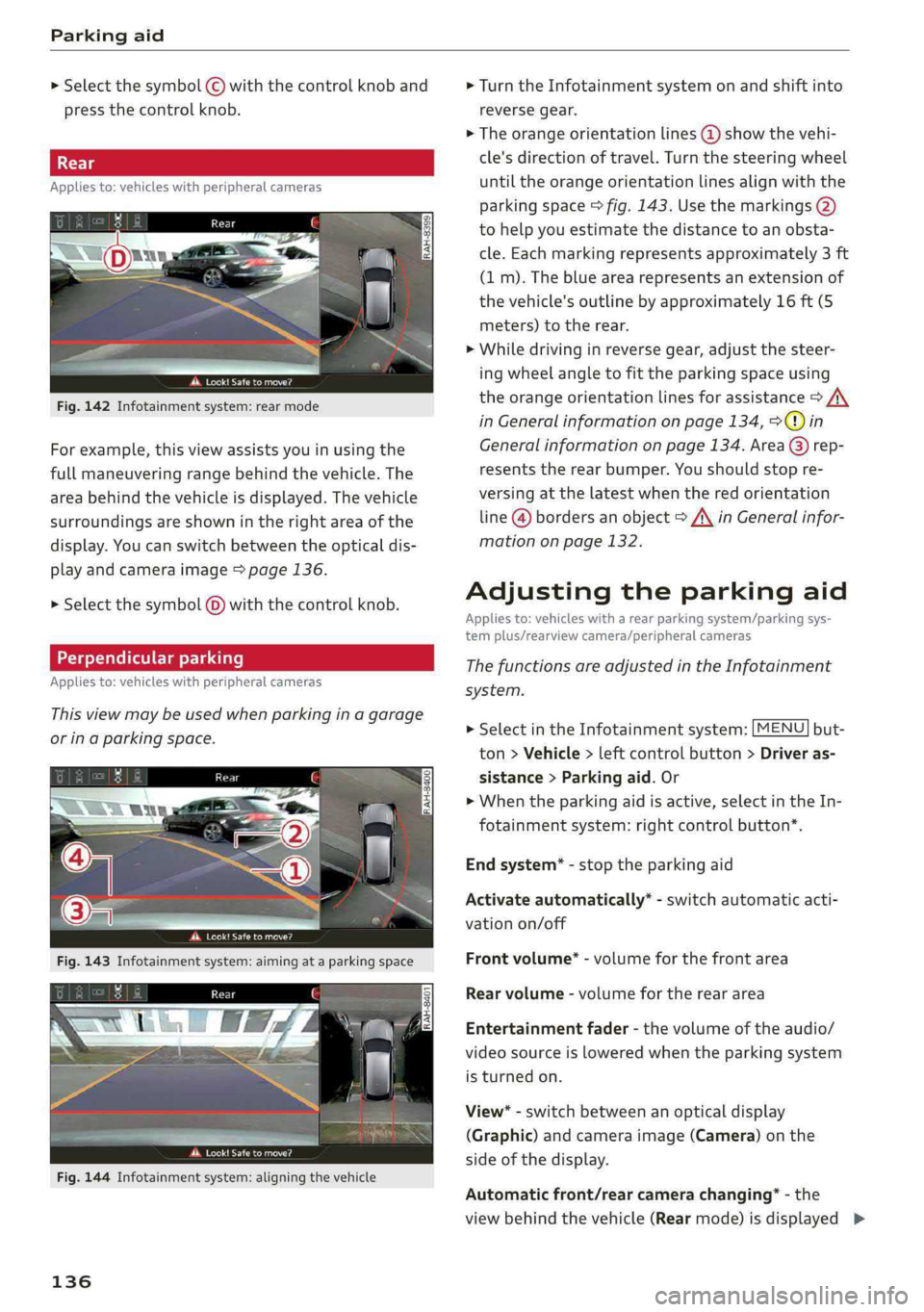
> Selectthesymbol©withthecontrolknoband
pressthecontrolknob.
Appliesto:vehicleswithperipheralcameras
Peat
Fig.142Infotainmentsystem:rearmode
Forexample,thisviewassistsyouinusingthe
fullmaneuveringrangebehindthevehicle.The
areabehindthevehicleisdisplayed.Thevehicle
surroundingsareshownintherightareaofthe
display.Youcanswitchbetweentheopticaldis-
playandcameraimage>page136.
> Selectthesymbol@)withthecontrolknob.
Perpendicularparking
Appliesto:vehicleswithperipheralcameras
Thisviewmaybe usedwhenparkinginagarage
orinaparkingspace.
ae-
dd.Look!Safetomove?
Fig.144Infotainmentsystem:aligningthevehicle
136
>Turn theInfotainmentsystemonandshiftinto
reversegear.
>Theorangeorientationlines@showthevehi-
cle'sdirectionoftravel.Turn thesteeringwheel
untiltheorangeorientationlinesalignwiththe
parkingspace>fig.143.Usethemarkings@)
tohelpyouestimatethedistancetoanobsta-
cle.Eachmarkingrepresentsapproximately3ft
(1m).Thebluearearepresentsanextensionof
thevehicle'soutlinebyapproximately16ft(5
meters)totherear.
>Whiledrivinginreversegear,adjustthesteer-
ing
wheelangletofittheparkingspaceusing
theorangeorientationlinesforassistance>A\
inGeneralinformationonpage134,>@)in
Generalinformationonpage134. Area@)rep-
resentstherearbumper.Youshouldstopre-
versingatthelatestwhenthered orientation
line@bordersanobject>AinGeneralinfor-
mationonpage132.
Adjustingtheparkingaid
Appliesto:vehicleswitharearparkingsystem/parkingsys-
templus/rearviewcamera/peripheralcameras
ThefunctionsareadjustedintheInfotainment
system.
>SelectintheInfotainmentsystem:[MENU]but-
ton>Vehicle>leftcontrolbutton>Driveras-
sistance>Parkingaid.Or
>Whentheparkingaidisactive,selectintheIn-
fotainmentsystem:rightcontrolbutton*.
Endsystem*-stoptheparkingaid
Activateautomatically*-switchautomaticacti-
vationon/off
Frontvolume*-volumeforthefrontarea
Rearvolume-volumeforthereararea
Entertainmentfader-thevolumeoftheaudio/
videosourceisloweredwhentheparkingsystem
isturnedon.
View*-switchbetweenanopticaldisplay
(Graphic)andcameraimage(Camera)onthe
sideofthedisplay.
Automaticfront/rearcamerachanging”-the
viewbehindthevehicle(Rearmode)isdisplayed>
Page 139 of 392
8W0012721BG
Parkingaid
automaticallywhenyoushiftintoreversegear.
Theviewinfrontofthevehicle(Frontmode)is
displayedautomaticallywhenyoushiftintothe
forwardgears.Whenfirstactivatinginaforward
gearwiththePbutton,thefrontsideviewis
displayed(Cornerview(front)mode).
IfyoudonotsettheV,theviewbehindthevehi-
cle(Rearmode)isalwaysdisplayedanditdoes
notswitchtothe Frontmodewhenaforward
gearisselected.
@Tips
—Severalmenuscanbeaccessedwiththe
rightcontrolbuttononlywhentheparking
aidisactive.
—Certain settingsareautomaticallystored
andassignedtothevehiclekeybeingused.
— Thenewlevelisdemonstratedbriefly*when
thevolumeisadjusted.
Errormessages
Appliesto:vehicleswitharearparkingsystem/parkingsys-
templus/rearviewcamera/peripheralcameras
wmRearparkingaid:malfunction!Obstacles
cannotbedetected
wmFrontparkingaid:malfunction!Obstacles
cannotbedetected
wmParkingaid:malfunction!Obstaclescannot
bedetected
Whenoneofthesemessagesappears,thereisa
systemmalfunction.TheLEDintheP4buttonal-
soblinkswhenswitchingiton.Therelevantmes-
sageonlyappearsagainwhenyoumanuallyacti-
vatetheparkingaidwiththebutton.
Rearparkingaid:obstacledetectionrestrict-
ed
Therearcross-trafficassist*>page125,Rear
cross-trafficassistisnotavailable.EithertheESC
isswitchedoff,ortheradarsensorsmaybecov-
ered byabikerack,stickers,leaves,snoworother
objects.SwitchtheESCon,orcleantheareain
frontofthesensorsifnecessary>page122,
fig.122.Ifthismessagecontinuestobedis-
played,driveimmediatelytoanauthorizedAudi
dealerorauthorizedAudiServiceFacilitytohave
themalfunctionrepaired.
Parkingsystemplus*
If asensororspeakerisfaulty,theP4symbol
willappearinfrontof/behindthevehicleinthe
Infotainmentsystemdisplay.If arearsensoris
faulty,onlyobstaclesthatareinareas(@)and
areshown>page130,fig.128.Ifafrontsensor
isfaulty,onlyobstaclesthatareinareas©and
©areshown.
Peripheralcameras*
Thereisasystemmalfunctionifthe#«symbol
appearsandthecorrespondingareaofthedis-
playisshowninblack.Thecameraisnotworking
inthisarea.
DrivetoanauthorizedAudidealerorauthorized
AudiServiceFacilityimmediatelytohavethe
malfunctioncorrected.
137
Page 143 of 392
8W0012721BG
IntelligentTechnology
Thesystemdoesnotworkatspeedsbetweenap-
proximately19 and37mph(30and60km/h).
Thesystemistheninready-mode.Thisisindicat-
edbytheLEDinthe buttonturningon.Thesys-
temautomaticallyswitchedoffwhenyoudrive
fasterthan37mph(60km/h).TheLEDwillalso
turnoffinthisscenario.
Hilldescentassistisautomaticallyactivatedun-
derthefollowingconditions:
—theLEDinthebuttonturnson
—thevehiclespeedislowerthan19mph(30
km/h)
—thehillangleisatleastapproximately6%
ZAWARNING
—Bereadytoapply thebrakesatalltimes
whenusingthehillholdassist.
—Alwaysadjustthespeedto thevisibility,
weather,road,andtrafficconditions.The
systemcannotreplacethedriver'satten-
tion.
— Thesystemcannotmaintainaconstantvehi-
clespeedinallsituations,forexamplewhen
onsmoothorslipperyground.Thiscanin-
creasetheriskofanaccident.
Brakes
Newbrakepads
Newbrakepadsdonotachievetheirfullbraking
effectduringthefirst250mi(400km).They
mustbe“brokenin”first.However,youcancom-
pensatefortheslightlyreducedbrakingforceby
pressingfirmlyonthebrakepedal.Avoidheavy
brakingduringthebreak-inperiod.
Brakepadweardependslargelyonthewaythe
vehicleisdrivenandonoperatingconditions.
Brakepadwearincreaseswhendrivingfrequently
inthecityorshortdistancesorwhenusingavery
sportydrivingstyle.
Operatingnoise
Noisesmayoccurwhenbrakingdependingonthe
speed,
brakingforce,andoutsideconditionssuch
astemperatureandhumidity.
Wetconditionsorroadsalt
Incertainsituations,forexampleafterdriving
throughwater,inheavyrain,orafterwashing
yourcar,thebrakingeffectmaybereduceddue
tomoistureoriceonthebrakerotorsandbrake
pads.Thebrakesmustbe“dried”firstwithafew
carefulbrakeapplications.
Whendrivingathigherspeedswhilethewind-
shieldwipersareswitchedon,thebrakepadsare
brieflypressedagainstthebrakerotors.Thisac-
tion,whichisnotfeltbythedriver,happensat
regularintervalsandensuresabetterreaction
timeforthe brakesinwetweather.
Thebrakingeffectcanalsobereducedifyouare
drivingonsaltedroadsandyoudonot applythe
brakesforlongperiodsoftime.Thelayerofsalt
onthebrakerotorsandpadsmustbewornoff
firstwhenthebrakesareapplied.
Corrosion
Leavingthevehicleparkedforlongperiodsof
time,lowmileageonthevehicle,andavoiding
heavybrakingcancontributetocorrosiononthe
brakerotorsandtodirtybrakepads.
Ifyouusuallyavoidheavybrakingorifthereis
corrosionpresent,occasionalheavybrakingat
highspeedsisrecommendedtocleanthebrake
rotorsandpads>A\.
Brakesystemmalfunction
Ifyounoticethatthebrakepedalsuddenlygoes
downfarthertowardthefloorwhenyoupressit,
thenabrakecircuitinthedual-circuitbrakesys-
temmayhavemalfunctioned.Drivetoanauthor-
izedAudidealerorauthorizedAudiServiceFacili-
tyimmediatelytohavetheproblemcorrected.
Onthewaythere,drivewithreducedspeedand
keepinmindthatyouwillneedalongerdistance
tostopandyouwillneedtopressthebrake pedal
harder.
Lowbrakefluidlevel
Whenthebrakefluidlevelislow,malfunctionsin
thebrakesystemmayoccur.Thebrakefluidlevel
iselectronicallymonitored.
141
Page 166 of 392
Voicerecognitionsystem
Voicerecognitionsystem
Operating
Appliesto:vehicleswithvoicerecognitionsystem
YoucanoperatemanyInfotainmentfunctions
convenientlybyspeaking.
Requirement:theignitionandtheMMImustbe
switched
on>page145.Asystemlanguagesup-
portedbythevoicerecognitionsystemmustbe
set.Theremustbenophonecallsinprogressand
theparkingaidmustnotbeactive.
>Switchingon:pressthe[%]button@
=>page17,fig.11or>page18,fig.13briefly
onthemultifunctionsteeringwheelandsay
thedesiredcommandaftertheBeep.
>Switchingoff:pressandholdthe|™]button.
Or:pressthe|5|button.
>Pausing:saythecommandPause.Toresume,
pressthe|]button.
>Correcting:saythecommandCorrection.Or:
simplysayanewcommandduringanan-
nouncement>page241.
Inputassistance
Thesystemguidesyouthroughtheinputwith
visualandaudiofeedback.
—Visualinputassistance:afterswitchingon
voicerecognition,adisplaywithaselectionof
possiblecommandsappears.Thiscommand
displaycanbe switchedonoroff.Select:
MENU]button>Settings>leftcontrolbutton
>MMIsettings>Speechdialogsystem.
—Audioinputassistance: tohavethepossible
commandsread,turnthevoicerecognitionsys-
temonandsayHelp.
Forthesystemtounderstandyou:
Speakclearlyanddistinctly atanormalvolume.
Speaklouderwhendrivingfaster.
Emphasizethewordsinthecommandsevenly
anddonotleavelongpauses.
Closethedoors,thewindows,andthesunroof*
toreducebackgroundnoise.Makesurethatpas-
sengersarenotspeakingwhenyouaregivinga
voicecommand.
164
Donotdirecttheventstowardthehands-freemi-
crophone,whichisintheroofheadlinernearthe
frontinteriorlights.
Onlyusethesystemfromthedriver'sseatbe-
causethehands-freemicrophoneisdirectedto-
wardthatseat.
Additionalsettings
See>page241,Speechdialogsystem.
ZAWARNING
—Directyourfullattentiontodriving.Asthe
driver,youhavecompleteresponsibilityfor
safetyintraffic.Onlyusethefunctionsin
suchawaythatyoualwaysmaintaincom-
pletecontroloveryourvehicleinalltraffic
situations.
—Donotuse thevoicerecognitionsystemin
emergenciesbecauseyourvoicemaychange
instressfulsituations.Thesystemmaytake
longertodialthenumberormaynotbe
abletodialitatall.Dialtheemergency
numbermanually.
Gi)Tips
— Thedialogpauseswhenthereisanincom-
ingphonecallandwillcontinueifyouig-
norethecall.Thedialogendsifyouanswer
thecall.
—Youcanselectan iteminthelistusingei-
therthevoicerecognitionsystemorthe
controlknob.
Commandoverview
information
Appliesto:vehicleswithvoicerecognitionsystem
Thefollowingoverviewsdescribethecommands
thatcan beusedtooperatetheMMIusingthe
voicerecognitionsystem.
Alternativecommandsareseparatedusinga“/”,
forexamplesay:Telephone/(or)Navigation/
(or)Radio.
Sequencesofcommandsusedtoperformanac-
tionareidentifiedwitha “>”,forexamplesay:
Enteraddress>(then)Entercountry/state.>
Page 194 of 392
Audiconnect
Vehiclestatusreport
Thisservicetransfersdriverinformationsystem
datatoaserver.Dependingonthevehicleequip-
ment,certaindatamaybeaccessed,suchasthe
remainingrangeormileage.Thevaluesmaydif-
ferfromthevaluesdisplayedinthevehicle.
Car Finder
Thisservicetransmitstheparkinglocationtoa
serverwhentheignitionisswitchedoff.Thevehi-
clelocation,yourlocation,ortheroutetoyour
vehiclecanbedisplayed.Thenewparkingloca-
tioncannotbedeterminedwiththisserviceifthe
vehicleismovedaftershuttingthevehicleoff
andwithoutswitchingtheignitiononandoff
again,forexampleifthevehicleistowedorsto-
len.
—DeactivatingandactivatingCarFinder:select:
MENU]>Audiconnect>Carfinder.
OnlineAudiservicerequest
Requirement:theservicemustbeactivatedon-
lineatwww.audiusa.com/myaudiandanauthor-
izedAudidealerorauthorizedAudiservicefacili-
tymustbeselected.
Thisservicetransmitsservice-relevantdatato
yourselectedauthorizedAudidealerorauthor-
izedAudiservicefacility.Theywillcontactyou
beforeyournextserviceappointment.
StolenVehicleLocator
Thisserviceassistsyouinlocatingyourvehicleif
itisstolen.
—Contactthepolice.YoureceiveaCaseID.
—Calltheservicehotlineandgiveyour CaseID.
Theservicehotlinewillforwardtheestablished
datatothepolice.YoureceivetheAudiService
hotlinenumberwhenyoupurchaseyourvehicle.
GeofencingAlert
Requirement:akeyusermustbesetinthevehi-
cle>page191.
Thisserviceallowsyoutosetpermittedandfor-
biddenzonesforyourvehicleaswellassettime
limitsforthesezones.Ifyourvehicleleavesa
permittedzoneorentersaforbiddenzone,you
192
willbenotifiedwithapushnotificationand/oran
e-mail.
SpeedAlert
Requirement:akeyusermustbesetinthevehi-
cle>page191.
Youcansetuptotwospeedlimitsforyourvehi-
cleusingthis service.Ifyourvehicleexceedsaset
speedlimit,youwillbenotifiedwithapushnoti-
ficationand/ore-mail.
ValetAlert
Requirement:akeyusermustbesetinthevehi-
cle>page191.
Ifyougiveyourvehicletoaparkingservice,you
cansetazoneandaspeedlimitusingthemyAu-
diapp.Ifthevehicleleavesthezoneorexceeds
thespeedlimit,youwillbenotifiedwithapush
notificationand/ore-mail.
ZA\WARNING
Donotignoremessagesandwarningorindi-
catorlightsthatturnoninthevehiclebe-
causeoftheinformationinthevehiclestatus
report.Thiscouldlead tobreakdownsinon
theroad,accidentsandseriousinjuries.
G)Tips
Forsomeservices,youcanselectifyouwould
liketobenotifiedwithapushnotification
and/orane-mail.
Settings
Cellphonenetwork
>Select:[MENU]button>Audiconnect>right
controlbutton>Connectionmanager.
>Select:rightcontrolbutton>Onlinesettings>
Dataconnectionsettings.
Dependingonthecountry,vehicleequipment,
andconnectiontype,thefollowing functionsmay
beavailable:
Dataconnectionsettings
UsingtheDataconnectionsettingsmenu,you
cansetwhenthesystemshouldconnecttothe>
Page 318 of 392
CheckingandFilling
engine.Ifthishappens,onlyusewaterand
restorethecorrectmixtureratiowiththe
specifiedcoolantadditiveassoonaspossi-
ble.
—Onlyrefillwithnewcoolant.
—Radiatorsealantmustnot bemixedwith
thecoolant.
Addingcoolant
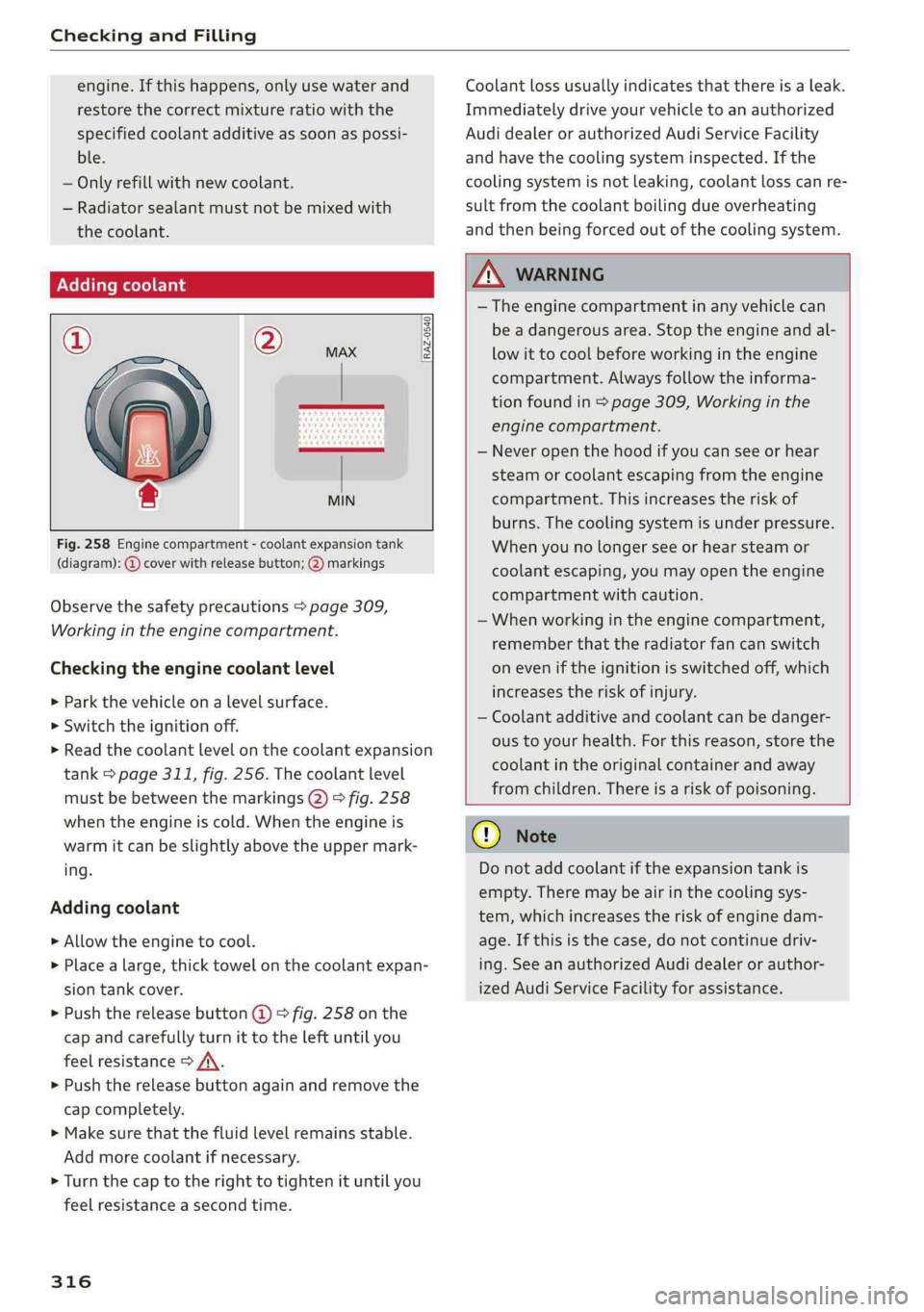
©=FeRAZ-0540
MIN
Fig.258Enginecompartment-coolantexpansiontank
(diagram):@coverwithreleasebutton;2)markings
Observethesafetyprecautions>page309,
Workingintheenginecompartment.
Checkingtheenginecoolantlevel
>Parkthevehicleonalevelsurface.
>Switchtheignitionoff.
>Readthecoolantlevelonthecoolantexpansion
tank>page311,fig.256.Thecoolantlevel
mustbebetweenthemarkings@)>fig.258
whentheengineiscold.Whentheengineis
warmitcanbeslightlyabovetheupper mark-
ing.
Addingcoolant
>Allowtheenginetocool.
> Placealarge,thicktowelonthecoolantexpan-
siontankcover.
>Pushthereleasebutton(@)9fig.258onthe
capandcarefullyturnittotheleftuntilyou
feelresistance>/\.
>Pushthereleasebuttonagainandremovethe
capcompletely.
>Makesurethatthefluidlevelremainsstable.
Add morecoolantifnecessary.
>
Turn thecaptotherighttotightenituntilyou
feelresistanceasecondtime.
316
Coolantlossusuallyindicatesthatthereisaleak.
Immediatelydriveyourvehicletoanauthorized
AudidealerorauthorizedAudiServiceFacility
andhavethecoolingsysteminspected.Ifthe
coolingsystemisnotleaking,coolantlosscanre-
sultfromthecoolantboilingdueoverheating
andthenbeingforcedoutofthecoolingsystem.
ZA\WARNING
— Theenginecompartmentinanyvehiclecan
beadangerousarea.Stoptheengineandal-
lowitto coolbeforeworkingintheengine
compartment.Alwaysfollowtheinforma-
tionfoundin>page309,Workinginthe
enginecompartment.
—Neveropenthehoodifyoucan seeorhear
steamorcoolantescapingfromtheengine
compartment.Thisincreasestheriskof
burns.Thecoolingsystemisunderpressure.
Whenyounolongerseeorhearsteamor
coolantescaping,youmayopentheengine
compartmentwithcaution.
—Whenworkingintheenginecompartment,
rememberthattheradiatorfancanswitch
oneveniftheignitionisswitchedoff,which
increasestheriskofinjury.
—Coolantadditiveandcoolantcan bedanger-
oustoyourhealth.Forthisreason, storethe
coolantintheoriginalcontainerandaway
fromchildren.Thereisariskofpoisoning.
@)Note
Donotaddcoolantiftheexpansiontankis
empty.Theremaybe airinthecoolingsys-
tem,whichincreasestheriskofenginedam-
age.Ifthisisthecase,donotcontinuedriv-
ing.SeeanauthorizedAudidealerorauthor-
izedAudiServiceFacilityforassistance.
Page 320 of 392
CheckingandFilling
Ifthismessagedoesnotturnoff,driveimmedi-
atelytoanauthorizedAudidealerorauthorized
AudiServiceFacility.
ZA\WARNING
Whenthereisanelectricalsystemmalfunc-
tion,vehiclefunctionsmaynotworkanddriv-
ingstabilitymaybelimited,whichincreases
theriskofanaccident.Stopdrivingand
switchtheengineoff.SeeanauthorizedAudi
dealerorauthorizedAudiServiceFacilityfor
assistance.
Battery
Prlaameeeelec)
Becauseofthecomplexpowersupply,allworkon
batteriessuchasdisconnecting,replacing,etc.,
should only beperformedby anauthorizedAudi
dealerorauthorizedAudiServiceFacility>A\.
Multiplebatterieswithdifferenttechnologies
maybeinstalledinyourvehicle:
—Vehiclebattery(forexample,forstartingthe
engine,basicpowersupply)>page319,Lead
batteryor>page319,Otherbatterytypes
—Auxiliarybattery(forexample,forrecuperation
oroptionalequipment)>page319,Otherbat-
terytypes
Notrunningthevehicleforlongperiodsof
time
Thebatterywillgraduallydrainifthevehicle
doesnotrunforlongperiodsoftime.Toensure
thatthevehiclecanstillbestarted,theelectrical
equipmentwillbereducedorswitchedoff
=>page143.Someconveniencefunctions,such
asinteriorlightingorpowerseatadjustment,
maynotbeavailableundercertaincircumstan-
ces.Theseconveniencefunctionswillbeavailable
againonceyouswitchtheignitiononandstart
theengine.
Evenwhenelectricalequipmentisswitchedoff,
theequipmentcanstilldrainthebatteryifthe
vehicleisnotdrivenforlongperiodsoftime.
Deepdrainingresultsinachemicalreactionthat
destroys
theinsideofthebattery.Thebattery
318
mustbechargedeverymonthtopreventthis
=page319.Contact anauthorizedAudidealeror
authorizedAudiServiceFacilityformoreinfor-
mation.
Winteroperation
Coldweatherplaceshigherdemandsonthebat-
tery.Thisresultsinreducedstartingability.Have
thebatterycheckedbyanauthorizedAudidealer
orauthorizedAudiServiceFacilitybeforecold
weatherbegins.
Z\WARNING
—Allworkonthebatteryorelectricalsystem
inyourvehiclecanresultininjuries,chemi-
calburns,accidents,or burns.Becauseof
this,allworkmustbeperformedonlybyan
authorizedAudidealerorauthorizedAudi
ServiceFacility.
—Neverconnectthechargingcableorjump
startcabledirectlytoyourvehiclebattery.
Onlyusethe connectionsintheenginecom-
partment>page319.
ZAWARNING
CaliforniaProposition65Warning:
—Batteryposts,terminalsandrelatedacces-
soriescontainleadandleadcompounds,
chemicalsknowntotheStateofCalifornia
tocausecancerandreproductiveproblems.
Washhandsafterhandling.
()Note
—Ifthevehiclewillbe parkedforlongperiods
oftime,protectthebatteryagainstthecold
so thatitwillnot be destroyed by“freezing”
=page319,Chargingthebattery.
—Thereareelectricalcomponentsunderthe
cargofloorbehindatrimpanelthatwarm
upduringoperation.To reducetheriskof
thecomponentsoverheating, donotstore
objectssuchasblanketsunderthecargo
floor.Ifthecomponentsoverheat,theywill
switchofftemporarily.Thiswillbeindicated
byamessagethatwillbedisplayedinthe
instrumentclusteruntilthetemperaturere-
turnstonormal.