transmission AUDI A4 2019 Owner's Guide
[x] Cancel search | Manufacturer: AUDI, Model Year: 2019, Model line: A4, Model: AUDI A4 2019Pages: 392, PDF Size: 99.53 MB
Page 109 of 392
8W0012721BG
Assistsystems
>Toincrease ordecrease thedistanceinincre-
ments,tap theswitchagaintoward@)or ©).
Thedistancebetweenthetwovehicleswill
changeintheinstrumentclusterdisplay.
Whenapproachingavehicledrivingahead,the
adaptivecruisecontrolsystembrakestomatch
thatvehicle'sspeedandthenadjuststotheset
distance.Ifthevehicledrivingaheadaccelerates,
thentheadaptivecruisecontrolwillalsoacceler-
ateuptothespeedthatyouhaveset.
Thehigherthespeed,thegreaterthedistance
=>A\.TheDistance3settingisrecommended.
Thatisequaltothegeneralrecommendationof
“halfthespeedshownonthespeedometer”.
Thedistancesprovidedare specifiedvalues.De-
pendingonthedrivingsituationandhowtheve-
hicleaheadisdriving,theactualdistancemaybe
moreorlessthanthesetargetdistances.
Ifyouchangethetimegaps,thevalueyouhave
justsetappearsbrieflyintheinstrumentcluster
display,forexampleBiforDistance3.Thisonly
occursiftheDriverassistancedisplayisnotcur-
rentlyshowninthedisplay>page105,fig.105.
Distance1:thissettingcorrespondstoadistance
of92ft(28m)whentravelingat62mph(100
km/h),oratimedistanceof1second.
Distance2: thissettingcorrespondstoadistance
of118ft(36m)whentravelingat62mph(100
km/h),oratimedistanceof1.3seconds.
Distance3:thissettingcorrespondstoadistance
of164ft(SOm)whentravelingat62mph(100
km/h),oratimedistanceof 1.8seconds.
Distance4:thissettingcorrespondstoadistance
of219ft(67m)whentravelingat62mph(100
km/h),oratimedistanceof2.4seconds.
Distance5:thissettingcorrespondstoadistance
of328ft(100m)whentravelingat62mph(100
km/h),oratimedistanceof3.6seconds.
D_Thisisnotavailableinsomecountries.
ZAWARNING
Whensettingthedistance,thedriverisre-
sponsibleforadheringtoanyapplicablelegal
regulations.
@Tips
Dependingontheselecteddrivingprogram
anddistance,drivingbehaviorwhenacceler-
atingwillvaryfromdynamictocomfortable
=>page108.
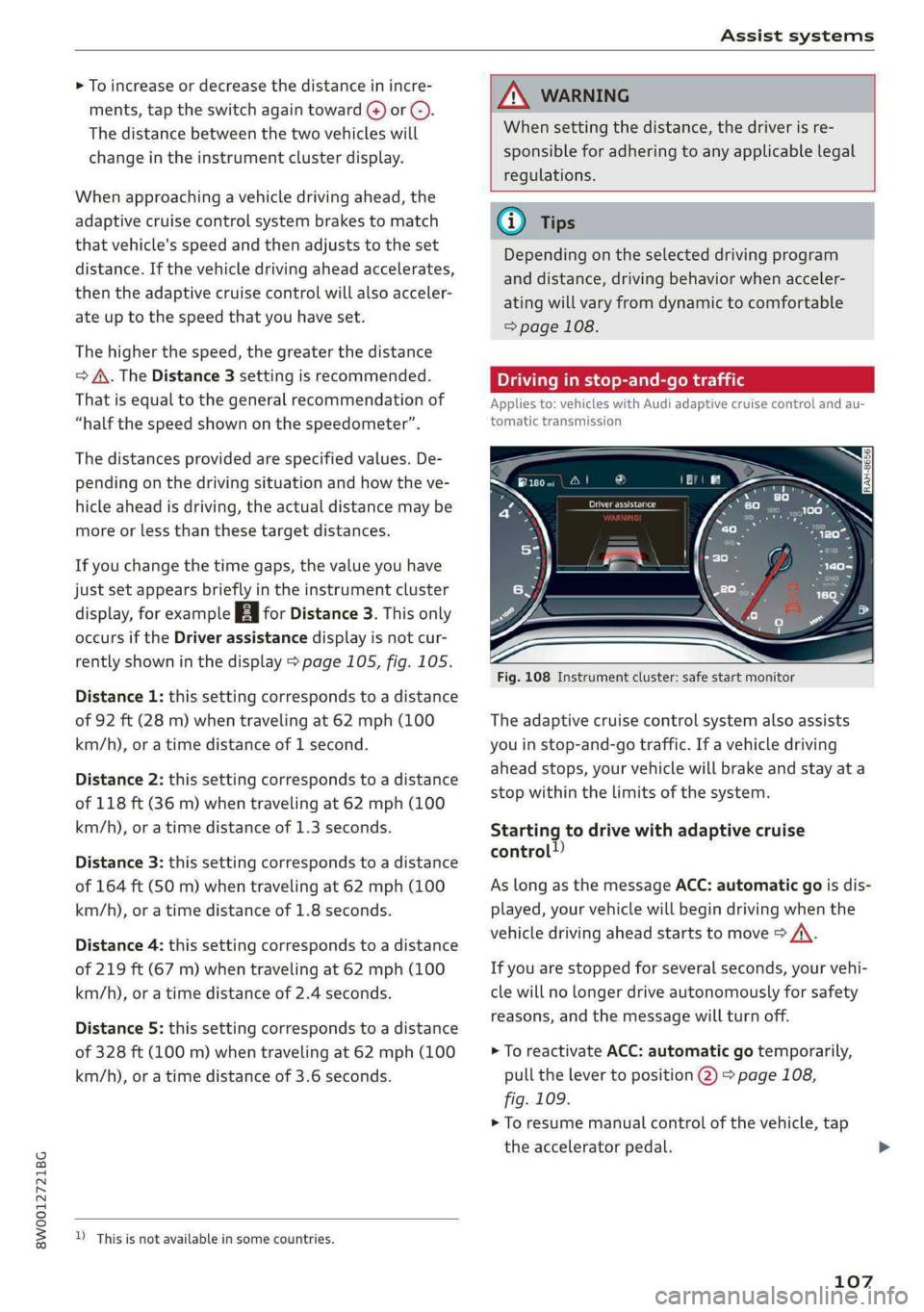
Drivinginstop-and-gotraffic
Appliesto:vehicleswith Audiadaptivecruisecontrolandau-
tomatictransmission
Fig.108Instrumentcluster:safestartmonitor
Theadaptivecruisecontrolsystemalsoassists
youinstop-and-gotraffic.Ifavehicledriving
aheadstops,yourvehiclewillbrakeandstayata
stopwithinthelimitsofthesystem.
Startingtodrivewithadaptivecruise
control!)
AslongasthemessageACC:automaticgoisdis-
played,yourvehiclewillbegindrivingwhenthe
vehicledrivingaheadstartstomove>A\.
Ifyouarestoppedforseveralseconds,yourvehi-
clewillnolongerdriveautonomouslyforsafety
reasons,
andthemessagewillturnoff.
>ToreactivateACC:automaticgotemporarily,
pullthelevertoposition@)>page108,
fig.109.
>Toresumemanualcontrolofthevehicle,tap
theacceleratorpedal.
107
Page 110 of 392
Assistsystems
Safestartmonitor
Ifanobstacleisdetectedwhenyoustartdriving,
youwillbealerted tothedangerbytheBAindi-
catorlightandtheimageintheinstrumentclus-
terdisplay>fig.108>A\.Anaudiosignalwill
alsosound.Yourvehiclewilldrivemoreslowly
whenstarting.Thismayalsooccurinsomesitua-
tionswhenthereisno apparentobstacle.
—Pressthebrakepedaltoslowyourvehicle
down.
Z\WARNING
IfthemessageACC:automaticgo”appears,
yourvehiclewillstartdrivingevenifthereis
anobstaclebetweenyourvehicleandtheve-
hicledrivingahead.Thisincreasestheriskof
anaccident.
G@)Tips
—Forsafetyreasons,yourvehiclewillonly
starttodriveautomaticallyif:
—Thedriver'ssafetybeltisfastened
—Alldoorsandthehoodareclosed
—Yourvehicleisnotstoppedforalongperi-
odoftime
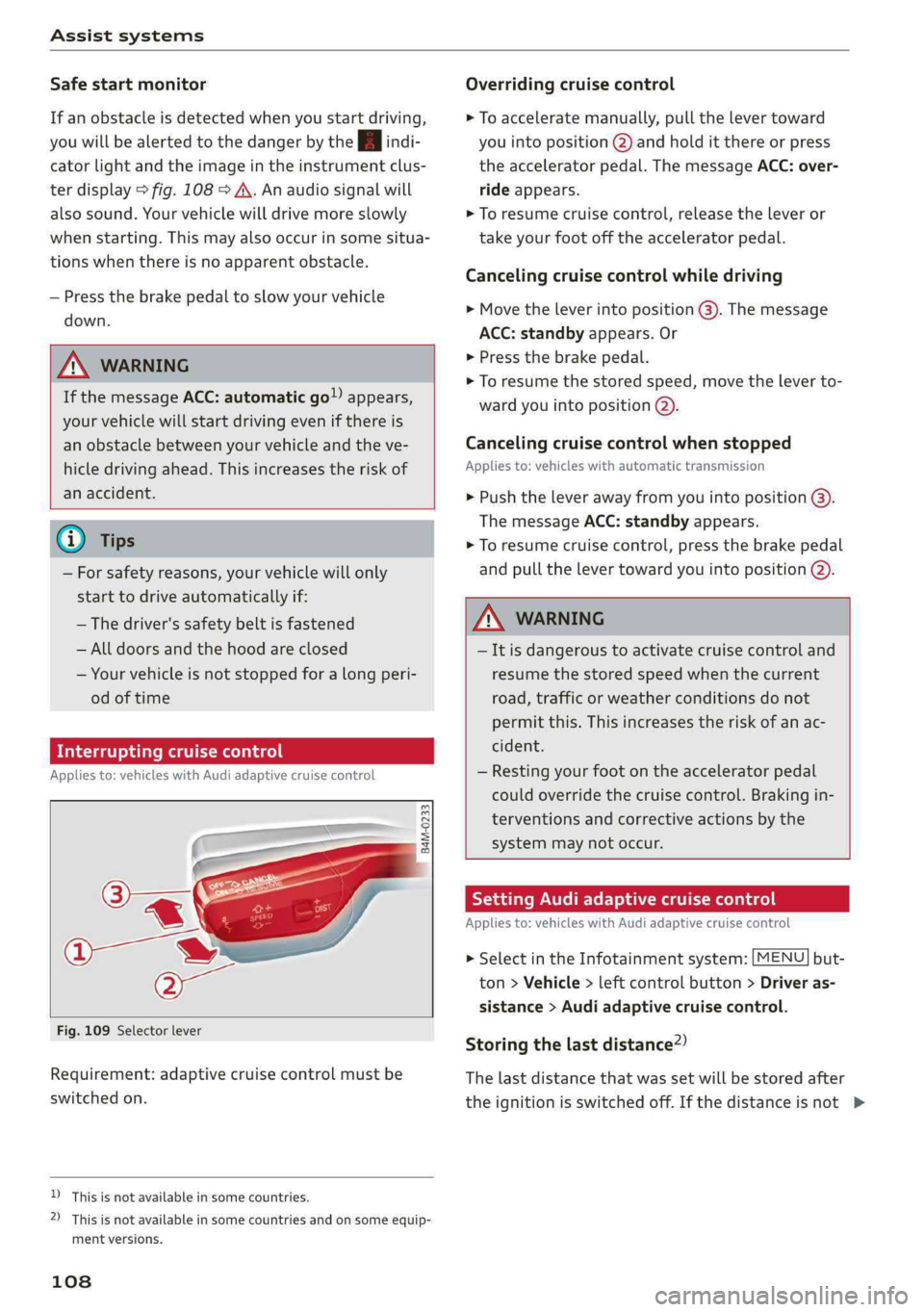
Interruptingcruisecontrol
Appliesto:vehicleswithAudiadaptivecruisecontrol
B4M-0233
Fig.109Selectorlever
Requirement:adaptivecruisecontrolmustbe
switched
on.
D_Thisisnotavailableinsomecountries.
2)Thisisnotavailableinsomecountriesand onsomeequip-
mentversions.
108
Overridingcruisecontrol
>Toacceleratemanually,pullthelevertoward
youintoposition@)andholditthereorpress
theacceleratorpedal.ThemessageACC:over-
rideappears.
>Toresumecruisecontrol,releasetheleveror
takeyourfootofftheacceleratorpedal.
Cancelingcruisecontrolwhiledriving
>Movetheleverintoposition@).Themessage
ACC:standbyappears.Or
>Pressthebrakepedal.
>Toresumethestoredspeed,movetheleverto-
wardyouintoposition@).
Cancelingcruisecontrolwhenstopped
Appliesto:vehicleswithautomatictransmission
>Pushtheleverawayfromyouintoposition@).
ThemessageACC:standbyappears.
>Toresumecruisecontrol,pressthebrakepedal
andpullthelevertowardyouintoposition@).
Z\WARNING
—Itisdangeroustoactivatecruisecontroland
resumethestoredspeedwhenthecurrent
road,trafficorweatherconditionsdonot
permitthis.Thisincreasestheriskofanac-
cident.
—Restingyourfootontheacceleratorpedal
couldoverridethecruisecontrol.Brakingin-
terventionsandcorrectiveactionsbythe
systemmaynotoccur.
SettingAudiadaptivecruisecontrol
Appliesto:vehicleswith Audiadaptivecruisecontrol
>SelectintheInfotainmentsystem:[MENU]but-
ton>Vehicle>leftcontrolbutton>Driveras-
sistance>Audiadaptivecruisecontrol.
Storingthelastdistance?)
Thelastdistancethatwassetwillbestoredafter
theignitionisswitchedoff.Ifthedistanceisnot>
Page 113 of 392
8W0012721BG
Assistsystems
>IntheInfotainmentsystem,select:[MENU
button>Vehicle>leftcontrolbutton>Driver
assistance>Distancewarning.
Z\WARNING
—Readandfollowthewarningson>Ain
Generalinformationonpage103.
—Thedriverisalwaysresponsibleforadhering
totheregulationsapplicableinthe country
wherethevehicleisbeingoperated.
@Tips
Youmayfallbelowhewarningthreshold
brieflywhenpassingorwhenquicklyap-
proachingaslowvehicle.Thereisnowarning
inthisscenario.Awarningisgivenonlyifyou
fallbelowthewarningthresholdforanex-
tendedperiodoftime.
Appliesto:vehicleswithAudiadaptivecruisecontrol
ACCwithtrafficjamassist:unavailable.See
owner'smanual
Thesystemcannotguaranteethatitwilldetect
vehiclescorrectlyandithasswitchedoff.Thera-
darsensorshaveshiftedorarefaulty.Drivetoan
authorizedAudidealerorauthorizedAudiService
Facilityimmediatelytohavethe malfunctioncor-
rected.
ACCwithtrafficjamassist:currentlyun-
available.Seeowner'smanual
Thismessageappearsiftheadaptivecruisecon-
trolcannotbeactivated,forexampleifthehood
isopen.
ACCw.trafficjamassist:currentlyunavaila-
ble.Sensorvisionrestrictedduetosurround-
ings.Seeowner'smanual
Thismessageappearsiftheradarsensorviewis
obstructed,forexamplebyleaves,snow,heavy
sprayordirt.Cleanthesensors>page103,
fig.101.
ACCwithtrafficjamassist:currentlyun-
available.Gradetoosteep
Theroadexceedsthemaximumpossiblegrade
forsafeoperation.Thesystemscannotbeswitch-
edon.
ACCwithtrafficjamassist:onlyavailablein
D,SorM
Selectthe"D/S"or"M"selectorleverposition.
ACC:availablefrom1stgearup
Manualtransmission:adaptivecruisecontrol
worksin1stgearandhigher.
ACC:clutchpedalpressed
Manualtransmission:pressingtheclutchpedal
longerinterruptsthecontrol.
ACC:noteenginespeed
Manualtransmission:thismessageappearsifthe
driverhasnotshiftedupordownintimewhen
theadaptivecruisecontrolisbrakingoracceler-
ating,causingthevehicletoexceedortonot
reachthepermittedenginespeed.Theadaptive
cruisecontrolswitchesoffautomaticallyandcan-
notbe switched backon.
ACCwithtrafficjamassist:currentlyun-
available.Parkingbrakeapplied
Thesystemsswitchoffifyousettheparking
brake.Thesystemsareavailableagainafteryou
releasetheparkingbrake.
ACCwithtrafficjamassist:currentlyun-
available.Stabilizationcontrol(ESC)input
ThismessageappearsiftheElectronicStabiliza-
tionControl(ESC)istakingaction tostabilizethe
vehicle.Thesystemsswitchoffinthisscenario.
ACCwithtrafficjamassist:manualcontrol!
Thismessageappearsifthevehiclerollsback
whenstartingonaslightincline,eventhoughthe
systemsareactive.Pressthebrakepedaltopre-
ventthevehiclefromrollingorstartingtomove.
ACCwithtrafficjamassist:currentlyun-
available.Downhillassistactivated
Youcannotactivatethesystemwhenhillholdas-
sistisactive.
ACCwithtrafficjamassist:manualcontrol!>
111
Page 128 of 392

Assistsystems
@Tips
—Youcancanceltheautomaticbrakeactiva-
tionwithincreasingbrakingforceifyouap-
plythe brakesyourselforaccelerateconsid-
erably.
—Insomesituations,rearcross-trafficassist
maywarnyouevenifthereisnocrosstraffic
ina criticalarea,forexamplewhenbacking
into aparkingspaceormaneuvering.
—Therearcross-trafficassistalsoswitchesoff
whenyouswitchofftheESC.
—Foranexplanationonconformitywiththe
FCCregulationsinthe UnitedStatesandthe
IndustryCanadaregulations,see
=>page370.
Appliesto:vehicleswithAudisideassist
Amessageappearsintheinstrumentclusterdis-
playifthesideassistswitchesoffautomatically.
8Audisideassist:malfunction!Pleasecontact
Service
8Audisideassistandexitwarning:malfunc-
tion!PleasecontactService
Thesystemcannotguaranteethatitwilldetect
vehiclescorrectlyandithasswitchedoff.The
sensorshavebeenmovedorarefaulty.Havethe
systemcheckedbyanauthorizedAudidealeror
authorizedAudiServiceFacilitysoon.
Audisideassist:currentlyunavailable.Sen-
sorvisionrestrictedduetosurroundings.See
owner'smanual
Audisideassistandexitwarning:currently
unavailable.Sensorvisionrestrictedduetosur-
roundings
Theradarsensorvisionisimpaired.Theareain
frontofthesensorsmustnot becoveredbybike
racks,stickers,leaves,snoworanyotherobjects.
Cleantheareacoveringthesensors,ifnecessary
=>page122,fig.122.
Audisideassist:currentlyunavailable.See
owner'smanual
126
Audisideassistandexitwarning:currently
unavailable.Seeowner'smanual
Sideassistcannotbe switchedonatthistimebe-
causethereisamalfunction(forexample,the
batterychargelevelmaybetoolow).
Rearparkingaid:obstacledetectionrestrict-
ed
Therearcross-trafficassistisnotavailable.Ei-
thertheESCisswitchedoff,ortheradarsensors
maybecoveredbyabikerack,stickers,leaves,
snoworotherobjects.SwitchtheESCon,or
cleantheareainfrontofthesensorsifnecessary
=>page122,fig.122.Ifthismessagecontinues
tobedisplayed,driveimmediatelytoanauthor-
izedAudidealerorauthorizedAudiServiceFacili-
tytohave themalfunctionrepaired.
Audidriveselect
Introduction
Appliesto:vehicleswithAudidriveselect
Driveselectmakesitpossibletoexperiencedif-
ferenttypesofvehiclecharacteristicsinonevehi-
cle.ThedrivercanselectOffroad*,Comfort,Au-
toandDynamicmodesintheInfotainmentsys-
temtoswitchbetweenasportyandacomforta-
bledrivingmode,forexample.IntheIndividual
mode,thesettingscan beadjustedtoyourper-
sonalpreferences.Thismakesitpossibletocom-
bine settingssuchasasportyenginesettingwith
lightsteering.
Appliesto:vehicleswithAudidriveselect
Thefollowingsystems,amongotherthings,are
influencedbydriveselect:
Engineandautomatictransmission*
Dependingonthemode,theengineandauto-
matictransmission*respondmorequicklyorina
morebalancedmannertoacceleratorpedal
movements.InthesportyDynamicmode,the
transmissionshiftsathigherspeedranges.
Page 130 of 392
Assistsystems
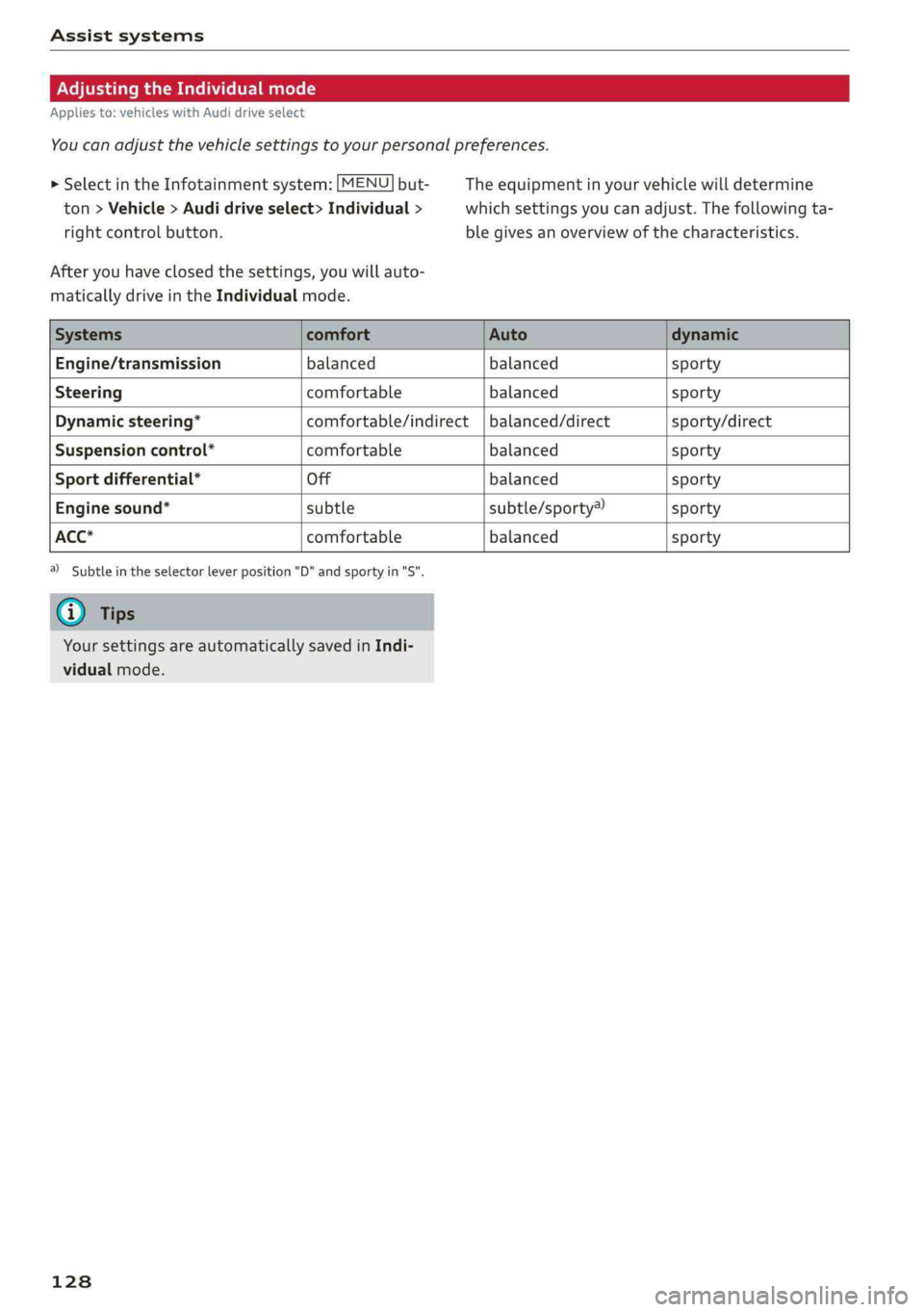
AdjustingtheIndividualmode
Appliesto:vehicleswithAudidriveselect
You canadjustthevehiclesettingstoyourpersonalpreferences.
>SelectintheInfotainmentsystem:
MENU but-Theequipmentinyourvehiclewilldetermine
ton>Vehicle>Audidriveselect>Individual>whichsettingsyoucanadjust.Thefollowingta-
rightcontrolbutton.blegivesanoverviewofthecharacteristics.
Afteryouhaveclosedthesettings,youwillauto-
maticallydriveintheIndividualmode.
Engine/transmissionbalanced balancedsporty
Steeringcomfortablebalancedsporty
Dynamicsteering*comfortable/indirect|balanced/directsporty/direct
Suspensioncontrol*comfortablebalancedsporty
Sportdifferential*Offbalancedsporty
Enginesound*subtlesubtle/sporty®sporty
ACC*comfortablebalancedsporty
2)Subtleintheselectorleverposition"D"andsportyin"S".
Yoursettings areautomaticallysavedinIndi-
vidualmode.
128
Page 134 of 392
Parkingaid
—Automatictransmission:the"P"selector
leverpositionisengagedandreleasedagain
Rearviewcamera
Introduction
Appliesto:vehicleswith rearviewcamera
B8V-0629
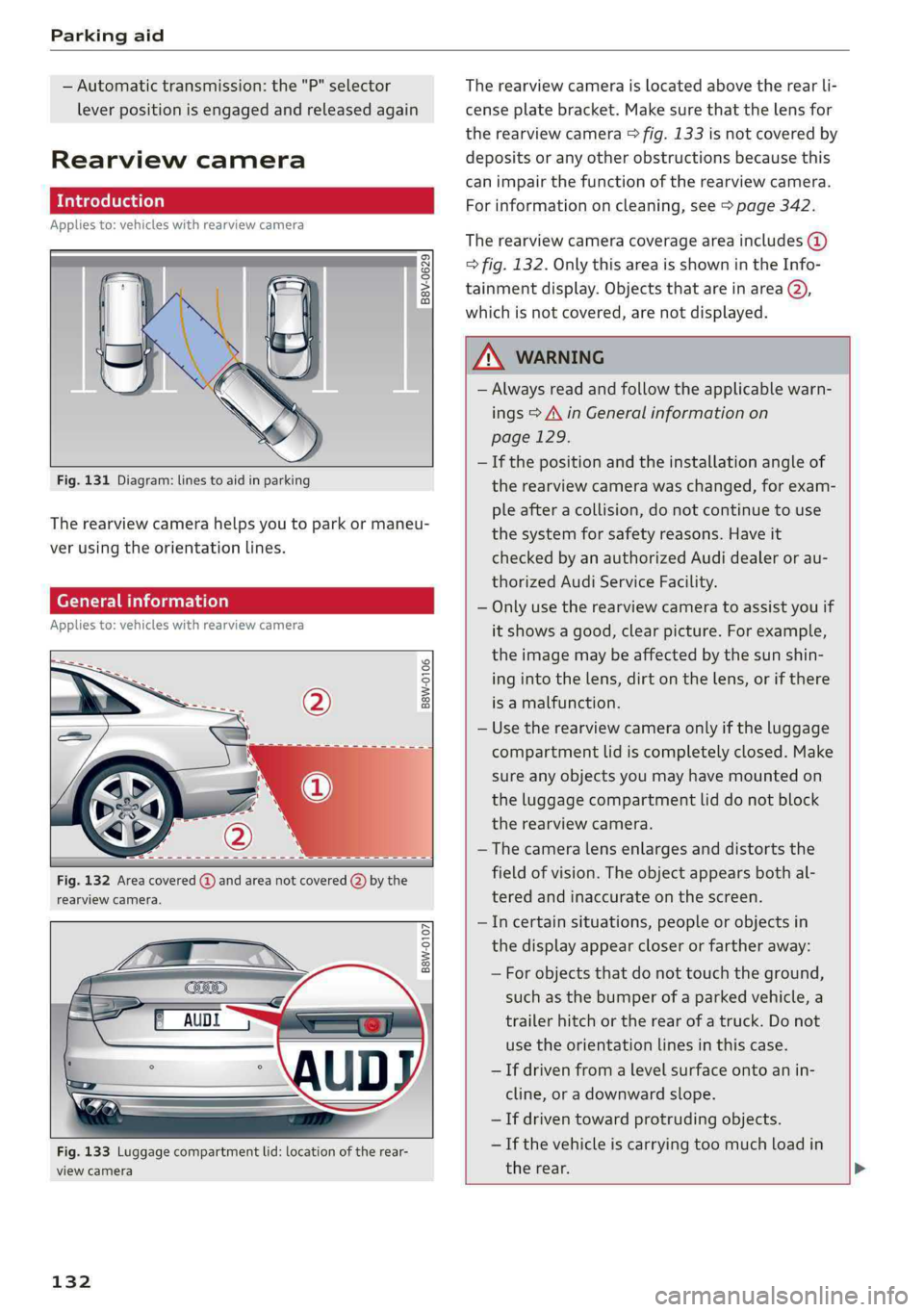
Fig.131Diagram:linestoaidinparking
Therearviewcamerahelpsyoutoparkormaneu-
verusingtheorientationlines.
Generalinformation
Appliesto:vehicleswithrearviewcamera
B8W-0106
Fig.132Areacovered@andareanotcovered(2)bythe
rearviewcamera.
B8W-0107
Fig.133Luggagecompartmentlid:locationoftherear-
viewcamera
132
Therearviewcameraislocatedabovetherearli-
censeplatebracket.Makesurethatthelensfor
therearviewcamera>fig.133isnotcoveredby
depositsoranyotherobstructionsbecausethis
can impairthefunctionoftherearviewcamera.
Forinformationoncleaning,see>page342.
Therearviewcameracoverageareaincludes(@)
>fig.132.OnlythisareaisshownintheInfo-
tainmentdisplay.ObjectsthatareinareaQ),
whichisnotcovered,arenotdisplayed.
ZAWARNING
—Alwaysreadandfollowtheapplicablewarn-
ings>A\inGeneralinformationon
page129.
—Ifthepositionandtheinstallationangleof
therearviewcamerawaschanged,forexam-
pleafteracollision,donotcontinuetouse
the
systemforsafetyreasons.Haveit
checkedby anauthorizedAudidealeror au-
thorizedAudiServiceFacility.
—Onlyusetherearviewcameratoassistyouif
itshowsagood,clearpicture.Forexample,
theimagemaybeaffectedbythesunshin-
ingintothelens,dirtonthelens,orifthere
isamalfunction.
—Usetherearviewcameraonlyiftheluggage
compartmentlidiscompletelyclosed.Make
sureanyobjectsyoumayhavemountedon
theluggagecompartmentliddonotblock
therearviewcamera.
— Thecameralensenlargesanddistortsthe
fieldofvision.Theobjectappearsbothal-
teredandinaccurateonthescreen.
—Incertainsituations,peopleor objectsin
thedisplayappearcloserorfartheraway:
—Forobjectsthatdonottouchtheground,
suchasthebumperofaparkedvehicle,a
trailerhitchortherearofatruck.Donot
use theorientationlinesinthiscase.
—Ifdrivenfromalevelsurfaceontoanin-
cline,oradownwardslope.
—Ifdriventowardprotrudingobjects.
—Ifthevehicleiscarryingtoomuchloadin
therear.
Page 142 of 392
IntelligentTechnology
Appliesto:allroad
Youshouldonlyswitchsportmode/offroad
modeonorswitchESC/ASRoffifyourdriving
abilitiesandroadconditionspermit.
—Thestabilizationfunctionislimitedwhen
sportmode/offroadmodeisswitchedon.
Thedrivingwheelscouldspinandthevehi-
clecouldswerve,especiallyonslickorslip-
peryroadsurfaces.
—Thereisnovehiclestabilizationwhen
ESC/ASRareswitchedoff.
Hilldescentassist
Appliesto:allroad
Hilldescentassistmakesitpossibletodrive
downahillataconstantspeed.
a
Q
gz
=& a
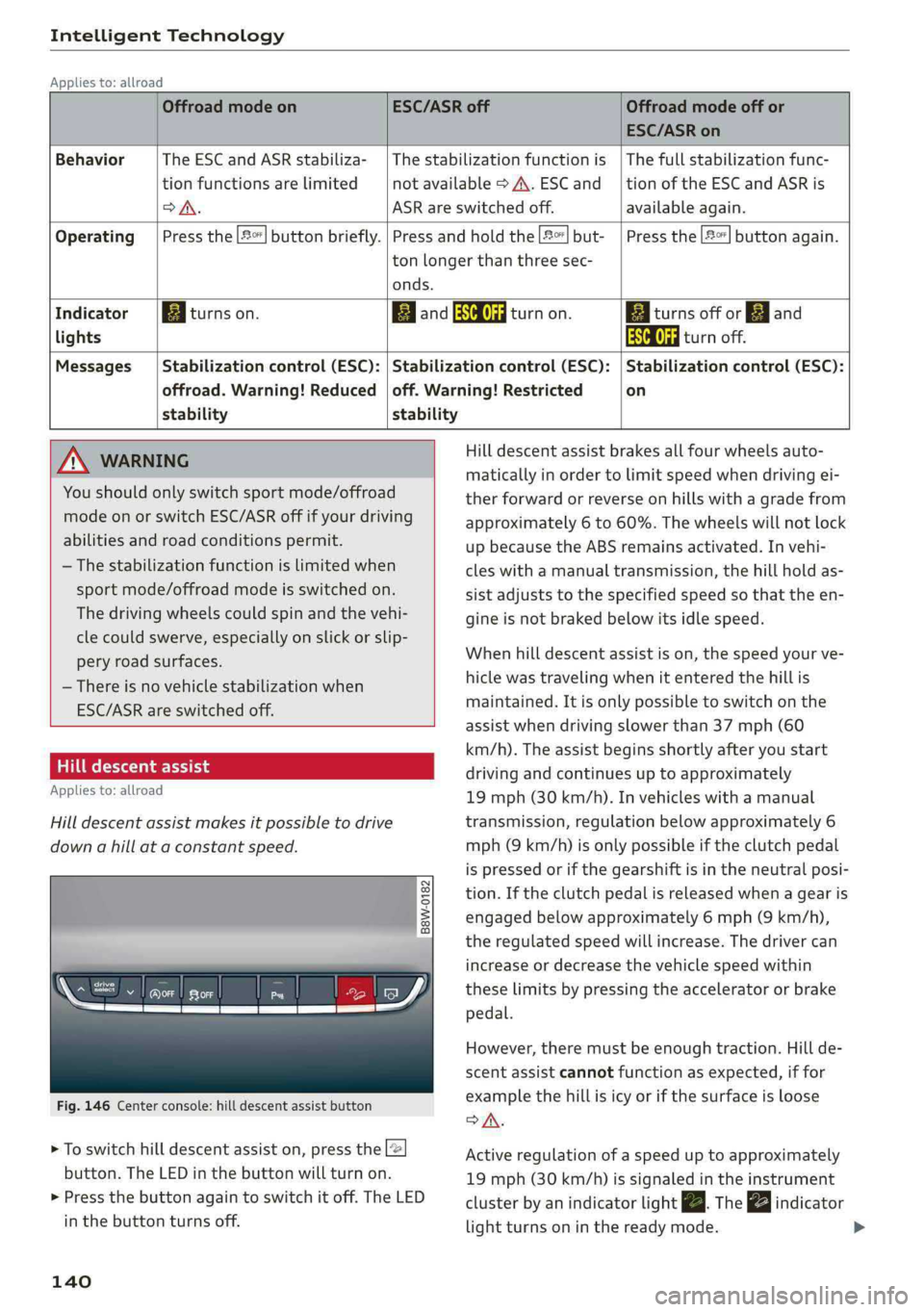
Fig.146Centerconsole:hilldescentassistbutton
>Toswitchhilldescentassiston,presstheL@
button.TheLEDinthebuttonwillturnon.
>»Pressthebuttonagaintoswitchitoff.The LED
inthe buttonturnsoff.
140
OffroadmodeonESC/ASRoffOffroadmodeoffor
ESC/ASRon
BehaviorThe ESC andASRstabiliza-|Thestabilizationfunctionis|Thefullstabilizationfunc-
tionfunctionsarelimitednotavailable>A\.ESCand__|tionoftheESCandASRis
DSA.ASRareswitchedoff.available again.
Operating|Pressthe|#°*]buttonbriefly.|Pressandholdthe||but-|Pressthe|#°"|buttonagain.
tonlongerthanthreesec-
onds.
IndicatorEgiturnson.ElandSaturnon.Eaiturnsoffor[gjand
lightsEaturnoff.
Messages|Stabilizationcontrol(ESC):|Stabilizationcontrol(ESC):|Stabilizationcontrol(ESC):
offroad.Warning!Reduced|off.Warning!Restrictedon
stability stability
AWARNINGHilldescentassistbrakesallfourwheelsauto-
maticallyinordertolimitspeedwhendrivingei-
therforwardorreverseonhillswithagradefrom
approximately6to60%.Thewheelswillnotlock
upbecausetheABSremainsactivated.Invehi-
cleswithamanualtransmission,thehillholdas-
sistadjuststothespecifiedspeedso thattheen-
gineisnot brakedbelowitsidlespeed.
Whenhilldescentassistison,thespeedyourve-
hiclewastravelingwhenitentered thehillis
maintained.Itisonlypossible toswitchonthe
assistwhendrivingslowerthan37mph(60
km/h).Theassistbeginsshortlyafteryoustart
drivingandcontinuesuptoapproximately
19mph(30km/h).Invehicleswithamanual
transmission,regulationbelowapproximately6
mph(9km/h)isonlypossibleiftheclutchpedal
ispressedorifthegearshiftisintheneutralposi-
tion.Iftheclutchpedalisreleasedwhenagearis
engagedbelowapproximately6mph(9km/h),
the regulatedspeedwillincrease.Thedrivercan
increaseordecreasethevehiclespeedwithin
theselimitsbypressingtheacceleratororbrake
pedal.
However,theremustbeenoughtraction.Hillde-
scentassistcannotfunctionasexpected,iffor
examplethehillisicyorifthesurfaceisloose
SA.
Activeregulationofaspeeduptoapproximately
19mph(30km/h)issignaledintheinstrument
clusterby anindicatorlightZBTheindicator
lightturnsoninthereadymode.
Page 147 of 392
8W0012721BG
MultiMediaInterface
MultiMediaInterface
Trafficsafety
information
AudirecommendsperformingcertainInfotain-
mentsystemfunctions,suchasenteringa desti-
nation,onlywhenthevehicleisstationary.Al-
waysbepreparedtostopoperating theInfotain-
mentsystemintheinterestofyoursafetyand
thesafety ofotherroadusers.
Z\WARNING
Onlyuse theInfotainmentsystemwhentraf-
ficconditionspermitandalwaysinawaythat
allows
youtomaintaincompletecontrolover
yourvehicle.
G@)Tips
Certainfunctionsarenotavailablewhiledriv-
ing.
Introduction
TheMultiMediaInterface,orMMIforshort,
combinesvarioussystemsforcommunication,
navigation*andentertainmentinyourAudi.You
canoperatetheMMIusingtheMMIcontrolpan-
el,themultifunctionsteeringwheelorthevoice
recognitionsystem*.
[RAH-8534)
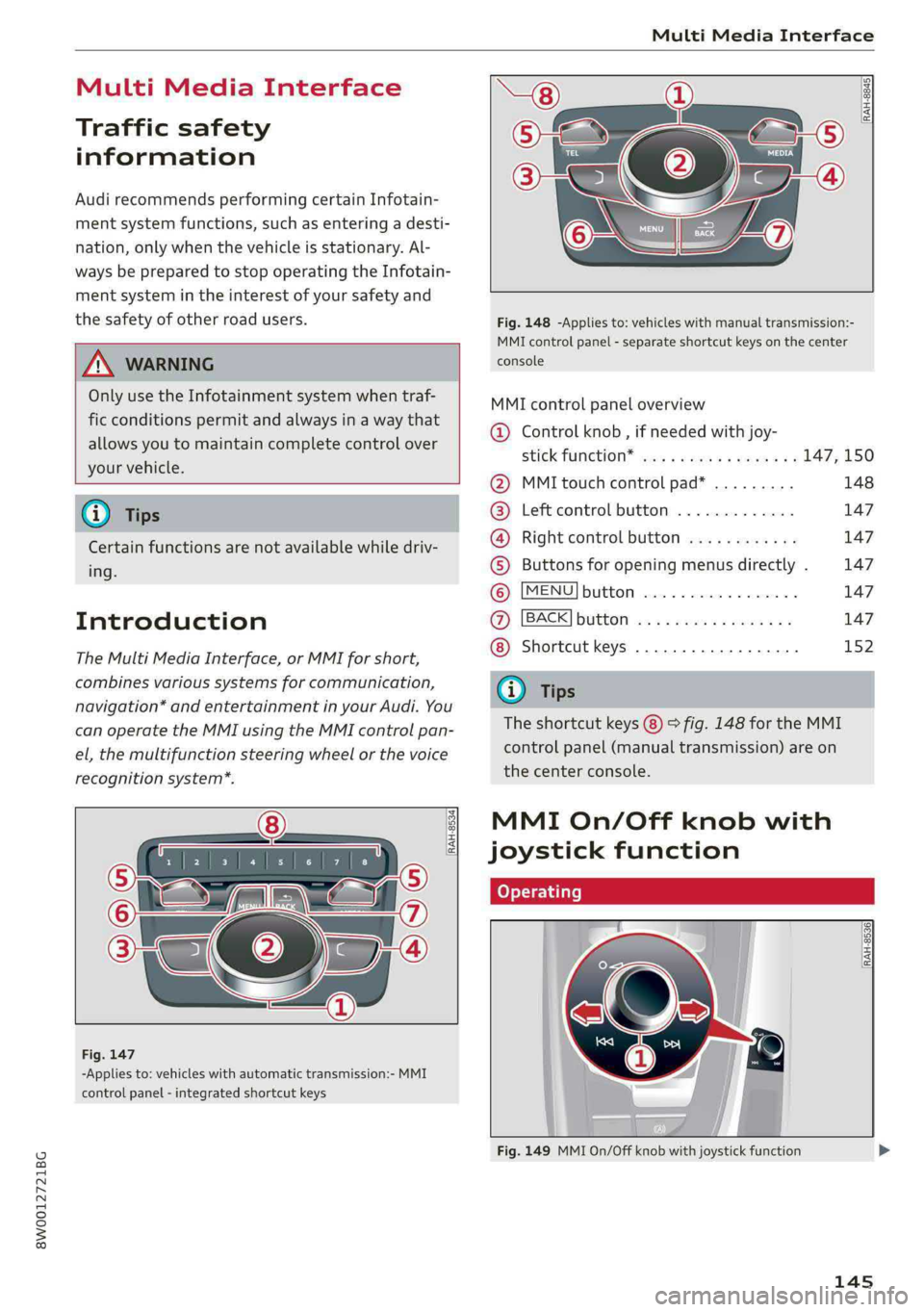
-Appliesto:vehicleswithautomatictransmission:-MMI
controlpanel-integratedshortcutkeys
RAH-8845|
Fig.148-Appliesto:vehicleswithmanualtransmission:-
MMIcontrolpanel-separateshortcutkeysonthecenter
console
MMIcontrolpaneloverview
@Controlknob,ifneededwithjoy-
StiCKTURCKION®cieseaeaswareswex147,150
@MMItouchcontrolpad*.........148
@®Leftcontrolbutton.............147
@®Rightcontrolbutton............147
©Buttonsforopeningmenusdirectly.147
©[MENU]button...............2.147
@[BACK]button............0....147
Shortcutkeys.............0000.152
@Tips
Theshortcutkeys@)©fig.148fortheMMI
controlpanel(manualtransmission)areon
the centerconsole.
MMIOn/Offknobwith
joystickfunction
tome|
[RAH-8536)
ee|7
a
Fig.149MMIOn/Offknobwithjoystickfunction
145
Page 154 of 392
![AUDI A4 2019 Owners Guide MultiMediaInterface
Requirement:theoptionsmenusymbol[+]must
bedisplayedintheInfotainmentsystemdisplay
>fig.161.
Openingandclosingtheoptionsmenu:push
thecontrolknobtotheright>fig.161toopen
theo](/img/6/57555/w960_57555-153.png "AUDI A4 2019 Owners Guide MultiMediaInterface
Requirement:theoptionsmenusymbol[+]must
bedisplayedintheInfotainmentsystemdisplay
>fig.161.
Openingandclosingtheoptionsmenu:push
thecontrolknobtotheright>fig.161toopen
theo")
MultiMediaInterface
Requirement:theoptionsmenusymbol[+]must
bedisplayedintheInfotainmentsystemdisplay
>fig.161.
Openingandclosingtheoptionsmenu:push
thecontrolknobtotheright>fig.161toopen
theoptionsmenu.Thenyoucanselectandcon-
firm
afunctionusingthecontrolknob.
Pressthe button@)9page145,fig.147
or>page145,fig.148to return tothefunction
onelevelup.
BACK
Shortcutkeys
Frequentlyusedradiostationscanbestoredon
theshortcutkeys.
Appliesto:vehicleswithautomatictransmission
TheshortcutkeysarelocatedontheMMIcontrol
panel@)9page145,fig. 147.
Appliesto:vehicleswithmanualtransmission
Theshortcutkeysarelocatedonthecenter con-
sole(8)>page145,fig.148.
Letter/numberspeller
Storingradiostations:turnthecontrolknobto
thedesiredradiostationinalist(forexample,a
radiostationintheFMstationlist).Pressand
holdthedesiredshortcutkeyforseveralseconds.
Theactiveradiostationwillbestoredonthe
shortcutkey.
Accessingaradiostation:presstheshortcutkey.
Displayingaradiostation:swipeyourfingerover
theshortcutkeys.
Deletingastoredradiostation:resetthe Short-
cut
keystothefactorydefaultsetting
=>page241.
(i)Tips
Itisnotpossibletoenternumbersusingthe
shortcutkeys.Usethenumberspeller
=page 152orMMItouch*>page148to en-
ternumbers.
(SEES,en
.ornrycm
RAH-8666
——e
=°
Crear4
PCaEL
ttle1e
as)
Fig.162Diagram:letter/numberspeller
Youcanenterletters,numbersandsymbolsin
theMMIusingtheletter/numberspeller.Thisop-
tionisavailablewhentheinputfield@isactive
>fig.162.
—Openingandclosingtheletter/numberspell-
er:movethecontrolknobup/downwhenthe
152
inputfieldisactive.Or:selecttherightcontrol
button>Openspeller/Closespeller.
—Enteringcharacters:turnthecontrolknobwith
thecharacterselection@0>fig.162tothede-
siredsymbol.Pressthecontrolknobtoconfirm
thecharacter.Yourinputisdisplayedinthein-
putfield@).Whenyouhaveenteredallofthe>
Page 177 of 392
8W0012721BG
Telephone
@)Note
ApplicabletoCanada
InCanada,operationofaZoneEnhancer,
suchasan AudiPhoneBox,issubjecttothe
followingrequirementsoftheInnovation,
ScienceandEconomicDevelopmentCanada
(ISED):
—ThisisaCONSUMERdevice.
—BEFOREUSE,youMUSTmeetallrequire-
mentssetoutinCPC-2-1-05.
—YouMUSToperatethisdevicewithapproved
antennas
andcablesasspecifiedbythe
manufacturer.AntennasMUSTNOTbein-
stalledwithin20cmofanyperson.
—YouMUSTceaseoperatingthisdeviceim-
mediatelyifrequestedbyISEDoralicensed
wirelessserviceprovider.
—WARNING:£911locationinformationmay
notbeprovidedormaybeinaccuratefor
callsservedbyusingthisdevice.
G)Tips
— TheAudiphoneboxisnotavailableinall
countries.Foradditionalinformation,con-
tactanauthorizedAudidealership.
—Placingthemobiledeviceinabagorprotec-
tivesleeveinsidetheAudiphoneboxcanin-
terferewiththeconnectiontotheexternal
antenna®*.
—Metallicobjectsinthe Audiphoneboxblock
thewirelesschargingofyourmobiledevice
andcallsmadeusingtheexteriorantenna’*.
— Thechargingtimeandtemperaturewillvary
dependingonthemobiledevicebeingused.
—Yourmobiledevicecanonlybechargedin
theAudiphoneboxwhentheignitionis
switchedon.
—Toreducetheriskofmalfunctions,make
surethemobiledeviceispositionedcorrect-
ly inthe Audiphonebox.
— Themaximumchargingoutputis5watts.
—Strongtransmissionqualitycannotbeguar-
anteedifmorethanonemobiledeviceisin
thebox.”
—Onlyonemobiledeviceatatimecanbe
chargedwirelesslyintheAudiphonebox.
—AudirecommendsusingAudiGenuineAc-
cessories.Audihasverifiedtheirreliability,
safety,andsuitability.
—YoucanpurchaseaUSBadapterfromanau-
thorizedAudidealerorauthorizedAudi
ServiceFacility,oratspecialtystores.
Usingthetelephone
Openingthetelephone
Appliesto:vehicleswithtelephone
Calllist
(2yeFavorites
©—PTicraxelay
EePrelia)1g
Taimessage(mobiledevice)
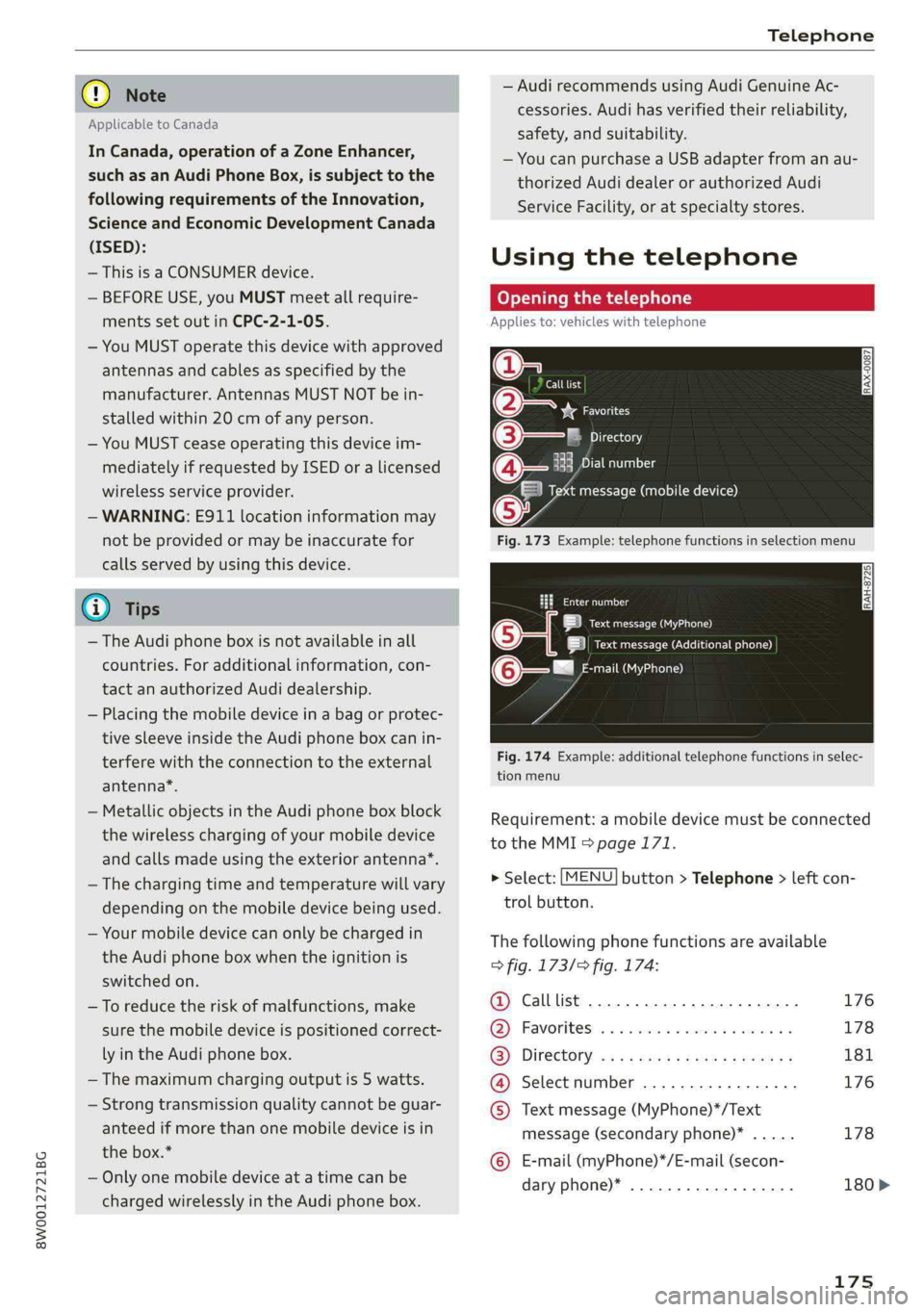
Fig.173Example:telephonefunctionsinselectionmenu
taeeal
LaueOa)
|ieectursecreueenen)
mail(MyPhone)@-—"
Fig.174Example:additionaltelephonefunctionsinselec-
tionmenu
Requirement:amobiledevicemustbeconnected
totheMMI>page171.
>Select:[MENU]button>Telephone>leftcon-
trolbutton.
Thefollowingphonefunctionsareavailable
>fig.173/>fig.174:
@Calllist.............0ceceee176
@®Favorites.........0.ceeeeeee178
(3)DIFECUOTYwcx xcaysxaessypeness181
@Selectnumber.................176
©Textmessage(MyPhone)*/Text
message(secondaryphone)*.....178
©E-mail(myPhone)*/E-mail(secon-
daryphone)*..................180>
175