ignition AUDI A4 2019 Workshop Manual
[x] Cancel search | Manufacturer: AUDI, Model Year: 2019, Model line: A4, Model: AUDI A4 2019Pages: 392, PDF Size: 99.53 MB
Page 119 of 392
![AUDI A4 2019 Workshop Manual 8W0012721BG
Assistsystems
SettingsintheInfotainmentsystem
Appliesto:vehicleswithAudipresense
>SelectintheInfotainmentsystem:[MENU]but-
ton>Vehicle> leftcontrolbutton>Driver
assistance>Audipre](/img/6/57555/w960_57555-118.png "AUDI A4 2019 Workshop Manual 8W0012721BG
Assistsystems
SettingsintheInfotainmentsystem
Appliesto:vehicleswithAudipresense
>SelectintheInfotainmentsystem:[MENU]but-
ton>Vehicle> leftcontrolbutton>Driver
assistance>Audipre")
8W0012721BG
Assistsystems
SettingsintheInfotainmentsystem
Appliesto:vehicleswithAudipresense
>SelectintheInfotainmentsystem:[MENU]but-
ton>Vehicle> leftcontrolbutton>Driver
assistance>Audipre sense.
TurnAudipresenseon/off-thepresensefunc-
tionscanbe turnedonandoff.
Ifthesystemisswitchedoff,itswitchesonagain
automaticallyoncetheignitionisswitchedon
again.
Prewarning-theearlywarningcan be switched
offorthepresensecity/frontwarningpointcan
be
set(Early/Medium/Late).
Setthewarningtimefortheearlywarningto
Earlyatfirst.Ifthiscausesundesiredearlywarn-
ingstoappear,thensetthewarningtimetoMe-
dium. TheLatewarningtimeshouldonlybeset
inspecialcircumstances.
@Tips
Yoursettings areautomaticallystoredandas-
signedtothevehiclekeybeingused.
Messages
Appliesto:vehicleswithAudipresense
Bhaudipresense:malfunction!Pleasecontact
Service
Thismessageappearswhenthepresensefunc-
tionisaffected.Forexample,thiscouldbe
causedbyafaultysensor.Drivetoanauthorized
AudidealerorauthorizedAudiServiceFacilityim-
mediatelytohavethemalfunctioncorrected.
Audipresense:currentlylimited.Sensor
viewlimitedduetosurroundings.Seeowner's
manual
Thismessageappearsiftheradarsensorand
cameraviewisobstructed,forexamplebyleaves,
snow,heavysprayordirt.Ifnecessary, cleanthe
sensorsandtheareaaroundthecamera
=>page103,fig.101or>page122,fig.122.
Audipresense:currentlylimited
ThismessageappearsiftheESCisrestrictedor
switchedoff,forexample.
Audipresense:currentlylimited.Seeown-
er'smanual
Thismessageappearswhenthereisatemporary
failureinasubsystem,suchastheESC.Ifthis
messageappearsrepeatedly,drivetoanauthor-
izedAudidealerorauthorizedAudiServiceFacili-
tytohave themalfunctioncorrected.
Audipresense:emergencybrakingsystem
off This
messageappearsifthepresensefunctions
areswitchedoffthroughtheInfotainmentsys-
temorifthesystemisnotready.
Audiactivelaneassist
Appliesto:vehicleswithAudiactivelaneassist
Active laneassist(lanedeparturewarning)de-
tectslanemarkerlineswithinthelimitsofthe
systemusingacamerainthewindshield.Ifyou
areapproachingadetectedlanemarkerlineand
itappearslikelythatyouwillleavethelane,the
systemwillwarnyouwithcorrectivesteering.
Youcanoverridethissteeringatanytime.Ifyou
passoveraline,thesteeringwheelwillvibrate
lightly.Inorderforthiswarningvibrationtooc-
cur,itmustfirstbeswitchedonintheInfotain-
mentsystem.Activelaneassistisreadyforoper-
ationwhenthelane markerlineisdetectedonat
leastonesideofthevehicle.
Thesystemisdesignedfordrivingonexpress-
waysandhighwaysandthereforeonlyactivates
atspeedsaboveapproximately40mph(65
km/h).
Appliesto:vehicleswithsideassist:ifyouacti-
vateaturnsignalwhenactivelaneassistisready
anditclassifiesalanechangeascriticalbecause
ofvehiclestravelingalongsideyouorapproach-
ingyou,therewillbenoticeablecorrectivesteer-
ingshortlybeforeyouleavethelane.Thiswillat-
tempttokeepyourvehicleinthelane.
Appliesto:vehicleswithoutsideassist:Whenthe
systemisready,itwillnotwarnyouifyouacti-
vateaturnsignalbeforecrossingthelanemarker>
117
Page 126 of 392

Assistsystems
fExitwarning— Theexitwarningsystemcanbeavailablefor
Appliesto:vehicleswithexitwarningsystemuptoapproximatelythreeminutesafterun-
lockingthevehicleandopeningthedooras
wellasafterswitchingofftheignition.Then
thedisplaysflashbrieflyandthesystem
switchesoff.
—Theexitwarningsystemdoesnotrespond
topeopleandcannotwarnyouaboutevery
typeofapproachingobjects,suchascyclists.
Alwaysmonitorthetrafficaswellastheve-
hicle'ssurroundingswithdirecteyecontact.
ZAWARNING
Theexitwarningsystemissubjecttolimita-
tionsandcannotwarnyoubeforeeveryim-
pendingcollision:
—Ifthevehicleistoowidefortheparking
spaceandcoveredbytheneighboringvehi-
cles.
B8W-0102
—Approachingobjectsorpeoplesuchascy-
clistsorskateboardersmaynot be detected
undercertaincircumstances.
Fig.124Door:ingstri:
osScieveee—The systemdoesnotreacttostationaryob-
jects.
—Theviewoftheradarsensorsmaybeim-
pairedbyleaves,snow,heavysprayordirt.
Clean
theareainfrontofthesensors
=page122,fig.122.
Whenthevehicleisstationary,theexitwarning
systemwarnsthepassengersofapossiblecolli-
sionwhenopeningthedoor.Withinthelimitsof
thesystem,thesystemmonitorstheareasbe-
hindandnexttothevehicleusingtheradarsen-
sors>page122,fig.122.MovingobjectsthatCG)N
areapproachingfrombehind,suchascars,areeto
detected©fig.123.Alsoreadtheinformationin>@inGeneral
informationonpage123.
Whenyouopenthedoor,thewarningstriponfpag
theaffecteddoorblinks>fig.124ifanotherG@)Tips
roaduserisdetectedandthesituationisclassi-=
fiedascritical.Thedisplayintheexteriormirror
ontheaffectedsideflashesatthesametime.If
thedoorisalreadyopen andanotherroaduseris
detectedandthesituationisclassifiedascritical,
thenthecorrespondingdisplaysturnon.
— Theexitwarningsystemisswitchedonand
offthroughthesideassist>page123.The
exitwarningindicatorsturnonduringthe
adjustmentprocess.
— Thedisplaybrightnessfortheexitwarning
systemcannotbeadjusted.
WARNING
—Alwayspayattentiontotrafficandtothe
areaaroundyourvehicle.Theexitwarning
systemdoesnotreplacetheattentionofthe
vehicleoccupants.Thevehicleoccupantsare
alwaysresponsibleforopeningthedoors
andexitingthevehicle.
124
Page 133 of 392
8W0012721BG
Parkingaid
=>A\inGeneralinformationonpage129,>@in
Generalinformationonpage129!
Visualwarnings
ThevisualwarningsintheInfotainmentsystem
displayhelpyoutodetectthecriticalvehiclearea
andtoestimatethedistancetoanobstacle
>fig.129.
Redsegmentsshowidentifiedobstaclesthatare
inyourvehicle'spath.Theredlinesmarktheex-
pecteddirectionoftravelaccordingtothesteer-
ing
angle.Awhitesegmentindicatesanidenti-
fiedobstaclethatisoutsideofthevehicle'spath.
Asyourvehiclecomesclosertotheobstacle,the
segmentsmoveclosertothevehicle.Thecolli-
sionareahasbeenreachedwhenthenexttolast
segmentisdisplayed.Obstaclesinthecollision
area,includingthoseoutsideofthevehicle's
path, areshowninred.Donotcontinuedriving
forwardorinreverse>A\inGeneralinformation
onpage129,>@inGeneralinformationon
page129!
@Tips
Ifthedistancetoanobstacleremainscon-
stant,thevolumeofthedistancewarning
graduallylowersafterafewsecondsuntilitis
muted(thisdoesnot applytothecontinuous
tone).Iftheobstaclecomescloserthanitwas
beforethesoundwasmuted,thetonewill
soundagain.Iftheobstaclebecomesfarther
awaythanitwasbeforethesoundwasmut-
ed,notonewillsound.Payattentiontothe
vehicle'ssurroundingswhenyoustartto
drive.
SyicealiaremliieRela
Appliesto:vehicleswithparkingsystemplus
z
s
S|
=aEs
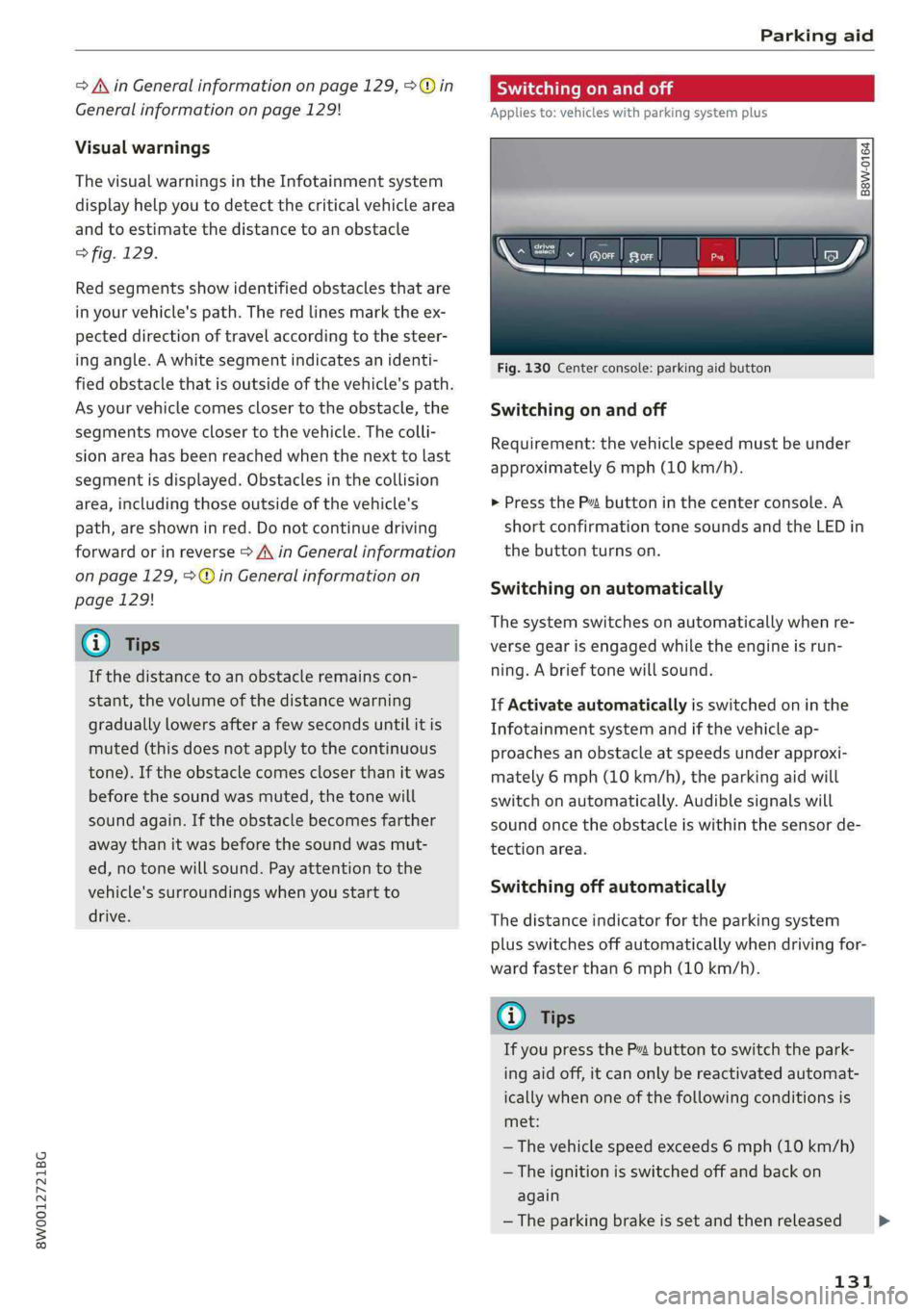
Fig.130Centerconsole:parkingaidbutton
Switchingonandoff
Requirement:thevehiclespeedmustbeunder
approximately6mph(10km/h).
>PresstheP™buttoninthecenterconsole.A
shortconfirmationtonesoundsandtheLEDin
thebuttonturnson.
Switchingonautomatically
The
systemswitchesonautomaticallywhenre-
versegearisengagedwhiletheengineisrun-
ning.Abrieftonewillsound.
IfActivateautomaticallyisswitchedoninthe
Infotainmentsystemandifthevehicleap-
proachesanobstacleatspeedsunderapproxi-
mately6mph(10km/h),theparkingaidwill
switchonautomatically.Audiblesignalswill
soundoncetheobstacleiswithinthesensorde-
tectionarea.
Switchingoffautomatically
Thedistanceindicatorfortheparkingsystem
plusswitchesoffautomaticallywhendrivingfor-
wardfasterthan6mph(10km/h).
(@)Tips
IfyoupressthePvbuttonto switchthepark-
ingaidoff,itcanonlybereactivatedautomat-
icallywhenoneofthefollowingconditionsis
met:
—Thevehiclespeedexceeds6mph(10km/h)
—Theignitionisswitchedoffandbackon
again
—Theparkingbrakeissetandthenreleased
131
>
Page 148 of 392
![AUDI A4 2019 Workshop Manual MultiMediaInterface
SwitchingtheMMIon/off:theMMIcanbe
switched
on/offmanually.
—Switchingonmanually:presstheOn/Offknob
@briefly>fig.149.Or:pressthe[MENU]but-
ton©>page145,fig.147or>page145,
fig.1](/img/6/57555/w960_57555-147.png "AUDI A4 2019 Workshop Manual MultiMediaInterface
SwitchingtheMMIon/off:theMMIcanbe
switched
on/offmanually.
—Switchingonmanually:presstheOn/Offknob
@briefly>fig.149.Or:pressthe[MENU]but-
ton©>page145,fig.147or>page145,
fig.1")
MultiMediaInterface
SwitchingtheMMIon/off:theMMIcanbe
switched
on/offmanually.
—Switchingonmanually:presstheOn/Offknob
@briefly>fig.149.Or:pressthe[MENU]but-
ton©>page145,fig.147or>page145,
fig.148,oroneofthebuttonstoopentheme-
nusdirectly©).
—Switchingoffmanually:pressandholdthe
On/Offknob@)>fig.149untiltheMMI
switchesoff.IftheMMIhasbeenswitchedoff
manually,itdoesnotswitchonagainautomati-
callythenexttimetheignitionisswitchedon.
Additionalfunctions:
—Adjustingthevolume:turntheOn/Offknob@
>fig.149.
—Muting:presstheOn/Offknob@)©fig.149
briefly.
—Selectingtheprevious/nextfunction(forex-
ample,aradiostation/track):presstheOn/Off
knob@)°fig.149brieflytowardtheleftKKor
rightDDI.
—Fastforwarding/rewinding(forexample
songs):pressandholdtheOn/Offknob@)
=>fig.149towardtheleftKdorrightPPI.
ZA\WARNING
Adjustthevolumeoftheaudiosystemsothat
signalsfromoutsidethevehicle,suchas po-
liceandfiresirens,canbeheardeasilyatall
times.
@Tips
TheMMIswitchesoffautomaticallyiftheen-
gineisnotrunningandthevehiclebatteryis
low.
Infotainmentsystem
display
Switchingon/off
>Pressthe[olbuttontoswitchtheInfotainment
systemonandoff.
WhentheMMIisswitchedonandthedisplayis
switchedoff,youcanoperatecertainfunctions
146
usingtheOn/OffknobwiththeMMIjoystick
function>page145.
Gi)Tips
Theremaybedelayswhenswitchingonthe
display.
Informationondisplayimages
Thedisplayversiondependsonvehicleequip-
ment.
Fig.150Display versionA
Fig.151Display versionB
Additionalcontent(such asalbumcoverandmap
material)isshownondisplayversionB,ifappli-
cable@)©fig.151.Becausetheothercontent
shownonthedisplaysisnearlyidenticalbetween
thetwoversions,thismanualwillprimarilyde-
scribedisplayversionA.
Page 166 of 392
Voicerecognitionsystem
Voicerecognitionsystem
Operating
Appliesto:vehicleswithvoicerecognitionsystem
YoucanoperatemanyInfotainmentfunctions
convenientlybyspeaking.
Requirement:theignitionandtheMMImustbe
switched
on>page145.Asystemlanguagesup-
portedbythevoicerecognitionsystemmustbe
set.Theremustbenophonecallsinprogressand
theparkingaidmustnotbeactive.
>Switchingon:pressthe[%]button@
=>page17,fig.11or>page18,fig.13briefly
onthemultifunctionsteeringwheelandsay
thedesiredcommandaftertheBeep.
>Switchingoff:pressandholdthe|™]button.
Or:pressthe|5|button.
>Pausing:saythecommandPause.Toresume,
pressthe|]button.
>Correcting:saythecommandCorrection.Or:
simplysayanewcommandduringanan-
nouncement>page241.
Inputassistance
Thesystemguidesyouthroughtheinputwith
visualandaudiofeedback.
—Visualinputassistance:afterswitchingon
voicerecognition,adisplaywithaselectionof
possiblecommandsappears.Thiscommand
displaycanbe switchedonoroff.Select:
MENU]button>Settings>leftcontrolbutton
>MMIsettings>Speechdialogsystem.
—Audioinputassistance: tohavethepossible
commandsread,turnthevoicerecognitionsys-
temonandsayHelp.
Forthesystemtounderstandyou:
Speakclearlyanddistinctly atanormalvolume.
Speaklouderwhendrivingfaster.
Emphasizethewordsinthecommandsevenly
anddonotleavelongpauses.
Closethedoors,thewindows,andthesunroof*
toreducebackgroundnoise.Makesurethatpas-
sengersarenotspeakingwhenyouaregivinga
voicecommand.
164
Donotdirecttheventstowardthehands-freemi-
crophone,whichisintheroofheadlinernearthe
frontinteriorlights.
Onlyusethesystemfromthedriver'sseatbe-
causethehands-freemicrophoneisdirectedto-
wardthatseat.
Additionalsettings
See>page241,Speechdialogsystem.
ZAWARNING
—Directyourfullattentiontodriving.Asthe
driver,youhavecompleteresponsibilityfor
safetyintraffic.Onlyusethefunctionsin
suchawaythatyoualwaysmaintaincom-
pletecontroloveryourvehicleinalltraffic
situations.
—Donotuse thevoicerecognitionsystemin
emergenciesbecauseyourvoicemaychange
instressfulsituations.Thesystemmaytake
longertodialthenumberormaynotbe
abletodialitatall.Dialtheemergency
numbermanually.
Gi)Tips
— Thedialogpauseswhenthereisanincom-
ingphonecallandwillcontinueifyouig-
norethecall.Thedialogendsifyouanswer
thecall.
—Youcanselectan iteminthelistusingei-
therthevoicerecognitionsystemorthe
controlknob.
Commandoverview
information
Appliesto:vehicleswithvoicerecognitionsystem
Thefollowingoverviewsdescribethecommands
thatcan beusedtooperatetheMMIusingthe
voicerecognitionsystem.
Alternativecommandsareseparatedusinga“/”,
forexamplesay:Telephone/(or)Navigation/
(or)Radio.
Sequencesofcommandsusedtoperformanac-
tionareidentifiedwitha “>”,forexamplesay:
Enteraddress>(then)Entercountry/state.>
Page 171 of 392
8W0012721BG
Voicerecognitionsystem
Appliesto:vehicleswithvoicerecognitionsystem
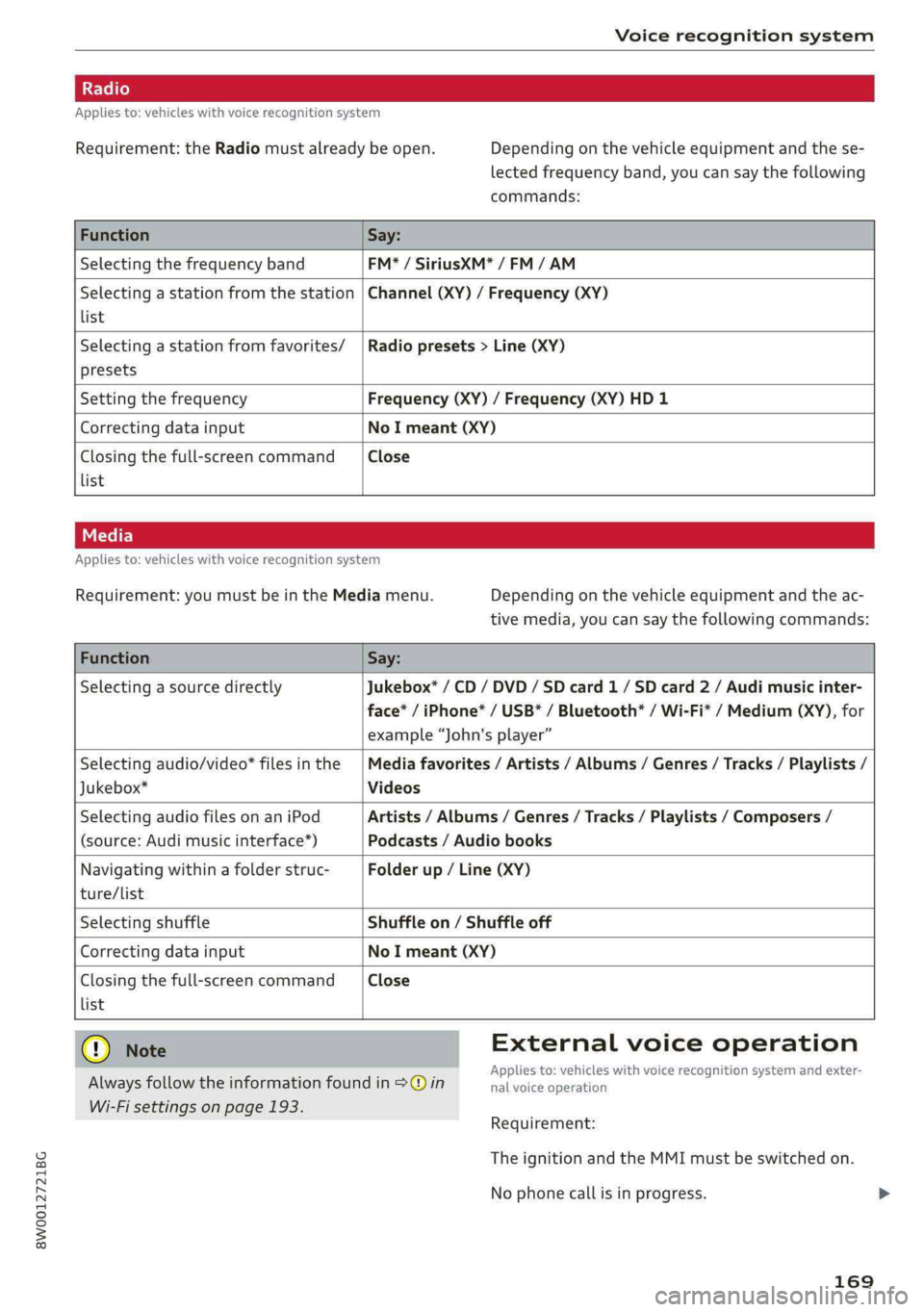
Requirement:theRadiomustalreadybeopen.Depending onthevehicleequipmentandthese-
lectedfrequencyband,youcansaythefollowing
commands:
FunctionSay:
SelectingthefrequencybandFM*/SiriusXM*/FM/AM
Selectingastationfromthestation|Channel(XY)/Frequency(XY)
list
Selectingastationfromfavorites/|Radiopresets>Line(XY)
presets
SettingthefrequencyFrequency(XY)/Frequency(XY)HD1
CorrectingdatainputNoImeant(XY)
Closingthefull-screencommandClose
list
Appliesto:vehicleswithvoicerecognitionsystem
Requirement:youmustbeintheMediamenu.Depending onthevehicleequipmentandtheac-
tivemedia,youcansaythefollowingcommands:
FunctionSay:
SelectingasourcedirectlyJukebox*/CD/DVD/SDcard1/ SDcard2/Audimusicinter-
face*/iPhone*/USB*/Bluetooth®/Wi-Fi*/Medium(XY),for
example“John'splayer”
Selectingaudio/video*filesinthe|Mediafavorites/Artists/Albums/Genres/Tracks/Playlists/
Jukebox*Videos
SelectingaudiofilesonaniPodArtists/Albums/Genres/Tracks/Playlists/Composers/
(source:Audimusicinterface*)Podcasts/Audiobooks
Navigatingwithinafolderstruc-Folderup/Line(XY)
ture/list
SelectingshuffleShuffleon/Shuffleoff
CorrectingdatainputNoImeant(XY)
Closingthefull-screencommandClose
list
Q)NoteExternalvoiceoperation
Alwaysfollowtheinformationfoundin>@inieacaeiskINNBICETSCagnHGnSySternarilexter>
Wi-Fisettingsonpage193.
Requirement:
TheignitionandtheMMImustbeswitchedon.
Nophonecallisinprogress.
169
Page 173 of 392

8W0012721BG
Telephone
Telephone
Introduction
Appliesto:vehicleswithtelephone
Tomakephonecallsinyourvehicleusingthe
MMI,connectyourcellphonetotheMMIvia
Bluetooth.
Handsfree
Afteryouhaveconnectedyourmobiledevice to
theMMIviaBluetooth,youcan use thehandsfree
systemandoperatetelephonefunctionsthrough
yourMMI.Youcanmakecallsusingtheantenna
onyourmobiledevice.
Withthe Audiphonebox’,callsaremadeusing
theexteriorantennaonthevehicle.Usingtheex-
ternalantennahelpswhenthereisalowsignal
andalsoprovidesbetterreceptionquality
=>page174.
ZAWARNING
—Medicalexpertswarnthatmobiledevices
caninterferewiththefunctionofpacemak-
ers.Alwaysmaintainaminimumdistanceof
about8inches(20cm)betweenthecell
phoneantennaandthepacemaker.
—Donotcarrythemobiledeviceinapocket
directlyoverthepacemakerwhenthe
phoneisswitchedon.
—Switchthemobiledeviceoffimmediately
ifyoususpectitmaybeinterferingwith
thepacemaker.
—Donotuse thevoicerecognitionsystem*
=>page164inemergenciesbecauseyour
voicemaychangeinstressfulsituations.The
systemmaytakelongertodialthenumber
ormaynotbeabletodialitatall.Dialthe
emergencynumbermanually.
—Switchyourmobiledeviceoffinareaswhere
thereisariskofanexplosion.Theseloca-
tionsarenotalwaysclearlymarked.This
mayincludegasstations,fuelandchemical
storagefacilitiesortransportvehicles,orlo-
cationswherefuelvapors(such aspropane
orgasolinevaporinvehiclesorbuildings),
chemicalsorlargequantitiesofdustparti-
cles(suchasflour,sawdustormetal)may
bepresentintheair.Thisalsoapplies toall
otherlocationswhereyouwouldnormally
turnyourvehicleengineoff.
— Thedemandsoftrafficrequireyourfullat-
tention.Alwaysreadthechapter
=>page145,Trafficsafetyinformation.
@)Note
Alwaysfollowtheinformationfoundin>@in
Wi-Fisettingsonpage193.
@)Tips
—TheBluetoothconnectionrangeislimited
toinsidethevehicle.Itcanalsobeaffected
bylocalconditionsandinterferencewith
otherdevices.
—TolearnwhichBluetoothconnectionsand
whichofthefunctionsinyourmobiledevice
aresupported,checkwithyourmobilede-
viceserviceproviderorthedatabaseformo-
biledevicesatwww.audiusa.com/
bluetooth.
Setup
ConnectingacellphoneusingBluetooth
Appliesto:vehicleswithtelephone
Naonro)ated
DoesthisPINmatchtheoneon your
Bluetoothdevice?PIN:967536
Fig.171DisplayingthePINforenteringinthecellphone
Requirement
Thevehiclemustbestationaryandtheignition
mustbe switchedon.
TheBluetoothsettingsmustbeopenonyour
mobiledeviceduringtheconnectionsetup.
TheBluetoothfunctionandvisibilityoftheMMI
=page243andmobiledevicemustbe switched
on.
171
Page 174 of 392
![AUDI A4 2019 Workshop Manual Telephone
Themobiledevicethatwillbeconnectedmust
not beconnectedtoanyotherBluetoothdevice.
TheMMImustnotbeconnectedtoamobilede-
vice.
Connectingamobiledevice
>Select:[MENU]button>Telephone>Conne](/img/6/57555/w960_57555-173.png "AUDI A4 2019 Workshop Manual Telephone
Themobiledevicethatwillbeconnectedmust
not beconnectedtoanyotherBluetoothdevice.
TheMMImustnotbeconnectedtoamobilede-
vice.
Connectingamobiledevice
>Select:[MENU]button>Telephone>Conne")
Telephone
Themobiledevicethatwillbeconnectedmust
not beconnectedtoanyotherBluetoothdevice.
TheMMImustnotbeconnectedtoamobilede-
vice.
Connectingamobiledevice
>Select:[MENU]button>Telephone>Connect
mobiledevice>Findnewdevices>Next.The
availableBluetoothdevicesareshownintheIn-
fotainmentsystemdisplay.Orselect:[MENU
button>Settings>leftcontrolbutton>MMI
settings>Connectionmanager©page241.
> Selectandconfirmthedesiredcellphonefrom
thelistofdisplayedBluetoothdevices.
>TheMMIgeneratesaPINfortheconnection
setup>fig.171.
>»SelectandconfirmYes.
>EnterthePINforconnectingonyourcell
phone.Or:whenthePINisdisplayedonyour
cellphone,confirmthePINonyourcellphone
andintheMMI.Thetimeallowedforentering
thePINislimitedtoapproximately30seconds.
>Payattentiontoanyadditionalsystemprompts
displayedonyourcellphone,forexampleifthe
systemshouldconnectautomaticallyinthefu-
ture.Dependingonthecellphone,youmay
havetoconfirmdownloadingthedirectorysep-
arately.
Afterconnectingsuccessfully
Afterconnectingsuccessfully,informationabout
theconnectedprofileswillappear.Youcanalso
changetheprofileslater.Select:[MENU]button>
Settings> leftcontrolbutton>MMIsettings>
Connectionmanager>page241.
Inaddition,thecellphonecontactsareautomat-
icallyloadedintheMMIdirectory.Thisprocess
cantakeseveralminutes,dependingonthenum-
berofcontacts.
Youcanalsomakeyourconnectedcellphonethe
defaultphonebyselectingSetasdefaulttele-
phoneintheConnectionmanager=page243.
@)Note
Alwaysfollowtheinformationfoundin>@in
Wi-Fisettingsonpage193.
172
G)Tips
— MakingphonecallsthroughtheMMIisonly
possibleusingtheHandsfreeBluetoothpro-
file.
—Youcanapplyadditionalsettingstocon-
nectedmobiledevicesusingtheConnection
manager>page241.
—YoucanalsosearchfortheMMIon yourmo-
biledeviceusingtheBluetoothdevice
search.
—Youonlyhavetopairyourdeviceonetime.
Bluetoothdevicesthatarealreadypaired
automaticallyconnecttotheMMIwhenthe
Bluetooth
functionisswitchedon,when
theyarewithinrange,andwhentheignition
isswitchedon.Thelastconnectedmobile
deviceisgivenfirstpriority.
—AuthorizingtheMMIconnectiononyour
mobiledevicewillmakeitpossibletocon-
nectautomatically.
—Payattentiontoanysystempromptsdis-
playedonyourcellphone,forexampleif
thesystemshouldconnectautomaticallyin
thefuture.Depending onthecellphone,
youmayalsoneedtodownloadthedirecto-
ryandconfirmaccesstoyourtextmessages
separately.
—Whenleavingthevehicle,theBluetooth
connectiontothemobiledevicewillauto-
maticallydisconnect.Depending onyour
mobiledevice,phonecallsinprogressmay
beautomaticallyredirectedfromtheMMI
toyourmobiledeviceso thatyoucancon-
tinuethecallonyourphone.
—Youcanobtainmoreinformationfromyour
mobiledeviceserviceproviderorfromyour
mobiledeviceuserguide. Forinformation
onusingthetelephone,visitwww.audiusa.
com/bluetoothorcontactanauthorizedAu-
didealerorauthorizedAudiServiceFacility.
—Appliesto:vehicleswithoutsecondary
phone:Severalcellphonescanbepairedto
theMMI,butonlyonecellphonecanbeac-
tivelyconnectedtotheMMI.
Page 175 of 392
8W0012721BG
Telephone
—Appliesto:vehicleswithoutsecondary
phone:IfaBluetoothdeviceisalreadycon-
nectedtotheMMI,itwillbedisconnected
whenanotherdeviceconnectstotheMMI.
Operatingtwomobiledevicesthroughthe
ie
YoucanconnecttwocellphonestotheMMI,for
exampleyourbusinesscellphoneastheprimary
phoneandyourprivatecellphoneasthesecon-
daryphone.You canbereachedinyourvehicle
throughbothcellphones.
Thefirstconnectedcellphoneisdisplayedasthe
primaryphoneintheMMI.Thesecondcellphone
isconnectedasthesecondaryphone.
Thedirectoryfromtheconnectedprimaryphone
willalways bedisplayed.Ifyouwouldliketouse
thedirectoryfromthesecondary phone, you
mustswitchtheprimaryandsecondaryphone
=>page173.
Connectingacellphoneastheprimary
phone
ConnectyourcellphonetotheMMIviaBlue-
tooth.
Thefirstconnectedcellphoneisdisplayed
asthePrimaryphoneintheMMI.
See>page171,Connectingacellphoneusing
Bluetooth.
Connectingacellphoneasthesecondary
phone
Requirement:acellphonemustbeconnectedto
theMMIastheprimaryphone.
Select:[MENU]button>Telephone>rightcon-
trolbutton>Connectsecondarytelephone.
See>page171,Connectingacellphoneusing
Bluetooth.
Example:youhaveconnectedyourbusinesscell
phonetotheMMIastheprimaryphoneandyour
privatecellphoneasthesecondaryphone.To be
abletocallcontactsfromyourprivatecellphone
directory,youmustswitchtheprimaryandsec-
ondaryphone,sincethedirectoryfromthepri-
maryphoneisalwaysdisplayed.
Switchingtheprimaryandsecondaryphone
Requirement:aprimaryphoneandasecondary
phonemustbe connected.
Switchprimaryandsecond.phone:select:
MENU]button>Telephone>rightcontrolbut-
ton>Switchprimaryandsecond.phone.
@Tips
—Pleasenotethatonlythedirectoryfromthe
primaryphoneisalwaysdisplayed.
—Youcanseeifacellphoneisconnectedas
theprimaryphoneorsecondaryphonein
theConnectionmanager>page241.Or:
thedevicenameoftheconnectedprimary
phoneisshownintheTelephonemenu
(suchasmyPhone).
—Iftheprimaryphonedoesnotconnectauto-
matically totheMMIwhentheignitionis
switchedon, forexamplebecauseitisout
ofthevehiclerangeortheBluetoothfunc-
tionisswitchedoff,thenapreviously paired
secondaryphoneisautomaticallyconnected
astheprimaryphone.
—Youcansendandreceivemessagesonyour
primaryphoneaswellasonyoursecondary
phone>page175,fig. 173.You donot
needtoswitchyourprimaryphoneandsec-
ondaryphoneforthis.
—Youcanalsomakeyourconnectedcell
phonethedefaultphonebyselectingSetas
defaulttelephoneintheConnectionman-
ager>page243.
173
Page 177 of 392
8W0012721BG
Telephone
@)Note
ApplicabletoCanada
InCanada,operationofaZoneEnhancer,
suchasan AudiPhoneBox,issubjecttothe
followingrequirementsoftheInnovation,
ScienceandEconomicDevelopmentCanada
(ISED):
—ThisisaCONSUMERdevice.
—BEFOREUSE,youMUSTmeetallrequire-
mentssetoutinCPC-2-1-05.
—YouMUSToperatethisdevicewithapproved
antennas
andcablesasspecifiedbythe
manufacturer.AntennasMUSTNOTbein-
stalledwithin20cmofanyperson.
—YouMUSTceaseoperatingthisdeviceim-
mediatelyifrequestedbyISEDoralicensed
wirelessserviceprovider.
—WARNING:£911locationinformationmay
notbeprovidedormaybeinaccuratefor
callsservedbyusingthisdevice.
G)Tips
— TheAudiphoneboxisnotavailableinall
countries.Foradditionalinformation,con-
tactanauthorizedAudidealership.
—Placingthemobiledeviceinabagorprotec-
tivesleeveinsidetheAudiphoneboxcanin-
terferewiththeconnectiontotheexternal
antenna®*.
—Metallicobjectsinthe Audiphoneboxblock
thewirelesschargingofyourmobiledevice
andcallsmadeusingtheexteriorantenna’*.
— Thechargingtimeandtemperaturewillvary
dependingonthemobiledevicebeingused.
—Yourmobiledevicecanonlybechargedin
theAudiphoneboxwhentheignitionis
switchedon.
—Toreducetheriskofmalfunctions,make
surethemobiledeviceispositionedcorrect-
ly inthe Audiphonebox.
— Themaximumchargingoutputis5watts.
—Strongtransmissionqualitycannotbeguar-
anteedifmorethanonemobiledeviceisin
thebox.”
—Onlyonemobiledeviceatatimecanbe
chargedwirelesslyintheAudiphonebox.
—AudirecommendsusingAudiGenuineAc-
cessories.Audihasverifiedtheirreliability,
safety,andsuitability.
—YoucanpurchaseaUSBadapterfromanau-
thorizedAudidealerorauthorizedAudi
ServiceFacility,oratspecialtystores.
Usingthetelephone
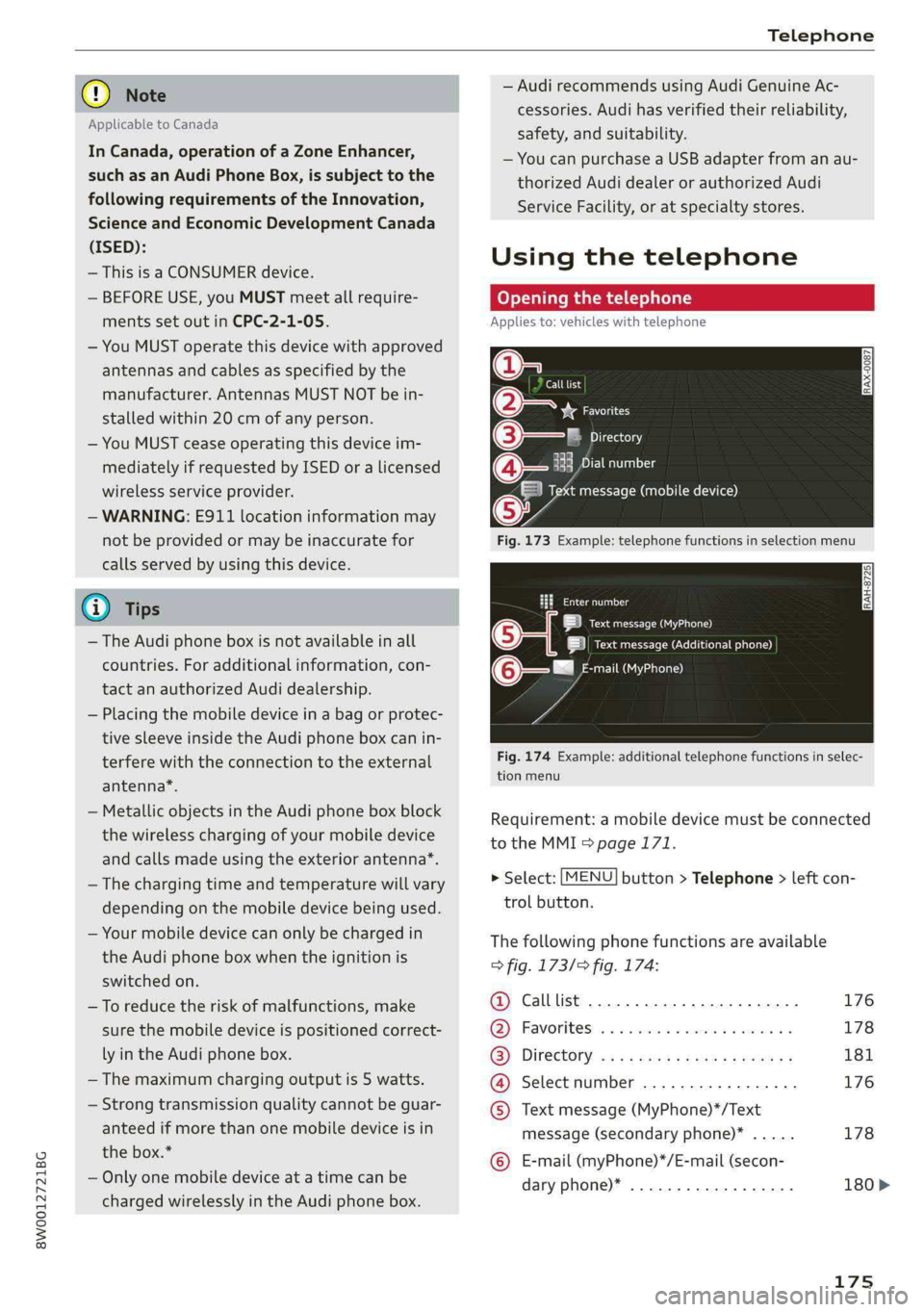
Openingthetelephone
Appliesto:vehicleswithtelephone
Calllist
(2yeFavorites
©—PTicraxelay
EePrelia)1g
Taimessage(mobiledevice)
Fig.173Example:telephonefunctionsinselectionmenu
taeeal
LaueOa)
|ieectursecreueenen)
mail(MyPhone)@-—"
Fig.174Example:additionaltelephonefunctionsinselec-
tionmenu
Requirement:amobiledevicemustbeconnected
totheMMI>page171.
>Select:[MENU]button>Telephone>leftcon-
trolbutton.
Thefollowingphonefunctionsareavailable
>fig.173/>fig.174:
@Calllist.............0ceceee176
@®Favorites.........0.ceeeeeee178
(3)DIFECUOTYwcx xcaysxaessypeness181
@Selectnumber.................176
©Textmessage(MyPhone)*/Text
message(secondaryphone)*.....178
©E-mail(myPhone)*/E-mail(secon-
daryphone)*..................180>
175