phone AUDI A4 2019 Workshop Manual
[x] Cancel search | Manufacturer: AUDI, Model Year: 2019, Model line: A4, Model: AUDI A4 2019Pages: 392, PDF Size: 99.53 MB
Page 235 of 392
8W0012721BG
Media
Rewind/Fastforward
Turnthecontrolknobtotheleftor totheright.
Or:moveyourfingeracrosstheMMItouch
controlpad*fromlefttoright.
Shuffle)
Withthefunctionswitchedon,allfilesinthe
playlistareplayedandshowninrandomorder.
Repeattrack!)
Whenthefunctionisswitchedon ¥,thecurrent
trackrepeats.
Repeat*
Requirement:aniPod/iPhone*mustbeselected
asthemediasourceintheAudimusicinterface
=page229,Accessingmedia.
—Track:thecurrenttrackwillberepeated.
—Folder:thetracksinthecurrentfolderare
playedcontinuouslyinaloop.
—Off:thefunctionisswitchedoff.
Backto'Playback'
Theoptionsmenuisclosed.Thetrackcurrently
playingappearsintheplaylist.
Playsimilarmusic*
Thetrackcurrentlyplayingisquicklyanalyzedfor
featuressuchasartist,genres,mood,andbeat,
andasmartplaylistwithsimilartrackswillbe
shown.
Playmore...
Asmartplaylistisshownbasedonthetrackcur-
rentlyplaying.Youcanselectbetweenaplaylist
withmoretracksbythisartist,fromthisalbum
orofthisgenre.
Copytojukebox*
See>page222,AddingfilestotheJukebox.
)Thefunctionautomaticallyswitchesoffwhenthesourceis
changed.
2)Thisfunctionisnotavailableforallcellphones.
Setasringtone*”
Requirement:amobiledevicemustbeconnected
totheMMI.Thetrackcurrentlyplayingmustbe
intheJukebox*>page222.
Theselectedtrackwillbeusedastheringtone
forincomingcalls.
Gracenoteonlinedatabase*
Requirement:theMMImustbeconnectedtothe
Internet.
Dependingonavailability,variousinformation
willloadaboutthetrackcurrentlyplayingwhen
thisfunctionisswitchedon.
Favorites
See>page232.
Additionaloptions
Requirement:thevehiclemustbestationaryand
avideofile*oraDVD*mustbeplaying.
Parentalcontrol*
PlaybackofvideoDVDscanberestrictedusing
parentalcontrol.
Enterthepasswordforparentalcontrol.Pass-
wordsetatthefactory:1234.Youhavethefol-
lowingoptions:
—Protectionlevel:selectandconfirmtheprotec-
tionlevel(forexample,Level5).Eightdifferent
protectionlevelscanbesetforparentalcon-
trol.Ifyousettheparentalcontrollevelat Lev-
el 5,allDVDsfromlevels1-5canbeplayed.
VideoDVDswithahigherlevelwillnotplay.Se-
lectUnrestrictedtoremovealloftherestric-
tions.
—Changepassword:editthecurrentpassword.
Switchtofullscreen
Thevideoimageisdisplayed.Turnthecontrol
knobtodisplaytheplaylist.Or:pressthe[BACK
button.
233
Page 239 of 392
8W0012721BG
Media
ProblemSolution
Audimusicinterface:themobile
deviceisnotrecognizedasa
source.
Formanycellphonesormobiledevices,playbackisnotpossible
when
thebatterylevelistoolow(lessthan5%ofitscapacity).
ThemobiledevicewillonlyberecognizedasasourceintheMMI
afterconnectingifthebatterychargeissufficient.
Audimusicinterface:malfunc-
tionsduringaudioplayback
throughaniPod/iPhone.
TheBluetoothaudioplayerfunctionisswitchedon.Switchthis
functionoff>page243whenyouarenotusingtheBluetoothau-
dioplayer.
Audimusicinterface:contents
thatarechangedonamobilede-
viceconnectedtotheAudimusic
interface®)arenotdisplayedin
themediacenter.
Reset theMediasettingstothefactorydefaultsettings
>page241.
AUXinput:thereisstaticwhen
connectinganddisconnectingthe
AUXconnectioncable.
Whenconnectinganddisconnecting,theExternalaudioplayer
sourceisalreadyselected.Beforeconnectingordisconnectingthe
mobiledevice,eithermutethedevice(see>page245)orswitch
toadifferentaudiosource(forexample>page215,Openingthe
radio).
Bluetoothaudioplayer*/Wi-Fi
audioplayer*:audioplaybackin-
terference.
Onlyoneinterfaceshouldbeactivelyusedatatimetoensure
problem-freeplayback.
Jukebox®*:tracks ontheimported
playlistaregrayedout.
Whenimportingplaylists,allofthefilesthemselvesmustbeim-
ported.
Jukebox*:importedtrackscannot
beplayedorfound.
Ifyoucannotfindimportedtracksinthemediacenter,theymay
notbesupported.Onlycopysupportedfiles>page235tothe
Jukebox.
Onlinemedia*:connectionfailed
betweentheMMIandthemyAudi
app.
ToestablishaconnectiontotheMMI,theMMIconnectionswitch
mustbe switchedoninthemyAudiappstatusscreen.
Bluetoothaudioplayer*:interfer-
encewithtrackdisplayandaudio
playback.
PlaybackinterferencecanoccurwhenusingtheBluetoothaudio
playerifamusicplayerappfromathirdpartyproviderisopen.
Audi
recommendsusingtheintegratedmediaplayeronyourBlue-
toothdevice(suchasasmartphone).
Wi-Fihotspot*:yourWi-Fidevice
isdisconnectedfromtheWi-Fi
hotspot.
Makesurethenetworkoptimizationfunctionsareswitchedoffin
theWi-FisettingsorinthenetworksettingsforyourWi-Fidevice.
ForadditionalinformationrefertotheuserguideforyourWi-Fi
device.
Audimusicinterface:audioplay-
backthroughtheconnectedmo-
biledeviceisnotpossible.
MakesuretheUSBmodeMTPisselectedinthesettingsonyour
mobiledevice.
2)Applies onlytoMTPdevices.DoesnotapplytoAppledevicesandUSBmassstoragedevices.
237
Page 240 of 392
Audismartphoneinterface
Audismartphone
interface
Setup
Appliesto:vehicleswithAudismartphoneinterface
YoucanconnectyoursmartphonetotheMMIus-
ingtheAudismartphoneinterface.Certaincon-
tenton yoursmartphoneisadaptedtotheInfo-
tainmentsystemdisplaywhiledrivingandcan
beoperatedthroughtheMMIcontrolpanel.
Requirement
Thevehiclemustbestationaryandtheignition
mustbe switchedon.
AniPhonegeneration5ornewerwithLightning
connectorandiOS7.1.2operatingsystemor
higherisrequired.Or:
AsmartphonewiththeAndroidAuto app andAn-
droid5.0Lollipopoperatingsystemorhigheris
required.
>ConnectyoursmartphonetotheAudimusicin-
terface>page226usingtheapplicableUSB
adapter>page226,fig.205.
> SelectandconfirmActivateAppleCarPlayor
ActivateAndroidAutonow.
>Follow thesysteminstructions.
>»Payattentiontoanyadditionalsystemprompts
onyoursmartphone,ifapplicable.
IfyouchosenottouseAppleCarPlayorAndroid
Autowhenconnectingyoursmartphoneforthe
firsttime,youcanstarttheAudismartphonein-
terfacelateronusingtheConnectionmanager.
>Select:[MENU]button>Audismartphonein-
terface>Changetoconnectionmanager.
>ConnectyoursmartphonetotheAudimusicin-
terfaceusingtheappropriateUSBadapter
=>page226,fig.205.
>»SelectandconfirmAudismartphoneinterface
intheConnectionmanager>page241.You
canselectyoursmartphoneinthelistofdevi-
cesthatarealreadypaired>page243.
>Follow thesysteminstructions.
sponsibilityforsafetyintraffic.Neveroperate
mobiledeviceswhiledriving,becausethisin-
creasestheriskofanaccident.
Z\WARNING
Drivingrequiresyourcomplete andundivided
attention.Asthedriver,youhavecompletere-
238
@)Note
Alwaysfollowtheinformationfoundin>@in
Wi-Fisettingsonpage193.
@)Tips
— Thefunctionsthatcanbeuseddependon
thefollowingfactors,amongothers:
—Thebrandofyoursmartphone
—Theversionoftheoperatingsystemin
yoursmartphone
—Thesoftwareversionoftheappused
—TheUSBadaptercableandcorrectconnec-
tion
—Yourcellphoneserviceprovider
—Thecustomizedsettingsonyoursmart-
phone
—Oneofthefactorsaboveoracombination
ofanyofthemcouldcauseyoursmart-
phonetobe incompatiblewiththeAudi
smartphoneinterface.Compatibilitycannot
beguaranteedforalltypesofsmartphones.
Formoreinformationandassistance,refer
totheuserguideandthemanufacturerof
yoursmartphone.
—Iftheconnectedsmartphonehasvoicecon-
trol,youcan operateyoursmartphoneusing
theexternalvoicerecognitionsystem
=>page169.
— ThemenulanguageshownintheMMIis
basedonthesettingsinyoursmartphone.
— ThetimedisplayedintheMMIisbasedon
thesettingsinyoursmartphone.
—SomeMMIfunctionsarenotavailablewhen
AppleCarPlayorAndroidAutoisactive.
—You cannotconnectanymobiledevicesvia
BluetoothwhenanAppleCarPlayconnec-
tionisactive.
Page 241 of 392
8W0012721BG
Audismartphoneinterface
OperatingAndroidAuto:togobacktotheAndroidAuto
Appliesto:vehicleswithAudismartphoneinterfacemenubar,pushthecontrolknobdown.
OpeningamenuOpeningamenuitem
AppleCarPlay:youcangobacktotheAppleCar-SelectandconfirmamenuitemusingtheMMI
Playmainmenuregardlessoftheselectedmenucontrolpanel.
itembypressingandholdingthe[BACK]button.
Troubleshooting
Appliesto:vehicleswithAudismartphoneinterface
ProblemSolution
Audismartphone
interfacecannotbe
opened.
Checkthebatterychargelevelonyoursmartphone.
ChecktheUSBcableanduseadifferentoneifnecessary.
CheckifAndroidAutoorAppleCarPlayisavailableinthecountrywherethevehi-
cleisbeingoperated.
AndroidAuto:checkiftheAndroidAutoappisinstalledonyoursmartphone.
Connectingthe
smartphonetothe
MMIfailed.
MakesurethatyouareusingthecorrectUSBadapterandcheckiftheUSB
adapterisconnectedcorrectlytoyoursmartphoneandthe Audimusicinterface
=>page226.
AppleCarPlay:checkifAppleCarPlayisactivatedonyoursmartphone.
AndroidAuto:checkintheAndroidAutoappifAndroidAutopermitsnewvehi-
cles.
Thesmartphoneis
notautomatically
detected.
MakesurethatyouareusingthecorrectUSBadapterandcheckiftheUSB
adapterisconnectedcorrectlytoyoursmartphoneandthe Audimusicinterface
=>page226.
Checkiftherequirementsneededtoconnectasmartphonehavebeenmet.
239
Page 242 of 392
![AUDI A4 2019 Workshop Manual Systemsettings
Systemsettings
Settingthedateand
time
Youcansettheclocktimemanuallyorusingthe
GPS*.
>Select:[MENU]button>Settings>leftcontrol
button>MMIsettings>Date&time.
>Or:select:[MENU]button](/img/6/57555/w960_57555-241.png "AUDI A4 2019 Workshop Manual Systemsettings
Systemsettings
Settingthedateand
time
Youcansettheclocktimemanuallyorusingthe
GPS*.
>Select:[MENU]button>Settings>leftcontrol
button>MMIsettings>Date&time.
>Or:select:[MENU]button")
Systemsettings
Systemsettings
Settingthedateand
time
Youcansettheclocktimemanuallyorusingthe
GPS*.
>Select:[MENU]button>Settings>leftcontrol
button>MMIsettings>Date&time.
>Or:select:[MENU]button>Vehicle>leftcon-
trolbutton>Vehiclesettings>Date&time.
Automaticsetting
Whenthisfunctionisswitchedon¥,thetime
anddateareautomaticallyset.
Time
Requirement:theAutomaticsettingmustbe
switchedoff.
Pressthecontrolknob.YoucansettheTime
manuallybyturningandpressingthecontrol
knob.
Date
Requirement:theAutomaticsettingmustbe
switchedoff.
Pressthecontrolknob.YoucansettheDate
manuallybyturningandpressingthecontrol
knob.
Timezone
Whenselectingtheappropriatetimezone,a
samplingofcountriesinthiszonewillbelisted.
Automatictimezone*
Whenthisfunctionisswitchedon,thetime
willautomaticallyadjusttothecorresponding
timezone.
Automaticdaylightsavingtime*
Whenthisfunctionisswitchedon¥,thetime
willautomaticallyswitchtodaylightsavingtime.
))TheQistandardmakesitpossibletocharge yourmobile
devicewirelessly.
240
Timeformat
Ifyouselect24h,theclockwilldisplay,forexam-
ple,13:00.IfyouselectAM/PM,theclockwill
display,forexample,1:00PM.
Dateformat
IfyouselectDD.MM.YYYY,thedatedisplaywill
show,forexample,31.08.2018.Ifyouselect
MM/DD/YYYY,thedatedisplaywillshow,forex-
ample,08/31/2018.IfyouselectYYYY-MM-DD,
thedatedisplaywillshow,forexample,
2018-08-31.
MMIsettings
>Select:[MENU]button>Settings>leftcontrol
button>MMIsettings.
Language
Youcanchangethedisplaylanguageaswellas
thelanguageforthevoiceguidance*andvoice
recognitionsystem*.
Thenumberoflanguagesavailabledependson
themarket.
Measurementunits
Thefollowingmeasurementunitscanbesetde-
pendingonavailability:Speed,Distance,Tem-
perature,Fuelconsumption,Volume,Pressure.
Mobiledeviceremindersignal
Appliesto:vehicleswith Audiphonebox
Requirement:yourcellphonemustbeQi-capa-
ble)orconnectedtothe Audimusicinterface@
withaUSBadaptercable>page174,fig.172.
Whenthedeviceremindersignalisswitchedon,
youwillbenotifiedthatyourmobiledeviceisstill
intheAudiphonebox*whenyouleavethevehi-
cle.YoucanselectbetweenSpokencue,Signal
toneandOff.
Mobiledeviceremindersignalvolume:youcan
adjusttheremindersignalvolumebyturningthe
controlknob.
Page 243 of 392
8W0012721BG
Systemsettings
Switchoffpop-up:whenthefunctionisswitched
on[M,themessagesintheInfotainmentsystem
displayregardingthechargingstatusofyourcell
phoneintheAudiphonebox*arehidden.There-
mindernottoforgetyourcellphonewhenleav-
ingthevehicleisalsoswitchedoff.
Tooltips
WhenthisfunctionisswitchedonM,yourMMI
showsyoutipsforinput.Thefrequencyofhow
oftenitdisplaysdecreaseswithtime.
Speechdialogsystem
Appliesto:vehicleswithvoicerecognitionsystem
Dependingonvehicleequipment,thefollowing
functions
maybeavailable:
Commanddisplay:whenthisfunctionisswitch-
edon[M,theMMIwillshowyouthepossible
commandsforvoiceinputintherespective
menu.
Shortdialog:whenthisfunctionisswitchedon
,ashorterformofthepromptsisused.
Commandduringvoiceoutput”:thisfunctionis
switchedonatthefactory.Whenthisfunctionis
switchedon M,youcansaynewcommandsdur-
ingannouncements.Youdonotneedtowaitfor
thesignaltone(beep)duringanannouncement.
Whenthefunctionisswitchedoff|_J,youneedto
waitforthesignaltone(beep)tosayanewcom-
mand.
Volume:youcanadjustthevolumeofthe
promptsbyturningthecontrolknob.
Individualspeechtraining(onlywhenthevehi-
cleisstationary):youcanadaptthevoice recog-
nitionsystemtoyourvoiceorpronunciationinor-
dertoimprovethesystem'sabilitytorecognize
yourspeech.Individualspeechtrainingiscom-
prisedof20speechentriesthatconsistofcom-
mandsand sequencesofnumbers.Youcande-
letetheprogrammedvoicetrainingwiththeRe-
setindividualspeechtrainingfunction.
Displaybrightness
YoucanadjustthebrightnessoftheInfotain-
mentsystemdisplaybyturningthecontrolknob.
Factorysettings
Depending onthevehicleequipment,thefollow-
ingfunctionscanberesettofactorysettings:
—Soundsettings
—Radio
—Mediasettings
—Jukebox*
—Directory
—Telephone
—BluetoothandWi-Fi*
—Navigationsettings*
—Navigationandonlinememory*
—Voicerecognitionsystem*
—Shortcutkeys
—Messagesettings*
—Apps*
—Tooltips
—Audiconnect*
—Audismartphoneinterface*
Youcanselectthedesiredfunctionsindividually
orallatoncewiththeoptionSelectallentries.
Selectandconfirm Restorefactorysettings.
(i)Tips
Makesurethatnotonlythesettingswerede-
letedbutalsothestoreddata,ifnecessary.
Connectionmanager
Introduction
Theconnectionmanagerprovidesanoverviewof
yourconnecteddevicesandtheirnetworkstatus.
>Select:[MENU]button>Settings>leftcontrol
button>MMIsettings>Connectionmanager.
>Selectandconfirmamenuitem.
If amobiledevicewasalreadyconnectedandyou
selectandconfirmthecorrespondingmenuitem,
thedevicenameandconnectionstatusaredis-
playedunderthemenuitem.
YoucanindividuallyConnect()orDisconnect
(L))apaireddevice.
241
>
Page 244 of 392
Systemsettings
Requirement:
—Thevehiclemustbestationaryandtheignition
mustbe switchedon.
—TheBluetoothsettingswillopenonyourmo-
biledeviceduring theconnectionsetup.
—TheBluetoothfunctionandvisibilityoftheMMI
=>page243andmobiledevicemustbeswitch-
edon.
—Themobiledevicetobeconnectedmustnot be
connectedtoanyotherBluetoothdevice.
aaluatlevadali)
Appliesto:vehicleswithtelephone
—Connectnewdevice:searchforandconnecta
cellphone.
—Listofdevicesalreadypaired:selectyourcell
phonefromthelistofallthedevicesthatare
alreadypaired.
YoTavaeli
Appliesto:vehicleswithtelephone
—Connectnewdevice:searchforandconnecta
cellphone.
—Listofdevicesalreadypaired:selectyourcell
phonefromthelistofallthedevicesthatare
alreadypaired.
PELeMeolaal-vaalela)
Appliesto:vehicleswithAudiconnectInfotainment
—Thedataconnectionismadeusingtheembed-
dedSIMcard)>page186.Youdonotneedto
adjustanyadditionalsettings.
@)Note
Alwaysfollowtheinformationfoundin>@in
Wi-Fisettingsonpage193.
myAudiapp
Appliesto:vehicleswithAudiconnectInfotainment
Requirement:themyAudiappmustbeinstalled
andopenonyourmobiledevice.
D_SIMcardinstalledinthevehicleatthefactory.
242
—Connectnewdevice:searchforandconnecta
mobiledevice(such asasmartphone).
—Listofdevicesalreadypaired:selectyourmo-
biledevicefromthelistofallthedevicesthat
arealreadypaired.
Audioplayer
Appliesto:vehicleswithBluetoothorWi-Fiaudioplayer
Bluetoothplayer*
Requirement:theBluetoothfunctionandvisibili-
tymustbe switchedonintheMMI>page243
andontheBluetoothaudioplayer.
—Connectnewdevice:pressthecontrolknob.
SelectBluetoothaudioplayer.Searchforand
connectamobiledevice.
—Listofdevicesalreadypaired:selectaBlue-
toothdevicefromthelistofallthedevicesthat
arealreadypaired.
Wi-Fiaudioplayer*
Requirement:theWi-Fihotspot*ontheMMI
=page193andonyourWi-Fiaudioplayermust
be switchedon.
—Connectnewdevice:pressthecontrolknob.
SearchforandconnectaWi-Ficapabledevice.
—DisconnectWi-Fiaudioplayer:deactivatethe
Wi-FionyourWi-Ficapabledevice.Thedevice
willbeautomaticallyremovedfromthelist.
C)Note
Alwaysfollowtheinformationfoundin>@in
Wi-Fisettingsonpage193.
Appliesto:vehicleswithtelephone
Displaycontactsfromacellphone(oranaddi-
tionalcellphone).
Requirement:nocellphonescanbeconnectedto
theMMIusingtheHandsfreeprofile.
—Connectnewdevice:searchforandconnecta
newcellphone.
Page 245 of 392
8W0012721BG
Systemsettings
—Listofdevicesalreadypaired:selectyourcell
phonefromthelistofallthecellphonesthat
arealreadypaired.
ONTladaelMllals)
Appliesto:vehicleswithAudismartphoneinterface
—Connectyourcellphonetothe Audimusicin-
terface>page226usingaUSBadapter
=>page226,fig.205.
—Selectyourcellphonefromthelistofcell
phonesthathavealreadybeenconnected.
Additionaloptions
Dependingontheselectedfunction,youcanuse
therightcontrolbuttontoaccesstheavailable
additionaloptionsintheconnectionmanager.
DeleteBluetoothdevice*
Theselectedcellphone/mobiledeviceisdiscon-
nectedfromtheMMIandisremovedfromthe
listofalldevicesthatarealreadypaired.
ShowBluetoothprofiles*
YoucanConnectorDisconnecttheHandsfree,
Messages’,Directory/contacts,andBluetooth
audioplayerprofilesseparately.
Bluetoothsettings*
—Bluetooth:selectandconfirmasettingforthe
Bluetooth
connectionvisibility.SelectVisible
fortheMMItobevisibletootherdevices.Se-
lectInvisiblefortheMMItonotbevisibleto
otherdevices.However,itisstillpossibletoes-
tablishaBluetoothconnectionwithpairedde-
viceswhenthevisibilityisswitchedoff.Select
Offtoturnvisibilityoff.ThenaBluetoothcon-
nectionisnotpossible.
—Bluetoothaudioplayer:whenthisfunctionis
switchedon,theBluetoothaudioplayeris
availableasasourceintheMediamenu.
—Bluetoothname:theMMIBluetoothname(for
example"AUDIMMI")isdisplayedandcanbe
changed.
Onlinesettings*
—Datausagecounter:theamountofdatapack-
etsthataresentandreceivedthroughtheMMI
isdisplayed.Youcanresetthedatausageinfor-
mationtozerousingtheResetdatacounter
option.
—Networkstatus:themobilenetworkprovider
fordataserviceaswellasthenetworkstatus
aredisplayed.
Wi-Fisettings*
See>page193,Wi-Fisettings.
Storingasadefaulttelephone
Appliesto:vehicleswithtelephone
Requirement:amobiledevicemustbeconnected
totheMMI>page171.
WhenthemobiledeviceisinrangeandtheBlue-
toothfunctiononthemobiledeviceandinthe
MMLisswitchedon,thismobiledevicewillbe
givenpriorityovertheotherBluetoothdevices
andwillbeconnecteddirectlytotheMMI.The
connectedmobiledeviceisdisplayedfirstinthe
devicelist.
Networksettings*
—Login:youcanchoseanAutomaticloginto
yourcellphoneserviceprovider'snetwork,or
youcanchooseaManualloginfromthelistof
availablenetworks.
—Networkselection:availablenetworksinthe
presentlocationcan beselectedundernetwork
selection.Thisfunctionisonlyavailableforthe
Manualloginsetting.
AppleCarPlaysoundsettings/AndroidAuto
soundsettings
Appliesto:vehicleswith Audismartphoneinterface
See>page244.
AboutAppleCarPlay/AboutAndroidAuto
Appliesto:vehicleswith Audismartphoneinterface
Hereyouwillfindlegalinformationregardingthe
useofAppleCarPlayorAndroidAutoandinfor-
mationaboutdevice-specificdataexchange.
DeleteAppleCarPlaydevice/DeleteAndroid
Autodevice
Appliesto:vehicleswith Audismartphoneinterface
Requirement:yourcellphonemustnotbecon-
nectedtotheAudimusicinterfacewithaUSB
adapter.
243
Page 246 of 392
Systemsettings
Select:Audismartphone>adevicefromthelist
>rightcontrolbutton.
Toremoveyourmobiledevicefromthelist,select
andconfirm DeleteAppleCarPlaydeviceorDe-
leteAndroidAutodevice.
Systemupdate
>Select:[MENU]button>Settings>leftcontrol
button>Systemmaintenance.
—Systemupdate:insertthestoragedevicewith
theupdatedataintotheappropriatedrive
=page221.Selectandconfirm thedrive>
Startupdate.Thelengthoftheprocessde-
pendsonthesizeoftheupdate.
—Resetdriverinstallation:theselectedmedia
driverpackageisresettothesettingsatthe
timeofdelivery.
—Versioninformation:informationontheMMI
softwareversionandthenavigationdatabase*
softwareversionisdisplayed.TheSoftwarein-
formationfunctionalsoprovidesinformation
onthesoftwarecontainedintheMMIandthe
licensingagreement.
Soundsettings
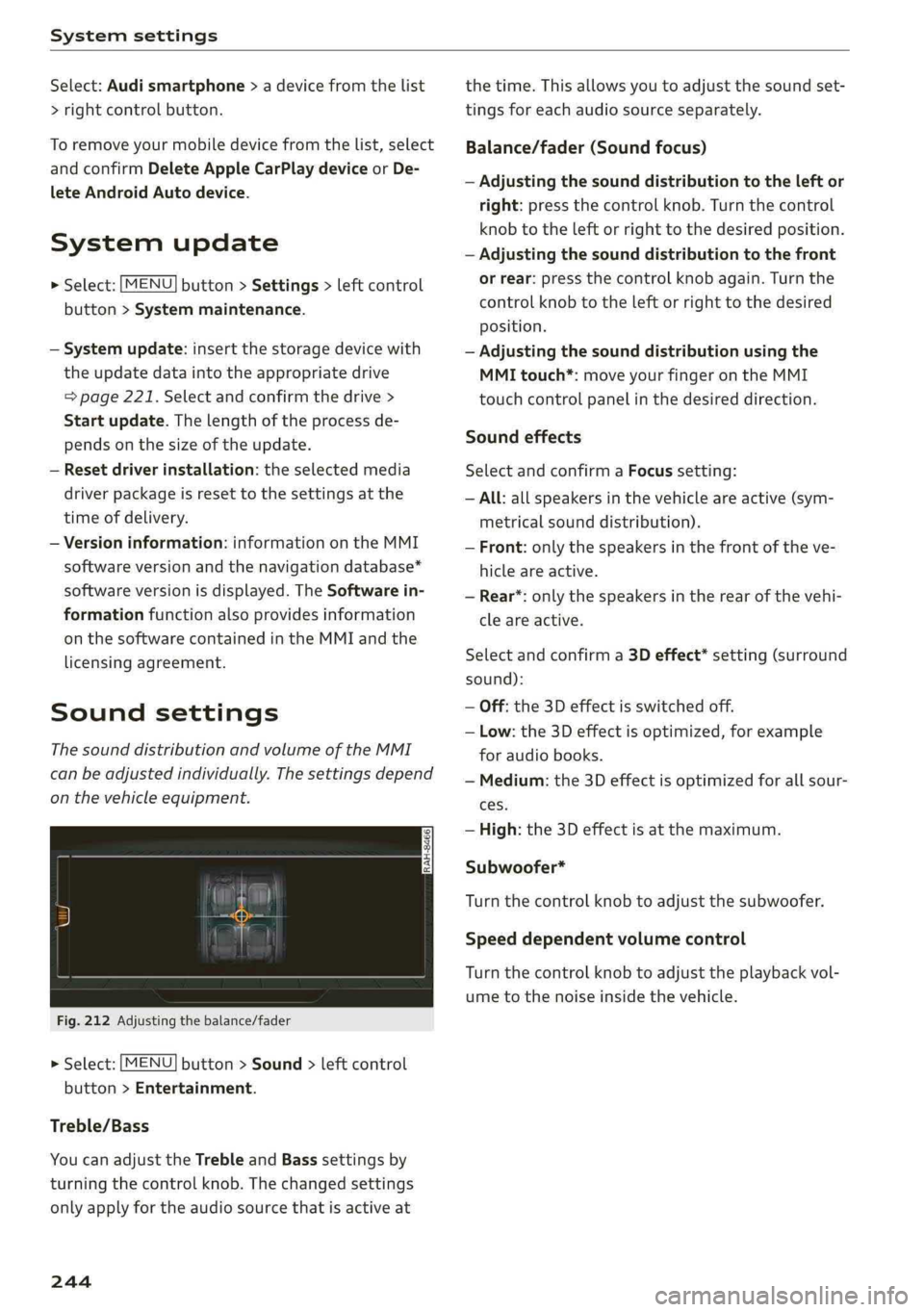
ThesounddistributionandvolumeoftheMMI
canbeadjustedindividually.Thesettingsdepend
onthevehicleequipment.
Fig.212Adjusting thebalance/fader
>Select:[MENU]button>Sound>leftcontrol
button>Entertainment.
Treble/Bass
YoucanadjusttheTrebleandBasssettingsby
turningthecontrolknob.Thechangedsettings
onlyapplyfortheaudiosourcethatisactiveat
244
thetime.Thisallowsyoutoadjustthesoundset-
tingsforeachaudiosourceseparately.
Balance/fader(Soundfocus)
—Adjustingthesounddistributiontotheleftor
right:pressthecontrolknob.Turn thecontrol
knobtotheleftorrighttothedesiredposition.
—Adjustingthesounddistributiontothefront
orrear:pressthecontrolknobagain.Turnthe
controlknobtotheleftorrighttothedesired
Position.
—Adjustingthesounddistributionusingthe
MMItouch*:moveyourfingerontheMMI
touchcontrolpanelinthedesireddirection.
Soundeffects
SelectandconfirmaFocussetting:
—All:allspeakersinthevehicleareactive(sym-
metricalsounddistribution).
—Front:onlythespeakersinthefrontoftheve-
hicleareactive.
—Rear*:onlythespeakersintherearofthevehi-
cleareactive.
Selectandconfirma3Deffect*setting(surround
sound):
—Off:the3Deffectisswitchedoff.
—Low:the3Deffectisoptimized,forexample
foraudiobooks.
—Medium:the3Deffectisoptimizedforallsour-
ces.
—High:the3Deffectisatthemaximum.
Subwoofer*
Turnthecontrolknobtoadjustthesubwoofer.
Speeddependentvolumecontrol
Turnthecontrolknobtoadjusttheplaybackvol-
umetothenoiseinsidethevehicle.
Page 247 of 392
8W0012721BG
Systemsettings
Volumesettings
Adjustingthevolume
Thevolumeofanaudiosourceorasystemmes-
sage(forexample,fromthevoicerecognition
system*)canbeadjusteddirectlywhilethe
soundisplayingusingtheOn/Offknob.
—Increasingordecreasingthevolume:turnthe
On/Offknob@)>page145,fig.149tothe
rightorleft.
—Mutingorpausing:presstheOn/Offknob
briefly.Or:turntheOn/Offknobtotheleftun-
tilthesymbol@)>page155appears.Anactive
audio/videosourceisstopped.
—Unmutingorresuming:presstheOn/Offknob
briefly.Or:turntheOn/Offknobtotheright.
Z\WARNING
To reducetheriskofanaccident,adjustthe
volumeoftheaudiosystemsothataudible
signalsfromoutsidethevehicle,suchas po-
liceandfiresirens,canbe heardeasilyatall
times.
@®Tips
Volumethatistoohighortoolowisautomat-
icallyadjustedtoasetlevelwhentheMMIis
switchedon.
NeUeareManey)Oy
>Select:[MENU]button>Sound>leftcontrol
button.
Telephone
Appliesto:vehicleswithtelephone
Mutetelephone:messagesandringtonesareset
tomute.
Ringtone:see>page183,Ringtoneandvolume
settings.
Ringtonevolume:youcanadjustthevolumeof
theselectedringtone byturningthecontrol
knob.
Messagevolume:youcanadjustthevolumeof
thenotificationforanincomingtextmessageby
turningthecontrolknob.
Microphoneinputlevel:youcanadjustthecall
volumeduringaphonecallbyturningthecontrol
knob.
Navigation
Appliesto:vehicleswithnavigationsystem
Voiceguidance:see>page207.
Voiceguidanceduringphonecall:see
=>page207.
Voiceguidancevolume:youcanadjustthevoice
guidancevolumebyturningthecontrolknob.Or:
youcanadjustthevoiceguidancevolumeduring
activerouteguidancebyturningtheOn/Offknob.
Entertainmentfader:thevolumeofaudioplay-
backcanbetemporarilyloweredwhenthepark-
ingsystemorvoiceguidanceisactive.
Voicerecognitionsystem
Appliesto:vehicleswithvoicerecognitionsystem
Commanddisplay:see>page241.
Shortdialog:see>page241.
Speechdialogsystemvolume:see>page241.
Individualspeechtraining:see>page241.
Parkingaid*
Youcanadjustthevolumeofthesignaltoneby
turningthecontrolknob.
—Adjustingthe Front volume:selectandcon-
firmHigh,MediumorLow.
—AdjustingtheRearvolume:selectandconfirm
High,MediumorLow.
MMItouch*
Turnthecontrolknobtoadjustthevolumeofthe
spokenpromptsfromtheMMItouch*.
245