light AUDI A4 2019 Manual PDF
[x] Cancel search | Manufacturer: AUDI, Model Year: 2019, Model line: A4, Model: AUDI A4 2019Pages: 392, PDF Size: 99.53 MB
Page 144 of 392
IntelligentTechnology
Brakebooster
Thebrakeboosteramplifiesthepressureyouap-
plytothebrakepedal.
ZAWARNING
—Onlyapplythebrakesforthepurposeof
cleaningthebrakesystemwhenroadand
trafficconditionspermit.Youmustnoten-
danger
otherroadusersandincreasethe
riskofanaccident.
—Duetotheriskofinjury,onlyhave anau-
thorizedAudidealerorauthorizedAudi
ServiceFacilityworkonthebrakesystem.
Incorrectrepairscouldimpair thefunction.
—Neverletthevehiclerollwhiletheengineis
stoppedbecausethisincreasestheriskofan
accident.
@)Note
—Neverletthe brakes“rub”bypressingthe
pedallightlywhenbrakingisnotactually
necessary.Thiscauses thebrakestoover-
heatandincreasesbrakingdistanceand
causeswear.
—Beforedrivingdownhillalongdistanceona
steephill,decreaseyourspeedandselecta
lowergear.Thismakesuseoftheengine
brakingeffectandreducestheloadplaced
onthebrakes.Ifyouneedtobrakeaddition-
ally,brakeinintervalsandnotcontinuously.
@Tips
—Ifthebrakeboosterisnotworking,you
mustpressthebrake pedalwithmuchmore
forcethannormal.
—Ifyouretrofityourvehiclewithafrontspoil-
er,wheelcoversorsimilaritems,makesure
thattheairflowtothefrontwheelsisnot
obstructed.Otherwisethebrakesystemcan
overheat.
142
Electromechanical
steering,Dynamic
steering
Theelectromechanicalsteeringsupportsthe
driver'ssteeringmovements.
Powersteeringadaptselectronicallybasedon
thevehiclespeed.
Indicatorlightsandmessages
aSteering:malfunction!Pleasestopvehicle
Ifthisindicatorlightturnsonandstaysonand
thismessageappears,thepowersteeringmay
havefailed.
Stopthevehicleinasafelocationassoonaspos-
sible.Donotcontinuedriving.Seeanauthorized
AudidealerorauthorizedAudiServiceFacilityfor
assistance.
aSteering:malfunction!Youcancontinue
driving
Iftheindicatorlightturnsonandthismessage
appears,thesteeringwheelmaybemoredifficult
tomoveormoresensitivethanusual.Thesteer-
ingwheelmayalsobeturnedtothesidewhen
drivingstraight.
DriveslowlytoanauthorizedAudidealerorau-
thorizedAudiServiceFacilitytohavethe mal-
functioncorrected.
Dynamicsteering:correctingsteeringwheel
position
Iftheindicatorlightturnsonandthismessage
appears,thedynamicsteering”isreinitializing.
Thesteeringwheelwillbeeasytomoveafter
startingtheengine.Reinitializationmightbe
necessaryifthesteeringwheelwasmovedwhile
theenginewasswitchedoff.Thedisplayturnsoff
iftheinitializationwassuccessful.
(i)Tips
—Iftheaorlindicatorlightonlystayson
forashorttime,youmaycontinuedriving.
— Thedynamicsteeringstabilitysystems
=>page138arenotavailableintheeventof
asystemmalfunction.
Page 155 of 392
![AUDI A4 2019 Manual PDF 8W0012721BG
MultiMediaInterface
characters,selectandconfirm the[LIST]button
@°fig.162.Or:pushthecontrolknobdown.
—Enteringaccentedcharacters (suchas4,¢,fi,
6)*:turnthecontrolknobwiththechar](/img/6/57555/w960_57555-154.png "AUDI A4 2019 Manual PDF 8W0012721BG
MultiMediaInterface
characters,selectandconfirm the[LIST]button
@°fig.162.Or:pushthecontrolknobdown.
—Enteringaccentedcharacters (suchas4,¢,fi,
6)*:turnthecontrolknobwiththechar")
8W0012721BG
MultiMediaInterface
characters,selectandconfirm the[LIST]button
@°fig.162.Or:pushthecontrolknobdown.
—Enteringaccentedcharacters (suchas4,¢,fi,
6)*:turnthecontrolknobwiththecharacter
selection@9>fig.162toacharacter.Toopen
theselectedaccentedcharacters,pressand
holdthecontrolknob.Turnthecontrolknob
withthecharacterselection@0>fig.162toan
accentedcharacter.Pressthecontrolknobto
inserttheaccentedcharacter.Toclosetheac-
centedcharacterswithoutselectingacharacter,
pressandholdthecontrolknobagain.Or:se-
lectandconfirm[a6t]Z)9fig.162.Selectand
confirmanaccentedcharacter.
—Deletingcharacters:selectandconfirm]@
=>fig.162.Todeleteallcharactersintheinput
field,pressandholdthecontrolknobon&]un-
tilallcharactersintheinputfieldare deleted.
—Enteringspecial characters:selectandcon-
firm!&2]©©fig.162or[123]@).Selectand
confirm thedesiredspecialcharacter(forex-
ample,ahyphenorperiod)withthenumber
speller.
—Inputassistance:insomecasessuchasinnavi-
gation*,thereisawordsuggestion*@)
=>fig.162basedonavailableentrieswhileyou
areenteringdata.Youcanselectthissugges-
tionbypushingthecontrolknobupward.
—Resultslist:insomecases,suchasinthedirec-
tory,thesystemswitchesautomaticallytothe
resultslistbasedonavailableentries@)
>fig.162.Selectandconfirmasuggestion
fromthelist.
Requirement:theinputfield@)>fig.162must
beactive.
—SwitchingbetweenspellerandMMItouch*:
thehandwritingrecognitionfortheMMItouch
controlpad*isactivatedautomatically.Simply
startwriting.
Overviewofsymbolsinthespeller
Thesymbolsintheletter/numberspellerareex-
plainedinthefollowingtable:
Symbol/DescriptionDescription
LIST]orlSwitchestotheresultslist.
InputfieldDisplaysthecurrentinput.
Resultslist
tered.
Displaysalistwithsuggestionsbasedonthelettersalreadyen-
t
Switchesfromlowercasetouppercaselettersorfromuppercaseto
lowercaseletters.
G
Opensadditionalspelleroptions,forexampleClosespellerand
Clearinputfield.
©
|E|O|
©
|
©
|
©
|O/|O
1&2Charactersetsandspecialcharacters
aouDisplaysaccentedcharacters(suchas4,¢,fi,6).
TSS/ABESwitchesfromlettertonumberinputorfromnumbertoletterin-
put.
Addsaspaceintheinputfield.
—
CharacterselectionHighlightstheselectedcharacter.
A
Insertsthesuggestedword*whenyoupushthecontrolknobup.
®
|
©
|O|
©
ea)
Deletesthecharactertotheleftofthecursor.
153
Page 163 of 392
8W0012721BG
Multifunctionsteeringwheel
Requirement:adestinationmustbeentered
=>page198,routeguidancemustbestartedand
thenavigationtabmustbedisplayed.
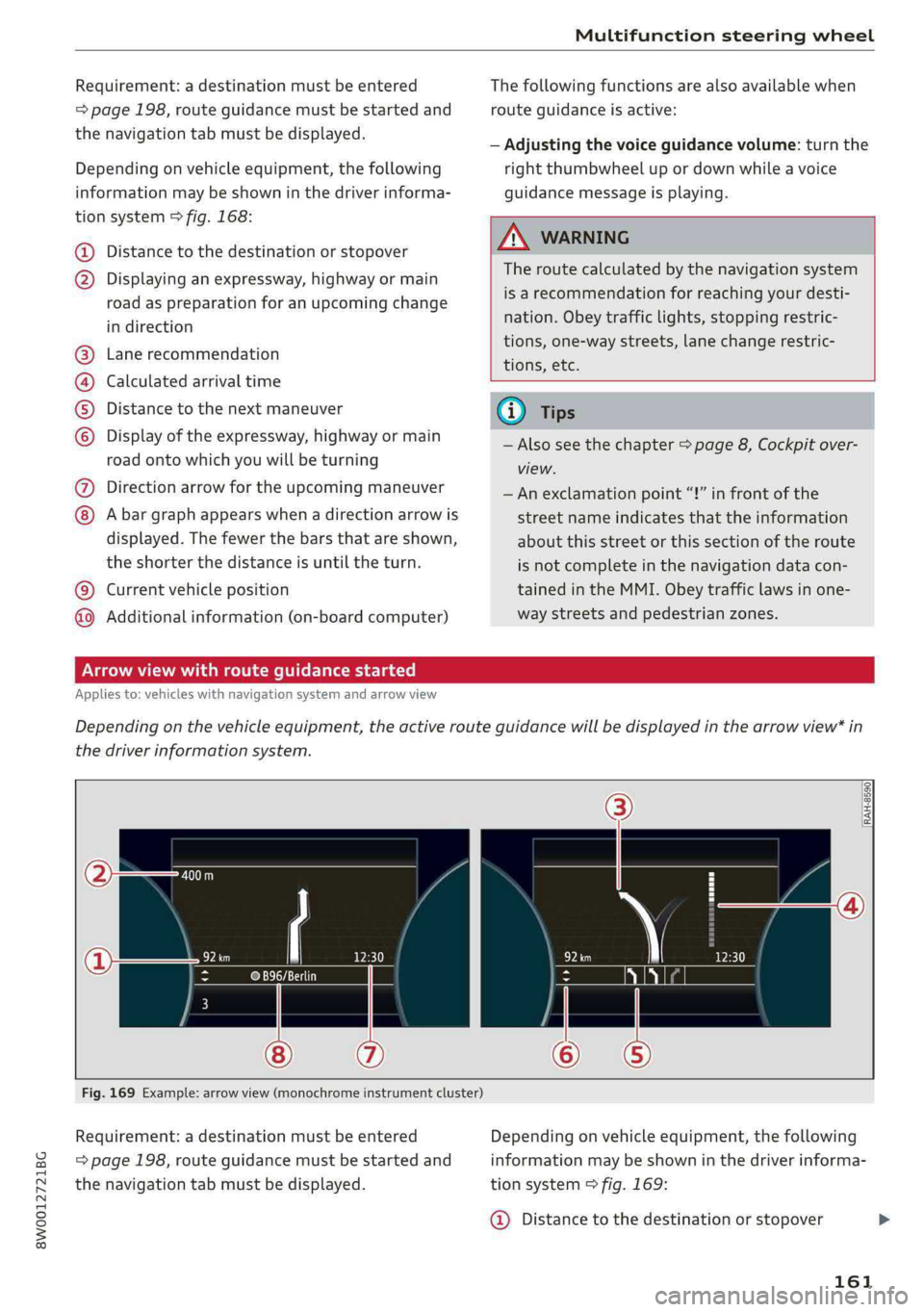
Dependingonvehicleequipment,thefollowing
informationmaybeshowninthedriverinforma-
tionsystem>fig.168:
Distancetothedestinationorstopover
©oDisplayinganexpressway,highwayormain
roadaspreparationforanupcomingchange
indirection
Lanerecommendation
Calculatedarrivaltime
Distancetothenextmaneuver
Display oftheexpressway,highwayormain
roadontowhichyouwillbeturning
Directionarrowfortheupcomingmaneuver
©
O80
Abargraphappearswhenadirectionarrowis
displayed.Thefewerthebars thatareshown,
theshorterthedistanceisuntiltheturn.
Currentvehicleposition©
Additionalinformation(on-boardcomputer)
Thefollowingfunctionsarealsoavailablewhen
routeguidanceisactive:
—Adjustingthevoiceguidancevolume:turnthe
rightthumbwheelupordownwhileavoice
guidancemessageisplaying.
ZA\WARNING
Theroutecalculatedby thenavigationsystem
isarecommendationforreachingyourdesti-
nation.Obeytrafficlights,stoppingrestric-
tions,one-waystreets,lanechangerestric-
tions,etc.
(i)Tips
—Alsoseethechapter>page8,Cockpitover-
view.
— Anexclamationpoint“!”infront ofthe
streetnameindicatesthattheinformation
aboutthisstreetorthissectionoftheroute
isnotcompleteinthenavigationdatacon-
tainedintheMMI.Obeytrafficlawsinone-
waystreetsandpedestrianzones.
TAUAmelhmeereeitanle)
Appliesto:vehicleswithnavigationsystemandarrowview
Dependingonthevehicleequipment,theactiverouteguidancewillbedisplayedinthearrowview*in
thedriverinformationsystem.
om:
Fig.169Example:arrowview(monochromeinstrumentcluster)
Requirement:adestinationmustbeentered
=page198,routeguidancemustbestartedand
thenavigationtabmustbedisplayed.
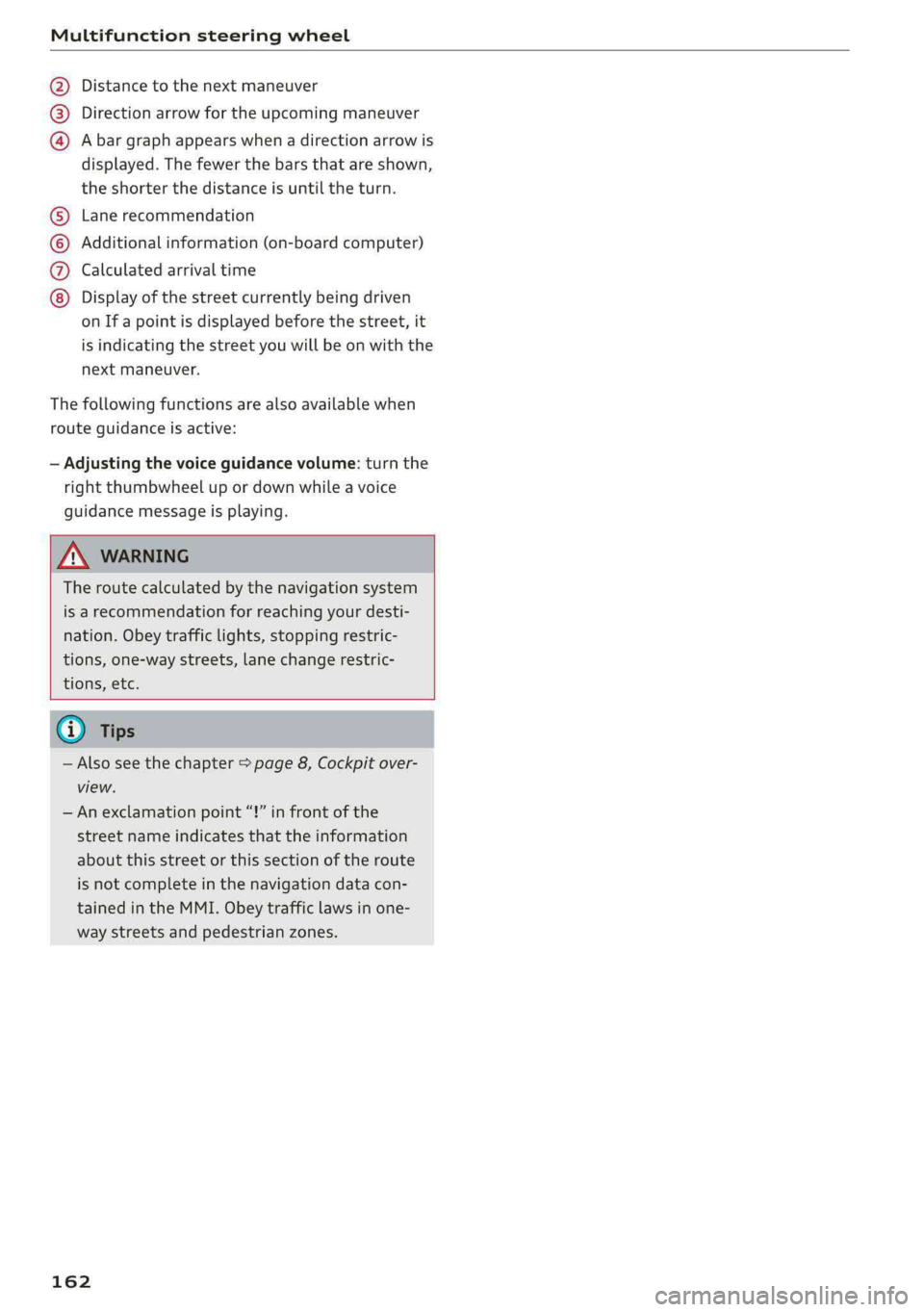
Dependingonvehicleequipment,thefollowing
informationmaybeshowninthedriverinforma-
tionsystem>fig.169:
@Distancetothedestinationorstopover
161
Page 164 of 392
Multifunctionsteeringwheel
Distancetothenextmaneuver
Directionarrowfortheupcomingmaneuver
Abargraphappearswhen adirectionarrowis
displayed.Thefewerthebars thatareshown,
theshorterthedistanceisuntiltheturn.
®O®
Lanerecommendation
Additionalinformation(on-boardcomputer)
Calculatedarrivaltime
©0G®@Displayofthestreetcurrentlybeingdriven
onIfapointisdisplayedbeforethestreet,it
isindicatingthestreetyouwillbe onwiththe
nextmaneuver.
Thefollowingfunctionsarealsoavailablewhen
routeguidanceisactive:
—Adjustingthevoiceguidancevolume:turnthe
rightthumbwheelupordownwhileavoice
guidancemessageisplaying.
ZXWARNING
Theroutecalculatedby thenavigationsystem
isarecommendationforreachingyourdesti-
nation.Obeytrafficlights,stoppingrestric-
tions,one-waystreets,lanechangerestric-
tions,etc.
@Tips
—Alsosee thechapter>page8,Cockpitover-
view.
—Anexclamationpoint“!”infront ofthe
streetnameindicatesthattheinformation
aboutthisstreetorthissectionoftheroute
isnotcompleteinthenavigationdatacon-
tainedintheMMI.Obeytrafficlawsinone-
waystreetsandpedestrianzones.
162
Page 165 of 392
8W0012721BG
Voicerecognitionsystem
OBARECOMMANDS
RAH-9091
*Telephone+Favorites
+Audiconnect*Call(XY)
*Navigation*Enternumber
*Directory*Redial
*Radio*Readnewtextmessage
*Media+Navigateto(XY)
+Sound+Enteraddress/destination
*Help+Onlinedestinations
+HelpSpeechdialogsystem*Cancelrouteguidance
*HelpTelephone*Map
*HelpAudiconnect+Line(XY)
*HelpNavigation*Next page/previouspage
*HelpMap*Cancel
*HelpRadio*No,Imeant(XY)
*HelpMedia*Correction
TELEPHONE:
+Enternumber+CalllistCs
+Deletenumber/correction+Redialsie
+Directory+Callmailbox
*Call(XY)+Telephonefavorites
*business/private/landline/mobile
NAVIGATION;
+Navigateto(XY)+Block routefor(XY)miles/Block
+Start/cancelrouteguidancethenextsection
+Directory*Routelist
+Lastdestinations*Calculatealternativeroutes
+Navigationfavorites*Onlinedestinations
+Drivehome*Specialdestination
-Enteraddress
+Entercountry/town/street/state
+Excluderoute/Excluderoutefor(XY)km/m
+Map
*Daymap/Nightmap
*2Ddrivingpositionmap/2Dnorthpositionmap/3Dmap/Destinationmap/Overviewmap
AUDICONNECT
*AudiconnectFlightinformation
*Travelinformation/Parkinginformation*Cityevents
*Fuelprices*Onlinenews
*Weather*Twitter
RADIO)MEDIA
+Radiopresets|*Jukeboxs))
°FM*CD/DVD
*FM/AM/SIRIUSXM seedy+SDcard1/SDcard2BRS
+Station(XY)/Frequency(XY)-Audimusicinterface/iPod/USB/Bluetooth/
*Trafficannouncementon/offWi-Fi/Medium(XY)
*Mediafavorites/Artists/Albums/Genres/
Tracks/Playlists/Videos
*Folderup
*Randomplaybackon/off
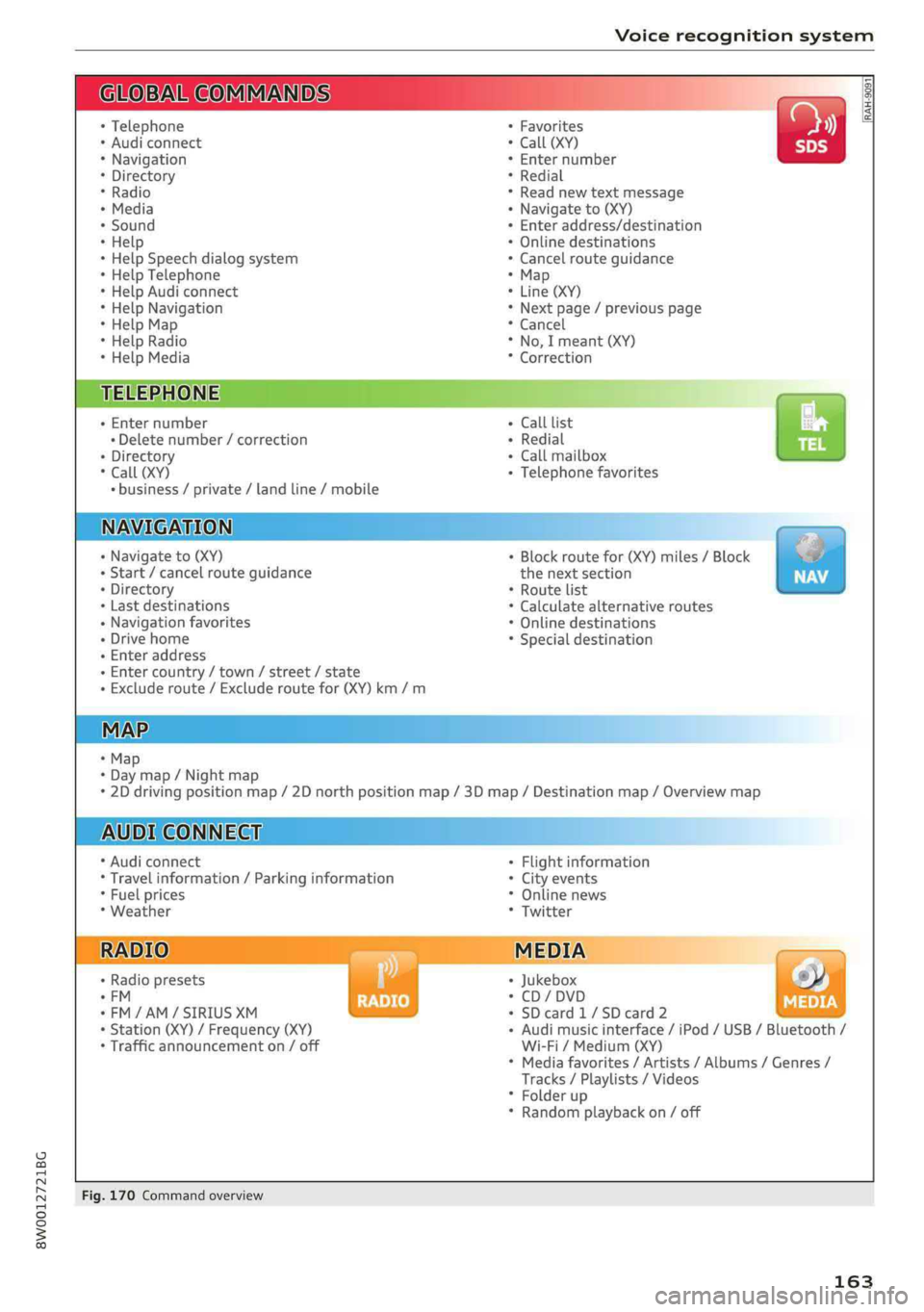
Fig.170Commandoverview
163
Page 166 of 392
Voicerecognitionsystem
Voicerecognitionsystem
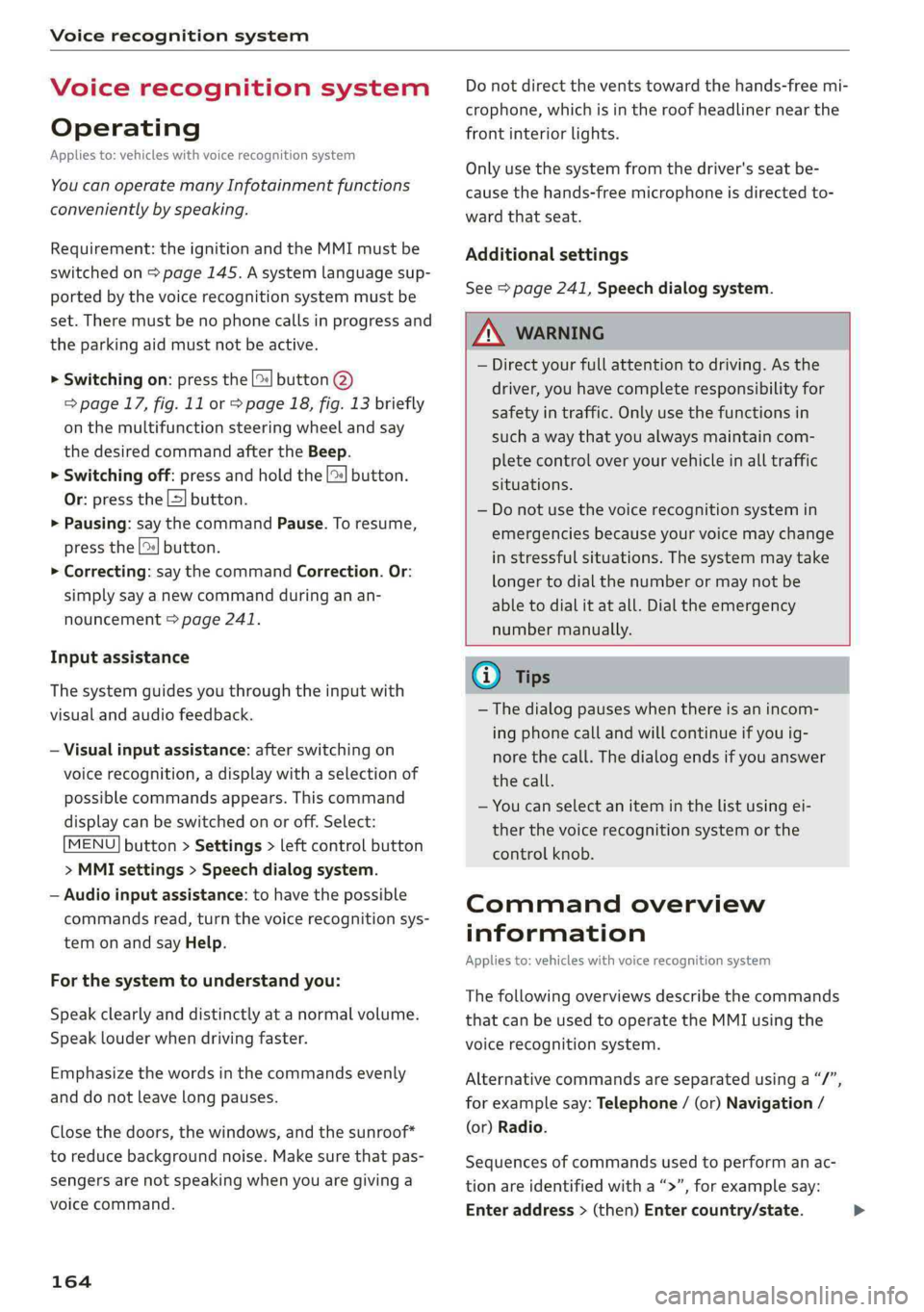
Operating
Appliesto:vehicleswithvoicerecognitionsystem
YoucanoperatemanyInfotainmentfunctions
convenientlybyspeaking.
Requirement:theignitionandtheMMImustbe
switched
on>page145.Asystemlanguagesup-
portedbythevoicerecognitionsystemmustbe
set.Theremustbenophonecallsinprogressand
theparkingaidmustnotbeactive.
>Switchingon:pressthe[%]button@
=>page17,fig.11or>page18,fig.13briefly
onthemultifunctionsteeringwheelandsay
thedesiredcommandaftertheBeep.
>Switchingoff:pressandholdthe|™]button.
Or:pressthe|5|button.
>Pausing:saythecommandPause.Toresume,
pressthe|]button.
>Correcting:saythecommandCorrection.Or:
simplysayanewcommandduringanan-
nouncement>page241.
Inputassistance
Thesystemguidesyouthroughtheinputwith
visualandaudiofeedback.
—Visualinputassistance:afterswitchingon
voicerecognition,adisplaywithaselectionof
possiblecommandsappears.Thiscommand
displaycanbe switchedonoroff.Select:
MENU]button>Settings>leftcontrolbutton
>MMIsettings>Speechdialogsystem.
—Audioinputassistance: tohavethepossible
commandsread,turnthevoicerecognitionsys-
temonandsayHelp.
Forthesystemtounderstandyou:
Speakclearlyanddistinctly atanormalvolume.
Speaklouderwhendrivingfaster.
Emphasizethewordsinthecommandsevenly
anddonotleavelongpauses.
Closethedoors,thewindows,andthesunroof*
toreducebackgroundnoise.Makesurethatpas-
sengersarenotspeakingwhenyouaregivinga
voicecommand.
164
Donotdirecttheventstowardthehands-freemi-
crophone,whichisintheroofheadlinernearthe
frontinteriorlights.
Onlyusethesystemfromthedriver'sseatbe-
causethehands-freemicrophoneisdirectedto-
wardthatseat.
Additionalsettings
See>page241,Speechdialogsystem.
ZAWARNING
—Directyourfullattentiontodriving.Asthe
driver,youhavecompleteresponsibilityfor
safetyintraffic.Onlyusethefunctionsin
suchawaythatyoualwaysmaintaincom-
pletecontroloveryourvehicleinalltraffic
situations.
—Donotuse thevoicerecognitionsystemin
emergenciesbecauseyourvoicemaychange
instressfulsituations.Thesystemmaytake
longertodialthenumberormaynotbe
abletodialitatall.Dialtheemergency
numbermanually.
Gi)Tips
— Thedialogpauseswhenthereisanincom-
ingphonecallandwillcontinueifyouig-
norethecall.Thedialogendsifyouanswer
thecall.
—Youcanselectan iteminthelistusingei-
therthevoicerecognitionsystemorthe
controlknob.
Commandoverview
information
Appliesto:vehicleswithvoicerecognitionsystem
Thefollowingoverviewsdescribethecommands
thatcan beusedtooperatetheMMIusingthe
voicerecognitionsystem.
Alternativecommandsareseparatedusinga“/”,
forexamplesay:Telephone/(or)Navigation/
(or)Radio.
Sequencesofcommandsusedtoperformanac-
tionareidentifiedwitha “>”,forexamplesay:
Enteraddress>(then)Entercountry/state.>
Page 190 of 392
Audiconnect
Changesearcharea
Thesetsearchareacanbechangedatanytime.
Additionalinformationonsearchareascan be
foundunder>page201.
ClosingAudiconnectInfotainmentservices
Regardlessofthefunctionselected,youcan
closean AudiconnectInfotainmentserviceat
anytimeandreturn tothehomescreen.
SYA(a1
Appliesto:vehicleswithAudiconnectInfotainment
Dependingonthecountryandthevehicleequip-
ment,thefollowingservicesmaybeavailable:
Weather
Informationoncurrentweatherconditionsas
wellasweatherforecastsfortheselectedsearch
area.
> SelectandconfirmWeather.
News
>Select:Onlinenews>desirednewsfeed>a
headline.
IfyouloggedintomyAudiinyourvehicle
=page187,personalizednewsfeedscanbedis-
played.
Twitter
Requirement: youmusthaveconnectedyourve-
hiclewithmyAudi>page187.Youmusthave
connectedyourmyAudiaccountwithTwitter.
YoucanonlyconnectoneTwitteraccountwith
yourmyAudiaccount.Notallsettingscan bead-
justedintheMMI.Somecanonlybeadjusted
throughtheTwitterwebsite.
>Select:Twitter>leftcontrolbutton>desired
function(forexample,Trends).
Travel(travelguide)
Requirement:themyAudiappmustbeinstalled
andopenonyourmobiledevice.Yourmobilede-
vicemustbeconnectedtothevehicleWi-Fihot-
spot>page193.
188
>Select:[MENU]button>Audiconnect> left
controlbutton>Informationcategory>Trav-
el.
Afteropeningthetravelguide,traveltipsinyour
areawillbedisplayedincludingcurrentratingsas
wellasthecorrespondingcategory.
>Toswitchcategories(forexample,bars near-
by),select:leftcontrolbutton>selectacate-
gory.
Trafficlightinformation
See>page189.
ZA\WARNING
—Itisonlysafe tousetablets,laptops,mobile
devicesandothersimilardeviceswhenthe
vehicleisstationarybecause,likeallloose
objects,theycouldbethrownaroundthein-
sideofthevehicleinacrashandcauseseri-
ousinjuries.Storethesetypesofdevicesse-
curelywhiledriving.
—Donotuseanywirelessdevicesonthefront
seatswithinrangeoftheairbagswhiledriv-
ing.Also readthewarningsinthechapter
=>page265,Frontairbags.
()Note
ReadtheinformationaboutAudiconnect,and
besuretonotetheconnectivitycostssection
=>@©inWi-Fisettingsonpage193.
Page 191 of 392
8W0012721BG
Audiconnect
Trafficlightinformation
Appliesto:vehicleswithtrafficlightinformation
Fig.180Example:displayofanestimatedwaittime
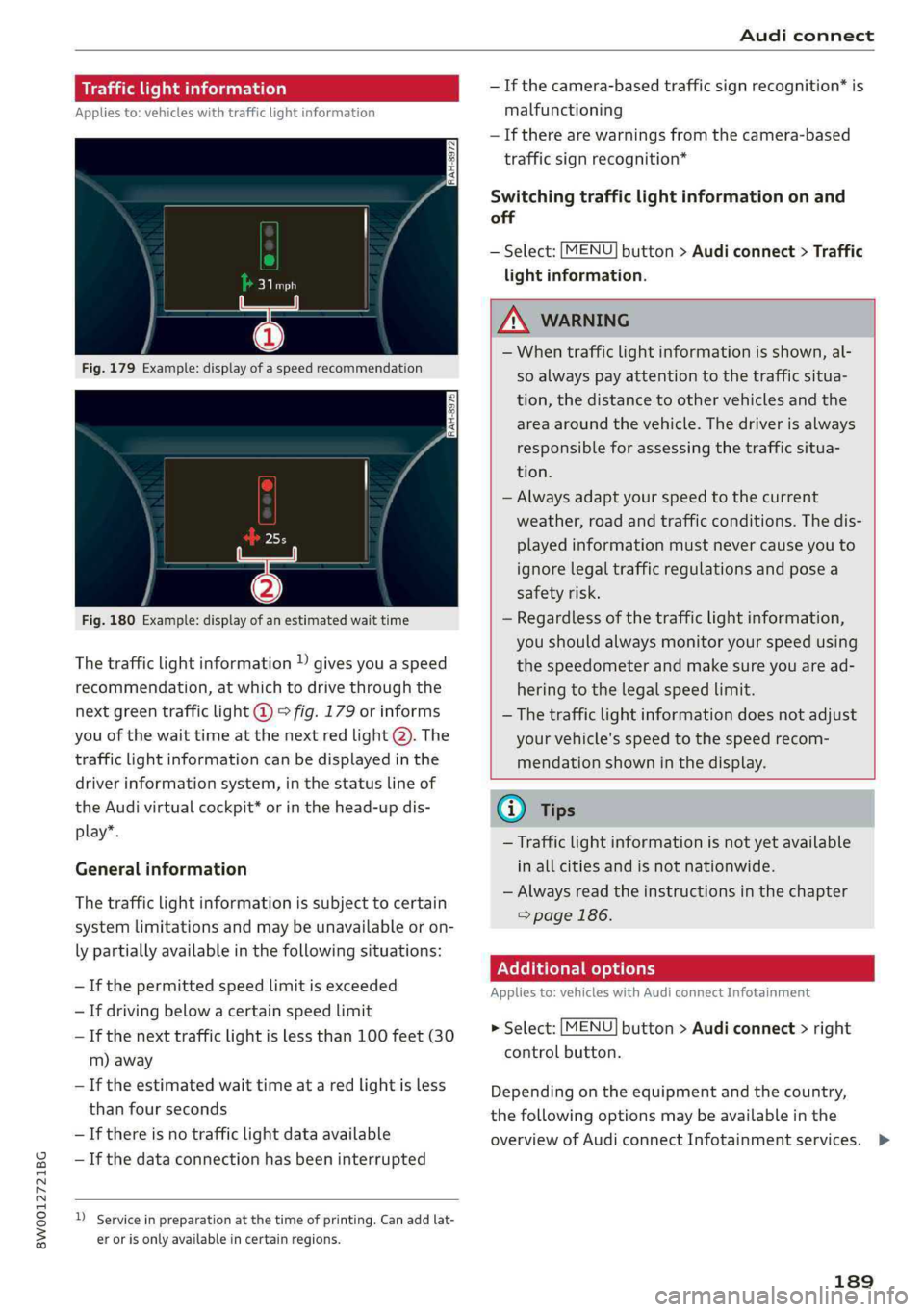
Thetrafficlightinformation»givesyouaspeed
recommendation,atwhichtodrivethroughthe
nextgreentrafficlight@°fig.179orinforms
youofthewaittimeatthenextredlight@).The
trafficlightinformationcanbedisplayedinthe
driverinformationsystem,inthestatuslineof
theAudivirtualcockpit*orinthehead-updis-
play”.
Generalinformation
Thetrafficlightinformationissubjecttocertain
systemlimitationsandmaybeunavailableoron-
lypartiallyavailableinthefollowingsituations:
—Ifthepermittedspeedlimitisexceeded
—Ifdrivingbelowacertainspeedlimit
—Ifthenexttrafficlightislessthan100feet(30
m)away
—Iftheestimatedwaittimeataredlightisless
thanfourseconds
—If thereisnotrafficlightdataavailable
—Ifthedataconnectionhasbeeninterrupted
)Serviceinpreparationatthetimeofprinting.Can addlat-
erorisonlyavailableincertainregions.
—Ifthecamera-basedtrafficsignrecognition*is
malfunctioning
—Iftherearewarningsfromthecamera-based
trafficsignrecognition*
Switchingtrafficlightinformationonand
off
—Select:[MENU]button>Audiconnect>Traffic
lightinformation.
ZAWARNING
—Whentrafficlightinformationisshown,al-
soalways payattentiontothetrafficsitua-
tion,thedistancetoothervehiclesandthe
areaaroundthevehicle.Thedriverisalways
responsibleforassessingthetrafficsitua-
tion.
—Alwaysadaptyourspeedtothecurrent
weather,roadandtrafficconditions.Thedis-
playedinformationmustnevercauseyouto
ignorelegaltrafficregulationsandposea
safetyrisk.
—Regardlessofthetrafficlightinformation,
youshouldalwaysmonitoryourspeedusing
thespeedometerandmakesureyouaread-
hering
tothelegalspeedlimit.
—
Thetrafficlightinformationdoesnotadjust
yourvehicle'sspeedtothespeedrecom-
mendationshowninthedisplay.
@)Tips
—Trafficlightinformationisnotyetavailable
inallcitiesandisnotnationwide.
—Alwaysreadtheinstructionsinthe chapter
=>page186.
Additionaloptions
Appliesto:vehicleswith AudiconnectInfotainment
>Select:[MENU]button>Audiconnect>right
controlbutton.
Depending ontheequipmentandthecountry,
thefollowingoptionsmaybeavailableinthe
overviewofAudiconnectInfotainmentservices.>
189
Page 194 of 392
Audiconnect
Vehiclestatusreport
Thisservicetransfersdriverinformationsystem
datatoaserver.Dependingonthevehicleequip-
ment,certaindatamaybeaccessed,suchasthe
remainingrangeormileage.Thevaluesmaydif-
ferfromthevaluesdisplayedinthevehicle.
Car Finder
Thisservicetransmitstheparkinglocationtoa
serverwhentheignitionisswitchedoff.Thevehi-
clelocation,yourlocation,ortheroutetoyour
vehiclecanbedisplayed.Thenewparkingloca-
tioncannotbedeterminedwiththisserviceifthe
vehicleismovedaftershuttingthevehicleoff
andwithoutswitchingtheignitiononandoff
again,forexampleifthevehicleistowedorsto-
len.
—DeactivatingandactivatingCarFinder:select:
MENU]>Audiconnect>Carfinder.
OnlineAudiservicerequest
Requirement:theservicemustbeactivatedon-
lineatwww.audiusa.com/myaudiandanauthor-
izedAudidealerorauthorizedAudiservicefacili-
tymustbeselected.
Thisservicetransmitsservice-relevantdatato
yourselectedauthorizedAudidealerorauthor-
izedAudiservicefacility.Theywillcontactyou
beforeyournextserviceappointment.
StolenVehicleLocator
Thisserviceassistsyouinlocatingyourvehicleif
itisstolen.
—Contactthepolice.YoureceiveaCaseID.
—Calltheservicehotlineandgiveyour CaseID.
Theservicehotlinewillforwardtheestablished
datatothepolice.YoureceivetheAudiService
hotlinenumberwhenyoupurchaseyourvehicle.
GeofencingAlert
Requirement:akeyusermustbesetinthevehi-
cle>page191.
Thisserviceallowsyoutosetpermittedandfor-
biddenzonesforyourvehicleaswellassettime
limitsforthesezones.Ifyourvehicleleavesa
permittedzoneorentersaforbiddenzone,you
192
willbenotifiedwithapushnotificationand/oran
e-mail.
SpeedAlert
Requirement:akeyusermustbesetinthevehi-
cle>page191.
Youcansetuptotwospeedlimitsforyourvehi-
cleusingthis service.Ifyourvehicleexceedsaset
speedlimit,youwillbenotifiedwithapushnoti-
ficationand/ore-mail.
ValetAlert
Requirement:akeyusermustbesetinthevehi-
cle>page191.
Ifyougiveyourvehicletoaparkingservice,you
cansetazoneandaspeedlimitusingthemyAu-
diapp.Ifthevehicleleavesthezoneorexceeds
thespeedlimit,youwillbenotifiedwithapush
notificationand/ore-mail.
ZA\WARNING
Donotignoremessagesandwarningorindi-
catorlightsthatturnoninthevehiclebe-
causeoftheinformationinthevehiclestatus
report.Thiscouldlead tobreakdownsinon
theroad,accidentsandseriousinjuries.
G)Tips
Forsomeservices,youcanselectifyouwould
liketobenotifiedwithapushnotification
and/orane-mail.
Settings
Cellphonenetwork
>Select:[MENU]button>Audiconnect>right
controlbutton>Connectionmanager.
>Select:rightcontrolbutton>Onlinesettings>
Dataconnectionsettings.
Dependingonthecountry,vehicleequipment,
andconnectiontype,thefollowing functionsmay
beavailable:
Dataconnectionsettings
UsingtheDataconnectionsettingsmenu,you
cansetwhenthesystemshouldconnecttothe>
Page 199 of 392
8W0012721BG
Emergencycall
@)Tips
Iftheemergencycalliscanceledduetoa
poorconnection,thenthesystemautomati-
callytriestoconnectagain.
Messages
Appliesto:vehicleswithemergencycallfunction
S&SEmergencycallfunction:malfunction!Re-
strictedfunctionality.PleasecontactService
Ifthisindicatorlightturnsonandthismessage
appears,the emergencycallfunctionisrestrict-
ed.Forexample,youcannotcalltheemergency
callcenter,butdatamaystill betransmittedun-
dercertaincircumstances.Drivetoanauthorized
AudidealerorauthorizedAudiServiceFacilityim-
mediatelytohavethemalfunctioncorrected.
&Emergencycallfunction:malfunction!Func-
tionunavailable.PleasecontactService
Ifthisindicatorlightturnsonandthismessage
appears,youcannotmakeanemergencycall.
DrivetoanauthorizedAudidealerorauthorized
AudiServiceFacilityimmediatelytohavethe
malfunctioncorrected.
Onlineroadside
assistance
Appliesto:vehicleswithonlineroadsideassistance
Anonlineroadsideassistancecall)) isacombina-
tionofdatatransmissionandaphonecall.The
datatransmissionfromyourvehicleforwardsim-
portantinformationtotheAudiservicecenter,
suchasthevehicleandpositiondata.
D_Theavailabilityoftheservicesoffereddependsonthe
countryandmaychangeinthefuture.
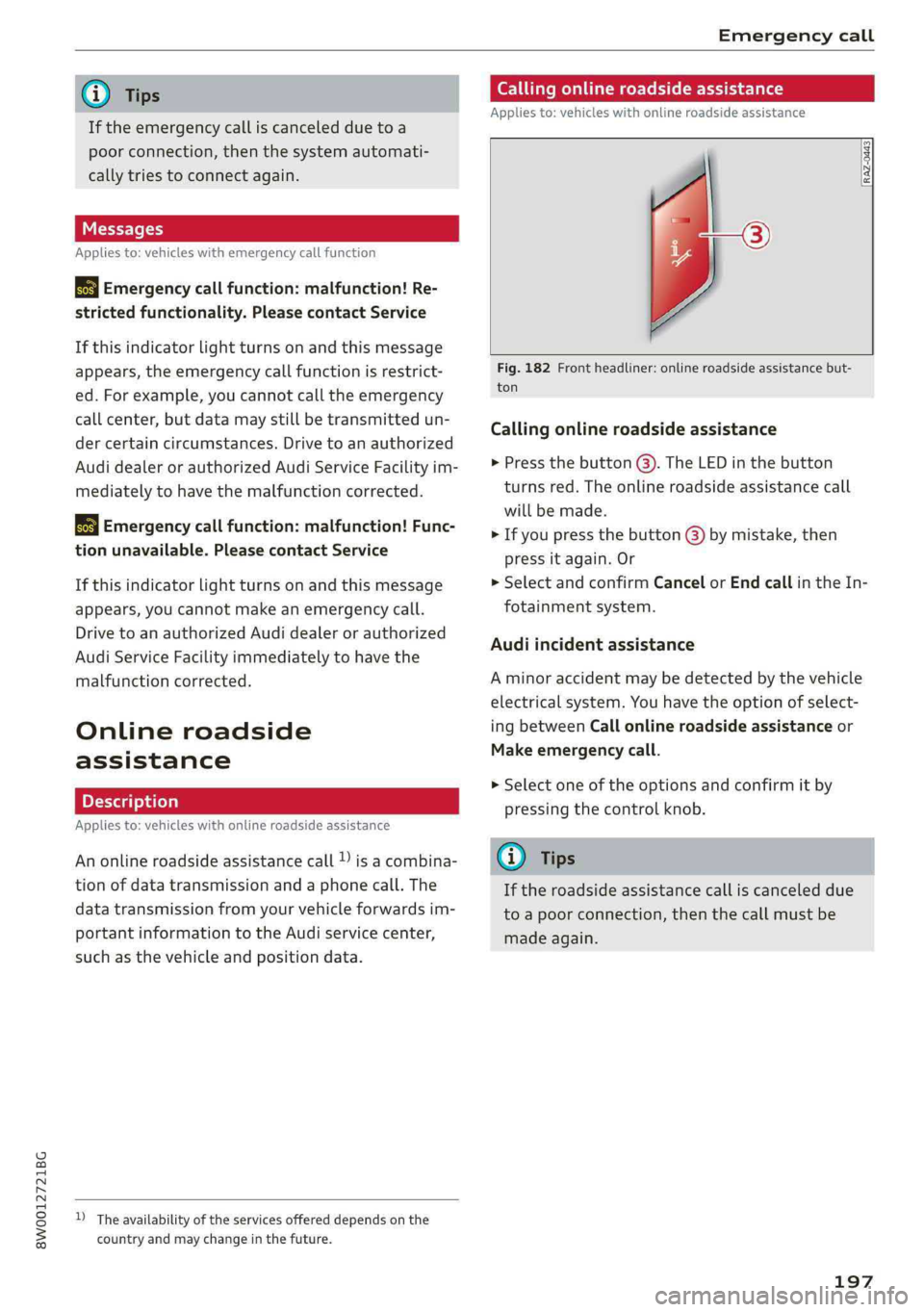
Callingonlineroadsideassistance
Appliesto:vehicleswithonlineroadsideassistance
RAZ-0443
+o
Fig.182Frontheadliner:onlineroadsideassistancebut-
ton
Callingonlineroadsideassistance
>Pressthebutton().TheLEDinthebutton
turnsred.Theonlineroadsideassistancecall
willbemade.
>Ifyoupressthebutton@)bymistake,then
pressitagain.Or
>SelectandconfirmCancelorEndcallintheIn-
fotainmentsystem.
Audiincidentassistance
Aminoraccidentmaybedetectedbythevehicle
electricalsystem.Youhavethe optionofselect-
ingbetweenCallonlineroadsideassistanceor
Makeemergencycall.
>Selectoneoftheoptionsandconfirmitby
pressingthecontrolknob.
@)Tips
Iftheroadsideassistancecalliscanceleddue
toapoorconnection,thenthecallmustbe
madeagain.
197