infotainment AUDI A4 2019 Manual Online
[x] Cancel search | Manufacturer: AUDI, Model Year: 2019, Model line: A4, Model: AUDI A4 2019Pages: 392, PDF Size: 99.53 MB
Page 213 of 392
8W0012721BG
Navigation
MMIdisplayautomaticallyswitchestothe
2Dmaptypewhendrivingthroughtunnels.
—Also readtheinformationinthechapter
=>page186,Audiconnect.
—Foradditionalinformation,visitwww.
audiusa.com.
Mapupdate
Appliesto:vehicleswithnavigationsystem
Therearemultipleoptionsavailableforupdating
yourmapmaterial:
—Mapupdatesthroughthe onlinemapupdate*
>page211.
—ImportmapupdatesfromtheSDcard*toyour
MMI.Youcanfindadditionalinformationon-
lineatwww.audiusa.com/myaudi.
—MapupdateatanauthorizedAudidealeror au-
thorizedAudiServiceFacility.Thiscanresultin
additionalcosts.
Onlinemapupdate
Appliesto:vehicleswithanavigationsystem andAudicon-
nectInfotainment
Usingtheonlinemapupdate,youcanupdate
themapmaterialinyournavigationsystemdi-
rectlyfromyourvehicle.
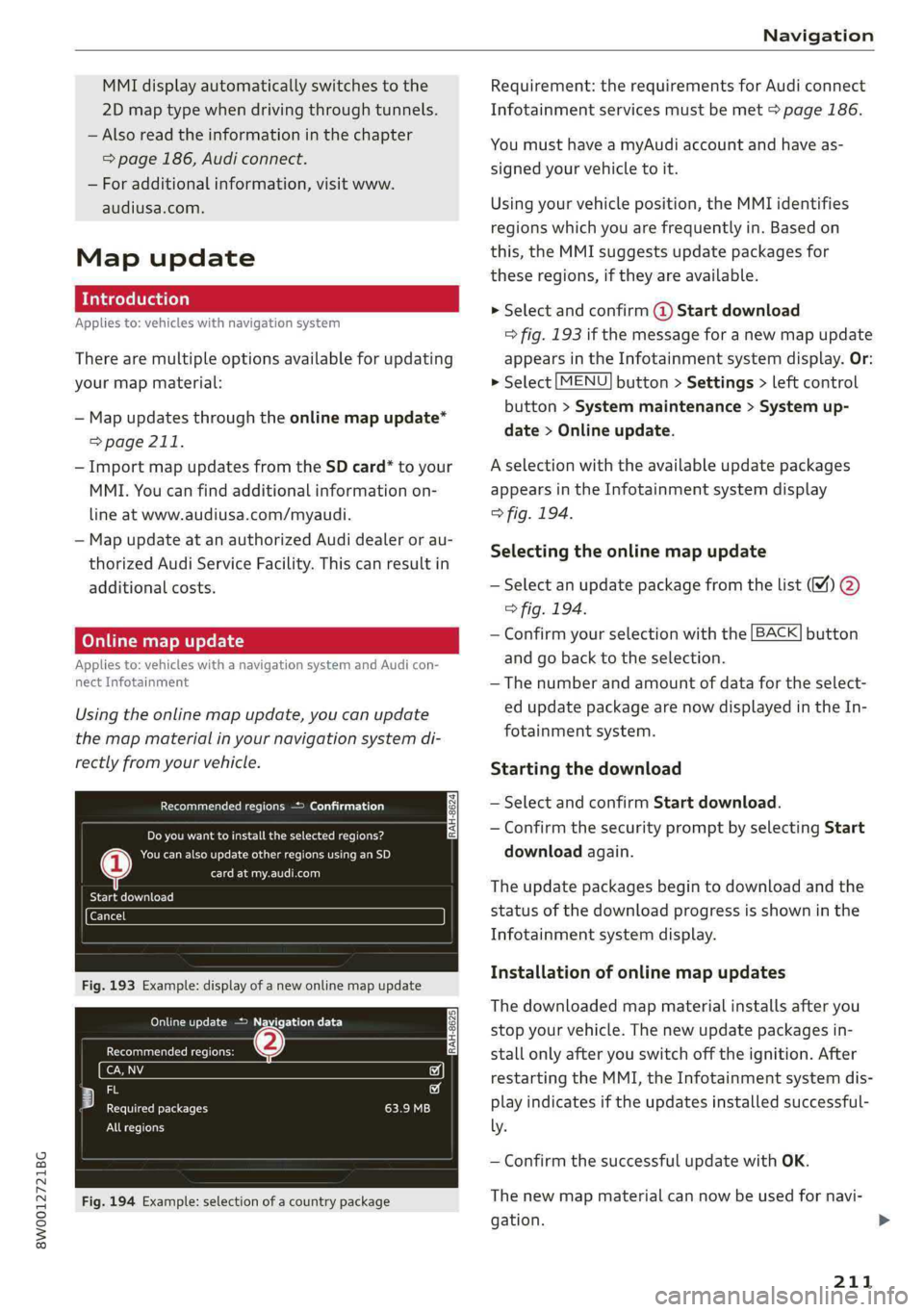
Recommendedregions>Confirmation
RAH-8624]Doyouwanttoinstalltheselected regions?
Neencaseseentcai)
CreanRel
BateCele)
Fig.193Example:displayofanewonlinemapupdate
OncmeetcEte)
Recommendedregions:(2)
any
eecf
PeeteBectaetry
Allregions
Fig.194Example:selectionofacountrypackage
Requirement:therequirementsforAudiconnect
Infotainmentservicesmustbemet>page186.
YoumusthaveamyAudiaccountandhaveas-
signedyourvehicletoit.
Usingyourvehicleposition,theMMIidentifies
regionswhichyouarefrequentlyin.Basedon
this,theMMIsuggestsupdatepackagesfor
theseregions,iftheyareavailable.
>Selectandconfirm@Startdownload
=>fig.193ifthemessageforanewmapupdate
appearsintheInfotainmentsystemdisplay.Or:
>Select[MENU]button>Settings>leftcontrol
button>Systemmaintenance>Systemup-
date>Onlineupdate.
Aselectionwiththeavailableupdatepackages
appearsintheInfotainmentsystemdisplay
>fig.194.
Selectingtheonlinemapupdate
—
Selectanupdatepackagefromthelist(M%)@
>fig.194.
—Confirmyourselectionwiththe[BACK]button
and gobacktotheselection.
—Thenumberandamountofdatafortheselect-
edupdatepackagearenowdisplayedintheIn-
fotainmentsystem.
Startingthedownload
—SelectandconfirmStartdownload.
—ConfirmthesecuritypromptbyselectingStart
downloadagain.
Theupdatepackagesbegintodownloadandthe
statusofthedownloadprogressisshowninthe
Infotainmentsystemdisplay.
Installationofonlinemapupdates
Thedownloadedmapmaterialinstallsafteryou
stopyourvehicle.Thenewupdatepackagesin-
stallonlyafteryouswitchofftheignition.After
restartingtheMMI,theInfotainmentsystemdis-
playindicatesiftheupdatesinstalledsuccessful-
ly.
—ConfirmthesuccessfulupdatewithOK.
Thenewmapmaterialcannowbeusedfornavi-
gation.>
211
Page 214 of 392
Navigation
@Tips
—Alwaysreadthechapter>page186.
— Theamountofavailableonlinemapupdates
inthevehicleislimited.Toupdatemorere-
gions,usethemapupdateviaSDcardat
www.audiusa.com/myaudi.
—Alwaysreadthechapter>page186,Audi
connect.
Trafficinformation
Introduction
Appliesto:vehicleswithnavigationsystem
(5of
yee@wee
=
@Westbound#Eastbound
t4
Northbound
f
©-Northbound
o—
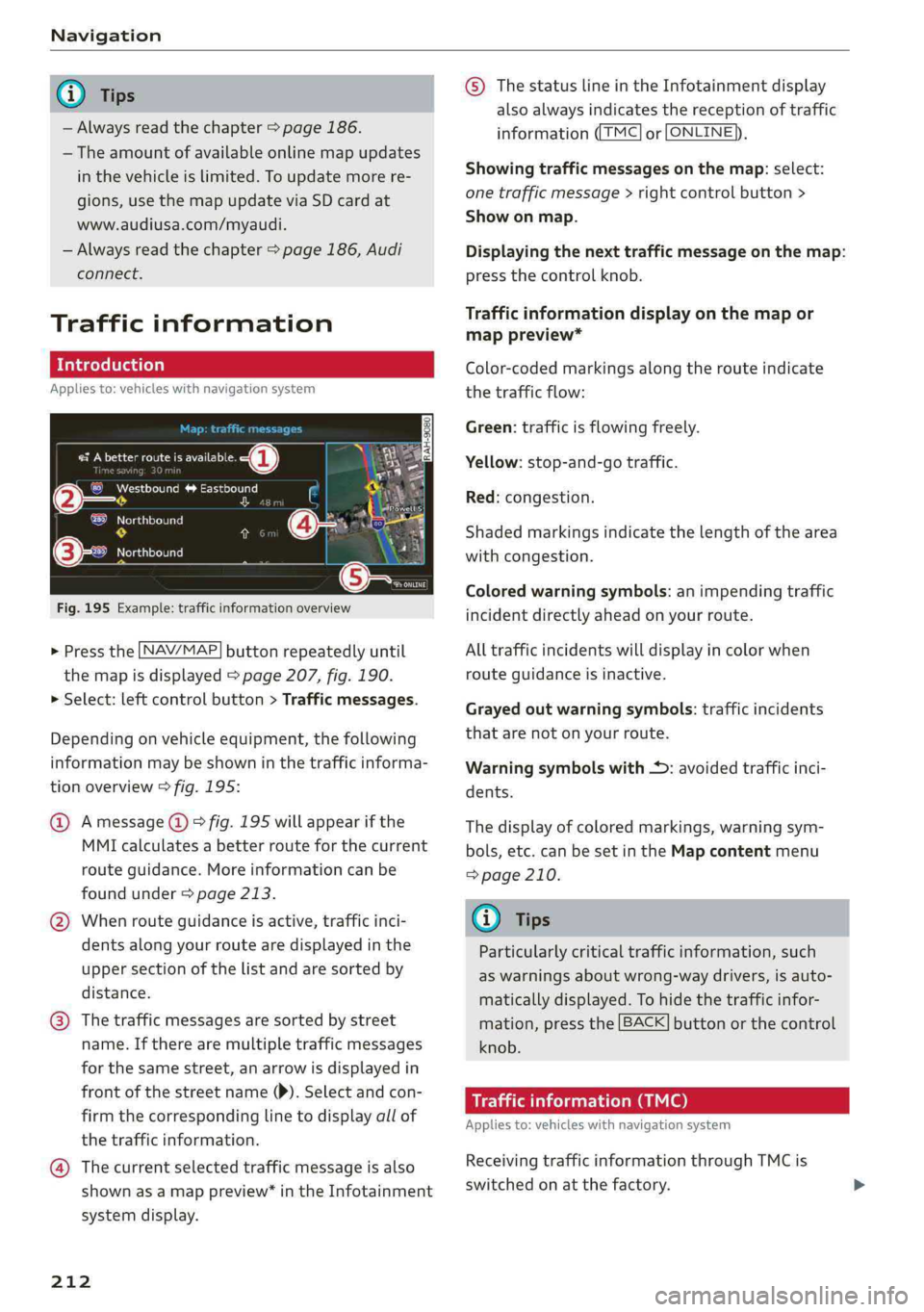
Fig.195Example:trafficinformationoverview
> Pressthe [NAV/MAP]buttonrepeatedlyuntil
themapisdisplayed>page207,fig.190.
>Select:leftcontrolbutton>Trafficmessages.
Dependingonvehicleequipment,thefollowing
informationmaybeshowninthetrafficinforma-
tionoverview>fig.195:
@Amessage@)>fig.195willappearifthe
MMIcalculatesabetterrouteforthecurrent
routeguidance.Moreinformationcanbe
foundunder>page213.
@Whenrouteguidanceisactive,trafficinci-
dentsalongyourroutearedisplayedinthe
uppersectionofthelistandaresortedby
distance.
@®Thetrafficmessagesaresorted bystreet
name.Iftherearemultipletrafficmessages
forthesamestreet,anarrowisdisplayedin
frontofthestreetname()).Selectandcon-
firmthecorrespondinglinetodisplayallof
thetrafficinformation.
@Thecurrentselectedtrafficmessageisalso
shownasamappreview*intheInfotainment
systemdisplay.
212
©ThestatuslineintheInfotainmentdisplay
alsoalwaysindicatesthereceptionoftraffic
information((TMC]or[ONLINE)),
Showingtrafficmessagesonthemap:select:
onetrafficmessage>rightcontrolbutton>
Showonmap.
Displayingthenexttrafficmessageonthemap:
pressthecontrolknob.
Trafficinformationdisplayonthemapor
mappreview*
Color-codedmarkingsalongtherouteindicate
thetrafficflow:
Green:trafficisflowingfreely.
Yellow:stop-and-gotraffic.
Red:congestion.
Shadedmarkingsindicatethelength ofthearea
withcongestion.
Coloredwarningsymbols:animpendingtraffic
incidentdirectlyaheadonyourroute.
Alltrafficincidentswilldisplayincolorwhen
routeguidanceisinactive.
Grayedoutwarningsymbols:trafficincidents
thatarenotonyourroute.
Warningsymbolswith+:avoidedtrafficinci-
dents.
Thedisplay ofcoloredmarkings,warningsym-
bols,etc.canbesetintheMapcontentmenu
=>page210.
@)Tips
Particularlycriticaltrafficinformation,such
aswarningsaboutwrong-waydrivers,isauto-
maticallydisplayed.Tohidethetrafficinfor-
mation,pressthe[BACK]buttonorthecontrol
knob.
Trafficinformation(TMC)
Appliesto:vehicleswithnavigationsystem
ReceivingtrafficinformationthroughTMCis
switchedonatthefactory.
Page 215 of 392
![AUDI A4 2019 Manual Online 8W0012721BG
Navigation
>Pressthe LNAV/MAP]buttonrepeatedlyuntil
themapisdisplayed.
>Select:leftcontrolbutton>Trafficmessages.
Anoverviewofallthetrafficmessagesisdis-
playedintheInfotainmentsys](/img/6/57555/w960_57555-214.png "AUDI A4 2019 Manual Online 8W0012721BG
Navigation
>Pressthe LNAV/MAP]buttonrepeatedlyuntil
themapisdisplayed.
>Select:leftcontrolbutton>Trafficmessages.
Anoverviewofallthetrafficmessagesisdis-
playedintheInfotainmentsys")
8W0012721BG
Navigation
>Pressthe LNAV/MAP]buttonrepeatedlyuntil
themapisdisplayed.
>Select:leftcontrolbutton>Trafficmessages.
Anoverviewofallthetrafficmessagesisdis-
playedintheInfotainmentsystem.
—Openingadetailedviewoftrafficinformation:
selectandconfirmthetrafficinformationfrom
thelist.
@)Tips
—TMCtrafficreportsarenotavailableinCan-
ada.Formoreinformation,pleasecontact
SiriusCanada.
—Criticaltrafficinformation,suchaswarnings
aboutwrong-waydrivers,isautomatically
displayed.Tohidethetrafficinformation,
pressthe[BACK] buttonorthecontrolknob.
Betterroute
Appliesto:vehicleswithnavigationsystem andbetterroute
ByreceivingtrafficinformationthroughTMC,
yourMMIcalculatesabetterrouteifavailable
andthepossibletimesavedcomparedtothe
currentroute.You candecidewhichrouteyou
wouldliketouse.
>Pressthe [NAV/MAP|buttonrepeatedlyuntil
themapisdisplayed.
Requirement:routeguidancemustbeactive.
IfyourMMIhascalculatedabetterroutethan
thecurrentrouteguidance,themessageAbetter
routeisavailable.appearsforseveralseconds
alongwiththetimethatmaybesaved.Abetter
routeisindicatedinthemapviewbythesymbol
"3©page207,fig.191.
Amessagewillalsoappearinthetrafficinforma-
tionoverview@)>page212,fig.195.
Acceptbetterroute
—Presstherightcontrolbutton.
2)AUDIAGprovidesaccesstoservicesfromthirdpartypro-
viders.Permanentavailabilitycannotbeguaranteed,be-
causethatdependsonthethirdpartyprovider.
—Selectandconfirmthebetterroute.Or:select
andconfirmDetailstodisplaydetailsaboutthe
optimizedroute.Youcanzoominoroutonthe
mapusingtheMMItouchcontrol pad.Require-
ment:theremustbemorethanoneoptimized
routecalculated.Pressthecontrolknobto
switchtothenextrouteinthedetailedview.
Closingthedetailedview:pressthe[BACK
button.
—Afteryouhaveselectedabetterroute,the
routewillberecalculated.
Onlinetrafficinformation
Appliesto:vehicleswithanavigationsystem andAudicon-
nectInfotainment
TheMMIcanreceivereal-timeonlinetrafficin-
formationaboutcongestion,accidents,road
construction,andotherincidents.
Requirement:therequirementsforAudiconnect
Infotainmentmustbemet>page186.
>Switchingonlinetrafficinformationonand
off:select[NAV/MAP|button>rightcontrol
button>Onlinetrafficdataon(M)oroff(
>Pressthe [NAV/MAP]buttonrepeatedlyuntil
themapisdisplayed.
>Select:leftcontrolbutton>Trafficmessages.
Theonlinetrafficinformationwillalsobedis-
playedonthesatellitemap1)>page210oron
thestandardmap>page207,fig.190.
If[ONLINE]trafficinformationcannotbere-
ceived,thentrafficinformationwillautomatically
bereceivedthrough[TMC]>page212.
G)Tips
—Onlinetrafficinformationisnotavailablein
Canada.
—Alwaysreadthechapter>page186,Audi
connect.
—HavingtheOnlinetrafficdatafunction
switchedonprovidesthemostaccuratere-
portsoftrafficsituationsaswellastraffic
forecasting.Yourvehicletransmitsand
213
Page 221 of 392
8W0012721BG
Radio
Thefollowingsettingscan beselected,depend-
ingonthebandthatisselected:
Stationnames(FM)
Variable:scrollingtexttransmitted bytheFM
stationsisshownintheInfotainmentsystemdis-
play.
Fixed:scrollingtexttransmittedby theFMsta-
tionsisnotshownintheInfotainmentsystem
display.Onlythecurrentsectionofthescrolling
textisdisplayed.
FM/AMHDRadio*
YoucanswitchHDRadioreceptiononoroff.
Channelsorting(SiriusXM*)
YoucansetthechannelsortingforSiriusXMsta-
tionlists*by:
—Channelnumber:thechannelsaresortedinas-
cendingorderaccordingtotheirchannelnum-
ber.
—Channelname:thechannelsarelistedinalpha-
beticalorder.
—Firstcategory,thenchannelnumber:thechan-
nelsaresorted bytheircategoryandthenby
theirchannelnumbers.
—Firstcategory,thenchannelname:thechan-
nelsaresorted bytheircategoryandthenby
theirchannelnames.
Categoryfilter(SiriusXM*)
Thestationsshowninthestationlistcanbefil-
teredby yourpersonalpreferencesandbypro-
gramtype.Theprogramcategoriesthatyoucan
selectdependonwhatisofferedbyyourprovid-
er.SelecttheAllcategoriesoptiontodeactivate
allfilteroptionsanddisplayallavailablestations
inthesatellitestationlist.
Troubleshooting
“NowPlaying"screen
Whenthefunctionisswitchedon¥andthesta-
tionsorpresetslistisopen, thedisplaywill
switchtothe"NowPlaying"screenviewafterap-
proximatelyfiveseconds>page217.Depending
onavailability,informationaboutthesetstation
(such asstationname,artistandstationlogo)
maybedisplayedinthisview.
Preferredpictureview*
Youcansetyourpreferredscreenviewforthe
"NowPlaying"screen>page217.
—Stationlogo:thestationlogoisdisplayed,de-
pendingonavailability.
—Coverart:thealbumcoverisdisplayedifavaila-
ble.
Gracenoteonlinedatabase*
Requirement:theMMImustbeconnectedtothe
Internet.TheCoverartoptionmustbeselected
=>page219,Preferredpictureview*.
WhenthefunctionisswitchedonM,thealbum
coverorgenrecoverforthesongthatisplayingis
loadedfromtheGracenoteonlinedatabase,de-
pendingonavailability.
Subscriptionstatus(SiriusXM)*
Thisoptionisavailablewhenyoursubscriptionis
abouttoexpireorhasalreadyexpired.Theexpi-
rationdateforyourlicenseisdisplayed.
CalltoSiriusXM”*:thecontactinformationfor
yoursatelliteradioproviderisdisplayed.Tocall
yoursatelliteradioproviderusingtheMMI,press
CalltoSiriusXM”*.
ProblemSolution
Astationwithpoorreceptionisnolonger
displayedinthestationlistonceyou
switchtoadifferentstation.
Storethestationasapresetinadvance.Accessthepre-
setsusingthepresetslist>page218.
219
Page 232 of 392
Media
—For safetyreasons,thevideoimageisonly
displayedwhenthevehicleisstationary.On-
lythesoundfromthevideoplayswhiledriv-
ing.
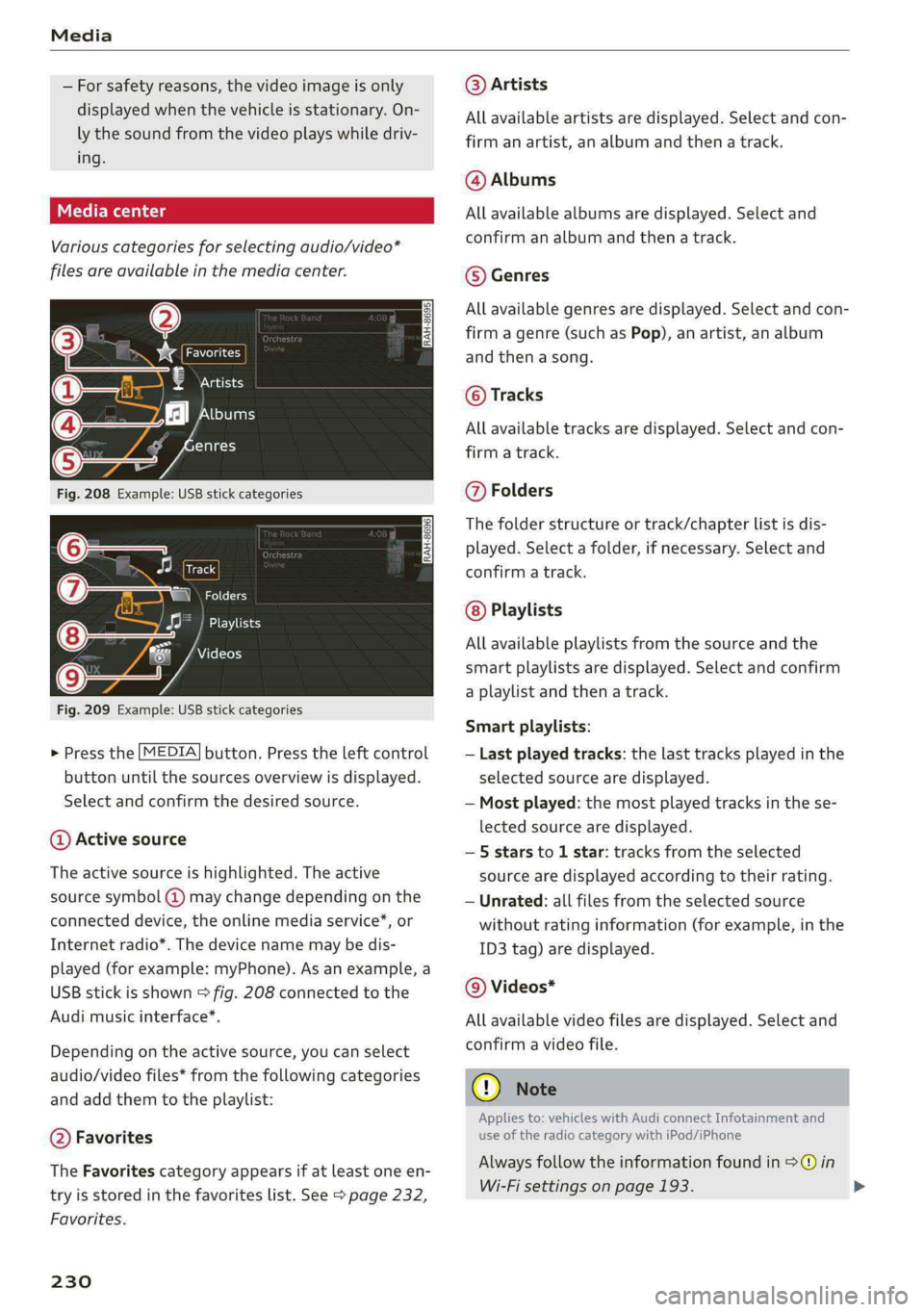
Variouscategoriesfor selectingaudio/video*
filesareavailableinthemediacenter.
esP=
€Artists
‘fl[bums
enres
Fig.208Example:USBstickcategories
Track
(7)SNzat
Playlists
7Videos
Fig.209Example:USBstickcategories
>Pressthe[MEDIA]button.Presstheleftcontrol
buttonuntilthesourcesoverviewisdisplayed.
Selectandconfirmthedesiredsource.
@Activesource
Theactivesourceishighlighted.Theactive
sourcesymbol(@)maychangedependingonthe
connecteddevice,theonlinemediaservice”,or
Internetradio*.Thedevicenamemaybedis-
played(forexample:myPhone).Asanexample,a
USBstickisshown>fig.208connectedtothe
Audi
musicinterface*.
Dependingonthe activesource,youcanselect
audio/videofiles*fromthefollowingcategories
andaddthemtotheplaylist:
@Favorites
TheFavoritescategoryappearsifatleastoneen-
tryisstoredinthefavoriteslist.See>page232,
Favorites.
230
@Artists
Allavailableartistsaredisplayed.Selectandcon-
firmanartist,analbumandthenatrack.
@Albums
Allavailablealbumsaredisplayed.Selectand
confirm analbumandthenatrack.
©Genres
Allavailablegenresaredisplayed.Selectandcon-
firmagenre(such asPop),anartist,analbum
andthenasong.
©Tracks
Allavailabletracksaredisplayed.Selectandcon-
firm
atrack.
@Folders
Thefolderstructureortrack/chapterlistisdis-
played.Selectafolder,ifnecessary. Selectand
confirmatrack.
Playlists
Allavailableplaylistsfromthesourceandthe
smartplaylistsaredisplayed.Selectandconfirm
aplaylistandthenatrack.
Smartplaylists:
—Lastplayedtracks:thelasttracksplayedinthe
selectedsourcearedisplayed.
—Mostplayed:themostplayedtracksinthese-
lectedsourcearedisplayed.
—5starsto1star:tracksfromtheselected
sourcearedisplayedaccordingtotheirrating.
—Unrated:allfilesfromtheselectedsource
withoutratinginformation(forexample,inthe
ID3tag)aredisplayed.
@Videos*
Allavailablevideofilesaredisplayed.Selectand
confirmavideofile.
C)Note
Appliesto:vehicleswithAudiconnectInfotainmentand
useoftheradiocategorywithiPod/iPhone
Alwaysfollowtheinformationfoundin>@in
Wi-Fisettingsonpage193.
Page 236 of 392
Media
Replayvideo!)
Whenthisfunctionisswitchedon¥,thecurrent
videowillreplay.
Show DVDmenu
TheDVDmainmenuopensintheInfotainment
systemdisplay.
—Selectingamenuitem:selectandconfirma
menuitem.Or:moveyourfingerontheMMI
touchcontrolpad*andpressthecontrolknob.
Audiotrack?)
Youcanmanuallysettheaudiotrack(language
andaudioformat).Thelanguageandaudiofor-
matoptionsdependonthevideoDVD.
Subtitles2)
Youcanmanuallyselectsubtitlesforplayback.
ThelanguagesavailabledependontheDVD.
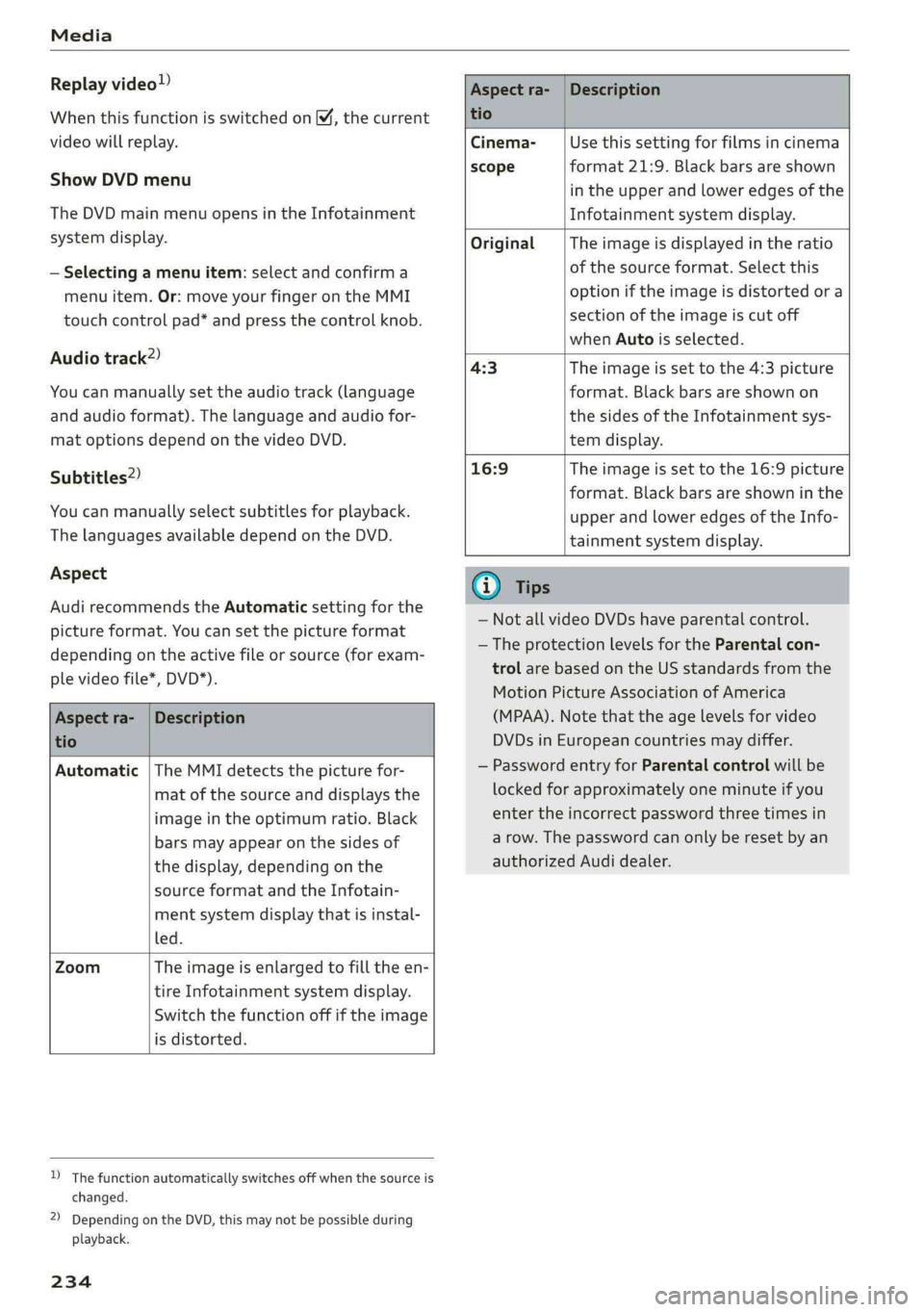
Aspect
AudirecommendstheAutomaticsettingforthe
pictureformat.Youcansetthepictureformat
dependingontheactivefileorsource(forexam-
plevideofile*,DVD*).
Aspectra-
tio
Description
Aspectra-|Description
tio
Cinema-Usethissettingforfilmsincinema
scopeformat21:9. Blackbars areshown
intheupperandloweredgesofthe
Infotainmentsystemdisplay.
OriginalTheimageisdisplayedintheratio
ofthesourceformat.Selectthis
optioniftheimageisdistorted ora
sectionoftheimageiscutoff
whenAutoisselected.
4:3Theimageissettothe 4:3picture
format.Blackbarsareshownon
thesidesoftheInfotainmentsys-
temdisplay.
16:9 Theimageissettothe16:9picture
format.Blackbarsareshowninthe
upperandloweredgesoftheInfo-
tainmentsystemdisplay.
Automatic|TheMMIdetectsthepicturefor-
matofthesourceanddisplaysthe
imageintheoptimumratio.Black
barsmayappearonthesidesof
thedisplay,dependingonthe
sourceformatandtheInfotain-
mentsystemdisplaythatisinstal-
led.
ZoomTheimageisenlargedtofilltheen-
tireInfotainmentsystemdisplay.
Switchthefunctionoffiftheimage
isdistorted.
)Thefunctionautomaticallyswitchesoffwhenthesourceis
changed.
2)DependingontheDVD,thismaynotbepossibleduring
playback.
234
(i)Tips
— NotallvideoDVDshaveparentalcontrol.
— TheprotectionlevelsfortheParental con-
trolarebasedontheUSstandardsfromthe
MotionPictureAssociationofAmerica
(MPAA).Notethattheagelevelsforvideo
DVDsinEuropeancountriesmaydiffer.
—PasswordentryforParentalcontrolwillbe
lockedforapproximatelyoneminuteifyou
entertheincorrectpasswordthreetimesin
arow.Thepasswordcanonlyberesetbyan
authorizedAudidealer.
Page 243 of 392
8W0012721BG
Systemsettings
Switchoffpop-up:whenthefunctionisswitched
on[M,themessagesintheInfotainmentsystem
displayregardingthechargingstatusofyourcell
phoneintheAudiphonebox*arehidden.There-
mindernottoforgetyourcellphonewhenleav-
ingthevehicleisalsoswitchedoff.
Tooltips
WhenthisfunctionisswitchedonM,yourMMI
showsyoutipsforinput.Thefrequencyofhow
oftenitdisplaysdecreaseswithtime.
Speechdialogsystem
Appliesto:vehicleswithvoicerecognitionsystem
Dependingonvehicleequipment,thefollowing
functions
maybeavailable:
Commanddisplay:whenthisfunctionisswitch-
edon[M,theMMIwillshowyouthepossible
commandsforvoiceinputintherespective
menu.
Shortdialog:whenthisfunctionisswitchedon
,ashorterformofthepromptsisused.
Commandduringvoiceoutput”:thisfunctionis
switchedonatthefactory.Whenthisfunctionis
switchedon M,youcansaynewcommandsdur-
ingannouncements.Youdonotneedtowaitfor
thesignaltone(beep)duringanannouncement.
Whenthefunctionisswitchedoff|_J,youneedto
waitforthesignaltone(beep)tosayanewcom-
mand.
Volume:youcanadjustthevolumeofthe
promptsbyturningthecontrolknob.
Individualspeechtraining(onlywhenthevehi-
cleisstationary):youcanadaptthevoice recog-
nitionsystemtoyourvoiceorpronunciationinor-
dertoimprovethesystem'sabilitytorecognize
yourspeech.Individualspeechtrainingiscom-
prisedof20speechentriesthatconsistofcom-
mandsand sequencesofnumbers.Youcande-
letetheprogrammedvoicetrainingwiththeRe-
setindividualspeechtrainingfunction.
Displaybrightness
YoucanadjustthebrightnessoftheInfotain-
mentsystemdisplaybyturningthecontrolknob.
Factorysettings
Depending onthevehicleequipment,thefollow-
ingfunctionscanberesettofactorysettings:
—Soundsettings
—Radio
—Mediasettings
—Jukebox*
—Directory
—Telephone
—BluetoothandWi-Fi*
—Navigationsettings*
—Navigationandonlinememory*
—Voicerecognitionsystem*
—Shortcutkeys
—Messagesettings*
—Apps*
—Tooltips
—Audiconnect*
—Audismartphoneinterface*
Youcanselectthedesiredfunctionsindividually
orallatoncewiththeoptionSelectallentries.
Selectandconfirm Restorefactorysettings.
(i)Tips
Makesurethatnotonlythesettingswerede-
letedbutalsothestoreddata,ifnecessary.
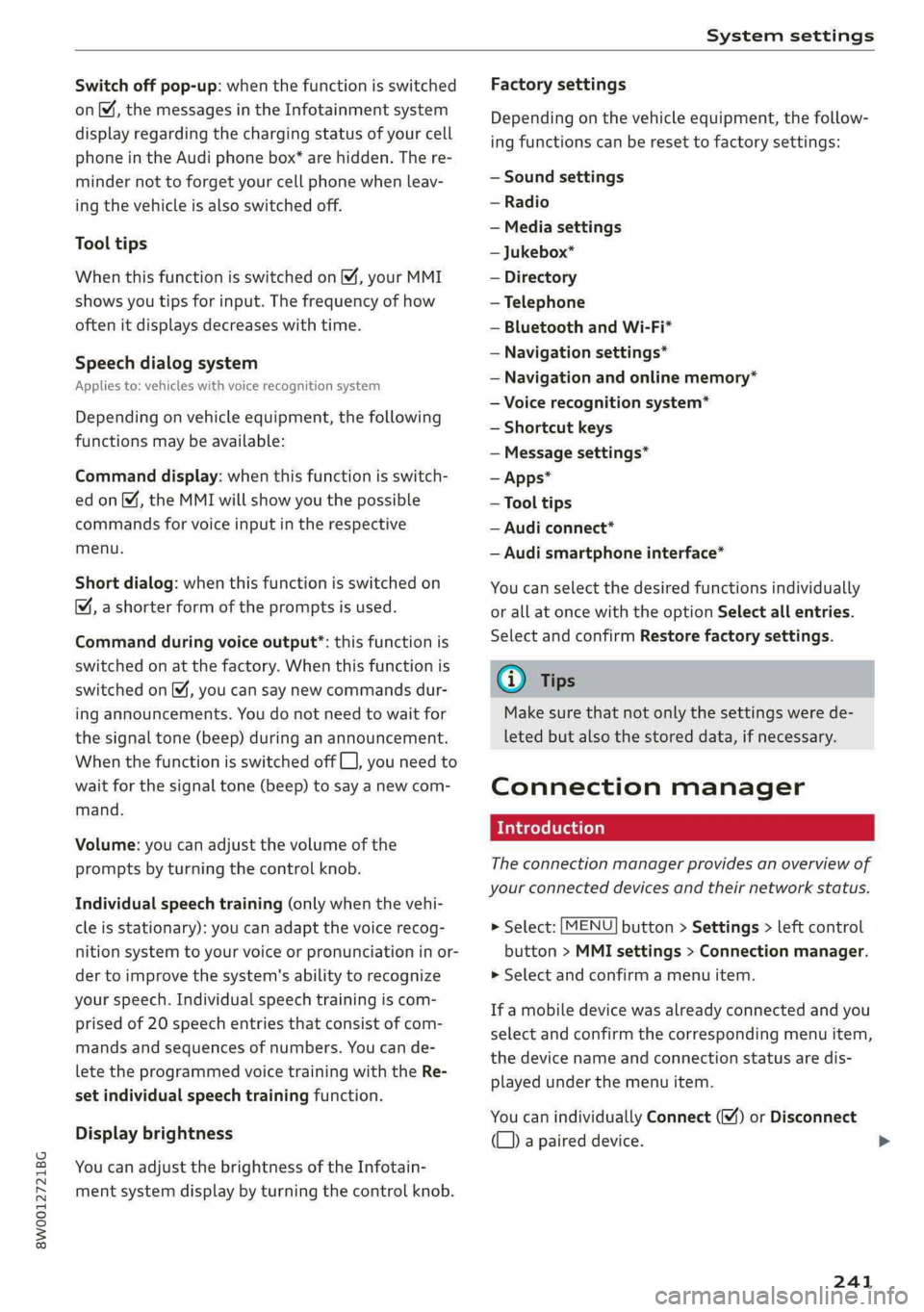
Connectionmanager
Introduction
Theconnectionmanagerprovidesanoverviewof
yourconnecteddevicesandtheirnetworkstatus.
>Select:[MENU]button>Settings>leftcontrol
button>MMIsettings>Connectionmanager.
>Selectandconfirmamenuitem.
If amobiledevicewasalreadyconnectedandyou
selectandconfirmthecorrespondingmenuitem,
thedevicenameandconnectionstatusaredis-
playedunderthemenuitem.
YoucanindividuallyConnect()orDisconnect
(L))apaireddevice.
241
>
Page 244 of 392
Systemsettings
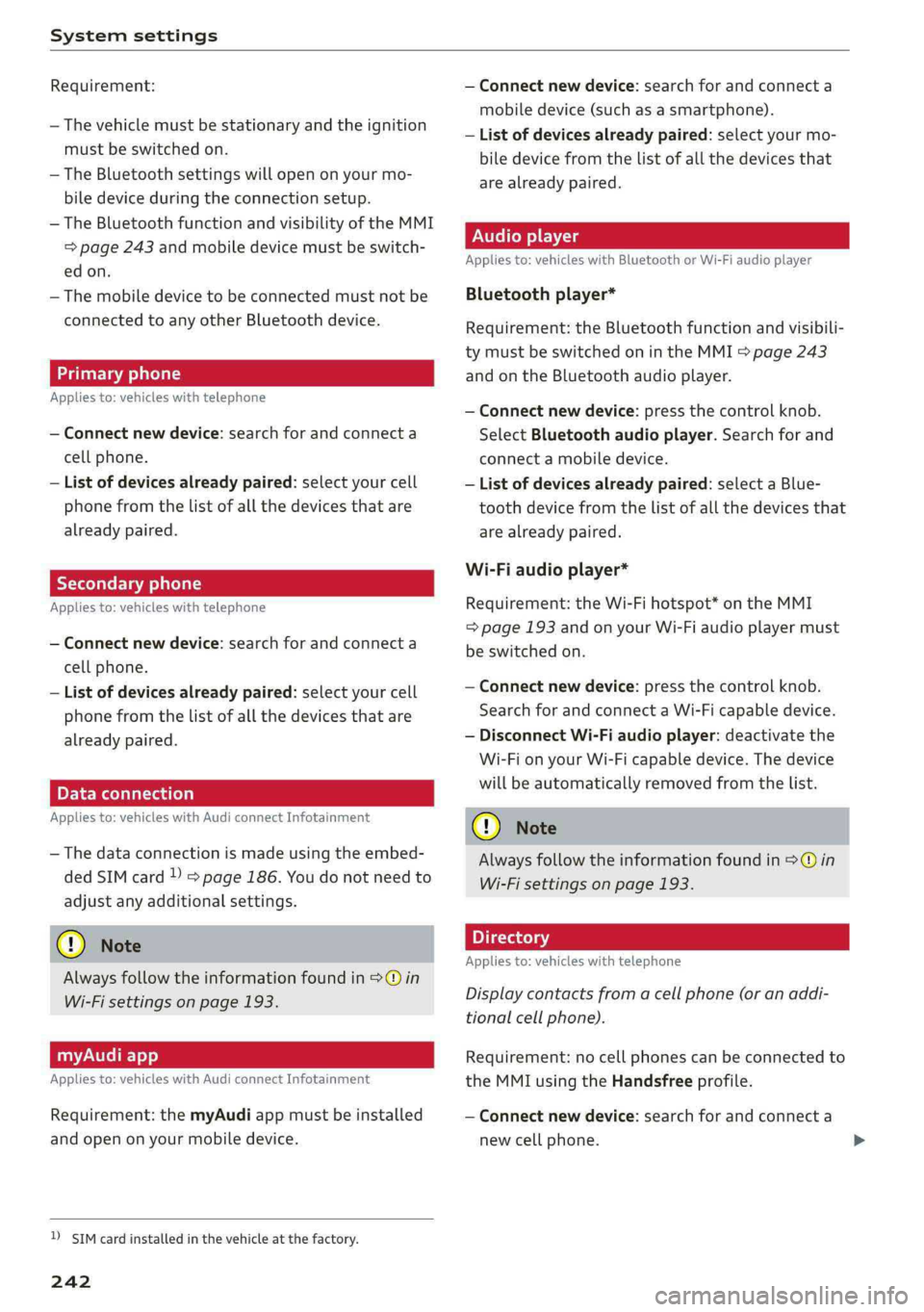
Requirement:
—Thevehiclemustbestationaryandtheignition
mustbe switchedon.
—TheBluetoothsettingswillopenonyourmo-
biledeviceduring theconnectionsetup.
—TheBluetoothfunctionandvisibilityoftheMMI
=>page243andmobiledevicemustbeswitch-
edon.
—Themobiledevicetobeconnectedmustnot be
connectedtoanyotherBluetoothdevice.
aaluatlevadali)
Appliesto:vehicleswithtelephone
—Connectnewdevice:searchforandconnecta
cellphone.
—Listofdevicesalreadypaired:selectyourcell
phonefromthelistofallthedevicesthatare
alreadypaired.
YoTavaeli
Appliesto:vehicleswithtelephone
—Connectnewdevice:searchforandconnecta
cellphone.
—Listofdevicesalreadypaired:selectyourcell
phonefromthelistofallthedevicesthatare
alreadypaired.
PELeMeolaal-vaalela)
Appliesto:vehicleswithAudiconnectInfotainment
—Thedataconnectionismadeusingtheembed-
dedSIMcard)>page186.Youdonotneedto
adjustanyadditionalsettings.
@)Note
Alwaysfollowtheinformationfoundin>@in
Wi-Fisettingsonpage193.
myAudiapp
Appliesto:vehicleswithAudiconnectInfotainment
Requirement:themyAudiappmustbeinstalled
andopenonyourmobiledevice.
D_SIMcardinstalledinthevehicleatthefactory.
242
—Connectnewdevice:searchforandconnecta
mobiledevice(such asasmartphone).
—Listofdevicesalreadypaired:selectyourmo-
biledevicefromthelistofallthedevicesthat
arealreadypaired.
Audioplayer
Appliesto:vehicleswithBluetoothorWi-Fiaudioplayer
Bluetoothplayer*
Requirement:theBluetoothfunctionandvisibili-
tymustbe switchedonintheMMI>page243
andontheBluetoothaudioplayer.
—Connectnewdevice:pressthecontrolknob.
SelectBluetoothaudioplayer.Searchforand
connectamobiledevice.
—Listofdevicesalreadypaired:selectaBlue-
toothdevicefromthelistofallthedevicesthat
arealreadypaired.
Wi-Fiaudioplayer*
Requirement:theWi-Fihotspot*ontheMMI
=page193andonyourWi-Fiaudioplayermust
be switchedon.
—Connectnewdevice:pressthecontrolknob.
SearchforandconnectaWi-Ficapabledevice.
—DisconnectWi-Fiaudioplayer:deactivatethe
Wi-FionyourWi-Ficapabledevice.Thedevice
willbeautomaticallyremovedfromthelist.
C)Note
Alwaysfollowtheinformationfoundin>@in
Wi-Fisettingsonpage193.
Appliesto:vehicleswithtelephone
Displaycontactsfromacellphone(oranaddi-
tionalcellphone).
Requirement:nocellphonescanbeconnectedto
theMMIusingtheHandsfreeprofile.
—Connectnewdevice:searchforandconnecta
newcellphone.
Page 315 of 392
8W0012721BG
CheckingandFilling
Enginewarm-uprequest
|F|Pleasedrivetowarmupengine
Fuelhasenteredtheengineoil,eitherduetolow
outsidetemperaturesorfrequentshortdrives.
Driveuntiltheengineiswarmso thatthefuelin
theengineoilwillevaporate.Avoidhighengine
speeds,fullaccelerating,andheavyengineloads
whendoingthis.
@Tips
Theoilpressurewarning2isnotanoillevel
indicator.
Alwayschecktheoillevelregularly.
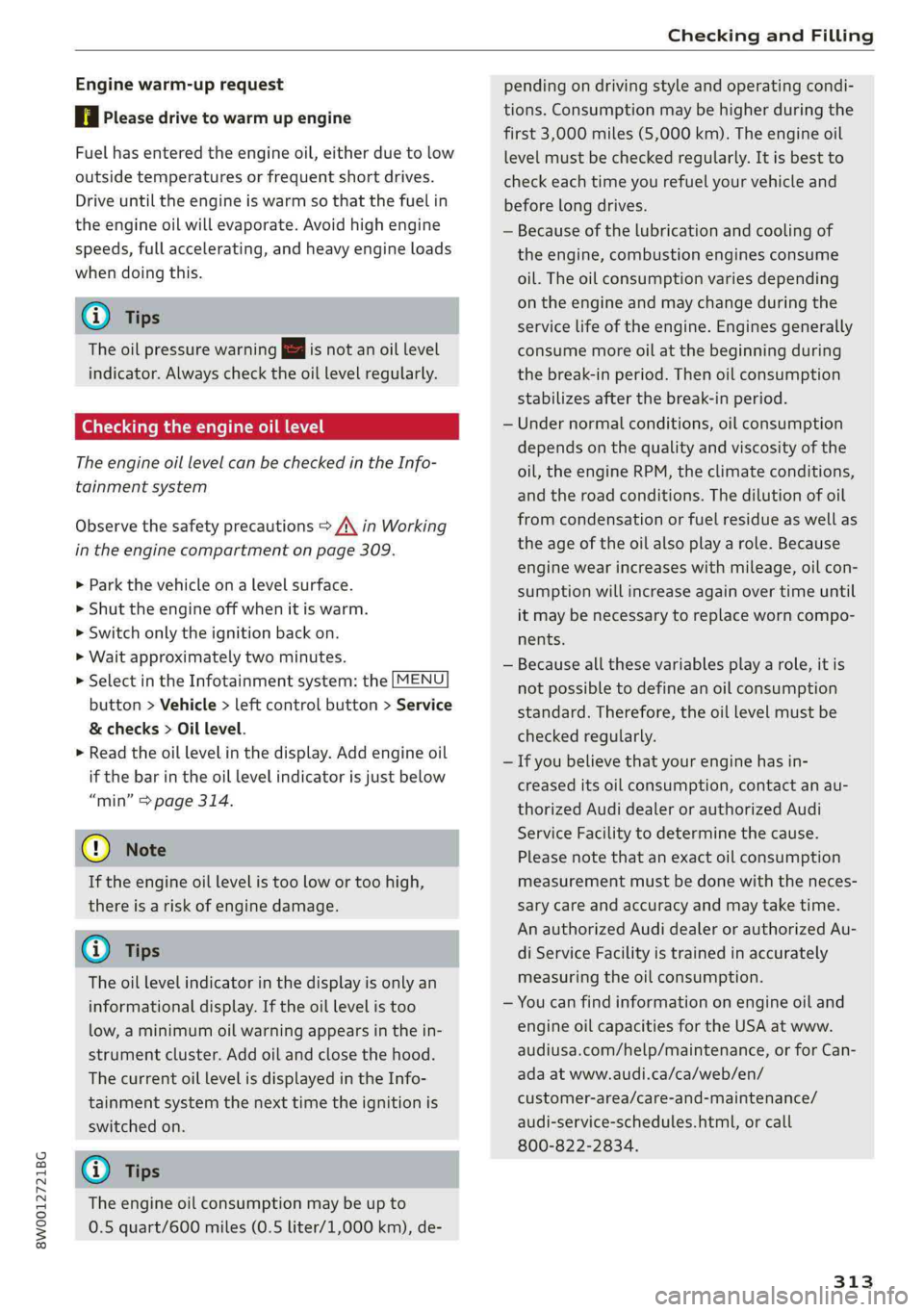
Checkingtheengineoillevel
TheengineoillevelcanbecheckedintheInfo-
tainmentsystem
Observethesafetyprecautions>A\inWorking
intheenginecompartmentonpage309.
>Parkthevehicleonalevelsurface.
>»Shuttheengineoffwhenitiswarm.
>Switchonlytheignitionbackon.
>Waitapproximatelytwominutes.
>SelectintheInfotainmentsystem:the[MENU
button>Vehicle>leftcontrolbutton>Service
&checks>Oillevel.
>Readtheoillevelinthedisplay.Addengineoil
ifthe barintheoillevelindicatorisjustbelow
“min”>page314.
@)Note
Iftheengineoillevelistoolowortoohigh,
thereisariskofenginedamage.
@)Tips
Theoillevelindicatorinthedisplayisonlyan
informationaldisplay.Iftheoillevelistoo
low,aminimumoilwarningappearsinthein-
strumentcluster.Addoilandclosethehood.
ThecurrentoillevelisdisplayedintheInfo-
tainmentsystemthenexttimetheignitionis
switchedon.
@Tips
Theengineoilconsumptionmaybeupto
0.5quart/600miles(0.5liter/1,000km),de-
pendingondrivingstyleandoperatingcondi-
tions.Consumptionmaybehigherduring the
first3,000miles(5,000km).Theengineoil
levelmustbecheckedregularly.Itisbestto
check eachtimeyourefuelyourvehicleand
before longdrives.
—Becauseofthelubricationandcoolingof
theengine,combustionenginesconsume
oil.Theoilconsumptionvariesdepending
ontheengineandmaychangeduring the
servicelifeoftheengine.Enginesgenerally
consumemoreoilatthe beginningduring
thebreak-inperiod.Thenoilconsumption
stabilizes afterthebreak-inperiod.
—Undernormalconditions,oilconsumption
dependsonthequalityandviscosityofthe
oil,theengineRPM,theclimateconditions,
andtheroadconditions.Thedilutionofoil
fromcondensationorfuelresidueaswellas
theageoftheoilalso playarole.Because
enginewearincreaseswithmileage,oilcon-
sumptionwillincreaseagainovertimeuntil
itmaybenecessarytoreplaceworncompo-
nents.
—Becauseallthesevariablesplayarole,itis
notpossibletodefineanoilconsumption
standard.Therefore,theoillevelmustbe
checkedregularly.
—Ifyoubelievethatyourenginehasin-
creaseditsoilconsumption,contactanau-
thorizedAudidealerorauthorizedAudi
ServiceFacilitytodeterminethecause.
Pleasenotethatanexactoilconsumption
measurementmustbedonewiththeneces-
sary careandaccuracyandmaytaketime.
AnauthorizedAudidealerorauthorizedAu-
diServiceFacilityistrainedinaccurately
measuringtheoilconsumption.
—Youcanfindinformationonengineoiland
engineoilcapacitiesfortheUSAatwww.
audiusa.com/help/maintenance,orforCan-
adaatwww.audi.ca/ca/web/en/
customer-area/care-and-maintenance/
audi-service-schedules.html,orcall
800-822-2834.
313
Page 316 of 392
CheckingandFilling
Addingengineoil
B8K-2120
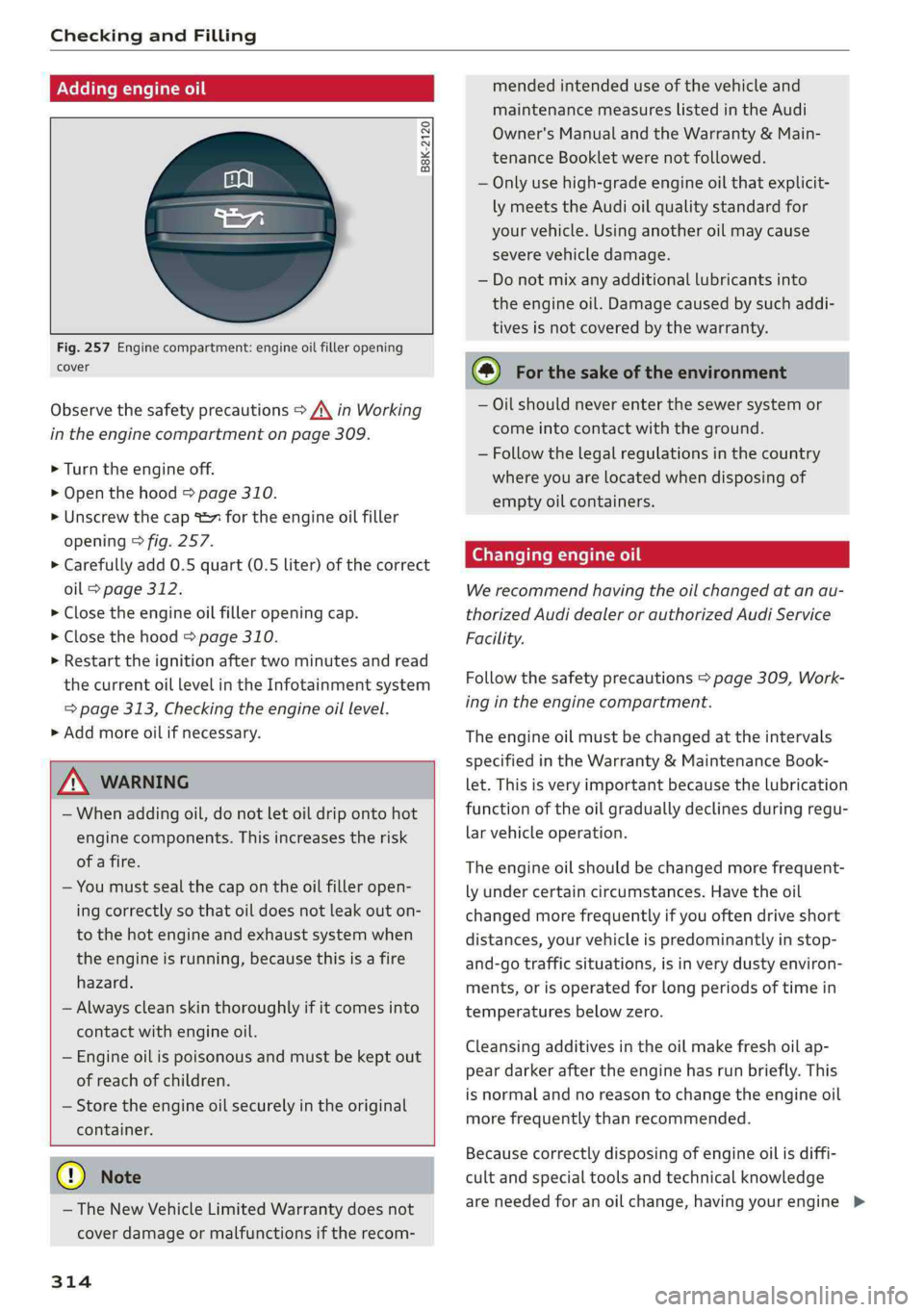
Fig.257Enginecompartment:engineoilfilleropening
cover
Observethesafetyprecautions>A\inWorking
intheenginecompartmentonpage309.
>Turn theengineoff.
>Openthehood>page310.
>Unscrewthecap%~fortheengineoilfiller
opening>fig.257.
>Carefullyadd0.5quart(0.5liter)ofthecorrect
oil>page312.
>Closetheengineoilfilleropeningcap.
>Closethehood>page310.
>Restarttheignitionaftertwominutesandread
thecurrentoillevelintheInfotainmentsystem
=>page313,Checkingtheengineoillevel.
>Addmoreoilifnecessary.
ZXWARNING
—Whenaddingoil,donotletoildripontohot
enginecomponents.Thisincreasestherisk
ofafire.
—Youmustsealthecapontheoilfilleropen-
ingcorrectlyso thatoildoesnotleakouton-
tothe hotengineandexhaustsystemwhen
theengineisrunning,becausethisisa fire
hazard.
—Alwayscleanskinthoroughlyifitcomesinto
contactwithengineoil.
—Engineoilispoisonousandmustbekeptout
ofreachofchildren.
—Storetheengineoilsecurelyintheoriginal
container.
@)Note
— TheNewVehicleLimitedWarrantydoesnot
coverdamageormalfunctionsiftherecom-
314
mendedintendeduseofthevehicleand
maintenance
measureslistedinthe Audi
Owner'sManualandtheWarranty&Main-
tenanceBookletwerenotfollowed.
—Onlyusehigh-gradeengineoilthatexplicit-
lymeetsthe Audioilqualitystandardfor
yourvehicle.Usinganotheroilmaycause
severevehicledamage.
—Donotmixanyadditionallubricantsinto
theengineoil.Damagecausedbysuchaddi-
tivesisnotcoveredbythewarranty.
(@)Forthesakeoftheenvironment
—Oilshouldnever enterthesewersystemor
come
intocontactwiththeground.
—Followthelegalregulationsinthecountry
whereyouarelocatedwhendisposingof
emptyoilcontainers.
Changingengineoil
Werecommendhavingtheoilchangedatanau-
thorizedAudidealerorauthorizedAudiService
Facility.
Followthesafetyprecautions>page309,Work-
ingintheenginecompartment.
Theengineoilmustbechangedattheintervals
specifiedintheWarranty&MaintenanceBook-
let.Thisisveryimportantbecausethelubrication
functionoftheoilgraduallydeclinesduringregu-
larvehicleoperation.
Theengineoilshouldbechangedmorefrequent-
lyundercertaincircumstances.Havetheoil
changedmorefrequentlyifyouoftendriveshort
distances,yourvehicleispredominantlyinstop-
and-gotrafficsituations,isinverydustyenviron-
ments,orisoperatedforlongperiodsoftimein
temperaturesbelowzero.
Cleansingadditivesintheoilmakefreshoilap-
peardarkeraftertheenginehasrunbriefly.This
isnormalandnoreasontochangetheengineoil
morefrequentlythanrecommended.
Becausecorrectlydisposingofengineoilisdiffi-
cultandspecialtoolsandtechnicalknowledge
areneededforanoilchange,havingyourengine