lock AUDI A4 2020 Workshop Manual
[x] Cancel search | Manufacturer: AUDI, Model Year: 2020, Model line: A4, Model: AUDI A4 2020Pages: 296, PDF Size: 80.45 MB
Page 154 of 296

Parking and maneuvering
Symbol/Descrip-
Description
tion P
Rear corner
vehicle.
This view can assist you when driving out of tight parking spaces or areas
with poor visibility. It shows an almost 180° panorama view behind the
This view helps you to see the distance between the front tires and the
curb and the steering wheel angle when parking.
©
© Front tires
@ Rear tires
This view helps you to detect the distance between the rear wheels and
the curb when parking.
Steering wheel an-
The red lines represent the estimated direction of travel based on the
gle steering wheel angle > ©.
ZA WARNING
— Follow the safety precautions and note the
limits of the assist systems, sensors, and
cameras > page 114.
— The Surroundings view is created from the
individual camera images. The vehicle image
is shown by the system. Objects and obsta-
cles above the camera are not displayed.
@) Note
— Only use the images provided by the camera
on the rear of the vehicle when the luggage
compartment lid is completely closed. Make
sure any objects you may have mounted on
the luggage compartment lid do not block
the rearview camera.
— The front of the vehicle swings out more
than the rear of the vehicle. Maintain plenty
of distance so that an exterior mirror or a
corner of the vehicle does not collide with
any obstacles.
G) Tips
— Depending on the selected gear, it will auto-
matically switch between the Front and
Rear views. If you switch the view manually,
the automatic front/rear camera change will
be temporarily deactivated.
— When first activated while a forward gear is
engaged, the Front corner is displayed.
152
Rear cross-traffic assist
on
Applies to: vehicles with rear cross-traffic assist
Fig. 134 Center display: rear cross-traffic assist display
General information
The rear cross-traffic assist monitors the area be-
hind and next to the vehicle using radar sensors
at the rear corners of the vehicle. The system can
detect moving objects that are approaching, such
as vehicles > fig. 133. A display in the MMI and
various warnings provide assistance when exiting
a parking space. >
Page 157 of 296

8W1012721BB
Parking and maneuvering
If the parking space allows different parking op-
tions, they can be selected manually. Press one of
the suggested parking options @ in the center
display.
Starting the parking process
As soon as the vehicle has reached the correct po-
sition, a P will appear in the center display above
the selected parking space (). The roof in the
parking aid display @) may show the required
braking or driving direction.
> Keep the vehicle as parallel as possible to the
parked vehicles or to the side of the road.
> Make sure that the parking space is suitable for
your vehicle >@.
Start parking using the park assist > page 156.
Maneuvering area
The vehicle can go off course during the parking
process > A\. If there are obstacles within the
maneuvering area that block or endanger the
parking process, for example on the opposite
side of the street, a message may appear. You
may need to drive farther forward and stay closer
to the row of parking spaces.
Z\ WARNING
— Follow the safety precautions and note the
limits of the assist systems, sensors, and
cameras > page 114.
— The driver is always responsible when enter-
ing or exiting a parking space and during
similar maneuvers.
— Sensors and cameras have spots in which
the surrounding area cannot be detected.
Objects, animals, and people may only be
detected with limitations may not be detect-
ed at all. Always monitor the traffic and the
vehicle's surroundings directly and do not
become distracted.
@) Note
— Parking spaces classified as suitable by the
system may have been detected incorrectly.
The driver must decide if the parking space
displayed is suitable for the vehicle.
— Certain conditions near the parking space
may cause the parking process to fail, such
as if the parking space is near trees or posts,
or if the ground is covered, for example,
with gravel, snow, or ice.
G) Tips
— If you did not drive past a suitable parking
space too quickly, the system can also be ac-
tivated afterward by pressing Pe.
— The Electronic Stabilization Control (ESC)
must not be switched off during the parking
process. If the ESC intervenes, the parking
process will be canceled.
— You can also drive into a perpendicular park-
ing space yourself and then activate the sys-
tem. If this is the case, the front of the vehi-
cle should already be in the space @)
=> page 154, fig. 135 so that the sensors
can measure the space.
— The system is not available when certain as-
sist systems are switched on.
—If there are suitable parking spaces on both
sides of the street, for example on a one-
way street, you can change the side where
the system is searching for parking spaces
by activating the turn signal for the other
side or by pressing on that side in the center
display.
— The park systems do not provide support for
assisted parking on tight curves.
Park assist
General information
Applies to: vehicles with park assist
The park assist helps you when parking and exit-
ing parking spaces after the parking space
search. The park assist takes over the steering of
the vehicle while the driver accelerates, brakes,
and monitors the vehicle's surroundings. Park as-
sist can be interrupted at any time.
ZA WARNING
— Follow the safety precautions and note the
limits of the assist systems, sensors, and
cameras > page 114.
155
Page 174 of 296
Audi connect
Applies to: vehicles with Audi connect vehicle control
Depending on the country and the vehicle equip-
ment, the following services may be available:
Locking and unlocking the vehicle by remote
control
Requirement: the vehicle must be parked and the
ignition must be switched off.
This service allows you to unlock or lock your ve-
hicle.
Vehicle status report
This service transfers driver information system
data to a server. Depending on the vehicle equip-
ment, certain data may be accessed, such as the
remaining range or mileage. The values may dif-
fer from the values displayed in the vehicle.
Car Finder
This service transmits the parking location to a
server when the ignition is switched off. The vehi-
cle location, your location, or the route to your
vehicle can be displayed. The new parking loca-
tion cannot be determined with this service if the
vehicle is moved after shutting the vehicle off
and without switching the ignition on and off
again, for example if the vehicle is towed or sto-
len.
Online Audi service request
Requirement: the service must be activated on-
line at my.audi.com and an authorized Audi deal-
er or authorized Audi service facility must be se-
lected.
This service transmits service-relevant data to
your selected authorized Audi dealer or author-
ized Audi service facility. They will contact you
before your next service appointment.
Stolen Vehicle Locator
This service assists you in locating your vehicle if
it is stolen.
— Contact the police. You receive a Case ID.
— Call the service hotline and give your Case ID.
172
The service hotline will forward the established
data to the police. You receive the Audi Service
hotline number when you purchase your vehicle.
Alert services
Requirement: a key user must be set in the vehi-
cle > page 171.
You can adjust the following services in the
myAudi app. You will be notified by a push notifi-
cation and/or e-mail if an alarm is triggered for
your vehicle.
— Geofencing Alert: a permitted/prohibited zone
was entered.
— Speed Alert: a set speed was exceeded.
— Valet Alert: a set speed was exceeded or a per-
mitted/prohibited zone was entered.
Z\ WARNING
Do not ignore messages and warning or indi-
cator lights that turn on in the vehicle be-
cause of the information in the vehicle status
report. This could lead to break downs in on
the road, accidents and serious injuries.
G) Tips
For some services, you can select if you would
like to be notified with a push notification
and/or an e-mail.
Settings
Wi-Fi settings
Applies to: vehicles with Wi-Fi hotspot
Requirement: the ignition must be switched on.
> Applies to: MMI: Select on the home screen:
SETTINGS > Connection settings > Wi-Fi.
Depending on the country and the vehicle equip-
ment, the following functions may be available:
Wi-Fi
When the function is switched on, the MMI's Wi-
Fi hotspot is active and Wi-Fi devices can be con-
nected to the hotspot.
Page 213 of 296

8W1012721BB
Checking and Filling
— Do not use any gasoline mixture whose
composition cannot be identified.
— Audi does not assume any responsibility for
damage to the fuel system or for perform-
ance problems caused by using gasoline
mixtures different from those specified.
This type of damage also does not fall under
the New Vehicle Limited Warranty or under
the emissions control system warranty.
— If you notice a higher fuel consumption or
poor handling or performance problems due
to such gasoline mixtures, we recommend
fueling with unblended gasoline.
Gasoline additives
An important issue for many automobile manu-
facturers is combustion residue in the engine
that results from the use of certain fuels.
Although types of gasoline differ depending on
the manufacturer, there are similarities. Certain
substances in the gasoline may cause deposits in
the engine. Additives in the gasoline that should
keep the engine and fuel system clean do not all
function equally.
Audi recommends using TOP TIER Detergent Gas-
oline. For additional information on TOP TIER De-
tergent Gasoline, visit www.toptiergas.com.
If you use incorrect fuels over a long period of
time, the maximum engine performance may be
impaired by combustion residue.
@) Note
— Damage or malfunctions caused by the use
of incorrect types of gasoline are not cov-
ered by the New Vehicle Limited Warranty.
— Only gasoline additives that have been ap-
proved by Audi may be used.
Refueling
Messages
[i Tank system: malfunction! Please contact
Service
There is a malfunction in the fuel tank system.
Drive to an authorized Audi dealer or authorized
Audi Service Facility immediately to have the
malfunction corrected.
Fueling procedure
Fig. 156 Right rear side of the vehicle: opening the fuel
filler door
Fig. 157 Fuel filler door with attached fuel cap
The fuel filler door is unlocked or locked by the
central locking system.
> Unlock the vehicle if necessary.
> Press on the left side of the fuel filler door to
open it > fig. 156.
> Unscrew the tank cap counterclockwise.
> Place the cap from above on the open fuel filler
door > fig. 157.
> Insert the fuel pump nozzle all the way into the
fuel filler neck.
> Begin fueling. Once the fuel pump nozzle turns
off the first time, the fuel tank is full. Do not
continue fueling, or else the expansion space in
the tank will be filled with fuel.
> After the fuel pump has switched off, wait five
seconds before removing the nozzle to allow
the rest of the fuel to finish dripping into the
fuel tank.
211
Page 214 of 296

Checking and Filling
> Turn the fuel cap clockwise until it clicks into
place.
> Close the fuel filler door and then press on the
left side until it latches.
The correct fuel type for your vehicle can be
found on a label located on the inside of the fuel
filler door. For additional information on fuel, see
=> page 210.
For the tank capacity in your vehicle, refer to the
Technical Data > page 278.
To reduce the risk of fuel leaking out or vapors
escaping, make sure that the fuel tank is closed
correctly. Otherwise the [gg indicator light will
turn on.
If the central locking system malfunctions, there
is a fuel filler door emergency release
=> page 213.
ZA\ WARNING
Improper fueling procedures and improper
handling of fuel can lead to explosions, fires,
severe burns, and other injuries.
— Do not smoke. Keep away from open flames.
— The ignition must be switched off when re-
fueling.
— Mobile devices, radio devices, and other ra-
dio equipment should always be switched
off when refueling. Electromagnetic rays
could cause sparks and start a fire.
— If you do not insert the fuel pump nozzle all
the way into the filler tube, then fuel can
leak out. Spilled fuel can ignite and start a
fire.
— Never get into the vehicle when refueling. If
there is an exceptional situation where you
must enter the vehicle, close the door and
touch a metal surface before touching the
fuel pump nozzle again. This will reduce the
risk of electrostatic discharge that can cause
flying sparks. Sparks can start a fire when
refueling.
Z\ WARNING
Transporting fuel containers inside the vehicle
is not recommended. Fuel could leak out of
the container and ignite, especially during an
accident. This can cause explosions, fires, and
injuries.
— If you must transport fuel in a fuel contain-
er, note the following:
— Always place the fuel container on the
ground before filling. Never fill the fuel
container with fuel while it is inside or on
the vehicle. Electrostatic discharge can oc-
cur while refueling and the fuel vapors
could ignite.
— When using fuel containers made of met-
al, the fuel pump nozzle must always re-
main in contact with the container to re-
duce the risk of static charge.
— Insert the fuel pump nozzle as far as pos-
sible into the filler opening while refuel-
ing.
— Follow the applicable legal regulations in
the country where you are driving when
using, storing and transporting fuel con-
tainers.
— Make sure that the fuel container meets
the industry standards, for example ANSI
or ASTM F852-86.
1) Depending on the engine and country
212
() Note
— Remove fuel that has overflowed onto any
vehicle
components immediately to reduce
the risk of damage to the vehicle.
— Never drive until the fuel tank is completely
empty. The irregular supply of fuel that re-
sults from that can cause engine misfires.
Uncombusted fuel may enter the exhaust
system and increase the risk of damage to
the catalytic converter.
@) For the sake of the environment
— Do not overfill the fuel tank, or fuel could
leak out when the vehicle is warming up.
— Fuel should never enter the sewer system or
come into contact with the ground.
Page 215 of 296

8W1012721BB
Checking and Filling
@) Tips
The fuel filler door on your vehicle does not
lock if you lock the vehicle from the inside us-
ing
the central locking switch.
Fuel filler door emergency release
If the central locking system malfunctions, the
fuel filler door can be unlocked manually.
Fig. 158 Right side trim panel in the luggage compart-
ment: opening the trim panel
Fig. 159 Luggage compartment: fuel filler door emergency
release
The emergency opening mechanism is located
behind the right side trim panel in the luggage
compartment.
> Open the cover in the side panel > fig. 158.
> To unlock the fuel filler door, loosen the loop
from the retainer and then pull on the loop
carefully > fig. 159 >@).
> Press on the left side of the fuel filler door to
open it > page 211, fig. 156.
® Note
Only pull on the loop until you feel resistance.
You will not hear it release. If you continue to
pull, you could damage the emergency re-
lease mechanism.
Emissions control
system
General information
ZA\ WARNING
The temperature of the exhaust system is
high, both when driving and after stopping
the engine.
— Never touch the exhaust tail pipes once they
have
become hot. This could result in burns.
— Do not park your vehicle over flammable
materials such as grass or leaves because
the high temperature of the emissions sys-
tem could start a fire.
— Do not apply underbody protectant in the
exhaust system area, because this increases
the risk of fire.
(ele) Nidtml alg
Follow the safety precautions > page 213, Gener-
al information.
The vehicle may only be driven with unleaded
gasoline, or the catalytic converter will be de-
stroyed.
Never drive until the tank is completely empty.
The irregular supply of fuel that results from that
can cause engine misfires. Uncombusted fuel
could enter the exhaust system, which could
cause overheating and damage to the catalytic
converter.
Malfunction Indicator Lamp (MIL)
If the S indicator light blinks or turns on, there
is a malfunction that is causing poor emissions
quality and that could damage the catalytic con-
verter. Drive slowly to an authorized Audi dealer
or authorized Audi Service Facility to have the
malfunction corrected.
213
Page 217 of 296
8W1012721BB
Checking and Filling
— Engine exhaust, some of its constituents,
and certain vehicle components contain or
emit chemicals known to the State of Cali-
fornia to cause cancer and birth defects and
reproductive harm. In addition, certain flu-
ids contained in vehicles and certain prod-
ucts of component wear contain or emit
chemicals known to the State of California
to cause cancer and birth defects or other
reproductive harm.
— Battery posts, terminals and related acces-
sories contain lead and lead compounds,
chemicals known to the State of California
to cause cancer and reproductive harms.
Wash hands after handling.
Q Note
When filling fluids, be sure not to add any flu-
ids to the wrong reservoirs. Otherwise severe
malfunctions and engine damage will occur.
@ For the sake of the environment
You should regularly check the ground under
your vehicle in order to detect leaks quickly. If
there are visible spots from oil or other fluids,
bring your vehicle to an authorized Audi deal-
er or authorized Audi Service Facility to be
checked.
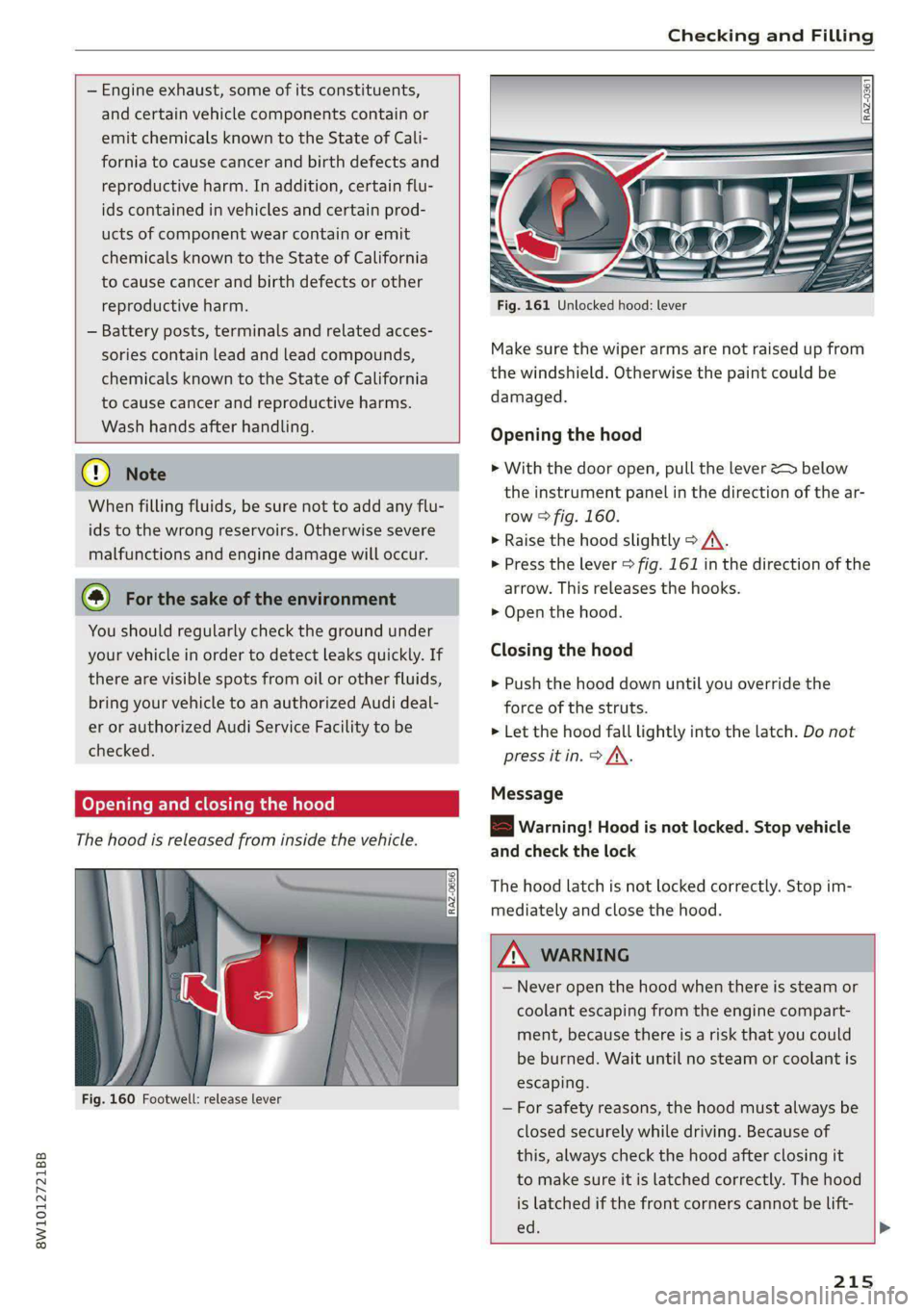
Opening and closing the hood
The hood is released from inside the vehicle.
Fig. 160 Footwell: release lever
Fig. 161 Unlocked hood: lever
Make sure the wiper arms are not raised up from
the windshield. Otherwise the paint could be
damaged.
Opening the hood
> With the door open, pull the lever > below
the instrument panel in the direction of the ar-
row > fig. 160.
> Raise the hood slightly > /A\.
> Press the lever > fig. 161 in the direction of the
arrow. This releases the hooks.
> Open the hood.
Closing the hood
> Push the hood down until you override the
force of the struts.
> Let the hood fall lightly into the latch. Do not
press itin. > AX.
Message
B Warning! Hood is not locked. Stop vehicle
and check the lock
The hood latch is not locked correctly. Stop im-
mediately and close the hood.
ZX WARNING
— Never open the hood when there is steam or
coolant escaping from the engine compart-
ment, because there is a risk that you could
be burned. Wait until no steam or coolant is
escaping.
—For safety reasons, the hood must always be
closed securely while driving. Because of
this, always check the hood after closing it
to make sure it is latched correctly. The hood
is latched if the front corners cannot be lift-
ed. >
215
Page 245 of 296
8W1012721BB
Wheels
@) Tips
You can also use all season tires instead of
winter tires. Please note that in some coun-
tries where winter tires are required, only win-
ter tires with the 44 symbol may be permit-
ted.
Snow chains improve both driving and braking in
winter road conditions.
> Only install snow chains on the front wheels.
> Check and correct the seating of the snow
chains after driving a few feet, if necessary. Fol-
low the instructions from the manufacturer.
> Note the maximum speed of 30 mph
(50 km/h). Observe the local regulations.
Use of snow chains is only permitted with certain
rim/tire combinations due to technical reasons.
Check with an authorized Audi dealer or author-
ized Audi Service Facility to see if you may use
snow chains.
Use fine-mesh snow chains. They must not add
more than 0.53 in (13.5 mm) in height, including
the chain lock.
You must remove the snow chains on roads with-
out snow. Otherwise, you could impair driving
ability and damage the tires.
ZA WARNING
Using incorrect snow chains or installing snow
chains incorrectly can result in loss of vehicle
control, which increases the risk of an acci-
dent.
@) Note
Snow chains can damage the rims and wheel
covers* if the chains come into direct contact
with them. Remove the wheel covers* first.
Use coated snow chains.
@ Tips
When using snow chains, it may be advisable
to limit the ESC > page 110.
Low-profile tires
Applies to: vehicles with low-profile tires
Compared to other tire/rim combinations, low-
profile tires offer a wider tread surface and a
larger rim diameter with shorter tire sidewalls.
This results in an agile driving style. However, it
may reduce the level of comfort and increase
road noise when driving on roads in poor condi-
tion.
Low-profile tires can become damaged more
quickly than standard tires when driving over
large bumps, potholes, manhole covers, and
curbs. Therefore, it is particularly important to
maintain the correct tire pressure > page 237.
To reduce the risk of damage to the tires and
rims, drive very carefully on poor roads.
Check your wheels regularly every 2,000 mi
(3,000 km) for damage. For example, check for
bulges/cracks on the tires or deformations/cracks
on the rims.
After a heavy impact or damage, have the tires
and rims inspected or replaced immediately by
an authorized Audi dealer or authorized Audi
Service Facility.
Low-profile tires can wear out faster than stand-
ard tires.
Uniform tire quality grading
— Tread wear
— Traction AAABC
— Temperature ABC
Quality grades can be found where applicable on
the tire side wall between tread shoulder and
maximum section width > page 228, fig. 168.
For example: Tread wear 200, Traction AA, Tem-
perature A.
All passenger car tires must conform to Federal
Safety Requirements in addition to these grades.
Tread wear
The tread wear grade is a comparative rating
based on the wear rate of the tire when tested
243
>
Page 251 of 296
8W1012721BB
Care and cleaning
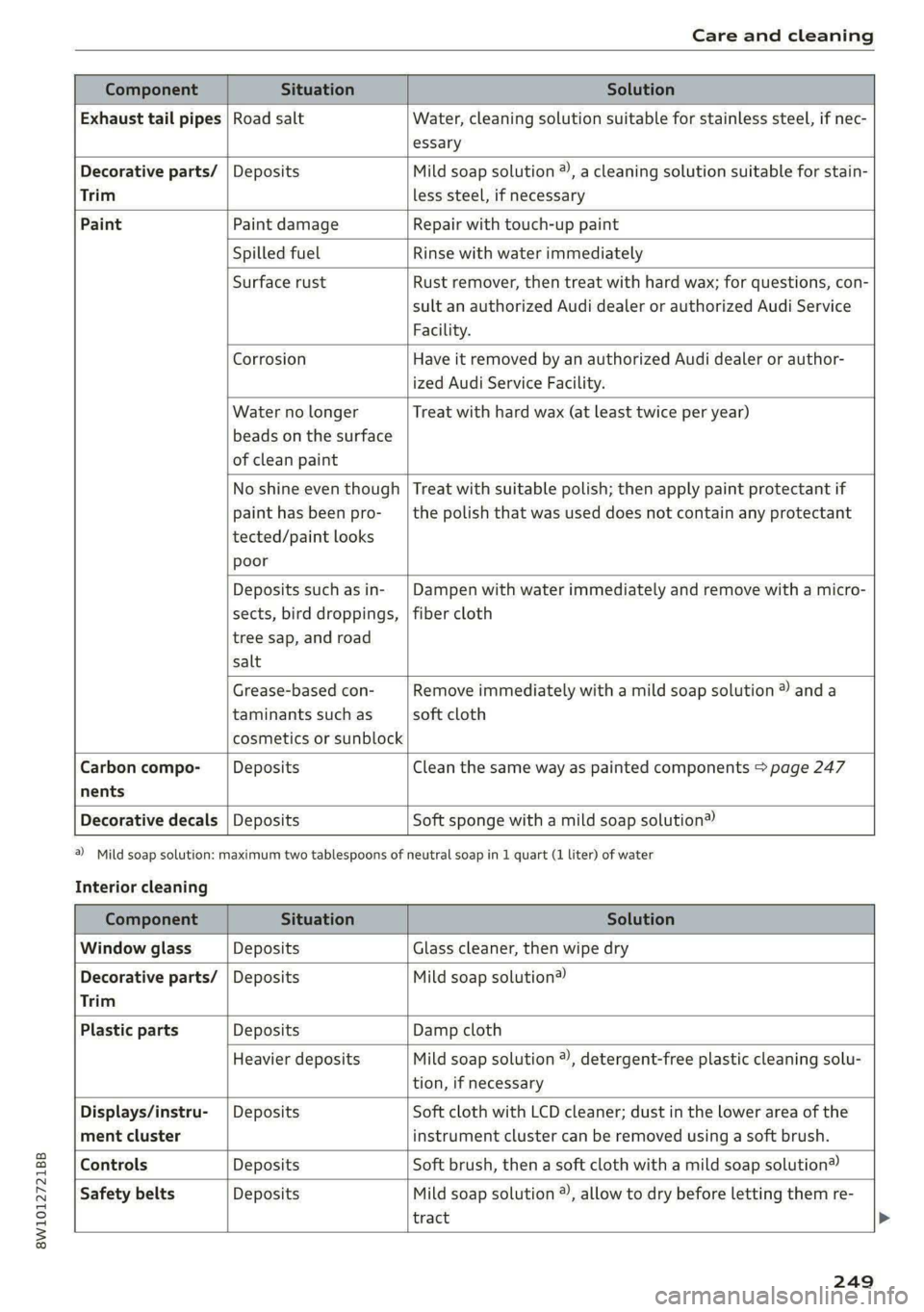
Component Situation Solution
Exhaust tail pipes | Road salt Water, cleaning solution suitable for stainless steel, if nec-
essary
Decorative parts/ | Deposits Mild soap solution @), a cleaning solution suitable for stain-
Trim less steel, if necessary
Paint Paint damage Repair with touch-up paint
Spilled fuel Rinse with water immediately
Surface rust Rust remover, then treat with hard wax; for questions, con-
sult an authorized Audi dealer or authorized Audi Service
Facility.
Corrosion Have it removed by an authorized Audi dealer or author-
ized Audi Service Facility.
Water no longer
beads on the surface
of clean paint
Treat with hard wax (at least twice per year)
No shine even though
paint has been pro-
tected/paint looks
poor
Treat with suitable polish; then apply paint protectant if
the polish that was used does not contain any protectant
Deposits such as in-
sects, bird droppings,
tree sap, and road
salt
Dampen with water immediately and remove with a micro-
fiber cloth
Grease-based con-
taminants such as
cosmetics or sunblock
Remove immediately with a mild soap solution ® anda
soft cloth
Carbon compo- Deposits Clean the same way as painted components > page 247
nents
Decorative decals | Deposits Soft sponge with a mild soap solution?
a) Mild soap solution: maximum two tablespoons of
Interior cleaning
neutral soap in 1 quart (1 liter) of water
Component Situation Solution
Window glass Deposits Glass cleaner, then wipe dry
Decorative parts/ | Deposits Mild soap solution®
Trim
Plastic parts Deposits Damp cloth
Heavier deposits Mild soap solution ®), detergent-free plastic cleaning solu-
tion, if necessary
Displays/instru- | Deposits Soft cloth with LCD cleaner; dust in the lower area of the
ment cluster instrument cluster can be removed using a soft brush.
Controls Deposits Soft brush, then a soft cloth with a mild soap solution®
Safety belts Deposits Mild soap solution ), allow to dry before letting them re-
tract
249
Page 255 of 296

8W1012721BB
Emergency assistance
Emergency assistance
General information
> Park the vehicle as far as possible from moving
traffic in the event of a breakdown. In the event
of a flat tire, park the vehicle ona level surface.
If you are ona steep hill, be especially careful.
> Set the parking brake.
> Switch the emergency flashers on.
> Have the passengers exit the vehicle. They
should move to a safe place, for example be-
hind a guard rail.
Z\ WARNING
Follow the steps given above. This is for your
protection and the for the safety of others on
the road.
Equipment
Vehicle tool kit, tire
vehicle jack
Applies to: vehicles with the vehicle tool kit, tire mobility kit,
and vehicle jack
yi aYaLaL eae Tale|
Fig. 172 Luggage compartment: cargo floor cover
The vehicle tool kit, vehicle jack, tire mobility kit
and compressor are stored in the luggage com-
partment under the cargo floor cover.
» Applies to: sedan: To open the front compart-
ment, lift the cargo floor cover by the strap (@).
> Applies to: allroad: To open the front compart-
ment, pull the cargo floor cover by the plastic
handle @) slightly toward the rear. Lift the car-
go floor cover over the front compartment.
> To open the rear compartment, lift the cargo
floor cover by the plastic handle @).
» Applies to: sedan: Hook the plastic handle (2)
into the luggage compartment seal.
> To remove the cargo floor cover completely,
pull it toward the rear at the plastic handle @).
> Applies to: vehicles with spare tire: Turn the
handle counter-clockwise and remove the spare
tire.
> Applies to: sedan: Unhook the cargo floor cover
again
before closing the luggage compartment
lid.
Depending on vehicle equipment, the vehicle tool
kit, tire mobility kit, and compressor may be lo-
cated under another cover that is secured with a
handwheel.
Applies to: vehicles with vehicle jack in the stor-
age bag: The bag with the vehicle jack is secured
to the tie-downs in the luggage compartment
and must be secured to the tie-downs again after
using it.
ZX WARNING
Applies to: vehicles with vehicle jack in the storage bag
A vehicle jack that is unsecured, incorrectly se-
cured, or not secured in the luggage compart-
ment may slide out of place when braking,
turning,
or in an accident, which increases the
risk of injuries to vehicle passengers. To re-
duce the risk of an accident, never transport
the vehicle jack without securing it.
G) Tips
—Insome vehicles, the rear compartment
may not open.
— The vehicle jack in your vehicle is mainte-
nance-free.
Tire mobility kit
Applies to: vehicles with tire mobility kit
> Read and follow the important safety precau-
tions > page 253.
> Set the parking brake.
> Select the “P” position.
> Check if a repair with the tire mobility kit is pos-
sible > page 254.
253