lights AUDI A4 2021 Owner´s Manual
[x] Cancel search | Manufacturer: AUDI, Model Year: 2021, Model line: A4, Model: AUDI A4 2021Pages: 304, PDF Size: 107.89 MB
Page 261 of 304
8W1012721BC
Care and cleaning
— Never clean the headlights or tail lights
with a dry cloth or sponge because the
lights could be damaged.
— Do not use any cleaning products that con-
tain alcohol, because they could cause
cracks to form.
— Wheels
— Never use any paint polish or other abra-
sive materials.
— Damage to the protective layer on the
rims, such as stone chips or scratches,
must be repaired immediately.
— Camera lenses
— Never use warm or hot water to remove
snow or ice from the camera lens. This
could cause the lens to crack.
— Never use abrasive cleaning materials or
alcohol to clean the camera lens. This
could cause scratches and cracks.
— Door windows
— Remove snow and ice on windows and ex-
terior mirrors with a plastic scraper. To re-
duce the risk of scratches, move the scra-
per only in one direction and not back and
forth.
— Never remove snow or ice from door win-
dows and mirrors using warm or hot water
because this could cause cracks to form.
—To reduce the risk of damage to the rear
window defogger, do not apply any stick-
ers on the heating wires on the inside of
the window.
— Decorative parts and trim
— Never use chrome care or cleaning prod-
ucts.
— Paint
—To reduce the risk of scratches, the vehicle
must be free of dirt and dust before pol-
ishing or waxing.
—To prevent paint damage, do not polish or
wax the vehicle in direct sunlight.
—To reduce the risk of paint damage, do not
polish away rust spots.
— Remove cosmetics and sunscreen immedi-
ately because they could damage the
paint.
— Decorative decals
—To reduce the risk of damage, do not use
any rough powder or abrasive cleaning
products.
—To reduce the risk of damage, do not pol-
ish decorative decals that have a matte or
printed finish.
— Due to the risk of damage, do not use an
ice scraper to remove snow and ice on win-
dows with decorative decals on them.
— Displays and instrument cluster
— Make sure that the display and instrument
cluster are switched off and have cooled
down before cleaning. To switch off the
center display, select on the MMI home
screen: SETTINGS > Display & brightness
> MMI > Screen cleaning.
— Displays, the instrument cluster, and the
trim surrounding it must not be cleaned
with dry cleaning methods because they
could become scratched.
— Make sure no fluids enter the spaces be-
tween the instrument cluster and the
trim, because that could cause damage.
— Controls
— Make sure that no fluids enter the con-
trols, because this could cause damage.
— Safety belts
— Do not remove the safety belts to clean
them.
— Never clean safety belts or their compo-
nents with chemicals or with corrosive flu-
ids or solvents and never allow sharp ob-
jects to come into contact with the safety
belts. This could cause damage to the belt
webbing.
— If there is damage to the webbing, the
connections, the retractors, or the buck-
les, have them replaced by an authorized
Audi dealer or authorized Audi Service Fa-
cility.
— Textiles, artificial leather, and Alcantara
— Never treat artificial leather or Alcantara
with leather care products, solvents, floor
polish, shoe polish, spot remover, or simi-
lar products.
— Have a cleaning specialist remove stub-
born stains to reduce the risk of damage.
259
>
Page 271 of 304
8W1012721BC
Emergency assistance
Connecting the positive cable (red) to the
positive terminal
> Open the cover on the positive terminal
> fig. 179.
1. Attach one end of the positive cable (red) to
the jump-start pin @ © fig. 180 on your vehi-
cle.
2. Attach the other end of the positive cable
(red) to the positive terminal @ on the pow-
er source.
Connecting the negative cable (black) to the
negative terminal
3. Attach one end of the negative cable (black)
to the negative terminal @) on the power
source.
4. Attach the other end of the negative cable
(black) to the jump-start pin @) on the vehi-
cle.
Starting the engine
>» Start the engine in the vehicle giving the charge
and let it run at idle.
> Now start the engine in your vehicle, which has
the
drained battery.
> If the engine does not start, stop the starting
procedure after 10 seconds and then repeat it
after approximately 30 seconds.
> Turn on the rear window defogger in your vehi-
cle in order to reduce any voltage peaks that
may occur when disconnecting the jump start
cables. The headlights must be switched off.
> With the engines running, remove the cables in
reverse order of the way they were installed.
> Close the cover on the positive terminal.
ZA WARNING
— Never connect the jump start cable directly
to your vehicle battery. Only use the connec-
tions in the engine compartment.
— Do not touch the non-insulated parts of the
terminal clamps. The cable must also not
come into contact with vehicle components
that conduct electricity when it is connected
to the positive vehicle battery terminal. This
can cause a short circuit.
— The plugs on the battery cells must not be
opened.
— Keep ignition sources (such as open flames,
burning cigarettes, etc.) away from the vehi-
cle batteries to reduce the risk of an explo-
sion.
— Route the jump start cables so they cannot
get caught in the moving parts in the other
vehicle's engine compartment.
() Note
Please note that the connecting process previ-
ously described for the jump start cables is in-
tended for when your vehicle is being jump
started.
G) Tips
Make sure that the connected jump start ca-
bles have sufficient contact with metal.
Towing
General information
You should only perform the steps that follow if
you have the necessary tools and technical ex-
pertise.
Towing requires a certain amount of practice.
Audi recommends contacting a towing company
to have the vehicle transported.
You should only have your vehicle towed by an-
other vehicle when disabled in exceptional cir-
cumstances. Inexperienced drivers should not
tow.
Notes on towing
When the engine is stopped, the transmission
will not be sufficiently lubricated if traveling at
high speeds and long distances:
— The maximum permitted towing speed is 30
mph (50 km/h).
— The maximum permitted towing distance is 30
miles (50 km).
Additional information on towing with a tow
truck
The vehicle may only be towed with the front axle
raised. Do not wrap any chains or cables around
the brake lines.
269
>
Page 277 of 304
8W1012721BC
Fuses and bulbs
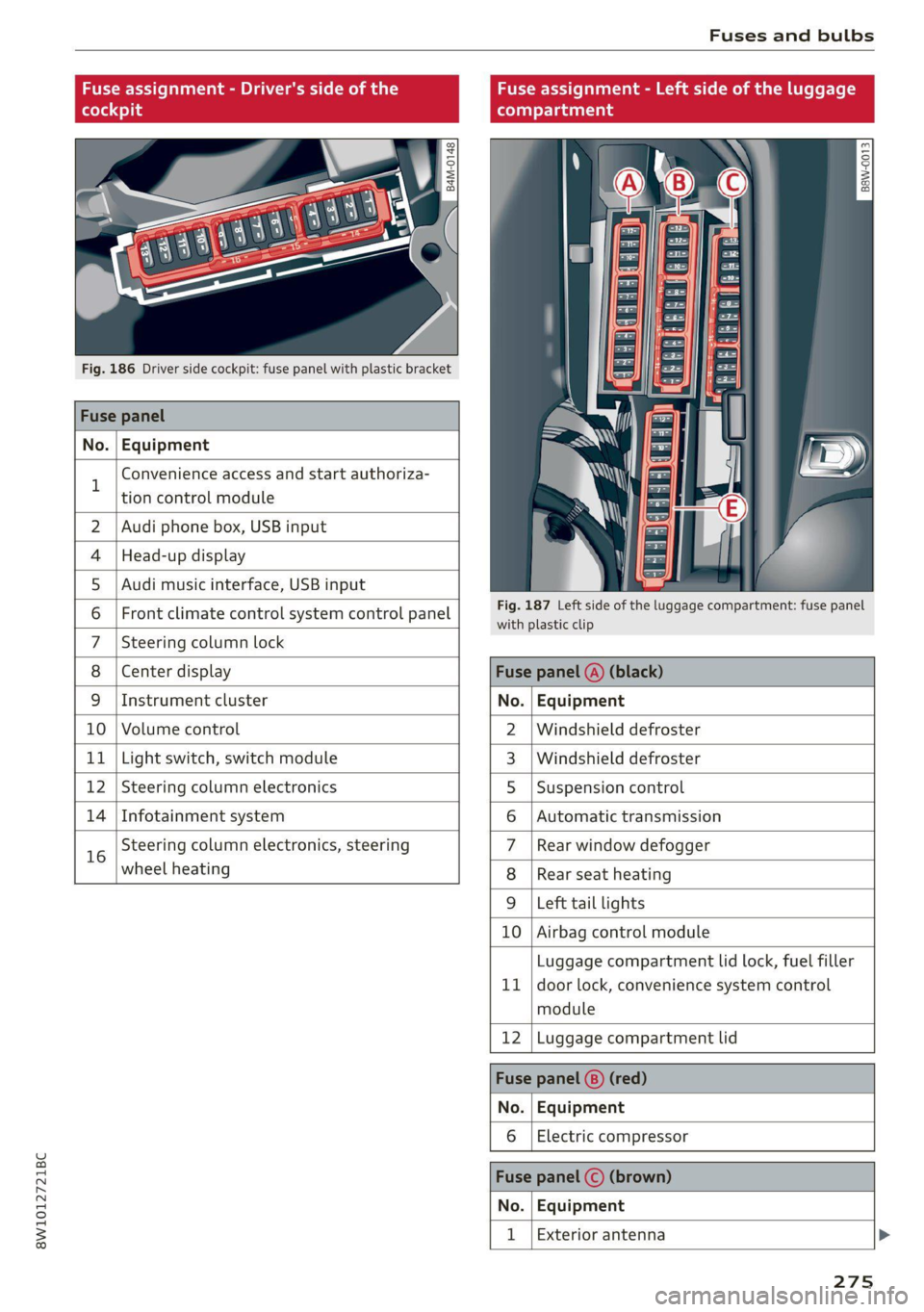
Fuse assignment - Driver's side of the
(ole 4o)ig
Fig. 186 Driver side cockpit: fuse panel with plastic bracket
Fuse panel
No. Equipment
B
Convenience access and start authoriza-
tion control module
Fuse assignment - Left side of the luggage
compartment
GU -
|_8aw-0013]
2 | Audi phone box, USB input
4 |Head-up display
5 |Audi music interface, USB input
6 | Front climate control system control panel eet ofihe uagage compartment: fuse panel
7 |Steering column lock
8 |Center display Fuse panel @) (black)
9 |Instrument cluster No. | Equipment
10 | Volume control 2 |Windshield defroster
11 | Light switch, switch module 3 |Windshield defroster
12 | Steering column electronics 5 |Suspension control
14 | Infotainment system 6 |Automatic transmission
16 Steering column electronics, steering 7 |Rear window defogger
wheel heating 8 |Rear seat heating
9 |Left tail lights
10 Airbag control module
ig
Luggage compartment lid lock, fuel filler
door lock, convenience system control
module
12 Luggage compartment lid
Fuse panel @) (red)
No. Equipment
Electric compressor
Fuse panel (©) (brown)
No. Equipment
Exterior antenna
275
Page 278 of 304
Fuses and bulbs
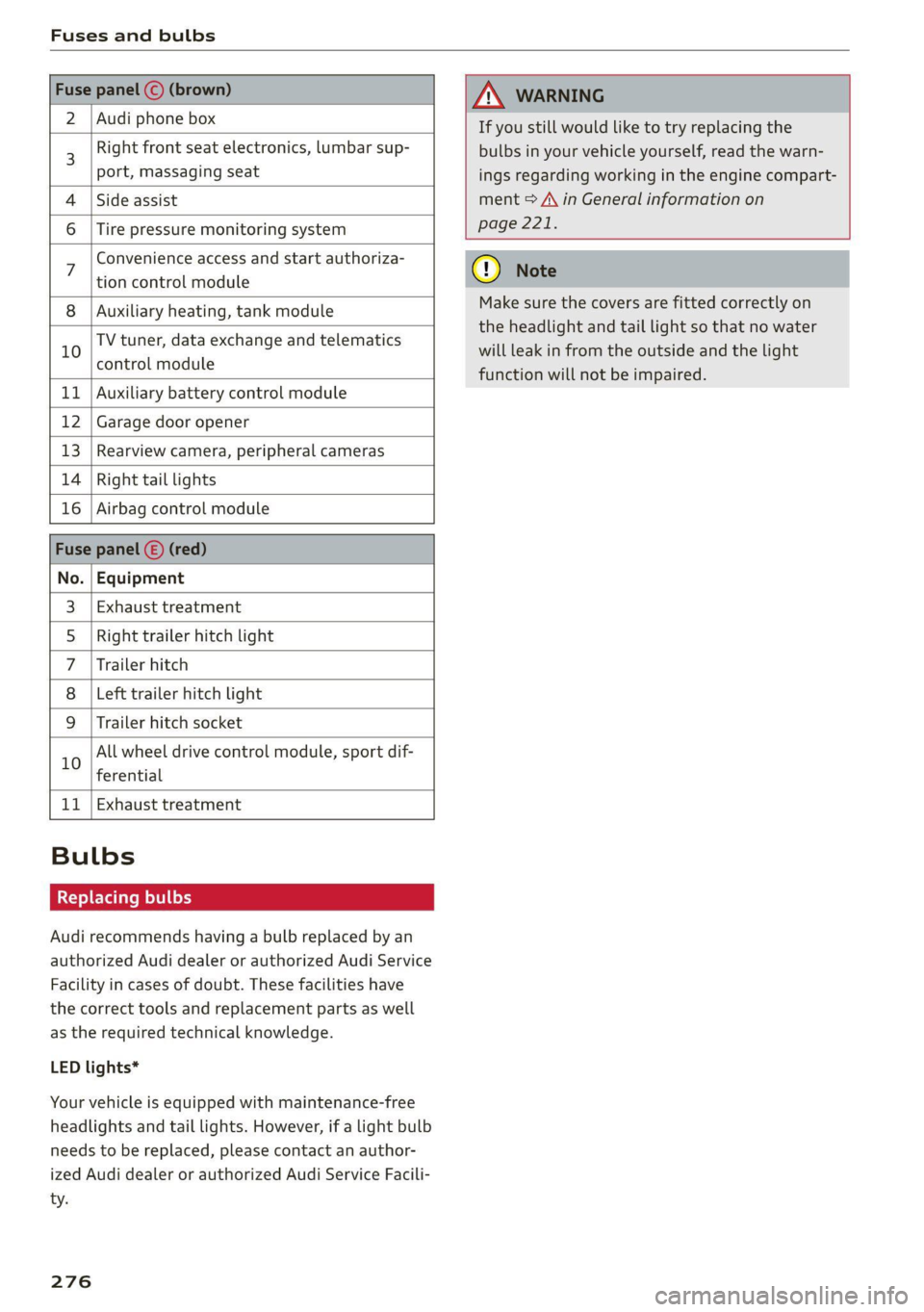
2 | Audi phone box
Right front seat electronics, lumbar sup-
port, massaging seat
4 |Side assist
6 |Tire pressure monitoring system
Convenience access and start authoriza-
tion control module
8 | Auxiliary heating, tank module
TV tuner, data exchange and telematics
10 control module
11 | Auxiliary battery control module
12 | Garage door opener
13 | Rearview camera, peripheral cameras
14 | Right tail lights
16 | Airbag control module
No. | Equipment
Exhaust treatment
Right trailer hitch light
Trailer hitch
Left trailer hitch light
Trailer hitch socket
WO)
O};N]/
Mm|
Ww
All wheel drive control module, sport dif-
10
ferential
11 | Exhaust treatment
Bulbs
Replacing bulbs
Audi recommends having a bulb replaced by an
authorized Audi dealer or authorized Audi Service
Facility in cases of doubt. These facilities have
the correct tools and replacement parts as well
as the required technical knowledge.
LED lights*
Your vehicle is equipped with maintenance-free
headlights and tail lights. However, if a light bulb
needs to be replaced, please contact an author-
ized Audi dealer or authorized Audi Service Facili-
ty.
276
If you still would like to try replacing the
bulbs in your vehicle yourself, read the warn-
ings regarding working in the engine compart-
ment > A\ in General information on
page 221.
Make sure the covers are fitted correctly on
the headlight and tail light so that no water
will leak in from the outside and the light
function will not be impaired.
Page 290 of 304

Index
Numbers and
Symbols
3-zone deluxe automatic climate control.... 91
A
A/G.cooling MOde:. 6 « vice a 6 assis av arene «ow 91
A/C system refrigerant oil............00. 287
Accelerator pedals ¢ wes 2 naan ox news s crew 99
also refer to Accelerator pedal........... 99
AGCOSSOMIES « sresis as isso 4 o ansnine ao atowen 8 He 283
Active lane assist
refer to Audi active lane assist.......... 141
Adaptive cruise control................. 130
Adaptive dampers...............0.-005 111
Adjusting air distribution (automatic climate
control system) ................0 eee eee 92
Adjusting the brightness................. 55
Adjusting the sound..............-..00- 212
Adjusting the temperature (automatic climate
control system) ......... 0.0.00 cee eee eee 92
Adjusting the volume.............0 eee ee 29
Adjusting the volume (announcements).... 212
Adjusting the welcome sound............ 212
Airbag’system . « sss 5 sees se een se cee ee 71
Alarm system
refer to Anti-theft alarm system.......... 36
Alignment pin (changing the wheel)....... 261
All-weather lights...............-.000005 51
AS@ASON tifeSmman: + » swe se meee s Hee Be 250
All wheel drive
refer toquatto sews s ween ss ween as wens 112
Amazon Alexa integration
Media:playback:. jo sscee oo cise a enero oo 202
Operating...............0..0..0.0000. 27
AMI
refer to Audi music interface........... 202
Android Auto
refer to Audi smartphone interface...... 210
Anti-lock braking system............0005 113
Anti-Slip Regulation.................05. 113
Anti-theft alarm system...........-...04. 36
Apple CarPlay
refer to Audi smartphone interface...... 210
288
ASR
refer to Anti-Slip Regulation............
Audi active lane assist...............005
Cleaning the camera area..............
Audi adaptive cruise control
Cleaning the sensors...............005
Predictive control..............000005
Traffic jam assistwax < » sees ss eeee ss eens
Audi adaptive light..............--..00-.
Audi connect
TEfEFLO CONNEC: « = ewan ss news ss Hea Fs
AUdidrive SeleCt ws s y oem s i ween ya eee 4
Audi music interface..............0000-
Audio files........ 0.00.00 cece eee eee
Safety measures... ...... eee eee e wees
Audi side assist
refer to Side assist............-..000-5
Audi smartphone interface..............
Legal information...................5
Audi virtual cockpit
refer to Instrument cluster..............
AUTO
Automatic climate control system........
Automatic headlights ..................
Auto Lock (central locking) ...............
Automatic climate control system.........
Automatic luggage compartment lid....
Automatic transmission............-...05
Automatic wipe/wash system.............
Average consumption...................
Average speed... 0... ee eee eee eee
B
Bag hooks........ 2.52.
Band
refer to Frequency band...............
Page 292 of 304
Index
Closing
Automatic luggage compartment lid...... 41
Convenience closing...........00.++00% 46
HOOP «a asaces
Luggage compartment lid............... 41
Luggage compartment lid with foot motion . 42
Panoramic glass'roOf ici «+ eaves ew wrens oo a 47
Sliding/tilting sunroof................-. 46
Sufishadé (OOF): « + eww = x sates ¢ oem ze se 47
Wind OwS:. « sess «save oo ance 2 0 weuew sw vee 45
Cockpit diMMING:: « & excuse cers so eens ees 55
Cockpit (GVEMIEW)'s + saws 2 2 eam ae wows 2c ce 6
Collapsible spare tire.................0- 267
Collapsible tire
refer to Collapsible spare tire........... 267
Color cOd@
Compartments...........0.0 eee eee eee 83
Compass inthe mirror............-0 0-0 ee 61
Compliance ..... 0.0... cee eee eee eee 284
Conference call......... eee eee eee eee 168
Configuration wizard « « sce 26 wicca a wena o 19
CONNEC son 2 & ieee 2 wares o were oo sR we oe L73
Data plans... 0... eee eee eee ee 177
Data Privacy..............2..0..0200. 279
Eme@ngericy'Calll ws a » aaa a & ons 2 9 rey 178
Infotainment............... 2.0 e ee eee 173
Infotainment services............00005 174
Online roadside assistance............. 179
Vehicle control services................ 175
Connected devices
Device overvieW.......... 00 eee eee eee 214
Connections
referto Media................--- 201, 203
Consumer information.................- 281
Consumption
Re@dUCING secs << sees = = wows sp eee sp ee 102
Consumption (fuel) .................000. 16
Contacts
IMPOFUNG ces s news 3 x woRG 5 5 aeEE Tae 170
Updating inthe MMI.................. 170
also refer to Directory...............-. 167
Convenience key...............00 000s eee 33
Convenience closing...........-...+6.: 46
also refer to Vehicle key..............-. 37
Convenience opening and closing
Windows or panoramic glass roof........ 46
290
Coolant temperature display.............. 14
Cooling system
Adding
coolant..............2--0000- 228
Checking the coolant level............. 228
GOOlANE
« sess oo soem oo memes © a ieenen @ DesemN 227
Cornering
lighticcs : gees s see es Senge 2 wes 51
Cruise control system..............00-5 127
CUB ROIGETS secs 5 eas « Basen Gs Hates ee BEG 82
Current consumption..............000005 16
D
Data module
Serial number (IMED) «swiss eae as rene 170
Data Plans = sees ss sees sine sarees bees 177
Data Privacy... .... cece cee ee eee eee 279
Date... eee eee 16
SEUting:< = = seme ¢ = see Fe ewes Fe ee Ee we 212
Daytime running lights.................. 51
Declaration of compliance............... 284
DEF (instrument cluster)..............005 12
Demo mode
refer to Presentation mode............. 191
Destination onthe map...............0. 184
Details... 6.0... ieee eee eee eee 184
Determining correct load limit........... 249
Digital GOMpass)s: sevsia + 0 woicssue se anesene 6 coven ws 61
DIMENSIONS ie. © & sss 2 w mens © w seen we AMR 286
Dimming the exterior mirrors............. 56
Dimming the rearview mirror............. 56
DIRECtO RY asus 5 2 wees 5s eee 5 3 ee Ey ERE 167
BUSIMESSICATG iam a wasn a 6 anesens « @ asanim www 168
Settings.......... 20.0.0 e eee eee eee 170
Display
Cleaning ....... 6... cece eee eee eee 258
Displaying tooltips..................00. 19
Disposal. ... 2.0.0... cee eee eee eee ee 281
DIStANGE cecriie is « coemmes ox mevece x somnwse ow omevere & 16
Distance’ Warning « sesisies + s acs w o enone & eeewens 140
Doors
Child safety lock............. 00... eee 44
DOOr COMEACESWITCH): « s waas s 6 eae s jaan a 3 54
Mechanically unlocking and locking....... 36
Driver information system................ L3
Drives
Feferto Med ideas se exw ae eevee 6 owe 201, 203
Page 295 of 304
8W1012721BC
HFP
refer to Hands Free Profile............. 162
High beams
High beam assistant.................4. 52
Highway lights ....... 0... cece eee eee ee ee 51
Hill descent assist..............02-000. 108
Hill descent control............0 eee eee 107
Hill hold assist... 0.0.2... ee ee eee eee 97
Home
refer to Home address...........-000% 187
Home address ....... 0.00.0. c eee eee ee 187
HomeLink
refer to Garage door opener............. 48
Home screen... ... 2. eee e eee eee eee eee 18
HOM... eee eee 6
Hotspot
refer to Wi-Fi...........0. 2.0 e eee eee 176
I
Idle
fefer to Gears ewes ¢ s ewes ce seen cs wees 8: 97
Ignition
Switching onvand Off". wes x y says « ¢ caver « 9 95
Imbalance (wheels) ............000000 0s 244
Immobilizer
refer to Electronic immobilizer........... 37
Indicatorlights » neow ¢ a wes ¢ ewer ws wares ao ee 7
INSpPectionintetWals ¢ ssw < gapen g x paves se ne 233
INStroMment ClUStErs = wasn s x wom » x eowe sy ew 12
Adjusting the layout................00. 13:
Cleaning........ 0... eee eee eee eee 258
ENGin@: code: « = sas ¢ seas ¢ eee ae Heese 215
Failures: «osc 2s mene oe pews se ee ¥ ee 12
On-board computer............00200 eee 16
Operating...............2.. 0.02.0 000 13
Service interval display................ 233
Software information................. 215
Switching tabs..................200005 13
Switching the view............ 00ers 13
Vehicle functions................00000- 16
Version information...............0-5 215
Instruments
Adjusting illumination.................. 55
Integrated Toll Module................. 125
Intelligent search
Navigation’: « s sxe 5 ¢ caw + + seein s o tees = 182
Interior lighting « . esccms ve ewe ve mes vw 54,55
Interior MONitOriNg’s + 2 wesw ce wows s ween a ae 36
Intermittent mode (windshield wipers) ..... 58
International’ travel... seessieivaseveuea Li?
Internet
veferto:connects =» ssw ss wees eo wes 2 oe 173
Internet radio
refer to Online radio.............. 197,198
iPhone
refer to Audi music interface........... 202
J
Jump starting......................00. 268
K
ROY". ccanees i a: sonra i ot samme +o anames o 9 ames @ 33,37
Convenience opening and closing......... 46
Key replacement.........c:eecceeeeees 37
Mechanical key...........0...000 02000 37
PANIC button ....... 2.20... 00 cece eee eee 38
Replacing the battery.................. 39
Unlocking and locking.............e eee 38
Vehicle code... 6.2.2... eee eee eee eee 37
Key user... 2... ee eee ee eee 31
RICK EOWING. « ccenerts «a: eames 0 a ayngen eo acne 9 me 99
L
Lane assist
refer to Audi active lane assist.......... 141
Lane departure warning
refer to Audi active lane assist.......... 141
Laptimer........... 0.000000. 0.0 2000. 124
Evaluating s « saws « & cae & & eee so ees os 125
StANEIINGsis 6 & conse w o owen 7 cummins & 7 aE & > 124
LATCH (securing child safety seats)......... 78
Leather care and cleaning............... 258
Legal information
License subscriptions................. 215
Software information................. 215
Software licenseSicx « s wews ss wee s genes 215
Version information...............000- 21S
License plate: brackets + scies 6 seen 3 6 ser 283
Lifting points (vehicle jack).............. 264
293
Page 296 of 304
Index
Light/rain sensor
Automatic headlights...............00. 51
Intermittent mode (windshield wipers).... 58
CIGHEING': « = sex & = eees & 3 Raw & HeieE 2 F eee 51
EXteriOr’s + cess 2 vem av cen a 2 ee a 2 es 51
TCORIOR ccioe + 0 soniane » : semcace wo wsesure aw ececeat as 54
Listening to music
referto Media................-4- 201, 203
Load... . i.e eee ee 287
E@GAULUSERS ti « sietas oo exansie a « ainsi o x avesiee 8 8 30
Locking and unlocking
By remote control..............-.000-- 38
Using the lock cylinder................. 36
With the convenience key............... 38
Low beam headlights.................00. 51
LTE
refer to Exterior antenna.............. 165
Luggage compartment.................. 83
Cover (power)... ... ce eee eee eee eee 85
Increasing the size................. 85, 86
Passethroughiis « essen s sons a o cos @ sens 6 86
Power SOUrCES .... 1 ee eee eee eee 82
TIG-COWNS sss = ses & z gars se peen st wen ee 87
Valet parking’: « cca es weve ae seme se corre 48
also refer to Luggage compartment...... 83
Luggage compartment lid................ 44
Closing button... ..... 0. cee eee eee eee 4l
General information.................05 40
Mechanically unlocking..............45. 43
Opening and closing................... 41
Opening and closing with foot motion..... 42
Opening from the inside in an emergency... 44
Power opening and closing.............. 41
Luggage compartment net............... 87
Lumbar support...........2.-.000 eee eee 64
M
Maintenance’. » seica i sce ov aveasc vo acanans os 281
Maintenance intervals................-5 233:
Malfunction Indicator Lamp (MIL)........ 220
Manual SHIMING:: « « cows a « cows a x cow a 2 Hew 99
Map
Changing the scale........... 000. seen 184
Display.... 2.0... ee eee eee eee 186
Operating: « asx s x news ¢ o Rew 2 b eRe Fe 185
Setting the destination................ 184
294
MAP
refer to Message Access Profile......... 170
Map preview............0..0 0000000008 184
Map update................02..000 00 189
myAudi app... .. eee c cece eee ee eee 189
ONUNG:: s sexe + 2 wees 2 Ree es Sea Gof Here 189
USBiGONMECEION sxicase s % suncane « © sxenass « © sons 190
Massage function
Front... cece eee eee ees 65
Mechanical key........ 0.0.0 e eee eee eee 37
Media « sisi s ccinene vo anvensa we ot aweseni a aie 201, 203
Supported formats.................-- 207
Media
center.................00000 eee 204
Memory function. ......... 0.0 eee eee eee 71
Menu language
refer to Setting the language........... 212
Menu paths......... 0.0.0... eee eee eee ee 18
Message Access Profile................. 170
MesSagesins « « sows so cavewse 9 a exmnsue wv oss ¥ 6 170
Mitrorcompassy oe sic 3 2 miss oo mar 2 8 aw 61
Mirrors
Adjusting exterior mirrors............... 55
Dimming... 06... cee e eee eee eee 56
Vanity mitror's « wax » ¢ anes 2 y tows © s ewe 57
MMI Navigation plus
refer to Multi Media Interface........... 19
MMI radio
refer
to Multi Media Interface........... 19
MMI Radio plus
refer to Multi Media Interface........... 19
Mobile device
refer to Telephone.............00e000 162
Mobile device reminder signal............ 166
Mountain passes...................00. 107
Mountain roads................0000 eee 107
Multifunction steering wheel
Buttons... 0... 02... cee eee eee 13,29
Operating: « s ws « x eeu sy eee so ewe se 13
Programming buttons...............05- 29
Voice recognition system.............-. 26
Multi Media Interface................... 19
Menus and symbols...............--04- 20
Operating’: « owes 2 wae o 6 wore oo were 17,20
Switching on or off..............02.00. 19
MWC Gpceie 3 5 coveine 6 & cxemens «4 carves ww sagan © & ome 29
MYAUG Es. : aseuore & csesain o cauees oe wrens woo 30,174
Page 297 of 304
8W1012721BC
Index
myAudi navigation................. 181, 184
MYAUI USERS asscver s 6 ease ae enue 2 eee oY oes 30
N
Natural leather care and cleaning......... 258
NaVIGAEION ccs < = cece vo eres se Hees ee oe 181
Betterrouteiis «i ccs + 2 anzens 0 cnwisme «6 cans 190
Calling... 2... eee eee eee eee 184
Changing the scale............0. ee eee 184
alsorrefer'to. Map « sss «= ews + 2 cies owes 185
Navigation database
Version information.............00005 215
Navigation (instrument cluster).......... 187
NHTSA es cases x x wana 4 x mmios oe wimaioe we omc 283
Notification center sci ¢ o ssesce so sae os ese 22
Oo
Octane rating (gasoline)................ 217
QOGOMELET way « ¢ wows & 2 wes 4 bee ee ee 1S
ReSettingien & : acum sv anm © o wties & a samen a 15
Office address
refer to Business address.............. 187
Offroad
refer to Offroad driving................ 108
Offroad
driving.......... 20sec eee eee 108
FEC
DUGEOM) wiccons = 2 exeses we stein «6 ansonoe 9 w noe 91,
Oil
refertoEngineoil.................... 224
On-board computer.............00 0-0 eee 16
On Board Diagnostic System (OBD)... 220,277
Online map
refer to Satellite map................. 188
Online radio...................0.00005 197
also refer to Online radio.......... 197,198
Online roadside assistance.............. 179
Online services
fefer tO CONNEC’: « ees ¢ ¢ eyes ce ew se He 173
Online system update.............00005 213
Online traffic information............... 190
Opening. ....... 6. eee eee cece 33
Automatic luggage compartment lid...... 41
Convenience opening...........-...005- 46
Fuel filler door...........00 eee cece eee 218
HOGG 's scvse © s mame 2 ¢ eR & 2 ERE § ee Ge 222
Luggage compartment lid............... Al
Luggage compartment lid with foot motion . 42
Panoramic glass roof............00 eee ee 47
Sliding/tilting sunroof..............0005 46
Sunshade (roof) « « wcscine ow cence mv owarne wa ow 47
Windows ...... 0... e cece eee eee eee eee 45
Opening and closing
refer to Unlocking and locking........ 33,38
Operating
Head-tip displayins « x aims s aaes = news ex xe 25
Tnstrumenticluster sissies i asians a o asneaine ow soi 13
Multifunction steering wheel............ 13
Multi Media Interface............... 17,20
TeXtINPUBss 2 2 cones ws wramrs x x seen oa ewe a ee 23
Touch display.......... 0... c eee eee eee 17
Voice recognition system............... 26
Optional equipment number............. 286
Options
Médias: = » saes ¢ = eae 9 e ames 5 © ews 3 ee 207
RaGiOiics so awinia 6 7 seanine 6 aa 6 cimRE Yo 8 198
Overview (Cockpit). cs sina ov arenas v6 aries a 6 ose 6
P
PaintiCOd Gis ¢ wees sv ween oe mews ae ees oa 286
Paint damageé:s:. = ¢ sees ss eees y = ewes se eee 257
PANIG BUttOMTs « » snus = 2 ame seme oY 37, 38
PANIC function ..............0 0c eee eens 37
Panoramic glass roof................-04. 47
Convenience opening and closing......... 46
Emergency closing: . iwc. scenes cowed ee 47
Quick opening............... eee eee eee 47
Park assist. ........ 0... ccc e eee eee eee 159
Parking. .... 0... cece cece eee eee 96
Parking aideecs os csvsens vo somes ve ssecers oa mse 150
Adjusting the volume................. 151
Automatic activation................4. 150
Cleaning the sensors/camera........... 256
Park assist... 20... eee eee eee eee 159
Parking aid plus: : sss ss sees se ewes 5 es 150
Parking space search................05. 157
Peripheral cameras...........--.000-5 152
REAlVIEW CAMEL a eins «i oes bs aes 5 a oe 152
Parking and maneuvering.............-- 150
Parking brake
refer to Electromechanical parking brake. 106
Parking lightSic
295
Page 298 of 304
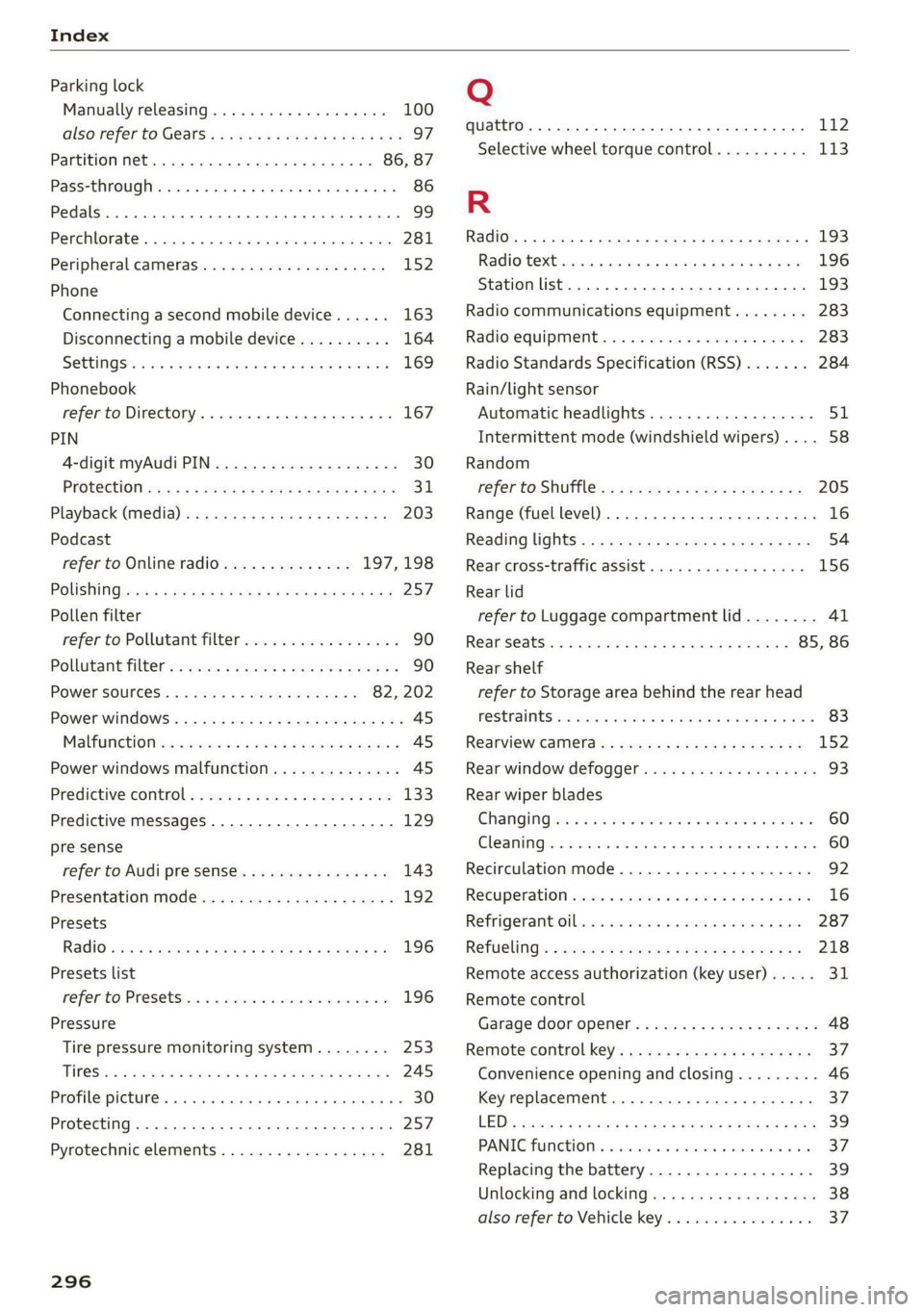
Index
Parking lock
Manually releasing.............00000- 100
also refer to Gears... 6... eee e eee eee 97
Partition W@t sca < ssces v enees s aren ase 86, 87
Pass-through... .... cc eee cence eens 86
Pedals... 2... cece eee eee eee 99
Perchlorate ....... 0. eee eee ee eee 281
Peripheral cameras............0.000085 152
Phone
Connecting a second mobile device...... 163
Disconnecting a mobile device.......... 164
SONGS ccsain » iam © © wravens a % aosmem w v soveTs 6 169
Phonebook
refer to Directory.......... 0. e ee eae 167
PIN
A-digit myAudi PIN.................00. 30
PROLECHON sev: « ¢ cee x o cares § e oem oe ee 31
Playback (media). . sss. ss sees ie cease ee 203
Podcast
refer to Online radio.............. 197,198
POLISHINGisax « ¢ eee + & eee Eee a Ree a ee 257
Pollen filter
refer to Pollutant filter................. 90
Pollutant filter’: . aces ss seee s bees ween as 90
POWEP SOUPCES:: « = seme: =v seme ee meee e 82, 202
Power WiINdOWS ......... 0 eee e eee eens 45
Malfunction ns san 2 wean es ween a 2 wees = 45
Power windows malfunction.............. 45
Predictive control.............-.00e000- 133
Predictive messages..............--005- 129
pre sense
refer to Audi presense................ 143
Presentation mode..............-+-008 192
Presets
RadiGicres s ¢ eves 5 2 neues x 5 Haus oe ROWS FB: 196
Presets list
Feferto Presetsicis <2 sais
Pressure
Tire pressure monitoring system........ 253
Tif@S': + : asvox ¢ & eaime & & eG 3 5 HORS 7 ES 245
Profile picture... . eee eee eee ee eee 30
Protecting ..... 0... 0c cece cece eee 257
Pyrotechnic elements..............000 281
296
Q
quattro... 2... eee 112
Selective wheel torque control.......... 113
R
RSGiG}: = : suse » 5 mews ¢ 2 Swe 2 a eee x eee 193
RadiOteXtiscn casi a i ance @ a anemia oo anew 196
Station list... 2.0.0... ee eee 193
Radio communications equipment........ 283
Radio‘equipment ....... eeen ee een ee eee 283
Radio Standards Specification (RSS) ....... 284
Rain/light sensor
Automatic headlights.................. 51
Intermittent mode (windshield wipers).... 58
Random
refer to Shuffle: . s sses s+ ovens peewee: 205
Range (fuel level) .................00000. 16
Reading lights.............. 2.000 eee eee 54
Rear cross-traffic assist.............0005 156
Rear lid
refer to Luggage compartment lid........ 41
Rear seatS.. 1... . cee eee eee 85, 86
Rear shelf
refer to Storage area behind the rear head
FEStrAINES wssve 2 o wawere oo esi ¥ 6 Rae @ 8 eens 83
Rearview camera... 12.1... ee eee eee eenes 152
Rear window defogger...............000 93
Rear wiper blades
Changing sec = wee ws were ov nee oo ae 8 60
Cleaning..... 2... . 6. cece eee 60
Recirculation mode..............--00005 92
RECUPERATION cesses vu suceae « & cameson ww eames ow Re 16
Refrigerant Oilivics = 5 wean eo wenn eo wwe 2 a0 287
Refueling’: ss sees 2 = saws 7 5 tees Fe ewe ro: 218
Remote access authorization (key user)..... 31
Remote control
Garage door opener..............2+-00. 48
Remote control key.............---.e eee 37
Convenience opening and closing......... 46
Key replacement...............--000-- 37
LED = suse 3 = wens = » owime oy ceeme se Rees ee 39
PANICTUMECIONS: « cscsses cs wrencce so ansnesa 3 8 arene 37
Replacing the battery.................. 39
Unlocking and locking...............005 38
also refer to Vehicle key..............-. 37