Digital display AUDI A4 2021 Owner´s Manual
[x] Cancel search | Manufacturer: AUDI, Model Year: 2021, Model line: A4, Model: AUDI A4 2021Pages: 304, PDF Size: 107.89 MB
Page 4 of 304
Table of contents
About this Owner's Manual......
SUMIMAry: < = exe : eens: Seen cs sens
QutckeaeCe ssh: «i esis se ois a eaves @
Cockpit. ...... 0... eee eee eee eee
Indicator lights overview...........4..
Display and operation...........
Instrument cluster...............
Instrument cluster overview...........
Operating. ecccuse w+ were oo wens oo ayes 9 ¥
Adjusting the display.................
Coolant temperature display...........
Tachometer’ series i ewe so snes ¥ & ome
Odometer.............. cee eee eee ee
Outside temperature display...........
Engine oil temperature indicator.......
Boost indicator...............0--000.
Vehicle functions...............-----
Touch display.....................
General touch display operation........
Multi Media Interface................
Head-up display..................
DeSeriptions: s wees « x wows ¢ cess so eee
Voice recognition system........
Generalinformation.................
DeSeriptions. «+ seams x x arucsms x 0 seine oo coer
External voice operation..............
Global FUNGtHIONS:. icc: 5 6 ese. 6 6 sce
Additional function buttons...........
Starting and driving.............
Personalization..................
Opening and closing.............
Central locking..............00-e eee
Child safety lock.............00.-000
Power WindOWSic« s < sews ys wey 5 2 em 5
Sliding/tilting:SUNTOOF escinie os wise a 6 soe
Panoramic glass roof.................
NOD
OO
12 12 12
13
13
14 14
15
15
15
15
16 17 17 19
Z5
25
26 26 26 27
29;
29
30 30 30
33
33)
37
40
44
45
46 47
Valetiparking = s ss-e «x cscs ov cree a ¥ os 48
Garage door opener..........--.00 eee 48
Lights and Vision................. 51
Exterior lighting...................4. 51
Interior liQhting ss =e aves ss eews so eos 54
ViSIOMsn « 3 ses 3 3 ema oo wena vo ae © ove 55
Windshield wipers.............-..45- 58
Digital compass.............-.-0000- 61
Sitting correctly and safely...... 63
Correct passenger seating position...... 63
Frontseats:: » ssw. « ¢ sews & » saws +s ewe < 63
Steering wheel seis < «cies ¥ eerie ss eee 66
Head restraints.................0000. 67
Safety Beltsi: s sass x eeups ¢ < saves 2 e cee 68
Memory function . « scons ecw ee cro ee 71
Airbag system... ... 2.62... 0 ee eee eee 7X
Child safety seats.................04- 76
Storage and convenience........ 82
POWErSOURCES coisa gs seen ss wae se aes 82
Gup holders. ¢ ssn ss wee 2 2 see 2 & pee 82
Storage and compartments............ 83
Luggage compartment............... 83
ROOF hacks « = weies x = wae 2 s eae 2 & ween 2 88
Warm and cold................... 90
Climate control system............... 90
3-zone deluxe automatic climate control. 91
Steering wheel heating............... 93
Fluids in the A/C system. .........0065 93
Driving .............. 0.0... eee eee 95
Starting the vehicle...............0.0. 95
When driving isis ss iovsvie se aerswce oo anes oe 96
Drive system... 2.2... ee eee eee eee 101
Start/Stop system .........ee cece eee 102
BrakeS's so isemi 2 wane w aman a 2 oer as ie 104
Electromechanical parking brake....... 106
Special driving situations.............. 107
Driving: dynamic. . « sic. 6 6 see a 6 se 110
Audi drive select..................00. 110
SUSPENSION es « + exes ¢ ¢ eres +o ees vv eae 111
SUECOMIING 6 vessse oo csisweue io & stone 6 a toma ww Bs Lid
Page 18 of 304
Instrument cluster
Vehicle functions
The trip computer is displayed in the first tab of
the driver information system. Additional vehicle
functions can be accessed depending on the vehi-
cle equipment.
> Press the LE] button on the multifunction steer-
ing wheel.
— On-board computer > page 16
— Lap times > page 124
— Lap statistics > page 124
— Reduced display > page 14
On-board computer
Resetting values to zero
Requirement: the Consumption, Short-term
memory, or Long-term memory display must be
selected.
> To reset the values in the respective memory to
zero, press and hold the left thumbwheel on
the multifunction steering wheel for one sec-
ond.
Depending on the vehicle equipment, you can call
up the following displays in the on-board com-
puter one at a time by turning the left thumb-
wheel on the multifunction steering wheel:
—Time and date > page 212
— Level
— Digital speedometer
— Average consumption > page 16
— Range
— Short-term memory overview
— Long-term memory overview
— Energy consumers > page 16
— Driver assistance
— Traffic sign recognition and traffic light infor-
mation
Short-term memory and long-term memory
The short-term memory collects driving informa-
tion from the time the ignition is switched on un-
til it is switched off. If you continue driving within
two hours after switching the ignition off, the
16
new values will be included when calculating the
current trip information.
Unlike the short-term memory, the long-term
memory is not erased automatically. You can se-
lect the time period for evaluating trip informa-
tion yourself.
Average consumption
The current consumption can be shown using a
bar graph. The average consumption stored in
the short-term memory is also displayed. If the
bar is green, your vehicle is saving fuel (for exam-
ple, using recuperation).
Energy consumers
The Energy consumers view lists other equip-
ment that is currently affecting fuel consump-
tion. The display shows up to three equipment
items. The equipment using the most power is
listed first. If more than three items using power
are switched on, the equipment that is currently
using the most power is displayed. A gauge also
shows the current total consumption of all other
equipment.
Gi) Tips
The date, time of day, and time and date for-
mat can be set > page 212.
Page 63 of 304
8W1012721BC
Lights and Vision
Digital compass
@ ©, q
S| > a
ao.
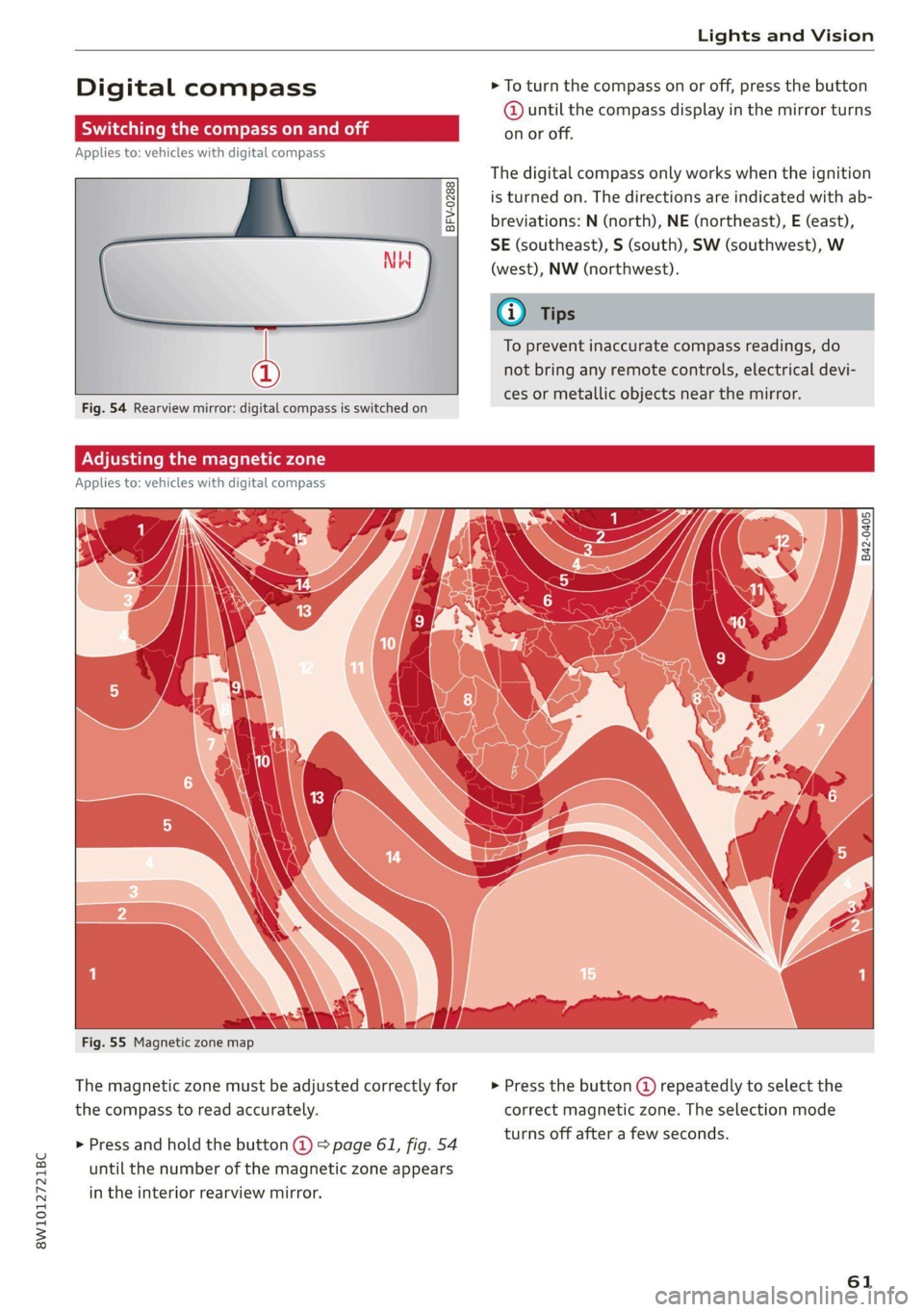
> To turn the compass on or off, press the button
@ until the compass display in the mirror turns
on or off.
The digital compass only works when the ignition
is turned on. The directions are indicated with ab-
breviations: N (north), NE (northeast), E (east),
SE (southeast), S (south), SW (southwest), W
(west), NW (northwest).
To prevent inaccurate compass readings, do
not bring any remote controls, electrical devi-
ces or metallic objects near the mirror.
B42-0405
Fig. 55 Magnetic zone map
The magnetic zone must be adjusted correctly for
the compass to read accurately.
> Press and hold the button @) > page 61, fig. 54
until the number of the magnetic zone appears
in the interior rearview mirror.
> Press the button () repeatedly to select the
correct magnetic zone. The selection mode
turns off after a few seconds.
61
Page 64 of 304
Lights and Vision
Calibrating the compass
Applies to: vehicles with digital compass
If the display is incorrect or inaccurate, the com-
pass must be recalibrated.
> Press and hold the button @ until aC
=> page 61, fig. 54 appears in the rearview mir-
ror.
> Drive in a circle at about 6 mph (10 km/h) until
a direction is displayed in the rearview mirror.
To reduce the risk to yourself and other driv-
ers, calibrate the compass in an area where
there is no traffic.
62
Page 195 of 304

8W1012721BC
Radio
Radio
General information
Selecting the radio
ey
ney) os 2 )
\) ea
102.9 1) 2 FM-HDB
(3) OME 4)
aa
e my 106.7 ama
mee
eo £0010 0—=@)
Saray fa
RAX-0190)
ca
Fig. 148 Center display: SiriusXM station list
Depending on the vehicle equipment, the radio
may support the FM, AM, and SiriusXM (satellite
radio) frequency bands. Using the HD Radio re-
ceiver* also allows you to receive radio stations
on the FM and AM bands in digital format.
Depending on the vehicle equipment and the se-
lected station list, the following information will
be displayed:
@ Station list
Shows the stations that are currently availa-
ble. The station list updates automatically.
@ Stations
For example, the station name may be dis-
played depending on availability.
@ HD Radio technology
FM/AM stations that can be received by digi-
tal radio are marked with the HD Radio tech-
nology symbol H).
If reception quality declines, the radio auto-
matically switches to the analog FM/AM sta-
tion depending on availability.
@ Additional audio programs
Digital HD Radio stations may contain multi-
ple additional audio programs. If you lose re-
ception, the additional audio programs will
be muted since they can no longer be re-
ceived.
© Radio ID
Your radio ID and contact data for your satel-
lite radio provider are displayed.
Channel number
% No reception e®
The station cannot be received.
In addition to the symbols for the usual frequen-
cy bands, the following information may also be
available depending on vehicle equipment:
Symbol | Description
The station provides information in
the background for an online station
alternative. Online station tracking
must be switched on for this
=> page 199.
The station is received through the In-
ternet.
The system attempts to receive the
station/podcast through the Internet.
G@) Tips
— Contact the SiriusXM* provider if you would
like to receive satellite programming.
— Buildings, tunnels, bridges, open areas, oth-
er vehicles or objects on the vehicle roof can
affect reception.
— Satellite radio* is not available in all re-
gions.
Adjusting the radio using the MMI
> Applies to: MMI: To set a frequency band, select
on the home screen: RADIO > Source a catego-
ry.
> Applies to: MMI: To set a station, select on the
home screen: RADIO > Source > a category >a
station/podcast*.
> To select a frequency, follow the instructions
under > page 195, Free text search.
Adjusting the radio using the multifunction
Tare maa 118
Requirement: radio mode must be on.
193
>
Page 203 of 304
8W1012721BC
Media
Media
General information
There may be different media sources and con-
nections available depending on the vehicle
equipment. For example, you can play media files
using a connected USB drive or connect your mo-
bile devices to the Audi music interface and oper-
ate them through the MMI.
Media and format restrictions: the MMI (includ-
ing the USB storage device connection) was test-
ed with a variety of products and media on the
market. However, there may be cases where indi-
vidual devices or media and audio/video files may
not be recognized, may play only with restric-
tions, or may not play at all.
Restricted functionality: reset the MMI to the
factory default settings if functionality is restrict-
ed > page 213.
Digital Rights Management: please note that
the
audio/video files are subject to copyright pro-
tection.
Files that are protected by DRM and are identi-
fied with the symbol f@ will not play.
Data security: never store important information
on mobile devices. Audi is not responsible for
damaged or lost files and media.
Loading times: the more files/folders/playlists
there are on a storage medium, the longer it will
take to load. To reduce the amount of time it
takes the audio/video files to load, use a storage
medium that only contains audio/video files, and
create subfolders (for example, for each artist or
album).
Additional information: when playing, audio
files are automatically displayed with any addi-
tional information that is stored (such as the ar-
tist, track and album cover). If this information is
not available on the medium, the MMI will revert
to the local Gracenote metadata database or
search online if necessary. See > page 207, On-
line additional data. However, in some cases, the
additional information may not be displayed.
CG) Note
Read the information about Audi connect, and
be sure to note the connectivity costs section
=@ in General information on page 173.
Bluetooth audio player
With the Bluetooth audio player, you can play
music wirelessly through the MMI from your
Bluetooth-capable mobile device (such as a cell
phone).
Requirement: the vehicle must be stationary and
the ignition must be switched on. The Bluetooth
settings will open on your mobile device during
the connection setup. The Bluetooth function and
visibility of the MMI > page 213 and mobile de-
vice must be switched on.
Connecting a mobile device
> Applies to: MMI: Select on the home screen:
MEDIA > Source > Connect external device >
New connection. The available Bluetooth devi-
ces will be displayed after several seconds.
> Press on the desired mobile device in the list of
displayed Bluetooth devices.
> To update the list, press OQ.
A PIN for a secure Bluetooth connection will be
generated.
> Confirm the PIN on your mobile device.
After
connecting successfully, the mobile device
will be displayed in the Connected devices menu
as a Bluetooth audio player.
Playing media > page 203.
@ Tips
— Check for any connection requests on your
Bluetooth device.
— Multiple Bluetooth audio players can be
paired with the MMI, but only one at a time
can be active as a Bluetooth audio player
=> page 214.
— The supported media functions (such as
shuffle, list view, categories, search, op-
tions) depend on the Bluetooth device being
used.
201
>
Page 292 of 304
Index
Closing
Automatic luggage compartment lid...... 41
Convenience closing...........00.++00% 46
HOOP «a asaces
Luggage compartment lid............... 41
Luggage compartment lid with foot motion . 42
Panoramic glass'roOf ici «+ eaves ew wrens oo a 47
Sliding/tilting sunroof................-. 46
Sufishadé (OOF): « + eww = x sates ¢ oem ze se 47
Wind OwS:. « sess «save oo ance 2 0 weuew sw vee 45
Cockpit diMMING:: « & excuse cers so eens ees 55
Cockpit (GVEMIEW)'s + saws 2 2 eam ae wows 2c ce 6
Collapsible spare tire.................0- 267
Collapsible tire
refer to Collapsible spare tire........... 267
Color cOd@
Compartments...........0.0 eee eee eee 83
Compass inthe mirror............-0 0-0 ee 61
Compliance ..... 0.0... cee eee eee eee 284
Conference call......... eee eee eee eee 168
Configuration wizard « « sce 26 wicca a wena o 19
CONNEC son 2 & ieee 2 wares o were oo sR we oe L73
Data plans... 0... eee eee eee ee 177
Data Privacy..............2..0..0200. 279
Eme@ngericy'Calll ws a » aaa a & ons 2 9 rey 178
Infotainment............... 2.0 e ee eee 173
Infotainment services............00005 174
Online roadside assistance............. 179
Vehicle control services................ 175
Connected devices
Device overvieW.......... 00 eee eee eee 214
Connections
referto Media................--- 201, 203
Consumer information.................- 281
Consumption
Re@dUCING secs << sees = = wows sp eee sp ee 102
Consumption (fuel) .................000. 16
Contacts
IMPOFUNG ces s news 3 x woRG 5 5 aeEE Tae 170
Updating inthe MMI.................. 170
also refer to Directory...............-. 167
Convenience key...............00 000s eee 33
Convenience closing...........-...+6.: 46
also refer to Vehicle key..............-. 37
Convenience opening and closing
Windows or panoramic glass roof........ 46
290
Coolant temperature display.............. 14
Cooling system
Adding
coolant..............2--0000- 228
Checking the coolant level............. 228
GOOlANE
« sess oo soem oo memes © a ieenen @ DesemN 227
Cornering
lighticcs : gees s see es Senge 2 wes 51
Cruise control system..............00-5 127
CUB ROIGETS secs 5 eas « Basen Gs Hates ee BEG 82
Current consumption..............000005 16
D
Data module
Serial number (IMED) «swiss eae as rene 170
Data Plans = sees ss sees sine sarees bees 177
Data Privacy... .... cece cee ee eee eee 279
Date... eee eee 16
SEUting:< = = seme ¢ = see Fe ewes Fe ee Ee we 212
Daytime running lights.................. 51
Declaration of compliance............... 284
DEF (instrument cluster)..............005 12
Demo mode
refer to Presentation mode............. 191
Destination onthe map...............0. 184
Details... 6.0... ieee eee eee eee 184
Determining correct load limit........... 249
Digital GOMpass)s: sevsia + 0 woicssue se anesene 6 coven ws 61
DIMENSIONS ie. © & sss 2 w mens © w seen we AMR 286
Dimming the exterior mirrors............. 56
Dimming the rearview mirror............. 56
DIRECtO RY asus 5 2 wees 5s eee 5 3 ee Ey ERE 167
BUSIMESSICATG iam a wasn a 6 anesens « @ asanim www 168
Settings.......... 20.0.0 e eee eee eee 170
Display
Cleaning ....... 6... cece eee eee eee 258
Displaying tooltips..................00. 19
Disposal. ... 2.0.0... cee eee eee eee ee 281
DIStANGE cecriie is « coemmes ox mevece x somnwse ow omevere & 16
Distance’ Warning « sesisies + s acs w o enone & eeewens 140
Doors
Child safety lock............. 00... eee 44
DOOr COMEACESWITCH): « s waas s 6 eae s jaan a 3 54
Mechanically unlocking and locking....... 36
Driver information system................ L3
Drives
Feferto Med ideas se exw ae eevee 6 owe 201, 203