parking brake AUDI A4 AVANT 2008 User Guide
[x] Cancel search | Manufacturer: AUDI, Model Year: 2008, Model line: A4 AVANT, Model: AUDI A4 AVANT 2008Pages: 368, PDF Size: 46.19 MB
Page 152 of 368
___ T_ r
_ a_ n_s _m_ i_s _s _i_o _n ___________________________________________________ _
Applies to vehi cles: with mu ltit ron ic '" C ont in uo usly Va riab le Tr ansmiss ion {CVT I
Driving the multitronic ™
The gear ratio is continuously adapted to vehicle speed
and load.
Starting the engine
-The selector lever must be in N or P.
Starting off
Press and hold the brake pedal.
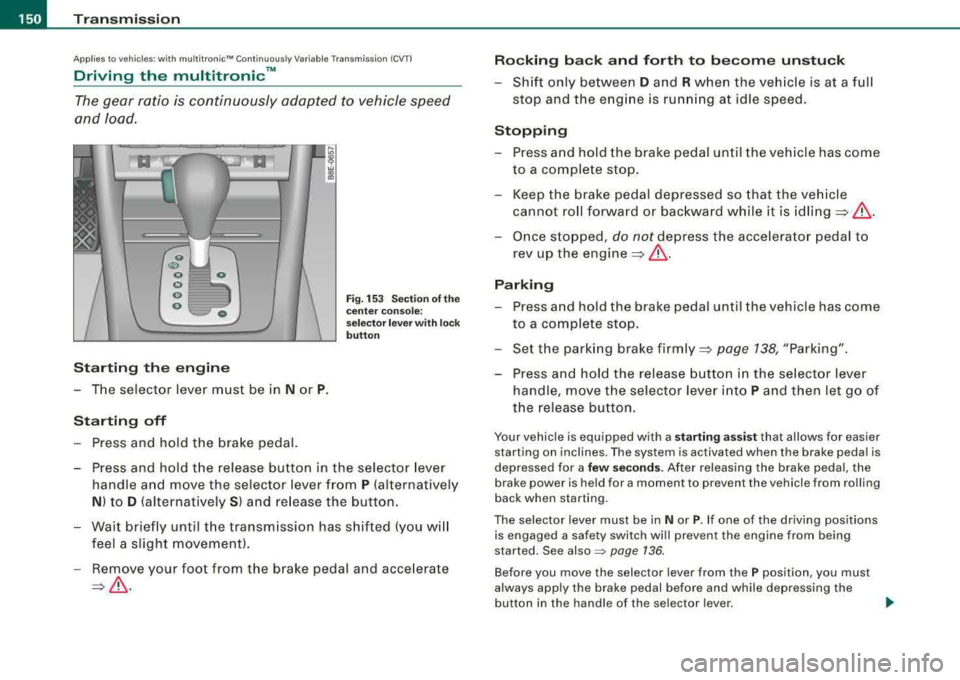
Fig. 153 Section of the
center console:
selector lever with lock
button
-Press and hold the release button in the selector lever
handle and move the selector lever from
P (alternatively
N) to D (alternatively S) and release the button.
-Wait briefly until the transmission has shifted (you will
feel a slight movement).
-Remove your foot from the brake pedal and accelerate
=>& .
Rocking back and forth to become unstuck
-Shift only between D and R when the vehicle is at a full
stop and the engine is running at idle speed.
Stopping
-Press and hold the brake pedal until the vehicle has come
to a complete stop.
-Keep the brake pedal depressed so that the vehicle
cannot roll forward or backward while it is
idling=>& .
-Once stopped, do not depress the accelerator pedal to
rev up the
engine =>& .
Parking
-Press and hold the brake pedal until the vehicle has come
to a complete stop.
-Set the parking brake firmly=> page 138, "Parking".
-Press and hold the release button in the selector lever
handle, move the selector lever into
P and then let go of
the release button.
Your vehicle is equipped with a starting assist that allows for easier
starting on inclines. The system is activated when the brake pedal is
depressed for a
few seconds. After releasing the brake pedal, the
brake power is held for a moment to prevent the vehicle from rolling
back when starting.
The selector lever must be in
Nor P. If one of the driving position s
is engaged a safety switch wi ll prev ent the engine from being
started. See
also ~ page 136.
Before you move the selec tor lever from the P position, you must
always apply the brake pedal before and while depressing the
button in the handle of the se lector lever.
~
Page 153 of 368
Transmission -
-----------------'
& WARNING
• Unintended veh icle mo vement can cause serious injury .
-When the selector lever is in a driving position, the vehicle
m ay creep , even at idle speed . Therefore do not relea se the
parking brake o r foot brake until you are read y to move ,
becau se power is transmitted to the wheel s as soon a s a
dri ving position is eng aged .
-Do not accelerate while selecting a driving position . At this
time the engine must be at idle speed so that undue stress is
not placed on the clutche s in the transmission.
-Remember: - even when stopped briefly with the automatic
tr ansmission in
" D" , "S " or "R ", engine power i s being t rans
mitted to the wheels. Your vehicle could
" creep " forward or
b ackward . When stopped , keep the brake pedal fully depressed
and use the p ark ing brake if necessary to keep the veh icle from
rolling .
-If the selector lever is un intentionally moved into N wh ile you
are driving , take your foot off the accelerator pedal and wait for
the eng ine to return to idle speed before selecting a driving
position.
-Never shift into " R " or "P " when the vehicle is in mot ion .
-Never get out of the dr iver 's seat when the engine is running.
-If you must get out of the vehicle , move the selector lever
se curely into the P position and apply the park ing bra ke firmly .
-If the engine must remain running, never have any driving
position engaged when che cking under the hood . Make sure
the selector lever has se curely engaged and is lo cked in
"P "
with the parking brake firmly set :::::, page 265 , "Eng ine
compartment ". Otherwise , any increase in engine speed may
set the vehicle in motion , even with the park ing brake
applied. •
Controls and equip
ment
Ap plies to ve hicles : wi th m ultit r on ic ™ Co ntin uo usly V ariab le Tr ansmissio n ICVT I
Selector lever positions
Th is sec tio n describes the selector le ver posi tions and
driving ranges.
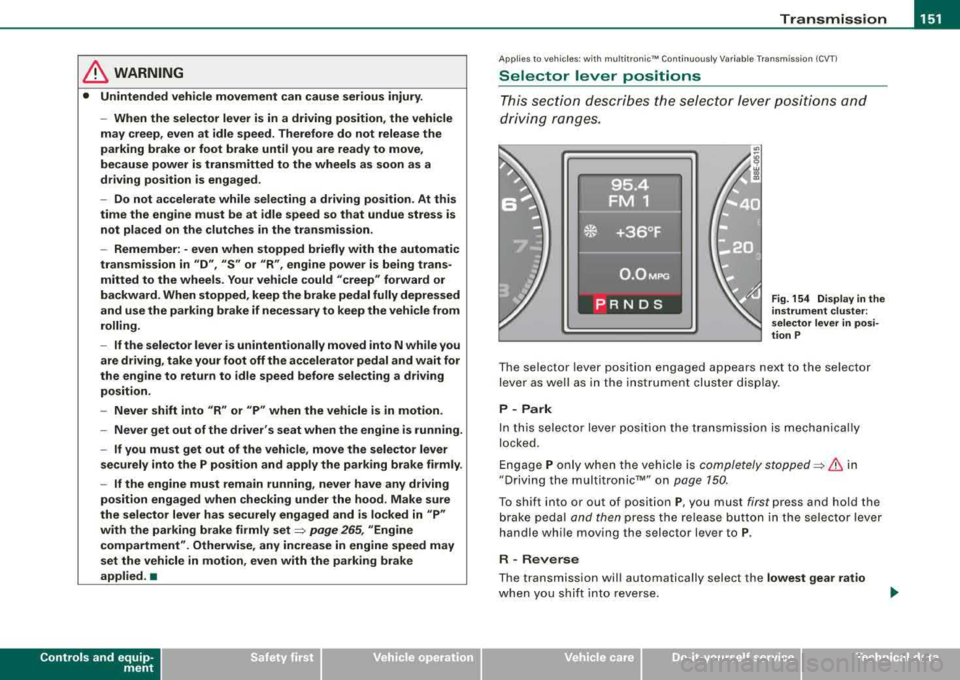
Fig . 154 Display in the
in strument clu ste r:
s elec tor lever in p osi
tion P
T he selector lever posit ion engaged appears next to the selector
lever as well as in the inst rumen t cluster dis play .
P - Park
In this selector lever posit ion the transmission is mechanica lly
locked .
E ngage P only w hen the vehicle is completely
stopped:::::, & in
"Driving the multi tronic™" on page 150.
T o shift into or out of posit ion P, you must first press and hold the
brake pedal and then press the release button in the selector lever
handle whi le moving the selec tor lever to P.
R -Rever se
The transmission wil l automatically select the lowest gear ratio
when you sh if t in to reverse .
irechnical data
Page 160 of 368
___ H_ o_ m_ e_L_ i_n _k_ ® __________________________________________________ _
Applies to vehicles: with Home link® univer sal rad io frequency remote contro l
Programming the HomeLink ® Universal
Remote Control
The Homelink® Universal Remote Control is programmed
in two phases: inside the vehicle at the overhead keypad
and outside the vehicle at the front bumper.
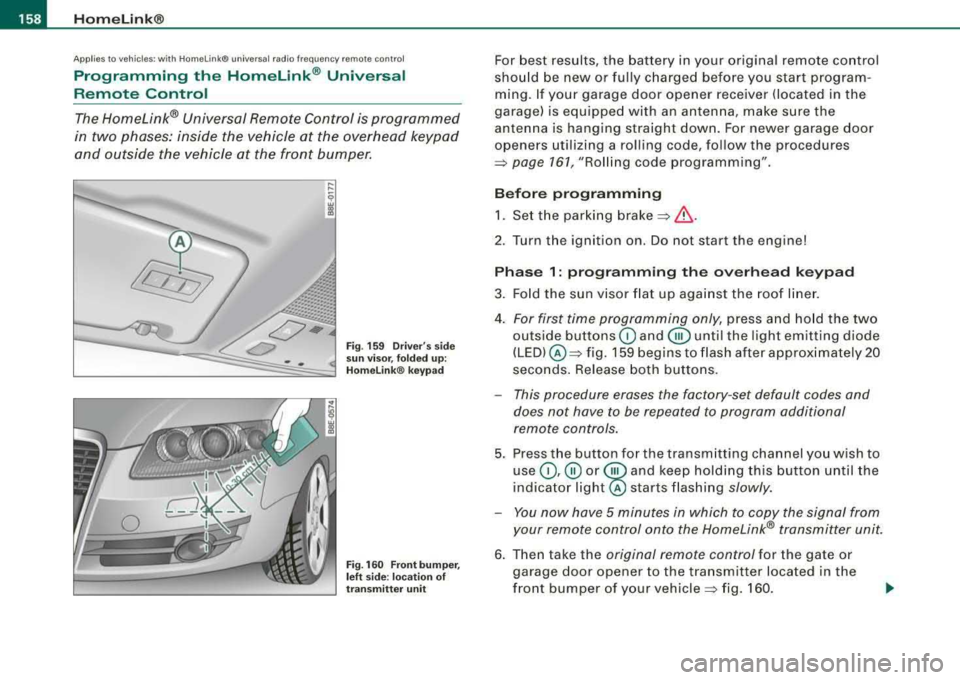
Fig . 159 Driver's side
sun visor, folded up:
Homelink ® keypad
Fig. 160 Front bumper,
left side : location of
transmitter unit
For best results, the battery in your original remote control
should be new or fully charged before you start program
ming. If your garage door opener receiver (located in the
garage) is equipped with an antenna, make sure the
antenna is hanging straight down. For newer garage door
openers utilizing a rolling code, follow the procedures
=> page 161, "Rolling code programming" .
Before programming 1. Set the parking
brake =>& .
2. Tur n the ignition on. Do not start the engine!
Phase 1: programming the overhead keypad
3. Fold the sun visor flat up against the roof liner.
4.
For first time programming only, press and hold the two
outside buttons
G) and @until the light emitting diode
(LED) @=> fig. 159 begins to flash after approximately 20
seconds. Release both buttons.
- This procedure erases the factory -set default codes and
does not have to be repeated to program additional
remote controls.
5. Press the button for the transmitting channel you wish to
use
G) ,@ or @ and keep holding this button until the
indica tor
light@ starts flashing slowly.
- You now have 5 minutes in which to copy the signal from
your remote control onto the Homelink® transmitter unit.
6. Then take the original remote control for the gate or
garage door opener to the transmitter located in the
front bumper of your
vehicle => fig. 160.
Page 163 of 368
_________________________________________________ H_ o_m _ e_L _i_n _k _® __ ftllll
Identifying a rolling code:
-Press the button for the programmed transmitter
channel again and hold it down.
- If the light emitting
diode @=> page 160 , fig. 161 first
flashes quickly and then remains lit after 2 seconds, the
garage door opener is using a rolling code.
•
A pplies to vehicle s: w it h H omelin k® u niv ers al radio fr equ enc y remot e con tro l
Rolling code programming
A rolling code is programmed in two phases: at the
garage door opener motor and inside the vehicle at the
overhead keypad.
Phase 1:
programming the garage door opener motor
1. Make sure that your vehicle is located within operat ing
range of the remote controlled garage door opener.
2. Locate the set button (teach button) on the garage door
opener motor (refer to the operating instructions for the
garage door opener).
3. Press the set button (teach button) on the garage door
opener motor.
Phase 2: programming the overhead keypad
4. Set the parking brake.
5. Turn the ignition on. Do not start the engine!
6. On the overhead keypad press the button for the previ
ously programmed transmitter channel.
7. Press this button a
second time in order to finish the
rolling code programming.
Controls and equip
ment The vehicle should be
located no further than 15 ft (5 m) from the
remote controlled garage door opener to remain within the average
signal range o f mos t remote con trolled systems.
Refer to the garage door opener operating instructions to locate the
set button (t each button) on the garage door opener motor .
After the keypad has been programmed, the g arage door opener
should recognize the radio frequency s ignal from the Homelink ®
Universal Remote Control and respond to signals from it.
[ i] Tips
Having a second person assist you makes programming of the
rolling code easier and faster . For some makes of garage door
op eners t he Homelink ® button may have to b e press ed a third time
to complete the teaching sequence. •
Applies to vehic le s: w it h Hom elink® univ ers al ra dio fr eque ncy remote c ontro l
Erasing the programming of the Homelink ®
universal remote control
When you erase the programming, the programming on
all three of the transmitter channels with be lost!
1. Set the parking brake.
2. Turn the ignition on. Do not start the engine!
3. Hold down both outside buttons
Ci) and @=> page 160,
fig. 161 simultaneously, until the diode begins to flash
(after about 20 seconds).
4. Release both buttons immediately. The programming on
all three transmitter channels is now erased.
.,_
Page 243 of 368

____________________________________________ ln_t_ e_ l_ li _,..g "- e_ n
_ t_t_e _c_ h_ n_o _l_o _....g ,_,y'-----'IJIII
& WARNING
Although the ABS is very effective, always remember that braking
capability is limited by tire traction. Always adjust your driving
speed according to the road and traffic conditions. Do not let the
extra safety afforded by the ABS tempt you into taking extra risks.
The ABS cannot overcome the laws of physics.
[ i] Tips
• If ABS is not functioning properly, a warning light will come on.
See~ page 21.
• If a fault occurs in the ABS , the EDL is also not functioning. This
is indicated by the ABS warning light. •
Brake assistant
The brake assistant is designed to achieve the optimum
braking effect.
The brake assistant helps to increase the effective braking power
and thus to achieve a shorter stopping distance . If the driver
presses the brake pedal very quickly, the brake assistant automati
cally boosts the braking force to the maximum level, up to the point
where the anti-lock brake function (ABS) intervenes to stop the
wheels from locking. You should then keep the brake pedal pressed
until the vehicle has braked to the required speed. The brake assis
tant switches itself off as soon as you release the brake pedal.
The brake assistant will not be operative if there is a malfunction in
the ABS.
Controls and equip
ment Safety first
Vehicle operation
& WARNING
Please remember that the accident risk always increases if you
drive too fast, especially in corners or on a slippery road, or if you
follow the vehicle ahead of you too closely. An increased accident
risk cannot be compensated even by the brake assistant, so
always maintain a safe speed. •
Servotronic® -advanced power
steering system
The power steering systems uses the power of the
running engine to allow precise steering with little effort. Your Audi is equipped with the electronically controlled
Servotronic® advanced power steering system. It adjusts
the degree of steering assistance to the roadspeed.
The advanced Servotronic ® power steering system senses the road
speed and electronically adjusts power assistance to provide
comfortable and safe steering response exactly matched to the
vehicle speed .
Power steering will not work if the engine is off. As a result, the
steering wheel will be hard to turn.
The power steering fluid level is checked during the scheduled
maintenance services.
0 Note
If there is an electronic malfunction, servotronic will still function
like a conventional power steering system, providing a constant
steering support force that is no longer proportionate to the vehicle
speed . This is most noticeable when turning the steering wheel at
low speeds (for example when parking), -more effort will be
required than usual.
.,.
Vehicle care Do-it-yourself service Technical data
Page 253 of 368
![AUDI A4 AVANT 2008 User Guide Traile r to win g -______________ _,..,_lflllll
[ i] Tip s
• Do not tow a trailer during the break-in period of your vehicle.
• If you tow a trailer, your Audi may require](/img/6/57552/w960_57552-252.png "AUDI A4 AVANT 2008 User Guide Traile r to win g -______________ _,..,_lflllll
[ i] Tip s
• Do not tow a trailer during the break-in period of your vehicle.
• If you tow a trailer, your Audi may require")
Traile r to win g -______________ _,..,_l'flllll
[ i] Tip s
• Do not tow a trailer during the break-in period of your vehicle.
• If you tow a trailer, your Audi may require more frequent mainte
nance due to the extra load
=> page 346 . •
Parking on a slope
Do not park with a trailer on a slope. If it cannot be
avoided, do so only after doing the following:
Wh en p arkin g:
-Apply the foot brake.
- Have someone place chocks under both the veh ic le and
the trailer wheels .
- Wit h chocks in p lace, s lowly release t he brakes until
wheel blocks absorb t he load.
- T urn t he wheels towards the curb .
- Apply the parking brake.
- Place an automatic transmission in
P , respect ively a
manual transmission in first or reverse gear.
Wh en re starting aft er p arking:
- Start the e ngine .
- Shift transmission into gear.
- Re lease the parking brake and slowly pull out and away
from the wheel blocks.
- Stop and have someone retrieve the whee l blocks.
Controls and equip
ment Safety first Vehicle operation
[ i
] Tip s
If you move the selector lever of the automatic transmission to P
before applying the parking brake and before blocking the wheels,
you may have to use more force later to move the lever out of the
P
position .•
Vehicle care Do-it-yourself service Technical data
Page 275 of 368

Checking and filling -
-----------------------------==--------=--
& WARNING (continued)
ment. Wait until no steam or coolant can be seen or heard before
carefully opening the hood.
•
Closing the engine hood
- Pull the hood down until the pressure from the strut is
reduced.
- Let the hood
drop down and latch in place. Do not try to
push
it shut; it may fail to engage =:>& .
& WARNING
A hood that is not completely latched could fly up and block your
view while driving.
• When you close the engine hood, check it to make sure the
safety catch has properly engaged. The hood should be flush with
the surrounding vehicle body parts.
• If you notice while driving that the hood is not secured prop
erly, stop at once and close it. •
Working in the engine compartment
Be especially careful whenever you work in the engine
compartment.
Whenever you must perform any work in the engine compartment,
for example checking and filling different fluids, there is a risk of
injury, burns and accidents. To prevent personal injury always
observe the following WARNINGS . The engine compartment of any
vehicle is a hazardous area
=> & .
• I I • • I
& WARNING
To help avoid injury, before you check anything under the hood:
• Turn off the engine.
• Remove the ignition key .
• Apply the parking brake.
• Move selector lever of automatic transmission to
"P" (Park);
put manual transmission in Neutral.
• Always let the engine cool down. Hot components will burn
skin on contact.
• To reduce the risk of being burned, never open the hood if you
see or hear steam or coolant escaping from the engine compart
ment. Wait until no steam or coolant can be seen or heard before
carefully opening the hood.
• Keep children away from the engine compartment.
• Never spill fluids on hot engine components. They can cause a
fire.
• Never touch the radiator fan. The auxiliary electric fan is
temperature controlled and can switch on suddenly.
• Never open the coolant reservoir cap when the engine is still
warm . The coolant system is pressurized and hot coolant could
spray out.
• Protect your face, hands and arm from steam or hot engine
coolant by placing a thick rag over the cap when you open the
coolant reservoir .
• If work on the fuel system or the electrical system is necessary: -Always disconnect the battery.
- Never smoke or work near heaters or open flames. Fluids in
the engine compartment could start a fire .
- Keep an approved fire extinguisher immediately available.
• To avoid electrical shock and personal injury while the engine
is running or being started, never touch:
- Ignition cables
.,_
Vehicle care
Page 276 of 368

lffll...__C_ h_ e_c _k _ i_n ..::g ,_ a_n_ d_ f_il _li _n....: g==-- --------------------------------------------
& WARNING (continued )
-Other components of the high voltage electronic ignition
system .
• If you must perform a che ck or repair with the engine running:
- Fir st, fully apply the parking brake , move selector lever of
automatic transmission to
" P " (Park ); put manual transmission
in Neutral.
- Alway s use extreme caution to prevent clothing , jewelry , or
long hair from getting caught in the radiator f an, V -belts or
other moving part s, or from contacting hot parts. Tie ba ck hair
before starting , and we ar no clothing that will hang or droop
into the engine.
• Min imize e xposure to emission and chemical hazards
=> & .
& WARNING
California Proposition 65 Warning :
• Engine exhaust , some of its constituents , and certa in vehicle
c omponents contain or emit chemicals known to the State of Cali
fornia to cause cancer and birth defects and reproductive harm . In
addition , certain fluids contained in vehicles and certain products
of component wear contain or emit chemical s known to the State
of California to cause cancer and birth defects or other reprodu c
tive harm.
• Battery posts, terminal s and related accessories contain lead
and lead compounds , chemicals known to the State of California
to cause cancer and reproductive harms . Wash hands after
handling.
0 Note
When a dding f luids, always make sur e tha t they are poured i nto the
prop er container or filler opening, otherwise serious damage to
ve hicle syste ms wi ll occur .
ffi For the sake of the environment
To detect leaks i n time, inspect the veh icle floor pan from unde r
neath regularly. If you see spots from oil or other vehicle fluids, have
your veh ic le i nspected by a n authori zed Audi dealer. •
Engine compartment
Applies to v ehic les: with 2 .0 I tur bo, 4-cy linder -e n gi ne
2 .0 I, 4-cy linder turbo engine (200 hp)
T hese are th e mo st impo rtant items that you ca n check .
Fig . 205 Engine comp artment : 2 .0 I , 4-cylind er turbo
G) Battery ... ..... .. ... .... ... ...... ... .. .. ... .. .
0 Engine oil fil le r cap (
© Engine oil dipstick ( orange) .. .... .. .... .... ... .. .
285
2 78
2 8 4
277 ....
Page 320 of 368

___ w_ h_ a_t _ d_ o_ l_d _ o_ n_ o_w _ ? ______________________________________________ _
Storing the replaced wheel
- Place the replaced wheel inside the spare wheel well in
the luggage compartment.
- Tighten the knurled retaining screw clockwise to secure
the wheel in place.
- Disengage and lower the floor panel before you close the
luggage compartment lid again.
& WARNING
Loose items in the passenger compartment can cause serious
personal injury during hard braking or in an accident.
• Never store the spare wheel or jack and tools
in the passenger
compartment.
• Always store all jacking equipment, tools, and the spare wheel
in the luggage compartment.
• Tighten the knurled retaining screw for the spare wheel
securely.
[ i] Tips
Check the inflation pressure of the spare tire periodically to keep the
tire ready for use. •
Wheel change
Before changing a wheel
Follow these points for your own and your passenger's
safety when replacing a wheel.
After you experience a tire failure, pull the car well away
from moving traffic and try to reach
level ground before
you
stop ~& .
-All passengers should leave the car and move to a safe
location (for instance, behind the
guardrail) ~& .
-Apply the parking brake firmly ~& .
-Move selector lever to position P on an automatic trans-
mission; put manual transmission in
first gear~& .
-If you are towing a trailer: unhitch the trailer from your
vehicle.
- Take the
tool case and the spare tire ~ page 316 out of
the luggage compartment.
& WARNING
You or your passengers could be injured while changing a wheel if
you do not follow these safety precautions:
• If you have a flat tire, move a safe distance off the road. Turn off
the engine, turn the emergency flasher on and use other warning
devices to alert other motorists.
• Make sure that passengers wait
in a safe place away from the
vehicle and well away from the roadway and traffic.
• To help prevent the vehicle from moving suddenly and possibly
slipping off the jack, always fully set the parking brake and block
the wheel diagonally opposite the wheel being changed . When one
front wheel is lifted off the ground, placing the Automatic Trans-
~
Page 333 of 368
________________________________________________ E=..:.; m:..:.:: e:.:.r.::g ~e::.:..: n:.:c :..y~ s:.: i:.:t .=u :.:a:. t:: i.=o :.:n..:.:: s~_J-
/b, WARNING (continued)
• Before you check anything in the engine compartment, always
read and heed all
WARNINGS~ page 265, "Engine compartment".
0 Note
• Applying a higher voltage booster battery will cause expensive
damage to sensitive electronic components, such as control units,
relays, radio, etc .
• There must be no electrical contact between the vehicles as
otherwise current could already start to flow as soon as the positive
( + ) terminals are connected.
[ i] Tips
• The discharged battery must be properly connected to the
vehicle's electrical system. •
Use of jumper cables
Make sure to connect the jumper cable clamps in exactly
the order described below!
Vehicle with discharged battery:
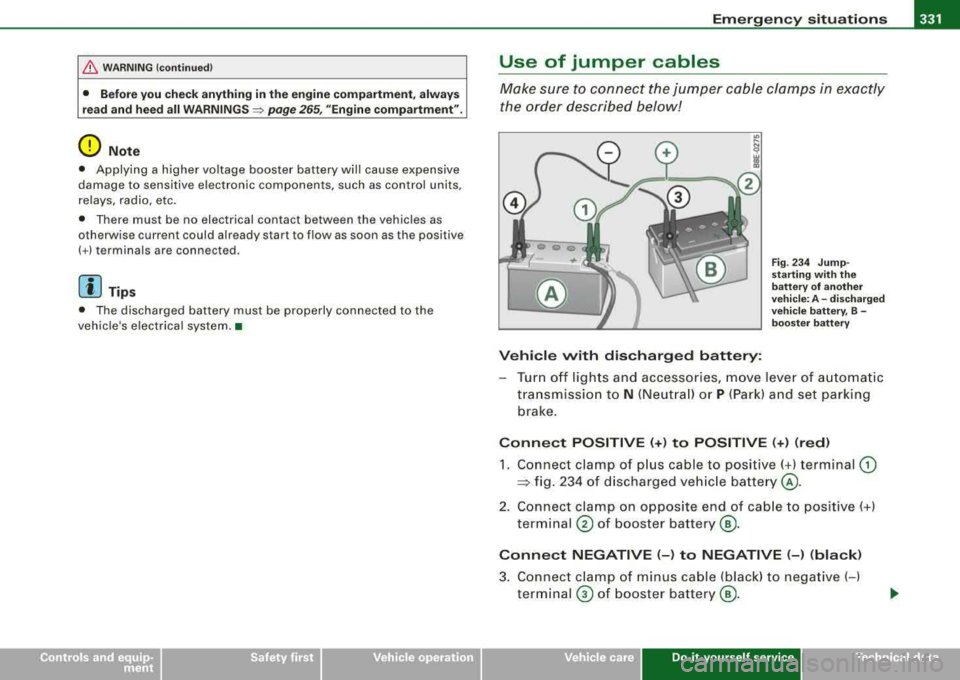
Fig. 234 Jump
starting with the
battery of another
vehicle: A -discharged
vehicle battery, B -
booster battery
- Turn off lights and accessories, move lever of automatic
transmission to
N (Neutral) or P (Park) and set parking
brake.
Connect POSITIVE (+) to POSITIVE (+) (red)
1. Connect clamp of plus cable to positive( +) terminal (D
:::> fig. 234 of discharged vehicle battery @.
2. Connect clamp on opposite end of cable to positive(+)
terminal
@ of booster battery ®·
Connect NEGATIVE (-) to NEGATIVE (-) (black)
3. Connect clamp of minus cable (black) to negative (-)
terminal
0 of booster battery®·
Do-it-yourse lf service irechnical data