radio AUDI A4 AVANT 2008 User Guide
[x] Cancel search | Manufacturer: AUDI, Model Year: 2008, Model line: A4 AVANT, Model: AUDI A4 AVANT 2008Pages: 368, PDF Size: 46.19 MB
Page 162 of 368
___ H_ o_m_ e_ L_ in_ k_® ____________________________________________________ _
time interval is not sufficient for the Homelink® system to learn the
radio frequency signal, perform the
alternate step 8 in Phase 2:
programming the bumper mounted transmitter:
Alternate step 8
• Press and re-press ("cycle") the activation button on your remote
control every two seconds.
Once programming is successfully completed, the emergency
flashers will flash
three times (after about 15-60 seconds). You can
now release the button on the remote control.•
Applies to vehi cles: w ith Hom eLink ® un iversal r adio frequency re mo te con tro l
Oper ating the Homelink ® universal remote
control
The Homelink® Universal Remote Control activates the
functions of your garage door opener in precisely the
same manner as the original handheld remote control
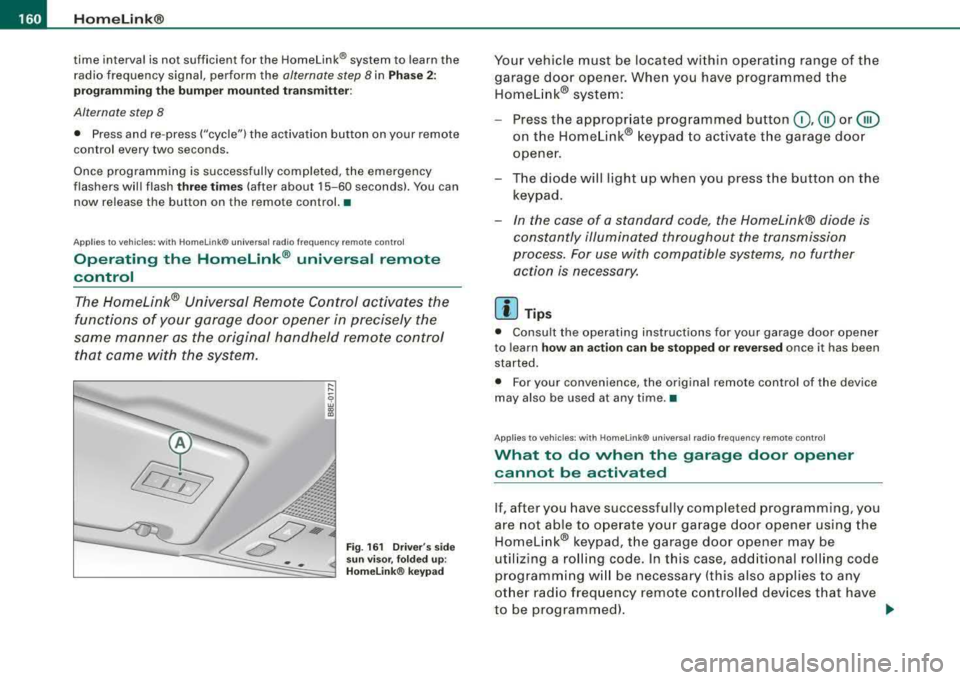
that came with the system.
... ...
9 w a,
"'
Fig. 161 Driver 's side
sun visor, folded up :
Homelink® keypad
Your vehicle must be located within operating range of the
garage door opener. When you have programmed the Homelink® system:
- Press the appropriate programmed button
0,@ or @
on the Homelink® keypad to activate the garage door
opener.
- The diode will light up when you press the button on the
keypad.
- In the case of a standard code, the Homelink® diode is
constantly illuminated throughout the transmission
process. For use with compatible systems, no further action is necessary.
[ i ] Tips
• Consult the operating instructions for your garage door opener
to learn
how an action can be stopped or reversed once it has been
started.
• For your convenience, the original remote control of the device
may also be used at any time. •
Applies to vehicles : wi th HomeLink® universal radio frequency remote cont ro l
What to do when the garage door op ener
cannot b e activat ed
If, after you have successfully completed programming, you
are not able to operate your garage door opener using the
Homelink® keypad, the garage door opener may be
utilizing a rolling code. In this case, additional rolling code
programming will be necessary (this also applies to any
other radio frequency remote controlled devices that have
to be programmed).
~
Page 163 of 368
_________________________________________________ H_ o_m _ e_L _i_n _k _® __ ftllll
Identifying a rolling code:
-Press the button for the programmed transmitter
channel again and hold it down.
- If the light emitting
diode @=> page 160 , fig. 161 first
flashes quickly and then remains lit after 2 seconds, the
garage door opener is using a rolling code.
•
A pplies to vehicle s: w it h H omelin k® u niv ers al radio fr equ enc y remot e con tro l
Rolling code programming
A rolling code is programmed in two phases: at the
garage door opener motor and inside the vehicle at the
overhead keypad.
Phase 1:
programming the garage door opener motor
1. Make sure that your vehicle is located within operat ing
range of the remote controlled garage door opener.
2. Locate the set button (teach button) on the garage door
opener motor (refer to the operating instructions for the
garage door opener).
3. Press the set button (teach button) on the garage door
opener motor.
Phase 2: programming the overhead keypad
4. Set the parking brake.
5. Turn the ignition on. Do not start the engine!
6. On the overhead keypad press the button for the previ
ously programmed transmitter channel.
7. Press this button a
second time in order to finish the
rolling code programming.
Controls and equip
ment The vehicle should be
located no further than 15 ft (5 m) from the
remote controlled garage door opener to remain within the average
signal range o f mos t remote con trolled systems.
Refer to the garage door opener operating instructions to locate the
set button (t each button) on the garage door opener motor .
After the keypad has been programmed, the g arage door opener
should recognize the radio frequency s ignal from the Homelink ®
Universal Remote Control and respond to signals from it.
[ i] Tips
Having a second person assist you makes programming of the
rolling code easier and faster . For some makes of garage door
op eners t he Homelink ® button may have to b e press ed a third time
to complete the teaching sequence. •
Applies to vehic le s: w it h Hom elink® univ ers al ra dio fr eque ncy remote c ontro l
Erasing the programming of the Homelink ®
universal remote control
When you erase the programming, the programming on
all three of the transmitter channels with be lost!
1. Set the parking brake.
2. Turn the ignition on. Do not start the engine!
3. Hold down both outside buttons
Ci) and @=> page 160,
fig. 161 simultaneously, until the diode begins to flash
(after about 20 seconds).
4. Release both buttons immediately. The programming on
all three transmitter channels is now erased.
.,_
Page 164 of 368
-~_H
_ o_ m
_ e
_ L_i _
n _k _® ____________________________________________________ _
The Homelink® system is now in the programming mode and is
ready to learn the codes for devices that are remote controlled by
radio frequency.
[ i] Tips
• Programmed buttons cannot be erased individually .
• For security reasons you are advised to erase the programming
of the Homelink® Universal radio frequency remote control system
before you sell your vehicle. •
Applies to vehic les: with Home link® universal radio frequency remote contro l
Homelink® universal transmitter,
reprogramming a single channel
A HomeLink® button can be reprogrammed individually without affecting the other button allocations.
Proceed as outlined in=> page 158, "Programming the Homelink®
Universal Remote Control" if you wish to program a different radio
frequency remote controlled device on a transmitter channel that is
already being used.
This procedure will cause the existing programming on these trans
mitter channels to be erased! •
Applies to vehic les: w ith Ho me link® universal radio frequency remote contro l
Accessories
Accessories for the Homelink® Universal Transmitter are available
from various sources.
If you would like more information on Homelink®, where to
purchase the Homelink® compatib le products, or would like to
purchase the Homelink® Home Lighting Package, please call toll
free : 1-800-355-3515
•
App lies to vehic les: with Homelin k® un iversal radio frequency remo te contro l
General notes
0 Note
The transmitter has been tested and complies with FCC and
DOC/MDC rules. Changes or modifications not expressly approved
by the party responsible for compliance could void the user's
authority to operate the device (DOC: ISTC 1763 102 264 Prince
MODEUFCC ID : CB2 V94800).
[ i] Tips
• The Homelink® Universal Transmitter complies with FCC rules
part 15. Operation is subject to the following conditions:
- this device may not cause any harmful interference, and
- this device must accept any interference that may be received
including interference that may cause undesired operation.•
Page 204 of 368

-Airbag system ---=--.:..,.._ _________________________________ _
&, WARNING (continued )
cellular telephones and CB radios, etc .) must be performed by a
qualified technician who has the training and special equipment
necessary .
• For any work on the airbag system , we strongly recommend
that you see your authorized Audi dealer or qualified workshop .
• Never modify the front bumper or parts of the vehicle body .
• Always make sure that the side airbag can inflate without inter
ference :
- Never install seat covers or replacement upholstery over the
front seatba cks that have not been specifically approved by
Audi.
- Never use additional seat cushions that cover the areas
where the side airbags inflate.
- Damage to the original seat covers or to the seam in the area
of the side airbag module must always be repaired immedi
ately by an authorized Audi dealer .
• The airbag system can be activated only once. After an airbag
has inflated , it must be replaced by an authorized Audi dealer or
qualified technician who has the technical information , training
and special equipment necessary.
• The airbag system can be deployed only once. After an airbag
has been deployed, it must be replaced with new replacement
parts designed and approved especially for your Audi model
version. Replacement of complete airbag systems or airbag
components must be performed by qualified workshops only .
Make sure that any a irbag service action is entered in your Audi
Maintenance
& Warranty booklet under AIRBAG REPLACEMENT
RECORD .
• In accidents when an airbag is deployed, the vehicle battery
separates the alternator and the starter from the vehi cle electrical
system for safety reasons with a pyrotechnic circuit interrupter.
-Work on the pyrotechni c circuit interrupter must only be
performed by a qualified dealer -risk of an accident !
&, WARNING (continued )
-If the vehicle or the circuit interrupter is scrapped, all appli
cable safety precautions must be followed.
•
Other things that can affect Advanced Airbag performance
Changing the vehic le 's suspension system can change the way that
t he A dvance d Ai rbag S ystem p erf o rm s in a c rash. F or example,
using tire -rim combinations not approved by Audi, lowerin g the
ve hicle , ch ang ing the stiff ness of the suspe nsion, includ ing the
springs, suspension struts, shock absorbers etc. can chang e the
fo rces that a re measured by the airbag senso rs and se nt to the elec
tronic control u nit. Some suspension chan ges can, for exampl e,
i n crease the fo rce level s measured by the sen so rs and ma ke the
a irbag s yste m de plo y in cras he s in w hi ch it wou ld not de ploy if th e
changes had not been made. Other kinds of changes may reduce
t h e fo rce lev els measu red by the senso rs a nd p reven t the airb ag
from dep loying when it should.
T he sens ors i n the safe ty belt buckle f or the dri ve r and front
passeng er seat tell t he electronic contro l modu le if the safety belt is
la tched o r not. If t he sa fe ty bel t i s being used, the fro nt ai rbag wi ll
deploy at a s ligh tly high er rate o f veh icle dece lerat io n th an if th e
safety be lt is not being u sed . Th erefo re , in a particula r co llision, it is
poss ib le th at a n airbag will not deplo y at a seat ing po sit io n wh ere
the safety be lt is being used but wi ll inflate at the pos ition where the
safety be lt is not bei ng used . It is im po rta nt tha t noth ing i nte rfere
with the safety belt buc kles so that the sensors can send the correct
i nf orm atio n abou t s afe ty belt use to th e electr onic co ntrol uni t.
~
Page 292 of 368
___ C_ h_ e_c _k_ i_n ~g _ a_n_ d_ f_ il _li_ n~ g~--------------------------------------------
For example, a charging current of 4.5 amps would be used on a
battery rated at 45 Ah. Rated capacity of the battery in your vehicle
is listed on the battery housing .
The battery caps should
not be opened when charging a battery.
& WARNING
Charging a battery can be dangerous.
• Always follow the operating instructions provided by the
battery charger manufacturer when charging your battery.
• Never charge a frozen battery . It may explode because of gas
trapped in the ice. Allow a frozen battery to thaw out first.
• Do not reuse batteries which were frozen. The battery housing
may have cracked and weakened when the battery froze.
• Charge the battery in a well ventilated area. Keep away from
open flame or electrical spark. Do not smoke. Hydrogen gas gener
ated by the battery is explosive.
• To reduce the danger of explosion, never connect or disconnect
charger cables while the charger is operating.
• Fast charging a battery is dangerous and should only be
attempted by a competent technician with the proper equipment.
• Battery acid that may spill during charging should be washed
off with a solution of warm water and baking soda to neutralize
the acid.
0 Note
Never use a fast charger as a booster to start the engine . This will
seriously damage sensitive electronic components, such as control
units, relays, radio, etc ., as well as the battery charger. •
Disconnecting and connecting the battery
When the battery is disconnected some features on the
vehicle will become inoperative and you must reset them
when the battery is reconnected.
When you disconnect the vehicle battery note the following:
• some data stored in the driver information system is erased,
• the clock stops,
• the factory installed radio locks up,
• the engine management system and the one-touch-up and one
touch -down functions of the power windows no longer work .
After you reconnect the battery, you must reset the following
features :
Inoperative because the
battery was discon
nected:
clock
one-touch-up and one-touch
down feature on the power
windows
engine management
seat memory*
radio station coding
Removing battery
To reset after the battery is
reconnected, see:
=> page 14
=> page 67
=> page 135
=> page 100
Sound System Operating Instruc -
tions booklet .
•
Before you check anything in the engine compartment,
always
read and heed all WARNINGS :::> & in "Working in
the engine compartment" on page
273. ~
Page 296 of 368
___ T_ ir_e _ s_ a_ n
_ d_ w_ h_ e_ e_ls _________________________________________________ _
&, WARNING (continued)
crashes and serious personal injuries . Have worn or damaged tires
replaced immediately.
• Tires age even if they are not being used and can fail suddenly,
especially at high speeds. Tires that are more than 6 years old can
only be used in an emergency and then with special care and at
low speed.
Glossary of tire and loading terminology
Accessory weight
means the combined weight (in excess of those standard items
which may be replaced) of automatic transmission, power steering,
power brakes, power windows, power seats, radio, and heater, to
the extent that these items are available as factory-installed equip
ment (whether installed or not).
Aspect ratio means the ratio of the height to the width of the tire in percent.
Numb ers of 55 or lower indicate a low sidewall for improved
steering response and better overall handling on dry pavement.
Bead means the part of the tire that is made of steel wires, wrapped or
reinforced by ply cords and that is shaped to fit the rim.
Bead separation
means a breakdown of the bond between components in the bead.
Cord
means the strands forming the plies in the tire.
&, WARNING (continued)
• Never mount used tires on your vehicle if you are not sure of
their "previous history." Old used tires may have been damaged
even though the damage cannot be seen that can lead to sudden
tire failure and loss of vehicle control.
• If you notice unusual vibration or if the vehicle pulls to one side
when driving, always stop as soon as it is safe to do so and check
the wheels and tires for damage.
•
Cold tire inflation pressure
means the tire pressure recommended by the vehicle manufacturer
for a tire of a designated size that has not been driven for more than
a couple of miles (kilometers) at low speeds in the three hour period
before the tire pressure is measured or adjusted .
Curb weight
means the weight of a motor vehicle with standard equipment
including the maximum capacity of fuel, oil, and coolant, air condi
tioning and additional weight of optional equipment.
Extra load tire
means a tire designed to operate at higher loads and at higher infla
tion pressures then the corresponding standard tire. Extra load tires
my be identified as "XL", "xi", "EXTRA LOAD", or
"RF" on the side
wall.
Gross Axle Weight Rating ("GAWR")
means the load-carrying capacity of a single axle system, measured
at the tire-ground interfaces .
Gross Vehicle Weight Rating ("GVWR")
means the maximum total loaded weight of the vehicle.
Page 333 of 368
________________________________________________ E=..:.; m:..:.:: e:.:.r.::g ~e::.:..: n:.:c :..y~ s:.: i:.:t .=u :.:a:. t:: i.=o :.:n..:.:: s~_J-
/b, WARNING (continued)
• Before you check anything in the engine compartment, always
read and heed all
WARNINGS~ page 265, "Engine compartment".
0 Note
• Applying a higher voltage booster battery will cause expensive
damage to sensitive electronic components, such as control units,
relays, radio, etc .
• There must be no electrical contact between the vehicles as
otherwise current could already start to flow as soon as the positive
( + ) terminals are connected.
[ i] Tips
• The discharged battery must be properly connected to the
vehicle's electrical system. •
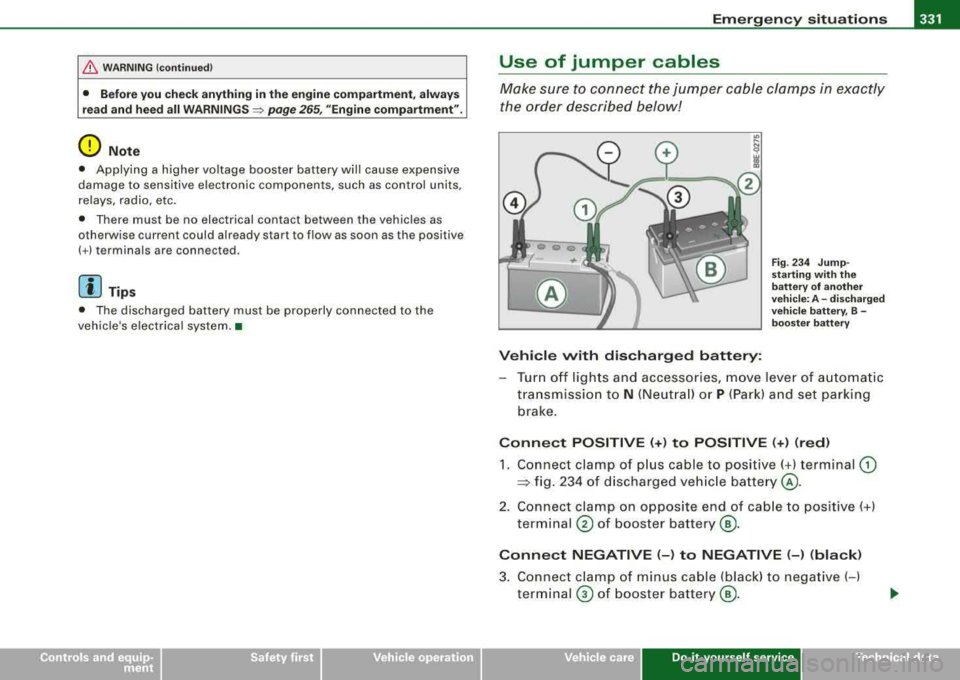
Use of jumper cables
Make sure to connect the jumper cable clamps in exactly
the order described below!
Vehicle with discharged battery:
Fig. 234 Jump
starting with the
battery of another
vehicle: A -discharged
vehicle battery, B -
booster battery
- Turn off lights and accessories, move lever of automatic
transmission to
N (Neutral) or P (Park) and set parking
brake.
Connect POSITIVE (+) to POSITIVE (+) (red)
1. Connect clamp of plus cable to positive( +) terminal (D
:::> fig. 234 of discharged vehicle battery @.
2. Connect clamp on opposite end of cable to positive(+)
terminal
@ of booster battery ®·
Connect NEGATIVE (-) to NEGATIVE (-) (black)
3. Connect clamp of minus cable (black) to negative (-)
terminal
0 of booster battery®·
Do-it-yourse lf service irechnical data
Page 351 of 368
_______________________________________________ .::C :.:o~ n
:..:.:: s:.:u::,: m:..:..:,: e~ r_:l~ n .:.:f:..: o~ r
:_: m~ a:!.!:. ti~o:!. n
~ _fflll
Installing /replacing a sound system
If you wish to install a radio or replace the factory insta lled radio,
p lease note the fol lowing:
The factory insta lled radio connectors are designed for genuine
Audi radios. When installing a different radio, difficu lties could arise
such as :
- the radio may not fit into the space provided
- the electrical connec tions may not be compatible
- different connector terminals may be needed .
Therefore, we recommend that you have your authorized Audi dea ler instal l or rep lace the radio.
They are the most fami liar with the technical features of your
veh ic le . T hey also offe r Genuine Audi Radios w ith the necessary
insta llation components and instructions .
& WARNING
Improperl y in stalling a r adi o cou ld cause a s hort cir cu it and an
elec trical fire . •
Technical Modifications
Our guidelines must be complied with when technical
modifi cations are made.
A lways consult an authorized Audi dealer before starting work on
any modifications.
This w ill he lp ensure that ve hicle funct ion, performance and safety
are not
impaired=> &.
Attempting to work on electronic components and the software
used with them can cause malfunctions. Because o f th e way elec
tronic components are interconnected with each other, such
Controls and equip ment Safety first Vehicle operation malfunctions can also have an adverse affect on other systems that
are not directly involved. Th is means that you r isk both a substantial
reduction in the operational safety of your vehicle and an increased
wear of vehicle parts
=> & .
Authorized Aud i dealers will perform this work in a pro fessional and
competent manner or, in special cases, refer you to a professional
company that spec ial izes in such mod ificat ions .
& WARNING
Improp er re pair s a nd modifi catio ns ca n change the way vehicle
s ys tems wo rk and cau se se rious per sonal injur y.
0 Note
If emergency repairs must be performed e lsewhere, have the
veh ic le examined by an aut horized Aud i dea lersh ip as soon as
possible .•
Vehicle care Do-it-yourself service Technical data
Page 362 of 368
___ A_,_ lp_h_ a_b_ e_ t
_ i_ c _ a_ l_ in_ d_ e_x ______________________________________________ _
Parking brake warning ..... .. .... .... . 29
Parking l ight
Defective . . . . . . . . . . . . . . . . . . . . . . . . 35
Park ing on a dec line (downhil l) ....... 138
Parking on an incline (uphill) ..... .... 138
Parktronic
See acoustic park assist . . . . . . . . . . . 139
Parts replacement . . . . . . . . . . . . . . . . . . 348
PASSENGER AIR BAG OFF light ........ 199
Passive safety system . . . . . . . . . . . . . . . 166
Pedals ............................ 172
Physical principles of a fronta l collision 177
Polishing . . . . . . . . . . . . . . . . . . . . . . . . . . 257
Power locking switch . . . . . . . . . . . . . . . . . 59
Rear ............................ 60
Power locking system . . . . . . . . . . . . . . . . 55
Convenience close/open feature ..... 59
Locking and unlocking the vehicle from
inside ........... ....... .... .... 59
Opening and c losing the windows ... 59
Operating locks from with key .. .... 58
Rear lid . .... ... .. .... .... .... .... 61
Remote control . . . . . . . . . . . . . . . . 53, 56
Unlocking and locking vehicle ....... 56
Power locks
Power sunroof ..... .... .... .... ... 69
Pow er outlets . . . . . . . . . . . . . . . . . . . . . . 121
Power roof ........ .... ... .. .... ..... 67
Power seats Adjusting the seatback ............. 99
Adjustment ........... .... .... ... 97
Pow er steering . . . . . . . . . . . . . . . . . 135 , 241 Power
sunroof
Emergency closing ................ 69
Power window switche ·s . ...... .... ... 65
In the driver's door ... .... ... .. .... 66
In the front passenger's door ....... 67
Reactivating the system ............ 67
Pregnant women Specia l considera tions when wearing a
safety belt . . . . . . . . . . . . . . . . . . . . . 183
Programming the Homelink® Universa l Re -
mote Contro l . . . . . . . . . . . . . . . . . . . 157
Prop er occupant seating positions .... 168
Proper safety be lt position . . . . . . . . . . . 182
P roper seating position
Front passenger . . . . . . . . . . . . . . . . . 169
Occupants . . . . . . . . . . . . . . . . . . . . . . 168
Rear passengers . . . . . . . . . . . . . . . . . 170
Protectiv e liner 113
a
Quartzclock ...... .... ........ ....... 14
quattro®
See All -whee l drive ............... 242
Question
R
What happens to unbelted occupants? ..
178
Why safety belts? . . . . . . . . . . . . . . . . 176
Radiator fan ...... ............. ..... 283
Radio Replacing ....................... 349 Rain sensor defective
... .. .... .... .... 34
Reading lights
Front ....... ...... .... ...... ..... 81
Rear .......................... 81, 82
Reararmrest . .... .... .... ....... ... 103
Rear ashtray ....................... 119
Rear fog lights .. ...... .... .... .... ... 76
Rear lid
Emergency un locking (on ly manually . 62
Locking/unlocking ............. .... 61
Rear light
Defective ........ .... .... .... .... . 35
Rear power locking switch ... .. .... .... 60
Rear seat bench .. .... .... ..... .. ... 104
Rear view mirror Inside rear view mirror ............. 90
Rear window defogger .... .... .... ... 131
Rearview mirror
See Mirrors ....................... 90
Red symbols .. ........... .... .... ... 30
Refuel ling .......................... 269
Release lever for hood .... ........ ... 272
Remote control . . . . . . . . . . . . . . . . . . . 53, 56
Assigning a seat position .. .... .... 102
Resetting remote control ........... 57
Unlocking and locking ............. 56
Remote master key
Battery replacement ....... ....... . 53
Check light ................ ...... . 53
Remote rear lid release .... ...... ..... 63
Removing luggage compartment cover/parti -
tion net ...... .... .... .... .... . 111