reset AUDI A4 AVANT 2008 User Guide
[x] Cancel search | Manufacturer: AUDI, Model Year: 2008, Model line: A4 AVANT, Model: AUDI A4 AVANT 2008Pages: 368, PDF Size: 46.19 MB
Page 45 of 368
Inquiry
• Service=:, page 17
Menu off
All the displays appear on the screen which are shown in vehicles
without menu display.
Help
The Help function helps you to make the right selection. •
Open Help
The DIS (Driver Information System) has a Help function.
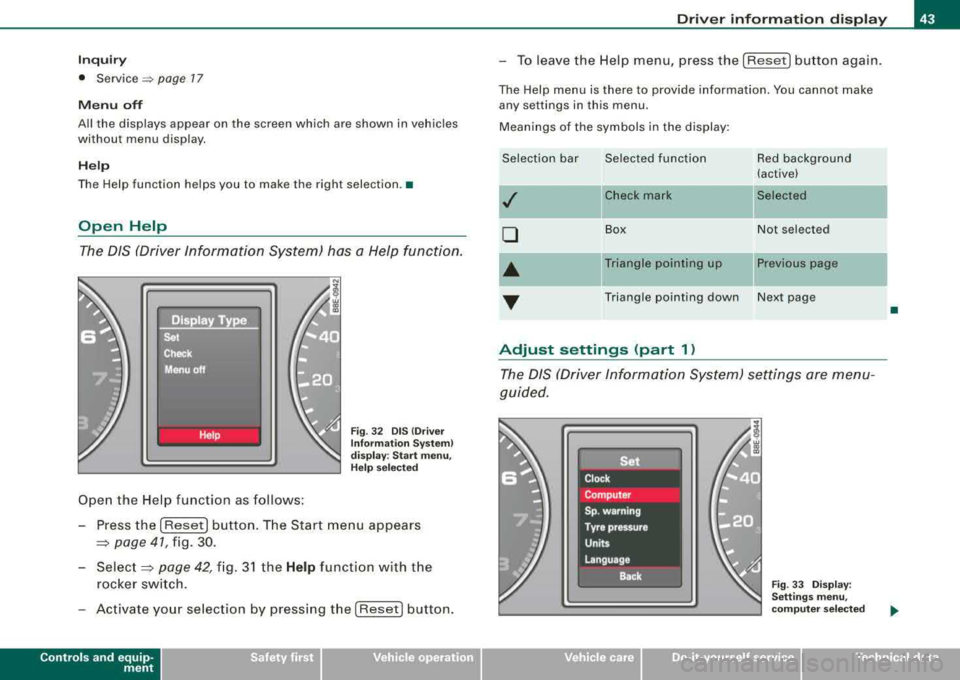
Open the Help function as follows:
Fig. 32 DIS (Driver
Information System)
display: Start menu,
Help selected
- Press the [Reset] button. The Start menu appears
==> page 41, fig. 30.
-
Select==> page 42, fig. 31 the Help function with the
rocker switch.
- Activate your selection by pressing the [ Reset] button.
Controls and equip
ment
Driver information display
- To leave the Help menu, press the [Reset] button again.
The Help menu is there to provide information. You cannot make
any settings in this menu.
Meanings of the symbols in the display:
Selection bar Selected function Red background (active)
,I Check mark Selected
0
Box Not
selected
•
Triangle pointing up Previous page
... Triangle pointing down Next page
Adjust settings (part 1)
The DIS (Driver Information System) settings are menu
guided.
Fig . 33 Display:
Settings menu,
computer selected
•
irechnical data
Page 46 of 368
![AUDI A4 AVANT 2008 User Guide Driver information display
Select your settings as follows:
- Press the
(Reset] button:::;, page 42, fig. 31. The Start
menu
appears:::;, page 41, fig. 30.
- Press the rocker switch](/img/6/57552/w960_57552-45.png "AUDI A4 AVANT 2008 User Guide Driver information display
Select your settings as follows:
- Press the
(Reset] button:::;, page 42, fig. 31. The Start
menu
appears:::;, page 41, fig. 30.
- Press the rocker switch")
Driver information display
Select your settings as follows:
- Press the
(Reset] button:::;, page 42, fig. 31. The Start
menu
appears:::;, page 41, fig. 30.
- Press the rocker switch
:::;, page 42, fig. 31 as often as
necessary until
Set is displayed.
- Press the
(Reset] button. All the menus appear.
- Press the rocker switch until the line you want is acti-
vated (red
background):::;, page 43, fig. 33.
- Press the
(Reset] button.
-If necessary, scroll by selecting and activating the
symbol for "Next page" or "Previous page".
When you have selected the Computer menu and activated it by
pressing the
I Reset) button, two computer levels appear (computer
1 and computer
2). Now you have to select the level you want using
the rocker switch and activate it with the [Reset) button.
Continued=> page 44, "Adjust settings (part 2)". •
Adjust settings (part 2)
Continue to make your settings as follows:
- Press the rocker switch
:::;, page 42, fig. 31 until the line
you want is activated (red background).
- Now activate or deactivate the function selected by
pressing the
(Reset] button and entering a check mark -
(for "Yes") in the box or no check mark (for "No").
Press the rocker switch as often as necessary until
Back
is selected and press the (Reset) button to return to the
next higher menu level.
For several of the settings, numerical values also have to be entered,
e.g. when setting the date. This is also done by using the rocker
switch .•
Practical example (part 1)
The example shows a complete, menu-guided operation
for a setting.
Fig. 34 Display: Start
menu, Settings
selected
Fig . 35 Display :
Settings menu, clock
selected
....
Page 47 of 368
![AUDI A4 AVANT 2008 User Guide To set the date, for example, proceed as follows :
- Press the [R eset] button . The Start menu appears
=> page 41, fig . 30.
- Tap the rocker
switch => page 42, fig. 3 1 until Set](/img/6/57552/w960_57552-46.png "AUDI A4 AVANT 2008 User Guide To set the date, for example, proceed as follows :
- Press the [R eset] button . The Start menu appears
=> page 41, fig . 30.
- Tap the rocker
switch => page 42, fig. 3 1 until Set")
To set the date, for example, proceed as follows :
- Press the [R eset] button . The Start menu appears
=> page 41, fig . 30.
- Tap the rocker
switch => page 42, fig. 3 1 until Set
=> page 44, fig. 34 is activated.
- Press the [Reset] button. The men us avai lab le under
Set
appear.
- Tap the rocker switc h unti l
Clock => page 44, fig . 35 is
disp layed .
- Press the [Reset] button . The c lock settings menu
appears .
Continued => page 45, "Practica l examp le (part 2)" . •
Practical example (part 2)
Continue w ith se tting the date as follows :
- Tap the rocker
switch => page 42, fig. 3 1 until Date is acti
vated.
- If there a n empty box in front o f Date, press the [Reset]
button. Now a check mark appears in t he box .
- Tap the rocker switc h until the date display is activated
and press the [Reset] button. The day flashes.
- Tap the rocker switc h up or down until the correct
number for the day appears . Press the [Reset] button .
Now the month flashes.
- Chan ge the mon th and th e year as needed in the same
way.
Controls and equip
ment
Dri ver information di spl ay
Continued=> page 45 , "Practical example (part 3)" . •
Practical example (part 3)
Close setting the da te as follows:
- Tap the rocker
switch => page 42, fig. 31 until Back is act i
vated.
- Press the [Reset] button. The
Set menu appears again .
- Press th e [Reset] butto n again. The Star t menu appears
agai n.•
Tire pressure monitoring system
Applies to veh ic les: with tir e pr essure monitor in g system
General notes
As an adde d safe ty feature, your vehicle has been equ ipped wit h a
tire pressure monitoring sys tem (TPMS) that i lluminates a low tire
pressure te llta le when one or more of your tires is significant ly
under-inflated . The TPMS only provides a low tire pressure warning
and does not reinflate your tires.
According ly, when the low tire pressure te llta le i llum inates, you
shou ld stop and check your tires as soon as possib le, and infla te
them to the proper pressure . Driv ing on a significantly under
inf lated tire causes the tire to overheat and can lead to tire failure.
Under -inflation a lso reduces fue l efficiency and tire tread life, and
may affect the vehicle 's hand ling and stopping ab ility .
0 Note
• Please note that the TPMS is not a substitute for proper tire
maintenance , and it is the driver's responsibility to maintain correct
..,_
Page 51 of 368
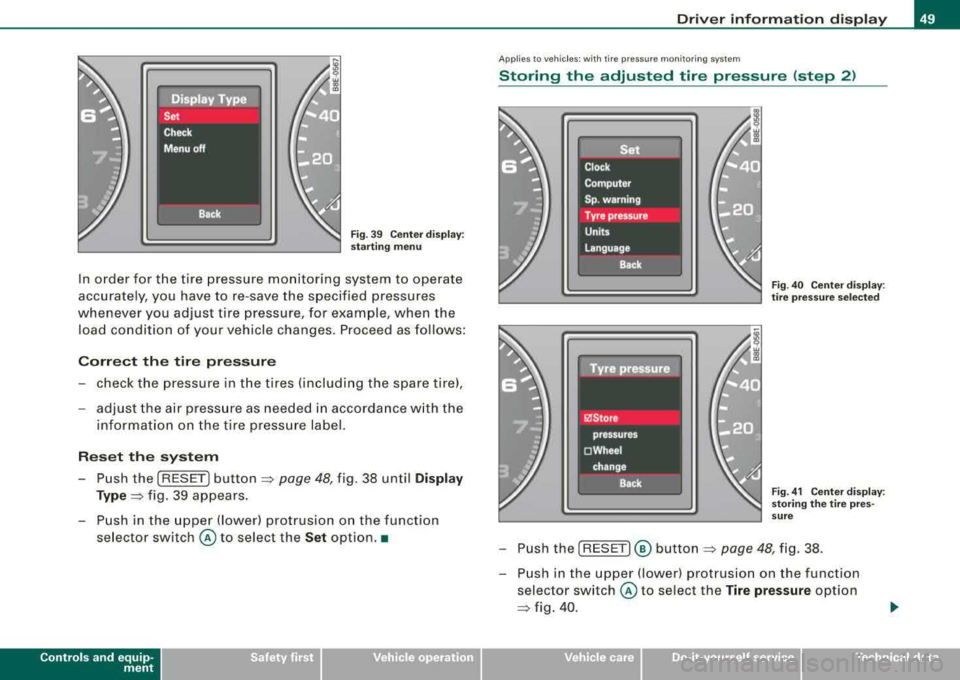
Fig. 39 Center display :
starting menu
In order for the tire pressure monitoring system to operate
accurately, you have to re-save the specified pressures
whenever you adjust tire pressure, for example, when the load condition of your vehicle changes. Proceed as follows:
Correct the tire pressure
- check the pressure in the tires (including the spare tire),
- adjust the air pressure as needed in accordance with the
information on the tire pressure label.
Reset the system
Push the [RESET] button=> page 48, fig. 38 until Display
Type=> fig. 39 appears.
- Push in the upper (lower) protrusion on the function selector switch
@ to select the Set option. •
Controls and equip
ment
Driver information display
Applies to veh ic les : w ith tir e pressure mon itoring system
Storing the adjusted tire pressure (step 2)
Fig . 40 Center display :
tire pressure selected
Fig. 41 Center display:
storing the tire pres
sure
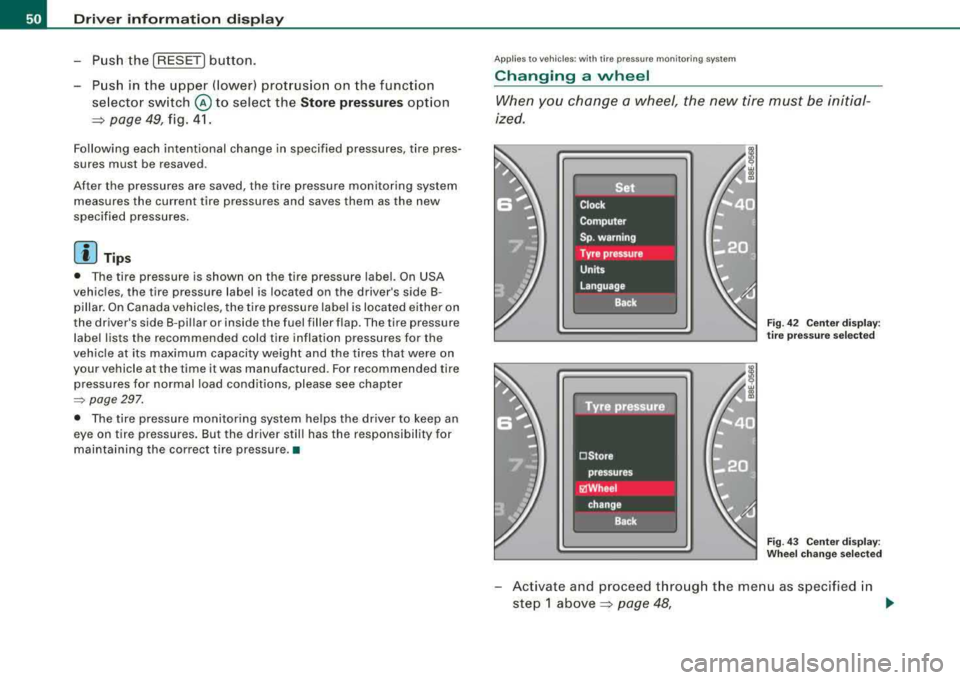
- Push the [RESET]® button => page 48, fig. 38.
- Push in the upper (lower) protrusion on the function
selector switch
@ to select the Tire pressure option
=> fig. 40.
irechnical data
Page 52 of 368
Driver inf orma tion di spl ay
-Push the I RESET I button.
-Push in the upper (lower) protrusion on the function
se lector switch
@ to select the Sto re pre ssure s option
~ page 49, fig. 41.
Following each intentional change in specified pressures , tire pres
sures must be resaved .
Af ter the pressures are saved, the tire pressure monitoring system
measures the current tire pressures and saves them as the new
specified pressures .
[ i] Tips
• The tire pressure is shown on the tire pressure label. On USA
vehic les, the tire pressure label is located on the driver's side 8-
pillar. On Canada vehicles, the tire pressure labe l is located either on
the driver's side 8 -pillar or inside the fuel filler flap . The tire pressure
label lists the recommended cold tire inflation pressures for the
vehicle at its maximum capacity weight and the tires that were on
your vehicle at the time it was manufactured. For recommended tire
pressures for normal load cond itions, please see chapter
~ page 297.
• The tire pressure monitoring system he lps the driver to keep an
eye on tire pressures. But the driver stil l has the responsibility for
mainta ining the correct tire pressure. •
Applies to vehic les : w it h tir e press ure m onit oring sys te m
Changing a wheel
When you change a wheel, the new tire mus t be initial
ized.
Fi g. 4 2 C enter display :
t ir e pr ess ure se lected
Fig . 4 3 Ce nter displa y:
W heel ch ang e se lecte d
-Act ivate and proceed through the menu as specified in
step 1
above~ page 48, .,
Page 59 of 368
To unlock rear lid only ~
- Press button © for approximately one second.
PANIC Button Push the red
butto n@) to activate the panic function. The
horn sounds and t he turn signals flash.
- P ush the
button @) again to deact ivate the panic fu nc
t io n.
& WARNING
R ead and fo llow all WARNIN GS=> & in "G eneral de scr iption " on
page 5 5.
[ i] Tip s
• In orde r to make sure the locking function is working, you should
always keep your eye on the vehic le to make sure it is proper ly
locked .
• Do not use the remote control if you are inside the car, otherwise
you may uninten tiona lly lo ck the vehicle, and then you would set off
the anti -t heft alarm when you try to s tart the engine or open a door.
In case this happens anyhow, push the unlock button
ft .
• Use the panic funct ion only if you are in an emergency
situation .•
Controls and equip
ment
Op ening and closing
Resetting the remote control
The remote control must be reset if the vehicle does not
unlock .
0
Fig . 50 Ig ni tio n l ock
p ositi ons
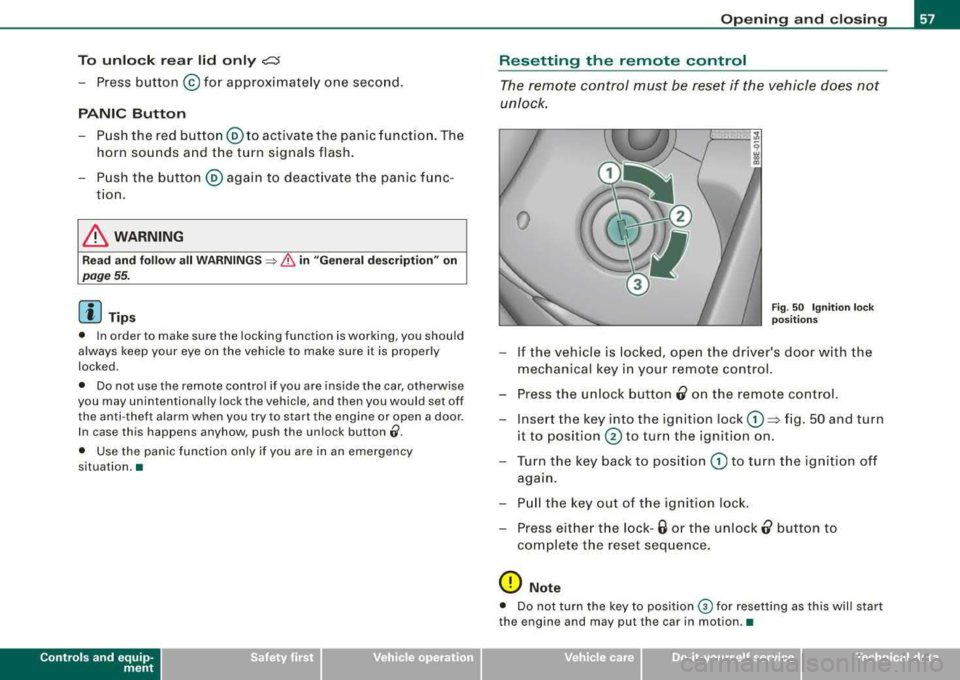
- If the vehicle is locked, ope n the driver's door w ith the
mechanical key in your remote control.
- Press the u nlock button
0 on the remote co ntrol.
- Inse rt the key into the ignition lock
G) => fig. 50 and turn
it to
position @ to turn the ignition on .
- T urn the key back to posit ion
G) to turn t he ignition off
aga in.
- P ull the key out of the igniti on lock.
- Press eithe r the lock -
6 or the unlock 0 button to
co mplete t he reset seque nce .
0 Note
• Do not turn the key to position ® for resetting as this will start
the engine and may pu t the car in motion .•
irechnical data
Page 130 of 368
_L_W:...:._: a::..:_: rm:....:...:..~ a::..: n~ d~ c~o :.:l.:::d :.._ _______________________________________________ _
By pressing both !AUTO l buttons for several seconds, the tempera
ture on the passenger's side can be set to the temperature of the
driver's side or vice versa . The new temperature set ting will be
shown in the display. The old temperature setting can be restored
by resetting the display as required. •
Switching between Fahrenheit and
Centigrade
You can change the temperature display from °F (Fahren
heit) to
°C (Centigrade) and vice versa.
- Press and hold[ ~] and press the plus button on the
driver's side temperature
switch ~ page 126, fig. 137 . •
Air recircul ation [~]
The air recirculation prevents exhaust fumes or other
pollution from entering the vehicle.
Switching on the air recirculation
-Press[ ~]~ page 126, fig. 137 ~ &
Switching off the air recirculation
-Press~ again, or
- press [AUTO], or
press[ ®].
In the air recirculation mode , the air in the passenger compartment
is recirculated to prevent exhaust fumes and other pollution from
entering the vehicle. We recommend that you use the manual air recirculation under the following conditions:
• when driving through tunnels
• in a tra ffic jam.
& WARNING
Do not use this setting for extended periods of time . The windows
could fog up since no fresh air can enter the vehicle.
If the
windows fog up, press the air recirculation button again immedi ately to switch off the air recirculation function or select defrost. •
ECON [ECON]
Using ECON helps save fuel
- Press [ECON] to activate ~ page 126, fig. 137.
Press [ECON] again or press [AUTO] to switch off.
In ECON mode the air conditioner is shut off and heating and venti
lation are automatically controlled . "ECON" translates "Economy"
since driving with the air conditioning compressor disengaged
improves your mileage noticeably.
When operating in ECON mode make sure the temperature inside
the vehicle is not lower than the outside temperature. The air is
nei ther cooled nor dehumidified, so there is a risk that the windows
can fog up .•
Switching the air conditioning on and off [ OFF]
Switching the air conditioning off
-Press [ OFF] to turn the air conditioner off and block
outside air from entering the vehicle.
Switching the air conditioning on
-Press [ OFF] again (indicator light comes on again), or
- Press [AUTO], or
- Press one of the following buttons:
[O J,[@!] or [-0, ].
Page 134 of 368
-
Warm and cold
----------------
The rear window defogger works only when the ignition is switched
on. The light in the switch will illuminate when the defogger is on .
When the outside temperature is warmer than 32 °F (O °Cl , the rear
window defogger switches off automatically after about ten minutes.
'£> F o r the sake of the environment
Switch off the defogger when the rear window is clear . When you
save e lectricity, you save fuel. •
Using the climate controls economically
Using the climate controls prudently can help save fuel .
When you use the air conditioner, engine power is reduced
and fuel consumption increases . To save fuel, you should
use the air conditioner only when necessary . Also please
note the following points:
-If you want to save fuel, activate ECON.
-If you are goi ng to drive w ith the windows open, use
ECON.
'£> For th e sake of the environment
By reducing the amount of fue l you use , you also reduce the amount
of pollutants emitted into the air. •
Key coded settings
When the ignition is switched on, the air conditioner
settings are automatically assigned to the key being used.
The air conditioner settings selected are automatically stored and
assigned to the key being used. When the vehicle is started, the air
conditioner automatically selects the settings assigned to that key.
This way every dr iver will ma intain his/her own personal settings
and does not have to reset them manually .
[ i ] Tip s
If a different driver uses your key and changes the air conditioner
set tings, the latest adjustments will erase and replace the settings
you have stored. •
App lies to ve hicles: w ith e lec tric ally heat ed front seats
Electrically heated front seats
With the ignition on, the seat cushion and backrest of the
front seats can be heated.
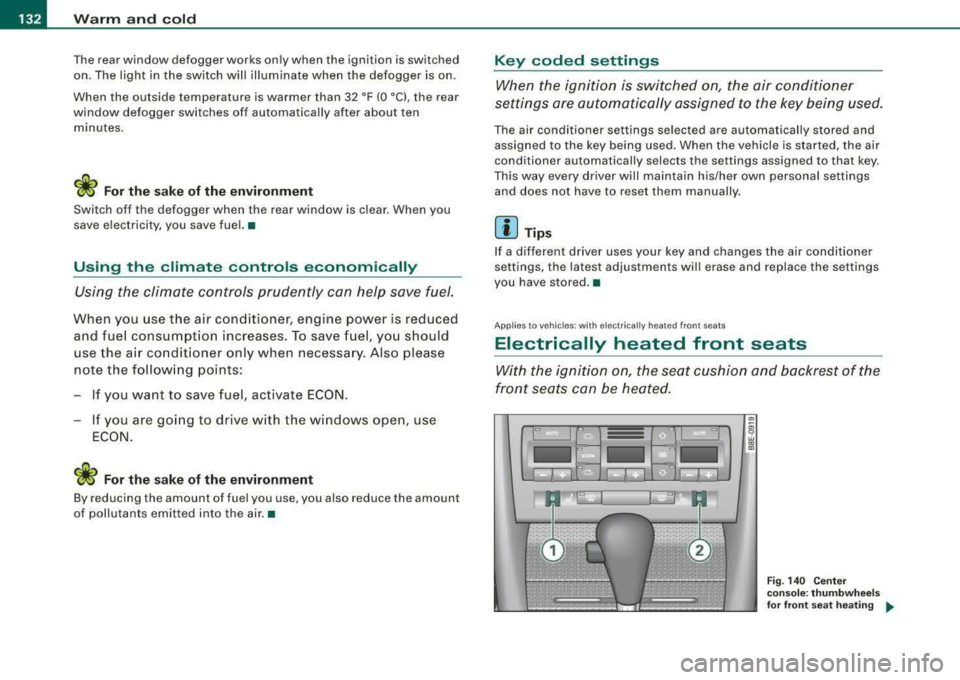
Fig . 140 Cente r
cons ole: thumb whe els
fo r fr ont seat heati ng
....
Page 143 of 368
_________________________________________________ O
_ n_ t_h _e _ r_o _a _d __ ftllll
D ece le rat e (slow er)
- Lower lever @ toward Q => page 140, fig. 145.
- Release the lever to store the new speed.
You can a lso increase the vehic le speed by depressing the acce ler
ator pedal. The vehicle speed wil l increase as long as you keep the
accelerator pedal depressed . When you let up on the accelerator
pedal, t he veh icle speed w ill automatica lly return the to previously
stored vehicle speed in th e cruis e control.
I f the actua l veh icle speed exceeds the stored vehicle speed in the
cruise control for longer than five minutes and by more than 6 mph
(10 km/h), the c ruise control wil l auto matica lly erase the stored
veh ic le speed and you w ill have to rese t the cruise contro l again.
T apping the lever lightly
@
By lightly tapping the lever @toward 0 => page 140, fig. 145, you
can increase ve hicle speed by approximately 1 mph (2 km/h).
By lightly tapp ing the lever @toward
O => page 140, fig. 145, you
can decrease vehicle speed by approximately 1 mph (2 km/h). •
Switching the system off temporarily
Either of the follow ing actions will tempora rily deact ivate
the cru ise con trol:
- press ing t he brake pedal, or
- p ressing t he c lutch pedal (on manua l transmission
mo dels), or
- pu shing the
lever @ towa rds the instrume nt panel 0
(n ot engaging)=> page 140, fig. 14 5.
When you tempo rari ly deac tiva te the cru ise co ntrol fo r a brie f
period, th e previous ly s tored vehicle speed remains in the memory .
Controls and equip
ment T
o resume the previously stored vehicle speed, release the brake (or
clutch) pedal, or you pull lever @toward t he stee ring wheel
G) .
If no veh ic le speed was stored when you switched off the system
temporarily, you must reset a new vehicle speed : Acce lerate to the
des ired speed and press
button @ (SET) => page 140, fig. 145.
& WARNING
Do not use the cruise control if the stored veh icle speed is faster
than exi sting traffic condition s permit .•
Switching off the cruise control system
While driving
- Pu sh lever © towa rds the inst rument p anel 0 un til it
e n gages => page 140, fig . 1 45.
When the vehicle is at a standstill
- Sw itch off the ignit ion. •
Page 155 of 368
Transmis sio n -
----------------
The selector lever lock is released as fo llows:
- Turn t he ignition on.
- Step on the brake pedal.
At the some time press and hold
the inter lock button on the side of the gear selector knob
=> page 145, f ig. 149 with your thumb until you have
moved the selector lever to the desi red position.
A uto mat ic se lec to r l eve r lock C\S)
The se lector lever is locked in the P and N posi tions when the igni
tion is turned on.
When the selector lever is in the
P or N pos itions , th e m essage
When statio nary appl y footbrak e while sel ecting gear
appears on the instrument c luster disp lay on vehicles equipped
with the Driver Informatio n System as a reminder to the driver . The
symbo l
Cs» will a lso light up on the shi ft gate at the base of the
selector lever.
In additio n, the symbo l for the automatic selector level lock with
light up in th e shift ga te .
A time delay e lement prevents the selecto r lever from loc king when
it is moved through the
N position (going from R to Dl. The locking
e lement will lock the selector lever if the lever is left in
N (Neutral)
for more than approx imately one second , without the brake peda l
being pressed.
At speeds above abou t 3 mph (5 km/h) the Automatic Shift Lock is
automatically deactivated in the
N position.
The button needs to be pressed to sh ift from
D to S to avoid unnec
essari ly high fuel consumption in the
S po rt mode .
Interlock but ton
The lock button on the selec tor lever prevents the lever from be ing
accidentally shifted into certain pos it ions . Pressing this button
deactivates the selector lever
lock=> page 152 , fig. 155.
Controls and equip
ment
Igniti on key sa fe ty int erlo ck
The key cannot be removed from the ignition un less the se lector
lever is in the
P park posi tion . When the ignition key is removed , the
selector lever wil l be locked in the
P posit ion. •
Applies t o ve hic les: w it h m ultitron ic™ C ontin uo usly Var iab le Tra nsmiss ion (CVTl
Kick-down
The kick -d own feature allows the veh icle to generate
maximum acceler ati on.
When you press the accelerator peda l beyond the resistance point
that is reached at ful l throttle, the trans mission wi ll select a lower
gea r ratio based on vehicle speed and engine RPM . The engine RPM
wil l be control led to produce max imum veh ic le acceleration as long
as you continue to press the acce lerator pedal beyond this resis
tance point .
& WARNING
Be careful when u sing the kic k-down f eature on slipp ery ro ad s.
R apid acceler ation m ay cause the vehicle to skid . •
A pplies to v ehicles: w ith mult it ro nic™ Con tinuo usly Var iab le Tra nsmiss ion (CV Tl
Dynamic shift program (DSP)
The multitronic™ transmission is electronically
controlled.
The transmiss ion se lec ts the appropr ia te gear rat io (upshifts and
downshifts) automatically based on preset driving programs .
However, you can also manua lly select a s hift program (tiptronic ®
f eature)
=> page 154 .
The transmission will select on e of th e econom y programs when
you drive at a s teady speed or a gradually changing speeds without
~