seats AUDI A4 AVANT 2008 User Guide
[x] Cancel search | Manufacturer: AUDI, Model Year: 2008, Model line: A4 AVANT, Model: AUDI A4 AVANT 2008Pages: 368, PDF Size: 46.19 MB
Page 105 of 368
__________________________________________________ s_ e_ a_t _s _ a_n _ d_ s_ t
_ o_ r_a ""'g :o.. e _ __.l9I
& WARNING
When folded down, the armrest can restrict the driver's move
ment. When driving in conditions that may call for quick maneu
vers, fold up the armrest . This will allow you to react more quickly
to avoid an accident.
[ i] Tips
The storage area in the center armrest may be equipped with a tele
phone base plate to house a phone cradle. Ask your authorized Audi
dealer if you have questions. •
Rear seats
General information
Safe transportation of passengers on the rear seats
requires proper safety precautions.
All passengers on the rear seats must be seated in compliance with
the safety guidelines explained
in=> page 176 and => page 187. The
correct seating position is safety critical for front
and rear seat
passengers
alike => page 170.
& WARNING
• Vehicle occupants in the front and rear seats must always be
properly restrained .
• Do not let anyone ride in the vehicle without the head restraints
provided . Head restraints help reduce injuries .
• Loose items inside the passenger compartment, can fly
forward in a crash or sudden maneuver and injure occupants.
Always store articles in the luggage compartment and use the
fastening eyes, especially when the rear seat backs have been
folded down.
Controls and equip
ment
& WARNING (continued)
• Read and heed and all WARNINGS => page 170, "Proper seating
positions for passengers in rear seats". •
Rear armrest
The storage bin inside the armrest contains the first-aid
kit*.
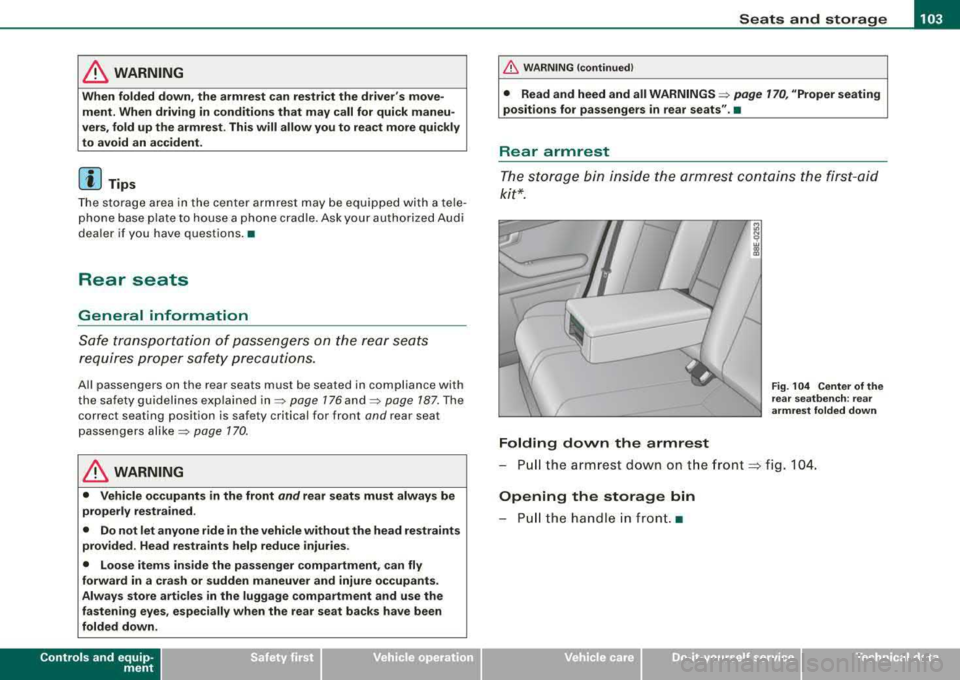
Folding down the armrest
Fig . 104 Center of the
rear seatbench: rear
armrest folded down
-Pull the armrest down on the front ~ fig. 104.
Opening the storage bin
-Pull the handle in front. •
irechnical data
Page 107 of 368
________________________________________________ s_ e_ a __ ts __ a_ n_d -- s..:t ..:o ..:r..: a;;..: g::!....:. e_--11111
Head restraints
Adjusting head restraints , front seats
The head restraints must be adjusted properly to provide
protection.
Fig. 106 Front seats
head restraints :
adjusting the height
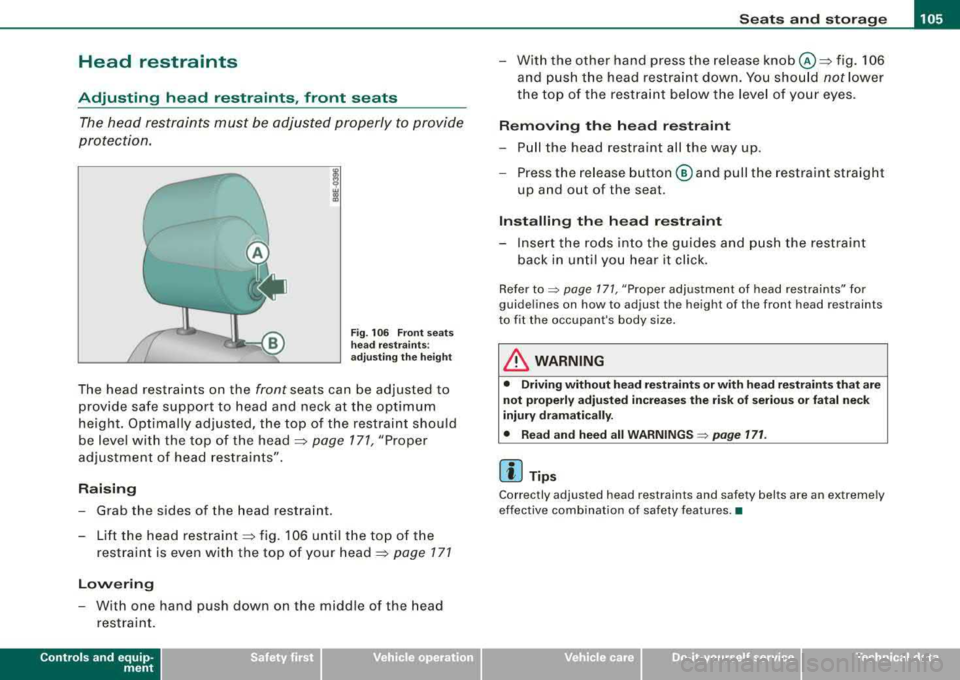
The head restraints on the front seats can be adjusted to
provide safe support to head and neck at the optimum
height. Optimally adjusted, the top of the restraint should
be level with the top of the head
=> page 171, "Proper
adjustment of head restraints".
Raising
- Grab the sides of the head restraint.
- Lift the head
restraint => fig. 106 until the top of the
restraint is even with the top of your
head=> page 171
Lowering
- With one hand push down on the middle of the head
restraint.
Controls and equip
ment
- With the other hand press the release knob@=> fig. 106
and push the head restraint down. You should
not lower
the top of the restraint below the level of your eyes.
Removing the head restraint
-Pull the head restraint all the way up.
- Press the release button @ and pull the restraint straight
up and out of the seat.
Installing the head restraint
- Insert the rods into the guides and push the restraint
back in until you hear it click.
Refer to::::> page 171, "Proper adjustment of head restraints" for
guidelines on how to adjust the height of the front h ead restraints
to fit the occupant's body size.
& WARNING
• Driving without head restraints or with head restraints that are
not properly adjusted increases the risk of serious or fatal neck
injury dramatically.
• Read and heed all
WARNINGS => page 171.
[ i] Tips
Correctly adjusted head restraints and safety belts are an extremely
effective combination of safety features .•
irechnical data
Page 113 of 368
Seats and storage -______________ __,:_____.
Partition screen
The partition screen is designed to prevent loose objects
from flying forward into the passenger compartment (e.g. under sudden braking).
Fig . 114 Overhead
attachment points,
rear seatbacks folded
down forward
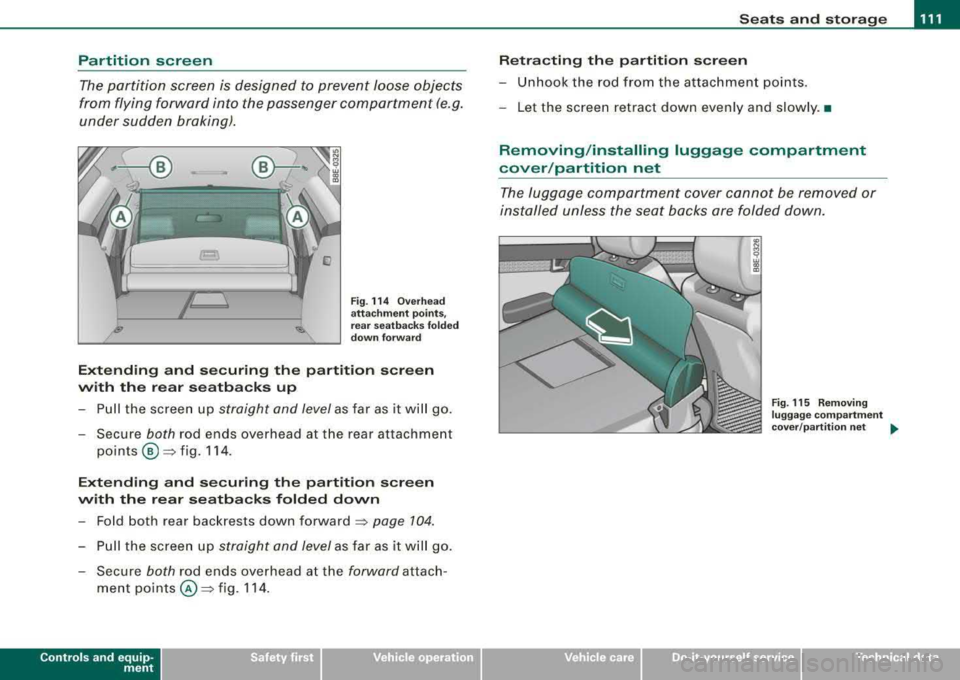
Extending and securing the partition screen
with the rear seatbacks up
-Pull the screen up straight and level as far as it will go.
-Secure both rod ends overhead at the rear attachment
points
® =>fig. 114 .
Extending and securing the partition screen
with the rear seatbacks folded down
-Fold both rear backrests down forward => page 104.
-Pull the screen up straight and level as far as it will go.
-Secure both rod ends overhead at the forward attach-
ment
points @=> fig. 114 .
Controls and equip
ment
Retracting the partition screen
-Unhook the rod from the attachment points .
-Let the screen retract down evenly and slowly. •
Removing/installing luggage compartment
cover /partition net
The luggage compartment cover cannot be removed or
installed unless the seat backs are folded down.
~
9 w C0
"'
Fig. 115 Removing
luggage compartment
cover/partition net ...
irechnical data
Page 114 of 368
-
Seats and storag e
----=---------------
Removing luggage compartment
cover /partition net
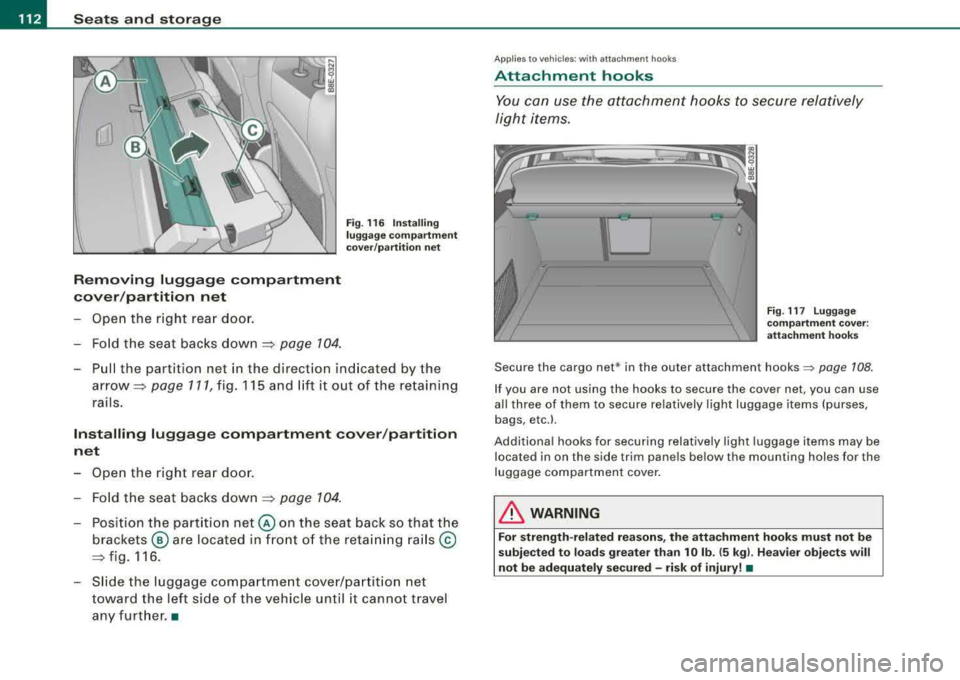
- Ope n the right rea r door.
- Fo ld the se at backs down
~ page 104 .
Fig . 116 Inst alling
luggage comp art m ent
c o ver /p arti tion n et
- Pull the partition net in the direction ind icated by the
arrow~ page 111, fig. 115 and lift it out of the retaining
rails .
Installing luggag e comp artment cover /part ition
n et
- Open the right rea r door .
- F old th e seat backs down
~ page 104 .
- Position the pa rtition net @ on the seat back s o that the
brackets @ are located in fron t of the retai ning ra ils ©
~fig .116.
- Slide the luggage compa rtme nt cove r/partit io n net
toward the left side of the vehicle until it cannot travel
any furt her. •
Applies to vehi cles: w ith attach men t hoo ks
Attachment hooks
You can use the attachment hooks to secure relatively
li g ht items.
Fig. 117 Lugg ag e
c omp artment cove r:
atta chm ent hook s
Secure the cargo net* in the outer attachment hooks~ page 108.
If you are not using the hooks to secure the cover net, you can use
a ll three of them to secure re latively l ight luggage items (purses,
bags,
etc.l.
Addi tiona l hooks for securing relat ively ligh t luggage items may be
located in on the side trim pane ls below the mounting holes for the
luggage compar tment cover .
& WARNING
For str ength -r e lated rea son s, the atta chment hooks must not be
s ubje cted to lo ads greater th an 10 lb . (5 kg l. Hea vier obje cts will
not be adequately sec ured -risk of injury! •
Page 115 of 368
Seats and storage -______________ __,:_____.
Applies to vehi cles: with protect ive li ner
Protective liner
The protective liner should be used for carrying dirty or
wet objects.
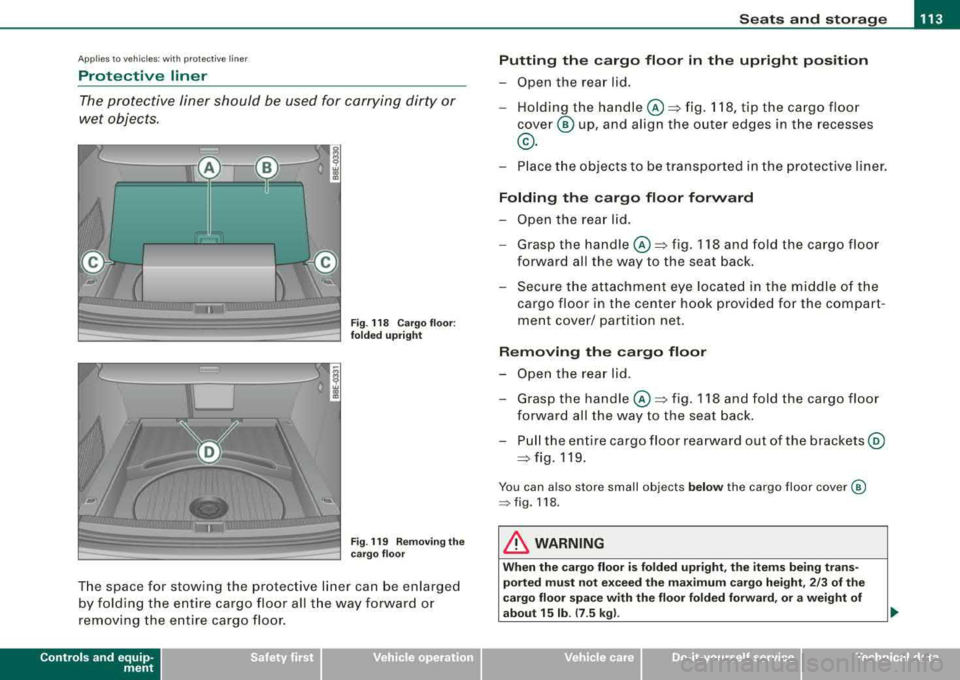
Fig . 118 Cargo floor:
folded upright
Fig . 119 Removing the
cargo floor
The space for stowing the protective liner can be enlarged
by folding the entire cargo floor all the way forward or
removing the entire cargo floor.
Controls and equip
ment
Putting the cargo floor in the upright position
-Open the rear lid.
-Holding the handle@~ fig. 118, tip the cargo floor
cover @ up, and align the outer edges in the recesses
®·
-Place the objects to be transported in the protective liner.
Folding the cargo floor forward
-Open the rear lid.
-Grasp the handle@~ fig. 118 and fold the cargo floor
forward all the way to the seat back .
-Secure the attachment eye located in the middle of the
cargo floor in the center hook provided for the compart
ment cover/ partition net.
Removing the cargo floor
-Open the rear lid.
-Grasp the handle @~ fig. 118 and fold the cargo floor
forward all the way to the seat back.
-Pull the entire cargo floor rearward out of the brackets @
~ fig. 119.
You can also store small objects below the cargo floor cover @
=> fig. 118.
& WARNING
When the cargo floor is folded upright, the items being trans
ported must not exceed the maximum cargo height, 2/3 of the
cargo floor space with the floor folded forward, or a weight of
about 15 lb.
(7 . 5 kg).
irechnical data
Page 117 of 368
Seats and storage -______________ __,:_____.
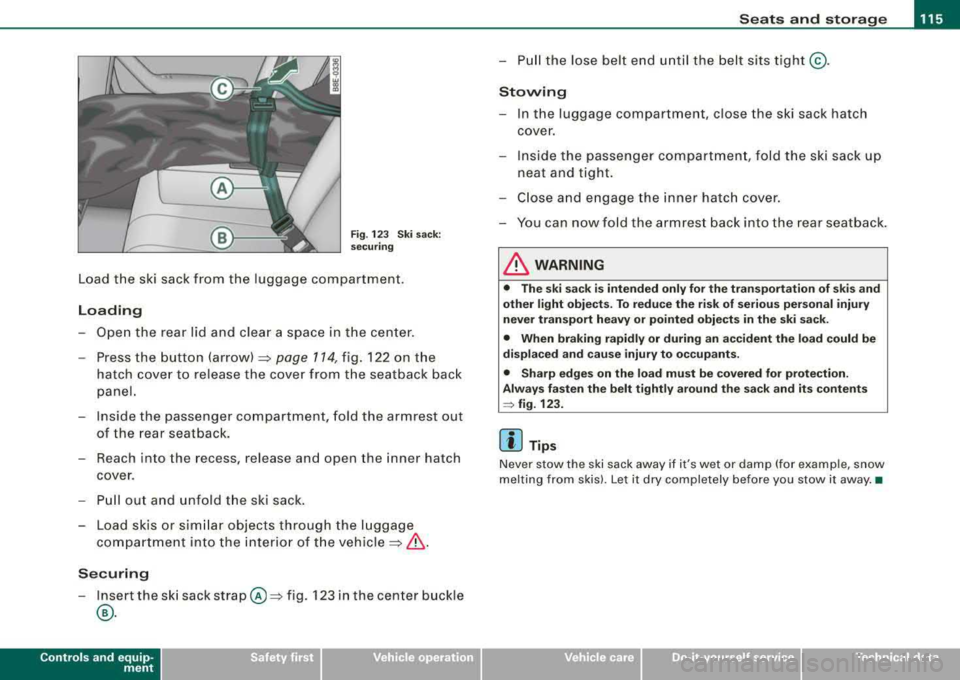
Fig. 123 Ski sack:
securing
Load the ski sack from the luggage compartment.
Loading
- Open the rear lid and clear a space in the center.
- Press the button (arrow)
~ page 114, fig. 122 on the
hatch cover to release the cover from the seatback back
panel.
- Inside the passenger compartment, fold the armrest out
of the rear seatback.
- Reach into the recess, release and open the inner hatch
cover .
- Pull out and unfold the ski sack.
- Load skis or similar objects through the luggage
compartment into the interior of the
vehicle~ &.
Securing
-Insert the ski sack strap @~ fig. 123 in the center buckle
®·
Controls and equip
ment
- Pull the lose belt end until the belt sits tight@.
Stowing
- In the luggage compartment, close the ski sack hatch
cover.
- Inside the passenger compartment, fold the ski sack up
neat and tight.
- Close and engage the inner hatch cover.
You can now fold the armrest back into the rear seatback.
& WARNING
• The ski sack is intended only for the transportation of skis and
other light objects. To reduce the risk of serious personal injury
never transport heavy or pointed objects in the ski sack.
• When braking rapidly or during an accident the load could be
displaced and cause injury to occupants.
• Sharp edges on the load must be covered for protection.
Always fasten the belt tightly around the sack and its contents
~ fig. 123.
[ i] Tips
Never stow the ski sack away if it's wet or damp (for example, snow
melting from skis). Let it dry completely before you stow it away. •
irechnical data
Page 124 of 368
![AUDI A4 AVANT 2008 User Guide -
Seats and storage
----=---------------
0 Note
To avoid damaging the socket, only use plugs that fit properly.
[ i] Tips
When the engine is off and accessories are still plugg](/img/6/57552/w960_57552-123.png "AUDI A4 AVANT 2008 User Guide -
Seats and storage
----=---------------
0 Note
To avoid damaging the socket, only use plugs that fit properly.
[ i] Tips
When the engine is off and accessories are still plugg")
-
Seats and storage
----=---------------
0 Note
To avoid damaging the socket, only use plugs that fit properly.
[ i] Tips
When the engine is off and accessories are still plugged in and are
on , the vehicl e battery can still be drained .•
Storage
General overview
There are numerous places to store items in your vehicle.
Glove compartment
Center console
Owner's Literature
Compartments in the door trims
Coat hooks
Compartments in the door trims ::, page 122
=:> page 123
=:> page 123
------::, page 124
=:> page 124
=:> page 114
Some of the storage locations are only found on specific vehicle
models or are optional equipment.
& WARNING
• Always remove objects from the instrument panel. Any items
not put away could slide around inside the vehicle while driving or
when accelerating or when applying the brakes or when driving
around a corner.
• When you are driving make sure that anything you may have
placed in the center console or other storage locations cannot fall
& WARNING (continued)
out into the footwells. In case of sudden braking you would not be
able to brake, depress the clutch or accelerate.
• Any pieces of clothing that you have hung up must not interfere
with the driver's view. The coat hooks are designed only for light
weight clothing . Never hang any clothing with hard, pointed or
heavy objects in the pockets on the coat hooks. During sudden
braking or in an accident
-especially if the airbag is deployed -
these objects could injure any passengers inside the vehicle. •
Glove compartment
The glove compartment is illuminated and can be locked .
•
To open glove compartment
Fig. 132 Glove
compartment
- Pull the handle in the direction of the arrow ~ fig. 132
and swing the cover down to open.
_,,,
Page 125 of 368
Seats and storage -
-----------------=------'
To close glove compartment
-Push the glove compartment lid upward until the lock
engages.
The light will illuminate when the parking/headlights are turned on
and the glove compartment is open.
In the glove compartment lid, you will find a place to store a pen and
a pad of paper .
& WARNING
To reduce the risk of personal injury in an accident or sudden stop,
always keep the glove compartment closed while driving. •
Storage compartment for small objects Ca
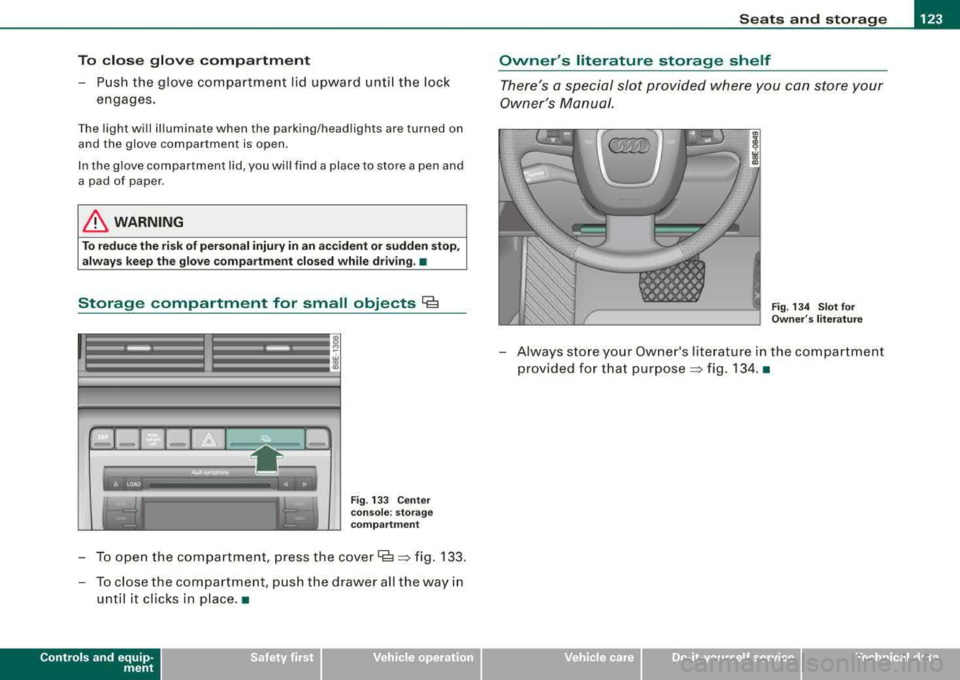
Fig. 133 Center
console: storage
compartment
To open the compartment, press the cover Cs => fig . 133.
- To close the compartment, push the drawer all the way in
until it clicks in place .•
Controls and equip
ment
Owner 's literature storage shelf
There's a special slot provided where you can store your
Owner 's Manual.
Fig. 134 Slot for
Owner 's literature
- Always store your Owner's literature in the compartment
provided for that purpose
=> fig. 134. •
irechnical data
Page 132 of 368
___ w_ a_ rm __ a_ n_ d_ c_o _l_d ________________________________________________ _
Air distribution
The automatically c ontrolled air distribution can be
changed manually.
You can use the [-0- 1, j@fill or j,O,I buttons separately or together in
combination . To sw itch back to the auto matic a ir distribution
setting, either switch off the buttons you previously selected, or
press [AUTO
I.
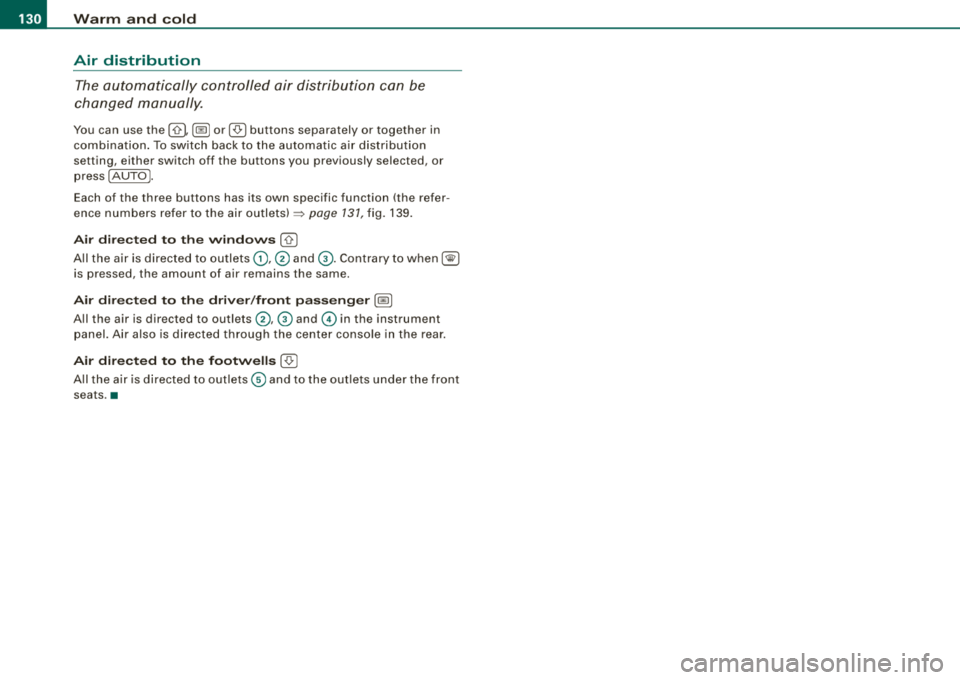
Each of the three buttons has its own specific function (the refer
ence numbers refer to t he air
outlets) ~ page 131, fig. 139.
Air dir ecte d to the wind ows [-0- 1
A ll the a ir is directed to outlets G) ,@ and G) . Contrary to when [@I
is pressed, the amount of air remains the same .
Air directed to the driver /fron t passenger l~ I
All the air is directed to outlets @,© and © in the instrument
panel. Air also is d irected t hroug h the center console in t he rear .
Air dir ect ed to th e footw ells I-0-1
A ll the a ir is directed to out lets © and to the out lets u nder the front
seats .•
Page 133 of 368
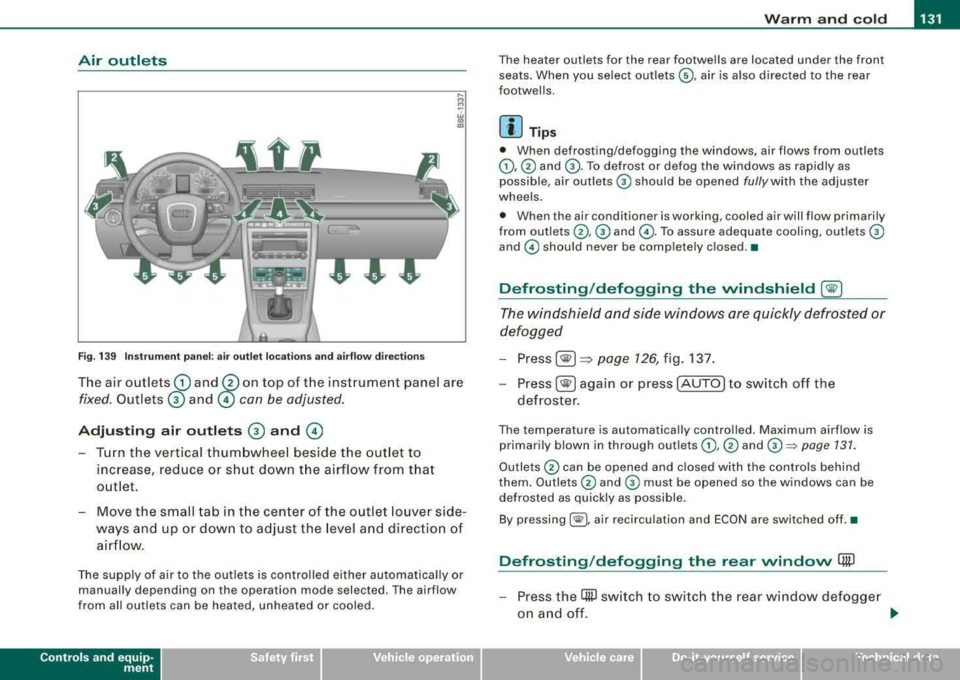
Warm and cold -
-----------------'
Air outl ets
-. .. ~.
Fig. 1 39 Instr umen t pan el: air outlet locat ions and a irflow direc tion s
The air outlets G) and 0 on top of t he instrument panel are
fixed. Outlets 0 and © con be adjusted.
Adjusting air outlets 0 and ©
- Turn the vertical thumbwheel beside the out let to
increase, reduce or shut down t he airflow from that
o utlet .
- Move the sm all tab in t he cen ter of the o utle t lo uver side
ways and up or dow n to adj ust the level and directio n of
air flow.
The supp ly of air to the outlets is contro lled eit her automatical ly or
manually depending on the operation mode selected. The airflow
from all outlets can be heated, unheated or coo led .
Controls and equip
ment
The heater outlets for the rear footwe lls are located under the front
seats. When you select outlets ©, air is also directed to the rear
footwel ls.
[ i ] Tip s
• When defrosting/defogging the windows, air flows from outlets
G),@ and G) . To defrost or defog the windows as rapidly as
possible , air outlets
G) should be opened fully with the adjuster
whee ls .
• When the air conditioner is working, cooled air will flow primarily
from
ou tlets @, G) and @. To assure adequa te cooling, out lets G)
and © should never be completely closed .•
Defrosting /defogging the windshield [@)
The windshield and side windows are quickly defrosted or
defogged
- Press [® I=> page 126, fig. 137.
-
Press[ ®] ag ain or press [AUTO] to switch off the
defroster .
The temperature is automatically contro lled. Maximum airflow is
primarily b lown in through out lets
G) , @ and G):::) page 131 .
Outlets @ can be opened and c losed with the controls behind
them. Outlets
@ and G) must be opened so the windows can be
defrosted as quickly as possible.
By pressing[ @), air recirculation and ECON are switched off .•
Defrosting /defogging the rear window Qii)
- Press the (ffi) switch to swi tc h the rear wind ow d efo gge r
o n an d off.
.,_
Technical data