warning AUDI A4 AVANT 2008 Owner's Manual
[x] Cancel search | Manufacturer: AUDI, Model Year: 2008, Model line: A4 AVANT, Model: AUDI A4 AVANT 2008Pages: 368, PDF Size: 46.19 MB
Page 35 of 368

[ i J Tips
• The engine oil pressure symbol ~ is not an indicator for a low
engine oil level. Do not rely on it . Instead , check the oil level in your
engine at regular interval s, preferably each time you refuel , and
always before going on a long trip.
• The yellow oil level warning indication requires oil refill or
workshop service without delay . Do not wait until the red oil pre s
s ure warning symbol
~ starts to fla sh before you respond to the
low oil level warning
-... . By then , your engine may already have
s uffered serious damage. •
Yellow symbols
A yellow symbol means WARNING .
Yellow symbols mean:
Controls and equip
ment
Fig . 2 0 Display : lo w
fu el lev el warn ing
( priority 2 )
Driver information display
Low fuel leve l ~ page34
Check engine oil level ~ page34
Engine oil sensor malfunction ~ page34
-
Light/rain* senso r defective ~ page34
Worn b rake pad s ~ page34
USA models: ~ page34 Speed wa rn ing 1 ..
Canada models: ~ page34 Speed wa rning 1
Dyn amic headl ight ra nge con-
~ page34 trol* defect ive
W inds hield washer fluid level low
~ page34
-
USA models : ~ page34 Speed warn ing 2
Canada models : ~ page34 Speed war ning 2
Battery voltage too high or too
~ page35 low
Defective light bulb
~ page35
Adaptiv e light* defective ~ page35
Ye llow symbo ls ind icate a p riority 2 mal funct ion - Warning!
When a yellow symbo l appears, a warning tone wil l sound
once.
Check the displaye d functio n as so on as possi ble. I f more than one ._
irechnical data
Page 36 of 368
Driver inf ormation di spl ay
priority 2 malfunction is detected, al l symbols will appear one after
t he other for about two seconds. •
Applie s to ve hicles: with Ligh ting pac kage
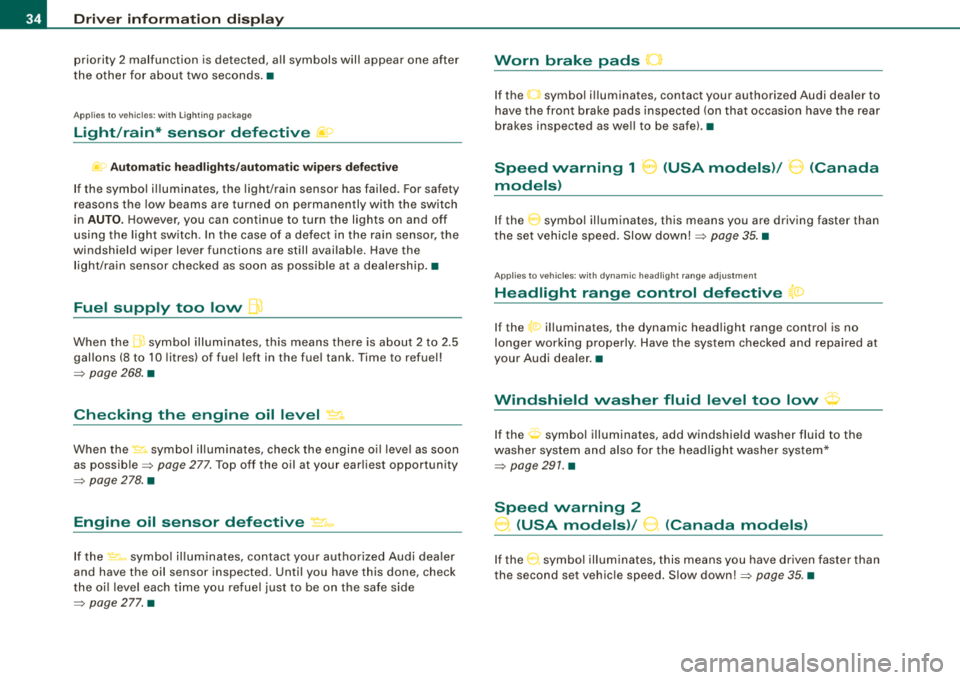
Light/rain* sensor defective fif>
~o Aut om atic hea dlig ht s/a utom atic w ipers defe ct iv e
If the symbol il luminates, the light /rain sensor has failed. For safety
reasons the low beams a re turned on permanently with the switch
in
AUTO. H owever, you can continue to turn the lights on and off
using the light sw itch . In the case of a defect in the ra in se nsor, the
windshield wiper lever functions are still available. Have the
l ight/ra in sensor checked as soon as poss ible at a dealersh ip .•
Fuel supply too low flt)
When the .ffi symbol illuminates, th is means there is about 2 to 2 .5
gallons (8 to 10 l itres) of fue l left in the fue l tank. Time to refuel!
=> page 268 . •
Checking the engine oil level ~ ..
When the ~ symbol illum inates, check the engine o il leve l as soon
as
possib le => page 277. Top off the oil at your ear liest opportunity
=> page 278 . •
Engine oil sensor defective ~ ...
If the ~-symbo l il lum inates, contact your authorized Audi dea ler
and have the oil sensor inspected . Until you have this done, check
the oi l leve l each t ime you refuel just to be on t he safe side
=> page 277. •
Worn brake pads 0
If the O symbo l illuminates, contact your authorized Audi dealer to
have the front brake pads inspected (on that occasion have the rear
brakes inspected as we ll to be safe) .•
Speed warning 1 8 (USA models)/ 0 (Canada
models)
I f the 0 symbo l il luminates, this means you are driving faster than
the set vehicle speed. Slow
down! => page 35. •
Applies to ve hicles : w ith d ynami c head light rang e adjus tment
Headlight range control defective {a:>
If the t0 illuminates, the dynamic head light range control is no
longer working properly. Have the system checked a nd repaired at
your Audi dealer .•
t·,···
Windshield washer fluid level too low <;p
If the O symbol illuminates, add windshield washer fluid to the
washer system and a lso fo r the headlight washer system*
=> page 291. •
Speed warning 2
0, (USA models)/ 9. (Canada models)
If the 0 symbol illum inates, this means you have driven faster than
the second set vehic le speed . S low
down!=> page 35 . •
Page 37 of 368
Battery voltage low .::::3
If the symbol illuminates, contact your authorized Audi dealer
and have the following components inspected:
• drive belt
• generator
• battery charge
Also see if the generator warning/indicator light illuminates
=> page 22. •
Defective light bulb warning ~
The defective light bulb warning tells you when a vehicle
light bulb has become defective.
If a defective bulb has been detected by the system or a light bulb
burns out, the symbol wi th a message appears in the display to
tell you which bulb is burnt out and where it is located . For example :
REAR LEFT TURN SIGNAL
After 5 seconds, the message d isappears . If you want to reca ll the
message into the display, press the CHECK button.
There are three reasons why the defective bulb message wou ld
appear in the display:
• the light bulb has burnt
out => page 328.
• the fuse is "blown"=> page 326, "Replacing a fuse" .
• the wire connec tion to the light bulb is defective .
Have the bulb replaced or the connection repaired by your autho
rized Audi Service department .
& WARNING
• Light bulb s are pres sur ized and c ou ld expl ode whi le they are
be ing changed causing seri ou s pe rso nal inju ry .
Controls and equip
ment
Dri ver inf orma tio n di spl ay
& WARNI NG ( conti nued )
• Work with due care wh en h andling th e high-vol tage s ecti on of
gas disch arge (xe non
I la mp s*. Fa ili ng to d o so could result in de ath
or se riou s inj ury !
•
Ap plie s to veh ic les: with a dapt iv e ligh t
Adaptive light defective
When th is symbol illuminates, it means that adaptive light is
defective. Go to an authorized dea lership to have the headlights or
the control unit for the adaptive light repa ired. •
Speed warning system
Overview
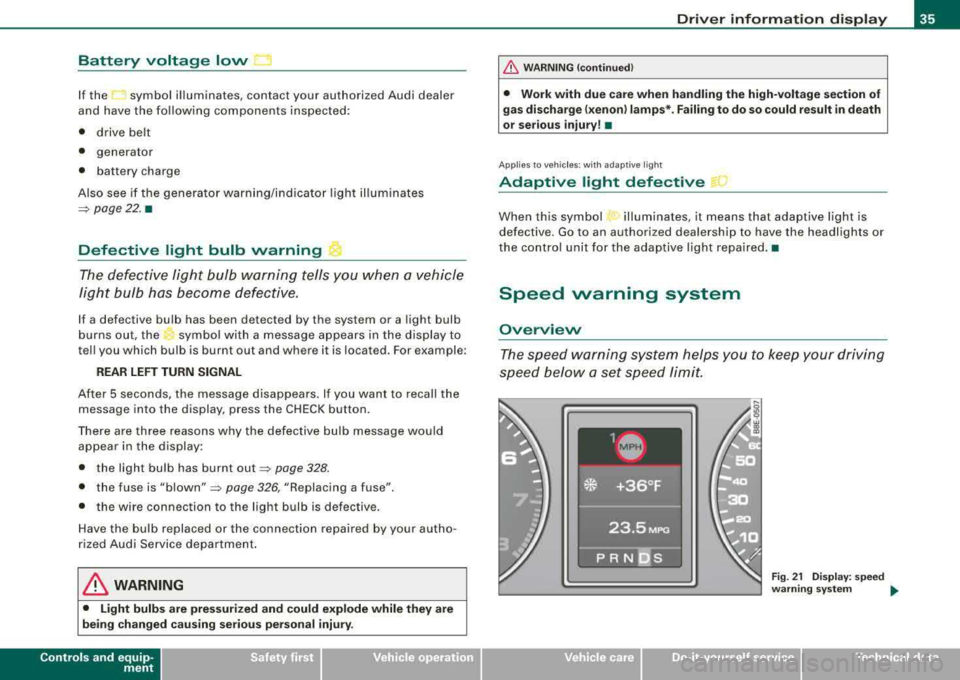
The speed warning system helps you to keep your driving
speed below a
set speed limit.
Fig . 21 Disp lay : s pee d
wa rning syste m
.,.
irechnical data
Page 38 of 368
Driver inf orma tion di spl ay
The speed warning system warns the driver if he exceeds a previ
ously stored maximum speed . A warning tone wi ll sound as soon as
the vehic le speed exceeds the set speed by about 6 miles per hour
(10 km/h) . At the same time, a warning symbol appears in the
display~ fig. 21 .
The speed warning system has
t wo wa rning thre sholds that func
tion independent ly of each other and that have somewhat different
purposes:
Sp eed w arnin g 1 -
You can use speed warning 1 to set the maximum speed while you
are driving . This setting will remain in effect until you turn off the
ignition, assuming that you have not changed or reset the setting.
The speed warning symbol (USA models)/ (: (Canada models) in
the warning 1 disp lay appears when you exceed the maximum
speed. It goes out when the speed falls be low the stored maximum
speed .
The speed warning symbol will also go out if the speed
exceeds the
stored maximum speed by more than about 25 mph (40 km/h) for at
least 10 seconds. The stored maximum speed is de leted.
Setting speed warning 1
~ page 36 .
S pee d w arni ng 2
Storing warning 2 is recommended if you always want to be
reminded of a certain speed, for example when you are traveling in
a country that has a genera l maximum speed limit, or if you do not
want to exceed a specified speed for winter tires.
The speed warning 2 symbol, (USA models)/ (Canada models) appears in the disp lay when you exceed the stored speed limit .
Unlike warning 1, it wil l not go out until the vehicle speed drops
below the stored speed limit .
Setting speed warning 2
~ page 37.
[ i ] Tip s
Even though your vehicle is equipped with a speed warning system,
you shou ld still watch the speedometer to make sure you are not
driving faster than the speed l imit. •
Speed warning 1: setting a speed limit
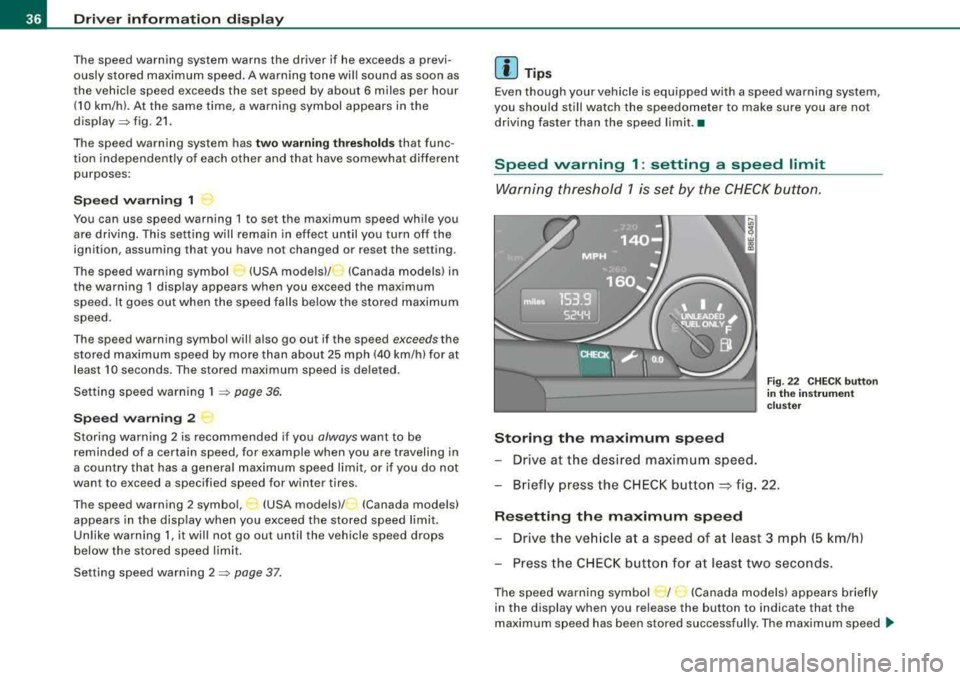
Warning thresh old 1 is set by the CHECK button .
Storing the maximum s pee d
- Drive at the desired maximu m speed.
Fig. 22 C HECK button
i n t he in strum ent
c lust er
Briefly press the CHECK button ~ fig. 22 .
Resetting th e ma ximum sp eed
Drive the ve hicle at a speed of at least 3 mph (5 km/h)
Press the CH EC K butto n for at least two seconds .
The speed warning symbo l r I· (Canada models) appears briefly
in the display when you re lease the button to indicate that the
maximum speed has been stored success ful ly . The maximum speed
~
Page 39 of 368
will remain stored in the system until it is changed by briefly
pressing the button again or until it is reset by holding down the
button for at least two seconds. •
Speed warning 2: setting a speed limit
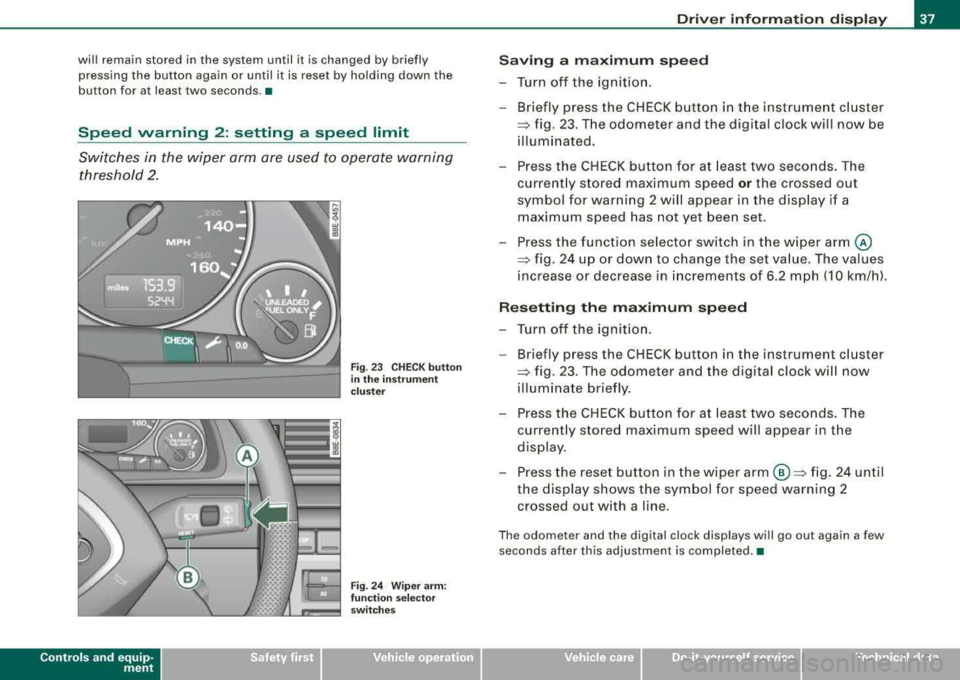
Switches in the wiper arm are used to operate warning
threshold 2.
Controls and equip
ment
Fig . 23 CHECK button
in the instrument
cluster
Fig. 24 Wiper arm:
function selector
switches
Driver information display
Saving a maximum speed
-Turn off the ignition.
-Briefly press the CHECK button in the instrument cluster
=> fig. 23 . The odometer and the digital clock will now be
illuminated.
-Press the CHECK button for at least two seconds. The
currently stored maximum speed
or the crossed out
symbol for warning 2 will appear in the display if a maximum speed has not yet been set.
Press the function selector switch in the wiper
arm @
=> fig. 24 up or down to change the set value. The values
increase or decrease in increments of 6.2 mph (10 km/h).
Resetting the maximum speed
-Turn off the ignition.
- Briefly press the CHECK button in the instrument cluster
=> fig. 23. The odometer and the digital clock will now
illuminate briefly.
-Press the CHECK button for at least two seconds. The
currently stored maximum speed will appear in the
display.
-Press the reset button in the wiper arm ©=> fig. 24 until
the display shows the symbol for speed warning 2 crossed out with a line.
The odometer and the digital clock displays will go out again a few
seconds after this adjustment is completed. •
irechnical data
Page 44 of 368
Driver inf orma tion di spl ay
Several functions in your vehicle can be set, activated and
controlled by means of
Menu s. With these menus, you can addition
ally select which information is to be shown in the DIS (Driver Infor
mation System) disp lay. This functions on ly with the ignit ion
switched on. Operation is controlled through the [Reset] button on
the windshield wiper
lever => page 41, fig. 29.
The
S ta rt me nu shows you the different types of d isplays:
S et
Check
Menu off
H el p•
Navigate the menu
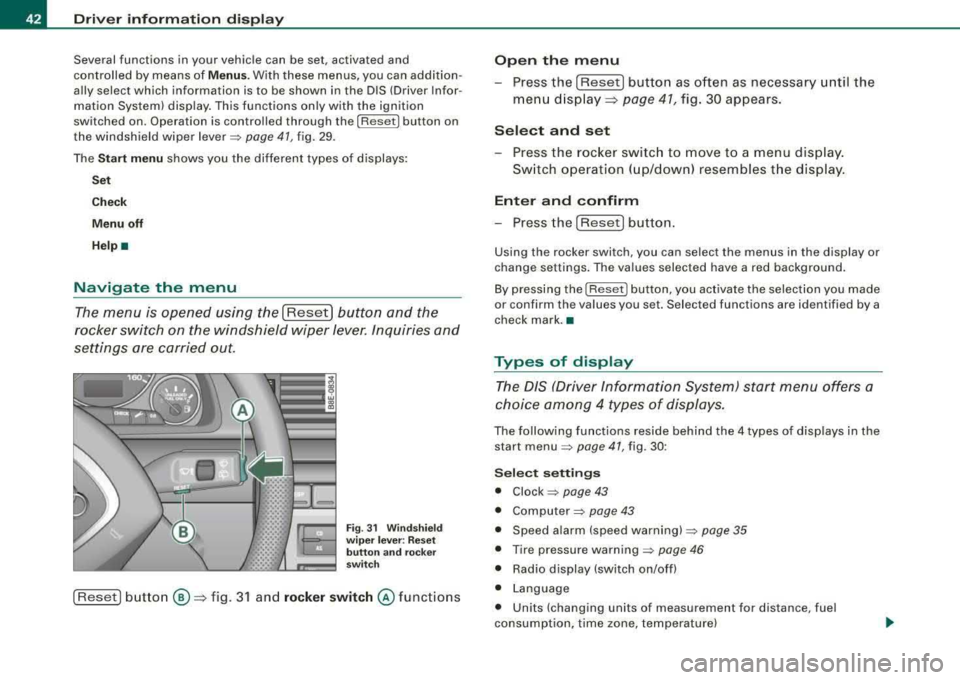
The menu is opened using the I Reset] button and the
rocker switch on the windshield wiper lever. Inquiries and
settings are carried out.
F ig. 31 W inds hield
w ip er le ver: R es et
butt on and rocker
sw itch
[Reset] button ®=> fig. 3 1 and rock er switch @ functions
Open th e menu
- Press the [Reset) button as often as necessary until the
menu d isplay::::>
page 41, fig. 30 appears.
S elect and set
- Press the rocker switch to move to a menu display.
Sw itch operation ( up/down) resembles the disp lay .
Enter and confirm
- Press the [Reset! button.
Using the rocker switch, you can select the menus in the display or
change settings. The values selected have a red background .
By pressing the [ Reset] button, you activate the selection you made
or confirm the va lues you set. Selected functions are identified by a
check mark. •
Types of display
The DIS (Driver Information System) start menu offers a
choice am ong 4 types of displays.
The following functions reside behind the 4 types of displays in the
start
menu => page 41, fig. 30 :
Selec t se tting s
• Clock => page 43
• Computer=> page 43
• Speed alarm (speed warning) => page 35
• Tire pressure warning => page 46
• Radio display (switch on/off)
• Language
• Units (changing units of measurement for distance, fuel
consumption, time zone, temperature)
Page 47 of 368
![AUDI A4 AVANT 2008 Owners Manual To set the date, for example, proceed as follows :
- Press the [R eset] button . The Start menu appears
=> page 41, fig . 30.
- Tap the rocker
switch => page 42, fig. 3 1 until Set](/img/6/57552/w960_57552-46.png "AUDI A4 AVANT 2008 Owners Manual To set the date, for example, proceed as follows :
- Press the [R eset] button . The Start menu appears
=> page 41, fig . 30.
- Tap the rocker
switch => page 42, fig. 3 1 until Set")
To set the date, for example, proceed as follows :
- Press the [R eset] button . The Start menu appears
=> page 41, fig . 30.
- Tap the rocker
switch => page 42, fig. 3 1 until Set
=> page 44, fig. 34 is activated.
- Press the [Reset] button. The men us avai lab le under
Set
appear.
- Tap the rocker switc h unti l
Clock => page 44, fig . 35 is
disp layed .
- Press the [Reset] button . The c lock settings menu
appears .
Continued => page 45, "Practica l examp le (part 2)" . •
Practical example (part 2)
Continue w ith se tting the date as follows :
- Tap the rocker
switch => page 42, fig. 3 1 until Date is acti
vated.
- If there a n empty box in front o f Date, press the [Reset]
button. Now a check mark appears in t he box .
- Tap the rocker switc h until the date display is activated
and press the [Reset] button. The day flashes.
- Tap the rocker switc h up or down until the correct
number for the day appears . Press the [Reset] button .
Now the month flashes.
- Chan ge the mon th and th e year as needed in the same
way.
Controls and equip
ment
Dri ver information di spl ay
Continued=> page 45 , "Practical example (part 3)" . •
Practical example (part 3)
Close setting the da te as follows:
- Tap the rocker
switch => page 42, fig. 31 until Back is act i
vated.
- Press the [Reset] button. The
Set menu appears again .
- Press th e [Reset] butto n again. The Star t menu appears
agai n.•
Tire pressure monitoring system
Applies to veh ic les: with tir e pr essure monitor in g system
General notes
As an adde d safe ty feature, your vehicle has been equ ipped wit h a
tire pressure monitoring sys tem (TPMS) that i lluminates a low tire
pressure te llta le when one or more of your tires is significant ly
under-inflated . The TPMS only provides a low tire pressure warning
and does not reinflate your tires.
According ly, when the low tire pressure te llta le i llum inates, you
shou ld stop and check your tires as soon as possib le, and infla te
them to the proper pressure . Driv ing on a significantly under
inf lated tire causes the tire to overheat and can lead to tire failure.
Under -inflation a lso reduces fue l efficiency and tire tread life, and
may affect the vehicle 's hand ling and stopping ab ility .
0 Note
• Please note that the TPMS is not a substitute for proper tire
maintenance , and it is the driver's responsibility to maintain correct
..,_
Page 48 of 368
Driver inf ormation di spl ay
tire pressure, even if under-inflation has not reached the level to
t rigger il lum ination of the TPMS low tire pressure te llta le .
• Each tire should be checked month ly when cold and inflated to
the infla tion pressure recommended by the vehic le manufacturer
on the vehicle placard , tire inflation pressure label, or in chapter
=> page 297 . (If your ve hicle has tires o f a different size than t he size
indicated on the vehicle placard or tire inf lation pressure label, you
should de termine the proper tire inflation pressure for those
tires.) •
Applies to vehi cles : with tire p ress ure mo nit o ring system
TPMS malfunction indicator
Your vehic le has also been equipped with a TPMS ma lfunction indi
cator to indicate when the system is not operating properly. The
TPMS ma lfunct ion indicator is combined with the low tire pressure
telltale . When the system detects a ma lfunction, t he tellta le wi ll
f lash for approximately one minute and then remain continuous ly
il lum inated. T his sequence wil l continue upo n subsequent veh icle
star ts up as long as the malfunction exists.
When the ma lfunc tion ind icator is ill uminated, the system may not
be able to detect or signal low tire pressure as intended .
TPMS malfunctions may occur for a variety of reasons, including the
installation o f rep lacement or a lternate tires or wheels on the
vehic le that prevent the TPMS from functioning properly . A lways
check t he TPMS malfunction tellta le after replac ing one or more
tires or whee ls on your v ehicle to ensur e that the replacement or
a lternate t ires and wheels al low the TP MS to continue to function
proper ly. •
Ap plies to ve hicles : w it h tir e pressu re m oni to ring sy ste m
Introduction
T he tire pressure monitoring system monitors air pressure
in all four road wheels while the vehicle is moving.
As soon as the tire pressure monito ring system se nses a significant
loss of air pressure in one or several tires, text messages and yel low
symbo ls appear in the instrument clus ter disp lay to a lert the driver.
The
(l) warning light in the instrument cluster comes on when the
t ire is significa ntly under inflated.
The warning light
(l) also lights up during a system failure .
When the whee l is turning, the system receives radio signals from
sensors located inside each tire.
A factory spare wheel is delivered with sensor . However, the spare
whee l is not checked by the ti re pressure monitoring sys tem. Such
monitoring can on ly occur after the spare wheel has been insta lled
and
initia lized => page 50.
Be aware that t ire pressure is a lso dependent o n the temperature of
the tire . For every 18 °F (1
O °C) increase in tire temperature, tire pres
su re increases by about 1.5 psi (0 .1 barl. The tire warms up wh ile the
vehic le is moving and t ire pressure rises. So you should adjust tire
pressure only when they are
cold, when tire temperature is roughly
the same as ambient air temperature .
I n order to keep the tire pressure moni toring system prope rly ca li
brated, tire pressure on all four tires shou ld be checked at regular
intervals, adjusted if necessary and saved in the proper sett ing
(reco mmended
pressure) => page 48.
The tire pressure is shown on the tire pressure label. On USA vehi
cles, the tire pressure label is located on the dr iver's side B -pillar. On
Canada vehicles, the tire pressure labe l is located either on the
driver's side B -p illar o r inside the fue l fi ller flap. The tire pressure
label l ists the recommended cold tire inflation pressures for the
vehic le at its maximum capacity weight and the tires that were on
your vehicle at the t ime it was manu factured . For recommended tire
~
Page 49 of 368
pressures for normal load conditions, p lease see chapter
~ p ag e 297 .
& WARNING
• When the tire pre ssure monitoring sy stem warning light i s lit ,
one or more of your tires is sign ifi cantly under-inflated . You should
s top and check your tire s as soon as possible , and inflate them to
the p rope r pres sure a s indicated on the vehicle's tire pre ssure
label
~ page 297 . Driving on a significantly under -inflated tire
c ause s the t ire to overheat and can lead to tire failure . Under -infla
tion also is likely to impair the vehicle's handling and stopping
ability .
• Do not adjust tire pre ssure when tire temperature is excessive.
Thi s could lead to serious tire damage and even cause the tire to
burst , with the additional danger of an ac cident .
<£' For the sake of the environment
Driving wi th under -inflated tires reduces fuel efficiency and tire
tread life.
[ i ] Tips
• Each tire should be checked mon th ly when cold and set to the
recommended inf lat ion pressure as specified on the tire pressure
table~ page 297 .
• The tire pre ssur e monito ring system he lp s the drive r to kee p
t rack of the tire pressures. But the d river s til l has the responsibi lity
for maintaining the correct tire p ressure .
• Tire pressure must only be adjusted when th e temperature of the
t ires is about the same as am bien t air temperatu re .
• When tires are replaced , the sensors and va lves must not be
detached or exchanged. Only the valve co re needs t o be rep laced
and, if necessary, the valve and the wheel e lectronics replaced.
Controls and equip
ment
Driver information display
• If you should put different whee ls and tires on your vehic le (e .g.
win ter wheels a nd ti res), you must be certa in that the wheels a nd
tires are compatible with the t ire pressure monitoring system .
O therwise the system will register a ma lfunction and a fau lt
message will be displayed. For more information, contact your Audi
dea ler .•
Ap plie s to veh ic les: with tir e pr ess ure mon ito ring syste m
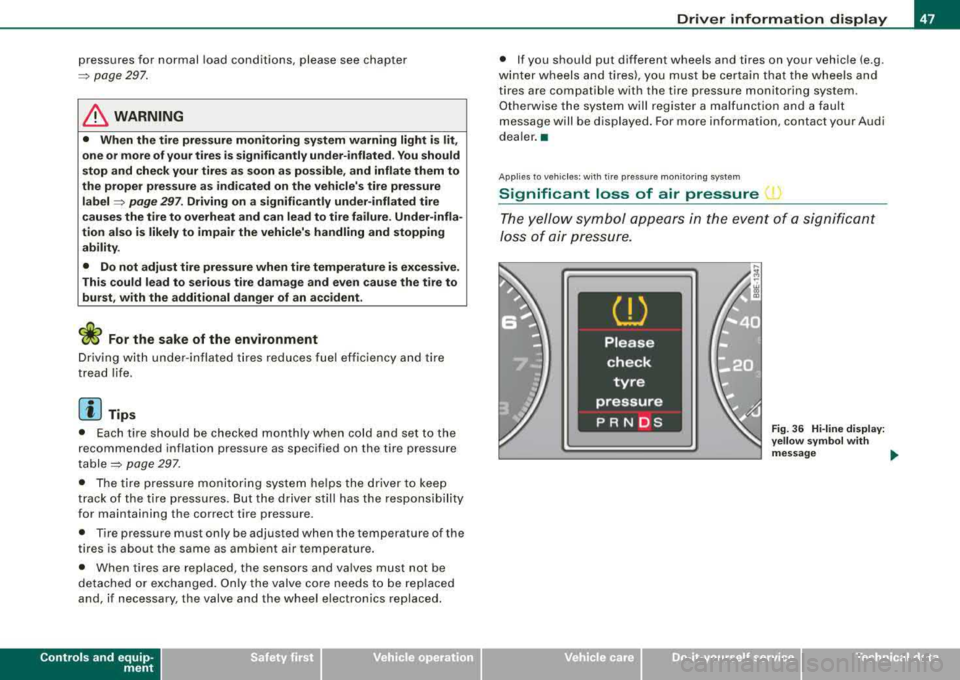
Significant loss of air pressure 1
The yello w symbo l app ear s in the e ve n t of a s ignific a n t
Jo ss of air pre ss ure.
Fig . 36 Hi -lin e di splay:
y ellow s ymbol w ith
message ....
irechnical data
Page 50 of 368
Driver inf orma tion di spl ay
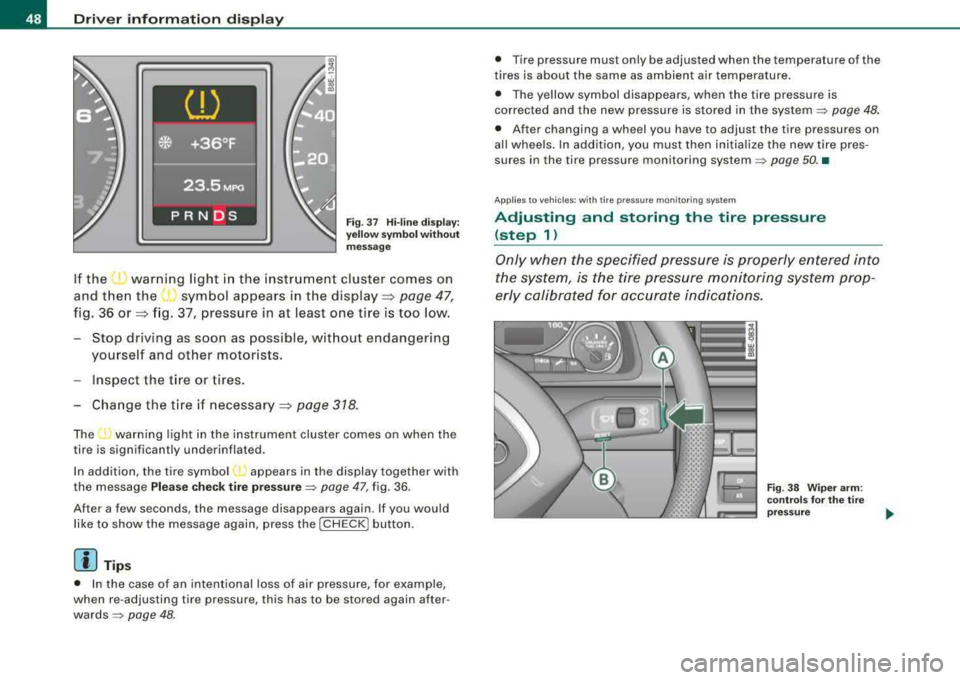
Fig. 3 7 H i-lin e dis play:
ye llow sy mbo l w ith out
m essa ge
If the ~ warning light in the instrument cluster comes on
and then the
( symbol appears in the display=> page 47,
fig. 36 or => fig. 37, pressure in at least one tire is too low.
- Stop driving as soon as possible, without endangering yourself and other motorists.
Inspect the t ire or tires .
Change the t ire if necessary=>
page 318.
The ...., warning light in the ins trument cluster comes on when the
tire is significantly underinflated.
In addition, the tire symbol appears in the display together with
the message
Ple ase c hec k tire p re ss ure ~ page 47, fig. 36 .
After a few seconds , the message disappears again. If you would
like to show the message again, press the
I CH ECK I button.
[ i ] Tips
• In the case of an intentional loss of air pressure, for examp le,
when re -adjusting tire pressure, this has to be stored again after
wards~ page 48.
• Tire pressure must only be adjusted when the temperature of the
t ires is about the same as ambient air temperature.
• The yellow symbol disappears, when the tire pressure is
corrected and the new pressure is s tored in the system
~ page 48 .
• After changing a wheel you have to adjust the tire pressures on
all wheels. In addition, you must then initia lize the new tire pres
sures in the tire pressure monitoring
system ~ page 50. •
Ap plies to vehic les : w it h tir e pressu re m onit oring syste m
Adjusting and storing the tire pressure
(step 1)
Only when the specified pressure is properly entered into
the system, is the tire pressure monitoring system prop
erly calibrated for accurate indications.
Fi g. 38 Wiper ar m:
co ntr ols fo r the t ire
press ure