ESP AUDI A4 CABRIOLET 2009 User Guide
[x] Cancel search | Manufacturer: AUDI, Model Year: 2009, Model line: A4 CABRIOLET, Model: AUDI A4 CABRIOLET 2009Pages: 340, PDF Size: 77.32 MB
Page 41 of 340
Sele cting th e fun ctions
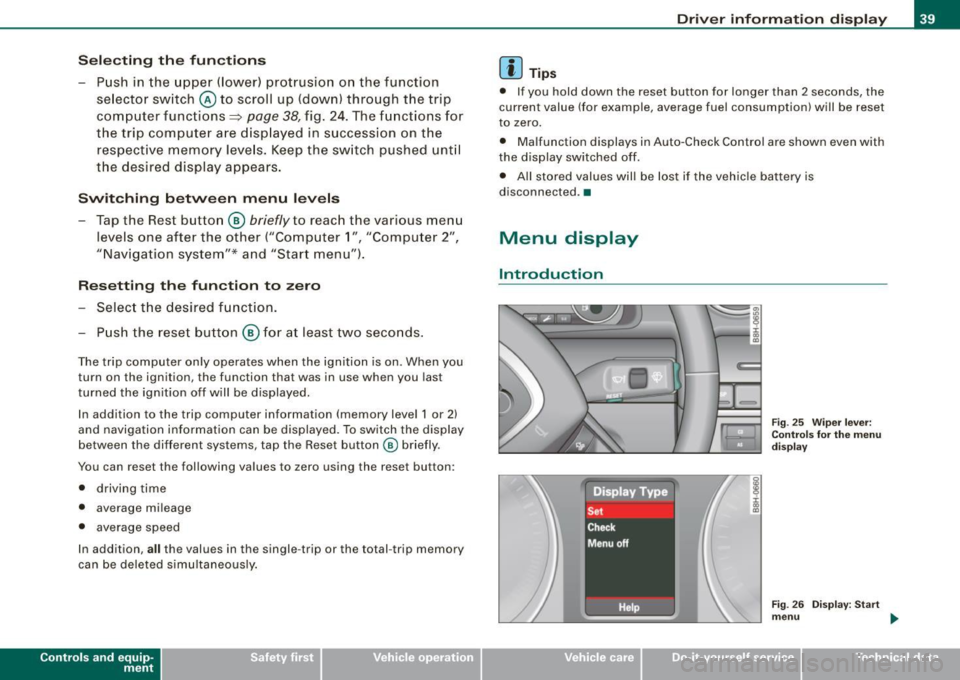
- Push in the uppe r (lower) protrusion on the function
se lector switch @to scroll up (down) through the trip
computer functions~
page 38, fig. 24. The fu nctions for
the trip computer a re d isp layed in succession on the
respective memory leve ls. Keep the switch pushed unt il
the desired display appears .
Swi tching b etw een m enu levels
- Tap the Rest button @
briefly to reach the various menu
levels one after the other ("Computer 1 ", "Computer 2",
"Navigation system"* and "Start menu") .
Res etting th e function to zero
- Selec t the desired func tion.
Push the reset button @for at least two seco nds .
The trip computer on ly operates when the ignition is on. When you
turn on the ignition, the function that was in use when you last
turned the ignition off will be displayed.
In addition to the trip computer information (memory level 1 or 2)
and navigation information can be displayed. To switch the d isp lay
between the different systems, tap the Reset button
@ briefly.
You can reset the fol lowing va lues to zero using the reset button:
• driving time
• average mileage
• average speed
In addition,
a ll the values in the single -trip or the total -trip memory
can be deleted s imu ltaneously .
Controls and eq uip
ment
Dri ver informa tio n di spl ay
[ i ] Tip s
• If you hold down the reset button for longer than 2 seconds, the
current value (for example, average fuel consumption) will be reset
to zero.
• Malfunction displays in Auto-Check Control are shown even with
the display sw itched off.
• All stored values will be lost if the vehic le battery is
disconnected. •
Menu display
Introduction
~ehicle care
Fig. 25 W iper leve r:
Con trols fo r the menu
d isp lay
F ig . 2 6 Di splay: Start
m enu
Technical data
Page 43 of 340
![AUDI A4 CABRIOLET 2009 User Guide Using the rocker switch, you can select the menus in the display or
change settings. A cursor appears on the left in front of the selected
values .
By pressing the [Reset] b](/img/6/57553/w960_57553-42.png "AUDI A4 CABRIOLET 2009 User Guide Using the rocker switch, you can select the menus in the display or
change settings. A cursor appears on the left in front of the selected
values .
By pressing the [Reset] b")
Using the rocker switch, you can select the menus in the display or
change settings. A cursor appears on the left in front of the selected
values .
By pressing the [Reset] button, you activate the selection you made
or confir m the values you set.
Sel ecte d funct ions are identified with
a check mark or are carried out directly.
Meanings of the symbo ls in the display:
Selection bar Selected function
> Cursor
Check mark
D
Box
-
Meaning
Current Selection
Selected o r Function
active
Not selected
Triangle pointing up Previous page
Triangle pointing down
Next page
-
Tire pressure monitoring system
App lies to vehicles: with tire pressu re mon itoring system
General notes C.. ~
Each tire, including the spare (if provided), should be checked
month ly when cold and inflated to the inflat ion pressure recom
mended by the vehicle manufacturer on the vehicle placard or tire
inf lation pressure label. ( If your vehicle has tires of a different size
than the size indicated on the vehicle placard or tire inflation pres
sure label, you should determine the proper tire inflation pressure
for those tires.)
As an added safety feature, your vehicle has been equipped with a
tire pressure monitoring system (TPMS) that illuminates a low tire
Controls and equip
ment
•
Driv er inf ormati on di spl ay
pressure telltale when one or more of your tires is significant ly
under -inflated. Accord ingly, when the low tire pressure tel ltale illu
minates, you shou ld stop and check your tires as soon as possible,
and inflate them to the proper pressure . Driving on a significan tly
under-inflated tire causes the tire to overheat and can lead to tire
failure . Under-inflation also reduces fuel efficiency and tire tread
life, and may affect the vehic le's handling and stopping ability .
Please note that the TPMS is not a substitute for proper tire mainte
nance, and it is the driver's responsibility to maintain correct t ire
pressure, even if under -inflation has not reached the leve l to trigger
il lumination of the TPMS low tire pressure te lltale .
Your veh ic le has a lso been equipped w ith a TPMS malfunction indi
cator to indicate when the system is not operating properly . The
TPMS malfunction indicator is combined with the low tire p ressure
telltale . When the system detects a malfunction, the telltale wil l
flash for approx imately one minute and then remain cont inuously
il luminated . This sequence will continue upon subsequent vehicle
start -ups as long as the malfu nction exists.
When the ma lfunction indicator is illuminated , the system may not
be able to detect or signal low tire pressure as intended. TPMS
malfunctions may occur for a variety of reasons , including the
insta llation of replacement or alternate tires or wheels on the
vehicle that prevent the TPMS from functioning prope rly . A lways
check the TPMS malfunction telltale after replacing one or more
tires or whee ls on your vehicle to ensure that the replacement or
alternate tires and wheels allow the TPMS to continue to function
p roper ly .•
App lies to ve hic les : with tire pressu re mon ito ring system
Introduction
The tire pressure m onitoring system monit ors air pressure
in all four road wheels while t he vehicle is moving.
As soon as the tire pressure monitoring system senses a significant
loss of air pressure in one or seve ra l tires, text messages and yellow
~
Page 44 of 340
Driver information display
symbols appear in the instrument cluster display to alert the driver.
The warning light in the instrument cluster comes on when the
tire is significantly underinflated .
The warning light _, also lights up during a system failure.
When the wheel is turning, the system receives radio signals from
sensors located inside each tire .
A factory spare wheel is delivered with sensor. However, the spare
wheel is not checked by the tire pressure monitoring system. Such monitoring can only occur after the spare wheel has been installed
and initialized ~
page 45.
Be aware that tire pressure is also dependent on the temperature of
the tire. For every 18 °F (10 °C) increase in tire temperature, tire pres
sure increases by about 1.5 psi (0.1 bar). The tire warms up while the
vehicle is moving and tire pressure rises. So you should adjust tire
pressure only when they are
cold, when tire temperature is roughly
the same as ambient air temperature.
In order to keep the tire pressure monitoring system properly cali
brated, tire pressure on all four tires should be checked at regular
intervals, adjusted if necessary and saved in the proper setting
(recommended pressure)~
page 43.
The tire pressure is shown on the tire pressure label. On USA vehi
cles, the tire pressure label is located on the driver's side B-pillar. On
Canada vehicles, the tire pressure label is located either on the
driver's side B-pillar or inside the fuel filler flap. The tire pressure
label lists the recommended cold tire inflation pressures for the
vehicle at its maximum capacity weight and the tires that were on
your vehicle at the time it was manufactured . For recommended tire
pressures for normal load conditions, please see chapter
~ page 277.
& WARNING
• When the tire pressure monitoring system warning light is lit,
one or more of your tires is significantly under -inflated. You should
stop and check your tires as soon as possible, and inflate them to
& WARNING (continued)
the proper pressure as indicated on the vehicle's tire pressure
label
~ page 271. Driving on a significantly under-inflated tire
causes the tire to overheat and can lead to tire failure. Under-infla
tion also is likely to impair the vehicle's handling and stopping ability .
• Do not adjust tire pressure when tire temperature is excessive.
This could lead to serious tire damage and even cause the tire to
burst, with the additional danger of an accident.
For the sake of the environment
Driving with under-inflated tires reduces fuel efficiency and tire
tread life.
[ i] Tips
• Each tire should be checked monthly when cold and set to the
recommended inflation pressure as specified on the tire pressure
table~
page 277 .
• The tire pressure monitoring system helps the driver to keep
track of the tire pressures . But the driver still has the responsibility
for maintaining the correct tire pressure.
• Tire pressure must only be adjusted when the temperature of the
tires is about the same as ambient air temperature.
• When tires are replaced, the sensors and valves must not be
detached or exchanged. Only the valve core needs to be replaced
and, if necessary, the valve and the wheel electronics replaced.
• If you should put different wheels and tires on your vehicle (e.g.
winter wheels and tires), you must be certain that the wheels and
tires are compatible with the tire pressure monitoring system.
Otherwise the system will register a malfunction and a fault
message will be displayed. For more information, contact your Audi
dealer. .,
Page 47 of 340
Following each intentional change in specified pressures, tire pres
sures must be resaved .
After the pressures are saved, the tire pressure monitoring system measures the current tire pressures and saves them as the new
specified pressures.
[ i ] Tips
• The tire pressure is shown on the tire pressure label. On USA
vehic les, the tire pressure label is located on the driver 's side 8-
pillar. On Canada vehicles, the tire pressure label is located either on
the driver's side 8 -pi llar or insid e the fuel filler flap . The tire pressure
label lists the recommended cold tire inflation pressures for the
vehicle at its maximum capacity weight and the tires that were on
your vehicle at the time it was manufactured . For recommended tire
pressures for normal load conditions , please see chapter
=> page 271.
• The tire pressure monitoring system he lps the driver to keep an
eye on tire pressures . But the driver st ill has t he responsibi lity for
maintaining the correct tire pressure .•
Contro ls and eq uip
ment
Dri ver informa tio n di spl ay
Ap plies to veh icles : w it h tir e pr essure mo nito ring syste m
Changing a wheel
When you change a wheel, the new tire must be initial
ized .
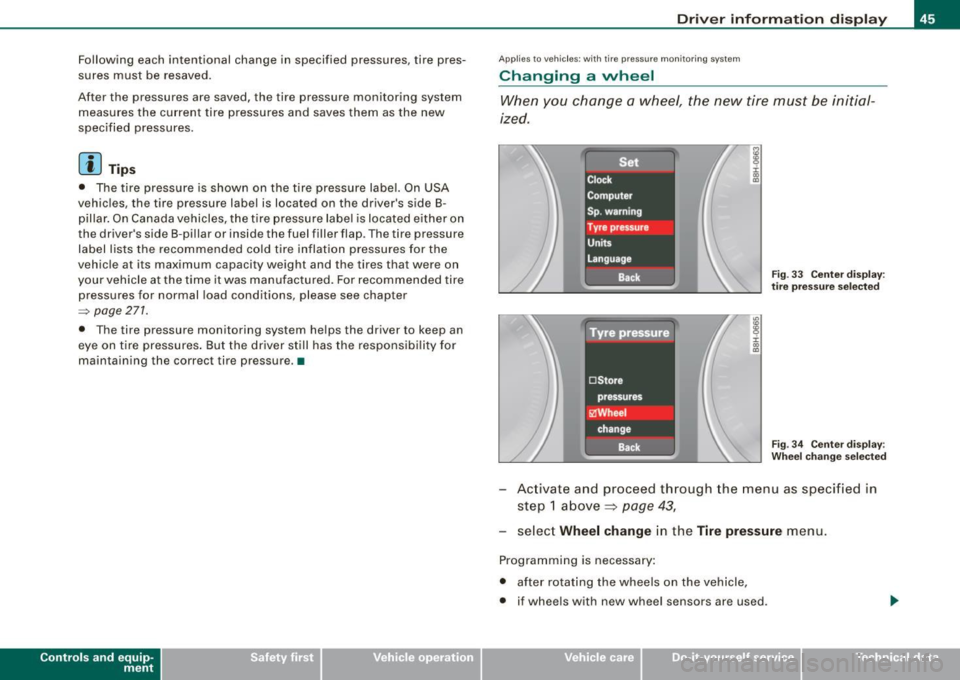
Fig . 33 Ce nter disp lay :
t ir e pr essur e se lecte d
Fi g. 3 4 Center disp lay :
W heel c hang e se lecte d
Activate and proceed through the menu as specified in
step 1 above ~
page 43,
select Wheel change in the Tire pres sure menu.
Programming is necessary:
• after rotating the wheels on the vehicle,
• if wheels with new wheel sensors are used .
~ehicle care Technical data
Page 52 of 340
Openin g and clo sin g
Power locking system
General description
The power Jocking system Jocks all the vehicle doors and
rear lid simultaneously or allows you to unl ock either just
the driver's door or all the vehicle doors and rear lid
simultaneously.
The power locking system in your veh icle incorporates the following
f unctions:
• Central locking function
• Remote contro l feature~
page 51.
• Anti -theft alarm system ~ page 57 .
All the doors and the rear lid are locked by the central locking
system when you lock the vehicle .
Unlo cking th e vehicle
You can unlock the vehicle from outside either by using the remote contro l
or by inserting and turning the key in the driver's door lock.
When you
unlo ck your vehic le:
• The anti-theft alarm sys tem is deact ivated briefly.
• The vehicle interior lights i lluminate for approximately 30
seconds.
• All turn signal lights will flash twice when the car is un locked.
• After un locking the vehicle, you have 60 seconds to open a door
or the rear lid. After 60 seconds, t he vehicle automatically locks and
the anti-theft a larm system activates again .
T he rear lid can be locked or unlocked either by using the remote
co ntro l
or by inserti ng and turning the key in the driver's door lock .
Un locking the vehicle with the remote control will only
unlock the
r ear lid, to
open it, the lid handle needs to be pressed . Lo
cking th e veh icle
You can lock the vehic le from outside e ither by using the remote
control
or by inserting and turning the key in the drivers's door lock .
When you
lock the vehicle:
• All doors and t he rear lid are locked .
• All turn signal lights w ill flash once when the ca r is locked.
• The anti -theft alarm system is activated . The horn of the anti
theft alarm sys tem will sound and the anti -t heft ala rm sys tem readi
ness l ight, located in the upper par t of the driver's door panel , wi ll
start to blink.
• The vehicle interior lights turn off .
Automatic locking*
The automat ic locking feature locks all the vehicle doors and the
rear lid when you drive faster than 9 mph (15 km/h).
You can unlock the vehicle from the inside by:
• removing the key from the ignition switch (the vehicle wil l auto
matically u nlock itself) or
• pressing the unlock pa rt of the power lock switch €:Dor
pulling the door handle (twice to open the door) .
If you wish, you can have an authorized Audi dea ler convert your
powe r door lock sys tem to automatic locking.
& WARNING
• When you lock your vehic le from out side , nobody -especially
c h ildren - should remain in side the vehicle . Remembe r, when you
lo ck the vehicle from the out side the windows cannot be opened
from the in side .
• When you leave the vehicle , alway s remove the ignition key and
take it with you . Thi s w ill prev ent pa ssenger s (children , fo r
example) from ac cidentally being locked in the vehicle should they
ac cidentally pre ss the power locki ng swit ch in the front door s. .,
Page 58 of 340
Opening and closing
As a general rule, you should use the remote control key to
lock and unlock the rear lid
c:5 =:> page 51. With the key slot
in the vertical position the rear lid can be
locked and
unlocked
by the power locking system using either the
remote-control- or the fold-out key:::::>
page 50.
Opening the rear lid
-Pull the handle :::::> page 55, fig. 47 while lifting the lid.
Closing the rear lid
-Pull it down and shut it firmly:::::>& . There is a recess in
the interior trim of the lid to make it easier to pull down.
To unlock the rear lid with the key
- Turn the key from the vertical to position @ :::::> page 55,
fig. 46 the lid springs open slightly.
- Open the lid.
To lock the rear lid with the key
-Turn key slot to horizontal position @.
Turning the key counter-clockwise to position @will release the
rear lid and cause it to rise slightly. In this position the key cannot
be pulled out of the lock cylinder.
Turning the key
clockwise to the horizontal position@ and pulling
it out will cause the
lid to remain locked when the power locking
system is actuated.
In this state the rear lid can only be unlocked with the remote
control unlock button
c:::5 on the master key.
After you turn the key
counter -clockwise back to the vertical posi
tion, the rear lid will again respond to the power locking system.
& WARNING
• After closing the rear lid, always pull up on it to make sure that
it is properly closed. Otherwise it could open suddenly when the
vehicle is moving .
• To help prevent poisonous exhaust gas from being drawn into
the vehicle, always keep the rear lid closed while driving . Never
transport objects larger than those fitting completely into the luggage area, because then the rear lid cannot be fully closed .
• Never leave your vehicle unattended especially with the rear lid
left open. A child could crawl into the car through the luggage
compartment and pull the lid shut, becoming trapped and unable
to get out. To reduce the risk of personal injury, never let children play in or around your vehicle. Always keep the rear lid, as well as
the vehicle doors, closed when not in use.
[ i] Tips
In case of an emergency , the rear lid can be opened from the inside
using the trunk escape handle~
page 290. •
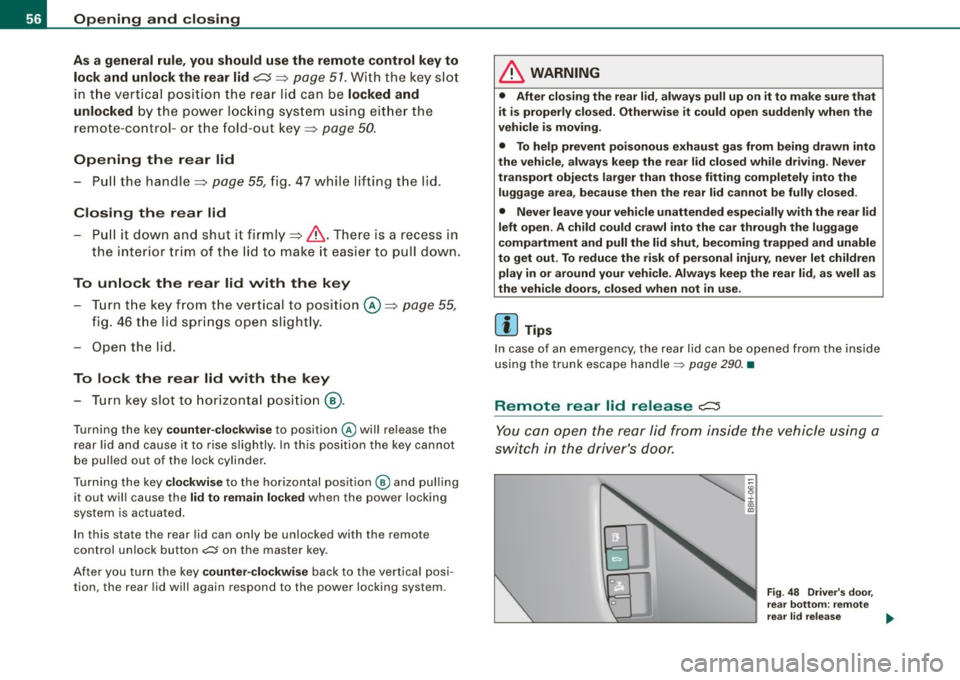
Remote rear lid release c::::5
You can open the rear lid from inside the vehicle using a
switch in the driver's door.
Fig. 48 Driver's door,
rear bottom: remote
rear lid release ...
Page 61 of 340

Power windows
Controls
Fig. 50 Driver's door:
power window
switches
The switches are located in the driver's door. The front passenger's
door has a own power window switch of its own.
To open/close If the respective switch is pushed or pulled, the
window will, respectively .
Switches for front door windows
© operates the window in the driver's door.
@ operates the window in the front passenger door.
Switches for rear windows
© operates the left rear window.
@ operates the right rear window.
Switches for all windows
© operates all windows .
& WARNING
• Do not leave children unattended in the vehicle, especially with
access to vehicle keys. Unsupervised use of the keys can result in
Contro ls and eq uip
ment
Opening and closing
& WARNING (continued)
starting of the engine and use of vehicle systems such as power
windows, etc. which could result in serious injury.
• Remember -you can still open or close the power windows for
about ten minutes after the ignition is switched off. Only when
either of the front doors are opened are the power windows
switched off.
• Be careful when closing the windows . Check to see that no one
is in the way, or serious injury could result!
• Always remove the ignition key whenever you leave your
vehicle.
• If you lock your vehicle from the outside, no one, especially
chil
dren, should remain in the vehicle even when the power top is
opened.
• Do not stick anything on the windows or the windshield that
may interfere with the driver's field of vision. •
Switches in the driver's door
The driver can operate all windows.
If the respect ive switch is pushed or pulled the windo w will
open or close . The power w indow switches have a
two-posi
tion function:
Opening the windows
Push the switch to the first stop and hold it there until the
window has lowered to the desired position.
Push the switch briefly to the
second stop: the window
will automatically open all the way. ..
~ehicle care Technical data
Page 63 of 340
Power top
Normal operation
General information
The power top is designed for quick and easy operation. The power
top opens and closes automatically by itself . When the top is folded
dow n, it is stored in a special compartment and hidden under a
cover.
The power top is both wind -and waterproof under normal oper
ating conditions . Only under extreme weather conditions, for
examp le, a violent burst of rain or torrentia l rainfall, can a few drops
of water possibly form inside the roof. This is normal and no cause
for concern.
To maintain the appearance of the power roof and to keep it water
proof , read the information on roof care in=> page
233, "Power top
care". In addition to this, please note the following:
• Always open or close the power roof on ly when it is clean . Other
wise particles of dirt can scratch the rear window when the power
top fo lds down . The particles can chafe a nd damage the fabric over
a period of time. It is a lso important to remove ice and snow before
opening the power roof.
• Do not use a sharp object or any other tools, which cou ld scratch
t he fabr ic when removing ice or snow. A normal ice scraper can be
used to remove ice from the rear window.
• The power roof should be opened only when it is completely dry .
I f you open and store the power roof when it is wet, unsight ly marks
or mildew can form if left for long per iods of time .
• Never leave the roof open for severa l weeks at a time. You should
close it occasiona lly to prevent discoloration in the folds of the
fabric and to allow the creases to smooth out. This is especially
impor tan t if t he top has once been s tored away when it was not
completely dry .
Controls and equip
ment
P ow er top
• Do not open the power when it is colder than 32 °F (0 °C). At
these temperatures, the fabric is less flexible.
L1}. WARNING
• For safety reasons never open or close the power top when the
v ehi cle is moving .
• Never drive the vehicle without the power top securely locked
in the closed po sition . If it i s not firml y en gaged , the top can be
blown open by the airstream and cau se in jur ies and damage to the
vehi cle . - Risk of cr ash!
• When opening and closing the power top m ake sure to keep
yo urself and other s clear of all moving pa rt s. Risk of injury!
• During opera tion of the power top the head clearance in the
re ar of the vehi cle is r edu ced . Alw ay s m ake sure that rea r seat
p assen gers keep clear of the power top a s it is being opened or
cl osed . Ri sk of injury!
[ i ] Tip s
• The power top can only be operated w ith the ignition switched
on.
• To avoid unnecessary strain on the battery, you should not open
and c lose the top several times in a row when the e ngine is n ot
running.
• The display in the ins trument cluster will indicate if a pr otective
feature of the power top has been activated or if a malfunction
occurs ~ page
64.
• In case of a ma lfunction the power top can be operated manu
a lly. This is intended for a limited time only~ page
68, "Opera te the
power top manually" . T he cause of the malfunction should be
tracked down and repaired by an au tho rized Aud i deale r as soon as
possible . _.,
Page 68 of 340
Power top
Wind deflector
Applies to veh icles: with wind def lector
General notes
The wind deflector reduces turbulent airflow inside the
vehicle for greater comfort when driving with the power top open.
The optional wind deflector is stored in a bag in the luggage
compartment. To prevent damage it should always be kept in this
bag when not installed. Do not place heavy objects (e.g. crates or
heavy shopping bags) on top of the wind deflector.
& WARNING
• The two rear seats must not be occupied when the wind
deflector is installed.
• Do not place any objects on the horizontal surface of the wind
deflector. The deflector is not designed to support loads. Be also
aware that objects left there could be blown off by the airstream
when the vehicle is moving. -Risk of injury!
0 Note
When you adjust the front seats when the wind deflector is
installed, be careful not to push the backrests into the wind
deflector when reclining the seats or when moving them back. This
can damage the deflector, especially the locking mechanism. •
Applies to vehic les : w ith wind deflector
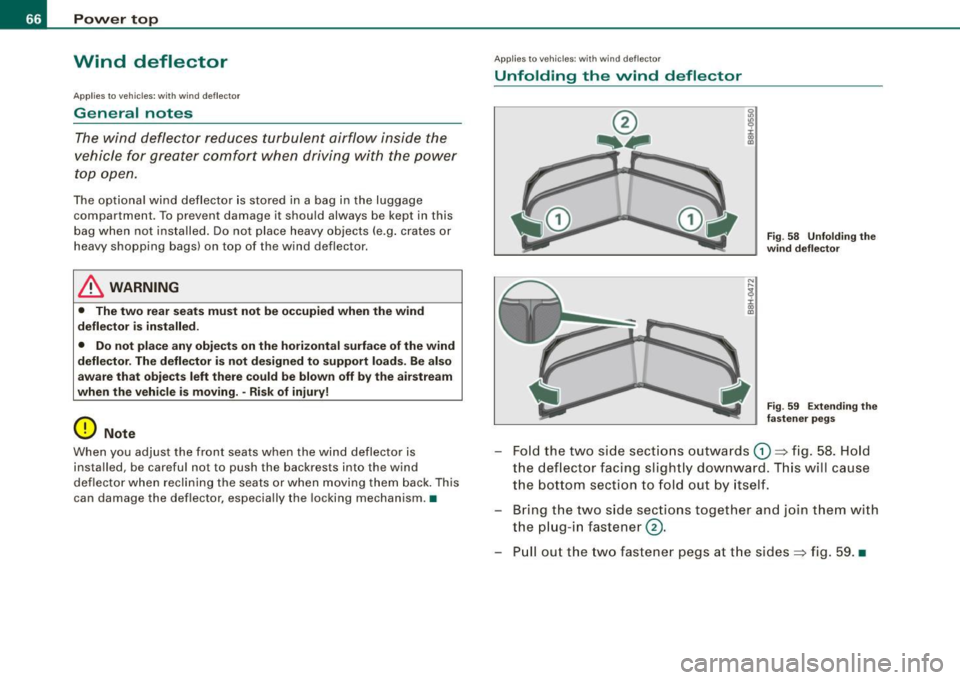
Unfolding the wind deflector
C
Fig . 58 Unfolding the
wind deflector
Fig . 59 Extending the
fastener pegs
- Fold the two side sections outwards G) ~ fig. 58. Hold
the deflector facing slightly downward. This will cause
the bottom section to fold out by itself .
- Bring the two side sections together and join them with
the plug-in fastener@.
- Pull out the two fastener pegs at the sides~ fig. 59. •
Page 79 of 340
Applies 10 vehic les: with light senso r package
Sensor activated head -and tail light control
In the "AUTO" position, light sensors monitor outside light
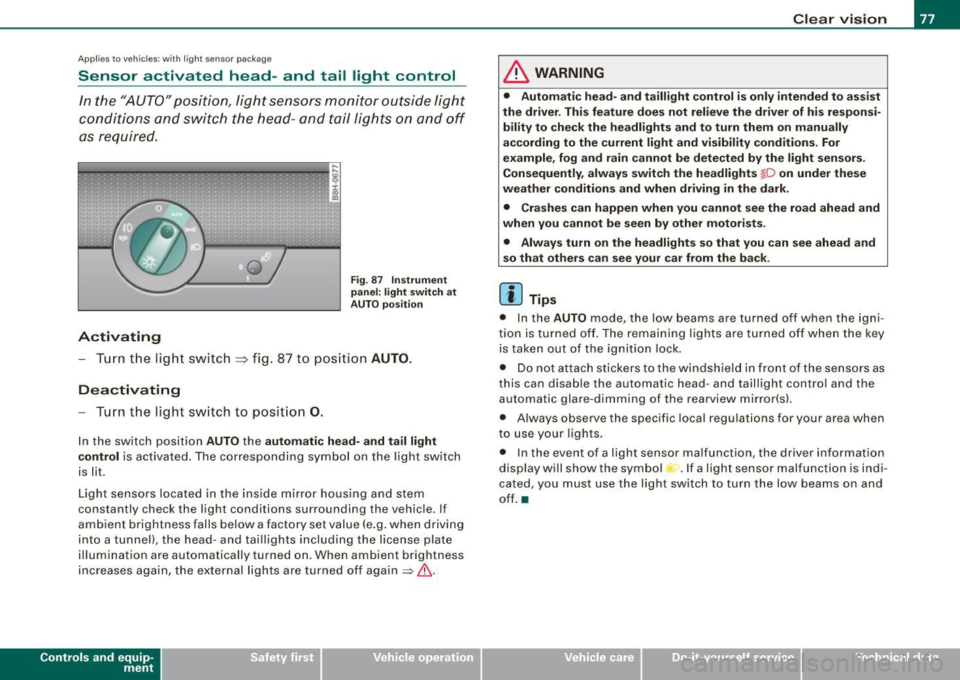
conditions and s witch the head- and t ail lights on and off
as required.
Activating
F ig . 87 Instru men t
p an el: li ght sw itch at
A UTO pos ition
- Tur n the light switch ~ fig. 87 to positi on AUTO.
Deactivating
- Turn the light switch to posit ion 0.
In the switch position AUTO the automati c head -a nd ta il light
contr ol
is activated . The corresponding symbol on the light switch
is lit.
Light sensors located in the ins ide mirror housing and stem
constantly check the light conditions surrounding the vehicle . If
ambient brightness falls below a factory set value (e .g. when driving
into a tunnel), the head -and tai llights including the license plate
illumination are automatically turned on. When ambient brightness
increases again, the external lights are turned off again
=> & -
Contro ls and eq uip
ment
Cle ar v ision
& WARNING
• Autom ati c head - and tailli ght control is only int ended to a ss is t
the driver . Th is feature does not reli ev e th e driver of h is res pon si
bilit y to che ck the headl ights and to turn them on m anuall y
according to the current light and vi sibilit y condition s. For
e xa mple , fo g and r ain cannot be dete cted by the light s en sor s.
Consequently , alw ay s swit ch th e headlights
fD on under the se
we ather condition s and when driving in th e da rk .
• Crashe s can happen when you cannot s ee the road ahead and
w hen you cannot be seen by oth er m otori sts .
• Alway s turn on the headlight s so that you can see ahead and
s o that others ca n s ee your car fr om th e back.
[ i ] Tip s
• In the AUTO mode , the low beams are turned off when the igni
tion is turned off. The remaining lights are turned off when the key is taken out of the ignition lock.
• Do not at tach stickers to the windshield in front of the sensors as
this can disable the automatic head- and taillight contro l and the
automatic glare -dimming of the rearview mirror(s).
• Always observe the specific local regulations for your area when
to use your lights .
• In the event of a light sensor malfunction, the driver information
display wi ll show the sy mbol -.
If a light sensor malfu nction is indi
cated, you must use the light switch to turn the low beams on and
off. a
~ehicle care irechnical data