ESP AUDI A4 CABRIOLET 2009 Owner's Guide
[x] Cancel search | Manufacturer: AUDI, Model Year: 2009, Model line: A4 CABRIOLET, Model: AUDI A4 CABRIOLET 2009Pages: 340, PDF Size: 77.32 MB
Page 103 of 340
__________________________________________________ S_ e_ a_t _s _ a_n _ d_ s_ t _ o_ r_a ...;:g ::.. e _ ___,_
[ i J Tip s
The storage area in the center armrest may be equipped with a te le
phone base plate to house a phone crad le . Ask your authorized Audi
dealer if you have questions .•
Rear seats
General information
Safe transportation of passengers on the rear seats
requires proper safety precautions.
All passengers on the rea r seats must be seated in comp liance with
the safety guidelines explained in=>
page 159 and=> page 168 . The
correct seat ing pos ition is critical for the sa fety of front
and rear
seat passengers alike =>
page 150.
& WARNING
• Occ upants in the front and rear seats must a lways be properly
restrained .
• Do not let anyone r ide in the vehi cle w ithout the head re str aints
provided . Head re str aint s help to reduce injurie s.
• Loo se item s in side the p assenger compartm ent , c an fly
forward in a crash or sudden m aneuve r an d injure occupants.
Alw ays store articl es in the luggag e comp artment and use the
fa stening eye s, especi ally wh en the r ear seat back s have been
fold ed d ow n.
• Read and h eed all WARNIN GS::::>
page 150, "Proper seating
p ositi ons f or p assengers in re ar seats ". •
Contro ls and eq uip
ment
Rear head restraints
The rear head restraints a re set at the optimum height at the factory.
This height setting cannot be changed . This preset height protects
both short and tall persons effective ly. •
Seat memory
App lies to vehicles: with seat memory
Driver 's seat memory
The seat adjustment settings for four drivers can be
stored using the memory buttons in the driver's door.
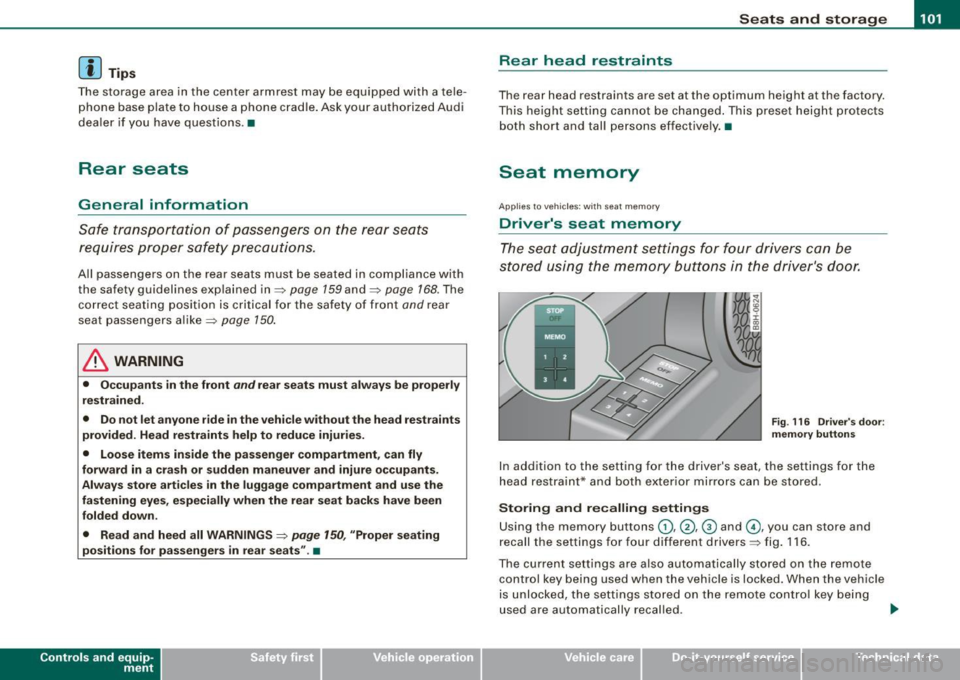
F ig . 116 Driver's doo r:
m emory button s
In addition to the setting for the driver's seat, the settings for the
head restraint* and both exter ior mirrors can be stored .
Storing and recalling setting s
Using the memory buttons G), @ , @ and G), you can store and
recall the settings for four different drivers=> fig . 116 .
The current settings are also automatically stored on the remote
control key being used when the vehicle is locked. When the vehicle
is unlocked, the settings stored on the remote contro l key being
used are automatically recal led . .,..
~ehicle care irechnical data
Page 104 of 340
• .___s_ e_a_ t_ s_ a_ n_ d_ s_t _o _ r_ a_ g =- e ________________________________________________ _
Turning seat memory on and off
If the I STOP I switch is depressed, the seat memory is inoperative.
The word OFF next to the
!S TOP] switch illuminates .
All the stored settings are retained . We recommend using the
I S TO PI switch and deactivating the seat memory if the vehicle is
only going to be used
temporarily by a driver whose settings are not
going to be stored.
[ i] Tips
Seat position settings cannot be recalled if the seatback is folded
forward. •
Applies to veh icles: with se at memory
Storing and recalling a seat position
Before you can store or recall your seat position, the [ STOP]
button must be engaged (down).
Storing settings
- Adjust the driver's seat=> page 96.
Adjust the head restraint => page 98
- Adjust both outside mirrors ::::> page 89. In the tilt-down
position, the passenger mirror can be adjusted to the
preferred position and saved in the seat memory.
- Press the [MEMO] button and hold it down. At the same time, press one of the memory buttons for at least one
second.
- Release the buttons. The settings are now stored under
the corresponding memory button.
Recalling settings
-Driver's door open -press the desired memory button .
- Driver's door closed -press the corresponding memory
button until the stored position is reached.
When the vehicle is locked, the current settings are stored and
assigned to the remote control key. But the settings stored on
memory buttons (1) through (4) are not deleted . They can be
recalled at any time. When the vehicle is unlocked, the settings
stored on the remote control key are restored.
If your vehicle is driven by other persons using your remote control
key, you should save your individual seat position on one of the
memory buttons. You can recall your settings again simply and
conveniently by pressing the corresponding memory button . When
the vehicle is locked, these settings are automatically re -assigned to
the remote control key and stored.
& WARNING
• For safety reasons, the seat setting can only be recalled when
the vehicle is stationary -otherwise you risk having an accident.
• In an emergency, the recall operation can be stopped by
pressing the
I STOP] button or by briefly pressing any given
memory button .
[ i] Tips
Seat position settings cannot be recalled if the seatback is folded
forward. •
Page 109 of 340
________________________________________________ S_e_ a_ ts_ a_ n_d _ s_t _o _r_ a ....; g::. e _ ___,_
The outlet may be used for 12-volt appliances with maximum
consumption of up to 100 watts, such as a flash light, small vacuum
cleaner, etc.
Before you purchase any accessories, a lways read and follow the
information in~
page 318, "Additional accessories and parts
replacement".
& WARNING
The outlet plus any appliances plugged into it remain functional
even if the ignition is switched off or the ignition key is removed.
Never leave children inside the vehicle without supervision.
0 Note
To avoid damaging the socket, only use plugs that fit properly.
[ i] Tips
When the engine is off and accessories are still plugged in and are
on, the vehic le battery can still be drained. •
Storage
General
& WARNING
• Always remove objects from the instrument panel. Any items
not put away could slide around inside the vehicle while driving or
when accelerating or when applying the brakes or when driving
around a corner.
• When you are driving make sure that anything you may have
placed in the center console or other storage locations cannot fall
Contro ls and eq uip
ment
& WARNING (continued)
out into the footwells . In case of sudden braking you would not be
able to brake, depress the clutch or accelerate .
• Any pieces of clothing that you have hung up must not interfere
with the driver's view. The coat hooks are designed only for light
weight clothing . Never hang any clothing with hard , pointed or
heavy objects in the pockets on the coat hooks . During sudden
braking or in an accident -especially if the airbag is deployed -
these objects could injure any passengers inside the vehicle. •
Glove compartment
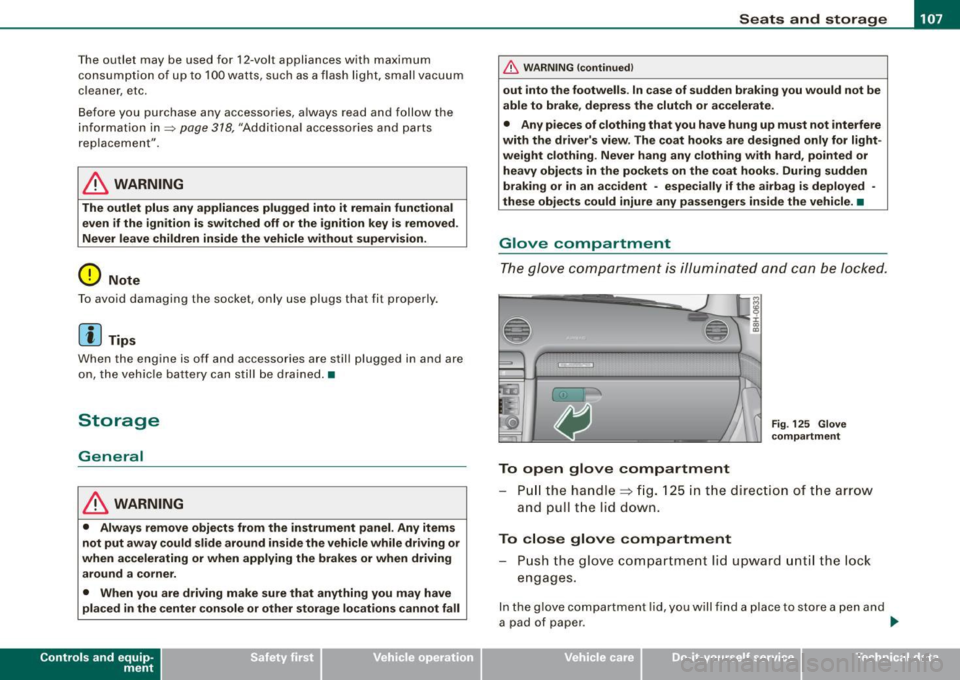
The glove compartment is illuminated and can be locked.
To open glove compartment
Fig. 125 Glove
compartment
P ull the handle~ fig. 125 in the direction of the arrow
and pull the lid down.
To close glove compartment
Push the glove compartment lid upward until the lock
engages.
In the glove compartment lid, you w ill find a place to store a pen and
a pad of paper . ..,_
~ehicle care irechnical data
Page 113 of 340
Warm and cold -
----------------
If a different driver uses your key and changes the air conditioner
settings, the latest adjustments will erase and replace the settings
you have stored.
& WARNING
Reduced visibility is dangerous and can cause accidents .
• For safe driving it is very important that all windows be free of
ice, snow and condensation.
• Fully familiarize yourself with the proper use and function of
the heating and ventilation system and especially how to defog
and defrost the windows.
• Never use the windshield wiper/washer system in freezing
weather until you have warmed the windshield first, using the
heating and ventilation system. The washer solution may freeze
on the windshield and reduce visibility.
0 Note
• If you suspect that the air conditioner has been damaged, switch
on ECON and contact an authorized Audi dealer to have the system
inspected.
• Repairs to the Audi air conditioner require special technical
knowledge and special tools. Contact an authorized Audi dealer for
assistance.
[ i] Tips
• Keep the air intake slots (in front of the windshield) free from ice,
snow and debris in order to maintain the proper function of the
climate control system.
• Air escapes through vents under the rear window. When placing
items of clothing on the luggage compartment cover, ensure that
the openings are not covered.
Controls and equip
ment
• If the inside temperature is very high (for example, if the vehicle
has been parked in sun), open the windows and allow the hot air to
escape before turning on the air conditioner. •
Controls
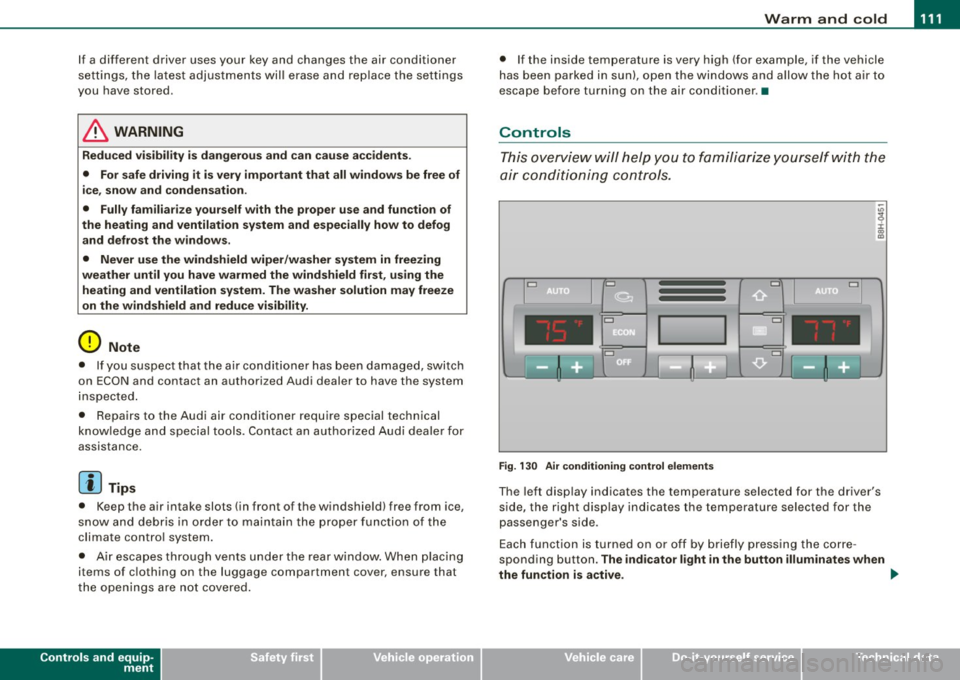
This overview will help you to familiarize yourself with the
air conditioning controls.
Cl Cl
Cl •
I I
•
Fig. 130 Air conditioning control elements
The left display indicates the temperature selected for the driver's
side, the right display indicates the temperature selected for the
passenger's side.
Each function is turned on or off by briefly pressing the corre
sponding button.
The indicator light in the button illuminates when
the function is active. _,.
Page 116 of 340
• .___w __ a _r _m _ a _n_d_ c_ o _ ld __________________________________________________ _
Moreover, the air conditioning switches on again whenever you
press the fan speed or temperature buttons.•
Automatic air recirculation [~I
If outside air is polluted, an air quality sensor in the
vehicle will automatically s witch on the air recirculation .
Switching on air recirculation
-Press [~ J:::::, page 777,fig.130.
Switching off air recir culation
Press~ again, or
- press [AUTO J, or
- press[ ~).
The automat ic air recirculat ion mode should nor mally be left
switched on at a ll times.
The system is ready to operate approximately 30 seconds afte r yo u
turn on the ignition or start the vehicle. Fresh air enters the vehicle only during this initialization period .
I f the
air quality sensor in the air conditioning sys tem detects
exhaust fumes in the outside air, the control unit wil l either pass the
incoming a ir through the pol lution filter, or automatically switch on
the air recirculation .
The air conditioning syste m wi ll aut omatically swi tch o n the ai r
recirculation if it senses that the outside air is very po lluted. At the
same time, it wil l not al low any outside air to ente r the vehic le until
the a ir quality has improved .
T he air recircula tion operates for a maximum of
12 minutes. If the
w indows s tart to fog up whi le the air rec ircula tion is on, press[@!.
Under certain operating conditions (for example, if 1@1 or
[ci;;,, I are
pressed) the air recircu lation automatically switches off . If "ECON" is pressed, or if the temperature is below
-8 °C, the air recirculation
will operate on ly for
12 sec onds. •
Adjusting the fan speed 8 0
The automaticall y selected fan speed can be increased or
de crease d.
D
D
=
D
:c
"' "'
D
D
F ig . 131 Fa n speed
butt ons a nd di splay
ind ication
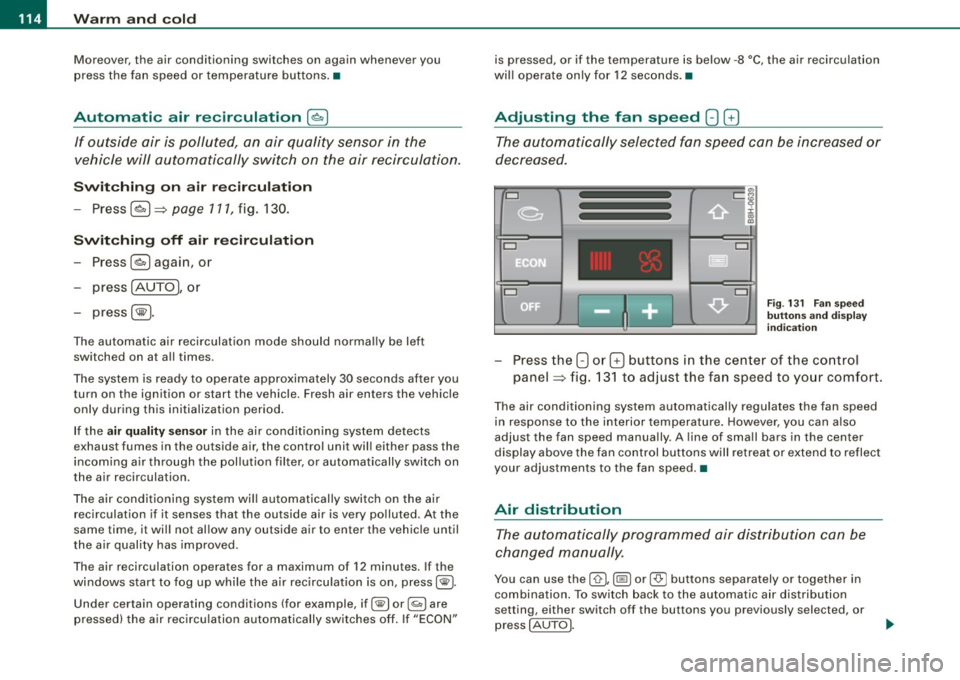
Press the 8 or G buttons in the center of the co ntrol
panel :::::, fig. 13 1 to adjust the fan speed to your comfort.
The air conditioning system automatical ly regulates the fan speed
in respo nse to the i nterior temperature . However, you can a ls o
adjust the fan speed manually . A line of sma ll bars in the center
display above the fan control but tons will retreat or ex tend to reflect
your adjustments to the fan speed .•
Air distribution
The aut omatically pr ogr am med air dis tribution ca n be
c ha nged m anu ally.
You can use the [ 0 I, (@ ] or [-0- J buttons separately or together in
combina tion . To swi tch back to the au tomatic air distribution
setting, either switch off the buttons you previously selected, or
press
[ AUTO J.
Page 121 of 340
___________________________________________________ O_ n_ t_h _e_ r_o _a_ d _ ___,11111
Ignition lock and ignition switch
Ignition lock
T he i gnition k ey sta rts or st ops t he e ngin e.
0
Ignition off 0
Fig. 13 6 Ignition lock
positi ons
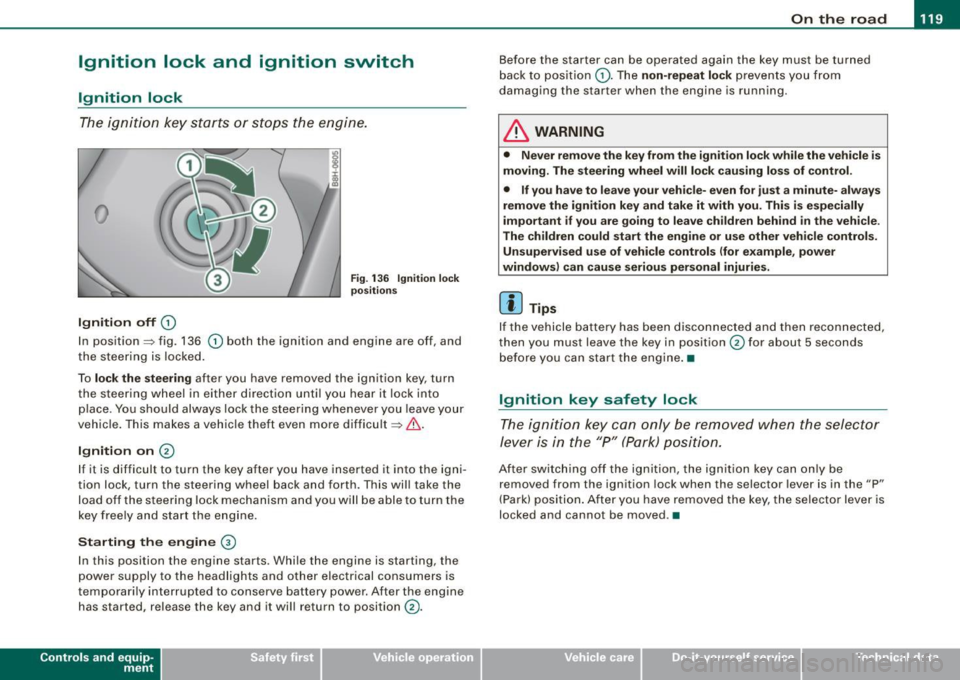
In position~ fig. 136 0 both the ignition and engine are off, and
t he stee rin g is locke d.
To
lo ck the steering after you have removed the ignit ion key, turn
t he stee rin g wheel in either direc tion un til you hear it loc k into
p lace . You should always lock the steering whenever you leave your
vehicle . This ma kes a vehic le theft even more difficult ~ & .
Ignition on 0
If it is difficult to turn the key afte r yo u have inserted it into the igni
tion lock, turn the steering wheel back and forth. This will take the
load off the steering lock mechanism and you will be able to turn the
key free ly an d start the engine.
Starting the engine @
In th is position the engine starts . While the engine is starting, the
power supply to the headlights and other electrical consumers is
temporarily interrupted to conserve battery power. After the engine has started, release the key and it wi ll return to position
(v.
Contro ls and eq uip
ment
Before the starter can be operated again the key must be turned
b ack to position
(D . Th e non -repeat lock p re vents y ou fr om
damag ing the starter when the engine is running .
& WARNING
• Never remove the key from the ignit ion lock while the vehicle is
moving. The steering wheel will lock causing loss of control .
• If you have to leave your vehi cle- even for just a minute- always
remove the ignition key and take it with you. This is especially
important if you are going to leave children behind in the vehicle.
The children could start the engine or use other vehicle controls. Unsupervised use of vehicle controls (for e xample , power
windows) can cause serious personal injuries.
[ i ] Tips
If the vehicle battery has been disco nnec ted and then recon nected,
then you must leave the key in position
0 for about 5 seconds
be fore you can start the eng ine .•
Ignition key safety lock
T he i gnit ion key ca n only be remove d when the se lector
lever is in the "P " (Pa rk) pos itio n.
A fte r swi tc h ing o ff th e ig nition, the ig nition key can only be
removed from the ignition lock when the selector lever is in the "P"
(Park) posi tio n. Af ter y ou h ave remo ved the key, the selec to r lever is
locked and cannot be moved. •
~ehicle care irechnical data
Page 124 of 340

-L___:O~ n'.... t ~h~ e~r ~o~a ~ d:...._ _______________________________________________ _
-Swit ch off the e ngine an d rem ove the ignitio n key f rom
t h e ig nition loc k.
What else you should do when parking your vehicle on
an i ncline o r de clin e
Turn the s teering wheel so that if the vehic le sh ould start to ro ll, it
wi ll ro ll into the curb .
I f you are parking on a
decline (the fron t of your vehicle facing
downhil l), turn the front wheels to the right so that they point
toward the curb.
If you are par king on an incline (the font of your vehic le fac ing
uphill), turn the front whee ls to the lef t so that they point
away from
the curb .
Move the selector lever into the P position.
LJ}. WARNING
This is how you can redu ce the r isk of injury when leaving your
vehicle .
• Never par k the vehi cle where it c an come i n contact with dry
gra ss, spilled fuel or any other flammable materials .
• Never allow an yone -especi ally s mall ch ildren -to remain in the
vehicle when it i s locked . Locked doors make it more difficult for
res cuer s to acce ss the pas senger compartment in the e vent of a n
emergency _ Danger to life!
• Never leave children unsupervised in the vehicle . Children
c ould release the parking brake or move the gear shift lever out of
gear . The vehi cle could st art to roll awa y and cau se an a ccident .
• No matter wha t the sea son i s, the temperature in a parked
vehi cle can reach d angerous levels . •
Acoustic park assist
A pplies to vehicles : with 4 -ch an nel a co ustic park ass is t
Rear acoustic park assist
The rear acoustic park assist warns you of obstacles or
objects behind your car.
How it works
The acoustic park assist warning system (4-channel acoustic park
assist) uses ultr asonic sensors to warn yo u when you are
backing
your vehicle close to an obstacle . The system 's 4 sensors are located
inside the rear bumper .
Acti va ting
The rear acoustic park assist is ac tivated whenever you shift into
Reverse . You will hear a warn ing tone when the system is on .
Reverse
With the car backing up in reverse gear, the col lision warning sound
sets in at the fol lowing
approximate d istances to obstacles :
straight aft 5ft(1.5m)
angling aft off vehicle corners 2 ft (0
.6 m)
As the dis tance shr inks, the time interva l between the audible tones
grows shorter.
The sound changes to a continuous tone as soon as the remaining distance to an obstacle closes to less than about 1 ft. (0 .3 ml. The
steady tone cautions you that you have backed up hazardously
close and you ris k co llision by backing up any further .
Malfunctions in the system
If a warning tone is audible for about five seconds when you turn on
the ignit ion, there is a malfunction in the system . Have the prob lem
corrected by your authorized Audi dea ler. _,.
Page 125 of 340

On the road ------------------------------.J
Keep the sensors in the rear bumper clean and free from ice so that
the acoustic park assist system can function properly.
& WARNING
• Sensors have dead spaces in which objects cannot be
detected . Be especially alert for small children and animals, since
they are not always detected by the sensors.
• The acoustic park assist system is not a substitute for the
driver's own caution and alertness. Ultimate responsibility always
remains with the driver during parking and similar maneuvers .
Always watch where you are driving.
0 Note
• Remember that low obstacles for which a warning has already
been issued may "dive" below the system's sensing zone if the
vehicle is being backed up closer. In this case, the warning sound
shutting off does
not indicate that you have cleared the obstacle .
Instead, impact is imminent.
• Objects such as trailer hitches, barrier chains, narrow posts or
fences covered by a thin layer of paint may not always be detected
by the system . They can still damage your vehicle without a
warning.
[ i] Tips
Keep the sensors in the rear bumper clean and free of snow and ice
so that the acoustic parking assist system can function properly. •
Controls and equip
ment
Cruise control
General information
The cruise control system allows you to maintain a
constant speed.
The cruise control system allows you to maintain a constant driving
speed when driving faster than 18 mph (30 km/h) -to the extent this
is possible with the given engine power and braking characteristics .
This allows you to take your foot off the "gas" and rest it, especially
on long trips.
The indicator light (U.S. models :
CRUISE , Canadian models:•(') ) in the
instrument cluster illuminates when the system is on.
& WARNING
• To help keep the vehicle under control, do not use the cruise
control system when driving on winding or slippery roads (as
caused by heavy rain or loose gravel on the road surface), or in
heavy or varying traffic.
• Only use the cruise control when traffic, road and weather
conditions allow you to drive at a steady speed.
[ i] Tips
The cruise control cannot maintain a constant speed when driving
downhill. The vehicle will accelerate under its own weight. Down
shift to a lower gear or use the brakes to slow down .•
Page 148 of 340
___ D_ ri_v _i_n ..;;:g::;,._ S_ a_ f _e__, ly'-- -------------------------------------------------
Driving Safely
General notes
Safe driving habits
Please remember -safety first!
This chapter contains important information, tips, instructions and
warnings that you need to read and observe for your own safety, the
safety of your passengers and others. We have summarized here
what you need to know about safety belts, the active rollover protec
tion system, airbags, child restraints as well as child safety. Your
safety is for us priority number 1 . Always observe the information
and warnings in this section -for your own safety as well as for that
of your passengers .
The information in this section applies to all model versions of your
vehicle. Some of the features described in this sections may be
standard equipment on some models, or may be optional equip
ment on others. If you are not sure, ask your authorized Audi dealer.
& WARNING
• Always make sure that you follow the instructions and heed
the WARNINGS in this Manual. It is in your interest and in the
interest of your passengers.
• Always keep the complete Owner's Literature in your Audi
when you lend or sell your vehicle so that this important informa
tion will always be available to the driver and passengers.
• Always keep the Owner's literature handy so that you can find
it easily if you have questions .•
Safety equipment
The safety features are part of the occupant restraint
system and work together to help reduce the risk of injury
in a wide variety of accident situations.
Your safety and the safety of your passengers should not be left to
chance. Advances in technology have made a variety of features
available to help reduce the risk of injury in an accident. The
following is a listing of just a few of the safety features in your Audi:
• sophisticated safety belts for driver and all passenger seating
positions,
• safety belt pre-tensioners for the outboard seating positions,
• front airbags,
• knee airbags for the front seats,
• side airbags in the front seats,
• LATCH anchorages for child restraints,
• head restraints for each seating position,
• adjustable steering column.
These individual safety features can work together as a system to
help protect you and your passengers in a wide range of accidents.
These features cannot work as a system if they are not always prop erly adjusted and properly used!
Safety is everybody's responsibility! •
Important things to do before driving
Safety is everybody's job! Vehicle and occupant safety
always depends on the informed and careful driver.
For your safety and the safety of your passengers, before
driving always: ..,
Page 149 of 340
________________________________________________ D_r_iv _ i _n...: g=--- S_ a_ fe--= ly'---------"'
- Make sure that all lights and signals are operating
correctly.
- Make sure that the tire pressure is correct.
- Make sure that all windows are clean and afford good
visibility to the outside.
- Secure all luggage and other items carefully~
page 107.
-Make sure that nothing can interfere with the pedals.
- Adjust front seat, head restraint and mirrors correctly for
your height.
- Instruct passengers to adjust the head restraints
according to their height.
- Make sure to use the right child restraint correctly to
protect children~
page 190, "Child Safety".
- Sit properly in your seat and make sure that your passen
gers do the same
~ page 92, "General recommenda
t ions" .
- Fasten your safety belt and wear it properly. Also instruct
your passengers to fasten their safety belts properly
~ page 159. •
What impairs driving safety?
Safe driving is directly related to the condition of the
vehicle, the driver as well as the driver's ability to concen
trate on the road without being distracted.
The driver is responsible for the safety of the vehicle and all
of its occupants. If your ability to drive is impaired, safety
risks for everybody in the vehicle increase and you also
Controls and equip
ment Safety first Vehicle operation
become a
hazard to everyone else on the road ~& .There
fore:
- Do not let yourself be distracted by passengers or by
using a cellular telephone.
- NEVER drive when your driving ability is impaired (by
medications, alcohol, drugs, etc.I.
- Observe all traffic laws, rules of the road and speed limits
and plain common sense.
- ALWAYS adjust your speed to road, traffic and weather
conditions.
- Take frequent breaks on long trips. Do not drive for more
than two hours at a stretch.
- Do NOT drive when you are tired, under pressure or when
you are stressed.
& WARNING
Impaired driving safety increases the risk of serious personal
injury and death whenever a vehicle is being used. •
Vehicle care Do-it-yourself service Technical data