door lock AUDI A4 CABRIOLET 2009 User Guide
[x] Cancel search | Manufacturer: AUDI, Model Year: 2009, Model line: A4 CABRIOLET, Model: AUDI A4 CABRIOLET 2009Pages: 340, PDF Size: 77.32 MB
Page 59 of 340
To unlock r ear lid
- Pu ll the switch c:::::5 ~ page 56, fig. 48 in the driver's door.
To open re ar lid
- Raise the rear lid.
The remote rear lid re lease is deactivated automatically if you lock
the rear lid using the key . This enables the driver to lock the luggage
compartment permanently with the key and prevent unwanted
access to the trunk .•
Anti-theft alarm system
Description
The anti-theft alarm triggers an alarm if anyone attempts
to break into the vehicle.
The anti -theft a larm system triggers an audible alarm and turns on
the emergency flasher if an unauthorized interference with the
veh ic le is sensed by the system.
How i s the anti -theft alarm syste m switched on ?
The anti-theft alarm system is switched on when you lock the
driver's door manually using your key, o r when you use the remote
control. The system is activated approx imately 30 seconds after the
vehic le is locked. The indicator light on top of the door trim start
fl ashing rapid ly for 30 seconds and then b link slowly.
How i s the anti -theft al arm syst em switch ed off ?
The anti-theft alarm system is switched off only when you use the
remote contro l to unlock your vehicle . If you do not open a door
with in 60 seconds after you have unlocked with the remote control,
the vehic le will lock itself again automatica lly.
Controls and equip
ment
Op ening and clo sing
If you lock just the driver's door using your key, the front
passenger's door, the rear and the fuel f iller flap remain locked.
If you use the vehicle key to unlock the driver's door, the other
doors, the rear lid and the fuel tank flap will remain locked . The
a larm system will not be deactivated unless you insert the key in the
ignition switch within 15 seconds and turn on the ignition. If you fai l
to do this, the a lar m wi ll sound.
When will the anti theft alarm system be triggered?
When the vehic le is locked, the a larm system monitors and protects
the following parts of the vehic le:
• engine compar tment
• luggage compartment
• doors
• vehic le incline
• ignition
• factory installed radio.
When the system is activated, the alarm will be triggered if one of
the doors, the engine hood or the rear lid are opened, or if the igni
tion is turned on or the radio removed or if the vehicle incline has
been changed.
The ant i-theft alarm system will also go off when you unlock the rear
lid with your key and open it. The alarm is switched off again when
you close the rear lid.
The anti-theft alarm system will also go off when the battery is d isconnected.
You can also trigge r the alarm by pressing the PANIC button on your
remote control. This will alert other people in case of emergency.
Press the
PANI C button again to turn off the a larm. .,_
Page 60 of 340
Openin g and clo sin g
How is th e a nti-th eft ala rm switch ed off whe n
t riggered ?
The alarm system is switched off when you unlock the vehicle using
the remote control or when the ignition is switched on. The a larm
will a lso switch itse lf off when it comes to the end of its cycle.
Em erg en cy flashe r
The emergen cy flashe r will blink briefly when the doors, engine
hood and rear lid are properly closed .
If the emergency flashers do not blink, check the doors, engine hood
and r ear lid to make sure they are properly closed . If you close a
door, the hood or the rear lid w ith the anti-theft a larm switched on,
the emerg ency flashers will blink only aft er you have clos ed the
door or lid.
[ i ] Tips
• For the anti -theft alarm system to function properly, make sure
all vehicle doo rs and windows are closed before leaving the vehicle .
• When you open the vehicle from the driver's door using the key,
the c entral locking switch will work only af ter you hav e swi tched on
the ignition. •
Tilt sensors ~
The tilt sensors trigger an alarm if they detect vehicle
movement.
N
ij
:c .,
"'
Fig . 49 D river's do or,
rear botto m: ti lt se nso r
sw itch
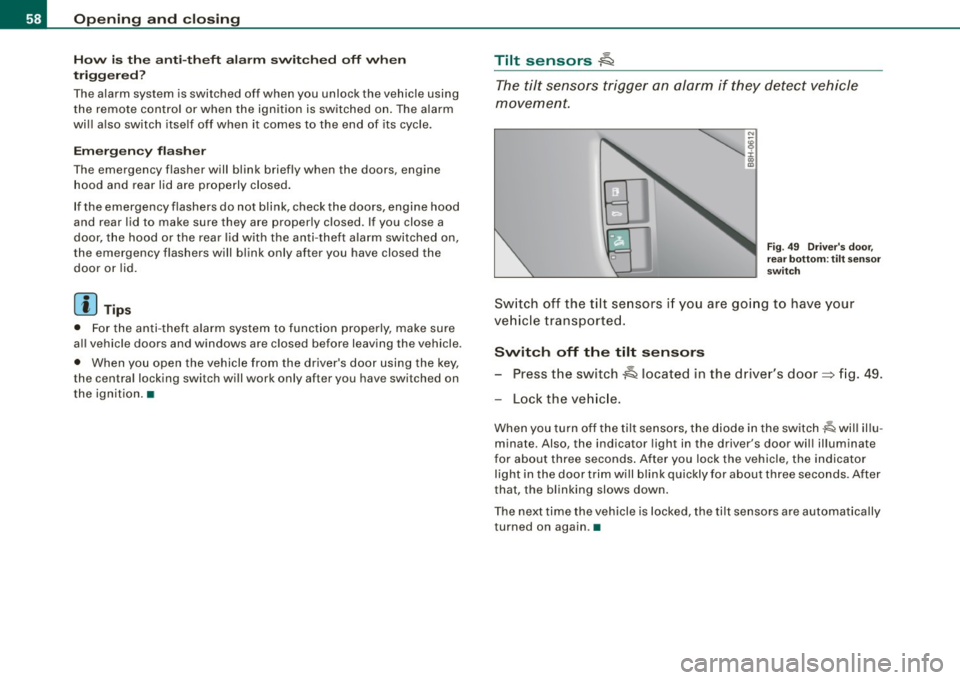
Sw itch off the tilt se nsors i f you are go ing to have your
ve hicle tr ansported .
Switch off the tilt s ensors
- Press the switch A located in the driver's door=> fig. 49 .
Lock the ve hicle.
When you turn off the tilt sensors, the diode in the switch -lQ wi ll illu
minate. Also , the indicator light in the driver's door wil l illuminate
for about three seconds . After you lock the vehicle, the indicator
light in the door trim will b link quickly for about three seconds . After
that, the blinking slows down.
The next time the vehicle is locked, the tilt sensors are automatically
turned on again .•
Page 61 of 340

Power windows
Controls
Fig. 50 Driver's door:
power window
switches
The switches are located in the driver's door. The front passenger's
door has a own power window switch of its own.
To open/close If the respective switch is pushed or pulled, the
window will, respectively .
Switches for front door windows
© operates the window in the driver's door.
@ operates the window in the front passenger door.
Switches for rear windows
© operates the left rear window.
@ operates the right rear window.
Switches for all windows
© operates all windows .
& WARNING
• Do not leave children unattended in the vehicle, especially with
access to vehicle keys. Unsupervised use of the keys can result in
Contro ls and eq uip
ment
Opening and closing
& WARNING (continued)
starting of the engine and use of vehicle systems such as power
windows, etc. which could result in serious injury.
• Remember -you can still open or close the power windows for
about ten minutes after the ignition is switched off. Only when
either of the front doors are opened are the power windows
switched off.
• Be careful when closing the windows . Check to see that no one
is in the way, or serious injury could result!
• Always remove the ignition key whenever you leave your
vehicle.
• If you lock your vehicle from the outside, no one, especially
chil
dren, should remain in the vehicle even when the power top is
opened.
• Do not stick anything on the windows or the windshield that
may interfere with the driver's field of vision. •
Switches in the driver's door
The driver can operate all windows.
If the respect ive switch is pushed or pulled the windo w will
open or close . The power w indow switches have a
two-posi
tion function:
Opening the windows
Push the switch to the first stop and hold it there until the
window has lowered to the desired position.
Push the switch briefly to the
second stop: the window
will automatically open all the way. ..
~ehicle care Technical data
Page 65 of 340
& WARNING (continued)
• During operation of the power top the head clearance in the
rear of the vehicle is reduced . Always make sure that rear seat
passengers keep clear of the power top as it is being opened or
closed. Risk of injury! •
Convenience opening and closing of power
top
The power top can alternatively be opened and closed by
turning the key in the driver's door lock.
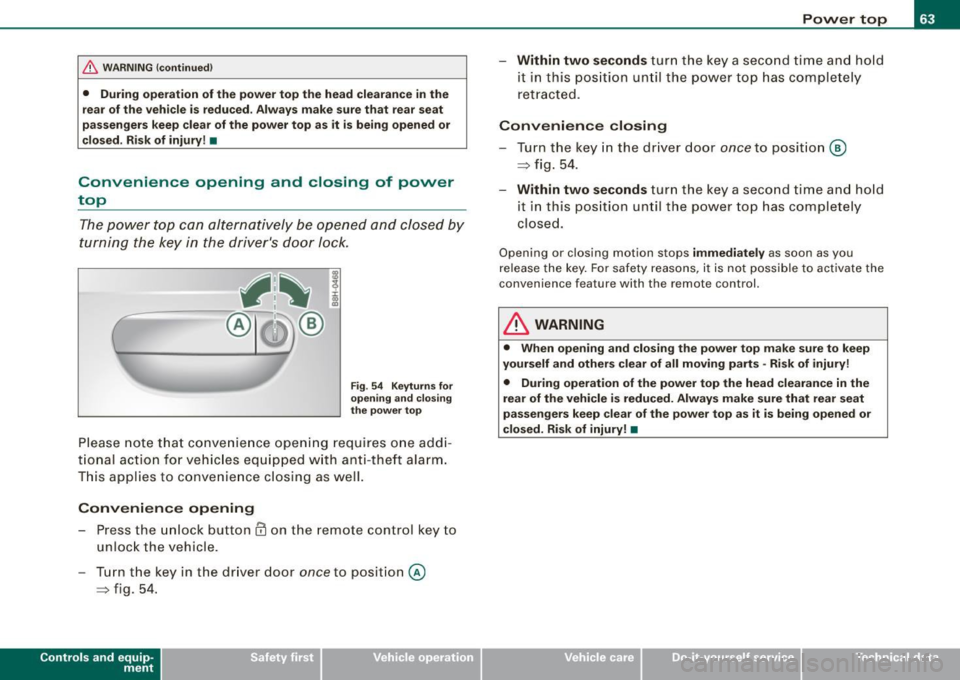
Fig . 54 Keyturns for
opening and closing
the power top
Please note that convenience opening requi res one addi
tional action for vehicles e quipped with anti-theft alarm.
This applies to convenience closing as well.
Convenience opening
- Press the unlock button @ on the remote control key to
unlock the vehicle.
- Turn the key in the driver door
once to position @
~ fig. 54.
Controls and eq uip
ment
Power top
- Within two seconds turn the key a second time and hold
it in this position until the power top has completely
retracted.
Convenience closing
-Turn the key in the driver door once to position @
~ fig. 54.
- Within two seconds turn the key a second time and hold
i t in this position until the power top has completely
closed.
Opening o r closing motion stops immediately as soon as you
release the key. For safety reasons , it is not possible to activate the
c onven ience feature wi th th e re mote control.
& WARNING
• When opening and closing the power top make sure to keep
yourself and others clear of all moving parts -Risk of injury!
• During operation of the power top the head clearance in the
rear of the vehicle is reduced. Always make sure that rear seat
passengers keep clear of the power top as it is being opened or
closed. Risk of injury! •
~ehicle care irechnical data
Page 78 of 340

Clear vision
Clear vision
Lights
Switching the headlights on and off ·'t!-·
Fi g. 85 Ins tru ment
pan el: lig ht sw itc h
Fi g.
86 Turn sig nal
lev er: high beam
ON /OFF
All switch pos itions refer to the indentation on the switc h
aligned with the spec if ied symbol. The light switch m ust not
be overt urned past the stops in either direction .
Switching on the side marker lights
- Turn t he light switch light to=> fig. 85
;oo:: .
Switching on the headlights and high beam
- T urn the light switch to ~D.
- Push the turn signa l lever forward towa rds the ins tru -
ment panel => fig. 86, to turn on the high beam, pu ll the
lever back to turn it off=>
page 83.
Swit ching off th e lights
- T urn the light switch to
0 .
The headlights only work when the ignition is switched on . While
starting the engine or when sw itching off the ignition , the head
lights wi ll go of f and only the side marker lights wil l remain lit .
& WARNING
Crashe s can happen when you cannot se e t he ro ad ah ead and
whe n you c annot b e seen by othe r motori sts.
• Alway s turn on the headlights so that you can see ahead and
s o that other s can see y our car fr om the b ack.
[ i ] Tip s
• If you remove the ignition from the ign ition lock whi le the head
lights are still on, a bu zzer will sound as long as the driver 's door is
open to remind you to switch off the lights .
• Always observe the specific local regulations for your area when
to use your lights .•
Page 82 of 340
Clear vision
Applies to vehi cles : equip ped wit h Ligh t se nso r pa ckag e
Coming home /leaving home function gr!}
The coming home/leaving home function switches on the
external lights on a vehicle parked in the dark to illumi
nate the surroundings.
Activating the function
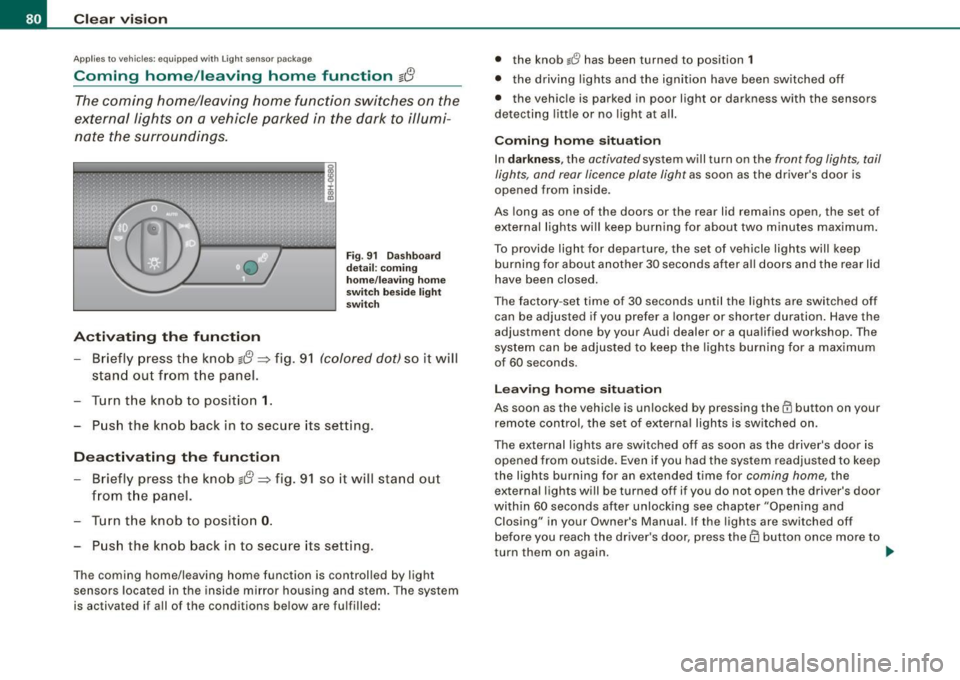
Fig . 91 Dashboard
detail: coming
home/leaving home
switch beside light
switch
- Briefly press the knob g{!} => fig. 91 (colored dot) so it will
stand out from the panel.
Turn the knob to position
1.
Push the knob back in to secure its setting.
Deactivating the function
- Briefly press the knob g{!} => fig. 91 so it will stand out
from the panel.
- Turn the knob to position
0.
Push the knob back in to secure its setting.
The coming home/leaving home function is controlled by light
sensors located in the inside mirror housing and stem. The system
is activated if all of the conditions below are fulfilled: •
the knob
lJ has been turned to position 1
• the driving lights and the ignition have been switched off
• the vehicle is parked in poor light or darkness with the sensors
detecting little or no light at all.
Coming home situation
In darkness , the activated system will turn on the front fog lights, tail
lights, and rear licence plate light as soon as the driver's door is
opened from inside.
As long as one of the doors or the rear lid remains open, the set of
external lights will keep burning for about two minutes maximum.
To provide ligh t for departure, the set of vehicle lights will keep
burning for about another 30 seconds after all doors and the rear lid
have been closed.
The factory -set time of 30 seconds until the lights are switched off
can be adjusted if you prefer a longer or shorter duration. Have the
adjustment done by your Audi dealer or a qualified workshop . The
system can be adjusted to keep the lights burning for a maximum
of 60 seconds.
Leaving home situation
As soon as the vehicle is unlocked by pressing the@ button on your
remote control, the set of external lights is switched on .
The external lights are switched off as soon as the driver's door is opened from outside. Even if you had the system readjusted to keep
the lights burning for an extended time for coming home, the
external lights will be turned off if you do not open the driver's door
within 60 seconds after unlocking see chapter "Opening and Closing" in your Owner's Manual. If the lights are switched off
before you reach the driver's door, press them button once more to
turn them on again. .,_
Page 86 of 340
Clear vision
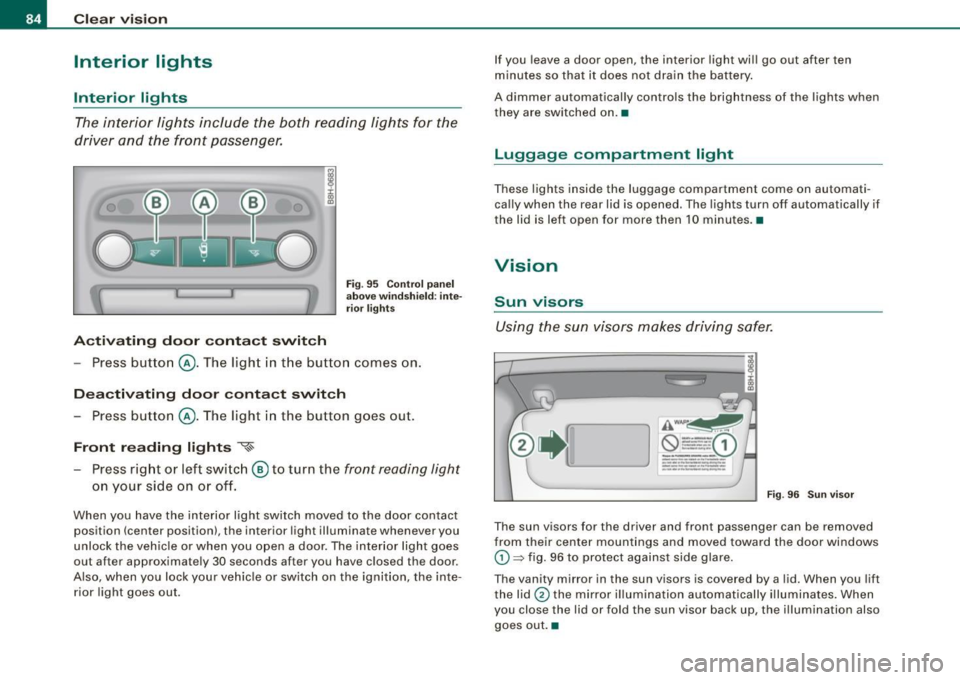
Interior lights
Interior lights
The interi or lights include the both readi ng lights for the
driver and the front passenger.
Activ ating door conta ct switch
Fi g. 95 Co ntrol p an el
a b ove w indsh ie ld : inte
ri or light s
-Press butto n@ . The ligh t in the button comes on.
Deactivating door contact switch
- Press button @. The light in the button goes out.
Front re ading light s '{~
Press right or left swi tch ® to turn the front reading light
on your side on o r off.
When you have the interior light switch moved to the door contact
position (center position), the interior light illuminate whenever you
unlock the vehic le or when you open a door. The interior light goes
out after approximate ly 30 seconds after you have c losed the door.
A lso, when you lock your veh ic le or switch on the ignition, the inte
rior light goes out. If you leave a door open, the interior
light wi ll go out after ten
m inutes so that it does not dra in the battery .
A dimmer automatically controls the brightness of the lights when
they are switched on. •
Luggage compartm ent light
These lights inside the luggage compartment come on automati
ca lly when the rear lid is opened. The lights turn off automatically if
the lid is left open for more then 10 minutes. •
Vision
Sun visors
Using the sun visors makes driving safer.
AWAI'~
--- -0 ----- 1 ---·
---
-·------... -..... -
_____ ... _
---.... -~ .. -----------
Fig . 9 6 Sun v is o r
The sun visors for the driver and front passenger can be removed
from their center mountings and moved toward the door windows
G) ~ fig. 96 to protect against side glare.
The vanity mirror in the sun visors is covered by a lid . When you lift
the lid
0 the mirror i llumi nation automatically illumina tes . When
you close the lid or fold the sun visor back up, the illumination also
goes out .•
Page 101 of 340
Adjusting the angle of the head restraint
-Grasp the head restraint on t he side with both hands and
t il t it forward or backward.
The height and angle of the head restraints are adjustable. They
should be adjusted to f it the occ upan t's body size. Correc tly
adjusted head restraints and safety be lts are an extremely effective
safety feature ~
page 151.
& WARNING
Read and heed all WARNINGS~ page 151, "Proper ad justment of
head restraint s".
[ i ] Tips
The powered head restraints on power seats should never be
removed by anyone other than a p rofessional mechanic. •
Applies t o vehicles: with power seats
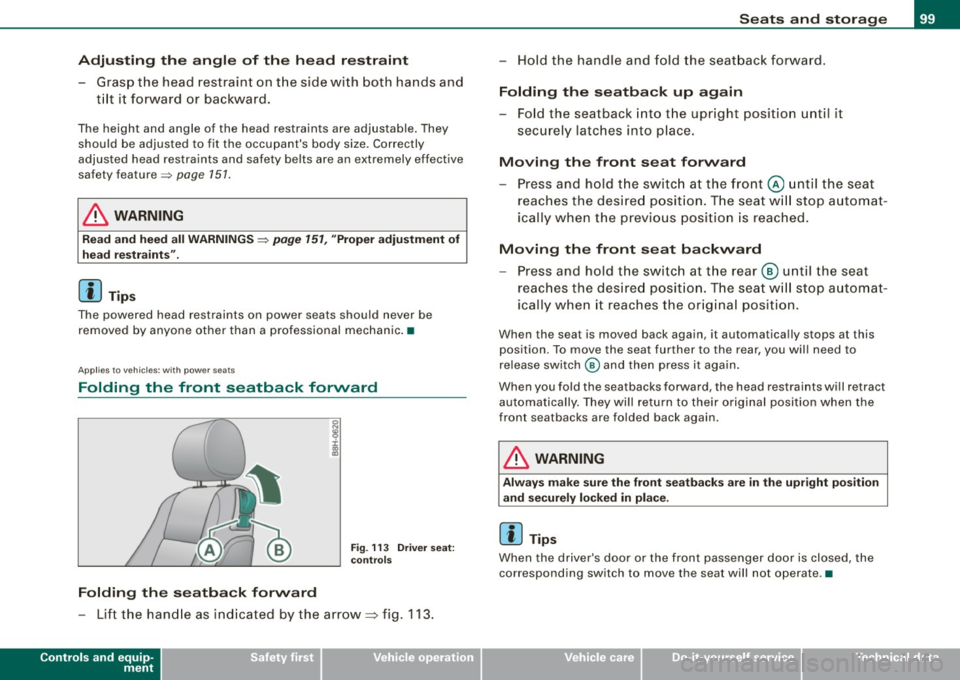
Folding the front seatback forward
Folding the seatba ck forward
Fig . 11 3 Driv er seat :
co ntr ols
- Lift t he hand le as ind icated by the arrow~ fig. 113.
Controls and equip
ment
S eats and storage
- Ho ld the handle and fold t he seat back fo rwa rd .
Folding the seatback up again
- Fo ld the seatback into t he upr ight position until it
securely latches into place.
Moving the front seat forward
- Press and h old t he swi tc h at th e fr ont @ un til th e sea t
reach es the des ire d posit ion. T he s eat w ill stop a uto mat
ically when the previo us position is reached.
Moving the front seat backward
- Press and hold t he swi tc h at t he rear ® until the se at
reaches the des ire d posit ion . Th e seat w ill stop a utomat
icall y whe n it reac hes the or ig ina l posi tion .
When the seat is moved back again, it automatica lly stops at this
position. To move the seat further to the rear, you wil l need to
re lease switch @ and then press it again.
When you fold the seatbacks forward, the head restraints will retract
automatica lly. They will return to their o riginal positio n when the
front seatbacks are folded back again.
& WARNING
Always make sure the front se atbacks are in the upright po sition
and securely locked in place .
[ i ] Tips
When the driver's door or the fr ont passenger door is closed, the
corresponding switch to move the seat will not operate .•
Page 103 of 340
__________________________________________________ S_ e_ a_t _s _ a_n _ d_ s_ t _ o_ r_a ...;:g ::.. e _ ___,_
[ i J Tip s
The storage area in the center armrest may be equipped with a te le
phone base plate to house a phone crad le . Ask your authorized Audi
dealer if you have questions .•
Rear seats
General information
Safe transportation of passengers on the rear seats
requires proper safety precautions.
All passengers on the rea r seats must be seated in comp liance with
the safety guidelines explained in=>
page 159 and=> page 168 . The
correct seat ing pos ition is critical for the sa fety of front
and rear
seat passengers alike =>
page 150.
& WARNING
• Occ upants in the front and rear seats must a lways be properly
restrained .
• Do not let anyone r ide in the vehi cle w ithout the head re str aints
provided . Head re str aint s help to reduce injurie s.
• Loo se item s in side the p assenger compartm ent , c an fly
forward in a crash or sudden m aneuve r an d injure occupants.
Alw ays store articl es in the luggag e comp artment and use the
fa stening eye s, especi ally wh en the r ear seat back s have been
fold ed d ow n.
• Read and h eed all WARNIN GS::::>
page 150, "Proper seating
p ositi ons f or p assengers in re ar seats ". •
Contro ls and eq uip
ment
Rear head restraints
The rear head restraints a re set at the optimum height at the factory.
This height setting cannot be changed . This preset height protects
both short and tall persons effective ly. •
Seat memory
App lies to vehicles: with seat memory
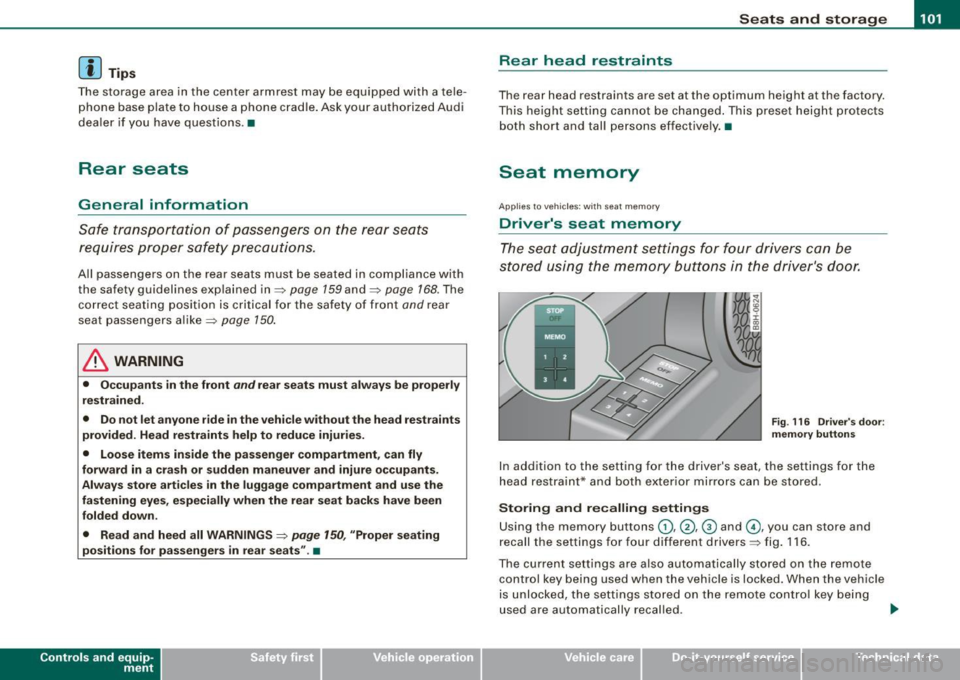
Driver 's seat memory
The seat adjustment settings for four drivers can be
stored using the memory buttons in the driver's door.
F ig . 116 Driver's doo r:
m emory button s
In addition to the setting for the driver's seat, the settings for the
head restraint* and both exter ior mirrors can be stored .
Storing and recalling setting s
Using the memory buttons G), @ , @ and G), you can store and
recall the settings for four different drivers=> fig . 116 .
The current settings are also automatically stored on the remote
control key being used when the vehicle is locked. When the vehicle
is unlocked, the settings stored on the remote contro l key being
used are automatically recal led . .,..
~ehicle care irechnical data
Page 104 of 340
• .___s_ e_a_ t_ s_ a_ n_ d_ s_t _o _ r_ a_ g =- e ________________________________________________ _
Turning seat memory on and off
If the I STOP I switch is depressed, the seat memory is inoperative.
The word OFF next to the
!S TOP] switch illuminates .
All the stored settings are retained . We recommend using the
I S TO PI switch and deactivating the seat memory if the vehicle is
only going to be used
temporarily by a driver whose settings are not
going to be stored.
[ i] Tips
Seat position settings cannot be recalled if the seatback is folded
forward. •
Applies to veh icles: with se at memory
Storing and recalling a seat position
Before you can store or recall your seat position, the [ STOP]
button must be engaged (down).
Storing settings
- Adjust the driver's seat=> page 96.
Adjust the head restraint => page 98
- Adjust both outside mirrors ::::> page 89. In the tilt-down
position, the passenger mirror can be adjusted to the
preferred position and saved in the seat memory.
- Press the [MEMO] button and hold it down. At the same time, press one of the memory buttons for at least one
second.
- Release the buttons. The settings are now stored under
the corresponding memory button.
Recalling settings
-Driver's door open -press the desired memory button .
- Driver's door closed -press the corresponding memory
button until the stored position is reached.
When the vehicle is locked, the current settings are stored and
assigned to the remote control key. But the settings stored on
memory buttons (1) through (4) are not deleted . They can be
recalled at any time. When the vehicle is unlocked, the settings
stored on the remote control key are restored.
If your vehicle is driven by other persons using your remote control
key, you should save your individual seat position on one of the
memory buttons. You can recall your settings again simply and
conveniently by pressing the corresponding memory button . When
the vehicle is locked, these settings are automatically re -assigned to
the remote control key and stored.
& WARNING
• For safety reasons, the seat setting can only be recalled when
the vehicle is stationary -otherwise you risk having an accident.
• In an emergency, the recall operation can be stopped by
pressing the
I STOP] button or by briefly pressing any given
memory button .
[ i] Tips
Seat position settings cannot be recalled if the seatback is folded
forward. •