fuel AUDI A4 CABRIOLET 2009 User Guide
[x] Cancel search | Manufacturer: AUDI, Model Year: 2009, Model line: A4 CABRIOLET, Model: AUDI A4 CABRIOLET 2009Pages: 340, PDF Size: 77.32 MB
Page 40 of 340
Driver inf orma tion d ispl ay
S in gle- trip m em ory (Tr ip co mputer 1)
The single -trip memory stores the trip informa tion from the time the
ignition is turned on until it is turned off. If the trip is continued
w ithin 2 hour s from the time the ignition was turned off, the new
data will be included in the calculation of the current trip informa
tion. If the trip is interrupted for
mo re t han 2 ho ur s the memory is
reset automatically.
T ot al-tr ip m emor y (Trip comp uter 2)
Un like the s ingle-trip memory, the total -trip memory is not reset
automatically . This permits you to evaluate your driving data for the
entire period between manua l resets .
Fuel r an ge
The es timated cruising range in miles (km) appears in the display .
This tells you how far your vehicle wil l be able to trave l on the
current tank of fuel and with the same driving style. The display
changes in increments of 6 miles (10 km).
The cruising range is ca lculated based on the fuel consumption for
the last 18 miles (30 km). If you drive conservatively, the cruising
range will increase.
Ave rage f uel m ileage
The average fuel economy in MPG (1/100 km) s ince you last cleared
the memory appears in this display. You can use this disp lay to
adjust your driving technique to achieve a desired mileage.
Curren t fue l mile age
The instantaneous fuel consumption in mi les per ga llon (1/100 km)
is shown in this display. You can use this disp lay to adjust your
driving technique to achieve a desired mileage.
Fuel consumption is recalcu lated at intervals of 33 yards (30
meters). When the vehic le is stationary, the most recent fuel
consumption is displayed.
A ve ra ge speed
The average speed in mph (km/h) since the last time the display was
reset appears in the display.
Elapsed time
The length of time that you have been driving since you last reset
the memory appears in this display .
Distance
The elapsed distance since the last time the memory was cleared
appears in the disp lay. The maximum distance that can be recorded
is 9,999.9 m iles (9,999 .9 kilomete rs) .
[ i ] Tips
A ll stored values will be lost if the vehicle battery is disconnected .•
Operation
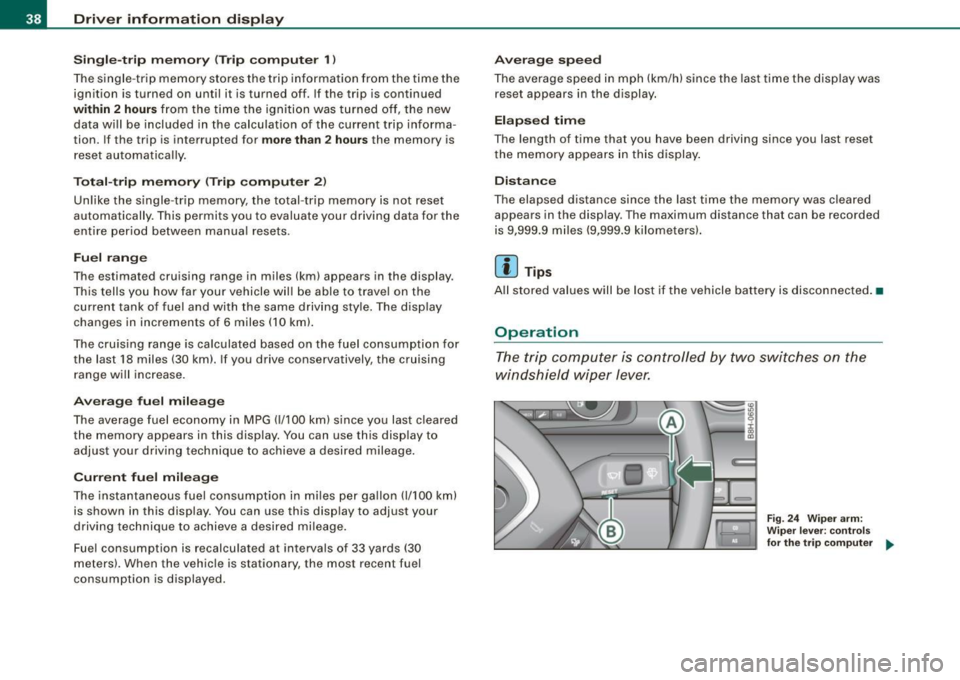
The trip computer is controlled by two switches on the
windshield wiper lever.
Fig. 24 W iper ar m:
W ipe r leve r: co ntrol s
for the tr ip co mpu ter ..
Page 41 of 340
Sele cting th e fun ctions
- Push in the uppe r (lower) protrusion on the function
se lector switch @to scroll up (down) through the trip
computer functions~
page 38, fig. 24. The fu nctions for
the trip computer a re d isp layed in succession on the
respective memory leve ls. Keep the switch pushed unt il
the desired display appears .
Swi tching b etw een m enu levels
- Tap the Rest button @
briefly to reach the various menu
levels one after the other ("Computer 1 ", "Computer 2",
"Navigation system"* and "Start menu") .
Res etting th e function to zero
- Selec t the desired func tion.
Push the reset button @for at least two seco nds .
The trip computer on ly operates when the ignition is on. When you
turn on the ignition, the function that was in use when you last
turned the ignition off will be displayed.
In addition to the trip computer information (memory level 1 or 2)
and navigation information can be displayed. To switch the d isp lay
between the different systems, tap the Reset button
@ briefly.
You can reset the fol lowing va lues to zero using the reset button:
• driving time
• average mileage
• average speed
In addition,
a ll the values in the single -trip or the total -trip memory
can be deleted s imu ltaneously .
Controls and eq uip
ment
Dri ver informa tio n di spl ay
[ i ] Tip s
• If you hold down the reset button for longer than 2 seconds, the
current value (for example, average fuel consumption) will be reset
to zero.
• Malfunction displays in Auto-Check Control are shown even with
the display sw itched off.
• All stored values will be lost if the vehic le battery is
disconnected. •
Menu display
Introduction
~ehicle care
Fig. 25 W iper leve r:
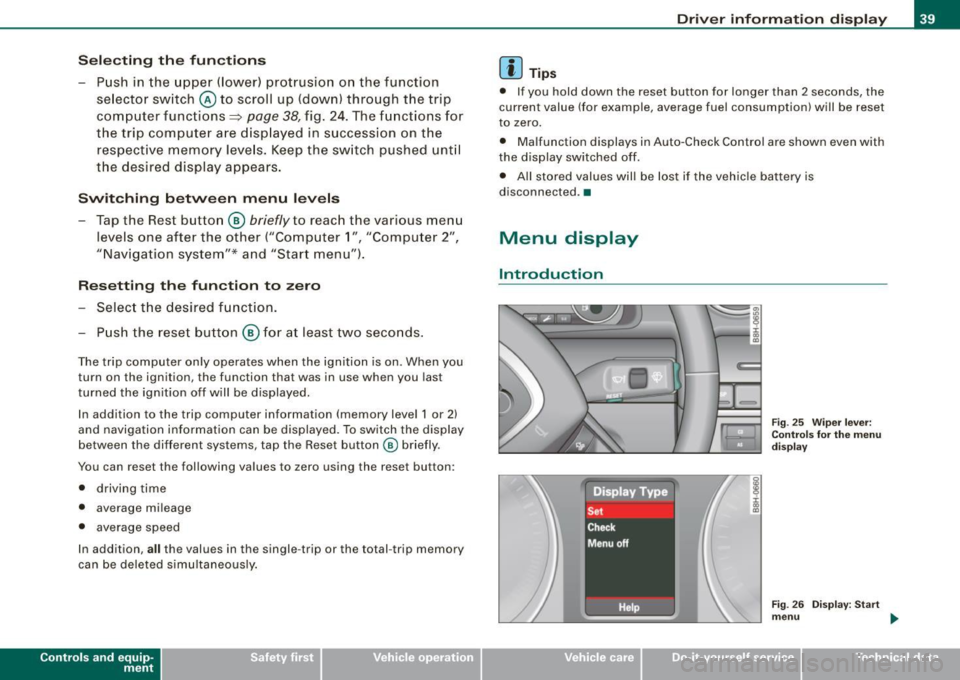
Con trols fo r the menu
d isp lay
F ig . 2 6 Di splay: Start
m enu
Technical data
Page 42 of 340
Driver inf orma tion d ispl ay
Some functions in your vehicle can be set, activated, and controlled
by
M enu s (e.g. Acoustic Park Assist*). With these menus you can
a lso select the information shown in the DIS disp lay, which operates
only with the ignition switched on. Operation is controlled by the
!Reset) button and the rocker switch on the wiper lever~
page 39,
fig. 25.
The
Start m enu shows you the different disp lay types :
Set
Check
Menu off
H el p
Each display type in the Start menu contains a submenu with addi
tional options.
S et
Check
Me nu off
H elp
Clock ~ page40
Computer
Speed alarm (speed
~ page35
warning)
Language (6 languages)
=> page40
Units (distance, fuel con-~ page40
sumption, temperature)
Service
~ page 17
All of the messages shown in vehicles without menu disp lay appear on the display screen.
The Help function helps you to make the right selection.
•
Navigating the menu
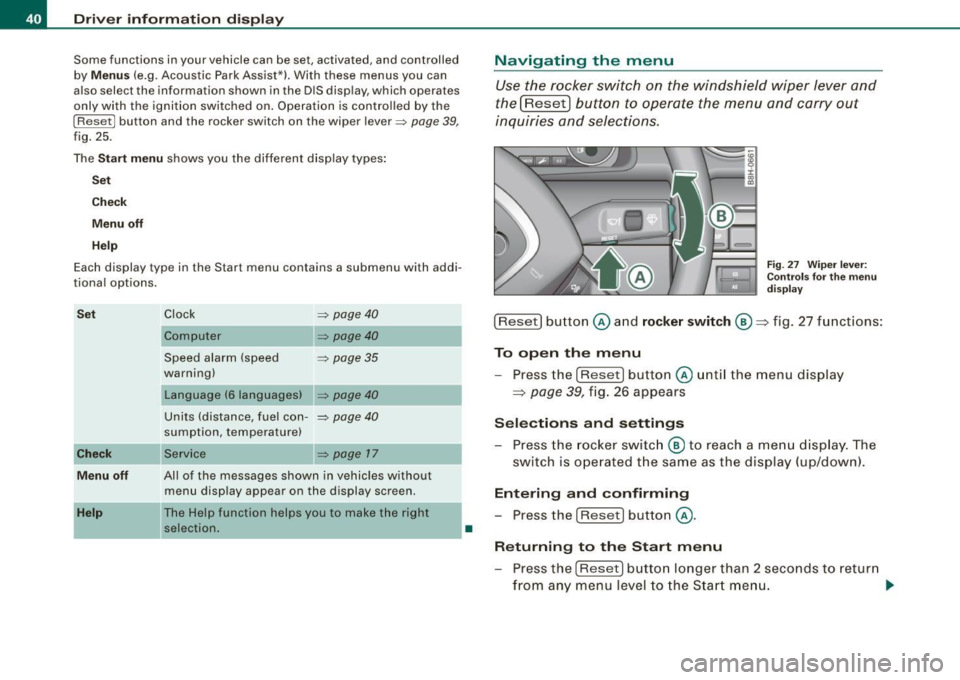
Use the rocker switch on the windshield wiper lever and
the[ResetJ button to operate the menu and carry out
inquiries and selections.
F ig . 27 Wipe r leve r:
Con trols for t he m en u
d is pl ay
!Reset] button @and rocker switch @=> fig. 27 functions:
To op en th e menu
- Press the
!Reset! button @unti l the menu display
=> page 39, fig. 26 appears
Sele ctions and setting s
- Press the rocker switc h
@ to reach a me nu display . The
switch is ope rated the sam e as the display (up/down).
Entering and confirming
- Press the
I Reset I button @.
R eturning to th e Start menu
- Press the
[Reset) butto n longer than 2 seconds to retur n
from any menu level to the Star t m en u. •
Page 43 of 340
![AUDI A4 CABRIOLET 2009 User Guide Using the rocker switch, you can select the menus in the display or
change settings. A cursor appears on the left in front of the selected
values .
By pressing the [Reset] b](/img/6/57553/w960_57553-42.png "AUDI A4 CABRIOLET 2009 User Guide Using the rocker switch, you can select the menus in the display or
change settings. A cursor appears on the left in front of the selected
values .
By pressing the [Reset] b")
Using the rocker switch, you can select the menus in the display or
change settings. A cursor appears on the left in front of the selected
values .
By pressing the [Reset] button, you activate the selection you made
or confir m the values you set.
Sel ecte d funct ions are identified with
a check mark or are carried out directly.
Meanings of the symbo ls in the display:
Selection bar Selected function
> Cursor
Check mark
D
Box
-
Meaning
Current Selection
Selected o r Function
active
Not selected
Triangle pointing up Previous page
Triangle pointing down
Next page
-
Tire pressure monitoring system
App lies to vehicles: with tire pressu re mon itoring system
General notes C.. ~
Each tire, including the spare (if provided), should be checked
month ly when cold and inflated to the inflat ion pressure recom
mended by the vehicle manufacturer on the vehicle placard or tire
inf lation pressure label. ( If your vehicle has tires of a different size
than the size indicated on the vehicle placard or tire inflation pres
sure label, you should determine the proper tire inflation pressure
for those tires.)
As an added safety feature, your vehicle has been equipped with a
tire pressure monitoring system (TPMS) that illuminates a low tire
Controls and equip
ment
•
Driv er inf ormati on di spl ay
pressure telltale when one or more of your tires is significant ly
under -inflated. Accord ingly, when the low tire pressure tel ltale illu
minates, you shou ld stop and check your tires as soon as possible,
and inflate them to the proper pressure . Driving on a significan tly
under-inflated tire causes the tire to overheat and can lead to tire
failure . Under-inflation also reduces fuel efficiency and tire tread
life, and may affect the vehic le's handling and stopping ability .
Please note that the TPMS is not a substitute for proper tire mainte
nance, and it is the driver's responsibility to maintain correct t ire
pressure, even if under -inflation has not reached the leve l to trigger
il lumination of the TPMS low tire pressure te lltale .
Your veh ic le has a lso been equipped w ith a TPMS malfunction indi
cator to indicate when the system is not operating properly . The
TPMS malfunction indicator is combined with the low tire p ressure
telltale . When the system detects a malfunction, the telltale wil l
flash for approx imately one minute and then remain cont inuously
il luminated . This sequence will continue upon subsequent vehicle
start -ups as long as the malfu nction exists.
When the ma lfunction indicator is illuminated , the system may not
be able to detect or signal low tire pressure as intended. TPMS
malfunctions may occur for a variety of reasons , including the
insta llation of replacement or alternate tires or wheels on the
vehicle that prevent the TPMS from functioning prope rly . A lways
check the TPMS malfunction telltale after replacing one or more
tires or whee ls on your vehicle to ensure that the replacement or
alternate tires and wheels allow the TPMS to continue to function
p roper ly .•
App lies to ve hic les : with tire pressu re mon ito ring system
Introduction
The tire pressure m onitoring system monit ors air pressure
in all four road wheels while t he vehicle is moving.
As soon as the tire pressure monitoring system senses a significant
loss of air pressure in one or seve ra l tires, text messages and yellow
~
Page 44 of 340
Driver information display
symbols appear in the instrument cluster display to alert the driver.
The warning light in the instrument cluster comes on when the
tire is significantly underinflated .
The warning light _, also lights up during a system failure.
When the wheel is turning, the system receives radio signals from
sensors located inside each tire .
A factory spare wheel is delivered with sensor. However, the spare
wheel is not checked by the tire pressure monitoring system. Such monitoring can only occur after the spare wheel has been installed
and initialized ~
page 45.
Be aware that tire pressure is also dependent on the temperature of
the tire. For every 18 °F (10 °C) increase in tire temperature, tire pres
sure increases by about 1.5 psi (0.1 bar). The tire warms up while the
vehicle is moving and tire pressure rises. So you should adjust tire
pressure only when they are
cold, when tire temperature is roughly
the same as ambient air temperature.
In order to keep the tire pressure monitoring system properly cali
brated, tire pressure on all four tires should be checked at regular
intervals, adjusted if necessary and saved in the proper setting
(recommended pressure)~
page 43.
The tire pressure is shown on the tire pressure label. On USA vehi
cles, the tire pressure label is located on the driver's side B-pillar. On
Canada vehicles, the tire pressure label is located either on the
driver's side B-pillar or inside the fuel filler flap. The tire pressure
label lists the recommended cold tire inflation pressures for the
vehicle at its maximum capacity weight and the tires that were on
your vehicle at the time it was manufactured . For recommended tire
pressures for normal load conditions, please see chapter
~ page 277.
& WARNING
• When the tire pressure monitoring system warning light is lit,
one or more of your tires is significantly under -inflated. You should
stop and check your tires as soon as possible, and inflate them to
& WARNING (continued)
the proper pressure as indicated on the vehicle's tire pressure
label
~ page 271. Driving on a significantly under-inflated tire
causes the tire to overheat and can lead to tire failure. Under-infla
tion also is likely to impair the vehicle's handling and stopping ability .
• Do not adjust tire pressure when tire temperature is excessive.
This could lead to serious tire damage and even cause the tire to
burst, with the additional danger of an accident.
For the sake of the environment
Driving with under-inflated tires reduces fuel efficiency and tire
tread life.
[ i] Tips
• Each tire should be checked monthly when cold and set to the
recommended inflation pressure as specified on the tire pressure
table~
page 277 .
• The tire pressure monitoring system helps the driver to keep
track of the tire pressures . But the driver still has the responsibility
for maintaining the correct tire pressure.
• Tire pressure must only be adjusted when the temperature of the
tires is about the same as ambient air temperature.
• When tires are replaced, the sensors and valves must not be
detached or exchanged. Only the valve core needs to be replaced
and, if necessary, the valve and the wheel electronics replaced.
• If you should put different wheels and tires on your vehicle (e.g.
winter wheels and tires), you must be certain that the wheels and
tires are compatible with the tire pressure monitoring system.
Otherwise the system will register a malfunction and a fault
message will be displayed. For more information, contact your Audi
dealer. .,
Page 47 of 340
Following each intentional change in specified pressures, tire pres
sures must be resaved .
After the pressures are saved, the tire pressure monitoring system measures the current tire pressures and saves them as the new
specified pressures.
[ i ] Tips
• The tire pressure is shown on the tire pressure label. On USA
vehic les, the tire pressure label is located on the driver 's side 8-
pillar. On Canada vehicles, the tire pressure label is located either on
the driver's side 8 -pi llar or insid e the fuel filler flap . The tire pressure
label lists the recommended cold tire inflation pressures for the
vehicle at its maximum capacity weight and the tires that were on
your vehicle at the time it was manufactured . For recommended tire
pressures for normal load conditions , please see chapter
=> page 271.
• The tire pressure monitoring system he lps the driver to keep an
eye on tire pressures . But the driver st ill has t he responsibi lity for
maintaining the correct tire pressure .•
Contro ls and eq uip
ment
Dri ver informa tio n di spl ay
Ap plies to veh icles : w it h tir e pr essure mo nito ring syste m
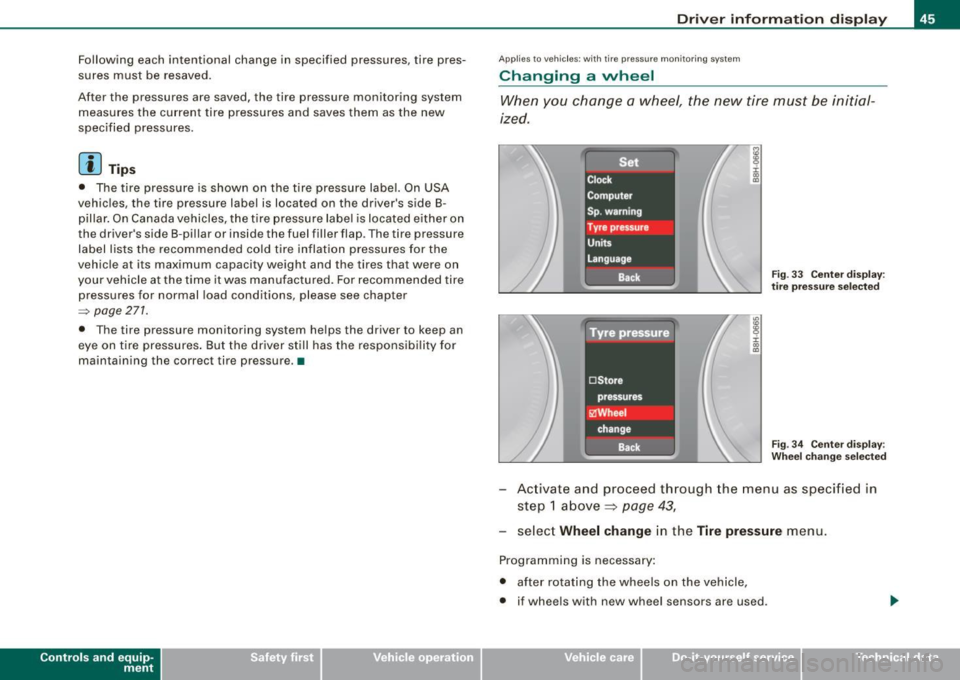
Changing a wheel
When you change a wheel, the new tire must be initial
ized .
Fig . 33 Ce nter disp lay :
t ir e pr essur e se lecte d
Fi g. 3 4 Center disp lay :
W heel c hang e se lecte d
Activate and proceed through the menu as specified in
step 1 above ~
page 43,
select Wheel change in the Tire pres sure menu.
Programming is necessary:
• after rotating the wheels on the vehicle,
• if wheels with new wheel sensors are used .
~ehicle care Technical data
Page 59 of 340
To unlock r ear lid
- Pu ll the switch c:::::5 ~ page 56, fig. 48 in the driver's door.
To open re ar lid
- Raise the rear lid.
The remote rear lid re lease is deactivated automatically if you lock
the rear lid using the key . This enables the driver to lock the luggage
compartment permanently with the key and prevent unwanted
access to the trunk .•
Anti-theft alarm system
Description
The anti-theft alarm triggers an alarm if anyone attempts
to break into the vehicle.
The anti -theft a larm system triggers an audible alarm and turns on
the emergency flasher if an unauthorized interference with the
veh ic le is sensed by the system.
How i s the anti -theft alarm syste m switched on ?
The anti-theft alarm system is switched on when you lock the
driver's door manually using your key, o r when you use the remote
control. The system is activated approx imately 30 seconds after the
vehic le is locked. The indicator light on top of the door trim start
fl ashing rapid ly for 30 seconds and then b link slowly.
How i s the anti -theft al arm syst em switch ed off ?
The anti-theft alarm system is switched off only when you use the
remote contro l to unlock your vehicle . If you do not open a door
with in 60 seconds after you have unlocked with the remote control,
the vehic le will lock itself again automatica lly.
Controls and equip
ment
Op ening and clo sing
If you lock just the driver's door using your key, the front
passenger's door, the rear and the fuel f iller flap remain locked.
If you use the vehicle key to unlock the driver's door, the other
doors, the rear lid and the fuel tank flap will remain locked . The
a larm system will not be deactivated unless you insert the key in the
ignition switch within 15 seconds and turn on the ignition. If you fai l
to do this, the a lar m wi ll sound.
When will the anti theft alarm system be triggered?
When the vehic le is locked, the a larm system monitors and protects
the following parts of the vehic le:
• engine compar tment
• luggage compartment
• doors
• vehic le incline
• ignition
• factory installed radio.
When the system is activated, the alarm will be triggered if one of
the doors, the engine hood or the rear lid are opened, or if the igni
tion is turned on or the radio removed or if the vehicle incline has
been changed.
The ant i-theft alarm system will also go off when you unlock the rear
lid with your key and open it. The alarm is switched off again when
you close the rear lid.
The anti-theft alarm system will also go off when the battery is d isconnected.
You can also trigge r the alarm by pressing the PANIC button on your
remote control. This will alert other people in case of emergency.
Press the
PANI C button again to turn off the a larm. .,_
Page 115 of 340
Warm and cold -------------------------------.J
Switching between Fahrenheit and
Centigrade
You can change the temperature display from °F (Fahren
heit) to
°C (Centigrade) and vice versa.
- Press and hold[~] and press the p lus button on the
driver's s ide temperature switch =>
page 111, fig. 130. •
Air recirculation [ <8?)
The air recirculation prevents exhaust fumes or other
pollution from entering the vehicle.
Switching on th e air re cir culation
- Press[ ~]=> page 777,fig.130 =>&
Switching off the air recirculation
- Press~ again, or
- press (AUTO], or
press[ @].
In the air recirculation mode , the air in the passenger compar tment
is recircula ted to p revent exhaust fumes and other pollution from
entering the vehicle . We recommend that you use the manua l air
recircula tion under the following conditions :
• when driving through tunnels
• in a traffic jam .
& WARNING
Do not use this setting for extended period s of time . The windo ws
c o uld fog up since no fresh air ca n enter the veh icle . If th e
Controls and equip
ment
& WAR NING (c onti nued)
wind ows fog up, pre ss th e air r ecirculat ion butt on a gai n immed i
atel y to s witch off the air re circula tion function or sel ect defro st. •
ECON [ECO N]
Using ECON helps save fuel
-Press [ECON] to switch on=> page 111 , fig. 130 .
- Press [ECON] o r pre ss [AUTO] to switch off.
In ECON mode the air condit ioner is shut off and heating and venti
lation are automat ically controlled. "ECON" translates "Economy"
s ince driving with the air conditioning compressor
disengaged
improves your mileage noticeably.
When operating in ECO N mode make sure the temperature inside
the vehicle is not lower than the outside temperature. The air is
neither cooled nor dehumidified, so there is a risk that the windows
can fog up. •
Switching the air conditioning on and off [ OFF ]
Switching the air conditioning off
- Press [ OFF] to tu rn the air condit ioner off a nd block
o utside a ir from entering the vehicle .
Switching the air conditioning on
- Press [ OFF] aga in (indicator light comes on aga in), or
- Press [AUTO], or
- Press one of the following butto ns: [ {)' ], [@ ]or
I -0, ].
Page 118 of 340
![AUDI A4 CABRIOLET 2009 User Guide • .___w_ a_ r_ m __ a_n_ d_ c_ o_ld ________________________________________________ _
Defrosting/defogging the windshield[@]
The windshield and side windows are quickly defrosted or
de](/img/6/57553/w960_57553-117.png "AUDI A4 CABRIOLET 2009 User Guide • .___w_ a_ r_ m __ a_n_ d_ c_ o_ld ________________________________________________ _
Defrosting/defogging the windshield[@]
The windshield and side windows are quickly defrosted or
de")
• .___w_ a_ r_ m __ a_n_ d_ c_ o_ld ________________________________________________ _
Defrosting/defogging the windshield[@]
The windshield and side windows are quickly defrosted or
defogged
- Press[@]=> page 111, fig. 130.
- Press[@] again or press !AUTO] to switch off the
defroster.
The temperature is automatical ly controlled. Maximum airflow is
primarily b lown in through out lets
0 , © and 0 => page 115 .
Outlets © can be opened and closed with the controls behind
them . Outlets © and
0 must be opened so the windows can be
defrosted as quickly as possible .
By pressing[ @], air recirculation and ECON are switched off. •
Defrosting/defogging the rear window QiP
The rear window defogger removes moisture fr om the
rear window.
- Press the QuJ switch to switch the rear window defogger
on a nd off.
The rear window defogger works only when the ignition is switched
on. The ligh t in the switch will illum inate when the defogger is on.
When the outside temperature is warmer than 32 °F
(0 °C), the rear
window defogger switches off automatically after about ten
m inutes .
'£> For the sak e of the environment
Swi tch off the defogger when the rear window is c lear. When you
save e lectricity, you save fuel. •
Using the climate controls economically
Using the climate controls pru dently can help save fuel.
When you use the air conditioner, engine power is reduced
and fuel consump tion increases. To save fuel, yo u sh ould
use the air conditio ner on ly when necessary. Also please
n ote th e follow ing points:
- If you want to save fuel, activate ECON.
- If you are goi ng to drive with the power top down, use
ECON.
'£> For the sake of the environment
By reducing the amount of fue l you use, you also reduce the amount
of pol lutants emitted into the air .•
App lies to vehic les: with elec tr ically heated seats
Electrically heated front seats
With the i gnition on, the seat cushion and backrest of the
fron t seats can be heated.
Fig . 133 C enter
c o n sole: thumbwh eels
fo r fr ont seat heati ng ....
Page 124 of 340

-L___:O~ n'.... t ~h~ e~r ~o~a ~ d:...._ _______________________________________________ _
-Swit ch off the e ngine an d rem ove the ignitio n key f rom
t h e ig nition loc k.
What else you should do when parking your vehicle on
an i ncline o r de clin e
Turn the s teering wheel so that if the vehic le sh ould start to ro ll, it
wi ll ro ll into the curb .
I f you are parking on a
decline (the fron t of your vehicle facing
downhil l), turn the front wheels to the right so that they point
toward the curb.
If you are par king on an incline (the font of your vehic le fac ing
uphill), turn the front whee ls to the lef t so that they point
away from
the curb .
Move the selector lever into the P position.
LJ}. WARNING
This is how you can redu ce the r isk of injury when leaving your
vehicle .
• Never par k the vehi cle where it c an come i n contact with dry
gra ss, spilled fuel or any other flammable materials .
• Never allow an yone -especi ally s mall ch ildren -to remain in the
vehicle when it i s locked . Locked doors make it more difficult for
res cuer s to acce ss the pas senger compartment in the e vent of a n
emergency _ Danger to life!
• Never leave children unsupervised in the vehicle . Children
c ould release the parking brake or move the gear shift lever out of
gear . The vehi cle could st art to roll awa y and cau se an a ccident .
• No matter wha t the sea son i s, the temperature in a parked
vehi cle can reach d angerous levels . •
Acoustic park assist
A pplies to vehicles : with 4 -ch an nel a co ustic park ass is t
Rear acoustic park assist
The rear acoustic park assist warns you of obstacles or
objects behind your car.
How it works
The acoustic park assist warning system (4-channel acoustic park
assist) uses ultr asonic sensors to warn yo u when you are
backing
your vehicle close to an obstacle . The system 's 4 sensors are located
inside the rear bumper .
Acti va ting
The rear acoustic park assist is ac tivated whenever you shift into
Reverse . You will hear a warn ing tone when the system is on .
Reverse
With the car backing up in reverse gear, the col lision warning sound
sets in at the fol lowing
approximate d istances to obstacles :
straight aft 5ft(1.5m)
angling aft off vehicle corners 2 ft (0
.6 m)
As the dis tance shr inks, the time interva l between the audible tones
grows shorter.
The sound changes to a continuous tone as soon as the remaining distance to an obstacle closes to less than about 1 ft. (0 .3 ml. The
steady tone cautions you that you have backed up hazardously
close and you ris k co llision by backing up any further .
Malfunctions in the system
If a warning tone is audible for about five seconds when you turn on
the ignit ion, there is a malfunction in the system . Have the prob lem
corrected by your authorized Audi dea ler. _,.