warning lights AUDI A4 CABRIOLET 2009 User Guide
[x] Cancel search | Manufacturer: AUDI, Model Year: 2009, Model line: A4 CABRIOLET, Model: AUDI A4 CABRIOLET 2009Pages: 340, PDF Size: 77.32 MB
Page 33 of 340
USA models: if there is a malfunction in the ABS system, the <
warning/indicator light illuminates along with the BRAKE system
malfunction warning/indicator light=>&.
Canada models: if there is a malfunction in the ABS system, the
warning/indicator light illuminates together with the
(Ci)) brake
system malfunction warning/indicator light=>& .
& WARNING
• Always observe the warnings in => page 242, "Engine compart
ment", before opening the engine hood and checking the brake
fluid.
• Driving with low brake fluid is a safety hazard! Stop the car and
get professional assistance.
• If the brake system warning/indicator light illuminates
together with the ABS warning/indicator light, then the ABS system is malfunctioning. The rear wheels could quickly lock up
when you apply the brakes. This could lead to loss of control and
your vehicle could slide! Drive carefully to the nearest authorized
Audi dealer and have the malfunction corrected. •
Engine cooling system malfunction -L
A malfunction in the engine cooling system must be
repaired as soon as possible.
When the -t symbol in the display flashes, then either the
engine coolant
temperature is too high, or the coolant level
is too low. In addition to the symbol, the following message
also appears in the display:
Switch off engine, check coolant level
Pull off the road and stop the vehicle.
- Turn off the engine.
Controls and equip
ment
Driver information display
Check coolant level ~ page 258.
-Add coolant if necessary~ page 259.
- Continue driving only after the engine coolant
warning/indicator light goes out.
- Contact your authorized Audi dealer for assistance if
necessary.
If the engine coolant level is correct, then the radiator fan may be
the cause of the malfunction.
If the generator warning/indicator light should also illuminate
=>
page 22, then the fan belt may be damaged.
& WARNING
• If your vehicle should break down for mechanical or other
reasons, park at a safe distance from moving traffic, turn off the
engine and turn on the hazard warning lights
=> page 82, "Emer
gency flasher
A".
• Never open the hood if you see or hear steam or coolant
escaping from the engine compartment -you risk being scalded.
Wait until you can no longer see or hear steam or coolant escaping.
• The engine compartment of any vehicle is a dangerous area.
Before you perform any work in the engine compartment, turn of
the engine and allow it to cool. Follow the warning stickers
=> page 242, "Engine compartment" .
0 Note
Do not continue driving if the -F-symbol illuminates. There is a
malfunction in the engine cooling system -you could damage your
engine. •
Page 35 of 340
II
Light/rain* sensor defective
Worn brake pads
USA m odels :
Speed warning 1
Canad a m od els:
Speed warning 1
Dynamic headlight range con trol*
defective
Adaptive Light* defective
Windshield washer fluid level low
U SA mod els:
Speed warning 2
Canada mod els:
Speed warning 2
Battery voltage too high or too low
D efective light bu lb
Tire pressure monitoring system* Loss of air pressure
Tire pressure monitoring system*
System not available
~ page33
~ page 33
~ page34
~ page 34
~ page34
~ page34
~ page34
~ page 34
~ page34
~ page 34
~ page35
~ page 43
~ page46 I
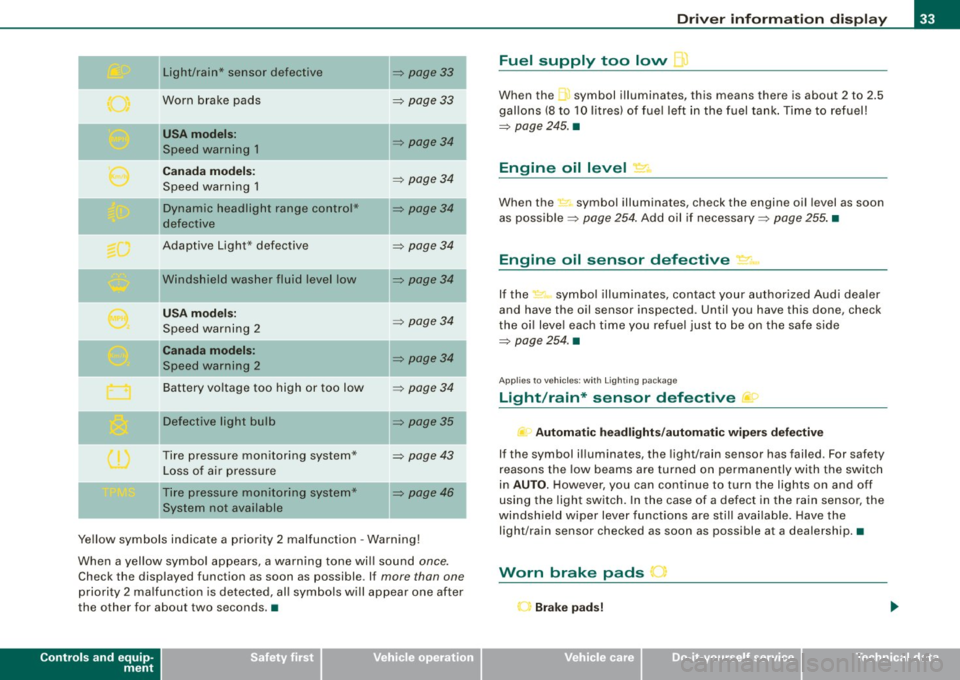
Ye llow symbols indicate a priority 2 malfunction -Warning!
When a yellow symbo l appears, a warning tone wi ll sound
once.
Check the displayed function as soon as possible. If more than one
priority 2 ma lfunction is detected, all symbols will appear one after
the other for about two seconds. •
Controls and equip
ment
Driv er inf ormati on di spl ay
Fuel supply too low l
When the -,symbol illuminates, this means there is about 2 to 2.5
gallons (8 to 10 litres) of fue l left in the fuel tank . Time to refuel!
~ page 245. •
Engine oil level '7.:.
When the-=· symbol illuminates, check the engine oil level as soon
as possib le ~
page 254 . Add oil if necessary ~ page 255. •
Engine oil sensor defective • ..
If the .,_,ft symbol illuminates, contact your author ized Audi dea ler
and have the oil sensor inspected. Until you have this done, check
the oi l leve l each time you refuel just to be on the safe side
~ page 254. •
Applies to vehic les: with Lighting package
Light/rain* sensor defective >
- Automa tic headl ight s/autom atic wiper s def ective
If the symbol il luminates, the light/rain sensor has failed. For safety
reasons the low beams are turned on permanently with the switch
in
AUTO . However, you can continue to turn the lights on and off
using the light switch. In the case of a defect in the rain sensor, the
windsh ield wiper lever functions are still avai lable. Have the
light/rain sensor checked as soon as possible at a dealership. •
Worn brake pads J
r Brake p ad s!
Page 36 of 340
Driver information display
If the warning light illuminates, immediately contact your autho
rized Audi dealer or qualified workshop to have all brake pads
inspected. On USA models the warning light
O comes on together
with the warning light
BRAKE. Both sets of brake pads on an axle must
always be replaced at the same time .
& WARNING
Driving with bad brakes can cause a collision and serious personal
injury.
• If the warning light , and the warning light
BRAKE11 with the
message Brake pads! comes on in the instrument cluster display,
immediately contact your authorized Audi dealer or qualified
workshop to have all brake pads checked or replaced if necessary .•
Speed warning 1 ~ (USA models)/
models) (Canada
If
the symbol illuminates, this means you are driving faster than
the set vehicle speed . Slow down! =>
page 35. •
Applies to vehicles : wit h dynami c h ea d light ran ge ad ju stment
Headlight range control defective C.1
If the symbol illuminates, the dynamic headlight range control is
no longer working properly. Have the system checked and repaired
a t your Audi dealer. •
11 BRAKE : USA models only
App lies to vehicles: w it h ada ptive li gh t
Adaptive Light defective ~ ,
When this symbol I illuminates, it means that Adaptive Light is
defective . Go to an authorized dealership to have the headlights or
the control unit for the Adaptive Light repaired. •
Windshield washer fluid level too low ¢;>
If the-;... symbol illuminates, add windshield washer fluid to the
washer system and also for the headlight washer
system *=>
page 266. •
Speed warning 2
models) (USA models)
/
(Canada
If the symbol illuminates, this means you have driven faster than
the second set vehicle speed. Slow down! =>
page 35. •
Battery voltage low ....J
If the C:::-symbol illuminates, contact your authorized Audi dealer
and have the following components inspected:
• drive belt
• generator
• battery charge
Also see if the generator warning/indicator light illuminates
=>
page 22. •
Page 44 of 340
Driver information display
symbols appear in the instrument cluster display to alert the driver.
The warning light in the instrument cluster comes on when the
tire is significantly underinflated .
The warning light _, also lights up during a system failure.
When the wheel is turning, the system receives radio signals from
sensors located inside each tire .
A factory spare wheel is delivered with sensor. However, the spare
wheel is not checked by the tire pressure monitoring system. Such monitoring can only occur after the spare wheel has been installed
and initialized ~
page 45.
Be aware that tire pressure is also dependent on the temperature of
the tire. For every 18 °F (10 °C) increase in tire temperature, tire pres
sure increases by about 1.5 psi (0.1 bar). The tire warms up while the
vehicle is moving and tire pressure rises. So you should adjust tire
pressure only when they are
cold, when tire temperature is roughly
the same as ambient air temperature.
In order to keep the tire pressure monitoring system properly cali
brated, tire pressure on all four tires should be checked at regular
intervals, adjusted if necessary and saved in the proper setting
(recommended pressure)~
page 43.
The tire pressure is shown on the tire pressure label. On USA vehi
cles, the tire pressure label is located on the driver's side B-pillar. On
Canada vehicles, the tire pressure label is located either on the
driver's side B-pillar or inside the fuel filler flap. The tire pressure
label lists the recommended cold tire inflation pressures for the
vehicle at its maximum capacity weight and the tires that were on
your vehicle at the time it was manufactured . For recommended tire
pressures for normal load conditions, please see chapter
~ page 277.
& WARNING
• When the tire pressure monitoring system warning light is lit,
one or more of your tires is significantly under -inflated. You should
stop and check your tires as soon as possible, and inflate them to
& WARNING (continued)
the proper pressure as indicated on the vehicle's tire pressure
label
~ page 271. Driving on a significantly under-inflated tire
causes the tire to overheat and can lead to tire failure. Under-infla
tion also is likely to impair the vehicle's handling and stopping ability .
• Do not adjust tire pressure when tire temperature is excessive.
This could lead to serious tire damage and even cause the tire to
burst, with the additional danger of an accident.
For the sake of the environment
Driving with under-inflated tires reduces fuel efficiency and tire
tread life.
[ i] Tips
• Each tire should be checked monthly when cold and set to the
recommended inflation pressure as specified on the tire pressure
table~
page 277 .
• The tire pressure monitoring system helps the driver to keep
track of the tire pressures . But the driver still has the responsibility
for maintaining the correct tire pressure.
• Tire pressure must only be adjusted when the temperature of the
tires is about the same as ambient air temperature.
• When tires are replaced, the sensors and valves must not be
detached or exchanged. Only the valve core needs to be replaced
and, if necessary, the valve and the wheel electronics replaced.
• If you should put different wheels and tires on your vehicle (e.g.
winter wheels and tires), you must be certain that the wheels and
tires are compatible with the tire pressure monitoring system.
Otherwise the system will register a malfunction and a fault
message will be displayed. For more information, contact your Audi
dealer. .,
Page 52 of 340
Openin g and clo sin g
Power locking system
General description
The power Jocking system Jocks all the vehicle doors and
rear lid simultaneously or allows you to unl ock either just
the driver's door or all the vehicle doors and rear lid
simultaneously.
The power locking system in your veh icle incorporates the following
f unctions:
• Central locking function
• Remote contro l feature~
page 51.
• Anti -theft alarm system ~ page 57 .
All the doors and the rear lid are locked by the central locking
system when you lock the vehicle .
Unlo cking th e vehicle
You can unlock the vehicle from outside either by using the remote contro l
or by inserting and turning the key in the driver's door lock.
When you
unlo ck your vehic le:
• The anti-theft alarm sys tem is deact ivated briefly.
• The vehicle interior lights i lluminate for approximately 30
seconds.
• All turn signal lights will flash twice when the car is un locked.
• After un locking the vehicle, you have 60 seconds to open a door
or the rear lid. After 60 seconds, t he vehicle automatically locks and
the anti-theft a larm system activates again .
T he rear lid can be locked or unlocked either by using the remote
co ntro l
or by inserti ng and turning the key in the driver's door lock .
Un locking the vehicle with the remote control will only
unlock the
r ear lid, to
open it, the lid handle needs to be pressed . Lo
cking th e veh icle
You can lock the vehic le from outside e ither by using the remote
control
or by inserting and turning the key in the drivers's door lock .
When you
lock the vehicle:
• All doors and t he rear lid are locked .
• All turn signal lights w ill flash once when the ca r is locked.
• The anti -theft alarm system is activated . The horn of the anti
theft alarm sys tem will sound and the anti -t heft ala rm sys tem readi
ness l ight, located in the upper par t of the driver's door panel , wi ll
start to blink.
• The vehicle interior lights turn off .
Automatic locking*
The automat ic locking feature locks all the vehicle doors and the
rear lid when you drive faster than 9 mph (15 km/h).
You can unlock the vehicle from the inside by:
• removing the key from the ignition switch (the vehicle wil l auto
matically u nlock itself) or
• pressing the unlock pa rt of the power lock switch €:Dor
pulling the door handle (twice to open the door) .
If you wish, you can have an authorized Audi dea ler convert your
powe r door lock sys tem to automatic locking.
& WARNING
• When you lock your vehic le from out side , nobody -especially
c h ildren - should remain in side the vehicle . Remembe r, when you
lo ck the vehicle from the out side the windows cannot be opened
from the in side .
• When you leave the vehicle , alway s remove the ignition key and
take it with you . Thi s w ill prev ent pa ssenger s (children , fo r
example) from ac cidentally being locked in the vehicle should they
ac cidentally pre ss the power locki ng swit ch in the front door s. .,
Page 53 of 340
& WARNING (co ntin u ed)
• Do n ot l ea ve c hildr en i ns ide th e vehicle un sup erv is ed. In an
e m erg en cy it w ould be impo ssible to op en the door s from the
out side without the key.
[ i ] Tip s
• In the event of a crash with airbag deployment all locked doors
wi ll be automat ically unlocked to give access to the vehicle occu
pants from the outside.
• If the power locking system should fail, you can st ill open the
fue l tank flap in an emergency~
page 248.
• You are we ll advised not to keep va luables inside an unattended
vehic le, visible or not. Even a properly locked vehicle cannot provide
the security of a safe! •
Keyless entry remote control
General description
The remote controls allows you to:
• lock or un lock the vehicle
• selective ly un lock the rear lid.
The turn signals wi ll flash briefly whenever you lock or unlock the
vehic le . Also, the interior light will come on or go off whenever you
open or c lose the driver's door.
The transmitter and battery are located in the head of the remote
control. The receiver is located inside the vehicle. The maximum
effective range depends on severa l things. Remember, if the battery
is weak, the effective range decreases .
The remote -control key contains a fo ld-ou t key that you can use to
manual ly lock or unlock the vehicle and to start the engine .
Controls and eq uip
ment
Op enin g and clo sing
If you need to replace the remote control, or if you need to have it
repaired, you must see your authorized Audi dealer. Only then can
you use the key again. •
Unlocking and locking the vehicle with the
remote control
How the remote control works.
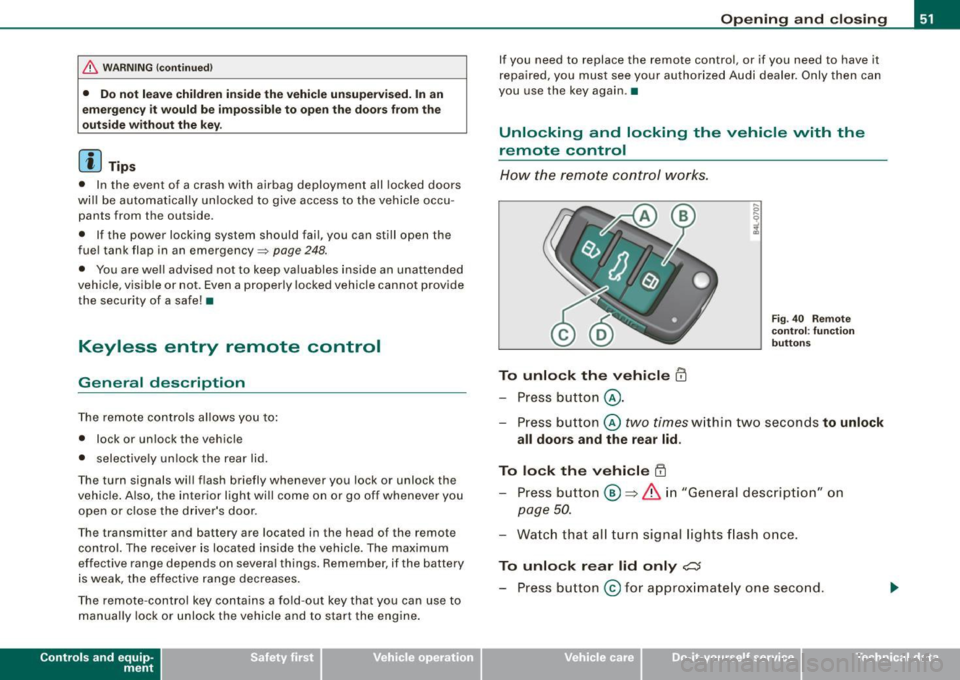
To unlock the v ehicle m
- Press button @.
Fig. 40 Remo te
co ntr ol: fu nctio n
b utt ons
- Press button @two times within two seconds to unlock
all doors and the rear lid .
To lock the vehicle [II
-Press bu tton @ => &, in "Gener al descri ption" on
page 50.
- Watch that all turn signal lights flash once.
To unlo ck r ear lid only ,c::;
- Press button @for approx imate ly one second.
~ehicle care Technical data
Page 78 of 340

Clear vision
Clear vision
Lights
Switching the headlights on and off ·'t!-·
Fi g. 85 Ins tru ment
pan el: lig ht sw itc h
Fi g.
86 Turn sig nal
lev er: high beam
ON /OFF
All switch pos itions refer to the indentation on the switc h
aligned with the spec if ied symbol. The light switch m ust not
be overt urned past the stops in either direction .
Switching on the side marker lights
- Turn t he light switch light to=> fig. 85
;oo:: .
Switching on the headlights and high beam
- T urn the light switch to ~D.
- Push the turn signa l lever forward towa rds the ins tru -
ment panel => fig. 86, to turn on the high beam, pu ll the
lever back to turn it off=>
page 83.
Swit ching off th e lights
- T urn the light switch to
0 .
The headlights only work when the ignition is switched on . While
starting the engine or when sw itching off the ignition , the head
lights wi ll go of f and only the side marker lights wil l remain lit .
& WARNING
Crashe s can happen when you cannot se e t he ro ad ah ead and
whe n you c annot b e seen by othe r motori sts.
• Alway s turn on the headlights so that you can see ahead and
s o that other s can see y our car fr om the b ack.
[ i ] Tip s
• If you remove the ignition from the ign ition lock whi le the head
lights are still on, a bu zzer will sound as long as the driver 's door is
open to remind you to switch off the lights .
• Always observe the specific local regulations for your area when
to use your lights .•
Page 79 of 340
Applies 10 vehic les: with light senso r package
Sensor activated head -and tail light control
In the "AUTO" position, light sensors monitor outside light
conditions and s witch the head- and t ail lights on and off
as required.
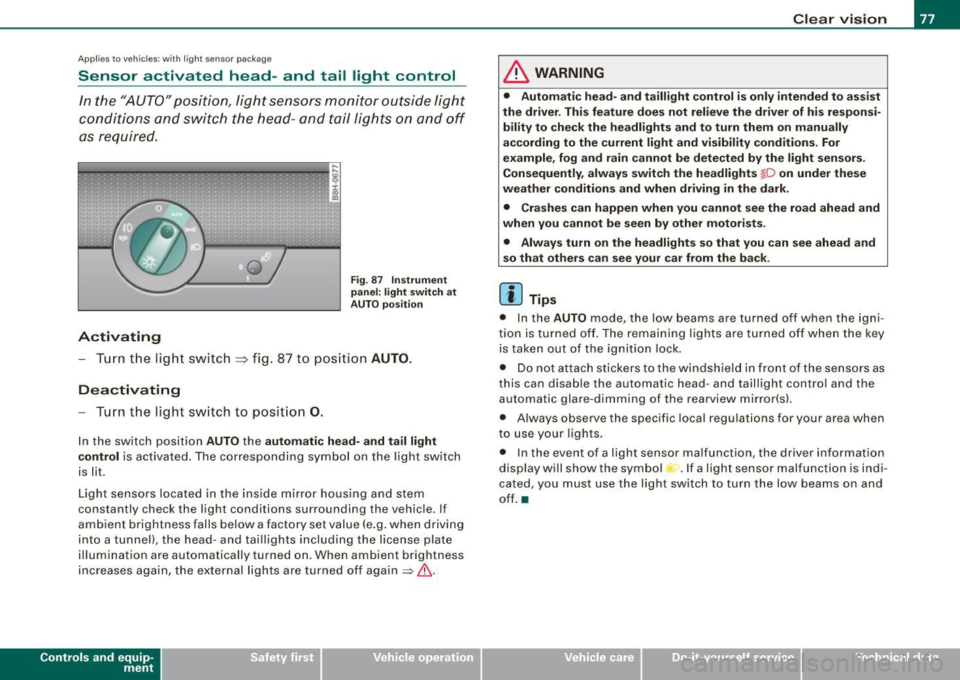
Activating
F ig . 87 Instru men t
p an el: li ght sw itch at
A UTO pos ition
- Tur n the light switch ~ fig. 87 to positi on AUTO.
Deactivating
- Turn the light switch to posit ion 0.
In the switch position AUTO the automati c head -a nd ta il light
contr ol
is activated . The corresponding symbol on the light switch
is lit.
Light sensors located in the ins ide mirror housing and stem
constantly check the light conditions surrounding the vehicle . If
ambient brightness falls below a factory set value (e .g. when driving
into a tunnel), the head -and tai llights including the license plate
illumination are automatically turned on. When ambient brightness
increases again, the external lights are turned off again
=> & -
Contro ls and eq uip
ment
Cle ar v ision
& WARNING
• Autom ati c head - and tailli ght control is only int ended to a ss is t
the driver . Th is feature does not reli ev e th e driver of h is res pon si
bilit y to che ck the headl ights and to turn them on m anuall y
according to the current light and vi sibilit y condition s. For
e xa mple , fo g and r ain cannot be dete cted by the light s en sor s.
Consequently , alw ay s swit ch th e headlights
fD on under the se
we ather condition s and when driving in th e da rk .
• Crashe s can happen when you cannot s ee the road ahead and
w hen you cannot be seen by oth er m otori sts .
• Alway s turn on the headlight s so that you can see ahead and
s o that others ca n s ee your car fr om th e back.
[ i ] Tip s
• In the AUTO mode , the low beams are turned off when the igni
tion is turned off. The remaining lights are turned off when the key is taken out of the ignition lock.
• Do not at tach stickers to the windshield in front of the sensors as
this can disable the automatic head- and taillight contro l and the
automatic glare -dimming of the rearview mirror(s).
• Always observe the specific local regulations for your area when
to use your lights .
• In the event of a light sensor malfunction, the driver information
display wi ll show the sy mbol -.
If a light sensor malfu nction is indi
cated, you must use the light switch to turn the low beams on and
off. a
~ehicle care irechnical data
Page 80 of 340
Clear vision
Ap plies to vehi cles: with d ayt ime running ligh ts
Daytime running lights (DRL) (USA models)
Use the activation switch to turn the daytime running
lights on or off.
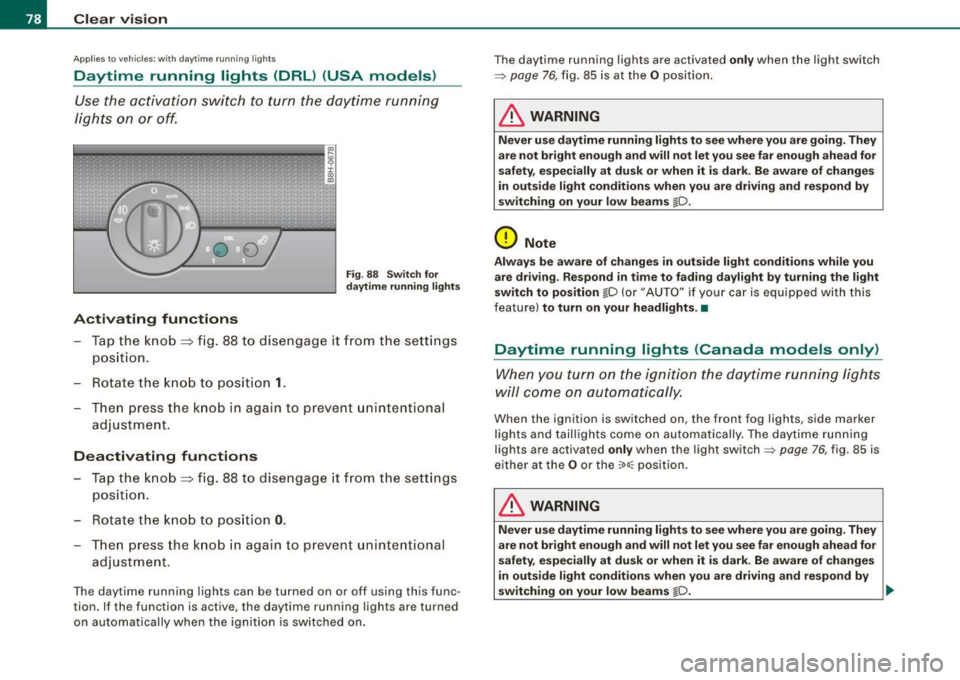
Activating functions
Fi g. 88 Sw itch for
d ayt ime runn ing light s
-Tap the knob ==> fig. 88 to dise ngage it from the sett ings
position.
- Rot ate the k nob to positi on
1.
T hen p ress the knob i n again to prevent unintentional
adjustment .
Deactivating functions
-Tap the knob==> fig. 88 to disengage it from the sett ings
posit ion.
- Rota te th e kn ob to p osition
0 .
- T hen p ress the knob in aga in to p reve nt uninte ntiona l
adjustment .
The daytime running lights can be turned on or off using this func
tion. If the function is active, the daytime running lights are turned
on automatically when the ignition is sw itched on . The daytime running lights are activated
only when the light switch
=>
page 76, fig. 85 is at the O posi tion .
& WARNING
Never u se daytime running lights to see where you are going. They
are not bright enough and will not let you see f ar enough ahead for
s afety , e spe cially at dusk or when it i s dark. Be aware of change s
i n out side light condition s when you are driving and re spond by
s witching on your low beams
@-0.
0 Note
Alway s be aware of change s in outside light conditions while you
are dr iving . Re spond in tim e to fading da ylight b y turning the light
s witch to po sition
@-0 {or "AUTO" if you r car is equipped with this
feature)
to turn on your headlight s.•
Daytime running lights (Canada models only)
When yo u tur n on the igni tion t he da ytime running ligh ts
w ill c ome on au toma tic ally.
When the ignition is switched on , the front fog lights, side marker
lights and taillights come on au toma tica lly . The daytime runn ing
lights are activated
only when the light switch=> page 76, fig. 85 is
e ithe r at the
O or the ~o o:: pos ition.
& WARNING
Never u se dayt ime running lights to see where you ar e going. They
ar e not bright enough and will not let y ou see far eno ugh ahead for
s afet y, espe cially at dusk or when it is dark. Be aware of changes
i n out side light conditions whe n you are dri ving a nd respond by
s witching on your low beam s
@-0. ~
Page 84 of 340
Clear vision
inst rument panel ill umination will automaticall y become dimmer
a s the daylight fades away and eventually will go out completely
when out side l ight i s very low . Thi s is to remind you , the dri ver , to
s witch on the headlights befor e it g ets too dark.
• Canada model s: instrument panel illumination will stay bright
re gardles s of the intensity of ambient light . Alway s be aware of
c hange s in outside light cond itions while you are d riv ing . Resp ond
in time to f ading dayl ight by turning the ligh t switch to po sit ion
io
(or "AUTO" if your car is equipped with this feature) to turn on your
he adl ights . •
Ap plie s to vehic le s: wi th x eno n hea dlig ht s
Xenon headlights
After s tarting the engine, the xenon headligh ts are automatically
adjusted to the load and angle of the vehicle (for example, during
acce leration and brak ing) . This prevents oncoming tra ffic from
experienc ing unnecessa ry glare from your head lights .
If the system is not operating properly, a warning sy mbol in the
Auto -Check Contro l is displayed:::::,
page 34. •
Emergency flasher &.
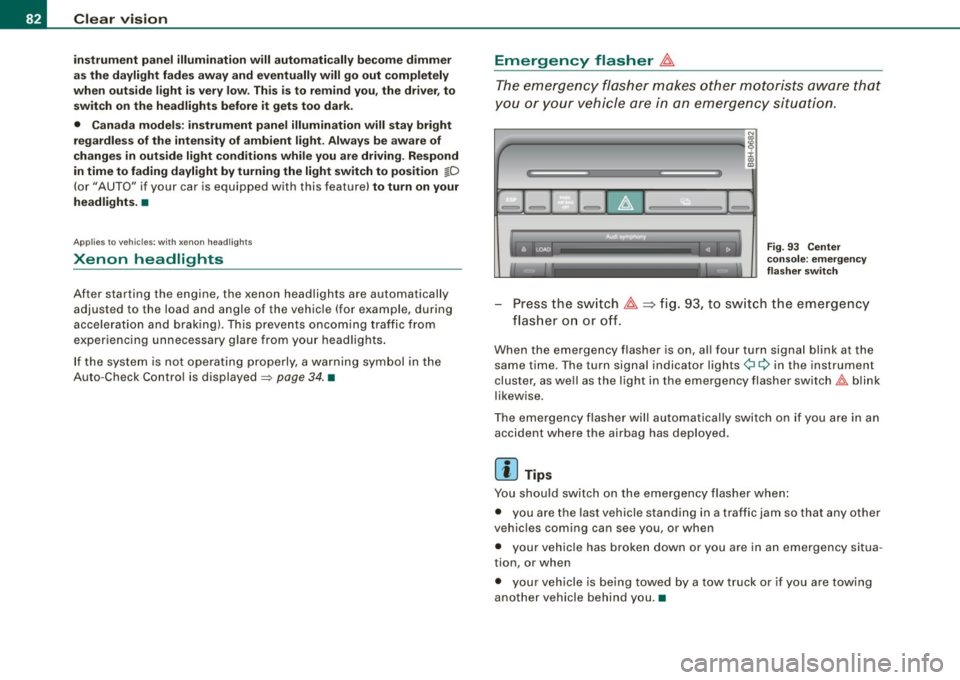
The emergency flasher makes other mot orists aw are that
y o u or your vehicle are in an emergency situation.
1Jia---------------...,i ij ::c .,
"'
-
Fig. 9 3 Ce nter
cons ole: e mergen cy
fla sher swit ch
Press the sw itch ~~fig . 93, to sw itch the emergency
fl ash er o n or o ff.
When the emergency flasher is on, al l four turn signa l blink at the
same time . The turn signal indicator lights¢¢ in the instrument
cluster, as we ll as the light in the emergency flasher sw itch
t!:;,,. b link
likewise .
The emergency flasher will automatica lly switch on if you are in an
accident where the airbag has deployed .
[ i ] Tips
You should switch on the emergency flasher when :
• you are the last vehicle stand ing in a t raffic jam so that any other
veh ic les coming can see you , or when
• your vehic le has broken down or you are in an emergency situa
tion, or when
• your veh ic le is being towed by a tow truck or if you are towing
another vehicle behind you .•