brake light AUDI A4 CABRIOLET 2009 Owner's Manual
[x] Cancel search | Manufacturer: AUDI, Model Year: 2009, Model line: A4 CABRIOLET, Model: AUDI A4 CABRIOLET 2009Pages: 340, PDF Size: 77.32 MB
Page 136 of 340
....... _T _r_a _ n_ s_m _ i_s _s _i_o _n ______________________________________________________ _
Engage P only when the vehicle is completely stopped=> & in
"Driving the multitronic®" on
page 132
To shift into or out of position P, you must first press and hold the
brake pedal
and then press the release button in the selector lever
handle while moving the selector lever to
P.
R -Reverse
The transmission will automatically select the lowest gear ratio
when you shift into reverse.
Select R only when the vehicle is at a
full stop and the engine is
running at idle speed=>
& in "Driving the multitronic®" on
page 132.
Before you move the selector lever to R, press both, the button in the
handle of the selector lever
and the brake pedal at the same time.
When the ignition is on, the backup lights illuminate when the
selector lever is moved into
R.
N -Neutral
Shift to this position for standing with brakes applied=> page 135.
When the vehicle is stationary or at speeds below 3 mph (5 km/h),
you must always apply the footbrake before and while moving the
lever out of
N.
Do not use N for coasting downhill.
D -Normal driving position for forward
Depending on the load on the engine, vehicle speed and the
dynamic control program, the transmission will select the
optimal
gear ratio.
In certain circumstances it may be advantageous to temporarily
switch to the manual shift program to manually select gear ratios to
match specific driving conditions=>
page 136.
When the vehicle is stationary or at speeds below 3 mph (5 km/h),
you must always apply the footbrake before and while moving the lever to
D out of N.
S -Sport position
Select this position for sportier performance. In this position, the
transmission will not upshift as soon, allowing the vehicle to use the increased power available at higher engine speeds to achieve live
lier acceleration.
When the vehicle is stationary or at speeds below 3 mph (5 km/h),
you must always apply the foot brake before and while moving the
lever to
S out of N.
& WARNING
Read and follow all WARNINGS=> & in "Driving the multitronic®"
on
page 132.
0 Note
Coasting downhill with the transmission in N and the engine not
operating will result in damage to the automatic transmission and
possibly the catalytic converter. •
Page 137 of 340
Transmission -
----------------
Applies to vehi cles : wit h m ultit r o ni c® Con tin uous ly Variab le Tra nsmi ssion (CVTl
Automatic Shift Lock (ASL)
The Automatic Shift Lock safeguards you against acciden
tally shifting into a forward or the reverse gear and
causing the vehicle to move unintentionally.
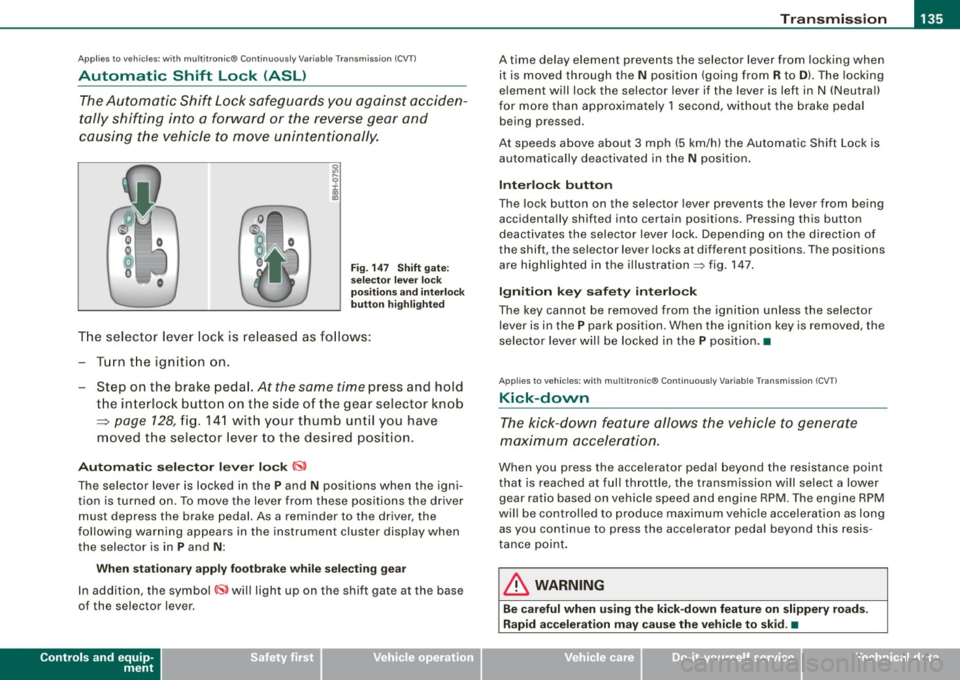
Fig. 147 Shift gate:
selector lever lock
positions and interlock
button highlighted
The selector lever lock is released as follows:
-Turn the ignition on.
- Step on the brake pedal.
At the same time press and hold
the interlock button on the side of the gear selector knob
=> page 128, fig. 141 with your thumb until you have
moved the selector lever to the desired position.
Automatic selector lever lock CS,
The selector lever is lock ed in the P and N positions when the igni
tion is turned on. To move the lever from these positions the driver
must depress the brake pedal. As a reminder to the driver, the
following warning appears in the instrument cluster display when
the selec tor is in
P and N :
When stationary apply footbrake while selecting gear
In addition, the symbol~ will light up on the shift gate at the base
of the selector l ever.
Controls and equip
ment
A time delay element prevents the selector lever from locking when
it is moved through the
N position (going from R to D). The locking
element will lock the selector lever if the lever is left in N (Neutral)
for more than approximately 1 second, without the brake pedal
being p ressed .
At speeds above about 3 mph (5 km/h) the Automatic Shift Lock is
automatically deactivated in the
N position.
Interlock button
The lock button on the selecto r lever prevents the lever from being
acc identally sh ifted into certain positions. Pressing this button
deactivates the selector lever lock. Depending on the direction of
the shift, the sel ector lever locks at different positions . Th e positions
are highlighted in the illustration=> fig. 147.
Ignition key safety interlock
The key cannot be removed from the ignition unless the selector
lever is in the
P park posit ion . Wh en the ignition key is removed , th e
selector lever will be locked in the P position. •
Applies to vehicl es : wit h mu lt itro nic® Co nti nuous ly V ariab le Tra nsmi ssion ( CVTl
Kick-down
The kick-down feature allows the vehicle to generate
maximum acceleration.
Wh en you press the accel erator pedal beyond the res istance point
that is reached at full throttle , the transmission will select a lower
gear ra tio based on veh icle speed and engin e RPM . The eng ine RPM
will be controlled to produce maximum vehicle acceleration as long as you cont inu e to press the accelerator pedal beyond this resis
tance point.
& WARNING
Be careful when using the kick-down feature on slippery roads.
Rapid acceleration may cause the vehicle to skid . •
Page 138 of 340
• .___T_ r_a _n_ s_ m_ is_ s_io _ n ______________________________________________________ _
Applies to vehicles: with mult it ron ic® Contin uously Variable Transm iss io n (CVT )
Dynamic shift program (DSP)
The multitronic® transmission is electronically
controlled .
The transmission selects the appropriate gear ratio (upshifts and
downshiftsl automatically based on preset driving programs .
The transmission will select one of the
economy programs when
you drive at a steady speed or a gradually changing speeds without heavy acceleration. This gives best fuel efficiency, with early
upshifting and delayed downshifting .
The transmission will automatically select th e
sporty shift programs
when you drive at higher speeds, or with heavy acceleration and
fr equ ently changing speeds. Upshifts are d elay ed to make full use
of engine power. Downshifting takes place at higher engine speeds
than in the economy programs .
The selection of the most suitable shift program is a continuous,
automatic process . The driver can also make the transmission
switch to a sporty program by
quickly pressing down the gas pedal.
This causes the transmission to shift down into a lower gear ratio
a n d makes quick acceleration possible (to pass another vehicle) You
do not need to press the gas pedal into the kickdown range. After
the transmission has upshifted, the original prog ram is selected
according to your driving style .
An additional shift program allows the automatic transmission to select the prop er gear for uphill and downhill gradients .
This prevents the transmission from shifting up and down unneces
sarily on hills. The transmission
will shift down to a lower gear ratio
when the driver presses the brake pedal on a downhill gradient . This
makes use of the braking effect of the engine without the need to
shift down manually.
If you are driving in hills and mountains, the transmission will
continuously adjust the g ear ratio to the road grade . If you press the brake pedal when driving downhill, the transmission will downshift
automatically. This increases the braking effect
of the engine.
If the cruise control is on when you are trave.ling downhill, the trans
mission will automatically select a lower gear ratio in order to main
tain the set vehicle speed. This will cause the engine speed to
increase. •
Applies to vehic les: with mult it ro ni c® Continu ous ly Varia ble Trans mission (CVT )
tiptronic ® manual shift program
Using the manual shift program (tiptronic®) you can
manually shift between seven pre -programmed gear
ratios (transmission positions).
I
Fig . 148 Center
console: shifting
manually
Fig. 149 Display:
manual shift program ,
selected gear high-
lighted ._
Page 142 of 340

• .___H_ o_m _ e_ L_ i_ n _k_ ®_R __________________________________________________ _
App lies to vehicles: w ith Homelin k® un ive rsal remote contro l
Programmi ng th e Hom eLink ® transmitt er
The transmitter is programmed in two phases. For rolling
code transmitters, a third phase is also necessary .
Fig. 151 Overhead
console : Homelink®
keypad
Fig.152 Frontbumper,
driver side: location of
transmitter unit
Phase 1: programming the overhead keypad
1. Make sure your vehicle is w ithin operat ing range o f the
remote controlled garage door opener .
2. Set the parking brake=>
& in "General information" on
page 139.
3. Turn the ignit ion on. Do not sta rt the engine! 4. Press and ho
ld the two outside Homelink® buttons
(D
and @for app roximately 20 seconds until indicator
light ©=:> fig.
151 beg ins to flash. Then release both
buttons . Do not hold the buttons for longer than
30
seconds.
This procedure only needs to be performed
once. It
erases the factory-set default codes and does not have to
be repeated to program additional remote controls.
5. Press and hold the Homelink ® button (D, ® or @ until
the indicator light © starts flashing
slowly. Release the
button.
- The system will remain in programming mode for 5
minutes.
Go to the front of the v ehicle and proceed w ith
phase 2.
Phase 2:
programming the bumper mounted transmitter
6. Hold the original remote control at a distance between 0-
6 in. (0-15 cm) from the b umper below the appropriate
headlight for your vehicle => fig.
152 (use the shortest
distance possible) .
7. Aim the remote control just below the
driver side head
lig ht.
8. Press and hold the act ivation button on the remote
control.
- May be different in Canada . If so, press and re-press
(cycle) the activation button on your remote control every
two seconds. -.,
Page 215 of 340

The direction in which the driver wishes to travel is determined with
the aid of the steering angle and vehicle speed and is continua lly
compared with the actual behavior of the vehicle. If the two do not
match, -for example, when the vehicle starts hydrop laning on a
wet road -, ESP will automatical ly brake the appropriate wheel to
correct the problem.
The veh icle is then stabi lized by the forces act ing on the whee l
during braking. If the vehicle is oversteering (rear tends to skid out
of the turn), the brakes are mainly app lied on the whee l that is on
the outside of the curve. In the case of a vehicle that is understeering
(tendency to s lide out of the curve), the brakes are applied at the
rear wheel that is on the inside of the curve . An acoustic signal indi
cates when ESP brake application cuts in =>
&.
The system operates across the entire speed range in combinat ion
with the ABS system => page 216 . If the Anti -Lock Brake System
(ABS) malfunctions, the ESP wi ll be out of act ion as well.
Activa tion
When you turn on the engine, ESP w ill automatica lly be activated
and will perform a self -test .
The system can be activated o r deactivated by pressing the butto n
=> page 212, fig . 190 . The warning light comes on when the system
is switched off .
Normally, the ESP should a lways be on, however, it may be advanta
geous to turn off the system in certain specia l cases when some
degree o f wheel spin is desired such as :
• when driving with snow chains
• when driving in deep snow or on a loose surface (to allow the
whee ls to dig in to reach firm ground)
• when trying to "rock" the vehicle free whe n it has become stuck .
The system shou ld be reactivated once you are no longer in such
situations.
Both , the ABS and EDL systems are still functioning even if the ESP
is switched off .
Controls and equip
ment Safety first Vehicle operation
Int
ellig ent tec hnol ogy
& WARNING
The Ele ctron ic Stab ilization Program is neve rth ele ss s ubje ct to th e
law s of phy sic s. It is p art icularly important to pay at tent ion to thi s
f ac t on wet and slipper y ro ad s. It i s therefore important th at yo u
alway s adapt your driving to the condition of the road and traffic
c onditio ns. Do not allo w the in crea sed safety prov ided by t he Ele c
tronic Stabilization Program sy stem to lull you into a ccepting
addition al safety ri sk s.
• Plea se note that when ESP i s deactivated , the drive wheel s can
s pin on icy and slippery ro ads a nd the vehi cle can break away -
d anger of skidding ! C
E lectronic differential lock CEDL)
The electronic differential lock monitors the rotational
speed of the drive wheels.
Gener al notes
The electronic differential lock (EDU helps the car to start moving,
accelerate and c limb a gradien t on surfaces providing poor or
a lmost no grip . Without EDL, this would be difficult , if not impos
sible.
How the syst em works
The EDL operates automat ical ly . It monito rs the rotationa l speed of
the drive whee ls on an axle with the he lp of the ABS sensors
=> page 216 . If a noticeable difference in rotational speed between
the drive wheels on one axle is de tected (e.g. on slippery grou nd on
one side), the spinning wheel is braked, thereby transferring power
to the other drive wheel or wheels (a ll -whee l drive) . This is done up
to a speed of about 60 mph ( 100 km/h). Noises from the brake
system signal that wheel spin is being control led.
~
Vehicle care Do-it-yourself service Technical data
Page 216 of 340
___ ln_ te_ ll..,,ig ..,_ e_ n_t _t_ e_ c_ h _ n_o _ l_o _,.g= y,_ __________________________________________ _
Driving off
When driving off, always be sure to keep road conditions in mind as
you accelerate. If one drive wheel spins because it is on a surface
with less grip, gradually increase the pressure on the accelerator
pedal until the car starts to move. The wheel less able to transfer
power spins.
Overheating of brakes
To prevent the disc brake of the braked wheel from overheating if
subjected to excessive loads, the EDL cuts out temporarily. The
vehicle remains operational and behaves in the same way as a
vehicle without EDL.
As soon as the brake has cooled down, EDL switches on again auto matically.
& WARNING
• When accelerating on slippery surfaces, such as on ice or snow,
always be careful when depressing the accelerator pedal. Even
with the EDL working, the drive wheels can spin and reduce your ability to control your car. -Risk of crash!
• The increased safety afforded by EDL does not mean that you
can take safety risks. Always adapt your driving style to the road
conditions and traffic situation.
[ i] Tips
If a fault occurs in the ABS, the EDL is also not functioning. This is
indicated by the ABS warning light=>
page 20. •
Anti-Slip Regulation System (ASR)
The Anti-Slip Regulation System prevents the driven
wheels from spinning when the car is accelerating.
General notes
The Anti-Slip Regulation System (ASR) is integrated in the electronic
stabilization program (ESP). When the vehicle starts up and acceler
ates, the wheels are prevented from spinning by adjusting the
engine power to match the amount of grip available from the road
surface.
How the system works
ASR performs automatically, i.e. without the driver's intervention.
With the aid of the ABS sensors=>
page 276, ASR monitors the
speed of the driven wheels. If the wheels start to spin, the engine
power is reduced automatically until the tires find enough grip to
lock onto the road surface. The system is active across the entire
speed range.
Th e ASR works in conjunction with the ABS. If a malfunction should
occur in the ABS, the ASR will also be out of action.
& WARNING
The increased safety afforded by ASR does not mean that you can
take safety risks. Always adapt your driving style to the road
conditions and traffic situation.
[ i] Tips
To ensure that the ASR works properly, all four wheels must be fitted
with identical tires Any differences in rolling radius of the tires can
cause the system to reduce engine power when this is not desired.
S ee also =>
page 279, "New tires and replacing tires and wheels". •
Page 218 of 340
___ ln_ te_ ll..,,ig ..,_ e_ n_t _t_ e_ c_ h _ n_o _ l_o _,.g= y,_ __________________________________________ _
& WARNING (continued)
• Do not "ride the brakes" by resting your foot on the pedal when
you do not intend to brake. This may cause the brakes to overheat, premature wear and increased stopping distance.
• Under certain climatic and operating conditions such as
passing through water, driving in heavy rain or after washing the
vehicle, the effectiveness of the brakes can be reduced. In winter,
ice can accumulate on the brake pads, linings, discs and drums .
Cautiously apply brakes for a test. Brakes will dry and ice coatings
will be cleaned off after a few cautious brake applications .
• Driving for an extended period of time on salt-covered roads
without using your brakes can also affect braking efficiency. Clean
off accumulated salt coating from brake discs and pads with a few
cautious brake applications.
• If you damage the front spoiler, or if you install a different
spoiler, be sure the air flow to the front brakes is not obstructed.
Otherwise the brake system could overheat reducing the effective
ness of the entire brake system.
• Failure of one brake circuit will impair the braking capability
resulting in an increased stopping distance. Avoid driving the
vehicle and have it towed to the nearest Audi dealer or qualified
workshop. u
Brake booster
The brake booster adds extra braking power.
The brake booster works with vacuum pressure which is created
only when the engine is running~ &.
& WARNING
• Never let the vehicle roll to a stop with the engine shut off.
• If the brake booster is not working, for example when towing
your vehicle, or because the brake booster has somehow been
& WARNING (continued)
damaged, the brake pedal must be pressed considerably harder to
make up for the lack of booster assistance. •
Functioning of Anti-Lock Brake System (ABS)
ABS prevents the wheels from locking up under braking.
The ABS contributes effectively to vehicle control since it prevents
the wheels from
locking when the brakes are applied. This means
that the vehicle remains steerable and is less likely to skid.
With ABS you do not need to pump the brake. Just hold the brake
pedal down.
However , do not expect that the ABS shortens braking distance
under
all circumstances. When driving on gravel or on newly fallen
snow on top of icy surfaces, braking distance may be even longer,
therefore, under these circumstances, it is especially important that
you drive slowly and with great care.
How the ABS system works
An automatic check is made when a speed of about 4 mph (6 km/h)
is reached. When this happens, a pumping noise can be heard.
If an individual wheel begins to rotate too slowly in relation to
vehicle speed and tends to lock, the ABS automatically reduces brake pressure to prevent that wheel from locking.
This automatic adjustment process will cause a
slight vibration of
the brake pedal and some noises to alert you that vehicle speed
must be adapted to existing road and traffic conditions.
& WARNING
Although the ABS is very effective, always remember that braking
capability is limited by tire traction . Always adjust your driving
speed according to the road and traffic conditions. Do not let the .,_
Page 219 of 340

& WARNING (c ont in u ed)
ext ra sa fe ty a fforded by the ABS tempt you into t ak in g ex tr a risks .
The ABS cannot overco me th e law s of ph ysics.
[ i J Tips
• If ABS is not funct ioning properly, a warning light will come on.
See
=> page 20.
• If a fau lt occurs in the ABS, the EDL is also not funct ion ing . This
is indicated by the ABS warning light.
Brake assistant
T he brake assistant is designed to achieve the optimum
braking effect.
The brake assistant helps to increase the effective braking power
and thus to achieve a shorter stopping distance . If the driver
presses the brake pedal very quick ly, the brake assistant automati
cally boosts the braking force to the maximum level, up to the point
where the anti -lock brake function (ABS) intervenes to stop the
wheels from locking. You should then keep the brake pedal pressed until the vehicle has braked to the required speed. The brake assis
tant switches itself off as soon as you re lease the brake peda l.
The brake assistant will not be operative if there is a malfunction in
the ABS .
& WARNING
Please remembe r that the accident risk always in cre a se s if you
dri ve to o fa st, e spe cially in cor ner s o r on a slipp ery road , or if you
follow th e vehicle ahead of you too clos ely. An increased a ccident
ri sk ca nnot be comp en sa ted even b y the brake assista nt , s o
alwa ys maintain a safe spe ed . •
Controls and equip ment Safety first Vehicle operation
Int
ellig ent tec hnol ogy
Servotronic® -advanced power
steering system
The power steering systems uses the power of the
running engine to allow precise steering with little effort.
The advanced Servotronic ® power steering system senses the road
speed and electronically adjusts power assistance to provide
comfortab le and safe steering response exactly matched to the
vehicle speed.
Power steering will not work if the engine is off. As a result, the
steering whee l wil l be hard to turn .
The power steering fluid level is checked during the schedu led
maintenance services.
0 Note
If there is an electronic ma lfunction, servotronic will still function
like a conventional power steer ing system, providing a constant
steering support force that is no longer proportionate to the vehicle
speed. This is most noticeable when tu rning the steering whee l at
low speeds (for examp le when parking), -more effort wil l be
requi red than usual.
• Be aware of the different than usual steering response and
adjust you r steering force accordingly .
• Have the problem checked and set right by an Audi dealer as
soon as possible .
[ i J Tips
• When the engi ne is running, never hold the steering whee l
turned all the way to the right or to the left for longer than 15
seconds. The power steering pu mp will overheat the hydraulic fluid
if you keep holding the steering wheel turned a ll the way. This is
likely to damage the power stee ring system.
~
Vehicle care Do-it-yourself service Technical data
Page 223 of 340

- Lack of proper maintenance as wel l as improper use of the
vehic le wi ll impair the function of the emission control system
and could lead to damage.
'£> For the sake of the environm ent
Even when the Emission Control System is operating properly, the
exhaust gas can have a su lfur -like exhaust gas sme ll under some
operating states. This depends on the sulfur content of the fuel
being used. Using a different brand of fue l may help, or filling the
tank with lead-free super grade gasoline. •
Avoid damaging the vehicle
When you are driving on poor roads, or over curbs, steep ramps,
etc., make certain that low- lying parts such as spoilers and exhaust
system parts do not bottom out and get damaged.
This is especially true for vehicles with low -slung chassis (sports
chassis)* and fully loaded vehicles.
a
Operate your vehicle economically
and minimize pollution
General
Your personal style of driving will determine the economy
of your vehicle, as well as exhaust and noise levels.
Fuel economy, environmental impact, and wear on your engine,
brakes and tires largely depend on three factors:
• your personal driving style
• operating cond itions
• technica l limitat ions
Controls and equip
ment Safety first Vehicle operation
Driving
and environm ent
If you anticipate what you need to do next and drive economica lly,
you can easily cut your fuel consumpt ion by 10 -15 percent . This
section wil l give you some tips on how you can help the environ
ment and your pocketbook.
[ i ] Tips
The consumption est imates as published by ENV IRONMENTAL
PROTECTION AGENCY (EPA) and Transport Canada may not corre
spond to your actua l consumption on the road, which will vary
depending upon vehicle load and speed, road and weather condi
tions, trip length, etc. •
Drive smoothly and keep a lookout ahead
Vehicles use the most fuel when they ore accelerating .
-Avoid unnecessary accelerating and brak ing.
Vehicles use the most fue l when they are accelerating . If you antici
pate what is going to happen next, you wi ll need to brake less and,
thus, acce lerate less. Let the vehicle coast whenever possib le - for
examp le when you see that the next traffic light is red. •
Avoid full throttle
Driving at moderate speeds saves fuel and improves your
mileage.
-Try and keep well below your car's maximum speed.
Acce lerating gently reduces fuel consumption, engine wear, and
does not disturb the environment.
Fue l consumption, exhaust emissions and engine noise increase
disproportionately at high speeds . If you drive at approximately
three quarters of top speed, fuel consumption wil l be reduced by •
Vehicle care Do-it-yourself service Technical data
Page 226 of 340
___ T_ r _a_ il_e _r_ t_ o_ vv_ in__... g,_ __________________________________________________ _
Trailer towing
Driving with a trailer
General information
Your Audi was designed primarily for passenger transpor
tation.
If you plan to tow a trailer, please remember that the additional load
will affect durability, economy and performance.
Trailer towing not on ly p laces more stress on the vehicle, it a lso calls
for more concentration from the driver.
For this reasons, always fo llow the operating and driving instruc
tions provided and use common sense. •
Technical requirements
Trailer hitch
Use a weight -carrying hitch conforming to the gross trailer weight.
The hitch must be suitab le for your veh ic le and tra iler and must be
mounted securely on the vehicle's chass is at a technically sound
l ocation. Use only a trailer hitch with removable bal l mount. A lways
check with the trailer hitch manufacturer to make sure that you are
using the correct hitch .
Do not u se a bumper hit ch .
The hitch must be installed in such a way that it does not interfere
with the impact-absorbing bumper system . No modifications
should be made to the vehicle exhaust and brake systems . From
time to time, check that all hitch mount ing bo lts re main securely
fastened.
When you are not towing a trai ler, remove the trailer hitch ball
mount. This prevents the hitch from causing damage shou ld your
vehic le be struck from behind
=:, & .
Tire pre ssur e
When towing a trailer, inflate the tires of your vehic le to the cold tire
pressure listed under "Full load"on the s ticker on the right door
jamb . Inflate trai ler tires to trai ler and tire manufacturers' specifica
tions.
Lights
The head ligh t sett ings should be checked with the trai ler attached
before driving off. Have the head lights adjusted as necessary so
that you can see the road ahead but not blind oncoming traffic.
Check to make sure both vehicle and trailer lights are working prop
erly .
Engine cooling sy stem
Towing a trailer makes the engine work harder. It is important tha t
the cooling system's performance stands up to the additional
strain. Make sure that the coo ling sys tem has enough fluid .
Trailer brakes
If your traile r is equipped wi th a braking system, check to be sure
that it conforms to all regu lations .
The trailer hydraul ic brake system must not be direct ly connected to
the vehic le's hydraulic brake system .
Safety chains
Be sure trailer safety chains are properly connected from the trai ler
to the hitch on the vehicle. Leave enough slack in the chains to
permit turning corners. When you install safety chains, make sure
they will not drag on the road when you are driving.
The chains shou ld cross under the trailer tongue to prevent it from
dropping in case of separation from the hitch.
~