check engine light AUDI A4 SEDAN 2013 User Guide
[x] Cancel search | Manufacturer: AUDI, Model Year: 2013, Model line: A4 SEDAN, Model: AUDI A4 SEDAN 2013Pages: 294, PDF Size: 73.71 MB
Page 32 of 294
30 Driver information display
the approp riate service on your vehicle. You
a lso have the possibility to reset the oil
change schedule after having performed an
oil change according to Audi specifications.
Select
I CAR I function button > Service interval
display > Reset oil change interval
or ICARI
function button> Car systems control button
> Servicing & checks > Reset oil change inter
val.
(CT;) Note
If you disconnect the battery terminals, no
calculations can be made for the service
interva l display during this time and no
service reminder will appear. Remember
that observing the proper serv ice interva ls
is vitally important to extending the life of
your vehicle, particularly the engine, and
maintaining its value. Even if the mileage
driven is low, the maximum period of one
year from one serv ice to the next must not
be exceeded.
@ Tips
-Do not reset the display between oil
changes, otherw ise the display will be in
correct.
- The information in the Service Reminder
remains stored even when the vehicle
battery is disconnected.
On-Board Diagnostic
system (OBD)
Malfunction Indicator Lamp (MIL)
The Malfunction Indicator Lamp (MIL) II in
the instrument cluster is part of the On-Board
Diagnostic (OBD II) system.
The warning/indicator light illuminates when
the ignition is switched on and goes out after
the engine starts and the idle has stabi lized .
This indicates that the MIL is working proper
l y.
If the light does not go out after the engine
is started, or illuminates while you are driv
ing, a malfunction may exist in the engine sys- tern.
If the
light illuminates, the catalytic con
verter could be damaged.
Continue driving
with reduced power (avoid
ing sustained high speeds and/or rapid accel
erations) and have the condition corrected.
Contact your authorized Audi dea ler.
If the light illuminates, the electronic speed
limiter may also be malfunct ioning. For more
information
q page 31, El ectronic speed
limiter .
An improperly closed fuel filler cap may also
cause the MIL light to illuminate
~page 212.
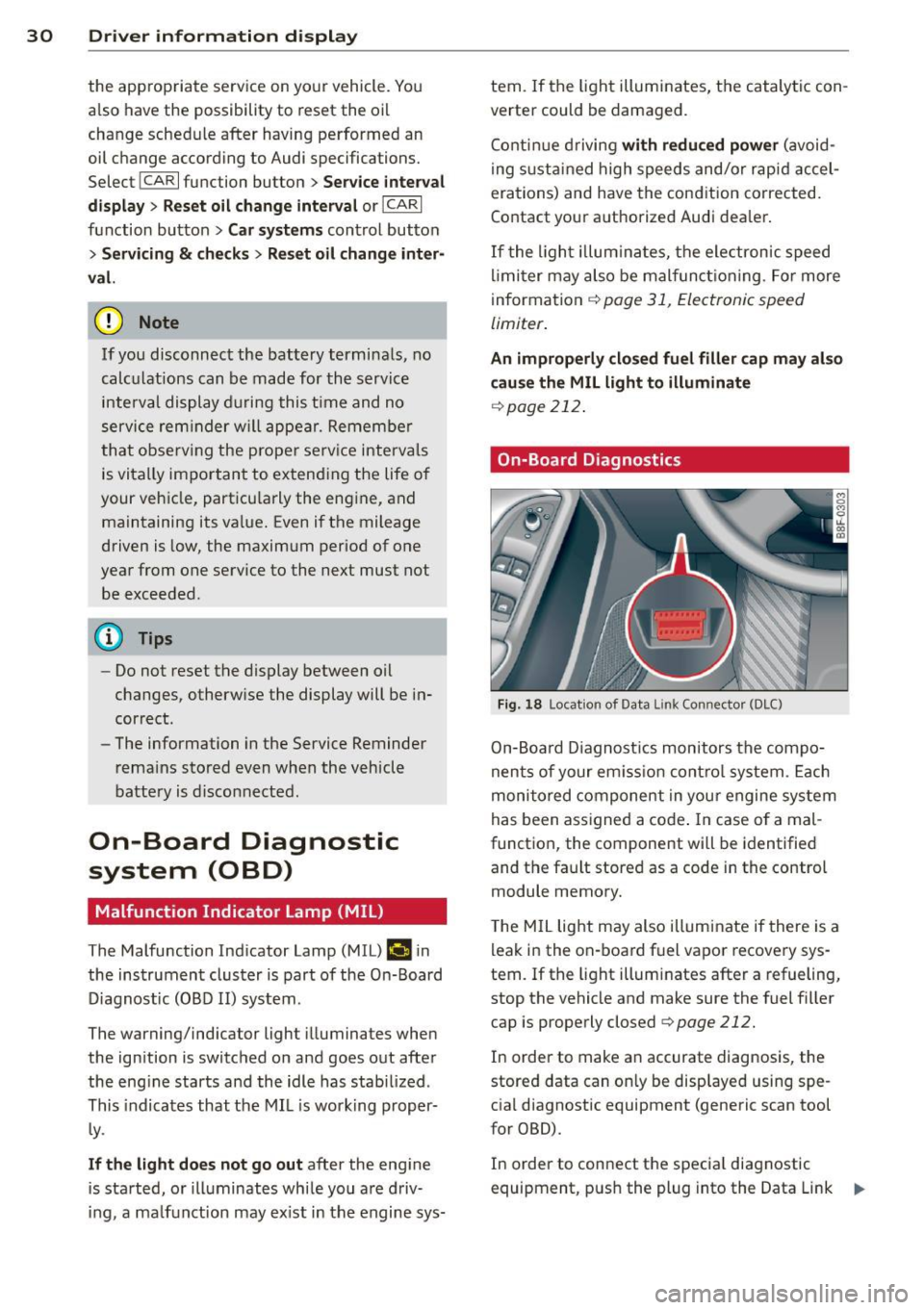
On-Board Diagnostics
Fig. 18 Locat ion of Data L ink Connector (DLC)
On-Board Diagnostics monitors the compo
nents of your em ission control system . Each
monitored component in your engine system
has been assigned a code . In case o f a mal
function, the component will be identified
and the fault stored as a code in the control
module memory.
T he MIL light may also illuminate if there is a
leak in the on-board fuel vapor recovery sys
tem.
If the light illuminates after a refueling,
stop the vehicle and make sure the fuel filler
cap is properly closed
q page 212.
In order to make an accurate diagnosis, the
stored data can on ly be displayed using spe
cial diagnostic equipment (generic scan tool
for OBD).
In order to connect the special diagnostic
equipment, push the plug into the Data Link ..,.
Page 36 of 294
34 Openin g and clo sing
keys. Unguarded access to the keys pro
vides children the opportunity to start the engine and/or act ivate vehicle sys
tems such as the power w indows etc . Un
supervised operation of any veh icle sys
tem by ch ildren can res ult in serious in
Jury.
- Do not remove the key from the ignition
lock until the vehicle has come to a com
plete stop. Otherwise the steering col
um n loc k co uld suddenly e ngage -caus
ing the risk of an accident.
@ Tips
- The operation of the remote contro l key
c a n be tempo rarily disrupted by in terfer
ence from tran smi tters in t he v ici nity of
the veh icle work ing in the same frequen
cy ra nge (e.g . a ce ll phone, radio equip
ment).
- Fo r security reasons, replacement keys
are on ly available from Aud i dea le rs .
- Fo r De clarat ion o f Compliance to United
States FCC and Industry Canada regu la
tions
¢ page 275.
Removing the mechanical key
Fig . 20 Remot e ma ste r key: re mov ing the mec hanic al
key
.. Press the release button @¢ fig. 20.
.. Pu ll the mecha nical key @ out of the mas
te r key .
Using the mechan ica l key, you can :
- l ock and unlock* the glove compartmen t on
the passenger's side ¢
page 61 .
-lock and unlock t he lockable* rear bench
seat and pass-through* ¢
page 64. -
activate the child sa fety locks on the rear
doors ¢
page 40.
- lock and unlock the vehicle manua lly
~ page 3 7 if this should not be possible
w ith the master key.
- use t he ignition key emergency release
~ page 35.
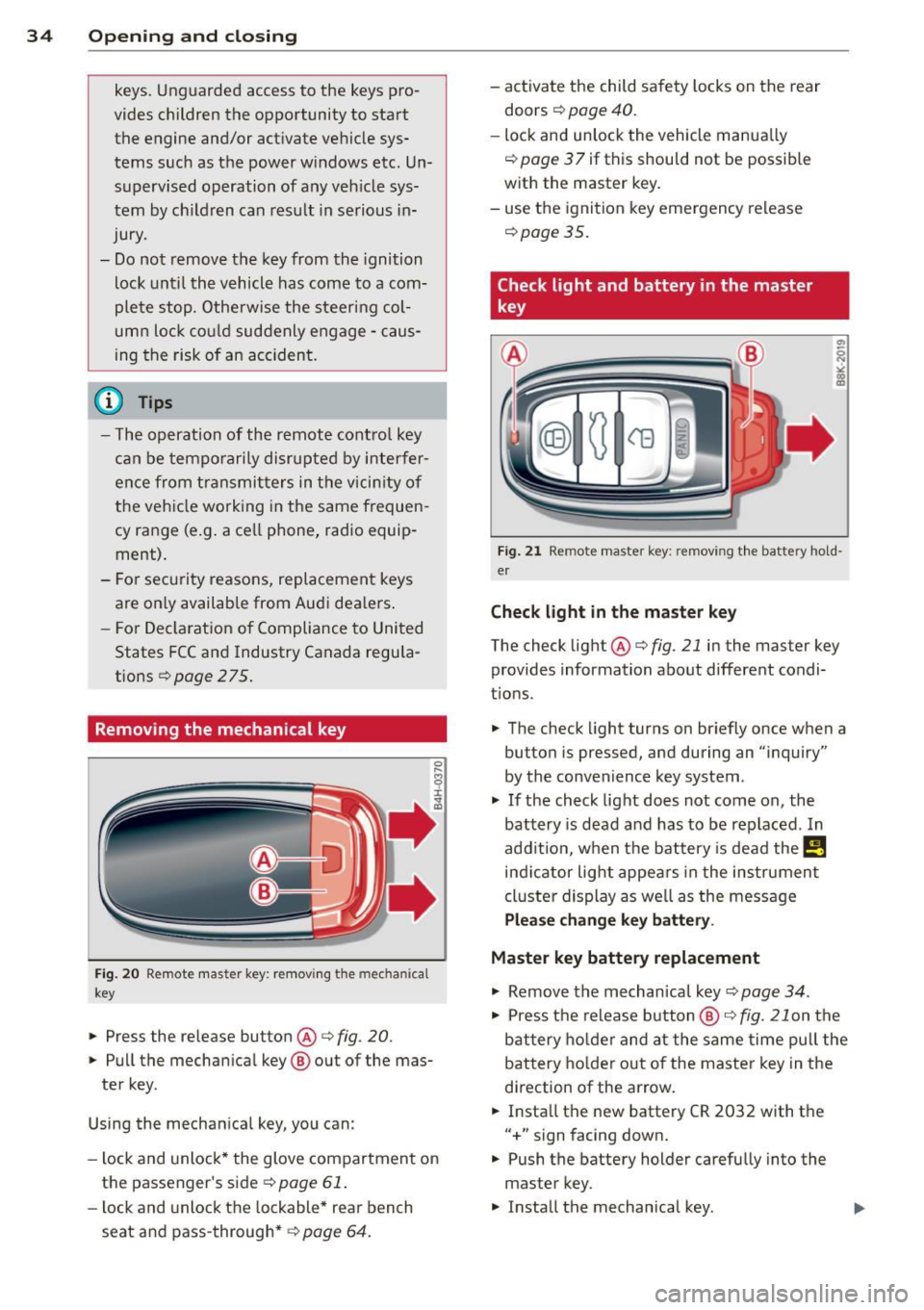
Check light and battery in the master
key
Fig. 21 Rem ote mas ter key: re m ov ing th e ba ttery h old
e r
Check light in the ma ster key
The check light@¢ fig. 21 in the mas ter key
provides information about different condi
t ions .
.. The check light turns on br iefly once when a
button is pressed, and during an "inquiry"
by the convenience key system .
.,. If the check light does not come on, the
battery is dead and has to be replaced . In
add it io n, w hen t he battery is dead
the m
indicator light appea rs in the instrument
cl uster display as we ll as the message
Please change key battery .
Master key battery replacement
.,. Remove the m echan ical key ~ page 34.
.,. Press t he release button @~
fig. 21 on the
b attery ho lde r and at the same time pull the
battery holder o ut o f the master key in the
direction of the arrow .
.. Insta ll the new battery CR 2032 with the
"+ " sign facing down.
.. Push the battery holder carefully into the
master key .
.. Insta ll the mechanical key .
Page 43 of 294
Opening th e windows
"' Press the switch to the firs t stop and hold it
until the window reaches the desi red posi
tion.
"' Press the switch briefly to the se cond stop
to automatically open the window .
Cl os ing th e windows
"' Pull the swi tch to the first sto p and hold it
until the window reaches the desi red posi
tion .
"' Pu ll the switch brief ly to the sec on d st op to
automatica lly close the window.
P ow er w ind ow switch es
@ Driver's door
@ Passenger's door
© Left rea r door
@ R ight rear door
® Safety button
Child safety loc ks
When the safety button® is pressed
c::> fig. 32, the ~ symbol in the button lights
up . The power w indow switches in the rear
doors are switched off.
A WARNING
- When you leave your veh icle - even if on
ly briefly - always remove the ign ition
key. This applies part icularly when chil
dren remain in the vehicle. Otherw ise the
children cou ld s tart the engine or oper
ate e lectr ica l equipment (e.g . power win
dows). The power windows a re f unction
al until the driver's door or passenger's
door has been opened.
- Pay close attention when closing the win
dows to prevent pinching of hands or
limbs.
- When locking the vehicle from outside,
the vehicle must be unoccupied s ince the
windows can no longer be opened in an
emergency.
Opening and clo sin g 41
(D Tips
After the ignition has been switched off,
the w indows can still be opened or closed
for about 10 minutes. The power windows
are not switched off until the driver's door
or passenger's door has been opened .
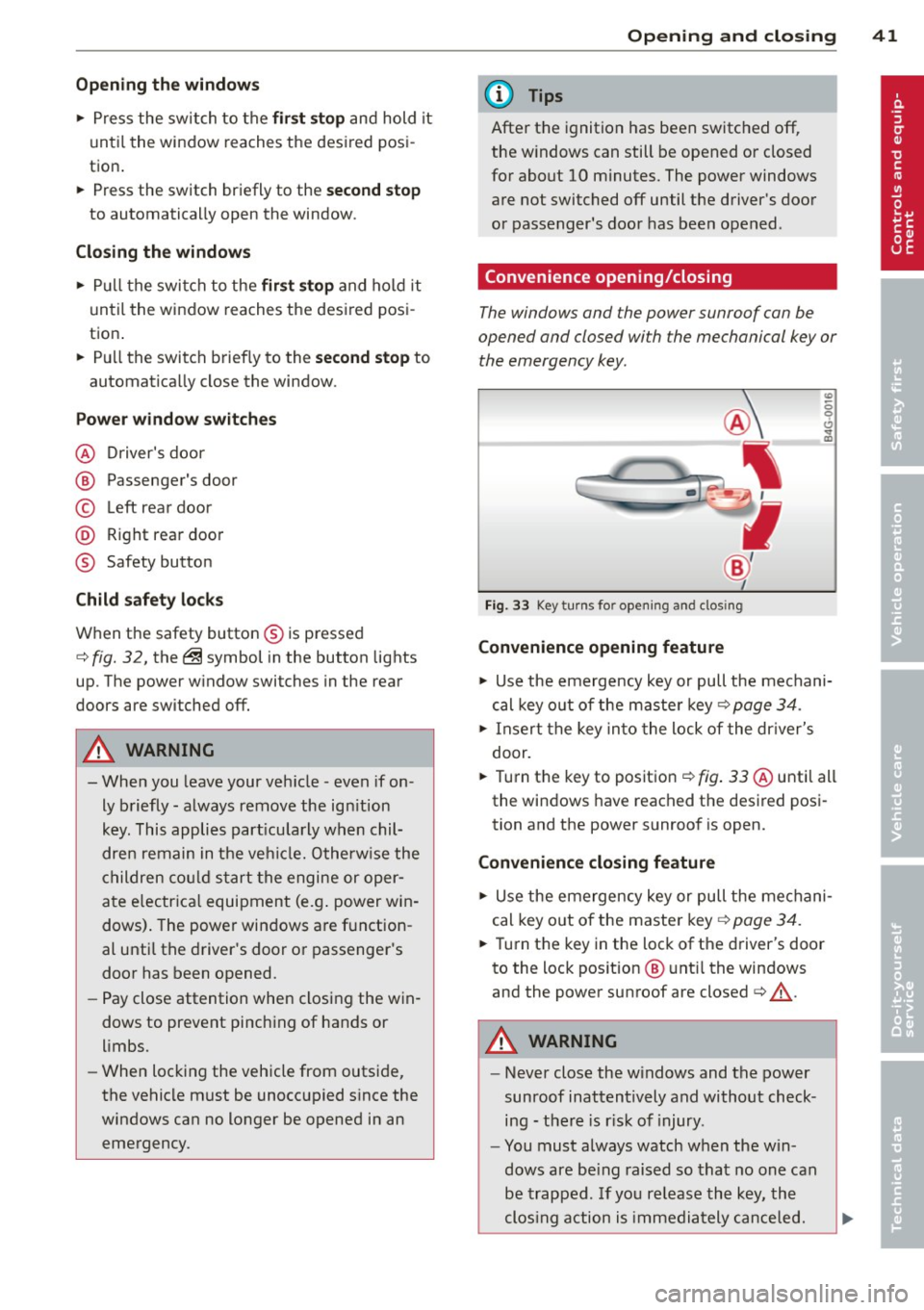
Convenience opening/closing
The windows and the power sunroof can be
opened and closed with the mechanical key or the emergency key.
Fig. 33 Key turns for opening and clos ing
Convenience opening feature
"' -0 0 t!, ., a,
"' Use the emergency key or pull the mechani
cal key out of the maste r key
c:? page 34.
"' Insert the key into the lock of the dr iver's
door.
"' Turn the key to position¢
fig. 33 @until all
the windows have reached the desired posi
tion and the power sunroof is open.
Convenience clo sing f eature
"' Use the emergency key or pull the mechani
cal key out of the master key¢
page 34.
"' Turn the key in the lock of the driver's door
to the lock position @ unt il the windows
and the power sunroof are closed¢
A.
A WARNING
- Never close the w indows and the power
sunroof inattentively and without check ing - there is r isk of injury.
- You must always watch when the win
dows are be ing raised so that no one can
be trapped. If you re lease the key, the
clos ing action is immediately canceled.
Page 87 of 294
necessary to keep the vehicle from
rolling.
- If the selector lever is unintentionally
moved into N while you are driving, take
your foot
off the accelerator pedal and
wait for the engine to return to idle
speed before selecting a driving position .
- Never shift into R or P when the vehicle is
in motion .
- Never get out of the driver's seat when
the engine is running.
- If you must get out of the vehicle, move
the selector lever securely into the P po
sit ion and apply the parking brake firmly.
- If the engine must remain running, never
have any driving position engaged when
checking under the hood . Make sure the
selector lever has securely engaged and
is locked in P with the parking brake
firmly set ¢
page 208, Engine compart
ment.
Otherwise, any increase in engine
speed may set the vehicle in motion,
even with the parking brake applied.
(D Tips
For safety reasons, the parking brake is re
leased automatically only when the driv
er 's safety belt is engaged in the buckle.
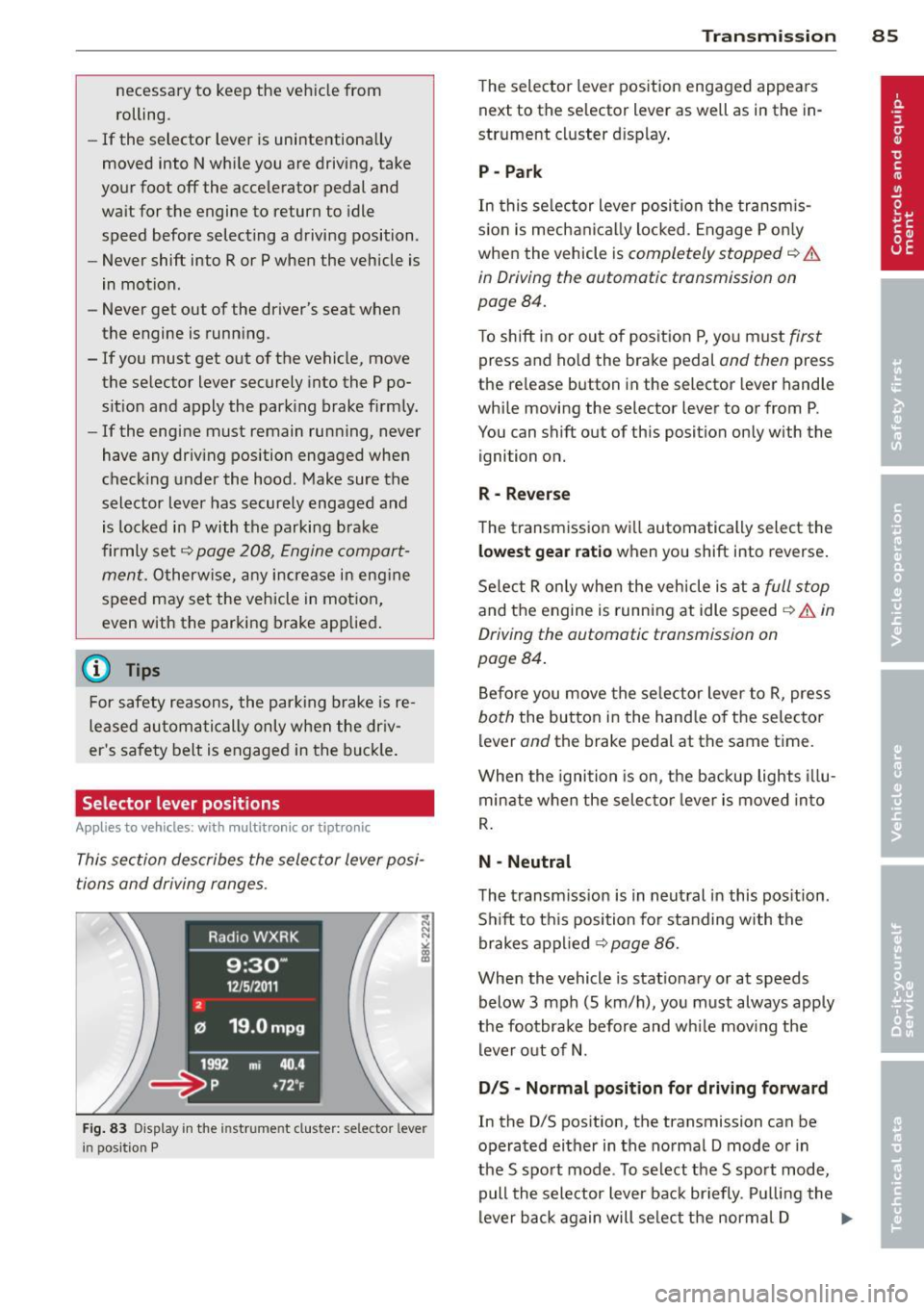
Selector lever positions
Applies to vehicles: with multit ronic or tiptronic
This section describes the selector lever posi
tions and driving ranges .
2
Radio WXRK
9:30-
12/5/2 011
121 19 .0mpg
1992 mi 40 .4
~= ~p +7 2~
Fig. 83 Display in the in str um ent cluste r: selecto r leve r
i n positi on P
Transmission 85
The selector lever position engaged appears
next to the selector lever as well as in the in
strument cluster display .
P -Park
In this selector lever position the transmis
s ion is mechanically locked. Engage P only
when the vehicle is
completely stopped ¢ &
in Driving the automatic transmission on
page 84.
T o shift in or out of position P, you must first
press and hold the brake pedal and then press
the re lease button in the selector lever handle
while moving the selecto r lever to or from P.
You can shift out of this position only with the
ignition on.
R- Reverse
The transmission will automatically select the
lowest gear ratio when you shift into reverse.
Select R only when the vehicle is at a
full stop
and the engine is running at idle speed ¢ & in
Driving the automatic transmission on
page 84.
Before you move the selector lever to R, press
both the button in the handle of the selector
lever
and the brake pedal at the same time .
When the ignition is on, the backup lights illu
minate when the selector lever is moved into
R.
N -Neutral
The transmission is in neutral in this position.
Shift to th is position for standing with the
brakes applied ¢
page 86.
When the vehicle is stationary or at speeds
below 3 mph (S km/h), you must always apply
the footbrake before and while mov ing the
lever out of N.
D /S -Normal position for driving forward
In the D/S pos ition, the transmission can be
operated either in the normal D mode or in
the S sport mode . To select the S sport mode,
pull the selector lever back briefly . Pulling the
lever back again will se lect the normal D ...,
Page 123 of 294
Homelink®
Universal remote
control
Description
Appl ies to vehicles: with Horne Link
The Homelink universal remote control can
be programmed with the remo te control for
devices that are already present.
With Home Link, you can control devices such
as the garage door, security systems, house
l ights , etc. comfortab ly from the inside of you
veh icle .
H ome Link ma kes it possible for you to rep lace
three differen t remote controls from dev ices
in your home with one universal remote. This
feature works for most garage door and exte
rior door motor signals. Programming the in
dividual remote control for your remote con
trol takes p lace near the center of the radiator
grille. There is a control module attached at
this location .
A one-t ime programming of the sensor must
be perfo rmed before you are able to use sys
t ems w ith Homelink. If the system does not
activate after performing the one-t ime pro
gramming, check whether the system uses a rolling codec:>
page 124 for veh icles without
the M MI*.
_& WARNING
- Never use the Homelink ® transmi tte r
with any garage door opener that does have not the sa fety stop and reverse fea
tu re as req uired by federa l safety stand
ards. Th is includes any garage door open
er mode l manufact ured before April 1,
1982.
- A garage door opener which cannot de
tect an object, signaling the door to stop
and reverse does not meet current feder
al safety standards . Us ing a ga rage door
opener without these features increases
risk of serious in ju ry or death.
Homelink ® 121
-For safety reasons never re lease the
parking brake or start the engine while
anyone is standing in front of the vehicle.
- A garage door or an estate gate may
sometimes be set in mot ion when the
Homelink ® remote control is being pro
grammed . If the device is repeatedly ac
tivated, th is can overstrain motor and
damage its e lectrical components -an
overhea ted mo to r i s a fire hazard !
- To avo id possib le injuries or p roperty
damage, please always make abso lutely
certain that no persons o r ob je cts are lo
ca ted in the range of mo tion of any
equi pment being ope rated .
(D Tips
- If you would li ke more information on
H ome link ®, where to purchase the
Home link ® compa tib le produc ts, or
would like to purchase the Homelink ®
Home Lighting Package, please call to ll
free: 1-800-355-3515.
- For Declaration of Compliance to United
States FCC and Ind ustry Canada reg ula
tions c:>
page 275.
Page 189 of 294
Braking
What affects braking efficiency?
New brake pads
During the first 250 miles (400 km), new
brake pads do not possess their full braking
effect, they have to be "broken in" first¢& .
You can compensate for this slightly reduced braking power by pushing harder on the brake
pedal. Avoid heavy braking loads during the
break-in per iod.
Operating conditions and driv ing habits
The brakes on today's automobi les are sti ll
subject to wear, depending largely on operat
ing conditions and driving habits¢.&. . On
vehicles that are e ither driven mostly in stop
and-go city traffic or are driven hard, the
brake pads should be checked by your author
ized Audi dealer more often than specified in
the
Warranty & Maintenance booklet . Failure
to have your b rake pads inspected can result
in red uced brake performance.
On steep slopes, you shou ld use the brak ing
effect of the engine. This way, you p revent un
necessary wear on the brake system.
If you
must use yo ur brakes, do not hold the brakes
down continuously. Pump the brakes at inter
va ls.
Operating noise
Noises may occur when braking depending on
the speed, braking force and outside condi
tions such as temperature and humidity.
Effect of water and road salt
In certain situat ions, for example after driving
through water, in heavy ra in, after overnight
condensation or after washing your car, the
braking effect can be reduced by moisture or
ice on the brake roto rs and brake pads . The
brakes must be dried first with a few careful
brake applications .
A t hi gher speeds and with the windshield w ip
ers turned on, the brake pads press against
the brake rotors for a short amount of time .
This occurs at regular intervals without the
Intelligent technology 187
driver noticing and provides for better brake
response time under wet conditions .
T he effectiveness of the brakes can be red uced
when the vehicle is driven on a sa lt-co vered
road and the b rakes are not used. Likewise,
you clean off accumulated salt coating from
brake discs and pads with a few cautious ap
plications of the brake ¢ & .
Corrosion
There may be a tendency for dirt to build up
on the brake pads and corrosion to form on
the discs if the car is not driven regu larly or
on ly for short trips with litt le use of the
brakes.
If the brakes are not used frequently, or if cor
rosion has formed on the discs, it is advisable
to clean off the pads and discs by braking
firmly a few times from a moderately high
speed ¢.&. .
Faults in the brake system
If you should notice a sudden increase in
brake pedal trave l, then one of the two brake
c ircuits may have failed ¢.&. .
Low brake fluid level
Malfunctions can occur in the brake system if
the brake fluid level is too low. The brake fluid
level is monitored electronica lly.
Brake booster
T he brake booster increases the pressure that
you generate with the brake peda l. It works
only when the engine is runn ing .¢ .&.
Brake lining wear status
Brake lining wear may be checked by visual in
spection of the condition of the brake pads
through the openings in the wheel. If neces
sary, the wheel may be removed fo r this in
spection ¢
page 252, Changing a wheel .
A WARNING
-
- New brake pads don't have the best stop
ping power and must be "broken-in" dur-
ing the initial 100 to 150 miles (150 to
~
•
•
Page 197 of 294
(D Note
Do not leave engine idling unattended af
ter starting . If warning lights should come
on to indicate improper operation, they
would go unheeded. Extended idling also
produces heat, which could result in over
heating or other damage to the vehicle or
other property .
Regular maintenance
A badly tuned engine unnecessarily wastes a
lot of fuel .
.,. Have your vehicle serv iced at regular inter-
vals .
By having your vehicle regularly serviced by an
authori zed Audi dealer helps to ensure that it
runs properly and economically . The condition
of your vehicle not only affects its safety and
ab il ity to hold its value, it also affects
fuel
consumption.
Check your oil each time you fill your tank.
The amount of oil used is related to engine
load and speed.
It is normal for the oil consumption of a new
engine to reach its lowest value after a certain
mileage has been driven.
You must drive your vehicle about 3 ,000 miles
(5,000 kilometers) before you can properly
assess oi l consumption.
This a lso applies to fuel consumption and en
g ine output .
0 Note
-Have your vehicle maintained properly
and in accordance with the service rec
ommendations in your Warranty
& Main
tenance booklet. Lack of proper mainte
nance as well as improper use of the ve
hicle will impair the function of the
emission control system and could lead
to damage.
Driving and environment 195
- Do not alter or remove any component of
the Emission Control System unless ap
proved by the manufacturer .
- Do not alter or remove any device, such
as heat shields, switches, ignition wires,
valves, which are designed to protect
your vehicle's Emission Control System and other important vehicle compo
nents .
Fewer short trips
Fuel consumption will always be rela tively
high on short trips .
.,. Try to avoid driving short distances with a
cold engine.
The engine and cata lytic converter have to
reach their opt imal
operating temperature to
reduce fuel consumpt ion and noxious emis
sions effectively .
Just after starting, a co ld engine in a mid-size
car only achieves a fuel economy of 6-8 miles
per gallon (30-40 l/100 km). After about a
half a mile, fuel economy climbs to 12 mpg
(20 l/100 km) . After about
2 .5 miles (4 km),
the engine is at its proper operat ing tempera
ture and fuel economy has reached a normal
level. So you can see that you should avoid
short trips whenever possible.
T he
outside temperature is also cr itical in th is
regard. Your car consumes more fue l in the
winter than in the summer.
•
•
Page 198 of 294
196 Trailer towing
Trailer towing Driving with a trailer
General information
Your Audi was designed primarily for passen
ger transportation .
If you plan to tow a trai ler, p lease remember
that the additional load will affect durability,
economy and performance .
Trailer towing not on ly places more stress on
the vehicle, it also calls for more concentra
tion from the driver.
For this reason, always fo llow the operating
and driving instructions provided and use
common sense.
Technical requirements
Trailer hitch Use a weight-carrying hitch conforming to the
gross trailer weight. The hitch must be suita
ble for your vehicle and trailer and must be
mounted securely on the veh icle's chassis at a
technically sound location. Use only a trailer
hitch with a removable ball mount. Always
check with the trailer hitch manufacturer to
make sure that you are using the correct
hitch.
Do not use a bumper hitch.
The hitch must be installed in such a way that
it does not interfere with the impact-absorb
ing bumper system . No modifications should
be made to the vehicle exhaust and brake sys
tems . From time to time, check that all hitch
mounting bolts remain securely fastened.
When you are not towing a trailer, remove the
trailer hitch ball mount. This prevents the
hitch from causing damage should your vehi
cle be struck from behind
¢ A.
Trailer brakes
If your tra iler is equipped with a braking sys
tem, check to be sure that it conforms to a ll
regulations . The trailer
hydraulic brake system must not be
direct ly connected to the vehicle's hydraulic
brake system
~ A.
Safety chains
Always use safety chains between your vehicle
and the trai le r.
Trailer lights
T railer lights must meet all regulations. Be
sure to check w ith your authorized Audi dealer
for correct wiring, sw itches, and relays.
Mirrors
If you are unable to see the traffic behind you
using the regular outside mirrors, then you
must install extended mirrors . It is important
that you
always have clear vis io n to the rear.
,8. WARNING
- If a trailer has electrical brakes please
note that these brakes are not activated
by the factory-fitted control unit -risk of
accident!
- Afte r removing the trailer hitch, do not
store it in your vehicle. In case of sudden
braking, the hitch could fly forward and
injure you or your passengers.
Operating instructions
Maximum trailer weight
-
A trailer for your vehicle is limited to a typical
class 1 or class 2 tra iler.
Trailer load distribution Be sure the load in the trailer is held secure ly
in place to prevent it from shifting forward,
backward or sideways.
Never allow a passenger to ride in a trailer
¢ A in Driving instructions on page 197.
Engine cooling system
T owing a trailer makes the engine work hard
er. It is important that the cooling system's
performance is up to the additional load.
Make sure that the cooling system has enough
fluid . .,..
Page 199 of 294
Tire pressure
When towing a trai le r, inflate the t ires of your
vehicle to the co ld tire pressure listed under
"Full load" on the label located on the driver's
side B-pillar (vis ible when the door is open).
Inflate trailer tires to trailer and tire manufac
turers' specifications.
Light s
The headlight settings should be checked with
the trailer attached before driving off. Check
to make sure both vehicle and trai ler lights
are working properly.
Safety chains
Be su re tra iler sa fety chains are properly con
nected from the trailer to the hitch on the ve
hicle. Leave enough slack in the chains to per
mit turning corners . When you install safety
chains, make sure they w ill not drag on the
road when you are driving.
The chains shou ld cross under the trai ler
tongue to prevent it from dropping in case of
separatio n from the hitch .
Driving instructions
Driving with a trailer always requires extra
core and consideration.
To obtain the best possible handling o f vehicle
and trai ler, p lease note the following:
.,. Do not tow a loaded trailer whe n your car it
self is not loaded .
.,. Be especia lly careful when passing other
vehicles .
.,. Observe speed limits .
.,. Do not drive at the maximum permissible
speed .
.,. Always apply brakes ea rly .
.,. Monitor the temperature gauge.
Weight di stribution
Towing a loaded trai ler with an empty car re
sults in a highly unstable distribution of
weight . If this cannot be avo ided, drive at very
low speeds only to avoid the risk of losing
steer ing control.
Trailer towing 197
A "balanced" rig is easier to operate and con
trol. This means that the tow vehicle should be loaded to the extent possible and permissi
ble, while keep ing the trailer as light as possi
ble under the c ircumstances. Whenever poss i
ble, transfer some cargo to the luggage com
partment of the tow vehicle while observing
tongue load requirements and vehicle loading
considerations.
Speed
The higher the speed, the more d iff icult it be
comes for the driver to control the rig . Do not
drive at the maximum permissible speed. Re
duce your speed even more if load, weather or
wind conditions are unfavorable -pa rticularly
when going downhill.
Reduce veh icle speed
immediately if the trail
er shows the slightest s ign of sway ing .
Do not
try to stop the swaying by accelerating.
Observe speed limits . In some areas, speeds
for vehicles tow ing tra ilers are lower than for
regular vehicles .
Always apply brakes early. When driving downh ill, shift into a lower gear to use the en
gine braking effect to slow the vehicle . Use of
the brakes alone can cause them to overheat
and fail.
Coolant temperature
The coolant temperature gauge ¢ page 10
must be observed carefully . If the need le
moves close to the upper end of the scale, re
duce speed immediately and/or turn off the
air conditioner.
If the coolant temperature warning light •
in the instrument cluster starts flashing, pull
off the road, stop and let the engine
idle for
about two minutes to prevent heat build -up .
A WARNING
Anyone not properly restrained in a mov
ing vehicle is at a much greater risk in an
accident . Never let anyone ride in yo ur car
who is not properly wearing the restraints
prov ided by Audi.
-
•
•
Page 210 of 294
208 Cleaning and protection
-Never use chemical solvents (e.g . lighter
fluid, turpentine), waxes, shoe polish or
similar products on the leather surfaces
in your Audi.
- To avoid damage, have stubborn stains removed by a commerc ial cleaning spe
cialist.
Cleaning Alcantara ® (synthetic suede)
App lies to vehicles: with A lcantara® up holstery
Removing dust and dirt
,. Moisten a cloth,
squeeze out excess water
and wipe down the seat surfaces .
Removing stains
,. Moisten a cloth with lukewarm water or
with diluted
ethyl (rubbing) alcohol.
,. Dab at the stain. Start at the outside and
work inwards .
,. Once the stain is no longer visible, use a
soft dry cloth or tissue to soak up the mois
ture.
Do not use leather cleaning products on Al
cantara ®.
You may use a suitable shampoo for removing
dust and dirt.
Dust and grit in the pores and seams can
scratch and damage the surface. If the car is
left standing in the sun for long periods, the
Alcantara ® should be protected against direct
sunlight to prevent it from fading . Slight color
variations will develop in normal use and are
not an indication of material deterioration .
IQ) Note
- Never use chemical solvents (e.g . lighter
fluid, turpentine), waxes, shoe polish or
s imilar products on Alcantara ® surfaces .
- To avoid damage, have stubborn stains
removed by a commerc ial cleaning spe
cialist.
- Do not use brushes, st iff sponges or sim
i larly abrasive cleaning aids . Safety belts
Only well-maintained safety belts work relia
bly when needed
.
,. Keep belts clean.
,. For cleaning, use a mild soap and water sol
ution. Let belts dry thorough ly and away
from d irect sunlight.
,. Do not allow inertia reel safety belts to re
tract before they are completely dry.
,. Check the condition of your safety be lts
reg
ularly.
Heavily soiled safety belts may not retract
properly.
A WARNING
-
Damaged safety belts can break in a crash .
- Anyth ing that might damage your safety
be lts could mean that you and your pas
sengers would not be adequate ly pro
tected in an accident.
- Safety belt performance depends on cor
rect installation. Never remove belts
from the vehicle to clean them.
- Do not use chemical cleaning agents,
bleach or dyes. They have corrosive prop
erties which weaken the webbing.
- When cleaning your safety be lts, inspect
them for damage . If you discover dam
age, see your authorized Audi dealer.
- Always read and heed all WARNINGS and
other information ¢
page 199.
Engine compartment
Be especially careful when cleaning the en
gine compartment.
Always switch off the ignition before clean
ing the engine
c.? .&, .
Plenum panel
Remove leaves from the plenum panel in front
of the windshield under the engine hood. This
prevents the water drai n holes from becoming
blocked, and it prevents debris from entering
the vehicle interior through the heating and
ventilat ion ducts .