fuel AUDI A4 SEDAN 2013 User Guide
[x] Cancel search | Manufacturer: AUDI, Model Year: 2013, Model line: A4 SEDAN, Model: AUDI A4 SEDAN 2013Pages: 294, PDF Size: 73.71 MB
Page 30 of 294
28 Driver information d isplay
• Press the I RESET I button @c:::> page 26,
fig. 11 repeatedly until the efficiency pro
gram appears in the display.
The effic iency program can help you to use
less fuel. It evaluates driving information in
reference to fuel consumption and shows oth
er equipment influencing consumption as well
as shift recommendations. Fuel economy messages c:::>
page 29 prov ide tips for effi
cient driving .
The efficiency program uses distance and con
sumption data from trip computer
1. If the
data are deleted in the eff iciency program,
those values are also reset in trip computer
1.
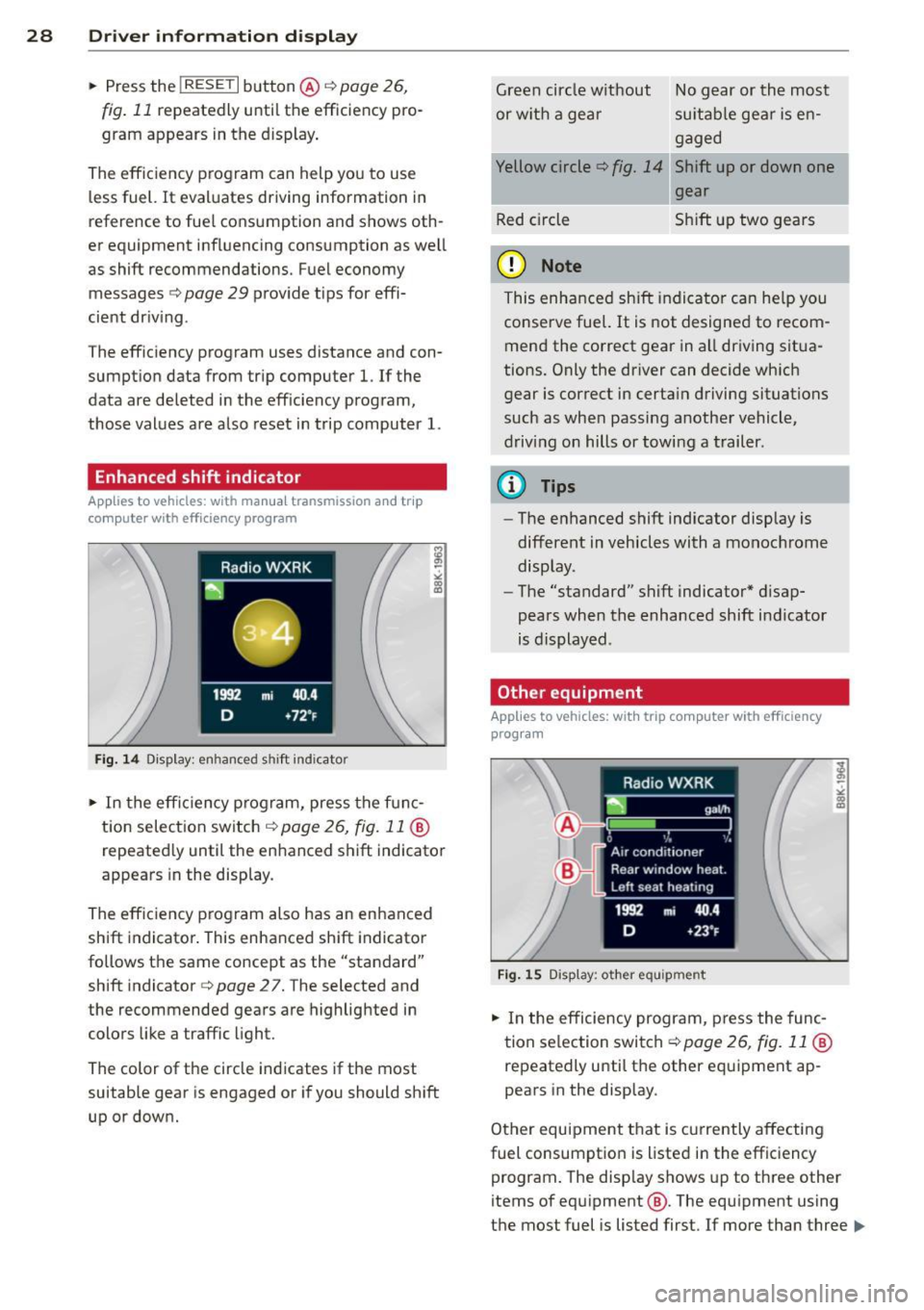
Enhanced shift indicator
Applies to vehicles: with manual transmission and trip
co mpute r with efficiency program
Fig . 14 D is p lay: e nhance d shi ft ind icato r
• In the efficiency program, press the func
tion selection switch c:::>
page 26, fig. 11 @
repeated ly until the enhanced shift indicator
appears in the display.
The effic iency program also has an enhanced
shift indicator. This enhanced shift indicator
follows the same concept as the "standard"
shift indicator
c:::> page 27. The selected and
the recommended gears are highlighted in
colors like a traffic light.
The color of the circle indicates if the most
suitable gear is engaged or if you should shift
up or down. Green
circle w ithout No gear or the most
or w ith a gear su itable gear is en
gaged
Yellow circle
c:::> fig. 14 Shift up or down one
gear
Red circle Shift up two gears
(D Note
This enhanced shift indicator can help you
conserve fuel.
It is not designed to recom
mend the correct gear in all driving situa
tions. Only the driver can decide which
gear is correct in certain driving situations
such as when passing another vehicle,
driving on hills or towing a trailer .
(!) Tips
-The enhanced shift indicator display is
different in vehicles with a monochrome
display .
- The "standard" shift indicator* disap
pears when the-enhanced shift indicator
is displayed .
Other equipment
Applies to vehicles: with trip computer with eff iciency
program
Fig. 15 D isplay : oth er equi pm en t
• In the efficiency program, press the func
tion selection switch ¢
page 26, fig. 11 @
repeatedly until the other equipment ap
pears in the display .
Other equipment that is currently affecting
fuel consumption is listed in the efficiency program. The disp lay shows up to three other
items of equipment @. The equipment using
the most fuel is listed first .
If more than three ""
Page 31 of 294
items using fuel are switched on, the equ ip
ment that is currently using the most fuel is
d isplayed .
A scale @also shows the curren t total con
sumpt ion of all other equipment.
Fuel economy messages
Applies to vehicles: with trip computer w it h eff ic iency
program
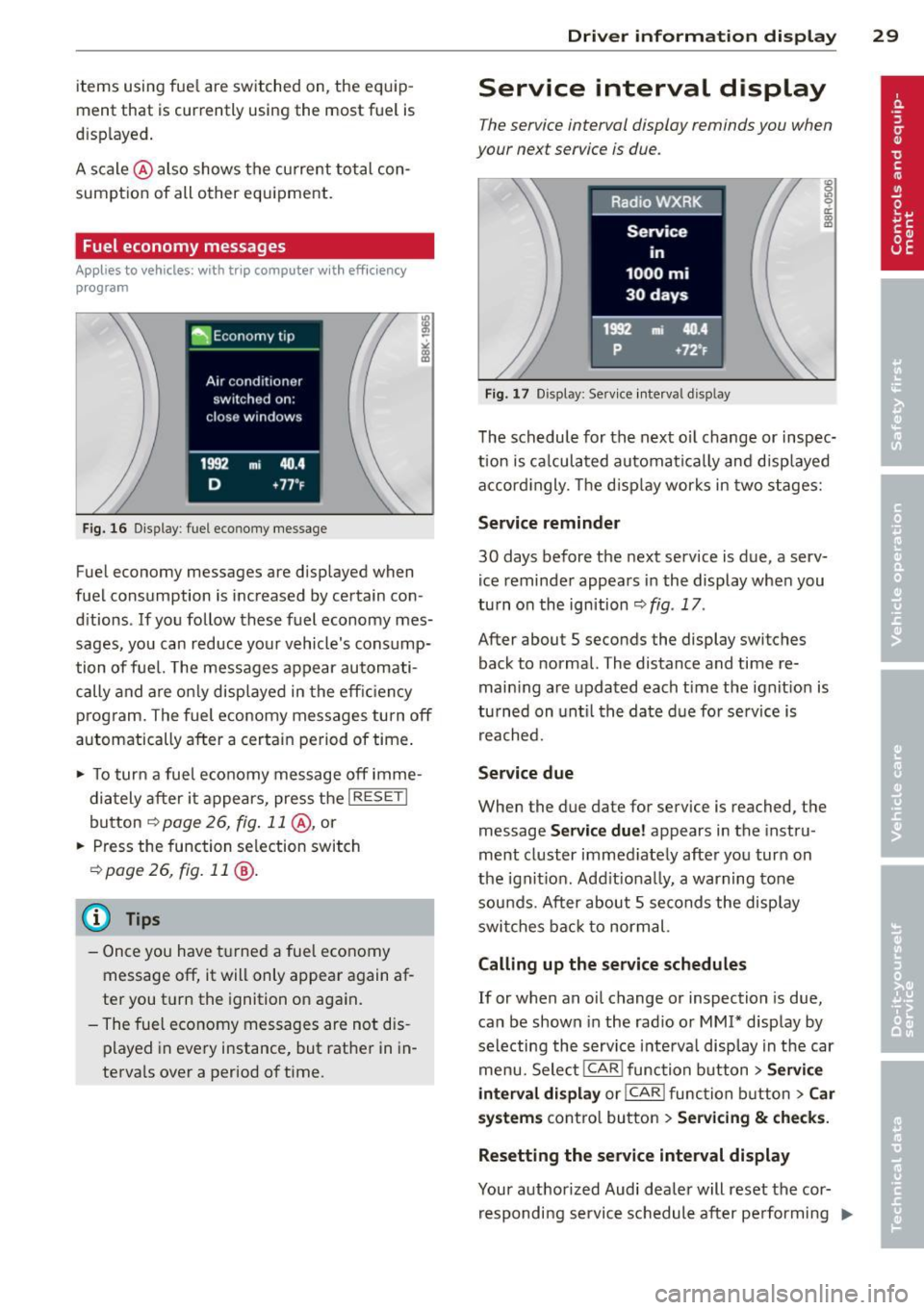
Fig. 16 D isplay : fuel eco nomy message
Fuel economy messages are displayed when
fuel consumption is increased by certain con
ditions . If you follow these fuel economy mes
sages, you can reduce your vehicle's consump
tion of fuel. The messages appear automati
cally and are on ly disp layed in the eff ic iency
p rogram. The fuel economy messages turn
off
automatically after a certain period of time .
.,. To turn a fuel economy message
off imme-
diately a fter it appears, press the I RESETI
button
~ page 26, fig . 11 @ , or
.,. Press the function selection switch
r=;, page 2 6, fig. 11 @ .
(D Tips
-Once you have t urned a fuel economy
message
off, it will only appear again af
ter you t urn the ignition on aga in.
- The fuel economy messages are not dis
p layed in eve ry instance, but rat her in in
terva ls over a period o f time .
Driver inform ation di spl ay 29
Service interval display
The service interval display reminds you when
your next service is due .
Fig. 17 Disp lay: Service i nterval disp lay
The schedule for the next oi l change or inspec
tion is ca lculated automatica lly and disp layed
a ccord ingly. The d isp lay works in two stages:
Service reminde r
30 days before the next service is due, a serv
ice reminder appears in the display whe n you
turn on the ignition
r=;, fig . 17 .
After about S seconds the display switches
back to normal. The distance and time re
main ing are updated each time the ignit ion is
tu rned on unt il th e date d ue for se rvice is
rea ched.
Service due
When the due date for service is reached, the
message
Serv ice due! appears in the instru
ment cluster immed iately afte r you tur n on
the ignit ion. Add it iona lly, a warning tone
sou nds. After about 5 seconds the disp lay
swi tches ba ck to normal.
Calling up the service schedules
If or when an oil change or inspection is due,
can be shown in the rad io or
MMI* disp lay by
se lecting the serv ice interva l display in the car
menu. Selec t!CAR I func tion button>
Servic e
interval d isplay
o r! CAR ! function b utton> C ar
s y ste ms
cont ro l bu tton > Ser vicing & checks.
Resetting the servic e interval display
Your author ized Audi dealer will reset the cor
r espondi ng service schedule after pe rforming ..,.
Page 32 of 294
30 Driver information display
the approp riate service on your vehicle. You
a lso have the possibility to reset the oil
change schedule after having performed an
oil change according to Audi specifications.
Select
I CAR I function button > Service interval
display > Reset oil change interval
or ICARI
function button> Car systems control button
> Servicing & checks > Reset oil change inter
val.
(CT;) Note
If you disconnect the battery terminals, no
calculations can be made for the service
interva l display during this time and no
service reminder will appear. Remember
that observing the proper serv ice interva ls
is vitally important to extending the life of
your vehicle, particularly the engine, and
maintaining its value. Even if the mileage
driven is low, the maximum period of one
year from one serv ice to the next must not
be exceeded.
@ Tips
-Do not reset the display between oil
changes, otherw ise the display will be in
correct.
- The information in the Service Reminder
remains stored even when the vehicle
battery is disconnected.
On-Board Diagnostic
system (OBD)
Malfunction Indicator Lamp (MIL)
The Malfunction Indicator Lamp (MIL) II in
the instrument cluster is part of the On-Board
Diagnostic (OBD II) system.
The warning/indicator light illuminates when
the ignition is switched on and goes out after
the engine starts and the idle has stabi lized .
This indicates that the MIL is working proper
l y.
If the light does not go out after the engine
is started, or illuminates while you are driv
ing, a malfunction may exist in the engine sys- tern.
If the
light illuminates, the catalytic con
verter could be damaged.
Continue driving
with reduced power (avoid
ing sustained high speeds and/or rapid accel
erations) and have the condition corrected.
Contact your authorized Audi dea ler.
If the light illuminates, the electronic speed
limiter may also be malfunct ioning. For more
information
q page 31, El ectronic speed
limiter .
An improperly closed fuel filler cap may also
cause the MIL light to illuminate
~page 212.
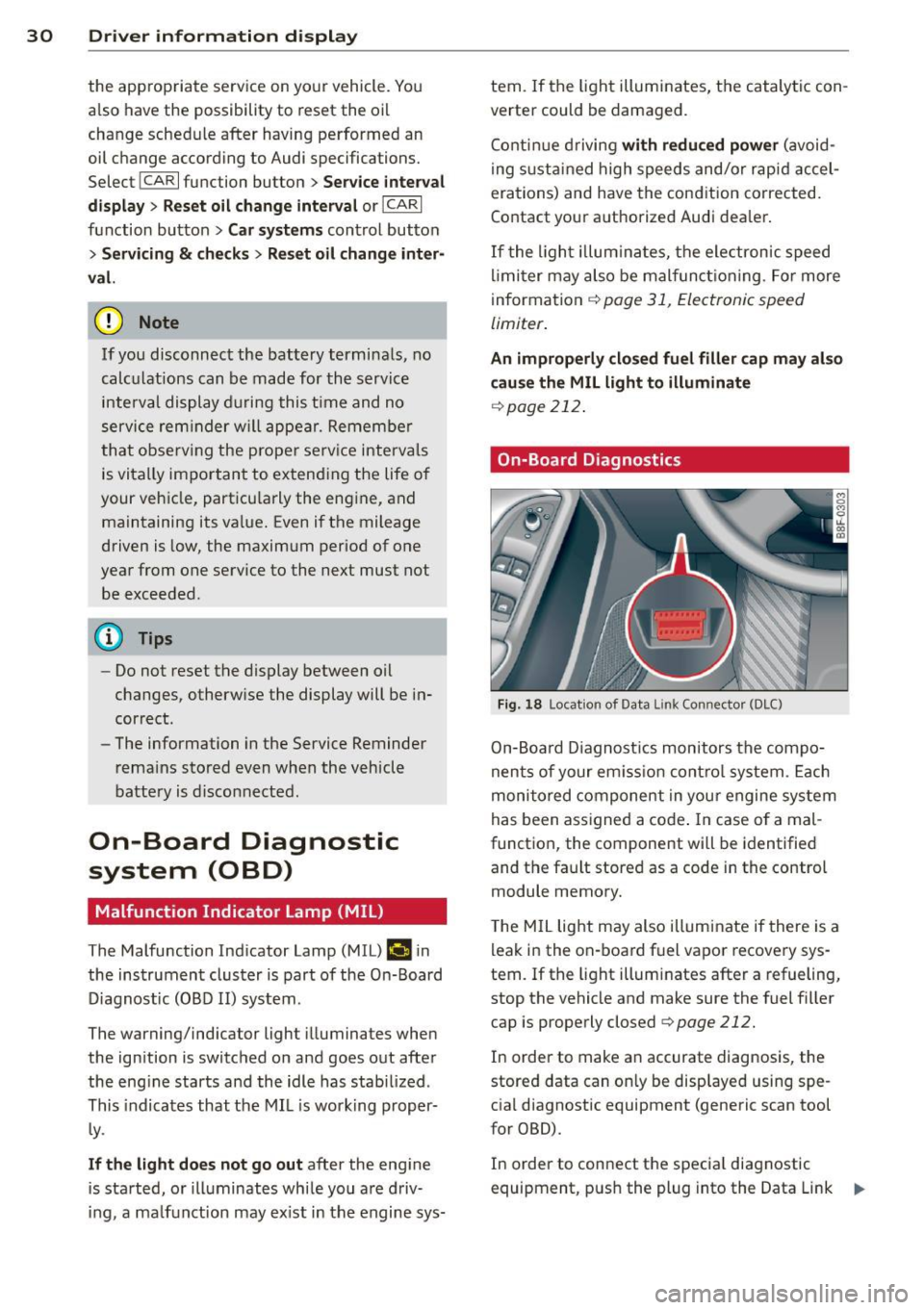
On-Board Diagnostics
Fig. 18 Locat ion of Data L ink Connector (DLC)
On-Board Diagnostics monitors the compo
nents of your em ission control system . Each
monitored component in your engine system
has been assigned a code . In case o f a mal
function, the component will be identified
and the fault stored as a code in the control
module memory.
T he MIL light may also illuminate if there is a
leak in the on-board fuel vapor recovery sys
tem.
If the light illuminates after a refueling,
stop the vehicle and make sure the fuel filler
cap is properly closed
q page 212.
In order to make an accurate diagnosis, the
stored data can on ly be displayed using spe
cial diagnostic equipment (generic scan tool
for OBD).
In order to connect the special diagnostic
equipment, push the plug into the Data Link ..,.
Page 65 of 294
Roof rack
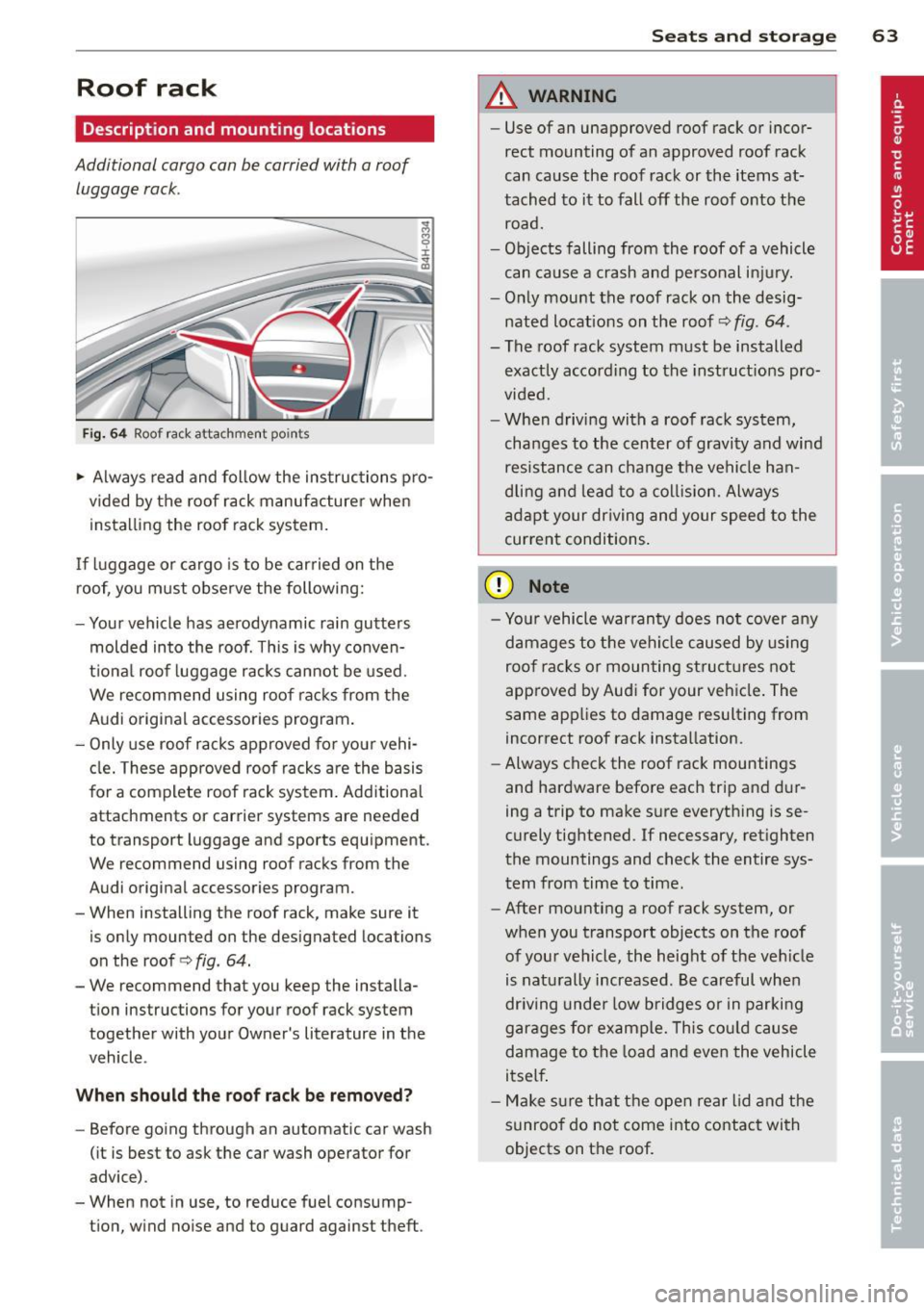
Description and mounting locations
Additional cargo can be carried with a roof luggage rack .
Fig. 64 Roof rack attachment poin ts
.,. Always read and follow the instructions pro
vided by the roof rack manufacturer when installing the roof rack system.
If luggage or cargo is to be carried on the
roof, you must observe the following:
- Your vehicle has aerodynamic rain gutters
molded into the roof. This is why conven
tional roof luggage racks cannot be used.
We recommend using roof racks from the
Audi original accessories program.
- Only use roof racks approved for your vehi
cle. These approved roof racks are the basis
for a complete roof rack system. Additional
attachments or carrier systems are needed
to transport luggage and sports equipment.
We recommend using roof racks from the
Audi original accessories program.
- When installing the roof rack, make sure it
is only mounted on the designated locations
on the roof ¢
fig. 64.
-We recommend that you keep the installa
tion instructions for your roof rack system
together with your Owner's literature in the
vehicle .
When shoul d th e r oof ra ck be re moved?
- Before going through an automatic car wash
(it is best to ask the car wash operator for
advice).
- When not in use, to reduce fuel consump
tion, wind noise and to guard against theft .
Sea ts a nd s to rage 63
A WARNING
- Use of an unapproved roof rack or incor
rect mounting of an approved roof rack
can cause the roof rack or the items at
tached to it to fall off the roof onto the
road.
- Objects falling from the roof of a vehicle can cause a crash and personal injury.
- Only mount the roof rack on the desig nated locations on the roof¢
fig. 64.
- The roof rack system must be installed
exactly according to the instructions pro
vided.
- When driving with a roof rack system, changes to the center of gravity and wind resistance can change the vehicle han
dling and lead to a col lision. Always
adapt your driving and your speed to the
current conditions .
(D Note
-Your vehicle warranty does not cover any
damages to the vehi cle caused by us ing
roof racks or mounting structures not
approved by Audi for your vehicle. The
same applies to damage resulting from
incorrect roof rack installation.
- Always check the roof rack mountings
and hardware before each trip and dur
ing a trip to make sure everything is se
curely tightened. If necessary, retighten
the mountings and check the entire sys
tem from time to time.
- After mounting a roof rack system, or
when you transport objects on the roof of your vehicle, the height of the veh icle
is naturally increased . Be careful when
dr iving under low bridges or in parking
garages for example. This cou ld cause
damage to the load and even the vehicle
itself .
- Make sure that t he open rear lid and the
sunroof do not come into contact with
objects on the roof.
Page 66 of 294
64 Seats and storage
loading the roof rack
Always distribute loads evenly . Make sure
anything on the roof rack is securely tied
down.
,. Always distribute the loads on the roof rack
evenly .
,. Always attach items to the roof rack secure-
ly befo re you dr ive off.
The maximum perm iss ible roof we ight is
2 00 lb (90 kg ). The roof weight is the total of
the we ight of the roof rack, the attachments
and the cargo you are car ry ing. You m ust also
not exceed the maximum load weight for the
roof rack you are using.
When us ing a roof rack system which has a
l owe r load carry ing capac ity, you must not use
up the total max imum pe rm issib le load carry
i ng capac ity specified
above . Instead, you
should load the roof rack system only to the
maximum capacity specified by the manufac
turer of the roof rack system.
A WARNING
Weak, damaged or improper straps used to secure items to the roof rack can fail
during hard braking or in a collision and
cause se rious personal injury .
- Make sure the roof rack is insta lled exact
ly as specified
above ¢ page 63.
- Always use suitable mounting straps for
sec uring items to the roof rack to help
prevent items from shift ing o r fly ing for
wa rd.
- Items on the roof rack must always be sec urely mounted.
- The use of a roof rack can negative ly af
fect the way a vehicle handles . Ca rgo
that is larg e, h eavy, bulky, long o r flat
will have a g reater negative influence on
the vehicle's aerodynamics, center of
gravity and overal l ha ndling. Always
dr ive slowly, avo id sudden braking and
mane uvers when transporting cargo o n
the roof of your vehicle.
- Never exceed the maxim um permissible
load carrying capacity of the roof of your
veh icle, the permissible axle weights and
the permissible total weight of your vehi cle ¢
page 268, Weights.
(D Note
Make sure that the opened rear lid does
not come in contact with the cargo on the
r oof.
@ For the sake of the environment
As a result of the increased wind resist
ance created by a roof rack, your vehicle is
us ing fuel unnecessarily. So
remove the
r oof rack after using it .
Luggage compartment
, General information
A WARNING
-Read and follow the important safety pre-
cautions on¢
page 132, Stowing lug
gage.
Enlarging the luggage compartment
Applies to vehicles: with folding rear seatback
The rear seat backrests can be folded forward
either separately or together .
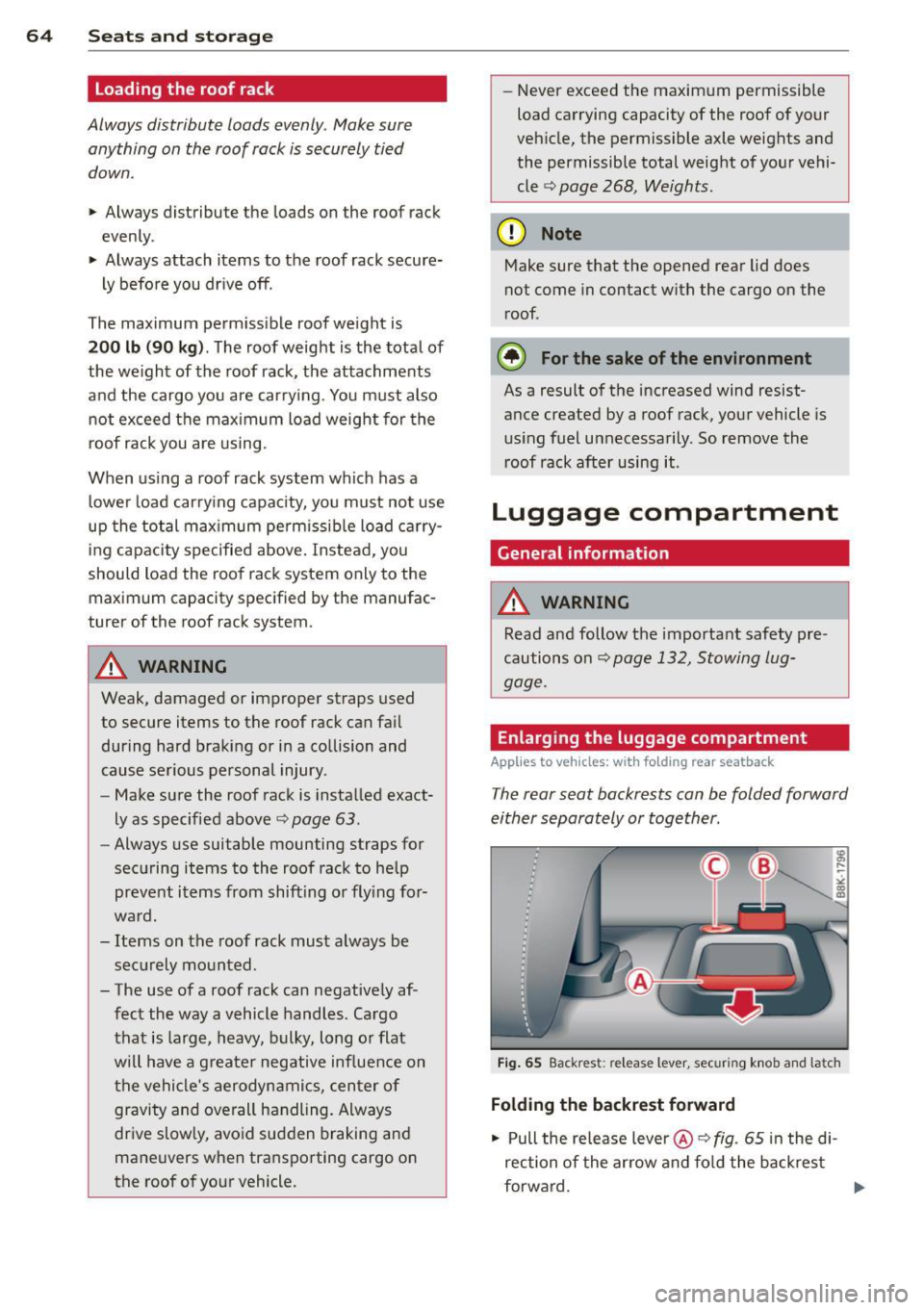
Fig . 65 Back rest : re lease lever , securing knob and latch
Folding the backr est forward
,. Pull the release lever @¢
fig. 65 in the di
rection of the arrow and fo ld the back rest
forward.
IJ,-
Page 70 of 294
68 Warm and cold
Warm and cold Climate controls
Description
The climate control system warms, cools and
adds humidity to the air in the vehicle interior.
It is the most effect ive when the windows and
sunroof are closed . If there is a build-up of
heat inside the vehicle, ventilation can help to
speed up the cooling process.
I n all heating mode functions except
defrost,
the blower on ly switches to a higher speed
once the engine coolant has reached a certain
temperature.
Condensat ion from the cooling system can
drip and form a puddle of water under the ve
hicle. This is normal and does not mean there
is a leak.
Pollutant filter
The pollutant filter removes pollutants s uch
as dust and pollen from the air.
The air pollutants filter must be changed at
the intervals spec ified in you r Warranty
&
Maintenance booklet, so that the air condi
tioner can properly work.
If you drive your vehicle in an area with h igh
a ir po llution, the fi lter may need to be
changed more frequent ly than specified in
your Aud i Wa rranty
& Ma intenance booklet. If
in doubt, ask your authorized Audi Service Ad
visor for advice .
Key coded settings
The climate control settings are automat ically
stored and assigned to the remote control key
that is in use.
A WARNING
Reduced visibility is dangerous and can
cause accidents.
-
- For safe driving it is very important that
all windows be free of ice, snow and con
densation.
- Comp letely familiarize yourself with the
proper use and function of the heating
and ventilation system and especially how to defog and defrost the windows.
- Never use the windshield wiper/washer
system in freez ing weather unt il you
have warmed the windshield first, using
the heating and ventilation system. The
washer solution may freeze on the wind shie ld and reduce visib ility.
(D Note
- If you suspect that the air conditioner
has been damaged, switch the system
off to avoid further damage and have it
inspected by a qualified dealership.
- Repairs to the Audi air conditioner re
quire special technical know ledge and
special tools. Contact an authorized Aud i
dea ler fo r assistance.
@ For the sake of the environment
By reducing the amount of fuel you use,
you also reduce the amount of pollutants
emitted into the air.
(D Tips
-Keep the air intake s lots (in fro nt of the
w indshield) free from ice, snow and de
bris in order to maintain the proper func
tion of the climate control system.
- T he energy management system may
switch the seat heating* or rear window
defroster off temporarily . These systems
are available again as soon as the energy
balance has been restored.
- Air escapes through vents under the rear
window. When placing items of clothing
on the luggage compartment cover, en
sure that the openings are not covered.
Page 89 of 294
Interlo ck button
The lock b utton on the selector leve r prevents
the lever from being accidentally shifted into
certain positions. Pressing this button deacti
vates the se lector lever lock. Depending on
the direction of the shift, the se lector lever
locks at different positions. The positions are
hi ghlighted in the illustration
c:> fig. 84.
Ignition k ey sa fe ty int erlock
The key cannot be removed from the ignition
un less the se lector lever is in the P park posi
tion . When the ign ition key is removed, the
selector lever will be locked in the P pos ition.
Kick-down
App lies to vehicles: with multitronic or tiptro nic
The kick-down features allows maximum ve
hicle acceleration.
Appli es to v eh icl es with a multit ronic ®
t ran sm ission
When you depress the acce lerator pedal be
yond the resistance point, the transmission downshifts into a lower gear ratio depending
on the vehicle speed and engine speed . As
long as the accelerator pedal is depressed, the
engine speed is automat ica lly regulated for
max imum ac celeration.
Applie s to veh icles with a tiptronic
transmission
When you depress the accelerator pedal be
yond the resistance po int, the automat ic
transmission downshifts into a lower gear, de
pending on vehicle speed and engine speed .
The upshift into the next higher gear takes
p lace once the maxim um specified engine
speed is reached.
_&. WARNING
Please note that the drive whee ls can spin
if kick-down is used on a smooth slippery
road -there is a risk of skidding.
Tran sm iss ion 87
Dynamic shift program (DSP)
App lies to vehicles: wit h m ultitro nic or t iptronic
The automatic transmission is electronically
controlled .
The transm iss ion is self adapting and will
a u
tomati call y select the best sh ift program suit
ed to the driving conditions and driv ing style.
The transmission wi ll select one of the
eco no
m y
programs when you drive at a steady
speed or a gradually changing speed w ithout
heavy acceleration . This achieves optimum
fuel eff iciency, with early upshifting and de
l ayed downshift ing .
The transm iss ion w ill automatically select the
sporty sh ift programs w hen you drive at high
er speeds, or with heavy acceleration and fre quently changing speeds. Upsh ifts are delayed
to make full use of e ngine power. Downshift
ing takes place at highe r engine speeds than
in the economy programs .
T he selection of the most suitable sh ift pro
gram is a continuous, automatic process . The
drive r can a lso make the transm iss ion sw itch
to a sporty program by
quickl y pressing down
the gas pedal.
T h is causes the t ransm ission to shift down to
a lowe r gear to ach ieve rapid acce le rat ion, e.g.
f or quickly passing another vehicle . You do not
need to press the gas pedal into the kick-down
range . After the transmission has upshifted,
the or iginal program is selected according to
your driving style .
Vehicles with mult itronic t ransmission: when
driving on hills and mountains, the gear ratio
continuously adapts to the grade . The trans
mission downshifts automatically when driv
ing downh ill if the brake pedal is pressed . As a
result, the engine braking effect inc reases.
Vehicles with tiptron ic transm issions: when
driv ing on hills and mountains, the gear se lec
tion adapts to the grade. This prevents con
stant upshift ing and downsh ifting when driv
i ng uphill.
Page 90 of 294
88 Transmission
Manual shift program
Applies to vehicles: with multitronic or tiptron ic
Using the manual shift program you can
manually select gears .
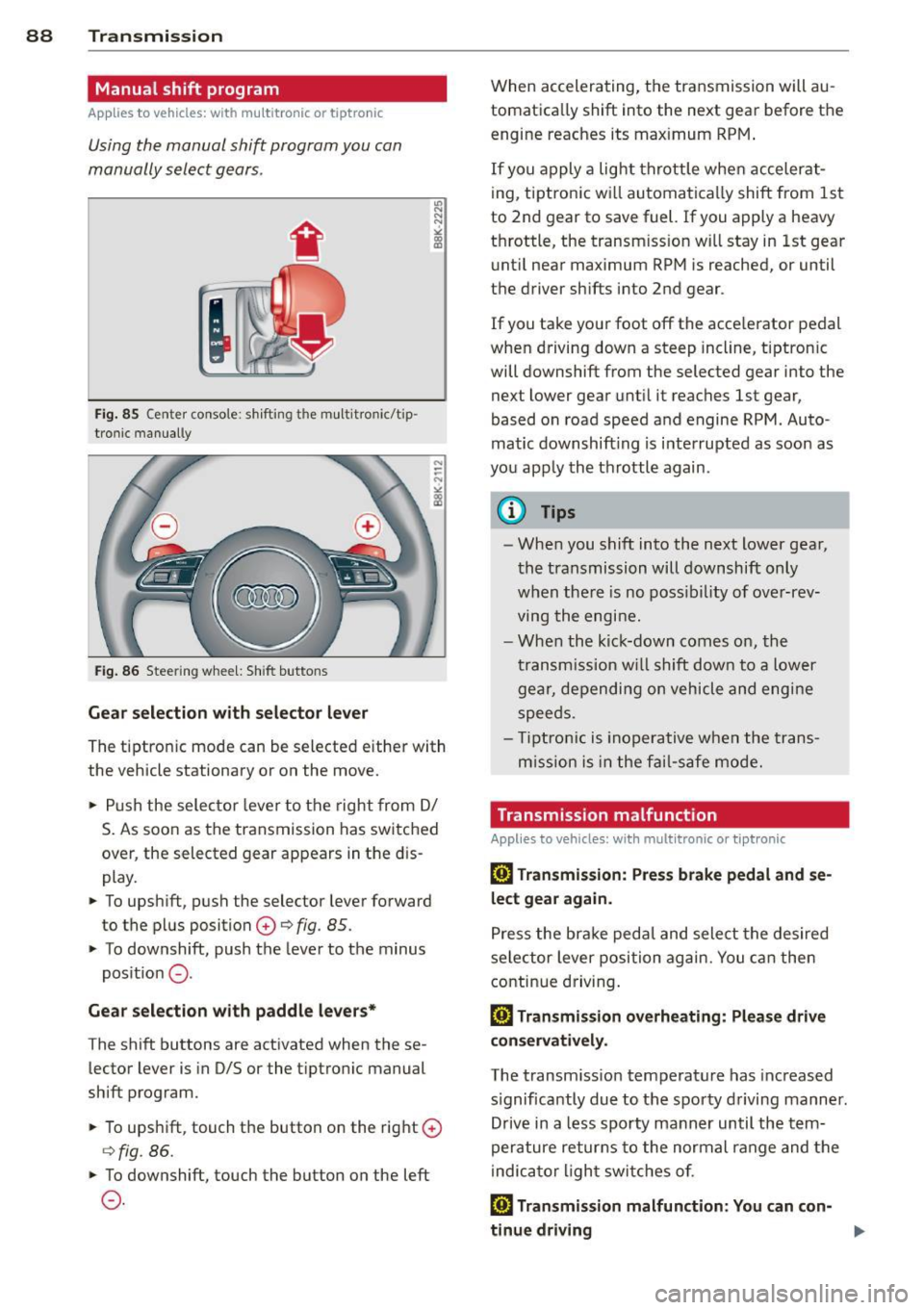
Fig. 85 Center console : shift ing t he multitro nic/t ip ·
tronic manual ly
Fig . 86 Steering wheel: Shift buttons
Gear selection with selector lever
"' N
N
~
" a> CD
The tiptronic mode can be selected either with
the vehicle stationary or on the move .
.,. Push the selector lever to the right from
DI
S. As soon as the transmission has switched
over , the selected gear appears in the dis
play.
.,. To upshift, push the selector lever forward
to the plus position
0 ¢ fig. 85 .
.,. To downshift, push the lever to the minus
position
0 -
Gear selection with paddle levers*
The shift buttons are activated when these
lector lever is in D/S or the tiptronic manual
shift program.
.,. To upshift, touch the button on the right
0
¢fig . 86.
.,. To downshift, touch the button on the left
0-
When accelerating, the transmission will au
tomatically shift into the next gear before the
engine reaches its maximum RPM .
If you apply a light throttle when accelerat
ing, tiptronic will automatically shift from 1st
to 2nd gear to save fuel. If you apply a heavy
throttle, the transm iss ion will stay in 1st gear
until near maximum RPM is reached, or until
the driver shifts into 2nd gear .
If you take your foot off the accelerator pedal
when driving down a steep incline, tiptronic
will downshift from the selected gear into the
next lower gear until it reaches 1st gear,
based on road speed and engine RPM . Auto ·
matic downshifting is interrupted as soon as
you apply the throttle again .
(D Tips
-When you shift into the next lower gear,
the transmission will downshift only
when there is no possibility of over-rev
ving the engine.
- When the kick-down comes on, the
transmission will shift down to a lower
gear, depending on vehicle and engine
speeds .
- Tiptronic is inoperative when the trans
m ission is in the fail-saf e mode.
Transmission malfunction
Applies to vehicles: with mult itronic or tiptronic
[O] Transmission: Press brake pedal and se
lect gear again .
Press the brake pedal and select the desired
selector lever position again. You can then
continue driving.
[O] Transmission overheating: Please drive
conservatively.
The transmission temperature has increased
s ignificantly due to the sporty driving manner.
Drive in a less sporty manner until the tern·
perature returns to the normal range and the
indicator light switches of.
[O] Transmission malfunction: You can con-
tinue driving ..,.
Page 96 of 294
94 Transmi ssion
When acce lerating, the transmiss ion will au
tomatically shift into the next gear before the
engine reaches its maximum RPM.
I f you apply a ligh t throttle when accelerat
ing, tiptronic will automatically shift from 1st
to 2nd gear to save fuel. If you app ly a heavy
thrott le, the transmission will stay in 1st gear
unti l near maximum RPM is reached, or unt il
the dr iver shifts into 2nd gear.
If you take your foot off the accelerator peda l
when dr iving down a steep incline, tiptronic
will downshift from the selected gear into the next lower gear until it reaches 1st gear,
based on road speed and eng ine RPM . Auto
mat ic downshifti ng is interrupted as soon as
you apply the th rottle aga in .
(D} Tips
- When you sh ift into the next lower gear,
the transmiss ion will downshift only
when there is no possibility of over-rev
v ing the engine.
- When the kick-down comes on, the
transmission will sh ift down to a lower
gear, depending on vehicle and engine
speeds.
- Tiptronic is inope rat ive when the t rans
mission is in the fail-sa fe mode.
Kick-down
A pp lies to vehicles: with S tro nic tr ansmiss ion
Kick-down enables maximum acceleration.
When you press the acce lerator pedal down
beyond the resistance po int, the automatic
transmission downshifts into a lower gear, de
pending on vehicle speed and engine RP M.
It
shifts up into the next h igher ge ar once the
max imum specified engine RPM is reached.
& WARNING
Please note that the wheels could spin on
slick or slippery roads when kick-down is
active.
Launch Control Program
App lies to vehicles : wit h S tronic tra nsmi ssio n
The Launch Control Program provides the
best acceleration possible when starting from
a stop .
Requirement: The engine must be at operat
ing temperature and the steering wheel must
not be t urned .
.. Press the
I~ OF F! button c::;, page 186 while
the engine is running. The
fl ind icator light
illuminates in the instrument cluster and
Traction control (ASR ): Off . Warning! Re
stricted stability
appea rs in the driver infor
mat io n system display .
.. Move the se lector lever to the D/S posit ion
or select the
d ynamic dr iv ing mode in Audi
drive select*
c::;, page 112 .
.. Press the brake peda l strongly with your left
foot and ho ld it down for at least one sec
ond.
.. At the same time, press the accelerator
pedal down complete ly w ith your r ight foot
until t he e ngine reaches and mainta ins a
h igh RP M.
.. Remove yo ur foot from the brake pedal
w ith in S seconds
c::;, A, .
& WARNING
-Always adapt your driving to the traffic
f low .
- On ly use the Launch Cont ro l Program
when road and traffic conditions a llow it
and other drivers w ill not be endangered
or annoyed by your driving and the vehi
cle's acceleration.
- Please note that the d riving wheels can
spin and the vehicle can break away
when ASR is switched off , especially
when the road is slippery .
- Once you have accelerated, you shou ld
sw itch the ASR back on by pressing the
lfl O FF ! button . .__ _____________ _J ...
Page 194 of 294
192 Driving and environment
Driving and
environment
The first 1,000 miles
(1,500 km) and
afterwards
New engine
The engine needs to be run-in during the first
1,000 miles (1,500 km).
For the fir st 600 miles (1,000
kilometers ):
.,. Do not use full throttle.
... Do not drive at engine speeds that are more
than 2/3 of the max imum permitted RPM.
From 600 to 1,000 miles (1 ,000 to
1,500 kilometers):
.,. Speeds can gradually be increased to the
max imum pe rm iss ible road or eng ine speed .
During and after break-in per iod
... Do not rev the eng ine up to h igh speeds
when it is cold. Th is app lies whether the
transmission is in N (Neutral) or in gear.
After the break- in period
... Do not exceed max imum eng ine speed un
der any circumstances .
... Upshift into the next higher gear
before
reaching the red area at the end of the tach
ometer scale¢
page 10.
During the first few hours of driving, the en
g ine's inter na l friction is higher tha n later
when alt the moving parts have been broken
i n. How welt this break- in process is done de
pends to a conside rable extent on the way the
ve hicl e is driven du ring the first 1,000 miles
(1, 500 kilome ters).
(D Note
E xtremely high engi ne speeds are auto
mat ica lly re duced. However, these rpm
lim its are programmed for a n engine welt
r u n- in, not a new eng ine.
{® For the sake of the environment
Do not drive with unnecessarily high en
g ine speeds - upshifting ear ly saves fuel,
reduces no ise and protects the environ
ment.
, New tires
If your vehicle is runni ng on new tires, drive
very carefully for the first 350 miles (500 kilo meters) after fitting.
_& WARNING
N ew tires tend to be slip pery a nd mus t al
so be "broken -in" . Be s ure to remembe r
this dur ing the fi rst 350 mi les (500 kilo
meters) . Brake gently . Avoid fo llow ing
closely behind other vehicles or other sit
uations that m ight require sudden, hard
braking.
Avoid damaging the
vehicle
When you a re d rivi ng on poo r roads, or over
cu rbs, ste ep ramps, etc., ma ke certai n that
low- ly ing parts s uch as spoile rs and ex ha ust
s ystem parts do not bot tom o ut and get dam
aged.
T his is espec ially true for veh icles with low
s lu ng chassis (s por ts chassis)* and fully load
ed vehicles.
Driving through water
on roads
Note th e following to avoid vehicle damage
whe n driving through water, for examp le on
flooded roads:
- The wa ter must not be any hig he r th an the
bottom of the vehicle body .
- Do not dr ive faste r than walk ing speed.