lights AUDI A4 SEDAN 2013 Owner's Manual
[x] Cancel search | Manufacturer: AUDI, Model Year: 2013, Model line: A4 SEDAN, Model: AUDI A4 SEDAN 2013Pages: 294, PDF Size: 73.71 MB
Page 52 of 294
50 Clear vis ion
& WARNING
When lowering or raising the sunshade,
make sure there is nothing in its way and
that it has a free path to travel. This could
cause personal injury .
@ Tips
-Pressing the button lt!tl several times
consecutively can tr igger the overload
protection . The sun shade can only be ex
te nded/retracted again after a b rief wa it
ing period.
- The rear window sun shade only func
tions when the veh icle inter ior is warmer
than 14°F (-10°C).
Wiper and washer system
Switching the windshield wipers on
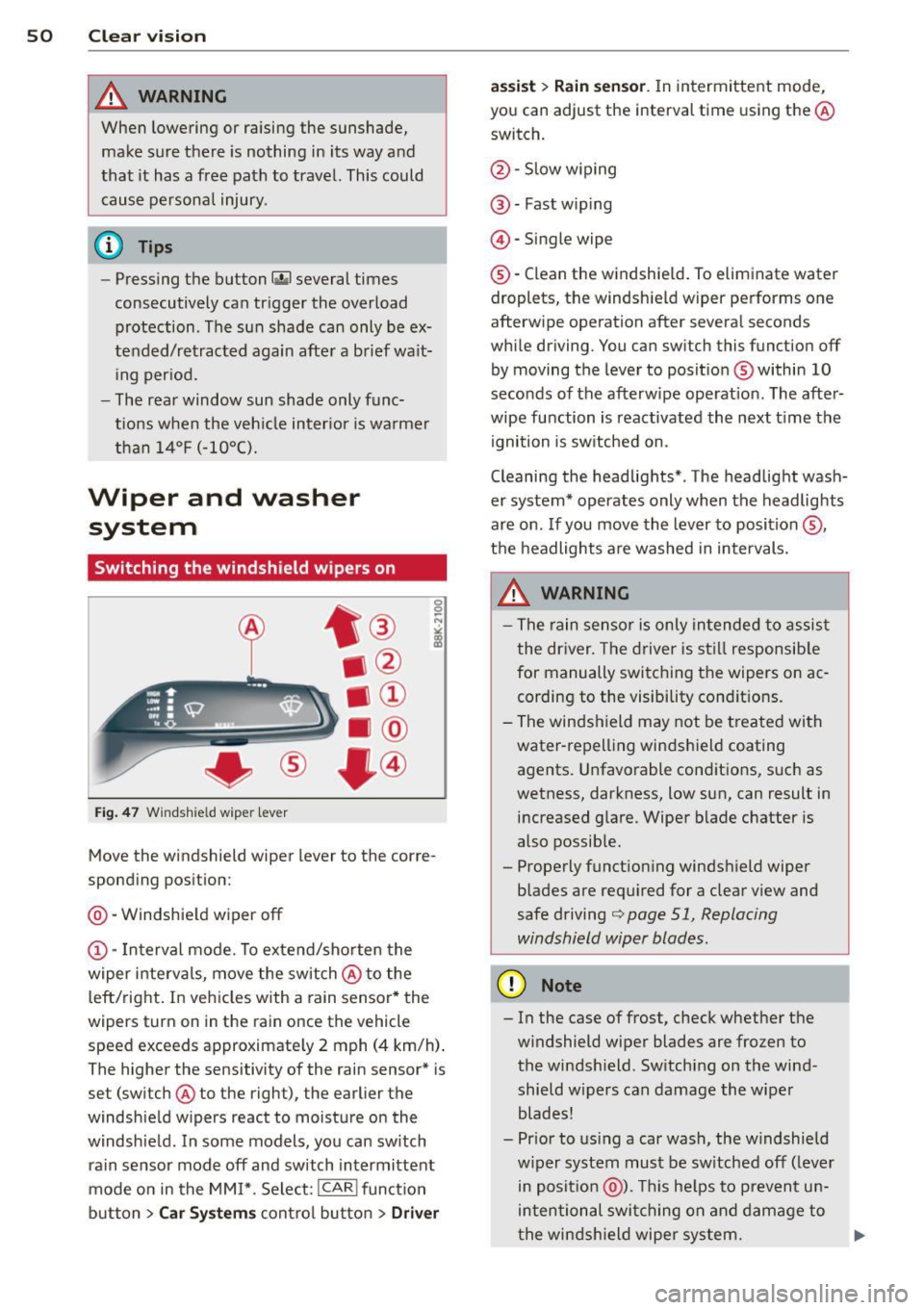
Fig. 47 Windshie ld wipe r lever
Move the windshield wiper lever to the corre
sponding position:
@ - Windshie ld wiper
off
(D -Interval mode. To extend/shorten the
wiper intervals, move the switch @to the
left/right. In vehicles with a rain sensor* the
wipers turn on in the rain once the vehicle
speed exceeds approximate ly 2 mph (4 km/h) .
The higher the sensitivity of the rain sensor* is
set (switch @to the right), the earlier the
windshie ld w ipers react to moisture on the
windsh ield . In some models, you can sw itch
rain sensor mode
off and switch intermittent
mode on in the MM I*. Select:
I CAR I funct ion
button
> Car Systems contro l button > Driver assist
> Rain
sensor. In intermittent mode,
you can adjust the interval time using the@
switch.
@ -Slow w iping
@ -Fast wip ing
© -Single wipe
®-Clean the windshield. To eliminate water
droplets, the windshield wiper performs one
afterwipe operation after several seconds
while driving. You can switch this function
off
by moving the lever to position @within 10
seconds of the afterwipe operat ion. The after
wipe function is reactivated the next time the
ignition is sw itched on.
Cleaning the headlights* . The headlight wash
er system* operates only when the headlights
are on. If you move the lever to position @,
the headlights are washed in intervals.
& WARNING
- The rain sensor is only intended to assist
the driver. The driver is still responsib le
for manually switching the wipers on ac
cording to the visibility cond itions.
- The windshield may not be treated with
water-repell ing windshield coating
agents. Unfavorable conditions, such as
wetness, darkness, low sun, can result in increased glare. Wiper blade chatter is
also possib le.
- Properly functioning windsh ield wiper
blades are required for a clear view and
safe driving
i::> page 51, Replacing
windshield wiper blades.
(D Note
- In the case of frost, check whether the
windshield wiper blades are frozen to
the windshield. Switching on the wind
shield wipers can damage the wiper
blades!
- Prior to using a car wash, the w indshield
w iper system must be sw itched
off (lever
in position @). This helps to prevent un
intentional switching on and damage to
the windsh ield wiper system. ..,.
Page 61 of 294
Switching the memory function on/off
• Press the !O FF ! button to sw itch the memo
ry function on/off. The word
OFF lights up
when the memory function is switched off .
S eat profi le s are not stor ed .
Storing a seat profile
" Press the !SE T! button. When the word SET
lights up, the memory is ready to store set
tings.
" Press a memory button
([II or rn ) briefly. A
tone confirms that the s ett ing s wer e stored.
Accessing a seat profile
" If the driver's door is open, press a memory
button.
" If the driver 's door is closed, press and ho ld
the memory button until the seat adjust
ment is complete .
.&_ WARNING
- For safety reasons, the seat sett ing can
only be recalled when the veh icle is sta
tionary- otherwise you risk having an ac
c ident .
- In an emergency the recall procedure can
be cancelled by press ing the
!OF F! switch
or by tapping the memory buttons .
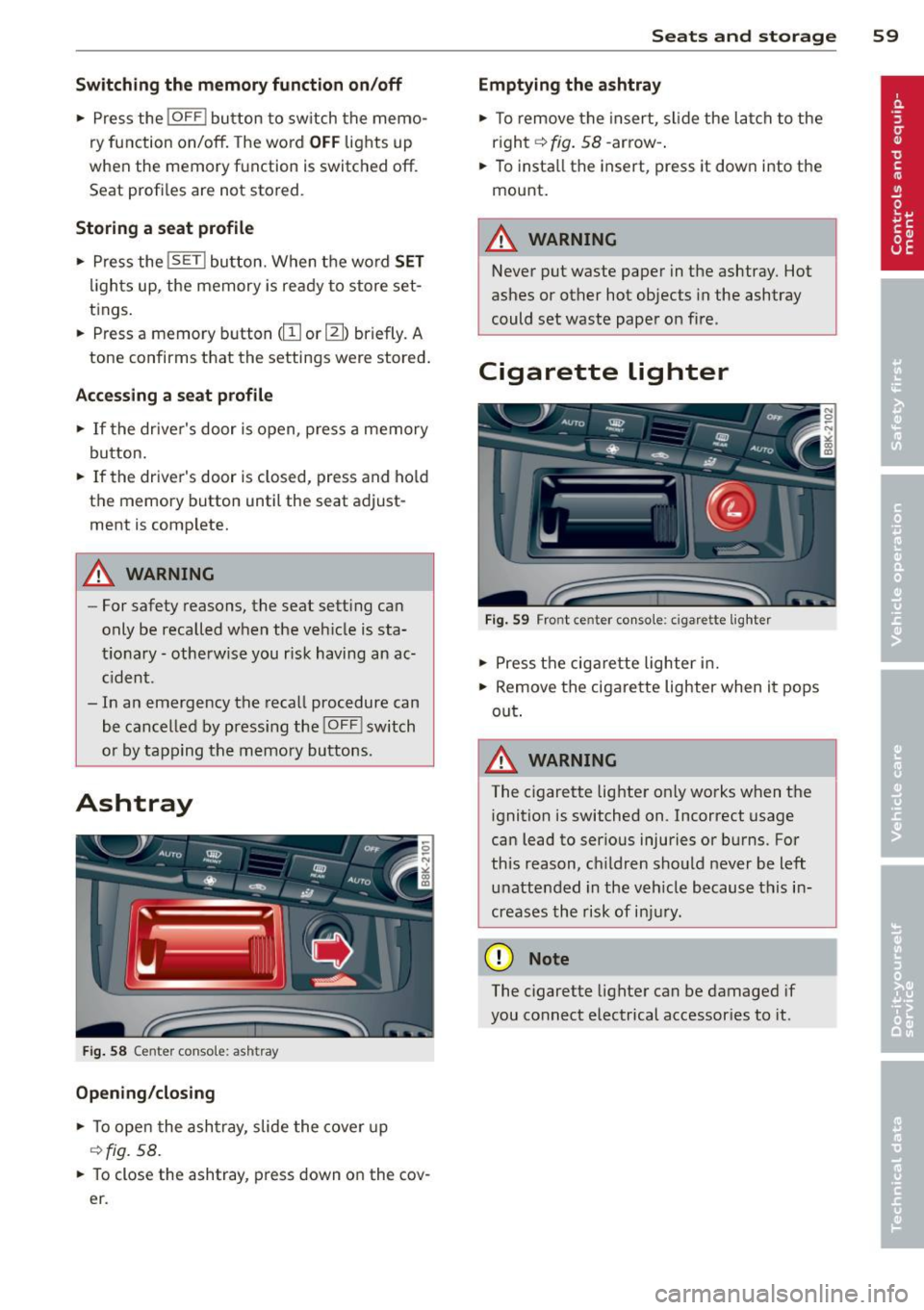
Ashtray
Fig. 58 Cente r conso le: ash tray
Opening /closing
• To open the ashtray , slide the cover up
¢ fig. 58 .
.. To close the ashtray, press down on the cov
e r.
Seats and storage 59
Emptying the ashtray
" To remove the insert, slide the latch to the
r ight ¢
fig. 58 -arrow- .
.. To insta ll the insert, press it down into the
mount.
.&_ WARNING
--Never put waste paper in the ashtray. Hot
ashes or other hot objects in the ashtray
could set waste paper on fire .
Cigarette lighter
Fig. 59 Fro nt ce nter con sole : cigare tte lighter
" Press the cigarette lighter in.
" Remove the cigarette lighter when it pops
out .
A WARNING
The cigarette lighter on ly works when the
ignition is switched on .1ncorrect usage
can lead to ser ious injuries or burns. For
this reason, children should never be left
unattended in the vehicle because this in
creases the risk of injury .
(D Note
The cigarette lighter can be damaged if
you connect electrical accessories to it .
Page 78 of 294
76 On the road
in the hy dra ulic valve adjusters. This is
norma l and not a cause for concern.
- If you leave the vehicle with the ignit ion
switched on, the ignition will switch
off
after a certain period of time . Please
note that e lectrica l equipment such as
exter ior lights w ill switch
off as well
when that happens.
Switching engine off
Applies to vehicles: with conven ience key
" Bring your vehicle to a complete stop.
" Automat ic transm iss ion: Move the se lector
lever to the P or N pos it ion.
" Press the
!START ENGINE STOPI button
~ page 75, fig . 76.
St eering lock
The steering locks when you t urn the engine
off us ing the I STAR T ENGINE STOP I button
and open the dr iver's door. The locked stee r
i ng helps p reven t vehicle theft.
Emergency off
If necessary, the eng ine ca n be sw itched off
with the selector leve r in the R o r D/S pos i
tions. To do so, step on the brake pedal and
p ress and hold the
I START ENGINE STOP I but
ton vehicle speed must be less th an 6 mph
(10 km/h).
_& WARNING
- Never t urn off the eng ine before the ve
hicle has come to a complete stop . The
full f unction o f the brake booster and the
power steering is not guaranteed. You
must use more force to turn or brake if
necessary. Because you cannot steer and
brake as you usua lly would, this could
lead to crashes and se rious injur ies.
- For safety reasons, you s hould always
par k your vehicle with the se lector lever
in P. Ot herwi se, the ve hicle co uld i nad
vertent ly roll away.
- T he ra diator fan ca n continue to ru n for
up to 10 mi nutes even after yo u have
tu rne d off the eng ine and remove d the ignit
ion key. T he radiator fan can a lso
tur n on again if the engine coo lant heats
up because of intense sunlight or heat
bu ild-up in the engine compartment.
- Always take the key w ith you whenever
you leave your ve hicle. Otherw ise, the
eng ine could be sta rted or elect rical
equ ipme nt such as the power windows
could be ope rated. This can lead to seri
o us injury.
(D Note
If the engine has bee n under heavy load
fo r an extended pe riod, heat bu ilds up in
the engine compartment after the engine
i s sw itched off -there i s a r is k of damag ing
the e ngine. A llow the eng ine to run at i dle
for about two minutes before switching it
off.
Driver messages
Ignition i s on
This message appears and a warning tone
sounds if you open the d river's door when the
ignition is sw itched on.
No key id entified
This message appears when t he
I S TART ENGI NE STOPI button is pressed if
there is no master key ins ide the veh icle or if
the system does not recognize it . Fo r exam
ple, the master k ey cannot be recognized if it
is covered by an object (e.g. al uminum b rief
case) which
screens the radio s ignal. Elec tron
ic dev ices such as cell phones can also inter
fere with the radio s ignal.
Press brak e pedal to start engine
This message appears if you do not press the
brake pedal to start the eng ine in a veh icle
with an automat ic transm iss ion.
Press clutch pedal to sta rt engine
T his message ap pears if you do not press the
clutch pedal to start the engine in a vehicle
with a manual transmission. .,.
Page 80 of 294
78 On the road
Emerg ency b rake function
An emergency brake ensures t hat the vehicle
can be slowed down even if the
normal brakes
fail c::>
page 79, Emergency broking.
Indicat or light s
-If the par king b rake is closed w ith the igni
t ion
s witc hed on the . (USA models) /
• (Canada mode ls) indica tor lights come
on in the instrum ent cluster and the switch .
-If the parking brake is closed w ith the igni
tion
s witc hed off the . (USA models) /
• (Canada mode ls) indicator lights come
on in the instrument clust er and th e switch
for about 20 seconds .
A WARNING
If a gear or a drive range (automat ic trans
m ission) is engaged with the vehicle sta
tionary and the engine runn ing, you must
in no instance accelerate o r release the
cl utch carelessly. Otherwise the vehicle
w ill sta rt to move immediately- r isk of an
accident .
@ Note
If the . symbol in the display or the
.. (USA models) . (Canada models)
ind icator light in the instr ume nt cl uster
flashes, there is a ma lf u nction in the brake
system. By pressing the
ISETI button, you
can bring up a driver message which ex
plains the malfunction in more detail. If
the driver message
Pa rking brake! ap
pears, there is an operating malfunction in
the park ing brake which you should have
repaired immediately by an authorized
Aud i deale r or other qualified workshop
c::>
page 15.
(D Tips
- You can apply the parking brake at any time - even w ith the ignition switched
off . Th e ignit ion must be t urned on in o r
der to release the par king brake. - Occasional noises when the parking
bra ke is applied and released are normal
and are not a cause for concern.
- When the vehicle is parked , the parking
brake goes through a self-test cycle at
regu lar interva ls. Any associated noises
are normal.
Parking
Parking
"' Press the br ake ped al to s top the veh icle .
"' Pull the button @ c::>
page 77, fig. 77 to set
the parking brake.
"' Automatic transmission: Move the selector
lever to P.
.,. Turn t he engine off c::>
,& .
.,. Man ual transmission: Shift into 1st gear.
In addition on inclines and gr ades
.,. Turn the steering wheel so that your vehicle
w ill roll aga inst the curb in case it shou ld
start to move.
A WARNING
- When you leave yo ur vehicle -even if on
ly briefly -always remove the igni tion
key. This app lies particularly when chi l
dren remain in the vehicle. Otherwise the
children could start the eng ine, release
the park ing brake or operate electrical
equ ipme nt (e .g . power windows). There
is the risk of an acc ident .
- When the veh icle is locked, no one -par
ticularly not children should rema in in
the vehicle . Locked doors make it mo re
d ifficult for emergency worke rs to get in
to the vehicle -putting lives at r isk .
Starting from rest
The starting assist function ensures that the
parking brake is released automatically upon starting.
Stopping and applying parking brake
"' Pull the switch @c::> page 77, fig . 77 to ap-
ply the parking brake . .,.
Page 83 of 294
.. Select : ICAR lfunction button> Car systems
control button > Driver assist > Speed
warning.
Warning thresho ld 2 can be set in the speed
range starting from 20 mph to 150 mph (30
km/h to 240 km/h). Settings can each be ad
justed in intervals of 6 mph (10 km/h).
Cruise control
Switching on
The cruise control system makes it possible to
drive at a constant speed starting at 20 mph (30 km/h).
®
f
®t
0
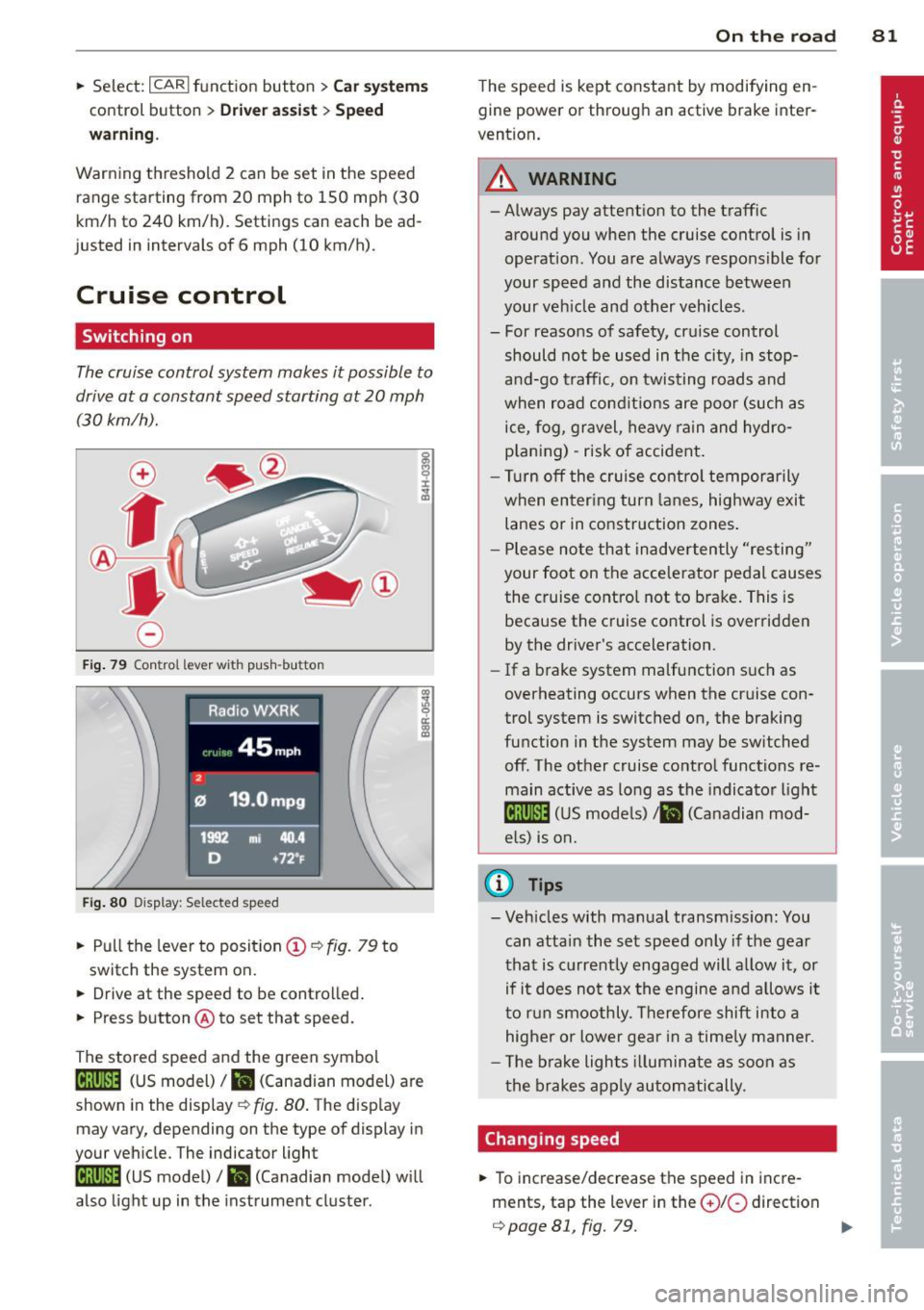
Fig. 79 Con tro l lev er w it h push-bu tton
Fig. 80 D isplay : S ele ct ed speed
.. Pull the lever to position (D ¢ fig. 79 to
switch the system on.
.. Drive at the speed to be controlled .
.. Press button @to set that speed.
The stored speed and the green symbol
[ij;jl)~i~ (US model)/ .. (Canadian model) are
shown in the display ¢ fig. 80. The display
may vary, depending on the type of display in
your vehicle. The indicator light
[ij;(l)~i~ (US model)/ B (Canadian model) w ill
also light up in the instrument cluster.
On the road 81
The speed is kept constant by modifying en
gine power or through an active brake inter
vention.
_& WARNING
- Always pay attent ion to the traffic
around you when the cruise control is in
operation. You are always responsible for
your speed and the distance between
your veh icle and other vehicles .
- For reasons of safety, cru ise control
should not be used in the city, in stop
and-go traffic, on twisting roads and
when road conditions are poor (such as
ice, fog, gravel, heavy rain and hydro
p lani ng) -risk of accident.
- Turn off the cruise control temporarily
when enter ing turn lanes, highway exit
lanes or in construction zones .
- Please note that inadvertently "resting"
your foot on the accelerator pedal causes
the cruise control not to brake. This is
because the cruise control is overridden
by the driver's acceleration .
-If a brake system malfunction such as
overheating occurs when the cruise con
trol system is switched on, the braking
function in the system may be switched off. The other cruise control functions re
main active as long as the indicato r light
lijj(l )~i~ (US models) li'I (Canadian mod
e ls ) is on.
@ Tips
-Veh icles with manual transmiss ion: You
can attain the set speed only if the gear
that is currently engaged will allow it, or
if it does not tax the engine and allows i t
to run smoothly. Therefore shift into a
higher or lower gear in a timely manner.
- The brake lights illuminate as soon as
the brakes apply automatically.
Changing speed
.. To increase/decrease the speed in incre
ments, tap the lever in the
0 10 direction
¢ page 81, fig. 79. Ill>
Page 85 of 294
Transmission Manual transmission
Gearshift lever
App lies to vehicles: with manu al transmission
The clutch pedal must be depressed all the
way before you can start the engine.
T he manua l transm ission in your Audi is
equ ipped w ith an
interlock-feature.
~ Depress the clutc h pedal all t he way .
~ Start the eng ine with the gea rshift lever in
Ne utral and the clutch peda l depressed.
(D Note
Always dep ress the clutch peda l fully when
chang ing gears . Do not hold the vehicle on
a hill with the clutch pedal partially de
pressed . This may cause p remature clutch
wear or damage .
@ Tips
-Resting your hand on the gearsh ift leve r
knob while driving will cause prematu re
w ear i n the t ransm ission.
- The back -up lights go on when you s hift
i nto Reverse w ith the igniti on o n.
Gearshift pattern (6-speed manual
transmission)
Applies to vehicles: with man ual transmission
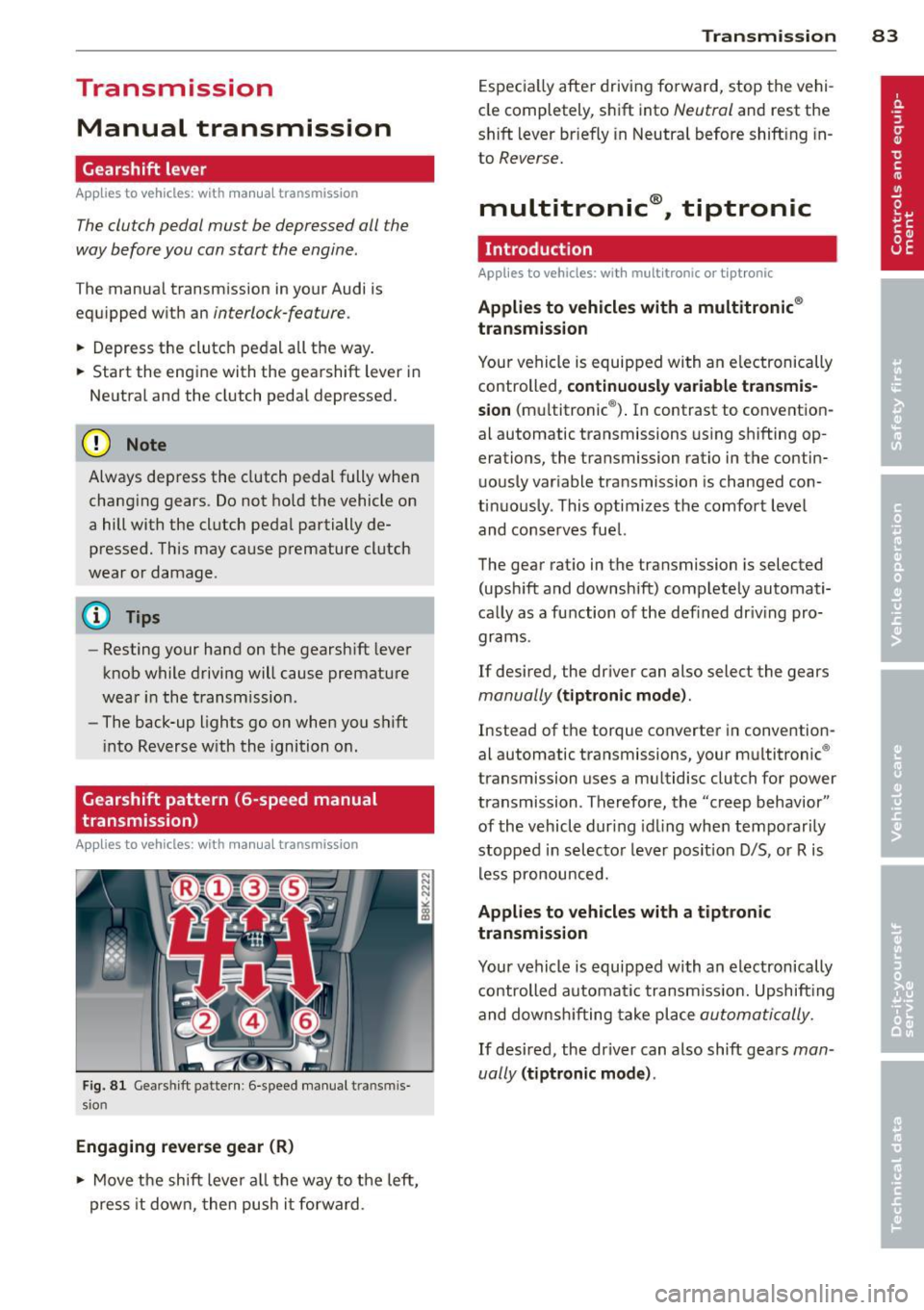
F ig . 8 1 Gears hift patte rn: 6 -speed manu al tran smi s
sio n
Engaging reverse gear (R)
~ Move t he sh ift leve r a ll the way to the left,
press it d ow n, then push it fo rward .
Transm ission 83
Espec ia lly afte r drivi ng fo rward, stop the vehi
cle completely, s hift into
Neutral and rest the
shift lever br iefly in Neutra l before shift ing in
to
Reverse .
multitronic ®, tiptronic
Introduction
App lies to vehicles: with multitronic or tiptr onic
Applies to vehicles with a multitronic ®
transmission
You r vehicle is equip ped wi th an e lectronically
controlled,
continuou sly variable transmis
sion (m ultitronic ®). In contrast to convention
al automatic transmissions us ing shifting op
erations, the transmission ratio in the contin uo usly var iable transmission is changed con
t in uously . This optimizes the comfort level
and conse rves fue l.
The gear rat io in the transmission is selected
(upsh ift and downshift) comp letely automati
ca lly as a function of the def ined dr iv ing pro
grams.
If desired, the driver can also select the gears
manually (t iptronic mode) .
Instead of the torque converter in convention
al automatic transmissi ons, your m ultitronic ®
transmission uses a mu ltidisc clutch for power
transmission . Therefore, the "creep behavior"
of the vehicle dur ing idling whe n temporar ily
st opped in selec to r l ever pos it ion D/S, or R is
l ess pronounced.
Applies to vehicles with a tiptronic
transmission
Your vehicle is equipped with an electronically
controlled automa tic transmiss io n. Upshift ing
and downsh ifting take place
automati cally.
If desired, the driver can also shift gears man
ually
( tiptronic mode ).
Page 87 of 294
necessary to keep the vehicle from
rolling.
- If the selector lever is unintentionally
moved into N while you are driving, take
your foot
off the accelerator pedal and
wait for the engine to return to idle
speed before selecting a driving position .
- Never shift into R or P when the vehicle is
in motion .
- Never get out of the driver's seat when
the engine is running.
- If you must get out of the vehicle, move
the selector lever securely into the P po
sit ion and apply the parking brake firmly.
- If the engine must remain running, never
have any driving position engaged when
checking under the hood . Make sure the
selector lever has securely engaged and
is locked in P with the parking brake
firmly set ¢
page 208, Engine compart
ment.
Otherwise, any increase in engine
speed may set the vehicle in motion,
even with the parking brake applied.
(D Tips
For safety reasons, the parking brake is re
leased automatically only when the driv
er 's safety belt is engaged in the buckle.
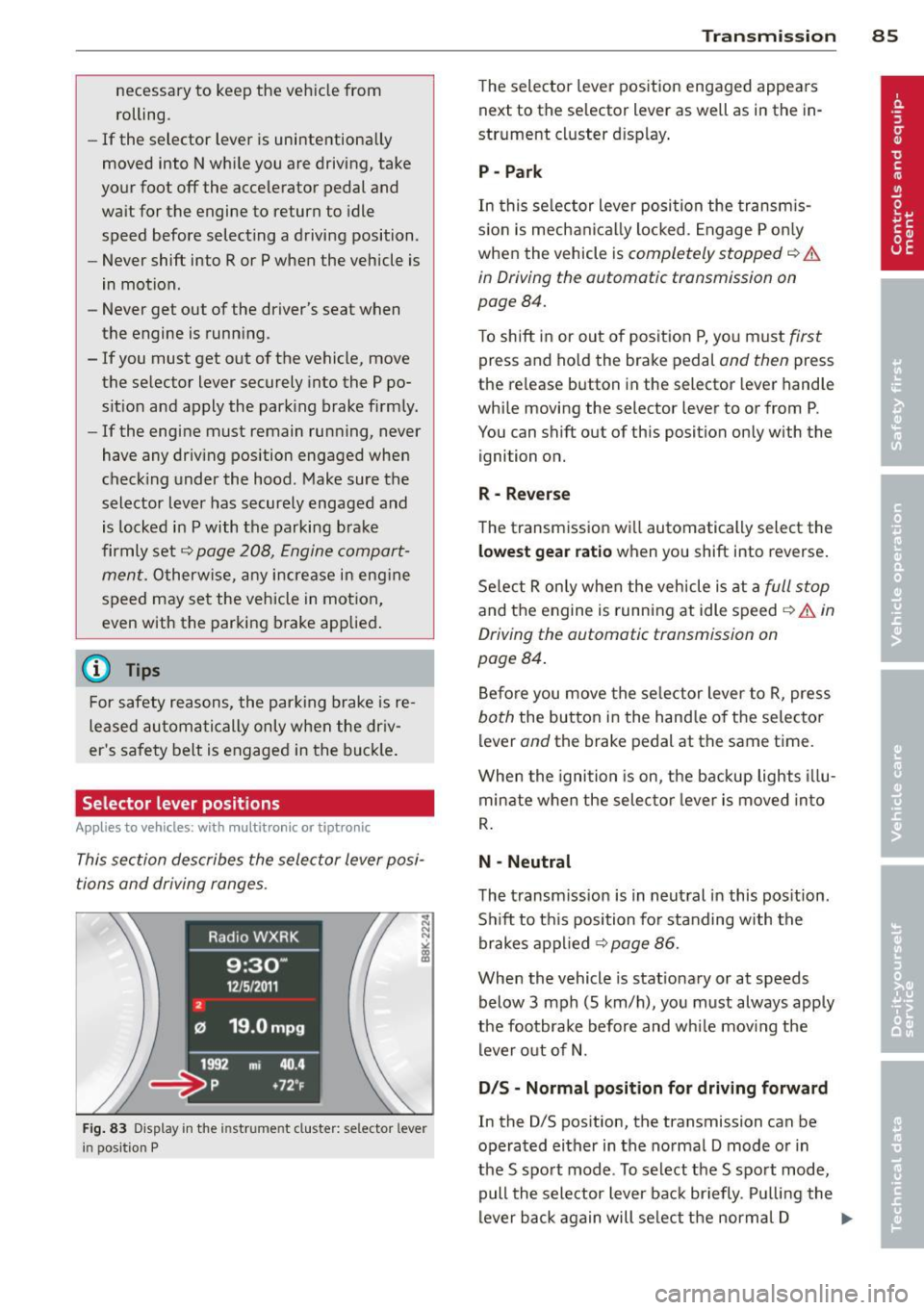
Selector lever positions
Applies to vehicles: with multit ronic or tiptronic
This section describes the selector lever posi
tions and driving ranges .
2
Radio WXRK
9:30-
12/5/2 011
121 19 .0mpg
1992 mi 40 .4
~= ~p +7 2~
Fig. 83 Display in the in str um ent cluste r: selecto r leve r
i n positi on P
Transmission 85
The selector lever position engaged appears
next to the selector lever as well as in the in
strument cluster display .
P -Park
In this selector lever position the transmis
s ion is mechanically locked. Engage P only
when the vehicle is
completely stopped ¢ &
in Driving the automatic transmission on
page 84.
T o shift in or out of position P, you must first
press and hold the brake pedal and then press
the re lease button in the selector lever handle
while moving the selecto r lever to or from P.
You can shift out of this position only with the
ignition on.
R- Reverse
The transmission will automatically select the
lowest gear ratio when you shift into reverse.
Select R only when the vehicle is at a
full stop
and the engine is running at idle speed ¢ & in
Driving the automatic transmission on
page 84.
Before you move the selector lever to R, press
both the button in the handle of the selector
lever
and the brake pedal at the same time .
When the ignition is on, the backup lights illu
minate when the selector lever is moved into
R.
N -Neutral
The transmission is in neutral in this position.
Shift to th is position for standing with the
brakes applied ¢
page 86.
When the vehicle is stationary or at speeds
below 3 mph (S km/h), you must always apply
the footbrake before and while mov ing the
lever out of N.
D /S -Normal position for driving forward
In the D/S pos ition, the transmission can be
operated either in the normal D mode or in
the S sport mode . To select the S sport mode,
pull the selector lever back briefly . Pulling the
lever back again will se lect the normal D ...,
Page 92 of 294
90 Transmi ssion
You can a lso shift the gears manually using
tiptron ic, if you like ¢page 93.
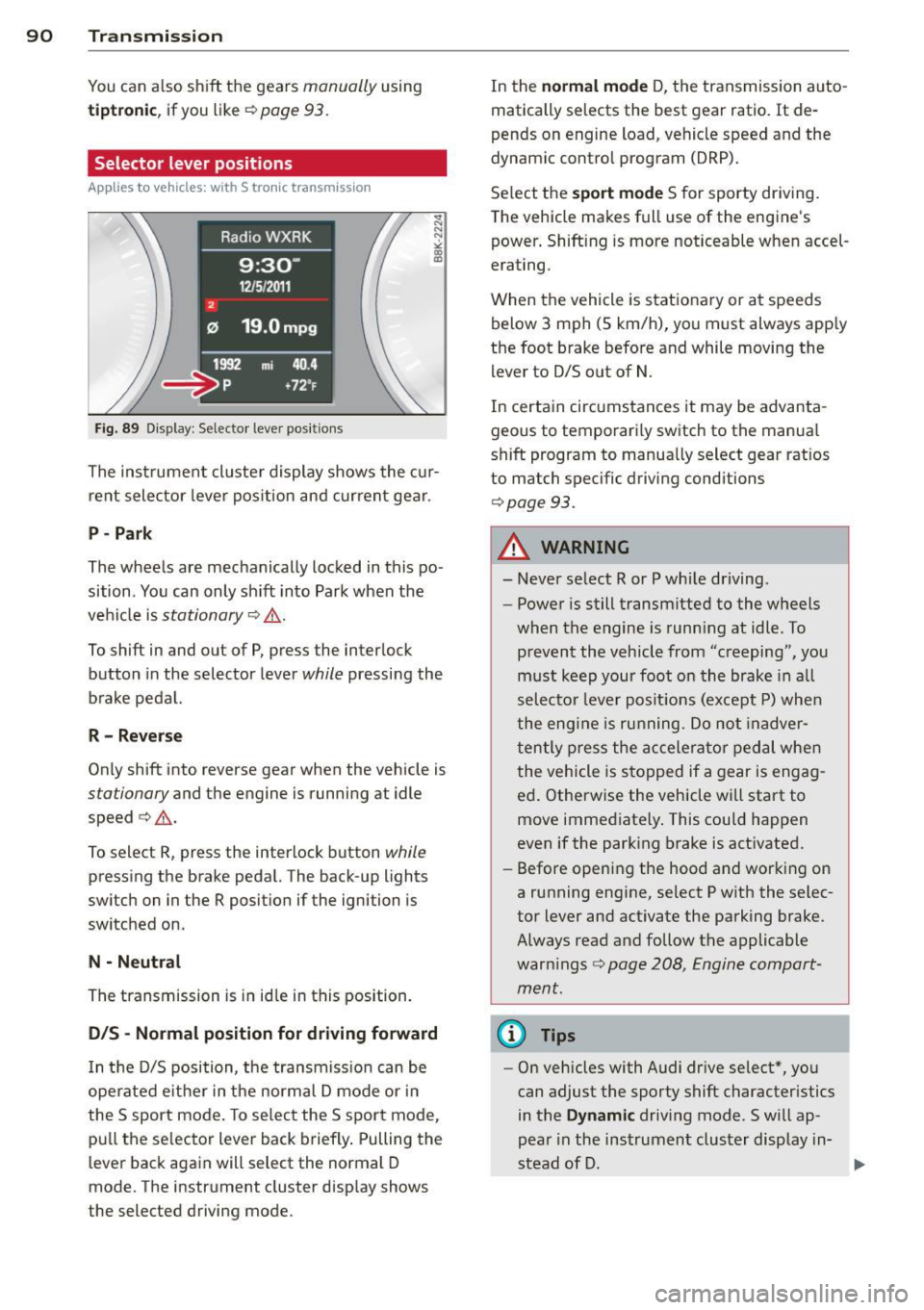
Selector lever positions
Appl ies to vehicles: with S tro nic t ransmission
F ig . 89 Display : Selector lever posit io ns
The inst rument cluster display shows the cur
rent selector lever position and current gear .
P-Park
The wheels are mechanically locked in this po
sition . You can only sh ift into Park when the
vehicle is
stationary ¢,&. .
To shift in and out of P, press the inter lock
button in the selector lever
while pressing the
brake pedal.
R - Re verse
Only shift into reverse gear when the vehicle is
stationary and the engine is running at idle
speed ¢.&. .
To select R, press the interlock button
while
pressing the brake pedal. The back-up lights
switch on in the R posit ion if the ignition is
switched on.
N -N eutral
The transmission is in id le in this position.
0 /5 -Normal position for driving forward
In t he D/S position, the transmiss io n can be
ope rated e ither in the normal D mode or i n
the S sport mode . To select the S sport mode,
pu ll the se lector lever back brief ly . Pulling the
l ever back again will select the normal D
mode. The instrument cluster disp lay shows
the selected driving mode. In the
n
o rmal mode D, the transmission auto
matically selects the best gear ratio.
It de
pends on engine load, vehicle speed and the
dynamic contro l program (DRP).
Se lect the
s port m ode S for sporty driving.
T he vehicle makes full use of the engine's
power . Shift ing is more noticeable when accel
erating.
When the vehicle is stationary or at speeds below 3 mph (5 km/h), you must always app ly
the foot brake before and while moving the l ever to D/S out of N.
In certain circumstances it may be advanta
geous to temporari ly switch to the manua l
shift program to manua lly select gear ratios
to match specific driving conditions
¢ page 93.
A WARNING
-- Never select R or P whi le driving .
- Power is still transmitted to the wheels
when the engine is runn ing at idle . To
prevent the vehicle from "creeping", you
m ust keep your foot on the brake in a ll
selecto r lever posit ions (except P) whe n
the eng ine is ru nning. Do not inadver
t en tly press the a ccelera tor pedal when
the vehicle is s topped if a gear is engag
ed . Otherwise the vehicle will start to
move immediate ly . This could happen
even if the park ing brake is act ivated.
- Before opening the hood and working on
a running engine, select P w ith the selec
tor lever and activate the parking brake. Always read and follow the applicable
war nings
c>page 208, Engine compart
ment.
@ Tips
- On vehicles with Audi dr ive select* , yo u
can adjust the sporty shift character istics
in the
Dynami c driving mode.Swill ap-
pear in the ins trument cluster display in-
stead of D. ..,.
Page 94 of 294
92 Transmi ssion
• Wait a moment until the transm ission
shifts . You wi ll notice a slight movement
when the gear engages.
• Re lease the brake pedal and press the accel
erator pedal
c::> .&, .
Stopping t empora ril y
• Press the brake peda l to prevent the vehicle
from moving, for example at traffic lights .
• Do not press the accelerator pedal when do -
ing this.
P a rk ing
If the selector lever is not in the P position
when you open the driver's door, the vehicle
could ro ll. The message
T ran smi ssio n: Car
m ay roll! Shift to p ark!
appears.
• Press and ho ld the brake pedal
c::> .&, .
• Activate the parking brake .
• Hold t he interlock button down, place the
selector lever in the
P position and release
the interlock button.
Stopping on an inclin e
• Always press the b rake peda l to hold the ve
hicle in p lace and prevent it from "rolling
back" c::>
.&,. Do not try to prevent the ve hicle
from "ro lling back" when a gear is engaged
by increasing the engine speed
c::> (D.
Starting on an incline
• Activate the parking brake .
• With the driving gear se lected, press the ac
celerator pedal carefully. The parking brake
will release automat ically if your seat be lt is
fastened.
Dr ivin g on an incline: Under certain circum
stances, such as driving in the mountains, it may be useful to sw itch temporarily to the
manual shift program in order to adjust the
gears to the driving conditions by hand
c::> & .
On slopes, activate the parking brake first and
then move the selector lever to the P posit ion.
This prevents the lock ing mechanism from be
ing loaded too heav ily and w ill make it easier
to move the selector leve r out of P .
A WARNING
-Never leave your vehicle with the engine
running while in gear. If you must leave
your veh icle when the engine is running,
activate the pa rking brake and move the
selecto r lever to P .
- Powe r is still transmitted to the w heels
when the engine is runn ing at idle. To
p revent the vehicle from "c reeping", you
m ust keep your foot on the brake when
the engine is running and the selector
lever is in D/S or R or "t iptronic" mode is
selected.
- Do not press the accelerator pedal when changing the se lector lever position
while the veh icle is stationary and the
engine is running.
- Never sh ift into R or
P while driving .
- Before driving down a steep s lope, re-
duce your speed and shift into a lower
gear with "tiptronic".
- Do not ride the brakes o r press the bra ke
pedal too often or too long. Constant
brak ing ca uses the brakes to overheat
and substantially reduces braking per
formance, increases braking d istance or
causes complete failure of the brake sys
tem.
- To preve nt the vehicle from ro lling back
when stopp ing on inclines, always hold it
in place with the b rake pedal or parking
b rake.
- Never hold the vehicle on an incline with
a slipping clutc h. T he clutch opens auto
mat ica lly when it becomes too hot from
the overload. An indica tor l amp
mJ ill u
minates and a driver message appears
c::>
page 95 when the clutc h is overload
ed .
(D Note
-When s topping on an incl ine, do no t try
to hold t he vehicle in place by pressing
the acce lerator pedal while a driving gear
is se lected. This can cause the S t ron ic
transm ission to overheat and can dam
age it. Activate t he parking brake or
Page 102 of 294
100 Audi adaptive cruise control and braking guard
Switching on and off
Applies to vehicles: with Audi adaptive cruise co ntrol
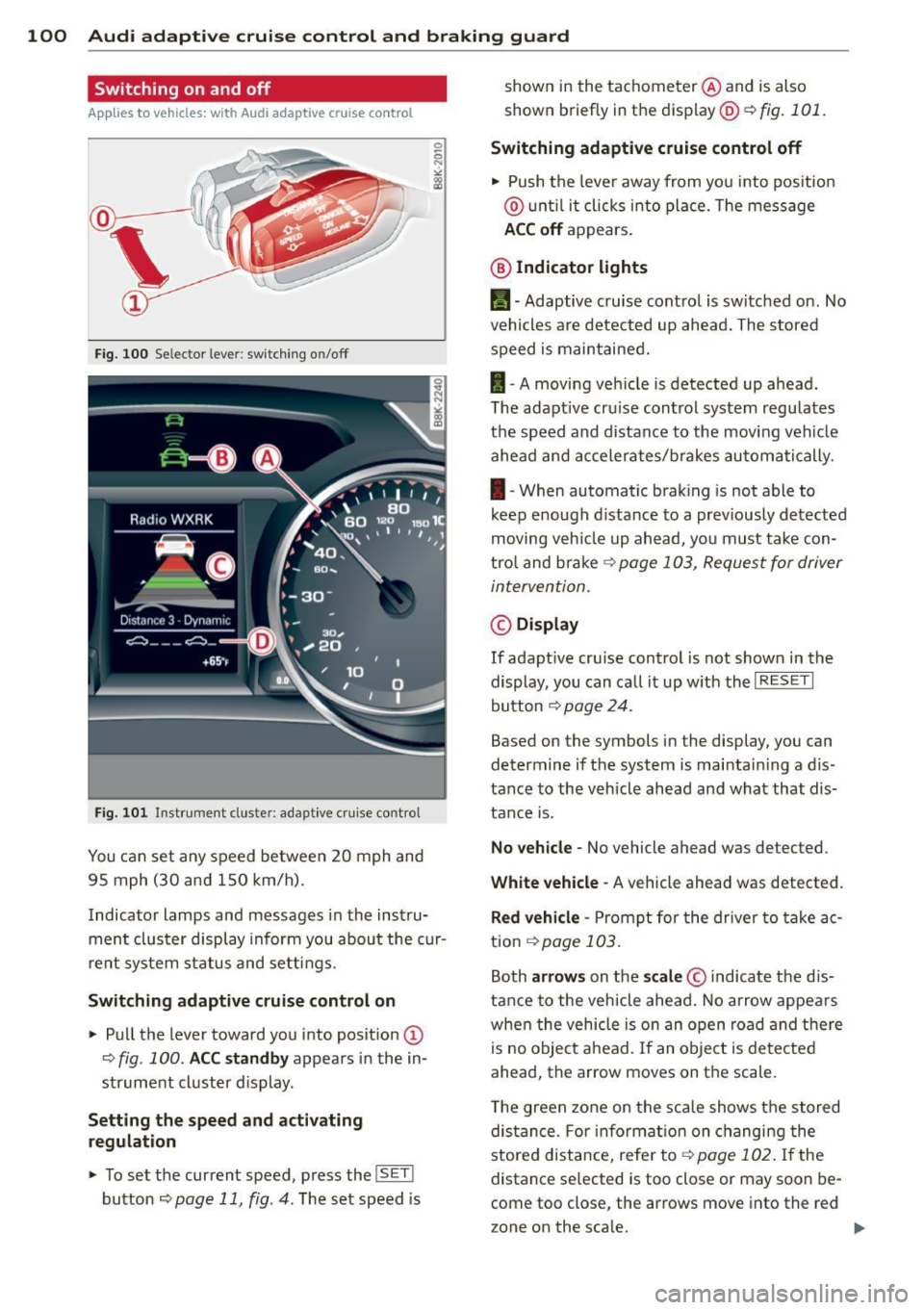
Fig. 100 Selec tor lever: switching o n/off
Fig. 101 Instrument clus te r: adap tive cru ise control
You can set any speed between 20 mph and
95 mph (30 and 150 km/h).
Indicator lamps and messages in the instru
ment cluster display inform you about the cur
r ent system status and settings.
Switching adaptive cruise control on
.. Pull the lever toward you into posit ion @
-:>fig . 100 . ACC standby appears in the in
strument cluster d isplay .
Setting the speed and activating
regulation
.. To set the current speed , press the ISET !
button ¢ page 11 , fig. 4. The set speed is shown in the tachometer
@and is also
shown briefly in the display@r:::>fig.
101.
Switching adaptive cruise control off
.. Push the lever away from you into positio n
@ until it clicks into place. The message
ACC off appears.
@ Indicator lights
II-Adaptive cruise control is switched on. No
vehicles are detected up ahead. The stored
speed is maintained.
I -A moving vehicle is detected up ahead .
T he adaptive cru ise control system regulates
the speed and distance to the moving vehicle
ahead and accelerates/brakes automatically.
I -When automatic braking is not able to
keep e nough d istance to a prev iously detected
moving veh icle up ahead, you must take con
trol and brake ~
page 103, Request for driver
intervention.
© Display
If adapt ive cru ise control is not shown in the
display, you can call it up w ith the
I RESET I
button ¢ page 24.
Based on the symbols in the display, you can
determine if the system is maintain ing a d is
tance to the vehicle ahead and what that dis
tance is.
No vehicle -No vehicle ahead was de tected .
White vehicle -A vehicle ahead was detected .
Red vehicle -Prompt for the driver to take ac
tion
~ page 103.
Both arrows on the scale© indicate the dis
tance to the vehicle ahead. No arrow appears
when the vehicle is on an open road and there
is no object ahead. If an object is detected
ahead, the arrow moves on the scale .
T he green zone on the scale shows the stored
distance. For information on changing the
stored distance, refer to~
page 102 . If the
distance se lected is too close or may soon be
com e too close , the arrows move into the re d
z one on the sca le.