tow AUDI A4 SEDAN 2013 Owner's Manual
[x] Cancel search | Manufacturer: AUDI, Model Year: 2013, Model line: A4 SEDAN, Model: AUDI A4 SEDAN 2013Pages: 294, PDF Size: 73.71 MB
Page 118 of 294
116 Park assist
Vehicles with the parking system are equipped
with a rear view camera in addition to the
acoustic parking system.
You can choose between two modes to assist
you with park ing. For example, you can use
"parking mode 1" when parking in a parking
space or garage
c:> fig . 114. When you want to
park parallel to the edge of the street, select
"park ing mode 2"
c:>fig . 115.
The rear acoustic park assist system is inte
grated in the rear of the vehicle and the rear
view camera is integrated in the rear lid
c:>page 117.
A WARNING
- The rear view camera has blind spots, in
wh ich objects cannot be detected . Be es
pecially careful to check for small chil
dren and animals before backing up.
Small children and animals will not al
ways be detected by the sensors.
General Information
Applies to vehicles: with parking system (rear, with rear
view camera)
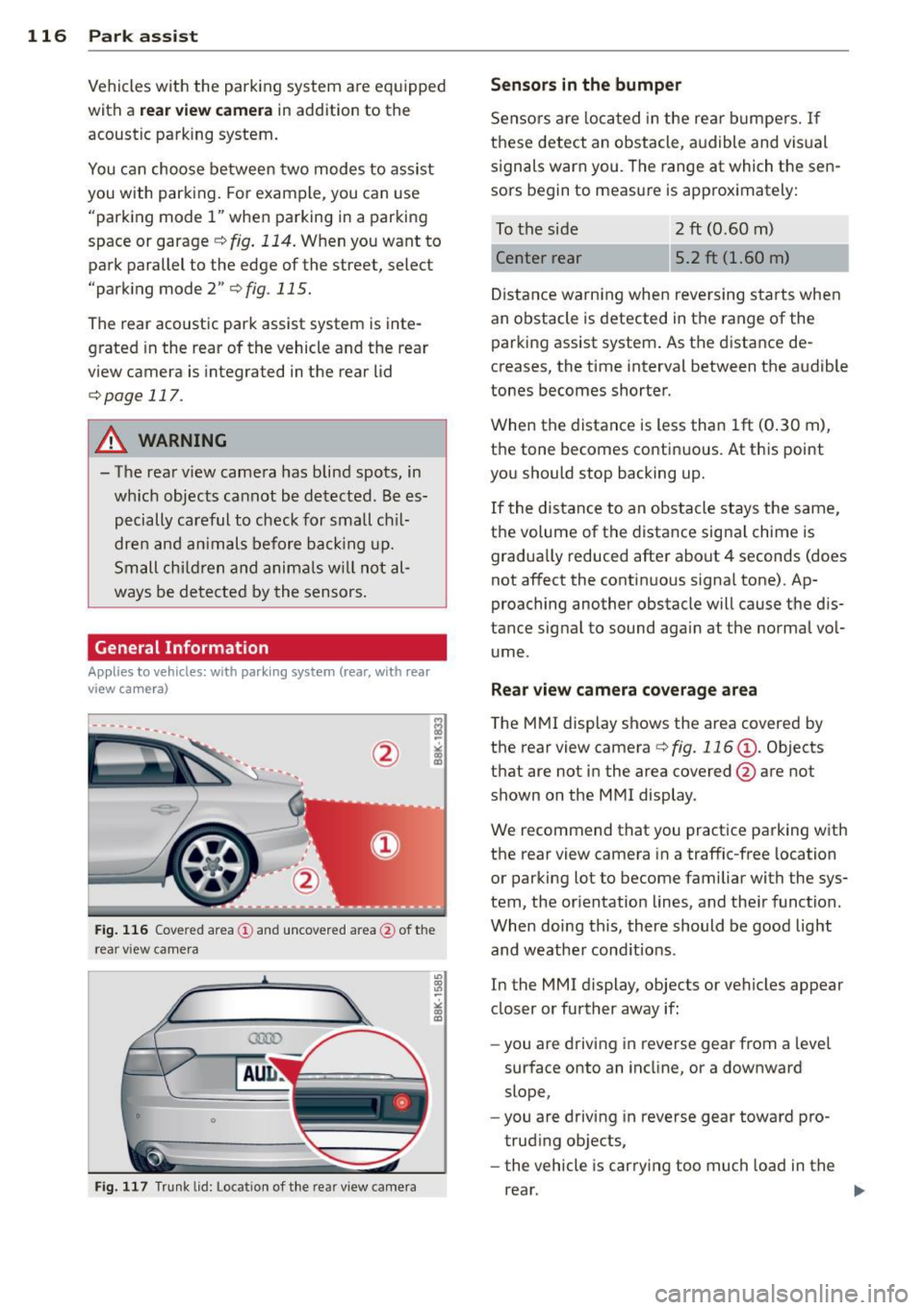
Fig. 116 Cove red area (!) and uncovered area @ of the
rea r view ca mera
• 0
Fig . 117 Trun k lid : Location of the rear view camera
"'
"' "'
~
Sensors are loca ted in the rear bumpers. If
these detect an obstacle, audible and visual
s ignals warn you. The range at which the sen
sors begin to measure is approx imately:
To the side 2
ft (0.60 m)
Center rear 5.2 ft (1.60 m)
Distance warning when reversing starts when
an obstacle is detected in the range of the
parking assist system. As the distance de
creases, the time interval between the audible
tones becomes shorter.
When the distance is less than 1ft (0.30 m),
t h e tone becomes continuous. At thi s point
you should stop backing up.
If the distance to an obstacle stays the same,
the volume of the distance signal chime is
gradually reduced after about 4 seconds (does
not affect the contin uous signa l tone) . Ap
proaching another obstacle will cause the d is
tance signal to sound agai n at the normal vol
ume.
Rear view camera coverage area
T he MMI display shows the area covered by
the rear view camera
c:> fig. 116 (D . Objects
that are not in the area covered @are not
shown on the MMI display .
We recommend that you practice parking with
the rear view camera in a traffic-free location
or parking lot to become familiar with the sys
tem, the orientation lines, and the ir function.
When doing this, there should be good light
and weathe r cond itions.
In the MMI display, objects or vehicles appear
closer or further away if:
- you are driving in reverse gear from a leve l
surface onto an incline, or a downward
slope,
- you are driving in reverse gear toward pro
trud ing ob jects,
- the vehicle is car ry ing too much load in the
rear.
Page 125 of 294
-For security reasons, we recommend that
you clear the programmed buttons be
fore se lling the vehicle .
Programming the transmitter (version
B)
Applies to vehicles: with Home Link
,,,,, r ,o :O·,) ,,;;~
®
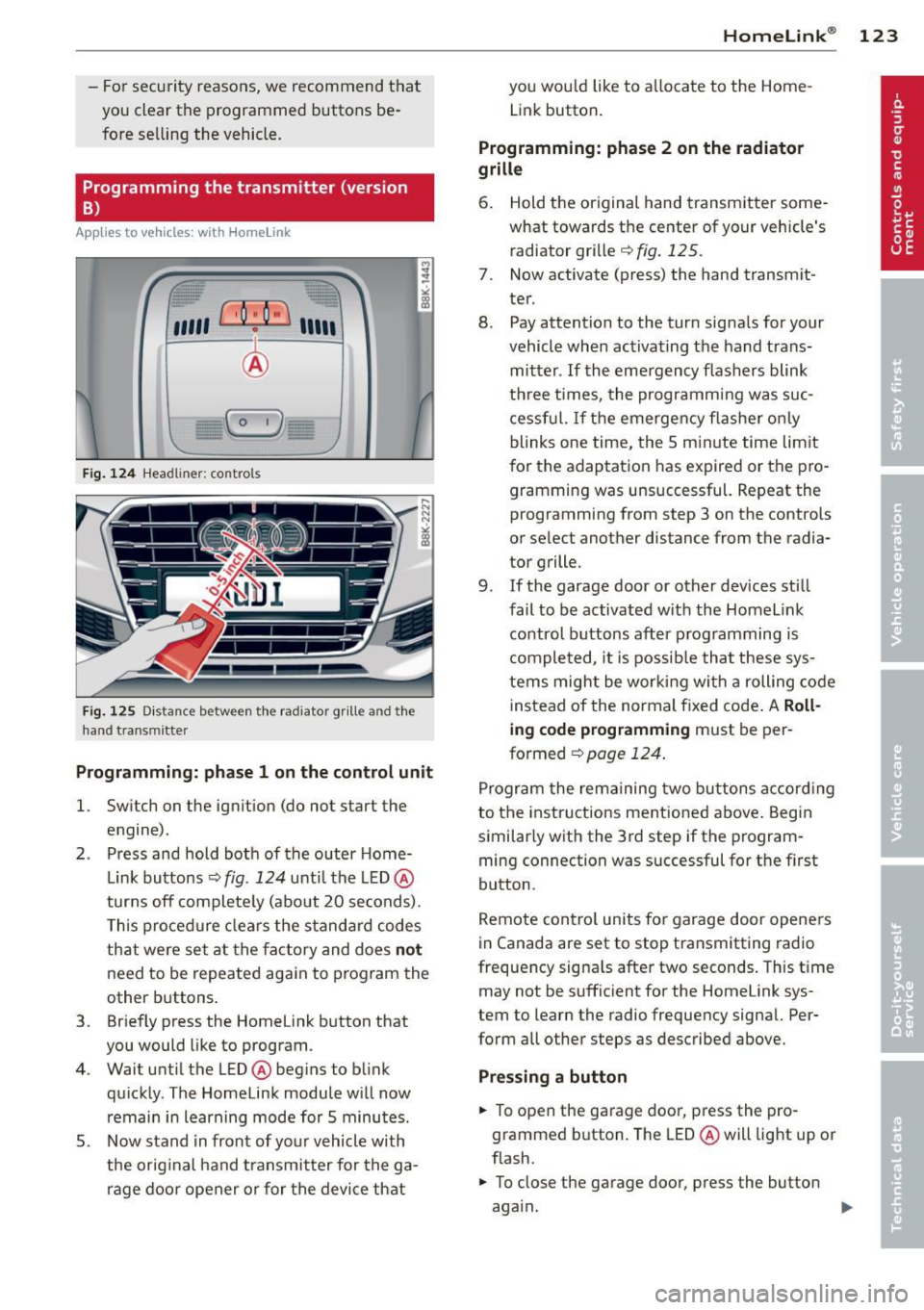
Fig. 124 Hea dli ner: c o n tro ls
Fig. 125 Dis ta n ce betw een th e radiato r gri lle a nd the
hand t rans mitte r
Programming: phase 1 on the control unit
l. Switch on the ignition (do not start the
engine) .
2 . Press and hold both of the outer Home
Link buttons ¢
fig. 124 unti l the LED @
turns off completely (about 20 seconds).
This procedure clears the standard codes
that were set at the factory and does
not
need to be repeated again to program the
other buttons .
3 . Briefly press the Homelink button that
you would like to program .
4. Wait until the LED @beg ins to blink
quickly . The Homelink module will now
remain in learning mode for 5 minutes.
5 . Now stand in front of your vehicle with
the original hand transmitter for the ga
rage door opener or for the device that
Homelink ® 123
you wou ld like to allocate to the Home
Link button .
Programming: phase 2 on the radiator
grille
6. Hold the or iginal hand transmitter some
what towards the center of your vehicle's radiator grille ¢
fig. 125.
7. Now activate (press) the hand transm it
ter.
8. Pay attention to the turn sig nals for your
vehicle when activating the hand trans
mitter .
If the emergency flashers blink
three times, the programm ing was suc
cessful. If the emergency flasher only
blinks one time, the 5 minute time lim it
for the adaptation has expired or the pro
gramming was unsuccessful. Repeat the
programming from step 3 on the controls
or se lect another distance from the radia
tor grille.
9. If the garage door or other devices still
fail to be activated with the Homelink control buttons after programming is
completed, it is possible that these sys
tems might be working with a roll ing code
instead of the normal fixed code . A
Roll
ing code programming must be per
formed ¢
page 124.
Program the remaining two buttons according
to the instructions ment ioned above . Begin
similarly with the 3rd step if the program
ming connection was successful for the f irst
button .
Remote contro l units for garage door openers
in Canada are set to stop transmitting radio
frequency signa ls after two seconds . This time
may not be sufficient for the Homelink sys
tem to learn the radio frequency signal. Per
form all other steps as described above.
Pressing a button
.,. To open the garage door, press the pro
grammed b utton. The LED @will light up or
flash.
.,. To close the garage door, press the button
aga in.
Page 130 of 294
128 Driving Safely
• Always keep both feet in the footwell so
that you are in control of the vehicle at all
times.
For detailed information on how to adjust the
driver's seat, see
¢ page 56.
A WARNING
Drivers who are unbelted, out of position
or too close to the airbag can be seriously
injured by an airbag as it unfolds. To help
reduce the risk of serious personal injury:
- Always adjust the driver's seat and the
steering wheel so that there are at least
10 inches (25 cm) between your breast
bone and the steering wheel.
- Always hold the steering wheel on the
outside of the steering wheel rim with
your hands at the 9 o'clock and 3 o'clock positions to help reduce the risk of per
sonal injury if the driver's airbag inflates.
- Never hold the steering wheel at the
12 o'clock position or with your hands at
other positions inside the steering wheel
rim or on the steering wheel hub. Hold
ing the steering wheel the wrong way
can cause serious injuries to the hands,
arms and head if the driver's airbag de
ploys.
- Pointing the steering wheel toward your
face decreases the ability of the supple
mental driver 's airbag to protect you in a
collision .
- Always sit in an upright position and nev
er lean against or place any part of your
body too close to the area where the air
bags are located.
- Before driving, always adjust the front
seats and head restraints properly and
make sure that all passengers are prop
erly restrained.
- Never adjust the seats while the vehicle
is moving . Your seat may move unexpect
edly and you could lose control of the ve
hicle.
- Never drive with the backrest reclined or
tilted far back! The farther the backrests
are tilted back, the greater the risk of in- jury due to incorrect positioning of the
safety belt and improper seating posi
tion.
- Children must always ride in child safety
seats ¢
page 165. Special precautions
apply when installing a child safety seat
on the front passenger seat¢
page 144 .
Proper seating position for the front
passenger
The proper front passenger seating position
is important for safe, relaxed driving .
For your own safety and to reduce the risk of
injury in the event of an accident, we recom
mend that you adjust the seat for the front
passenger to the following position :
• Move the front passenger seat back as far
as possible . There must be a minimum of
10 inches (25 cm) between the breastbone
and the instrument panel¢,&. .
• Adjust the angle of the seatback so that it is
in an upright position and your back comes
in full contact with it whenever the vehicle is
moving.
• Applies to vehicles with adjustable head re
straints: Adjust the head restraint so the up
per edge is as even as possible with the top
of your head. If tha t is not possible, try to
adjust the head restraint so that it is as
close to this position as possible.
• Keep both feet flat on the floor in front of
the front passenger seat.
• Fasten and wear safety belts correctly
¢page 139.
For detailed information on how to adjust the
front passenger's seat, see
¢ page 54.
A WARNING
-
Front seat passengers who are unbelted,
out of position or too close to the airbag
can be seriously injured or killed by the air
bag as it unfolds. To help reduce the risk of
serious personal injury:
Page 134 of 294
132 Driving Safel y
-Always make sure that objects cannot
fall into the driver footwe ll wh ile the ve
hicle is moving. Objects can become
trapped under the brake pedal and accel
erator peda l causing a loss of veh icle
contro l.
Stowing luggage
Loading the luggage compartment
All luggage and other objects must be prop
erly stowed and secur ed in the luggage com
partment.
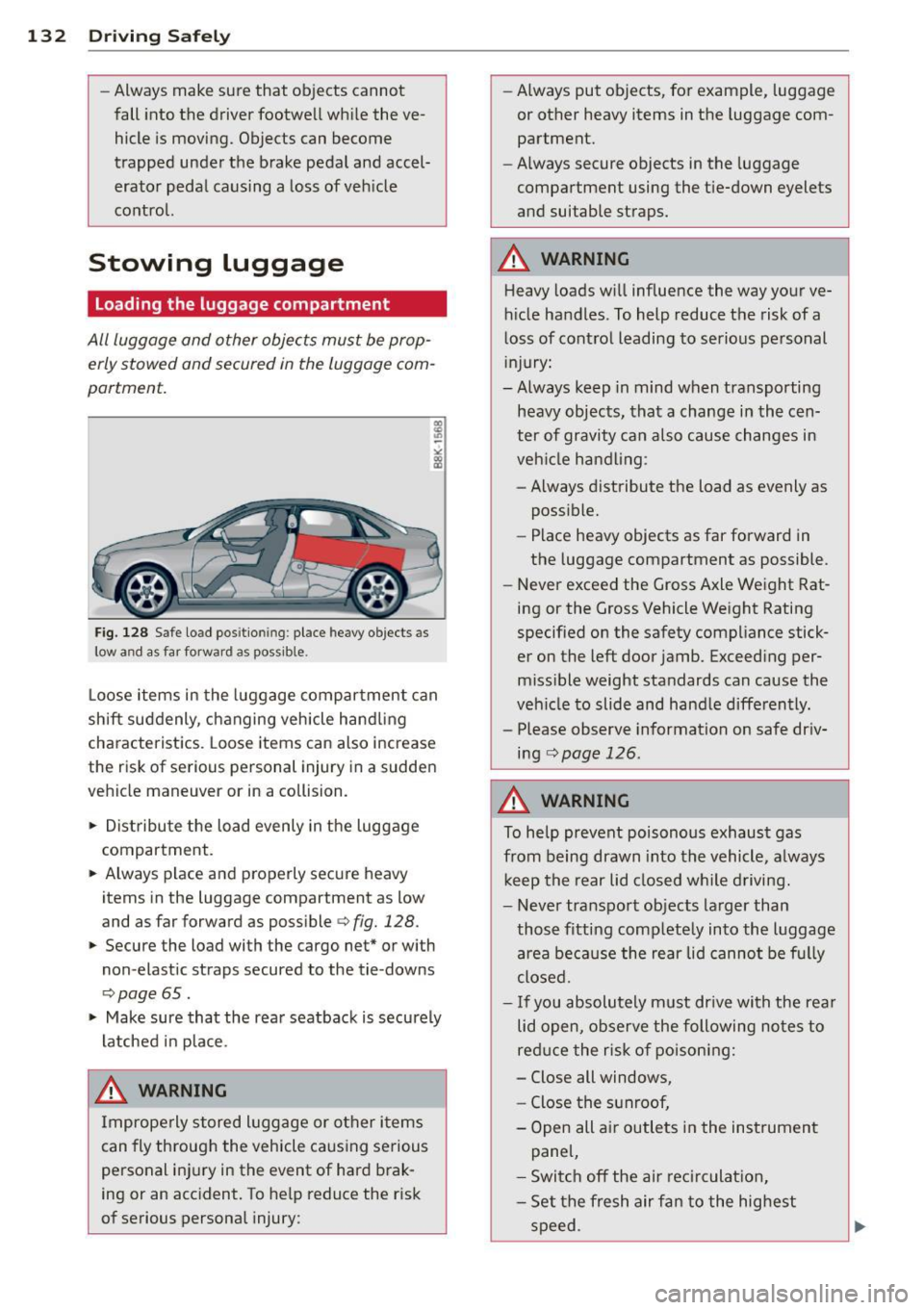
Fig. 128 S afe load positio nin g: place heavy objects as
l ow a nd a s far forward as pos sible.
Loose items in the luggage compartment can
shift suddenly, changing vehicle hand ling
characteristics. Loose items can also increase
the risk of serious personal injury in a sudden
vehicle maneuver or in a collision .
.,. Distribute the load evenly in the luggage
compartment .
.,. Always p lace and properly secure heavy
items in the luggage compartment as low
and as far forward as possible
c> fig. 128.
.,. Secure the load with the cargo net* or with
non -elastic straps secured to the tie-downs
<=> page 65.
.,. Make sure that the rear seatback is securely
latched in place.
.&_ WARNING
Improperly stored luggage or other items
can fly throug h the vehicle ca using serious
personal inj ury in the event of hard brak
ing or an accident. To help reduce the r isk
of serious personal injury: -
Always put objects, for example, luggage
or other heavy items in the luggage com
partment.
- Always secure objects in the luggage
compartment using the t ie-down eyelets
and suitable straps.
.&_ WARNING
-
Heavy loads w ill influence the way your ve
hicle handles . To help reduce the risk of a
loss of control leading to serious personal
in jury:
- Always keep in mind when transporting
heavy objects, that a change in the cen
ter of gravity can also cause changes in
veh icle handling :
- Always distribute the load as evenly as
possible.
- Place heavy objects as far forward in
the luggage compartment as possible .
- Never exceed the Gross Axle Weight Rat
ing or the Gross Vehicle Weight Rating
specified on the safety compliance stick
er on the left door jamb. Exceeding per
miss ible weight standards can cause the
veh icle to slide and handle differently.
- Please observe information on safe dr iv
ing
c:> page 126.
.&_ WARNING
To help prevent poisonous exhaust gas
from being drawn into the vehicle, always
keep the rear lid closed while driving.
- Never transport objects larger than
those fitting completely into the luggage
a rea because the rear lid cannot be fully
closed.
- If you absolutely m ust dr ive with the rear
lid open, observe the following notes to
red uce the risk of poisoning:
- Close all windows,
- Close the sunroof,
- Open all air outlets in the instrument
panel,
- Switc h off the ai r rec irc ulat ion,
- Set the fresh air fan to the highest
speed.
Page 144 of 294
142 Safet y belt s
• Let the belt wind up on the retractor as you
gu ide the belt tongue to its stowed pos ition .
A WARNING
Never unfasten safety belt while the veh i
cle is moving. Doing so will increase your
r isk of being injured or killed .
Adjusting safety belt height
-
With the aid of the safety belt height adjust
men t, the three point safety belt strap rout
ing can be fitted to the shoulder area, accord
ing to body size .
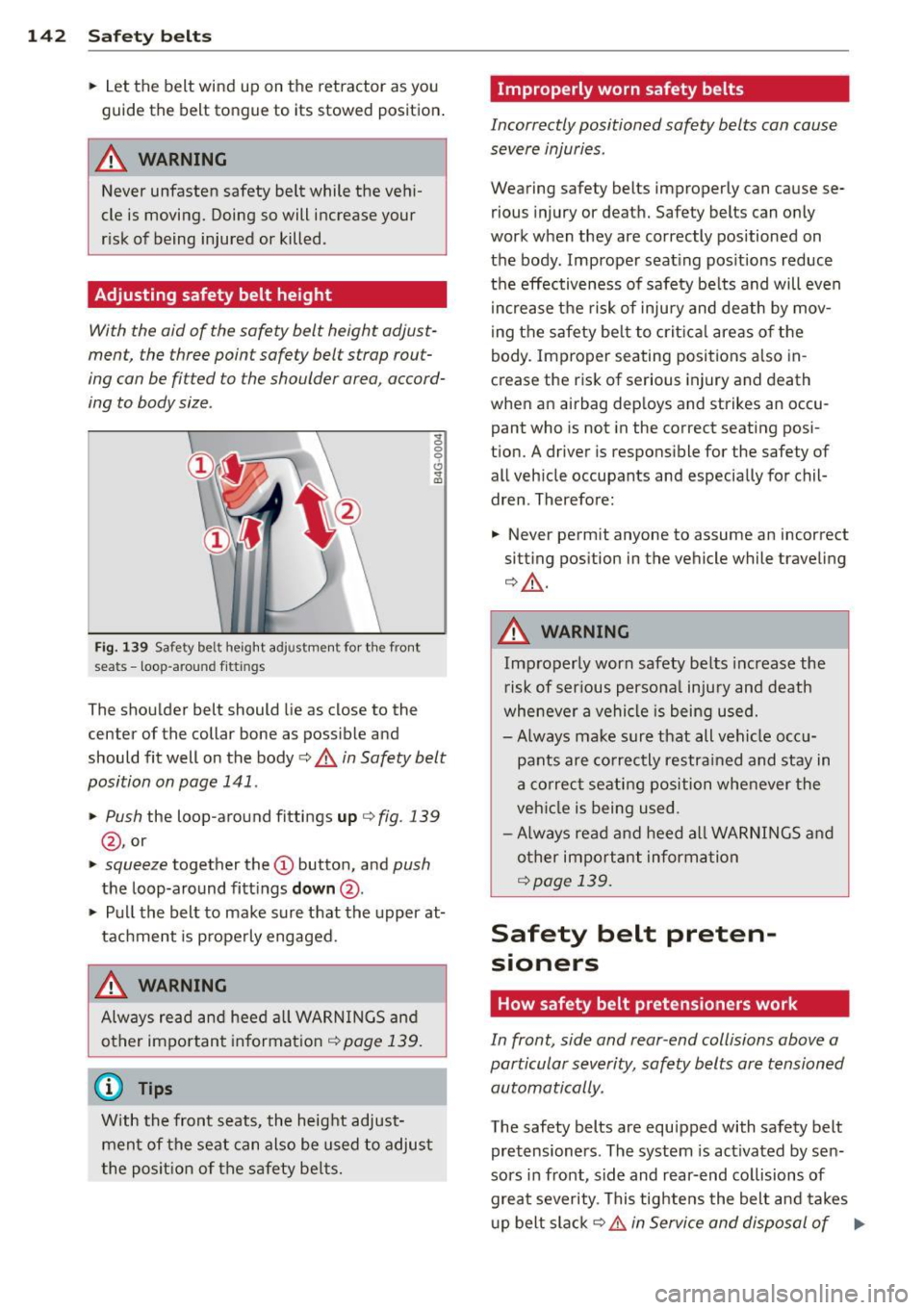
~ 0 0 6
Fig. 139 Safety be lt he ig ht a dju stme nt for t he front
sea ts - loop -a rou nd fit tings
.. (0
The shoulder belt should lie as close to the
center of the collar bone as possib le and
should fit well on the body
c:> .&. in Safety belt
position on page 141 .
• Push
the loop-around fittings up c:> fig . 139
@ , or
• squeeze together the (D button, and push
the loop-around fitt ings down @.
• Pull the belt to make sure that the upper at
tachment is properly engaged.
.&, WARNING
Alw ays read and heed all WARNINGS and
other impo rtant informat ion
¢ page 139.
(D Tips
With the front seats, the height adjust
ment of the seat can also be used to adjus t
the posit ion of the safety be lts.
Improperly worn safety belts
Incorrectly positioned safety belts can cause
severe injuries .
Wearing safety belts improperly can cause se
rious injury or death. Safety belts can only
work when they are correctly positioned on
the body . Improper seat ing pos itions reduce
the effectiveness of safety be lts and will even
i ncrease the risk of inju ry and death by mov
ing the safety be lt to crit ical areas o f the
body. Improper seating positions also in
crease the risk of serious injury and death
when an airbag deploys and strikes an occu pant who is not in the cor rect seating posi
tion. A driver is responsible for the safety of
all veh icle occupants and especially for chil
dren . Therefore:
• Never permit anyone to assume an incorrect
sitting position in the vehicle while traveling
c:> ,&. .
.&, WARNING
Improperly worn safety belts increase the
r isk of ser ious persona l injury and death
whenever a vehicle is being used.
- Always make sure that all vehicle occ u
pants are correctly restrained and stay in
a correc t seating position whe never the
veh icle is being used .
- Always read and heed all WARNINGS and
other important information
¢ page 139.
Safety belt preten
sioners
How safety belt pretensioners work
In front, side and rear -end collisions above a
particular severity, safety belts are tensioned automatically .
The safety belts are equipped with safety belt
pretensioners . The system is act ivated by sen
sors in front, side and rear-end collisions of
great severity. This tightens the belt and takes
u p belt slack
c:> .&. in Service and disposal of .,._
Page 154 of 294
152 Airbag sys te m
- Improper repair or disassembly of the
front passenger and driver seat will pre
vent the Advanced Airbag System from
functioning properly.
- Repairs to the front passenger seat must
be performed by qualified and properly
trained workshop personnel.
- Never remove the front passenger or
dr iver seat from the veh icle .
- Never remove the upholstery from the
front passenger seat.
- Never disassemble or remove parts from the seat or disconnect wires from it.
- Never carry sharp objects in your pockets
or place them on the seat. If the weight
sensing mat in the passenger seat is punctured it cannot work properly.
- Never carry things on your lap or carry
objects on the passenger seat. Such
items can increase the weight registered
by the weight-sens ing ma t and send the
wrong info rmation to the airbag control
uni t.
- Never sto re items under the front pas·
senger seat. Parts of the Advanced Ai r
b ag System under the p assenge r seat
cou ld be damaged, prevent ing them and
the airbag system from wo rking proper
ly .
- Never place seat covers or replacement
upholste ry that have not been specifical
ly approved by A udi on the front seats.
- Seat covers can prevent the A dvanced
Air bag System from recognizing child re
straints or occupants on the front pas
senger seat and prevent the side airbag in the seat backrest from deploy ing prop
erly.
- Never use c ush ions, pillows, blankets or
similar items on the front passenger
seat. The add it iona l padd ing will prevent
the weight-sensing mat in the seat from
accu rately reg iste ring the c hild restra int
or person on the seat and prevent the
Adva nce d Airb ag System from func tion
ing properly .
-If you mus t use a child restra int on the
front passenger seat and the ch ild re- straint manufacture
r's instructions re
qu ire the use of a towel, foam cushion or
something e lse to properly pos ition the
child restraint, make certain that the
PASSENGER AIR BAG OFF light comes
on and stays on whenever the ch ild re·
s t raint is installed on the front passen
ge r seat.
- If the PASSENGER AIR BAG OFF light
does not come on a nd stay on, immed i
a tely insta ll child restrain t in a rear se at
ing position and have the ai rbag system
inspected by your authorized A udi dealer.
How the Advanced Airbag System
components work together
The front Advanced Airbag System and the
s ide airbags supp lement the protection of
fered by the front three-poi nt safety belts
with pretensioners and load limiters a nd the
adjustable head rest raints to help redu ce the
risk of inj ury in a wide range of accident and
c rash situations. Be s ure to read the impor
tant information about safety and heed the
WARNINGS in this chapter.
Deployment of the Adv a need A irba g System
and t he activation of the safety belt preten
sioners depend on the deceleration measured
by the crash sensors and registered by the
electron ic control unit. The amount of infla
tion of the front airbags can a lso be adapted
to the front sea t pos ition, depending on the
distance between the respect ive front seat
and the steer ing w heel or instrument panel as
registered by sensors in the seats. Crash se·
verity depends on speed and decelerat ion as
well as the mass and st iffness of t he vehicle
o r object involved in the crash .
On the passenger side, regardless of safety
belt use, the ai rbag w ill be tu rned off if the
we ight on the passenger seat is less than the
amount programmed in the e lectron ic control
u nit. The front airbag on the passenger side
will a lso be turned off if one of the child safe -
ty seats that has been certified under Federal
Motor Vehicle Safety Standard 208 has been
recogni zed on the seat . The
PAS SENGER AIR .,..
Page 180 of 294
178 Child Saf ety
Deactivating the convertible locking
retractor
The convertible locking retractor for child re
straints will be deactivated automatically when the belt is wound all the way back into the retractor .
.,. Press the red button on the safety be lt
buck le. The belt tongue wi ll pop out of the
buck le .
.. Guide the safety belt all the way back into
its stowed position .
A lways le t the safety belt retract complete ly
into its stowed position . The safety belt can
now be used as an ordinary safety belt with
out the convertib le locking r etractor for chi ld
restra int s.
I f the convertible locking retractor shou ld be
activated inadvertently, the safety belt m ust
be unfastened and guided completely back in
to its stowed pos ition to deactivate th is fea
ture. If the convertible locking retractor is not
deactivated, the safety belt will gradually be
come tighter and u ncomfortable to wear .
A WARNING
Improperly insta lled child safety seats in
crease the risk of ser ious personal inju ry
and death in a collision .
- Never unfaste n the safety belt to deacti
vate the convert ible lock ing retractor for
c hild restrain ts while the veh icle is mov
ing. You would not be restrained and
cou ld be seriously injured in an accident .
- Always read and heed all WARN INGS
whenever using a child restrained in ave
hicle is being used
¢ page 165. Special
precautions apply when installing a chi ld
safety seat on the front passenger seat
¢ page 145, Child restraints on the front
seat -some important things to know .
Page 182 of 294
180 Child Safet y
Description
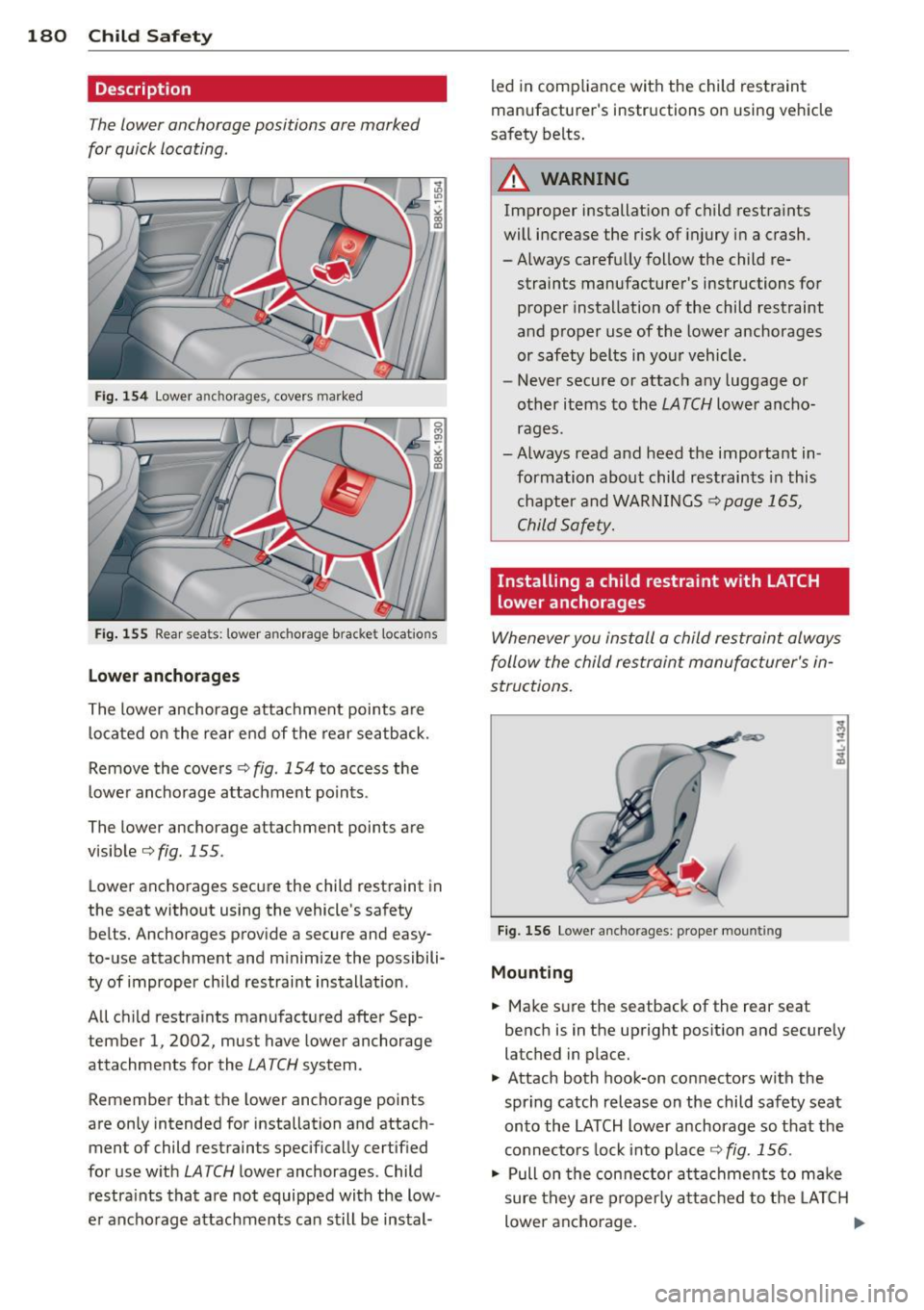
The lower anchorage positions are marked
for quick locating .
Fig. 154 Lower a nch orages, covers marke d
Fig. 155 Rear sea ts: towe r an ch orage b racke t locat io n s
Lowe r ancho rages
The lower anchorage atta chment points are
located on the rear end of the rear seatback.
Remove the covers¢
fig. 154 to access the
lower anchorage attachment points .
The lower anchorage attachment points are
visible ¢
fig. 155 .
Lower anchorages secure the child restraint in
the seat without using the vehicle 's safety
belts. Anchorages provide a secure and easy
to-use attachment and m inim ize the possibili
ty of improper child restraint installation .
All chi ld restraints manufactured after Sep
tember 1 , 2002, must have lower anchorage
attachments for the
LATCH system .
Remember that the lower anchorage points
are only intended for installation and attach ment of child restraints specifically certified
for use w ith
LATCH lower anchorages. Child
restra ints that are not equipped with the low
e r ancho rage attachments can still be instal- led in compliance with the child restraint
manufacturer's instructions on using vehicle
safety belts
.
A WARNING
-Improper installat ion of child restra ints
will increase the risk of injury in a crash .
-A lways carefu lly follow the child re -
straints manufacturer's instructions for proper installation of the child restraint
and proper use of the lower anchorages
or safety belts in your vehicle .
- Never secure or attach any luggage or
other items to the
LATCH lower ancho
rages.
- Always read and heed the important in formation about child restraints in this
chapter and WARN INGS
¢ page 165,
Child Safety.
Installing a child restraint with LATCH
lower anchorages -
Whenever you install a child restraint always
follow the child restraint manufacturer's in
structions.
F ig. 156 Lower a ncho rages : proper mount ing
Mounting
.. Make s ure the seatback of the rear seat
bench is in the upright posit ion and securely
latched in place.
.,. Attach both hook-on connectors with the
spring catch release on the child safety seat
onto the LATCH lower anchorage so that the
connecto rs lock i nto pla ce ¢
fig. 156.
.. Pull on the con nector attachments to make
sure they are properly a ttached to the LA T CH
lower ancho rage . ..,.
Page 186 of 294
184 Intelligent technology
Intelligent technology
Notice about data
recorded by vehicle
control modules
Your veh icle is not equipped with an Event Da
ta Recorde r (EDR), ins talled by some manu
facture rs fo r the express p urpose of capturing
data for retrieval after an accident or cras h
event . EDR's are sometimes ca lled "crash re
corders".
Some state laws restr ict the retr ieval or down
loading of data stored by EDR's that were in
stalled in a vehicle for the express purpose of retrieving data after an accident or crash
event without the owner's consent.
A ltho ugh yo ur vehicle is not equ ipped wit h an
EDR, it is equipped with a number of electron
ic control modules for various vehicle systems
such as, for examp le, eng ine f unction, em is
sion control, as well as for the airbags and
safety belts.
These electronic contro l modules also record
vehicle-re lated data during norma l vehicle op
erat ion for diagnostic and repa ir purposes.
The recording capacity of the electronic con
trol modules is limited to data (no sound is re
corded) and only a small amount of data is ac
tually recorded ove r a ve ry limited pe riod of
time and stored when a sys tem faul t or o ther
cond ition is sensed by a cont ro l u nit. Some of
the data then stored may re late to vehicle
speed, direction, braking as we ll as restraint
system use and performance in the event of a
crash or other condit ion. Stored data can only
be read and downloaded w ith special equip
ment.
Electronic Stabilization
Control (ESC)
Description
ESC helps to improve road holding and vehicle
dynamics to help reduce the probability of
skidd ing and loss of ve hicle control. It works
only when the eng ine is running. ESC detects certain difficult driving situat
ions, including
when the vehicle is beginning to spin (yaw)
o ut of control and he lps you to get the veh icle
back under control by se lectively braking the
whee ls, and/or reducing eng ine power and
providing steer ing ass istance to he lp hold the
vehicle o n the dr iver's intended course. The in
dicator light
G) in the inst rument cluster
blinks when ESC is ta king action to help yo u
control the veh icle.
ESC has limitations.
It is importa nt to remem
ber that ESC cannot overcome the laws of
physics. It wi ll not always be able to help out
under a ll cond it ions you may come up aga inst.
F or example, ESC may not always be able to
help you master situations where there is a
s u dden change in the coefficient of friction of
the road surface. When there is a section of
dry road that is sudden ly covered w ith water,
s lush or snow, ESC cannot perform the same
way it wou ld on the dry surface . If the ve hicle
hydroplanes (rides on a cushion of water in
stead of the road surface), ESC will not be
able to help you steer the vehicle because con
tact with the pavement has been in terrupted
and the vehicle cannot be braked or steered .
D uring fast cornering, particularly on winding
roads, ESC cannot always deal as effectively
with difficult driving situations than at lower
speeds. When towing a trailer, ESC is not able
to help you regain control as it would if you
were not tow ing a trailer.
Always adjust your speed and driving style to road, traffic; and weather condit ions. ESC can
not override the vehicle's physical limits, in
crease the availab le tract ion, or keep a ve hicle
on the road if road departure is a result of
drive r inattent io n. Instead, ESC imp roves the
poss ibil ity of keeping the vehi cle under con
trol and on the road during ex treme maneu
vers by using the d river's steering inputs to
help keep the vehicle going in the intended di
rection . If you are traveling at a speed that
ca uses you to run off the road before ESC can
provide any assistance, you may not experi
ence the benefits of ESC.
Page 190 of 294
188 Intelligent technology
200 kilometers) of normal city driving.
You can compensate for this by pressing
the brake pedal more firmly. This also applies later when new pads are instal
led .
- You should perform braking maneuvers
for the purpose of cleaning the brake
system only if road conditions permit.
Other road users must not be put at risk -
you may cause an acc ident!
- Before descending a steep grade, reduce
speed and shift transmission into a lower
gear or lowe r driving range. Do not ride
the brakes or hold the pedal down too
long or too often. This could cause the
brakes to get hot and diminish braking
efficiency.
- Do not "ride the brakes" by resting your
foot on the pedal when you do not intend
to brake . This may cause the brakes to
overheat, premature wear and increased
stopping distance.
- Under certain climatic and operating
conditions such as passing through wa
ter, driving in heavy rain or after washing
the vehicle, the effectiveness of the
brakes can be reduced. In winter, ice can
accumulate on the brake pads, linings,
discs and drums. Carefully apply brakes
for a test. Brakes will dry and ice coat
ings will be cleaned off after a few care
ful brake applications.
- Driving for an extended period of time on
salt-covered roads without using your
brakes can also affect braking efficiency.
Clean off accumulated salt coating from
brake discs and pads with a few careful
brake applications.
- If you damage the front spoiler, or if you
install a different spoiler, be sure the air
flow to the front brakes is not obstruct
ed . Otherwise the brake system could
overheat reducing the effectiveness of
the entire brake system.
- Failure of one brake c ircuit will impair
the braking capability resulting in an in
creased stopping distance. Avoid driv ing
the vehicle and have it towed to the near- est authorized Audi dealer or
qualified
workshop.
- Never let the vehicle roll to a stop with
the engine shut off.
- If the brake booster is not working, for
example when towing your vehicle, or
because the brake booster has somehow
been damaged, the brake pedal must be
pressed considerably harder to make up
for the lack of booster assistance.
Electro-mechanical
power assist, dynamic
steering
The electro-mechanical power assist helps
the driver when steering.
Power steering adapts electronically based on
the vehicle speed .
Indicator lights and messages
• Steering defective! Do not drive vehicle!
If this indicator light turns on and stays on
and this message appears, the power steering
may have failed.
Do
not continue driving . See your authorized
Audi dealer or other qualified repair facility
for assistance.
E!"4 Dynamic steering: System fault! You can
continue driving
If the indicator light turns on and the mes
sage appears, the steering may be more diffi
cult to move or more sensitive than usual. The
steering wheel may also be at an angle when
driving straight .
Drive slowly to your authorized Audi dealer or
qualified workshop to have the malfunction
corrected .
ls!'fl Dynamic steering: initializing
If this driver message appears and the indica
tor light is flashing on the instrument panel,
dynamic steering* is being reinitialized. Once
you start the engine after this is finished, the ..,..