tow AUDI A4 SEDAN 2013 User Guide
[x] Cancel search | Manufacturer: AUDI, Model Year: 2013, Model line: A4 SEDAN, Model: AUDI A4 SEDAN 2013Pages: 294, PDF Size: 73.71 MB
Page 69 of 294
@ Tips
-Never stow the ski sack away when it is
still wet or damp (for example, snow
melting from skis) . A llow it to dry com
plete ly before stowing it away .
- When transporting skis or snowboards,
tighten the securing strap between the
bindings.
- Position skis in the ski sack w ith the
po inted ends facing the front and ski
poles w ith the pointed ends facing the
rear .
- You can lock or unlock the pass-through
using the mechanical key . This prevents
any access to the luggage compartment
from the vehicle interio r.
Parcel shelf
The parce l shelf behind the rear seatback can
be used to carry light items of cloth ing.
& WARNING
No heavy or hard objects should be placed
on the parcel she lf. They are a hazard to
the vehicle occupants during sudden brak
ing. The is a r isk of injury .
Please make sure that the heating wires
for the rear window defogger are not dam
age by abrasive objects.
To ensure problem -free ventilation, the
ventilation s lots between the rear window
and the parce l shelf must not be covered .
Seat s an d sto rage 67
Page 72 of 294
70 Warm and cold
switching recirculation mode on when driving
through a tunnel or when sitting in traffic
c:::> &. .
The IAU TO I button or I@ FRON T I butt on
switches recircu lation mode off .
IAUTO I Switching automatic mode on
Automatic mode mainta ins a constant tem
perature inside the vehicle. Air temperature,
airflow and air distribution are controlled au
tomatically.
Adjusting the temperature
Temperatures between 60 °F (+16 °C) and
84 °F ( +28 °C) can be set . Outside of this
range,
LO or HI will appea r in the climate con
trol system disp lay. At both of these settings,
the climate control system runs continuously
at maximum cooling or heating power . There
is no temperature regu lation.
~ Adjusting the airflow
You can adjust the airflow manually to su it
your needs . To have the airflow regulated au
tomatically , press the
!AUTO ! button.
~ Adjusting the air distribution
You can manually select the vents where the
a ir will flow . To have the air d istribution regu
lated automatically, press the
IAUTOI button .
~ Adjusting seat heating*
Pressing the button switches the seat heating
on at the highest sett ing (level 3) . The LEDs
indicate the temperature leve l. To reduce the
temperature, press the button again . To
switch the seat heating off , press the button
repeatedly until the LED turns off .
After 10 minutes , the seat heating automati
cally switches from level 3 to leve l 2.
I@ FR ON T I Switch the defroster on/off
The windshield and s ide windows are defrost
ed or cleared of condensation as quickly as
possible . The max imum amount of air flows
mainly from the vents below the windshield.
Recirculation mode switches off . Th e tempera
ture is controlled automatically. T
he
!AUTO I button switches the defroster off.
l !iiil R EAR I Switching rear window heater
on/off
T he rea r window heater only operates when
the engine is running. It switches off auto
matically after a few m inutes, depending on
the outside temperature .
T o prevent the rea r window heater from
switching off automatically, press and hold
the
l oo REAR I button for more than 2 seconds .
This remains stored until the ignition is
switched off.
Air vents
You can open and close the center and rear air
vents using the thumbwhee ls. The levers ad
just the direction of the airflow from the
vents.
In vehicles with a 3-zone deluxe automatic cli
mate control system*, you can adjust the air
temperature in the rear by turning the thumb
wheel toward the red side to make it warmer
or toward the b lue s ide to make it cooler.
A WARNING
-- Do not use the recirculation for extended
periods of time . The windows could fog
up since no fresh air can enter the vehi
cle . If the windows fog up, press the air
recir culation butto n aga in imm ediately
to switch off the air recirculation func
tion or se lect defrost.
- I ndivid uals w ith reduced sensitivity to
pa in or temperature could develop burns
when using the seat heating function . To
red uce the risk of injury, these individu
als shou ld not use seat heating.
(D Note
To avoid damage to the heating elements
in the seats, do not kneel on the seats or
place heavy loads on a small area of the
seat.
Page 84 of 294
82 On the road
• To increase/dec rease the speed qu ickly,
hold the lever in the
G) !Q direction unti l
the des ired speed is d isplayed.
You can a lso press the accelerator pedal down
to increase your speed , e .g. if you want to
pass someone . The speed yo u saved earlier
will resume as soon as you let off of the accel
erator pedal.
If , however, you exceed your saved speed by
6 mph (10 km/h) for longer than 5 minutes ,
the cruise contro l will be turned off tempora
rily. The green symbol in the display turns
white . The saved speed remains the same .
Presetting your speed
You con preset your desired speed while the
vehicle is not moving.
• Switch on the ignition.
• Pu ll lever into pos ition
CD c:> page 81 ,
fig. 79.
• Press the lever in the 0 or O direction to
incr ease or decrease yo ur speed .
• Re lease the lever to save that speed .
This funct ion makes it possible, for example,
to save the speed you want before driving on
the hig hway . Once o n the hig hway, activate
the cruise contro l by pulling the lever towa rd
(D .
Switching off
Temporary deactivation
• Pres s the bra ke peda l, or
• Manual transmission : Keep the clutch pedal
pressed down
longer , or
• Press the lever into position @ (not clicked
into p lace)
¢ page 81, fig . 79, or
• Drive for longer than 5 minutes at more
t h an 6 mph (10 km/h) above the stored
speed .
Switching off completely
• Press lever into position @(clicked into
place), or
• Switch the ignition off. The speed you saved will be retained if the
cruise control has been switched off tempora
rily . To resume the saved speed, let up on the
brake or clutch pedal and pu ll the lever to po
s ition (!).
Switching the ignition off erases the saved
speed.
_& WARNING
You shou ld only return to the saved speed
if it is not too fast for the current traffic
conditions -risk of an accident!
Page 91 of 294
There is a system malfunction in the transmis
sion. You may continue driving. Drive to your
authorized Audi dealer or qualified repair fa
cility soon to have the malfunction corrected.
[O] Transmission malfunction: Limited driv·
ing functionality
There is a system malfunction in the transmis
sion . The transmission is switching to emer
gency mode. This mode only shifts into cer
tain gears or will no longer shift at all. The en
gine may stall. Drive to your authorized Audi
dealer or qualified repair facility immediately
to have the malfunction corrected .
[O] Transmission malfunction: Stop vehicle
and shift to park.
Do not continue driving. Select the P selector
lever position and see your authorized Audi
dealer or qualified repair facility for assis
tance.
([) Note
If the transmission switches to emergency
mode, you should take the vehicle to an
authorized Audi dealership as soon as pos
sible to have the condition corrected.
Emergency release of the selector lever
Applies to vehicles: with multitronic or tiptro nic
If the vehicle's power supply foils, the selec
tor lever can be released in an emergency.
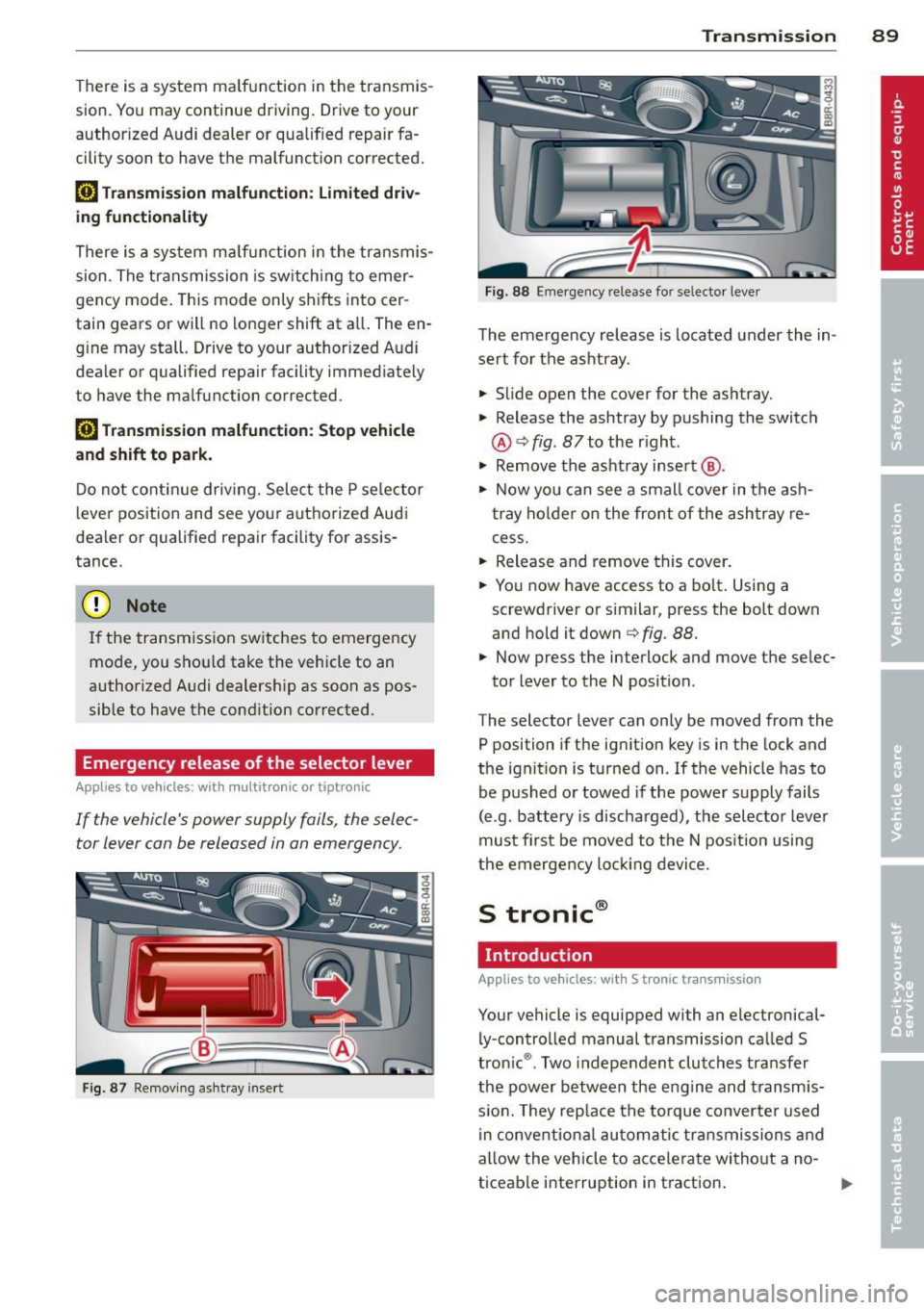
Fig . 87 Removing ashtray insert
Transmission 89
Fig . 88 Emerge ncy release fo r se lecto r lever
The emergency release is located under the in
sert for the ashtray.
.,. Slide open the cover for the ashtray.
.,. Release the ashtray by pushing the switch
@ ¢
fig. 87 to the right .
.,. Remove the ashtray insert @ .
.,. Now you can see a small cover in the ash
tray holder on the front of the ashtray re
cess .
.,. Release and remove this cover.
.,. You now have access to a bolt. Using a
screwdriver or similar, press the bolt down
and hold it down ¢
fig. 88.
.,. Now press the interlock and move the selec-
tor lever to the N position .
The selector lever can only be moved from the
P position if the ignition key is in the lock and
the ignition is turned on . If the vehicle has to
be pushed or towed if the power supply fails
(e .g . battery is discharged), the selector lever
must first be moved to the N position using
the emergency locking device.
S tronic®
Introduction
Applies to vehicles : with S tronic transmission
Your vehicle is equipped with an electronical
ly -controlled manual transmission called S
tronic ®. Two independent clutches transfer
the power between the engine and transmis
s ion. They rep lace the torque converter used
in conventional automatic transmissions and
allow the vehicle to accelerate without a no
ticeable interruption in traction.
Page 98 of 294
96 Transmi ssion
• To access the emergency release mecha
nism, remove the ashtray insert @ using the
release switch@~
fig. 94.
• Loosen and remove the cap in the ashtray
mount.
• You now have access to a pin . Us ing a screw
dr iver or s imilar object, press the pin dow n
and hold it in that position~
fig. 95.
• Now p ress the in terlock button and move
t h e se lecto r lever to the N posi tion.
The selector lever can only be moved from the P position if the key is in the loc k and the ign i
tion is switched on. If the powe r supply fa ils
(fo r examp le, the ba tte ry is dis charged) and
the vehicle mus t be p ushed or towed, move
the selector leve r to the N pos ition first using
the emergency release.
Page 99 of 294
Audi adaptive cruise control and braking guard 97
Audi adaptive cruise
control and braking
guard
Introduction
App lies to vehicles: with Audi adaptive cruise co ntrol
The adaptive cruise control system assists the
driver by regu lating vehicle speed and helping
to maintain a set distance to the vehicle
ahead, within the limits of the system . If the
system detects a moving vehicle up ahead,
adaptive cruise control can brake and then ac
celerate your vehicle. This he lps to make driv
ing more comfortable on long highway
stretches.
The braking guard system can warn you about
an impending collision and initiate braking
maneuvers ¢
page 103.
Adaptive cruise control and braking guard
have technical limitations that you must
know , so please read this section carefully, un
derstand how the system works and use them properly at all times.
General information
General information
Applies to vehicles: with Audi adaptive cruise control
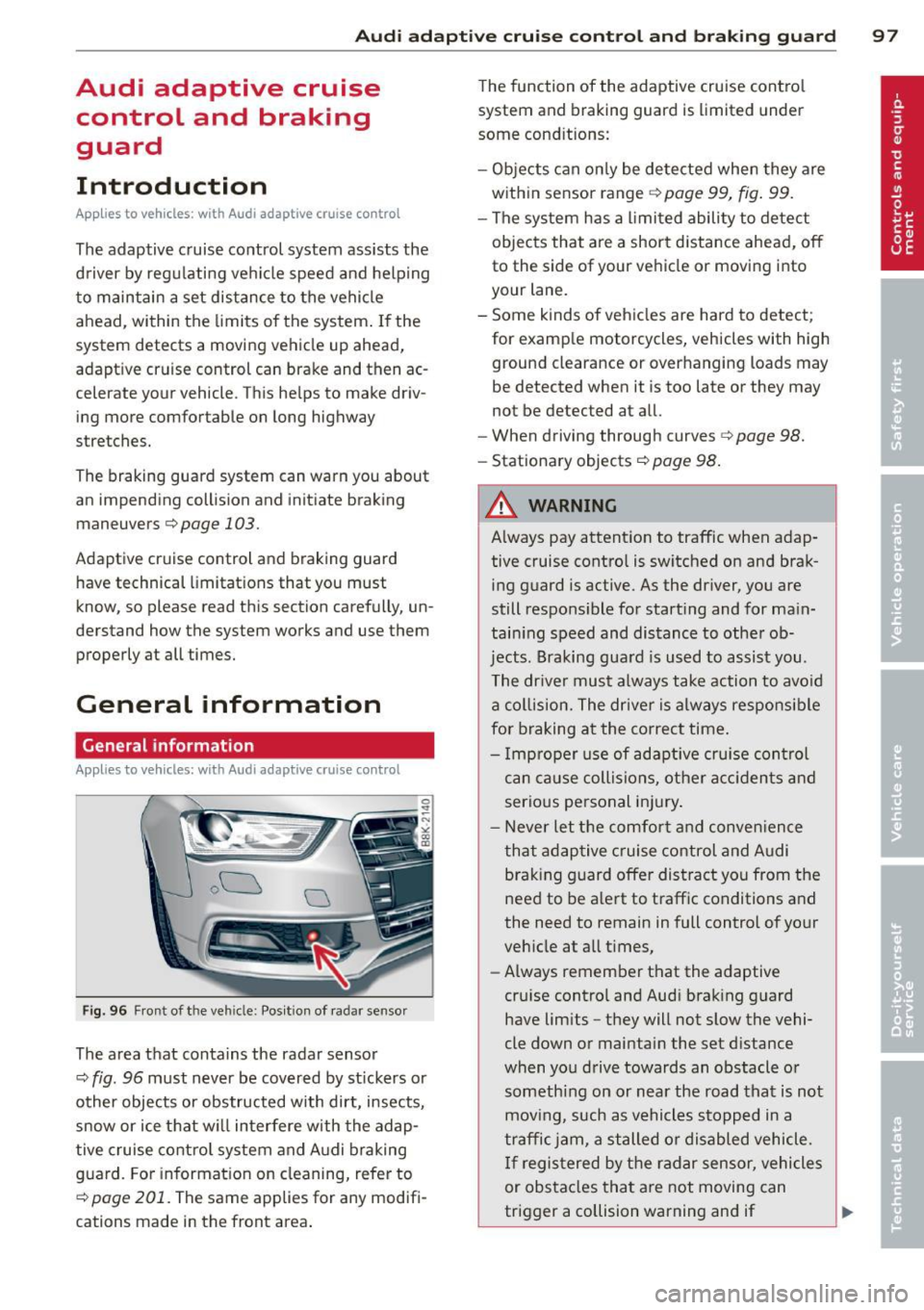
Fig. 96 Front of the veh icle: Pos ition of radar sensor
The area that contains the radar sensor
¢
fig. 96 must never be covered by st ickers or
other objects or obstructed with dirt, insects,
snow or ice that will interfere with the adap
tive cruise control system and Audi braking
guard. For information on cleaning, refer to
¢
page 201. The same applies for any modifi
cations made in the front area . The
function of the adaptive cruise contro l
system and braking guard is limited under
some cond itions:
- Objects can only be detected when they are
within sensor range
¢page 99, fig . 99.
-The system has a limited ability to detect
objects that are a short distance ahead, off
to the side of your vehicle or moving into
your lane.
- Some kinds of vehicles are hard to detect;
for examp le motorcycles, vehicles with high
ground clearance or overhanging loads may
be detected when it is too late or they may
not be detected at all.
- When driving through curves¢
page 98.
-Stationary objects¢ page 98.
A WARNING
-Always pay attention to traffic when adap-
tive cruise control is switched on and brak ing guard is active. As the dr iver, you are
still responsible for starting and for ma in
tain ing speed and distance to other ob
jects. Braking guard is used to assist you.
The driver must always take action to avoid
a collision. The driver is always responsible
for braking at the correct time.
- Improper use of adaptive cruise con trol
can caus e collisions, other accidents and
serious personal injury .
- Never let the comfort and convenience
that adaptive cruise control and Audi
braking guard offer distract you from the
need to be alert to traff ic conditions and
the need to remain in full control of yo ur
veh icle at a ll times,
- Always remember that the adaptive
cru ise contro l and Aud i brak ing guard
have lim its -they will not slow the vehi
cle down or maintain the set d istance
when you drive towards an obstacle o r
someth ing on or nea r the road that is not
moving, such as vehicles stopped in a
traffic jam, a stalled or disabled vehicle.
If registered by the radar sensor, vehicles
or obstacles that are not moving can
trigger a collision warning and if .,.
Page 102 of 294
100 Audi adaptive cruise control and braking guard
Switching on and off
Applies to vehicles: with Audi adaptive cruise co ntrol
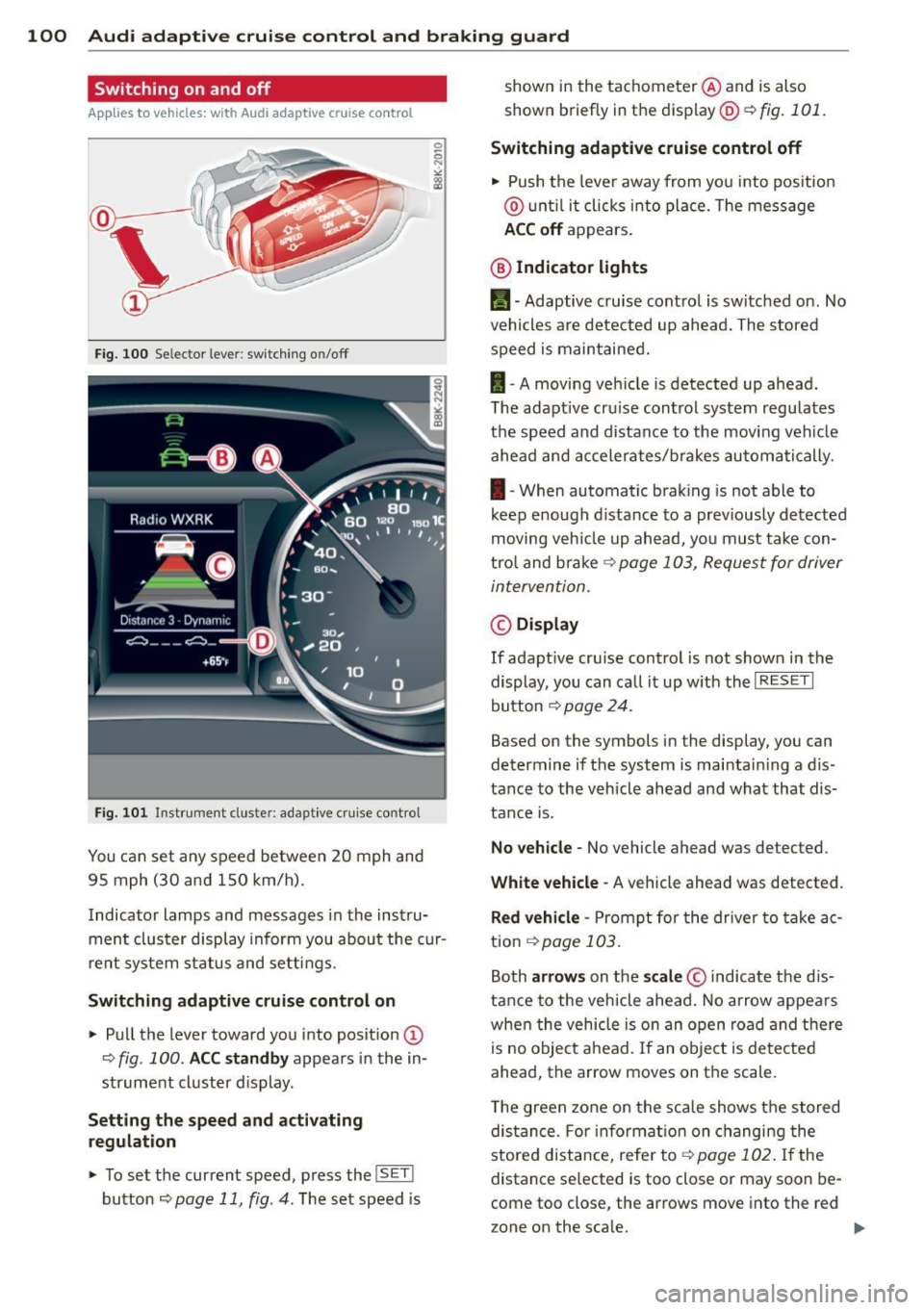
Fig. 100 Selec tor lever: switching o n/off
Fig. 101 Instrument clus te r: adap tive cru ise control
You can set any speed between 20 mph and
95 mph (30 and 150 km/h).
Indicator lamps and messages in the instru
ment cluster display inform you about the cur
r ent system status and settings.
Switching adaptive cruise control on
.. Pull the lever toward you into posit ion @
-:>fig . 100 . ACC standby appears in the in
strument cluster d isplay .
Setting the speed and activating
regulation
.. To set the current speed , press the ISET !
button ¢ page 11 , fig. 4. The set speed is shown in the tachometer
@and is also
shown briefly in the display@r:::>fig.
101.
Switching adaptive cruise control off
.. Push the lever away from you into positio n
@ until it clicks into place. The message
ACC off appears.
@ Indicator lights
II-Adaptive cruise control is switched on. No
vehicles are detected up ahead. The stored
speed is maintained.
I -A moving vehicle is detected up ahead .
T he adaptive cru ise control system regulates
the speed and distance to the moving vehicle
ahead and accelerates/brakes automatically.
I -When automatic braking is not able to
keep e nough d istance to a prev iously detected
moving veh icle up ahead, you must take con
trol and brake ~
page 103, Request for driver
intervention.
© Display
If adapt ive cru ise control is not shown in the
display, you can call it up w ith the
I RESET I
button ¢ page 24.
Based on the symbols in the display, you can
determine if the system is maintain ing a d is
tance to the vehicle ahead and what that dis
tance is.
No vehicle -No vehicle ahead was de tected .
White vehicle -A vehicle ahead was detected .
Red vehicle -Prompt for the driver to take ac
tion
~ page 103.
Both arrows on the scale© indicate the dis
tance to the vehicle ahead. No arrow appears
when the vehicle is on an open road and there
is no object ahead. If an object is detected
ahead, the arrow moves on the scale .
T he green zone on the scale shows the stored
distance. For information on changing the
stored distance, refer to~
page 102 . If the
distance se lected is too close or may soon be
com e too close , the arrows move into the re d
z one on the sca le.
Page 109 of 294
Audi side assist Lane change assistant
Description
Applies to vehicles: with s ide assist
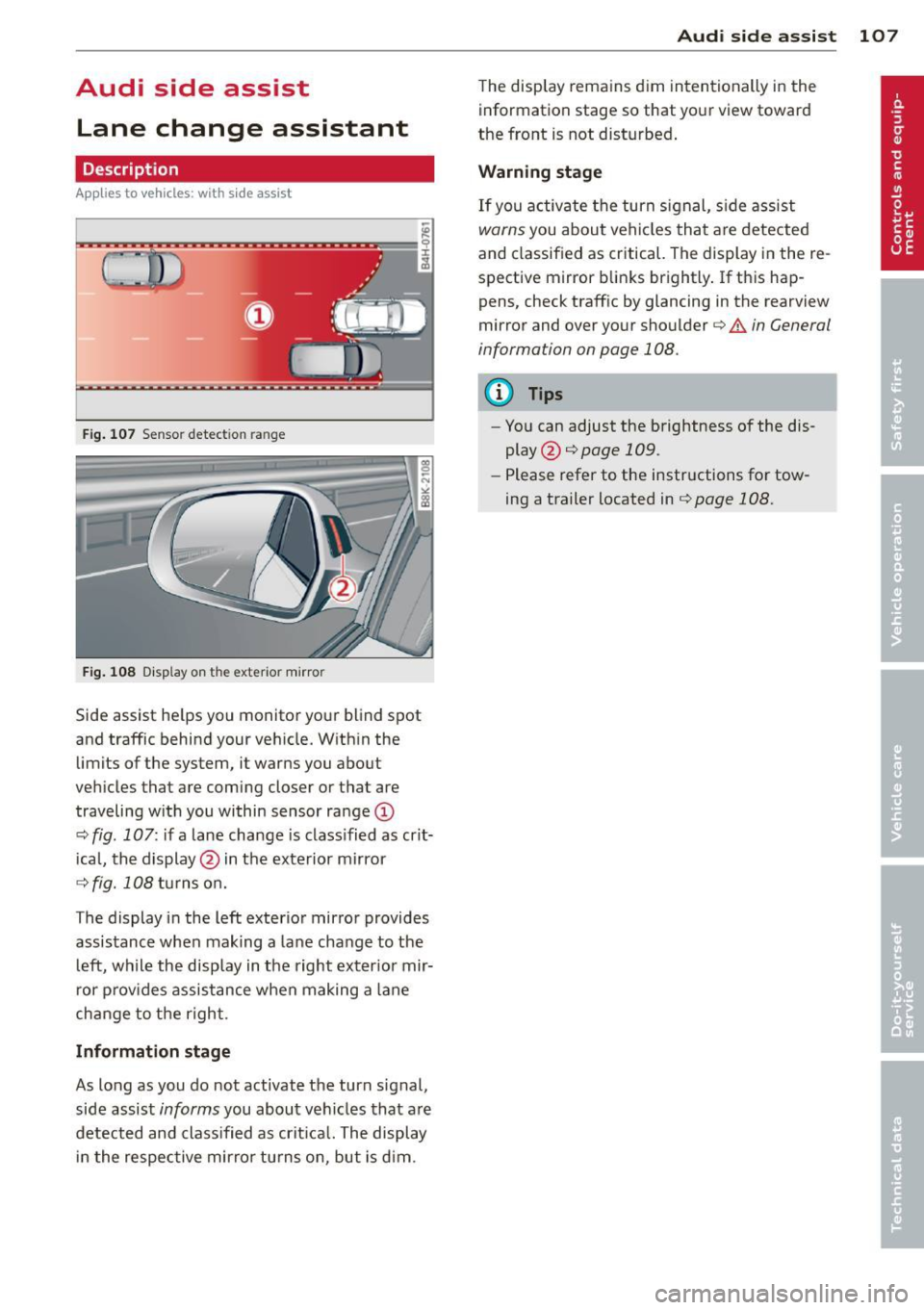
Fig . 107 Sensor detection range
Fig. 108 Disp lay on the exterior mirror
Side assist he lps you monitor your blind spot
and traffic behind your veh icle. W ith in the
limits of the system, it warns you about
vehicles that are coming closer or that are
traveling w ith you within sensor ra nge
(D
c::, fig . 107: if a lane change is class ified as crit
ical, the display @ in the exterior mirror
c::> fig. 108 turns on.
The display in the left exterior mirror provides
assistance when making a lane change to the l eft, while the display in the right exter ior mir
r or p rov ides assistance when making a lane
change to the right.
Information stage
As long as you do not activate the turn signal,
side assist
informs you about vehicles that are
detected and class ified as crit ical. The display
i n the respective mirror turns o n, but is d im.
Aud i side assist 10 7
The display remains d im intentionally in the
information stage so that your view toward
the front is not disturbed .
Warning st age
If you activate the turn signal, s ide assist
warns you about veh icles that are detected
and classified as critical. The display in the re
spective mirror blinks brightly . If this hap
pens, check traff ic by glancing in the rearview
mirror and over your shoulder¢
A in General
information on page 108.
@ Tips
- You can adjust the brightness of the dis
play @¢
page 109.
-Please refer to the instructions for tow
ing a trailer located in¢
page 108.
Page 110 of 294
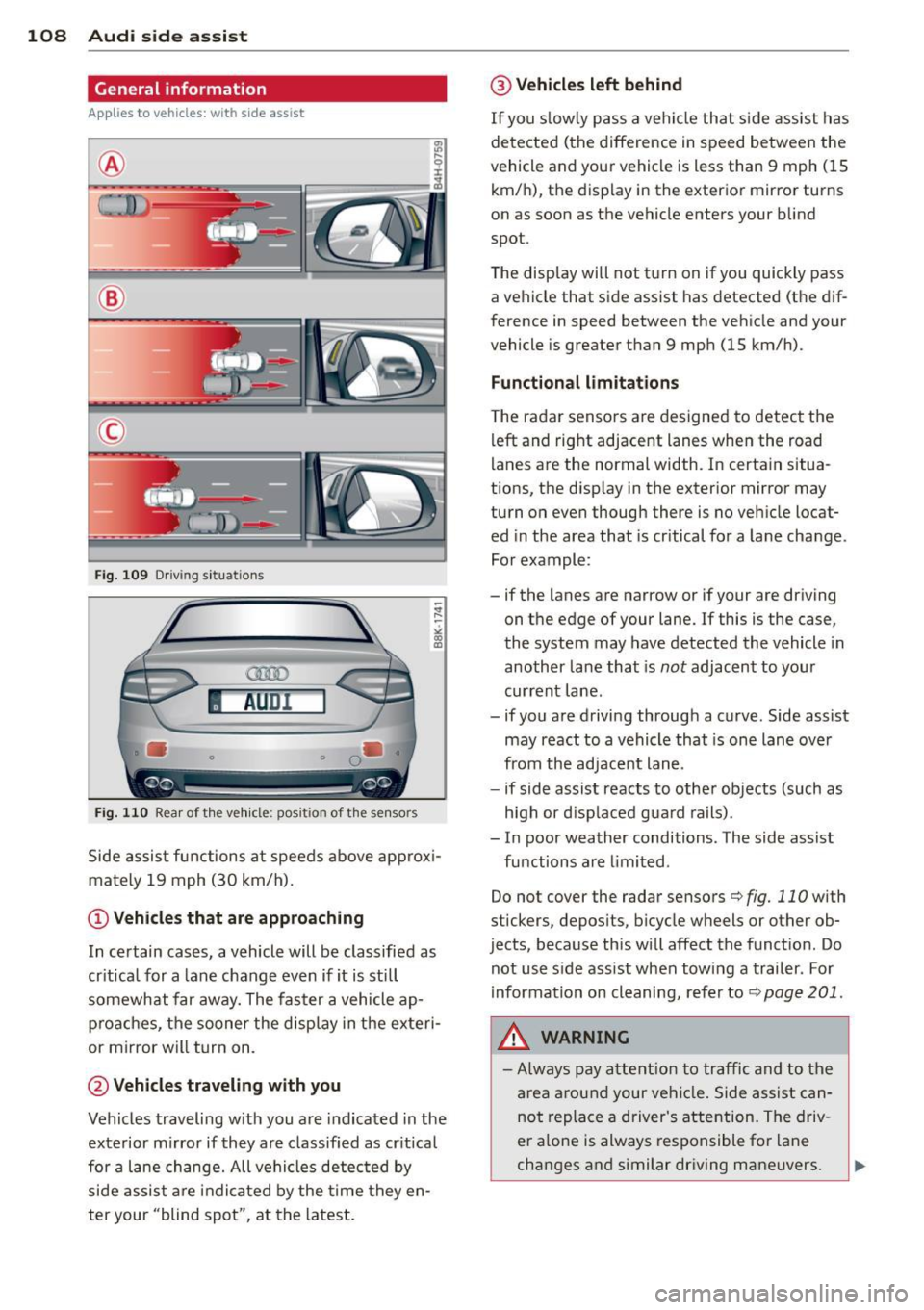
108 Audi side assist
General information
App lies to vehicles: with side assist
®
©
Fig. 109 Driving s it u at ions
AU Dr- l
• •
Fig . 11 0 Rea r of th e ve hicle: pos it io n of t he se nso rs
Side assis t fu nctions at speeds above ap prox i
ma tely 19 mph (30 km/h).
(D V ehicles that are approaching
In certain cases, a vehicle will be classified as
cr itical for a lane change
even if it is still
somewhat far away. The fas ter a vehicle ap
p ro aches, the sooner the disp lay in the exteri
or m irror will t urn on.
@ Vehicles traveling with you
Vehicles traveling w ith you are indicated in the
exterior m irror if they are classified as cr it ical
for a lane change. All vehicles detec ted by
side assis t are in dicated by the time they en
ter your "blind spot", at the latest.
@ Vehicles left behind
If you s low ly pass a ve hicl e tha t sid e ass ist has
dete cted ( the difference in s peed between the
vehicle and you r vehicle is less than 9 mph ( 15
km/ h), t he display in the exterior mirro r turns
on as soon as the vehicle enters your blind
spot.
The disp lay wi ll not t urn on if you quickly pass
a vehicle that s ide assist has detected (t he d if
f erence in speed between the ve hicle and your
vehicle is greater than 9 mph (15 km/h).
Functional limitations
T he radar senso rs are designed to detect the
left and right adjacent lanes whe n the road
l anes a re the normal width. In certain situa
t ions, the d isp lay in the exterior mirror may
turn on
even though there is no ve hicle locat
ed in the area that is cr itical fo r a la ne cha nge.
Fo r example:
- if the lanes are narrow or if your are driving on t he edge of your lane. If this is the case,
the system may have detected the vehicle in
another la ne that is
not adjacent to you r
cur rent lane .
- if you a re driving throug h a c urve . Side assist
may react to a vehicle that is one lane
ove r
from the ad jacent lane .
- if side assist reacts to other objects (such as
high or d isp laced gua rd rails) .
- In poor weather conditions. The side assist fu nctions are limited .
Do not
cover the radar sensors c::> fig. 110 with
stickers, depos its, bicycle wheels or other ob
jects, because this will affect the funct ion. Do
not use s ide ass ist when towing a trailer . For
i nforma tion on cleaning, refe r to
c::> page 201 .
&_ WARNING
-Always pay a ttention t o traffic and to th e
ar ea arou nd your vehi cle. Side a ssist c an
no t repl ace a driver 's atte ntion. The driv
er a lone is always res ponsible fo r lane
cha nges a nd similar driving maneuvers.
Page 112 of 294
110 Audi side assist
-Side assist is not active while you are
making the adjustment.
- Your settings are automatically stored
and assigned to the remote control key
being used.
Driver messages
App lies to vehicles: with side assist
If side assist switches off by itself, the LED in
the button turns off and a message will ap
pear in the instrument cluster display:
Audi side assist unavailable: Sensors blocked
The radar sensors' vision is affected. Do not
cover the area in front of the sensors with bike
wheels, stickers, dirt or other objects. Clean
the area in front of the sensors, if necessary
c:::;,page 108, fig. 110.
Audi side assist: Currently unavailable
Side assist cannot be switched on temporarily
because there is a malfunction (for example,
the battery charge level may be too low).
Audi side assist: System fault!
The system cannot guarantee that it will de
tect vehicles correctly and it is switched off .
The sensors have been displaced or are faulty .
Have the system checked by an authorized
Audi dealer or authorized Audi Service Facility
soon .
Audi side assist: Unavailable when towing
Side assist switches off automatically when a
factory-installed trailer hitch is connected to
the electrical connector on the trailer . There is
no guarantee the system will switch off when
using a retrofitted trailer hitch. Do not use
side assist when towing a trailer.