engine oil AUDI A4 SEDAN 2013 Owners Manual
[x] Cancel search | Manufacturer: AUDI, Model Year: 2013, Model line: A4 SEDAN, Model: AUDI A4 SEDAN 2013Pages: 294, PDF Size: 73.71 MB
Page 5 of 294
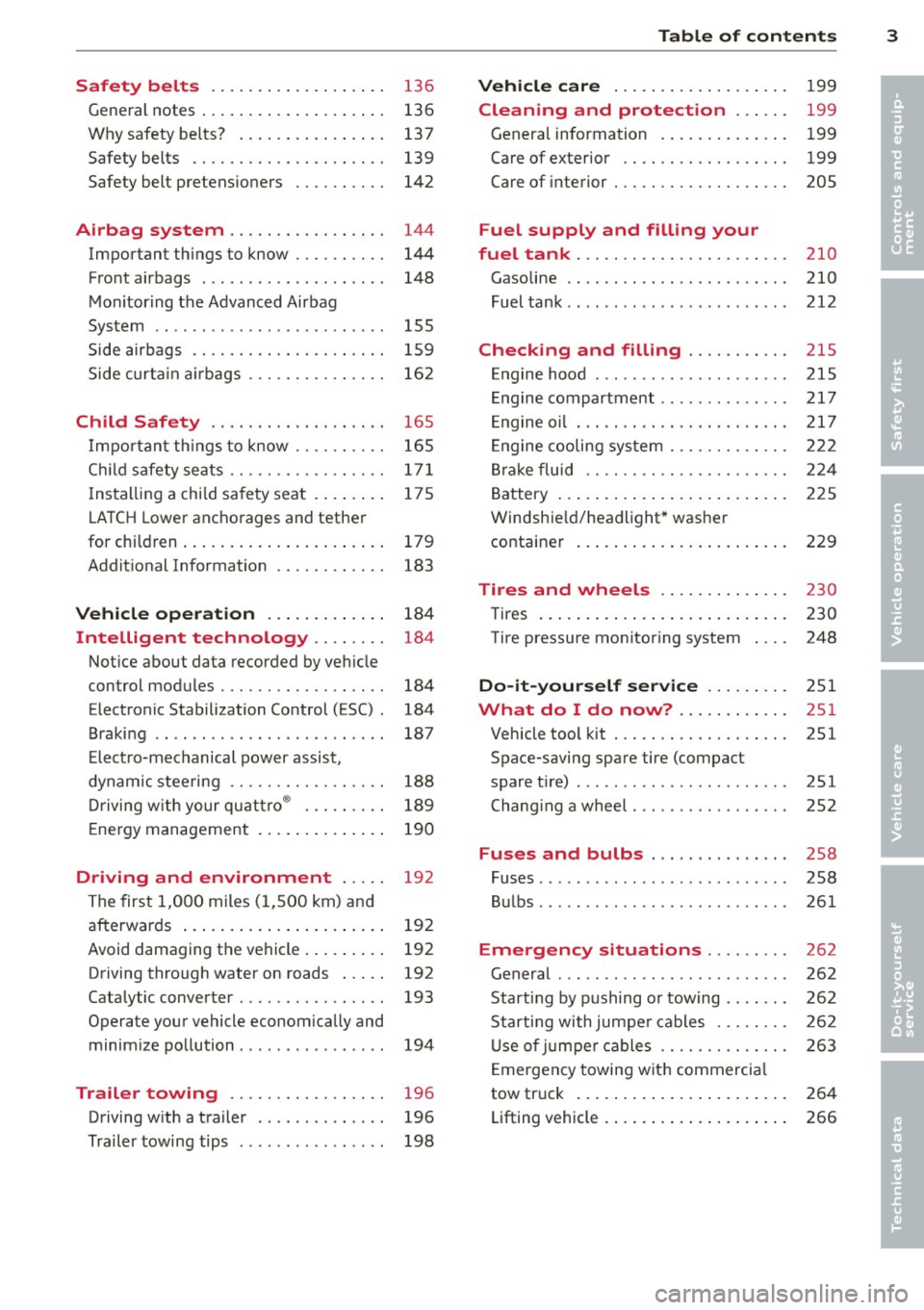
Safety belts . . . . . . . . . . . . . . . . . . . 136
General notes . . . . . . . . . . . . . . . . . . . . 136
Why safety be lts? . . . . . . . . . . . . . . . . 137
Safety belts . . . . . . . . . . . . . . . . . . . . . 139
Safety belt pretens ioners . . . . . . . . . . 142
Airbag system ................ .
Important things to know ......... .
Front airbags ................... .
Mon itor ing the Advanced Airbag
System ........................ .
Side airbags ............. .... .. . .
Side curta in a irbags .............. .
Child Safety ........ .... ... .. . .
Impor tant th ings to know ......... .
C hi ld safety sea ts ................ .
I nstall ing a chi ld safety seat . ... .. . .
L A T CH Lower anchorages and tether
for children ... .... .... ... .. .. .. . .
Addit ional Information
Vehi cle operat ion ..... .. .. .. . .
Intelligent technology .. .. .. . .
Not ice about data recorded by vehicle
control modules .......... .... .. . .
Electronic Stabilization Control (ESC) .
Braking .. ... ................ ... .
E lect ro-mechanical power assist ,
dynamic stee ring ................ .
Driving w ith your qu attro ® ... .. .. . . 144
144
148
155
1 59
162
165
165
17 1
175
179
183
184
184
184
184
187
188
189
E nergy management . . . . . . . . . . . . . . 190
Driving and environment . . . . . 192
The first 1,000 miles (1,500 km) and
afterwards . . . . . . . . . . . . . . . . . . . . . . 192
Avoid damaging the vehicle . . . . . . . . . 192
Driving through water on roads . . . . . 192
Catalytic converter . . . . . . . . . . . . . . . . 193
Operate your vehicle econom ically and
minim ize pollution . . . . . . . . . . . . . . . . 194
Trailer towing . . . . . . . . . . . . . . . . . 196
Driving w ith a trailer . . . . . . . . . . . . . . 196
Trailer towing tips . . . . . . . . . . . . . . . . 198
Table of contents 3
Vehicle care . . . . . . . . . . . . . . . . . . .
199
Cleaning and protection . . . . . . 199
Genera l information . . . . . . . . . . . . . . 199
Care of exterior . . . . . . . . . . . . . . . . . . 199
Care of interior . . . . . . . . . . . . . . . . . . . 205
Fuel supply and filling your
fuel tank ... .. .. .. . .............
210
Gasoline . . . . . . . . . . . . . . . . . . . . . . . . 210
Fuel tank .. .. .. .. .. . .. .... ...... . 212
Checking and filling . . . . . . . . . . . 21S
Engine hood . . . . . . . . . . . . . . . . . . . . . 215
Engine compartment . . . . . . . . . . . . . . 217
E ngine oil . . . . . . . . . . . . . . . . . . . . . . . 217
E ngine cooling system . . . . . . . . . . . . . 222
B ra ke fluid . . . . . . . . . . . . . . . . . . . . . . 224
Battery . . . . . . . . . . . . . . . . . . . . . . . . . 225
Windshie ld/headlight* washer
container . . . . . . . . . . . . . . . . . . . . . . . 229
Tires and wheels . . . . . . . . . . . . . . 230
Tires . . . . . . . . . . . . . . . . . . . . . . . . . . . 230
Tire pressure monitoring system 248
Do-it-yourself service . . . . . . . . . 251
What do I do now? . . . . . . . . . . . . 251
Vehicle tool kit . . . . . . . . . . . . . . . . . . . 251
Space-saving spare tire (compact
spare tir e) . . . . . . . . . . . . . . . . . . . . . . . 251
Changi ng a wheel . . . . . . . . . . . . . . . . . 252
Fuses and bulbs . . . . . . . . . . . . . . . 258
Fuses ... .. .. .. .. .. . .. .... ...... . 258
Bulbs . . . . . . . . . . . . . . . . . . . . . . . . . . . 261
Emergency situations . . . . . . . . . 262
General . . . . . . . . . . . . . . . . . . . . . . . . . 262
Starting by pushing or towing . . . . . . . 262
Star ting with jumpe r cables . . . . . . . . 262
U se of jumpe r cables . . . . . . . . . . . . . . 263
E mergency towing with commercia l
tow truck . . . . . . . . . . . . . . . . . . . . . . . 264
Lifting vehicle . . . . . . . . . . . . . . . . . . . . 266
•
•
Page 13 of 294
Instrument s and warning /indicator lights 11
,&_ WARNING
- Always observe the warning in
¢ page 208, Engine compartment, be
fore opening the hood and checking the
engine coolant level.
- Never open the engine hood if you see or
hear steam, or if you see engine coolant
dripping from the engine compartment.
You could burn yourself. Let the engine cool off first so that you cannot hear or
see any steam or engine coolant .
(D Note
-Mounting additional lights or accessories
in front of the air inlets reduces the cool
i ng effect of the radiator. At h igh outside
temperatures or high engine load, the
engine could overheat.
- The front spo iler has been designed to
properly distribute the cooling air when
the veh icle is moving. If the spoiler is
damaged, this could reduce the cooling
effect and the engine could then over
heat. Ask your authorized Audi dealer for
assistance.
Tachometer (engine rev counter)
The tachometer indicates the engine RPM
(revolutions per minutes).
If engine RPM d rops be low 1,500 , you should
downshift to the next lower gear. The red area
at the end of the scale indicates maximum
permissible engine RPM after the break-in pe
riod. Before reaching this area, move these
lector lever to position D/S or ease your foot
off the accelerator pedal.
(D Note
The tachometer needle@¢ page 10,
fig . 3
shou ld only briefly be in the red
zone: you could damage your engine! The
beg inning of the red zone varies depend
ing on the engine.
@) For the sake of the environment
Upshifting early saves fuel and reduces en
gine noise.
~ button
You can perform different functions with this
button.
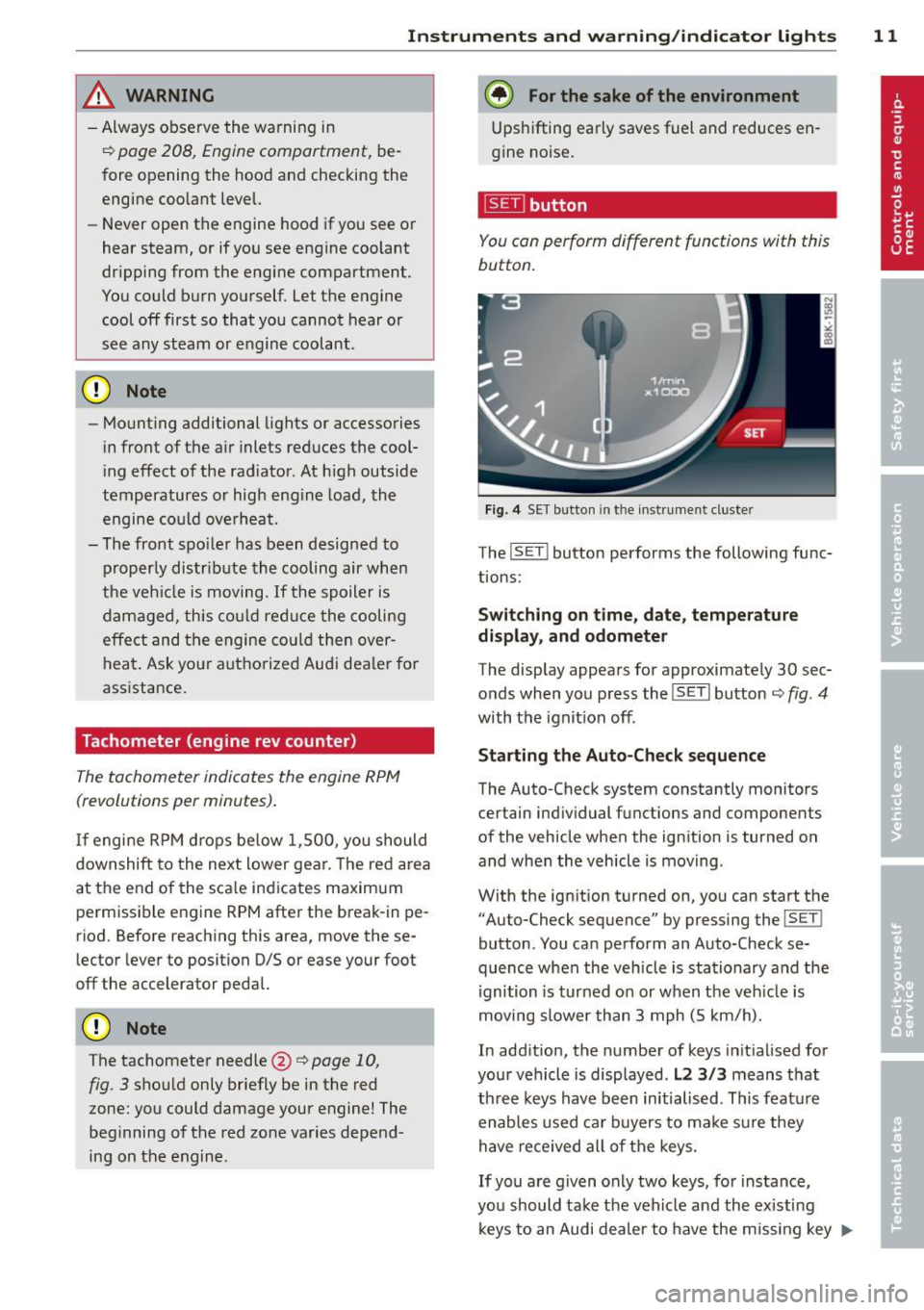
Fig. 4 SET button in th e in strument cluste r
The !SET ! button performs the following func
tions:
Switching on time, date, temperature
display , and odometer
The display appears for approximately 30 sec
onds when you press the
!SET I button ¢ fig. 4
with the ignition off.
Starting the Auto-Check sequence
The Auto-Check system constantly monitors
certain individual functions and components
of the vehicle when the ignition is turned on
and when the vehicle is moving .
With the ignition turned on, you can start the "Auto-Check sequence" by pressing the
! SET !
button . You can perform an Auto-Check se
quence when the vehicle is stationary and the
ignition is turned on or when the veh icle is
moving slower than 3 mph (5 km/h).
In addition, the number of keys init ialised for
your vehicle is disp layed .
L2 3/3 means that
three keys have been initialised. This feature
enables used car buyers to ma ke sure they
have received all of the keys.
If you are given only two keys, for instance,
you should take the vehicle and the existing
keys to an Audi dea ler to have the missing key
II>-
Page 15 of 294
Instrument s and warnin g/indic ator ligh ts 13
(D Note
Never run the tank completely dry! An ir
reg ular supply of fuel can cause eng ine
m isfiring and fuel could enter into the ex
haust system. The catalyt ic converter
could the n overheat and be damaged .
Warning/indicator
Lights
Description
The indicator lights in the instrument cluster
blink or turn on . They indicate functions or
malfunct ions ¢,&. .
Messages may appear with some indicator
lights. A warning signal will sound at the
same time . The messages disappear again af
ter a short t ime . To display a message again ,
pressthelSE T!button
¢ page 11. If severa l
malfunc tions occu r, each of the indica to r/
warn ing lamps will be d isplayed in succession
for abo ut two seconds at a time .
Some ind icators lights in the disp lay can turn
on in several colors.
_& WARNING
- F ailure to heed warning lights and o ther
impor tant vehicle info rmation may result
in serious persona l injury o r vehicle dam
age.
- Whenever sta lled or stopped for repair,
move the vehicle a safe distance off the
road, stop the engine, and turn on the
eme rgency flasher¢
page 46.
-The e ngine compartment of any motor
vehicle is a potentially hazardous area.
Before you check anything in the engine
compartment, stop the engine and let it
cool down. Always exercise extreme cau
t ion when wor king under the hood
¢ page 208, Engine compartment
(D Tips
Ma lfunctions or faults w ill be identified ei
ther with a red symbo l (pr io rity 1 -Dan- ger!) or with a yellow symbol (prio
rit y 2 -
Warning).
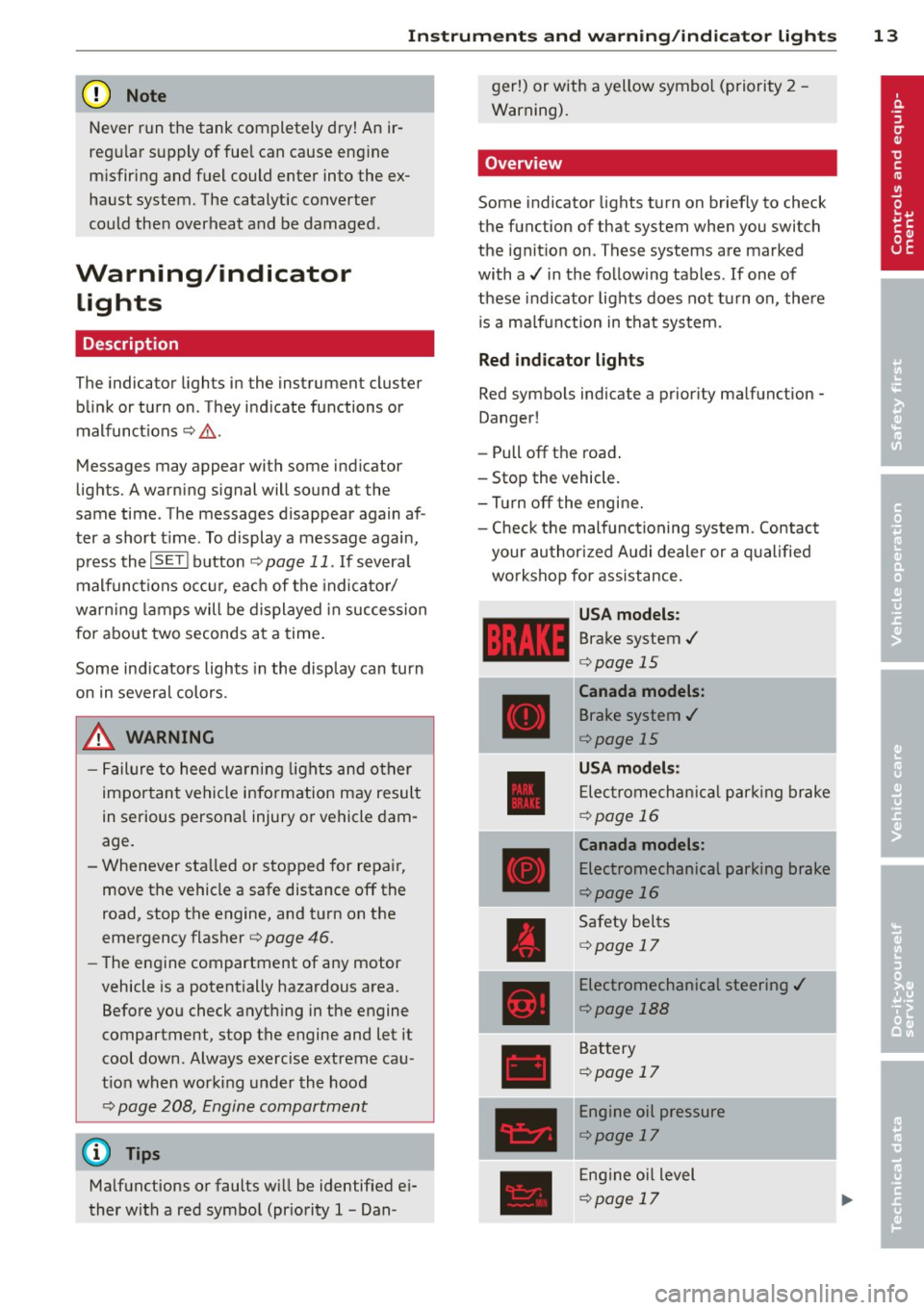
' Overview
Some indicator lights t urn on briefly to check
the function of that system when you switch
the ignit ion on . These systems are marked
with a../ in the fo llow ing tables . If one of
these indicator lights does not tu rn on, there
i s a ma lf u nct ion in that system.
Red indicator lights
Red symbo ls indicate a prior ity ma lfunction -
Danger!
- Pull off the road .
- Stop the vehicle.
- Tur n off the engi ne.
- Check t he malfunc tioning system. Contac t
your author ized A udi dealer or a q ualified
workshop for assistance.
USA models :
Brake system../
¢page 15
----~r~
Canada models:
Brake system ../
¢page 15
USA mod els :
Elec tromech anical parki ng br ake
¢ page 16
Canada models:
Electromechanical parking brake
¢page 16
Safety be lts
¢ page 17
Electromechanical steering ../
¢page 188
Battery
¢page 17
Engine oil pressure
¢page 17
Eng ine oil level
¢page 17
Page 16 of 294
14 Instrum ent s and w arn ing /indic ato r light s
Engine cooling system Tire pressure monitor ing
¢ page 18
system,/
¢page249
Steering column lock Tire pressure monitoring system
¢ page 18
1181~1 ¢page249
Ignition lock
Im
Electronic power cont ro l ,/
r:::;,page 18
c:>page20
U SA mod els:
•
Malfunction indicator Lamp
Speed warning system (MIL),/
r:::;, page 79
c:> page 20
Canada models :
•
Engine speed limitation
Speed warning system c:>page 21
r:::;,page 79
Engine oil level
Aud i adapt ive cru ise control./
•
c:>page 17
¢ page 100
•
Engine o il sensor
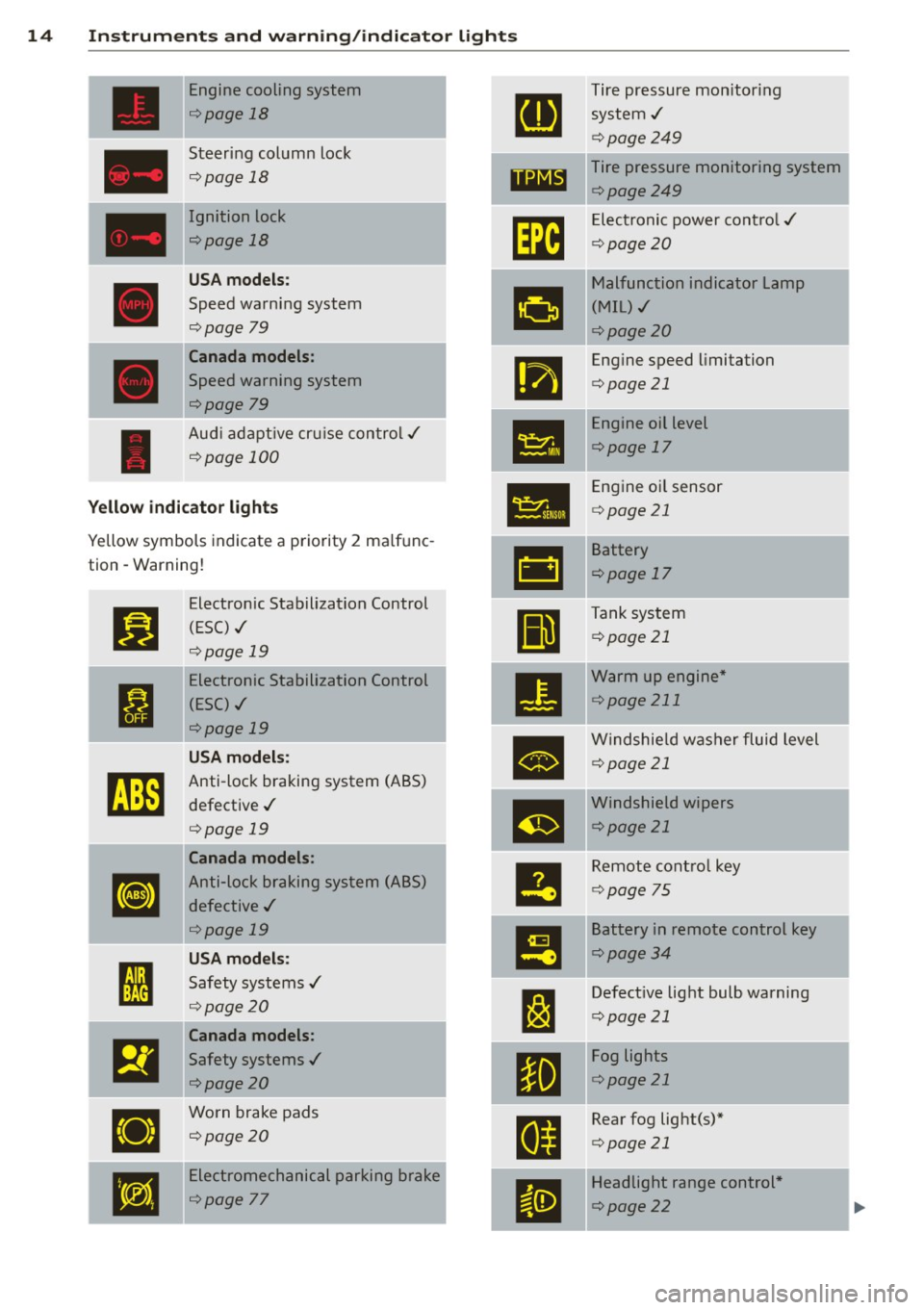
Yellow indic ato r lights c:> page 21
Yellow symbols indicate a priority 2 ma lfunc-
-
&1
Battery
tion -Warning!
c:>page 17
Jj]
Electron ic Stabilization Control
Ill
Tank system
(ESC) ,/
c:>page 21
r:::;, page 19
-Electronic Stabilization Control
•
Warm up engine *
ti
(ESC) ./ c:>
page 211
r:::;, page 19
•
Windshie ld washer fluid level
U SA m odel s: c:>page 21
~
Anti-lock braking system (ABS)
defective ,/
m
Windshield wipers
r:::;, page 19 c:>page
21
Canada models :
le
Remote control key
[I]
Anti-lock braking system (ABS)
c:>page 75
defective ,/
r:::;, page 19
I!
Battery in remote control key
USA models: c:>page 34
I
Safety systems ,/ --
l:J
Defective light bulb warning ' r:::;, page 20
c:>page 21
Canada models :
El
Safety systems ,/
•
Fog lights
<=>page20 c:>
page 21
•
Worn brake pads
E
Rear fog light(s)*
<=> page 20
c:>page 21
•
Electromechanical parking brake
II
Headlight range control *
<=>page
77 c:> page 22
Page 19 of 294
Instruments and warning/indicator lights 17
malfunction. Drive to your autho rized Audi
dealer or qualified workshop immediately to
have the malfunction corrected.
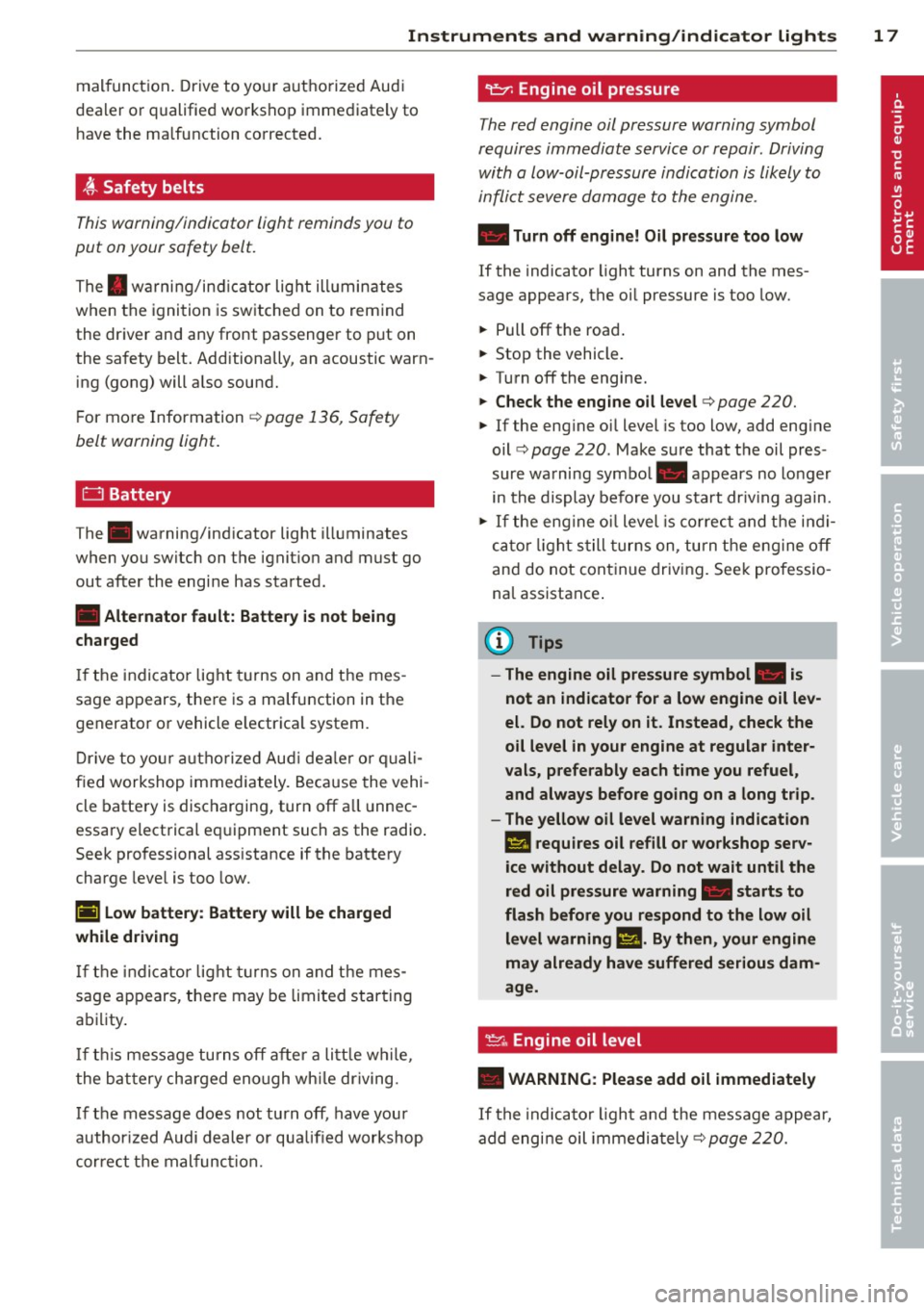
~ Safety belts
This warning/indicator light reminds you to
put on your safety belt.
The . warning/ind icator light ill uminates
when the ignition is switched on to remind
the driver and any front passenger to put on
the safety belt. Additionally, an acoustic warn
ing (gong) will also sound.
For more Information ¢
page 136, Safety
belt warning light.
0 Battery
T he . warning/indicator light illuminates
when you switch on the ignition and must go
out after the engine has started.
• Alternator fault: Battery is not being
charged
If the indicator light turns on and the mes
sage appears, there is a malfunction in the
generator or vehicle e lectrica l system .
Drive to your autho rized Aud i dealer or quali
fied workshop immediately . Because the vehi
cle battery is discharging, turn
off all unnec
essary electrical equipment such as the radio .
Seek professional assistance if the battery
charge level is too low.
(•) Low battery: Battery will be charged
while driving
If the indicator light turns on and the mes
sage appears , there may be limited starting
ability .
If thi s message turns off after a litt le w hile,
the battery charged eno ugh wh ile driving.
If the message does not turn
off, have your
author ized Audi dealer or qualified workshop
correct the malfunction.
"l::;r: Engine oil pressure
The red engine oil pressure warning symbol
requires immediate service or repair . Driving
with a low-oil-pressure indication is likely to
inflict severe damage to the engine.
• Turn off engine! Oil pressure too low
If the indicator light turns on and the mes
sage appears, the oil pressure is too low.
.,. Pull
off the road .
.,. Stop the vehicle.
.,. Turn
off the engine.
.,. Check the engine oil level ¢ page 220.
.,. If the eng ine oil level is too low, add eng ine
oil ¢
page 220 . Make sure that the oil pres
sure warning symbol. appears no longer
in the display before you start dr iv in g again .
.,. If the engine oil level is correct and the ind i
cator light still turns on, turn the engine
off
and do not continue driving. Seek professio
na l assistance .
(D Tips
- The engine oil pressure symbol. is
not an indicator for a low engine oil lev
el. Do not rely on it. Instead, check the
oil level in your engine at regular inter
vals, preferably each time you refuel,
and always before going on a long trip.
- The yellow oil level warning indication
l!I requires oil refill or workshop serv
ice without delay. Do not wait until the
red oil pressure warning. starts to
flash before you respond to the low oil
level warning
1!1-By then, your engine
may already have suffered serious dam
age.
~ .. Engine oil level
• WARNING: Please add oil immediately
If the indicator light and the message appear,
add engine oil immediately
¢ page 220.
Page 23 of 294
Instruments and warning/indicator lights 21
speed. This ind icates that the MIL is working
properly.
The warning light illuminates when there is a
mal funct ion in the engine e lectronic system.
Contact your authorized Audi dealer and have
the ma lfunction corrected .
An improperly closed fuel filler cap may also
cause the MIL light to illum inate
r::!,> page 212.
For more informat ion r:!,> page 30 .
!?) Engine speed limitation
App lies to vehicles: wit h eng ine speed lim itat ion
(II Do not exceed max. engine speed of
XXXX rpm
The (I! symbol illuminates when there is an
engine control malfunction. Th e~ indicator
l ight in the instrument cluster also illumi
nates. The engine speed is lim ited to the
speed displayed in the driver information sys
tem . Keep in mind that the engine speed will
not exceed the va lue displayed in the driver in
formation system, for example when down
shifting.
Drive to your authorized Audi dea ler immedi
ately to have the malfunction corrected .
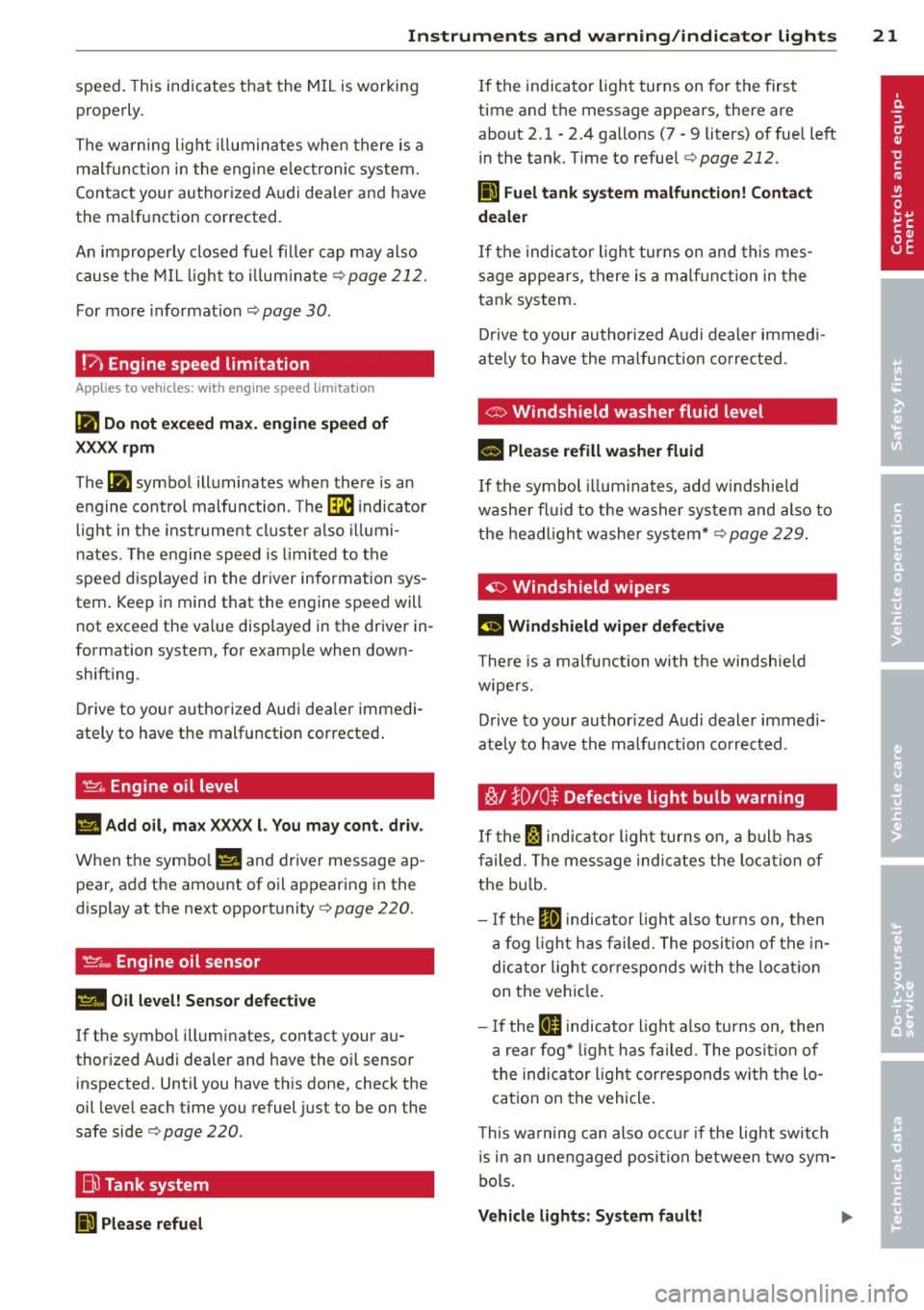
~ .. Engine oil level
1111 Add oil , max XXXX l. You may cont. driv.
When the symbo l l!I and driver message ap
pear , add the amount of oil appearing in the
disp lay at the next opportunity
r:!,> page 220.
~;.., Engine oil sensor
II Oil level! Sensor defective
If the symbol illuminates, contact your au
thor ized Audi dealer and have the o il sensor
inspected. Until you have this done, check the
oil level each time you refuel just to be on the
safe side r:!,>
page 220.
Bu Tank system
liJl Please refuel
If the indicator light turns on for the first
time and the message appears, there are
about 2. 1 -2.4 gallons (7 -9 liters) of fuel left
in the tank . T ime to refuel
r::!,> page 212.
Ii] Fuel tank system malfunction! Contact
dealer
If the indicator light turns on and this mes
sage appears, there is a malf unct ion in the
tank system.
Drive to your authorized Audi dealer immed i
ate ly to have the malfunction corrected.
<:::> Windshield washer fluid level
- Please refill washer fluid
If the symbol illum inates, add w indshie ld
washe r fluid to the washer system and also to
the headlight washer system*
r:!,> page 229.
'1:> Windshield wipers
El'J Windshield wiper defective
The re is a malfunction with the windshield
wipers.
Drive to your authorized Audi dealer immedi
ately to have the malfunction corrected .
~/ }D 10 $ Defective light bulb warning
If the Fl indicator light turns on, a bulb has
failed. The message ind icates the location of
the bulb.
- If the
IIJ indicato r light also turns on, then
a fog light has fai led. The position of the in
dicator ligh t corresponds wi th the locatio n
on the vehicle .
- If the
ftD indicator light also turns on, then
a rear fog* light has fai led. The position of
the indicator light cor responds wi th the lo
cation on the vehicle .
T his wa rning can also occu r if the light switch
is in an unengaged posi tion between two sym
bols .
Vehicle lights: System fault!
Page 32 of 294
30 Driver information display
the approp riate service on your vehicle. You
a lso have the possibility to reset the oil
change schedule after having performed an
oil change according to Audi specifications.
Select
I CAR I function button > Service interval
display > Reset oil change interval
or ICARI
function button> Car systems control button
> Servicing & checks > Reset oil change inter
val.
(CT;) Note
If you disconnect the battery terminals, no
calculations can be made for the service
interva l display during this time and no
service reminder will appear. Remember
that observing the proper serv ice interva ls
is vitally important to extending the life of
your vehicle, particularly the engine, and
maintaining its value. Even if the mileage
driven is low, the maximum period of one
year from one serv ice to the next must not
be exceeded.
@ Tips
-Do not reset the display between oil
changes, otherw ise the display will be in
correct.
- The information in the Service Reminder
remains stored even when the vehicle
battery is disconnected.
On-Board Diagnostic
system (OBD)
Malfunction Indicator Lamp (MIL)
The Malfunction Indicator Lamp (MIL) II in
the instrument cluster is part of the On-Board
Diagnostic (OBD II) system.
The warning/indicator light illuminates when
the ignition is switched on and goes out after
the engine starts and the idle has stabi lized .
This indicates that the MIL is working proper
l y.
If the light does not go out after the engine
is started, or illuminates while you are driv
ing, a malfunction may exist in the engine sys- tern.
If the
light illuminates, the catalytic con
verter could be damaged.
Continue driving
with reduced power (avoid
ing sustained high speeds and/or rapid accel
erations) and have the condition corrected.
Contact your authorized Audi dea ler.
If the light illuminates, the electronic speed
limiter may also be malfunct ioning. For more
information
q page 31, El ectronic speed
limiter .
An improperly closed fuel filler cap may also
cause the MIL light to illuminate
~page 212.
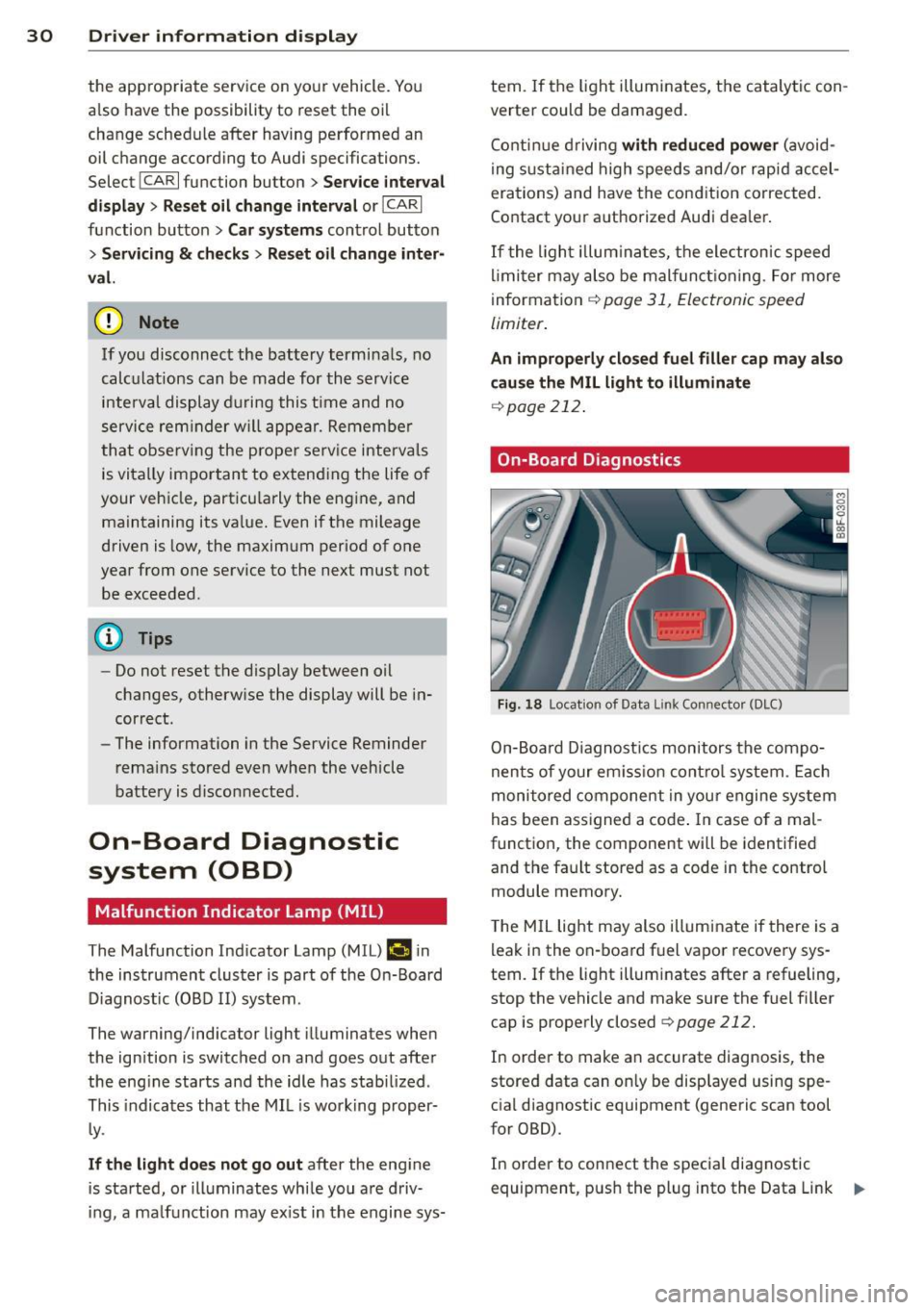
On-Board Diagnostics
Fig. 18 Locat ion of Data L ink Connector (DLC)
On-Board Diagnostics monitors the compo
nents of your em ission control system . Each
monitored component in your engine system
has been assigned a code . In case o f a mal
function, the component will be identified
and the fault stored as a code in the control
module memory.
T he MIL light may also illuminate if there is a
leak in the on-board fuel vapor recovery sys
tem.
If the light illuminates after a refueling,
stop the vehicle and make sure the fuel filler
cap is properly closed
q page 212.
In order to make an accurate diagnosis, the
stored data can on ly be displayed using spe
cial diagnostic equipment (generic scan tool
for OBD).
In order to connect the special diagnostic
equipment, push the plug into the Data Link ..,.
Page 75 of 294
~ Automatic transmission: Step on the brake
peda l and move the se lector lever to the P
or N position .
~ Press the key c:> fig. 73 -the eng ine will
start.
Sw itching the i gnition on /off
If you wou ld like to switch the ignition on
without starting the engine, follow t hese
steps :
~ Insert the key i nto the igni tion lock .
~ Press the key b riefly w ithout press ing the
clutch peda l (for manual transmissions) or
the brake peda l (for automatic transmis
s ions) .
~ To sw itch the ignition off, press the key
again .
When starting the engine, ma jor e lectr ica l
loads are switched off temporarily .
You can only remove the key with the ignition
switched off.
I f the engine sho uld not star t immediately,
the starting process is automatically stopped
after a short time. Repeat starting procedure .
A WARNING
-Never allow the engine to run in confined
spaces -danger of asphyxiation.
- Never remove the ign ition key from the
ignition look while the vehicle is moving.
Otherw ise, the steering lock could sud
denly engage and you would not be able
to steer the vehicle.
- Always take the key with you whenever
you leave your vehicle . Otherwise, the
engine could be star ted or e lectr ica l
equipment such as the power w indows
cou ld be operated. This ca n lead to seri
o us inj ury.
- Never leave c hildren or persons requ iring
assistan ce unattended in the vehicle. The
doors c an be lo cked using the remote
t ransmit ter, preventing people from es
caping from the vehicle on their own in
the event of an emergency. Depend ing
on the time of year, people inside the ve-
On the ro ad 73
hicle can be exposed to very high or very
low temperatu res.
(D Note
Avoid high eng ine rpm, fu ll th rottle and
heavy engine loads unti l the engine has
reached operating tempe rat ure -other
wise you r isk eng ine damage.
@ For the sake of the environment
Do not let the engine run w hile parked to
warm up. Begin dr iv ing immediately. T his
reduces unnecessary emissions.
@ Tips
- If the key cannot be removed from the
ignition lock, you have to pull the me
chanical key out of the maste r key in or
der to be able to lock the vehi-
cle c:>
page 35.
-After starting a cold engine, t here may
be a brief peri od of increased no ise be
cause the oil press ure must first bu ild up
in the hydraulic valve ad justers. This is
normal and not a cause for concern.
- If you leave the veh icle with the ignition
switched on, the ig nition w ill switch off
afte r a certa in per iod of t ime . Please
note that ele ctrical eq uipment such as
exterior ligh ts w ill sw itch off as well
w hen that happens .
Page 77 of 294
CD Note
If the engine has been under heavy load
for an extended period, heat builds up in
the engine compartment after the engine
is switched off- there is a risk of damaging
the engine . Allow the engine to run at idle
for about two minutes before switching it
off.
Convenience key
Starting the engine
Applies to vehicles: with convenience key
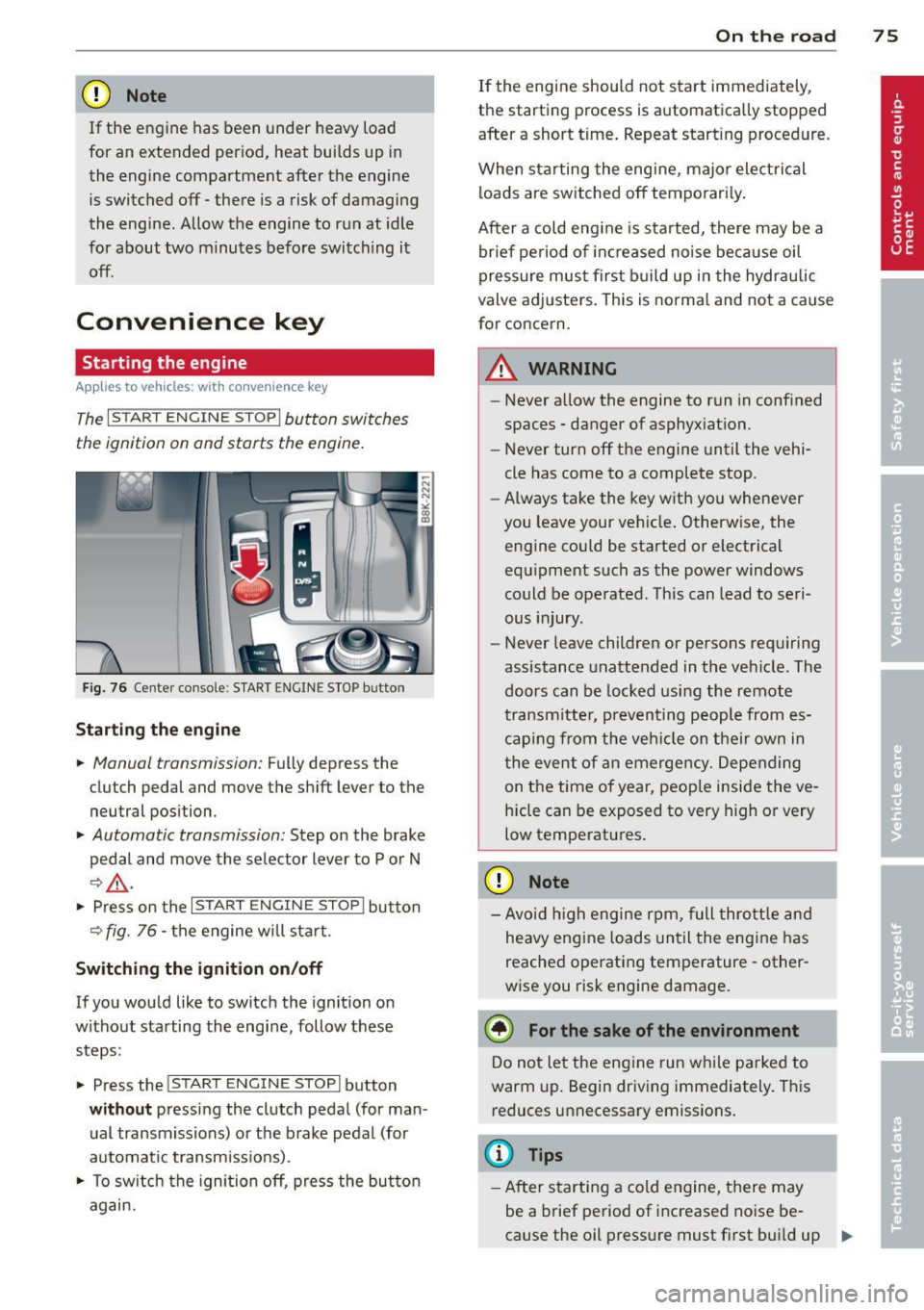
The I STAR T ENGINE ST OPI button switches
the ignition on and starts the engine.
Fig. 76 Ce nter console : S TART ENGINE STOP b utto n
Starting the engine
.. Manual transmission: Fully depress the
clutch pedal and
move the shift lever to the
neutral position .
.. Automatic transmission: Step on the brake
pedal and
move the selector lever to P or N
~ .&, .
.. Press on the I STAR T ENGINE S T OPI button
~ fig . 76 - the engine will sta rt.
Switching the ignition on/off
If you would like to switch the ignition on
without starting the engine, follow these
steps :
.. Press the
!START E NGIN E STOPI button
without pressing the clutch pedal (for man
ual transmissions) or the brake pedal (for
automatic transmissions) .
.. To switch the ignition off, press the button
again.
On the road 75
If the engine should not start immediately,
the starting process is automatically stopped
after a short time. Repeat starting procedure .
When starting the engine , major electrical
loads are switched off temporarily.
After a cold engine is started, there may be a
brief period of inc reased noise because oil
pressure must first build up in the hydraulic
valve adjusters. This is norma l and not a cause
for concern.
A WARNING
- Never allow the engine to run in confined
spaces - danger of asphyxiation.
- Never turn off the engine until the vehi
cle has come to a complete stop.
- Always take the key with you whenever
you leave your vehicle. Otherwise, the
engine could be started or electrical
equipment such as the power windows
could be operated . This can lead to seri
ous injury .
- Never leave children or persons requiring
assistance unattended in the vehicle. The
doors can be locked using the remote
transmitter, preventing people from es
caping from the vehicle on their own in
the event of an emergency. Depending
on the time of year, peop le inside the ve
hicle can be exposed to very high or very
low temperatures .
CD Note
-Avo id high engine rpm, full throttle and
heavy engine loads until the engine has
reached operating temperature - other
wise you risk engine damage.
@ For the sake of the environment
Do not let the engine run while parked to
warm up. Begin driving immediately. This
reduces unnecessary emissions.
(D Tips
-After starting a cold engine, there may
be a brief period of increased noise be-
cause the oil pressure must first bui ld up
II-
Page 91 of 294
There is a system malfunction in the transmis
sion. You may continue driving. Drive to your
authorized Audi dealer or qualified repair fa
cility soon to have the malfunction corrected.
[O] Transmission malfunction: Limited driv·
ing functionality
There is a system malfunction in the transmis
sion . The transmission is switching to emer
gency mode. This mode only shifts into cer
tain gears or will no longer shift at all. The en
gine may stall. Drive to your authorized Audi
dealer or qualified repair facility immediately
to have the malfunction corrected .
[O] Transmission malfunction: Stop vehicle
and shift to park.
Do not continue driving. Select the P selector
lever position and see your authorized Audi
dealer or qualified repair facility for assis
tance.
([) Note
If the transmission switches to emergency
mode, you should take the vehicle to an
authorized Audi dealership as soon as pos
sible to have the condition corrected.
Emergency release of the selector lever
Applies to vehicles: with multitronic or tiptro nic
If the vehicle's power supply foils, the selec
tor lever can be released in an emergency.
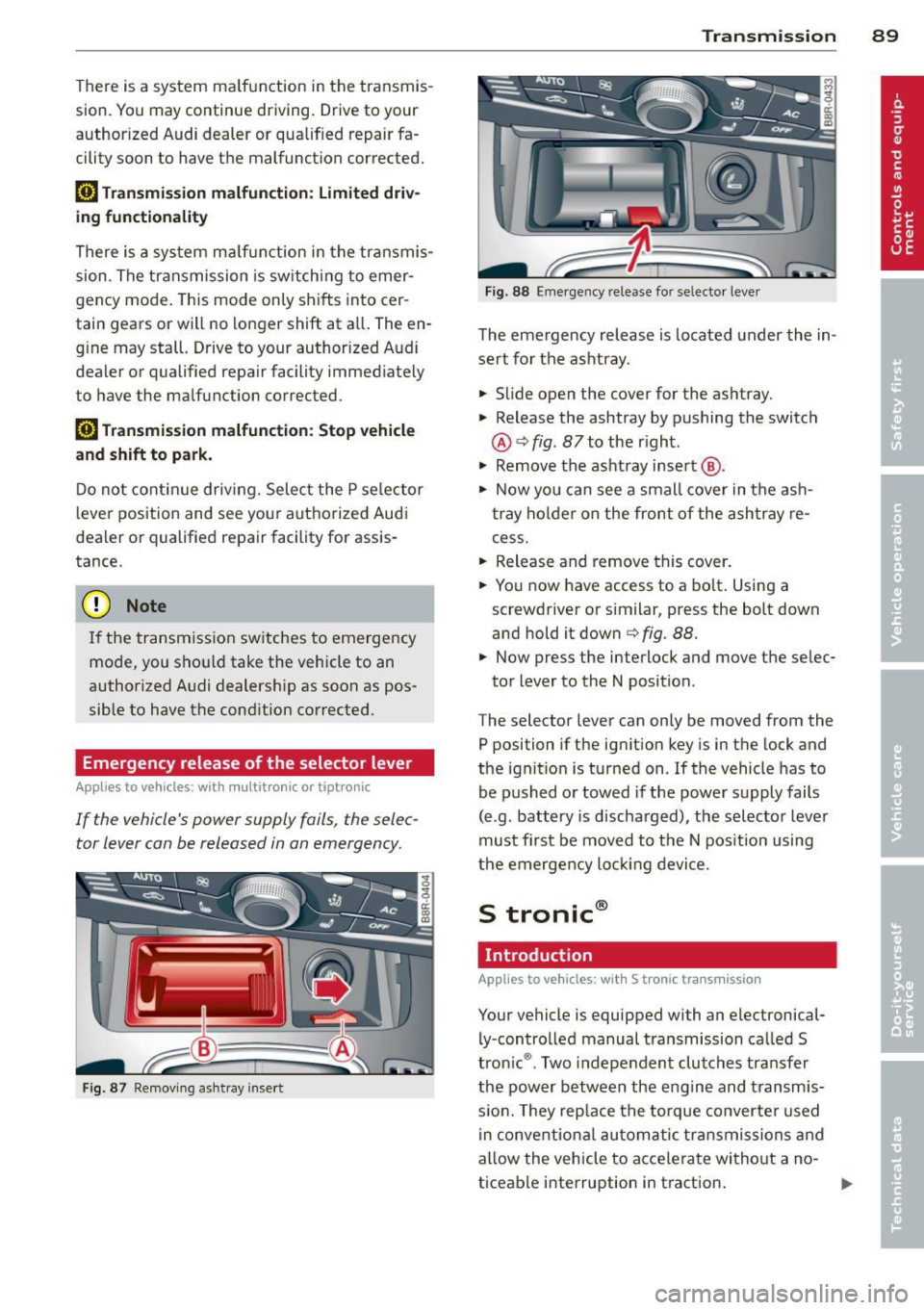
Fig . 87 Removing ashtray insert
Transmission 89
Fig . 88 Emerge ncy release fo r se lecto r lever
The emergency release is located under the in
sert for the ashtray.
.,. Slide open the cover for the ashtray.
.,. Release the ashtray by pushing the switch
@ ¢
fig. 87 to the right .
.,. Remove the ashtray insert @ .
.,. Now you can see a small cover in the ash
tray holder on the front of the ashtray re
cess .
.,. Release and remove this cover.
.,. You now have access to a bolt. Using a
screwdriver or similar, press the bolt down
and hold it down ¢
fig. 88.
.,. Now press the interlock and move the selec-
tor lever to the N position .
The selector lever can only be moved from the
P position if the ignition key is in the lock and
the ignition is turned on . If the vehicle has to
be pushed or towed if the power supply fails
(e .g . battery is discharged), the selector lever
must first be moved to the N position using
the emergency locking device.
S tronic®
Introduction
Applies to vehicles : with S tronic transmission
Your vehicle is equipped with an electronical
ly -controlled manual transmission called S
tronic ®. Two independent clutches transfer
the power between the engine and transmis
s ion. They rep lace the torque converter used
in conventional automatic transmissions and
allow the vehicle to accelerate without a no
ticeable interruption in traction.