parking brake AUDI A4 SEDAN 2013 Owners Manual
[x] Cancel search | Manufacturer: AUDI, Model Year: 2013, Model line: A4 SEDAN, Model: AUDI A4 SEDAN 2013Pages: 294, PDF Size: 73.71 MB
Page 4 of 294
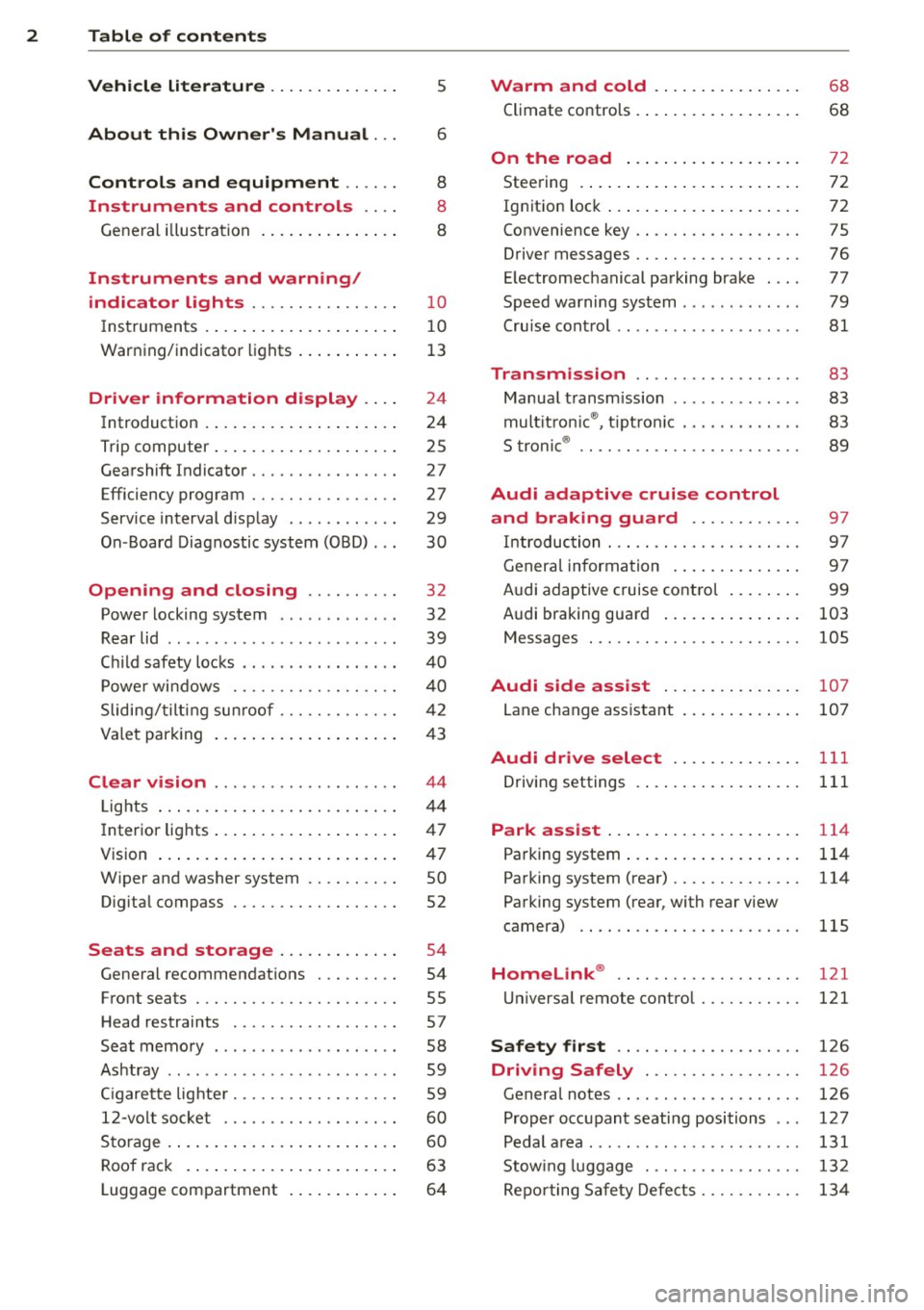
2 Table of contents Vehicle literature .. .. .. .. .. ... .
5
About this Owner's Manual . . . 6
Controls and equipment .. ... .
Ins truments and controls .. . .
General illus tration .... ... .. .. ... .
Instruments and warning /
indicator lights ........ .. .. .. . .
Ins truments . .. .. ..... ... .. .. ... .
War ning/ indi cator lights ... .. ... .. .
Driver information d isplay .. . .
Introduct ion . .. .. ..... ... .. .. ... .
Trip computer .. .. ..... ... .. .. ... .
Gearshift Indicator ........ .. .. ... .
Efficiency program ........ .. .. .. . .
Service interval d isp lay .. .. .. .. .. . .
On -Board Diagnostic system (OBD) .. .
Opening and closing .... .. .. . .
Power locking system .. ... .. .. .. . .
R ear lid .. .. ................ ... . . 8
8
8
10
1 0
1 3
24
24
25
27
27
29
30
32
32
39
C hil d safety locks . . . . . . . . . . . . . . . . . 40
P ower wi ndows ........ .. .. .. .. . .
Sliding/ tilt ing su nroof ..... .. .. .. . .
Va let par king .. .. ..... ... .. .. ... .
Clear vision .. ........ .. .. .. .. . .
Lig hts ..... ... . ...... ... .. .. ... .
I nter ior lights .. .. ..... ... .. .. ... .
V1s 1on ..... ... .. ..... ... .. .. ... .
W iper and washer system .. .. .. .. . .
Dig ita l compass .............. ... .
Seats and storage ... .. .. ... .. .
General recommendat ions . .. .. ... .
Front seats .............. .. .. ... .
H ead restraints . .......... ... .. . .
Seat memory ............. ... .. . .
Ashtr ay .. .. ... .... ...... .. .. .. . .
C igarette lig hte r .......... .. .. .. . .
12-vo lt socket ........... .... ... .
S torage . ... .. . .. ..... ... .. .. ... .
Roo f rack . .... .. ..... ... .. .. ... .
Luggage compartment . ... .. .. ... . 4
0
42
4 3
44
4 4
47
4 7
so
52
54
54
55
57
58
59
5 9
60
60
63
64
Warm and cold ... .. ..... .... . .
Climate co ntrols . ... ... ..... ... .. .
68
68
On the road . . . . . . . . . . . . . . . . . . . 72
Stee ring . . . . . . . . . . . . . . . . . . . . . . . . 72
Ign it io n lock . . . . . . . . . . . . . . . . . . . . . 72
Convenience key . . . . . . . . . . . . . . . . . . 75
Driver messages . . . . . . . . . . . . . . . . . . 76
E lectromechanical parking brake . . . . 77
Speed warning system . . . . . . . . . . . . . 79
Cru ise cont ro l . . . . . . . . . . . . . . . . . . . . 81
Transmission . . . . . . . . . . . . . . . . . . 83
Manua l transm ission . . . . . . . . . . . . . . 83
mult it ron ic ® , t ipt ron ic . . . . . . . . . . . . . 83
S troni c® . . . . . . . . . . . . . . . . . . . . . . . . 89
Audi adaptive cruise control
and braking guard . . . . . . . . . . . .
97
I n troduc tion . . . . . . . . . . . . . . . . . . . . . 9 7
Genera l informa tion . . . . . . . . . . . . . . 9 7
Audi adaptive cruise contro l . . . . . . . . 99
Audi braking gua rd . . . . . . . . . . . . . . . 103
Messages . . . . . . . . . . . . . . . . . . . . . . . 105
Audi side assist .... ..... ... .. .
Lane change ass istant 107
107
Audi drive select
. . . . . . . . . . . . . . 111
Driving settings . . . . . . . . . . . . . . . . . . 111
Park assist . . . . . . . . . . . . . . . . . . . . . 114
Pa rking system . . . . . . . . . . . . . . . . . . . 114
Pa rking system (rear) . . . . . . . . . . . . . . 114
Pa rking system (rear, with rear view
camera) . . . . . . . . . . . . . . . . . . . . . . . . 115
Homelink ® . . . . . . . . . . . . . . . . . . . . 121
U niversa l remote control........ ... 121
Safety first . . . . . . . . . . . . . . . . . . . . 126
Driving Safely . . . . . . . . . . . . . . . . . 126
Genera l notes . . . . . . . . . . . . . . . . . . . . 126
Proper occupant seating positions . . . 127
Pedal a rea . . . . . . . . . . . . . . . . . . . . . . . 131
Stow ing luggage . ............. .. . 132
Repo rting Safe ty Defe cts . . . . . . . . . . . 13 4
Page 15 of 294
Instrument s and warnin g/indic ator ligh ts 13
(D Note
Never run the tank completely dry! An ir
reg ular supply of fuel can cause eng ine
m isfiring and fuel could enter into the ex
haust system. The catalyt ic converter
could the n overheat and be damaged .
Warning/indicator
Lights
Description
The indicator lights in the instrument cluster
blink or turn on . They indicate functions or
malfunct ions ¢,&. .
Messages may appear with some indicator
lights. A warning signal will sound at the
same time . The messages disappear again af
ter a short t ime . To display a message again ,
pressthelSE T!button
¢ page 11. If severa l
malfunc tions occu r, each of the indica to r/
warn ing lamps will be d isplayed in succession
for abo ut two seconds at a time .
Some ind icators lights in the disp lay can turn
on in several colors.
_& WARNING
- F ailure to heed warning lights and o ther
impor tant vehicle info rmation may result
in serious persona l injury o r vehicle dam
age.
- Whenever sta lled or stopped for repair,
move the vehicle a safe distance off the
road, stop the engine, and turn on the
eme rgency flasher¢
page 46.
-The e ngine compartment of any motor
vehicle is a potentially hazardous area.
Before you check anything in the engine
compartment, stop the engine and let it
cool down. Always exercise extreme cau
t ion when wor king under the hood
¢ page 208, Engine compartment
(D Tips
Ma lfunctions or faults w ill be identified ei
ther with a red symbo l (pr io rity 1 -Dan- ger!) or with a yellow symbol (prio
rit y 2 -
Warning).
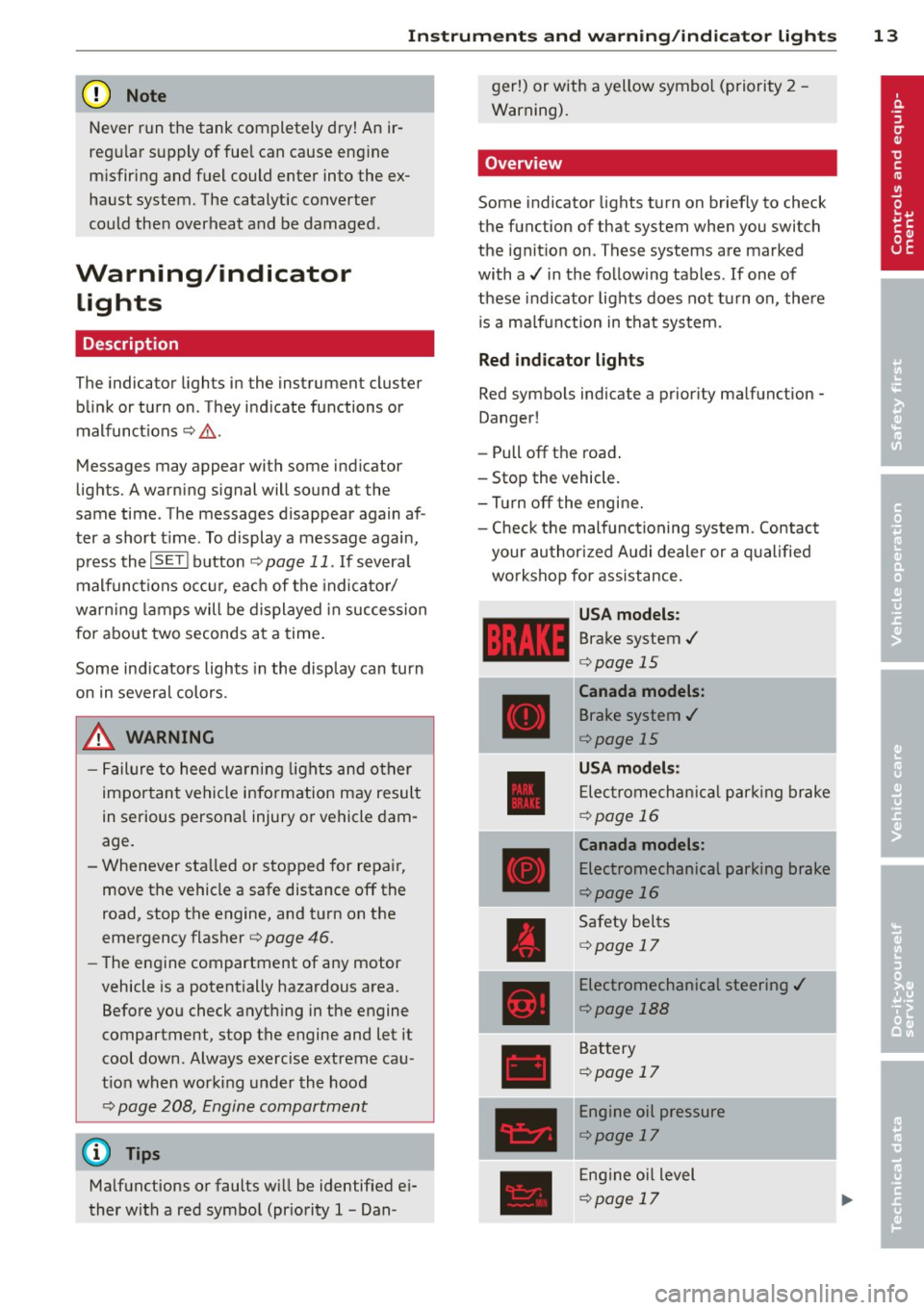
' Overview
Some indicator lights t urn on briefly to check
the function of that system when you switch
the ignit ion on . These systems are marked
with a../ in the fo llow ing tables . If one of
these indicator lights does not tu rn on, there
i s a ma lf u nct ion in that system.
Red indicator lights
Red symbo ls indicate a prior ity ma lfunction -
Danger!
- Pull off the road .
- Stop the vehicle.
- Tur n off the engi ne.
- Check t he malfunc tioning system. Contac t
your author ized A udi dealer or a q ualified
workshop for assistance.
USA models :
Brake system../
¢page 15
----~r~
Canada models:
Brake system ../
¢page 15
USA mod els :
Elec tromech anical parki ng br ake
¢ page 16
Canada models:
Electromechanical parking brake
¢page 16
Safety be lts
¢ page 17
Electromechanical steering ../
¢page 188
Battery
¢page 17
Engine oil pressure
¢page 17
Eng ine oil level
¢page 17
Page 16 of 294
14 Instrum ent s and w arn ing /indic ato r light s
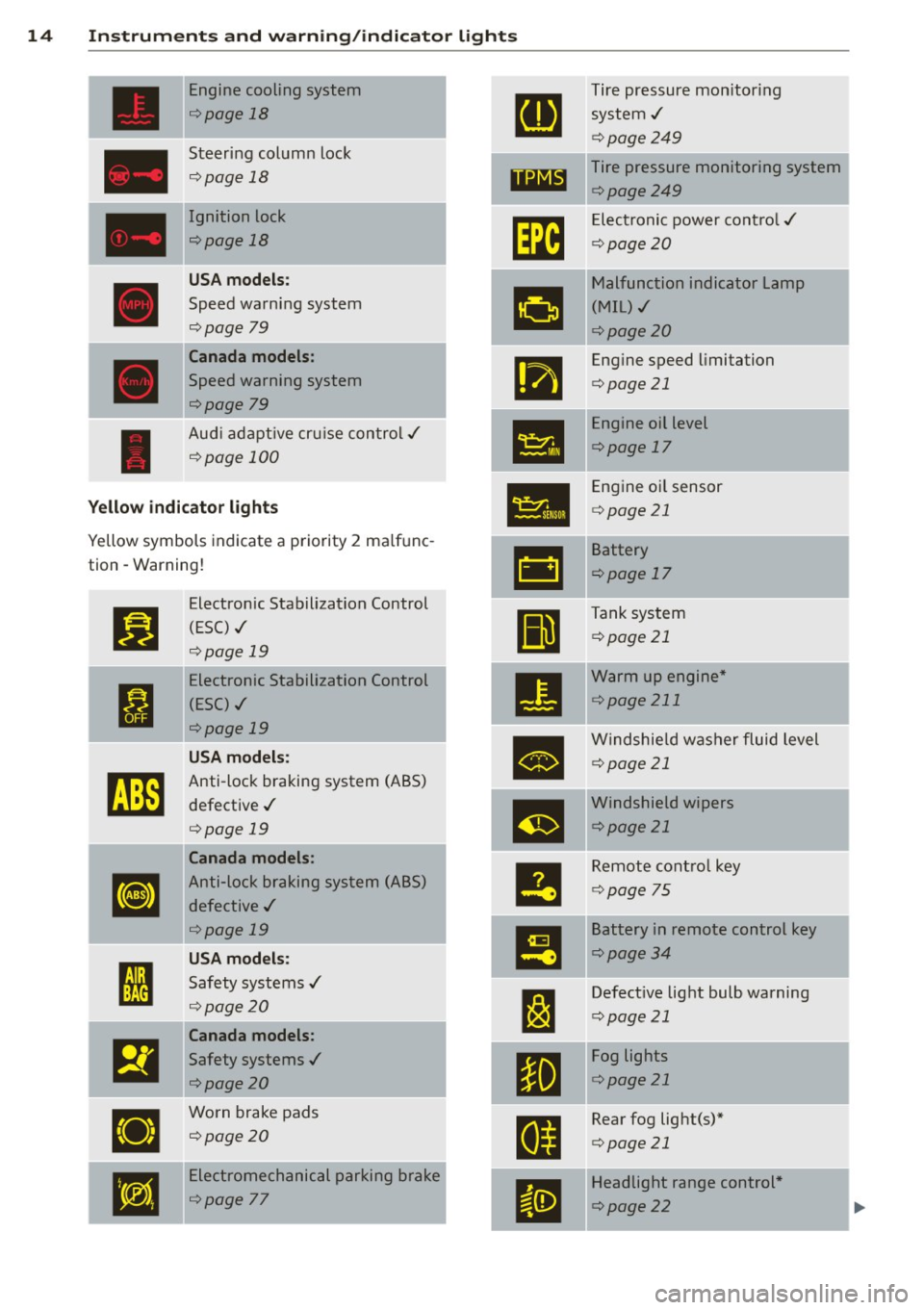
Engine cooling system Tire pressure monitor ing
¢ page 18
system,/
¢page249
Steering column lock Tire pressure monitoring system
¢ page 18
1181~1 ¢page249
Ignition lock
Im
Electronic power cont ro l ,/
r:::;,page 18
c:>page20
U SA mod els:
•
Malfunction indicator Lamp
Speed warning system (MIL),/
r:::;, page 79
c:> page 20
Canada models :
•
Engine speed limitation
Speed warning system c:>page 21
r:::;,page 79
Engine oil level
Aud i adapt ive cru ise control./
•
c:>page 17
¢ page 100
•
Engine o il sensor
Yellow indic ato r lights c:> page 21
Yellow symbols indicate a priority 2 ma lfunc-
-
&1
Battery
tion -Warning!
c:>page 17
Jj]
Electron ic Stabilization Control
Ill
Tank system
(ESC) ,/
c:>page 21
r:::;, page 19
-Electronic Stabilization Control
•
Warm up engine *
ti
(ESC) ./ c:>
page 211
r:::;, page 19
•
Windshie ld washer fluid level
U SA m odel s: c:>page 21
~
Anti-lock braking system (ABS)
defective ,/
m
Windshield wipers
r:::;, page 19 c:>page
21
Canada models :
le
Remote control key
[I]
Anti-lock braking system (ABS)
c:>page 75
defective ,/
r:::;, page 19
I!
Battery in remote control key
USA models: c:>page 34
I
Safety systems ,/ --
l:J
Defective light bulb warning ' r:::;, page 20
c:>page 21
Canada models :
El
Safety systems ,/
•
Fog lights
<=>page20 c:>
page 21
•
Worn brake pads
E
Rear fog light(s)*
<=> page 20
c:>page 21
•
Electromechanical parking brake
II
Headlight range control *
<=>page
77 c:> page 22
Page 17 of 294
Instrument s and warnin g/indic ator ligh ts 15
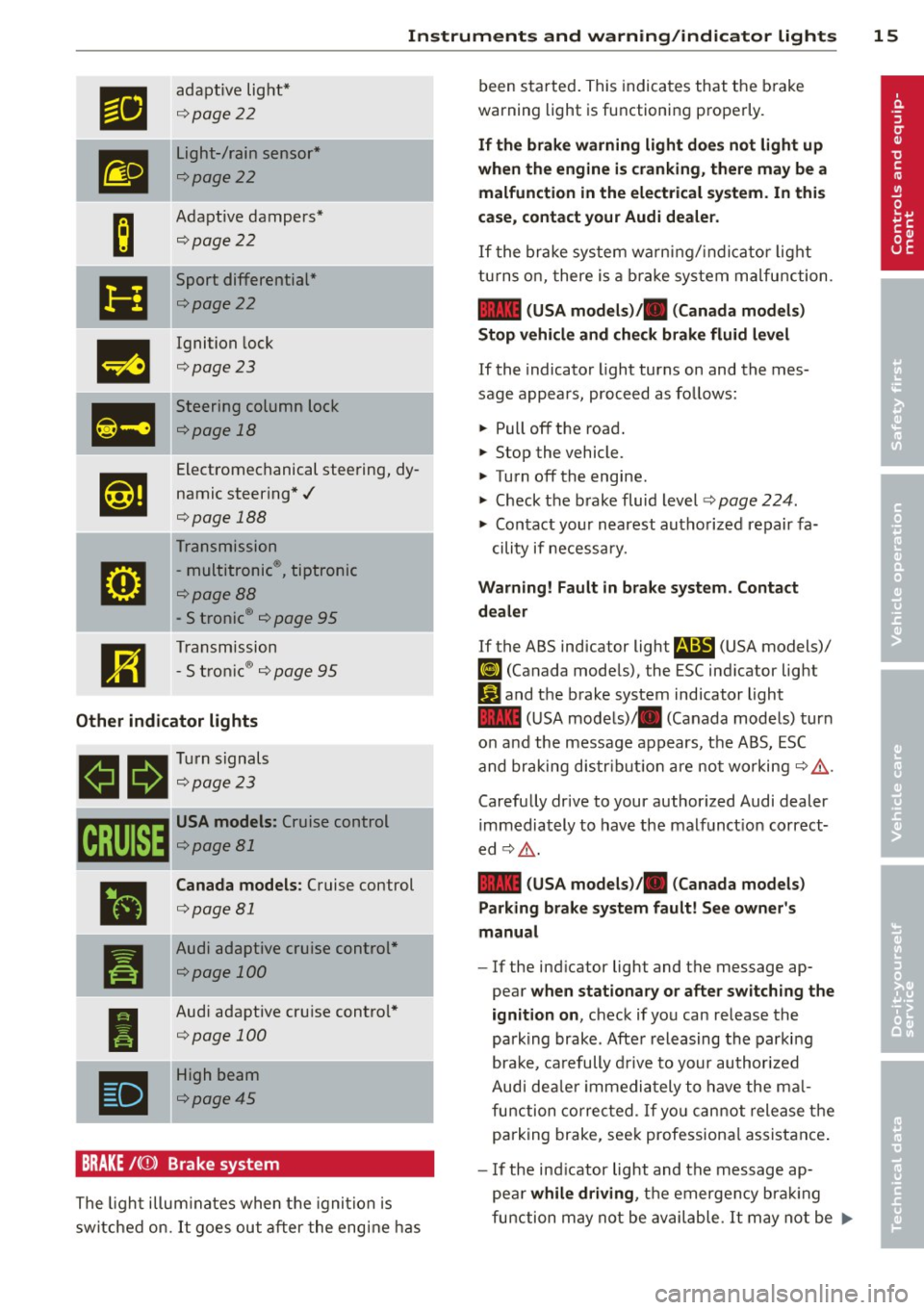
ml
adaptive light *
¢page22
m
Light-/rain sensor*
¢page22
-
B
Adaptive dampers*
¢page 22
Ill
Sport differential *
¢page22
m
Ignition lock
¢page 23
Ill
Steering column lock
¢page 18
,1,ij
Electromechanical steering, dy-
namic steering*./
¢page 188
Transmission
g
-multitronic®, tiptronic
¢page88
- S tronic® ¢ page 95
m
Transmission
-S t ro nic ® ¢ page 95
Other indicator l ight s
11
1!11 Turn signals
llfa ¢page23
CRUISE
•
I
•
USA models: Cruise control
¢page81
Canada models : Cruise control
¢page 81
Audi adaptive cruise control *
¢page 100
Audi adaptive cru ise control *
¢page 100
-High beam
¢page45
BRAKE /((J)) Brake system
The ligh t illum ina tes when the ignition is
sw itche d on.
It goes out a fter the eng ine has been started. This
indicates that the b rake
warning light is functioning properly.
If th e brake warning light doe s not light up
when the engine is cranking, th ere may be a
malfunction in the electrical system . In thi s
case, contact your Audi dealer .
If the brake system wa rn ing/ indica tor light
t u rns o n, there is a b ra ke sys tem ma lfunction .
1111 (USA model s)/. (Canada model s)
Stop v ehicl e and check brake fluid lev el
If the indicator l ight turns on and the mes
sage appears , proceed as follows:
.,. Pull off the road.
.,. Stop the vehicle.
.,. Tu rn off the engine.
.,. Check the b rake fluid level¢
page 224.
.,. Contact your nearest autho rized repair fa-
cility if necessa ry.
Warning! Fault in brake system . Contact
d ealer
If the ABS indicator light fl!S (USA models)/
(11 (Canada mode ls), the ESC ind icator light
Ji1 and the b rake system indicator light
1111 (U SA mode ls)/ . (Canada mode ls) turn
o n and the message appears, the ABS, ESC
and braking d is tribut ion are not worki ng ¢ ,&. .
Carefully drive to your author ized Audi dealer
immediately to have the malfunct ion correct
ed ¢,&. .
1111 (USA models )/. (Canada models)
Parking brake system fault! See owner' s
manual
- If the ind icator light and the message ap
pear
when stationary or after switch ing the
ignition on ,
check if you can release the
park ing brake . Afte r releasing the parki ng
brake, carefully d rive to your au thor ized
Audi dea le r i mmedia tely t o have the ma l
fu nction corre cted. If yo u can not release the
parking brake, see k professiona l assistance .
-If the ind icator light and the message ap-
pea r
while driving , th e e mergen cy b ra ki ng
fu nction may not be avail able.
It may not be .,..
Page 18 of 294
16 Instrum ent s and w arn ing /indic ato r light s
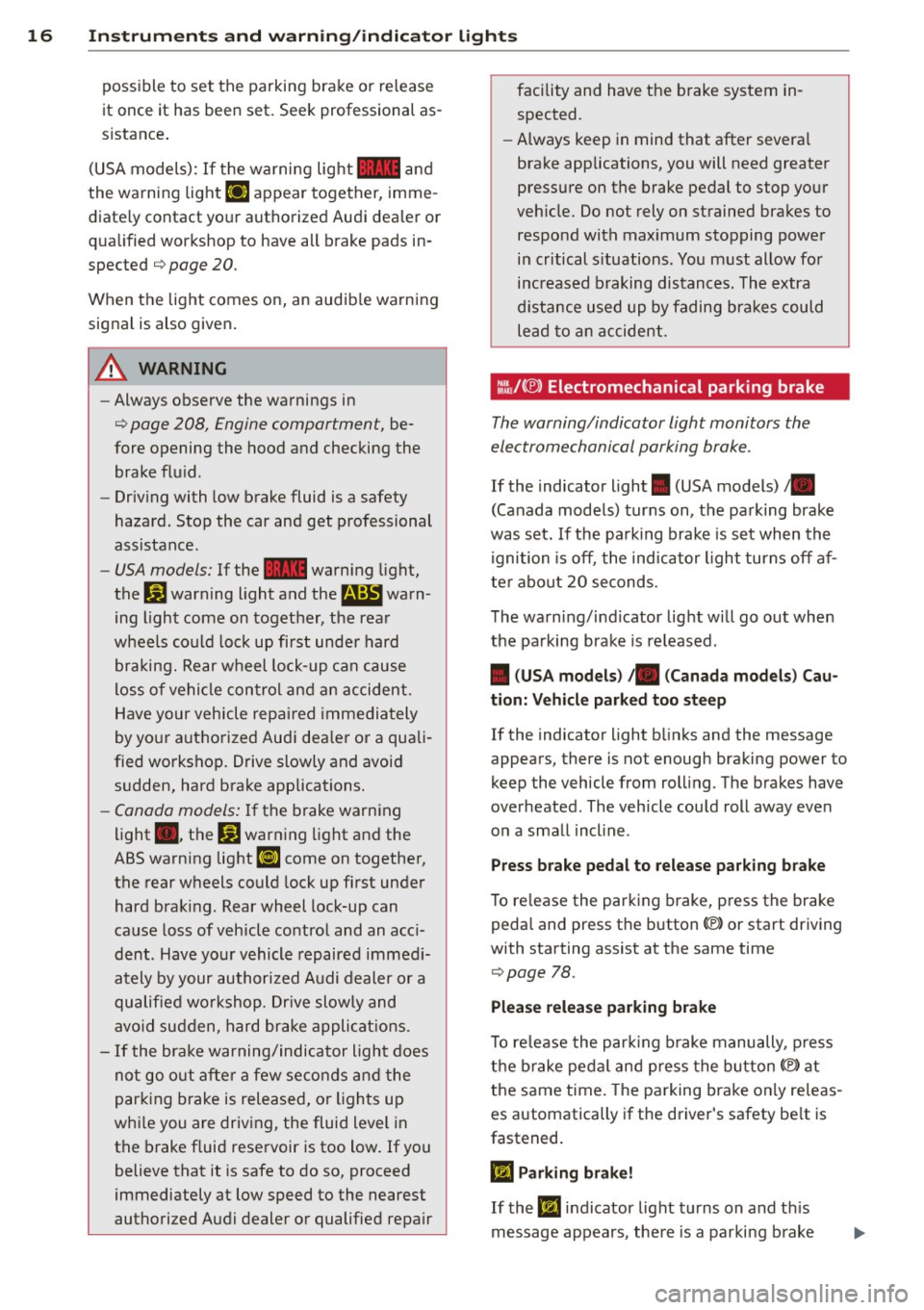
possible to set the parking brake or release
it once it has been set. Seek professional as
s istance .
(USA models): If the warning light
1111 and
the warning light
liJ appear together, imme
diate ly contact your authorized Audi dealer or
qua lified workshop to have all brake pads in
spected
¢ page 20.
When the light comes on, an audib le warning
signal is also given .
A WARNING
-Always observe the warnings in
¢ page 208, Engine compartment, be
fore opening the hood and checking the brake flu id .
- Driv ing with low brake fluid is a safety
hazard. Stop the car and get professional
assistance.
- USA models: If the 1111 warn ing light,
the
G1 warning light and the m;B warn
ing light come on together, the rear
wheels co uld lock up first unde r hard
braking. Rear wheel lock-up can cause
loss of vehicle con tro l an d an accident .
Have your vehicle repai red immedia tely
by your aut ho rized Audi dea le r or a quali
fied workshop. Drive slowly and avoid sudden, hard brake applications.
- Canada models: If the brake warn ing
light ., the
DJ warning light and the
ABS warning light
BJ come on together,
the rear wheels could lock up first unde r
hard braking. Rear wheel lock-up can
cause loss of vehicle control and an acc i
dent . Have yo ur vehicle repaired immed i
ately by your authori zed A udi dealer or a
qu alifie d wo rkshop. Dr ive slowly and
avo id su dden, hard brake appli cat ions.
- If the brake warning/indicator light does
no t go out afte r a few se con ds and the
par king brake is released, or lights up
whi le you are driving, the fluid level in
the brake f luid reservoir is too low. If you
believe that it is safe to do so, proceed
immediately at low speed to the nearest
authorized Audi dealer or qualified repair facility and have the brake system in
spected.
- Always keep in mind that after severa l
brake applications, you will need greater
pressure on the brake pedal to stop your
veh icle. Do not rely on strained brakes to
respond with max imum stopping power
in critical s ituations . You must allow for
increased braking distances. The extra
d istance used up by fading bra kes could
le ad to an ac cident.
:l~/(®) Electromechanical parking brake
The warning/indicator light monitors the
electromechanical parking brake .
If the indicator light. (USA models)/ .
(Canada models) turns on, the pa rking brake
was set. If the parking brake is set when the
ignition is off, the ind icator light turns off af
ter abo ut 20 seconds.
The wa rning/i ndicator lig ht will go out when
the pa rking brake is re leased .
• (USA models ) /. (Can ada model s) Cau
tion: Vehicle parked too ste ep
If the indicator light b links and the message
appears, there is not enough braking power to
keep the vehicle from roll ing . The brakes have
overheated . The veh icle cou ld roll away eve n
o n a sma ll incline .
Press brake pedal to release parking bra ke
To re lease the parking brake, press the brake
pedal and press t he button(® or start driving
with starting assist at the same time
¢ page 78.
Please relea se park ing brake
T o re lease the par king b rake manually , p ress
t h e b rake peda l and press the button{®) at
the same time. The pa rking brake on ly releas
es automatically if the driver's safety be lt is
fastened.
Ill Parking brake!
If the 11,1 indicator light turns on and t his
message appears, the re is a parki ng b rake
Page 79 of 294
Shift to N or P to start engine
This message appea rs whe n attempti ng to
s ta rt the engine if the se le ctor lever for the
a u tomatic t ransmission is not in the P or N
p osition. The engine can on ly be sta rted w ith
the selector in these posit ions .
Is the key in the vehicle?
This m essage appears if the maste r key is re
moved from t he vehi cle w ith the eng ine run
ni ng.
If the mas ter key is no longe r in the ve
hicl e, yo u ca n not swi tch on the igni tion a fter
s t opping the eng ine a nd you also canno t st art
the eng ine again. Mo reover, yo u cannot lock
the vehicle from the outside with the key .
Shift to P otherwise vehicle can roll away.
Doors do not lo ck if lever is not in P.
This m essage appea rs for safety reaso ns
along w it h a wa rning signa l.
It appears if t he
s e lec to r l ever for the aut omat ic tra n sm iss io n
i s no t in the P po sition when switch ing off t he
ignit ion . Move the se lector lever to the P pos i
tion, othe rwise the veh icle is not sec ured
aga inst rolling away. You a lso cannot lock the
ve hicle using the locking button * on the door
h andle or using the remote key.
Convenience key defective! Use ignition lock
Thi s m essa ge appe ars if the eng ine mu st be
s ta rted or s to p ped using the ignition key and
no t th e
I S TART ENGINE STOP! button.
On the road 7 7
Electromechanical
parking brake
Operation
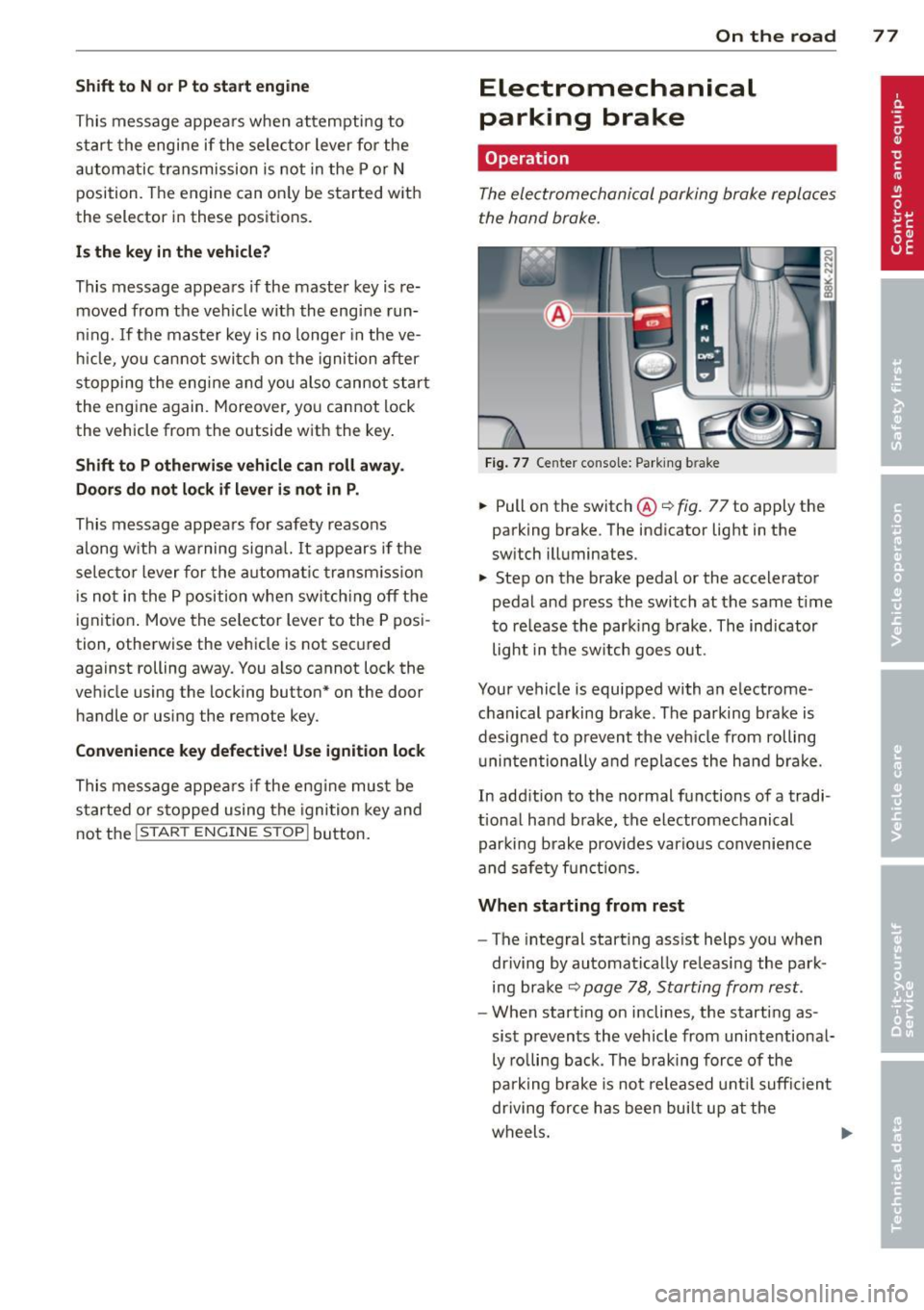
The ele ctromechani cal parking brake replaces
the hand br ake.
Fi g. 77 Center console: Park ing b rake
.,. Pull on the switc h@ ¢ fig. 77 to apply the
parking brake. The ind icator lig ht in the
sw itch illuminates.
.,. Step on the brake pedal or the accele rator
pedal and press the switch at the same t ime
t o re lease the par king brake. The indicator
light in the sw itch goes out.
Your vehicle is equipped with an e lectrome
c hanical p arking bra ke. The pa rking bra ke is
d esigned to p revent the ve hicle from rolling
u nin ten tionally and repla ces the hand b ra ke.
In add ition to the normal fu nctions of a tradi
t ional ha nd b rake, the electromechanical
par king b rake provides vario us conv enience
and sa fe ty f unct ion s.
When starting from rest
- The integral start ing ass ist helps you when
dr iving by automat ica lly releasi ng the par k
ing b ra ke ¢
pag e 78, Starting from rest .
-When start ing on inclines, the starting as
sis t preven ts the veh icle from unintentiona l
ly ro lling back . The braking force of the
pa rk ing brake is no t released u ntil su ffici ent
driving for ce h as been bui lt up at the
w heel s. ..,.
Page 80 of 294
78 On the road
Emerg ency b rake function
An emergency brake ensures t hat the vehicle
can be slowed down even if the
normal brakes
fail c::>
page 79, Emergency broking.
Indicat or light s
-If the par king b rake is closed w ith the igni
t ion
s witc hed on the . (USA models) /
• (Canada mode ls) indica tor lights come
on in the instrum ent cluster and the switch .
-If the parking brake is closed w ith the igni
tion
s witc hed off the . (USA models) /
• (Canada mode ls) indicator lights come
on in the instrument clust er and th e switch
for about 20 seconds .
A WARNING
If a gear or a drive range (automat ic trans
m ission) is engaged with the vehicle sta
tionary and the engine runn ing, you must
in no instance accelerate o r release the
cl utch carelessly. Otherwise the vehicle
w ill sta rt to move immediately- r isk of an
accident .
@ Note
If the . symbol in the display or the
.. (USA models) . (Canada models)
ind icator light in the instr ume nt cl uster
flashes, there is a ma lf u nction in the brake
system. By pressing the
ISETI button, you
can bring up a driver message which ex
plains the malfunction in more detail. If
the driver message
Pa rking brake! ap
pears, there is an operating malfunction in
the park ing brake which you should have
repaired immediately by an authorized
Aud i deale r or other qualified workshop
c::>
page 15.
(D Tips
- You can apply the parking brake at any time - even w ith the ignition switched
off . Th e ignit ion must be t urned on in o r
der to release the par king brake. - Occasional noises when the parking
bra ke is applied and released are normal
and are not a cause for concern.
- When the vehicle is parked , the parking
brake goes through a self-test cycle at
regu lar interva ls. Any associated noises
are normal.
Parking
Parking
"' Press the br ake ped al to s top the veh icle .
"' Pull the button @ c::>
page 77, fig. 77 to set
the parking brake.
"' Automatic transmission: Move the selector
lever to P.
.,. Turn t he engine off c::>
,& .
.,. Man ual transmission: Shift into 1st gear.
In addition on inclines and gr ades
.,. Turn the steering wheel so that your vehicle
w ill roll aga inst the curb in case it shou ld
start to move.
A WARNING
- When you leave yo ur vehicle -even if on
ly briefly -always remove the igni tion
key. This app lies particularly when chi l
dren remain in the vehicle. Otherwise the
children could start the eng ine, release
the park ing brake or operate electrical
equ ipme nt (e .g . power windows). There
is the risk of an acc ident .
- When the veh icle is locked, no one -par
ticularly not children should rema in in
the vehicle . Locked doors make it mo re
d ifficult for emergency worke rs to get in
to the vehicle -putting lives at r isk .
Starting from rest
The starting assist function ensures that the
parking brake is released automatically upon starting.
Stopping and applying parking brake
"' Pull the switch @c::> page 77, fig . 77 to ap-
ply the parking brake . .,.
Page 81 of 294
Starting and autom ati call y relea sing the
pa rking b rake
~ When you start to drive as usua l, the park
ing brake is automatically re leased and your
vehicle begins to move.
When stopping at a traffic signa l or stopp ing
in city traffic on vehicles with an automatic
transmission, the parking brake can be ap plied. The vehicle does not have to be held
w ith the footbrake . The park ing brake elimi
nates the tendency to creep with a drive range
engaged. As soon as you dr ive off as usual,
the park ing brake is released automatically
and the vehicle starts to move .
Starting on slop es
When starting on inclines, the start ing ass ist
prevents the vehicle from unintentionally roll
ing back. The braking force of the parking
brake is not released until sufficient dr iving
force has been b uilt up at the whee ls.
(D Tips
For safety reasons, the park ing brake is re
leased automatically only when the dr iv
er 's safety belt is engaged in the bu ckle.
Starting off with a trailer
To prevent rolling back unintentionally on an
incline, do the following:
~ Keep the switch@¢ page 77, fig. 77
pulled and depress the accelerator . The
park ing b rake stays app lied and p revents
the vehi cle from rolling backward.
~ You can release the switch @once you are
s u re that yo u are developing enough driving
force at the wheels by depressing the accel erator.
D epending on the weight of the rig (vehicle
and trai ler) and the severity of the incline, you
may roll backwards as you start. Yo u can pre
vent roll ing backwards by holding the parking
brake switch @pulled out and accelerating -
just as you would when starting on a hill wit h
a conventional hand brake .
On the ro ad 79
Emergency braking
In the event that the conventional brake sys
tem fails or locks .
~ In an emergency, pull the sw itch @
¢
page 77, fig. 77 and continue to pull it to
slow your vehicle down with the parking
brake .
~ As soon as you release the switch @ or ac-
celerate, the b ra ki ng process s tops.
If you pull the switch @and hold it above a
speed of about 5 mph (8 km/h), the eme rgen
cy bra king funct ion is initia ted . T he ve hicle is
braked at all four whee ls by activating the hy
draulic brake system. The brake performa nce
is similar to making an emergency stop¢&..
In order not to act ivate the eme rgency brak
ing by mis take, an audib le warning tone (buz
zer) so unds when the switch @is pulled. As
soon as the switch @ is re leased, or the acce l
erato r peda l is depressed, emergency braking
stops.
A WARNING
...--
Emergency braking should only be used in
an emergency, when the normal foot brake has fa iled or the brake pedal is obstructed .
Using the par king b rake to pe rform eme r
gency brak ing will slow your vehicle down
as if you had made a full bra ke application.
The laws of physics cannot be suspended
even with ESC and its associated compo
nents (ABS, ASR, EDS) . In corners and
when road or weather conditions are bad,
a full brake application can ca use the vehi
cle to sk id or the rear end to break away -
risking an accident.
Speed warning system
Overview
The speed warning system helps you to keep
your driving speed below a set speed limit.
The speed warn ing system warns if the driver
exceeds a p reviously sto red max imum speed .
A warn ing tone w ill sound as soon as the
Ill>
Page 86 of 294
84 Transmi ssion
Driving the automatic transmission
App lies to vehicles: with multitron ic or tiptro nic
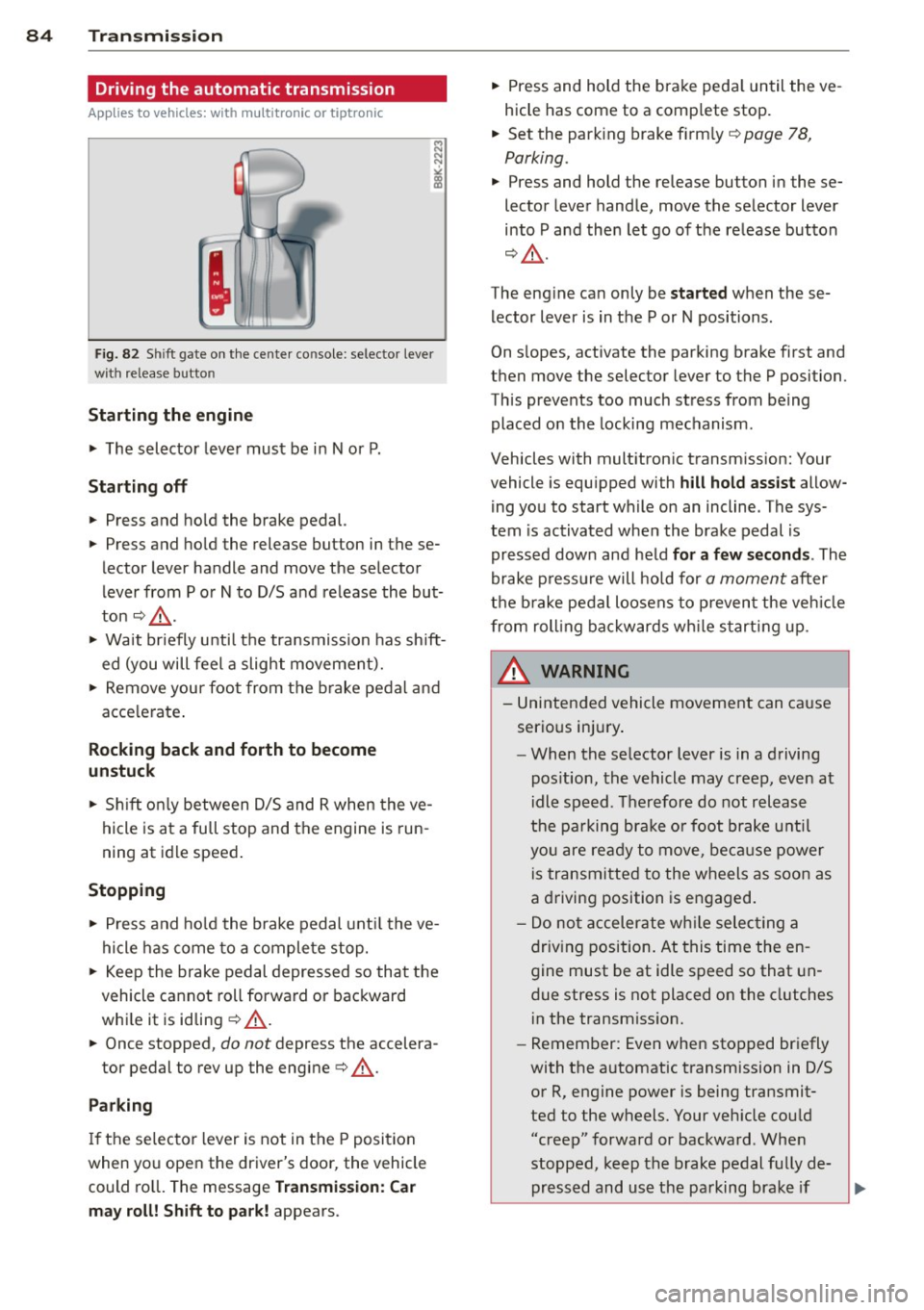
Fig. 82 Sh ift gate on the center co nso le : selector lever
with release button
Starting the engine
• The selector lever must be in N or P.
St arting off
• Press and hold the brake pedal.
• Press and hold the release button in these
lector lever handle and move the selector
lever from P or
N to D/S and release the but
ton¢ ,&..
> Wait briefly until the transmission has shift
ed (you will feel a slight movement).
> Remove your foot from the brake pedal and
acce lerate .
Rocking back and forth to become
un stuc k
• Sh ift on ly between D/S and R when the ve
hicle is at a full stop and the engine is run
ning at idle speed .
Stopp ing
> Press and ho ld the brake pedal unt il the ve
hicle has come to a complete stop.
• Keep the brake pedal depressed so that the
vehicle cannot roll forward or backward
whi le it is idling ¢,&. .
• Once stopped,
do not depress the accelera-
tor pedal to rev up the engine¢,&..
Parking
If the selector lever is not in the P position
when you open the driver's door, the vehicle
could ro ll. The message
Tra nsmi ssio n: C ar
m ay roll! Shift to p ark!
appears. •
Press and hold the brake peda l until the ve
hicle has come to a comp lete stop.
• Set the park ing brake firm ly ¢
page 78,
Parking.
• Press and hold the release button in these
lector lever handle, move the se lector lever
into P and then let go of the release button
¢ ,&. .
The eng ine can only be
s ta rt e d when these
lector lever is in the P or N positions .
On s lopes, activate the parking brake first and
then move the selector lever to the P position.
This prevents too much stress from being
placed on the locking mechanism.
Vehicles with multitronic transmission: Your
vehicle is equ ipped with
hill hold as sist allow
ing you to start while on an incline . The sys
tem is activated when the brake pedal is
pressed down and held
f or a few s econd s. The
brake p ressu re will hold for
a moment after
the b rake peda l loosens to p reven t the veh icle
from roll ing bac kwards wh ile s tarting up .
_& WARNING
-= -
- Unintended vehicle movement can cause
serio us injury .
- When the se lector lever is in a driving
pos ition, the vehicle may creep, even at
idle speed. Therefore do not release
the pa rking bra ke o r foot brake u ntil
you are ready to move, beca use power
is transmitted to the wheels as soon as
a driving position is engaged.
- Do no t accelerate wh ile selecting a
driv ing position. At this time the en
gine must be at idle speed so that un
due stress is not placed on the clutches
in the transmiss ion.
- Remember: Even when stopped briefly
with the automatic transmission in 0/5
or R, engine power is being transmit
ted to the wheels. Your veh icle cou ld
"creep" forward or backward . Whe n
stopped, keep the brake pedal fu lly de
pressed and use the parking brake if
Page 87 of 294
necessary to keep the vehicle from
rolling.
- If the selector lever is unintentionally
moved into N while you are driving, take
your foot
off the accelerator pedal and
wait for the engine to return to idle
speed before selecting a driving position .
- Never shift into R or P when the vehicle is
in motion .
- Never get out of the driver's seat when
the engine is running.
- If you must get out of the vehicle, move
the selector lever securely into the P po
sit ion and apply the parking brake firmly.
- If the engine must remain running, never
have any driving position engaged when
checking under the hood . Make sure the
selector lever has securely engaged and
is locked in P with the parking brake
firmly set ¢
page 208, Engine compart
ment.
Otherwise, any increase in engine
speed may set the vehicle in motion,
even with the parking brake applied.
(D Tips
For safety reasons, the parking brake is re
leased automatically only when the driv
er 's safety belt is engaged in the buckle.
Selector lever positions
Applies to vehicles: with multit ronic or tiptronic
This section describes the selector lever posi
tions and driving ranges .
2
Radio WXRK
9:30-
12/5/2 011
121 19 .0mpg
1992 mi 40 .4
~= ~p +7 2~
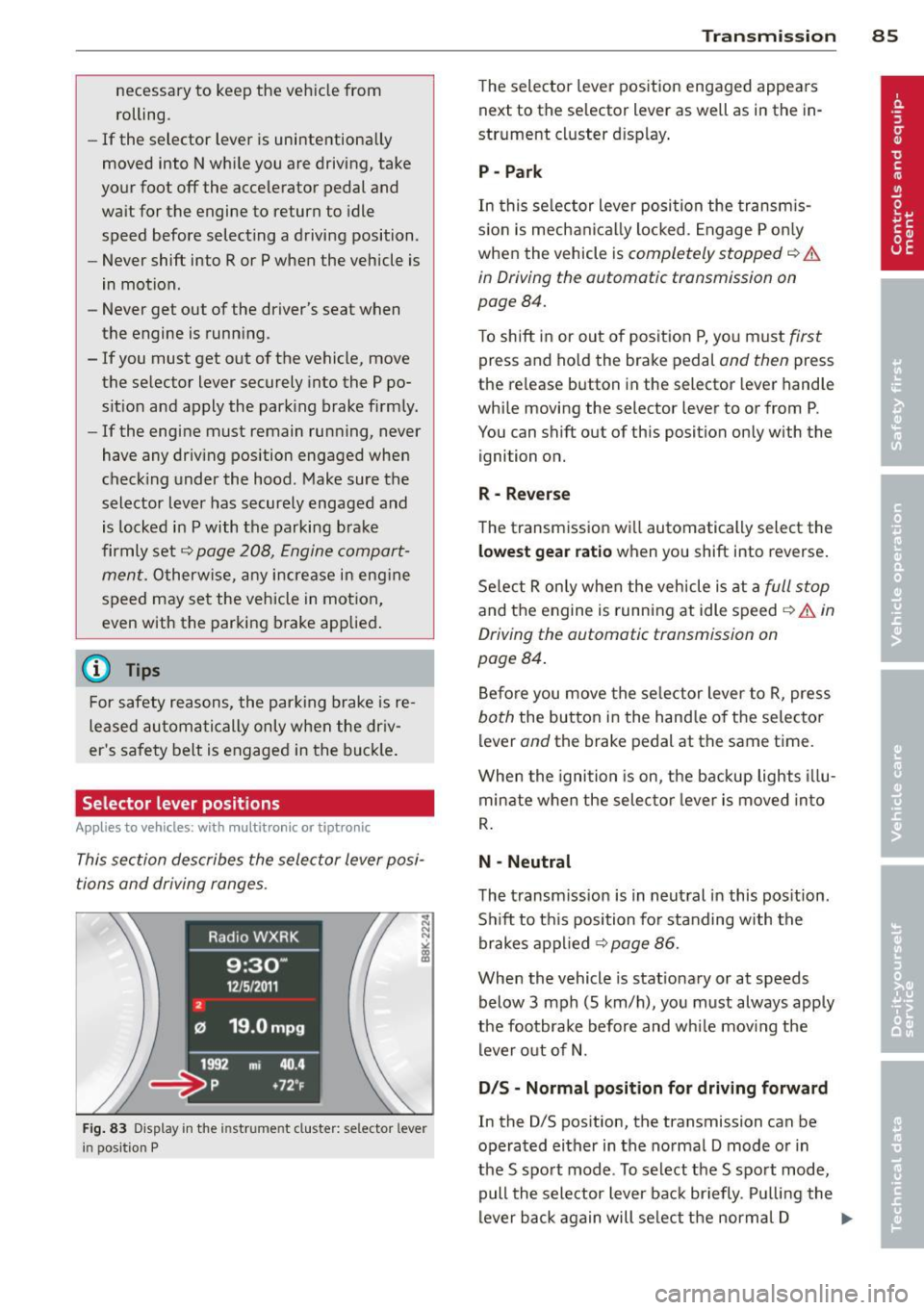
Fig. 83 Display in the in str um ent cluste r: selecto r leve r
i n positi on P
Transmission 85
The selector lever position engaged appears
next to the selector lever as well as in the in
strument cluster display .
P -Park
In this selector lever position the transmis
s ion is mechanically locked. Engage P only
when the vehicle is
completely stopped ¢ &
in Driving the automatic transmission on
page 84.
T o shift in or out of position P, you must first
press and hold the brake pedal and then press
the re lease button in the selector lever handle
while moving the selecto r lever to or from P.
You can shift out of this position only with the
ignition on.
R- Reverse
The transmission will automatically select the
lowest gear ratio when you shift into reverse.
Select R only when the vehicle is at a
full stop
and the engine is running at idle speed ¢ & in
Driving the automatic transmission on
page 84.
Before you move the selector lever to R, press
both the button in the handle of the selector
lever
and the brake pedal at the same time .
When the ignition is on, the backup lights illu
minate when the selector lever is moved into
R.
N -Neutral
The transmission is in neutral in this position.
Shift to th is position for standing with the
brakes applied ¢
page 86.
When the vehicle is stationary or at speeds
below 3 mph (S km/h), you must always apply
the footbrake before and while mov ing the
lever out of N.
D /S -Normal position for driving forward
In the D/S pos ition, the transmission can be
operated either in the normal D mode or in
the S sport mode . To select the S sport mode,
pull the selector lever back briefly . Pulling the
lever back again will se lect the normal D ...,