door lock AUDI A5 2015 Owner´s Manual
[x] Cancel search | Manufacturer: AUDI, Model Year: 2015, Model line: A5, Model: AUDI A5 2015Pages: 264, PDF Size: 66.83 MB
Page 41 of 264
M N
i? co ,...., \!) 1.1'1
N 1.1'1 ,....,
• Pull the switch briefly to the se con d s top to au
tomatica lly close the window.
A WARNING
-When you leave your veh icle -even if only
br iefly -always remove the ignition key. This
applies part icularly when children remain in
the vehicle. Otherwise the children could start the engine o r operate electr ical equip
ment (e.g. power w indows). The power win
dows are functional until the d river's door o r
passenger's door has been opened.
- Pay close attention when closing the w in
dows to prevent pinch ing of hands or limbs.
- When loc king the veh icle from outs ide, the
vehicle must be unoccupied since t he win
dows can no longer be opened in an emer
gency.
@ Tips
- When you open the doors, the windows au
tomatically lower about 10 mm.
- After the ignition has been switched off, the
windows can st ill be opened or closed for
abo ut 10 m inutes. The window regulato rs
are not switched until the driver's or pas
senger's door is opened .
Convenience opening/closing
The windows and the panoramic tilting sunroof
can be opened and closed with the mechanical
key or the emergency key.
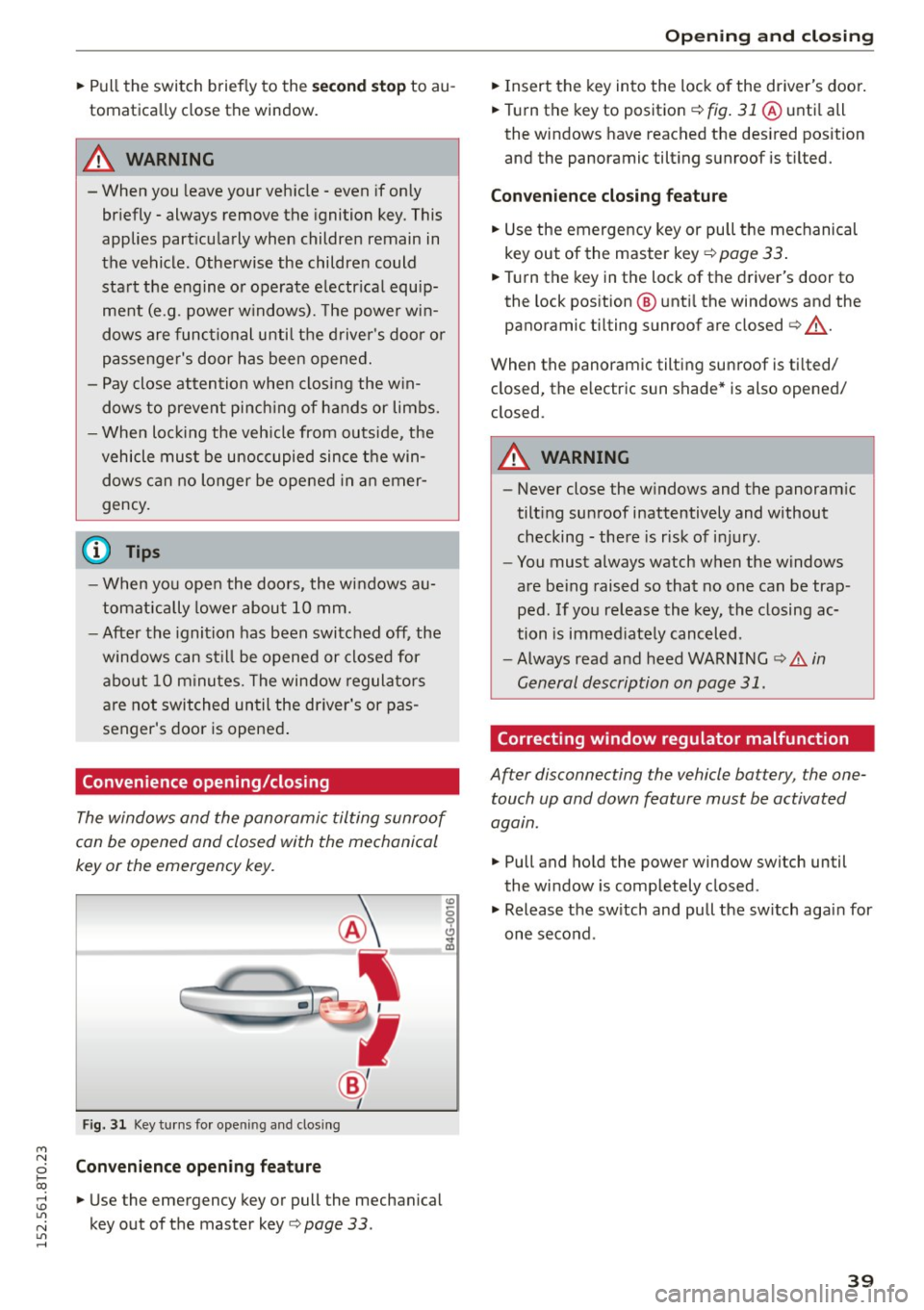
Fig. 3 1 Key tu rns fo r opening a nd clos ing
Con venience open ing fea ture
• Use the emergency key or pull the mechanical
key out of the master key
Q page 33 .
-
Opening and cl osing
• Insert the key into the lock of the driver's doo r.
• Turn the key to position
Q fig. 31 @ unti l all
the windows have reached the des ired pos ition
and the panoramic tilting sunroof is tilted.
Convenienc e clo sing featur e
• Use the emergency key or pull the mechanical
key out of the master key
Q page 33 .
• Turn the key in the lock of the d river's door to
the lock position @ unti l the windows and the
panoramic tilting sunroof are closed
Q ,A.
When the panoramic tilting sunroof is tilted/
closed, the electric sun shade* is also opened/
closed.
A WARNING
-- Never close the w indows and the panoram ic
tilt ing sunroof inattentively and without
checking - there is risk of injury.
- You must always watch when the windows
are be ing raised so that no one can be trap
ped. If you release the key, the closing ac
tion is immed iate ly canceled.
- Always read and heed WARNING
Q .&. in
General description on page 31.
Correcting window regulator malfunction
After disconnecting the vehicle battery , the one
touch up and down feature must be activated
again.
• Pull and hold the power window switch until
the window is completely closed.
• Release the sw itch and pull the sw itch again for
one second .
39
Page 42 of 264
Opening and closing
Panorama roof
Operation
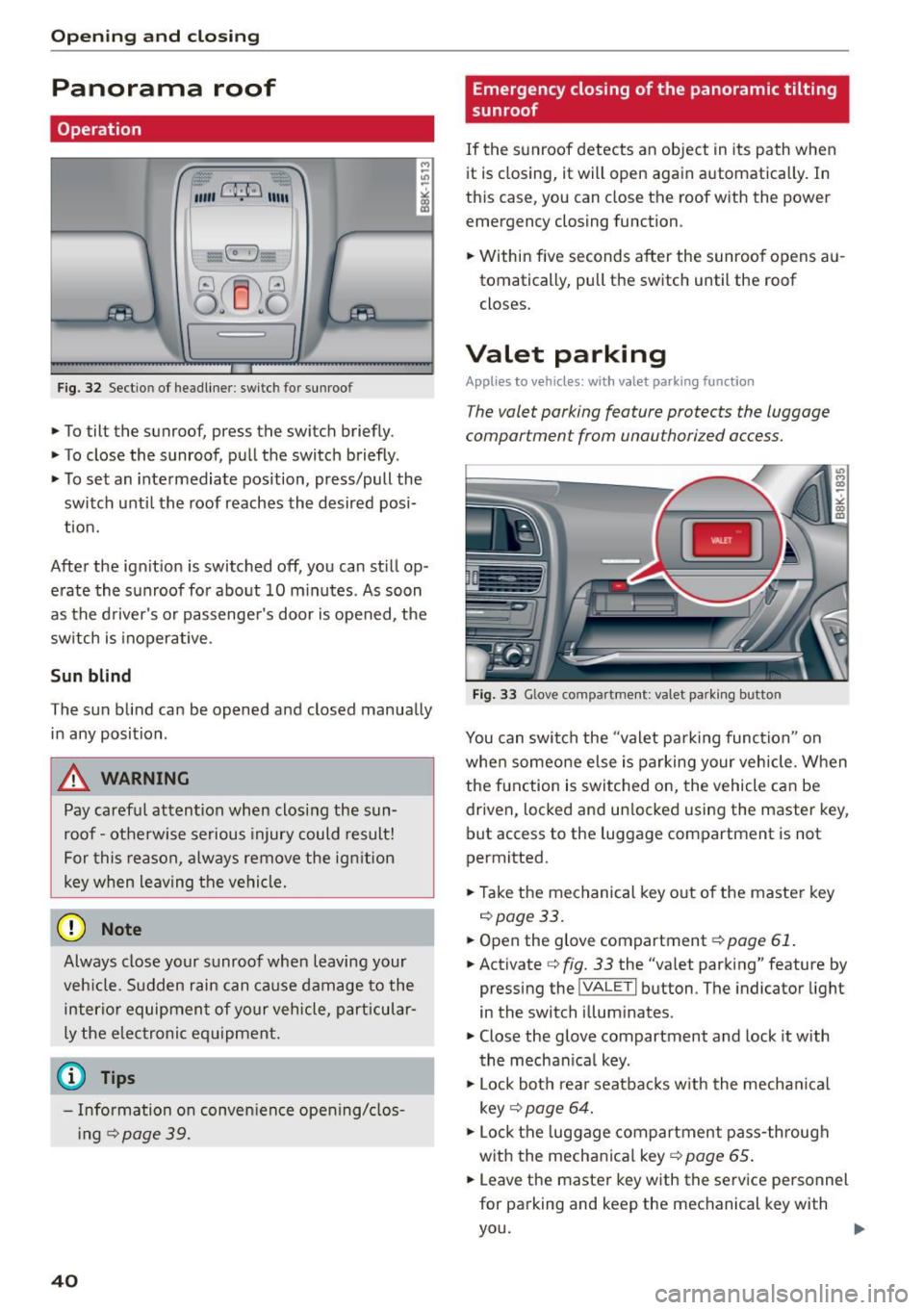
Fig. 32 Sectio n of headliner : swi tc h fo r sunroo f
.,. To tilt the sunroof, press the switch briefly .
• To close the sunroof, pull the switch briefly .
• To set an intermediate position, press/pull the
switch until the roof reaches the desired posi
tion.
After the ignition is switched off, you can still op
erate the sunroof for about 10 minutes . As soon
as the driver's or passenger's door is opened, the
switch is inoperative .
Sun blind
The sun blind can be opened and closed manually in any position .
A WARNING
Pay careful attention when closing the sun
roof - otherwise serious injury could result!
For this reason, always remove the ignition
key when leaving the vehicle.
(D Note
Always close your sunroof when leaving your
veh icle. Sudden rain can cause damage to the
interior equipment of your vehicle, particular
ly the electronic equipment.
- Information on convenience opening/clos
i ng
c::> page 39.
40
Emergency closing of the panoramic tilting
sunroof
If the sunroof detects an object in its path when
it is closing, it will open again automatically . In
this case, you can close the roof with the power
emergency closing function.
• Within five seconds after the sunroof opens au
tomatically, pull the switch until the roof
closes .
Valet parking
Applies to vehicles: wi th valet parkin g function
The valet parking feature protects the luggage
compartment from unau thorized access.
-
Fig. 33 Glove com partment: va let pa rk ing b utto n
You can switch the "valet parking function" on
when someone else is parking your vehicle. When
the function is switched on, the vehicle can be driven, locked and un locked using the master key,
but access to the luggage compartment is not
permitted.
• Take the mechanical key out of the master key
c::>page33.
• Open the glove compartment c::> page 61.
• Activate c::> fig. 33 the "valet parking" feature by
pressing the
! VA LET I button . The indicator light
in the switch illuminates.
• Close the glove compartment and lock it with
the mechanical key .
• Lock both rear seatbacks w ith the mechan ical
key
c::> page 64.
• Lock the luggage compartment pass-through
with the mechanical key
c::> page 65 .
• Leave the master key with the service personnel
for parking and keep the mechanical key with
you.
Page 47 of 264
M N
0 loo
rl I.O
"' N
"' rl
the windshield in this a rea in order to
prevent malfunctions or failures .
- Some exterior lighting functions can be ad
ju ste d
~ page 45 .
-When yo u remove your key from the igni tion
while the vehi cle's ligh ts are turned o n, a
buzzer sounds as long as t he driver 's door is
open.
- In coo l o r dam p weather, t he inside of the
h eadlights, turn sig nals and tail lights can
fog over d ue to the temperature difference
between the inside and outs ide. They will
clea r shortly after switching them on. T his
does not affect t he service li fe of the light
i ng.
- In the event of a light sensor malfunction,
the driver is not ified in the instr ume nt clus
te r display~
page 21.
Turn signals and high beam lever
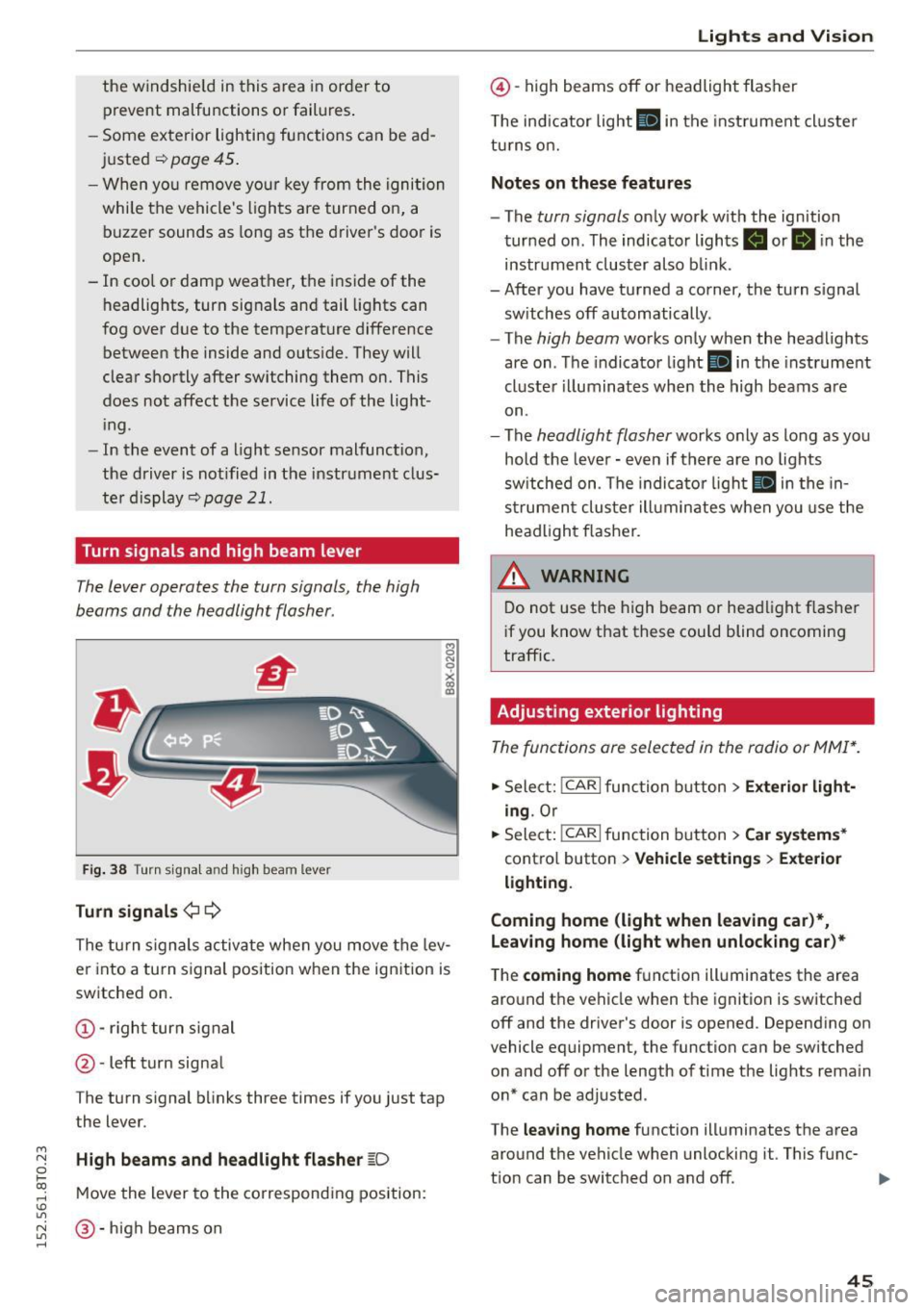
The lever operates the turn signals, the high
b eams and the headlight flasher.
Fi g. 3 8 Tu rn signa l and high beam lever
Turn signals ¢ Q
g N
0
~ CD
The turn signals activate when you move the lev
er into a turn s ignal position when the ignition is
switched on.
@ -righ t tur n signal
@ -left turn signa l
The turn s ignal b links three times if you just tap
the lever.
High beams and headlight flasher
[0
M ove the lever to the corresponding position:
@ -high beams o n
Lights and Vis ion
@ -high beams off or headlight flasher
T he ind icator light
II in t he inst rument cl uste r
tu rns on.
Notes on these features
- The
turn signals on ly wor k w ith the ign ition
tur ned on. The indicator ligh ts . or
II in the
instr um ent clus ter also b link.
-After you have tu rned a corner, the turn s ignal
sw itches off automatically.
- The
high beam works on ly when the headlights
are on . T he indicator light
II in the instrument
cluste r illuminates whe n the high beams a re
on.
- The
headlight flash er works o nly as long as yo u
hold the leve r - even if there are no lights
sw itched on . The indica to r li ght
II in the in
s trumen t cluste r ill umin ates when you use t he
head light flasher.
,&. WARNING
D o not use t he h igh beam or hea dlight flashe r
i f you know that these could blind oncoming
traffic.
Adjusting exterior lighting
The func tions are selected in the radio or MMI* .
.,. Select: !CAR I func tion b utton > Exterior light
ing .
Or
.,. Sele ct: !~C_A _R~ I function b utton > Car systems *
contro l butto n > Vehicle settings > Exterior
lighting .
Coming home (light when leaving car )*,
Leaving home (light when unlocking car)*
The
coming home f u nction illuminates the area
aro und t he vehicle when the ignition is switched
off and the driver's door is opened. Depend ing on
vehicle equipment, the function can be switched o n and off o r the length of t ime t he lig hts rema in
on* can be adjusted .
The
leaving home function illuminates t he area
around th e vehicle when unloc kin g it. This func-
t ion can be switched on and off. ""
45
Page 50 of 264
Lights and Vision
Q/P -Adjusting the left/right exterior mirror .
Move the knob in the des ired direction.
4ill -Heat ing the m irror g lass depending on the
outside temperature*.
.9 -Folding exterior mirrors* . In the Infotain
ment system, you can select if the mirrors fold in
automatically when you lock the vehicle
¢ page 36.
Front passenger's exterior mirror tilt
function*
To help you see the curb when backing into a
parking space, the surface of the mirror t ilts
slightly . Fo r this to happen, the knob must be in
the position for the front passenger 's outside
mirror.
You can adjust the tilted mirror su rface by turn
ing the knob in the des ired direction . Wh en you
move out of revers e and into another gear, the
new mirror position is stored and assigned to the
key you are using.
The mirror goes back into its origina l position
once you drive forward faster than 9 mph (15 km/h) or turn the ignition off.
A WARNING
Curved mirror surfaces (convex or spherical*)
increase your field of view. Remember that
vehicles or other objects will appear smaller
and farther away than when seen in a flat mir
ror. If you use this mirror to estimate distan
ces of following vehicles when changing
lanes, you cou ld estimate incorrectly and
cause an accident.
(D Note
-If the mirror hous ing was moved by force
(for example, by running into an object
when maneuvering the vehi cle), the mirror
must be folded all the way in using the pow
er folding function. The mirror housing
must not be moved back into place by hand
because this would impair the function of
the mirror mechanism.
- If you wash the vehicle in an automatic car
wash, you must fold the exterior mirrors in
48
to reduce the risk of damage to the mirrors.
Never fold power folding exterior mirrors*
by hand. Only fold them in and out using
the power controls.
(D Tips
-If the power adjusting function malfunc
tions, the g lass in both mirrors can be ad
justed by pressing on the edge of it by hand.
- The exterior mirror settings are stored with
the memory function* ¢
page 58.
Dimming the mirrors
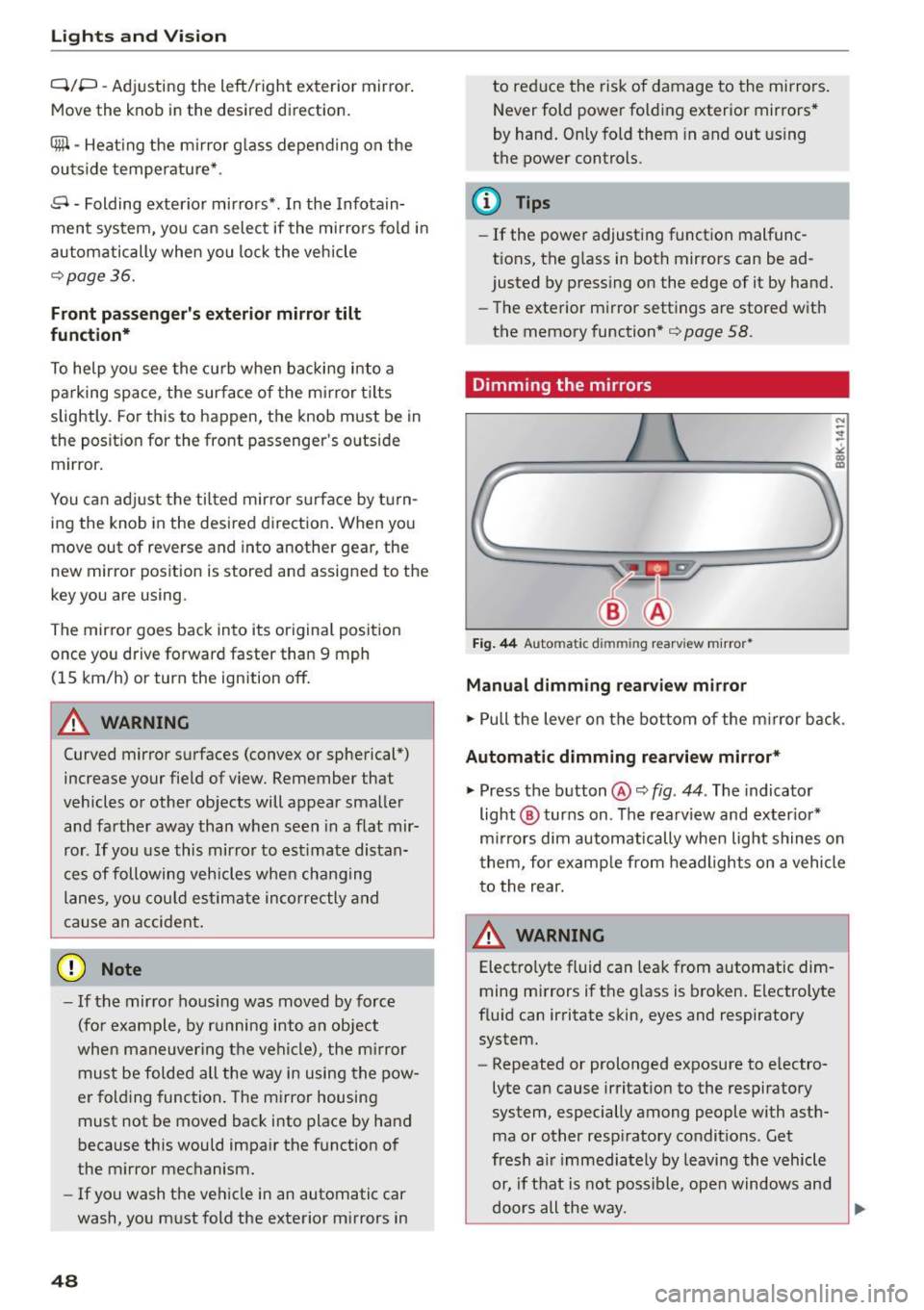
Fig. 44 Automat ic dimmin g rearv iew mirro r•
Manual dimming rearview mirror
.,. Pull the lever on the bottom of the m irror back .
Automat ic dimming rearview mirror*
.,. Press the button@¢ fig. 44. The indicator
light @ turns on . The rearview and exter ior*
mirrors dim automatically when light shines on
them, for example from headlights on a vehicle
to the rear.
~ WARNING
Electro lyte fluid can leak from automatic dim
ming mirrors if the glass is broken. Electrolyte
fluid can irritate skin, eyes and respiratory system.
- Repeated or prolonged exposure to e lectro
lyte can cause irritation to the respiratory
system, especially among people with asth
ma or other resp iratory conditions . Get
fresh a ir immediately by leaving the vehicle
or, if that is not possible, open windows and
doors all the way.
~
Page 60 of 264

Seats and storag e
Rear head restraints
Fig. 58 Rear seats: head restra ints
F ig. 59 Rear head restraints: release
Adjust ing t he he ad rest raints
.. To move the head restraint up, hold it at the
s ides with both hands and slide it upward until
you feel it click into place
c> &.
.. To move the head restraint down, press the
button @
c::> fig. 58 and slide the head restraint
downward.
Remo ving the head re str aints
.. Fold the backrest forward c> page 64.
.. Move the head restra int upward as far as it can
go .
.. Press the release @
c::> fig. 59 with the mechan
ica l key
c::> page 33 a nd the button @ c::> fig. 58.
Pull the head restraint out of the backrest at
the same time¢.&_ .
Inst all ing the head rest raints
.. Slide the posts on the head restra int down into
the gu ides unti l you feel the posts cl ick into
place.
.. Press the button@ ¢
fig. 58 and s lide the head
restraint a ll the way down . Yo u shou ld not be
able to pull the head restraint out of the back
rest .
58
So that the driver can have a better view to the
rear, the head restraints should be pushed down
completely when the rear seats are not occupied .
_& WARNING
-Read and heed all WARNINGS c> page 115,
Proper adjustment of head restraints.
-On ly remove the rear seat head restraints
when necessary in order to install a child
seat ¢
page 159. Install the head restraint
aga in immediately once the chi ld seat is re
moved. Driving w ithout head restraints or
w it h head restra ints that are not properly
adj usted increases the risk of serio us or fa
tal nec k injury dramat ica lly.
- Vehi cles w ith a pass through i n the center
conso le have seating for four. The long cen
ter conso le between t he two rea r seats is
not a seating position . There fore, a safety
be lt is not provided.
(0 Tips
Correct ly adjusted head restraints and sa fety
belts are an extremely effective combination
of safety features .
Memory function
Description
App lies to vehicles: with memory f unction
The memory function allows you to quickly and
eas ily store and recall pe rsonal seating p rofi les
fo r the driver. The memory function is ope rated
th rough the maste r key and the memory bu ttons
in the driver's door .
The driver's seati ng p rofile is stored and assigned
to the master key each t ime the vehicle is locked .
When yo u open the door, the seat profile is auto
matically recalled. If two people use one vehicle,
i t is recommended that each person always uses
"their own" master key .
Up to 2 seat profi les can be stored in the memory
buttons in the d river's door. Once they are stored,
these seat profiles can be selected at any time .
Ill>
Page 61 of 264

M N
0 loo
rl 1.0
"' N
"' rl
In addition to the d river 's seat settings, you can
also store and access the exterior mirror adjust
ment settings* using the remote control key or
memory button.
Remote control key
App lies to vehicles: with seat memory
To assign the driver's seat settings to the remote
control key when locking the veh icle, the funct ion
must be act ivated in the radio or
MM!*
• Select: I CARI function button > Seat adjust·
ment
> Driver's seat > Remote control key >
on .Or
• Select : I CAR I function button > Car sy stem s*
control button > Vehicle settings > Seats >
Driver' s seat > Remot e contro l key > On .
@ Tips
If you do not want anoth er driver's settings to
be assigned to the remote key, sw itc h off the
memory f un ct io n using the radio or MM I* or
the
I O N/OFF I but ton ¢ page 59 .
Memory buttons
Applies to vehicles: with seat memo ry
Fig. 6 0 Driver's door: memory fu nct io n buttons
The memory butto ns are located in the dr iver's
d oor.
Switching the memory function on /off
• Press the ION/O FF I button to switch the memo
ry function on/off . The word
OFF lights up when
the memory function is switched off. Seat p ro·
files are nei ther stored no r r eca lled.
Seats and storage
Storing a seat profile
• Press the ISET I button. Whe n the word SET
lights up, the memory is ready to store set
tings.
• Press a memory button
dil or [II) briefly . A tone
confirms that the settings were stored.
Accessing a seat profile
• If the driver's door is open and the ignition is
sw itched off, press the memory button .
• If the driver's door is closed or the ignition is
switched on, press and hold the memory but
ton unti l the seat adjustment is complete.
A WARNING
- For safety reasons, the seat setting can o nly
be recalled when the veh icle is stationary·
otherwise you risk hav ing an accident.
- In an emergency the recall procedure can be
cancelled by pressing the
I O N/OF F! switch o r
by tappi ng the memory buttons.
Ashtray
Fi g. 6 1 Center console: ashtray
Opening /clo sing
• To open the ashtray, sl ide the cover up
r:!) fig. 61.
• To close the ashtray, press down on the cover.
Emptying the ashtray
• To remove the insert, slide the latch to the right
r:!) fig. 61 -arrow-.
• To insta ll the insert, press it down into the
mou nt.
59
Page 66 of 264
Seats and storag e
Luggage compartment
General information
A WARNING
Read and follow the impo rtant safety preca u
tions on
r=;, page 118, Storing cargo correctly.
Enlarging the luggage compartment
App lies to veh icles: w ith fol ding rear sea tback
The backrests can be folded forward separately
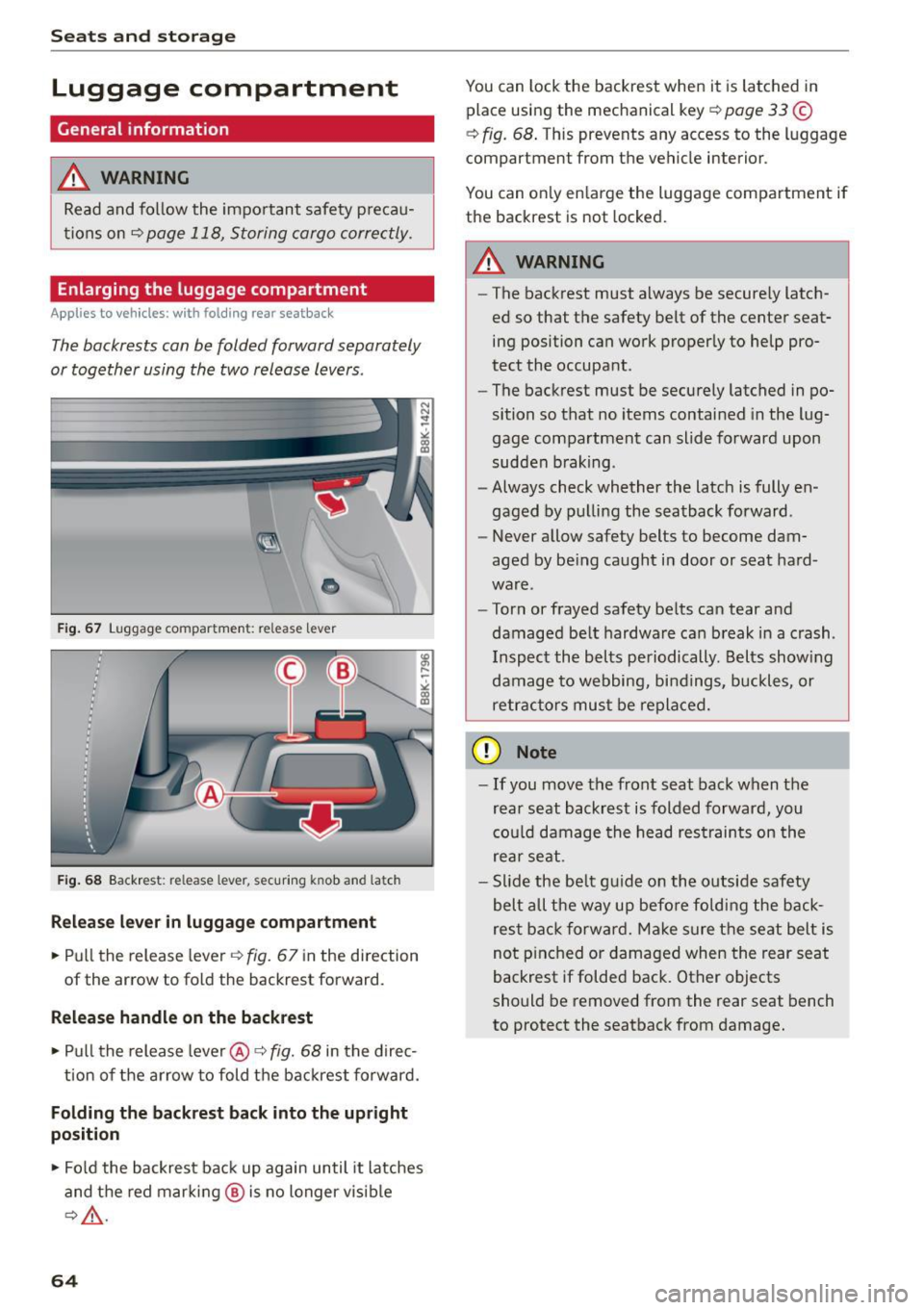
or together using the two release levers .
•
Fig . 67 Luggage compartment: release lever
F ig . 68 Backrest : release lever, securing knob and latch
Release lever in luggage compartment
• Pull the release leve r r=;,fig. 67 in the direction
of the arrow to fold the backrest forward.
R elease handle on the backrest
• Pull the release lever @ c::> fig. 68 in the direc-
tion of the a rrow to fold t he backrest forward.
Folding the backrest back into the upright
posit ion
• Fol d the backrest back up again until it latches
and the red mar kin g @ is no longer vis ib le
r:!;, A .
64
You can lock the backrest when it is latched in
place using the mechanical key
r=;, page 33 ©
r=;, fig. 68 . This prevents any access to the luggage
compartment from the vehicle interior .
You can on ly en large the luggage compartment if
the backrest is not locked.
A WARNING
- The backrest must always be secure ly latc h
ed so that the safety belt of the center seat
ing position can work proper ly to help pro
tect the occupant.
- The backrest must be securely latched in po
sition so that no items contained in the lug
gage compartment can slide forward upon
sudden b rak ing .
- Always check whether the latch is fully en
gaged by pu lli ng the seatback forward .
- Never a llow safety belts to become dam
aged by be ing caught i n door or seat hard
ware.
- Torn or frayed safety be lts can tear and
damaged be lt hardwa re can b reak in a crash .
I nspect the belts periodically. Belts show ing
damage to webbing, bindings, buckles, or
retractors must be re placed.
(D Note
- If you move the front seat back when the
rear seat backrest is folded forward, you
cou ld damage the head res traints on the
rear se at.
- Slide the be lt g uide on the o utside safety
belt all t he way up befo re folding the back
res t back forw ard. Make sure t he se at belt is
no t pin ched or damaged when the rear seat
backrest if folded back. Other objects
should be removed from the rear seat bench
to protect the seatback from damage.
Page 76 of 264
Driving
Starting the vehicle with the emergency
key
Applies to veh icles: w ith igni tion lock
You can use the emergency key as an ignition key
in an emergency.
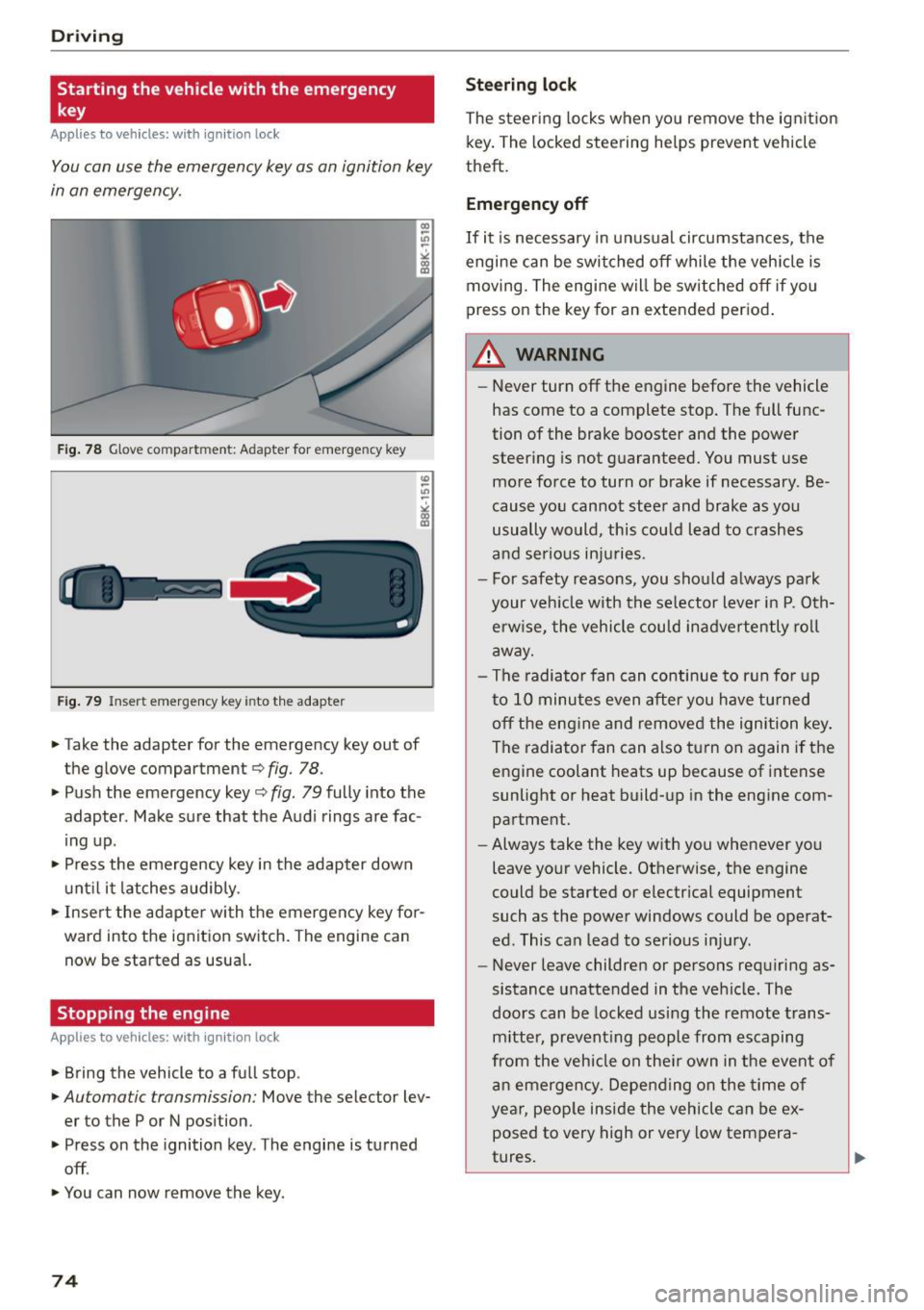
Fig. 78 Glove compar tmen t: A dapter for emerge ncy key
Fig. 79 Inser t emergency key into the adapter
.,. Take the ad apter for the emergency key out of
the glove compartment
c:> fig. 78.
.,. Pu sh the emergency key c:> fig. 79 fully into the
adapter . Make sure that the Audi rings are fac
ing up .
.,. Press the emergency key in the adapter down
until it latches audibly.
.,. Insert the adapter with the emergency key for
ward into the ignition switch. The eng ine can
now be start ed as usual.
Stopping the engine
App lies to veh icles: w ith ig ni tio n lock
.,. Bring the vehicle to a full stop .
.,. Automa tic transmission: Move the selec tor lev
er to the P or N position .
.,. Press on the ignition key. The engine is turned
off .
.,. You can now remove the key.
74
Steering lock
The steering locks when you remove the ignition
key. The locked steering he lps prevent vehicle
theft.
Emergency off
If it is necessary in unusual circumstances, the
engine can be switched off while the vehicle is
moving. The engine will be switched off if you
press on the key for an extended period.
A WARNING
- Never turn off the engine before the vehicle
has come to a complete stop. The full func
tion of the brake booster and the power
steering is not guaranteed. You must use
more force to turn or brake if necessary . Be
cause you cannot steer and brake as you
usually would, this could lead to crashes
and serious injuries.
- For safety reasons, you should always park
your vehicle with the selector lever in P . Oth
erw ise, the vehicle could inadvertently roll
away.
- The radiator fan can continue to run for up
to 10 minutes even after you have turned off the engine and removed the ignition key .
The radiator fan can also turn on again if the
engine coolant heats up because of intense
sunlight or heat build-up in the engine com
partment.
- Always take the key with you whenever you
leave your vehicle. Otherwise, the engine
could be started or electrical equipment
such as the power windows could be operat
ed. This can lead to serious injury .
- Never leave children or persons requiring as
sistance unattended in the vehicle. The
doors can be locked using the remote trans
mitter, preventing people from escaping
from the vehicle on the ir own in the event of
an emergency. Depending on the time of
year, people inside the vehicle can be ex
posed to very high or
very low tempera-
tures. ,..
Page 77 of 264
M N
0 loo
rl I.O
"' N
"' rl
CD Note
If the engine has been under heavy load for
an extended period, heat builds up in the en
gine compartment after the engine is switch
ed off -there is a risk of damaging the engine .
Allow the engine to run at idle for about two
minutes before switching it off.
Convenience key
Starting the engine
Applies to vehicles: with conve nien ce key
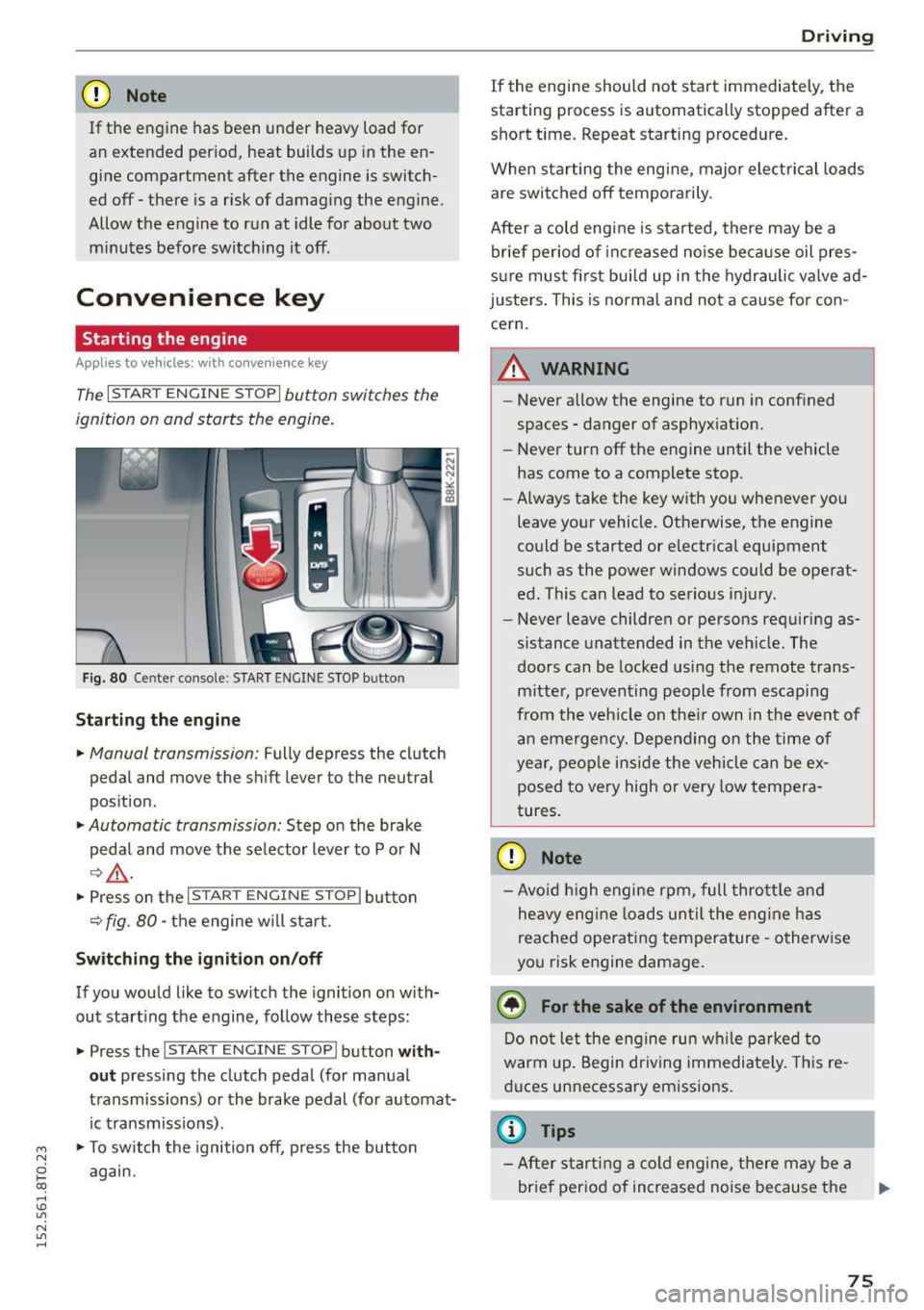
The I STAR T ENGINE ST OP I button switches the
ignition on and starts the engine.
Fig. 80 Ce nter console: START ENGINE STOP b utto n
Starting the engine
• Manual transmission: Fully depress the clutch
pedal and move the shift lever to the neutral
position.
• Automatic transmission: Step on the brake
pedal and move the selector lever to P or N
¢.&., .
.. Press on the I STAR T ENGINE ST OP I button
¢ fig . 80 -the engine w ill sta rt .
Switching the ignition on/off
If you would like to switch the ignition on with
out starting the engine, follow these steps:
• Press the
!START E NGINE STOPI button with
out pressing the clutch pedal (for manual
transmissions) or the brake pedal (for automat
ic transmissions) .
• To switch the ignition off, press the button
again.
Driving
If the engine should not start immediately, the
starting process is automatically stopped after a
short time. Repeat starting procedure.
When starting the engine, major elect rical loads
are switched off temporarily .
After a cold engine is started, there may be a
brief period of increased noise because oil pres
sure must fi rst bui ld up in the hydraulic valve ad
justers. This is normal and not a cause for con
cern.
.&_ WARNING
-~ ·
-Never allow the engine to run in confined
spaces - danger of asphyxiation.
- Never turn off the engine until the vehicle
has come to a complete stop.
- Always take the key with you whenever you
leave your vehicle. Otherwise, the engine
could be started or electrical equipment
such as the power windows could be operat
ed . This can lead to serious injury.
- Never leave children or persons requiring as
sistance unattended in the vehicle. The
doors can be locked using the remote trans
mitter, preventing people from escaping
from the vehicle on the ir own in the event of
an emergency. Depending on the time of
year, people inside the vehicle can be ex
posed to very high or very low tempera
tures.
CD Note
- Avo id high engine rpm, full throttle and
heavy eng ine loads until the engine has
reached operating temperature -otherwise
you risk engine damage.
@ For the sake of the environment
Do not let the engine run wh ile parked to
warm up. Begin driving immediately. This re
duces unnecessary emissions .
@ Tips
-After starting a cold engine, there may be a
brief period of increased noise because the
75
Page 78 of 264
Driving
oil pressure must first build up in the hy
draulic va lve adjusters. This is normal and
not a cause for concern .
- If yo u leave the vehicle with the ign ition
switched on, the ignition will switch off af
ter a certa in period o f time . P lease note that
electr ica l equipment suc h as exterior lights
will switch off as well when that happens.
Switching engine off
Applies to vehicles: w ith conven ience key
" Bring your veh icle to a complete stop .
" Automat ic transm iss ion: Move the se lector lev
er to the P or N pos ition .
" Press the
!S TAR T ENGINE STOPI bu tton
~page 75, fig. 80 .
Steering lock
The steering locks when you tu rn the engine off
using the
! STA RT E NG IN E STOP I button and open
the dr iver's door . The locked stee ring helps pre
vent vehicle theft .
Emergency off
If necessary, the eng ine can be sw itched off with
the selector lever in the R o r D/S pos itions . T he
engine stops if you press and hold the
I S TAR T ENGIN E ST OP I button at speeds be low
6 mph ( 10 km/h) and p ress the brake pedal.
A WARNING
- Never turn off the engine be fore the veh icle
has come to a comp lete stop. The f ull func
t ion of the b rake booster and the power
steering is not guaranteed. Yo u must use
more force to turn or bra ke if necessa ry. Be
ca use you cannot steer and b ra ke as you
usually wou ld, this could lead to c rashes
and serious injur ies .
- For safety reasons , you should always park
yo ur vehicle wi th the selec to r l ever in P . Oth
erwise, t he vehicle could inadve rten tly roll
away .
- T he rad iator fan ca n con tinue to run for up
to 10 m inutes eve n after yo u have tur ned
o ff the engine and removed the igni tion key .
T he r adiator fan c an also turn on ag ai n if t he
76
engine coolant heats up because of intense
sunlight or heat b uild- up in the eng ine com
partme nt.
- Always take the key w ith you whenever yo u
leave your vehicle . Otherwise, the engine
could be started or electrical equipment
such as the powe r windows could be operat
ed. This can lead to serio us i njur y.
(D Note
If the engine has been under heavy load for
an extended pe riod, heat bu ilds up in the en
gine compartment after the eng ine is switch
ed off -there is a risk of damaging the engine .
A llow the engi ne to run at id le for about two
m in utes before swit ching i t off.
Driver messages
Ignition is on
This message appears and a warning tone sound s
i f you open the d river's door when the ign ition is
switched on .
No key ident ified
This message appears when the
I S TAR T ENGINE ST OP I butto n is pressed if there
i s no maste r key ins ide the ve hicle or if the sys
tem does not recogni ze it. For examp le, the mas
ter key cannot be recogn ized if it is covered by an
object (e .g . a luminum brief case) wh ich
screens
the radio signal. Elect ro n ic dev ices such as cell
phon es can a lso inte rfe re with the radio signal.
Press brake pedal to start eng ine
This message appears if yo u do not press the
brake pedal to start the eng ine in a vehicle with
an a utomat ic transm ission.
Pre ss clutch pedal to start engine
This message appears if yo u do no t press the
cl utc h ped al to sta rt the eng ine in a ve hicle w it h
a manual transmission.
Shift to N or P to start eng ine
This message appears when attempt ing to star t
t h e engine if the selecto r lever for the automat ic
transmission is not in the P o r
N position. T he ..,.