Driver AUDI A5 2015 Owner´s Manual
[x] Cancel search | Manufacturer: AUDI, Model Year: 2015, Model line: A5, Model: AUDI A5 2015Pages: 264, PDF Size: 66.83 MB
Page 47 of 264
M N
0 loo
rl I.O
"' N
"' rl
the windshield in this a rea in order to
prevent malfunctions or failures .
- Some exterior lighting functions can be ad
ju ste d
~ page 45 .
-When yo u remove your key from the igni tion
while the vehi cle's ligh ts are turned o n, a
buzzer sounds as long as t he driver 's door is
open.
- In coo l o r dam p weather, t he inside of the
h eadlights, turn sig nals and tail lights can
fog over d ue to the temperature difference
between the inside and outs ide. They will
clea r shortly after switching them on. T his
does not affect t he service li fe of the light
i ng.
- In the event of a light sensor malfunction,
the driver is not ified in the instr ume nt clus
te r display~
page 21.
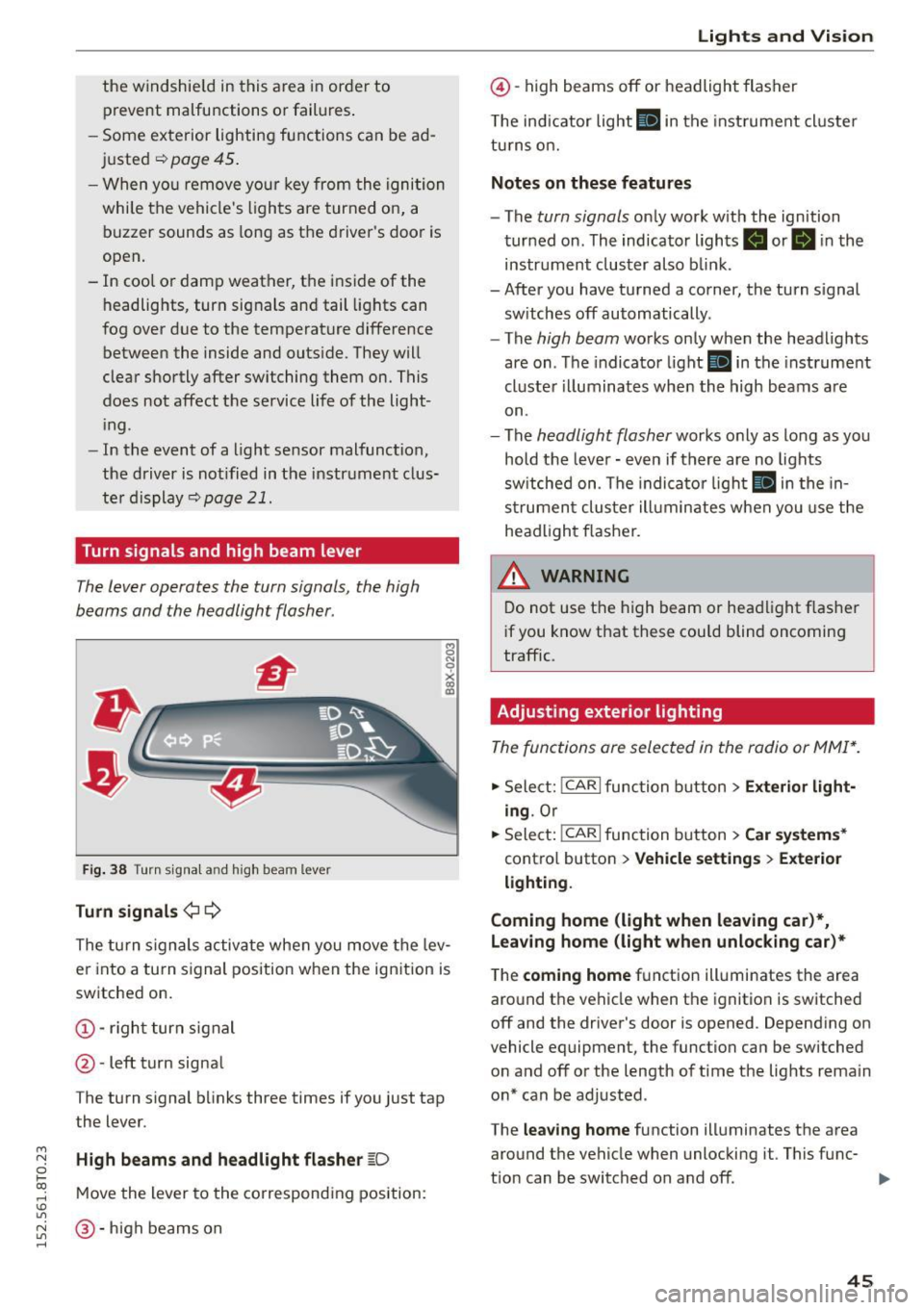
Turn signals and high beam lever
The lever operates the turn signals, the high
b eams and the headlight flasher.
Fi g. 3 8 Tu rn signa l and high beam lever
Turn signals ¢ Q
g N
0
~ CD
The turn signals activate when you move the lev
er into a turn s ignal position when the ignition is
switched on.
@ -righ t tur n signal
@ -left turn signa l
The turn s ignal b links three times if you just tap
the lever.
High beams and headlight flasher
[0
M ove the lever to the corresponding position:
@ -high beams o n
Lights and Vis ion
@ -high beams off or headlight flasher
T he ind icator light
II in t he inst rument cl uste r
tu rns on.
Notes on these features
- The
turn signals on ly wor k w ith the ign ition
tur ned on. The indicator ligh ts . or
II in the
instr um ent clus ter also b link.
-After you have tu rned a corner, the turn s ignal
sw itches off automatically.
- The
high beam works on ly when the headlights
are on . T he indicator light
II in the instrument
cluste r illuminates whe n the high beams a re
on.
- The
headlight flash er works o nly as long as yo u
hold the leve r - even if there are no lights
sw itched on . The indica to r li ght
II in the in
s trumen t cluste r ill umin ates when you use t he
head light flasher.
,&. WARNING
D o not use t he h igh beam or hea dlight flashe r
i f you know that these could blind oncoming
traffic.
Adjusting exterior lighting
The func tions are selected in the radio or MMI* .
.,. Select: !CAR I func tion b utton > Exterior light
ing .
Or
.,. Sele ct: !~C_A _R~ I function b utton > Car systems *
contro l butto n > Vehicle settings > Exterior
lighting .
Coming home (light when leaving car )*,
Leaving home (light when unlocking car)*
The
coming home f u nction illuminates the area
aro und t he vehicle when the ignition is switched
off and the driver's door is opened. Depend ing on
vehicle equipment, the function can be switched o n and off o r the length of t ime t he lig hts rema in
on* can be adjusted .
The
leaving home function illuminates t he area
around th e vehicle when unloc kin g it. This func-
t ion can be switched on and off. ""
45
Page 51 of 264

M N
0 loo
rl I.O
"' N
"' rl
-If electrolyte gets into the eyes, flush them
thoroughly with large amounts of clean wa
ter for at least 15 minutes; medical atten
tion is recommended .
- If electrolyte contacts skin, flush affected
area with clean water for at least 15 mi
nutes and then wash affected area with
soap and water; medical attention is recom
mended. Thoroughly wash affected clothing
and shoes before reuse .
-If swallowed and person is conscious, r inse
mouth with water for at least 15 minutes.
Do not induce vomit ing unless instructed to
do so by medical professional. Get medical
attention immediate ly .
(D Note
Liquid electrolyte leaking from broken mirror
glass will damage any plastic surfaces it
comes in contact with. Clean up spilled elec
trolyte immediate ly with clean water and a
sponge .
@ Tips
-Switch ing off the dimming function of the
i nside rear view mirror also deactivates the
automatic dimming function of the exterior
mirrors .
- Automatic dimming for the mirror only op
erates properly if the sun shade* for the rear
window is not in use or the light striking the
inside mirror is not hindered by other ob
jects .
- The automatic dimming mirrors do not dim
when the interior lighting is turned on or
the reverse gear is selected.
Lights and Vision
Sun visors
Fig. 45 Dr iver's s ide: sun visor
The sun visors for the driver and passenger can
be pulled out of their brackets in the center of
the vehicle and turned towards the doors@.
The mirror light switches on when the cover over
the vanity mirror @opens.
Sun shade
App lies to vehicles: with s un shade
The rear window is equipped with a sun shade.
Fig. 46 With MMI: Button for rear window sun shade
Fig . 47 W ithout MMI: Button for rear window sun shade
"'To extend/retract the sun shade, press the Q;;I
~ 0
0
I-' CD U)
button ~ fig. 46 or¢ fig . 47 . ..,.
49
Page 55 of 264
M N
0 loo
rl I.O
"' N
"' rl
Adjusting the magnetic zone
Applies to vehicles: with digital compass
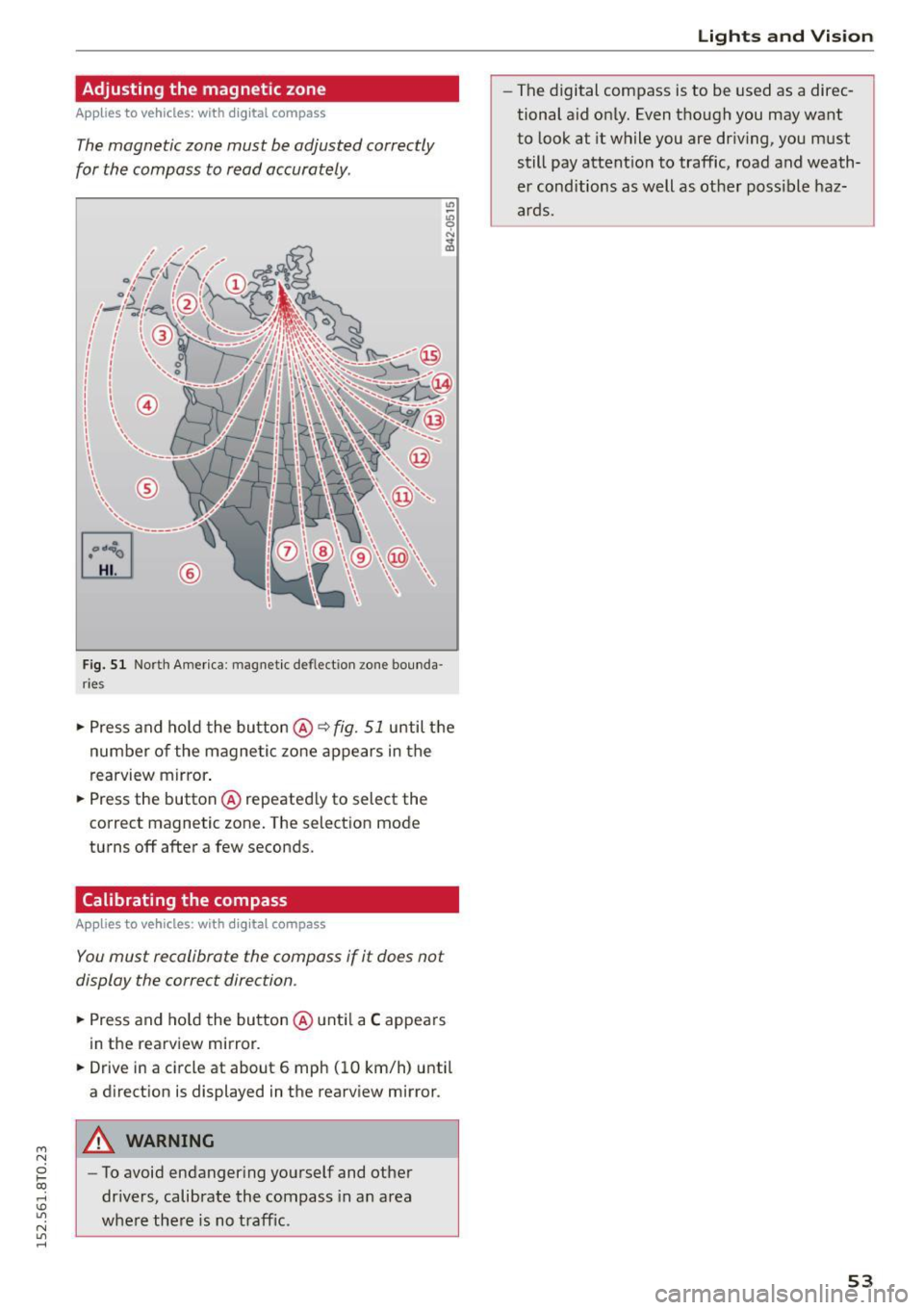
The magnetic zone must be adjusted correctly
for the compass to read accurately .
®
Fig. 51 North America : magnetic de flect io n zone bounda
r ie s
• Press and ho ld the button @~ fig. 51 until the
number of the magnetic zone appears in the
rearview mirror .
• Press the button @repeatedly to select the
correct magnetic zone. The selection mode
turns off after a few seconds .
Calibrating the compass
Applies to vehicles: with digital compass
You must recalibrate the compass if it does not
display the correct direction .
• Press and hold the button @until a C appears
in the rearview mirror.
• Drive in a circle at about 6 mph (10 km/h) until
a direction is displayed in the rearview mirror .
A WARNING
-To avoid endangering yourself and other
drivers, calibrate the compass in an area
whe re there is no traffic.
Lights and Vision
-The digital compass is to be used as a direc
tional aid only. Even though you may want
to look at it while you are driving, you must
still pay attention to traffic, road and weath
er conditions as well as other poss ible haz
ards.
53
Page 56 of 264
Seat s and storage
Seats and storage
General information
Why is your seat adjustment so important?
The safety belts and the airbag system can only
provide maximum protection if the front seats are correctly adjusted .
There are various ways of adjusting the front
seats to provide safe and comfortable support
for the dr iver and the front passenger . Adjust
your seat properly so that :
- you can easily and quickly reach all the switches
and controls in the instrument panel
- your body is properly supported thus reducing
physical stress and fatigue
- the safety belts and a irbag system can offer
maximum protection
¢ page 129.
In the following sections, you will see exactly
how you can best adjust your seats.
There are special regulat ions and instructions for
installing a child safety seat on the front pas
senger's seat . Always fo llow the information re
garding child safety provided in¢
page 151 ,
Child safety.
_&. WARNING
Refer to¢ page 112, Driving safety for im
portant information, tips, suggestions and
warnings that you should read and follow for
your own safety and the safety of your pas
senge rs.
_&. WARNING
Incorrect seating position of the driver and all
other passengers can resu lt in serious person
al injury.
- Always keep your feet on the floor when the
vehicle is in motion -neve r put your feet on
top of the instr ument pane l, out of the win
dow or on top of the seat cushion. This ap
plies espec ially to the passengers . If your
seat ing position is incorrect, you increase
the risk of injury in the case of sudden brak ing or an accident. If the airbag inflates and
54
the seating position is incorrect, this cou ld
result in personal injury or even death.
- It is important for both the driver and front
passenger to keep a distance of at least
10 inches (25 cm) between themselves and
the steering wheel and/or instrument panel.
If you're sitting any closer than this, the air
bag system cannot protect you properly . In
addition, the front seats and head restraints
must be adjusted to your body height so
that they can give you max imum protect ion.
- Always try to keep as much distance as pos sible between yourself and the steer ing
wheel or instrument pane l.
- Do not adjust the driver's or front passeng
er 's seat while the vehicle is moving. Your
seat may move unexpected ly, causing sud
den loss of vehicle control and persona l in
jury.
If you adjust your seat while the vehicle
is moving, you are out of position.
Driver's seat '
The correct seat position is important for safe
and relaxed driving.
We recommend that you adjust the dr iver's seat
in the following manner:
~ Adjust the seat in fore and aft direction so that
you can easi ly push the pedals to the floor
while keepi ng your knees slightly bent¢ .&,
in
Why is your seat adjustment so important? on
page 54.
~ Adjust the seatback so that when you sit with
your back against the seatback, you can still
grasp the top of the steering wheel.
~ Applies to veh icles with adjustable head re
straints: Adjust the head restraint so the upper
edge is as even as possible with the top of your
head.
If that is not poss ible, try to adjust the
head restra int so that it is as close to this posi
tion as possible ¢
page 57.
_&. WARNING
Never place any objects in the driver's foot
well. An object could get into the pedal area
and interfere with pedal funct ion. In case of
-
Page 58 of 264
Seats and storag e
Power easy entry function
Applies to vehicles: with power adjustable seats
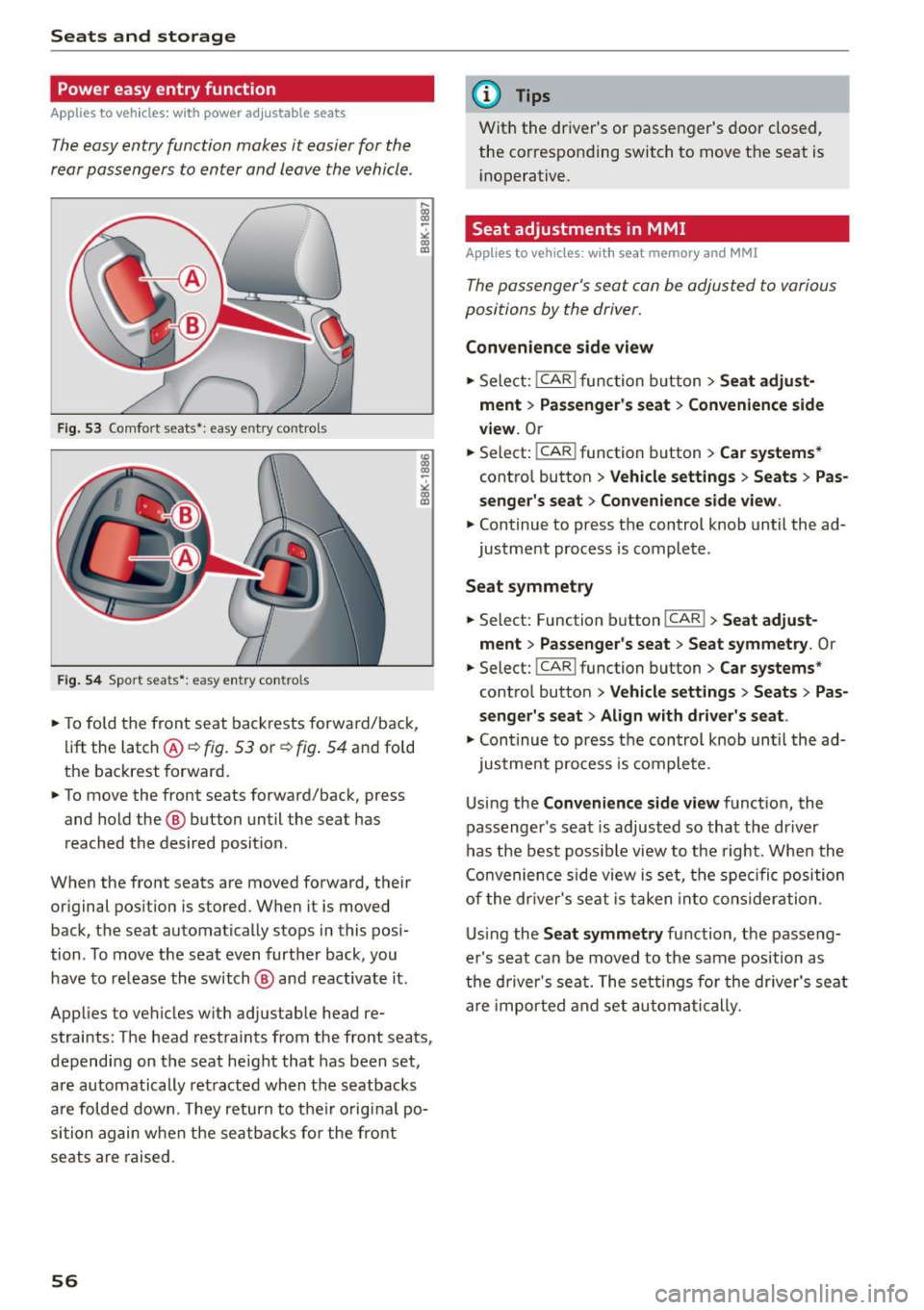
The easy entry function makes it easier for the
rear passengers to enter and leave the vehicle .
Fig . 53 Comfo rt seat s•: easy e ntry co ntro ls
F ig . 54 Spor t seats * : ea sy entry con tro ls
.,. To fold the front seat backrests forward/back,
li ft the latch@~
fig. 53 or~ fig. 54 and fo ld
the backrest forwa rd .
.,. To move the front seats forward/back, press
and hold the @ button until the seat has
reached the desired posit ion.
When the front seats are moved forward, their
or iginal position is s tored. When it is moved
back, the sea t automatically stops in this posi
tion . To move the seat even further back , you
have to re lease the switch @ and reactivate it .
Applies to vehicles w ith adjustable head re
straints: The head restraint s from the front seats,
depending on the seat height that has been set,
are automatically ret racted when the seatbacks
are folded down . T hey return to their o riginal po
sition again when the seatbacks fo r the front
seats are raised .
56
@ Tips
With the driver 's or passenger's door closed,
the corresponding switch to move the seat is i noperative .
Seat adjustments in MMI
Applies to vehicles: with seat memory and MMI
The passenger 's seat can be adjusted to various
position s by the driver.
Convenience side view
.,. Sele ct: !CAR ! function b utton> Seat adju st
ment > Passenger's seat > Con venience side
v iew.
Or
.,. Select: !CAR ! function button> Car systems *
control button > Vehicle settings > Seats > Pas
s enger 's se at> Con venience side v ie w .
.,. Continue to press the control knob until the ad
justment process is complete .
Seat symmetry
.,. Sel ect: Function button !CAR !> Seat adju st
ment
> Passenge r's seat > Seat symmetry . Or
.,. Select: !CAR ! function button> Car s ystems *
control button > Vehicle settings > Seat s > Pas
se ng er' s s eat > Align with d rive r's se at .
.,. Continue to press the control knob until the ad-
j ustment process is complete .
Using the
Con venience side view functio n, the
passenger 's seat is adjusted so that the driver
has the best possib le view to the right . When the
Co nvenience side view is set, the spec ific position
of the dr iver's seat is taken into consideration .
Us ing the
Seat symmetr y function, the passeng
er's seat can be moved to the same position as
the d river 's sea t. The settings for the dr iver's seat
are imported and set au tomatically.
Page 59 of 264
M N
0 loo
rl I.O
"' N
"' rl
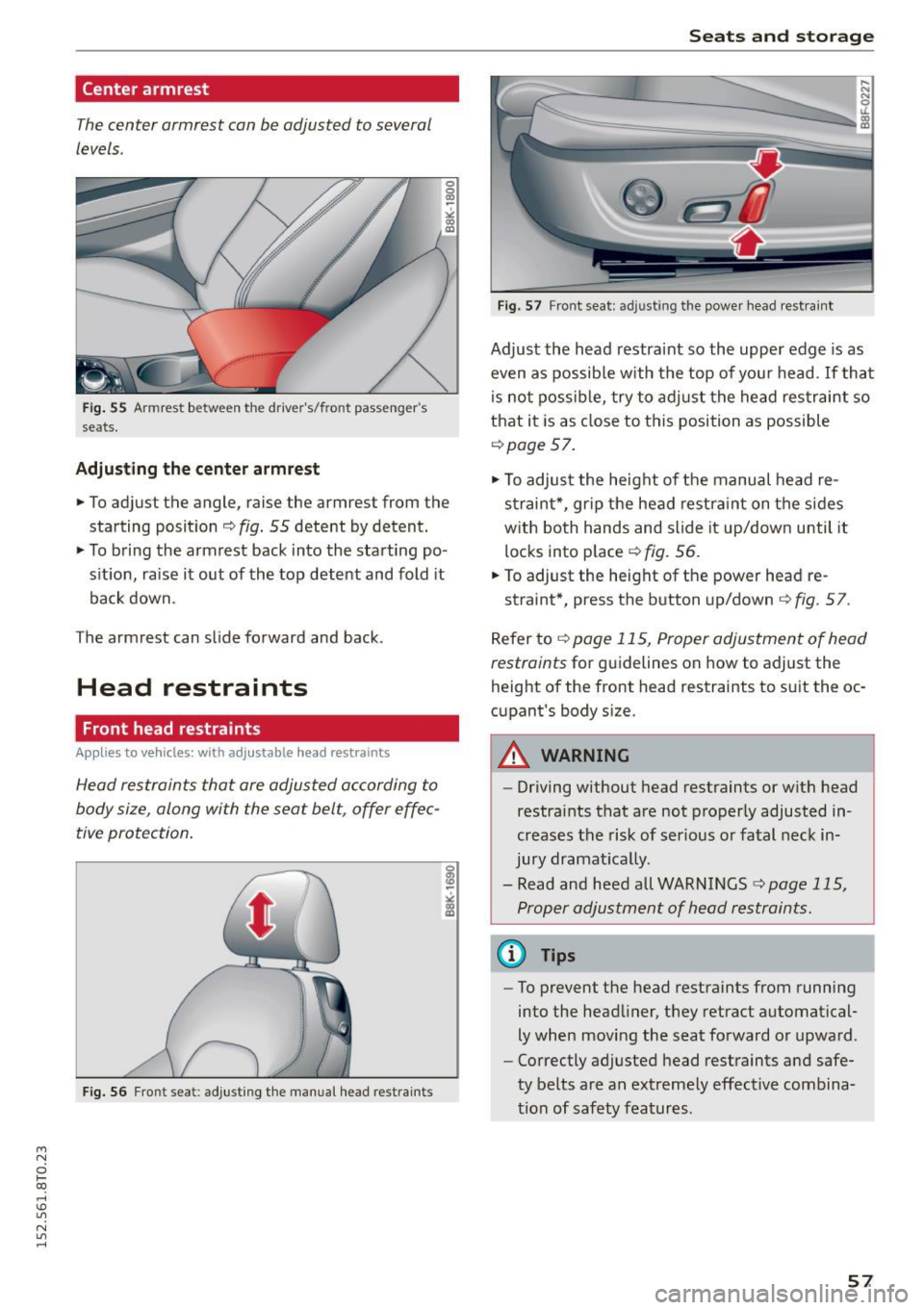
Center armrest
The center armrest can be adjusted to several
levels .
Fig. 55 Armrest between the driver's/front passenger's
seats.
Adjusting the center armrest
.,. To adjust the angle, raise the armrest from the
starting position
c:> fig. 55 detent by detent.
.,. To bring the armrest back into the starting po
s it io n, raise it out of the top detent and fold it
back down.
The armrest can slide forward and back .
Head restraints
Front head restraints
Applies to vehicles: with a djustable head restraints
Head restraints that are adjusted according to
body size, along with the seat belt, offer effec
tive protection .
Fig. 56 Front seat : ad just ing the man ual head restraints
Seats and storage
Fig. 57 Front seat: adjusting the power head restra int
Adjust the head restraint so the upper edge is as
even as possib le with the top of yo ur head . If tha t
is not possib le, try to adj ust the head restr aint so
that it is as close to this position as possible
<=> page 57.
.,. To adjust the height of the manual head re
straint*, grip the head restra int on the sides
w ith both hands and slide it up/down until it
locks into place
<=> fig . 56.
.,. To adjust the height of the power head re-
straint*, press the button up/down
c:> fig. 57 .
Refer to c:> page 115, Proper adjustment of head
restraints
for g uidelines on how to adjust the
height of the front head restraints to suit the oc
cupant's body size.
A WARNING
-- Driving without head restraints or with head
restraints that are not proper ly adjusted in
creases the risk of ser ious or fatal neck in
jury dramat ica lly.
- Read and heed all WARNINGS
c:> page 115,
Proper adjustment of head restraints.
@ Tips
- To prevent the head restraints from running
into the head liner, they retract automatical
ly when mov ing the seat forward or upward.
- Correctly adjusted head restraints and safe
ty be lts are an extreme ly effective combina
tion of safety features.
57
Page 60 of 264

Seats and storag e
Rear head restraints
Fig. 58 Rear seats: head restra ints
F ig. 59 Rear head restraints: release
Adjust ing t he he ad rest raints
.. To move the head restraint up, hold it at the
s ides with both hands and slide it upward until
you feel it click into place
c> &.
.. To move the head restraint down, press the
button @
c::> fig. 58 and slide the head restraint
downward.
Remo ving the head re str aints
.. Fold the backrest forward c> page 64.
.. Move the head restra int upward as far as it can
go .
.. Press the release @
c::> fig. 59 with the mechan
ica l key
c::> page 33 a nd the button @ c::> fig. 58.
Pull the head restraint out of the backrest at
the same time¢.&_ .
Inst all ing the head rest raints
.. Slide the posts on the head restra int down into
the gu ides unti l you feel the posts cl ick into
place.
.. Press the button@ ¢
fig. 58 and s lide the head
restraint a ll the way down . Yo u shou ld not be
able to pull the head restraint out of the back
rest .
58
So that the driver can have a better view to the
rear, the head restraints should be pushed down
completely when the rear seats are not occupied .
_& WARNING
-Read and heed all WARNINGS c> page 115,
Proper adjustment of head restraints.
-On ly remove the rear seat head restraints
when necessary in order to install a child
seat ¢
page 159. Install the head restraint
aga in immediately once the chi ld seat is re
moved. Driving w ithout head restraints or
w it h head restra ints that are not properly
adj usted increases the risk of serio us or fa
tal nec k injury dramat ica lly.
- Vehi cles w ith a pass through i n the center
conso le have seating for four. The long cen
ter conso le between t he two rea r seats is
not a seating position . There fore, a safety
be lt is not provided.
(0 Tips
Correct ly adjusted head restraints and sa fety
belts are an extremely effective combination
of safety features .
Memory function
Description
App lies to vehicles: with memory f unction
The memory function allows you to quickly and
eas ily store and recall pe rsonal seating p rofi les
fo r the driver. The memory function is ope rated
th rough the maste r key and the memory bu ttons
in the driver's door .
The driver's seati ng p rofile is stored and assigned
to the master key each t ime the vehicle is locked .
When yo u open the door, the seat profile is auto
matically recalled. If two people use one vehicle,
i t is recommended that each person always uses
"their own" master key .
Up to 2 seat profi les can be stored in the memory
buttons in the d river's door. Once they are stored,
these seat profiles can be selected at any time .
Ill>
Page 61 of 264

M N
0 loo
rl 1.0
"' N
"' rl
In addition to the d river 's seat settings, you can
also store and access the exterior mirror adjust
ment settings* using the remote control key or
memory button.
Remote control key
App lies to vehicles: with seat memory
To assign the driver's seat settings to the remote
control key when locking the veh icle, the funct ion
must be act ivated in the radio or
MM!*
• Select: I CARI function button > Seat adjust·
ment
> Driver's seat > Remote control key >
on .Or
• Select : I CAR I function button > Car sy stem s*
control button > Vehicle settings > Seats >
Driver' s seat > Remot e contro l key > On .
@ Tips
If you do not want anoth er driver's settings to
be assigned to the remote key, sw itc h off the
memory f un ct io n using the radio or MM I* or
the
I O N/OFF I but ton ¢ page 59 .
Memory buttons
Applies to vehicles: with seat memo ry
Fig. 6 0 Driver's door: memory fu nct io n buttons
The memory butto ns are located in the dr iver's
d oor.
Switching the memory function on /off
• Press the ION/O FF I button to switch the memo
ry function on/off . The word
OFF lights up when
the memory function is switched off. Seat p ro·
files are nei ther stored no r r eca lled.
Seats and storage
Storing a seat profile
• Press the ISET I button. Whe n the word SET
lights up, the memory is ready to store set
tings.
• Press a memory button
dil or [II) briefly . A tone
confirms that the settings were stored.
Accessing a seat profile
• If the driver's door is open and the ignition is
sw itched off, press the memory button .
• If the driver's door is closed or the ignition is
switched on, press and hold the memory but
ton unti l the seat adjustment is complete.
A WARNING
- For safety reasons, the seat setting can o nly
be recalled when the veh icle is stationary·
otherwise you risk hav ing an accident.
- In an emergency the recall procedure can be
cancelled by pressing the
I O N/OF F! switch o r
by tappi ng the memory buttons.
Ashtray
Fi g. 6 1 Center console: ashtray
Opening /clo sing
• To open the ashtray, sl ide the cover up
r:!) fig. 61.
• To close the ashtray, press down on the cover.
Emptying the ashtray
• To remove the insert, slide the latch to the right
r:!) fig. 61 -arrow-.
• To insta ll the insert, press it down into the
mou nt.
59
Page 62 of 264
Seats and storag e
_& WARNING
Never put waste paper in the ashtray . Hot
ashes or other hot objects in the ashtray could
set waste paper on fire .
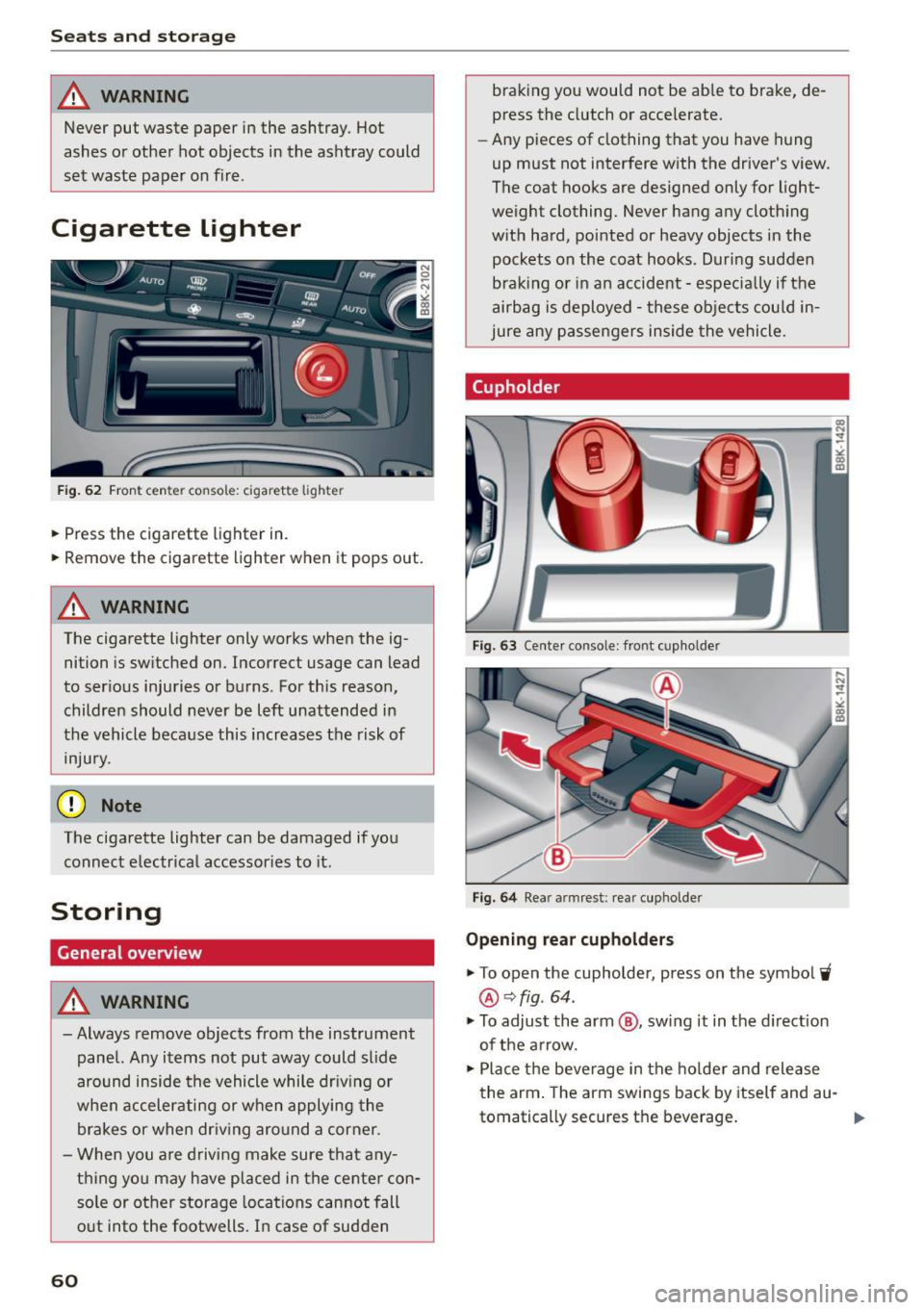
Cigarette Lighter
Fig. 62 Fron t center c onso le: cig arett e lighter
.,. Press the c igarette lighter in .
.,. Remove the cigarette lighter when it pops out .
_& WARNING
The cigarette lighter only works when the ig
nition is sw itched on. Incorrect usage can lead
to ser ious injuries or burns. For this reason,
children should never be left unattended in
the vehicle because this increases the risk of
injury.
(D Note
The ciga rette lighter can be damaged if you
connect electrical accessories to it .
Storing
General overview
_& WARNING
- Always remove objects from the instrument
panel. Any items not put away could slide
around inside the vehicle while dr iv ing or
when accelerating or when applying the brakes or when dr iv ing aro und a corner .
- When you a re driv ing make sure that a ny
thing yo u may have placed in the ce nter con
so le or ot her storage locations can not fall
o ut into the footwells. In case of sudden
60
braking you would not be ab le to brake, de
press the clutch or accelerate.
- Any pieces of clothing that you have hung
up must not interfere with the driver's view .
The coat hooks are designed only for light
weigh t clothing. Never hang any cloth ing
w ith ha rd, pointed or heavy objects in the
pockets on the coat hooks. During sudden
braking or in an accident -espec ially if the
airbag is deployed -these objects cou ld in
jure any p assengers inside the vehicle.
Cupholder
F ig. 63 Center co nsole: front cup holde r
Fig. 6 4 Rea r arm rest: rear cuphol der
Opening re ar cupholders
.,. To open the cupholder, press on the symbol~
®Qfig . 64 .
.,. To adjust the arm @, sw ing it in the d irection
of the a rrow.
.,. Place the beverage in the ho lder and release
the arm . The arm sw ings back by itself and au-
tomatically secures the beverage .
Ill>-
Page 63 of 264
M N
0 loo
rl I.O
"' N
"' rl
Closing cupholders
• To close the cupholder, press on the center sec
tion between the two arms and push the cu
pholder in the slot as far as it will go.
.&_ WARNING
Spilled hot liquid can cause an accident and
personal injury.
- Never carry any beverage containers with
hot liquids, such as hot coffee or hot tea, in
the vehicle while it is moving. In case of an
accident, sudden braking or other vehicle
movement, hot liquid could spill, causing
scalding burns . Spil led hot liquid can also
cause an accident and personal injury.
- Use only soft cups in the cupholder. Hard
cups and glasses can cause injury in an acci
dent .
- Never use the cupholder or adapter as an
ashtray - risk of fire.
(y Note
Only drink containers with lids should be car
r ied in the cupholder . Liquid could spill out
and damage your vehicle's electronic equip
ment or stain the upholstery, etc.
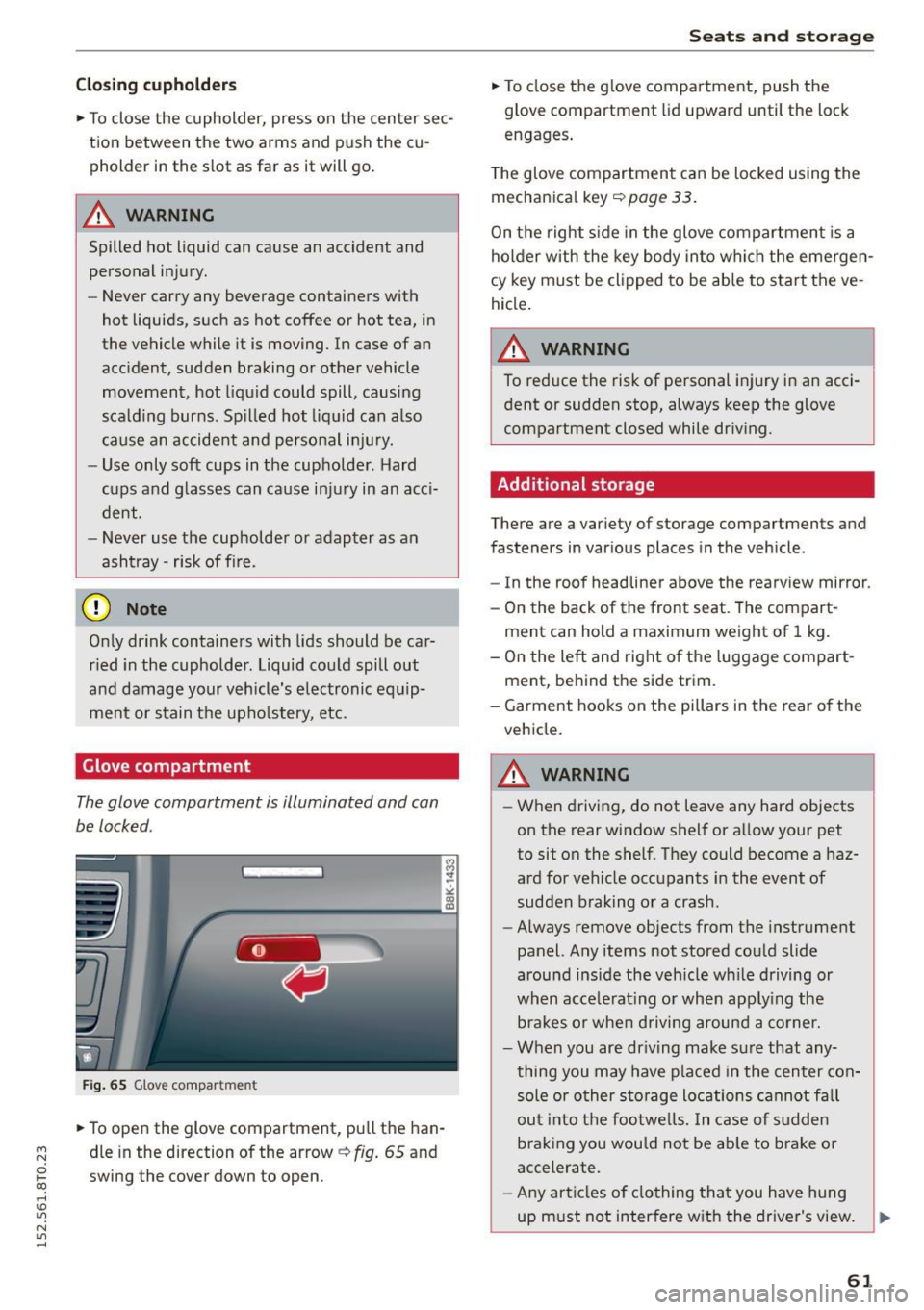
Glove compartment
The glove compartment is illuminated and can
be locked .
Fig. 65 Glove compar tmen t
• To open the glove compartment, pull the han
dle in the direction of the arrow~
fig. 65 and
swing the cover down to open .
Seats and storage
• To close the glove compartment, push the
glove compartment lid upward until the lock
engages .
The glove compartment can be locked using the
mechanical key
~ page 33 .
On the right side in the glove compartment is a
holder with the key body into which the emergen
cy key must be clipped to be able to start the ve
hicle.
A WARNING
-
To reduce the risk of personal injury in an acci-
dent or sudden stop, always keep the glove
compartment closed while driving.
Additional storage
There are a variety of storage compartments and
fasteners in various places in the vehicle .
- In the roof headliner above the rearview mirror.
- On the back of the front seat . The compart -
ment can hold a maximum weight of 1 kg.
- On the left and right of the luggage compart
ment, behind the side trim .
- Garment hooks on the pillars in the rear of the
vehicle.
A WARNING ,..___
- When driving, do not leave any hard objects
on the rear window shelf or allow your pet
to sit on the shelf. They could become a haz
ard for vehicle occupants in the event of
sudden braking or a crash .
- Always remove objects from the instrument
panel. Any items not stored could slide
around inside the vehicle whi le driving or
when accelerating or when apply ing the
b rakes or when driving around a corner.
- When you are driving make sure that any
thing you may have placed in the center con
sole or other storage locations cannot fall
out into the footwells. In case of sudden
braking you would not be able to brake or
accelerate.
- Any articles of clothing that you have hung
up must not interfere with the driver's view .
~
61