parking brake AUDI A5 2015 Owner´s Manual
[x] Cancel search | Manufacturer: AUDI, Model Year: 2015, Model line: A5, Model: AUDI A5 2015Pages: 264, PDF Size: 66.83 MB
Page 4 of 264
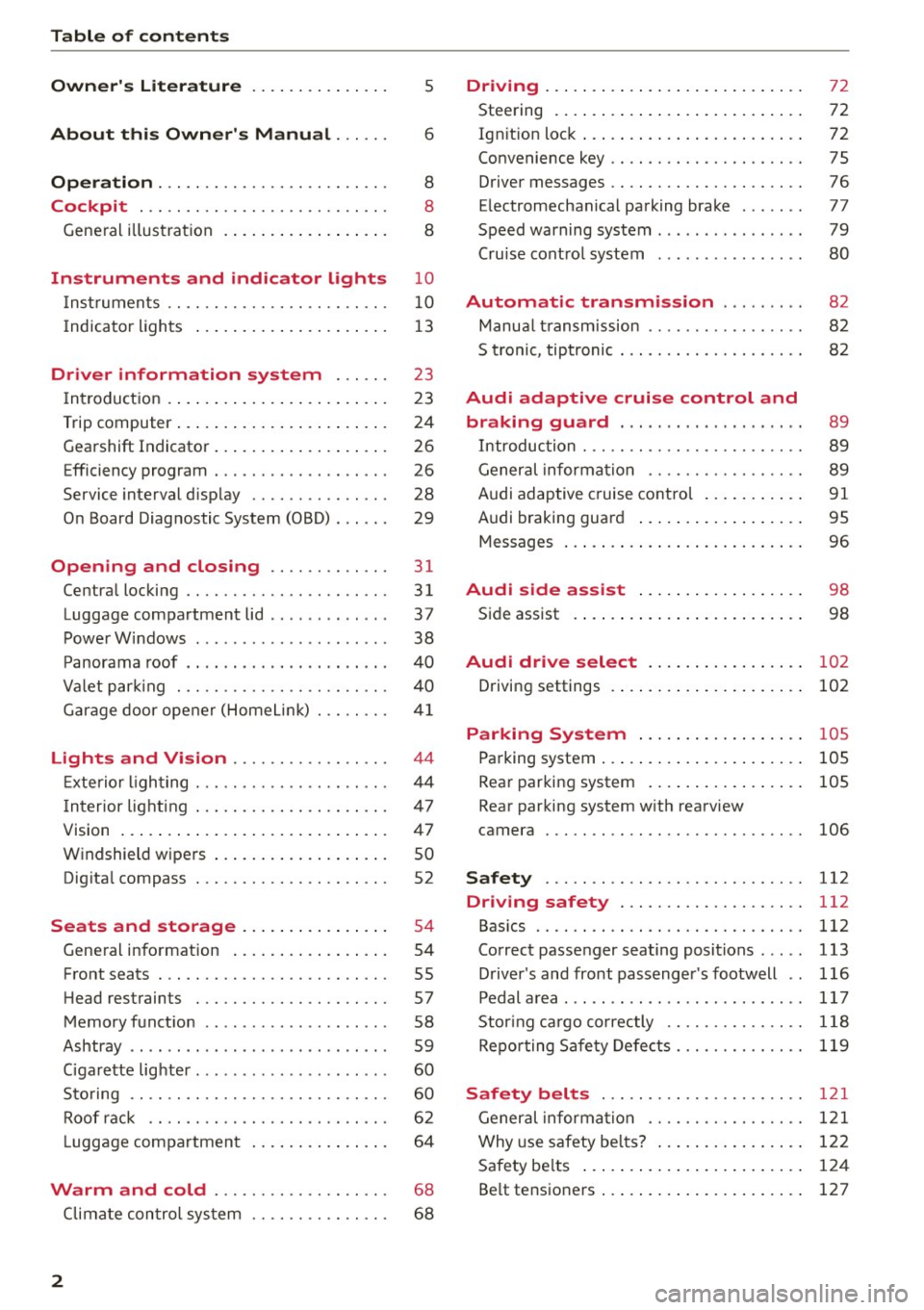
Table of contents
Owner's Literature
About this Owner's Manual ... .. .
Operation ....... ........... .. .. .. .
Cockpit ... .. ............... .. .. .. .
Gene ral illus tra tion . ..... ... .. .. .. .. . 5
6
8
8
8
Instrument
s and indicator lights 10
Instruments . . . . . . . . . . . . . . . . . . . . . . . . 10
Indicator ligh ts . . . . . . . . . . . . . . . . . . . . . 1 3
Driver information system . . . . . . 23
I n troduct ion . . . . . . . . . . . . . . . . . . . . . . . . 23
Trip computer . . . . . . . . . . . . . . . . . . . . . . .
24
Gearshift Indicator . . . . . . . . . . . . . . . . . . . 26
E fficiency program . . . . . . . . . . . . . . . . . . . 26
Service interval disp lay . . . . . . . . . . . . . . . 28
O n Board Diag nostic System (OBD) . . . . . . 29
Open ing and closing . . . . . . . . . . . . . 31
Centra l locking . . . . . . . . . . . . . . . . . . . . . . 31
Luggage compartment lid . . . . . . . . . . . . . 37
Powe r W indows . . . . . . . . . . . . . . . . . . . . . 38
P anorama roof . . . . . . . . . . . . . . . . . . . . . . 40
Va let par king . . . . . . . . . . . . . . . . . . . . . . . 40
G arage door ope ner (Home Link) . . . . . . . .
4 1
Lights and Vision . . . . . . . . . . . . . . . . . 44
E xte rior ligh ting . . . . . . . . . . . . . . . . . . . . .
4 4
Interior lighting . . . . . . . . . . . . . . . . . . . . . 47
V1s1on ... .... ... .. .. ..... ... .. .. .. .
Windshield wipers .. ..... ... .. .. .. .. .
Dig ita l compass ... ........... .. .. .. . 4
7
so
52
Seats and storage . . . . . . . . . . . . . . . . 54
Gene ral i nfo rmation . . . . . . . . . . . . . . . . . 54
Front seats . . . . . . . . . . . . . . . . . . . . . . . . . 55
H ead restraints . . . . . . . . . . . . . . . . . . . . . 57
Memory funct ion . . . . . . . . . . . . . . . . . . . .
58
Ashtray . . . . . . . . . . . . . . . . . . . . . . . . . . . . 59
Ciga rette lig hte r. . . . . . . . . . . . . . . . . . . . .
60
Sto ring . . . . . . . . . . . . . . . . . . . . . . . . . . . . 60
Roof rac k . . . . . . . . . . . . . . . . . . . . . . . . . . 6 2
L uggage compartmen t . . . . . . . . . . . . . . . 64
Warm and cold . . . . . . . . . . . . . . . . . . . 68
Climate con tro l sys tem . . . . . . . . . . . . . . . 6 8
2
Driving .... . .... .. .. ... . .. .... ... . .
Steering . ... .... .. .. .. .. .. .... ... . .
72
72
Ign it ion loc k . . . . . . . . . . . . . . . . . . . . . . . . 72
Convenience key . . . . . . . . . . . . . . . . . . . . . 75
Driver messages . . . . . . . . . . . . . . . . . . . . . 76
E lectromechan ical pa rking brake . . . . . . .
77
Speed warning system . . . . . . . . . . . . . . . . 79
Cru ise cont ro l system . . . . . . . . . . . . . . . .
80
Automatic transmission . . . . . . . . . 82
Manua l transm ission . . . . . . . . . . . . . . . . . 82
5 tronic , tiptronic . . . . . . . . . . . . . . . . . . . . 82
Audi adaptive cruise control and
braking guard . . . . . . . . . . . . . . . . . . . .
89
Introduc tion . . . . . . . . . . . . . . . . . . . . . . . . 89
Gener al informa tion . . . . . . . . . . . . . . . . . 89
Audi adaptive cruise contro l . . . . . . . . . . .
91
Audi braking guard . . . . . . . . . . . . . . . . . . 95
Messages . . . . . . . . . . . . . . . . . . . . . . . . . . 96
Audi side assi st . . . . . . . . . . . . . . . . . . 98
Side assist . . . . . . . . . . . . . . . . . . . . . . . . . 98
Audi drive select . . . . . . . . . . . . . . . . . 102
Driving settings . . . . . . . . . . . . . . . . . . . . . 102
Parking System . . . . . . . . . . . . . . . . . . 105
Pa rking system . . . . . . . . . . . . . . . . . . . . . . 105
Rear par king system . . . . . . . . . . . . . . . . . 105
Rear parking system w ith rearview
camera
106
Safety 112
Driving safety . . . . . . . . . . . . . . . . . . . . 112
Bas ics . . . . . . . . . . . . . . . . . . . . . . . . . . . . . 112
Correc t passenger seating positions . . . . . 113
D river 's and front passenger 's footwell . . 116
Pedal area . . . . . . . . . . . . . . . . . . . . . . . . . . 117
Stor ing cargo co rrectly . . . . . . . . . . . . . . . 118
Repo rting Sa fe ty Defe cts.......... .. .. 119
Safety belts . . . . . . . . . . . . . . . . . . . . . . 121
General informa tion . . . . . . . . . . . . . . . . . 1 2 1
Why use safety bel ts? . . . . . . . . . . . . . . . . 122
Safety be lts . . . . . . . . . . . . . . . . . . . . . . . . 12 4
Be lt tensioners . . . . . . . . . . . . . . . . . . . . . . 127
Page 11 of 264
M N
i? co ,...., \!) ..,.,
N l/'I ,....,
CD
@
®
©
®
®
(j)
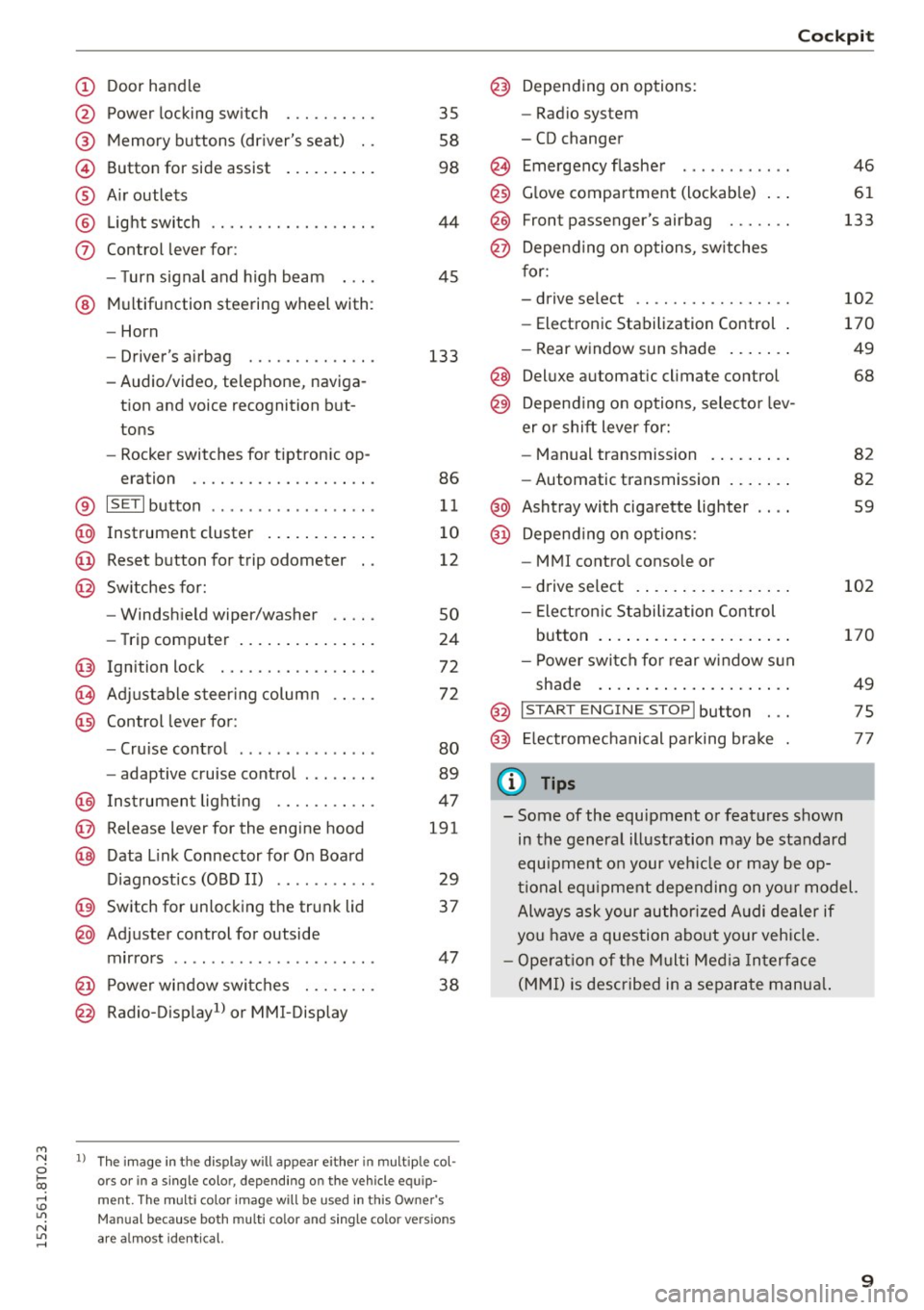
Door handle
Power locking swi tch
Memory buttons (driver's seat) . .
Button for side assist
A ir outlets
Light switch
Control lever for:
- Turn signal and high beam
@ Multifunction steering wheel with :
- Horn
- Driver' s airbag ....... .. .. .. .
- Audio/video , telephone, naviga-
tion and voice recognition but
tons
- Rocker switches for tiptronic op-
eration ............. .... .. .
® IS ETI button ................. .
@ Instrument cluster ........ ... .
@ Reset button for trip odometer
@ Switches for:
- Windshield wiper/washer
- Trip computer .............. .
Ignition lock . .......... ... .. .
Adjustable steering column
Control lever for:
- Cruise control ............ .. .
- adaptive cruise control ..... .. .
@ Instrument lighting ...... .. .. .
@ Release lever for the engine hood
@ Data Link Connector for On Board
Diagnostics (OBD II) ..... ... .. .
@ Switch for unlocking the trunk lid
@ Adjuster control for outside
mirrors ................ ... .. .
@ Power window switches . .. .. .. .
@ Radio-Display1l or MMI-Display
35
58
98
44
45
133
86
11
10
12
so
24
72
72
80
89
47
191
29
37
47 38
l) Th e im age in t he d ispl ay will app ea r e ither in mult ipl e col
or s or in a s ingle color, depending on the vehicle e quip
m ent. The mul ti color image w ill b e used in this Ow ne r's
Man ual bec ause both multi co lo r an d single color vers io n s
are a lmo st i de nti cal.
Cockpit
Depending on options:
- Radio system
- CD changer
Emergency flasher
Glove compartment (lockable) .. .
F ront p assenger's airbag . .. .. . .
Depend ing on options, switches
for:
- drive select .. ........... .. . .
- Electronic Stabilization Control .
- Rear window sun shade ...... .
@ Deluxe automa tic climate control
@) Depend ing on options, selector lev
er or shift lever for:
- Manual transmission ........ .
- Automatic transmission ...... .
@ Ashtray with cigarette lighter
@ Depend ing on options:
- MM I control console or
- drive select . ............... .
- Electron ic Stabilization Control
button . ..... .............. .
- Power switch for rear window sun
shade .... .. .............. .
@ I START ENG IN E STOPI button . . .
@) Electromechanical parking brake
(D Tips
46
61
133
102
170
49
68
82
82
59
102
170
49
75
77
- Some of the equipment or features shown
in the general illustration may be standard
equipment on your veh icle or may be op
tional equ ipment depending on your model.
Always ask your author ized Audi dealer if
you have a question about your vehicle.
- Operation of the Multi Media Interface
(MMI) is described in a separate manua l.
9
Page 15 of 264
M N
i? co ,...., \!) 1.1"1
N 1.1"1 ,....,
Indicator lights
Description
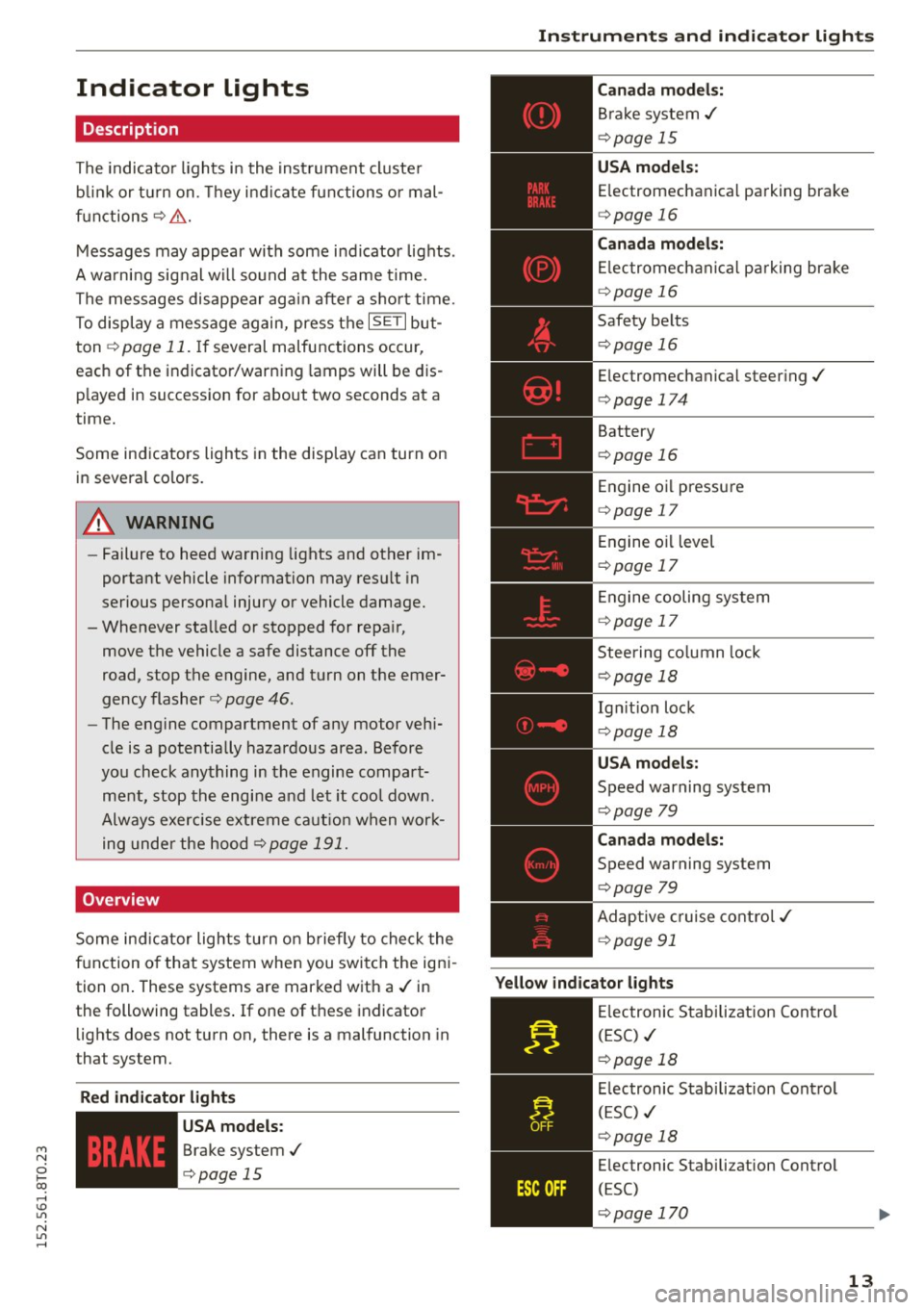
The indicator lights in the instrument cluster
blink or turn on. They indicate functions or mal
functions¢ &.
Messages may appear with some indicator lights .
A warning signal will sound at the same time.
The messages disappear again after a short time.
To display a message again, press the
I SE TI but
ton ¢
page 11. If several malfunctions occur,
each of the indicator/warning lamps will be dis
p layed in succession for about two seconds at a
time.
Some indicators lights in the display can turn on
in several colors.
8_ WARNING
- Failure to heed warning lights and other im
portant vehicle information may resu lt in
serious personal injury or vehicle damage.
- Whenever sta lled or stopped for repa ir,
move the vehicle a safe distance off the
road, stop the engine, and turn on the emer
gency flasher ¢
page 46.
-The engine compartment of any motor vehi
cle is a potentially hazardous area. Before
you check anything in the engine compart
ment, stop the engine and let it cool down.
Always exercise extreme caution when work
ing under the hood ¢
page 191.
Overview
Some ind icator lights turn on briefly to check the
function of that system when you switch the igni
tion on . These systems are marked with a./ in
the following tables .
If one of these indicator
lights does not turn on, there is a malfunction in
that system.
Red indicator light s
--------------
US A models:
Brake system./
¢page 15
Instruments and indicator lights
Canada models:
Brake system./
¢page 15
USA models:
Electromechanical parking brake
¢ page 16
Canada models:
Electromechanical parking brake
¢ page 16
Safety belts
¢page 16
Electromechanical steering./
¢page 174
Battery
¢page 16
Engine oil pressure
¢page 17
Engine oil level
¢page 17
Engine cooling system
¢page 17
Steering column lock
¢page 18
Ign it ion lock
¢ page 18
USA models:
Speed warning system
¢page 79
Canad a models:
Speed warning system
¢page 79
Adaptive cruise control./
¢page 91
Yellow indicator lights
--------------
Electronic Stabilization Contro l
(ESC) ./
¢page 18
Electronic Stabilization Contro l
(ESC) ./
¢page 18
Electronic Stabilization Control
(ESC)
¢page 170
13
Page 16 of 264
Instruments and indicator lights
TPMS
-~--
14
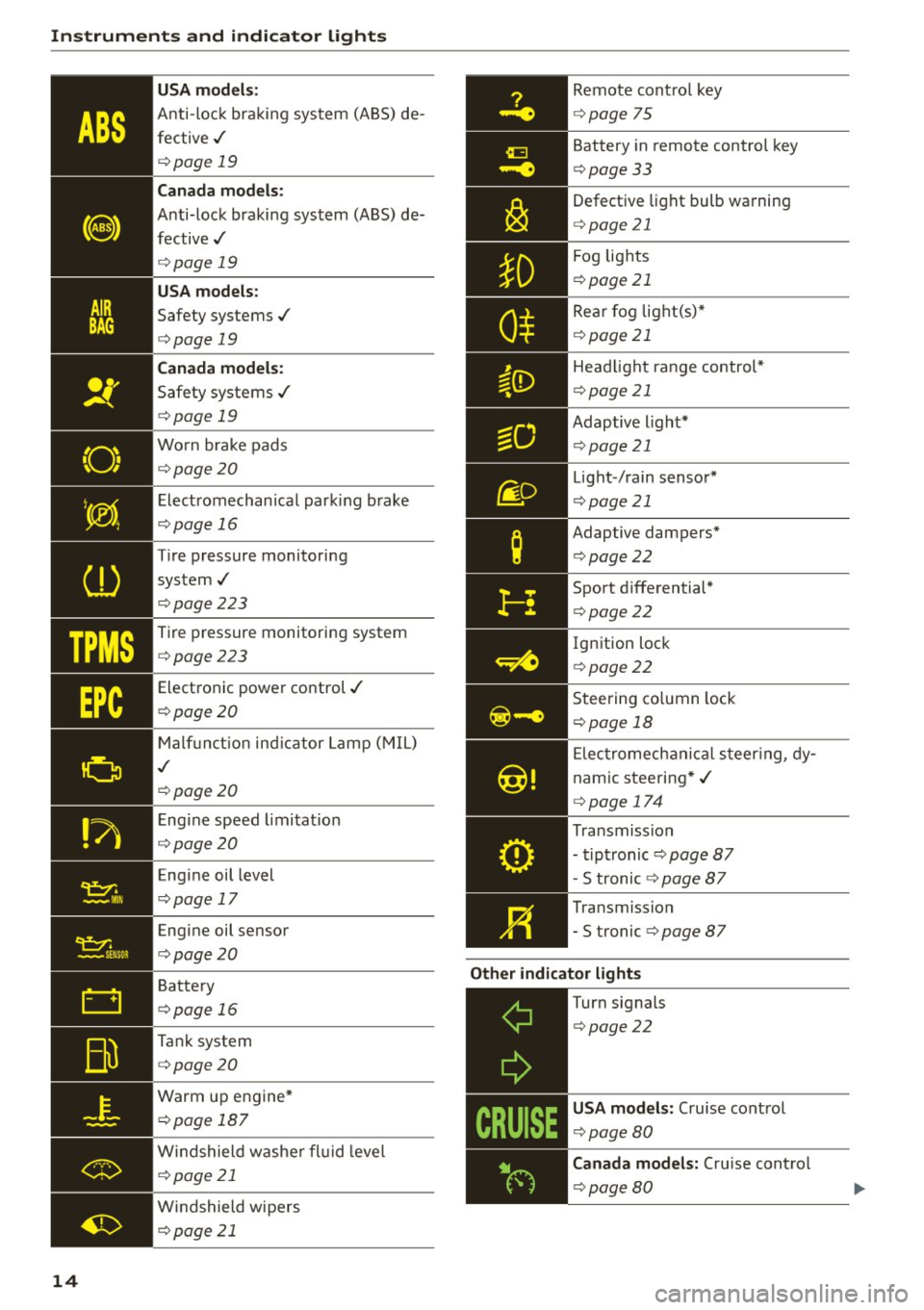
USA m odel s:
Anti-loc k braking system (ABS) de
fective,/
¢ page 19
Canada mod els :
Anti-lock braking system (ABS) de
fective,/
¢ page 19
USA models :
Safety systems./
¢page 19
Canada model s:
Safety systems ./
¢page 19
Worn brake pads
¢ page20
Elect romechanical parking b rake
¢page 16
Tire pressure monitoring
system,/
¢ page 223
Tire pressure monitoring system
¢page223
Electronic power control./
¢page20
Malf unct ion ind icator Lamp (MIL)
,I
c::>page 20
Engine speed limitat ion
c::> page20
Engine oil level
c::> page 17
Engine oil sensor
c::>page20
Battery
c::>page 16
Tank system
c::>page20
Warm up engine*
¢page 187
Windshield washe r flu id leve l
¢page 21
Windshield wipers
¢page 21
Remote cont ro l key
¢ page 75
Battery in remote control key
¢page 33
Defect ive light bulb wa rning
<=> page 21
Fog lights
¢page 21
Rear fog lig ht(s)*
c> page 21
Headlight range control*
c>page 21
Adaptive light*
c>page 21
Light-/rain sensor*
c>page 21
Adaptive dampers*
c>page22
Sport d ifferential *
<=>page22
Ig nition lock
c>page22
Steering co lumn lock
¢ page 18
Elec tromechanical s teer ing, dy
nam ic stee ring* ,/
c>page 174
Transmission
- tiptronic
c> page 87
-S tronic c::> page 87
Transmission
-5 tronic
<=> page 87
Other indicator light s
~--==------------Turn signals
<=>page22
USA mod els: Cruise cont rol
c> page80
Canada mod els : Cru ise contro l
c>page 80
Page 17 of 264
M N
i? co ,...., \!) 1.1'1
N 1.1'1 ,....,
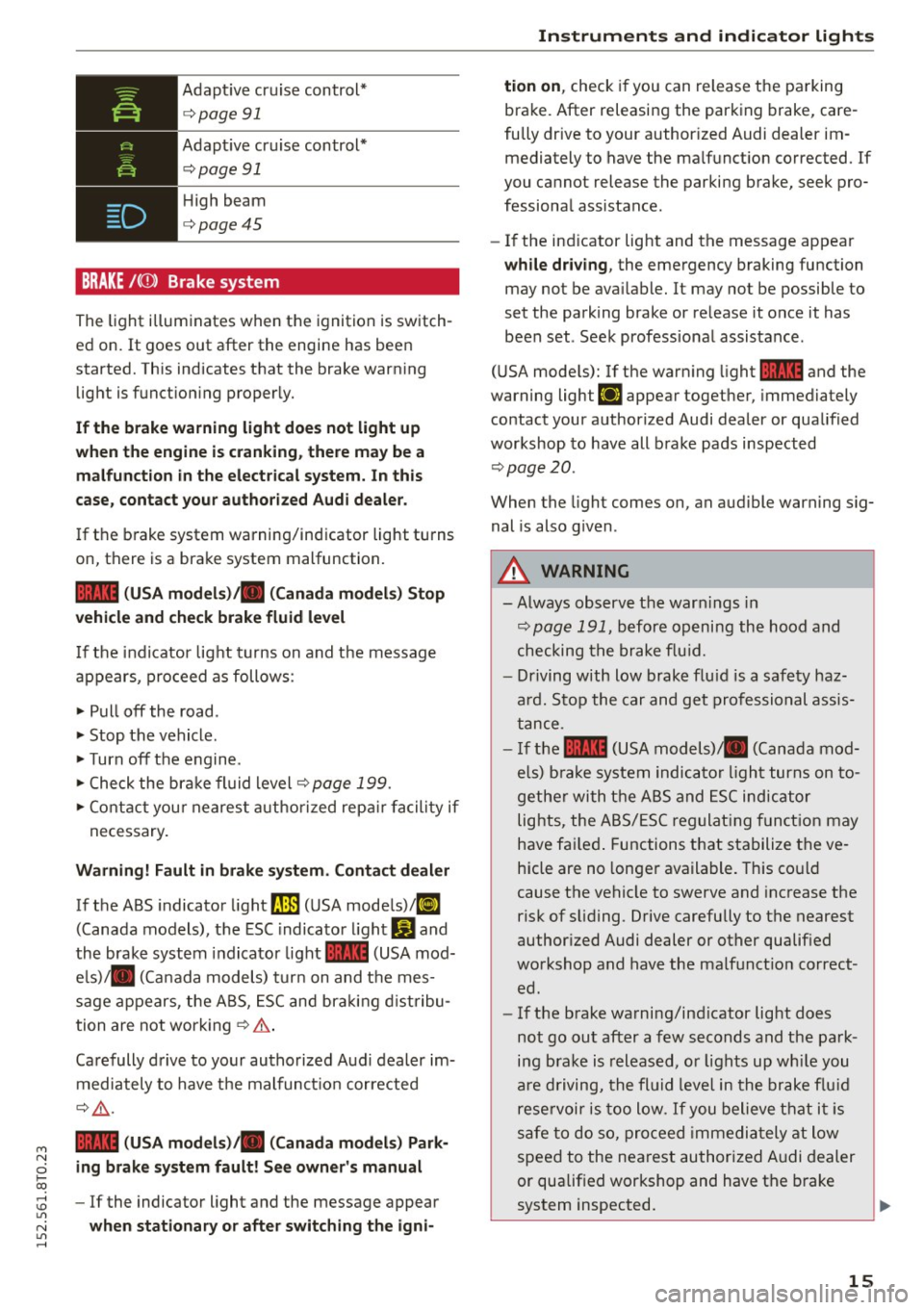
Adaptive cruise control*
c:>page 91
Adaptive cruise control*
c:>page 91
High beam
c:>page45
BRAKE /((J) ) Brake system
The light illuminates when the ignition is switch
ed on. It goes out after the engine has been
started. This indicates that the brake warning light is functioning properly.
If the brake warning light does not light up
when the engine is cranking, there may be a
malfunction in the electrical system. In this
case, contact your authorized Audi dealer.
If the brake system warning/indicator light turns
on, there is a brake system malfunction.
1111 (USA models)/ . (Canada models) Stop
vehicle and check brake fluid level
If the indicator light turns on and the message
appears, proceed as follows :
.,. Pull off the road .
.. Stop the vehicle.
.,. Turn off the engine .
.,. Check the brake fluid level
c:> page 199.
.,. Contact your nearest authorized repair facility if
necessary.
Warning! Fault in brake system. Contact dealer
If the ABS indicator light fl]) (USA models)/tl]
(Canada models), the ESC indicator light Gland
the brake system indicator light 1111 (USA mod
els)/ . (Canada models) turn on and the mes
sage appears, the ABS, ESC and braking distribu
tion are not working
c:> .&. .
Carefully drive to your authorized Audi dealer im
mediately to have the malfunction corrected
¢ .&,.
1111 (USA models)/ . (Canada models) Park
ing brake system fault! See owner's manual
- If the indicator light and the message appear
when stationary or after switching the igni-
Instruments and indicator lights
tion on, check if you can release the parking
brake. After releasing the parking brake, care
fully drive to your authorized Audi dealer im mediately to have the malfunction corrected. If
you cannot release the parking brake, seek pro
fessional assista nee.
- If the indicator light and the message appear
while driving, the emergency braking function
may not be available. It may not be possible to
set the parking brake or release it once it has
been set . Seek professional assistance .
(USA models): If the warning light
1111 and the
warning light
111 appear together, immediately
contact your authorized Audi dealer or qualified
workshop to have all brake pads inspected
c:>page20 .
When the light comes on, an audible warning sig
nal is also given .
A WARNING
--Always observe the warnings in
c:> page 191, before opening the hood and
checking the brake fluid.
- Driving with low brake fluid is a safety haz
ard. Stop the car and get professional assis
tance .
- If the
1111 (USA models) . (Canada mod
els) brake system indicator light turns on to
gether with the ABS and ESC indicator
lights, the ABS/ESC regulating function may
have failed. Functions that stabilize the ve
hicle are no longer available. This could
cause the vehicle to swerve and increase the
risk of sliding. Drive carefully to the nearest
authorized Audi dealer or other qualified
workshop and have the malfunction correct
ed.
- If the brake warning/indicator light does
not go out after a few seconds and the park
ing brake is released, or lights up while you
are driving, the fluid level in the brake fluid
reservoir is too low. If you believe that it is
safe to do so, proceed immediately at low
speed to the nearest authorized Audi dealer
or qualified workshop and have the brake
system inspected.
15
Page 18 of 264
Instruments and indicator lights
-Always keep in mind that afte r several brake
applications, you will need greater pressure on the brake pedal to stop your vehicle. Do
not rely on strained brakes to respond with
maximum stopping power in cri tical situa
t ions . You must allow for increased bra king
distan ces. The extr a dis tance used up by
fa ding b rakes c ould lead to an acciden t.
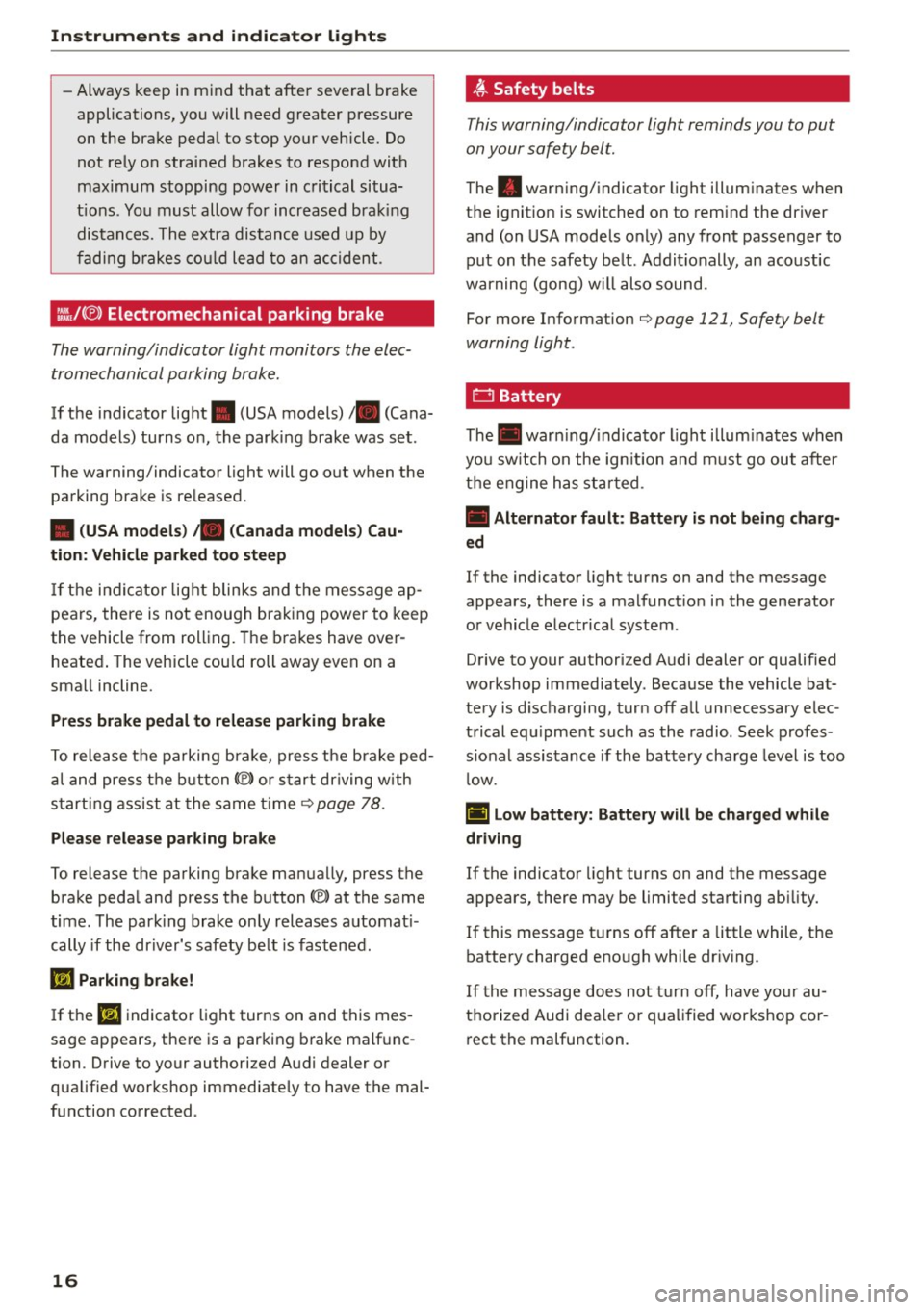
:ill.IC®) Electromechanical parking b rake
The warning/indicator light monitors the elec
tromechanical parking brak e.
If the i nd icator lig ht . (USA models)/ . (Cana
da models) turns on , the parking b rake was set .
The warning/indicator light will go o ut when the
parking brake is re leased.
• (USA models) ;a (Canada model s) Cau
tion: Vehicle parked too steep
If th e i nd ic ator lig ht blinks and t he message ap
pea rs, there is not enoug h bra king power to keep
the vehicle from roll ing. The b rakes have over
heate d. The veh icle cou ld roll away even on a
sma ll incline .
Press brake pedal to relea se parking brake
To release t he pa rking bra ke, press t he b ra ke ped
al and press t he button(®) or star t driving wi th
s tartin g assist at the same t ime
¢ page 78 .
Please release parking brake
To release the parking brake manually, press the
brake peda l and press the button(®) at the same
time . The par king brake on ly releases automat i
cally if the dr iver's safety be lt is fastened.
Iii Parking brake!
If the Iii indicato r light tur ns on and this mes
sage appears, the re is a par king b rake malf unc
tion . Drive to your authorized A ud i dealer or
qualified wor kshop immediately to have t he mal
fu nction corrected .
16
~ Safety belts
This warning/indicator light reminds you to put
on your safety belt.
The . war ning/ indicator light illum inates when
the ignit io n is switched on to remind the dr iver
and (on USA models only) any front passenger to
put on the safety be lt. Addit ionally, an acoust ic
warning (gong) w ill also sound.
For more Information¢
page 121, Safety belt
warning light .
f::::l Battery
The. war ning/ indica to r li ght illum inates w hen
yo u sw itch on the ig nition and m ust go out after
t h e e ngine h as sta rted .
• Alternator fault : Battery is not being charg
ed
If the indicator light turns on and the message
appears , there is a ma lfunct io n in the generator
o r vehicle e lectr ica l system .
D rive to y our authori zed A udi dealer or quali fied
workshop immediately. Because the vehicle bat
te ry is discharging, tur n off a ll unnecessary elec
trical e quipme nt such as th e r adio . Seek profes
s iona l assistance if the battery cha rg e l eve l is too
l ow .
(•) Low battery: Battery will be charged while
driving
If the indicato r light turns on and the message
appears, there may be limited sta rting ab ility.
If this message t urns off afte r a little while, the
battery charged enough while dr iv ing .
I f the mess age does not turn off, have yo ur au
thorized Audi dea le r or qualified wor kshop cor
r ect the malfunction .
Page 79 of 264
M N
0 loo
engine can only be sta rted w ith the selector in
these positions.
!!I Is the k ey in the vehi cle?
This message appea rs if the maste r key is re
moved from t he vehicle w ith the eng ine running.
If the maste r key is no longer in the vehicle, you
c a nnot swi tch on the ignition after s topping the
e ngine and yo u also cannot start the engine
again. Mo reover, yo u cannot lock the vehicle from
the outside with the key.
Shift to P otherwi se vehicle can roll aw ay. Doors
do not lo ck if lever i s not in P .
This message appears for safety reasons a long
w ith a warn ing signal. It appears if the se lector
l eve r fo r the autom atic transmis sion is not in the
P posi tion when switching off the ign ition. Move
the selector leve r to the P posit ion, otherwise the
ve hicle is not secured against ro lling away. You
a lso cannot lock the vehicle using the locking
button* on the door handle or using the remote
key .
Convenience key defective! Use ignition lock
This mes sage appea rs if the eng ine mus t be
started or s topped using the igni tion key and no t
the
! START ENGINE STOPI b utton.
Electromechanical
parking brake
Operation
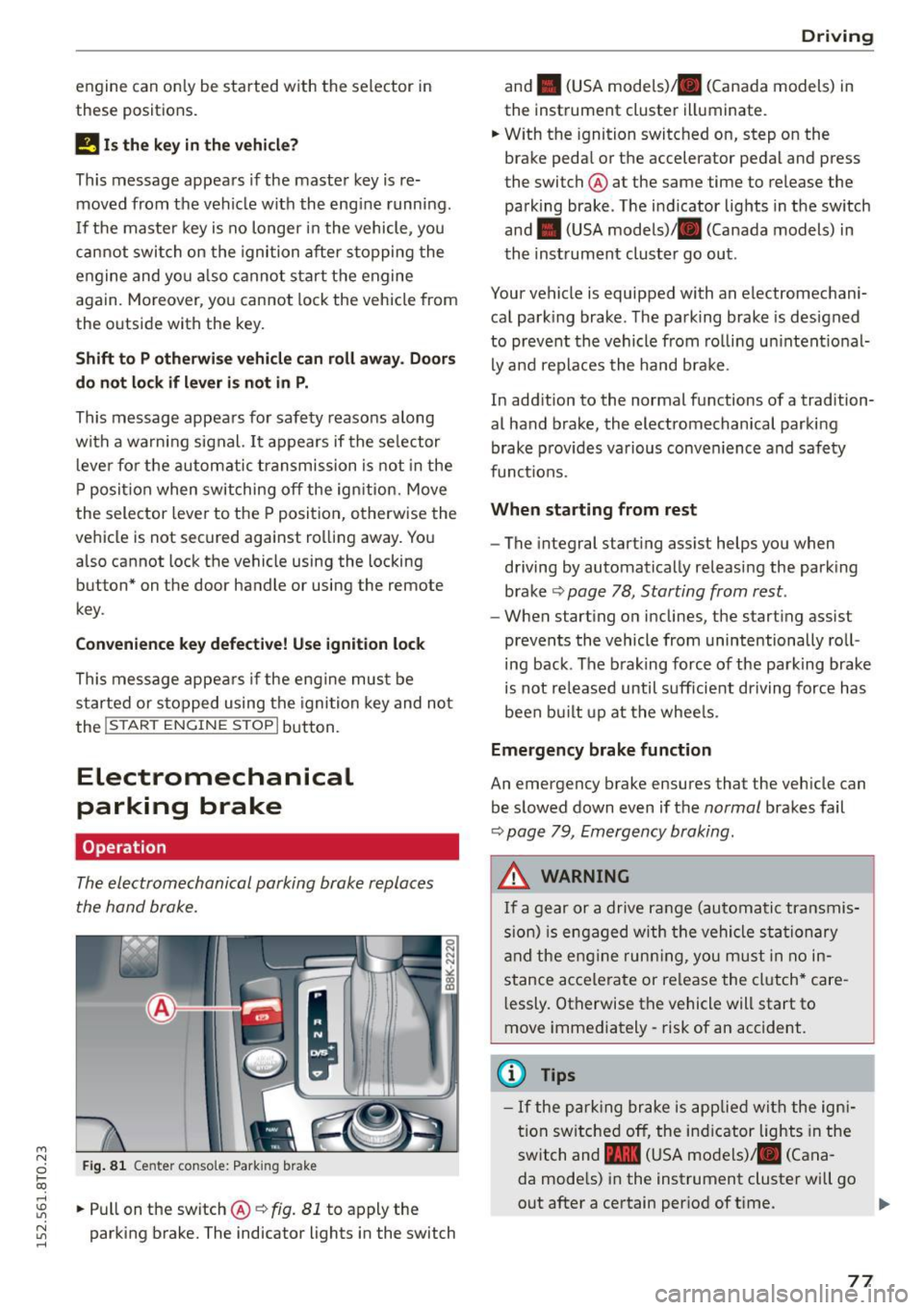
The electromechanical parking brake replaces
the hand brake.
Fig. 81 Ce nter conso le : Park ing bra ke
rl
:5: .. Pull on t he sw itch @¢ fig. 81 to apply the
~ parking b rake. The indicator lights in the switch rl
Driv ing
and . (USA mode ls) . (Canada models) in
the instrument cluste r illuminate.
.. W ith the ignition switched on, step o n the
brake peda l or the accelerator pedal and press
the switch @ at the same time to release the
pa rking brake . The i ndicator lig hts in the sw itch
and . (USA models) . (Canada models) in
th e inst rument cluster go out .
Your vehicle is equipped with an electromechani
ca l park ing brake . T he pa rking brake is designed
to preve nt the vehicle from ro ll in g u nintent ional
ly and replaces the hand brake .
In add ition to the normal functions of a tradition
al hand brake, the electromechanical parki ng
brake p rov ides va rious conve nience and saf ety
funct ions.
When starting from rest
- The integral start ing ass ist helps you when
driving by automatically releasing the park ing
brake
¢ page 78, Starting from rest .
-When starting o n inclines, the starting assist
prevents the vehicle from unintentionally ro ll
ing back . The b rak ing force of the parking brake
i s not re leased until s ufficie nt driving force has
been built up at t he whee ls.
Emergency brake function
An emergency brake ensures that the vehicle can
be s lowed down even if t he
normal brakes fail
¢ page 79, Emergency braking .
A WARNING
If a gear or a drive ra nge (au tomati c tr an smis
s ion) is engaged w ith the vehi cle sta tion ary
a nd the e ng in e runn ing, you m ust in no in
stance ac ce lerate or re lease the cl utch* care
l essly. Otherwise the vehicle will start to
move immediately - risk of an accident.
(1) Tips
- If the p arking br ake is app lied wi th the ign i
tion sw itche d off, the ind icator lights in the
swit ch and -(USA mo dels)/ . (Cana
da mode ls) i n the instrument cluster will go
out after a certain per iod of t i me.
77
Page 80 of 264
Driving
-Oc ca siona l noises when the parking brake is
applied and released are normal and are not
a cause for conce rn.
- When the vehicle is parked, the parking
brake goes thro ugh a se lf-test cycle at regu
l ar inte rvals . Any associated noises are nor
mal.
Parking
.,. Press the brake pedal to stop the vehicle .
.,. Pull the switch@¢
page 77, fig. 81 to set the
parking b rake.
.,. Automat ic transm iss ion: Move the se lector lev-
er to P.
.. Turn the eng ine off ¢,&. .
.. Manua l transmission: Shift in to 1st gea r.
.. When on inclines or declines, tu rn the steering
whee l so that the vehicle w ill roll into the curb
if it beg ins to move.
A WARNING
- When you leave your veh icle -even if only
br iefly -always remove the ignition key . This
applies part icu larly when children remain in
t h e ve hicl e. Otherwise the childre n could
s tar t the engine, release the p arking br ake
or opera te e lectr ica l equi pment (e.g . power
win dows) . There is the ris k of an acci den t.
- When the vehicle is lo cked, no one -particu
larly not children should rema in in the vehi
cl e. Locked doors make it more difficult for
emergency wor kers to get into the vehicle -
putt ing lives at risk.
Starting from rest
The starting assist function ensures that the
parking brake is released automatically upon
starting .
Stopping and applying parking brake
.. Pu ll t he swi tch @ ¢ page 77, fig. 81 to app ly
t h e parking brake.
78
-
Starting and automatically releasing the
park ing brake
.. When you sta rt to drive as usual, the parking
bra ke is automatically released and yo ur vehicle
beg ins to move.
When stop ping at a traffic signal or stopping in
c ity t raffic on vehicles with an a utomat ic t rans
mission, the parking brake can be app lied. The
vehicle does not have to be he ld with the foot
brake. The pa rking brake eliminates the tendency
to c reep with a d rive ra nge engaged. As soon as
yo u drive off as usua l, the park ing b rake is re
l eased a utomat ica lly and the vehi cle starts to
m ove .
Starting on slopes
When sta rting on inclines, the starting assist pre
ven ts the vehicle from unintentionally ro lling
bac k. The braking force of the parking b rake is
n ot released until suff icient dr iving force has
been built up at the wheels.
(D Tips
For safety reasons, the pa rking bra ke is re
l eased a utoma tically on ly w hen t he d river's
s a fety be lt is en gaged in t he b uckle.
Starting off with a trailer
To prevent rolling back unin tentionally on an in
cline, do the f ollowing:
.. Keep the sw itch @¢ page 77, fig . 81 pulled
and dep ress the accelera to r. T he pa rking brake
s t ays app lied and p revents the veh icle from
roll ing ba ckw ard .
.. Yo u can re lease the swi tch @ once you are s ure
that you are deve loping enough d riving force at
the whee ls by depressing the accelerato r.
Depend ing on the weight of the rig (vehi cle an d
t ra ile r) and the seve rity of the incline, yo u may
r o ll backwards as yo u start. You can p revent roll
i ng backwards by holding the parking brake
switch @pulled o ut and acce lerating -just as
you would when starting on a hill wi th a conven
tiona l hand b rake .
Page 81 of 264
Emergency braking
In the event that the conventional brake system
fails or locks.
11-In an emergency, pull the switch@¢ page 77,
fig. 81 and continue to pull it to slow your vehi
cle down with the parking brake .
11-As soon as you release the switch @ or acceler-
ate, the braking process stops.
If you pull the sw itch @and ho ld it above a
speed of about
5 mph (8 km/h), the emergency
brak ing funct ion is initiated. The vehicle is braked
at all four wheels by activa ting the hydraulic
b rake system . The brake performance is similar
to making an eme rgency stop ¢
.&..
In o rder not to activate the emergency brak ing by
mista ke, an audible warning tone (b uzzer)
sounds when the sw itch @ is pulled . As soon as
the switch @ is released, or the accelerator pedal
is depressed, emergency braking stops .
A WARNING
Emergency braking should only be used in an
emergency, when the normal foot brake has
fai led or the brake pedal is obstructed. Using
the parking brake to perform emergency brak
ing w ill slow your vehicle down as if you had
made a full brake a pplicat io n. The laws of
physics cannot be suspended even with ESC
and its associa ted components (A BS, ASR,
ED S). In cor ners and w hen ro ad or weather
condi tions a re bad, a full brake app lication
can ca use the vehicle to skid or the rear end to
break away - risking an accident .
Speed warning system
Overview
The speed warning system helps you to keep your
driving speed below a set speed limit.
T he speed warning system warns if the driver ex
ceeds a previously stored maximum speed . A
~ war ning tone w ill sound as soon as the vehicle
~ speed exceeds the set speed by about 3 mph
~ (3 km/ h). At the same t ime, a warn ing symbol 1.1'1
N 1.1'1 ,....,
Dri ving
appea rs in the display. The symbol 's appea rance
mig ht be different in some models .
T he speed warn ing system h as two warning
t hr eshol ds that function i ndependen tly o f ea ch
othe r and t hat have somewhat d iffe rent p urpos
es :
Speed warning 1
You can use speed warning 1 to set t he maximum
speed w hile you are driv ing. This se tt ing will re
mai n in effec t unti l yo u turn off the ig nition, as
s u ming tha t you have not changed or reset the
setting .
T he . (USA models) /. (Can ada models)
speed wa rning symbo l in the warn ing
1 d isp lay
appears when you exceed the maxim um speed. It
goes out when the speed falls be low the stored
maximum speed.
T he speed warn ing symbol will also go out if the
speed
exceeds the stored maximum speed by
more than about
25 mph (40 km/h) for at least
10 seconds. The stored maximum speed is delet
ed.
Speed wa rning 2
Stor ing warning 2 is recommended if yo u always
want to be reminded of a certain speed, for ex
amp le when you are traveling in a country that
has a general max imum speed limit, or if yo u do
not want to exceed a specified speed for winter
t ir es .
T he . (USA models)
I. (Canada models)
speed warning 2 symbol appears in the display
when you exceed the stored speed lim it. Unlike
warning 1, it will not go out unt il the vehicle
speed drops below t he sto red speed l imit .
Setting speed warn ing 2 ¢
page 80 .
(D Tips
Even though yo ur vehicle is eq uipped w it h a
speed warning system, you should still watch
the speedometer to make sure yo u are not
drivi ng faste r than the speed lim it.
79
Page 87 of 264
M N
i? co ,...., \!) 1.1'1
N 1.1'1 ,....,
~ Wait briefly until the transmission has shifted (you will feel a slight movement) .
~ Remove your foot from the brake pedal and ac
celerate.
Stopp ing tempo raril y
~ Keep the vehicle stationary using the b raking
pedal, for examp le at traffic lights.
~ Do not press the accelerator pedal when doing
this .
~ To prevent the vehicle from rolling when you
start driving , se t the parking brake when stop
ping on steep inclines¢&,. .
~ The parking brake will release automatically
and the vehicle will start moving once you press
the accelerator pedal.
Stopp ing /p ar kin g
If the selector lever is not in the P position when
you open the driver 's door, the veh icle could roll.
The message
Tr ansmi ssion : Car m ay roll ! Shift
t o park!
appears .
~ Press and hold the brake pedal until the vehicle
has come to a complete stop .
~ Apply the parking brake¢ page 78, Parking.
~ Select the P selector lever pos ition ¢ .&_.
Stopp ing on an incline
~ Always press the brake pedal to hold the vehi
cle in place and prevent it from "rolling back"
¢ &,. . Do
not try to prevent the vehicle from
"rolling back" when a gear is engaged by in
creasing the engine speed ¢0 .
Startin g on an incline
~ Activate the parking br ake.
~ With the driving gear selected, press the accel
erator pedal carefully . The parking brake will re
lease automat ically if you r seat belt is fastened.
Under certain circumstances, such as driv ing in
the mountains, it may be useful to switch tempo
rarily to the manual shift program in orde r to ad
just the gears to the d riving conditions by hand
¢ page 86.
On slopes, activate the parking brake first and
then move the selector lever to the P posit ion.
Aut omatic transm issio n
This prevents too much stress from being placed
on the locking mechanism .
A WARNING ,-
-The vehicle can also roll when the engine is
stopped.
- Unintended vehicle movement can cause se
rio us injury.
- Never leave your vehicle with the engine
running while in gear . If you must leave your
veh icle when the engine is running, activate
the park ing brake and move the selector lev
er to P .
- Power is still transmitted to the wheels
when the engine is runn ing at idle . To pre
vent the vehicle from "creep ing", you must
keep your foot on the brake when the eng ine
is running and the se lector lever is in D/S or
R or "tiptronic" mode is selected.
- Do not press the accelerator pedal when
changing the se lector lever position while
the vehicle is stationary and the eng ine is
r u nning .
- Never sh ift into R or P while driving ,
- Before driving down a steep s lope, reduce
your speed and sh ift into a lower gear with
" t ipt ronic ".
- Do not ride the brakes or press the brake pedal too ofte n or too long whe n driving
down a hi ll. Constant brak ing causes the
b rakes to overhea t and substantially re
duces braking performance, increases brak ing distance or causes comp lete fai lure of
the brake system.
- To prevent the vehicle from ro lling back
when stopping on inclines, always ho ld it in
p lace with the brake pedal or parking brake.
- Never hold the vehicle on an incline with a
slipping clutch. The clutch opens automati
cally when it becomes too hot from the
overload. An ind icator lamp@] illuminates
and a driver message appears¢
page 87
when the clutch is overloaded .
-If the engine must remain running, never
have any dr iving posit ion engaged when
checking under the hood . Make sure these
lecto r lever has secu rely engaged and is
locked in P with the parking brake set
85