wheel AUDI A5 2020 Owners Manual
[x] Cancel search | Manufacturer: AUDI, Model Year: 2020, Model line: A5, Model: AUDI A5 2020Pages: 302, PDF Size: 81.67 MB
Page 267 of 302

8W7012721BA
Emergency assistance
The wheel bolts must be clean and loosen and
tighten easily. Check the contact surfaces for the
wheel and hub. Contaminants on these surfaces
must be removed before installing the wheel.
ZA\ WARNING
— Read and follow the important information
and notes under > page 241.
— Never use the hex socket in the screwdriver
handle or the hex socket wrench with the
ratchet to loosen or tighten the wheel bolts.
This increases the risk of an accident, be-
cause you will not be able to achieve the cor-
rect tightening specification.
@) Note
When removing or installing the wheel, the
rim
could hit the brake rotor and damage the
rotor. Work carefully and have a second per-
son help you.
Unidirectional tires
A unidirectional tire profile is identified by arrows
on the tire sidewall that point in the running di-
rection. You must always maintain the specified
running direction. This is necessary to ensure the
tire's optimal performance in regard to adhesion,
running noise, and friction, and to reduce the risk
of hydroplaning.
To benefit fully from the advantages of the uni-
directional tire design, you should replace faulty
tires as soon as possible and restore the correct
running direction on all of the tires.
> Reinstall the caps on the wheel bolts if necessa-
ry.
> Store the vehicle tool kit in its designated
place.
> If the removed wheel does not fit in the spare
wheel well, store it securely in the luggage
compartment > page 89.
> Check the tire pressure on the installed wheel
as soon as possible.
> Correct the tire pressure and store it in the MMI
=> page 253.
> The wheel bolt tightening specification must be
90 ft lbs (120 Nm). Have it checked as soon as
possible with a torque wrench. Drive carefully
until then.
> Have the faulty wheel replaced as quickly as
possible.
Space-saving spare tire
Applies to: vehicles with space-saving spare tire (compact
spare tire)
The spare tire is intended for short-term use only.
Have the damaged tire checked and replaced if
necessary by an authorized Audi dealer or author-
ized Audi Service Facility as soon as possible.
There are some restrictions on the use of the
compact spare tire. The compact spare tire has
been designed specifically for your type of vehi-
cle. Do not replace it with the spare tire from an-
other type of vehicle.
The compact spare tire is located in the luggage
compartment under the cargo floor cover
=> page 260.
The tire pressure must be adjusted to a specified
value listed on the tire pressure sticker
=> page 244, fig. 176.
Snow chains
For technical reasons, the use of snow chains on
the compact spare tire is not permitted.
If you have to drive with snow chains and a front
tire fails, mount the spare tire in place of a rear
tire. Install the snow chains on the rear tire that
you removed, and install that in place of the
front tire that failed.
ZX WARNING
— After installing a spare tire, the tire pressure
must be checked as soon as possible.
— Do not drive faster than 50 mph (80 km/h)
with a compact spare tire. Driving faster
than that increases the risk of an accident.
— To reduce the risk of an accident, avoid hard
acceleration or braking and driving fast
around curves with the compact spare tire.
— To reduce the risk of an accident, never drive
with more than one compact spare tire. >
265
Page 268 of 302

Emergency assistance
— Normal summer or winter tires must not be
mounted on the compact spare wheel rim.
@) Note
Secure the space-saving spare tire in the spare
tire well using the handwheel in order to re-
duce the risk of damage to other components.
Jump starting
You should only perform the steps that follow if
you have the necessary tools and technical ex-
pertise.
If the engine does not start because the vehicle
battery is drained, you can jump start your vehi-
cle using another vehicle. Jump start cables are
needed to do this.
Both vehicle batteries must have 12 V nominal
voltage. The voltage capacity (Ah) of the vehicle
battery that is giving power must not be less
than the capacity of the drained vehicle battery.
Jump start cable
Only use a jump start cable with a large enough
diameter. Note the manufacturer's specifica-
tions.
Only use a jump start cable with insulated termi-
nal clamps.
Positive cable - usually red.
Negative cable - usually black.
Z\ WARNING
— A drained battery can freeze at tempera-
tures around 32 °F (0 °C). If the vehicle bat-
tery is frozen, it must be thawed before con-
necting the jump start cables. If it is not,
the risk of an explosion and chemical burns
increases. After jump starting the vehicle,
drive to an authorized Audi dealer or author-
ized Audi Service Facility immediately to
have the vehicle battery checked.
— Read the warnings when working in the en-
gine compartment > page 221.
266
— Handling the jump start cables incorrectly
may cause the vehicle battery to explode
and lead to serious injuries.
C) Note
Jump start cables can cause considerable
damage to the vehicle electrical system if
they are connected incorrectly.
G) Tips
— There must be no contact between the
vehicles, or else voltage could flow when
connecting the positive terminal and drain
the vehicle battery of the vehicle providing
the jump start.
— The drained vehicle battery must be con-
nected correctly to the electrical system.
— Switch off electrical equipment that is not
needed.
Both jump start cables must be connected in the
correct order.
Fig. 187 Engine compartment: connectors for jump start
cables or a charger
Fig. 188 Engine compartment: connectors for jump start
cables or a charger
Page 270 of 302

Emergency assistance
Additional information on towing with a tow
truck
The vehicle may only be towed with the front axle
raised. Do not wrap any chains or cables around
the brake lines.
Tow bar and towing cable
The vehicle can be towed with a tow bar or tow-
ing cable. Both drivers should be familiar with
the special considerations when towing, especial-
ly when using a towing cable.
Always make sure the traction force does not ex-
ceed the permitted level and there are no shock
loading conditions. There is always the risk of the
coupling becoming overloaded when driving off-
road.
For the most safety and security, drive with a tow
bar. You should use a towing cable only if a tow
bar is not available. Use a towing cable made of
synthetic elastic cable similar elastic material.
ZA\ WARNING
— Towing highly increases the risk of an acci-
dent, for example from colliding with the
towing vehicle.
—To reduce the risk of an accident, do not al-
low anyone to remain inside the vehicle
when it is being transported by a tow truck
or a special transporter.
@) Note
— If normal towing is not possible, for exam-
ple if the transmission is faulty or if the
towing distance is greater than 30 miles
(50 km), then transport the vehicle ona
special carrier.
— If the vehicle is towed by a tow truck at the
axle that is not permitted, this can cause se-
vere damage to the transmission.
— The vehicle must not be tow started for
technical reasons.
G) Tips
— If the power supply is interrupted, then it
will not be possible to move the selector
lever out of the "P" position. The parking
lock must be released using the emergency
268
release before towing the vehicle
=>page 105.
— Follow the local legal regulations for tow-
ing.
Read and follow the important information under
=> page 267.
Preparations
> Only secure the towing cable or tow bar at the
designated towing loop > page 269.
> Make sure the towing cable is not twisted. Oth-
erwise it could disconnect from the towing loop
while towing.
> Switch the emergency flashers on in both
vehicles > page 57. However, do not do this if it
prohibited by law.
Towing vehicle (front)
> Only start to drive when the towing cable is
taut.
> Press the brake pedal very carefully.
> Avoid sudden braking or driving maneuvers.
Vehicle being towed (rear)
> Make sure the ignition is switched on so that
the steering wheel is not locked and so that you
can use the turn signals, the horn, and the
windshield wipers if needed > A\.
> Switching it off before the vehicle has stopped
may impair the function of the brake booster
and power steering. You would then need to
use more force to steer and brake the vehicle.
> Release the parking brake > page 110.
> Select the “N” selector lever position.
> Make sure the towing cable is always taut.
ZA WARNING
Never tow a vehicle using a tow bar or towing
cable if the vehicle does not have electrical
power.
Page 271 of 302
8W7012721BA
Emergency assistance
Rear towing lo
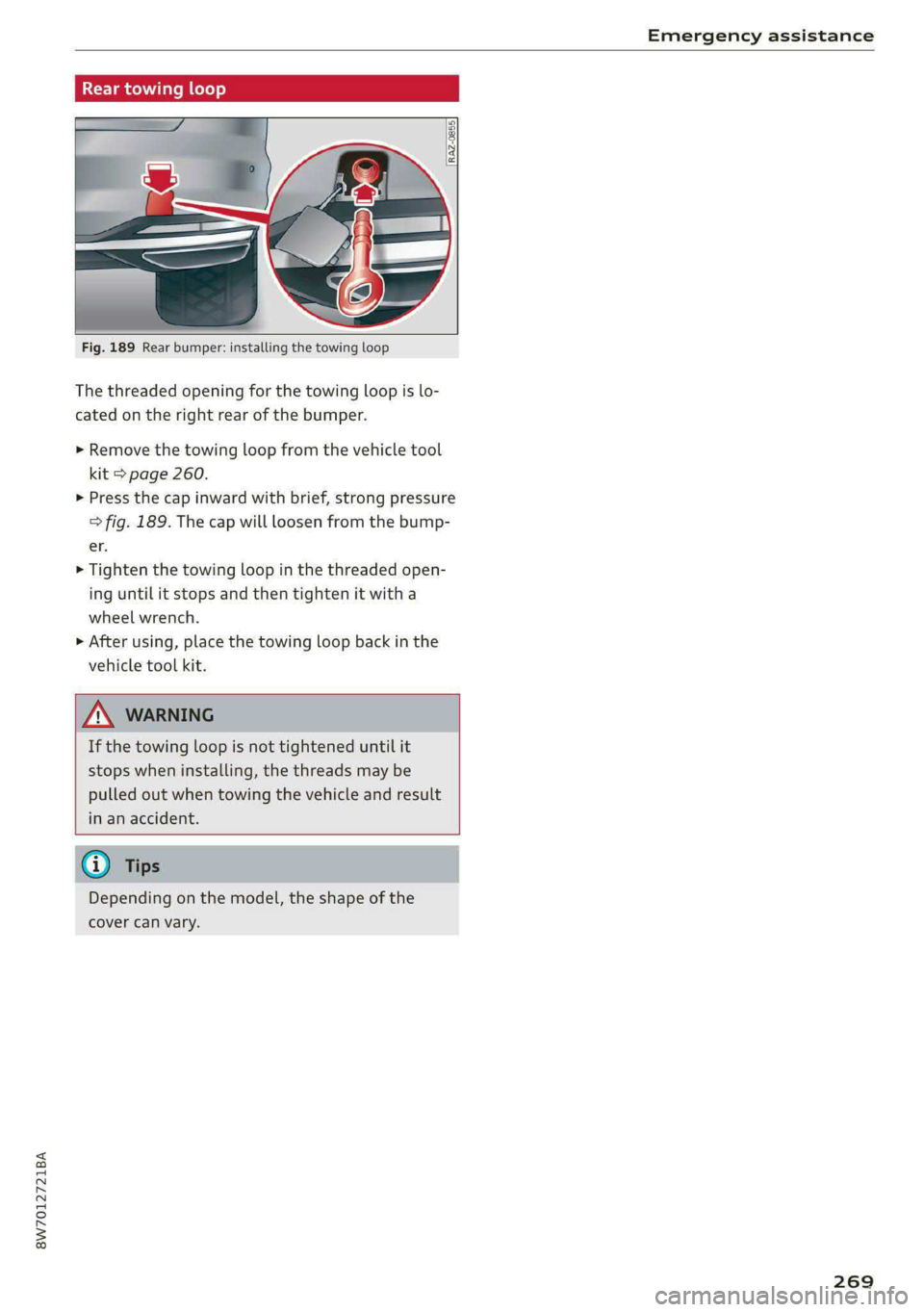
Fig. 189 Rear bumper: installing the towing loop
The threaded opening for the towing loop is lo-
cated on the right rear of the bumper.
> Remove the towing loop from the vehicle tool
kit > page 260.
> Press the cap inward with brief, strong pressure
> fig. 189. The cap will loosen from the bump-
er.
>» Tighten the towing loop in the threaded open-
ing until it stops and then tighten it with a
wheel wrench.
> After using, place the towing loop back in the
vehicle tool kit.
If the towing loop is not tightened until it
stops when installing, the threads may be
pulled out when towing the vehicle and result
in an accident.
Depending on the model, the shape of the
cover can vary.
269
Page 275 of 302
![AUDI A5 2020 Owners Manual 8W7012721BA
Fuses and bulbs
Fuse assignment - Driver's side of the Fuse assignment - Left side of the luggage
(ole 4o}ig compartment
GU -
|_8aw-0013]
Fig. 194 Driver side co](/img/6/57566/w960_57566-274.png "AUDI A5 2020 Owners Manual 8W7012721BA
Fuses and bulbs
Fuse assignment - Driver's side of the Fuse assignment - Left side of the luggage
(ole 4o}ig compartment
GU -
|_8aw-0013]
Fig. 194 Driver side co")
8W7012721BA
Fuses and bulbs
Fuse assignment - Driver's side of the Fuse assignment - Left side of the luggage
(ole 4o}ig compartment
GU -
|_8aw-0013]
Fig. 194 Driver side cockpit: fuse panel with plastic bracket
Fuse panel
No. | Equipment
1 |Vehicle opening/start (NFC)
2 | Telephone, mobile device charger
4 |Head-up display
5 |Audi music interface, USB charging port
6 Front climate control panel, instrument
Fig. 195 Left side of the luggage compartment: fuse panel
with plastic clip
panel
7 |Steering column lock
Infotainment system display Fuse panel @) (black)
9 |Instrument cluster No. | Equipment
Windshield defroster
Windshield defroster
10 | Infotainment unit
11 | Light switch, switch module
12 | Steering column electronics Suspension control
Particulate matter sensor for climate con-
trol system
13 Automatic transmission
Rear window defogger
14 | Infotainment system Rear seat heating
Left tail lights
10 | Airbag control module
WOl/OINID|M|)WInN 16 | Steering wheel heating
Luggage compartment lid lock, fuel filler
iL
door lock, luggage compartment cover
12 |Luggage compartment lid control module
Fuse panel (8) (red)
No. | Equipment
6 | Battery power interrupt
Fuse panel © (brown)
No. | Equipment
2 |Telephone, safety belt microphone
273
Page 287 of 302

8W7012721BA
Index
Numbers and
Symbols
3-zone deluxe automatic climate control.... 96
A
ALC cooling MOde ss « « vesiev «sass w © wernin eon 96
Accelerator pedals esis & cma sv eon oo ews 104
also refer to Accelerator pedal.......... 104
AGCOSSONIES «vce. «0 cesses « wesese ao nreree © 5 88, 280
Active lane assist
refer to Audi active lane assist.......... 144
Adaptive cruise control................. 134
Adaptive dampers............-.0000005 114
Adjusting air distribution (automatic climate
control system) ......... 0.0.00. e eee ee 97
Adjusting the brightness................. 59
Adjusting the sound..............-...0- 213
Adjusting the temperature (automatic climate
control system) ...... 0.0 e cee eee eee 97
Adjusting the volume..............000005 26
Aitbagsystemn « «: swersve « sxaneus + cuneons wx anecome o 76
Alarm system
refer to Anti-theft alarm system.......... 33
Alignment pin (changing the wheel)....... 260
Alleweatherlightscses ws ances © sonasie » i axssane a 54
All Season tireSiens ss emans e e emie eo enews oo 250
All wheel drive
refer to quattro... . 2... eee eee ee eae 115
AMI
refer to Audi music interface........... 203
Android Auto
refer to Audi smartphone interface...... 211
Anti-freeze
Windshield washer system............. 232
Anti-lock braking system............00-5 117
Anti-Slip Regulation.................005 117
Anti-theft alarm system..............000 33
Apple CarPlay
refer to Audi smartphone interface...... 211
Aspect ratio (video) ................ 206, 208
ASR
refer to Anti-Slip Regulation............ 116
Audi active lane assist..............0005 144
Cleaning the camera area.............. 256
Audi adaptive cruise control
Cleaning the sensors..............
Predictive control.............05.
Traffic jam assist.............00-.
Audi adaptive light.................
Audi connect
refer to connect...........eee eee
Audi connect Remote & Control
refer to Vehicle control services.....
Audi drive select...............0005
Audi music interface............00.
AudiosFileSviccs «x eon 2 wwe « o emcee 9 8 5
Safety measures..............005
Audi pre sense front..............0-
Audi side assist
refer to Side assist................
Audi smartphone interface..........
Legalinformation................
Audi virtual cockpit
refer to Instrument cluster.........
AUTO
Automatic climate control system...
Automatic headlights.............
Auto Lock (central locking) ..........
Automatic climate control system... .
Automatic luggage compartment lid....
Automatic transmission............
Automatic wipe/wash system........
Average consumption..............
AVETAGE SPEEd ss 5s aean sy ows Bee
B
Band
Page 291 of 302
8W7012721BA
Index
Favorites
Bluetooth ........ cece eee eee eee 215
NavViGdtiGnis « = snes 5 2 anes 2 ¥ ees & 2 eee 185
Telephone seas x cme « scene gv ewe ee wane 170
Federal Communications Commission (FCC) . 281
File formats (media drives).............. 208
Filling
TANK CAPACHHICS css + wcecsn ao manne we er 284
For the sake of the environment
Disposing of engine oil................ 226
Fueling. ..... 2.0.0 e cece ee eee eee 218
Le@aksSiax = scene so aeen ¢ eee s ewe 6 x oes 222
Forward gear
TefFEr tO GeaNS scscis x 5 ecw eo arenes oo ween © 102
Free text search
Media... ... cee cece eee eee 207
RadiGlss < = acs ¢ = ones = & eevee + £ Sates $F 197
also refer to Intelligent search.......... 184
Freeze protection
COOLANT ais 2 x cencere s ¥ ararcie 2 2 earns Ye ome 227
Frequency band « ¢ caccax xo cows x wownes « 2 bee 195
also refer to Frequency band........... 195
Front center armrest ....... 0... cece eee 70
Front collision warning
refer to Audi pre sense front............ 146
Front passenger’s seat adjustment
ReGit seas x ¢ wees 5 e eee Fe ee £2 ewe YB oe 69
Front wiper blades
Changing'’s « ¢ ses yo ewe xo saps 2 eee & ene 63
GLOATIAG « «: cxnins 2 cetesees 9 a suena atone a = am 63
BUC lbs corso a x connor: 2 a cress vx amaviems x x cmomae eB oH 217
Additives ...... 0.0... cece cece eee 218
CURFENECONSUMPTION = cox « pene sy emme se 15
Fuelidisplay sssisis s cose s 0 seemese ww avons 6 9 sea 11
Gasoline. ... 2... eee eee eee eee 217
Reducing fuel consumption............ 107
Tank. capacity's « ssica cs seca se ween = ween 284
Fueling
Fuel filler door..............00220000- 218
Fuel filler door emergency release....... 220
Functions ondemand...........+ee eee 178
Functions that require a license
refer to Functions ondemand.......... 178
Fuses
ASSIQNMONE: sews « x saws = e mews x x ees es 271
Replacing siciiss + x seis +o acer ow ceauere » wrenene 270
G
Garage door opener............--000 eee 44
Garment hooks .............00000eee eee 88
GaSOUIMC sie uo asmeme = veins = 5 cxamene 8 a omens @ 217
Additives... 0.0.0... 0... cece eee eee eee 218
Gasoline MIRCUNE wen 2» ewe so ways + ance 217
GAWR
refer to Gross Axle Weight Rating (GAWR) . 284
GOATS: ss cise 2 oes oo mie 2 OR ae RE A 102
Glossary of tire and loading terminology... 237
Glove compartment.............--.0000- 88
Lockablets< . css ao cave a owen oo omer vo ae 88
Valet parking. ... 0... ccc eee eee eee 43
Gross Axle Weight Rating (GAWR)........ 284
Gross Vehicle Weight Rating (GVWR)...... 284
GVWR
refer to Gross Vehicle Weight
Rating (GVWR) = sce 2 x meme 2 ¢ coms 2 2 ee 284
H
Handsfree................2..-0..0 eee 166
Hands Free Profile..................... 166
Head-up display
ACiUStiNG zu: » = :zvor ss eames 5 s eee sv BES 23
Adjusting the brightness................ 59
Operating...................0.000000. 23:
Headlight range control.................. 54
Headlights. « isos xo enc oo comune v © asecane ¥ © ave 54
Cleaning ............. 0. cece eee eee ee 255
Headlight range control................ 54
Washerisystemtx « « ces «i sauna » memes 3 © wee 61
Head restraints « vscsia 2 seaccci v anew a 2 omen 2 oo 71
Heated rear window...............000008 98
Heated steering wheel................... 99
Heating... 2.6... cece cece 95
HFP
refer to Hands Free Profile............. 165
High beams
High beam assistant............00.000 55
Highwaylightss » ase ss weew + weeaw ¢ woe a 54
Hill descent control............00 e000 ee 112
Hill hold Assist = seex < «eee se pees ss pees 102
Home
refer to Home address............00 0s 190
HOM@@ddrESS). « ¢ cues + paysmn > pees ss HORE 190
Page 292 of 302

Index
HomeLink
refer to Garage door opener............. 44
Home screen... 1.2... 0.0.0 cee eee eee eee 17
FORO se a success « o mecnens @ os omomess © os seni © eRe w © WUEES 6
Hotspot
refer to Wi-Fi... 0.0... cece eee eee 179
I
Idle
fefeF tO Gears « wees eeeaa s wowace Kanne 102
Ignition
Switching on and off.................. 100
Imbalance (wheels) ...........00.0e000- 243
Immobilizer
refer to Electronic immobilizer........... 34
Indicator lights « sm» « » sews = «ees ee eee ee: 7
Inspection interval............-..2+--5- 233
Instrument cluster............. eee eee eee 11
Adjusting the layouties. «+ css e+ seein 2 2 ove 12
Cleaning... ... 2... cee eee eee eee 257:
Engine code.............-. cee eee eee 215
Failut@inn + cease « x wows © + woe x x eee ot ee Ll
On-board computer..............2..00. 5
Operating ...... 0.6... cece cece eee eee 12
Service interval display................ 233
Software information..............005 215
Switching tabs................-000000- 12
Switchirig the VieW's + < sexs + x eems 4 eee ee 12
Vehicle TUnctions « sive « e ccvvane x o envene ww owns 15
Version information...............0-. 215
Instruments
Adjusting illumination...............005 59
Intelligent search
NaVidatloniics: : s weme + x wees ¢ nance ge Heres & 184
Interior lighting.............. eee eee 58,59
Interior monitoring...............2..05- 33
Intermittent mode (windshield wipers) ..... 61
International travel.................00. 180
Internet
refertoconnect..........eeeeeee eens 176
Internet radio
refer to Online radio.............. 198, 199
iPhone
refer to Audi music interface........... 203
290
J
Jump starting......................00. 266
K
Key. ee eee eee eee 30, 34
Convenience opening and closing......... A2
Key replacement...
. 00... cscs e eee e ene 34
Mechanical key............0 0000 eee eee 34
PANIC DULLOM « sas ¢ aston @ s Home ae EaVOR DE 34
Replacing the battery.................. 36
Unlocking and locking..............000. 35
Vehicle code... 1.2.2... eee eee eee ee 34
Key user... 2... eee eee eee 28
Kick-down .. eee eee eee 104
L
Lane assist
refer to Audi active lane assist.......... 144
Laptimer...... 0.0... cee 128
Evaluating); « «ses: sees ss pews & = Howe ee 129
StArtiNGyencie 6 6 ava wo serene wo wwe woo cuwnare # 128
Ease Lightings. + sem 2 o samas & = asvins s + sewers 56
LATCH (securing child safety seats)......... 84
Leather care and cleaning............... 257
Legal information
License subscriptions................. 215
Software information................. 215
Software licens@Sics ss secu a i mene se sais 275
Version information.................. 215
License plate bracket................... 280
Lifting points (vehicle jack).............. 263
Light/rain sensor
Automatic headlights.................. 54
Intermittent mode (windshield wipers).... 61
Lighting
Exterior... 0.0... cece eee eee ee 54
INQ@rlOf’s saws x = owe « « eeeen © Gee «RRR 58
CIGHESs » wees: 5 ¢ vere & x See 2 a BREE EE ee ee 54
Listening to music
Peferto Medidaces + x wes + 2 eaves x 2 me 202, 204
LOad « nase ss mem 3 5 yeuee 4 & eee a meee te 284
LOGaLISElSiss s x cose 5 y HemG sb DRE EE EE ge 27
Lockable glove compartment............. 88
Page 293 of 302
8W7012721BA
Locking and unlocking
By remote control. ...... 0... eee ee 35
Using the lock cylinder...............0. 32
With the convenience key............... 35
Low beam headlights .................... 54
LTE
refer to Exterior antenna.............. 167
Luggage compartment................0- 89
Cover (manual) ............20 20200 e eee 90
Pass-throughi« = sce =» awe s sam ¢ s Meum « 92
POWEPSOUPGES ies: 6 siiecs oo esa & wares + i 88
Tie-downs .... 0.0... cece eee 92
Valet parking s = secs exes ve een ss eres ss 43
also refer to Luggage compartment...... 89
Luggage compartment lid
Closing BUEEOM:. « «soca s+ weainine + & eraser +o anew 38
Generalinformation................... 36
Mechanically unlocking.............0005 40
Opening and closing.................4. 37
Opening and closing with foot motion..... 39
Power opening and closing.............. 38
Luggage compartment net.............0- 92
Lumbar support.............-.0 eee ee aee 67
M
Maintenance ......... 6... eee eee ee eee 278
Maintenance intervals.................. 233
Malfunction Indicator Lamp (MIL)........ 220
Manualishifting’. « sassis so eniosie sw anevive © ¥ arene 104
Map
Changing the scale................... 186
Display « secs ¢ eee ¢ Heea es Feeu si ees = 188
QPerating « « wssce ss vesuse so amen s were eo oe 187
Setting the destination................ 186
MAP
refer to Message Access Profile......... 173
Map previeW........ 0.00 cece eee eee eee 186
Map update..... 0.2... cece eee eee 1911
Online... 2... eee eee eee 191
USB. CONNECHON 0 + wae a s awe se wenn ss 191
Massage function
FROM & csccoce vo sancene ¥ & ascnane ww ceneaie © w oem © 68
Mechanical. keys ss ssives & owes © mace se wows 34
MeGidiccsn a = wes 3 x eae 3 2 meee a F EER 202, 204
Supported formats................0-. 208
Mediatcenter’s « csisccs so cscs 0 0 somine + a asco w 205
Memory fUNCtION ses xo cee ee ree ee ees oe 75
Menu language
refer to Setting the language........... 213
Message Access Profile................- 173
MOSSAGESE os wcities excuses 3 oo amet 4 0 aeOS os 173
MitrorcoMpass’s « ssw so sve 6 4 some 6 o ene 5 64
Mirrors
Adjusting exterior mirrors............... 60
Dimming ........... cece eee eee eee 60
Vanityimirtor’s sews 2 » sews sy aeons & 2 wees ge 61
MMI Navigation plus
refer to Multi Media Interface........... 18
MMI radio
refer to Multi Media Interface........... 18
MMI Radio plus
refer to Multi Media Interface........... 18
Mobile device
refer to Telephone.............0ee000e 165
Mobile device reminder signal............ 168
Mountain passes ...........0-. 0c eee eee 112
Mountain roads.................000005 112
Multifunction steering wheel
Buttons... 0... cece eee ees 12, 26
Operating’; ss wes6 s secu = s weree & & wee & x Be 12
Programming buttons.................. 26
Voice recognition system............... 24
Multi Media Interface................005 18
Menus and symbols..............2.-00- 19
Operating:: « s wsw0s ¢ wawn es wren « assum x 16,19
Switching onoroff..............22-00. 18
WAGE Gis ce oe srscoens @ pecans x sme Hm este ww ize 26
MYAUGT © ceciene vx asecene we ener © w ames ¥ oo 27, 177
myAudi navigation................. 183, 186
MYAUGI USEIS & cscs sv eee ov cea ao eee yes 27
N
Natural leather care and cleaning......... 257.
Navigation = xoes < = eas < = eee ¢ o sees pee 183
Bette riroutericas & 2 osc x» masun 2 8 weno & wane 192
Calling. ..... 0... eee eee eee 186
Changing the scale................0-. 186
alsosrefer'to Maps + ws 2 2 wen = sien ae we 187
Navigation database
Version information...............00. 215
Navigation (instrument cluster).......... 189
Neckheating ies 2 o acne so eens 2 o esos ee eens 98
Page 294 of 302

re ee 88
NHIGA.. « oss 2 2 owe as wees os oars 2 x oun 280
Notificationicenter’s « gas ¢ eam a + name 6 s pom 20
O
Octane rating (gasoline)................ 217
OdGITIGtEHs se: 5 2 eee 5 x qe ss wee ge See 14
RESCUING pais «6 cress wo vanes ab orem aw aeons 14
Office address
refer to Business address.............. 190
OFF (DUttON) |. sccvere 4s sseseos a coenens wo antares vw aoe 96
Oil
referto Engine oil..................0. 223
On-board computer...............2-.00. 15
On Board Diagnostic System (OBD)... 220, 275
Onlinerradio « weiss «2 coswos so serene oo comme wo 0 198
also refer to Online radio.......... 198, 199
Online roadside assistance.............. 182
Online services
refer tO CONNECT... . ke eee eee eee 176
Online system update...............-.. 214
Online traffic information............... 192
Openings: « = suscn os mene 3 v ames © 6 emme wa ome 30
Automatic luggage compartment lid...... 38
Convenience opening................... 42
Fuebtillerdoors « s sisisu s © ascowa oe mesa a 4 as 218
HOOd .. 0... eee 222
Luggage compartment lid............... 37
Luggage compartment lid with foot motion . 39
Panoramic glass roof................005 42
Power top...........0 000.2 eee eee eee 47
Sunshade (COOf)\: « + wei os caus ¢ © meen a ew 42
WIMGOWS. « sono xo: seeens © 0 seers a 0 seeem a 8 us 41
Opening and closing
refer to Unlocking and locking........ 30,35
Operating
Head-up displays << sacs ¢ & wersy ¢ & oes 5 2 2 23
Instrumenticluster wise 2 wos so mean wees 12
Multifunction steering wheel............ 12
Multi Media Interface............... 16,19
TEXEINPUES ss eee + 2 cen + peen sv ee 2 we 21
Touch display......... 02... eee cece eee 16
Voice recognition system............... 24
Optional equipment number............. 283
292
Options
Media... .. cece eee eee eee eee 208
RaGiC swiss § ¢ engi oo aga oo REE aE ome oY 200
OVERVIEWACOCKDit) iss 2 ¢ scee a a aees sp ees a oa 6
P
Paint code... . ee eee eee eee eee 283
Paint damage............--. 0c eee eae 256
PANIC button. ..................000 000s 34
Pani@TUMetions. « x sais wx omnes © swe 0 sect « 34
Panoramic glass roof................2.0. 42
Convenience opening and closing......... 42
Emergenicy closings: ¢ ¢ exes » «ava ss eee 43
Tintenion ailowie + sccscso x seems «2 anenene a 8 am 43
Quick opening.......... 0... c eee ee eae 43
Panksassist susie 0 o ansnene e w sossene so eswice 4 «seen 162
Parkingeaidsas « « scan « i morn every © euamice 1 154
Adjusting the volume................. 155
Automatic activation.................. 154
Cleaning the sensors/camera........... 256
Park assist... 2... eee ee 162
Parkingaid PlUSs < « eax ¢ y eeme ey eeae doe 154
Parking space search.................. 160
Peripheral cameras............2-0000. 156
Rearview cameéta swe. < see, sv ees sven 156
Parking and maneuvering..............- 154
Parking brake
refer to Electromechanical parking brake. 110
Parking light a
Parking lock
Manually releasing...........0eee eae 105
also refer to Gears...........0--0 00 eee 102
Passethrough « ses
Paths: ss nwo 2 3 cow ¥ Qamom us dem Ge ROO A 17
Pause (media files)... ......0.c cc eee eee 204
PédalS ses ¢ s naces 5 x wales 5b Res Gt eG ce 104
Perchlorate. ... 0.2.0... cece eee eee eee 278
Peripheral cameras.............000005. 156
Phone
Connecting a second mobile device...... 166
Disconnecting a mobile device.......... 166
SQEUIGS sccenn o « suounse = » svexene » 0 eneenne @ 4. acostene 172
Phonebook
refer to Directory.............00--000 170