warning lights AUDI A5 2020 Owner's Manual
[x] Cancel search | Manufacturer: AUDI, Model Year: 2020, Model line: A5, Model: AUDI A5 2020Pages: 302, PDF Size: 81.67 MB
Page 132 of 302
Driver assistance
Driver assistance
Cruise control system
Applies to: vehicles with cruise control system
The cruise control system assists the driver in
maintaining a constant speed above approxi-
mately 15 mph (20 km/h). The system maintains
the desired speed by braking and accelerating.
ZA WARNING
— Always pay attention to the traffic around
your vehicle when the cruise control system
is in operation. As the driver, you are always
responsible for controlling your vehicle
speed and the distance between your vehicle
and
other vehicles.
— For safety reasons, cruise control should not
be used in the city, in stop-and-go traffic, on
winding roads, and when road conditions are
poor (such as ice, fog, gravel, heavy rain,
and conditions that could lead to hydroplan-
ing), because this increases the risk of an ac-
cident.
— Switch the cruise control off temporarily
when driving in turning lanes, highway exits,
or in construction zones.
—To reduce the risk of an accident, you should
only resume the stored speed if it is suitable
for the current traffic conditions.
C) Note
Before driving downhill a long distance ona
steep hill, decrease your speed and select a
lower gear. This makes use of the engine brak-
ing effect and reduces the load placed on the
brakes.
G) Tips
The brake lights turn on when the brakes are
applied automatically.
130
Switching the system on
Applies to: vehicles with cruise control system
BFV-0220
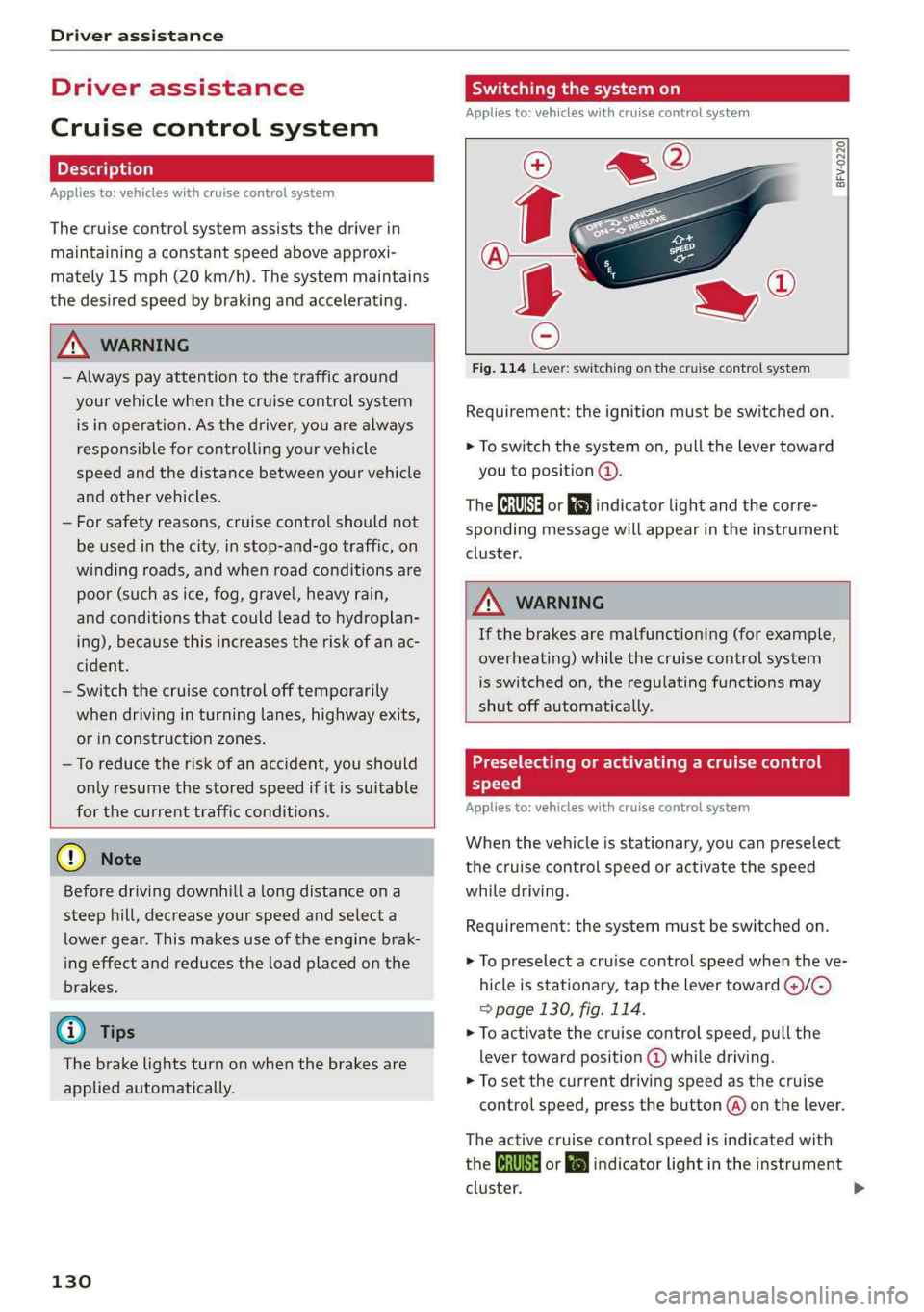
Fig. 114 Lever: switching on the cruise control system
Requirement: the ignition must be switched on.
> To switch the system on, pull the lever toward
you to position @.
The Ga or 8) indicator light and the corre-
sponding message will appear in the instrument
cluster.
A WARNING
If the brakes are malfunctioning (for example,
overheating) while the cruise control system
is switched on, the regulating functions may
shut off automatically.
etal Rom lad lille Rag etna)
speed
Applies to: vehicles with cruise control system
When the vehicle is stationary, you can preselect
the cruise control speed or activate the speed
while driving.
Requirement: the system must be switched on.
> To preselect a cruise control speed when the ve-
hicle is stationary, tap the lever toward @)/G)
=> page 130, fig. 114.
> To activate the cruise control speed, pull the
lever
toward position @ while driving.
> To set the current driving speed as the cruise
control speed, press the button @) on the lever.
The active cruise control speed is indicated with
the ICRUISE| or El indicator light in the instrument
cluster.
Page 136 of 302
Driver assistance
— The system does not consider “right of way”
rules and does not respond to traffic lights,
so lack of driver attention in these situations
can increase the risk of an accident.
— The speed when driving through curves may
be different from what you as a driver would
do or may not be suitable for the weather
and road conditions. If necessary, apply the
brakes and reduce the selected speed to be
maintained in the Adaptation to route
ahead setting to reduce the risk of an acci-
dent.
G) Tips
— Predictive control can exceed or drop below
the maximum permitted speed. The driver
is responsible for adhering to the permitted
speed limit.
— The traffic signs on the road always take pri-
ority over the display. The driver is always
responsible for adhering to the regulations
applicable in the country where the vehicle
is being operated.
— Ifa speed limit is detected, the marking @
=> page 135 of the set speed limit will be ad-
justed even if Audi adaptive cruise control is
not actively regulating.
— Control by the system depends on which
adaptive cruise control driving program is
set or on the selected Audi drive select*
mode.
— After switching on the ignition and first
driving onto a freeway or similar road with-
out a speed limit, the system will regulate
the speed to 80 mph (130 km/h). Then
the system adjusts to the last speed set by
the driver.
— There is no adaptation to speed limits when
driving through highway interchanges and
when driving on or off the expressway.
— The system can fail to provide control or the
control may be faulty if the values from the
camera-based traffic sign recognition* are
incorrect or the navigation system map data
is outdated.
YD In certain countries
134
— When route guidance is switched on, the
system adapts to the route provided by the
navigation system. Driving without route
guidance or leaving a route can result in
faulty control.
Audi adaptive cruise
control
General information
Applies to: vehicles with Audi adaptive cruise control
Depending on vehicle equipment, Audi adaptive
cruise control may consist of the following func-
tions:
Within the limits of the system, the adaptive
speed and distance control assists the driver in
controlling the speed and the set distance to the
vehicle driving ahead. If the system detects a ve-
hicle driving ahead, the adaptive cruise control
can brake and accelerate your vehicle within the
limits of the system. On open roads with no traf-
fic, it functions like a cruise control system. The
stored speed is maintained. When approaching a
vehicle driving ahead, the adaptive cruise control
system automatically brakes to match that vehi-
cle's speed and then maintains the set distance
as much as possible. As soon as the system does
not detect a vehicle driving ahead, adaptive
cruise control accelerates up to the stored speed.
In stop-and-go traffic, the vehicle may brake to a
full stop and then may also start driving again
automatically under certain conditions.
Applies to: vehicles with traffic jam assist: In
traffic jams or in stop-and-go traffic, the traffic
jam assist can assist the driver to stay within the
lane detected by the system > page 141.
Applies to: vehicles with efficiency assist: Predic-
tive control can adjust the set speed based on
traffic and road conditions > page 133.
ZA\ WARNING
Follow the safety precautions and note the
limits of the assist systems, sensors, and
cameras > page 121. >
Page 137 of 302

8W7012721BA
Driver assistance
@) Tips
For an explanation on conformity with the
FCC regulations in the United States and the
Industry Canada regulations, see > page 281.
2 2. 3
g| = © a
Fig. 115 Example: vehicle changing lanes and stationary
vehicle
Fig. 116 Example: driving into a curve
In some situations, the adaptive cruise control
function is limited and you must assume control
of the vehicle when necessary, for example by ap-
plying the brakes.
— When driving into a curve > fig. 116 and out of
acurve, the system may react to a vehicle in the
neighboring lane and apply the brakes. You can
override the system by pressing the accelerator
pedal briefly.
— The system works with the various sensors and
cameras in the vehicle. Vehicles can only be de-
tected once they are within the area and range
covered by the sensors > page 122, fig. 108.
— When driving around tight curves, a vehicle
driving ahead that was previously detected may
no longer be detected, and the system may ac-
celerate unexpectedly.
— The system does not react to a stationary vehi-
cle in the same lane if it expects that you can
easily drive around the stationary vehicle by
turning the steering wheel.
— The system cannot react to stationary objects,
such as vehicles at the end of a traffic jam, es-
pecially when traveling at high speeds.
— The system has a limited ability to detect
vehicles that are a short distance ahead, off to
the side of your vehicle, or moving into your
lane.
— Objects that are difficult to detect, such as mo-
torcycles, vehicles with high ground clearance,
or vehicles with an overhanging load, may be
detected late or not detected at all.
— The system does not respond to people, ani-
mals, or objects that are crossing or approach-
ing from the opposite direction.
ZX WARNING
Follow the safety precautions and note the
limits of the assist systems, sensors, and
cameras > page 121.
Displé Y v
Applies to: vehicles with Audi adaptive cruise control
iS BI 3 19) IN| Pe jac
Fig. 118 Instrument cluster: driver assistance display
Indicator lights and messages in the speedome-
ter inform you about the driving situation
and the settings. In the Driver assistance display >
135
Page 138 of 302

Driver assistance
@ - @, you can find more detailed information
about the system. The displays depend on the
country and equipment.
Display in the speedometer
@ Marking for the set speed
@ Current vehicle speed
@® Available speed range for the adaptive cruise
control (example)
Image in the Driver assistance display
The display only appears when the Driver assis-
tance display is open in the on-board computer
=> page 15.
Messages and settings
Detected vehicle driving ahead
Set target distance
If you fall below the set distance, the dis-
tance bars turn red from the bottom upward.
Your vehicle
Availability of Audi active lane assist
OOO
COL®
Availability of traffic jam assist
Indicator lights
A - The speed/distance control is active. No
vehicles were detected ahead. The stored speed
is maintained.
B - The speed/distance control is active. A vehi-
cle was detected ahead. The system controls the
speed and distance from the vehicle driving
ahead, and accelerates and brakes automatically.
A - The speed/distance control is active but the
vehicle is not ready to drive. A vehicle was de-
tected ahead. Your vehicle is stationary and will
not start driving automatically.
B - The speed/distance control is active but the
vehicle is not ready to drive. No vehicles were de-
tected ahead. Your vehicle is stationary and will
not start driving automatically.
A - The automatic braking is not enough to
maintain a sufficient distance to a vehicle driving
ahead. You must intervene > page 140, Driver in-
tervention request.
> 4 - Lane guidance is active.
4] - Lane guidance is not active.
136
> 4 - This indicator turns on if the limitations of
the system have been reached (for example, the
system’s steering force is not sufficient to handle
tight curves). Take over steering.
Z\ WARNING
Follow the safety precautions and note the
limits of the assist systems, sensors, and
cameras > page 121.
Operating Audi adaptive cruise control
Applies to: vehicles with Audi adaptive cruise control
B4M-0232
Fig. 120 Operating lever: changing the speed
Switching on
> To switch on the adaptive cruise control, pull
the lever up to position @ until it engages.
Storing the speed and activating regulation
If you have switched the system on, you can set
the current speed as the “regulated speed” and
activate regulation:
> Press the [SET] button (2). The set speed is indi-
cated with a marking in the speedometer (@)
=> page 135, fig. 117 and shown in the instru-
ment cluster > /\.
Page 140 of 302

Driver assistance
the country where the vehicle is being oper-
ated.
— If you switch the ignition or the adaptive
cruise control system off, the set speed is
erased for safety reasons.
— When adaptive cruise control is switched
on, the ESC and ASR automatically switch
on.
— The system cannot be switched off or it may
be interrupted if the road exceeds the maxi-
mum possible grade for safe operation.
Setting the distance
Applies to: vehicles with Audi adaptive cruise control
B4M-0234
Fig. 121 Operating lever: setting the distance
If you adjust the speed, you must also change the
time gap to the vehicle driving ahead. The higher
the speed, the greater the distance that is need-
ed.
> Tap the rocker switch to display the distance
that is currently set.
>» To increase or decrease the distance in incre-
ments, tap the switch again toward () or G).
The newly-set distance will be shown briefly, for
example with the indicator light. In the Driv-
er assistance display, a graphic display is shown
instead of the indicator lights > page 135,
fig. 118. The display matches the functions of
the indicator lights.
When approaching a vehicle driving ahead, the
adaptive cruise control system brakes to match
that vehicle's speed and then adjusts to the set
distance. If the vehicle driving ahead accelerates,
then the adaptive cruise control will accelerate
up to the speed that you have set.
The following distances can be set:
138
Meaning
The time between is approximately 1
second. This setting corresponds to a
distance of approximately 92 feet (28
m) when traveling at 62 mph (100
km/h).
The time between is approximately 1.3
seconds. This setting corresponds toa
distance of approximately 118 feet (36
m) when traveling at 62 mph (100
km/h).
The time between is approximately 1.8
seconds. This setting meets the general
recommendation of “half the speed
shown on the speedometer”. This cor-
responds to a distance of approximate-
ly 164 feet (50 m) when traveling at
62 mph (100 km/h).
The time between is approximately 2.4
seconds. This setting corresponds toa
distance of approximately 219 feet
(67 m) when traveling at 62 mph (100
km/h).
The time between is approximately 3.6
seconds. This setting corresponds toa
distance of approximately 328 feet
(100 m) when traveling at 62 mph (100
km/h).
1D
D
Z\ WARNING
Follow the safety precautions and note the
limits of the assist systems, sensors, and
cameras > page 121.
G) Tips
— When setting the distance, the driver is re-
sponsible for adhering to any applicable le-
gal regulations.
— Depending on the selected driving program
and distance, driving behavior when acceler-
ating may vary from moderate to sporty
= page 140, Adjusting adaptive cruise con-
trol.
— The distances provided are specified values.
Depending on the driving situation and how
the vehicle ahead is driving, the actual
Page 146 of 302

Driver assistance
Audi active lane assist
General information
Applies to: vehicles with Audi active lane assist
The active lane assist can detect lane marker
lines within the limits of the system. If you are
approaching a detected lane marker and it ap-
pears likely that you will leave the lane, the sys-
tem can warn you with corrective steering anda
steering wheel vibration, if necessary.
The system functions in the speed range of ap-
proximately 40 mph - 155 mph (65 km/h -
250 km/h).
Applies to: vehicles with Audi adaptive cruise control
If the conditions are met, traffic jam assist
switches on at speeds under approximately
40 mph (65 km/h) > page 141.
ZA WARNING
Follow the safety precautions and note the
limits of the assist systems, sensors, and
cameras > page 121.
Applies to: vehicles with Audi active lane assist
Fig. 128 Instrument cluster: driver assistance display
Display and warning
The availability, readiness to provide warnings,
and the warnings are indicated with indicator
lights. Active lane assist is ready to provide warn-
ings if an object is detected on at least one side
of the lane where your vehicle is traveling.
144
Driver as-
sistance
display
Indicator lights |Meaning
Instru-
ment clus-
ter (ana-
log)
Audi vir-
tual
cockpit
@White |7 \
lines
Active lane
assist is acti-
vated, but is
not ready to
provide warn-
ings.
7X
Active lane
assist is acti-
vated and
ready to pro-
vide warn-
ings.
@Green |7 \ 1X
@Red [7 ¥ WN
line
Active lane
assist will
warn you be-
fore the vehi-
cle leaves a
lane. The
steering
wheel will al-
so vibrate
lightly.
If the system is switched on but is not ready to
provide warnings, one of the following could be
the cause:
— There is no lane marker line
— The necessary lane marker lines have not been
detected (for example, in a construction zone
or because the lines are obstructed by snow,
dirt, water, or lighting)
— The speed is below the activation speed
— The lane is too narrow or too wide
— The curve is too narrow
— The driver's hands are not on the steering
wheel
— Visibility is obstructed by a rise or dip.
Steering intervention request
If no steering activity is detected or the steering
power from the system is not sufficient, the driv-
er steering intervention request will alert the
driver using audio and visual signals. Take over >
Page 181 of 302
8W7012721BA
Audi connect
Applies to: vehicles with Audi connect vehicle control
Depending on the country and the vehicle equip-
ment, the following services may be available:
Locking and unlocking the vehicle by remote
control
Requirement: the vehicle must be parked and the
ignition must be switched off.
This service allows you to unlock or lock your ve-
hicle.
Vehicle status report
This service transfers driver information system
data to a server. Depending on the vehicle equip-
ment, certain data may be accessed, such as the
remaining range or mileage. The values may dif-
fer from the values displayed in the vehicle.
Car Finder
This service transmits the parking location to a
server when the ignition is switched off. The vehi-
cle location, your location, or the route to your
vehicle can be displayed. The new parking loca-
tion cannot be determined with this service if the
vehicle is moved after shutting the vehicle off
and without switching the ignition on and off
again, for example if the vehicle is towed or sto-
len.
Online Audi service request
Depending on the country, this service transmits
service-relevant data to your selected authorized
Audi dealer or authorized Audi service facility.
You will be contacted before upcoming service is
due.
Stolen Vehicle Locator
This service assists you in locating your vehicle if
it is stolen.
— Contact the police. You receive a Case ID.
— Call the service hotline and give your Case ID.
The service hotline will forward the established
data to the police. You receive the Audi Service
hotline number when you purchase your vehicle.
Alert services
Requirement: a key user must be set in the vehi-
cle > page 178.
You can adjust the following services in the
myAudi app. You will be notified by a push notifi-
cation and/or e-mail if an alarm is triggered for
your vehicle.
— Geofencing Alert: a permitted/prohibited zone
was entered.
— Speed Alert: a set speed was exceeded.
— Valet Alert: a set speed was exceeded or a per-
mitted/prohibited zone was entered.
ZA\ WARNING
Do not ignore messages and warning or indi-
cator lights that turn on in the vehicle be-
cause of the information in the vehicle status
report. This could lead to break downs in on
the road, accidents and serious injuries.
@) Tips
For some services, you can select if you would
like to be notified with a push notification
and/or an e-mail.
Settings
Applies to: vehicles with Wi-Fi hotspot
Requirement: the ignition must be switched on.
> Applies to: MMI: Select on the home screen:
SETTINGS > Connection settings > Wi-Fi
Depending on the country and the vehicle equip-
ment, the following functions may be available:
Wi-Fi
When the function is switched on, the MMI's Wi-
Fi hotspot is active and Wi-Fi devices can be con-
nected to the hotspot.
Wi-Fi hotspot settings
The Wi-Fi connection between the MMI and your
Wi-Fi device is encrypted. You can change the fol-
lowing information if needed.
179
>
Page 255 of 302

8W7012721BA
Wheels
Tire tread circumference and vibration character-
istics can change and cause a tire pressure warn-
ing if:
— The tire pressure in one or more tires is too low
— The tires have structural damage
— The tire was replaced or the tire pressure was
changed and it was not stored > page 253
— Tires that are only partially used are replaced
with new tires
Indicator lights
If the @ indicator light turns on, there is a loss
of pressure in at least one tire .> A\ Check the
tires and replace or repair if necessary. Check and
correct the pressures of all four tires and store
the pressure again > page 253.
iis Tire pressure: malfunction! See owner's
manual
If fe appears after switching the ignition on or
while driving and the @) indicator light in the in-
strument cluster blinks for approximately one
minute and then stays on, there is system mal-
function. Try to store the correct tire pressures
=> page 253. In some cases, you must drive for
several minutes after storing the pressures until
the indicator light turns off. If the indicator light
does turn off or turns on again after a short peri-
od of time, drive to an authorized Audi dealer or
authorized Audi Service Facility immediately to
have the malfunction corrected.
ZA WARNING
— If the tire pressure indicator appears in the
display, reduce your speed immediately and
avoid any hard steering or braking maneu-
vers. Stop as soon as possible and check the
tires and their pressure.
— The driver is responsible for maintaining the
correct tire pressure. You must check the
tire pressure regularly.
— Under certain conditions (such as a sporty
driving style, winter conditions, or unpaved
roads), the tire pressure monitoring system
indicator may be delayed.
@) Tips
—The tire pressure monitoring system can al-
so stop working when there is an ESC mal-
function.
— Using snow chains may result in a system
malfunction.
—The tire pressure monitoring system in your
Audi was calibrated with “Audi Original
Tires” > page 241. Using these tires is rec-
ommended.
Syed elite tee eee
Applies to: vehicles with Tire Pressure Monitoring System in-
dicator
If the tire pressure changes or a tire is replaced,
it must be confirmed in the system.
> Before storing the tire pressures, make sure the
tire pressures in all four tires meet the speci-
fied values and are adapted to the load
=> page 244.
> Switch the ignition on.
> Applies to: MMI: Select on the home screen:
VEHICLE > Settings & Service > Tire pressure
monitoring > Store tire pressure > Yes, store
now.
G) Tips
Do not store the tire pressures if snow chains
are installed.
253
Page 260 of 302

Care and cleaning
ZA WARNING
The windshield must not be treated with wa-
ter-repelling windshield coating agents. Un-
der unfavorable conditions, such as wetness,
darkness, and when the sun is low, these coat-
ings can cause increased glare, which increas-
es the risk of an accident. They can also cause
wiper blade chatter.
@) Note
— Headlights and tail lights
— Never clean headlights or tail lights with a
dry cloth or sponge.
— Do not use any cleaning products that con-
tain alcohol, because they could cause
cracks to form.
— Wheels
— Never use any paint polish or other abra-
sive materials.
— Damage to the protective layer on the
rims,
such as stone chips or scratches,
must be repaired immediately.
— Camera lenses
— Never use warm or hot water to remove
snow or ice from the camera lens. This
could cause the lens to crack.
— Never use abrasive cleaning materials or
alcohol to clean the camera lens. This
could cause scratches and cracks.
— Power top
— Remove bird droppings immediately.
— Never use gasoline, spot remover, ben-
zene, paint thinner or other solvents to re-
move.
— Door windows
— Remove snow and ice on windows and ex-
terior mirrors with a plastic scraper. To re-
duce the risk of scratches, move the scra-
per only in one direction and not back and
forth.
— Never remove snow or ice from door win-
dows and mirrors using warm or hot water
because this could cause cracks to form.
— To reduce the risk of damage to the rear
window defogger, do not apply any stick-
258
ers on the heating wires on the inside of
the window.
— Decorative parts and trim
— Never use chrome care or cleaning prod-
ucts.
— Paint
—To reduce the risk of scratches, the vehicle
must be free of dirt and dust before pol-
ishing or waxing.
— To prevent paint damage, do not polish or
wax the vehicle in direct sunlight.
—To reduce the risk of paint damage, do not
polish away rust spots.
— Remove cosmetics and sunscreen immedi-
ately because they could damage the
paint.
— Decorative decals
—To reduce the risk of damage, do not use
any rough powder or abrasive cleaning
products.
—To reduce the risk of damage, do not pol-
ish decorative decals that have a matte or
printed finish.
— Due to the risk of damage, do not use an
ice scraper to remove snow and ice on win-
dows with decorative decals on them.
— Displays and instrument cluster
— Make sure that the display and instrument
cluster are switched off and have cooled
down before cleaning. To switch off the
center display, select on the MMI home
screen: SETTINGS > Display & brightness
> MMI > Screen cleaning.
— Displays, the instrument cluster, and the
trim surrounding it must not be cleaned
with dry cleaning methods because they
could become scratched.
— Make sure no fluids enter the spaces be-
tween the instrument cluster and the
trim, because that could cause damage.
— Controls
— Make sure that no fluids enter the con-
trols, because this could cause damage.
— Safety belts
— Do not remove the safety belts to clean
them.
Page 269 of 302

8W7012721BA
Emergency assistance
The jump start cable connections are located in
the engine compartment.
Follow the information about the vehicle battery
=> page 230.
Connecting the positive cable (red) to the
positive terminal
> Open the red cover on the positive terminal
> fig. 187.
1. Attach one end of the positive cable (red) to
the jump-start pin @ © fig. 188 on your vehi-
cle.
2. Attach the other end of the positive cable
(red) to the positive terminal @ on the pow-
er source.
Connecting the negative cable (black) to the
negative terminal
3. Attach one end of the negative cable (black)
to the negative terminal @) on the power
source.
4. Attach the other end of the negative cable
(black) to the negative terminal @) on the ve-
hicle.
Starting the engine
> Start the engine in the vehicle giving the charge
and let it run at idle.
> Now start the engine in your vehicle, which has
the
drained battery.
> If the engine does not start, stop the starting
procedure after 10 seconds and then repeat it
after approximately 30 seconds.
> Turn on the rear window defogger in your vehi-
cle in order to reduce any voltage peaks that
may occur when disconnecting the jump start
cables. The headlights must be switched off.
> With the engines running, remove the cables in
reverse order of the way they were installed.
> Close the red cover on the positive terminal.
ZA WARNING
— Never connect the jump start cable directly
to your vehicle battery. Only use the connec-
tions in the engine compartment.
— Do not touch the non-insulated parts of the
terminal clamps. The cable must also not
come into contact with vehicle components
that conduct electricity when it is connected
to the positive vehicle battery terminal. This
can cause a short circuit.
— The plugs on the battery cells must not be
opened.
— Keep ignition sources (such as open flames,
burning cigarettes, etc.) away from the vehi-
cle batteries to reduce the risk of an explo-
sion.
— Route the jump start cables so they cannot
get caught in the moving parts in the other
vehicle's engine compartment.
@) Note
Please note that the connecting process previ-
ously described for the jump start cables is in-
tended for when your vehicle is being jump
started.
(i) Tips
Make sure that the connected jump start ca-
bles have sufficient contact with metal.
Towing
General information
You should only perform the steps that follow if
you have the necessary tools and technical ex-
pertise.
Towing requires a certain amount of practice.
Audi recommends contacting a towing company
to have the vehicle transported.
You should only have your vehicle towed by an-
other vehicle when disabled in exceptional cir-
cumstances. Inexperienced drivers should not
tow.
Notes on towing
When the engine is stopped, the transmission
will not be sufficiently lubricated if traveling at
high speeds and long distances:
— The maximum permitted towing speed is 30
mph (50 km/h).
— The maximum permitted towing distance is 30
miles (50 km).
267
>