coolant temperature AUDI A5 2020 Owners Manual
[x] Cancel search | Manufacturer: AUDI, Model Year: 2020, Model line: A5, Model: AUDI A5 2020Pages: 302, PDF Size: 81.67 MB
Page 4 of 302
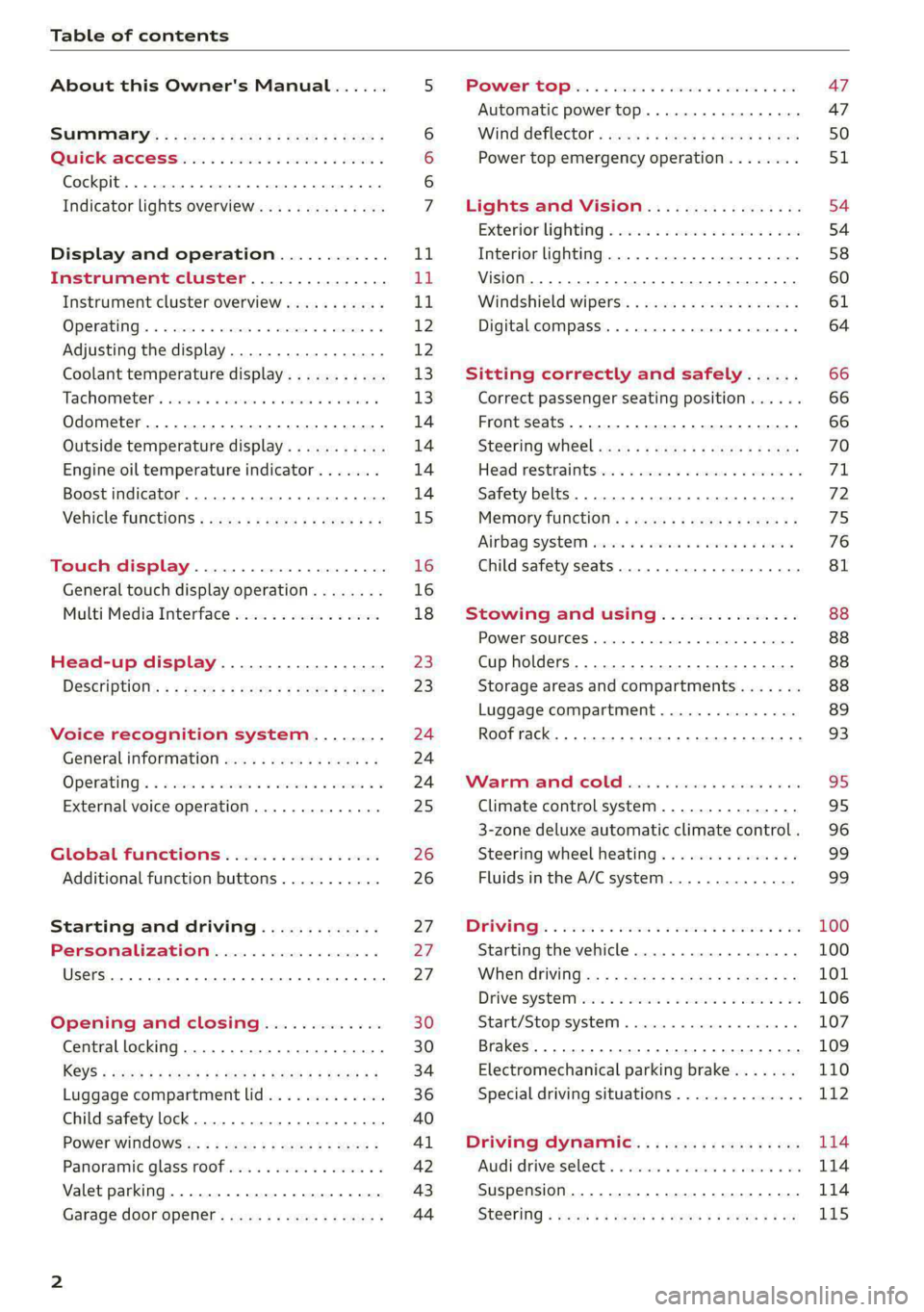
Table of contents
About this Owner's Manual......
SUMIMALY: ; « ss6% : osen ss sean cs poe s
QC CCeS Skis: si esis a 6 ores os ewe
Cockpit... 2... ee eee eee eee
Indicator lights overview...........0.
Display and operation............
Instrument cluster...............
Instrument cluster overview...........
Operating. ecco ws swacemn o © aero o erm 9
Adjusting the display.................
Coolant temperature display...........
Tachometer’. series s ewie so sie ¥ & overs
Odometer............ 0. cee eee eee eee
Outside temperature display...........
Engine oil temperature indicator.......
Boost indicator...............0--000-
Vehicle TuNCtiONnS ¢ ssc. ss sees ge eeew ge
Touch display.....................
General touch display operation........
Multi Media Interface................
Head-up display..................
DeSériptlonis ss wees « x wees so eee + ee
Voice recognition system........
Generalinformation.................
Operating’ « esses ss assur wx aeuew sv ewe &
External voice operation..............
Global FuUNCtiONS:. icc: 6 6 ese. 6 6 ces
Additional function buttons...........
Starting and driving.............
Personalization..................
Opening and closing.............
Central locking........-.....00-e eee
Child safety lock.............00.-0 08
Power Wind OwWSics «seus ys sms 5 4 wee
Panoramic glass roof.................
Valet parking...............00 eee eee
Garage door opener..........--..0005
NOD
OO
13
16
16 18
20
23
24 24 24
25
26
26
27 27 27 30 30
34
36
40
Al 42 43
Power tapi... «cones 0 6 soma ye eas ao ee 47
Automatic power top............-.05. 47
Wine GeRect6r « sews « 2 mean
Lights and Vision................. 54
Exterior lighting « ssscs< <2 coos 2 eeeme + aes 54
Tmterior UQhting)ecoo 6. secre» «scones 6 + euniece 58
VISION... ke eee eee 60
Windshield wipers................... 61
Digital compass............... 000 eee 64
Sitting correctly and safely...... 66
Correct passenger seating position...... 66
Front seatS 1.2... . 0. e eee eee ee eee 66
Steering WHEEL sw: s x newes 4 « eeu ee ane 70
Head restraintstr «+ cscs x a asteine vo owen © 71
Safety belts......... 0.0.0 e eee eee 72
Memory function's + asx «wees « eee a 75
Airbag system sian «+ suc oo sewn « 5 wees 76
Child
safety seats.............2..000- 81
Stowing and using............... 88
POWERSOUNGES serene = © vienna 9 1 anecene a enewane 88
Cup holders...........-..00 0.000 eee 88
Storage areas and compartments....... 88
Luggage compartment............... 89
Roof rack... ee eee eee eee 93
Warrmitanma colada: sé ccc 6 sonia 6 6 avs 95
Climate control system............... 95
3-zone deluxe automatic climate control. 96
Steering wheel heating............... 99
Fluids in the A/C system.............. 99
IMIR. 5 scscess 5 ames 3 & mam 8 BIW & oH 100
Starting the vehicle...............0.. 100
WHeNMOFIVING a + s eens + ¢ cates ¢ o eee Te: 101
Drive SYSTEM Mises so sce so oem oo cee 9 BU 106
Start/Stop system.............0 ee eee 107
Brakes... 2.2.0.0... cece eee ee eee 109
Electromechanical parking brake....... 110
Special driving situations.............. 112
Driving dynamic.................. 114
Audi driverselectis « ase «+ cana 2 0 marine a ove 114
Suspension..............0 0.00.0 000. 114
Steering « sce ss coun se sees gz eee ge ee 115
Page 13 of 302
8W7012721BA
Instrument cluster
00 T
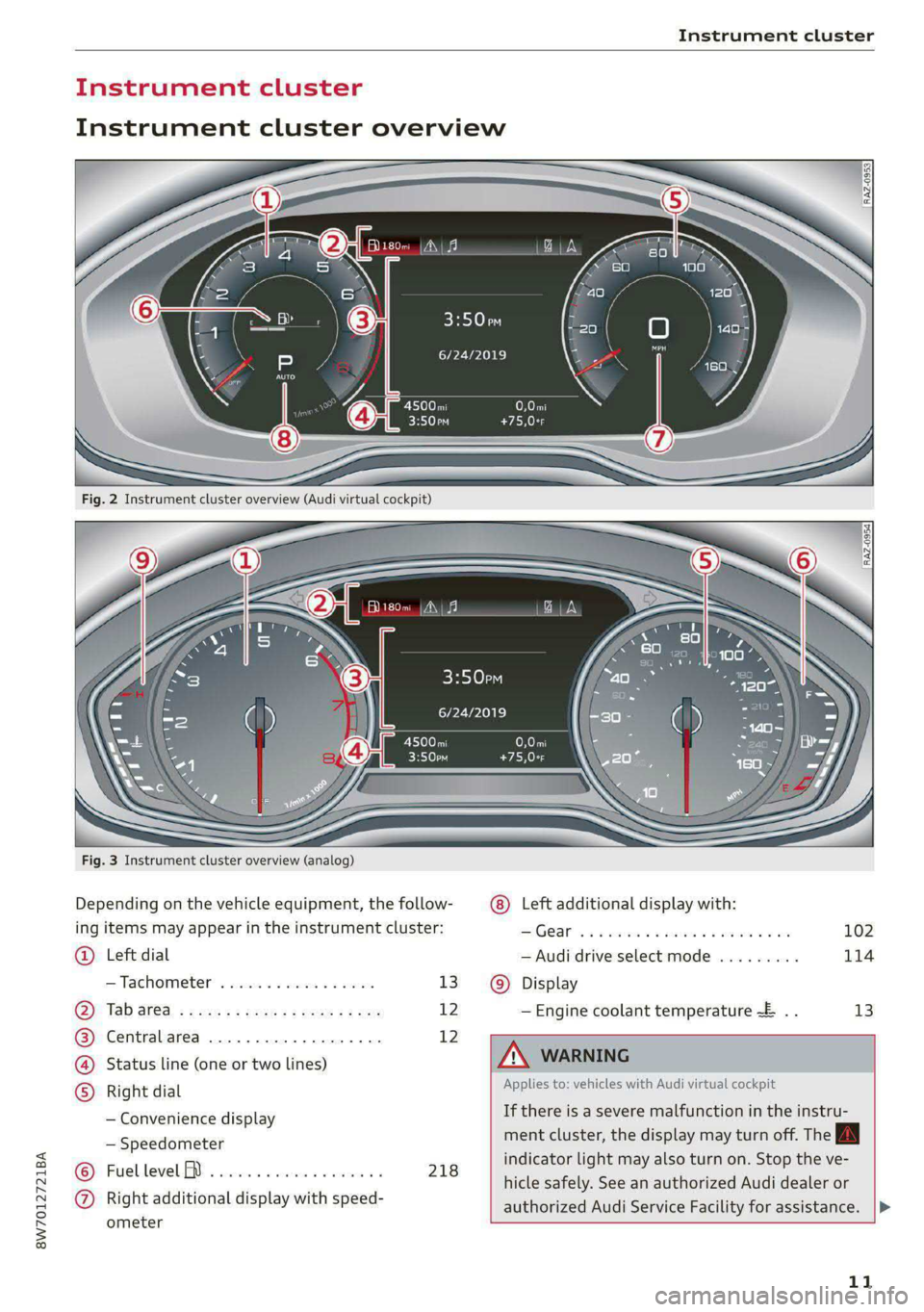
Fig. 3 Instrument cluster overview (analog)
Depending on the vehicle equipment, the follow-
ing items may appear in the instrument cluster:
@ Left dial
—Tachometer ....0 0.000. es ewes 13
Tab ar@a: ; snes « s sees = s wees sz eee 12
Centralarea ...............0.00. 12
) Status line (one or two lines)
5) Right dial
— Convenience display
— Speedometer
Fuellevel M ...........0. 00 eee 218
Right additional display with speed-
ometer
Beery
6/24/2019
3:50pm
6/24/2019
102
114
Display
— Engine coolant temperature ~E .. 13
A WARNING
Applies to: vehicles with Audi virtual cockpit
If there is a severe malfunction in the instru-
ment cluster, the display may turn off. The
indicator
light may also turn on. Stop the ve-
hicle safely. See an authorized Audi dealer or
authorized Audi Service Facility for assistance. |>
11
Page 15 of 302
8W7012721BA
Instrument cluster
Switching the view
Applies to: Audi virtual cockpit
> Press the VIEW button to switch between the
default view @ and the enhanced view (2).
Adjusting the layout
Applies to: Audi virtual cockpit
Depending on the vehicle equipment, various lay-
outs may be available.
> Applies to: MMI: Select on the home screen:
SETTINGS > Display & brightness > Virtual
cockpit.
> To adjust the desired layout, press @).
Adjusting the additional display
Applies to: Audi virtual cockpit
Depending on the vehicle equipment, the addi-
tional displays that can be selected may vary.
> Applies to: MMI: Select on the home screen:
SETTINGS > Display & brightness > Virtual
cockpit > Configure.
> Select the desired additional display.
Reducing the display
Depending on the vehicle equipment, you can
hide the central area in the instrument cluster.
>» Select on the instrument cluster: vehicle func-
tions tab > EE] button > Reduced display, or
> Press the VIEW button on the multifunction
steering wheel.
Coolant temperature
display
Applies to: vehicles with a coolant temperature indicator
The coolant temperature display @) > page 11
only functions when the ignition is switched on.
To reduce the risk of engine damage, please ob-
serve the following notes about the temperature
ranges.
Cold range
If only the LEDs at the bottom of the gauge turn
on, the engine has not reached operating tem-
perature yet. Avoid high engine speeds, full accel-
eration, and heavy engine loads.
Normal range
The engine has reached its operating tempera-
ture once the LEDs up to the center of the gauge
turn on. If the i] indicator light in the instru-
ment cluster display turns on, the coolant tem-
perature is too high > page 227.
@) Note
— Auxiliary headlights and other accessories in
front of the air intake impair the cooling ef-
fect of the coolant. This increases the risk of
the engine overheating during high outside
temperatures and heavy engine load.
— The front spoiler also helps to distribute
cooling air correctly while driving. If the
spoiler is damaged, the cooling effect will
be impaired and the risk of the engine over-
heating will increase. See an authorized
Audi dealer or authorized Audi Service Fa-
cility for assistance.
Tachometer
The tachometer @) 9 page 11 displays the engine
speed in revolutions per minute (RPM). The be-
ginning of the red zone in the tachometer indi-
cates the maximum permissible engine speed for
all gears once the engine has been broken in. Be-
fore reaching the red zone, you should shift into
the next higher gear, select the "D" or "S" selec-
tor lever position, or remove your foot from the
accelerator pedal.
Engine speed limitation
If the Bw indicator light turns on, the engine will
be automatically limited to the RPM displayed in
the instrument cluster. This will protect the en-
gine components, for example during a cold start
or from overheating.
The engine speed limitation will be deactivated
once the engine has reached its normal operating
temperature and you have released the accelera-
tor pedal.
If the engine speed limitation was activated by
an engine control malfunction, the By indicator
light also turns on. Make sure the engine speed
does not go above the speed displayed, for
13
>
Page 97 of 302
8W7012721BA
Warm and cold
Warm and cold
Climate control system
Your vehicle has a deluxe automatic climate con-
trol system with 3 zones where the temperature,
air distribution, and air supply can be set sepa-
rately on the left front side, the right front side,
and in the rear.
The climate control system warms, cools and re-
moves humidity from the air in the vehicle interi-
or. It is the most effective when the windows and
panoramic glass roof* or power top* are closed.
If there is a build-up of heat inside the vehicle,
ventilation can help to speed up the cooling proc-
ess.
In all heating mode functions, except for defrost,
the blower only switches to a higher speed once
the engine coolant has reached a sufficient tem-
perature.
Pollutant filter
The pollutant filter removes pollutants such as
dust and pollen from the air.
(@) For the sake of the environment
Energy can be saved by switching off the A/C
mode.
@) Tips
—To prevent interference with the heating
and cooling output and to prevent the win-
dows from fogging over, the air intake in
front of the windshield must be free of ice,
snow, and leaves.
— Condensation from the cooling system can
drip and form a puddle of water under the
vehicle. This is normal and does not mean
there is a leak.
— The energy management system may tem-
porarily switch off certain functions, such as
the seat heating* or rear window defogger.
These systems are available again as soon as
the energy supply has been restored.
—The climate control settings are automati-
cally stored and assigned to the vehicle key
that is in use. These settings are different
when the power top* is open or closed.
95
Page 100 of 302

Warm and cold
—} Neck heating*
Applies to: vehicles with neck heating
The neck heating temperature can be set at mul-
tiple levels. Press the J button once to switch on
the highest level. Press the 3 button again to de-
crease the temperature one level at a time. The
neck heating is off when all of the LEDs are off.
a Seat heating and ventilation*
Applies to: vehicles with seat heating/ventilation
If you press the # button, you can turn either the
seat ventilation or the seat heating on or off.
— If you turn the knob @ clockwise, you will turn
the seat heating down to the lowest level (1).
The red LED in the button turns on. To increase
the temperature, keep turning clockwise to the
highest level (3).
— If you turn the knob @ counterclockwise, you
will turn the seat ventilation down to the low-
est level (1). The blue LED in the button turns
on. To increase the ventilation, keep turning
counterclockwise to the highest level (3).
® Defrosting
The windshield and side windows are defrosted
or cleared of condensation as quickly as possible.
The maximum amount of air flows mainly from
the vents below the windshield. Recirculation
mode switches off. The temperature should be
set at +72°F (+22°C) or higher. The temperature
is controlled automatically.
You can switch the defroster on or off using the
X& button. You can switch the function off by
pressing a knob ().
@ Rear window defogger
The rear window defogger only operates when
the engine is running. It switches off automati-
cally after 10 to 20 minutes, depending on the
outside temperature.
To prevent the rear window defogger from
switching off automatically, press and hold & for
more than three seconds. This is stored until the
ignition is switched off.
98
Vents
You can open or close the center and rear vents in
the cockpit and the vents in the rear center con-
sole using the ridged thumbwheels. The levers
adjust the direction of the airflow from the vents.
Residual heat
You can activate the residual heat function when
the ignition is switched off by pressing the knob
@ (left side). The residual heat from the coolant
is used to heat the vehicle interior. The residual
heat function switches off automatically after
about 15 minutes.
ZA WARNING
— You should not use the recirculation mode
for an extended period of time, because no
fresh air is drawn in and the windows can
fog
when cooling mode is switched off. This
increases the risk of an accident.
— Individuals with reduced sensitivity to pain
or temperature could develop burns when
using the seat heating* or neck heating*
functions. To reduce the risk of injury, these
individuals must not use the seat or neck
heating*.
— If the air vents in the seats are covered by
clothing or similar objects when the neck
heating* is switched on, the output from the
neck heating may become very hot tempora-
rily. This can cause burns on unprotected
skin exposed directly to the vents.
@) Note
To reduce the risk of damage to the seat heat-
ing* elements, do not kneel on the seats or
place heavy pressure on one area of the seat.
@) Tips
— When the power top” is closed, the neck
heating* will switch automatically from set-
ting 3 to setting 2 after approximately six
minutes.
— The heat output from the neck heating" is
lower when the power top* is closed than
when it is open.
Page 121 of 302

8W7012721BA
Trailer towing
Trailer towing
Driving with a trailer
General information
Your vehicle is primarily intended for transport-
ing people and luggage. However, if you drive
with a trailer, follow the technical requirements,
the operation and driving tips, and the legal reg-
ulations.
Driving with a trailer affects the vehicle's energy
usage, performance, and wear. It also requires
higher concentration from the driver.
Z\ WARNING
Do not transport any people in a trailer due to
the risk of fatal injury.
Technical requirements
Trailer hitch
Only use a trailer hitch with a removable ball
hitch mount and ball hitch. The trailer hitch must
be permitted for the vehicle, the trailer and the
permitted total weight of the trailer being
pulled. Above all, it must be securely and safely
attached to the vehicle trailer.
Never mount a trailer hitch on the bumper. The
trailer hitch must be mounted in a way that does
not impair the function of the bumper. Do not
make any changes to the exhaust system and the
brake system.
Check regularly if the trailer hitch is securely
mounted. Always follow the instructions given by
the trailer hitch manufacturer.
Trailer brakes
If the trailer has its own brake system, then fol-
low the manufacturer specifications. However,
the brake system on the trailer must never be
connected to the vehicle brake system.
Engine cooling system
Driving with a trailer means a higher load on the
engine and the cooling system. The cooling sys-
tem must be designed for additional load and
contain enough coolant > @.
CG) Note
Longer inclines cannot be driven without a
suitable cooling system, especially if the out-
side temperatures are high. Otherwise, this
increases the risk of engine damage.
Operating instructions
Towing capacity
Your vehicle can only be operated with class 1 or
class 2 trailers.
Load distribution
Poor cargo load and distribution can negatively
impact vehicle handling. Load the trailer based
on the following criteria as much as possible:
— Store objects in the vehicle luggage compart-
ment, if possible. The vehicle should always
carry the heaviest possible load and the trailer
should have the lightest possible load.
— Distribute the load in the trailer so that the
heavy objects are as close to the axle as possi-
ble.
— Secure objects so that they do not slide.
— Utilize the maximum permitted tongue weight
if possible.
Tires
Set the tire pressure on your vehicle for a “full
load”; see the tire pressure sticker > page 244. If
necessary, also adjust the tire pressure on the
trailer according to the manufacturer's specifica-
tions.
The trailer and the vehicle should be equipped
with winter tires when driving in winter tempera-
tures.
Outside mirrors
If you cannot see the traffic behind the trailer
with the standard exterior mirrors, then you
must attach additional exterior mirrors. Adjust
them so you have a sufficient visibility behind
you.
Exterior lighting
Follow the legal regulations for lighting on your
trailer that are applicable in the country where
119
>
Page 122 of 302
Trailer towing
you are operating the vehicle. Contact an author-
ized Audi dealer or authorized Audi Service Facili-
ty for more information.
Before you start driving, check all lighting equip-
ment on the trailer while it is hitched to the vehi-
cle.
The headlight range control automatically ad-
justs the light range of the headlights.
Safety chains
Make sure the safety chains are correctly applied
when pulling a trailer. The chains should hang
enough so that the trailer can drive around
curves. However, they must not touch the
ground.
@) Note
Attachments retrofitted on the vehicle may
cause damage, especially on the trailer hitch
ball head. In cases of damage, have the func-
tion checked by an authorized Audi dealer or
authorized Audi Service Facility.
@ Tips
— Block the wheels with chocks when parking
on inclines if the trailer is loaded.
— Having the vehicle inspected between the
inspection intervals is recommended if you
tow a trailer frequently.
— Avoid driving with a trailer during the vehi-
cle break-in period.
Driving with a trailer
Driving with a trailer requires extra caution.
Speed
Adhere to the legal speed limits. Follow the legal
regulations that are applicable in the country
where you are operating the vehicle.
As the speed increases, the driving stability of
the trailer decreases. Therefore you should not
exceed the maximum legal speed limit when
there are unfavorable road, weather, and/or wind
conditions. This especially applies when driving
downhill.
120
Hill
When you start driving uphill or downhill, trailers
may tilt or sway sooner than when driving ona
level surface. If small swaying movements have
already occurred, you can stabilize the trailer by
firmly braking immediately. Never attempt to
“straighten out” the trailer by accelerating.
Downshift before driving on hills to utilize the en-
gine braking effect > A\.
Brakes
When using a trailer with overrun brakes, first
brake gently then quickly. This reduces the risk of
jerking while braking if the trailer wheels lock up.
Engine coolant temperature
Pay attention specifically to the coolant tempera-
ture display when there are high outside temper-
atures, and when driving on long inclines
=> page 13. Shift to a higher gear in a timely man-
ner.
Z\ WARNING
Constant braking causes the brakes to over-
heat and can substantially reduce braking per-
formance, increase braking distance, or cause
complete failure of the brake system.
Page 223 of 302

8W7012721BA
Checking and Filling
The indicator light can also turn on if the fuel fill-
er cap is not closed correctly > page 218).
Engine compartment
General information
Special care is required if you are working in the
engine compartment
For work in the engine compartment, such as
checking and filling fluids, there is a risk of in-
jury, scalding, accidents, and burns. For this
reason, follow all the warnings and general
safety precautions provided in the following in-
formation. The engine compartment is a dan-
gerous area in the vehicle. > A.
ZA WARNING
— Turn the engine off.
— Switch the ignition off.
— Set the parking brake.
— Select the “P” (Park) selector lever position.
— Allow the engine to cool.
— Keep children away from the engine com-
partment.
— Never spill fluids on a hot engine. These flu-
ids (such as the freeze protection contained
in the coolant) can catch fire.
— Avoid short circuits in the electrical system.
— Never reach into the radiator fan. The fan is
temperature-controlled and can turn on
suddenly, even when the ignition is switched
off.
— Never open the hood when there is steam or
coolant escaping from the engine compart-
ment, because there is a risk that you could
be burned. Wait until no steam or coolant is
escaping.
— The cap on the coolant expansion tank must
never be opened when the coolant is hot.
The cooling system is under pressure. There
is a risk of burns
—To protect your face, hands, and arms from
hot steam or coolant, cover the cap with a
thick cloth when opening.
) Depending on the engine and country
— Do not remove the engine cover under any
circumstances. This increases the risk of
burns.
— Due to the risk of electric shock, never touch
the ignition cable or other components in
the electronic high-voltage ignition system
when the engine is running or is starting.
— Ifa gear is engaged while the vehicle is sta-
tionary and the engine is running, do not
press the accelerator pedal inadvertently.
Pressing the accelerator pedal will cause the
vehicle to move, and this could result in an
accident.
— If inspections or repairs must be performed
while the engine is running, moving compo-
nents (such as the ribbed belt, generator,
and radiator fan) pose an additional risk.
— Set the parking brake first and select the
“P” (Park) selector lever position.
— Always make sure that no parts of the
body, jewelry, ties, loose clothing, and
long hair can be caught in moving engine
components. Before any work, always re-
move any jewelry and/or ties, tie back long
hair, and make sure all clothing fits close
to the body to reduce the risk of anything
becoming caught in engine components.
— Pay attention to the following warnings list-
ed when work on the fuel system or on the
electrical equipment is required.
— Do not smoke.
— Never work near open flames.
— Always have a working fire extinguisher
nearby.
— All work on the battery or electrical system
in your vehicle can result in injuries, chemi-
cal burns, accidents, or burns. Because of
this, all work must be performed only by an
authorized Audi dealer or authorized Audi
Service Facility.
— Limit your exposure to exhaust and chemi-
cals to as short a time as possible.
Z\ WARNING
California Proposition 65 Warning:
221
Page 229 of 302

8W7012721BA
Checking and Filling
@) Note
Do not mix any additives with the engine oil.
Additives may cause engine damage that is
not covered by your New Vehicle Limited War-
ranty.
@) For the sake of the environment
— Before changing the engine oil, make sure
you can dispose of the used engine oil cor-
rectly.
— Engine oil must always be disposed of cor-
rectly. Do not dump it in the yard, in the for-
est, or in open water, river channels, or sew-
ers.
— Have your used engine oil recycled by bring-
ing it to a used oil collection site or contact
a gas station.
Cooling system
The engine cooling system is filled with a mixture
of purified water and coolant additive at the fac-
tory. This coolant must not be not changed.
The coolant level is monitored using the B indi-
cator light. However, occasionally checking the
coolant level manually is recommended.
Messages
BAturn off engine and check coolant level. See
owner's manual
The coolant level is too low.
Stop driving and switch the engine off. Check the
coolant level > page 228.
— If the coolant level is too low, add coolant
=> page 228. Only continue driving once the in-
dicator light turns off.
| Coolant temperature: too high. Please let
engine run while vehicle is stationary
Let the engine run at idle for a few minutes to
cool off, until the indicator light turns off.
—If the indicator light does not turn off, do not
continue driving the vehicle. See an authorized
Audi dealer or authorized Audi Service Facility
for assistance.
|E} Coolant system: malfunction! Please turn
off engine
Do not continue driving, shut the engine off, and
switch the ignition off.
— See an authorized Audi dealer or authorized
Audi Service Facility for assistance.
Coolant additive
The coolant additive is made of anti-freezing and
corrosion protection agents. Only use the follow-
ing coolant additives. These additives may be
mixed with each other.
Coolant additive Specification
Gl12evo TL774L
G12++ TL774G
G13 TL774)
The amount of coolant additive that needs to be
mixed with water depends on the climate where
the vehicle will be operated. If the coolant addi-
tive percentage is too low, the coolant can freeze
and damage the engine.
Coolant Freeze protec-
additive tion
Warm min. 40% min. -13 °F
regions max. 45% (-25 °C)
Cold min. 50% max. -40 °F
regions max. 55% (-40 °C)
@) Note
— Before the start of winter, have an author-
ized Audi dealer or authorized Audi Service
Facility check if the coolant additive in your
vehicle matches the percentage appropriate
for the climate. This is especially important
when driving in colder climates.
— If the appropriate coolant additive is not
available in an emergency, do not add any
other additive. You could damage the en-
gine. If this happens, only use water and re-
store the correct mixture ratio with the
specified coolant additive as soon as possi-
ble.
227
Page 289 of 302

8W7012721BA
Luggage compartment lid............... 37
Luggage compartment lid with foot motion . 39
Panoramic glass roof...............0005 42
PoWertOpy « » cscs w x eran xs soaner ea mews a ee 47
Sunshade (roof)... .. 6.2... 0. scene eee 42
WITGOWS = saws 2 2 eeuse 5 ¢ eae x 5 eee 6 2 ae 41
Cockpit dimming................02-000 59
Cockpit (overview) ..............0000000 ee 6
Color code... 2... ccc cece ee eee eee eee 283
Compact spare tire........... 0... eee eee 265
GOMPATEMENES!s «6 cave » 6 eunwma » x avers ¥ vara 88
Gompassimtheiminor’s « wim 2 wiwe ax sae x 64
Complianees: « wos ss sews sv aaa « 2 eae x es 281
Conference Calleces = = sews se pews te ees ea: 171
Configuration wizard...............2.00. 18
CONNECE. ke ee ees 176
Data plans: « seis ss nen se nce + een ooo 180
Datta Privatyinns « ws 3 x esmem + onemoai « + arenes 277
Emergency call................-0000- 181
Infotainment): « : sues ¢ s wens « = wows 2 ew 176
Infotainment services...........00000- 177
Online roadside assistance............. 182
Vehicle control services.............0.. 178
Connected devices
Device Overview asics « ssasin sv mses + wave 214
Connections
refer to Media...............0-.- 202, 204
Consumer information................05 278
Consumption
Reducing.......... cee eee eee eee ee 107
Consumption: (Fuel), « wvccwis ow menos © setewe a = ee 15
Contacts
Importing and exporting.............. 173
Updating inthe MMI.................. 173
also refer to Directory..............005 170
Convenience: key: - wevu 2 5 ween ss eee sy were 30
Convenience closing................00 42
also refer to Vehicle key..........-...-. 34
Convenience opening and closing
Windows or panoramic glass roof........ 42
Coolant temperature display.............. 13
Cooling system
Adding
coolant « vss 4 i seen se ecw ae eee 228
Checking the coolant level............. 228
Coolant... 6... cece eee eee eee eee eee 227
Cornering
light. ............. 0. eee e eee 54
Cruise control system.............2+--5 130
Cup holdersyincss «a sive sx onmn oe waren oe eww s 88
Current consumption ...........ceeee cece 15
D
Data module
Serialinumber (IMED) « sevice es ciseava ao wenuane 172
Data plans sorsacs « 0 sersene ¢ o aoeees ¥ o mesa & 8 wa 180
Data Privacy’: « sass gs wows oo eau ¢ 8 mews 2 277
Daté seuss x 2 eyes 2 x eae ¢ # eieS 7 ReuEmS 3 Re 15
SeOTtHA G's » cca oo cess 2 v emeee oo evans o & sae 213
Daytime running lights.................. 54
Declaration of compliance............... 281
DEF {instrument cluster) . vii s vous ss oes Li
Demo mode
refer to Presentation mode............. 193
Destination onthe map...............4. 186
Detailsi: « « wees 2 wen 2: meme oe woe sg co 186
Determining correct load limit........... 249
Digital compass .......... 06. e cece eee eee 64
Dimensions. ...........0.00 000 eee eee 283
Dimming the exterior mirrors............. 60
Dimming the rearview mirror............. 60
DineGtOnyics « » secu « 0 sxeums © o omemeus aw o seers @ & 3 170
Business card. ..........0 0.02000 e eee 170
SOttingS
sacs « s wees + eeee Fs ROER ee SOE F L72
Display
GlOANING)'s » » sews ¢ 2 ewes o © wee oe Rew BBE 257
Displaying tool tips ssc «2 ces ss een ys eee 18
Disposal: s ¢ eens ¢ z sree 5 sees ge eee ae 278
Distance... 0.0... eee eee ee 15
Distance warning..............-.0-.0-. 143
Doors
Child safety LOCK weer: ¢ x oes 2 2 wen 2 5 ewe 40
Door'contact Switch « « sisi és sien a 0 aera oa 58
Mechanically unlocking and locking....... 32
Driver information system................ 12
Drives
refer to Media.............000005 202, 204
Drive select
refer to Audi drive select............... 114
Drive systeM.. 1.2... eee eee eee 106
Audi drive select): seo. < ¢ sau 2s some 2 oe 114
Drive system (message)................. 108
Driving down hills.............2.-0000- 112