power steering AUDI A5 2020 Owners Manual
[x] Cancel search | Manufacturer: AUDI, Model Year: 2020, Model line: A5, Model: AUDI A5 2020Pages: 302, PDF Size: 81.67 MB
Page 4 of 302
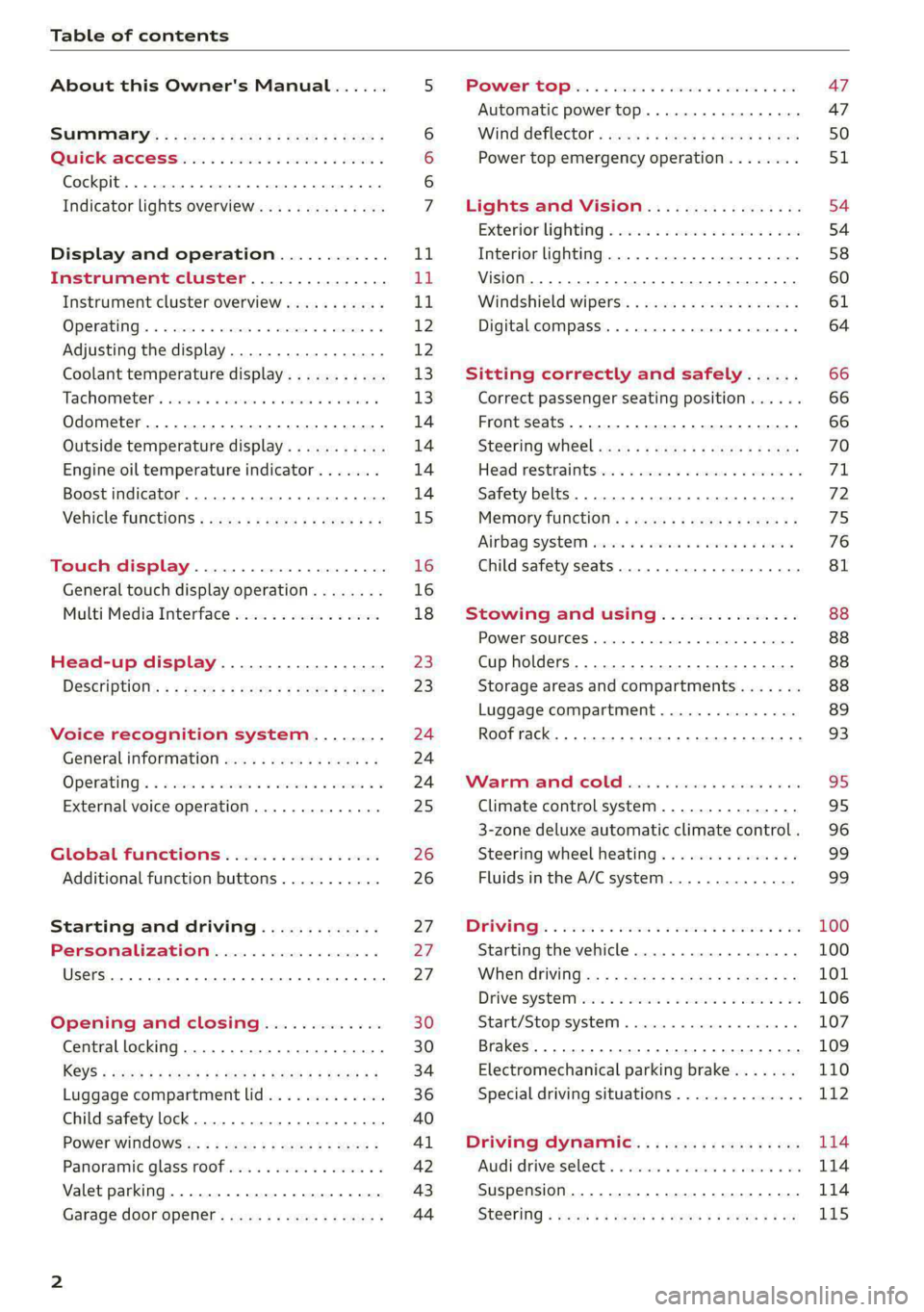
Table of contents
About this Owner's Manual......
SUMIMALY: ; « ss6% : osen ss sean cs poe s
QC CCeS Skis: si esis a 6 ores os ewe
Cockpit... 2... ee eee eee eee
Indicator lights overview...........0.
Display and operation............
Instrument cluster...............
Instrument cluster overview...........
Operating. ecco ws swacemn o © aero o erm 9
Adjusting the display.................
Coolant temperature display...........
Tachometer’. series s ewie so sie ¥ & overs
Odometer............ 0. cee eee eee eee
Outside temperature display...........
Engine oil temperature indicator.......
Boost indicator...............0--000-
Vehicle TuNCtiONnS ¢ ssc. ss sees ge eeew ge
Touch display.....................
General touch display operation........
Multi Media Interface................
Head-up display..................
DeSériptlonis ss wees « x wees so eee + ee
Voice recognition system........
Generalinformation.................
Operating’ « esses ss assur wx aeuew sv ewe &
External voice operation..............
Global FuUNCtiONS:. icc: 6 6 ese. 6 6 ces
Additional function buttons...........
Starting and driving.............
Personalization..................
Opening and closing.............
Central locking........-.....00-e eee
Child safety lock.............00.-0 08
Power Wind OwWSics «seus ys sms 5 4 wee
Panoramic glass roof.................
Valet parking...............00 eee eee
Garage door opener..........--..0005
NOD
OO
13
16
16 18
20
23
24 24 24
25
26
26
27 27 27 30 30
34
36
40
Al 42 43
Power tapi... «cones 0 6 soma ye eas ao ee 47
Automatic power top............-.05. 47
Wine GeRect6r « sews « 2 mean
Lights and Vision................. 54
Exterior lighting « ssscs< <2 coos 2 eeeme + aes 54
Tmterior UQhting)ecoo 6. secre» «scones 6 + euniece 58
VISION... ke eee eee 60
Windshield wipers................... 61
Digital compass............... 000 eee 64
Sitting correctly and safely...... 66
Correct passenger seating position...... 66
Front seatS 1.2... . 0. e eee eee ee eee 66
Steering WHEEL sw: s x newes 4 « eeu ee ane 70
Head restraintstr «+ cscs x a asteine vo owen © 71
Safety belts......... 0.0.0 e eee eee 72
Memory function's + asx «wees « eee a 75
Airbag system sian «+ suc oo sewn « 5 wees 76
Child
safety seats.............2..000- 81
Stowing and using............... 88
POWERSOUNGES serene = © vienna 9 1 anecene a enewane 88
Cup holders...........-..00 0.000 eee 88
Storage areas and compartments....... 88
Luggage compartment............... 89
Roof rack... ee eee eee eee 93
Warrmitanma colada: sé ccc 6 sonia 6 6 avs 95
Climate control system............... 95
3-zone deluxe automatic climate control. 96
Steering wheel heating............... 99
Fluids in the A/C system.............. 99
IMIR. 5 scscess 5 ames 3 & mam 8 BIW & oH 100
Starting the vehicle...............0.. 100
WHeNMOFIVING a + s eens + ¢ cates ¢ o eee Te: 101
Drive SYSTEM Mises so sce so oem oo cee 9 BU 106
Start/Stop system.............0 ee eee 107
Brakes... 2.2.0.0... cece eee ee eee 109
Electromechanical parking brake....... 110
Special driving situations.............. 112
Driving dynamic.................. 114
Audi driverselectis « ase «+ cana 2 0 marine a ove 114
Suspension..............0 0.00.0 000. 114
Steering « sce ss coun se sees gz eee ge ee 115
Page 8 of 302
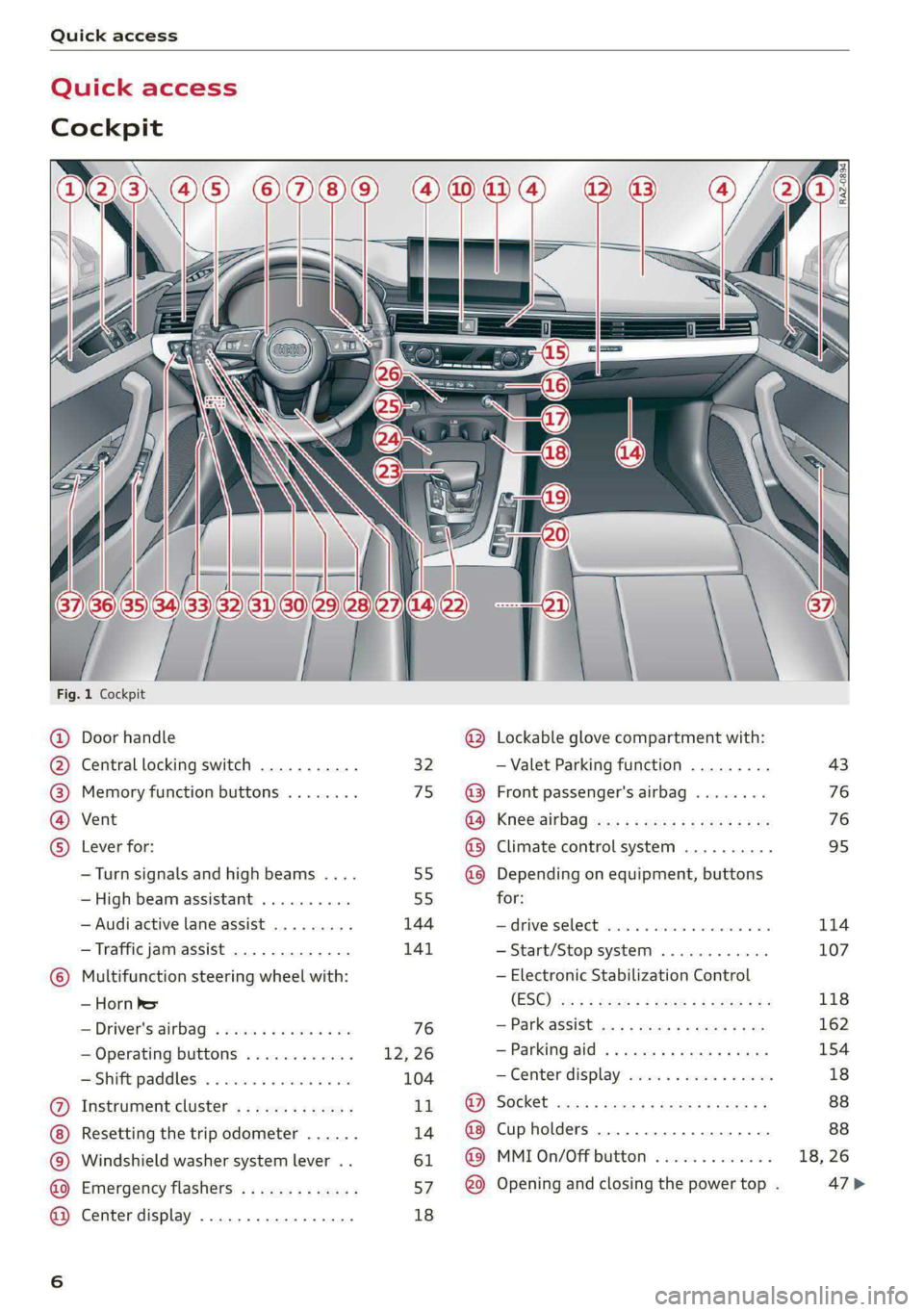
Quick access
Quick access
Cockpit
Fig. 1 Cockpit
@ @ @ @ ©
©
OO©eCOS
Door handle
Central locking switch
Memory function buttons
Vent
Lever for:
— Turn signals and high beams ....
— High beam assistant ..........
— Audi active lane assist .........
— Traffic jam assist .............
Multifunction steering wheel with:
— Horn he
— Driver's airbag
— Operating buttons
Shift paddles: « « cwwws « « savaxe w 0 von
Instrument cluster .............
Resetting the trip odometer ......
Windshield washer system lever ..
Emergency flashers .............
Center display .................
32
75
55)
55
144
141
76
12, 26
104
11
14
61
a7
18
®
OOO®
©OO®
Lockable glove compartment with:
— Valet Parking function
Front passenger's airbag
Knee airbag
Climate control system ..........
Depending on equipment, buttons
for:
drive SElLCCE cscs «6 soe © 4 enero © eve
— Start/Stop system
— Electronic Stabilization Control
(ESC)
— ParkeaSsist wx 5 2 came « x ga « ae
— Parking aid
—Center display ..............00.
Cup holders ...........-...0-0.
MMI On/Off button
Opening and closing the power top .
[RAZ-0894)
43
76
76
95
114
107
118
162
154
Page 9 of 302
8W7012721BA
Quick access
@) Center armrest with storage com-
partment. Depending on vehicle
equipment, it may have:
— Audi music interface .......... 203
—Audi phone box ............... 167
— Starting the engine when there is
A
MALPUNGEION 2 2 aceon 2 wom © & ae 100
@ Electromechanical parking brake
BUTEON scece: oo samen 2 oom 2 x ene 9 110
@ Selector lever (automatic transmis-
SION) seve & # sere & o ES Go OE GB 102
@4 Storage compartment .......... 88
@) [START ENGINE STOP] button .... 100
@ Audi music interface ............ 203
@) Steering wheel adjustment ...... 70
Lever for:
— Cruise control system ......... 130
— Audi adaptive cruise control .... 134
@9) Button for switching the head-up
display on/off, adjusting the height . 23
G0) Instrument illumination ......... 59
62 Connection port for the On Board
Diagnostic System (OBD) ........ 275
@) Light switch ................00. 54
@3 Hood release .........0...0.0.. 222
G4 All-weather lights button ........ 54
@5) Luggage compartment lid button . 36
G6 Exterior mirror adjustment ...... 60
62 Buttons for:
— Power windows .............. 41
— Central power window switch ... 41
—Child safety lock .............. 40
@) Tips
Some the equipment listed here is only instal-
led in certain models or is available as an op-
tion.
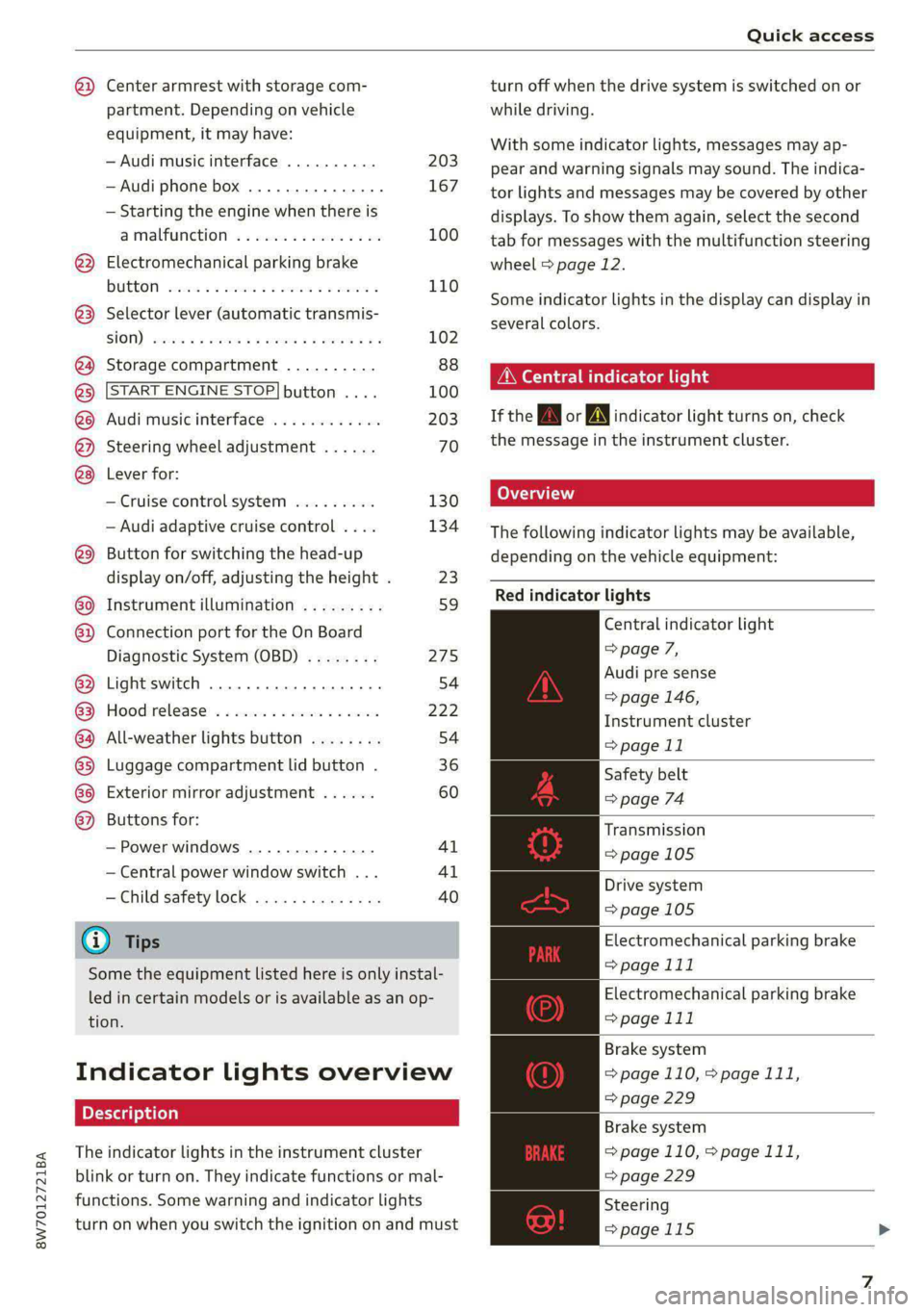
Indicator lights overview
The indicator lights in the instrument cluster
blink or turn on. They indicate functions or mal-
functions. Some warning and indicator lights
turn on when you switch the ignition on and must
turn off when the drive system is switched on or
while driving.
With some indicator lights, messages may ap-
pear and warning signals may sound. The indica-
tor lights and messages may be covered by other
displays. To show them again, select the second
tab for messages with the multifunction steering
wheel > page 12.
Some indicator lights in the display can display in
several colors.
OMe elle Lins
If the wA or N indicator light turns on, check
the message in the instrument cluster.
The following indicator lights may be available,
depending on the vehicle equipment:
Red indicator lights
Central indicator light
=> page 7,
Audi pre sense
=> page 146,
Instrument cluster
=> page 11
Safety belt
=> page 74
Transmission
=> page 105
Drive system
=>page 105
Electromechanical parking brake
> page 111
Electromechanical parking brake
=> page 111
Brake system
=> page 110, > page 111,
=> page 229
Brake system
=> page 110, > page 111,
=> page 229
Steering
=>page 115
Page 11 of 302
8W7012721BA
Quick access
Parking aid plus
=>page 155
Park assist
=> page 164
Rear cross-traffic assist
=> page 159
Tire pressure
=> page 252
Tire pressure
=> page 252
Bulb failure indicator
=> page 58
Adaptive light
=> page 58
Light/rain sensor
=> page 58, > page 63
Door lock
=> page 32
Battery in vehicle key
=> page 36
Power top
=> page 49
Distance warning
=> page 143
Side assist
=> page 152;
Exit warning
=> page 152
Audi adaptive cruise control
=> page 141,
Traffic jam assist
=> page 141
Steering intervention request
=> page 142, > page 144
Audi active lane assist
=> page 146
Audi pre sense
=> page 150
Emergency call function
=> page 182
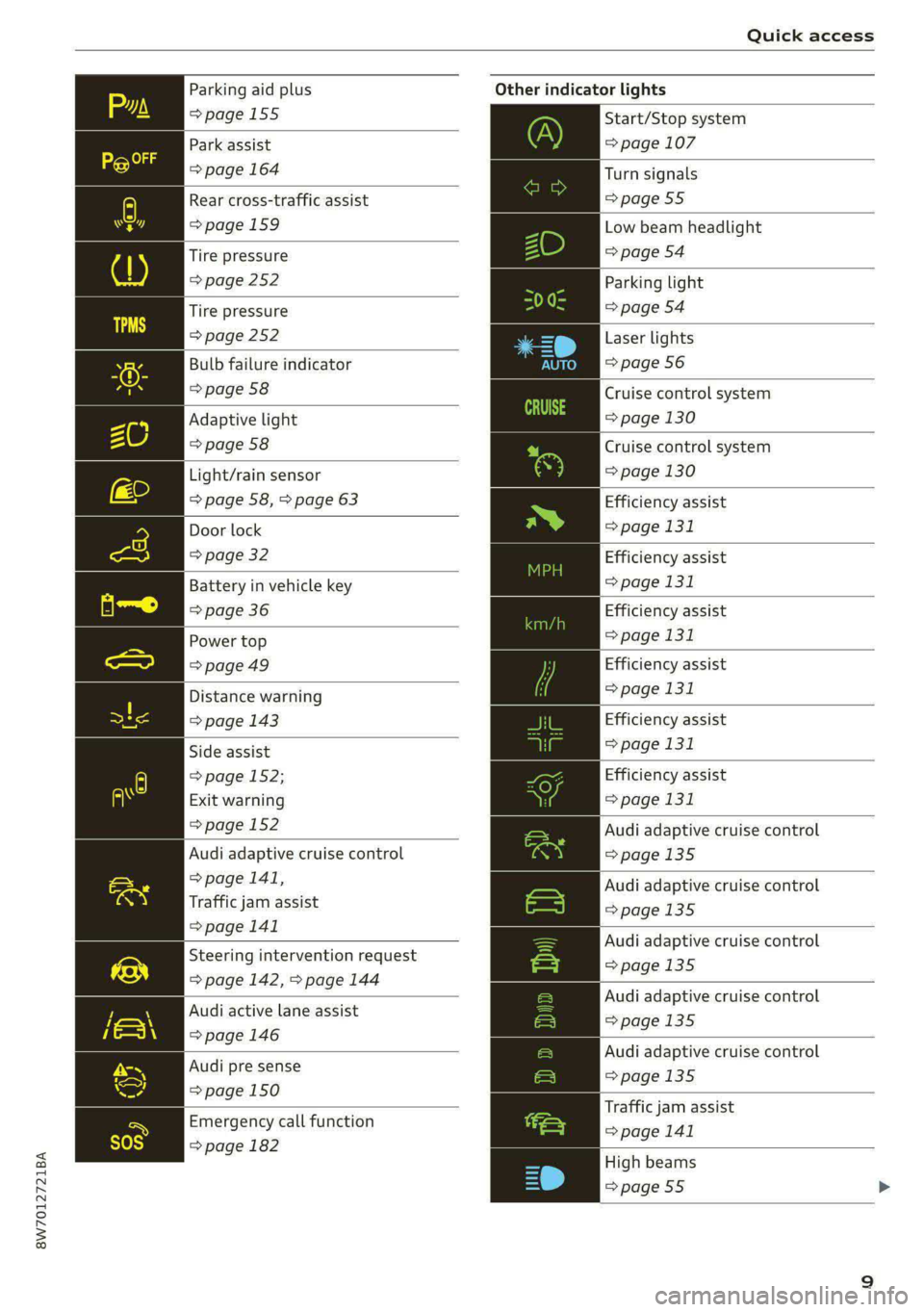
Other indicator lights
Start/Stop system
= page 107
Turn signals
=>page 55
Low beam headlight
=> page 54
Parking light
=> page 54
Laser lights
=> page 56
Cruise control system
=> page 130
Cruise control system
=> page 130
Efficiency assist
=> page 131
Efficiency assist
=> page 131
Efficiency assist
=> page 131
Efficiency assist
> page 131
Efficiency assist
=> page 131
Efficiency assist
> page 131
Audi adaptive cruise control
=>page 135
Audi adaptive cruise control
=>page 135
Audi adaptive cruise control
=>page 135
Audi adaptive cruise control
=>page 135
Audi adaptive cruise control
=>page 135
Traffic jam assist
> page 141
High beams
=> page 55
Page 12 of 302
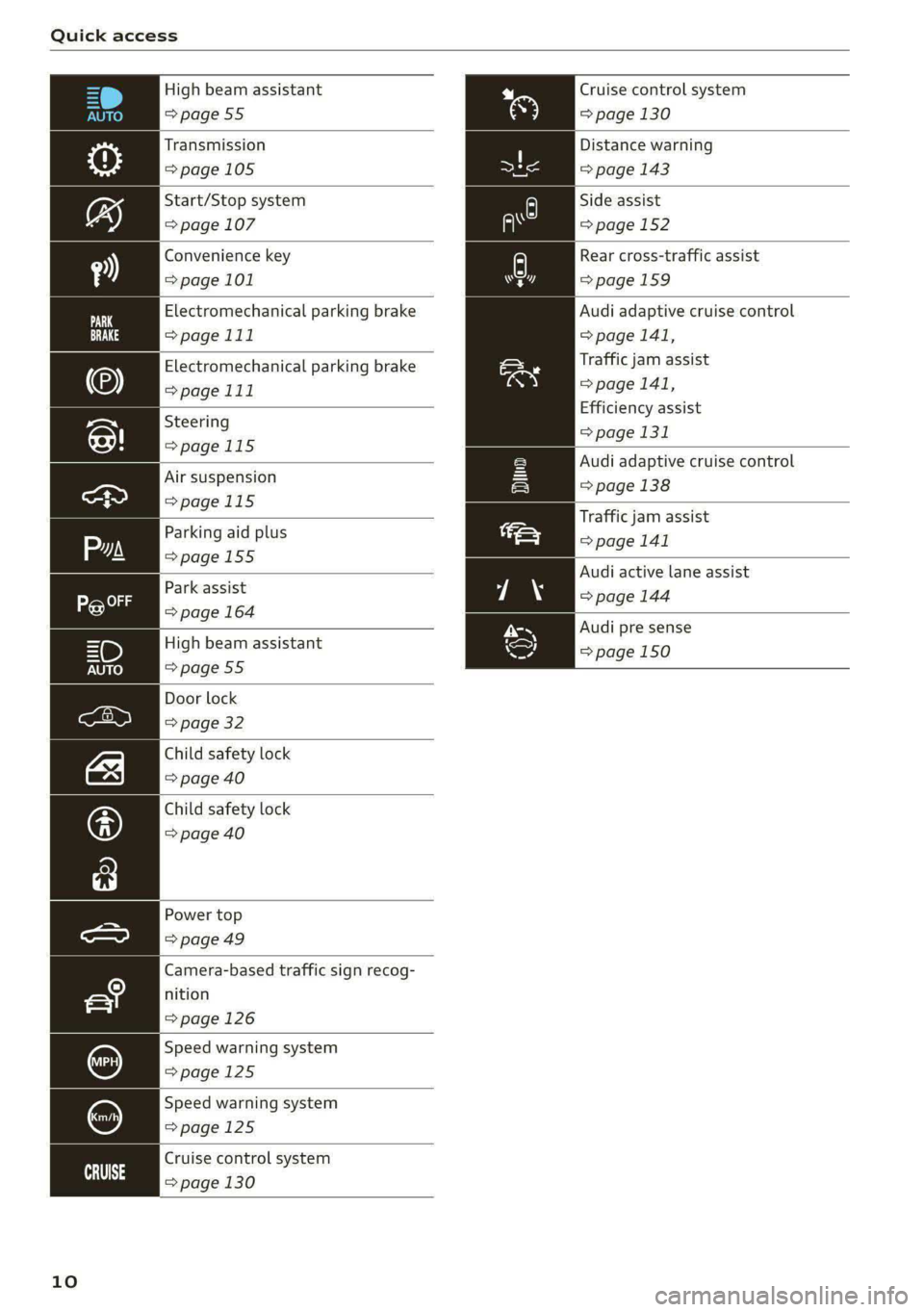
Quick access
High beam assistant
=>page 55
Transmission
=> page 105
Start/Stop system
=> page 107
Convenience key
=> page 101
Electromechanical parking brake
>page 111
Electromechanical parking brake
>page 111
Steering
=>page 115
Air suspension
=>page 115
Parking aid plus
=>page 155
Park assist
=> page 164
High beam assistant
=>page 55
Door lock
=> page 32
Child safety lock
=> page 40
Child safety lock
=> page 40
Power top
=>page 49
Camera-based traffic sign recog-
nition
=> page 126
Speed warning system
=>page 125
Speed warning system
=>page 125
Cruise control system
= page 130
eit 3
10
Cruise control system
=> page 130
Distance warning
=> page 143
Side assist
=> page 152
Rear cross-traffic assist
=>page 159
Audi adaptive cruise control
=> page 141,
Traffic jam assist
=> page 141,
Efficiency assist
=> page 131
Audi adaptive cruise control
=> page 138
Traffic jam assist
=> page 141
Audi active lane assist
=> page 144
Audi pre sense
=> page 150
Page 17 of 302

8W7012721BA
Instrument cluster
> Applies to: vehicles with analog instrument
cluster: Open the lap timer > page 128.
Vehicle functions
The trip computer is displayed in the first tab of
the driver information system. Additional vehicle
functions can be accessed depending on the vehi-
cle equipment.
> Press the £=] button on the multifunction steer-
ing wheel.
— On-board computer >page 15
—Lap times > page 128
— Lap statistics > page 128
— Reduced display > page 13
On-board computer
Resetting values to zero
Requirement: the Fuel consumption, Short-term
memory, or Long-term memory display must be
selected.
> To reset the values in the respective memory to
zero, press and hold the left thumbwheel on
the multifunction steering wheel for one sec-
ond.
Depending on the vehicle equipment, you can call
up the following displays in the on-board com-
puter one at a time by turning the left thumb-
wheel on the multifunction steering wheel:
— Time and date > page 213
— Level
— Digital speedometer
— Average consumption > page 15
— Range
— Short-term memory overview
— Long-term memory overview
— Energy consumers > page 15
— Driver assistance
— Traffic sign recognition and traffic light infor-
mation
Short-term memory and long-term memory
The short-term memory collects driving informa-
tion from the time the ignition is switched on un-
til it is switched off. If you continue driving within
two hours after switching the ignition off, the
new values will be included when calculating the
current trip information.
Unlike the short-term memory, the long-term
memory is not erased automatically. You can se-
lect the time period for evaluating trip informa-
tion yourself.
Average consumption
The current consumption can be shown using a
bar graph. The average consumption stored in
the short-term memory is also displayed. If the
bar is green, your vehicle is saving fuel (for exam-
ple, using recuperation).
Energy consumers
The Energy consumers view lists other equip-
ment that is currently affecting fuel consump-
tion. The display shows up to three equipment
items. The equipment using the most power is
listed first. If more than three items using power
are switched on, the equipment that is currently
using the most power is displayed. A gauge also
shows the current total consumption of all other
equipment.
Gi) Tips
The date, time of day, and time and date for-
mat can be set > page 213.
15
Page 69 of 302

Sitting correctly and safely
— Your thighs are lightly supported by the front
surface of the seat
window, or on the seat surfaces. This also
applies to passengers in the rear seats.
CG) Note
Applies to: vehicles with manually adjustable head re-
straints
— The backrest is in an upright position and your
back is resting against it
— You have a sufficient view of the area around
the vehicle
— You have a clear view of the instrument cluster,
indicator lights, and the head-up display*
To reduce the risk of damage, be very careful
when adjusting the seat to make sure the
head restraints do not hit the headliner or the
Panorama glass roof*.
ZA WARNING
— If you are too close to the steering wheel or
instrument panel, the airbag system cannot
provide the optimal protection, which in-
creases the risk of injury and death.
— To reduce the risk of injury in the event of
sudden braking maneuvers or accidents,
never drive with the backrest reclined very
far. The airbag system and seat belts can on-
ly provide optimal protection when the back-
rest is in an upright position and the driver
is wearing the seat belt correctly. If the
backrest is angled back too far, the safety
belt can shift to soft areas of the body, such
as the stomach, which increases the risk of
injury.
—To reduce the risk of an accident, only adjust
the seats when the vehicle is stationary.
— Be careful when adjusting the seat. Lack of
control or attention when adjusting can re-
sult in injuries due to pinching to vehicle oc-
cupants both in the front seats and rear
Seats,
— Never place objects in the driver's footwell.
Objects could shift and enter the area
around the pedals, which could prevent you
from using them. You would then be unable
to use the pedals if sudden driving or brak-
ing maneuvers were needed, which increas-
es the risk of an accident.
— Make sure that the floor mats are always se-
curely attached.
—To reduce the risk of an accident, never place
additional floor mats or other floor covers
over the installed floor mats, because this
reduces the pedal's range of motion and can
impair pedal operation.
Power seat adjustme
Fig. 65 Front seat: adjusting the seat (version B)
The settings depend on the vehicle equipment.
Adjusting the seat position
> To adjust the seat forward or backward, push
the button @) forward or backward.
> To adjust the seat upward or downward, push
the rear section of the button @) upward or
downward.
> To adjust the seat surface, press the front part
of the button @) upward or downward.
Adjusting the backrests
8W7012721BA
—To reduce the risk of injury, never place your
feet on the instrument panel, out of the
> To adjust the backrest forward or backward,
press the button @ forward or backward.
67
>
Page 72 of 302
Sitting correctly and safely
@ Tips
To prevent the head restraints from running
into the headliner, the power adjustable head
restraints* automatically move forward or up-
ward when the seat is adjusted.
cela aah keel a
Applies to: vehicles with a front center armrest
The front center armrest is located between the
front
seats.
Adjusting the center armrest
The settings depend on the vehicle equipment.
> To adjust the armrest forward or backward,
move the armrest in the desired direction.
> To adjust the angle, raise the armrest in stages.
> To move the armrest back into the original posi-
tion, raise it slightly out of the top level and
fold it downward.
A WARNING
In certain positions, the front center armrest
can interfere with the driver’s arm movement,
which increases the risk of injury.
Steering wheel
General information
Make sure that:
— The distance between your upper body and the
steering wheel is at least 10 in (25 cm)
— Your arms are bent slightly at the elbows
— You have a sufficient view of the area around
the vehicle and you have a clear view of the in-
strument cluster
— You are always holding the steering wheel with
both hands on the outer edge at the sides (9:00
and 3:00 position) when driving
Z\ WARNING
— If you are too close to the steering wheel,
the driver's airbag cannot provide optimal
protection, which increases the risk of injury
or fatality.
70
— Never hold the steering wheel in the 12:00
position or in any other way, such as holding
the center of the steering wheel. Otherwise,
your arms, hands, and head could be injured
in the event that the driver's airbag deploys.
Adjusting the steering wheel position
manually
Applies to: vehicles with manual steering wheel adjustment
The steering wheel position is adjustable up and
down and forward and back.
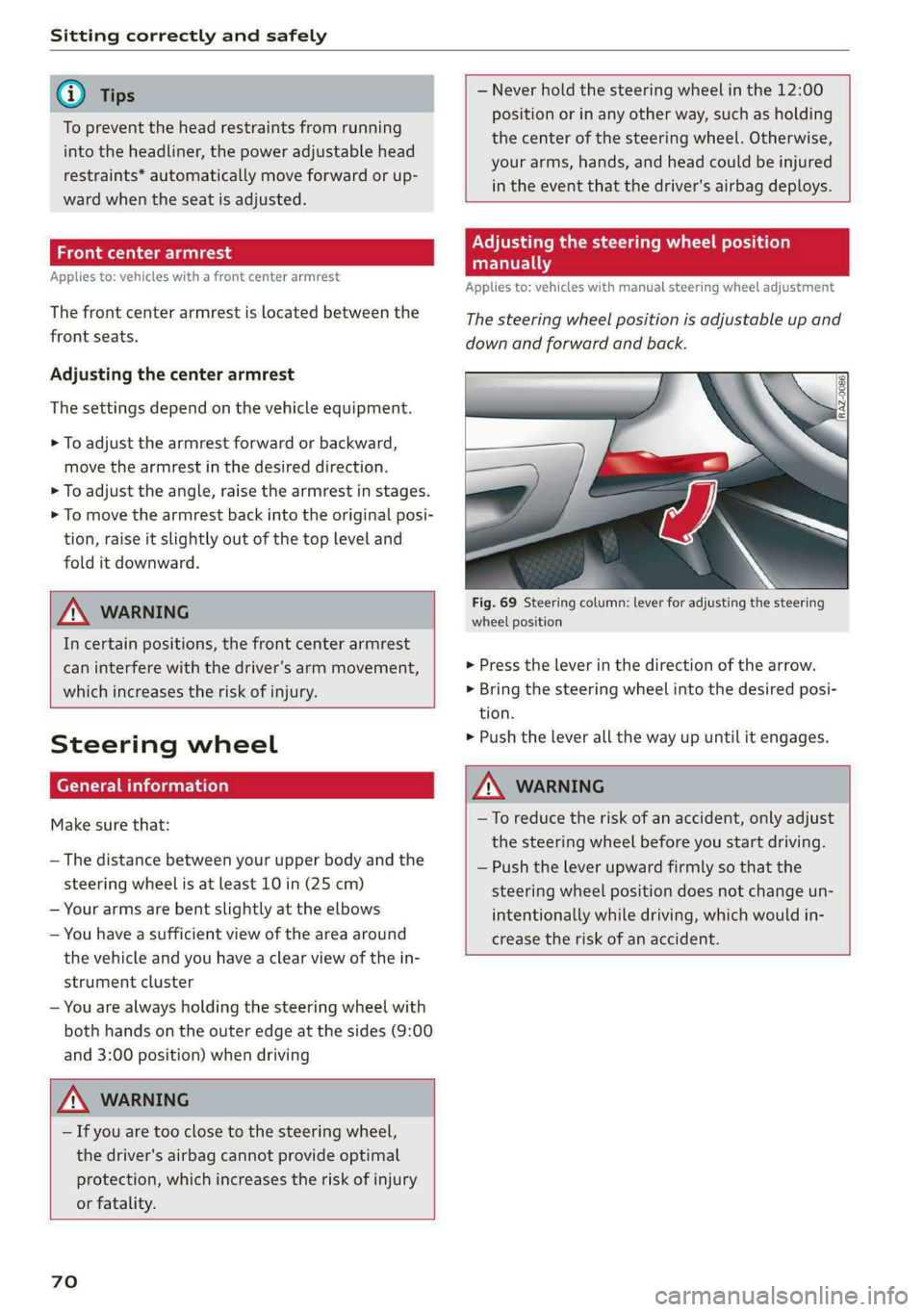
Fig. 69 Steering column: lever for adjusting the steering
wheel position
> Press the lever in the direction of the arrow.
> Bring the steering wheel into the desired posi-
tion.
> Push the lever all the way up until it engages.
A WARNING
—To reduce the risk of an accident, only adjust
the steering wheel before you start driving.
— Push the lever upward firmly so that the
steering wheel position does not change un-
intentionally while driving, which would in-
crease the risk of an accident.
Page 102 of 302

Driving
Driving
Starting the vehicle
eta
Applies to: vehicles with convenience key
RAZ-0843
Fig. 102 Center console: starting the engine
Requirement: the key must be in the vehicle.
Starting the engine
> Press and hold the brake pedal.
> Press the [START ENGINE STOP] button. The
engine will start.
Equipment that uses a lot of electricity is switch-
ed off temporarily when you start the engine. If
the engine does not start immediately, the start-
ing procedure stops automatically after a short
time. If this is the case, repeat the starting pro-
cedure after approximately 30 seconds.
Stopping the engine
> Bring the vehicle to a full stop.
> Press the [START ENGINE STOP] button. The
engine will switch off.
Applies to: vehicles with steering lock: The steer-
ing is locked when you turn off the engine and
open the driver's door. The steering lock helps
prevent vehicle theft. “P” must be engaged on
vehicles with an automatic transmission.
Stopping the engine in an emergency
If necessary in an emergency, the engine can also
be stopped while driving using the emergency off
function*.
> Press the [START ENGINE STOP] button twice in
a row or press and hold it one time.
100
Switching on and off
If you would like to switch the ignition on or off
without starting the engine, follow these steps:
> Press the [START ENGINE STOP] button without
pressing the brake pedal.
Switching the ignition off automatically
To prevent the vehicle battery from draining, the
ignition and possibly the exterior lighting may
switch off automatically.
Requirements:
— The Start/Stop system must have stopped the
engine.
— You must have left the vehicle for longer than
30 seconds.
— The ignition must be switched on.
Among other indicators, the system detects that
you have left the vehicle based on the following
factors:
— The driver's door has been opened.
— The driver's safety belt has been unbuckled.
— The brake pedal is not being pressed.
The ignition will also be switched off after 30 mi-
nutes or if you lock the vehicle from the outside.
ZA\ WARNING
—To reduce the risk of asphyxiation, never al-
low the engine to run in confined spaces.
— Never turn off the engine before the vehicle
has come to a complete stop. Switching it
off before the vehicle has stopped may im-
pair the function of the brake booster and
power steering. You would then need to use
more force to steer and brake the vehicle.
The fact that you cannot steer and brake as
usual may increase the risk of accidents and
serious injuries.
— Always select the “P” selector lever position
when parking the vehicle; otherwise, the ve-
hicle could roll away.
@) Note
— Avoid high engine speed, full throttle, and
heavy engine load if the engine has not
Page 103 of 302

8W7012721BA
Driving
reached operating temperature yet. You
could damage the engine.
— If the engine has been under heavy load for
an extended period of time, heat builds up
in the engine compartment after the engine
is switched off and there is a risk of damag-
ing the engine. For this reason, let the en-
gine run at idle for approximately two mi-
nutes before shutting it off.
@ Tips
— Brief noises are normal when starting and
stopping the vehicle and are no cause for
concern.
— For up to 10 minutes after stopping the en-
gine, the radiator fan may turn on again au-
tomatically or it may continue to run, even if
the ignition is switched off.
— It may not be possible to start the vehicle in
extremely low temperatures.
— Power will be fully available once the engine
is at operating temperature.
Messages
E Engine start system: malfunction! Please
contact Service
There is a malfunction in the engine start system.
Drive immediately to an authorized Audi dealer
or authorized Audi Service Facility to have the
malfunction repaired.
BB Remote control key: key not detected. Is the
key
still in the vehicle?
The vehicle key was removed from the vehicle
while the engine is running. If the vehicle key is
no longer in the vehicle, you cannot switch the ig-
nition on or start the engine once you stop it. You
also cannot lock the vehicle from the outside.
Remote control key: hold back of key
against the designated area. See owner's man-
ual
The battery in the vehicle key may be drained or
there may be a malfunction. To start the vehicle,
you must also hold the vehicle key against the lo-
cation shown ?) > page 100, fig. 102.
If the malfunction remains, drive immediately to
an authorized Audi dealer or authorized Audi
Service Facility to have the malfunction correct-
ed.
When driving
Starting to drive, stopping, and parking
Starting from a stop
>» Press and hold the brake pedal.
> Start the engine.
> Select a gear.
> Release the parking brake.
> Release the brake pedal. The vehicle may roll.
> Press the accelerator pedal to accelerate.
Stopping and parking
> Bring the vehicle to a full stop and press and
hold the brake pedal.
> Set the parking brake.
> Select the “P” selector lever position to secure
the vehicle from rolling away.
> Turn the steering wheel when parking on in-
clines so that the wheels will roll into the curb
if the vehicle starts moving.
> Switch off the ignition before leaving the vehi-
cle.
On hills, activate the parking brake first and then
shift into the "P" selector lever position. This pre-
vents too much stress from being placed on the
locking mechanism.
ZA\ WARNING
— Always set the parking brake when leaving
your vehicle, even if for a short period of
time. If the parking brake is not set, the ve-
hicle could roll away, increasing the risk of
an accident.
— Do not leave your vehicle unattended while
the engine is running, because this increases
the risk of an accident.
— If the parking brake is set, it can release au-
tomatically when the accelerator pedal is
pressed. To reduce the risk of an accident,
do not inadvertently press the accelerator
pedal and always shift into “P” when the ve-
hicle is stopped.
101