wheel AUDI A5 2021 Owners Manual
[x] Cancel search | Manufacturer: AUDI, Model Year: 2021, Model line: A5, Model: AUDI A5 2021Pages: 318, PDF Size: 85.96 MB
Page 276 of 318

Emergency assistance
Emergency assistance
General information
> Park the vehicle as far as possible from moving
traffic in the event of a breakdown. In the event
of a flat tire, park the vehicle ona level surface.
If you are ona steep hill, be especially careful.
> Set the parking brake.
> Switch the emergency flashers on.
> Have the passengers exit the vehicle. They
should move to a safe place, for example be-
hind a guard rail.
Z\ WARNING
Follow the steps given above. This is for your
protection and the for the safety of others on
the road.
Equipment
Applies to: vehicles with the vehicle tool kit, tire mobility kit,
and vehicle jack
Fig. 177 Luggage compartment: cargo floor cover
The vehicle tool kit, vehicle jack, tire mobility kit
and compressor are stored in the luggage com-
partment under the cargo floor cover.
» Applies to: Coupe/Sportback: To open the front
compartment, lift the cargo floor cover by the
strap @.
> To open the rear compartment, lift the cargo
floor cover by the plastic handle @).
> Applies to: Coupe/Cabriolet: Hook the plastic
handle @) into the luggage compartment seal
or above the power top storage compartment.
274
» Applies to: Coupe/Sportback: To remove the
cargo floor cover completely, pull it toward the
rear using the plastic handle @).
> Applies to: vehicles with spare tire: Turn the
handle counter-clockwise and remove the spare
tire.
» Applies to: Coupe/Cabriolet: Unhook the cargo
floor cover again before closing the luggage
compartment lid.
Depending on vehicle equipment, the vehicle tool
kit, tire mobility kit, and compressor may be lo-
cated under another cover that is secured with a
handwheel.
Applies to: Cabriolet: The vehicle jack is located
under the foam piece. To remove the foam piece,
you must remove the wind deflector*, the com-
pressor securing strap*, and the handwheel.
Applies to: vehicles with vehicle jack in the stor-
age bag: The bag with the vehicle jack is secured
to the tie-downs in the luggage compartment
and must be secured to the tie-downs again after
using it.
Z\ WARNING
Applies to: vehicles with vehicle jack in the storage bag
A vehicle jack that is unsecured, incorrectly se-
cured, or not secured in the luggage compart-
ment may slide out of place when braking,
turning, or in an accident, which increases the
risk of injuries to vehicle passengers. To re-
duce the risk of an accident, never transport
the vehicle jack without securing it.
G) Tips
—Insome vehicles, the rear compartment
may not open.
— The vehicle jack in your vehicle is mainte-
nance-free.
Tire mobility kit
Applies to: vehicles with tire mobility kit
> Read and follow the important safety precau-
tions > page 274.
» Set the parking brake.
Page 279 of 318
8W7012721BB
Emergency assistance
ZA WARNING
Pay attention to the following after repairing
the tire:
— Do not drive faster than 50 mph (80 km/h).
— Avoid hard acceleration or braking and driv-
ing fast around curves.
— The vehicle may become more difficult to
control.
— If the tire is too severely damaged, see an
authorized Audi dealer or authorized Audi
Service Facility for assistance.
@ For the sake of the environment
You can give the used tire sealant bottle to an
authorized Audi dealer or authorized Audi
Service Facility for disposal.
@ Tips
Remember to obtain a new bottle of sealant
from an authorized Audi dealer or authorized
Audi Service Facility after repairing a tire.
Changing a tire
You must complete the preparation before
changing a tire.
> Read and follow the important safety precau-
tions > page 274.
>» Set the parking brake.
> Select the “P” position.
>» When towing a trailer: disconnect the trailer
from your vehicle.
> Lay out the vehicle tool kit > page 274 and the
spare tire > page 280.
> Switch the ignition off.
Z\ WARNING
The vehicle must also be secured to prevent it
from rolling when using the vehicle jack”. Use
suitable objects to block the front and back of
the wheel that is diagonal from the wheel
with the flat tire.
NS
3
~~
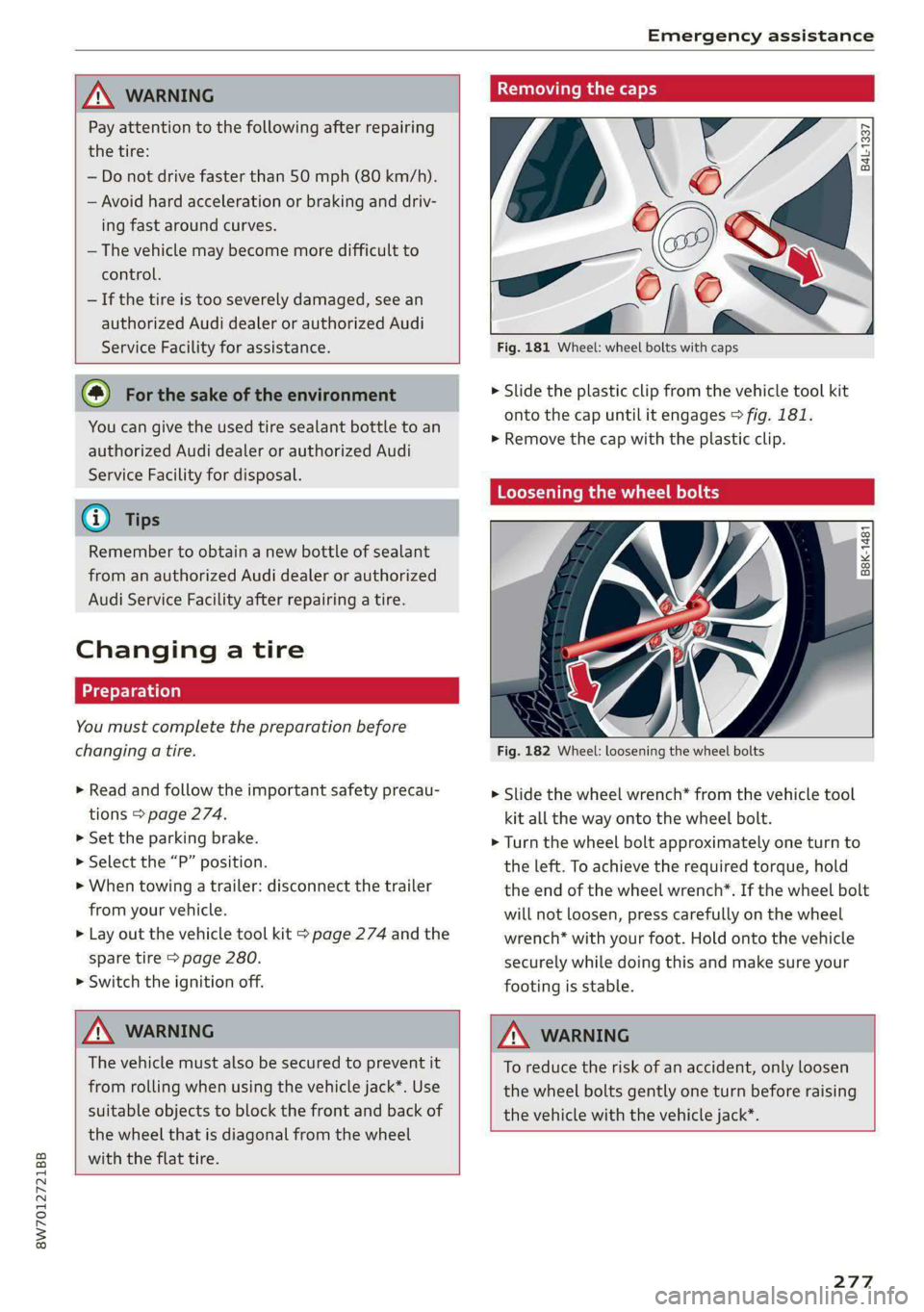
Fig. 181 Wheel: wheel bolts with caps
B4L-1337
> Slide the plastic clip from the vehicle tool kit
onto the cap until it engages > fig. 181.
>» Remove the cap with the plastic clip.
Loosening the wheel bolts
&
=
x © a
Fig. 182 Wheel: loosening the wheel bolts
> Slide the wheel wrench* from the vehicle tool
kit all the way onto the wheel bolt.
> Turn the wheel bolt approximately one turn to
the left. To achieve the required torque, hold
the end of the wheel wrench*. If the wheel bolt
will not loosen, press carefully on the wheel
wrench* with your foot. Hold onto the vehicle
securely while doing this and make sure your
footing is stable.
Z\ WARNING
To reduce the risk of an accident, only loosen
the wheel bolts gently one turn before raising
the vehicle with the vehicle jack*.
277
Page 280 of 318

Emergency assistance
Raising the vehicle
Applies to: vehicles with vehicle jack
B8W-0193
Fig. 184 Sill: positioning the vehicle jack
> Place the vehicle jack from the vehicle tool kit
ona firm surface. Use a flat, stable support if
necessary. On a slippery surface such as tile,
you should use a non-slip pad such as a rubber
mat > /\.
> Find the marking on the sill that is closest to
the tire that will be changed > fig. 183. Behind
the marking, there is a lifting point on the side
sill for the vehicle jack.
> Turn the handwheel to raise the vehicle jack un-
der the lifting point on the side sill until the
bracket on the jack @) completely covers the
notch on the vehicle.
> Align the vehicle jack so the bracket (@) covers
the notch and the base (2) is flat on the ground.
The base (2) must be directly under the mount-
ing point @.
> Mount the crank on the vehicle jack: insert the
crank into the opening on the handwheel. Turn
the crank to the left or right to secure it.
> Continue raising the vehicle jack with the crank
until the wheel lifts off the ground slightly.
278
AN WARNING
—To reduce the risk of injury, make sure no
one is in the vehicle before raising it.
— Make sure the vehicle jack is stable. The risk
of injury is increased when the ground is
slippery or soft, because the vehicle jack
could slide or sink.
— Only raise your vehicle with the vehicle jack
provided by the factory. If you use a vehicle
jack designed for another vehicle, your vehi-
cle could slip and cause injury.
— Position the vehicle jack only at the desig-
nated mounting points on the side sill and
align the jack. Otherwise, the vehicle jack
could slip and cause an injury if it does not
have sufficient hold on the vehicle.
—To reduce the risk of injury, do not raise any
other vehicles or other loads using the vehi-
cle jack provided by the factory.
—To reduce the risk of an accident, never start
the engine when the vehicle is raised.
—To reduce the risk of injury, no work should
be performed under the vehicle while it is
raised.
() Note
Do not lift the vehicle by the sill. Position the
vehicle jack only at the designated mounting
points on the side sill. Otherwise, your vehicle
could be damaged.
Page 281 of 318

8W7012721BB
Emergency assistance
Removing and installing a wheel
@ Rg Tt
“ 0 oO
B8K-1477
Removing a wheel
> Remove the top wheel bolt completely using
the hex socket in the screwdriver handle from
the vehicle tool kit > fig. 185 and place it ona
clean surface.
> Then install the alignment pin from the vehicle
tool kit by hand in the empty wheel bolt hole
> fig. 186”.
> Remove the rest of the wheel bolts.
> Remove the wheel >(). The alignment pin re-
mains in the hole while doing this.
Installing a wheel
Read the directions on > page 279 when instal-
ling unidirectional tires.
> Slide the wheel on over the alignment pin >@.
> Install the wheel bolts and tighten them gently
using the hex socket.
> Remove the alignment pin and tighten the re-
maining wheel bolt.
D Applies to: vehicles with ceramic brake rotors*: Use a sec-
ond alignment pin* from the vehicle tool kit for the lowest
hole according to the steps described for the first align-
ment pin.
> Carefully lower the vehicle using the vehicle
jack*.
> Tighten the wheel bolts in a diagonal pattern
using the wheel wrench*.
The wheel bolts must be clean and loosen and
tighten easily. Check the contact surfaces for the
wheel and hub. Contaminants on these surfaces
must be removed before installing the wheel.
ZX WARNING
— Read and follow the important information
and notes under > page 251.
— Never use the hex socket in the screwdriver
handle or the hex socket wrench with the
ratchet to loosen or tighten the wheel bolts.
This increases the risk of an accident, be-
cause you will not be able to achieve the cor-
rect tightening specification.
o Note
When removing or installing the wheel, the
rim could hit the brake rotor and damage the
rotor. Work carefully and have a second per-
son help you.
Unidirectional tires
A unidirectional tire profile is identified by arrows
on the tire sidewall that point in the running di-
rection. You must always maintain the specified
running direction. This is necessary to ensure the
tire's optimal performance in regard to adhesion,
running noise, and friction, and to reduce the risk
of hydroplaning.
To benefit fully from the advantages of the uni-
directional tire design, you should replace faulty
tires as soon as possible and restore the correct
running direction on all of the tires.
279
Page 282 of 318

Emergency assistance
> Reinstall the caps on the wheel bolts if necessa-
ry.
> Store the vehicle tool kit in its designated
place.
> If the removed wheel does not fit in the spare
wheel well, store it securely in the luggage
compartment > page 92.
> Check the tire pressure on the installed wheel
as soon as possible.
> Correct the tire pressure and store it in the MMI
=> page 263 or > page 265.
> The wheel bolt tightening specification must be
90 ft lbs (120 Nm). Have it checked as soon as
possible with a torque wrench. Drive carefully
until then.
> Have the faulty wheel replaced as quickly as
possible.
Space-saving spare tire
Applies to: vehicles with space-saving spare tire (compact
spare tire)
The spare tire is intended for short-term use only.
Have the damaged tire checked and replaced if
necessary by an authorized Audi dealer or author-
ized Audi Service Facility as soon as possible.
There are some restrictions on the use of the
compact spare tire. The compact spare tire has
been designed specifically for your type of vehi-
cle. Do not replace it with the spare tire from an-
other type of vehicle.
The compact spare tire is located in the luggage
compartment under the cargo floor cover
=> page 274.
The tire pressure must be adjusted to a specified
value listed on the tire pressure sticker
= page 254, fig. 176.
Snow chains
For technical reasons, the use of snow chains on
the compact spare tire is not permitted.
If you have to drive with snow chains and a front
tire fails, mount the spare tire in place of a rear
tire. Install the snow chains on the rear tire that
280
you removed, and install that in place of the
front tire that failed.
ZA\ WARNING
— After installing a spare tire, the tire pressure
must be checked as soon as possible.
—Do not drive faster than 50 mph (80 km/h)
with a compact spare tire. Driving faster
than that increases the risk of an accident.
—To reduce the risk of an accident, avoid hard
acceleration or braking and driving fast
around curves with the compact spare tire.
—To reduce the risk of an accident, never drive
with more than one compact spare tire.
— Normal summer or winter tires must not be
mounted on the compact spare wheel rim.
@) Note
Secure the spare tire in the spare tire well us-
ing
the handwheel in order to reduce the risk
of damage to other components.
Jump starting
You should only perform the steps that follow if
you have the necessary tools and technical ex-
pertise.
If the engine does not start because the vehicle
battery is drained, you can jump start your vehi-
cle using another vehicle. Jump start cables are
needed to do this.
Both vehicle batteries must have 12 V nominal
voltage. The voltage capacity (Ah) of the vehicle
battery that is giving power must not be less
than the capacity of the drained vehicle battery.
Jump start cable
Only use a jump start cable with a large enough
diameter. Note the manufacturer's specifica-
tions.
Only use a jump start cable with insulated termi-
nal clamps.
Positive cable - usually red.
Negative cable - usually black.
Page 285 of 318

8W7012721BB
Emergency assistance
(50 km), then transport the vehicle on a
special carrier.
— If the vehicle is towed by a tow truck at the
axle that is not permitted, this can cause se-
vere damage to the transmission.
— The vehicle must not be tow started for
technical reasons.
@® Tips
— If the power supply is interrupted, then it
will not be possible to move the selector
lever out of the "P" position. The parking
lock must be released using the emergency
release before towing the vehicle
=> page 108.
— Switch Audi pre sense* off > page 155 when
loading the vehicle onto a vehicle carrier,
train, ship, or other type of transportation,
or when towing the vehicle. This can prevent
an undesired intervention from the pre
sense* system.
— Follow the local legal regulations for tow-
ing.
Read and follow the important information under
=> page 282.
Preparations
> Only secure the towing cable or tow bar at the
designated towing loop > page 283.
> Make sure the towing cable is not twisted. Oth-
erwise it could disconnect from the towing loop
while towing.
> Switch the emergency flashers on in both
vehicles > page 61. However, do not do this if it
prohibited by law.
Towing vehicle (front)
> Only start to drive when the towing cable is
taut.
> Press the brake pedal very carefully.
» Avoid sudden braking or driving maneuvers.
Vehicle being towed (rear)
> Make sure the ignition is switched on so that
the steering wheel is not locked and so that you
can use the turn signals, the horn, and the
windshield wipers if needed > A\.
> Switching it off before the vehicle has stopped
may
impair the function of the brake booster
and power steering. You would then need to
use more force to steer and brake the vehicle.
> Release the parking brake > page 114.
> Select the “N” selector lever position.
> Make sure the towing cable is always taut.
JN WARNING
— Never tow a vehicle using a tow bar or tow-
ing cable if the vehicle does not have electri-
cal power.
— If the vehicle runs out of power while it is
being towed, stop towing the vehicle imme-
diately and consult an authorized Audi deal-
er or qualified repair facility.
Rear towing loop
Applies to: RS models
Fig. 190 Rear bumper: installing the towing loop
The threaded opening for the towing loop is lo-
cated on the right rear of the bumper.
> Remove the towing loop from the vehicle tool
kit > page 274.
283
>
Page 289 of 318

8W7012721BB
Fuses and bulbs
Fuse panel (4) (brown) Fuse panel © (black)
14 | Fuel injectors, engine control module 1 Left rear door control module, left rear
15 |Ignition coils, heated oxygen sensors power window
16 | Fuel pump 12 | Parking heater
Fuse panel @) (red) Fuse panel (0) (black)
No. | Equipment No. | Equipment
Anti-theft alarm system Front seat electronics, seat ventilation,
2. [Engine control module rearview mirror, rear climate ‘control sys-
1 |tem control panel, neck heating, front pas-
3 Left front seat electronics, lumbar sup- senger's airbag warning light, diagnostic
port, massaging seat connection
4_|Automatic transmission selector lever Diagnostic interface, vehicle electrical sys-
5 |Horn 2 tem control module
6 |Parking brake 3 /Sound generator
7 | Diagnostic interface 4 |Clutch position sensor
8 | Roof electronics control module 5 |Engine start, emergency shut-off
9 | Emergency call module 6 Diagnostic connection, traffic information
10 | Airbag control module antenna (TMC)
1 Electronic Stabilization Control (ESC), An- 7 |USB input
ti-Lock Braking System (ABS) 8 | Garage door opener
12 | Diagnostic connection, light/rain sensor 7 Audi adaptive cruise control, distance reg-
13 | Climate control system ulation
14 | Right front door control module 11 | Front camera
15 | Climate control system compressor 12 | Right headlight
16 Brake system pressure reservoir, left neck 13 | Left headlight
heating 14 |Transmission fluid cooling
Fuse panel © (black) Fuse panel © (red)
No. | Equipment No. | Equipment
1 |Front seat heating 1 | Ignition coils
2 |Windshield wipers 2 |Climate control system compressor
3 | Left headlight electronics 5 | Left headlight
4 | Panoramic glass roof 6 |Automatic transmission
5 |Left front door control module 7 | Instrument panel
6 | Sockets 8 | Climate control system blower
7 Right rear door control module, right rear 9 |Right headlight
power window 10 | Dynamic steering
All wheel drive control module 11 | Engine start
9 | Right headlight electronics
10 Windshield washer system/headlight
washer system control module
287
Page 290 of 318

Fuses and bulbs
Fuse assignment - Driver's side of the
(ole 4) g
Fig. 195 Driver side cockpit: fuse panel with plastic bracket
Fuse assignment - Left side of the luggage
compartment
—
Fuse panel
No. | Equipment
1 Convenience access and start authoriza-
tion control module
2. | Audi phone box, USB input
4 |Head-up display
5S |Audi music interface, USB input
6 | Front climate control system control panel cian othe luggage comparimen’: fuse pane!
7 |Steering column lock
8 | Center display Fuse panel (@) (black)
9 |Instrument cluster No. | Equipment
10 | Volume control 2 |Windshield defroster
11 | Light switch, switch module 3 | Windshield defroster
12 | Steering column electronics 5 |Suspension control
14 | Infotainment system 6 |Automatic transmission
16 Steering column electronics, steering 7 |Rear window defogger
wheel heating 8 |Rear seat heating
9 | Left tail lights
288
10 Airbag control module
a
Luggage compartment lid lock, fuel filler
door lock, convenience system control
module
12 Luggage compartment lid
Fuse panel @) (red)
No. Equipment
Electric compressor
Fuse panel © (brown)
No. Equipment
Exterior antenna
Page 291 of 318

8W7012721BB
Fuses and bulbs
Fuse panel © (brown)
2 | Audi phone box, safety belt microphone
Right front seat electronics, lumbar sup-
3 port, massaging seat
4 |Side assist
6 Interior monitoring, anti-theft alarm sys-
tem, tire pressure monitoring system
7 Convenience access and start authoriza-
tion control module
8 | Auxiliary heating, tank module
9 | Power top control module
Your vehicle is equipped with maintenance-free
headlights and tail lights. However, if a light bulb
needs to be replaced, please contact an author-
ized Audi dealer or authorized Audi Service Facili-
ty.
ZX WARNING
If you still would like to try replacing the
bulbs in your vehicle yourself, read the warn-
ings regarding working in the engine compart-
ment > A\ in General information on
page 230.
TV tuner, data exchange and telematics
a control module
11 | Auxiliary battery control module
12 | Garage door opener
13 | Rearview camera, peripheral cameras
14 | Right tail lights
16 | Airbag control module
Fuse panel (£) (red)
No. | Equipment
Right neck heating
Exhaust treatment
Power top control module
Right trailer hitch light
Trailer hitch
Left trailer hitch light
Trailer hitch socket
WOlLOIN
MW)
R]
W]e
All wheel drive control module, sport dif-
10
ferential
11 | Exhaust treatment
Bulbs
Replacing bulbs
Audi recommends having a bulb replaced by an
authorized Audi dealer or authorized Audi Service
Facility in cases of doubt. These facilities have
the correct tools and replacement parts as well
as the required technical knowledge.
LED lights*
@) Note
Make sure the covers are fitted correctly on
the headlight and tail light so that no water
will leak in from the outside and the light
function will not be impaired.
289
Page 303 of 318

8W7012721BB
Index
Numbers and
Symbols
3-zone deluxe automatic climate control.... 99
A
AIC cooling MOde:. « « vesiare «sas © wrens 6 avers 99
A/C system refrigerant oil............005 300
Acceleration measurement.............. 134
Accelerator pedal....... 0... cece eee eee ee 107
also refer to Accelerator pedal.......... 107
AGCOSSONICS © iiss 2s weer «wai + wave «6 o5a08 296
Active lane assist
refer to Audi active lane assist.......... 150
Adaptive cruise control................. 139
Adaptive dampers............000 ee eee 119
Adjusting air distribution (automatic climate
control system) ............-. ce eee eee 100
Adjusting the brightness................. 63
Adjusting the sound.................00- 221
Adjusting the temperature (automatic climate
control system) ........ cee eee eee 100
Adjusting the volume..............2.-005 30
Adjusting the volume (announcements).... 221
Adjusting the welcome sound............ 221
Aitbag’syStem « « sams s seen + wees os reese es 79
Alarm system
refer to Anti-theft alarm system.......... 37
Alignment pin (changing the wheel)....... 274
All-weather lights...............-..20--- 58
Allseason tires..........2.220202200005 260
All wheel drive
refer tOQUAtEOmms: 5 = yews « w eam eo ewe 120
Amazon Alexa integration
Media playback’. « oii. eons 6 6 cris 6 0 ow 211
Operating...............0..0 000.0000. 28
AMI
refer to Audi music interface........... 211
Android Auto
refer to Audi smartphone interface...... 219
Anti-lock braking system............0005 121
Anti-Slip Regulation. ................405 121
Anti-theft alarm system ..............000. 37
Apple CarPlay
refer to Audi smartphone interface...... 219
ASR
refer to Anti-Slip Regulation........
Audi active lane assist..............
Cleaning the camera area..........
Audi adaptive cruise control
Cleaning the sensors..............
Predictive control................
Traffic jam assist..........-..00-.
Audi adaptive light.................
Audi connect
FefEr LO CONNECE ss = « awe + e wane seas
Audi drive selects: 2 : ssa as xeaas x een
Audi music interface...............
Audio files...............002--000-
Safety measures ....... 0c. ee eens
Audi side assist
refer to Side assist................
Audi smartphone interface..........
Legalinformation................
Audi virtual cockpit
refer to Instrument cluster.........
AUTO
Automatic climate control system...
Automatic headlights.............
Auto Lock (central locking) ..........
Automatic climate control system....
Automatic luggage compartment lid....
Automatic transmission............
Automatic wipe/wash system........
Average consumption..............
Average speed............0.- 0000
B
Bag hooks............--6- eee sees
Band
refer to Frequency band...........
301