ignition AUDI A5 2021 Owner's Manual
[x] Cancel search | Manufacturer: AUDI, Model Year: 2021, Model line: A5, Model: AUDI A5 2021Pages: 318, PDF Size: 85.96 MB
Page 61 of 318

8W7012721BB
Lights and Vision
Turn signal and high beam lever
BFV-0012
Fig. 52 Lever: switching on the turn signal and high beams
The lever operates the turn signals, the high
beams and the headlight flasher.
Turn signals 15>
The turn signal will activate when you move the
lever into a turn signal position while the ignition
is switched on. The respective Kl or By indicator
light will flash.
@ Right turn signal
@® Left turn signal
The turn signal blinks three times if you tap the
lever (convenience turn signal).
If an indicator light blinks twice as fast as usual,
a turn signal bulb has failed. Carefully drive to an
authorized Audi dealer or authorized Audi Service
Facility immediately to have the malfunction cor-
rected.
High beams =O and headlight flasher
> Move the Lever to the corresponding position:
@) High beams on (vehicles with high beam assis-
tant*) > page 59
@ High beams off or headlight flasher
The
=o) indicator light in the instrument cluster
will turn on.
Z\ WARNING
High beams can cause glare for other drivers,
which increases the risk of an accident. For
this reason, only use the high beams or the
headlight flasher when they will not create
glare for other drivers.
thames
Applies to: vehicles with high beam assistant
The high beam assistant automatically turns the
high beams on or off depending on the surround-
ing conditions.
A camera on the rearview mirror mount can de-
tect light sources from other road users. The high
beams switch on or off automatically depending
on the position of vehicles driving ahead and on-
coming vehicles, the vehicle speed as well as oth-
er environmental factors and traffic conditions.
Activating high beam assistant
Requirement: the light switch must be in the AU-
TO position and the high beam assistant must be
switched on in the MMI > page 61.
> To activate the high beam assistant, tap the
lever forward @) > page 59, fig. 52. The fa&4 in-
dicator light will appear in the instrument clus-
ter display and the high beams will be switched
on or off automatically. The Ea indicator light
will turn on if the high beams are switched on.
Activating and deactivating the high beam
head lights manually
If the high beams did not switch on or off as ex-
pected, you may switch them on or off manually
instead:
> To activate the high beams manually, tap the
lever
forward @) > page 59, fig. 52. The & in-
dicator light will turn on.
> To deactivate the high beams manually, pull
the lever back @) > page 59, fig. 52. The high
beam assistant is deactivated.
Operating the headlight flasher
> To operate the headlight flashers, pull the lever
back @) > page 59, fig. 52. If the high beam
headlights are not switched on, the high beam
assistant will remain activated.
Z\ WARNING
— Observe the safety precautions and note the
limits of the assist systems, sensors, and
cameras > page 126.
59
Page 65 of 318

8W7012721BB
Lights and Vision
Interior lighting
Applies to: vehicles with interior lighting
The ambient lighting turns on when the ignition
is switched on. The O light switch position deacti-
vates the interior lighting.
You can adjust the interior lighting individually.
The settings depend on the vehicle equipment.
>» Applies to MMI: Select on the home screen: VE-
HICLE > Light & Visibility > Interior lighting.
You can choose from various color profiles, such
as Maritime.
Additional settings and profiles:
— Brightness: you can adjust the brightness for
all of the interior lighting.
— Individual: you can adjust the brightness and
color of the interior lighting separately, divided
into contour and surface lighting.
— Audi drive select: the contour and surface
lighting color changes depending on the select-
ed drive select* mode.
@ Tips
Depending on vehicle equipment, when the
drive select function is activated, the color of
the contour and surface lighting may briefly
change to red or blue when the interior tem-
perature is manually increased or decreased.
Display brightness
You can adjust the instrument and display illumi-
nation separately. The settings depend on the ve-
hicle equipment.
> Applies to MMI: select on the home screen:
SETTINGS > Display & brightness.
Possible settings in the MMI:
— Cockpit dimming
— Head-up display
—MMI
— Audi virtual cockpit
Pitt aaa ce aria eda)
Fig. 57 Light switch: instrument illumination
%, - You can adjust the background brightness of
the instruments and display illumination.
> Press the knob (@) to release it.
> Turn the knob toward "-" or "+"
crease the brightness.
> Press the knob again to return it to its original
Position.
@) Tips
Depending on vehicle equipment, the instru-
ment illumination (needles and gauges) may
turn on when the lights are off and the igni-
tion is switched on. The illumination for the
gauges reduces automatically and eventually
turns off as brightness outside increases. This
function reminds the driver to turn the low
beams on at the appropriate time.
to reduce or in-
Vision
Adjusting exterior mirrors
RAZ-0150
©
Fig. 58 Driver's door: knob for the exterior mirrors
©
> Turn the knob in the driver's door to the desired
position:
63
>
Page 66 of 318

Lights and Vision
0 - Deactivates all adjustment functions.
Q/ #- Selects the left or right exterior mirror.
To adjust the mirror glass in a mirror, press the
knob in the desired direction.
GA - Heats the mirror glass depending on the
outside temperature.
©) - Folds the exterior mirrors*. To fold the mir-
rors out, turn the knob to one of the other posi-
tions. In the MMI, you can select if the mirrors
fold in automatically when you lock the vehicle
=> page 35.
Front passenger's exterior mirror tilt
function*
Requirement: the knob must be in the position
for the front passenger’s exterior mirror.
The mirror surfaces tilt slightly when reverse
gear is selected to provide a better view, for ex-
ample of the edge of the curb.
You can adjust the mirror surface by turning the
knob in the desired direction.
The mirror moves from the reversing position
back to the original position:
— When you switch the ignition off
— When you drive forward at speeds faster than 9
mph (15 km/h).
— When the knob is no longer in the position for
the front passenger exterior mirror
Z\ WARNING
Curved mirror surfaces (for example convex)
enlarge the field of vision. However, they
make objects in the mirror appear smaller and
farther away. When using these mirrors to es-
timate your distance to vehicles behind you
when changing lanes, you could estimate in-
correctly, which increases the risk of an acci-
dent.
@) Note
— Applies to: vehicles with power folding exte-
rior mirrors: If the mirror housing was
moved by outside forces (such as an impact
when maneuvering), you must use the pow-
er folding function to fold the mirror all the
64
way out. The mirrors will make a loud noise
when they latch into place. The mirror hous-
ing must not be moved back into place by
hand because this could impair the function
of the mirror mechanism.
— Applies to: vehicles without power folding
exterior mirrors: If the mirror housing was
moved by outside forces (such as an impact
when maneuvering), you must move it back
in place by hand.
— If you wash the vehicle in an automatic car
wash, you must fold the exterior mirrors in
to reduce the risk of damage to the mirrors.
Never fold power folding exterior mirrors*
by hand. Only fold them in and out using
the power controls.
@) Tips
If the power adjusting function malfunctions,
the glass in both mirrors can be adjusted by
pressing on the edge of it by hand.
Dimming the mirrors
Manual dimming rearview mirror
> Pull the lever on the bottom of the mirror back.
Automatic dimming rearview mirror
Applies to: vehicles with automatic dimming mirrors
> The interior and exterior mirrors dim automati-
cally when light shines on them, for example
from headlights on a vehicle behind you.
ZA WARNING
Applies to: vehicles with automatic dimming mirrors
— Electrolyte fluid can leak out from broken
mirror glass. This liquid can irritate the skin,
eyes and respiratory system. If there is con-
tact with the fluid, flush immediately with
plenty of water. Consult a physician if neces-
sary.
— Repeated or long-term exposure to electro-
lyte fluid can lead to irritation of the air-
ways, especially in people with asthma or
other respiratory conditions. Take deep
breaths immediately after leaving the vehi-
cle or, if this is not possible, open all of the
doors and windows as wide as possible.
Page 68 of 318

Lights and Vision
© Clean the windshield &. The number of wipes
and afterwipes depends on how long the lever is
held in position ©).
The wipers wipe one time after several seconds of
driving to remove water droplets. You can switch
this function off by moving the lever to position
© within ten seconds of the afterwipe. The after-
wipe function is reactivated the next time you
switch the ignition on.
If you hold the lever in position ©) for longer
than half a second, the edge wiping feature will
be activated. This moves the windshield wipers
closer to the edge of the windshield and per-
forms an afterwipe to clean the residue that re-
sults from the wiping process from the edge of
the windshield. The function is available when
driving at speeds up to 75 mph (120 km/h).
The headlight washer system* operates only
when the low beam headlights are on. If you
move the lever into position ©, the headlights
will be cleaned at fixed intervals.
ZA WARNING
— The rain sensor is only intended to assist the
driver. The driver may still be responsible for
manually switching the wipers on based on
visibility
conditions.
— The windshield must not be treated with
water-repelling windshield coating agents.
Under unfavorable conditions, such as wet-
ness, darkness, and when the sun is low,
these coatings can cause increased glare,
which increases the risk of an accident. They
can also cause wiper blade chatter.
— Properly functioning windshield wiper
blades are required for a clear view and safe
driving > page 66, Cleaning/changing wip-
er blades.
@) Note
— If there is frost, make sure the windshield
wiper blades are not frozen to the wind-
shield. Switching on the windshield wipers
when the blades are frozen to the wind-
shield can damage the wiper blades.
66
— Prior to using a car wash, the windshield
wiper system must be switched off (lever in
position @). This prevents the wipers from
switching on unintentionally and causing
damage to the windshield wiper system.
G) Tips
— The windshield wipers switch off when the
ignition is switched off. You can activate the
windshield wipers after the ignition is
switched on again by moving the windshield
wiper lever to any position. The single wipe
function (lever in position @) also functions
when the ignition is switched off.
— Worn or dirty windshield wiper blades result
in streaking. This can affect the rain sensor
function. Check your windshield wiper
blades regularly.
— The washer fluid nozzles for the windshield
washer system are heated when the ignition
is on if the outside temperature is low.
— When stopping temporarily, such as at a
traffic light, the speed of the windshield
wipers automatically reduces by one level.
(eG ee a kes PUT Xa Cel
Fig. 61 Windshield wipers: changing the wiper blades
B8V-0696]
Wiper blade replacement position
> Switch off the ignition and hold the windshield
wiper lever in position @) > page 65, fig. 60 un-
til the windshield wiper moves into the wiper
blade replacement position.
> To bring the windshield wipers into the normal
position, switch the ignition on and hold the
windshield wiper lever in position @) until the
windshield wipers go back to the original posi-
tion, or drive faster than 8 mph (12 km/h). >
Page 70 of 318
Lights and Vision
The digital compass only works when the ignition Om
is turned on. The directions are indicated with ab-
breviations: N (north), NE (northeast), E (east), To prevent inaccurate compass readings, do
SE (southeast), S (south), SW (southwest), W not bring any remote controls, electrical devi-
(west), NW (northwest). ces or metallic objects near the mirror.
Applies to: vehicles with digital compass
B42-0405
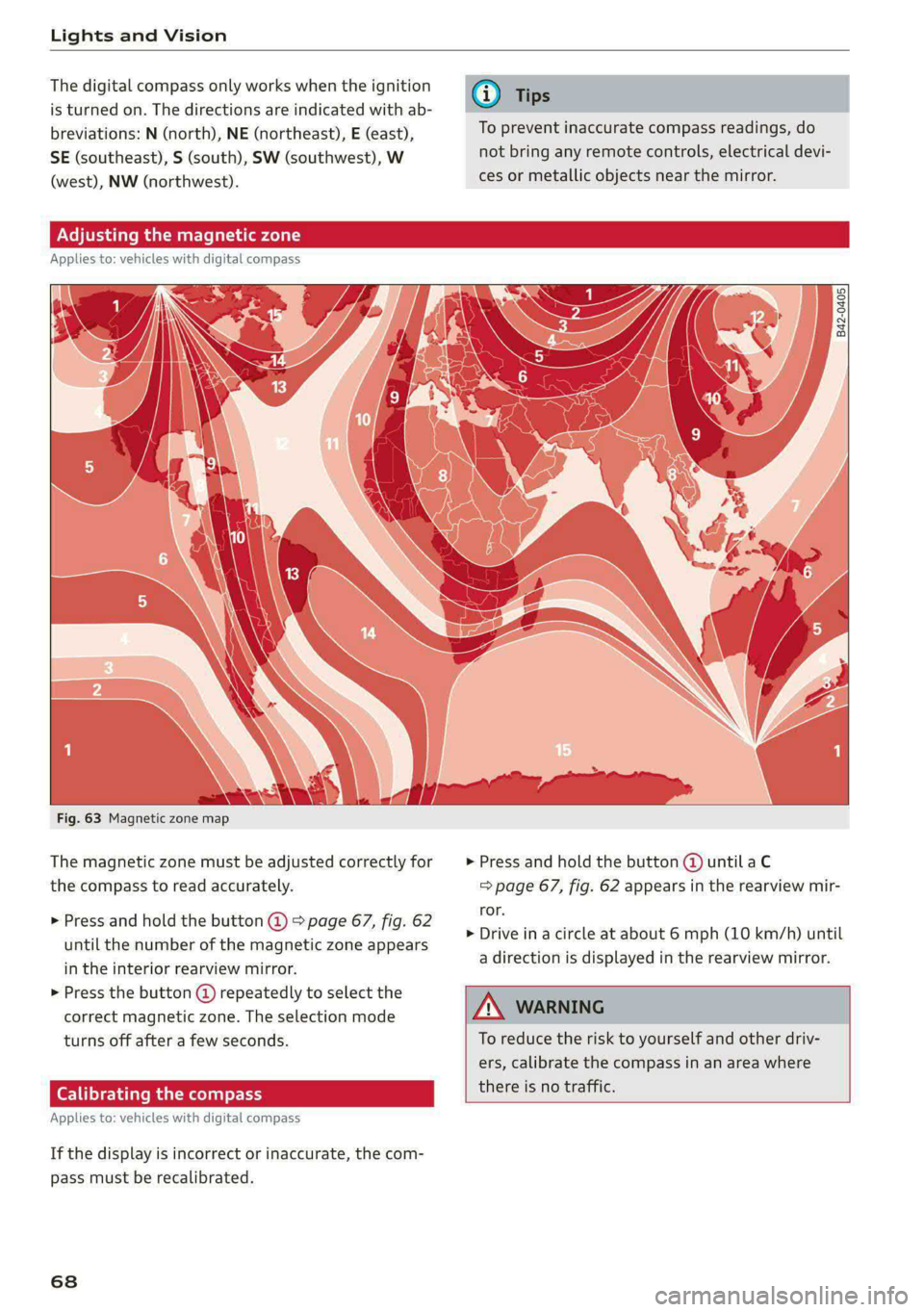
Fig. 63 Magnetic zone map
The magnetic zone must be adjusted correctly for > Press and hold the button @ untilaC
the compass to read accurately. => page 67, fig. 62 appears in the rearview mir-
ror.
> Drive in a circle at about 6 mph (10 km/h) until
a direction is displayed in the rearview mirror.
> Press and hold the button @ > page 67, fig. 62
until the number of the magnetic zone appears
in the interior rearview mirror.
> Press the button () repeatedly to select the
correct magnetic zone. The selection mode
turns off after a few seconds. To reduce the risk to yourself and other driv-
ers, calibrate the compass in an area where
there is no traffic.
Applies t
: vehicles with digital compass
If the display is incorrect or inaccurate, the com-
pass must be recalibrated.
68
Page 73 of 318

8W7012721BB
Sitting correctly and safely
Adjusting the lumbar support
> To adjust the lumbar support, press the button
@) in the desired direction.
Adjusting the upper thigh support
> To increase or decrease the upper thigh sup-
port, lift the handle @) and move the upper
thigh support.
Massage function
> To switch the massage function on or off, press
the button ©) > fig. 65.
Adjusting the side supports
You can adjust the side bolsters using the multi-
function button @) > fig. 65.
ZA WARNING
—To reduce the risk of an accident, only adjust
the driver's seat when the vehicle is station-
ary.
— The power front seats can also be adjusted
when the ignition is switched off. To reduce
the risk of injury, children should never be
left unattended in the vehicle for this rea-
son.
— Exercise caution when adjusting the seat
height. Unsupervised or careless seat adjust-
ment could cause parts of the body to get
pinched, which increases the risk of injury.
— The front seat backrests must not be re-
clined too far back when driving, because
this impairs the effectiveness of the safety
belts and airbag system, which increases the
risk of injury.
ON em amie MR
Applies to: vehicles with seat settings in the MMI
RAZ-0873,
Fig. 66 Center display: seat settings
The settings and the number of menus and but-
tons depend on the vehicle equipment.
Operating
Applies to: MMI
> Select on the home screen: VEHICLE > Seats.
> To access the various menus (4), swipe to the
left or right.
> To display the various seats, press ) or ( @.
The red coloring in the symbol @) indicates which
seat is selected.
Massage
See > page 71
Additional seat settings
See > page 71
aces cetera (ol)
Applies to: vehicles with massage function
Selecting the massage function
> To open the Massage menu, press the button
® > page 70, fig. 65.
Switching the massage function on or off
Applies to: MMI
> To switch the massage function on or off, press
the button ©) > page 70, fig. 65.
> Press Start/Stop on the MMI.
Setting the massage type and intensity
Applies to: MMI
> To adjust the massage type, press the desired
button on the MMI, for example Wave.
> To adjust the intensity of the massage, press
Intensity on the MMI repeatedly until the de-
sired level is reached.
G) Tips
The massage function switches off automati-
cally after approximately 10 minutes.
OX CTT eerie Mg
> Applies to: MMI: Select on the home screen:
VEHICLE > Seats.
> Swipe to the left if necessary.
71
Page 74 of 318

Sitting correctly and safely
Depending on the vehicle equipment, the follow-
ing options may be available.
Reset seat position
You can adjust the position of the front passeng-
er’s seat to match the driver's seat.
Driver seat entry assistance
Entry assistance makes it easier to enter or exit
the vehicle.
Front passenger seat adjustment
You can adjust the front passenger's side with the
driver's seat buttons.
(Fatt)
Applies to: vehicles with easy entry function
SSA stele
B8W-0269.
Fig. 68 Front seat: power entry assistance (version 2)
Entry assistance makes it easier for the rear pas-
sengers to enter and leave the vehicle.
Power entry assistance (version 1)
> Lift the handle @ © fig. 67 and fold the seat
backrest forward.
2) Requirement: the vehicle battery must have a sufficient
charge level.
72
> To move the seat all the way forward or to the
original position, press the (2) button briefly.
You can stop the seat by pressing the button
again.
> You can move the seat all the way forward even
when the backrest is upright. Press and hold
the button @) until the seat reaches your pre-
ferred position.
Power entry assistance (version 2)
Pull on the loop @ © fig. 68 and fold the back-
rest forward (2).
> To move the seat all the way forward or to the
original position, press the @) button briefly.
You can stop the seat by pressing the button
again.
ZA WARNING
Always make sure the front seats are upright
and securely locked in place.
— Power entry assistance also works when the
ignition is switched off) or when the vehicle
key is removed, so that rear seat passengers
can still move to the front of the vehicle in
an emergency situation. To reduce the risk
of injury, children should never be left unat-
tended in the vehicle for this reason.
@) Tips
To prevent the head restraints from running
into the headliner, the power adjustable head
restraints* automatically move forward or up-
ward when the seat is adjusted.
eames Cera ti
Applies to: vehicles with a front center armrest
The front center armrest is located between the
front seats.
Adjusting the center armrest
The settings depend on the vehicle equipment.
> To adjust the armrest forward or backward,
move the armrest in the desired direction. >
Page 79 of 318

8W7012721BB
Sitting correctly and safely
rivets on clothing in the area where the safety
belt is worn. Otherwise, the safety belt could
be damaged.
Belt po: tig
Applies to: vehicles with belt positioners
E 8 g
g
= a a
Fig. 75 Driver’s seat: belt positioner
Belt positioners make it easier to fasten the safe-
ty belts on the front seats.
The belt positioner extends automatically when
you close the door and switch the ignition on.
The belt positioner retracts automatically again
when the belt tongue locks into the belt latch, if
the safety belt is not fastened, if you switch the
ignition off, or if you open the door.
The belt positioners can cause injury or dam-
age if they pinch people or objects when ex-
tending or retracting.
em ee ale et Li1 am Loe
B4H-0462
Fig. 76 Belt buckle and belt latch
Fig. 77 Releasing the belt buckle from the belt latch
Observe the safety precautions > page 75.
Fastening the safety belt
> Pull the safety belt by the belt buckle evenly
across your chest and lap.
2 & a
2 a + a
> Insert the belt buckle in the belt latch belong-
ing to the seat until it audibly engages
> fig. 76.
> Pull on the belt to make sure that the belt is se-
curely locked in the latch.
Unfastening the safety belt
> Press the red button on the belt latch > fig. 77.
The belt buckle will pop out.
> Guide the belt back by hand so that the safety
belt can roll up more easily.
Safety belt monitoring system
Ba - If the indicator light turns on or flashes, a
safety belt is not fastened or it has been unbuck-
led while driving. Above certain speeds, addition-
al warning tones will sound.
Adjusting the height of the safety belt
B4G-0004
Fig. 78 Belt height adjustment for the front seats - safety
belt relay
77
>
Page 80 of 318

Sitting correctly and safely
> To move the belt higher, slide the safety belt re-
lay @) upward.
> To move the belt lower, press the release but-
ton @ and slide the safety belt relay 2) down-
ward.
> To check if the safety belt relay is securely
locked in place, pull firmly on the belt.
G) Tips
You can also adjust the height of the front
seats to change the position of the safety
belts.
ON eal ime ad olay
Belt retractor lock
The safety belts on the rear seats and on the
front passenger seat are equipped with a belt re-
tractor lock.
> If you secure a child safety seat with a safety
belt, the belt retractor lock on the safety belt
may need to be activated. Follow the instruc-
tions from the child safety seat manufacturer.
> When a vehicle passenger has fastened a safety
belt, the belt retractor lock should not be acti-
vated. If the belt retractor lock has been acti-
vated unexpectedly, deactivate it.
Deactivating or activating the belt retractor lock
=> page 87.
Safety belt retractor
The safety belts are equipped with an automatic
belt retractor. This automatic retractor allows the
safety belt to be pulled all the way out when the
belt is pulled slowly. However, the automatic re-
tractor locks during sudden braking maneuvers.
It also locks the belts when accelerating, driving
uphill, and driving around curves.
Belt force limiter
Safety belts with belt force limiters reduce the
force placed on the body by the safety belts dur-
ing a collision.
Safety belt pretensioners
In certain driving situations, safety belts may be
tightened with reversible belt tensioners when
78
you start driving. If the safety belt is too loose, it
will be tightened so that the belt will rest closer
to the body.
In some collisions, pyrotechnic belt tensioners
may secure the safety belts so that they cannot
loosen. This reduces forward movement by the
vehicle passengers.
ZA WARNING
The pyrotechnic system can only provide pro-
tection during one collision. If the pyrotechnic
belt tensioners deploy, the pretensioning sys-
tem must be replaced by an authorized Audi
dealer or authorized Audi Service Facility.
@ Tips
Smoke may be released when pyrotechnic belt
tensioners deploy. This is not a sign of a vehi-
cle fire.
Memory function
General information
Applies to: vehicles with memory function
With the memory function, you can save and call
up seat profiles using the memory buttons in the
door trim panel.
Depending on vehicle equipment, some settings
such as the driver’s seat and exterior mirror posi-
tion can be stored.
Storing and recalling a seat profile
Applies to: vehicles with memory function
The memory function buttons are located in the
door trim panel.
Storing a seat profile
SEE > Press the button. If the LED in the button
turns on, a seat profile can be stored.
> Push one of the numbered memory buttons. A
tone confirms that the settings were stored.
Recalling a seat profile
> When the a door is open and the ignition is
switched off, press the memory button once >
Page 81 of 318
8W7012721BB
Sitting correctly and safely
briefly. The seat will be fully adjusted to the
settings in the seat profile.
> If the door is closed or the ignition is switched
on, press and hold the memory button until the
seat is fully adjusted to the settings in the seat
profile.
ZX WARNING
— To reduce the risk of an accident, the seat
setting can only be recalled when the vehicle
is stationary.
— In an emergency, the recall process can be
canceled by pressing the seat adjustment
button on that seat.
Airbag system
ZA WARNING
— If you have not fastened your safety belt,
you are in an incorrect seating position, or
you are too close to the airbag system, the
airbag system will not be able to protect
you. This increases the risk of serious or fa-
tal
injuries. Make sure that every vehicle
passenger has their safety belt correctly fas-
tened and is sitting in a correct seating posi-
tion > page 69. This is necessary regardless
of whether the seat is equipped with an air-
bag or not.
— Never place your feet on the instrument
panel, out of the window, or on the seat sur-
faces. To help ensure that the airbag system
can deploy correctly, never bend forward or
lean on the door or the side window. Other-
wise, serious and possibly fatal injuries can
occur if the airbags deploy.
— People, animals, or objects between the
passengers and the airbag system can inter-
fere with the correct deployment of the air-
bag or can be thrown through the vehicle in-
terior, increasing the risk of serious or fatal
injuries. Make sure that nothing is located
between the vehicle occupants and the air-
bag system. Do not secure or transport any
objects within the deployment zone of the
airbag systems, especially on the steering
wheel, on the instrument panel, on the
doors, on the windows, or in the footwell.
— Never put stickers on the airbag system cov-
ers or cover them with any objects.
— Only lightweight clothing should be hung
from the garment hooks in the vehicle. Do
not use clothes hangers to hang clothing.
The pockets of the clothing must not con-
tain any heavy, breakable, or sharp-edged
objects. This could impair the effectiveness
of the side curtain airbags.
— You must not use seat or protective covers
that are not specifically approved for use on
Audi seats with side airbags. Since the side
airbags deploy from the seat backrest, such
covers could impair the protective function
of the side airbags.
— Damage to the original seat covers in the
side airbag deployment area must always be
repaired by an authorized Audi dealer or au-
thorized Audi Service Facility.
— Airbag system components are installed at
various locations in your vehicle. Incorrect
work or repairs on the vehicle could damage
the airbag system components or impair
their functionality. This may prevent the air-
bags from deploying or cause them to de-
ploy incorrectly in the event of an accident,
which increases the risk of serious or fatal
injuries. Only have an authorized Audi dealer
or authorized Audi Service Facility make re-
pairs or modifications to a vehicle.
— The airbag system can only provide protec-
tion during one collision. If there is another
collision, the airbag system will not deploy
again. If the airbag system has deployed,
have it replaced immediately by an author-
ized Audi dealer or authorized Audi Service
Facility.
— Fine dust may appear if the airbags deploy.
This is completely normal and does not indi-
cate a fire in the vehicle. The fine dust can ir-
ritate the skin and mucous membranes in
the eyes and can cause difficulty breathing,
particularly for individuals who have or have
had asthma or other health issues that af-
fect breathing. Exit the vehicle or open the
windows or doors to get access to fresh air.
79