parking brake AUDI A5 2021 Owner's Manual
[x] Cancel search | Manufacturer: AUDI, Model Year: 2021, Model line: A5, Model: AUDI A5 2021Pages: 318, PDF Size: 85.96 MB
Page 276 of 318

Emergency assistance
Emergency assistance
General information
> Park the vehicle as far as possible from moving
traffic in the event of a breakdown. In the event
of a flat tire, park the vehicle ona level surface.
If you are ona steep hill, be especially careful.
> Set the parking brake.
> Switch the emergency flashers on.
> Have the passengers exit the vehicle. They
should move to a safe place, for example be-
hind a guard rail.
Z\ WARNING
Follow the steps given above. This is for your
protection and the for the safety of others on
the road.
Equipment
Applies to: vehicles with the vehicle tool kit, tire mobility kit,
and vehicle jack
Fig. 177 Luggage compartment: cargo floor cover
The vehicle tool kit, vehicle jack, tire mobility kit
and compressor are stored in the luggage com-
partment under the cargo floor cover.
» Applies to: Coupe/Sportback: To open the front
compartment, lift the cargo floor cover by the
strap @.
> To open the rear compartment, lift the cargo
floor cover by the plastic handle @).
> Applies to: Coupe/Cabriolet: Hook the plastic
handle @) into the luggage compartment seal
or above the power top storage compartment.
274
» Applies to: Coupe/Sportback: To remove the
cargo floor cover completely, pull it toward the
rear using the plastic handle @).
> Applies to: vehicles with spare tire: Turn the
handle counter-clockwise and remove the spare
tire.
» Applies to: Coupe/Cabriolet: Unhook the cargo
floor cover again before closing the luggage
compartment lid.
Depending on vehicle equipment, the vehicle tool
kit, tire mobility kit, and compressor may be lo-
cated under another cover that is secured with a
handwheel.
Applies to: Cabriolet: The vehicle jack is located
under the foam piece. To remove the foam piece,
you must remove the wind deflector*, the com-
pressor securing strap*, and the handwheel.
Applies to: vehicles with vehicle jack in the stor-
age bag: The bag with the vehicle jack is secured
to the tie-downs in the luggage compartment
and must be secured to the tie-downs again after
using it.
Z\ WARNING
Applies to: vehicles with vehicle jack in the storage bag
A vehicle jack that is unsecured, incorrectly se-
cured, or not secured in the luggage compart-
ment may slide out of place when braking,
turning, or in an accident, which increases the
risk of injuries to vehicle passengers. To re-
duce the risk of an accident, never transport
the vehicle jack without securing it.
G) Tips
—Insome vehicles, the rear compartment
may not open.
— The vehicle jack in your vehicle is mainte-
nance-free.
Tire mobility kit
Applies to: vehicles with tire mobility kit
> Read and follow the important safety precau-
tions > page 274.
» Set the parking brake.
Page 279 of 318
8W7012721BB
Emergency assistance
ZA WARNING
Pay attention to the following after repairing
the tire:
— Do not drive faster than 50 mph (80 km/h).
— Avoid hard acceleration or braking and driv-
ing fast around curves.
— The vehicle may become more difficult to
control.
— If the tire is too severely damaged, see an
authorized Audi dealer or authorized Audi
Service Facility for assistance.
@ For the sake of the environment
You can give the used tire sealant bottle to an
authorized Audi dealer or authorized Audi
Service Facility for disposal.
@ Tips
Remember to obtain a new bottle of sealant
from an authorized Audi dealer or authorized
Audi Service Facility after repairing a tire.
Changing a tire
You must complete the preparation before
changing a tire.
> Read and follow the important safety precau-
tions > page 274.
>» Set the parking brake.
> Select the “P” position.
>» When towing a trailer: disconnect the trailer
from your vehicle.
> Lay out the vehicle tool kit > page 274 and the
spare tire > page 280.
> Switch the ignition off.
Z\ WARNING
The vehicle must also be secured to prevent it
from rolling when using the vehicle jack”. Use
suitable objects to block the front and back of
the wheel that is diagonal from the wheel
with the flat tire.
NS
3
~~
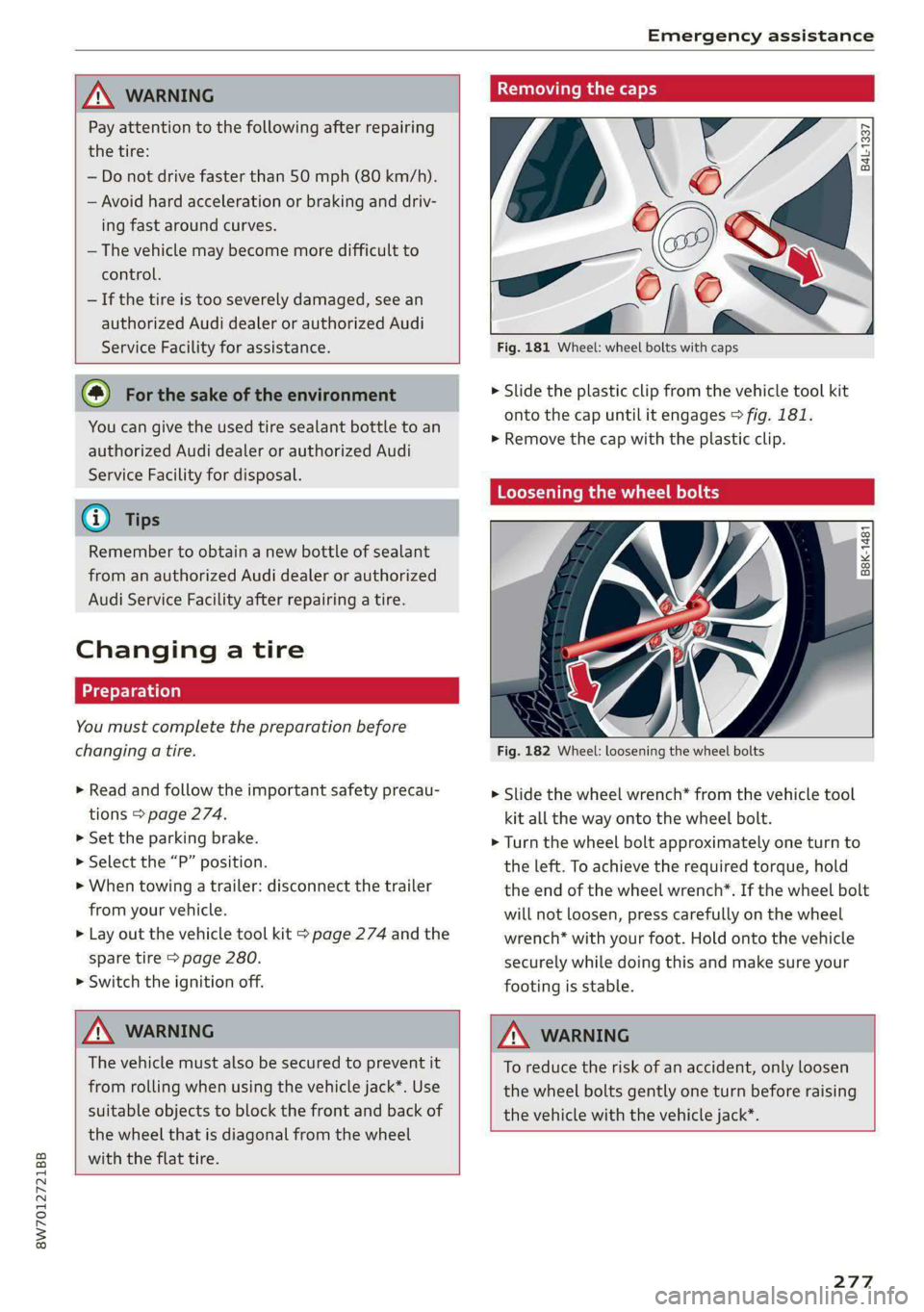
Fig. 181 Wheel: wheel bolts with caps
B4L-1337
> Slide the plastic clip from the vehicle tool kit
onto the cap until it engages > fig. 181.
>» Remove the cap with the plastic clip.
Loosening the wheel bolts
&
=
x © a
Fig. 182 Wheel: loosening the wheel bolts
> Slide the wheel wrench* from the vehicle tool
kit all the way onto the wheel bolt.
> Turn the wheel bolt approximately one turn to
the left. To achieve the required torque, hold
the end of the wheel wrench*. If the wheel bolt
will not loosen, press carefully on the wheel
wrench* with your foot. Hold onto the vehicle
securely while doing this and make sure your
footing is stable.
Z\ WARNING
To reduce the risk of an accident, only loosen
the wheel bolts gently one turn before raising
the vehicle with the vehicle jack*.
277
Page 285 of 318

8W7012721BB
Emergency assistance
(50 km), then transport the vehicle on a
special carrier.
— If the vehicle is towed by a tow truck at the
axle that is not permitted, this can cause se-
vere damage to the transmission.
— The vehicle must not be tow started for
technical reasons.
@® Tips
— If the power supply is interrupted, then it
will not be possible to move the selector
lever out of the "P" position. The parking
lock must be released using the emergency
release before towing the vehicle
=> page 108.
— Switch Audi pre sense* off > page 155 when
loading the vehicle onto a vehicle carrier,
train, ship, or other type of transportation,
or when towing the vehicle. This can prevent
an undesired intervention from the pre
sense* system.
— Follow the local legal regulations for tow-
ing.
Read and follow the important information under
=> page 282.
Preparations
> Only secure the towing cable or tow bar at the
designated towing loop > page 283.
> Make sure the towing cable is not twisted. Oth-
erwise it could disconnect from the towing loop
while towing.
> Switch the emergency flashers on in both
vehicles > page 61. However, do not do this if it
prohibited by law.
Towing vehicle (front)
> Only start to drive when the towing cable is
taut.
> Press the brake pedal very carefully.
» Avoid sudden braking or driving maneuvers.
Vehicle being towed (rear)
> Make sure the ignition is switched on so that
the steering wheel is not locked and so that you
can use the turn signals, the horn, and the
windshield wipers if needed > A\.
> Switching it off before the vehicle has stopped
may
impair the function of the brake booster
and power steering. You would then need to
use more force to steer and brake the vehicle.
> Release the parking brake > page 114.
> Select the “N” selector lever position.
> Make sure the towing cable is always taut.
JN WARNING
— Never tow a vehicle using a tow bar or tow-
ing cable if the vehicle does not have electri-
cal power.
— If the vehicle runs out of power while it is
being towed, stop towing the vehicle imme-
diately and consult an authorized Audi deal-
er or qualified repair facility.
Rear towing loop
Applies to: RS models
Fig. 190 Rear bumper: installing the towing loop
The threaded opening for the towing loop is lo-
cated on the right rear of the bumper.
> Remove the towing loop from the vehicle tool
kit > page 274.
283
>
Page 289 of 318

8W7012721BB
Fuses and bulbs
Fuse panel (4) (brown) Fuse panel © (black)
14 | Fuel injectors, engine control module 1 Left rear door control module, left rear
15 |Ignition coils, heated oxygen sensors power window
16 | Fuel pump 12 | Parking heater
Fuse panel @) (red) Fuse panel (0) (black)
No. | Equipment No. | Equipment
Anti-theft alarm system Front seat electronics, seat ventilation,
2. [Engine control module rearview mirror, rear climate ‘control sys-
1 |tem control panel, neck heating, front pas-
3 Left front seat electronics, lumbar sup- senger's airbag warning light, diagnostic
port, massaging seat connection
4_|Automatic transmission selector lever Diagnostic interface, vehicle electrical sys-
5 |Horn 2 tem control module
6 |Parking brake 3 /Sound generator
7 | Diagnostic interface 4 |Clutch position sensor
8 | Roof electronics control module 5 |Engine start, emergency shut-off
9 | Emergency call module 6 Diagnostic connection, traffic information
10 | Airbag control module antenna (TMC)
1 Electronic Stabilization Control (ESC), An- 7 |USB input
ti-Lock Braking System (ABS) 8 | Garage door opener
12 | Diagnostic connection, light/rain sensor 7 Audi adaptive cruise control, distance reg-
13 | Climate control system ulation
14 | Right front door control module 11 | Front camera
15 | Climate control system compressor 12 | Right headlight
16 Brake system pressure reservoir, left neck 13 | Left headlight
heating 14 |Transmission fluid cooling
Fuse panel © (black) Fuse panel © (red)
No. | Equipment No. | Equipment
1 |Front seat heating 1 | Ignition coils
2 |Windshield wipers 2 |Climate control system compressor
3 | Left headlight electronics 5 | Left headlight
4 | Panoramic glass roof 6 |Automatic transmission
5 |Left front door control module 7 | Instrument panel
6 | Sockets 8 | Climate control system blower
7 Right rear door control module, right rear 9 |Right headlight
power window 10 | Dynamic steering
All wheel drive control module 11 | Engine start
9 | Right headlight electronics
10 Windshield washer system/headlight
washer system control module
287
Page 306 of 318

Index
Drive select
refer to Audi drive select.............0. 118
Drive system... ... 00.20. cee eee eee eee 110
Audi driveselect . cc.0i ices d ceca cain 118
Drive system (message) ........00. eee eee 112
Driving down hills............0. 00.0 eee 116
DrivING PFOGKAME. « « eserce «© sone 6 0 sons aw ane 146
Driving through water.................. 116
DrIVING ELIMI 5 & cescinne 6 5 cose vo een & enawens a 17
Driving tips
Driving through water...............0- 116
Efficient driving................00000- 110
Uphilland downhill................... 116
DFIVING:-trACK es: « 2 sews & 2 seme xc owe oe 116
Driving Up:hills. < 2 sees + » yews 5» ewes c 2 eee 116
Dust filter
refer to Pollutant filter................. 98
DY MAMIE StEEKING = wwe = 2 qewe a 2 anes = noR 119
E
E-itidilss < same « 2 sau: ¢ 5 sepa 2 s neem 2 5 pee 180
SOCHINGSiccsain » sew © © wravens a & soomem w V soveTS 6 180
EDL
refer to Electronic Differential Lock...... 121
EDR
refer to Event Data Recorder (EDR)...... 290
Efficiency assist.............0 02. eee ee 137
PREGietiVe CONTTOlacs ¢ = wax + xeme 2 2 pene 142
Electrical system. ...........0.0020000. 239
Electromechanical parking brake......... 114
Electronic Differential Lock.............. 121
Electronic immobilizer................00. 39
Electronic Stabilization Control........... 121,
Embedded SIM Card « seswiie ss sien os wiven oo 8 183
Emergency assistance ............00000e 274
Emergency braking function............. 115
Emergency call.........cceeeeveee 178, 187
Emergency flashers...............000005 61
Emergency mode............020 eee eee 109
Emergency operation
DOOGIS s seas 3 ¢ Sone 2b ROMA ca aK o ANeRE se 37
Fuel tillerdoor ic = swiss a 2 saves wo wien «2 axe 229
Luggage compartment lid............... 44
Panoramic glass roof...............2-0. 47
Emissions control system..............- 229
304
EMErGy’CONSUMENS Hs 6 ceive e sieves ww neeewe wo x
Energy management... 006. eeee ee eens
Engine
Breakingin.............. cece eee eee
Emergency StOpies : « sews ss weea s eae gs
JUMPISTAREIING » « canseis ws wssins 6 # oeenss a a une
Start/Stop system...........--0000005
Starting/Stopping ws ss caw se ewes yams
Engine compartment
Opening and closing the hood..........
Overview ......- 2. eee cee eee eee
Safety precautions............-0.ee0ee
Engine data
refer to Sport displays..................
Engine oil
AGING «scence ox cesses > 5 eons owes av ara
Changing.......... eee eee eee eee
Checking oillevel.............---000--
CONSUMPTION ess « & sivees 2 o onerees & o ewer @ 8 ov
Indicator light..............02..0000-
Replacement interval.................
Temperature display.................-.
Engine sound
Audi drive select............ 0.00000
Engine Start/Stop mode
refer to Start/Stop system.............
Engine startsSySte ny wcusooe » scaseas o « seas oo one
Engine stop
refer to Start/Stop system.............
Entry/exit lighting. ............0 0...
Entry ASSISTANGE!S. 4 « scusnze » » sxnzece » o asnseue ow anes
also refer to Exit assistance.............
GlSO refer to Seats ¢ seen % 3 aes sv awn % Ears
Environment
Unleaded gasoline..................0.
ESG
refer to Electronic Stabilization Control...
ESCSpOlbnnsos 5 2 omners x x emmes oo nveoeee ao manne ©
eSIM
refer to Embedded SIM card............
Event Data Recorder (EDR)..............
Exitassistamee « scccene a 0 sxesese = v vreuain 3 o anes © 5
EXHE WAP Gicnes 2 a caees vw cscs «Heaven «© enone
Exterionantenna s wise <2 wees 2 6 mec ss oes
Exterior lighting + « ¢ see: +» sees y sae ees
Page 310 of 318

MUTI Gis 5 x secvess © v comers ov cumaees @ a sanawes ow 8 omens 30
MYAUGL 5 & swceis & o seesein 2 8 mime @ remenew © wee 31, 183
myAudi navigation................. 190, 193
MYAUGI USERS « seus < & eee & = Hees ee Hew eee 31
N
Natural leather care and cleaning......... 271
Navigation.....................0.000. 190
Betterroute cic: s nies se eeew s wae ss wen 199
Calling... 2... ee eee eee eee 193
Changing the scale................... 193
also referto Map : seas: ceea ss tees ee es 194
Navigation database
Version information................6.4 224
Navigation (instrument cluster) .......... 196
Neck heating =< =. gecs seve s seve s bene 101
NHTSA « seme: « 9 szae 2 2 see © 2 see 2 2 ee 296
Notification center.............0ceeeeuee 23
Oo
Octane rating (gasoline)................ 226
Odometer... ... ee cee eee eee eee ee 15
RESCUUING bac: « ewes & 2 EmeG Fy ReGE s x eeeH 8 15
Office address
refer to Business address.............. 196
OFFADUttON)| + sy 5 < ame + 7 aauee & o wee 2 ge 99
Oil
refer tO EMgine Gib. 2. cwee 2 vse s wean es 233:
On-board computer...........0...0000ee 17
On Board Diagnostic System (OBD)... 229, 290
Online map
refer to Satellite map................. 197
QALIMNG AIO « wrasse & & wees 5 & eeens « B Howe y oe 206
also refer to Online radio.......... 206, 207
Online roadside assistance.............. 188
Online services
refertoconnect.......-....-.ee ee eee 182
Online system update.................. 222
Online traffic information............... 199
Openings « = wen ss asssna se eam ae een 2 wee 34
Automatic luggage compartment lid...... 42
Convenience opening............-.0e00- 46
Fueltillerdoor's 2 = swiss a 2 sanew wo ance <2 ae 227
FOO « «scones» m vssnce i oi sean ow somes «0: omexeite 231
Luggage compartment lid............... 42
308
Luggage compartment lid with foot motion . 43
Panoramic glass roof.............00e ee 47
POWEP tO Pivess + manu 5 & mei x ¢ BOE & E emE 6 Ee 51
Sunshade (nO) wor « « scsces ww wom x 8 swswace wa 47
Windows ...... 0.0.0 cece cece ee eee eee 45
Opening and closing
refer to Unlocking and locking........ 34, 39
Operating
Head-up display..............-002eeeee 26
ANStruMeNt CLUSTER « ssevers ¢ wcuscsin aresnce a ¥ ae 13
Multifunction steering wheel............ 13
Multi Media Interface « oy... ee se oe 18; 21
TOXIN PU Bis & 2 sscnaon & snawene ae veces ao peewee oo 24
Touch display......... 0.0.0 eee eee eee 18
Voice recognition system............... 27
Optional equipment number............. 299
Options
Médidiwis = « ees se cow g s wawe & o Heme os eer 216
RadiO wiswscs i 0 isivane wo aueuens a a woenire a 8 asmnoed oo 207
Overview (COCKpIt) ws: ss save ¥ 0 onesie oo wane ava 6
P
Paint COd Gis < o wens so ners oe eee oe Hoe a 299
Paint damage swe « = sews +s eee te eee ee ee 269
PANIG@ BUttOMias s ¢ sure ae em zo ete eae 38, 39
PANIC function .............0. 0c eee eee 38
Panoramic glass roof................200. 47
Convenience opening and closing......... 46
Emergency closing wr: «scien cman ae cere 47
Interior airflow................000 eee 47
QuICK OPENING wwe ss wows s i sews + bees oe: 47
Park@SsiSt wan sx sane 5 ¢ HOINR s 3 eres oD eR 168
Parking ..... 60. c cece eee eee ee 104
Parking aid... 1... eee eee 159
Adjusting the volume..............0.. 160
Automatic activation.................. 159.
Cleaning the sensors/camera........... 269
Park ASSiSt’: = x came: 5 2 wean 5 x eH ss eee GE 168
Parkingraid Plus: = « sss x 6 were 26 wens 3 0 159
Parking space search.................. 166
Peripheral cameras...............004- 161
Rearview came sviies so osea es eee ee een 161
Parking and maneuvering..............- 159
Parking brake
refer to Electromechanical parking brake. 114
Parking lightsiess 2 + aces sa aera se nee se eee 58
Page 312 of 318

Index
Replacement parts.............-.020005 296
Replacing bulbsescs. «6 voi 2 6 sree #0 were 2 289
Reporting
Safety Defects................ 296
Reverse gear
TEPEFLO.GOANS & secs ¥ waveere ¥ wave eo eee 105
RIMS! « aces oo smn oo corse oo Ree De BS 259
Cleaning....... 00... cece cece 269
Rolling. ..... 0... cee eee ee eee eee 104
Rolling ability
Electromechanical parking brake........ 114
Transmission idlés « < seo x y ose 2 eee « 2 106
Roof
refer to Panoramic glass roof............ 47
Roof load « « seas seee x ¢ peen sc Pee ex eS 300
ROOPECK ose : sae « £ sexe es Heme ss meu eee 96
alsorreferito Roof taCkivrses «sce a wow «oe 96
Route guidance
SEOPPLING erie «© sures © & senmns © o sammeee wo cane 194
also refer to Navigation............... 190
Running direction (tires)................ 279,
S
Safety belt microphone................. 181
Safety belts... 0... 2... eee eee 75
Belt positioner... 0... 0... eee eee 77
Cleaning’: « ¢ saws ¢ ¢ sews oy cee ee ees eee 270
Locking... 0.6... cee eee eee eee eee 88
Securing child safety seats.............. 87
Satellite map... ... eee eee 197
Saving fuel
Energy consumers..............-.--05- i?
Recuperation « « eee ss ceww + ween & + wows ¢ 9 17
Screen
refer to Touch display..........00ees eee 18
SCrewahiver’s x + sxswive wo inane & o sama ow omncam a 274
Search function
refer to Free text search............... 215
Seat: heating secs so cane eo esawere 2 eases 100, 101
Seats
Adjusting. .......... 0. cee eee eee eee 70
ClGANING:: ¢ « saas ss Hess 2 o ReeS eo eRe eA: 270
Easy entry function................200. 72
Folding the rearseats............... 94,95
Head restraints....................05. 73
Memory FUNCHON ¢ wie & 2 mas a ¢ ween » 2 ese 78
310
Resetting the position.................. 71
Storing a seat profile...............000. 78
Seat ventilation.................8. 100, 101
Securing the vehicle................000. 104
Selecting a source (media).............. 212
Selector lever + « wows oo awesome 2 cvtue oo sees 105
Selector lever position
MOPEPEONGCANS :. iacans wo « enerame we % suena @ Heer 105
Sensors
Coverage areaS.. 1. eee eee eee 127
LOGatiONS aes = y seme + a serge « eee ce eS 128
Service interval display................. 242
SET REAR (button).............00000005 100
Setting measurement units.............. 221
Settings... 20... cee eee eee eee eee 221
Announcements and tones............. 221
BlUGtOOEN's ¢ sasns + & were = & sees © v cores & 222
Dateramd timer: « x secmece = x carne © = sms = 5 221
Language............ cece eee eee 221
Measurement units................06- 221
Media... ... cee eee eee eee 216
Navigation..............0..0.00 ee eee 200
RaGiO son x ¢ woe & o cme 2H Hee YB Ee 208
SOUNG aiicssa x a isvars «+ cvenane 2 0 ncanews a 8 seauow oa 221
SysteM . 1... eee eee ee 221
TIMEZONE wis 2 = news a o eoeeR & & SOU GE PETE 221
WisFihotspot. cscs 2 sec x 2 eens e 2 wns « 185
Setting the language................... 221
Setting the times: « + aes neen ee rea ee 221
Shift light indicator’: « escx « s wees se sors «ee 16
Shit Pad dleSiacu « = misuse & = menue 2 § Hepes 2 Ese 107
5S) To)» 184
Shuffle... 0... eee ee 214
Side assist... 0... eee eee eee 156
Cleaning the sensors...............0-. 269
SIM Card... 6... eee ee eee eee 183
Sliding/tilting sunroof
refer to Panoramic glass roof............ 47
Smart Favorites
referto Presets sais so sews v een av were as 205
Smartphone
refer to Telephone ..........ceeeeenees 171
SNOW CHAINS is: os weeiies os eee 6 wow a 6 awa 260
Socket
refer to Power sourceS..........--.00--- 91