park AUDI A5 2021 Workshop Manual
[x] Cancel search | Manufacturer: AUDI, Model Year: 2021, Model line: A5, Model: AUDI A5 2021Pages: 318, PDF Size: 85.96 MB
Page 243 of 318
8W7012721BB
Checking and Filling
Other battery types
Explanation of warnings:
Fire, sparks, open flame, and smoking are
& forbidden.
Always keep children away from battery
@) acid and the battery.
@/ | Always follow the instructions in the oper-
fQ | ating manual.
Z\ WARNING
All work on the batteries must only be per-
formed by an authorized Audi dealer or au-
thorized Audi Service Facility.
— Gases that escape from these different bat-
tery types can be poisonous or flammable.
— The contents of these battery types can be
corrosive. If any battery contents come into
contact with the skin, flush the affected
area for at least 15 minutes with clean wa-
ter. Then wash the affected area with soap.
Have the affected area examined by a medi-
cal professional.
@) Note
Components must not be connected to the
battery terminals and wires on these battery
types because this increases the risk of dam-
age, for example due to overvoltage.
@ For the sake of the environment
“5 J These types of batteries must be dis-
posed of using methods that will not harm
the environment. Do not dispose of them in
household trash. They contain harmful sub-
stances and recyclable raw materials. Contact
an authorized Audi dealer or authorized Audi
Service Facility for more information.
ing the 12 Volt vehicle battery
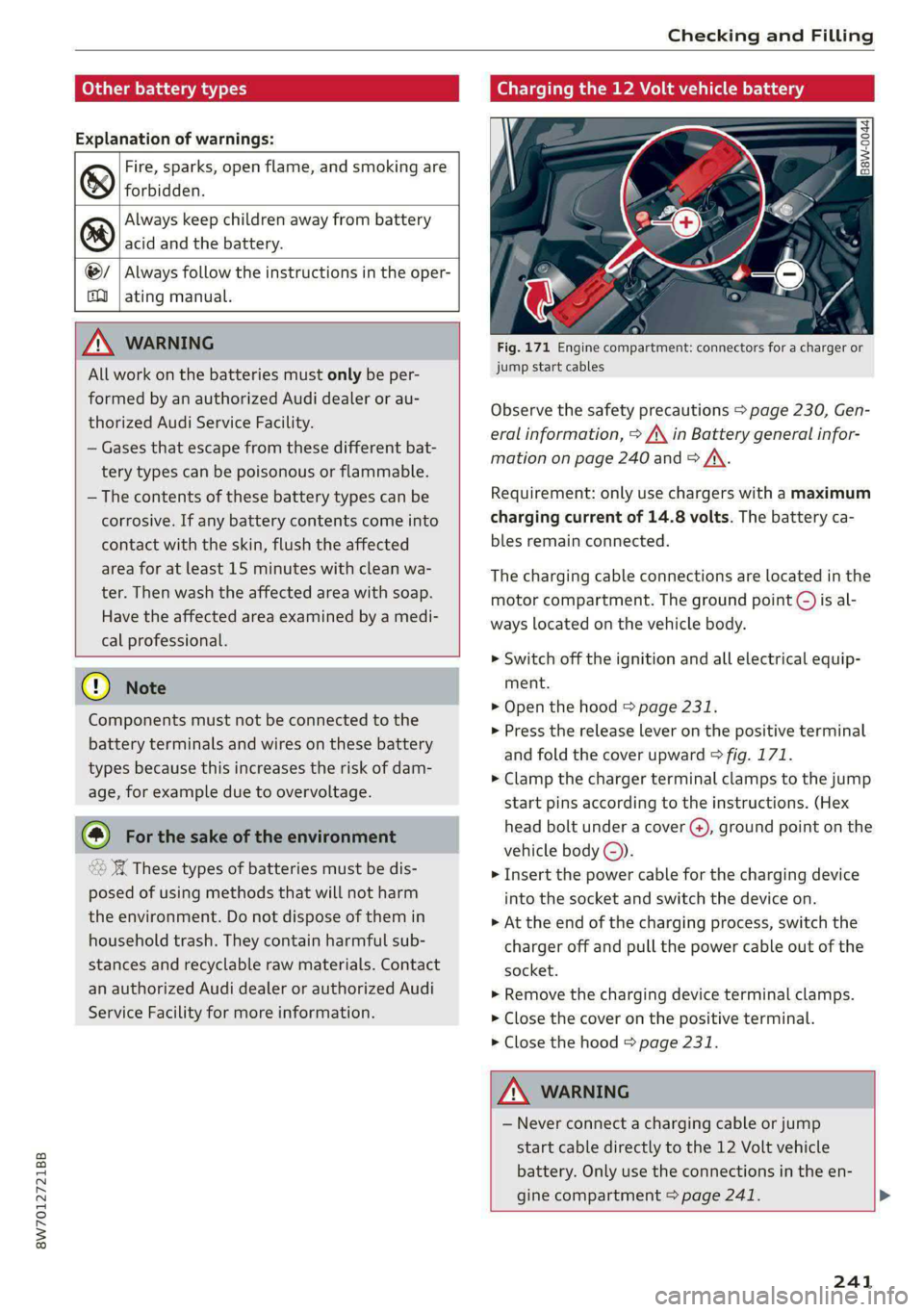
Fig. 171 Engine compartment: connectors for a charger or
jump start cables
Observe the safety precautions > page 230, Gen-
eral information, > /\ in Battery general infor-
mation on page 240 and > /A\.
Requirement: only use chargers with a maximum
charging current of 14.8 volts. The battery ca-
bles remain connected.
The charging cable connections are located in the
motor compartment. The ground point ©) is al-
ways located on the vehicle body.
>» Switch off the ignition and all electrical equip-
ment.
> Open the hood > page 231.
> Press the release lever on the positive terminal
and fold the cover upward > fig. 171.
> Clamp the charger terminal clamps to the jump
start pins according to the instructions. (Hex
head bolt under a cover (), ground point on the
vehicle body ©).
> Insert the power cable for the charging device
into the socket and switch the device on.
>» At the end of the charging process, switch the
charger off and pull the power cable out of the
socket.
> Remove the charging device terminal clamps.
> Close the cover on the positive terminal.
> Close the hood = page 231.
ZA WARNING
— Never connect a charging cable or jump
start cable directly to the 12 Volt vehicle
battery. Only use the connections in the en-
gine compartment > page 241. >
241
Page 274 of 318

Care and cleaning
— Paint
—To reduce the risk of scratches, the vehicle
must be free of dirt and dust before pol-
ishing or waxing.
—To prevent paint damage, do not polish or
wax the vehicle in direct sunlight.
—To reduce the risk of paint damage, do not
polish away rust spots.
— Remove cosmetics and sunscreen immedi-
ately because they could damage the
paint.
— Decorative decals
—To reduce the risk of damage, do not use
any rough powder or abrasive cleaning
products.
—To reduce the risk of damage, do not pol-
ish decorative decals that have a matte or
printed finish.
— Due to the risk of damage, do not use an
ice scraper to remove snow and ice on win-
dows with decorative decals on them.
— Displays and instrument cluster
— Make sure that the display and instrument
cluster are switched off and have cooled
down before cleaning. To switch off the
center display, select on the MMI home
screen: SETTINGS > Display & brightness
> MMI > Screen cleaning.
— Displays, the instrument cluster, and the
trim surrounding it must not be cleaned
with dry cleaning methods because they
could become scratched.
— Make sure no fluids enter the spaces be-
tween the instrument cluster and the
trim, because that could cause damage.
— Controls
— Make sure that no fluids enter the con-
trols, because this could cause damage.
— Safety belts
— Do not remove the safety belts to clean
them.
— Never clean safety belts or their compo-
nents with chemicals or with corrosive flu-
ids or solvents and never allow sharp ob-
jects to come into contact with the safety
belts. This could cause damage to the belt
webbing.
272
— If there is damage to the webbing, the
connections, the retractors, or the buck-
les, have them replaced by an authorized
Audi dealer or authorized Audi Service Fa-
cility.
— Textiles, artificial leather, and Alcantara
— Never treat artificial leather or Alcantara
with leather care products, solvents, floor
polish, shoe polish, spot remover, or simi-
lar products.
— Have a cleaning specialist remove stub-
born stains to reduce the risk of damage.
— Never use steam cleaners, brushes, hard
sponges, etc. when cleaning.
— Do not turn on the seat heating* to dry
the seat.
— Objects with sharp edges, such as zippers
or rivets on clothing or belts, can cause
damage to the surface.
— Open hook and loop fasteners, for exam-
ple on clothing, can damage seat covers.
Make sure hook and loop fasteners are
closed.
— Natural leather
— Never treat leather with solvents, floor
polish, shoe polish, spot remover or simi-
lar products.
— Objects with sharp edges, such as zippers
or rivets on clothing or belts, can cause
damage to the surface.
— Never use steam cleaners, brushes, hard
sponges, etc. when cleaning.
— Do not turn on the seat heating* to dry
the seat.
—To help prevent the leather from fading,
do not leave the vehicle in direct sunlight
for long periods of time. If leaving the ve-
hicle parked for long periods of time, you
should cover the leather to protect it from
direct sunlight.
G) Tips
— Insects are easier to remove from paint that
has been freshly waxed.
— Regular waxing can prevent rust spots from
forming.
Page 276 of 318

Emergency assistance
Emergency assistance
General information
> Park the vehicle as far as possible from moving
traffic in the event of a breakdown. In the event
of a flat tire, park the vehicle ona level surface.
If you are ona steep hill, be especially careful.
> Set the parking brake.
> Switch the emergency flashers on.
> Have the passengers exit the vehicle. They
should move to a safe place, for example be-
hind a guard rail.
Z\ WARNING
Follow the steps given above. This is for your
protection and the for the safety of others on
the road.
Equipment
Applies to: vehicles with the vehicle tool kit, tire mobility kit,
and vehicle jack
Fig. 177 Luggage compartment: cargo floor cover
The vehicle tool kit, vehicle jack, tire mobility kit
and compressor are stored in the luggage com-
partment under the cargo floor cover.
» Applies to: Coupe/Sportback: To open the front
compartment, lift the cargo floor cover by the
strap @.
> To open the rear compartment, lift the cargo
floor cover by the plastic handle @).
> Applies to: Coupe/Cabriolet: Hook the plastic
handle @) into the luggage compartment seal
or above the power top storage compartment.
274
» Applies to: Coupe/Sportback: To remove the
cargo floor cover completely, pull it toward the
rear using the plastic handle @).
> Applies to: vehicles with spare tire: Turn the
handle counter-clockwise and remove the spare
tire.
» Applies to: Coupe/Cabriolet: Unhook the cargo
floor cover again before closing the luggage
compartment lid.
Depending on vehicle equipment, the vehicle tool
kit, tire mobility kit, and compressor may be lo-
cated under another cover that is secured with a
handwheel.
Applies to: Cabriolet: The vehicle jack is located
under the foam piece. To remove the foam piece,
you must remove the wind deflector*, the com-
pressor securing strap*, and the handwheel.
Applies to: vehicles with vehicle jack in the stor-
age bag: The bag with the vehicle jack is secured
to the tie-downs in the luggage compartment
and must be secured to the tie-downs again after
using it.
Z\ WARNING
Applies to: vehicles with vehicle jack in the storage bag
A vehicle jack that is unsecured, incorrectly se-
cured, or not secured in the luggage compart-
ment may slide out of place when braking,
turning, or in an accident, which increases the
risk of injuries to vehicle passengers. To re-
duce the risk of an accident, never transport
the vehicle jack without securing it.
G) Tips
—Insome vehicles, the rear compartment
may not open.
— The vehicle jack in your vehicle is mainte-
nance-free.
Tire mobility kit
Applies to: vehicles with tire mobility kit
> Read and follow the important safety precau-
tions > page 274.
» Set the parking brake.
Page 279 of 318
8W7012721BB
Emergency assistance
ZA WARNING
Pay attention to the following after repairing
the tire:
— Do not drive faster than 50 mph (80 km/h).
— Avoid hard acceleration or braking and driv-
ing fast around curves.
— The vehicle may become more difficult to
control.
— If the tire is too severely damaged, see an
authorized Audi dealer or authorized Audi
Service Facility for assistance.
@ For the sake of the environment
You can give the used tire sealant bottle to an
authorized Audi dealer or authorized Audi
Service Facility for disposal.
@ Tips
Remember to obtain a new bottle of sealant
from an authorized Audi dealer or authorized
Audi Service Facility after repairing a tire.
Changing a tire
You must complete the preparation before
changing a tire.
> Read and follow the important safety precau-
tions > page 274.
>» Set the parking brake.
> Select the “P” position.
>» When towing a trailer: disconnect the trailer
from your vehicle.
> Lay out the vehicle tool kit > page 274 and the
spare tire > page 280.
> Switch the ignition off.
Z\ WARNING
The vehicle must also be secured to prevent it
from rolling when using the vehicle jack”. Use
suitable objects to block the front and back of
the wheel that is diagonal from the wheel
with the flat tire.
NS
3
~~
Fig. 181 Wheel: wheel bolts with caps
B4L-1337
> Slide the plastic clip from the vehicle tool kit
onto the cap until it engages > fig. 181.
>» Remove the cap with the plastic clip.
Loosening the wheel bolts
&
=
x © a
Fig. 182 Wheel: loosening the wheel bolts
> Slide the wheel wrench* from the vehicle tool
kit all the way onto the wheel bolt.
> Turn the wheel bolt approximately one turn to
the left. To achieve the required torque, hold
the end of the wheel wrench*. If the wheel bolt
will not loosen, press carefully on the wheel
wrench* with your foot. Hold onto the vehicle
securely while doing this and make sure your
footing is stable.
Z\ WARNING
To reduce the risk of an accident, only loosen
the wheel bolts gently one turn before raising
the vehicle with the vehicle jack*.
277
Page 285 of 318

8W7012721BB
Emergency assistance
(50 km), then transport the vehicle on a
special carrier.
— If the vehicle is towed by a tow truck at the
axle that is not permitted, this can cause se-
vere damage to the transmission.
— The vehicle must not be tow started for
technical reasons.
@® Tips
— If the power supply is interrupted, then it
will not be possible to move the selector
lever out of the "P" position. The parking
lock must be released using the emergency
release before towing the vehicle
=> page 108.
— Switch Audi pre sense* off > page 155 when
loading the vehicle onto a vehicle carrier,
train, ship, or other type of transportation,
or when towing the vehicle. This can prevent
an undesired intervention from the pre
sense* system.
— Follow the local legal regulations for tow-
ing.
Read and follow the important information under
=> page 282.
Preparations
> Only secure the towing cable or tow bar at the
designated towing loop > page 283.
> Make sure the towing cable is not twisted. Oth-
erwise it could disconnect from the towing loop
while towing.
> Switch the emergency flashers on in both
vehicles > page 61. However, do not do this if it
prohibited by law.
Towing vehicle (front)
> Only start to drive when the towing cable is
taut.
> Press the brake pedal very carefully.
» Avoid sudden braking or driving maneuvers.
Vehicle being towed (rear)
> Make sure the ignition is switched on so that
the steering wheel is not locked and so that you
can use the turn signals, the horn, and the
windshield wipers if needed > A\.
> Switching it off before the vehicle has stopped
may
impair the function of the brake booster
and power steering. You would then need to
use more force to steer and brake the vehicle.
> Release the parking brake > page 114.
> Select the “N” selector lever position.
> Make sure the towing cable is always taut.
JN WARNING
— Never tow a vehicle using a tow bar or tow-
ing cable if the vehicle does not have electri-
cal power.
— If the vehicle runs out of power while it is
being towed, stop towing the vehicle imme-
diately and consult an authorized Audi deal-
er or qualified repair facility.
Rear towing loop
Applies to: RS models
Fig. 190 Rear bumper: installing the towing loop
The threaded opening for the towing loop is lo-
cated on the right rear of the bumper.
> Remove the towing loop from the vehicle tool
kit > page 274.
283
>
Page 289 of 318

8W7012721BB
Fuses and bulbs
Fuse panel (4) (brown) Fuse panel © (black)
14 | Fuel injectors, engine control module 1 Left rear door control module, left rear
15 |Ignition coils, heated oxygen sensors power window
16 | Fuel pump 12 | Parking heater
Fuse panel @) (red) Fuse panel (0) (black)
No. | Equipment No. | Equipment
Anti-theft alarm system Front seat electronics, seat ventilation,
2. [Engine control module rearview mirror, rear climate ‘control sys-
1 |tem control panel, neck heating, front pas-
3 Left front seat electronics, lumbar sup- senger's airbag warning light, diagnostic
port, massaging seat connection
4_|Automatic transmission selector lever Diagnostic interface, vehicle electrical sys-
5 |Horn 2 tem control module
6 |Parking brake 3 /Sound generator
7 | Diagnostic interface 4 |Clutch position sensor
8 | Roof electronics control module 5 |Engine start, emergency shut-off
9 | Emergency call module 6 Diagnostic connection, traffic information
10 | Airbag control module antenna (TMC)
1 Electronic Stabilization Control (ESC), An- 7 |USB input
ti-Lock Braking System (ABS) 8 | Garage door opener
12 | Diagnostic connection, light/rain sensor 7 Audi adaptive cruise control, distance reg-
13 | Climate control system ulation
14 | Right front door control module 11 | Front camera
15 | Climate control system compressor 12 | Right headlight
16 Brake system pressure reservoir, left neck 13 | Left headlight
heating 14 |Transmission fluid cooling
Fuse panel © (black) Fuse panel © (red)
No. | Equipment No. | Equipment
1 |Front seat heating 1 | Ignition coils
2 |Windshield wipers 2 |Climate control system compressor
3 | Left headlight electronics 5 | Left headlight
4 | Panoramic glass roof 6 |Automatic transmission
5 |Left front door control module 7 | Instrument panel
6 | Sockets 8 | Climate control system blower
7 Right rear door control module, right rear 9 |Right headlight
power window 10 | Dynamic steering
All wheel drive control module 11 | Engine start
9 | Right headlight electronics
10 Windshield washer system/headlight
washer system control module
287
Page 306 of 318

Index
Drive select
refer to Audi drive select.............0. 118
Drive system... ... 00.20. cee eee eee eee 110
Audi driveselect . cc.0i ices d ceca cain 118
Drive system (message) ........00. eee eee 112
Driving down hills............0. 00.0 eee 116
DrivING PFOGKAME. « « eserce «© sone 6 0 sons aw ane 146
Driving through water.................. 116
DrIVING ELIMI 5 & cescinne 6 5 cose vo een & enawens a 17
Driving tips
Driving through water...............0- 116
Efficient driving................00000- 110
Uphilland downhill................... 116
DFIVING:-trACK es: « 2 sews & 2 seme xc owe oe 116
Driving Up:hills. < 2 sees + » yews 5» ewes c 2 eee 116
Dust filter
refer to Pollutant filter................. 98
DY MAMIE StEEKING = wwe = 2 qewe a 2 anes = noR 119
E
E-itidilss < same « 2 sau: ¢ 5 sepa 2 s neem 2 5 pee 180
SOCHINGSiccsain » sew © © wravens a & soomem w V soveTS 6 180
EDL
refer to Electronic Differential Lock...... 121
EDR
refer to Event Data Recorder (EDR)...... 290
Efficiency assist.............0 02. eee ee 137
PREGietiVe CONTTOlacs ¢ = wax + xeme 2 2 pene 142
Electrical system. ...........0.0020000. 239
Electromechanical parking brake......... 114
Electronic Differential Lock.............. 121
Electronic immobilizer................00. 39
Electronic Stabilization Control........... 121,
Embedded SIM Card « seswiie ss sien os wiven oo 8 183
Emergency assistance ............00000e 274
Emergency braking function............. 115
Emergency call.........cceeeeveee 178, 187
Emergency flashers...............000005 61
Emergency mode............020 eee eee 109
Emergency operation
DOOGIS s seas 3 ¢ Sone 2b ROMA ca aK o ANeRE se 37
Fuel tillerdoor ic = swiss a 2 saves wo wien «2 axe 229
Luggage compartment lid............... 44
Panoramic glass roof...............2-0. 47
Emissions control system..............- 229
304
EMErGy’CONSUMENS Hs 6 ceive e sieves ww neeewe wo x
Energy management... 006. eeee ee eens
Engine
Breakingin.............. cece eee eee
Emergency StOpies : « sews ss weea s eae gs
JUMPISTAREIING » « canseis ws wssins 6 # oeenss a a une
Start/Stop system...........--0000005
Starting/Stopping ws ss caw se ewes yams
Engine compartment
Opening and closing the hood..........
Overview ......- 2. eee cee eee eee
Safety precautions............-0.ee0ee
Engine data
refer to Sport displays..................
Engine oil
AGING «scence ox cesses > 5 eons owes av ara
Changing.......... eee eee eee eee
Checking oillevel.............---000--
CONSUMPTION ess « & sivees 2 o onerees & o ewer @ 8 ov
Indicator light..............02..0000-
Replacement interval.................
Temperature display.................-.
Engine sound
Audi drive select............ 0.00000
Engine Start/Stop mode
refer to Start/Stop system.............
Engine startsSySte ny wcusooe » scaseas o « seas oo one
Engine stop
refer to Start/Stop system.............
Entry/exit lighting. ............0 0...
Entry ASSISTANGE!S. 4 « scusnze » » sxnzece » o asnseue ow anes
also refer to Exit assistance.............
GlSO refer to Seats ¢ seen % 3 aes sv awn % Ears
Environment
Unleaded gasoline..................0.
ESG
refer to Electronic Stabilization Control...
ESCSpOlbnnsos 5 2 omners x x emmes oo nveoeee ao manne ©
eSIM
refer to Embedded SIM card............
Event Data Recorder (EDR)..............
Exitassistamee « scccene a 0 sxesese = v vreuain 3 o anes © 5
EXHE WAP Gicnes 2 a caees vw cscs «Heaven «© enone
Exterionantenna s wise <2 wees 2 6 mec ss oes
Exterior lighting + « ¢ see: +» sees y sae ees
Page 307 of 318

8W7012721BB
Index
Exterior MinrorSeecs «= cess oe cure +o coarene © o ove 63
Folding settings........... 0. cece eee ee 35
External voice operation................. 28
F
Factory default settings
Multi Media Interface...............4. 222
Fast route............ 0.00.00. . 0022 191
Favorites... 0... 0... eee eee eee ee 22
BIWetOOth ¢ « sses so eees co eG Hee ee Be 224
Navigation’s. © « cscs. 6 2 sma o 0 omens o 0 woman 192
Telephone ........... 0. e eee eee eee 176
Federal Communications Commission (FCC) . 297
File formats (media drives) .............. 216
Filling
Tank capacities... 0.2.0... eee eee eee 300
For the sake of the environment
Disposing of engine oil................ 235
FUGLING(s = aes s « seme & ¢ seus = 7 ERS & oe 227
LO AKS base ox estzane ew esecire o somneun ss & wrenene we ¥ rane 231
Forward gear
refer to Gears... ... eee eee eee 105
Free text search
Media... ..... 0. eee eee eee 215
RadiO:ss ss ssc « = nes 5 2 ceree Sees ee 204
also refer to Intelligent search.......... 191,
Freeze protection
Coolant... ...... cee eee eee eee 236
Windshield washer system............. 242
Frequency band...............--0000-- 202
also refer to Frequency band........... 202
Fronit‘centerarmrest © esis s caes ae eee sve 72
Front passenger’s seat adjustment
ROAM cesses 6 & sonra 5 & anion & & seRON ow SMO we Be 71
Front wiper blades
Changing............. see eee eee eee 66
Cleaning... .. cece eects 66
Fuel... cece eee eee 226
AddItIVGS « ces z = seus ¢ s een 2 eee se os 227
CUPFENt: CONSUMPTION « esses 6 cee we eee oe 17
Fueldisplay....... 0.0... cece eee eee ee 12
Gasoline : wess + y ees ss ca6s to ews Fe ees 226
Reducing fuel consumption............ 110
Tank
capacity. ........... 0. cee eee eee 300
Fueling
Fuel filler door..... 0.0... cece eee eee ee 227
Fuel filler door emergency release....... 229
Functions on demand.................. 184
Functions that require a license.......... 184
also refer to Functions on demand....... 184
Fuses
ASSIQMIMIOM GE & asvies & weenie © ¥ sursers WF senses v 286
Replacing......... 0c cece cece eee 285
G
Garage door opener............-.000 eee 48
Garment hooks ...... 2... 0c eee eee 92
GasOlime visio: x ceawnwe vo ancane ow ceewe mw aw Oo 226
Additives... 0.0.0... cece cece 227
GaSOline MIXING veux ss meme 2» see so ee 226
GAWR
refer to Gross Axle Weight Rating (GAWR) . 300
GOATS: x = ues © gate « ¢ aes « Rates F RaNEE & 105
Glossary of tire and loading terminology... 247
Glove compartment.............-.000005 92
Valet parking’: s ¢ aes + eons ss wows es eeu 47
G meter
refer to Sport displays.................. 16
Gross Axle Weight Rating (GAWR)........ 300
Gross Vehicle Weight Rating (GVWR)...... 300
GVWR
refer to Gross Vehicle Weight
Rating (GVWR)... 1... . cee eee eee ee 300
H
Handsfree..................000000 00 172
HamdsiPree:Profiles. so sacs + 0 weowee 0 0 ctunene «2 172
Head-up display
Adjusting ..... 6.6.06. eee ee 26
Adjusting the brightness................ 63
Operating’: « s ses « sews + cine oo corer o ¥ ave 26
Headlight range control.................. 58
Headlights’, » segs x + sees se pees se ees ee 58
Cleanings « x visas x 6 aomene eo aevuee wo anarene w oe 268
Headlight range control................ 58
Washersystem:: « « gems « x nama x paemes 2 per 65
Washer system (filling washer fluid) ..... 242
Head restraints « icin s cian s wae a 2 cexsen wv 74
Heated rear Window ¢ sacs iw a eames eee 101
305
Page 309 of 318

8W7012721BB
License plate bracket................... 296
Lifting points (vehicle jack).............. 278
Light/rain sensor
Automatic headlights .................. 58
Intermittent mode (windshield wipers).... 65
Lighting
EXteriOn : wes x = sewn @ s emu s 2 tows v Fees 58
EMtOTOleece: 2 2 emems so ene ov een oo wR oF 62
BIQGHES swsos wv cisswse xe ameses 3 a avewon: wo oan DO om 58
Listening to music
Vefertoi Medias « « wssen + 6 seen a x sess 210,:212
LOAD sevecss ov soso © eames @ 2 mere 2 a me 2 Bam 300
Local Users: « s sea ss meen ss news wae 6 ows 31
Locking and unlocking
By remote:controls. sescce es cress a 6 asec owes 39
Using the lock cylinder................. 37
With the convenience key..............- 39
Low beam headlights.................--. 58
LTE
refer to Exterior antenna.............. 174
Luggage compartments . ves. ss een ee eeu 92
COVED: & & suesca ao mavens oo cmamne so annie wo eee 94
Increasing the size................. 94,95
PasS-through < = sees 7 = sea% i evens: eee si 95
POWEPSOURGES aia 6 8 aswiios so anerans oo eatiw « oe 91
Tie-downs .... 0... 2. cee 96
Valet ParkitiG: + exes < 3 ame ts eee trae ee 47
also refer to Luggage compartment...... 92
Luggage compartment lid
Closing BUttONs. « 5: soos «2 seems aw atwnene «0 uno 42
Generalinformation.................-- 4l
Mechanically unlocking...............-. 44
Opening and closing................04. 42
Opening and closing with foot motion..... 43
Power opening andclosing.............. 42
Luggage compartment net..............- 96
Lumbar support........ 0... eee eee eee ee 70
M
Maintenance..........-- 2. eee eee ee eee 294
Maintenance intervals..............0005 242
Malfunction Indicator Lamp (MIL)........ 229
Manualishifting’. « svessis ce eniosie 3 a aeavive 6 © arene 107
Map
Changing the scale................... 193
Display « ees ss oss ¢ Fae ss pews ss Feaes 195
Operating ’s « = swe v wemeness v cues as wen a oo 194
Setting the destination................ 193
MAP
refer to Message Access Profile......... 179
Map preview....... 0. ce eee eee eee eee 193
Map update........... 0.0 eee eee eee 198
MYAUGL app = sos « x acer: sp ees ee eS ee 198
ONUING & sess & & sore oo seamen a 8 ene oo OO 198
USB connection...........5-. see cena 199
Massage function
Front... 2... ccc eects 71
Mechanical key............00 0: eee ee eee 38
Media... . 2... 2. cece eee eee 210, 212
Supported formats............-.00005 216
Media center... 0... 0... eee eee eee eee 213
Memory function..........-....--00 eee 78
Menu language
refer to Setting the language........... 221
Menu paths......... 2.0.00. cee eee eee ee 19
Message Access Profile..........--..005 179
MessageS.... 22.0... eee eee eee 179
Minor COmpasss. « cos » « sume % @ omnes wa neo 6 67
Mirrors
Adjusting exterior mirrors..............- 63
DINIMING ¢ 2 xem. = » eee su ees s eee Ss oe 64
Vanty:mirrors esas so cece 6 ee 2 cries oo 65
MMI Navigation plus
refer to Multi Media Interface........... 20
MMI radio
refer to Multi Media Interface........... 20
MMI Radio plus
refer to Multi Media Interface........... 20
Mobile device
refer to Telephone ...........eseeeeee: 171
Mobile device reminder signal............ 175
Mountain passes: « ces se ese se eee seas 116
Mountain roads...............-00-0005 116
Multifunction steering wheel
BULtONS's ¢ eqns & o sees & = see & = SY Gs 13; 30
OPerating’s « = sense v scasenar ¥ snamene @ ¥ sueceas wo HE 13
Programming buttons................-. 30
Voice recognition system............... 27
Multi Media Interface................... 20
Menus:and symbols « sess ss cses senses ses 21
Operatiingé. « a ssc « mensaee « samen @ 6 sets « 18, 21
Switching on or off.............--00008 20
307
Page 310 of 318

MUTI Gis 5 x secvess © v comers ov cumaees @ a sanawes ow 8 omens 30
MYAUGL 5 & swceis & o seesein 2 8 mime @ remenew © wee 31, 183
myAudi navigation................. 190, 193
MYAUGI USERS « seus < & eee & = Hees ee Hew eee 31
N
Natural leather care and cleaning......... 271
Navigation.....................0.000. 190
Betterroute cic: s nies se eeew s wae ss wen 199
Calling... 2... ee eee eee eee 193
Changing the scale................... 193
also referto Map : seas: ceea ss tees ee es 194
Navigation database
Version information................6.4 224
Navigation (instrument cluster) .......... 196
Neck heating =< =. gecs seve s seve s bene 101
NHTSA « seme: « 9 szae 2 2 see © 2 see 2 2 ee 296
Notification center.............0ceeeeuee 23
Oo
Octane rating (gasoline)................ 226
Odometer... ... ee cee eee eee eee ee 15
RESCUUING bac: « ewes & 2 EmeG Fy ReGE s x eeeH 8 15
Office address
refer to Business address.............. 196
OFFADUttON)| + sy 5 < ame + 7 aauee & o wee 2 ge 99
Oil
refer tO EMgine Gib. 2. cwee 2 vse s wean es 233:
On-board computer...........0...0000ee 17
On Board Diagnostic System (OBD)... 229, 290
Online map
refer to Satellite map................. 197
QALIMNG AIO « wrasse & & wees 5 & eeens « B Howe y oe 206
also refer to Online radio.......... 206, 207
Online roadside assistance.............. 188
Online services
refertoconnect.......-....-.ee ee eee 182
Online system update.................. 222
Online traffic information............... 199
Openings « = wen ss asssna se eam ae een 2 wee 34
Automatic luggage compartment lid...... 42
Convenience opening............-.0e00- 46
Fueltillerdoor's 2 = swiss a 2 sanew wo ance <2 ae 227
FOO « «scones» m vssnce i oi sean ow somes «0: omexeite 231
Luggage compartment lid............... 42
308
Luggage compartment lid with foot motion . 43
Panoramic glass roof.............00e ee 47
POWEP tO Pivess + manu 5 & mei x ¢ BOE & E emE 6 Ee 51
Sunshade (nO) wor « « scsces ww wom x 8 swswace wa 47
Windows ...... 0.0.0 cece cece ee eee eee 45
Opening and closing
refer to Unlocking and locking........ 34, 39
Operating
Head-up display..............-002eeeee 26
ANStruMeNt CLUSTER « ssevers ¢ wcuscsin aresnce a ¥ ae 13
Multifunction steering wheel............ 13
Multi Media Interface « oy... ee se oe 18; 21
TOXIN PU Bis & 2 sscnaon & snawene ae veces ao peewee oo 24
Touch display......... 0.0.0 eee eee eee 18
Voice recognition system............... 27
Optional equipment number............. 299
Options
Médidiwis = « ees se cow g s wawe & o Heme os eer 216
RadiO wiswscs i 0 isivane wo aueuens a a woenire a 8 asmnoed oo 207
Overview (COCKpIt) ws: ss save ¥ 0 onesie oo wane ava 6
P
Paint COd Gis < o wens so ners oe eee oe Hoe a 299
Paint damage swe « = sews +s eee te eee ee ee 269
PANIG@ BUttOMias s ¢ sure ae em zo ete eae 38, 39
PANIC function .............0. 0c eee eee 38
Panoramic glass roof................200. 47
Convenience opening and closing......... 46
Emergency closing wr: «scien cman ae cere 47
Interior airflow................000 eee 47
QuICK OPENING wwe ss wows s i sews + bees oe: 47
Park@SsiSt wan sx sane 5 ¢ HOINR s 3 eres oD eR 168
Parking ..... 60. c cece eee eee ee 104
Parking aid... 1... eee eee 159
Adjusting the volume..............0.. 160
Automatic activation.................. 159.
Cleaning the sensors/camera........... 269
Park ASSiSt’: = x came: 5 2 wean 5 x eH ss eee GE 168
Parkingraid Plus: = « sss x 6 were 26 wens 3 0 159
Parking space search.................. 166
Peripheral cameras...............004- 161
Rearview came sviies so osea es eee ee een 161
Parking and maneuvering..............- 159
Parking brake
refer to Electromechanical parking brake. 114
Parking lightsiess 2 + aces sa aera se nee se eee 58