park AUDI A5 2021 User Guide
[x] Cancel search | Manufacturer: AUDI, Model Year: 2021, Model line: A5, Model: AUDI A5 2021Pages: 318, PDF Size: 85.96 MB
Page 42 of 318
Opening and closing
door cannot be opened for a brief period direct-
ly after locking it. This way you have the oppor-
tunity to check if the doors locked correctly.
Unlocking and locking with the Audi connect
vehicle control service!)
Applies to: vehicles with Audi connect vehicle control
Requirement: Audi connect vehicle control serv-
ices must be activated > page 184. The vehicle
must be parking and the ignition must be switch-
ed off.
Z\ WARNING
Observe the safety precautions > page 34.
G) Tips
— Only use the vehicle key when you can see
the vehicle.
— The vehicle can only be locked when the "P”
selector lever position is engaged.
— Do not use the vehicle key to lock and un-
lock when you are inside the vehicle. Other-
wise, you could trigger the anti-theft
alarm*. If this happens, press the @ unlock
button.
@) Tips
Applies to: vehicles with convenience key
— When unlocking or locking the vehicle, the
convenience key cannot be more than ap-
proximately 4 feet (1.5 m) away from the
door handle or luggage compartment.
— Unlocking with the convenience key (keyless
access) can be deactivated in the MMI sys-
tem > page 35.
— To prevent the vehicle battery from dis-
charging, the energy management gradual-
ly switches off convenience functions that
are not needed. You then may no longer be
able to unlock your vehicle with the sensors.
D_Incertain countries
40
the vehicle key
RAZ-0722
BFV-0277
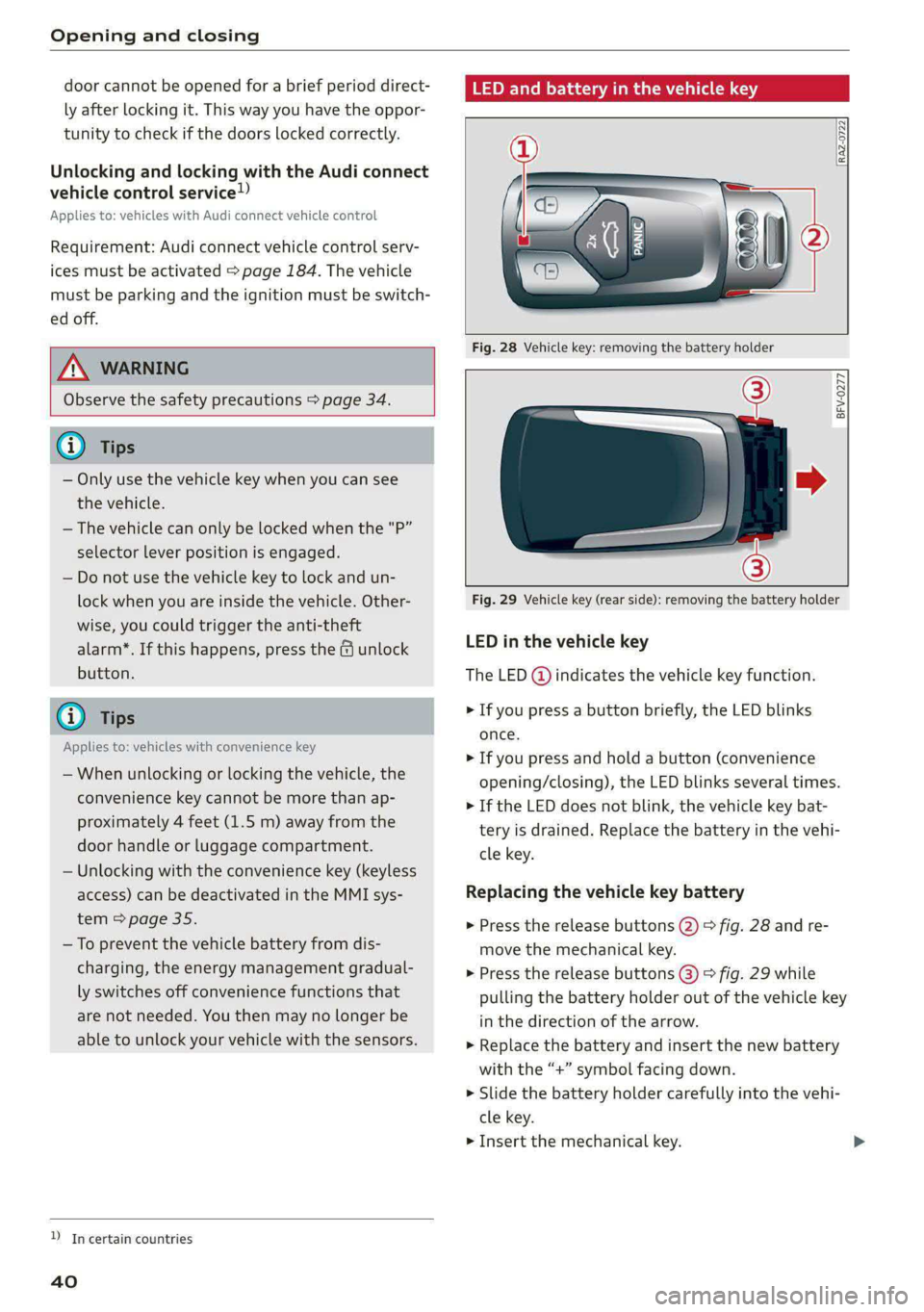
Fig. 29 Vehicle key (rear side): removing the battery holder
LED in the vehicle key
The LED (@) indicates the vehicle key function.
> If you press a button briefly, the LED blinks
once.
> If you press and hold a button (convenience
opening/closing), the LED blinks several times.
> If the LED does not blink, the vehicle key bat-
tery is drained. Replace the battery in the vehi-
cle key.
Replacing the vehicle key battery
> Press the release buttons (2) > fig. 28 and re-
move the mechanical key.
» Press the release buttons @) > fig. 29 while
pulling the battery holder out of the vehicle key
in the direction of the arrow.
> Replace the battery and insert the new battery
with the “+” symbol facing down.
> Slide the battery holder carefully into the vehi-
cle key.
> Insert the mechanical key.
Page 46 of 318

Opening and closing
between the rear of the vehicle and your ga-
rage door. In some situations, the function
may be limited or temporarily unavailable.
This may happen if:
— You are standing too close to the bumper or
too far away from it
— The luggage compartment lid was closed or
opened immediately beforehand
— You park close to a hedge and the branches
move back and forth under the vehicle for a
long period of time
— You clean your vehicle, for example with a
pressure washer or in a car wash
— There is heavy rain
—The bumper is very dirty, for example after
driving on salt-covered roads
— There is interference to the vehicle key's ra-
dio signal, such as from mobile devices or
remote controls
Mechanically unlocking luggage
compartment lid
Fig. 33 Inner luggage compartment lid: access to the
emergency release. (2) Coupe, @) Sportback
44
B8W-0267
Applies to: vehicles with power top
Fig. 34 Luggage compartment lid: mechanical key in lock
cylinder
» Fold the backrest on the rear bench seat for-
ward > page 94.
> Remove the mechanical key > page 38.
> Using the mechanical key, pry the cover off the
luggage compartment lid trim panel.
> To unlock the luggage compartment lid, press
the lever in the direction of the arrow using a
suitable object (such as a screwdriver) or using
the mechanical key if necessary.
> Fold the backrest backward until it locks into
place.
Applies to: vehicles with power top
>» Remove the integrated mechanical key
=> page 38.
> Insert the mechanical key in the luggage com-
partment lid lock cylinder.
> Turn the key counterclockwise. The luggage
compartment lid opens.
Observe the safety precautions > page 41.
If you have folded the backrests into the up-
right
position, always check if the lock is cor-
rectly engaged by pulling forward on the
backrest.
Page 49 of 318

8W7012721BB
Opening and closing
Panoramic glass roof Roof emergency closing
If an object is detected when closing, the roof
“Si au seGe will open again automatically. In this case, you
Applies to: vehicles with panoramic glass roof and roof sun- can then close it with the power emergency clos-
shade ing function.
Operating the panoramic glass roof and
> Within five seconds after the sunroof opens au-
tomatically, pull the applicable button until the
roof is closed.
Z\ WARNING
To reduce the risk of injury, always pay atten-
tion when closing the roof. Always switch the
ignition off and take the key with you when
leaving the vehicle.
Fig. 38 Headliner: panoramic glass roof and sunshade*
buttons CG) Note
The control buttons are equipped with a two- Always close the roof when you leave the vehi-
stage function. cle and when there is precipitation to reduce
the risk of damage to the interior equipment,
Operating the roof sunshade particularly the electronic equipment.
> Opening and closing the sunshade: push the )
switch in the headliner @ briefly toward the @ Tips
rear or forward to the second level. — Interior airflow: wind inside the vehicle can
> Partially opening the sunshade: press the be reduced by the roof sunshade when the
switch to the first level until the sunshade panoramic glass roof is all the way open.
reaches the desired position. When the sunshade is all the way open,
close it approximately 4 inches (10 cm) until
Opersting the‘reur the wind inside the vehicle subsides.
» Tilting the roof: press the A> switch in the — After switching off the ignition, the roof and
headliner briefly up to the second level (@). sunshades can still be operated for several
> Closing the tilted roof: pull the 2> switch down minutes as long as neither of the front
briefly to the second level. doors have been opened.
> Opening the roof: slide the > switch back — It is not possible to open the roof when
briefly twice in a row to the second level @). temperatures are too low.
> Closing the opened roof: push the 2S switch
forward briefly to the second level. Valet pa rki ng
> Opening or closing partially: slide the A>
switch to the first level and hold it there until
the roof reaches the desired position.
Applies to: vehicles with valet parking function
The valet parking function can protect the lug-
gage compartment from unauthorized access.
Quick opening
The [VALET] button for valet parking is in the
glove compartment.
You can also open the roof and roof sunshade in
one movement.
> Push the 4S switch back briefly to the second
level ) twice in a row.
47
Page 50 of 318

Opening and closing
You can switch the valet parking function on, for
example when someone else is parking your vehi-
cle ). The vehicle can be driven, locked, and un-
locked using the vehicle key, but access to the
luggage compartment is blocked.
> Remove the mechanical key > page 38.
> Press the [VALET] button in the glove compart-
ment. The LED in the button turns on if the
function is switched on.
> Lock the glove compartment with the mechani-
cal key.
>» Applies to: vehicles with lockable pass-through
and lockable rear seat backrests: To secure the
luggage compartment from the vehicle interior,
lock the pass-through and the rear seat backr-
ests using the mechanical key > page 95,
=> page 94.
> Give your vehicle key to the service personnel
who are parking your vehicle and keep the me-
chanical key.
The following buttons are deactivated when the
valet parking function is switched on:
— <3 Button in the driver's door
— &s Button on the vehicle key
— Handle in the luggage compartment lid
If the valet parking function is switched on, a
message will appear every time the ignition is
switched on.
@ Tips
Please note that the luggage compartment
can still be accessed from the vehicle interior
in vehicles with fixed rear seat backrests or
ones that cannot be locked, even when the
valet parking function is switched on.
Garage door opener
Applies to: vehicles with garage door opener
With the garage door opener, you can activate
systems such as the garage doors, security sys-
D_ This function is not available in all countries.
2) The possible number of hand-held transmitters depends
on the equipment.
48
tems or house lights from inside your vehicle.
These functions are operated in the MMI. Multi-
ple receivers can be programmed, which can con-
trol the functions of up to eight2) hand-held
transmitters.
ZA WARNING
— When operating or programming the garage
door opener, make sure that no people or
objects are in the area immediately sur-
rounding the equipment. People can be in-
jured or property can be damaged if struck
when closing.
— Do not allow yourself to be distracted from
traffic by the viewing and operating the dis-
plays.
Gi) Tips
— Ifyou sell your vehicle, reset all settings to
the factory default settings > page 222.
— The system complies with United States FCC
regulations and ISED regulations
=> page 297.
(i) Tips
Before you program your system to the ga-
rage door opener, first check the compatibili-
ty:
— Ask an authorized Audi dealer or authorized
Audi Service Facility or check at www.
homelink.com. You can also find more infor-
mation about HomeLink there.
— You can display information about Home-
Link (compatibility level/status/country
code/HomeLink generation) in the MMI:
— Select on the home screen: VEHICLE > Set-
tings & Service > Garage door opener > @.
Applies to: vehicles with garage door opener
Requirements: the remote control transmitter
must be programmed > page 49, the vehicle >
Page 54 of 318
Power top
factors and that it does not interfere with
other drivers.
— Visibility to the rear is limited when operat-
ing the power top. Avoid operating the top
while driving in reverse.
— Never drive with the power top unlocked.
The wind from driving could cause the pow-
er top to open. This can result in injuries and
damage to the vehicle.
— Make sure no one will be injured by the pow-
er top supports or other moving compo-
nents when opening and closing the top.
— The headroom in the rear is reduced when
opening and closing the power top. Make
sure the rear passengers keep enough dis-
tance from the power top to reduce the risk
of injury.
@) Note
To prevent damage to the power top:
— do not store any objects in the power top
storage compartment.
— make sure there is enough space above the
vehicle when opening or closing the power
top.
@) Tips
— To avoid draining the vehicle battery unnec-
essarily, do not open and close the power
top repeatedly when the engine is switched
off.
— The power top can also be operated manual-
ly temporarily if there is a malfunction
=> page 55, Power top emergency opera-
tion. Have the problem corrected as soon as
possible by an authorized Audi dealer or au-
thorized Audi Service Facility.
— If the vehicle is parked with the power top
open, the vehicle interior is not protected
from
damaging weather or unauthorized ac-
cess. Lock any items you leave behind in the
luggage compartment. Close the power top
before leaving the vehicle.
— The side windows automatically lower
slightly when opening or closing the power
top.
52
Power top convenience opening and closing
Applies to: vehicles with power top
“Ss
paw-0149
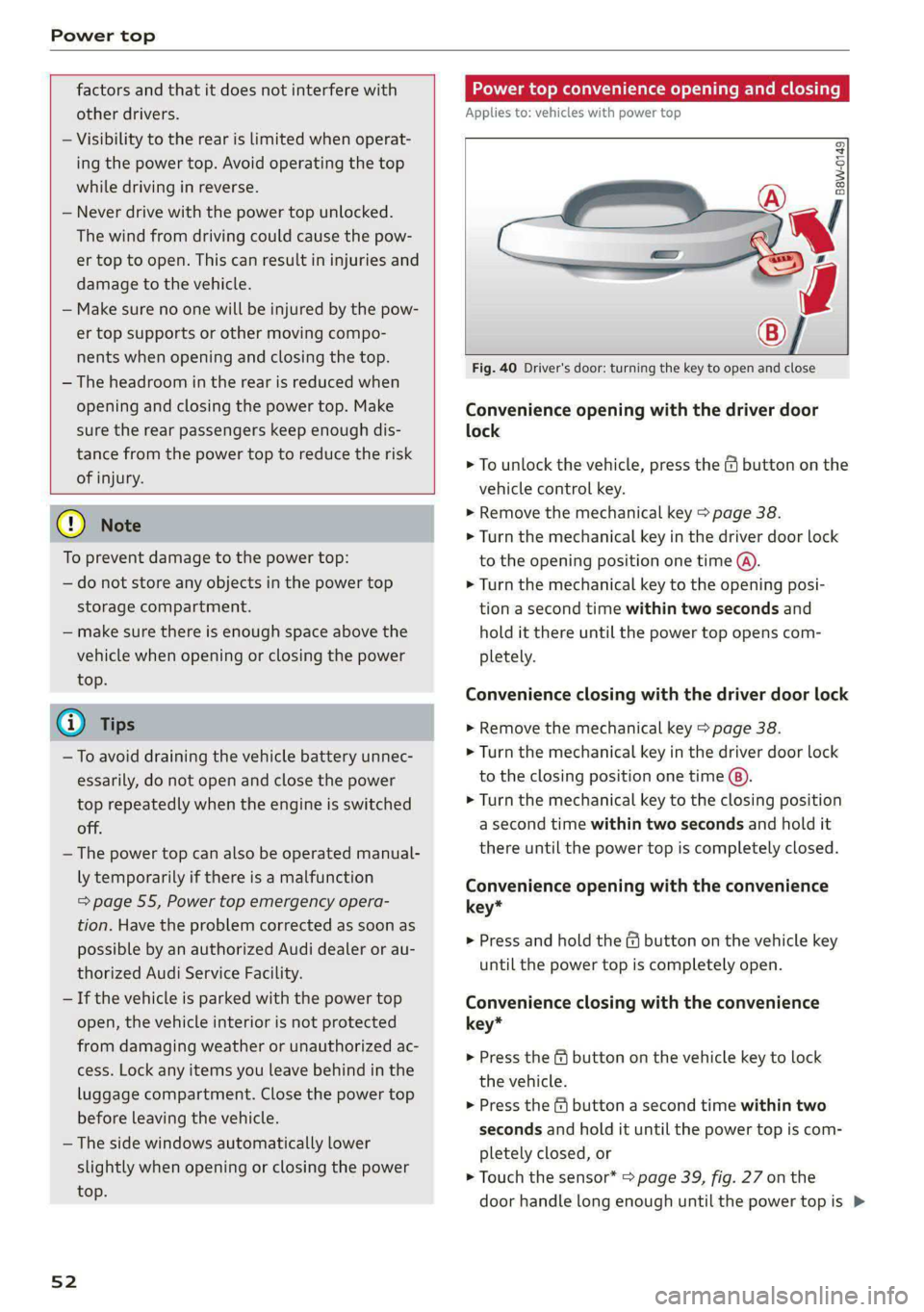
Fig. 40 Driver's door: turning the key to open and close
Convenience opening with the driver door
lock
> To unlock the vehicle, press the & button on the
vehicle control key.
> Remove the mechanical key > page 38.
> Turn the mechanical key in the driver door lock
to the opening position one time @).
> Turn the mechanical key to the opening posi-
tion a second time within two seconds and
hold it there until the power top opens com-
pletely.
Convenience closing with the driver door lock
> Remove the mechanical key > page 38.
> Turn the mechanical key in the driver door lock
to the closing position one time ®).
> Turn the mechanical key to the closing position
a second time within two seconds and hold it
there until the power top is completely closed.
Convenience opening with the convenience
key*
> Press and hold the & button on the vehicle key
until the power top is completely open.
Convenience closing with the convenience
key*
> Press the f& button on the vehicle key to lock
the vehicle.
> Press the f button a second time within two
seconds and hold it until the power top is com-
pletely closed, or
> Touch the sensor* > page 39, fig. 27 on the
door handle long enough until the power top is >
Page 57 of 318
8W7012721BB
Power top
Power top emergency
operation
Applies to: vehicles with power top
B8W-0258
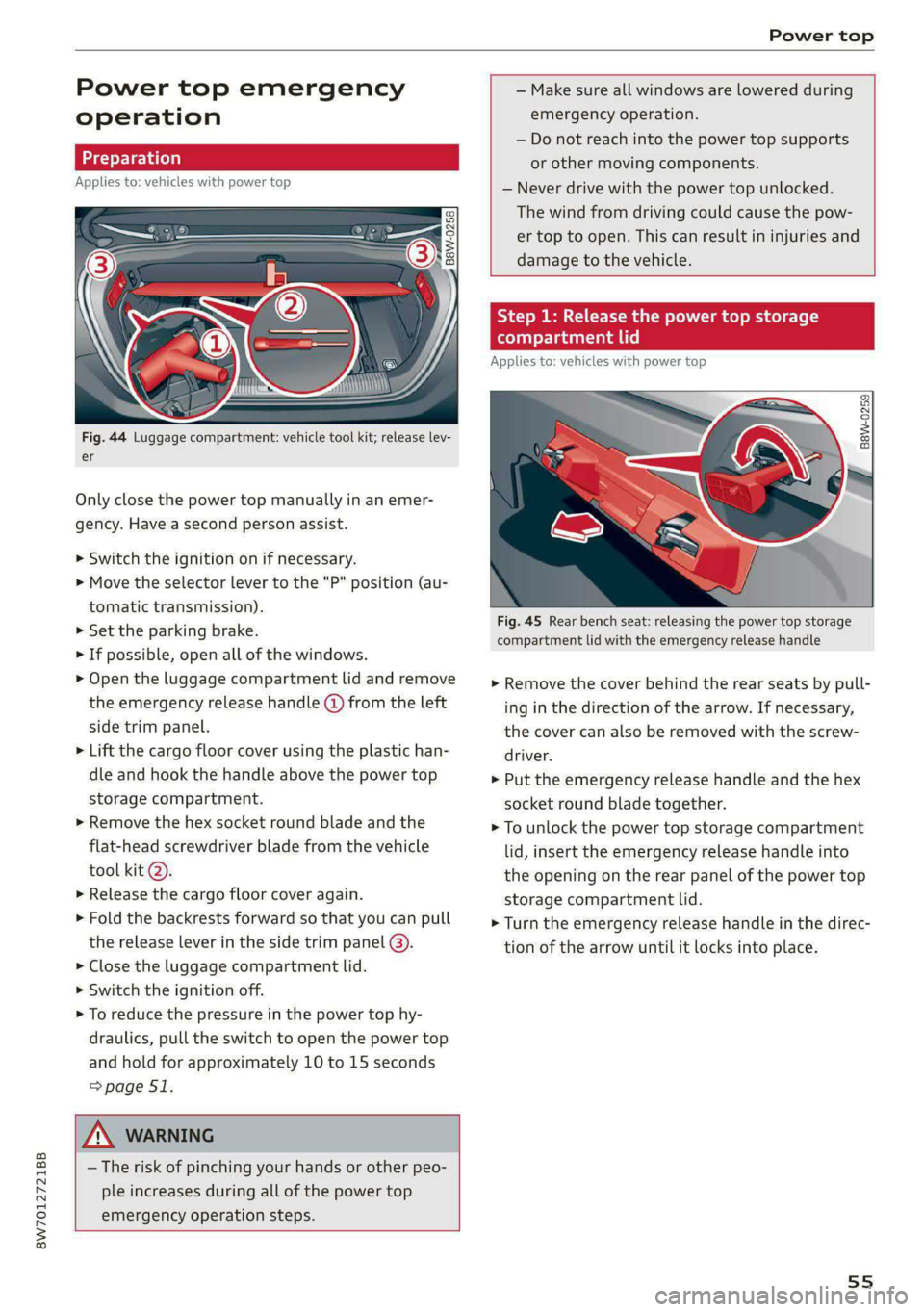
Fig. 44 Luggage compartment: vehicle tool kit; release lev-
er
Only close the power top manually in an emer-
gency. Have a second person assist.
> Switch the ignition on if necessary.
> Move the selector lever to the "P" position (au-
tomatic transmission).
> Set the parking brake.
> If possible, open all of the windows.
> Open the luggage compartment lid and remove
the emergency release handle (d) from the left
side trim panel.
> Lift the cargo floor cover using the plastic han-
dle and hook the handle above the power top
storage compartment.
> Remove the hex socket round blade and the
flat-head screwdriver blade from the vehicle
tool kit @).
>» Release the cargo floor cover again.
> Fold the backrests forward so that you can pull
the release lever in the side trim panel @).
> Close the luggage compartment lid.
> Switch the ignition off.
> To reduce the pressure in the power top hy-
draulics, pull the switch to open the power top
and hold for approximately 10 to 15 seconds
=> page 51.
Z\ WARNING
— The risk of pinching your hands or other peo-
ple increases during all of the power top
emergency operation steps.
— Make sure all windows are lowered during
emergency operation.
— Do not reach into the power top supports
or other moving components.
— Never drive with the power top unlocked.
The wind from driving could cause the pow-
er top to open. This can result in injuries and
damage to the vehicle.
Step 1: Release the power top storage
compartment lid
Applies to: vehicles with power top
B8W-0259
Fig. 45 Rear bench seat: releasing the power top storage
compartment lid with the emergency release handle
> Remove the cover behind the rear seats by pull-
ing in the direction of the arrow. If necessary,
the cover can also be removed with the screw-
driver.
> Put the emergency release handle and the hex
socket round blade together.
> To unlock the power top storage compartment
lid, insert the emergency release handle into
the opening on the rear panel of the power top
storage compartment lid.
> Turn the emergency release handle in the direc-
tion of the arrow until it locks into place.
55
Page 60 of 318

Lights and Vision
Lights and Vision
Exterior lighting
Switching the lights on and off
Fig. 51 Instrument panel: light switch with button
@ Light switch &
Turn the light switch @ to the corresponding po-
sition when the ignition is switched on. The 2
symbol and the selected position will turn on (ex-
cept position 0).
O - The daytime running lights* will automatical-
ly turn on. In vehicles for some markets, you can
switch the automatic daytime running lights on
and off in the MMI.
AUTO - The headlights will automatically adapt to
the surrounding brightness.
300: — Parking lights
2D - Low beam headlights
When the low beam headlights or parking lights
are switched on, the corresponding BB or 200 in-
dicator light will turn on depending on vehicle
equipment.
@ All-weather lights Zo
Requirement: the light switch must be in the AU-
TO or ZO position.
The headlights automatically adjust so that there
will be less glare, for example when the road sur-
face is wet.
Automatic headlight range control
Your vehicle is equipped with automatic head-
light range control. It reduces glare for oncoming
58
traffic if the vehicle load changes. The headlight
range adjusts automatically.
Audi adaptive light
Applies to: vehicles with Audi adaptive light
Audi adaptive light provides better visibility when
driving in the dark. The lights are adapted to the
road conditions based on speed, such as when
driving on expressways, rural roads, at intersec-
tions, and around curves. The adaptive lights only
function when the light switch is in the AUTO po-
sition and the all-weather lights are switched off.
ZA WARNING
— Observe the safety precautions and note the
limits of the assist systems, sensors, and
cameras > page 126.
— Automatic headlights are only intended to
assist the driver. The driver is still responsi-
ble for controlling the headlights and may
need to switch them on and off manually
depending on light and visibility conditions.
For example, fog cannot be detected by the
light sensors. So always switch on the low
beams ZO under these weather conditions
and when driving in the dark.
(i) Tips
— If the vehicle battery has been discharging
for a while, the parking light may switch off
automatically. Avoid using the parking
lights for several hours.
— When using lighting equipment, the driver
is responsible for adhering to any local ap-
plicable regulations while driving and when
parking the vehicle.
— Only the front headlights turn on when the
daytime running lights are switched on*. In
vehicles in certain markets, the tail lights
will also turn on.
—Incool or damp weather, the inside of the
headlights, turn signals, and tail lights can
fog
over due to the temperature difference
between the inside and outside. They will
clear shortly after switching them on. This
does not affect the service life of the light-
ing.
Page 106 of 318

Driving
— If the engine has been under heavy load for
an extended period of time, heat builds up
in the engine compartment after the engine
is switched off and there is a risk of damag-
ing the engine. For this reason, let the en-
gine run at idle for approximately two mi-
nutes before shutting it off.
G) Tips
— Brief noises are normal when starting and
stopping the vehicle and are no cause for
concern.
— For up to 10 minutes after stopping the en-
gine, the radiator fan may turn on again au-
tomatically or it may continue to run, even if
the ignition is switched off.
— It may not be possible to start the vehicle in
extremely low temperatures.
— Power will be fully available once the engine
is at operating temperature.
Messages
= Engine start system: malfunction! Please
contact Service
There is a malfunction in the engine start system.
Drive immediately to an authorized Audi dealer
or authorized Audi Service Facility to have the
malfunction repaired.
B Remote control key: key not detected. Is the
key
still in the vehicle?
The vehicle key was removed from the vehicle
while the engine is running. If the vehicle key is
no longer in the vehicle, you cannot switch the ig-
nition on or start the engine once you stop it. You
also cannot lock the vehicle from the outside.
Remote control key: hold back of key
against the designated area. See owner's man-
ual
The battery in the vehicle key may be drained or
there may be a malfunction. To start the vehicle,
you must also hold the vehicle key against the lo-
cation shown P) > page 103, fig. 100.
If the malfunction remains, drive immediately to
an authorized Audi dealer or authorized Audi
104
Service Facility to have the malfunction correct-
ed.
When driving
Starting to drive, stopping, and parking
Starting from a stop
> Press and hold the brake pedal.
> Start the engine.
> Select a gear.
> Release the parking brake.
> Release the brake pedal. The vehicle may roll.
> Press the accelerator pedal to accelerate.
Securing the vehicle against rolling
Secure your vehicle to prevent it from rolling be-
fore exiting the vehicle.
> Set the parking brake.
> Select the “P” selector lever position.
> If parking on a steep road, turn the steering
wheel so that your vehicle will roll against the
curb in case it should start to move.
If one of these measures is not possible, for ex-
ample because there is no vehicle power, you
must secure your vehicle against rolling using ad-
ditional measures.
> Only park the vehicle on a level surface.
> Use suitable objects to block the front and rear
wheels.
Set the parking brake before selecting the “P” se-
lector lever position. This prevents too much
stress from being placed on the locking mecha-
nism when parking on a steep surface.
ZA WARNING
— Always set the parking brake when leaving
your vehicle, even if for a short period of
time. If the parking brake is not set, the ve-
hicle could roll away, increasing the risk of
an accident.
— Do not leave your vehicle unattended while
the engine is running, because this increases
the risk of an accident.
— If the parking brake is set, it can release au-
tomatically when the accelerator pedal is
pressed. To reduce the risk of an accident, >
Page 107 of 318
8W7012721BB
Driving
do not inadvertently press the accelerator
pedal and always shift into “P” when the ve-
hicle is stopped.
— If you leave the vehicle, switch the ignition
off and take the key with you. This is espe-
cially important when leaving persons or an-
imals in the vehicle. Otherwise, the vehicle
could start unintentionally, the parking
brake could release, or electronic equipment
could activate, which increases the risk of an
accident.
— No persons or animals should be left in a
locked vehicle. Locked doors make it more
difficult for emergency workers to enter the
vehicle, which puts lives at risk.
— If you do not begin driving immediately af-
ter releasing the brake pedal, your vehicle
may begin to roll backward. Press the brake
pedal or set the parking brake immediately.
@) Note
If you have to stop on an incline, always press
the brake pedal to hold the vehicle in place to
reduce the risk of the vehicle rolling back-
ward. Do not try to hold the vehicle in place
by pressing and holding the accelerator pedal.
The transmission can overheat, which increas-
es the risk of damage.
Hill hold assist
If you take your foot off of the brake pedal when
driving on hills, the braking force will be held for
several seconds. At that time, you can start driv-
ing without the vehicle rolling backward.
Requirement: the driver's door must be closed,
the engine must be on, and the vehicle must be
traveling uphill.
> To activate hill hold assist, press and hold the
brake pedal for several seconds while the vehi-
cle is stationary.
ZA WARNING
— If you do not begin driving immediately af-
ter releasing the brake pedal, your vehicle
may begin to roll backward. Press the brake
pedal or set the parking brake immediately.
— The hill hold assist cannot hold the vehicle
on inclines in every scenario (for example,
on slippery or icy ground).
Gears and driving programs
(y—
(2—*
RAZ-0410:
R
N
i
D/S
~~ NEI
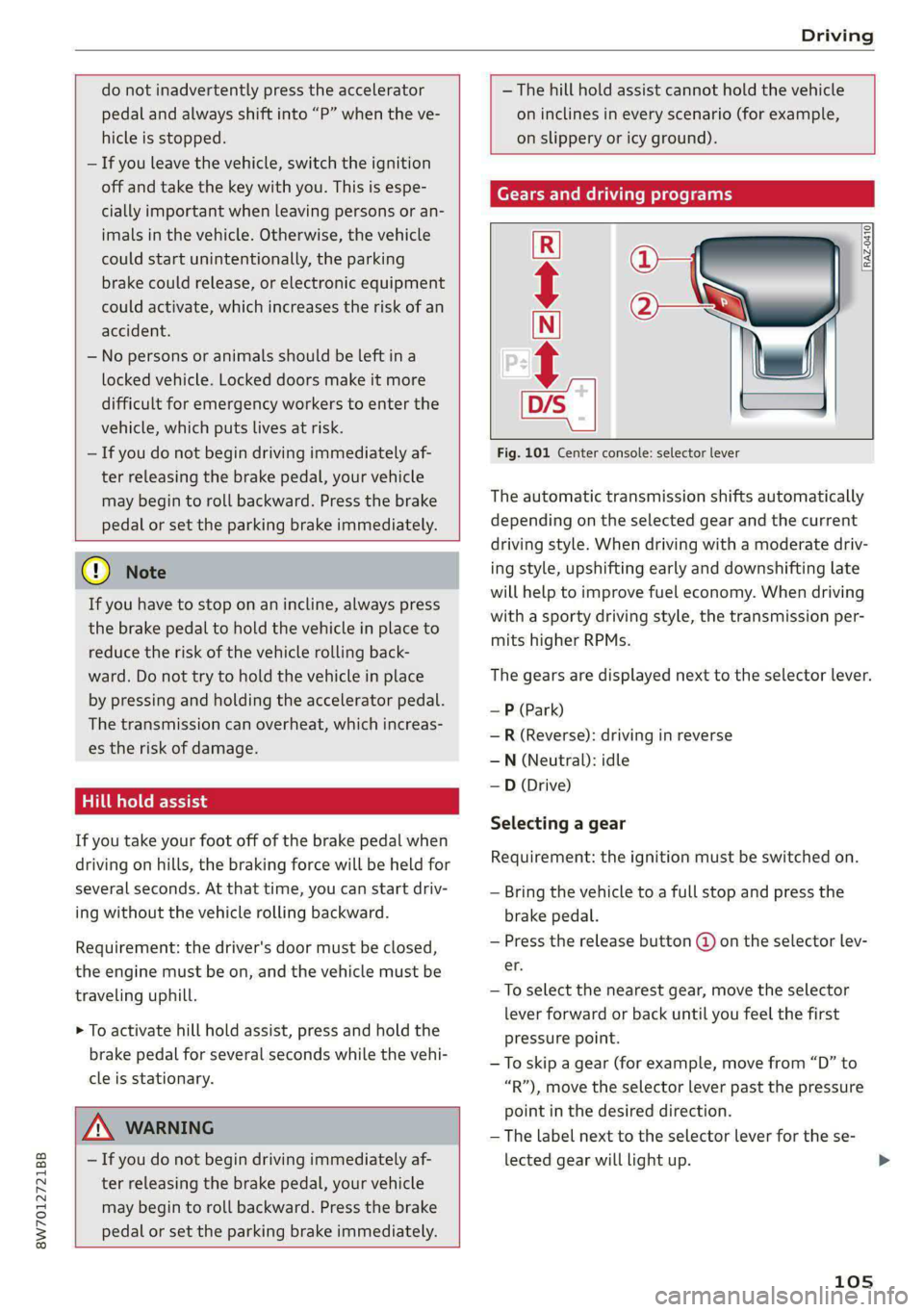
Fig. 101 Center console: selector lever
The automatic transmission shifts automatically
depending on the selected gear and the current
driving style. When driving with a moderate driv-
ing style, upshifting early and downshifting late
will help to improve fuel economy. When driving
with a sporty driving style, the transmission per-
mits higher RPMs.
The gears are displayed next to the selector lever.
— P (Park)
—R (Reverse): driving in reverse
—N (Neutral): idle
—D (Drive)
Selecting a gear
Requirement: the ignition must be switched on.
— Bring the vehicle to a full stop and press the
brake pedal.
— Press the release button (@ on the selector lev-
er.
—To select the nearest gear, move the selector
lever forward or back until you feel the first
pressure point.
—To skip a gear (for example, move from “D” to
“R”), move the selector lever past the pressure
point in the desired direction.
—The label next to the selector lever for the se-
lected gear will light up.
105
Page 108 of 318
Driving
“N” (Neutral) gear
In the “N” gear, power is not transmitted to the
driving wheels. Use the “N” gear in a car wash
(with conveyor belts), for example.
If you unintentionally select “N” while driving
(faster than 1 mph (2 km/h)), you can also shift
back to “D” without pressing the brake pedal.
For safety reasons, the vehicle cannot be locked
when the transmission is in the "N” gear.
“Pp” (Park) gear
Requirement: the ignition must be switched on.
The vehicle is secured from rolling away by the
parking lock when in the “P” gear.
— Bring the vehicle to a full stop and press the
brake pedal.
— Press the “P” button @) on the selector lever.
— The “P” next to the selector lever will light up.
“P” engages automatically if you switch the en-
gine off while the “D” or “R” gear is selected. If
you switch the engine off in “N”, “P” will engage
automatically after approximately 30 minutes.
If you want to switch from “P” to “D” or “R”, the
engine must be running.
If you cannot shift out of “P”, for example be-
cause the vehicle has no power, you may need to
use the emergency release for the parking lock
=> page 108.
Selecting a driving program
Various driving programs can be selected when in
the “D” gear. The programs influence when the
transmission shifts and how the accelerator ped-
al responds.
The selected driving program is displayed in the
instrument cluster.
—D (Drive): normal driving mode
— S (Sport): sporty driving mode
If you select the Dynamic mode in Audi drive se-
lect*, the “S” driving program will be activated.
When the ignition is switched off, the driving pro-
gram may be reset to “D”.
106
To switch between the current driving program
and “S”, push the selector lever toward the rear.
ZA WARNING
— Before you start driving, check if the label
for the desired selector lever position next
to the selector lever is lit up.
— Secure the vehicle against rolling before ex-
iting the vehicle > page 104.
— Power is still transmitted to the wheels
when the engine is running at idle. To pre-
vent the vehicle from “creeping”, you must
keep your foot on the brake in all selector
lever positions (except "P" and "N") when
the engine is running.
— To reduce the risk of an accident, do not
press the accelerator pedal when changing
gears if the vehicle is stationary and the en-
gine is running.
— Never select the “R" or "P” gears while driv-
ing. Doing so could cause an accident.
— The vehicle can roll even if the ignition is
switched off.
@) Tips
If you shift between “D” and “R” within one
second, you do not need to press the brake
pedal. This makes it possible to “rock” if it is
stuck, for example.