ABS AUDI A5 2021 Owners Manual
[x] Cancel search | Manufacturer: AUDI, Model Year: 2021, Model line: A5, Model: AUDI A5 2021Pages: 318, PDF Size: 85.96 MB
Page 11 of 318

8W7012721BB
Quick access
Electronic Stabilization Control
(ESC)
=> page 122
Electronic Stabilization Control
(ESC)
=> page 122
Electronic Stabilization Control
(ESC)
=> page 122
Anti-lock Braking System (ABS)
=>page 122
Anti-lock Braking System (ABS)
=> page 122
Adaptive cruise control
> page 147,
Traffic jam assist
=> page 148
Steering intervention request
=> page 148,
=>page 151
Distance warning
=> page 149
Active lane assist
=> page 150,
=> page 152
Pre sense
> page 152
Side assist, exit warning
>page 157
Parking systems
=>page 161
Rear cross-traffic assist
>page 165
Park assist
=>page 170
Emergency call function
> page 188
Tank system
=> page 227
Malfunction Indicator Lamp (MIL)
=> page 227,
> page 229
Engine oil level (MIN)
=> page 233
Engine oil level (MAX)
=> page 233
Engine oil sensor
=> page 233
Engine warm-up request
=> page 233
Electrical system
> page 239
Washer fluid level
=> page 242
Tire pressure
=> page 262,
=> page 263,
=> page 265,
=> page 265,
=> page 266
Tire pressure
=> page 263,
=> page 266
Other indicator lights
Low beam headlights
=> page 58
Parking lights
=>page 58
Turn signals
=> page 59,
=> page 61
Turn signals
=>page 59,
=> page 61
Start/Stop system
=> page 111
Cruise control system
=> page 136
Cruise control system
=> page 136
Efficiency assist
=> page 138,
> page 138
Efficiency assist
=> page 138
Page 15 of 318
8W7012721BB
Instrument cluster
vehicle safely. See an authorized Audi dealer
or authorized Audi Service Facility for assis-
tance.
G) Tips
— The following pages primarily show illustra-
tions of the Audi virtual cockpit*. The dis-
play or location of the items that are shown
may vary on the different versions of the in-
strument cluster.
— You can select the units used for tempera-
ture, speed, and other measurements
=> page 221.
— Speeds are displayed in mph (miles per
hour) or km/h (kilometers per hour).
— Certain instrument cluster content can also
be displayed in the head-up display*
=> page 26.
Operating
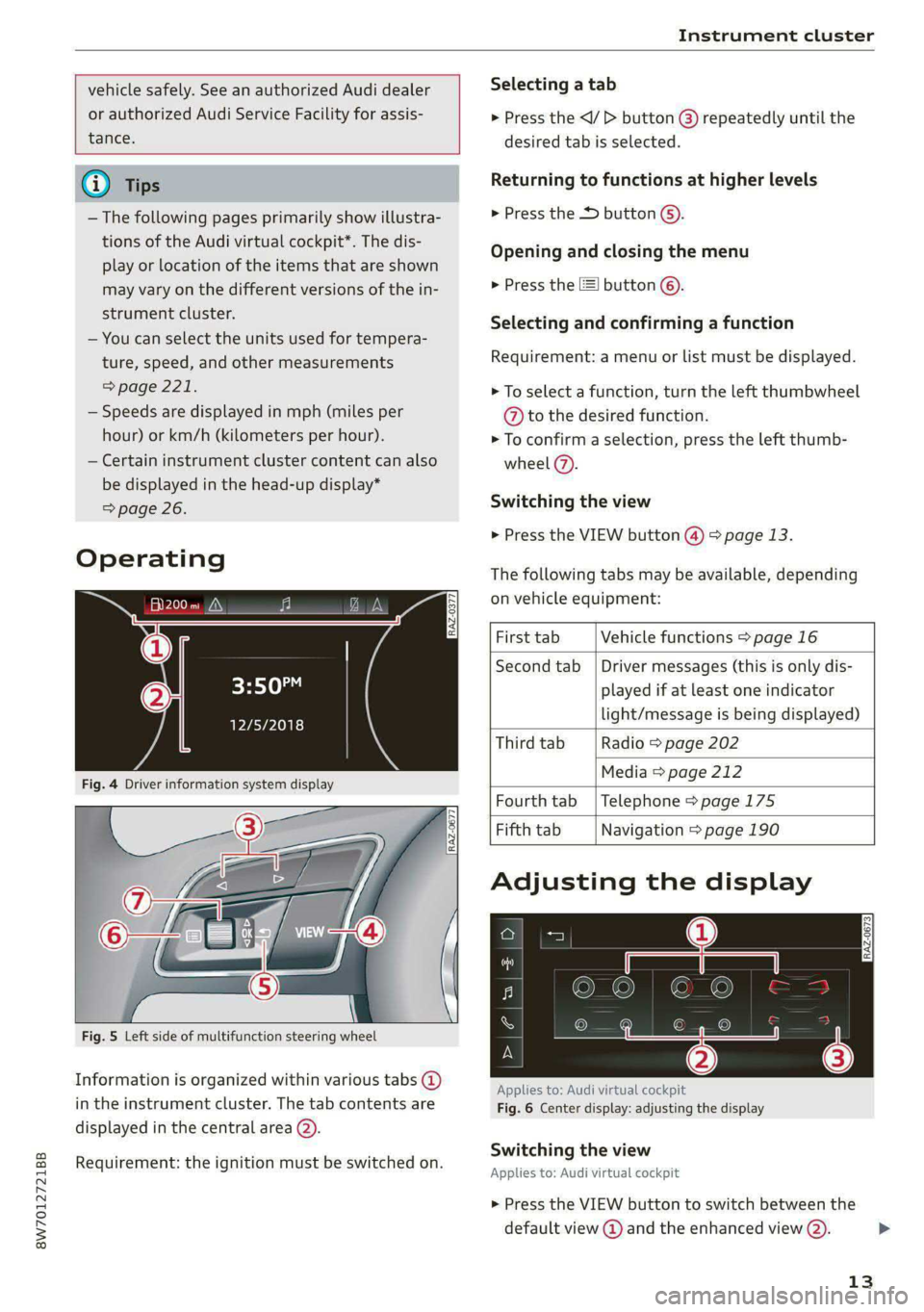
Fig. 5 Left side of multifunction steering wheel
Information is organized within various tabs @)
in the instrument cluster. The tab contents are
displayed in the central area (2).
Requirement: the ignition must be switched on.
RAZ-0377
Selecting a tab
> Press the
desired tab is selected.
Returning to functions at higher levels
> Press the D button ©).
Opening and closing the menu
» Press the [=] button ©).
Selecting and confirming a function
Requirement: a menu or list must be displayed.
> To select a function, turn the left thumbwheel
@ to the desired function.
> To confirm a selection, press the left thumb-
wheel (7).
Switching the view
> Press the VIEW button @) > page 13.
The following tabs may be available, depending
on vehicle equipment:
First tab Vehicle functions > page 16
Second tab | Driver messages (this is only dis-
played if at least one indicator
light/message is being displayed)
Third tab Radio > page 202
Media > page 212
Fourth tab | Telephone > page 175
Fifth tab Navigation > page 190
Adjusting the display
RAZ-0673
Applies to: Audi virtual cockpit
Fig. 6 Center display: adjusting the display
Switching the view
Applies to: Audi virtual cockpit
> Press the VIEW button to switch between the
default view @ and the enhanced view (2).
13
Page 88 of 318
Sitting correctly and safely
Facility and have the airbag system in-
spected.
— If you must use a forward-facing child safety
seat on the front passenger's seat, move the
seat as far back as possible so that it is as
far as possible from the front passenger's
airbag. While doing this, make sure the seat
can be adjusted all the way. A child in a child
safety seat on the front passenger's seat can
receive a severe impact if the front passeng-
er's airbag deploys, which increases the risk
of serious or fatal injury.
— Replace the child safety seat after an acci-
dent because there could be damage that is
not visible.
— Even if a child is not sitting in the child safe-
ty seat, the child safety seat must be se-
cured. An unsecured child safety seat may
be thrown through the vehicle interior dur-
ing sudden braking maneuvers or an acci-
dent.
Correct positioning for children
Always secure children in a child safety seat de-
signed for the body size, weight, and age of the
child.
You can secure child safety seats in your vehicle
using the lower LATCH anchors or the safety
belts. You can also secure child safety seats to
the top tether anchor. Depending on the child
safety seat, it may also be necessary to secure it
to the top tether anchor. In Canada, securing for-
ward-facing child safety seats to the top tether
anchors is required by law.
Always transport children in the rear seats
Accident statistics show that children that are se-
cured correctly in the rear seats are safer than in
front seats. Always transport children in suitable
child safety seats secured on the rear seats.
In exceptional circumstances: transporting
children in the front passenger's seat
If exceptional circumstances require the child
safety seat to be placed on the front passenger's
seat, then the front passenger's airbag must be
deactivated. Please note the important informa-
86
tion for this > page 82, Advanced airbag system.
If you must secure a forward-facing child safety
seat, move the front passenger's seat as far back
as possible so that it is as far as possible from the
front passenger's airbag. While doing this, make
sure the seat can be adjusted all the way.
Only switch to a larger child safety seat when
absolutely necessary
Switch to a larger child safety seat only when ab-
solutely necessary. Secure your child using a safe-
ty belt without a child safety seat only if all of the
following statements are true:
— The child is large enough to sit upright in the
seat
— The child is able to sit with his or her back rest-
ing completely on the seat backrest
—The child is able to sit with his or her knees
bent over the edge of the seat surface
—The child is able to sit with both of his or her
feet completely touching the floor in the foot-
well
— The lap portion of the safety belt lies flat and
securely over the hip area and never over the
stomach
— The shoulder portion of the safety belt lies flat
and securely over the center of the shoulder
and
the chest, and never under the arm, behind
the back, or over the neck or face.
—The child is able to maintain this seating posi-
tion throughout the entire trip
Read and follow the important information and
warnings regarding the correct use of safety belts
=> page 75.
G) Tips
— Child safety seats can also be secured to
seats with side airbags. In the event of an
accident, children can also be protected by
the side airbags if the child is correctly se-
cured in a suitable child safety seat that is
attached correctly.
— The lower LATCH anchors as well as the
safety belt may be required to correctly in-
stall some child safety seats. Using both at
the same time is permitted, provided that >
Page 115 of 318

8W7012721BB
Driving
braking heavily several times while driving at
high speeds can clean the brake rotors > A\.
Brake pads
New brake pads do not achieve their full braking
effect during the first 250 miles (400 km). They
must be “broken in” first. However, you can com-
pensate for the slightly reduced braking force by
pressing firmly on the brake pedal. Avoid heavy
braking during the break-in period.
Brake pad wear depends largely on the way the
vehicle is driven and on operating conditions.
Brake pad wear increases when driving frequently
in the city or short distances or when using a very
sporty driving style.
Ceramic brakes
Applies to: vehicles with ceramic brakes
Ceramic brakes provide excellent deceleration
rates.
The break-in period for new ceramic brakes may
be significantly longer than for standard brake
rotors. Due to the properties of the material,
they may cause noises at lower speeds. Ceramic
brakes also absorb more moisture in wet condi-
tions. Therefore, there will temporarily be less
braking force than when the brakes are dry. You
can compensate for this by pressing the brake
pedal harder.
Automatic post-collision braking system
The automatic post-collision braking system can
help to reduce the risk of sliding and of addition-
al collisions after an accident. If the airbag con-
trol module detects a collision, the vehicle is
braked by the ESC.
The vehicle does not brake automatically if one of
the following occurs:
— The driver presses the accelerator pedal, or
— The braking force generated by the pressed
brake pedal is greater than the braking force
that
would be initiated by the system
— The ESC, the brake system, or the vehicle elec-
trical system is not functioning
ZA\ WARNING
— Only apply the brakes for the purpose of
cleaning the brake system when road and
traffic conditions permit. You must not en-
danger other road users and increase the
risk of an accident.
— Due to the risk of injury, only have an au-
thorized Audi dealer or authorized Audi
Service Facility work on the brake system.
Incorrect repairs could impair the function.
— Never let the vehicle roll while the engine is
stopped because this increases the risk of an
accident.
— During automatic braking maneuvers, the
brake pedal may move downward automati-
cally. To reduce the risk of injury, do not
place your foot under the brake pedal.
@) Note
— Never let the brakes “rub” by pressing the
pedal lightly when braking is not actually
necessary. This can cause the brakes to over-
heat and increases braking distance and
causes wear.
— Observe the important information for driv-
ing downhill > page 116. This especially ap-
plies when towing a trailer.
(i) Tips
— In vehicles with an electromechanical brake
booster, the resistance in the brake pedal
may vary depending on the driving situation
(such as if driver assistance system are ac-
tive).
— If you retrofit your vehicle with a front spoil-
er, wheel covers or similar items, make sure
that the air flow to the brakes is not ob-
structed. Otherwise the brake system can
overheat.
— Also refer to the information about brake
fluid > page 238.
GG / @® Brakes: malfunction! Stop vehicle
safely
113
Page 116 of 318

Driving
There is a malfunction in the brake system. If
ES/@ana BAalso turn on, there is a malfunc-
tion in the ABS, ESC, and braking distribution. If
the brake booster is not working, you have to use
much more force when braking the vehicle.
Do not continue driving. See an authorized Audi
dealer or authorized Audi Service Facility for as-
sistance. Read and follow the other safety pre-
cautions > A\.
fie / @ Brake pads: wear limit reached. You
can continue driving. Please contact Service
The brake pads are worn. Drive to an authorized
Audi dealer or authorized Audi Service Facility as
soon as possible to have the malfunction correct-
ed.
Brake booster: limited functionality. You can
continue driving. Please contact Service
There is a brake booster malfunction. The brake
booster is available, but its effectiveness is re-
duced. The braking performance may be different
compared to the usual performance. Drive to an
authorized Audi dealer or authorized Audi Service
Facility immediately to have the malfunction cor-
rected.
Brake booster: deactivated. See owner's manual
The brake booster remains active for a brief peri-
od of time after switching off the ignition. Secure
the vehicle against rolling > page 104.
Other indicator lights
When you switch the ignition on, the BRRMa / @
indicator light turns on briefly to check the func-
tion. If the indicator light does not turn on, there
is a system malfunction.
If Be / @ stays on, there is a malfunction in
the brake system.
© - Ahigh load was placed on the brakes from
driving downhill for a long period of time. Follow
the instructions in the message to utilize the en-
gine braking effect and to relieve the brakes.
ZA WARNING
If a malfunction occurs in the ABS, ESC, and
braking distribution, interventions that stabi-
114
lize the vehicle will no longer be available.
This could cause the vehicle to swerve, which
increases the risk that the vehicle will slide.
Do not continue driving. See an authorized
Audi dealer or authorized Audi Service Facility
for assistance.
Electromechanical
parking brake
Operating the parking brake
The electromechanical parking brake is used to
secure the vehicle from rolling away unintention-
ally.
The ©) switch is located under the selector lever
in the center console. It turns on when the park-
ing brake is set. You can release the parking brake
manually or automatically when you start to
drive.
Setting and releasing the parking brake
> Setting: pull the ®) switch.
> fiin/ appears, the parking brake is hold-
ing the vehicle. You can remove your foot from
the brake pedal.
> Releasing: when the ignition is switched on,
press and hold the brake pedal and press the ©)
button.
If the red indicator light flashes, the braking
force has not built up enough or it has decreased.
You can also secure the vehicle by selecting the
“P” gear or pressing the brake pedal. Make sure
the indicator light is off before you start driving.
Automatically releasing the parking brake
when starting to drive
Requirement: the driver's door must be closed
and the driver’s safety belt must be fastened.
> Press the accelerator pedal to start to drive.
ZA WARNING
—To reduce the risk of an accident, always
make sure the vehicle is situated safely
while stationary.
— If the parking brake is set, it can release au-
tomatically when the accelerator pedal is
Page 123 of 318

8W7012721BB
Driving dynamic
Sport differential
Applies to: vehicles with sport differential
The sport differential distributes the drive power
to the rear axle based on the situation. The goal
is a high level of agility and ability to accelerate
on curves. The vehicle is very responsive to steer-
ing. The settings depend on the selected Audi
drive select* mode.
Messages
7-3] All-wheel drive: malfunction! You can con-
tinue driving. Please contact Service
Drive immediately to an authorized Audi dealer
or authorized Audi Service Facility to have the
malfunction repaired.
t-3] Sport differential: malfunction! Please con-
tact Service
Drive immediately to an authorized Audi dealer
or authorized Audi Service Facility to have the
malfunction repaired.
BH Att-wheel drive: too hot. Please adapt driv-
ing style. See owner's manual
The transmission temperature has increased sig-
nificantly due to the sporty driving manner. Drive
in a less sporty manner until the temperature re-
turns to the normal range and the indicator light
switches of.
iT-3| Sport differential: temperature too high.
Please adapt driving style
The transmission temperature has increased sig-
nificantly due to the sporty driving manner. Drive
in a less sporty manner until the temperature re-
turns to the normal range and the indicator light
switches of.
A WARNING
Contact an authorized Audi dealer or author-
ized Audi Service Facility if the sport differen-
tial is faulty or malfunctioning. The repair
must be performed by trained personnel us-
ing
the correct oil in order to ensure safety.
Electronic Stabilization
Control
Electronic Stabilization Control (ESC) supports
driver safety. It reduces the risk of slipping and
improves driving stability. ESC detects critical sit-
uations, such as if the vehicle is oversteering or
understeering, or if the wheels are spinning.
The brakes are applied or the engine torque is re-
duced in order to stabilize the vehicle.
The following stabilization functions are integrat-
ed into the ESC, among others:
Anti-lock Braking System (ABS)
ABS prevents the wheels from locking when brak-
ing. The vehicle can still be steered even during
hard braking. Apply steady pressure to the brake
pedal. Do not pump the pedal.
A pulsing in the brake pedal indicates that the
system is acting to stabilize the vehicle.
Anti-Slip Regulation (ASR)
ASR reduces drive power when the wheels begin
spinning and adapts the power to the road condi-
tions. This will increase the driving stability.
Electronic Differential Lock (EDL)
The EDL applies the brakes to wheels that are
slipping and transfers the drive power to the oth-
er wheels. This function is not available at higher
speeds.
In extreme cases, EDL automatically switches off
to keep the brake on the braked wheel from over-
heating. The vehicle is still functioning correctly.
EDL will switch on again automatically when con-
ditions have returned to normal.
Selective wheel torque control
Selective wheel torque control is used when driv-
ing on curves. Braking is targeted toward the
wheels on the inside of the curve as needed. This
allows more precise driving in curves.
121
>
Page 124 of 318

Driving dynamic
Power steering
The ESC can also support vehicle stability
through steering.
ZA WARNING
— The ESC and its integrated systems cannot
overcome the limits imposed by natural
physical laws. This is especially important on
slippery or wet roads. If the systems begin
acting to stabilize your vehicle, you should
immediately alter your speed to match the
road and traffic conditions. Do not let the in-
creased safety provided tempt you into tak-
ing risks. This could increase your risk of a
collision.
— Please note the risk of a collision increases
when driving fast, especially through curves
and on slippery or wet roads, and when driv-
ing too close to objects ahead. There is still
a risk of accidents because the ESC and its
integrated systems cannot always prevent
collisions.
— Accelerate carefully when driving on
smooth, slippery surfaces such as ice and
snow. The drive wheels can spin even when
these control systems are installed and this
can affect driving stability and increase the
risk of a collision.
@) Tips
The ABS and ASR only function correctly when
all four wheels have a similar wear condition.
Different tire sizes can lead to a reduction in
engine power.
The So button (or 2, depending on the model)
for controlling the ESC is located in the center
console, in front of the selector lever. The ESC is
automatically switched on when the ignition is
switched on.
Limiting ESC
In some situations, it may make sense to limit
the stabilizing function of the ESC so that the
wheels can spin, for example to rock a vehicle to
free it when it is stuck or to drive with snow
122
chains. The ESC can also be limited to provide
more sporty driving characteristics with fewer
stabilizing corrective actions.
—To limit the ESC, press the S20 button briefly.
The B indicator light will turn on.
— To completely reactivate the ESC stabilization
function, press the button again. The indicator
light turns off.
Switching off ESC
For a more active control of the vehicle where the
stabilizing functions of the ESC cannot intervene,
the ESC can be switched off.
—To switch off the ESC, press and hold the or
button for more than three seconds. The B
and Ea indicator lights turn on.
— To completely reactivate the ESC stabilization
function, press the button again. The indicator
lights turn off.
ZA\ WARNING
— When the ESC is switched off or limited,
there will be no vehicle stabilization or it will
be limited. The driving wheels could spin
and the vehicle could swerve, especially on
slick or slippery road surfaces, which in-
creases the risk of an accident.
— Because of the increased risk of an accident,
only drive with the ESC switched off or Limit-
ed when it is necessary. Reactivate the ESC
as soon as possible.
@) Tips
— If the ESC is limited, switched off, or mal-
functioning, systems with an automatic
braking intervention function may not be
fully available.
— If malfunctions occur in other systems or
certain driver assist systems are active, the
ESC must be switched on by the system. The
ESC
may switch on automatically and can-
not be operated with the button.
B fs / B © Stabilization control (ESC/
ABS): malfunction! See owner's manual
Page 125 of 318

8W7012721BB
Driving dynamic
There is a malfunction in the ABS or EDL. This al-
so causes the ESC to malfunction. The brakes still
function with their normal power, but ABS is not
active.
Drive to an authorized Audi dealer or authorized
Audi Service Facility immediately to have the
malfunction corrected.
Other indicator lights
ita blinks while driving, the ESC is actively reg-
ulating. Operating noises may occur. If the indi-
cator light stays on, the ESC has been switched
off due to system needs. The indicator light turns
off when the system is fully functional.
123
Page 227 of 318

8W7012721BB
Additional information
Additional information
Brands and licenses
This manual does not contain any symbols, such
as ® or ™, to identify trademarks or registered
trademarks. However, the absence of these sym-
bols does not constitute a waiver of any rights as-
sociated with these names.
Apple, iPhone, iPod touch, Apple CarPlay, Light-
ning, and iTunes Radio are trademarks of Apple
Inc.
10S is a trademark or, in the USA and other coun-
tries, a registered trademark of Cisco and is used
under license.
Other product and manufacturer names may be
trademarks of their respective owners.
225
Page 255 of 318

8W7012721BB
Wheels
absolutely necessary and drive
carefully when doing so.
—Do not use run-flat tires on
your vehicle. Using them when
not permitted can lead to ve-
hicle damage or accidents.
—If you install wheel covers on
the vehicle, make sure they al-
low enough air circulation to
cool the brake system. If they
do not, this could increase the
risk of an accident.
Tire wear and damage
rr)
+
x xz + a
Fig. 174 Tire profile: treadwear indica-
tor
Tire wear
Check the tires regularly for wear.
—Inflation pressure that is too low
or high can increase tire wear
considerably.
D Obey any applicable regulations in the
country where the vehicle is being oper-
ated.
—Driving quickly through curves,
rapid acceleration, and heavy
braking increase tire wear.
—Have an authorized Audi dealer
or authorized Audi Service Facili-
ty check the wheel alignment if
there is unusual wear.
—Have the wheels rebalanced if an
imbalance is causing noticeable
vibration in the steering wheel.
If you do not, the tires and other
vehicle components could wear
more quickly.
Treadwear indicator
Original equipment tires contain
treadwear indicators in the tread
pattern, which are bars that are
1/16 inch (1.6 mm) high and are
spaced evenly around the tire per-
pendicular to the running direc-
tion > fig. 174. The letters “TWI”
or triangles on the tire sidewall
indicate the location of the tread-
wear indicators.
The tires have reached the mini-
mum tread depth !) when they
have worn down to the treadwear
indicators. Replace the tires with
new ones > A.
253