reset AUDI A5 2021 Owners Manual
[x] Cancel search | Manufacturer: AUDI, Model Year: 2021, Model line: A5, Model: AUDI A5 2021Pages: 318, PDF Size: 85.96 MB
Page 8 of 318
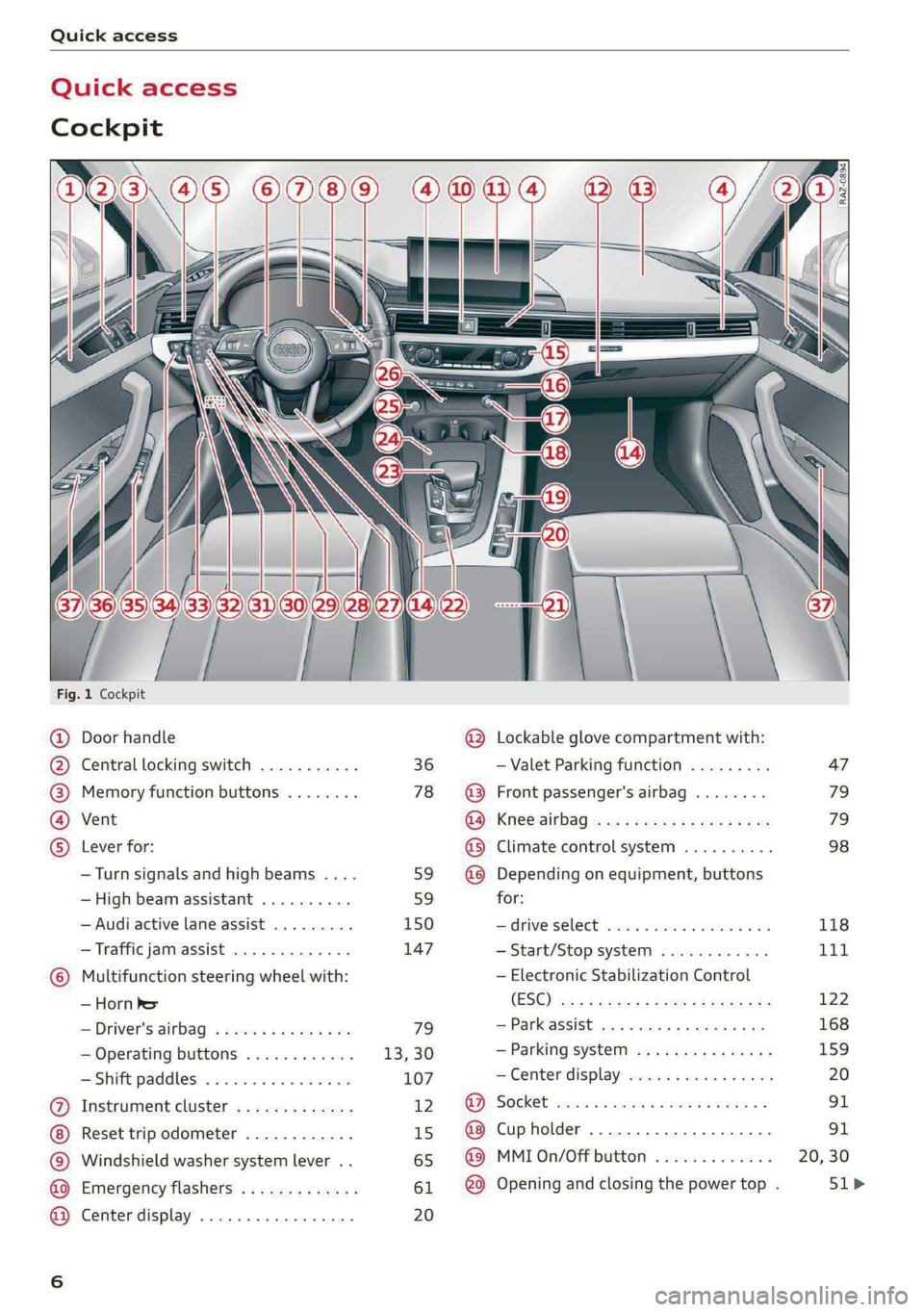
Quick access
Quick access
Cockpit
Fig. 1 Cockpit
@ @ @ @ ©
©
OO©eCS9
Door handle
Central locking switch
Memory function buttons
Vent
Lever for:
—Turn signals and high beams ....
— High beam assistant ..........
— Audi active lane assist .........
— Traffic jam assist .............
Multifunction steering wheel with:
— Horn he
— Driver's airbag
— Operating buttons
—Shift paddles ................
Instrument cluster .............
Reset trip odometer ............
Windshield washer system lever ..
Emergency flashers .............
Center display .................
36
78
59 59
150 147
79
13,30
107
12 15
65
61 20
®
OOO®
©OO®
Lockable glove compartment with:
— Valet Parking function
Front passenger's airbag
Knee airbag
Climate control system ..........
Depending on equipment, buttons
for:
drive SELCCE cassis «6 sossan © 4 esr © 6s
— Start/Stop system
— Electronic Stabilization Control
(ESC)
— Parkassist os 5 & enies so acs x ¢ ee
— Parking system
—Center display ................
Cup holder ...............0000.
MMI On/Off button
Opening and closing the power top .
[RAZ-0894)
47
79
79
98
118
Tit
122
168
159
Page 17 of 318

8W7012721BB
Instrument cluster
the instrument cluster. This will protect the en-
gine components, for example during a cold start
or from overheating.
The engine speed limitation is deactivated if you
release the accelerator pedal while the engine is
at normal operating temperature.
If the engine speed limitation was activated by
an engine control malfunction, the B indicator
light also turns on. Make sure the engine speed
does not go above the speed displayed, for exam-
ple when downshifting. Drive to an authorized
Audi dealer or authorized Audi Service Facility im-
mediately to have the malfunction corrected.
@) Note
The needle in the tachometer may only be in
the red area of the gauge for a short period of
time before there is a risk of damaging the
engine. The location where the red zone be-
gins varies depending on the engine.
Odometer
Fig. 7 Instrument cluster: reset button
The trip odometer and odometer are displayed in
the status bar @) > page 12.
The trip odometer shows the distance driven
since it was last reset. It can be used to measure
short distances. The odometer shows the total
distance that the vehicle has been driven.
Resetting the trip odometer
> To reset the trip odometer to zero, press the re-
set button @.
iG) Tips
Distances are displayed in mi (miles) or km
(kilometers).
Outside temperature
display
The outside temperature is displayed in the sta-
tus bar @) > page 12.
If your vehicle is stationary or if you are driving at
very low speeds, the temperature displayed in
the instrument cluster may be slightly higher
than the actual temperature outside due to heat
radiating from the engine.
At temperatures below 41 °F (+5 °C), a snowflake
symbol appears in front of the temperature dis-
play > A.
Z\ WARNING
Do not assume the roads are free of ice based
on the outside temperature display. Be aware
that there may be ice on roads even when the
outside temperature is around 41 °F (+5 °C)
and that ice can increase the risk of accidents.
Engine oil temperature
indicator
Applies to: vehicles with engine oil temperature indicator
Depending on the vehicle equipment, the engine
oil temperature %7 may be indicated by a bar in
the instrument cluster.
> Applies to: vehicles with Audi virtual cockpit:
Open the vehicle functions tab and switch to
the enhanced view > page 13.
> Applies to: vehicles with analog instrument
cluster: Open the lap timer > page 133.
When engine oil temperatures are low, the dis-
play --- °F (--- °C) appears in the instrument clus-
ter. The engine has reached its operating temper-
ature when the engine oil temperature is be-
tween 176 °F (80 °C) and 248 °F (120 °C) under
normal driving conditions. The engine oil temper-
ature may be higher if there is heavy engine load
and high temperatures outside. This is not a
15
Page 18 of 318
Instrument cluster
cause for concern as long as the B or 3 indica-
tor lights do not turn on.
Boost indicator
Applies to: vehicles with boost indicator
Depending on vehicle equipment, the current en-
gine load (meaning the current boost pressure)
may be indicated by a bar in the instrument clus-
ter.
> Applies to: vehicles with Audi virtual cockpit:
Open the vehicle functions tab and switch to
the enhanced view > page 13.
> Applies to: vehicles with analog instrument
cluster: Open the lap timer > page 133.
Shift light indicator
Applies to: RS models
The shift light indicator informs the driver when
the RPM limit is reached.
» Applies to: vehicles with Audi virtual cockpit:
Set the RS Performance or RS Runway layout if
necessary > page 13.
» Applies to: vehicles with analog instrument
cluster: Open the lap timer > page 133.
The shift light indicator is displayed with green,
yellow and red ranges in the upper areas of the
tachometer. The shift light indicator will blink red
when approaching the engine speed limit. Shift
to the next highest gear at the right time.
Sport displays
Applies to: RS models
Various sport displays, such as a G meter or tire
pressure indicator, may be available depending
on vehicle equipment.
Opening sport displays in the instrument
cluster
Applies to: vehicles with Audi virtual cockpit
> Select in the instrument cluster: Vehicle func-
tions tab > EE] button > Sport displays.
> Turn the left thumbwheel on the multifunction
steering wheel until the desired sport display
appears in the instrument cluster.
16
Opening sport displays in the MMI
> Applies to MMI: Select on the home screen: VE-
HICLE > RS monitor.
> Browse to the desired display if necessary.
G meter
Applies to: vehicles with Audi virtual cockpit
The G meter displays the longitudinal and lateral
acceleration. The current values are displayed in
the instrument cluster while driving. The maxi-
mum values that are reached are stored and dis-
played when the vehicle is stationary. Only the
maximum values that are reached are displayed
in the MMI.
> To reset the stored values, press and hold the
left thumbwheel on the multifunction steering
wheel for one second.
Tire pressure
The tire pressure monitoring system displays the
current tire pressures and temperatures. Also see
=> page 263, Tire pressure monitoring system.
Engine data
Applies to: vehicles with Audi virtual cockpit
The engine data in the instrument cluster shows
which percentage of the maximum output or
maximum torque is currently being used.
Temperature
The temperature display in the MMI shows the
temperature of various fluids and vehicle compo-
nents, such as the engine oil or sport differential.
Vehicle functions
(OTe TWN]
The trip computer is displayed in the first tab of
the driver information system. Additional vehicle
functions can be accessed depending on the vehi-
cle equipment.
> Press the =] button on the multifunction steer-
ing wheel.
— On-board computer > page 17
— Sport displays > page 16
— Lap times > page 133
Page 19 of 318

8W7012721BB
Instrument cluster
— Lap statistics > page 133
— Acceleration measurement > page 134
— Reduced display > page 14
On-board computer
Resetting values to zero
Requirement: the Consumption, Short-term
memory, or Long-term memory display must be
selected.
> To reset the values in the respective memory to
zero, press and hold the left thumbwheel on
the multifunction steering wheel for one sec-
ond.
Depending on the vehicle equipment, you can call
up the following displays in the on-board com-
puter one at a time by turning the left thumb-
wheel on the multifunction steering wheel:
—Time and date > page 221
— Level
— Digital speedometer
— Average consumption > page 17
— Range
— Short-term memory overview
— Long-term memory overview
— Energy consumers > page 17
— Driver assistance
— Traffic sign recognition and traffic light infor-
mation
Short-term memory and long-term memory
The short-term memory collects driving informa-
tion from the time the ignition is switched on un-
til it is switched off. If you continue driving within
two hours after switching the ignition off, the
new values will be included when calculating the
current trip information.
Unlike the short-term memory, the long-term
memory is not erased automatically. You can se-
lect the time period for evaluating trip informa-
tion yourself.
Average consumption
The current consumption can be shown using a
bar graph. The average consumption stored in
the short-term memory is also displayed. If the
bar is green, your vehicle is saving fuel (for exam-
ple, using recuperation).
Energy consumers
The Energy consumers view lists other equip-
ment that is currently affecting fuel consump-
tion. The display shows up to three equipment
items. The equipment using the most power is
listed first. If more than three items using power
are switched on, the equipment that is currently
using the most power is displayed. A gauge also
shows the current total consumption of all other
equipment.
G) Tips
The date, time of day, and time and date for-
mat can be set > page 221.
17
Page 35 of 318
8W7012721BB
Personalization
@) Tips
— Depending on the country, you may be able
to use the myAudi app or my.audi.com.
— You do not need to log into the vehicle with
a myAudi user in order to use Audi connect
vehicle control services, which depend on
the vehicle equipment.
— If you sell your vehicle, reset all settings to
the factory default settings.
— Store the vehicle code in a secure place. It
may be necessary to re-enter the vehicle
code.
— When entering the vehicle code, please note
that the code is case-sensitive.
— If you do not have the 10-digit vehicle code,
contact an authorized Audi dealer or author-
ized Audi Service Facility.
33
Page 50 of 318

Opening and closing
You can switch the valet parking function on, for
example when someone else is parking your vehi-
cle ). The vehicle can be driven, locked, and un-
locked using the vehicle key, but access to the
luggage compartment is blocked.
> Remove the mechanical key > page 38.
> Press the [VALET] button in the glove compart-
ment. The LED in the button turns on if the
function is switched on.
> Lock the glove compartment with the mechani-
cal key.
>» Applies to: vehicles with lockable pass-through
and lockable rear seat backrests: To secure the
luggage compartment from the vehicle interior,
lock the pass-through and the rear seat backr-
ests using the mechanical key > page 95,
=> page 94.
> Give your vehicle key to the service personnel
who are parking your vehicle and keep the me-
chanical key.
The following buttons are deactivated when the
valet parking function is switched on:
— <3 Button in the driver's door
— &s Button on the vehicle key
— Handle in the luggage compartment lid
If the valet parking function is switched on, a
message will appear every time the ignition is
switched on.
@ Tips
Please note that the luggage compartment
can still be accessed from the vehicle interior
in vehicles with fixed rear seat backrests or
ones that cannot be locked, even when the
valet parking function is switched on.
Garage door opener
Applies to: vehicles with garage door opener
With the garage door opener, you can activate
systems such as the garage doors, security sys-
D_ This function is not available in all countries.
2) The possible number of hand-held transmitters depends
on the equipment.
48
tems or house lights from inside your vehicle.
These functions are operated in the MMI. Multi-
ple receivers can be programmed, which can con-
trol the functions of up to eight2) hand-held
transmitters.
ZA WARNING
— When operating or programming the garage
door opener, make sure that no people or
objects are in the area immediately sur-
rounding the equipment. People can be in-
jured or property can be damaged if struck
when closing.
— Do not allow yourself to be distracted from
traffic by the viewing and operating the dis-
plays.
Gi) Tips
— Ifyou sell your vehicle, reset all settings to
the factory default settings > page 222.
— The system complies with United States FCC
regulations and ISED regulations
=> page 297.
(i) Tips
Before you program your system to the ga-
rage door opener, first check the compatibili-
ty:
— Ask an authorized Audi dealer or authorized
Audi Service Facility or check at www.
homelink.com. You can also find more infor-
mation about HomeLink there.
— You can display information about Home-
Link (compatibility level/status/country
code/HomeLink generation) in the MMI:
— Select on the home screen: VEHICLE > Set-
tings & Service > Garage door opener > @.
Applies to: vehicles with garage door opener
Requirements: the remote control transmitter
must be programmed > page 49, the vehicle >
Page 51 of 318

8W7012721BB
Opening and closing
must be within range of the system, and the igni-
tion must be switched on.
There are multiple options to open or close the
system (such as the garage door).
> If you have only programmed one remote con-
trol transmitter, press the rs button on the
display. Or
> If you have programmed multiple remote con-
trol transmitters, press the 2 button on the
display and then press the respective system
button. Or
> Applies to: vehicles with programmable steer-
ing wheel button: If you have configured the
programmable steering wheel button, press
the *K button > page 30 and then press the re-
spective button for the system. Or
> Applies to: vehicles with location pairing: If you
have programmed Location pairing, press the
button for this in the display (notification cen-
ter > page 23). As you approach the system,
the button is displayed on the MMI.
If transmission was successful, the message:
Send to: XXX will appear.
Applies to: vehicles with garage door opener
You can program both fixed code and rolling code
systems in the MMI using the procedure that is
described.
Requirement: the ignition must be switched on.
Programming the system
Applies to: MMI
Requirement: the hand transmitter must be
present and the vehicle must be within range of
the system (such as the garage door) that you
would like to program.
> If you are programming the garage door opener
for the first time, press the - button on the
display. Follow the instructions in the MMI. Or
> If you would like to program other systems, se-
lect on the home screen: VEHICLE > Settings &
Service > Garage door opener. Select the de-
2) Only applies to rolling code systems
sired button: @). Follow the instructions in the
MMI.
> If you would like to reprogram systems that are
already programmed, select on the home
screen: VEHICLE > Settings & Service > Garage
door opener. Press the Z button and select 7
for the system to be reprogrammed. Select:
Program. Follow the instructions in the MMI.
With some systems, the garage door opener will
be immediately available after programming.
With other systems, the garage door opener
must also be synchronized.
Synchronizing!)
Requirement: the hand transmitter must already
be programmed and the vehicle must be within
range of the system (such as the garage door).
If the system synchronization is performed di-
rectly after the programming procedure, follow
the instructions on the MMI.
If you would like to sync at a later time:
> Applies to: MMI: Select on the home screen:
VEHICLE > Settings & Service > Garage door
opener.
> Press the button for the system that you would
like to synchronize.
> Follow the instructions in the MMI.
Renaming programmed systems
You can rename the programmed systems indi-
vidually (names may have a maximum of 10 char-
acters).
>» Applies to: MMI: Select on the home screen:
VEHICLE > Settings & Service > Garage door
opener.
> Press the Z button.
> Press the 7 button for the system that you
would like to rename.
> Select: Rename. If necessary, delete the preset
name, such as Garage door opener 1.
> Follow the instructions in the MMI.
49
Page 74 of 318

Sitting correctly and safely
Depending on the vehicle equipment, the follow-
ing options may be available.
Reset seat position
You can adjust the position of the front passeng-
er’s seat to match the driver's seat.
Driver seat entry assistance
Entry assistance makes it easier to enter or exit
the vehicle.
Front passenger seat adjustment
You can adjust the front passenger's side with the
driver's seat buttons.
(Fatt)
Applies to: vehicles with easy entry function
SSA stele
B8W-0269.
Fig. 68 Front seat: power entry assistance (version 2)
Entry assistance makes it easier for the rear pas-
sengers to enter and leave the vehicle.
Power entry assistance (version 1)
> Lift the handle @ © fig. 67 and fold the seat
backrest forward.
2) Requirement: the vehicle battery must have a sufficient
charge level.
72
> To move the seat all the way forward or to the
original position, press the (2) button briefly.
You can stop the seat by pressing the button
again.
> You can move the seat all the way forward even
when the backrest is upright. Press and hold
the button @) until the seat reaches your pre-
ferred position.
Power entry assistance (version 2)
Pull on the loop @ © fig. 68 and fold the back-
rest forward (2).
> To move the seat all the way forward or to the
original position, press the @) button briefly.
You can stop the seat by pressing the button
again.
ZA WARNING
Always make sure the front seats are upright
and securely locked in place.
— Power entry assistance also works when the
ignition is switched off) or when the vehicle
key is removed, so that rear seat passengers
can still move to the front of the vehicle in
an emergency situation. To reduce the risk
of injury, children should never be left unat-
tended in the vehicle for this reason.
@) Tips
To prevent the head restraints from running
into the headliner, the power adjustable head
restraints* automatically move forward or up-
ward when the seat is adjusted.
eames Cera ti
Applies to: vehicles with a front center armrest
The front center armrest is located between the
front seats.
Adjusting the center armrest
The settings depend on the vehicle equipment.
> To adjust the armrest forward or backward,
move the armrest in the desired direction. >
Page 108 of 318
Driving
“N” (Neutral) gear
In the “N” gear, power is not transmitted to the
driving wheels. Use the “N” gear in a car wash
(with conveyor belts), for example.
If you unintentionally select “N” while driving
(faster than 1 mph (2 km/h)), you can also shift
back to “D” without pressing the brake pedal.
For safety reasons, the vehicle cannot be locked
when the transmission is in the "N” gear.
“Pp” (Park) gear
Requirement: the ignition must be switched on.
The vehicle is secured from rolling away by the
parking lock when in the “P” gear.
— Bring the vehicle to a full stop and press the
brake pedal.
— Press the “P” button @) on the selector lever.
— The “P” next to the selector lever will light up.
“P” engages automatically if you switch the en-
gine off while the “D” or “R” gear is selected. If
you switch the engine off in “N”, “P” will engage
automatically after approximately 30 minutes.
If you want to switch from “P” to “D” or “R”, the
engine must be running.
If you cannot shift out of “P”, for example be-
cause the vehicle has no power, you may need to
use the emergency release for the parking lock
=> page 108.
Selecting a driving program
Various driving programs can be selected when in
the “D” gear. The programs influence when the
transmission shifts and how the accelerator ped-
al responds.
The selected driving program is displayed in the
instrument cluster.
—D (Drive): normal driving mode
— S (Sport): sporty driving mode
If you select the Dynamic mode in Audi drive se-
lect*, the “S” driving program will be activated.
When the ignition is switched off, the driving pro-
gram may be reset to “D”.
106
To switch between the current driving program
and “S”, push the selector lever toward the rear.
ZA WARNING
— Before you start driving, check if the label
for the desired selector lever position next
to the selector lever is lit up.
— Secure the vehicle against rolling before ex-
iting the vehicle > page 104.
— Power is still transmitted to the wheels
when the engine is running at idle. To pre-
vent the vehicle from “creeping”, you must
keep your foot on the brake in all selector
lever positions (except "P" and "N") when
the engine is running.
— To reduce the risk of an accident, do not
press the accelerator pedal when changing
gears if the vehicle is stationary and the en-
gine is running.
— Never select the “R" or "P” gears while driv-
ing. Doing so could cause an accident.
— The vehicle can roll even if the ignition is
switched off.
@) Tips
If you shift between “D” and “R” within one
second, you do not need to press the brake
pedal. This makes it possible to “rock” if it is
stuck, for example.
Page 110 of 318
Driving
— Start/Stop system* must be deactivated
>page 111.
—ESC must be limited > page 121.
— Driving program “S” > page 106 or the Dynam-
ic Audi drive select* mode must be selected
=> page 118.
Using Launch Control
— Press the brake pedal with your left foot and
hold it all the way down for at least one second.
— With the brake pedal pressed, press the accel-
erator pedal all the way down with your right
foot at the same time.
— Once the engine reaches a constant speed, re-
move your foot from the brake pedal.
Once the vehicle has started moving, reactivate
the ESC so that it is fully functional.
ZX WARNING
Only use Launch Control when road and traffic
conditions allow it and other road users will
not be endangered or impacted by your driv-
ing and the vehicle's acceleration. The driving
wheels could spin and the vehicle could
swerve, especially on slick or slippery road
surfaces, which increases the risk of an acci-
dent.
@) Note
When accelerating using Launch Control, all
vehicle components are subject to heavy
loads. This can result in increased wear.
@ Tips
After accelerating using the Launch Control,
the temperature of some vehicle components
may increase greatly. If that happens, the
function will not be available for a few mi-
nutes to reduce the risk of damage. After a
cool-down period, Launch Control will be
available again.
108
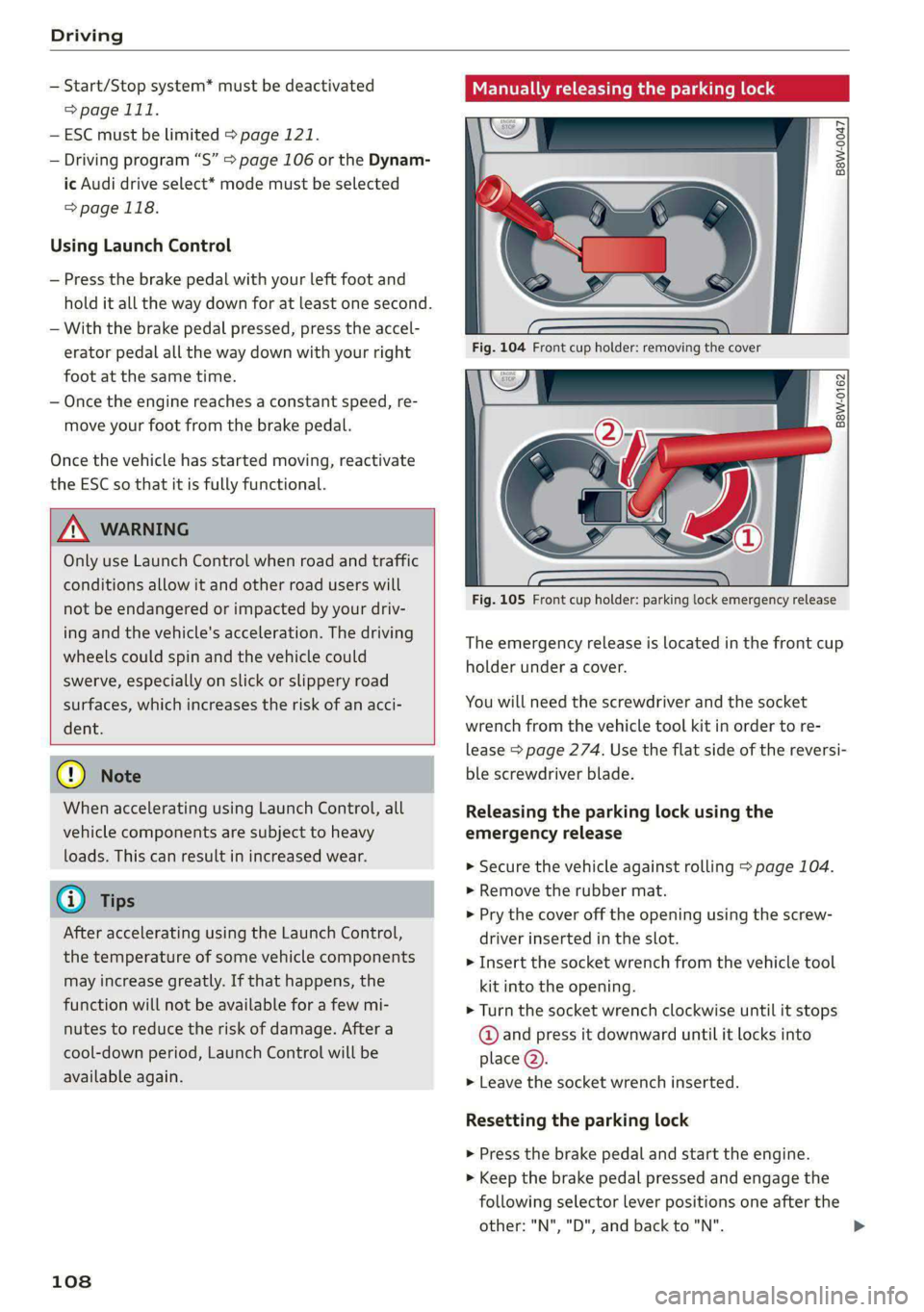
Manually releasing the parking lock
B8W-0047
B8W-0162
Fig. 105 Front cup holder: parking lock emergency release
The emergency release is located in the front cup
holder under a cover.
You will need the screwdriver and the socket
wrench from the vehicle tool kit in order to re-
lease > page 274. Use the flat side of the reversi-
ble screwdriver blade.
Releasing the parking lock using the
emergency release
> Secure the vehicle against rolling > page 104.
> Remove the rubber mat.
> Pry the cover off the opening using the screw-
driver inserted in the slot.
> Insert the socket wrench from the vehicle tool
kit into the opening.
> Turn the socket wrench clockwise until it stops
@ and press it downward until it locks into
place @).
> Leave the socket wrench inserted.
Resetting the parking lock
> Press the brake pedal and start the engine.
> Keep the brake pedal pressed and engage the
following selector lever positions one after the
other: "N","D", and back to "N". >