mirror AUDI A5 CABRIOLET 2010 User Guide
[x] Cancel search | Manufacturer: AUDI, Model Year: 2010, Model line: A5 CABRIOLET, Model: AUDI A5 CABRIOLET 2010Pages: 364, PDF Size: 86.51 MB
Page 138 of 364

lffll..__A_ u_d_ i _s _id _ e_ a_s _ s_ i_ s _t _______________________________________________ _
Audi side assist
Lane change assistant
Applies to vehicles : w ith s ide ass ist
Description
The side assist helps you when changing lanes.
Fig. 138 Rear
bumper: Position of
radar sensors (not
visible on outside)
Fig. 139 Signal light
on the outside mirror -
driver's side
Side ass ist uses radar sensors (not visible on outside)=> fig. 138 to
help the driver check blind spots, and see what is happening in traffic
behind the vehicle=>
page 137, fig. 141.
Signal lights are bu ilt into both outside mirrors
(D => fig. 139 . The
signal light on the left ou tside mirror assists when moving over into the
left lane and the signal light on the right outside mirror assists
when moving over into the right lane.
Th e sig nal light comes on to tell you that side assist has detected a
vehicle on that side and that the position of this other vehicle should
be taken into account if you were to change lanes. Thi s is called the
informational stage signal =>
page 138. The informationa l stage
signal is designed so that you not ice it only when you are looking in
the outside m irror.
When you activate the turn s ignal and side assist detects a vehicle in
a notable location, the correspo nding signal on the outside mirror
flashes briefly and brightly several times. This is the alert stage
signal =>
page 138. •
Applies to veh icles: w ith side ass ist
Activating and deactivating
Activating
Fig. 140 Drive r's
door: Side assi st
butto n
-Press the=> fig. 140 button. The indicator on the button
lights up. .,_
Page 139 of 364
_________________________________________________ A_ u_d _ i_ s_id _ e_ a_s _s_ i_s _t __ ffl'II
Deactivating
- Pre ss th e b utton again . Th e ind icator light on the button
goes o ut.
The system works at speeds faster than 19 mph (30 km/h) .
& WARNING
• Improper reliance on the side assist system can cause collisions
and seriou s per sonal injury:
- Never rely only on side assist when changing lanes.
- Alway s check rear view mirrors to make sure that it is safe to
change lanes.
• Side assist cannot detect all vehicles under all condition s
danger of accident!
• Side a ssist cannot detect vehicle s
in time to alert you when
they approach from behind at very high speed , or fall drop bac;k
very quickly .
• The radar sensor's
vision can be reduced o r entirely blocked by
rain, snow, and heavy spray . Thi s can result in side a ssist not
adequately detecting vehicles o r, in some cases , not detecting
them at all. Always keep an eye on the direction you are traveling
and the relevant area around the vehicle.
• Plea se note that side assi st indi cates there are approaching
veh icles, or vehicles in your blind spot, only after your vehicle has
reached a driving speed of at lea st 19 mph (30 km/h).
• Side assist signal does not work around tight corners (turning
radius le ss than 328 feet or 100 m).
• Side assist is no replacement for the driver's full attention. The
driver alone is respon sible for lane changes and similar driving
maneuvers. Always keep an eye on the direction you are traveling
and the relevant area around the vehicle .
Controls and equip
ment Safety first
0 Note
• T
o ens ure t hat you do not adve rsely affec t side assist, do not blo ck
the area on the rear bumper where the radar sensors are located with
foreign obje cts (s uch as stickers or bicy cle ra cks).
• Make s ure that the s ignal light on the outside mirror is not
blo cked by st ickers or o ther ite ms.
W Tips
• Side assist a utoma tically deact iva tes if it de tects that the rada r
sensors are blocked =>
page 143. The indicator light on the button
goe s out.
• Th e area on the bumpe r w here the ra dar sensors are located must
c o nsistent ly remain free of snow, i ce, a nd heavy soiling so tha t side
assist can funct ion p roper ly. Follow the add itiona l notes on
=>
page 1 4 3.
• Additiona l tint ing on the front si de windows can make it ha rder to
see and co rrec tly un ders t and t he sig nal ligh t on the outs ide m irro r.
• F or Declaration of Compliance to United States FC C and Industry
Cana da regulat ions=>
pag e 346. •
Applies to veh icl es: w ith s ide ass ist
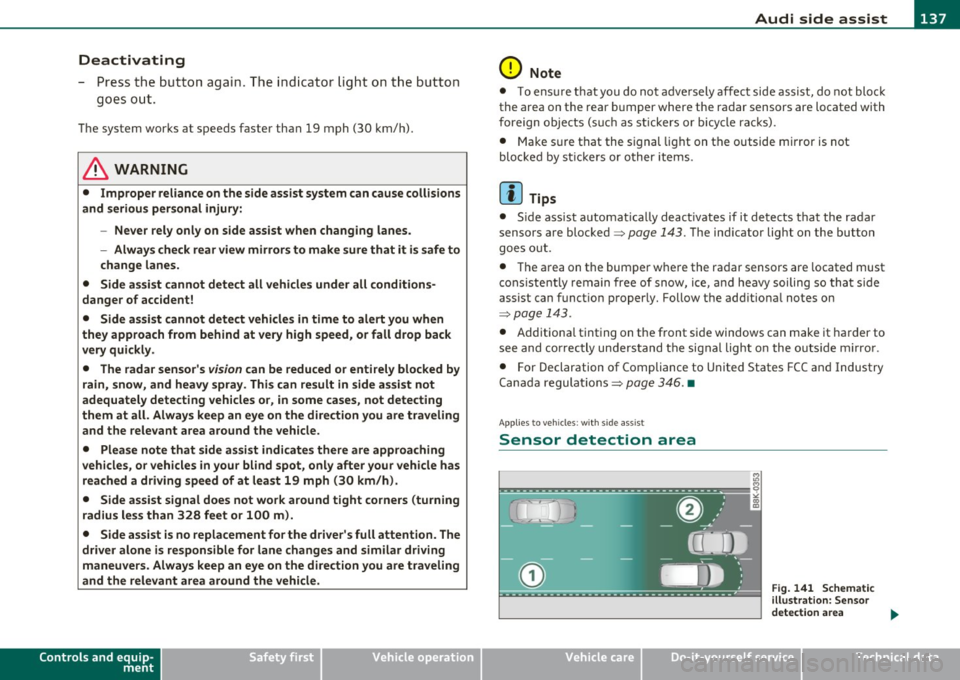
Sensor detection area
Vehicle care
Fig . 141 Schem atic
ill ustration: Se nsor
detectio n area
~
Technical data
Page 140 of 364

lffll.___A_ u_ d_i_ s_ id_ e_ a_s _s_ i_ s _t _________________________________________________ _
The detection~ page 13 7, fig . 141 of the radar sensor detection
area is made up of:
• the approach area (light green area)
(D, about 230 feet (70 m)
behind the vehicle, and
• the "blind spot" (dark green area)@.
The radar sensors cover the adjacent left and right lanes. Other lanes
are
not covered by the radar sensors .
rn Tips
Side assist does not measure actual lane width. The system assumes
a fixed lane width. Detection in the left and right lanes is based on
this assumed lane width. When driving on narrow roads or when
driving to the left or right of the center of a travel lane, it is possible
that vehicles will be detected that are
not in the lane next to the lane
you are using~
page 142. •
Applie s to vehic les: w ith s ide a ssist
Operation
Side assist compares the distance and difference in speed of detected
vehicles with the speed of your vehicle . Whenever the difference in
speed and distance is registered as notab le if you were to change
lanes , a signa l light appears on the respective mirror .
The signal can light up if you are passed by a vehicle or if you are
passing another vehicle .
If you pass another vehicle slowly (difference in speed less than 9
mph, or 15 km/h), the signa l light will come on as soon as the other
vehicle is in your blind spot and is detected by side ass ist. When the
difference in speed is greater, the signal light will not come on. •
Appli es to vehicles : with si de assist
Informational and alert stage signals
Side ass ist has two signal stages:
• the informational stage signal, and
• the alert stage signal.
Side assist helps you by using the appropr iate signal stage,
depending on whether or not you have activated the turn signal, and
thus have indicated that you are or are not changing lanes.
Informational stage signal
As long as you have not activated the turn signal, s ide assist informs
you of detected vehicles that are reg istered as being in a notable loca
tion if you were to change lanes . Whenever the detected vehicle's
difference in speed and distance is registered by side assist as
notable , the signal light on the respective mirror produces muted
illumination.
Th e brightness of the informat ional stage signal is designed not to be
as intense, so that it does not interfere with your view of the road
when you are driving and have no intention of changing lanes. When
you look in the outs ide mirror, you can clearly see the informational
stage signal.
Alert stage signal
When you act ivate the turn s ignal , and side assist has detected a
vehicle in a notable location on that particular side , the signal light on
this side mirror flashes brightly. The repeated brief and bright
flashing of the alert stage signal reminds you to carefully check
traffic to the rear in the outside mirror and over your shoulder, so that
you can safely complete the lane change~
& in "Safety tips" on
page 143.
rn Tips
The brightness of the signa l light on the outside mirrors can be
adjusted with the MMI
~ page 141. •
Page 141 of 364

_________________________________________________ A_ u _ d_ i_ s_ id_ e_ a _ s_s _ i_s _t _ __.lft'I
A pplie s to vehicles : wi th s ide ass ist
Driving situation: Fast approaching
vehicles
Fig. 142 Side assist: Fast approaching vehicles
(D Signal on outside mirror does not light up
No vehicle was detected by the sensors . The signal on the outside
mirror does not light up~
& in "Safety tips" on page 143.
@ Informational stage signal lights up
A fast approaching vehicle· in the left-hand lane for example· was
detected by the sensors . Although this vehicle is sti ll far away, it
should be taken into account if you were to change lanes, due to the
considerable difference in speed . The informational stage signal on
the outside mirror lights up~
page 138.
Contro ls a nd e quip
m en t Vehicle
OP-eration
® Alert stage signal flashes
If you act ivate your turn signa l in driving situation @, the signa l
br iefly f lashes repeatedly . Side assist is alert ing you to a vehicle that
you may not have noticed .
[I) Tips
• The faster a vehicle approaches from the rear, the sooner the
signal on the outs ide mirror l igh ts up . S ide assist will signal, at the
latest, when a detected vehicle enters your "blind spot".
• Whe n ve hicles approach very quickly, chang ing lanes can be
dangerous even if the signal on the outside mirror does not light up. •
App lies to vehicles : with side assis t
Driving situation : Slowly approaching
vehicles
Fig. 143 Side assist: Slowly approach ing vehicles and vehicles in your blind
~ot
~
Vehicle care Do-it-yourselt service iTechnical data
Page 142 of 364

1111..__A_ u_d_ i _s _i_d _e_ a_s_ s_ i_ s_ t _______________________________________________ _
© Signal on outside mirror does not light up
A vehicle approach ing s low ly- in the left-hand lane for example -was
detected by the sensors. Because of the small difference in speed and
the considerable distance from your vehicle, the signal on the outside
mirror will not light up=>
& in "Safety tips" on page 143 .
@ Informational stage signal lights up
The distance between your vehicle and that of the slowly approaching
vehicle has narrowed . The informational stage signal on the outside
m irror lights up.
As soon as the difference in speed and distance is registered as
notable if you were to change lanes, a signal on the mirror lights up.
Side assist will signal at the latest when a detected vehicle enters
your "blind spot" .
@ Alert stage signal flashes
If you activate your turn signal in dr iving s ituation @, the signal light
briefly flashes repeatedly. Side assist is alerting you of a vehicle that
you may not have noticed.
[ i ] Tips
• T he faste r a vehicle approaches from the rear, the sooner the
signal on the outs ide mirror lights up. S ide assist will signal, at the
latest, when a detected vehicle enters your "blind spot".
• When vehicles approach very quickly, changing lanes can be
dangerous even if the signal on the outside mirror does not light up.•
App lies to vehicles : wit h si de assist
Driving situat ion : Vehicles dropping back
slowly
Fig. 144 Side assist: Vehicles dropping back slowly
© Signal on outside mirror does not light up
The vehicle that you passed has not yet been detected by side assist.
The signal on the outside mirror does not light up=>
& in "Safety
tips" on
page 143.
@ Informational stage signal lights up
A vehicle dropping back slowly on the right (differen ce in speed of
less than 9 mph, or 15 km/h) has been detected by side assist. The
informational stage signal on the outside mirror lights up.
@ Alert stage signal flashes
If you activate your turn signa l in driving situa tion @, the signal
br iefly flashes repeatedly . Side ass ist is alerting you of a vehicle that
you may not have noticed. •
Page 143 of 364

_________________________________________________ A_ u _ d_ i_ s_ id_ e_ a _ s_s _ i_s _t _--J_
A pplie s to ve hicles : wi th s id e ass ist
Driving situation: Vehicles dropping back
quickly
@
I
- (OIDJ -
•. _ ...
' I
- Q•n
-~---
Fig. 145 Side assist: Vehicles dropping back quickly
(D Signal on outside mirror does not light up
The vehicle just passed has not yet been detected by side assist. The
signal on the outside mirror does not light up~
& in "Safety tips" on
page 143.
@ Signal on outside mirror does not light up
The vehicle dropping back quickly on the right (difference in speed of
more than 9 mph, or 15 km/h) has been detected by side assist, but
is not considered notable in the event of a lane change, because it is
dropping back so quickly . The signal on the outside mirror does not
light up~
& in "Safety tips" on page 143.
Con tro ls a nd e quip
m en t Vehicle
OP-eration
® Signal on outside mirror does not light up
If you activate your turn signal in driving situation @, the signal still
does not light up on the outside mirror~
& in "Safety tips" on
page 143. •
App lies to ve hicles : with side assis t
Setting the signal brightness on the
outside mirror
The signal brightness can be set in the radio or in the
fv1fv1I*.
- Select: Function button I CAR] > Audi side assist.
- Rotate the control knob to adjust the displayed brightness
of the signal Light on the outside mirrors.
The brightness of the signal light for both the informational a nd alert
stages is automatically adjusted to ambient light conditions. In addi
tion, you can adjust the
basic brightness separately, via the bright
ness function.
While making the adjustment, the new brightness setting is
displayed briefly. The brightness displayed is that of the informa
tional stage signal. The alert stage signal brightness is linked to the
informational stage signal brightness.
The informational stage signal brightness should be adjusted so that
you notice the signal illumination when you look in the outside
mirror, but not when you look forward through the windshield .
In very dark or light surroundings, the automatic brightness setting
adjusts signal light brightness to maximum or minimum intensity, as
needed. In circumstances such as these, you may not notice any
change in the brightness on the outside mirror when adjusting the
basic brightness.
You may not notice the change until lighting conditions are normal
again.
Vehicle care Do-it-yourselt service iTechnical data
Page 145 of 364

_________________________________________________ A_ u_d _ i_ s_id _ e_ a_s _s_ i_s _t __ _
Notes
Applies to veh icles: w ith s ide ass ist
Messages in instrument cluster display
If side assist turns off automatically, the indicator lig ht on the butto n
w ill go out and yo u w ill see a message in the instrument cl uster
display:
Audi side assist not available: sensors blocked
Th e side ass ist senso rs a re b uilt in to the rear bum per o n the left and
r ight (not v is ible on the outside)=>
page 136, fig. 138. To e nsure
that you do not adve rsely affect the way side assist f unctions, foreign
objec ts (such as stic ke rs or b icycle racks) should not be attached to
the a rea on the rear bumper where t he sensors are located. If side
as sis t fu nctions a re adverse ly affe cted , you will see thi s me ssa ge in
the instrume nt cl uster disp lay. Remove anything that may b e
bl ockin g the sensor s.
If no ve hicle is detected for a lo nger p eriod of t ime w hile driving, side
assist w ill also switch off automatically .
Audi side assist currently not available
If the re is a te mp orary p rob lem (such as the vehicle 's batt ery ch arg e
bei ng low) , side assist ca nnot be act ivated temporar ily.
Audi side assist : system fault
Have the system checked by an auth orized Audi dealer or qualified
wo rkshop .•
Applies to veh icles: w ith s ide ass is t
Safety tips
T he side assist detect io n may be limited when driving a ro u nd na rrow
s tr ee t co rner s, on hilly stree ts, and und er poor we ather cond itio n s.
Controls and equip
ment Safety first
It
is possible that the rada r senso rs may a lso detect o ther objects,
such a s high or stag gere d guar drails.
S ide assis t does not measure actua l lane w idth. The system assum es
a fi xed la ne w idt h. Detection in the left and right lanes is based on
t hi s a ssumed lane w id th. Wh en driving o n narrow ro ads or w he n
dr iv ing to the left or rig ht of the center of a travel lane, it is poss ible
t h at vehicles will be de tected tha t a re
no t in th e lan e nex t to th e l an e
you are using.
& WARNING
• Improper reliance on the side assist system can cause collisions
and serious personal injury:
-Never rely only on side assist when changing lanes .
- Always check rear view mirrors to make sure that it is safe to
change lanes.
• Side assist cannot detect all vehicles under all conditions
danger of accident!
• Side assist cannot detect vehicles in time to alert you when
they approach from behind at very high speed , or fall drop back
very quickly .
• The radar sensor's
vision can be reduced or entirely blocked by
rain, snow, and heavy spray. This can result in side assist not
adequately detecting vehicles or, in some cases , not detecting
them at all. Always keep an eye on the direction you are traveling and the relevant area around the vehicle .
• Please note that side ass ist indicates there are approaching
vehicles, or vehicles in your blind spot, only after your vehicle has reached a driving speed of at least 19 mph (30 km/h).
• Side assist signal does not work around tight corners (turning
radius less than 328 feet, or 100 m ).
• Side assist is no replacement for the driver's full attention . The
driver alone is responsible for lane changes and similar driving
maneuvers. Always keep an eye on the direction you are traveling
and the relevant area around the vehicle. .,,
Vehicle care Technical data
Page 169 of 364

___________________________________________________ P_ a_r _k _ a_s _s_ i_s _t __ ffllll
• Remove snow with a hand brush and ice preferably with a de- ic ing
spray ~(D .
& WARNING
• The park ing aid cannot repla ce the dri ver' s attention . The
dri ver alone is res pon sible f or p arking and sim ilar dri ving m aneu
ve rs.
• Always keep yo ur eyes on the vehicle 's su rro unding s, usi ng th e
r e ar -view mirror a s we ll.
• Do not all ow y ourself to be dist racted from tr affic b y th e re ar
v iew cam era pic ture s.
• If the p osit ion and the in stall ati on ang le of the came ra has
c hange d, fo r ex ample, aft er a rea r end collisi on, do n ot contin ue
to u se the system for safe ty rea sons . Ha ve it ch ecked b y a qualifi ed
d eal ers hip.
0 Note
• Low obstacles a lready s ignaled by a warning can disappear from
the system's detection range as they are approached and will not
cont inue to be s ignaled. Objects such as bar rier chains, t railer draw
bars, thin painted vertical poles or fences may not be detected by the
system, pos ing ris k of damage .
• Never use warm or hot water to remove snow or ice from the rear
view came ra lens -danger of crack format io n on the lens!
• When cleaning the lens, never use products that are abrasive.•
Controls and equip
ment Safety first
A
pp lies to vehicles : wi th par king syst em (r e a r) a nd r ear-v iew came ra
Sw itching on /off
The rearview camera switches on automatically together
with the acoustic and optical park assist when you put the
vehicle in reverse .
Activation
-Put the vehicle in reverse gear, the acoustic parking
system with rear-view camera is activated automatically .
Activation of the acoustic pa rking system is confirmed by
a brief acknowledgement sound .
Switching between the rearview camera and
optical display
-Press the Graphic control button~ page 168, fig. 171 ®
to see the optical display.
- Press the
Rear view control button to see the rearview
camera image.
Deactivat ion
- Take the vehicle out of reverse gear. The acoust ic parking
system is immediate ly deactivated, and the rear-v iew
camera picture is deactivated automatically after a period
of about 15 seconds, or
- Switch the ignition off, the entire acoustic parking system
is automatically deactiva ted.
T he rear-view camera will deactivate a utoma tica lly when you shift
into a forward gear and dr ive faster than about 9 mph (15 km/h) .
Th e de lay in deactivating the camera provides an uninterrupted view
behind the vehicle espec ia lly when maneuver ing in tight parking
spaces and prevents the picture from turning off the every time you
shift out of reverse. _..
Vehicle care Technical data
Page 171 of 364

----------------------------------------------~P~a..!..r ~k :...:a:!.s~s!..:is~t ~_J-
& WARN ING (continued)
y ou sh oul d no t use th e help line s to help w ith pa rki ng, wh ic h
p os es dang er of an a ccident!
0 Note
• Low obstacles a lready s ignaled by a wa rning can disappear from
t he sys tem' s de tec tion range as they are approached and will no t
cont inue to be s ignaled. Objects such as bar rier chains, trailer draw
bars, thin pa inted vertical poles or fences may not be detected by the
system, posing risk of damage.
• In the MMI display, the direc tion of travel of the vehicle rear is
represented depend ing on the stee ring whee l angle. The vehicle front
swings out more than the vehicle rear . Maintain plenty of distance
from an obstacle so that your outs ide mirror or a corner of your
vehicle does not collide with any obstacles -danger of accident! •
Applies to veh icl es: wit h pa rk ing syst em (rear ) and re ar-v iew ca mer a
Parallel Parking
Use parking mode 2 to help you park on the edge of a
street.
Con tro ls a nd e quip
m en t
Fig.173 MMI Display :
b lu e s urface In th e
par king s lot
Vehicle OP-eration
Fig.174 MM I Dis pl ay:
Bl ue cur ve on t h cur b
The following steps apply only when there is no obstacl e
(such as a wall) near the parking spot. Otherw ise, please read
the "Tips o n Parking Next to Obstacles" .
- Activate the turn signal.
- Switch the MMI on and select the reverse gear. The
parking a id turns on and parking mode 1 appears on the
display.
- Position your vehicle parallel to the edge of the street,
approximately 1 meter from a parked vehicle.
- Press the
Mode ~ fig. 173 © control button on the MMI
control console . Parking mode 2 appears .
- Back up in reverse gear a nd alig n your veh icle so that the
blue area
0 borders on the rear end of the veh icle or on
the parking spot line . The blue area represents an exten
sion of the vehicle's out line by approximately 5 m to the
rear. The long side of the b lue area should be on the curb .
The entire blue area must fit into the park ing spot.
- Whi le the vehicle is stationary, turn the steering whee l to
the right as far as it will go . _.,
Vehicle care Do-it-yourselt service iTechnical data
Page 172 of 364

lffl!IL____:P:....::a:.:r..:k:..:::a::s:.:s::.:i~s:.:t :..._ _________________________________________________ _
- Back into the parking space until the blue curve touches
the curb~
page 169, fig . 174. Stop the vehic le .
- While the ve hicle is stationa ry, turn the steering whee l to
the left as far as i t will go.
- Continue to back up into the parking spot until the ve hicle
is parked parallel to the curb. ® mar ks the rear bumper.
You shou ld stop dr iving i n reverse as soon as and no later
than when the red orientation line
0 abuts a n object
~ & !Kee p an eye on the front of your vehicle wh ile doing
this ~0.
Parking next to obs tacles
When there is an obstacle (such as a wall) next to the parking spot,
c hoose a spo t w it h more space on the sides. Position the long side of
the blue area so that there is sufficient space from the curb. The area
must not be on the curb . You will a lso need to star t turning the
steering wheel much earlier. There should be a suff icie nt amount of
space between the c urb and the b lue c urve, and the b lue c urve
=> page 169, fig. 17 4 must not touch the curb .
& WARNING
• The rea r-v iew camera does not show the entire area behind the
vehicle =>
page 166, fig. 169 . Watch out e spe cially for small chil
dr en and animal s. The rear-view camera cannot alway s det ect
them, posing risk of an accident!
• Please note that objects not touch ing the ground can appear to
be further away than they really are (for example, the bumper of
a park ed vehicle, a trailer hit ch , or the rear of a truck) . In this case ,
you should not use the help lines to help with parking , which
po ses danger of an accid ent!
0 Note
In the MMI display, the d irection of t ravel of the vehicle rear is rep re
sented depending o n the steering wheel angle . The ve hicle front
swi ngs ou t mo re than the ve hicl e rea r. M aintain plenty of d istance
from an obstacle so that your outside mirror or a corner of your
veh icle does not collide w ith any obstacles - d anger of a ccident!
[ i ] Tips
Th e left or rig ht or ientation lines and surfaces w ill be displayed,
depending on the tur n signa l being used .•
A pp lies to veh icles: with par king system (rear) and r ear-view camera
Adjusting the display and warning tones
The display* and warning tones can be adjusted in the
radio or in the MM!*.
-Select : [CAR)> Parking system.
Display
• Off -when the parking system is switched off, only aud ible sig nals
are g iven.
• On -when the pa rking system is switched on , eithe r the visua l
display or the p ictu re from the rearview camera is displayed.
Warn ing tones
• Front volume -front sensor vo lume
• Front frequency -front sensor frequency
• Rear volume -rear senso r vo lume
• Rear frequency -rear sensor freq uency
• In-car ent ertainment fader -when the park ing system is sw itched
on, the volume of the active audio source is lowere d.
Th e newly adju ste d val ue is briefly he ard from the signal generato r . ..