warning lights AUDI A5 CABRIOLET 2010 User Guide
[x] Cancel search | Manufacturer: AUDI, Model Year: 2010, Model line: A5 CABRIOLET, Model: AUDI A5 CABRIOLET 2010Pages: 364, PDF Size: 86.51 MB
Page 30 of 364
Driver information display
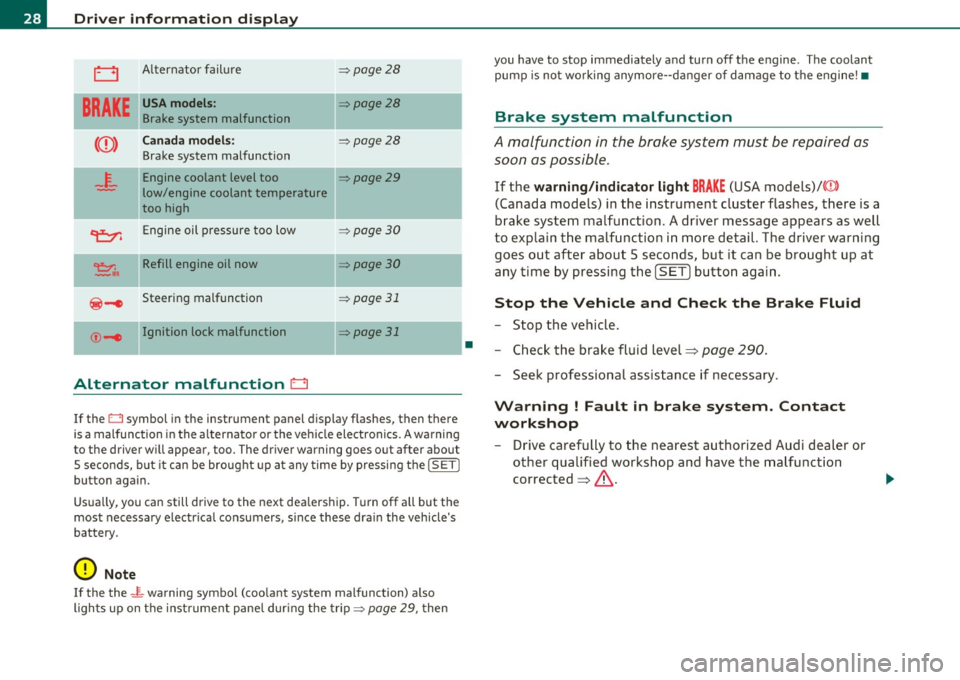
0 Alternator failure => page 28
BRAKE
USA models: ::::>page28
Brake system malfunction
Canada models: ::::>page28
Brake system malfunction
4.
Engine coolant level too ::::>page29
low/engine coolant temperature
too high
II
~ Engine oil pressure too low =:>page 30
~,. Refill engine oil now =:> page 30
@-e Steering malfunction => page 31
©-1 Ignition lock malfunction II=> page 31
Alternator malfunction D
If the O symbol in the instrument panel display flashes, then there
is a malfunction in the alt ernator or the vehicle electronics. A warning
to the driver will appear, too. The driver warning goes out after about
5 seconds, b ut it can be brought up at any time by pressing the
!SET I
button again.
Usually, you can still drive to the next dealership. T urn off all but the
most necessary e lectr ica l consumers, s ince these dra in the vehicle's
battery.
0 Note
If the the _ i,_ warning symbo l (coo lant system malfunction) a lso
lights up on the instrument panel during the trip::::>
page 29, then
•
you have to stop immediately and turn off the engine . The coolant
pump is not work ing anymore- -danger of damage to the engine! •
Brake system malfunction
A malfunction in the brake system must be repaired as
soon as possible .
If the warning/indicator light BRAKE (USA models)/ ((D)
(Canada models) in the instrument cluster flashes, there is a
brake system malfunction. A driver message appears as well
to explain the malfunction in more detail. The driver warning
goes out after about 5 seconds, but it can be brought up at
any time by pressing the
[SET ] button again.
Stop the Vehicle and Check the Brake Fluid
-Stop the vehicle.
- Check the brake fluid level=>
page 290.
-Seek professional assistance if necessary .
Warning ! Fault in brake system. Contact
workshop
- Drive carefully to the nearest authorized Audi dealer or
other qualified workshop and have the malfunction
corrected =>,& .
Page 32 of 364
Driver information display
in. WARNING
• If your vehicle should break down for mechanical or other
rea son s, park at a safe di stan ce from movin g traffic , turn off the
e ngine and turn on th e hazard warning lights =>
page 66, "Emer
gency fl ashe rs A ".
• Never open th e hood if you see or hear steam or coo lant
es caping from the engine compartment -you ri sk being scalded.
Wait until you can no longer see or hear steam or coo lant
escaping.
• The engine compartment of any vehicle is a dangerous area .
Before you perform any work in the engine compartment, turn of
the engine and allow it to cool. Follow the warning stickers
=> page 2 72 , "Engine compartment" .
(D Note
Do not continue d riving if the _f_ symbol illuminates . There is a
ma lf u nction in the e ngine cooling system -you co uld damage you r
engine .•
Engine oil pressure malfunction "t::7:
The red engine oil pressure warning symbol r equires
imm ediat e service or repair . Driving with a low oil pres
sure indication is likely to cause severe engine damage.
If the ~ symbo l on the display flashes , th e eng ine o il pres
sure is too low . A driver message appea rs as well to exp lain
t h e malfunc tion in more detail. The driver warning goes ou t
a ft er a bout 5 seco nds, but it can be b roug ht up at a ny time by
p ressin g th e
(SET ] butto n again .
Switch off engine ! Oil pressure too low
-Sto p the veh icl e. - Tur
n the eng ine off.
- Chec k the engi ne oil level=>
page 284 .
-Contact your a uthor ized Audi dealer for assistance if
necessary .
Engine o il level too low
If the eng ine o il level is too low, add engine oil=> page 285 .
Engine oil level correct
If the symbo l~ flashes ev en though the eng ine oil leve l is cor rect,
please seek pro fessional assistance . Do not continue dr iv ing. Do not
leave t he e ngine runn ing
idle, either .
(I] Tips
• The engine oil pre ssure symbol ~ is not an indi cator for a low
engine oil level. Do not rely on it. Instead , check the oil level in your
engine at regular intervals, preferably each time you refuel, and
always before going on a long trip.
• The yellow oil level warning indication "" requires oil refill or
workshop service without delay. Do not wait until the red oil pre s
sure warning ~ starts to flash before you respond to the low oil
level warning ~ . By then, your engine may already h ave suffered
serious damage. •
Fill engine oil now~
~-Please repleni sh oil now
If the ~-symbo l ligh ts up, then t he oil has to be replen is hed right
now =>
page 285. •
Page 35 of 364

This driver message and the symbol,;;:;,. appear when a system
malfunction occurs during travel. You can continue to drive carefully
at a reduced speed to a qualified workshop. Steering can be more
difficult or sensitive than usual. The steering whee l can also be at an
angle when driving straight .
Dynamic steering: initialization
If this driver message appears and the indicator lightl, is flash ing on
the instrument panel, dynamic steering is being reinitialized . Once
you start the engine after this is finished, the steering wheel wi ll be
easy to move. Re -initializat ion might be necessary if the steering
wheel was moved hard to the left and right while the vehicle was not
moving. The display goes out as soon as initial izat io n is complete.
& WARNING
Have the dynamic steering system malfunction repaired as soon
as possible by an authorized Audi dealer or any qualified workshop
- risk of accident!
[I) Tips
The dynamic steer ing stability systems are not ava ilab le in the event
of a system ma lfunct ion .•
Ap plies to ve hicles : w it h c onven ien ce key
Key not in vehicle
Key not in vehicle
This reminder appears along with the symbol if the master key is
removed from the vehicle with the engine running. It is int ended to
remind you (e.g. when chang ing drivers) not to continue the journey
without the master key.
If the master key is no longer in the veh icle, you cannot sw itch off the
ignition after stopping the engine and you a lso cannot start the
engine again. You also cannot lock the veh icle from the outs ide .•
Controls and equip
ment Safety first
Driver information display
Light/rain sensor defective
·)
Automatic headlights/automatic wipers defective
If the symbol ill um inates , the light sensor has failed. For safety
reasons the low beams are turned o n permanently with the switch in
AUTO . However, you can continue to turn the lights on and off using
the light switch . In the case of a defect in the ra in sensor, the wind
shield wiper lever functions are still avai lable . Have the light/rain
sensor checked as soon as possib le by an autho rized Audi dealer. •
Worn brake pads ~
Brake pads!
If the warning light illuminates, immediately contact your authorized
Audi dealer or qualified workshop to have all brake pads inspected .
On USA mode ls the warning light comes on together with the
war ning light BRAKE . Both sets of b rake pads on an axle must always
be replaced at the same time.
& WARNING
Driving with bad brakes can cause a collision and serious personal
injury .
• If the warning light and the warning light
BRAKE1> with the
message Brake pads! comes on in the instrument cluster display,
immediately contact your authorized Audi dealer or qualified
workshop to have all brake pads checked or replaced if necessary. •
ll BRAKE : USA mode ls on ly
Vehicle care Technical data
Page 36 of 364

Driver information display
Applies to veh icles : w ith defective lig ht bulb warning
Defective light bulb warning
The defective light bulb warning monitors the function of
the light bulbs in the vehicle.
T he defect ive light bulb war ning moni tors t he f unct io n of the light
bulbs. If a defective light b ulb is detected, or if a light bu lb has
burned o ut, a ye llow sym bol appe ars as we ll as a not ifica tion th at
shows which light bulb is defective .
Defective bulb~
If this symbol I") lights up, a t urn signa l (front or rear), a head lamp, a
bra ke light, t he b ack-up light, a fog l amp o r a rear fog lamp h as
fa iled.
& WARNING
• Light bulbs are unde r pre ssure and can explode when bulbs are
replaced - risk of injury.
• With gas-discharge lamp s* (xenon headlights ), the high
voltage component must be handled appropriately . Doing other
wise poses a risk of death!
[I] Tips
Have an aut horized Audi dealer or other q ualified workshop perform
t he rep lacement or the rep air .•
Windshield washer fluid level too low o
- Plea se refill washer fluid
If the symbo l illum inates, add w indshield washer f lu id to the washer
system and a lso to the headlight w asher system =>
page 295. •
Fuel supply too low )
When the symbol illum inates, this means t here are about 2.1
ga llons (8 l ite rs) of f ue l left in the f uel t ank. T ime to re fuel!
=>page 275.
If the symbol lights up, even when there is ample fue l in the tank, an d
the text
TANK SYSTEM MALFUNCTION! CONTACT WORKSHOP
appea rs in the disp lay, there is a fa ult in the system. Contact a quali
fied wo rkshop to have t he fa ult rectified. •
Applies to veh icles: with ba ttery voltage warn ing
Battery voltage 0
If battery powe r d rops into the range where it can lim it the ability of
the engine to start, t his the symbol ~ appears in the i nstr ument
cl uste r d isp lay with the following driver message
battery charge low:
Indicates charging by being driven .
While this driver not ification is displayed, you have to be prepa red for
limited sta rting ca pability.
Driver message appears and goes out again
If th is drive r mess age appears a fter the igni tion i s tur ned o n or whil e
dr iving and it goes o ut agai n after a while, the battery has been
a de qua tely rech arged.
Driver message appears and does not go out again
If th is dr iver no tifi cati on appears after the ign it ion is tu rned on o r
w hil e driving and does not go out again, the battery 's state of charge
is not in th e o ptim al r ange. Startin g cap abili ty is rest ric ted. H ave t he
battery c hecked at an a uth orized A udi dea ler or othe r qua lified work
shop as soon as possible. •
Page 65 of 364

& WARNING
Automatic headlights are only intended to assist the driver. They
do not relieve the driver of his responsibility to check the head
lights and to turn them on manually a ccording to the current light
and visibility conditions . For example , fog cannot be detected by
the light sensors . So always switch on the headlights under these
weather conditions and when driving in the dark
tD .
[ i J Tips
• Th e light sensor for head light control is located in the rea r view
m irror mount. You shou ld therefore not app ly any st ickers to the
windshield in th is area in order to prevent m alfunct ions or fa ilure s.
• Th e sensitivity level fo r the light senso r se t a t the factory can be
changed in the MMI menu ~
page 64 in the automatic d riving lights
fu nction .
• When you remove your key from the ign ition wh ile the veh icle's
ligh ts ar e tu rned on, a bu zzer sounds as long as the d river 's door is
open.
• Please obey all laws when using the lighting systems described
here .
• The coming home/ leav ing home fu nction is avai lab le o nly with the
switch in the AU TO position. •
Contro ls a nd e quip
m en t Vehicle
OP-eration
Applies to vehicl es: with fog lights
Fog Lights
Clear vision
Fig . 66 Fo g light
s witch
- To t urn o n the fo g lights tD, press butto n (D:::} fig. 66.
- To turn o n the rear fog lights
0$, press butt on @ .
Fog lights
The side marker lights or low beams must be sw itched on . When the
fog lights a re switc hed on, the green check lig ht at the edge of the
switch comes on .
I f automat ic dr iv ing light cont rol AUTO is act ivated , the low beams
a re switched on whe n the fog ligh ts are turned on.
Rear fog lights
Lo w beam s or sid e ma rke r lig hts wi th f og l igh ts mus t be t urne d o n.
Wh en the rea r fog l ights are turned o n, the y ellow check light at the
edge o f the swi tch comes on .
0 Note
The rea r fog lig hts sho uld only be turned on in accor dance w it h traffic
reg ulation, as t he lights are brig ht for fo llow ing traffic .•
Vehicle care Do-it-yourselt service iTechnical data
Page 66 of 364
Clear vision
Adjusting exterior Lighting
The functions are selected in the radio or in the MMI.
- Sel ect: Function button [CARI> E x terior lighting.
Com ing home
The coming home function ensures that after
tu rning off the ignition
and op ening th e driver' s door
the vehi cle periphery is illum inated i n
the dark . In addition, the front fog lights, the ta il lights and the
license p late ligh t are tu rned on. The power-on time can be set for a
per iod from O (off) to 60 seconds .
Leaving home
The leaving home funct ions ensures that
when unlocking , the vehicle
per iphery is illuminated in t he da rk. In addi tion, the front fog l igh ts,
the tai l lights and t he license p late light are turned on . This function
can be tu rned on and off.
Automatic driving ligh ts*
W hen the light switch is in the AUTO=> page 62 position, the switch
on point of the l ights can be changed in the automatic driving light
function.
Daytime running lights*
T he daytime running light s ca n be tu rn ed on o r off using this f unc
tion. If the funct ion is active, the dayt ime runn ing lights are turned
on a utomat ica lly when the ignition is switched on.
In the vers ions for some co unt ries it is not poss ible to switc h off the
daytime running lights or they may not have daytime running lights.
(I) Tips
The coming home/ leaving home f unction is avai lab le only with the
switch in the AUTO position .•
Daytime running Lights (DRL) (USA models)
T he daytime running lights are turned on au tomatically
w hen the ignition is switched on.
On vehicles w ith xenon lights the daytime running lights will come on
autom atically when the ig ni tio n is t urned on and t he lig ht switch
=>
page 62, fig. 65 is in the O position or the AUTO position (only in
d aylig ht co ndit ions). T he
Daytime running light s fu nct ion can be
turned on and off in the MMI menu
E xterior lighting => page 64. On
vehicles wi th
halogen lights there is no dayt ime runn ing lights func
tion .
& WARNING
Neve r use daytime running lights to see where you are going. They
are not bright enough and will not let you see far enough ahead
fo r safety , especiall y at dusk or when it is dark. Be aware of
c hange s in out side light condition s when you are driv ing and
r espond by switching on your low b eams
~D.
0 Note
Always be aware of changes in outside light conditions while you
are d riving. Re spond in t ime to fading daylight by tu rning the light
switch to position
~D (or "AUTO" if your ca r is equ ipped with this
feature)
to turn on your hea dlights. •
Daytime running Lights (Canada models
only)
When you turn on the ignition the daytime running lights
will come on automatically.
T he d aytime running lights a re a ct ivated only when the light sw itch
=>
page 62, fig. 65 is e it h er at the O or the coo: pos it io n. When the .,_
Page 67 of 364
ignition is switched on, there is a difference between vehicles with bi
xenon lights and halogen lamps:
• On vehicles with b i-xenon lights only the dayt ime running lamps in
the headlights will come on.
• On vehicles with halogen lights the front fog lights, side marker
lights and tail lights come on automatically.
& WARNING
Never u se daytime running lights to see where you are going . They
are not bright enough and will not l et you see fa r en ough ah ead
for safety , espe ciall y at dusk or when it i s dark. Be awar e of
c hanges in out side l ight condit ion s wh en you are dri ving and
respond b y switching on your l ow be am s
tD .
0 Note
• Alw ays be aware of changes in out side light condit ion s while you
are drivin g. Re spond in tim e to fadin g daylight b y turning the light
s witch to po sition
tD (or "AUTO") to turn on yo ur headlight s.
[I) Tips
The daytime running lights function cannot be turned off. •
Contro ls a nd e quip
m en t Vehicle
OP-eration
Clear vision
Instrument lighting
The basic brightness of the illumination for the instru
ments, the center console and the display can be
adjusted.
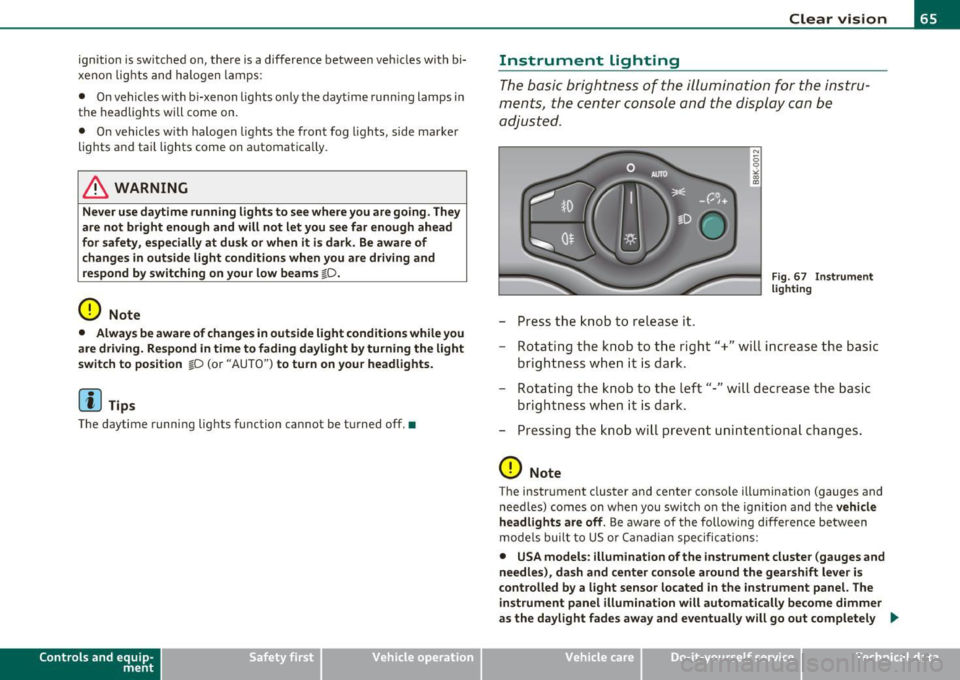
- Press the knob to release it.
N
-0 0 >< 00
"'
Fi g. 6 7 I nst rume nt
l ighti ng
- Rotating the knob to the right"+" will increase the basic
brightness when it is dark.
- Rotating the knob to the left"-" will decrease the basic
brightness when it is dar k.
- Pressing the knob will prevent unin tentiona l changes .
0 Note
The instrument cluster and center conso le illumination (gauges and
need les) comes on when you switch o n the ignition and the
veh icle
h eadlights are off .
Be aware of the following difference between
mode ls built to US or Canadian specifications:
• USA models : illumination of the inst rument cluste r (gauges and
needle s), da sh and center c onsol e around the gearshift l ever i s
c o ntrolled b y a light senso r lo cated in the instrument panel. The
in strument panel illumination will autom atically be come dimmer
as the day light fades away and eventu all y will go out completel y .,
Vehicle care Do-it-yourselt service iTechnical data
Page 68 of 364

Clear vision
when outside light is very low . This is to r emind you , the driver , to
s witch on the headlight s before it get s too dark.
• Canada models : inst rument p anel illumin ation will stay br ight
regardles s of the inten sity of ambient light. Alw ay s be aware of
changes in outs ide light conditions wh ile you are driving. Respond
in time to fading daylight by turning the light switch to po sition
io
(or "AUTO" if your car is equipped with this feat ure) to turn on your
headlights .•
A ppli es to ve hicles : wit h xe non h eadlights
Xenon headlights
After starting the engine, the xenon head lights are automat ically
adjusted to the load and ang le of t he vehicle (for e xamp le, dur ing
acce leration and brak ing) . This prevents oncom ing traffic from expe
r ienc ing unnecessary headlight glare from yo ur xenon head lights.
If the sy ste m is not opera ting p roperly, a warning symbol in t he Auto
Check Control is displayed~
page 35. •
App lies to vehicles : w ith adapti ve lig ht
Adaptive Light
Wh en driving around bends, the relevant ar ea of the road
is better illuminated .
Fig . 68 Adaptive lig ht
w hen driving
The benefit of adaptive light is that the curve and the edge of the road
are better illum inate d~ fig. 68. Dyn am ic a daptive light is con trolled
automatically, depend ing on ve hicle speed and steering whee l angle .
When driving around bends, the headlights are contro lled accord ing
t o s teer ing whee l angle . So t hat there is no bla ck ho le ahea d of the
vehicle , the two ma in beams pivot at d ifferent angles.
[I] Tips
The system works above a speed of about 6 mph (10 km/h) .•
Emergency flashers A
T h e eme rgency flash ers m akes ot her mot ori st s a ware
that you or y our vehicle a re in an eme rgency situation.
Fig. 69 Eme rgenc y
fla she r sw itch
Pr ess the swi tch~ => fig. 69 to tu rn the eme rgenc y
flash ers on or of f.
When the e merge ncy flashers are on, all fou r turn sig nals blink at the
same t ime. The turn signal indicator lights¢¢ in the i nstr ument
cl uste r, as well as the ligh t in the eme rge ncy flasher switch ~ blink
likewise . The emergency flashers also wo rk when the ignition is
t urned off. .,_
Page 74 of 364
![AUDI A5 CABRIOLET 2010 User Guide Clear vision
(I] Tips
Commercial hot waxes applied by automatic car washes affect t he
how easily the glass surface can be cleaned. •
Mirrors
Manual glare-dimming
Standard settin](/img/6/57573/w960_57573-73.png "AUDI A5 CABRIOLET 2010 User Guide Clear vision
(I] Tips
Commercial hot waxes applied by automatic car washes affect t he
how easily the glass surface can be cleaned. •
Mirrors
Manual glare-dimming
Standard settin")
Clear vision
(I] Tips
Commercial hot waxes applied by automatic car washes affect t he
how easily the glass surface can be cleaned. •
Mirrors
Manual glare-dimming
Standard setting
- Move the small lever (located on the bottom edge of the
mirror) to the front.
Anti-glare setting
- Move the small lever (located on the bottom edge of the
m irror) to the rear .•
A ppli es to vehicl es: w ith automat ica lly dim ming in side m ir ro r
Automatically dimming inside mirror
The automatic dimming function con be turned on and
off if required.
Fi g. 7 7 In sid e re ar
v iew mirr or
Disabling auto dimming
- Press button@=> fig. 77 briefly, -the indicator light ®
goes out.
Activating /reactivating auto dimming
- Press button @ briefly, -the indicator light ® goes on .
Automatic dimming function
The automat ic dimm ing function is act ivated eve ry time t he ig nitio n
is turned on. The green indicator lig ht is lit to indicate auto dimming
is active.
When d imming is activated, the inside mirror w ill darken
automati
cally
in respo nse to the amount o f light s triking the mir ror (suc h as
headlights from rearward approach ing ve hicles). Even in dimming
mode, the mirror surface turns brigh t when:
• the interior light is sw itched on
• reverse gear is engaged .
& WARNING
Broken glass of automatic dimming mirror can cause electrolyte
fluid leak age. Electrolyte fluid can irritate skin, eyes , and resp ira
tory sy stem.
• Repeated or p rolonged e xposu re to electrolyte can cause i rrita
tion to the re spiratory system, especially among people with
asthma or other respiratory conditions . Get fresh air immediately
by leaving the vehicle or , if that is not po ssible , open window s and
doors all the way.
• If electrolyte get s into the eye s, flu sh them thoroughly with
large amounts of clean water fo r at least 15 minutes; medical
attention is recommended.
• If elect rolyte contacts skin , flush affected area with clean
water for at lea st 15 minute s and then wash affected area with
Page 75 of 364

& WARNING (cont inued )
soap and water; medical attention is recommended. Thoroughly
wash affe cted clothing and shoes before reuse.
• If swallowed and person is conscious, rinse mouth with water
for at least 15 minutes. Do not induce vomiting unle ss instructed
to do so by medical professional. Get medical attention immedi
ately .
0 Note
Liquid elec tro ly te le aked fro m a broken mirro r g la ss w ill damage any
plast ic surfaces it comes i n contact with . Clean up spilled electro lyte
immedi ately wit h cle ar wa te r an d a spo nge.
[ i ] Tips
• If you switch off the automatic dimming function on the inside
mirror, automatic dimming of the outside mirrors will likewise be
disabled.
• Check to make s ure there are no objects preventing light from
reach ing the inside m irro r.
• Do not attach any st ickers to the w indshield in front of the light
s ensor, as this wo uld inter fere wi th both t he a utom atic oper ation of
the headlights and the automatic d imm ing of the inside mi rror. •
Contro ls a nd e quip
m en t Vehicle
OP-eration
Clear vision
Outside mirrors
Th e outs ide m irrors are e lec tricall y adj ust ed ( pow er
m irr ors )
Adjusting exterior mirrors
Fig. 78 Forward
section of d river 's
armr est : p ower mirror
controls
- R otate the kn ob to the© position (driver's ex ter ior
m irror) or t o th e® p osit io n (passe nger's e xterior mi rro r)
=> fig. 78 .
- R otate the k nob a nd th e mirror so t hat you have a clear
v iew to the rea r.
Heated mirrors
- Rotat e the k nob to position
@ .
Depen ding on the outs ide te mperature, the mir ror surfa ce s a re
heated until the ignit ion is sw itched off- even if the knob is no longer
in pos itio n
@.
You are w ell -advis ed to fold th e outside m irro rs in when man euv ering
in tight spaces or when leaving the ca r parked close to other vehicles ._..
Vehicle care Do-it-yourselt service Technical data