heating AUDI A5 CABRIOLET 2011 User Guide
[x] Cancel search | Manufacturer: AUDI, Model Year: 2011, Model line: A5 CABRIOLET, Model: AUDI A5 CABRIOLET 2011Pages: 364, PDF Size: 86.48 MB
Page 105 of 364
_________________________________________________ W_ a_ r_m _ a_ n_d_ c_ o_ ld _ ___.lfll
Seat heating
Ap plies to vehicles: w it h fr ont se at heat in g
Front seat heating ~
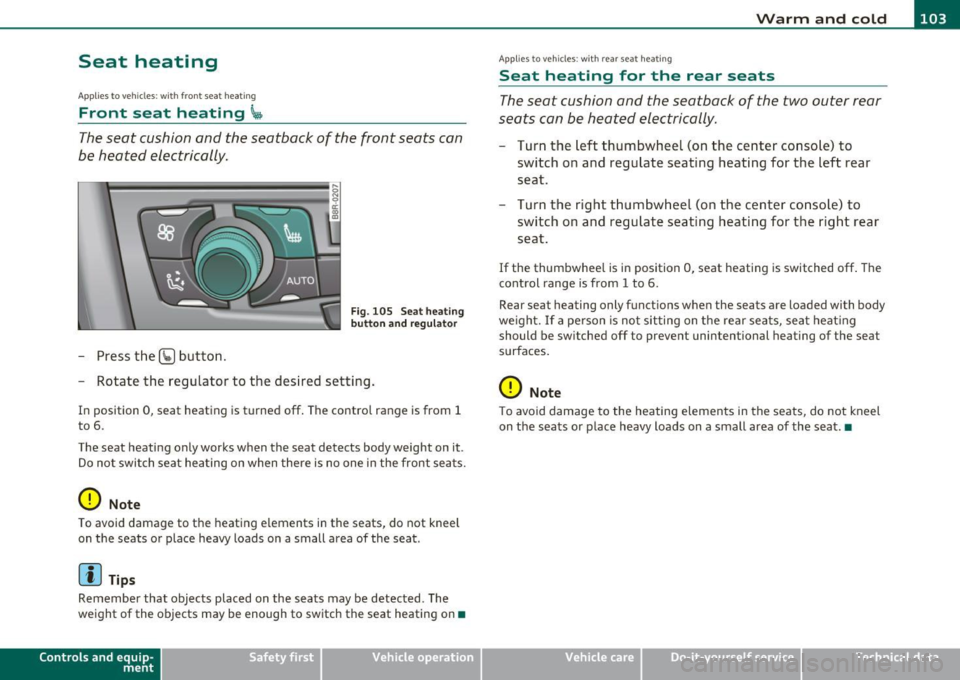
The seat cushion and the seatback of the front seats can
be heated electrically.
- Press the (g button.
s ci: ., m
Fig. 105 Seat heati ng
button and r egul ator
- Rotate the regulator to the des ired setting .
In position 0, seat heating is turned off . The contro l range is from 1
t o 6.
The seat heating only works when the seat detects body weight on it .
Do no t swi tc h s eat he ating on when the re is no one in the front se ats.
0 Note
To avoid damage to t he heat ing e lements in the seats, do not kneel
on t he seats o r place heavy loads on a small area of the seat .
[I) Tips
Remember that objects placed on the seats may be detected . The
we ight of the objects may be enough to switch the seat heating on •
Contro ls a nd e quip
m en t Vehicle
OP-eration
Applies to ve hicles : w ith rea r sea t heat ing
Seat heating for the rear seats
T he seat cushion and the seatback of the two outer rear
seats c an be heated electrically.
- Turn the left thumbwheel (on t he center conso le) to
switch o n and reg ulate seating heat ing fo r the left rear
seat.
Turn t he right t humbwhee l (on the center co nsole) to
switch on and regulate seat ing heating for the r ight rear
seat.
If the thumbwhee l is i n position 0, seat heating is switched off . The
control range is from 1 to 6.
Rear sea t heating only funct ions when the seats are loaded with body
we igh t. If a pe rson is no t sitting on t he rear sea ts, sea t heat ing
should be sw itched off to preve nt unintentional heating of the seat
surfaces.
0 Note
T o avoid damage to the heatin g elements in the seats, do not kneel
on the sea ts or p lace heavy loads on a small area of the seat .•
Vehicle care Do-it-yourselt service iTechnical data
Page 106 of 364
ffl Warm and cold .._ ____ .....;_____,;,;_ _______________________________ _
Applie s to veh icles : wi th upp er cabi n heat in g
Upper cabin heating
The upper cabin area of the front seats can be heated at
three levels when the engine is running .
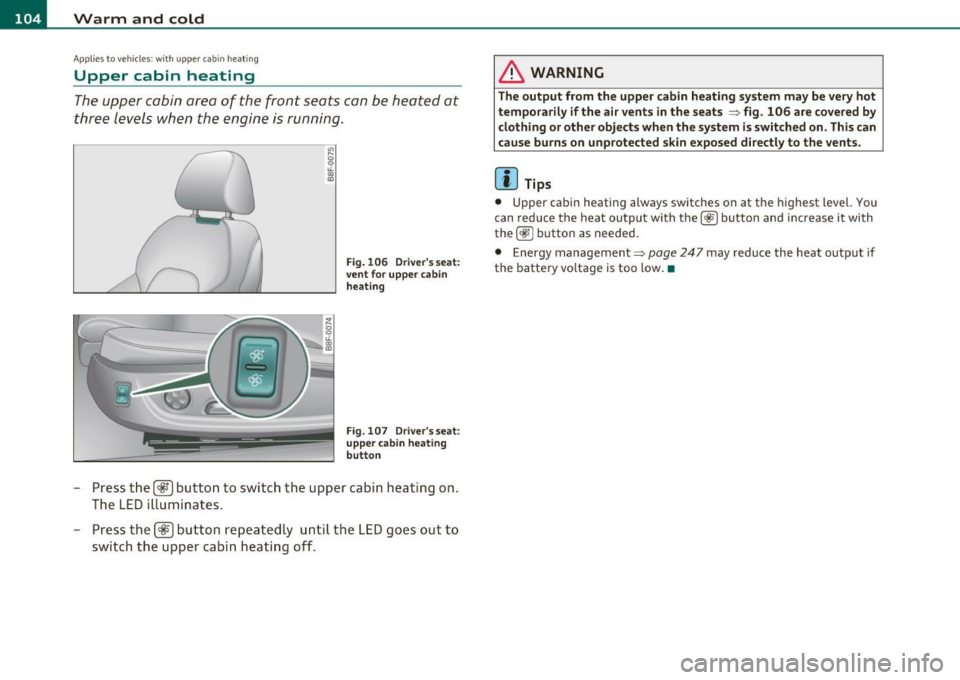
Fig. 106 Driver's seat:
vent for upper cabin
heating
Fig . 107 Driver's seat:
upper cabin heating
button
- Press the [~l button to switch the upper cabin heating on.
The LED illuminates.
- Press the
[
& WARNING
The output from the upper cabin heating system may be very hot
temporarily if the air vents in the seats
~ fig. 106 are covered by
clothing or other objects when the system is switched on. This can
cause burns on unprotected skin exposed directly to the vents.
[ i ] Tips
• Upper cabin heating a lways switches on at the highest level. You
can reduce the heat output with the
[cg;) button and increase it with
the[~] button as needed.
• Energy management ~
page 247 may reduce the heat output if
the battery voltage is too low.•
Page 116 of 364
IIIIL-_O.::...:. n.:....: t:.:.h.:.. e::....: r...: o:.. a .::..: d,;__ ________________________________________________ _
& WARNING (continued)
• Please note that unconsciously "resting" your foot on the
accelerator pedal causes cruise control not to brake. This is due to
the control system being overridden by the driver's acceleration.
• If a brake system malfunction such as overheating occurs when
the cruise control system is switched on, the braking function in
the system may be switched off. The other cruise control functions remain active as long as the indicator light
CRUISE (US model) / (;f
(Canadian model) is on.
(I) Tips
The brake lights illuminate as soon as the brakes apply
automatically. •
Applies to vehicles : w ith cr uise contro l
Changing speed
-Press the lever in the direction of the
0 => page 113,
fig . 112 or in the direction of the Oto increase or
decrease your speed.
- Let go of the lever to save that speed.
Change speed in increments of 1 mph (1 km/h) by lightly press ing the
lever . If you keep the lever pressed down, you will alter your speed in
5 mph (10 km/h) incremen ts.
You can also press the accelerator pedal down to increase your speed,
e .g . if you want to pass someone. The speed you saved earlier will
resume as soon as you let off of the accelerator pedal.
If, howeve r, you exceed your saved speed by 5 mph (10 km/h) for
longer than 5 minutes, the cruise control will be turned off tempo
rarily. The green symbol in the display turns white, the saved speed is
retai ned .•
A pp lies to veh ic les : wi th cru ise contro l
Pre-selecting speed
You can pre-select your desired speed while the vehicle is
not moving.
- Turn on the ignition.
- Pull lever into position 1
=> page 113, fig. 112.
- Press the lever in the
0 or O direction to increase or
decrease your speed.
- Let go of the lever to save that speed.
This function makes it possible, for example, to save the speed you
want before driving on the highway. Once on the highway, activate
the cruise control by pulling the lever toward
(D . •
App lies to veh icles : w ith c ruise contro l
Switching off
Temporary deactivation
-Step on the brake pedal, or
Press the lever into position @ (not clicked into place)
=> page 113, fig. 112, or
- Drive for longer than S minutes at more than S mph
(10 km/h) above the stored speed.
Switching off completely
-Press lever into position @ (clicked into place), or
- Switch the ignition off.
Page 244 of 364
Intelligent t echnology
---------------------------------------
Electronic differential lock (EDL)
The elec tronic differen tial lock monitors the rotational
speed of the drive wheels.
G en era l not es
The electronic differentia l lock (EDL) helps the ca r to sta rt moving,
accelerate and climb a gradient on surfaces provid ing poor or almost
no grip . W ithout ED L, this would be d iff icu lt, if not impossible.
How the sy stem works
The EDL operates automatically. It mo nitors the rota tional speed of
wheels with the help of the ABS sensors=>
page 245. If a not iceab le
slip is detected at the wheels (e.g. on slippery g round on one side),
the spinn ing wheels are braked and power is transferred to the other
wheels . This is done up to a speed of about 60 mph (100 km/h).
No ises from the brake system signal that wheel sp in is being
controlled.
Driv ing off
When d riving off, always be s ure to keep road conditions in mind as
you accelerate. If one drive wheel spins because it is on a surface with
less grip, apply
plenty of throttle until the car starts to move.
O verheating of bra kes
To prevent the disc b rake of the bra ked wheel from ove rhea ting if
subjected to excessive loads on this wheel, the EDL cuts out tempo
ra rily. The vehicle remains operat io nal and be haves in the same way
as a veh icle without EDL.
As soon as the brake has coo led down, EDL switches on again auto
matically.
Electronic limited slip differential
In vehicles w ith front wheel drive *, an e lectron ic lim ited slip d ifferen
tial engages when driving on curves . The brakes are applied spec ifi
cally to the front wheel that is on the inside of the curve. T his m ini
m izes sliding on the front wheels and enables precise and neutral dr
iv ing t hrouge curves. The electronic lim ited slip differentia l does
no t engage whe n driving in we t cond it io ns or snow.
& WARNING
• Wh en acc elerating on slipp ery s urface s, such a s on ice or snow,
always be careful when depre ssing the accele rator pedal. Even
with the EDL and the electroni c limited slip differential working,
the dr ive wh eels can spin and reduce you r ability to control your
c ar . -Ri sk of cra sh!
• The increased safet y afforded b y EDL and the electronic l imited
slip differ ential d oes not mean th at you can take safety risks .
Alw ay s adapt your d riving st yle to the road c onditions and traffi c
si tuation.
[ i ] Tips
If a fa ult occurs in the ABS, the EDL is also not funct ioning. This is
ind icated by the ABS warn ing light=>
page 15 . •
Anti-Slip Regulation System (ASR)
The Anti-Slip Regulation System prevents the driven
wheels from spinning when the car is a ccelerating.
General notes
T he Anti-Slip Regu lation System (ASR) is in tegrated in the electronic
stabilization program (ESP) . When the veh icle starts up and acceler
a tes, the wheels are preven ted from sp inning by adjust ing the engine
power to match the amount of grip ava ilable from the road surface.
How the system works
ASR performs automatica lly, i.e. without the driver's intervent ion.
With the a id o f the ABS sensors=>
page 245, ASR moni tors the speed
of the driven wheels. If the wheels start to spin, engine torque is
reduced automatically unti l the tires find enough grip to lock onto
the road s urface. The system is active across the entire speed range . .,
Page 250 of 364
Intelligent technology
'-------------------------------------------------
vi dual components. It regulates consumption, so that more electrical
energy is not being used than is being generated and ensures an
optimal state of charge for the battery .
[I] Tips
• But even energy management cannot negate the limits of physics.
Consider that the power and life of a battery are limited.
• If starting ability is threatened, you are informed by a warning
~ page 249, "Driver notification in the instrument cluster display" .•
What you should know
The highest priority is given to maintaining starting capa
bility.
Th e battery is severe ly taxed in short-distance driving, in city traffic
and during the cold time of year. Abundant electrical energy is
required, but only a little is generated.
It is also critical if the engine
is not running and electrical components are turned on. In this
instance energy is being consumed but none is being generated.
It is in prec ise ly these sit uations that you will notice energy manage
ment actively regulating the distribution of energy.
Vehicle stands for an extended period
If you do not drive your vehicle over a period of several days or weeks,
electrical components are gradually cut back or sw itched off. This
reduces energy consumption and maintains starting capability over a
longer period.
Take into consideration that when you unlock your vehicle, some
convenience functions, such as the remo te key or power seat adjust
ment, may not be available. The convenience functions will be avail
able again when you turn on the ignition and start the engine.
W ith the engine turned off
If you listen to the radio, for example, with the engine turned off or
use other MMI functions, the battery is being discharged .
If starting capability is jeopardized due to energy consumption, the
following warning appears in the MMI display:
Please start engine, otherwise system will switch off in
3 minutes.
Th e warn ing indicates that the system will be turned off automati
cally after 3 m inutes. If you wish to continue using the functions, you
have to start the engine.
With the engine running
Although electrica l energy is generated when the vehicle is being
driven, the battery can become discharged. This happens most ly
when little energy is being generated and a great deal consumed and
the battery's state of charge is not optimal.
T o br ing the ene rgy balance back into equilibrium, consumers which
require especially large amounts of energy are temporarily cut back
or switched off. Heating systems in particular require a great deal of
energy .
If you notice, for example, that the heated seats* or the
heated rear window are not heating, they have been temporarily cut
back or switched off. These systems will be ava ilable again as soon as
the energy ba lance has been restored.
You will also notice that engine idle speed has been increased
slightly. This is normal and not a cause for concern. By increasing
eng ine id le speed the additional energy required is generated and the
battery is charged. •
Page 288 of 364

___ C_ h_ e_c _k _i _ n _g ~ a_n _d_ f_il _l_in _ g _________________________________________ _
in. WARNING
To reduce the risk of personal injury if you must change the engin e
oil in your vehicle your self:
• Wear eye protection.
• To reduce the ri sk of burns from hot engine oil, let the engine
cool down to the touch.
• When removing the oil drain plug w ith your finger s, stay as far
away as possible. Always keep you r forearm parallel to the ground
to help prevent hot oil from runn ing down your arm .
• Drain the oil into a containe r designed for this purpo se, one
large enough to hold at lea st the total amount of oil in your
engine.
• Engine oil is poisonous . Keep it well out of the reach of chil
dren.
• Continuous contact w ith used eng ine oil is harmful to your
skin. Always protect your skin by washing oil off thoroughly with
soap and water.
0 Note
N ever m ix o il add itives w it h your eng ine oi l. These additives can
damage your engine and adverse ly affect your Audi Limited New
Vehicle Warranty .
ffi For the sake of the environment
• Before chang ing yo ur o il, firs t ma ke s ure you know w here yo u can
proper ly dispose of the used oi l.
• Always dispose of used eng ine o il properly . D o not dump it on
garden soi l, wooded areas, into open streams or down sewage drains.
• Recycle used engine o il by taking it to a used eng ine oil collection
facility in your area, or contact a serv ice stat io n. •
Engine cooling system
Coolant
The engine coo lant performs two functions: i t keeps the
en gine fro m overhe ating and i t protects the engine fr om
fre ezing in th e winter .
The cooling system is sea led and genera lly requ ires little attention .
Th e cool ing sy stem h as been filled at the f actory wit h a permanent
coo lant which does not need to be changed . T he coolant cons ists of a
mixt ure of water an d the manufacturer's glycol -basedcoolant ad di
tive Gl2++ antifreeze w ith anticorros ion addit ives (50% for USA
mode ls; 60% for Canadian models). This mixture both ass ures the
necessary frost protect ion and p rotects meta l components in th e
eng ine's cooling system from co rrosion an d scaling. It also raises the
boiling point of the cool ant.
Do not red uce the concentration of the coolant in the summer by
add ing p la in water. The proportion of coolant additive must be at
least 50 % but not more than 60 %
to maintai n antifreeze protection
and coo ling efficiency. If the coolant frost pro tect io n i s too low, t he
coo lant co uld free ze and damage t he veh icle heating an d eng ine
coo ling system.
For yea r- round drivi ng , antifree ze is added at t he factory for tempe r
atures dow n to:
• - 31°F(- 35°C)USA
• -40°F ( -40°C) Canada .
You can mi x the Gl2+ + coo lant additive wit h other additives (G12 + or
Gl2) . Always check with you r autho rized Aud i dea ler .
in. WARNING
Before you check anything in the engine compartment , always
read and heed all WARNINGS =>
& in "Working in the engine
compartment " on
page 280.
Page 289 of 364

___________________________________________ C_ h _ e_c _k _ i_n -=g .._ a_n _ d_ f_i _ll _i _ n -=g '--- ........ 11'1
0 Note
• Before winter sets in, have the coolant checked to see if the
coolant additive in your vehicle is sufficient to meet the climate
conditions. This is especially important if you live in a region where
the winter is extremely cold. If necessary, increase the proportion of
coo lant additive to 60% .
• When adding coolant additive to your cooling system, remember:
-We recommend using only coolant additive G12++ (check the
label) for your vehicle. This coolant additive is available at autho
r iz ed Audi dealers. Other types of antifreeze can s ignificantly
reduce corrosion protection. The resulting corrosion can cause a
loss of coolant and serious engine damage.
• Do not add any type of radiator leak sealant to your vehicle 's
eng ine coolant. Adding radiator repair fluid may adversely affect the
function and performance of your cooling system and could result in
damage not covered by your New Vehicle Limited Warranty. •
Checking the engine coolant level
The engine coolant level can be checked with a quick
glance.
Fig. 223 Engine
compartment: Coolant
expansion tank
Vehicle OP-eration
Before you check anything in the engine compartment,
always read and heed all WARNINGS=:> & in "Working in
the engine compartment" on
page 280.
-Turn off the ignition.
- Let the engine cool down .
- Place a thick rag over the coolant expansion tank
=:> fi.9. 223 and carefully twist the cap counter -clockwise
=> & .
- Read the engine coolant level in the open coolant expan
sion tank=:> fig. 223. With a cold engine, the coolant level
should be between the "min" and "max" markings. When
the engine is warm, the level may be slightly above the
"max" marking.
The location of the coo lant expansion tank can be seen in the engine
compartment illustration =>
page 281.
To obtain an accurate reading, the engine must be sw itched off.
The expansion tank in your vehicle is equipped with an electric coolant level sensor.
When the coolant level is too low, the warn ing light in the Auto-Check
System =>
page 31 will blink until you add coolant and the level has
been restored to normal. Even though there is an electric coolant
level sensor, we st ill recommend you check the coolant leve l from
t ime to time .
Coolant loss
Coolant loss may indicate a leak in the cooling system . In the event of
coolant loss , the cooling system should be inspected immediately by
your authorized Aud i dealer . It is not enough merely to add coolant .
In a
sealed system, losses can occur only if the boiling point of the
coo lant is exceeded as a result of overheating . .,
Vehicle care Do-it-yourselt service iTechnical data
Page 331 of 364
__________________________________________ __!F~U!_.:!S~e:.:s~ a~n~d:!_..!:b~u:!!l~b~s~ _J
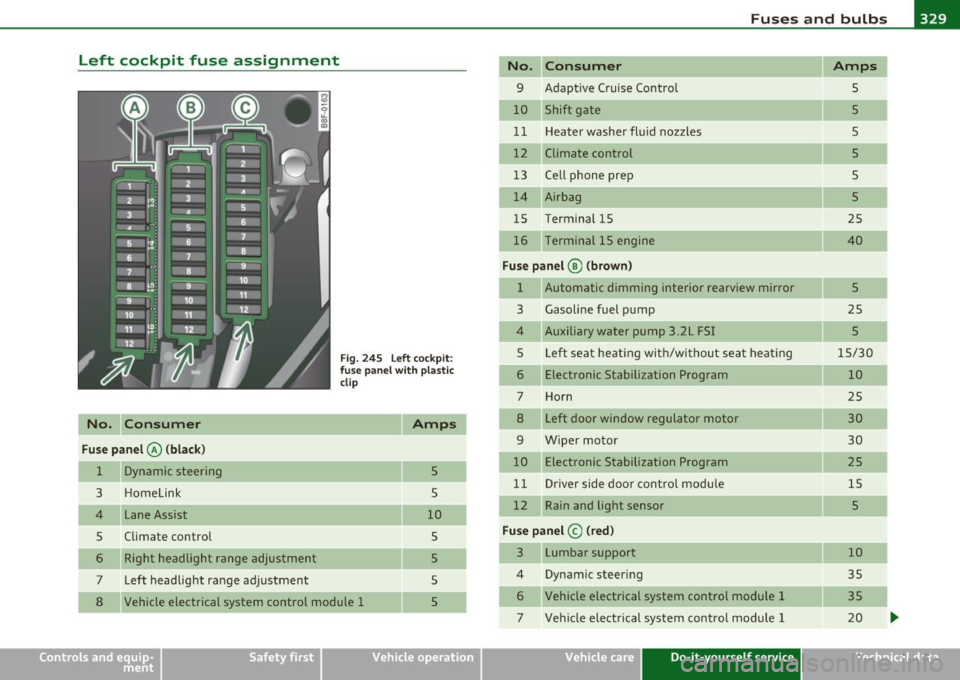
Left cockpit fuse assignment
No. C onsumer
Fus e pa nel @ (black )
1 Dynamic steering
3 Homelink
4 Lane Assist
5 Climate control Right headlight range adjustment
7 Left headlight range adjustment
Fig. 2 4 5 Left cock pit :
fuse pan el with plastic
cl ip
5
5
10 5
5
5
8 Vehicle electrical system control module 1 5
Vehicle OP-eration
No. Consumer Amps
9 Adaptive Cruise Control
5
10 Shift gate 5
1 1 Heater washer fluid nozzles
5
12 Climate control 5
13 Ce lt phone prep
s
14 Airbag
5
15 Term
inal 15
25
16 Terminal 15 engine 40
Fus e pa nel ® (brow n)
1 Automatic dimming interior rearview mirror 5
3 Gasoline fuel p ump 25
4 Auxiliary water pump 3 .2L FSI 5
5 Left seat heating with/wi tho ut seat heat ing 15/30
6 Electronic Stabilization Program
10
7 Horn 25
8 Left door window regulator motor 30
9 Wiper motor 30
10 Electronic Stabilization Program
25
11 Driver side door control modu le 15
12 Rain and light sensor 5
Fuse panel © (red)
3 Lumbar support 10
4 Dynamic steer
ing
35
6 Vehicle electrical system control module 1 35
7 Veh icle elect rical system control module 1 20
Vehicle care Do-it-yourself service iTechnical data
Page 333 of 364

Fuses and bulbs Ill ___________________ ...:......:.;...:...,:_.;__...;___--
Right luggage comp artment fuse
assignment
Fig. 2 47 R igh t luggage compartment: fuse panel wit h plastic cl ip
N o. Con sum er
Fu se pane l@ (bl ac k)
1 Power top control module
2 T railer control module
3 Trailer control module
4 Trailer control module
Electromechanical parking brake
Electronic damping control
7 Electromechanical parking brake
8 Veh icle elect rical system contro l mod ule 2 10
15
20
20
5
15
30
30
Vehicle
OP-eration
No. Consume r
9 quattro Sport
10 Veh icle electrical sys tem control modu le 2
11 Vehicle electrical system control module
12 Terminal 30
Fuse p anel © (brown)
1 Luggage compartment lid control module, vehi
cle electr ica l system control module
2 Right front seat heating
3
4
6
7
DCDC converter path 1
DCDC converter path 2
Right upper cab in heat ing
Electromechanical parking brake
8 Rear seat heating
9 Passenger side door control module
10 Left upper cabin heating
11 Passenger side door control module
F us e pa nel ® (red)
1 Rear center console outlet
2 Front center console outlet
3 Luggage compartment outlet
4 Cigarette lighter 6 Rear Seat Entertainment supply
7 Parking system
9 Electromechanical parking brake switch
10 Aud i side assist
Vehicle care Do-it-yourself service
Amps
35
30
20
5
30
15
40
40
30
30
30
30 30
15
15 15
15
15
5
7,5
5
5
iTechnical data
Page 353 of 364

Alphabetical index -________________ f!:VII
Electronic immobilizer ..... .. .. .. . 346
Homel ink® un iversal remote control . 346
Remote control key .......... ..... 346
Tire pressure monitoring system . .. . 346
Defective light bulb warning ... ... . .. .. 35
Defrost ing the windows . . . . . . . . . . . 92, 99
Deluxe automatic climate control ....... 88
A/C mode ............. ... ........ 93
Air distribution .. .. .. .......... ... 92
Air vents .. .. ... .......... .... .. .. 93
Automatic mode .... .. .. .. .. .... .. 90
Controls .. .. ................. .. .. 89
Defrost ...... ...... .. .. .. .. .... .. 92
Description ........ ....... .. .. .. .. 88
Economical use ................... 94
Fan . ... .................... ..... 91
Rear window defogger ......... .. .. 92
Recirculation mode ................ 91
Temperature ..................... 91
Turning on and off ............ .... . 90
Deluxe automatic climate control plus ... 95
A/C mode ......... ..... .... .... . 100
Air distribution . ... ............... 99
Air vents .. ............. .. .... .. . 101
Air vents (rear) . ............... .. . 101
Automatic mode .... .. .. .. .. .... .. 97
Automatic recirculation ........... . 102
Basic settings ............... ..... 102
Controls .. .. .. .. .. ...... .. .. ... .. 96
Defrost .......................... 99
Description ....................... 95
Economical use .................. 102
Fan .. .. .................... ..... 98
Front seat heating ............ .... 103
Controls and equip
ment Safety first
Rear window defogger
... .. .. .. .. . 100
Recirculation mode ............... . 99
Synchronization ..... .. .. ......... 102
Temperature ..................... 98
Turning on and off . .... ........... . 97
Determining correct load limit ... .. .. .. 305
Digital clock ..... ............. .. .. .. . 10
Digital compass ............... ... ... 75
Digital speedometer ... ............... 20
Dimensions ... .. ................... 341
Doors Emergency locking .............. .. 47
Driver informat ion system .......... ... 18
Defective light bulb warning ......... 35
Digital speedometer ....... ... .. .. . 20
Driver information messages ........ 28
Open door or rear lid warn ing ........ 20
Outside temperature display ........ 19
Sound system display .............. 19
Driver seat
See Seating position .............. 178
Drive r's seat memory
Act ivat ing remote control key .... .. . 81
Driving lights ........................ 63
Driving messages ........... .. ... .... 28
Dr iving safely . .. .... .... .. ... ...... 176
Driving through water ... .. . ... .. .. . . 251
Dr iving time .. .. .... ............. ... 21
Duplicate key ........................ 38
Dust filter . . . . . . . . . . . . . . . . . . . . . . 88, 95
Dynamic shift program .. ............. 158
Dynamic stee ring . . . . . . . . . . . . . . . . 13, 34
E
Easy entry function .......... ......... 79
Efficiency program . ... .. .. .. ......... 24
Fuel economy messages ............ 25
Memory levels .................... 22
Other equipment . .. ............... 24
Electrical seat adjustment
See Seat adjustment .. . ... ... .. .. .. 78
Electromechanical parking brake
Emergency braking .......... .. .. . 112
Malfunction ........ ...... .. .... . 112
Operation ...................... . 110
Parking ............ .. .. .. .... ... 111
Releasing and closing ............. 110
Starting assist ........ ........... 111
Starting from rest ... .. .... .... ... lll
Starting off with a trailer ... .. .. .. . 112
Warning/indica tor lights ... .. .. .. .. 16
Electronic differential lock (EDL)
How the system works ............ 242
Warning/indicator lights ..... .. .. .. 15
Electronic immob ilizer . . . . . . . . . . . . 11, 41
Electronic power control
(EPC) warning/indicator light ........ 13
Electronic stabilization program (ESP)
How the system works ............ 240
Warning/indicator lights ... .. .. .. .. 14
Emergency braking .. .. .... ......... . 112
Emergency flasher ................... 67
Warning/indicator lights ... .. .. .. .. 15
Emergency key ... .. .. ............... 38
Starting engine ................... 41
Vehicle operation Vehicle care Do-it-yourself service Technical data