cruise control AUDI A5 CABRIOLET 2011 Owners Manual
[x] Cancel search | Manufacturer: AUDI, Model Year: 2011, Model line: A5 CABRIOLET, Model: AUDI A5 CABRIOLET 2011Pages: 364, PDF Size: 86.48 MB
Page 4 of 364
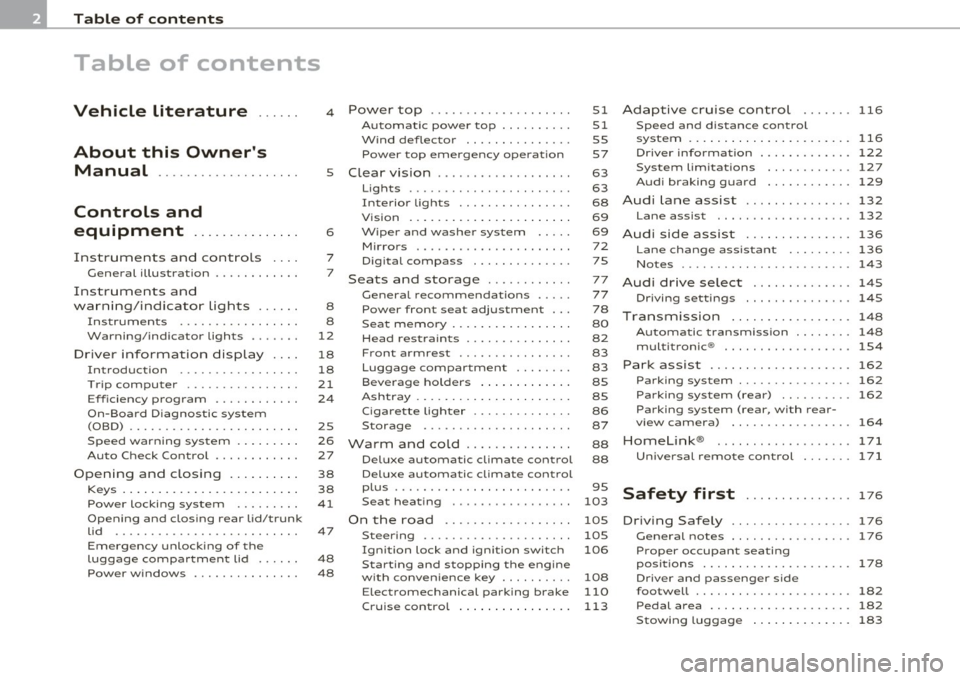
Table of contents
Table of contents
Vehicle literature ..... .
About this Owner's Manual ............. ...... .
Controls and
equipment .............. .
Instruments and controls ... .
General illustration ........... .
Instruments and
warning/indicator Lights ..... .
Instruments ................ .
Warning/indicator ligh ts ...... .
Driver information display ... .
Introduction ............ ... . .
Tri p com puter ......... ...... .
Eff iciency program ........... .
On-Board Diagnostic system (OBD) ....................... .
Speed warning sys tem ....... . .
Au to Check Control ........... .
Opening and closing ...... ... .
Keys ........... ... .......... .
Power locking system ........ .
Opening and closing rear lid/trunk
lid ....... ... ......... ...... .
Em erge ncy unlo cking of the
luggage compartment lid ..... .
Pow er windows ........ .. .. .. . 4
5
6
7
7
8
8
12
18
18
21
2 4
2S
26
27
38
38
41
47
48
48 Power top
............. ...... .
Automatic power top ......... .
Wind deflector .............. .
Power top emergency operat ion
Clear vision ............... ... .
Lig hts ....... ...... .... ... .. .
Interio r lights ............... .
Vis ion . ... ................ .. .
Wiper and washer system .... .
Mirror s .................. ... .
Digital compass ............ .
Seats and storage ........... .
G eneral recommendat ions .... .
Power front seat adjustment .. .
Seat memory ................ .
Head restrain ts .............. .
Front armrest ... .... ....... . .
Luggage compartment ....... .
Beverage holders ............ .
Ashtray ..................... .
Cigar ette lighter ......... .... .
S torage ............. ... .. .. .
Warm and cold .............. .
Delux e automatic climate control
Deluxe automatic climate control
p lu s ................... · · · · · ·
S eat heat ing .. .. ............ .
On the road ....... .......... .
Steer ing ................ ... . .
Ign it ion lock and ignition switch
Starting and stopping the engine
with conven ience ke y ........ . .
E lect romechanical parking brake
51
51
55
57
63
63
68
69
69 72
75
77
77
78
80
82
83
83
8S
8S
86
87
88
88
95
103
105
105
106
108
110
Cru ise control . . . . . . . . . . . . . . . . 113 Adaptive cruise control
116
Speed and distance control
system ............... ....... .
116
Driver informati on .......... ... 122
System limitation s ............ 127
Audi braking guard . . . . . . . . . . . . 129
Audi Lane assist ......... ...... 132
Lane assist ................... 132
Audi side assist ............... 136
Lane change ass istant ...... ... 136
No tes ...... ........ .......... 143
Audi drive select .............. 145
Driving settings ............... 145
T ransmission ........... ...... 148
Automatic transm iss ion . . . . . . . . 148
mult it ron ic® .. ................ 154
Park assist . . . . . . . . . . . . . . . . . . . . 162
Parking system . . . . . . . . . . . . . . . . 162
Park ing s ystem (rear) . . . . . . . . . . 162
Parking system (rear, with rear-
vi ew camera) . . . . . . . . . . . . . . . . .
164
Homelink ®
Universal remote control
171
171
Safety first . . . . . . . . . . . . . . . 17 6
D riving Safely ................. 176
Genera l notes . . . . . . . . . . . . . . . . . 176
Proper occupan t seating
posit ions . . . . . . . . . . . . . . . . . . . . .
178
Driver and passenger side
footwell . . . . . . . . . . . . . . . . . . . . . .
182
Pedal area . . . . . . . . . . . . . . . . . . . . 182
Stow ing luggage . . . . . . . . . . . . . . 183
Page 9 of 364
Instruments and controls
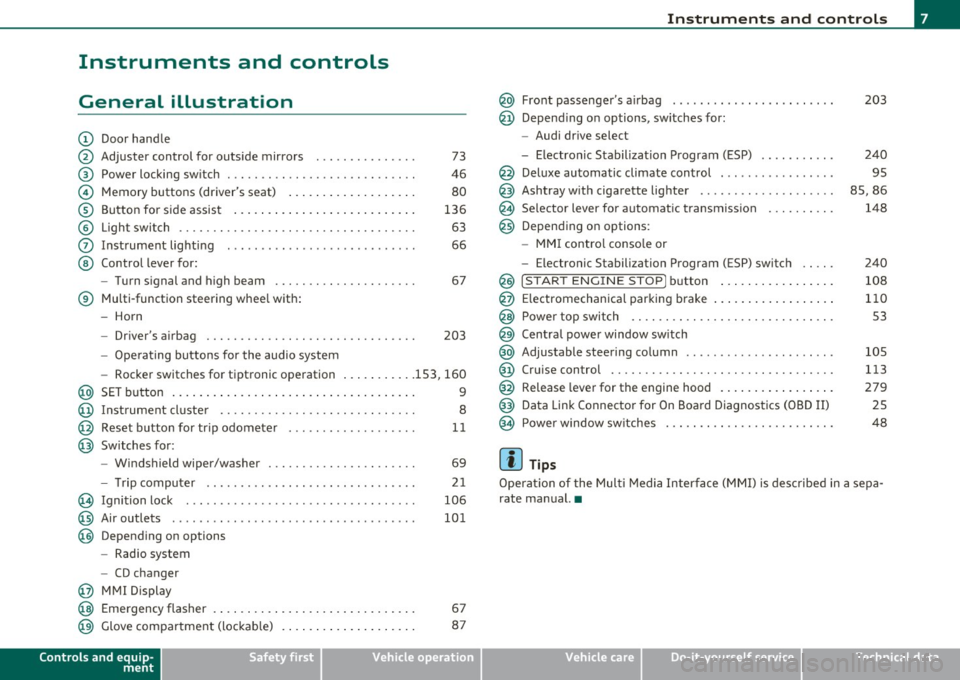
General illustration
(D Door handle
@ Adjuster control for outside mirrors . . . . . . . . . . . . . . . 73
@ Power locking switch . . . . . . . . . . . . . . . . . . . . . . . . . . . . 46
© Memory buttons (driver's seat) . . . . . . . . . . . . . . . . . . . 80
® Button for side assist . . . . . . . . . . . . . . . . . . . . . . . . . . . 136
© Light switch . . . . . . . . . . . . . . . . . . . . . . . . . . . . . . . . . . . 63
0 Instrument lighting . . . . . . . . . . . . . . . . . . . . . . . . . . . . 66
@ Control lever for:
- Turn signal and high beam . . . . . . . . . . . . . . . . . . . . . 67
® Multi-function steering wheel with:
- Horn
- Driver's airbag . . . . . . . . . . . . . . . . . . . . . . . . . . . . . . . 203
-Operating buttons for the audio system
- Rocker switches for tiptronic operation ... .. ...... 153, 160
@ SET button . . . . . . . . . . . . . . . . . . . . . . . . . . . . . . . . . . . . 9
@ Instrument cluster . . . . . . . . . . . . . . . . . . . . . . . . . . . . . 8
@ Reset button for trip odometer . . . . . . . . . . . . . . . . . . . 11
@ Switches for:
- Windshield wiper/washer . . . . . . . . . . . . . . . . . . . . . . 69
- Tr ip computer .. .......... . .. .... .. .. .... ... .
@ Ignition lock ..... .. .................. ... .. ... .
@ Air outlets ........... ... .. ..... ... ........... .
@ Depending on options
- Radio system
- CD changer
@ MMI Display 21
106
101
@ Emergency flasher . . . . . . . . . . . . . . . . . . . . . . . . . . . . . . 67
@ Glove compartment (lockab le) . . . . . . . . . . . . . . . . . . . . 87
Controls and equip
ment Safety first
Instruments and controls
@ Front passenger
's airbag . . . . . . . . . . . . . . . . . . . . . . . . 203
@ Depending on options, sw itches for :
- Audi drive select
- Electronic Stabilization Program (ESP) . . . . . . . . . . . 240
@ Deluxe automatic climate control . . . . . . . . . . . . . . . . . 95
@ Ashtray with cigarette lighter . . . . . . . . . . . . . . . . . . . . 85, 86
@ Se lector lever for automat ic transmission . . . . . . . . . . 148
@ Depending on options:
- MMI control console or
- Electronic Stabilization Program (ESP) switch . . . . . 240
@ !START ENGINE STOP] button . . . . . . . . . . . . . . . . . 108
@ Electromechanical parking brake . . . . . . . . . . . . . . . . . . 110
@ Power top switch . . . . . . . . . . . . . . . . . . . . . . . . . . . . . . S3
@ Central power window switch
@ Adjustable steering column . . . . . . . . . . . . . . . . . . . . . . 105
@ Cruise control . . . . . . . . . . . . . . . . . . . . . . . . . . . . . . . . . 113
@ Release lever for the engine hood . . . . . . . . . . . . . . . . . 279
@ Data Link Connector for On Board Diagnostics (OBD II) 25
@ Power window sw itches . . . . . . . . . . . . . . . . . . . . . . . . . 48
[ i ] Tips
Operation of the Multi Media Interface (MMI) is described in a sepa
rate manual. •
Vehicle care Technical data
Page 14 of 364
Instruments and warning /indicator lights
Warning/indicator lights
Overview
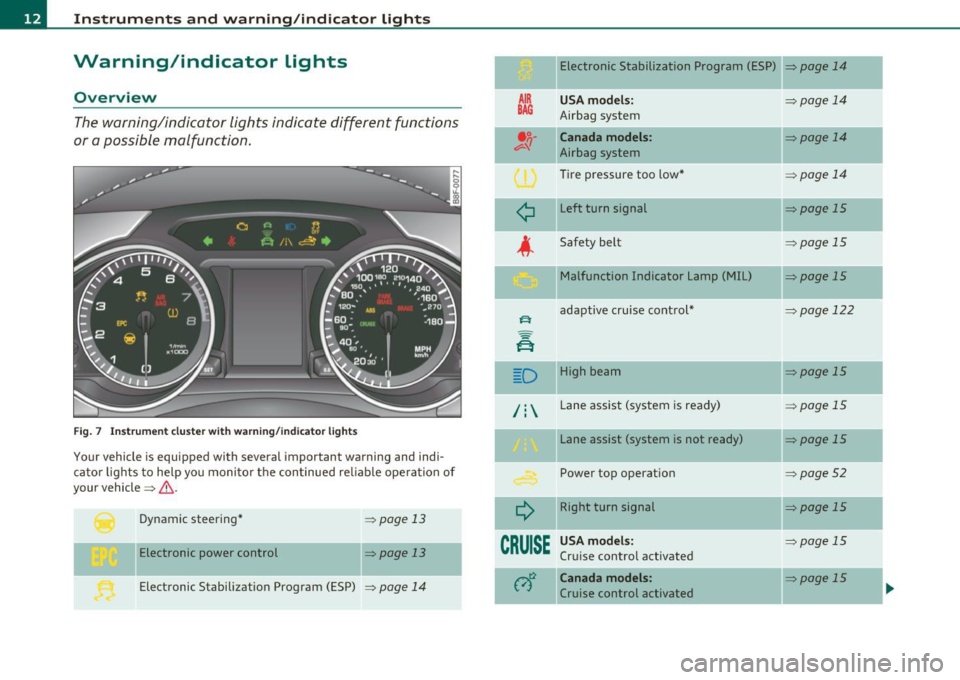
The warning/indicator lights indicate different functions
or a possible malfunction.
F ig . 7 Inst rum ent cluster with wa rning/in dicato r lig hts
Your vehicle is equipped with several important warning and indi
cato r lights to he lp yo u moni to r the continued re liable ope ration of
your vehicle =>& .
Dynamic steering *
Electronic power control =>
page 13
=> page 13
Electronic Stabilization Program (ESP)
=> page 14
Electronic Stabilization Program (ESP) => page 14
AIR
BAG
¢
USA model s:
Airbag system
Canada models:
Airbag system
Tire pressure too low *
Left turn signal
Safety belt Malfunction Indicator Lamp (MIL)
adapt ive cruise cont rol*
D High beam
/ : Lane assist (system is ready)
¢
CRUISE
Lane assist (system is not ready)
Power top operation
Right turn signal
USA model s:
Cru ise control activated
Canada models :
Cruise control activated =>
page 14
=>
page 14
=> page 14
=>page 15
=>page 15
=>page 15
=:-page 122
=:- page 15
=> page 15
:>page 15
=>page 52
=>page 15
=> page 15
=:- page 15
-
Page 17 of 364
Turn signals ¢ ¢
The indicator light blinks when you use either turn signal .
Whenever you use the left ¢i or the right ¢ turn signal, the indicator
light blinks. When you use the emergency flashers, both indicator
lights flash .
If one of the turn signa l light bu lbs burn out, the turn signal will blink
twice as fast as normal. •
Applies to veh icles: with lane assist
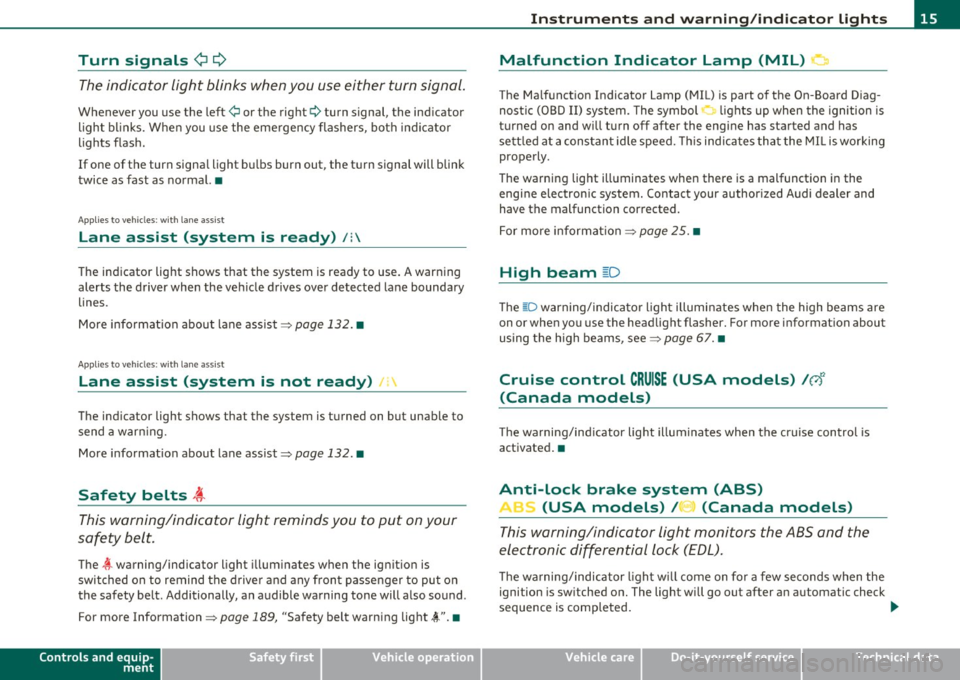
Lane assist (system is ready) /:
The indicator light shows that the system is ready to use. A warning
alerts the driver when the vehicle drives over detected lane boundary
lines.
More informat ion about lane assist~
page 132. •
Applies to veh icles: with lan e ass ist
Lane assist (system is not ready) I·
The indicator light shows that the system is turned on but unable to
send a warning.
More informat ion about lane assist~
page 132. •
Safety belts ~
This warning/indicator light reminds you to put on your
safety belt.
The l warning/indicator light illuminates when the ignition is
switched on to remind the drive r and any front passenger to put on
the safety belt. Additionally, an audible warning tone will also sound .
For more Information
~ page 189, "Safety belt warning light~". •
Controls and equip
ment Safety first
In
strum ents and warning /indicator lights
Malfunction Indicator Lamp (MIL)
::i
The Malfunction Indicator Lamp (MIL) is part of the On-Board Diag
nostic (OBD II) sys tem. The symbol
.'::I lights up when the ignition is
turned on and will turn off after the engine has started and has
sett led at a constant idle speed. This indicates that the MI L is working
properly.
The warning light illuminates when there is a malfunction in the
engine electron ic system. Contact your author ized Audi dealer and
have the malfunction corrected.
For more information ~
page 25. •
High beam ~D
The aD warning/indicator l ight illuminates when the high beams are
on or when you use the headlight flasher. For more information about
using the high beams, see::::;,
page 67. •
Cruise control CRUISE (USA models) /0 1'1
(Canada models)
Th e warning/ind icator light illum inates when the cru ise control is
activated. •
Anti-Lock brake system (ABS)
, (USA models) / (Canada models)
This warning/indicator light monitors the ABS and the
electronic differential lock (EDL).
T he wa rning/indicator l igh t w ill come on for a few seconds when the
ignition is sw itched on. The light will go out after an automatic check
sequence is completed.
~
Vehicle care Technical data
Page 115 of 364
On the road -_______________ __.
matically release the pa rking brake w ith the starting assist
==;, page 111 .
,
Parking b rake!
Thi s driver message appea rs together wi th t he ye llow J symbol
when there is a parking brake malfunction .
Malfunction starting assi st
Th is driver message appears if there is a starting assist malfunction .
T he automati c re lease of the park ing brake w hen s tarting is malfunc
tioning. You have to release the parking brake manually by pressing
t he swi tch . Have the problem correc ted by an author ized A udi
dealer. •
Cruise control
Applies to veh icl es: w it h cru ise co ntro l
Switching on
The cruise control system makes it possible to drive at a
constant speed starting at 20 mph (30 km/h).
A--
Con tro ls a nd e quip
m en t
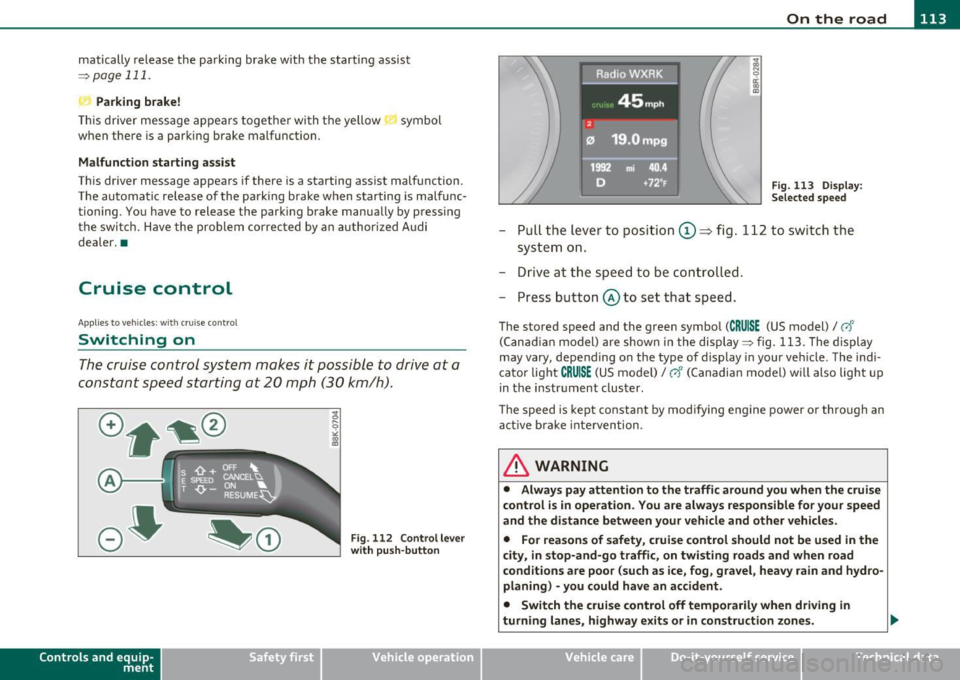
Fig. 11 2 Control lever
w ith push -butt on
Vehicle OP-eration
Radici'WXRK
Fig. 11 3 Disp la y:
Se lect ed spee d
-Pull the lever to position ©~ fig . 112 to sw itch the
system on .
- Drive at th e spee d to be con troll ed .
- Press button @ to set that speed.
The stored speed and the green symbol (CRUISE (US model)/ 0"
(Can ad ian model) are shown in the display ==;, fig. 113. The display
may
vary, depend ing on the type of display in your ve hicle . The indi
cato r light
CRUISE (US model)/ vf (Canadian model) w ill also light u p
in t he instr ument cluster.
The speed is kept constant by modifying engine power or through an act ive brake inte rvention .
& WARNING
• Alway s pay attention to the traffic around you when th e cruise
c ontrol is in operation . You are alwa ys respon sible for your speed
and th e di st a nce betwe en your vehicle and oth er vehicl es.
• Fo r rea sons of safet y, crui se contr ol should not be u sed in the
city, in stop-and-go traffi c, on twisting road s and when road
c ond ition s are poor (su ch as ice , fog , gra vel, he avy rain and hy dro
planing ) -you could hav e an ac cident.
• Switch the crui se c ontrol off temporaril y when dri ving in
turning lane s, highw ay ex it s or in construction zones .
Vehicle care Do-it-yourselt service iTechnical data
Page 116 of 364
IIIIL-_O.::...:. n.:....: t:.:.h.:.. e::....: r...: o:.. a .::..: d,;__ ________________________________________________ _
& WARNING (continued)
• Please note that unconsciously "resting" your foot on the
accelerator pedal causes cruise control not to brake. This is due to
the control system being overridden by the driver's acceleration.
• If a brake system malfunction such as overheating occurs when
the cruise control system is switched on, the braking function in
the system may be switched off. The other cruise control functions remain active as long as the indicator light
CRUISE (US model) / (;f
(Canadian model) is on.
(I) Tips
The brake lights illuminate as soon as the brakes apply
automatically. •
Applies to vehicles : w ith cr uise contro l
Changing speed
-Press the lever in the direction of the
0 => page 113,
fig . 112 or in the direction of the Oto increase or
decrease your speed.
- Let go of the lever to save that speed.
Change speed in increments of 1 mph (1 km/h) by lightly press ing the
lever . If you keep the lever pressed down, you will alter your speed in
5 mph (10 km/h) incremen ts.
You can also press the accelerator pedal down to increase your speed,
e .g . if you want to pass someone. The speed you saved earlier will
resume as soon as you let off of the accelerator pedal.
If, howeve r, you exceed your saved speed by 5 mph (10 km/h) for
longer than 5 minutes, the cruise control will be turned off tempo
rarily. The green symbol in the display turns white, the saved speed is
retai ned .•
A pp lies to veh ic les : wi th cru ise contro l
Pre-selecting speed
You can pre-select your desired speed while the vehicle is
not moving.
- Turn on the ignition.
- Pull lever into position 1
=> page 113, fig. 112.
- Press the lever in the
0 or O direction to increase or
decrease your speed.
- Let go of the lever to save that speed.
This function makes it possible, for example, to save the speed you
want before driving on the highway. Once on the highway, activate
the cruise control by pulling the lever toward
(D . •
App lies to veh icles : w ith c ruise contro l
Switching off
Temporary deactivation
-Step on the brake pedal, or
Press the lever into position @ (not clicked into place)
=> page 113, fig. 112, or
- Drive for longer than S minutes at more than S mph
(10 km/h) above the stored speed.
Switching off completely
-Press lever into position @ (clicked into place), or
- Switch the ignition off.
Page 117 of 364
On the road Ill
----------------
The speed you saved will be retained if the cruise control has bee n
switc hed o ff tempo rar ily . To resume the saved speed , let up on the
bra ke or cl utch pedal and pull the leve r to position
(D .
The saved speed w ill be erased after turning the ignition off.
& WARNING
You s hould only resume the saved speed if it is not too high for
existing traffic conditions. Otherwis e you r isk an accident. •
Controls and equip
ment Safety first
Vehicle care Technical data
Page 118 of 364
ffl Adaptive cruise control .._ __ :,..._ ____ _,;__,;_...;.____ ________________________________ _
Adaptive cruise control
Speed and distance control system
Applies to veh icl es : w it h adaptive c ruise contro l
Description
The adaptive cruise control driver assistan ce program is a
combined speed and distance control system .
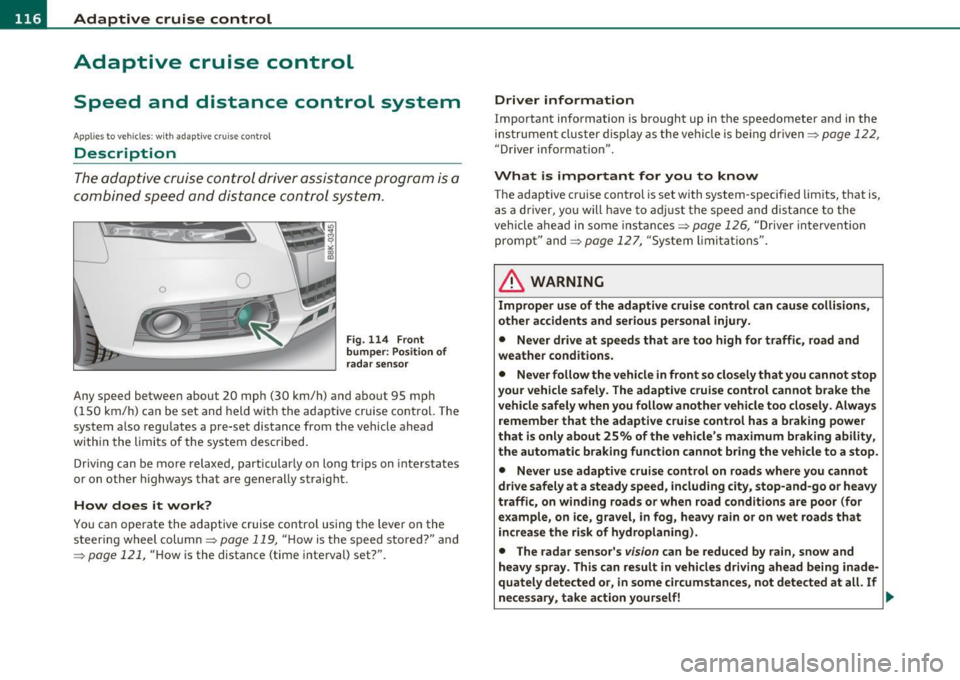
Fig. 114 Front
bum per : Po sitio n of
r a d ar sen sor
Any speed betwee n about 20 mph (30 km/h) and about 95 mph
( 1 50 km/ h) can be set and held with the adaptive cruise control. The
system also regu lates a pre-set distance from the vehicle ahead
w ith in the limits of the system described.
Driv ing c an be more relaxed, particularly o n long tr ips on inter states
or on other highways that a re generally straig ht.
How does it work?
Yo u ca n operate the adaptive c ruise contro l using the leve r o n the
steer ing wheel column:::,
page 119, "H ow is the speed sto red? " and
=:> pag e 121, "How is the distance (time interval) set?".
Driver information
Important info rmation is brought up in the speedometer and in the
instrumen t clust er dis play as the ve hicl e is be ing driven :::,
page 122,
"Driver in format ion ".
What is important for you to know
The adaptive cru ise cont rol is set with system-specified lim its, that is,
a s a driver, yo u will h ave to adju st the speed and dist an ce to the
vehicle ahead in some instances :::,
page 126, "Driver inte rvention
promp t" and =>
page 127, "Sy stem limi ta tions ".
& WARNING
Improper u se of the adaptive cruise control can cause colli sion s,
othe r accidents and serious personal injury.
• Never drive at speeds that are too high for traffic, road and
weather condition s.
• Never follow the vehicle in front so closely that you cannot stop
your vehicle safel y. The adaptive cruise control cannot brake the
vehicle safely when you follow another vehicle too closely . Alway s
remember that the adapti ve cruise control has a braking power
that i s only about 25% of the vehicle 's maximum br aking ability,
the automatic b rak ing function cannot bring the vehicle to a stop.
• Never use adaptive cruise control on roads where you cannot
drive safely at a steady speed , including city , stop-and-go or heavy
traffi c, on winding road s or when road cond ition s are poor (for
example , on ice, gravel, in fog, heavy rain or on wet roads that
in crea se the risk of hydroplaning).
• The rada r sensor' s
vis io n can be reduced by rain, snow and
heavy spray . This can re sult in vehicle s driving ahead being inade
qu ately detected or, in some circumstances , not detected at all. If
necessary, t ake action yourself! ..,
Page 119 of 364
____________________________________________ A_ d_ a.._p _t_ i_ v _e_ c_r_u _ i_ s _e_ c_o_ n_ t_r _o _l __ ffl'II
& WARNING (co ntinued )
• Always turn off adaptive crui se control when entering turn
lanes, highway ex it lanes and con struction zones or similar situa
tions because the vehicle will automatically accele rate to the
stored speed .
• Never rest your foot on the accelerator pedal, especially when
the adaptive cruise control is being u sed because doing so will
override the braking function and prevent the brakes from being
applied by the system when it detect s a situation when the brake s
must be applied.
• Alway s remember that the adaptive cruise control has limits -
it does not react when you drive towards an obstacle or something
else on or near the road that is not moving, such as vehicles
stopped in a traffic jam , a stalled or disabled vehicle .
• Always remember that the adaptive cruise control cannot
detect a veh icle th at i s driving towards you in your traffic lane and
that it cannot detect narrow vehicles such as motorcycles and bicy
cles .
[ i] Tips
• For safety reasons, the stored speed is deleted when the ignition
is turned off.
• The Electronic Stabilization Program (ESP) and the Ant i-Slip Regu
la tio n (A SR) c anno t be de activated when the adaptive cruise cont rol
is sw itched on .
If the ESP and the Anti -S lip Regulation (ASR) has been
de activ at ed an d yo u the n switch on the ad apt ive cruise cont rol, the
ESP fu nction w ill also be activated automatically.
• Dam age cau sed by accide nts (e.g. if the vehicle is dam age d whe n
park ing) can affect the rada r sensor settings. This can cause t he
sys tem to malfunc tion or switch off comple tely.
• The radar sensor cover is heated. In w inter conditions, you should
st ill ch eck befor e dr iv in g to make s ure i t is free of ice and s now. If
necessary, clean the area nea r the rada r sensor carefully=>
page 116,
fig. 114 .
Controls and equip
ment Safety first
•
To ensure that the radar sensor is not blocked , fore ign objects
(e .g. st ickers, add -on par ts) m ust no t cover the are a ne ar th e radar
sensor=>
page 116, fig . 114 . The area near t he radar sensor must not
be painted, either .
• For Declaration of Compliance to United States FCC and Industry
C an ada regula tions =>
page 34 6. •
App lies to ve hicle s: with adap tiv e crui se contro l
How does adaptive cruise control work?
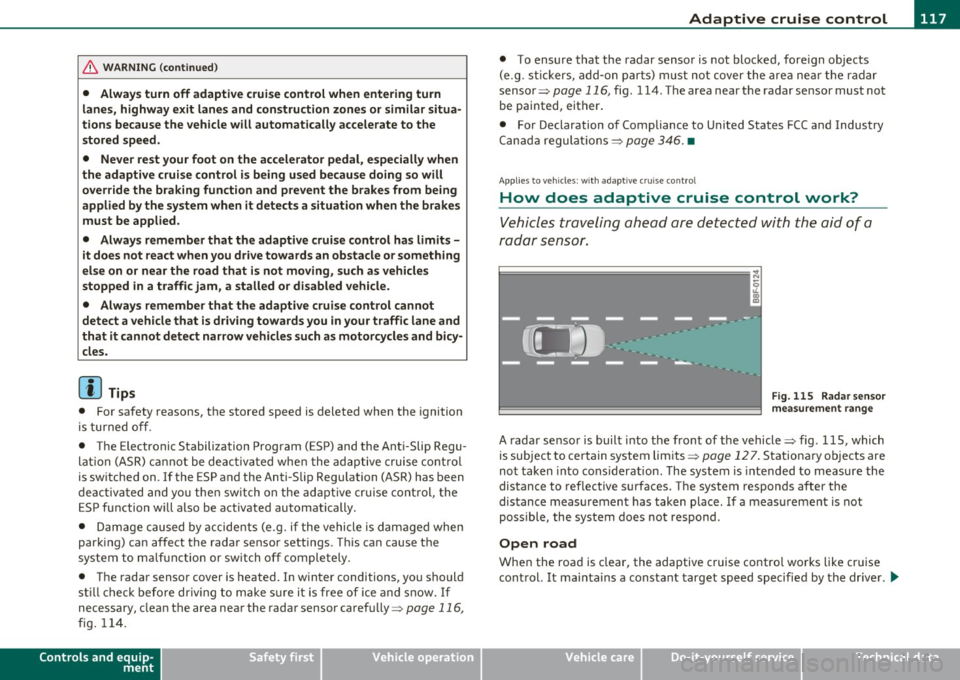
Vehicles traveling ahead are de tec ted w ith the aid of a
ra dar sens or.
I;= =;. =============== --~
~
l8
Fig. 115 Radar sen sor
mea sureme nt r an ge
A radar sensor is buil t into the front of the vehicle=> fig. 115, which
is subject to ce rtain system limits =>
page 12 7 . Stationary o bjects are
not taken into cons iderat ion. The system is intended to measure the
distance to reflective s urfaces. The system responds after the
dis tance measuremen t has taken place. If a meas urement is not
poss ible, the system does not respond.
Open road
When the road is clear, the adaptive c ruise contro l works like cr uise
cont rol. It ma inta ins a constant target speed specified by the drive r.
~
Vehicle care Technical data
Page 120 of 364
lffll.___A_ d_ a,.:.p _ t_ i _v _ e_ c_ r _u _ is_ e_ c_o _n_ t_r _o _l _____________________________________________ _
Driving in traffic
If a vehicle driving ahead is detected, the adaptive cruise control
decelerates (within the limits of the system)=>
page 126, "Driver
intervention prompt" and=>
page 127, "System limitations" to its
speed and after adjusting, tries to mainta in the set distance from the
vehicle ahead. The vehicle may temporarily drive slower than the set
speed wh ile adjusting::::>
& in "Description" on page 116 .
If the vehicle in front accelerates, adaptive cruise control also accel
erates up to the speed that you have set.
Situation requiring driver intervention
In some situations you will have to use the footbrake to slow the
vehicle down in order to keep a safe distance from vehicle in front of
you o r to avoid a rear-end co llision. In this situation, a symbo l
appears and a warning tone sounds=>
page 126.
Passing another vehicle
If you move into the passing lane and no vehicle is detected ahead,
the adaptive cruise control accelerates to the speed you have set and
maintains it .
Override
You can increase your speed at any time by stepping on the acceler
ator pedal. After you release the accelerator pedal, the system
adjusts back down to the speed you previously set .
[ i ] Tips
Please note that the amount of acceleration the adaptive cruise
control uses depends on the Distance setting selected. DISTANCE 1
gives you accelerat ion that is dynamic and sporty. DISTANCE 4, on the
other hand, gives more moderate acceleration . For more information
about the time intervals=>
page 121, "H ow is the distance (time
interval) set?".
• Please note that if the adaptive cruise control has begun braking
the vehicle and the driver chooses to brake the vehicle additionally, the brakes may
feel "hard". This is simply due to the pressure build
up of the initial braking.
• Adaptive cruise contro l is switched off after pressing the foot
brake. The speed saved up this point can be resumed. To resume the
saved speed, release the brake pedal and pull the control lever
=>
page 120, "Tu rning adaptive cruise control off temporarily". •
Applies to veh icles : wit h ad aptive c ru is e cont rol
Switching the system on and off
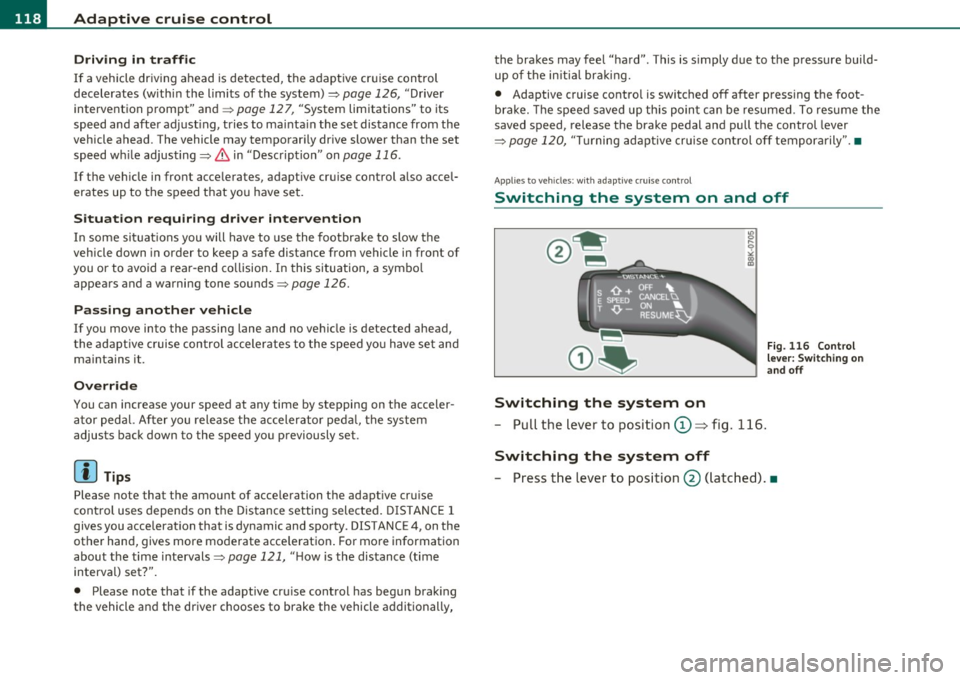
Switching the system on
- Pull the lever to position
0 => fig. 116.
Switching the system off
Fig . 116 Control
lever: Switching on
and off
- Press the lever to position@ (latched) .•