key battery AUDI A5 CABRIOLET 2011 User Guide
[x] Cancel search | Manufacturer: AUDI, Model Year: 2011, Model line: A5 CABRIOLET, Model: AUDI A5 CABRIOLET 2011Pages: 364, PDF Size: 86.48 MB
Page 156 of 364
ffl..__T_ r_a _n_ s_ m_ is_ s_io _ n ___________________________________________________ _
Applies to veh icles : with automat ic tr ansm ission
Emergency release of the selector lever
If the vehicle's power supply fails, the selector lever can
be released in an emergency.
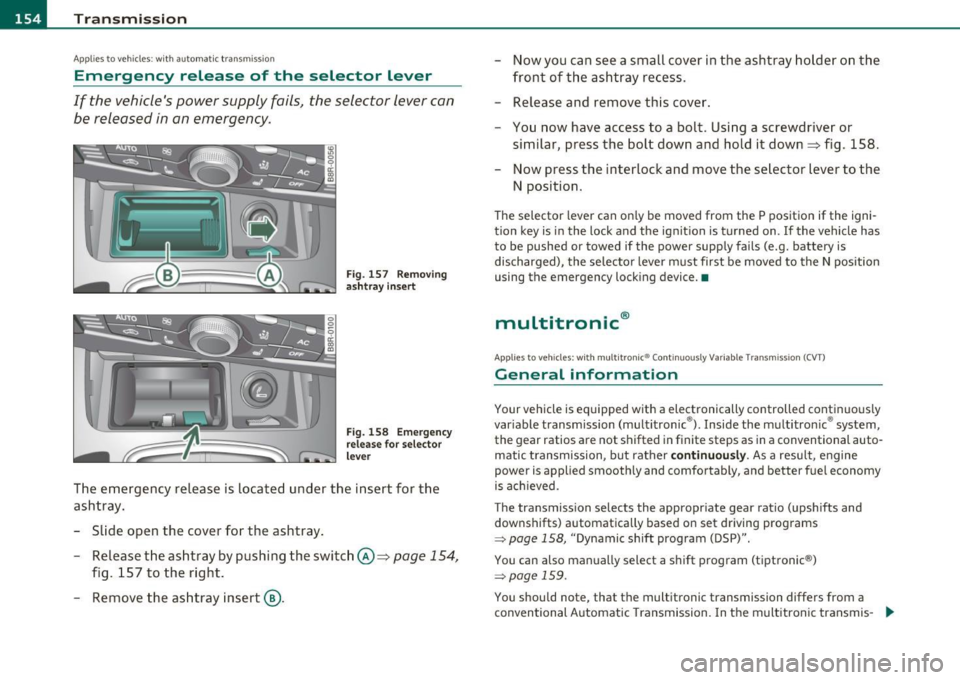
Fig . 157 Removing
ashtr ay in sert
Fig. 158 Emerge ncy
release for selector
lever
The emergency release is located under the insert for the
ashtray.
- Slide open the cover for the ashtray .
- Release the ashtray by pushing the switch @=>
page 154,
fig. 157 to the right.
- Remove the ashtray insert@. -
Now you can see a small cover in the ashtray holder on the
front of the ashtray recess.
- Release and remove this cover.
- You now have access to a bolt. Using a screwdriver or
similar, press the bolt down and hold it down=> fig . 158.
Now press the interlock and move the selector lever to the
N position.
Th e selector lever can on ly be moved from the P position if the igni
tion key is in the lock and the ignit ion is turned on . If the vehicle has
to be pushed or towed if the power supply fails (e.g. battery is
discharged), the selector lever must first be moved to the N position
using the emergency locking device. •
multitronic®
Applies to veh icle s: with mu lt it ron ic® Con tinuously Variable Transmission (CVT)
General information
Your vehicle is equipped with a electronically controlled continuous ly
var iable transmission (multitronic ®). Inside the multitronic ® system,
the gear ratios are not shifted in finite steps as in a conventional auto
matic t ransmission, but rather
continuously. As a result, engine
power is applied smoothly and comfortably, and better fuel economy
is ach ieved .
The transmission selects the appropriate gear ratio (upshifts and
downshifts) automatically based on set driving programs
~ page 158, "Dynamic shift program (DSP)".
You can also manually select a shift program (tiptronic ®)
~ page 159 .
You shou ld note, that the multitronic transmission differs from a
conventional Automatic Transmission . In the multitronic transmis-
9J,,
Page 163 of 364
____________________________________________________ T _r_a _n_ s_m _ i_s _s_ i_ o _ n_---J_
Applies to vehicles : with mult itron ic® Continuous ly Variab le Transm ission (CVT)
Emergency release for selector lever
If the vehicle 's power supply fails, the selector lever can
be released in an emergency.
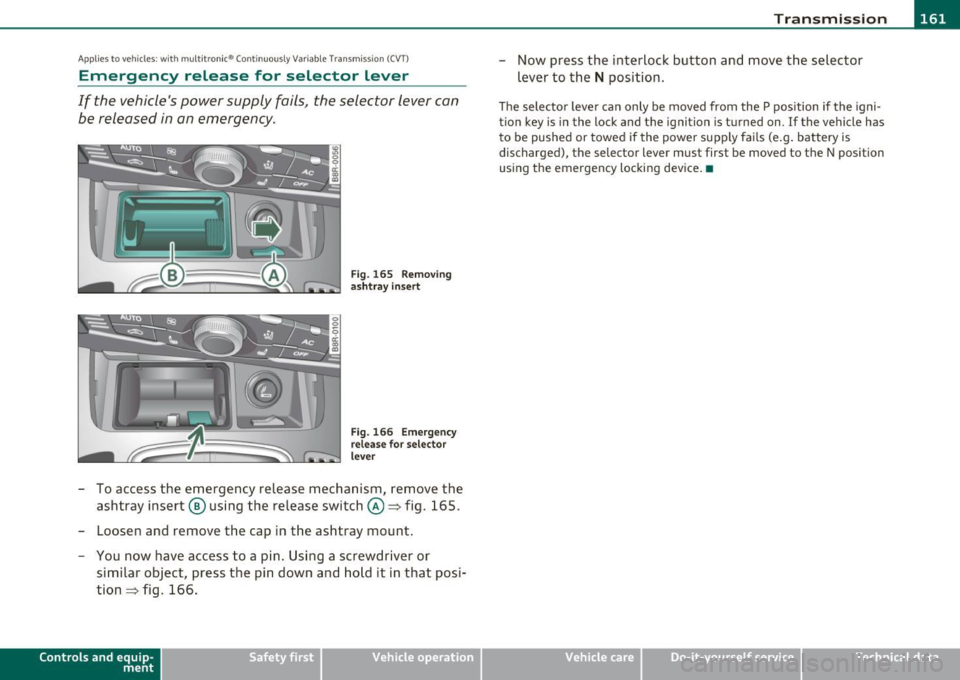
Fig . 165 Removing
ashtray insert
Fig. 166 Emergency
release for selector
lever
- To access the emergency release mechanism, remove the
ashtray insert @ using the release switch@~ fig. 165.
- Loosen and remove the cap in the ashtray mount.
- You now have access to a pin. Using a screwdriver or
similar object, press the pin down and hold it in that posi
tion~ fig. 166.
Contro ls a nd e quip
m en t Vehicle
OP-eration
-Now press the interlock button and move the selector
lever to the
N position.
The selector lever can only be moved from the P position if the igni
tion key is in the lock and the ignition is turned on. If the vehicle has
to be pushed or towed if the power supply fails (e.g. battery is
discharged) , the selector lever must first be moved to the N position
using the emergency locking device. •
Vehicle care Do-it-yourselt service iTechnical data
Page 250 of 364
Intelligent technology
'-------------------------------------------------
vi dual components. It regulates consumption, so that more electrical
energy is not being used than is being generated and ensures an
optimal state of charge for the battery .
[I] Tips
• But even energy management cannot negate the limits of physics.
Consider that the power and life of a battery are limited.
• If starting ability is threatened, you are informed by a warning
~ page 249, "Driver notification in the instrument cluster display" .•
What you should know
The highest priority is given to maintaining starting capa
bility.
Th e battery is severe ly taxed in short-distance driving, in city traffic
and during the cold time of year. Abundant electrical energy is
required, but only a little is generated.
It is also critical if the engine
is not running and electrical components are turned on. In this
instance energy is being consumed but none is being generated.
It is in prec ise ly these sit uations that you will notice energy manage
ment actively regulating the distribution of energy.
Vehicle stands for an extended period
If you do not drive your vehicle over a period of several days or weeks,
electrical components are gradually cut back or sw itched off. This
reduces energy consumption and maintains starting capability over a
longer period.
Take into consideration that when you unlock your vehicle, some
convenience functions, such as the remo te key or power seat adjust
ment, may not be available. The convenience functions will be avail
able again when you turn on the ignition and start the engine.
W ith the engine turned off
If you listen to the radio, for example, with the engine turned off or
use other MMI functions, the battery is being discharged .
If starting capability is jeopardized due to energy consumption, the
following warning appears in the MMI display:
Please start engine, otherwise system will switch off in
3 minutes.
Th e warn ing indicates that the system will be turned off automati
cally after 3 m inutes. If you wish to continue using the functions, you
have to start the engine.
With the engine running
Although electrica l energy is generated when the vehicle is being
driven, the battery can become discharged. This happens most ly
when little energy is being generated and a great deal consumed and
the battery's state of charge is not optimal.
T o br ing the ene rgy balance back into equilibrium, consumers which
require especially large amounts of energy are temporarily cut back
or switched off. Heating systems in particular require a great deal of
energy .
If you notice, for example, that the heated seats* or the
heated rear window are not heating, they have been temporarily cut
back or switched off. These systems will be ava ilable again as soon as
the energy ba lance has been restored.
You will also notice that engine idle speed has been increased
slightly. This is normal and not a cause for concern. By increasing
eng ine id le speed the additional energy required is generated and the
battery is charged. •
Page 282 of 364
-Checking and filling
-------=------=---------------------------------------------------
Closing the engine hood
-Pull the hood down until the pressure from the struts is
reduced.
- Let the hood
drop down and latch in place . Do not try to
push it shut;
it may fail to engage=> &.
& WARNING
A hood that is not completely latched could fly up and block your
view while driving.
• When you close the engine hood, check it to make sure the
safety catch has properly engaged. The hood should be flush with
the surrounding vehicle body parts.
• If you notice while driving that the hood is not secured prop
erly, stop at once and close it. •
Working in the engine compartment
Be especially careful whenever you work in the engine
compartment.
Whenever you must perform any work in the engine compartment,
for example checking and filling different fluids, there is a risk of
injury, burns and accidents. To prevent personal injury always
observe the following WARNINGS. The engine compartment of any
vehicle is a hazardous area
=> & .
& WARNING
To help avoid injury, before you check anything under the hood :
• Turn off the engine.
• Remove the ignition key.
• Apply the parking brake.
& WARNING (continued)
• Move selector lever of automatic transmission to "P" (Park).
• Always let the engine cool down. Hot components will burn
skin on contact.
• To reduce the risk of being burned, never open the hood if you
see or hear steam or coolant escaping from the engine compart
ment. Wait until no steam or coolant can be seen or heard before
carefully opening the hood.
• Keep children away from the engine compartment.
• Never spill fluids on hot engine components. They can cause a
fire.
• Never touch the radiator fan. The auxiliary electric fan is
temperature controlled and can switch on suddenly.
• Never open the coolant reservoir cap when the engine is still
warm. The coolant system is pressurized and hot coolant could
spray out.
• Protect your face, hands and arm from steam or hot engine
coolant by placing a thick rag over the cap when you open the
coolant reservoir.
• If work on the fuel system or the electrical system is necessary:
-Always disconnect the battery.
- Never smoke or work near heaters or open flames. Fluids in
the engine compartment could start a fire.
- Keep an approved fire extinguisher immediately available.
• To avoid electrical shock and personal injury while the engine is
running or being started, never touch: -Ignition cables
- Other components of the high voltage electronic ignition system.
• If you must perform a check or repair with the engine running: -First, fully apply the parking brake, move selector lever of
automatic transmission to "P" (Park). ..,
Page 293 of 364

___________________________________________ C_ h_e _c _k_ i_n ~g_ a_n_ d_ f_ i_ll _i_n _g __ _
Have the battery checked when you take your vehicle in for service .
You are well advised to replace a battery that is older than 5 years.
With certain types of a irbag deployment, the battery is disconnected
from the vehicle electrica l system for safety reasons~
& in "Repair,
care and disposal of the airbags" on
page 213.
Disconnecting the battery terminals
Some vehicle funct ions (power window regulators, for example) are
lost if the battery terminals are disconnected. These functions have
to be relearned after the battery termina ls are connected aga in . To
prevent this, the battery should only be disconnected from the
vehicle electr ica l system when absolute ly necessary for repairs.
Vehicles not driven for long periods
If you do not drive your veh icle over a period of several days or weeks,
electrical components are gradually cut back or switched off. This
reduces energy consumption and maintains starting capability ove r a
longer period
~ page 247.
Take into consideration that when you unlock your vehicle, some
convenience functions, such as the master key remote function or
powe r seat adjustment, may not be available. The convenience func
tions will be available again when you turn on the ignition and start
the engine.
Winter operation
During the winter months, battery capacity tends to decrease as
temperatures drop. This is because more power is also consumed
while starting, and the headlights, rear window defogger, etc., are
used more often .
Avoid unnecessary power consumption, particu larly in city traffic or
when travel ing only short distances. Let your authorized Audi dealer
check the capacity of the vehicle battery before winter sets in
~ page 293. A well charged battery will not only p revent start ing
problems when the weather is cold, but will also last longer.
Safety first
(I] Tips
If your vehicle is left standing for several weeks at extremely low
temperatures, the vehicle battery shou ld be removed and stored
where it will not freeze. This will prevent it from being damaged and
having to be replaced. •
Working on the battery
Be especially careful when working on or near the
battery.
The battery is located in the luggage compartment under the
floor. Before you check anything in the lu~gage compart
ment,
read and heed all WARNINGS =:,& .
Always heed the safety warnings, when working on the vehicle
battery or the vehicle electrical system to prevent injury .
The following WARNINGS are very important when
working on the battery:
Always heed the following WARNING SYMBOLS and safety pre
cautions when working on the battery.
Always wear eye protection.
Battery acid contains sulfuric acid. Always wear
gloves and eye protection. .,_
Vehicle care Technical data
Page 342 of 364
___ G_ e_n_ e_r _a _ l_ in_ f_o _r_ m_ a_ t_io _ n _______________________________________________ _
General information
Explanation of technical data
Some of the technical data listed in this manual requires
further explanation.
The technical data for your vehicle is listed in the charts starting on
~ page 342 . This sect ion prov ides genera l information, notes and
restrictions which app ly to this data .•
Veh icle identification
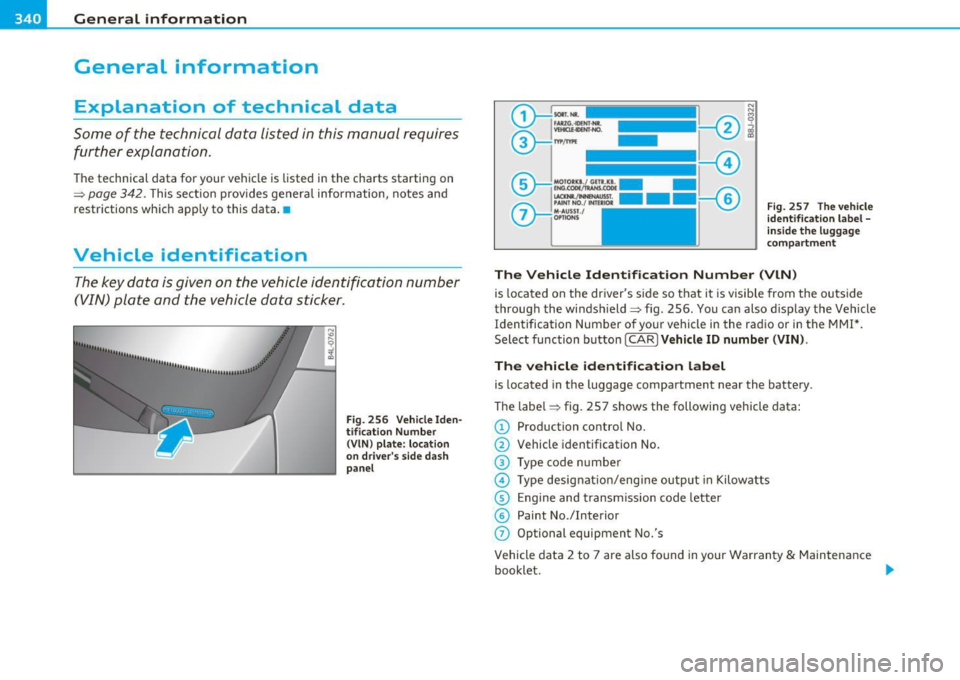
The key data is given on the vehicle identification number
(VIN) plate and the vehicle data sticker.
F ig. 256 V ehicle I den
t ifi ca tion Nu mbe r
(V IN ) pl ate: locat io n
o n d river's s id e d ash
p an el Fi
g. 257 The vehi cle
i d enti ficati on l abel -
in side the l ugga ge
co mpa rtme nt
The Vehicle Id ent ifi cat ion Number (VlN )
is located on the driver's s ide so that it is visible from the outside
throug h the windsh ield ~ fig . 256 . You can also d isp lay the Vehicle
Identification Number of your vehicle in the radio or in the MMI*.
Select function button [ CAR
l Veh icle ID numb er (VIN) .
The vehicle identifica tion label
is located in the luggage compartment near the battery .
The label~ fig . 257 shows the following vehicle data:
© Production control No.
@ Vehicle identification No.
® Type code n umber
@ Type designat io n/eng ine output in Kilow atts
© Engine and transmission code letter
© Paint No./Interior
(j) Optional equipment No.'s
Vehicle data 2 to 7 are also found in your Warranty
& Maintenance
booklet . .,,
Page 354 of 364

___ A_l_,_ p _ h_ a _ b_e _ t_ i_c __ a _l _i_n :...::d __ e::..: x:...::...,_ _________________________________________ _
Emergency locking of the doors .. .. ....
47
Emergency operation
Luggage compartment lid .... ... .. .
48
Power top ... .. .. .. ... ... .... .... 57
Emergency release
Sele ctor lever ...................
154
Emergency starting .. .. ............. 333
Emergency towing ..... .. .. ..... .... 336
Emergency u nlocking
Ignition key .. ................. ...
40
Energy management .............. .. 247
Battery power ................ ... 249
Dr iver not ification ......... .... ... 249
Engine
Compartment .. .. ... . .. ... ... . ..
281
Coolant ................ .. .... .. 286
Hood .................. ...... .. 279
Starting ... ............. ...... ..
106
Starting w ith jumper cables ........ 333
Stopping .. .. ... .... ........ .... 1 07
Engine compartment
Safety instructions .. ... ... .... . ..
280
Work ing the eng ine compartment 280
Engine coo lant system
Ma lf u nct ion . . . . . . . . . . . . . . . . . . . . . .
31
Radiator fan ... .... .. . ... ... .. .. 289
Engine coo lant tempe rature
T empera ture gauge ............ .. .. 8
Engine cooling system ...............
286
Adding coolant ... .. .. .. ... ...... 288
Checking coo lant level . ........... 287
Checking the engine coolant level ... 287
Engine data ....... .. ... . .. ... ... ... 342
Engine hood
Closing ............... ... .......
280
How to re lease the hood ........... 279
Engine oil .... ..... ... ... ... .. .. .. . 282
Add ing ......................... 284
Add itives ....................... 284
Changing ............ .... .. ..... 285
Check o il level ....... ... .. .. .. .. . 284
Consumption ............. ....... 284
Oi l co nsumption ............... .. 283
Oi l grades ...................... 282
Specification and viscosity .. .. .. .. . 2 82
Engine oil leve l .. . .. ............... .. 36
Engine oil p ressure
Ma lf u nction . . . . . . . . . . . . . . . . . . . . . .
31
Engine oil se nsor defec tive . .. .. ... .... 36
Engine speed limitatio n ............... 36
Environmen t
B reak -in period .. .... .. .. ... .... .
250
Catalytic converter .... ... ... .. .. . 251
Disposing of your vehicle battery ... . 29 4
Driv ing at high speeds ............ 253
Driv ing to minimi ze po llution and noise ..
252
Fuel ... ............... .. .. .. .. . 27 6
Fuel e co nomy ............ .. .... . 252
Leaks unde r yo ur vehicle .. ... ..... . 280
Letting the vehicle stand and wa rm up . ..
253
Prope r disposa l of dra ined bra ke fluid 290
Pro per disposal of dra ined engine coo la nt
288
Proper disposal of dra ined engine oil 284,
2 85
Recycl ing used eng ine o il ... .. .... . 284
Unleaded fue l ................... 274
What should I do w it h an old battery?
294
Environmental note
Rear window defogger ........ .
92, 100
EPC
See Electronic power contro l . . . . . . . . 13
ES P
See Electronic stabilization program (ESP)
240
Event Data Recorder ( EDR) 240
Exhaust ta il pipes
Cleaning ... .... .... .. .. ...... ..
267
Expans ion tank ..... ................ 28 7
F
Fan ..................... .... ... 9 1, 98
Rad iator ................. ... .... 289
Fastening
Booster seats ...................
229
Convertible child safety seats ...... 228
Infant seats ...... ............... 227
Flat tire
Changing ................. .... ..
320
Floo r mats ............ .. .. .. .. .. .. 182
Fog lights .. ... ........ ...... .. . ... . 64
Folding the rear seat backrests . ... .. .. . 8 4
Foot pedals ................... ... .. 182
Page 356 of 364
-Alphabetical inde x _ ___,_ ______ .::..:....=.:..:..__ __________________________ _
Ignition lock .. .. .. .. .. .. ... ........ 106
Malfunction .............. ... .. 32, 37
Immobilizer ... ................. . 11, 38
Important things to do before driving .. 177
Improperly worn safety belts ....... .. 196
Indicator lights ............. ...... ... 12
Airbag system ...... ..... .... 210,211
Dynamic steering .............. 13, 34
PASSENGER AIR BAG OFF .......... 211
Infant seats .... .... ...... ......... 227
Inside rear view mirror ................ 72
Insta lling child safety seats
Safety belts .................. ... 231
Instrument lighting .. .. .......... .... 66
Instruments and controls .............. 8 General illustration ............. .. .. 7
Interior lights ... .. .. .. ... ..... ...... 68
Rear .... .. .. .................... 69
Interval wip ing .. ............ ........ 69
Rain sensor ..... ....... ..... .. .. . 69
J
Jumper cables ...................... 334
Jump-starting .... .. .... .. .. .. .. .. .. 333
K
Key . ..................... .. .... .. . 38
Battery replacement ............... 39
Key replacement .... .. .. .. .. .. .. .. 38
Master key with remote control ...... 38
Mechanical key ..... ... ........... 40 Kick-down
multitronic ® ................ ... . 1S8
t.
t . ® rp ronic ................ ... .. . 151
Knee airbags ................ .. .... . 215
Description . .. ................. . 215
How they work ......... .. .. .. .. . 216
Important safety instructions ...... 217
L
Lane assist
Activating and deactivating ........ 132
Description . .................. .. 132
Indicator in the instrument cluster display
133
Instrument cluster indicator light ... 132
Notes on instrumen t cluster display . 132
steering wheel vibration . .......... 135
warning time .. ... ... ... .. .. .. ... 135
LATCH ............ .... ..... .. .... . 234
Description ... ................. . 236
Installing a child restraint .. .. .... . 237
Location ....... ...... .... .. ..... 235
Mounting and releasing the anchorage hook .............. .... ....... 237
Leather . .. .. .. .. ..... ...... .. ... .. 269
Cleaning . .......... ... .. ... ... . 270
Lifting jack ......... .... .... ....... 323
Lifting vehicle .... ........... .. .. .. . 338
Light sensor ............ .... .. ...... 63
Light senso r defective ............. ... 35
Lighting .. .. .. .... ....... .... .... .. 63 Lights
Com ing home .......... .... ...... 65
Daytime running lights ............. 65
Dr iving light control . .......... ... . 63
Emergency flashers .. .. .. .. .. .. .. . 67
Exterior lighting .. .. .... ......... . 65
H igh beam ... .. .. .. .............. 67
High beam warning/indicator light ... 15
Leaving home ........ ... .. .... ... 65
Switching on and off .............. . 63
Turn signals .. .. .... ............. . 67
Xenon headlights . .. ............. . 66
Loading the luggage compartment 183
Locking Power locking switch . . . . . . . . . . . . . . 46
Rear lid/trunk lid ................. 4 7
Remote control key . . . . . . . . . . . . . . . . 43
Us ing the mechanical key . .......... 45
Low beams . . . . . . . . . . . . . . . . . . . . . . . . . 63
Lower unive rsal ancho rage bars (Canada) ...
234
Lower universal anchorages (Canada) . .. 234
Luggage Stowing ............ .. .. .. .... .. 183
Luggage compartment ............... 83
Increasing the s ize .. .......... .... 84
Loading ........... .. . ... ... .. ... 83
Tie-downs . . . . . . . . . . . . . . . . . . . . . . . 84
See also Loading the luggage
compartment . .. .. ......... .... 183
See also Luggage compartment .... . 83
Luggage compartment lid
Emergency unlocking ....... .. .. .. . 48
Page 357 of 364

Alphabetical index -________________ fNi'II
M
Maintenance ................... .... 343
Malfunction Indicator Lamp (MIL) ... 15, 25
Master key ........ .... .. .. .. ... ... .. 39
Battery replacement .. .. .. .. ....... 39
Check light ............... .. .. .. .. 39
Mechanical key ........... ... ... .... . 40
Memory for driver's seat ............... 80
Recalling settings .. ........... .. .. 81
Storing settings ............... .... 81
Mileage Average .... ........... ...... .... 21
Instantaneous .................... 21
Mirrors Act ivat ing the dig ita l compass ... .. .. 75
Adjusting the anti-glare .... .... .. .. 72
Au tomatic dimming for the outside
mirrors ........... .... .. .. .. .. .. 74
Automatically dimming inside mirror . 72
Ins ide rearview mirror .............. 72
Interior mirror ......... .. .... .... . 72
Manual glare d imm ing .. ....... .. .. 72
Outside mirrors .. .. .... ........... 73
Monitoring the Advanced Airbag System 210
mu ltitronic ® ................ .. .. .. . 154
Automatic Shift Lock (ASL) ......... 157
Driving the mu ltitronic ® .......... . 155
Dynamic shift program ... .. .. .. .. . 158
Fail-safe mode ... ................ 160
Kick-down ......... ...... .. .... . 158
Manual shift program ..... .... .... 159
Selector lever .... ... ..... ... .. .. . 156
Controls and equip
ment Safety first
Steering wheel with tiptronic
® .... .. 160 p
tiptron ic . .................. ..... 159
N
Natural leather .................. ... 269
New tires and whee ls ................ 307
NHTSA Contact ing ... .. .... .. .. ......... 185
Number of seats . ............ ..... .. 189
0
Occupant seating posi tions . .... .. .. .. 178
Octane rating .... ... .. .... ......... 274
Odometer .. .. ................ ... ... 11
Oil
See Engine oil ........... .. . 282, 284
Oil consumption . .. ................. 284
On-Board Diagnostic System (OBD) Data Link Connector (DLC) ......... . 2S
Electronic speed limiter ........... . 26
Malfunction Indicator Lamp (MIL) .... 25
Open door or rear lid warning ..... .. .. . 20
Operate your veh icle economically and mini-
mize pollution ............ ...... 2S2
Optional equipment Marked with an asterisk ......... .... 5
Other equipment (effic iency program) ... 24
Ou tside mirrors ............. .. .. .. .. . 73
Outside temperature display ........... 19
Owner 's manual
How the Owner's Manual is organized .. 5 Paint
Touch-up . .. .. .. .. ..... ..... ... . 265
Paint No .............. ...... .... ... 340
Park assist ............ .... .. .. .. .. . 162
Adjusting the chimes .. ..... .... .. . 163
rear ... ......................... 162
rear, with rear-view camera ........ 164
Parking . .. .. .. ................. .. . 111
Automatic transmission ........... 148
multitron ic® . ............ .. .. .. . 155
Parking brake .. .. .. .. ..... ..... ... . 110
See also Electromechanical park ing brake
110
Parking system
rear, with rear-view camera ..... .. . 164
Parking system (rear, with rear-view camera) 164
Acoustic parking system tips ..... .. 170
Parking mode 1 . ... ............ .. 167
Parking mode 2 . ... ............ .. 168
Safety precautions ................ 16S
Switching on/off ... ............. . 166
Switching rear-view came ra on/off . . 169
Parts replacement .. .. .... .......... 345
PASSENGER AIR BAG OFF light . .. .. ... 211
Passive safety system ..... .... .. .. ... 176
Pedals .. .. .... ................... . 182
Physical principles of a frontal collision . 190
Polishing .................. ..... ... 264
Pollen filter . . . . . . . . . . . . . . . . . . . . . 88, 9S
Pollutant fi lter . . . . . . . . . . . . . . . . . . 88, 9S
Vehicle operation Vehicle care Do-it-yourself service Technical data
Page 361 of 364
___________________________________________ A_ l::.. p _h _a_ b_ e_t _ic _a_ l_ in_ d _ e_x __ _
u
Undercoating ............... .... ... . 267
Unfastening safety be lts ......... .... 196
Unidirectional tires ....... .. .. .... .. . 296
Uniform tire quality grading .. .. .. ... .. 311
Unlocking Power locking switch ............... 46
Rear lid/trunk lid ...... ... ..... .... 47
Remote control key .. ...... .. .... .. 43
Using the mechanical key . .. .... .. .. 45
Upper cabin heating .... .. .. .. .. .... . 104
Use of jumper cables . .. ... ... .. ..... 334
V
Vanity mirror ................... .... . 69
Vehicle Identification Number (VIN) ... . 340
Vehicle jack .................... ... . 323
Vehicle literature ... ............. .. ... 4
Vehicle tool kit ....... ... .. .. .. ..... 318
Vehicle -care products .... ......... .. . 260
Ventilation . . . . . . . . . . . . . . . . . . . . . 91, 98
Warning/indicator lights .... ...... .. .. 12
adaptive cruise control ... .. ... . .. . 123
Airbag system ............ .... .. .. 14
Anti-lock brake system (ABS) ........ 15 Brake system ...... ... ... ... .. .. .. 17
Cruise control ............. ... ... .. 15
Electromechanical parking brake ... .. 16
Controls and equip
ment Safety first
Electronic power control
.. ...... ... . 13
Electronic stabilization program (ESP) . 14
H igh beam ................... .... 15
Malfunction Ind icator Lamp (MIL) ... . 15
Safety belt . .. .. ................. . 15
T ire pressure monitoring system ..... 14
T urn signals ................... ... 15
Warranty coverages .... .. .. .. .. .. .. . 343
Washer reservoir .................... 295
Wash ing . .... .. ........... ...... .. 260
Automatic car was h .... .. ......... 261
by hand .. .. .. ................. .. 261
General information .............. 260
Power top cleaning .......... ... .. 263
with a power washer .............. 262
Waxing .. .. .. .. .. .... .. ... ...... .. 263
Wear indicator .. ... ................ 306
Weatherstr ips ............. ......... 266
Weights ....... .... ... ............. 341
What happens if you wear your safety be lt too
loose? ... .. .. ... ..... ..... .. .. 1 95
What happens to unbelted occupants? .. 191
What impairs driving safety? ........ .. 177
What should I do after changing a wheel? . .
303
What should I do after replacing wheels? .. .
303
Wheel bolts Torque .... ................... .. 313
Wheels .. .. .. .. ... ................ 296
Cast alloy ....................... 266
Checking tire pressure .. .. .... .... . 302
Cold tire inflation pressure ......... 300 General notes
........ ... ... .. .. . 296
Glossary of tire and loading terminology. 297
New tires and wheels ........... .. 307
Tires and vehicle load limits ........ 304
When must a safety belt be replaced? .. 192
When must the airbag system be inspected?
210
When should I adjust the tire pressures? 303
When should I check the tire pressures? . 303
Where are lower anchorages located? .. . 236
Where can I find the tire pressures for my car? 302
Why safety belts? . . . . . . . . . . . . . . 189, 190
Wind deflector ..... .. ............... 55
Cleaning ............ .... ..... ... 263
Window regulators
Malfunctions ............ ...... ... 50
Powe r locks ....... ............... 49
Windows Cleaning ........... .. ... ... .. .. . 265
Windshield defogging/defrosting . . 92, 100
Windshield washer fluid
Low level ........................ 35
Windshield wipers .. .. .. .. .......... . 69
Faulty .................. ... .. ... . 37
Folding up .. .. .. .. .... ... ........ 71
Serv ice position .. .. .... ........... 70
Washer reservoir ... .............. 295
Winter operation Battery ......... ... .. .. ... ... ... 290
Coolant system ..... ..... ... . ... . 286
Defrosting windows . . . . . . . . . . . 92, 99
Vehicle operation Vehicle care Do-it-yourself service Technical data