parking brake AUDI A5 CABRIOLET 2011 User Guide
[x] Cancel search | Manufacturer: AUDI, Model Year: 2011, Model line: A5 CABRIOLET, Model: AUDI A5 CABRIOLET 2011Pages: 364, PDF Size: 86.48 MB
Page 115 of 364
On the road -_______________ __.
matically release the pa rking brake w ith the starting assist
==;, page 111 .
,
Parking b rake!
Thi s driver message appea rs together wi th t he ye llow J symbol
when there is a parking brake malfunction .
Malfunction starting assi st
Th is driver message appears if there is a starting assist malfunction .
T he automati c re lease of the park ing brake w hen s tarting is malfunc
tioning. You have to release the parking brake manually by pressing
t he swi tch . Have the problem correc ted by an author ized A udi
dealer. •
Cruise control
Applies to veh icl es: w it h cru ise co ntro l
Switching on
The cruise control system makes it possible to drive at a
constant speed starting at 20 mph (30 km/h).
A--
Con tro ls a nd e quip
m en t
Fig. 11 2 Control lever
w ith push -butt on
Vehicle OP-eration
Radici'WXRK
Fig. 11 3 Disp la y:
Se lect ed spee d
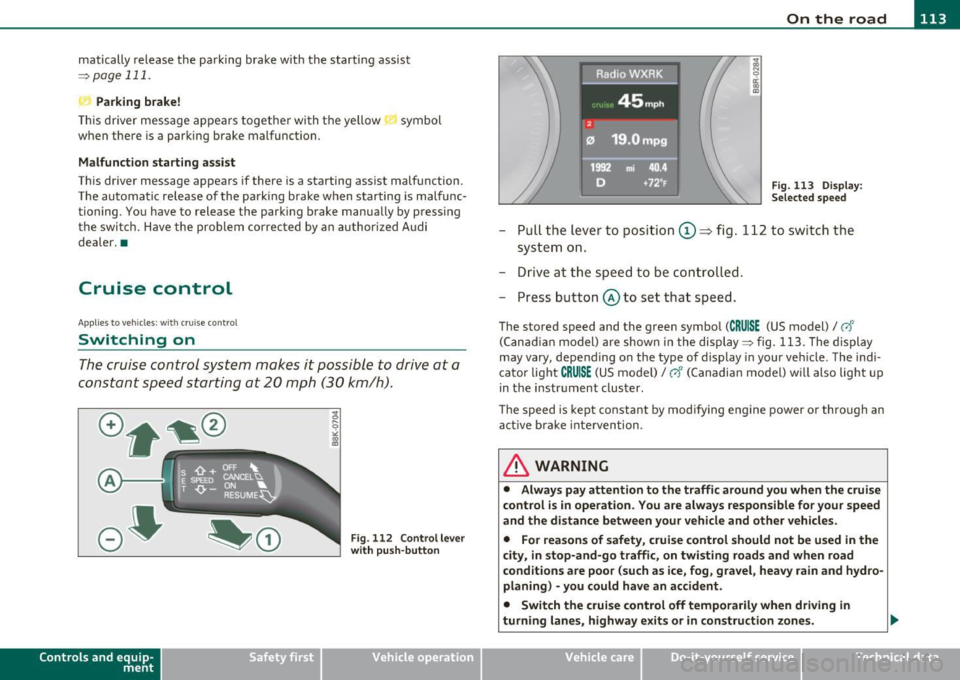
-Pull the lever to position ©~ fig . 112 to sw itch the
system on .
- Drive at th e spee d to be con troll ed .
- Press button @ to set that speed.
The stored speed and the green symbol (CRUISE (US model)/ 0"
(Can ad ian model) are shown in the display ==;, fig. 113. The display
may
vary, depend ing on the type of display in your ve hicle . The indi
cato r light
CRUISE (US model)/ vf (Canadian model) w ill also light u p
in t he instr ument cluster.
The speed is kept constant by modifying engine power or through an act ive brake inte rvention .
& WARNING
• Alway s pay attention to the traffic around you when th e cruise
c ontrol is in operation . You are alwa ys respon sible for your speed
and th e di st a nce betwe en your vehicle and oth er vehicl es.
• Fo r rea sons of safet y, crui se contr ol should not be u sed in the
city, in stop-and-go traffi c, on twisting road s and when road
c ond ition s are poor (su ch as ice , fog , gra vel, he avy rain and hy dro
planing ) -you could hav e an ac cident.
• Switch the crui se c ontrol off temporaril y when dri ving in
turning lane s, highw ay ex it s or in construction zones .
Vehicle care Do-it-yourselt service iTechnical data
Page 128 of 364
BI..__A_ d_a_ p,__ t_iv _ e_ c_r _ u _i _ s _e _ c_o _n _ t_ r_ o_ l ___________________________________________ _
Parking brake!
The text message Parking brake! appears if emergency braking was
manually initiated with the Electromechanical Parking Brake (EPB).
The adapt ive cruise control is turned off. This is accompanied by a
warning tone.
Stabilisation program
The text message Stabilisation program appears if the Elect ronic
Stabilization Program (ESP) has intervened. In this case the adaptive
cruise control is automat ica lly turned off. This is accompanied by a
warning tone.
Speed
The set speed in mph (Canada km/h) always appears when saving or
changing the speed in adaptive cruise control~
page 119, "How is
the speed stored?" and~
page 119, "Changing stored speed".
Speed too low
The text message Speed too low appears if the current speed is too
low
to set or to hold the requested speed.
When setting a desired speed, it must be at least 20 mph (30 km/h).
At speeds below 12 mph (20 km/h), the cruise control is turned off .
In speeds over 95 mph (150 km/h), the system remains active and
resumes the speed of 95 mph (150 km/h) if the driver removes the
foot from the accelerator .
Selector lever position!
The text message Selector lever position! appears when the selector
lever is moved to position
N. In this position , adaptive cruise control
is not available .•
A pplie s to veh icles : wit h adap tive cru ise contro l
Driver intervent ion prompt
The driver intervention prompt calls on the driver to take
over the situation .
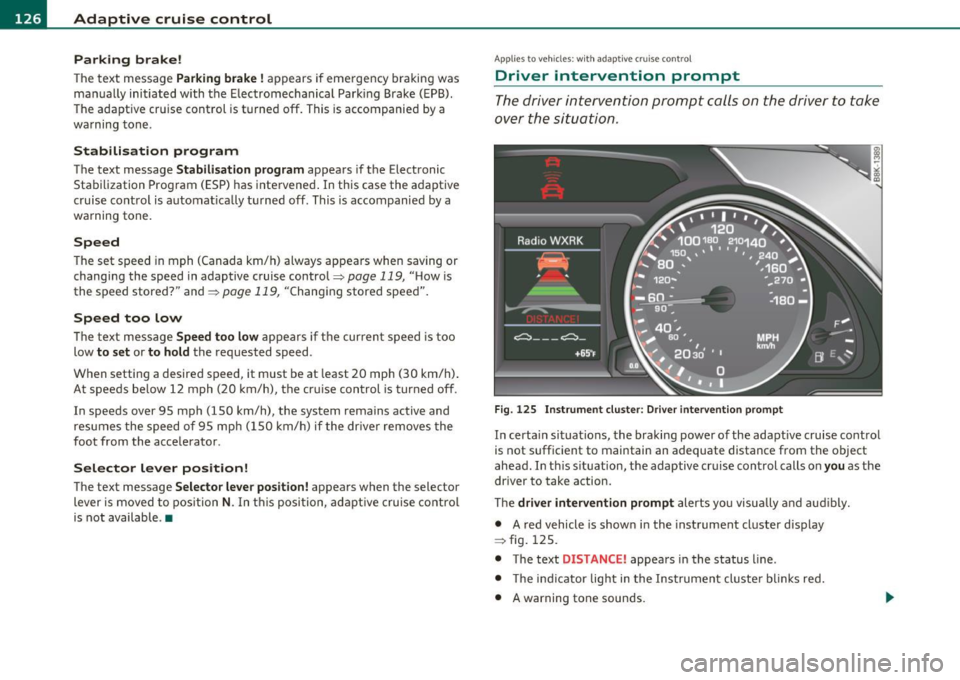
Fig. 125 Instrument cluster: Driver intervention prompt
In certain situations, the braking power of the adaptive cruise control
is not sufficient to maintain an adequate distance from the object
ahead . In th is s ituation, the adaptive cruise control calls on you as the
driver to take action.
The
driver intervention prompt alerts you visua lly and audibly.
• A red vehicle is show n in the instrument cluster display
=> fig . 125.
• The text
DISTANCE! appears in the status line .
• T he indicator light in the Instrument cluste r blinks red.
• A warning tone sounds.
Page 150 of 364
ffl..__T_ r _a_ n_s _ m_ i_ s _s_ i_ o _ n _________________________________________________ _
Transmission
Automatic transmission
Applies to vehicles: with automatic transm ission
General information
Your vehicle is equipped with an electronically controlled automatic
transmiss ion. Upshifting and downshifting takes place
automati
cally.
The transmission is also equipped with tiptronic ®. It allows the driver
to shift gears
manually if desired~ page 152 . •
Applies to vehicles : with automatic transm ission
Driving the automati c transmission
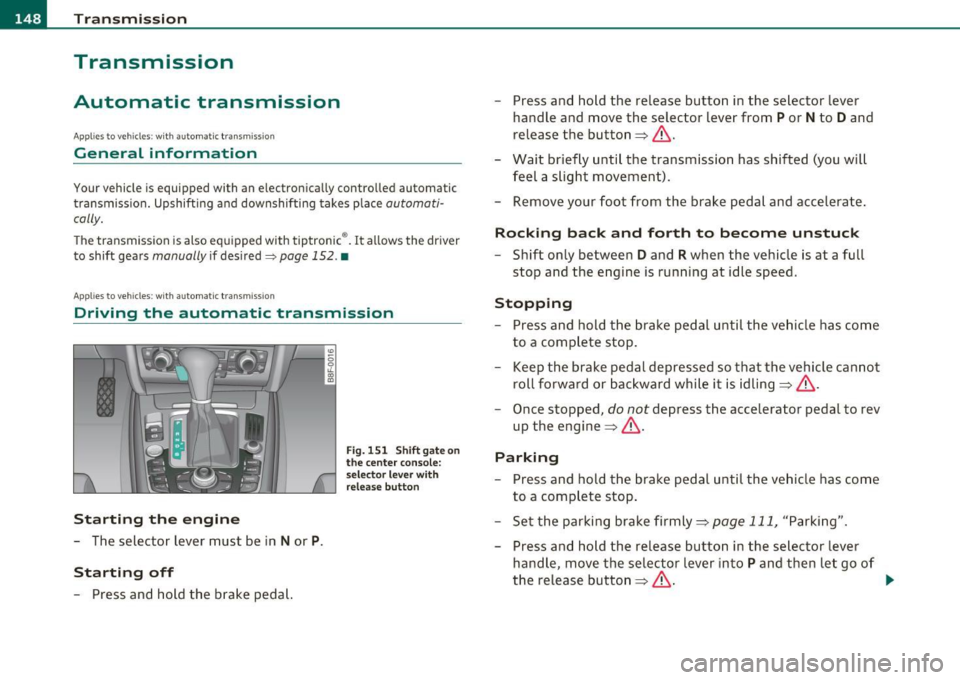
St arting the engine
- The selector lever must be in Nor P.
St arting off
- Press and hold the brake pedal.
Fig. 151 Shift ga te on
t he center conso le:
selector leve r with
release butt on
- Press and hold the release button in the selector lever
handle and move the selector lever from
P or N to D and
release the button~ & .
- Wait briefly until the transmission has shifted (you will
feel a slight movement).
- Remove your foot from the brake pedal and accelerate .
Rocking back and forth to become unstuc k
-Shift only between D and R when the vehicle is at a full
stop and the engine is running at idle speed.
Stopp ing
- Press and hold the brake pedal until the vehicle has come
to a complete stop .
Keep the brake pedal depressed so that the vehicle cannot
roll forward or backward while it is idling~& .
- Once stopped,
do not depress the accelerator pedal to rev
up the engine~ &.
Parking
-Press and hold the brake pedal until the vehicle has come
to a complete stop .
- Set the parking brake firmly~
page 111, "Parking".
- Press and hold the release button in the selector lever
handle, move the selector lever into
P and then let go of
the release button~ & - .,
Page 151 of 364

____________________________________________________ T_r_a _ n_ s_m_ i_ s _s_ i_ o _ n __ _
The selector lever must be in Nor P . If one o f the dr iv in g positions is
e n gag ed a saf ety s witch will preven t the engin e from b eing sta rt e d.
S ee also=>
page 106.
Be fore you move t he se lecto r lever from t he P position, yo u m ust
a lw ay s a ppl y the b rake pedal before and while depr ess ing the bu tton
in t he handle of the selector lever.
_& WARNING
• Unintended vehicle movement can cause serious injury.
- When the selector lever is
in a driving position, the vehicle
may creep, even at idle speed. Therefore do not release the
parking brake
or foot brake until you are ready to move,
because power is transmitted to the wheels as soon as a driving
position is engaged.
- Do not accelerate while selecting a driving position . At this
time the engine must be at idle speed so that undue stress is
not placed on the clutches in the transmission.
- Remember : · even when stopped briefly with the automatic
transmission
in " D", "S" or "R", engine power is being trans
mitted to the wheels. Your vehicle could "creep " forward or
backward. When stopped, keep the brake pedal fully
depressed and use the parking brake if necessary to keep the
vehicle from rolling .
• If the selector lever is unintentionally moved into N while you
are driving, take your foot off the accelerator pedal and wait for
the engine to return to idle speed before selecting a driving posi
tion.
• Never shift into "R" or "P " when the vehicle is in motion .
• Never get out of the d river's seat when the engine is running.
• If you must get out of the vehicle , move the selector lever
securely into the P position and apply the parking brake firmly .
• If the engine must remain running, never have any driving
position engaged when checking under the hood. Make sure the
selector lever has securely engaged and is locked in "P " with the
Controls and equip
ment Safety first
& WARNING (
cont inued)
parking brake firmly set=> page 272, "Engine compartment ".
Otherwise, any increase in engine speed may set the vehicle in
motion, even with the parking brake applied. •
App lies to vehicles : w it h auto mat ic t ransmiss ion
Selector lever positions
T his s ection d escrib es the s ele ct or l eve r posi tions and
drivin g ran ges.
Fig. 152 Di splay in
the instrum ent cluster:
selector lever In posi
tio n P
Th e sele ctor lever posi tion engaged appe ars ne xt to the se le ct or lever
as well as in the instr umen t cluster display .
P -Park
In this selector lev er position the transmiss ion is mecha nica lly
l oc ked. Engage
P only when the vehi cle is comple tely sto pp ed=> &
in " Driving t he automatic transmiss io n" on page 148.
T o sh ift in o r o ut of position P , yo u must first press an d hold the brake
peda l
and th en press t he r elease b utton in t he se lec to r l eve r hand le
wh ile moving the selector lever to or from
P. Yo u can s hif t out of thi s
posit ion on ly with t he ignit ion on . .,,
Vehicle care Technical data
Page 157 of 364
Transmission Ill _______________ ___.
sion the engine power is transferred via a link-plate chain, rather than
by a conventional torque converter. The m ultitron ic transm ission
greatly reduces vehicle "creep" when at a standstill and the transmis
sion is in
D Sor R . •
Appli es to vehicles : with mul tit ron ic® Con tinu ous ly Variabl e Tra ns missi on (CVT )
Driving the multitronic ®
The gear ratio is continuously adopted to vehicle speed
and load.
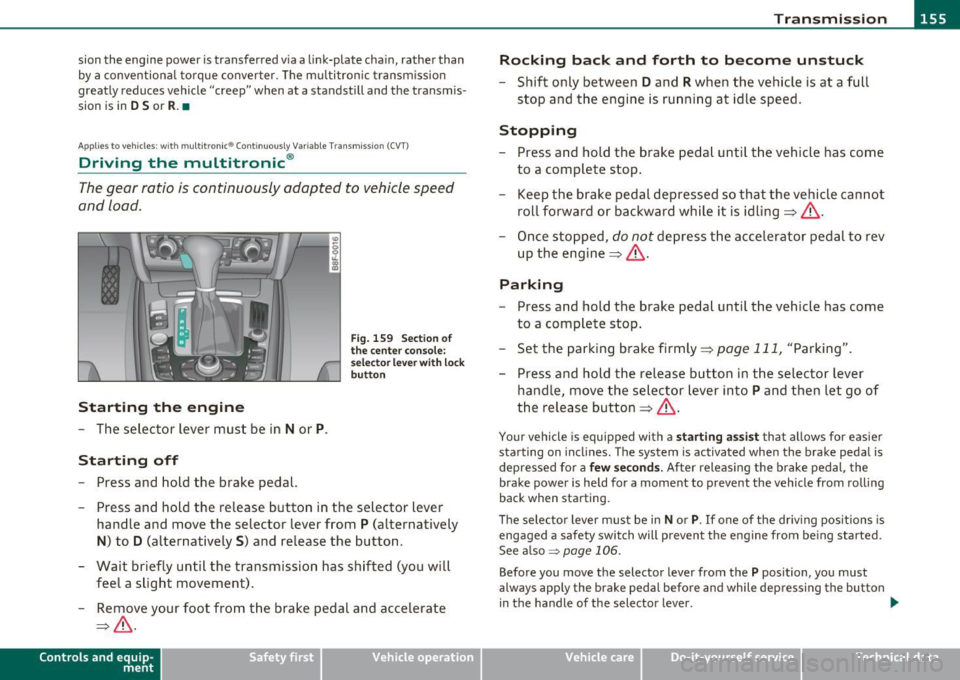
Starting the engin e
- The selector lever must be in Nor P.
Starting off
-Press and hold the brake pedal.
Fig. 159 Sect ion of
the center conso le:
selector leve r with loc k
button
- Press and hold the release button in the selector lever
handle and move the selector lever from
P (alternatively
N) to D (alternatively S) and release the button.
- Wait briefly until the transmission has shifted (you will feel a slight movement).
- Remove your foot from the brake pedal and accelerate
=> & .
Con tro ls a nd e quip
m en t Vehicle
OP-eration
Rocking bac k and forth to become unstuck
- Shift only between D and R when the vehicle is at a full
stop and the engine is running at idle speed .
Stopping
-Press and hold the brake pedal until the veh icle has come
to a complete stop .
- Keep the brake pedal depressed so that the vehicle cannot
roll forward or backward while it is idling=> &.
- Once stopped,
do not depress the accelerator pedal to rev
up the engine => & -
Parking
- Press and hold the brake pedal until the veh icle has come
to a complete stop.
- Se t the parking brake firmly =>
page 111, "Parking".
- Press and hold the release button in the selector lever
handle, move the selector lever into
P and then let go of
the release button=>& .
Your vehicle is equipped with a star ting ass ist that allows for easier
starting on inclines. The system is activated when the brake pedal is
depressed for a
fe w secon ds. After releas ing the brake pedal, the
brake power is held for a moment to prevent the vehicle from rolling
back when starting .
T he selector lever must be in
N or P. If one of the dr iving positions is
engaged a safety switch will prevent the engine from being sta rted .
See also~
page 106 .
Before you move the selector lever from the P position, you must
always apply the brake pedal before and while depressing the button
in the handle of the selector lever. .,_
Vehicle care Do-it-yourselt service iTechnical data
Page 158 of 364

IIIIL_..:T..:r..: a::. n :..:.: S:.: •..: •..: • .:.:is :::.::: s~io ::.: n..:.._ ____________________________________________________ _
in. WARNING
• Unintended vehicle movement can cause serious injury.
- When the selector le ve r is in a driving position, the vehicle
may creep, even at idle speed . Therefore do not re lea se the
parking brake o r foot brake until you are ready to move ,
becau se pow er is transmitted to the wheels as soon a s a driving
position is engaged .
- Do not accelerate while selecting a driving position. At this
time the engine must be at idle speed so that undue stre ss is
not plac ed on the clutche s in the transmi ssion.
- Remember : - even when stopped b riefly with the automatic
tran smis sion in "D ", "S " or "R ", engine power is being trans
mitted to the wheels . Your vehicle could "creep " forward or
ba ckward. When stopped, keep the brake pedal fully
depressed and use the pa rking brake if necessary to keep the
vehicle from rolling .
-If the selector lever is unintentionally moved into N while
you are driving, take your foot off the ac celerator pedal and
wait fo r the engine to return to idle speed before selecting a
driving position.
- Never shift into "R" or "P" when the vehicle is in motion.
- Never get out of the driver 's seat when the engine i s running .
- If you must get out of the vehicle , move the selector lever
securely into the P pos ition and apply the parking brake firmly .
- If the engine must remain running , never h ave any driving
position engaged when check ing under the hood. Make sure
the selector lever ha s securely engaged and is lo cked in "P "
with the parking brake firmly set=> page
272, "Engine
compartment". Otherwise , any inc rease in engine speed may
set the veh icle in motion, even with the parking brake
applied. •
App lies to veh icles: with mult itron ic ® Cont in uous ly Var ia bl e Transm ission (CVT)
Selector Lever positions
This section descri bes the selector lever positions and
driving r ang es .
Fig . 160 Di spl ay in
the in strume nt clu ster :
selecto r leve r in po si
t io n D
Th e sele cto r lever posi tion engaged appears next to the se lec tor lever
as well as in the i nstr ument clus ter disp lay .
P - Park
In this selecto r lever position t he t ransmission is mechan ically
lo ck ed.
Engage P only wh en the vehicle is completely stopped=>
& in
" Dr iving the mult itronic ®" on page 155
T o shift into or out of position P, yo u mus t first press and hold the
brake pedal and then press the release b utton in the selector lever
h andl e wh ile mov ing the sele cto r leve r to P.
R - Reverse
Th e tran smi ssion will a utoma tica lly selec t the lowest gear ratio when
you sh ift into reve rse.
Select R only when t he veh icle is at a full stop and the eng ine is
running a t id le speed =>
& in "Driving the mult it ronic ®" on
page 155. _,.,
Page 173 of 364
HomeLink® -
----------------
Homelink®
Universal remote control
Applies to veh icles: w ith Hom eli nk ® universal remote control
General information
The Homelink ® feature can learn up to three radio
frequency codes for most current transmitters used for
operating garage doors, estate gates, home or outdoor
lighting systems, and other devices.
You must first program the Homelink ® transm itter before you can
use the system=>
page 172, "Programming the Home link® trans
mitter".
I n order to program the Homelink ® transmitter for devices utilizing
rolling code, a second person on a ladder who can safe ly reach the
garage door opener motor is recommended. It is also necessary to
locate the "learn" button on your garage door opener motor. Refer to
the operating instructions for the opener, as the location and color of
this button may vary by manufacturer.
You can still use the original remote control for the device at any
time.
& WARNING
• Never use the Homelink'"' transmitter with any garage door
opener that does have not the safety stop and reverse feature as
required by federal safety standards. This includes any garage
door opener model manufactured before Aprill, 1982.
• A garage door opener which cannot detect an object, signaling
the door to stop and reverse does not meet current federal safety
standards. Using a garage door opener without these features
increases risk of serious injury or death.
Controls and equip
ment Safety first
& WARNING
(continued)
• For safety reasons never release the parking brake or start the
engine while anyone is standing in front of the vehicle.
• A garage door or an estate gate may sometimes be set in
motion when the Homelink ® remote control is being
programmed. If the device is repeatedly activated, this can over
strain motor and damage its electrical components -an over
heated motor is a fire hazard!
• To avoid possible injuries or property damage, please always
make absolutely certain that no persons or objects are located in
the range of motion of any equipment being operated.
rn Tips
• If you would like more information on Homelink ®, where to
purchase the Homelink ® compatible products, or would like to
purchase the Homelink ® Home Lighting Package, please call toll
free: 1-800-355-3515.
• For Declaration of Compliance to United States FCC and Industry
Canada regulations=>
page 346 . •
Vehicle care Technical data
Page 174 of 364
Ill HomeLink® ..__ ______________ _
Applies to veh icles : w ith Homelin k® un iversa l remote control
Programming the Homel ink ® transmitter
The transmitter is programmed in two phases . For rolling
code transmitters, a third phase is also necessary .
0
ct
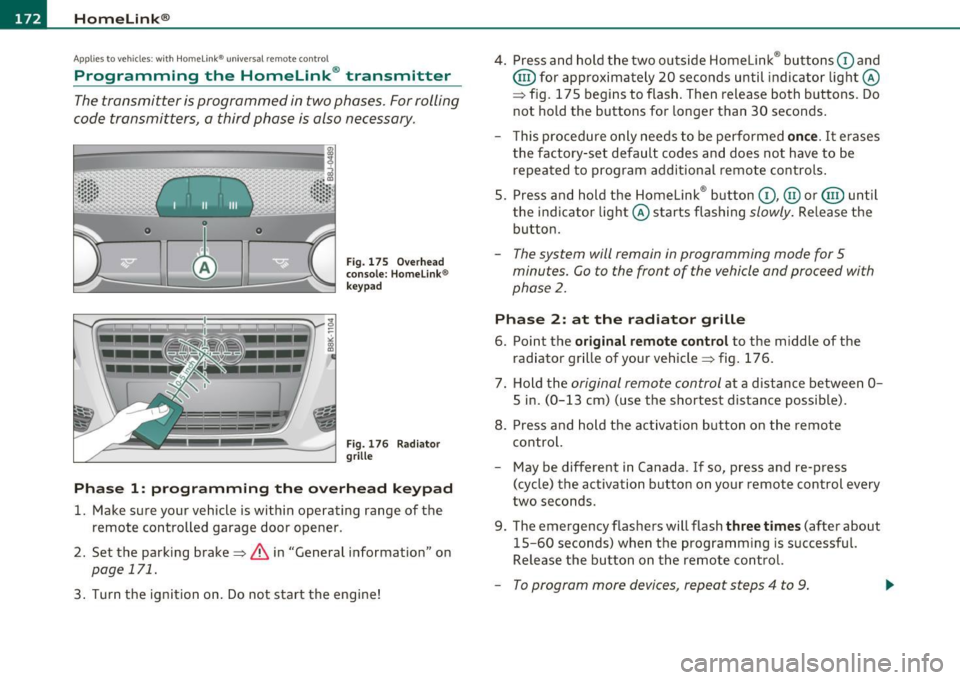
Fig. 175 Ove rh ead
console: Homelink ®
keypad
F ig. 176 Rad iator
grille
Phas e 1: prog ramming th e ove rhead k eypad
1. Make sure your vehicle is within operating range of the
remote controlled garage door opener .
2. Set the parking brake=>&, in "General information " on
page 171.
3. Turn the ignition on . Do not start the engine! 4
. Press and hold the two outside Homelink ® buttons
G) and
@ for approximately 20 seconds until indicator light@
=> fig. 175 begins to flash . Then release both buttons . Do
not hold the buttons for longer than 30 seconds .
- This procedure only needs to be performed
once. It erases
the factory-set default codes and does not have to be repeated to program additional remote controls .
S. Press and hold the Homelink ® button
G) , @ or@ until
the indicator light@ starts flashing
slowly . Release the
button .
-The system will remain in programming mode for 5
minutes. Co to the front of the vehicle and proceed with
phase
2 .
Phase 2: at the radiator grille
6. Po int the original remote control to the middle of the
radiator grille of your vehicle=> fig. 176.
7 . Hold the
original remote control at a distance between O
S in. (0 -13 cm) (use the shortest distance possible).
8 . Press and hold the activation button on the remote
control.
- May be different in Canada . If so, press and re-press
(cycle) the act ivation button on your remote control every
two seconds.
9. The emergency flashers will flash
three t imes (after about
15-60 seconds) when the programm ing is successful.
Release the button on the remote control.
- To program more devices , repeat steps 4 to 9.
Page 259 of 364
Observe speed limits. In some areas, speeds for vehicles towing
t railers are lowe r than for regular veh icles.
Always apply brakes early. When dr iv ing downh ill, sh ift in to a lower
gear to use the engine braking effect to slow the vehicle. Use of the
brakes alone can cause them to overheat and fail.
Coolant temperature
The coolant temperature gauge~ page 8 must be observed care
fully. If the needle moves close to the upper end of the scale, reduce
speed immediately and/or turn off the air conditione r.
If the coolant temperature warning light in the instrument cluster
star ts flashing
-t- , pull off the road, stop and let the engine idle for
about two minutes to prevent heat bu ild-up.
& WARNING
Anyone not properly restrained in a moving vehicle is at a much
greater risk in an accident. Never let anyone ride in your car who is
not properly wearing the restraints provided by Audi. u
Trailer towing tips
Important to know
------------
Your vehicle handles differently when tow ing a tra iler because of the
additiona l weight and different weight distribution. Safety, perfor
mance and economy will greatly depend on how carefu lly you load
your trailer and operate your rig .
Before you actua lly tow your trailer, practice turning, stopping and
backing up in an area away from traffic. Keep pract icing until you have
become completely familiar with the way your vehicle-t railer combi
nation behaves and responds.
Controls and equip
ment Safety first Vehicle operation
Backing up
is d iff icult and requ ires practice . Backing up with a trailer
generally requires steering action opposite to that when backing up
your vehicle without a trailer.
Maintain a greater distance between your vehicle and the one in front
of you. You will need more room to stop . To compensate fo r the
trailer, you will need a larger than norma l turning radius.
When passing, remember that you cannot accelerate as fast as you
normally would because of the added load. Make sure you have
enough room to pass. After passing, allow plenty of room for you r
trailer before changing lanes again.
Avoid jerky starts, sharp turns or rapid lane changes .
[I) Tips
• Do not tow a trai ler during the break-in per iod of your vehicle.
• If you tow a tra iler, your Audi may requi re more frequent mainte
nance due to the extra toad~
page 343. •
Parking on a slope
Do not park on a slope with a trailer. If it cannot be
avoided, do so only after doing the following:
When parking:
-Apply the foot brake.
- Have someone place chocks under both the vehicle and the
trailer wheels.
- With chocks in place, slowly release the brakes until the
wheel chocks absorb the load.
- Turn the wheels towards the curb.
- Apply the parking brake .
- Move the se lector lever to
P.
Vehicle care Do-it-yourself service Technical data
Page 260 of 364
Trailer towing
"-------------------------------------------------
When rest arting afte r parking:
- Apply the foot brake.
- Start the engine.
- Move the selector lever to
D.
- Release the parking brake and slowly pull out and away
from the wheel chocks .
- Stop and have someone retrieve the wheel chocks.
(I] Tip s
If you move the se lector lever of the automat ic transm ission* to P
before applying the parking brake and before blocking the wheels,
you may have to use mo re force late r to move the lever out of the
P
position.