ESP AUDI A5 CABRIOLET 2011 Owner's Manual
[x] Cancel search | Manufacturer: AUDI, Model Year: 2011, Model line: A5 CABRIOLET, Model: AUDI A5 CABRIOLET 2011Pages: 364, PDF Size: 86.48 MB
Page 79 of 364
Seats and storage
General recommendations
Why is your seat adjustment so important?
The safety belts and the airbag system can only provide
maximum protection if the front seats are correctly
adju sted.
Th ere a re various ways of adjusting t he front seats to provide safe and
comfortable support for the driver and the front passenger . Ad just
your seat properly so that :
• you can easily and quickly reach a ll the switc hes and contro ls in the
ins trumen t pa nel
• your body is properly supported thus reducing phys ica l stress and
fatigue
• the safety be lts and airbag system can offer maximum protection
=>
page 199 .
In the following sections, you w ill see exact ly how you can best ad just
your sea ts .
Th ere are special regulations a nd instr uctions for install ing a child
safety seat on the front passenger's sea t. Always follow the informa
tion regarding child safety p rovided in=>
page 221, "Child Safety ".
& WARNING
Incorrect seating posit ion of the dri ver and all other passengers
can result in seriou s personal injury.
• Always keep your feet on the floor when the vehicle is in
motion -never put your feet on top of the instrument panel, out
of the window o r on top of the seat cush ion. This applies especially
to the passengers.
If your seating po sition is incorrect, you
increase the ri sk of injury in the case of sudden braking or an acci-
Controls and equip
ment Safety first
Seats and storage
& WARNING
(con tinu ed)
dent . If the airbag inflates and the seating position is incorrect ,
this could result in per sonal injury or even death .
• It is important for both the dri ver and front passenger to keep
a distan ce of at least 10 inche s (25 cm) between themselves and
the steering wheel and /or instrument panel. If you 're sitting any
closer than this , the airbag system cannot protect you properly. In
addition, the front seats and head restraints must be adjusted to
your body height so that they can give you maximum protection .
• Always try to keep as much distance as possible between your
self and the steering wheel or instrument panel.
• Do not adjust the driver's or front passenger 's seat while the
vehicle is moving. You r seat may move unexpectedly , causing
sudden loss of vehicle control and personal injury . If you adjust
your seat while the vehicle is moving , you are out of position. •
Driver's seat
The correct seat position is important for saf e and
re lax ed driving.
W e recomme nd that you a djust the drive r's sea t in the
f ollowing man ner :
- Ad just the seat in fore and aft direction so that you can
easily pus h the pedals to the floor w hile keeping your
knees slightly bent=>
& in "Why is yo ur seat a djus tme nt
so importa nt?" .
- Adjust the seatback so that when yo u sit with yo ur back
agai nst t he seatback , you can st ill grasp t he top of the
steering w heel. ..,
Vehicle care Technical data
Page 80 of 364
Seats and storage
-Adjust the head restraint so the upper edge is as even as
possible with the top of your head. If that is not possible,
try to adjust the head restraint so that it is as close to this
position as possible=>
page 82.
& WARNING
Never place any objects in the driver's footwell. An object could
get into the pedal area and interfere with pedal function. In case
of sudden braking or an accident, you would not be able to brake
or accelerate. •
Front passenger's seat
Always move the front passenger seat into the rearmost
position.
To avoid contact with the airbag while it is deploying, do not
sit any closer to the instrument panel than necessary and
always wear the three-point safety belt provided adjusted
correctly. We recommend that you adjust the passenger's
seat in the following manner:
- Bring the backrest up to an (almost) upright position.
Do
not ride with the seat reclined.
- Adjust the head restraint so the upper edge is as even as
possible with the top of your head. If that is not possible,
try to adjust the head restraint so that it is as close to this
position as possible=>
page 82.
-Place your feet on the floor in front of the passenger's
seat. •
Power front seat adjustment
Seat adjustment controls
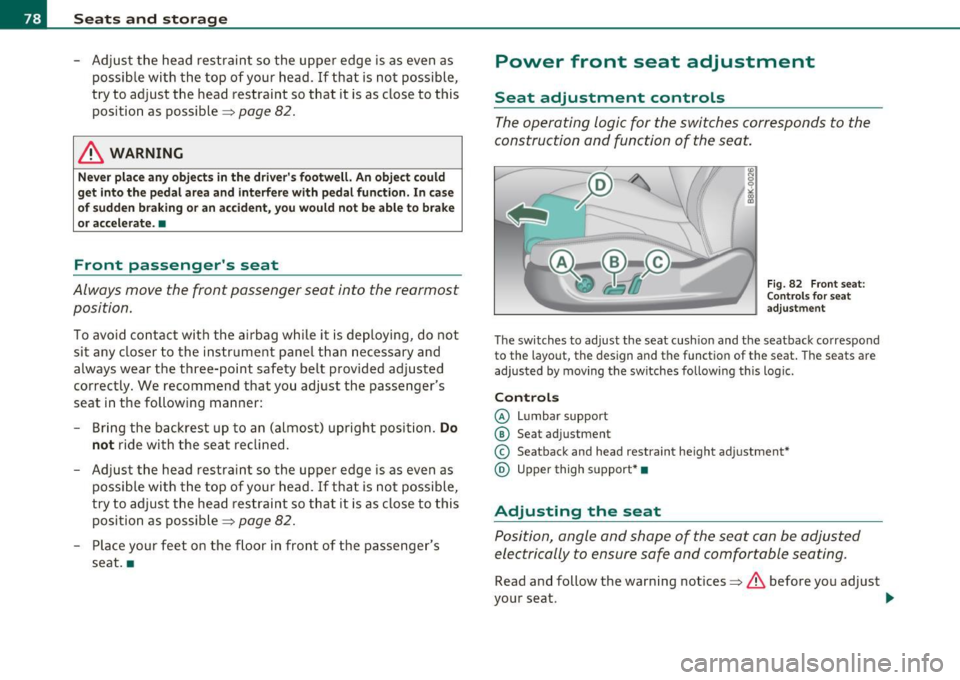
The operating logic for the switches corresponds to the
construction and function of the seat.
Fig. 82 Front seat:
Controls for seat
adjustment
The switches to adjust the seat cushion and the seatback correspond
to the layout, the design and the function of the seat. The seats are
adjusted by moving the switches following this logic.
Controls
© Lumbar support
© Seat adjustment
© Seatback and head restraint height adjustment*
@ Upper thigh support* •
Adjusting the seat
Position, angle and shape of the seat can be adjusted
electrically to ensure safe and comfortable seating.
Read and follow the warning notices=>.&, before you adjust
your seat.
~
Page 82 of 364

Seats and storage Folding down the front seatbacks
- Lift the latch=> page 79, fig. 83.
- Tilt the seatbac k forward.
Moving the front seats forward
-Press and hold the switch@ until the seat has reached the
desired position.
Moving front seats back
- Press and hold the switch @ until the seat has reached the
des ired position. The seat stops automatically when it has
reached its starting position again .
To make it easier to enter and leave the rear seat, the seatbacks of the
front seats can be folded forward and the head restraints are auto
matically lowered. At the same time, the front seats can be moved
forward and back.
When the front seats a re moved forward, their orig inal position is
stored . When it is moved back, the seat automatically stops in this
posit ion. To move the seat even further back, you have to release the
switch @ and reactivate it.
T he head rest raints from the front seats, depending on the seat
height that has been set, are automatically retracted when the seat
backs are folded down. They return to their original position again
when the seatbacks for the front seats are ra ised .
(I) Tips
With the driver's or passenger's door closed, the corresponding
switch to move the seat is inoperative.•
Seat memory
Applies to veh icles : wit h seat memo ry
Memory for driver's seat
The seat adjustment settings for two drivers can be
stored using the memory buttons in the driver's door .
Fig. 84 Driver 's door:
Seat memory
In addition to the setting for the driver's seat, the exterior rear view
mirror setting ca n be stored and reca lled through seat memory if the
vehicle is properly equipped.
Storing and recalling settings
With the help of the memory buttons 1 and 2 ~ fig. 84 the settings
for two different drivers can be stored and recalled~
page 81.
The current settings are also automatically stored on the remote
control key being used when the vehicle is locked. When the vehicle is
unlocked, the settings stored on the remote contro l key being used
are automatically recalled.
Turning seat memory on and off
If the [ ON/OFF] switch is depressed , the seat memory is inoperative.
The word
OFF in the [ ON/OFF] sw itch illuminates .
All the stored settings are retained. We recommend using the
I ON/OFF] switch and deact ivating the seat memory if the vehicle is .,
Page 83 of 364
only going to be used temporarily by a driver whose settings are not
going to be stored. •
Applies to vehicles : w ith seat memory
Storing and recalling settings
Before you can store or recall your settings, the [ ON/OFF]
switch on the seat memory must be engaged (not raised).
Storing settings
- Adjust the driver's seat.
- Adjust the two exterior mirrors .
- Press the
I SETI button and hold it down. In addition, press
one of the memory buttons for at least one second .
- Release the buttons. The settings are now stored under
the corr esponding memory button .
Recalling settings
- If the driver's door is open, tap the corresponding memory
button briefly .
- If the driver's door is closed , press the appropriate
memory button unt il the stored position is reached .
Successful storage is confirmed audibly and by the light in the [SET)
button illuminat ing=> page 80, fig . 84.
When the vehicle is
loc ked , the current settings are stored and
ass igned to the remote contro l key. B ut the setti ngs sto red on
memory buttons 1 to 2 are not deleted. They can be reca lled at any
time. When the vehicle is
unlo ck ed , the settings stored on the
remote control key are restored.
If your vehicle is driven by other persons using your remote control
key , you should save your individua l seat position on one of the
Controls and equip
ment Safety first
S
eats and storage
memory buttons. You can recall your settings again simply and
conveniently by press ing the cor responding memory button. When
the vehicle is locked, these settings are automatically re-assigned to
the remote control key and stored.
& WARNING
• Fo r sa fe ty reaso ns, th e se at se tting can only b e recalled when
t h e ve hicl e is s tat ion ary -oth erwise yo u risk ha ving an acc ident .
• In an emer gency th e re ca ll pro ce du re can be cancelled b y
p ressing the [
ON/OFF) sw itch or by t appin g of the the memo ry
b utto ns. •
App lies to ve hicles: with seat memory
Activating remote control key memory
To be able to recall the stored settings with the remote
control key, the function has to be activated in the radio
or in the MM!*.
-Select : Function button I CAR]> Seat adjustment >
D river's se at > Key mem . profile > On .
(I) Tips
If you do not want another driver to store their settings on the
remote key, switch
off the Memory function using the radio or the
MMI* or the [OFF] button => page 80 . •
Vehicle care Technical data
Page 90 of 364
Warm and cold
Warm and cold
Deluxe automatic climate control
Applies to vehicles: with deluxe automat ic climate cont ro l
Description
The climate control system can be used to set a comfort
able temperature inside the vehicle .
The climate control system is a combination of a heating and ventila
tion system as well a cooling system respons ible for dehumid ifying
and cooling the air inside the vehicle.
Th e automatic climate control system automatically maintains a
temperature once it has been set. The temperature of the air from
the vents, fan speed (air volume) and air distribution are a lso auto
matically adjusted . The system also takes into account strong
sunlight so that manual adjustment is not necessary . So in almost all
cases, automatic mode offers the best conditions for the comfort of
the occupants at all times of the year=>
page 90.
Please note the following :
The cooling mode lowers the humidity level inside the vehicle. This
prevents fogging up of the windows.
In the case of high outside humidity and temperatures,
condensation
can drip from the air conditioning system evaporator and form a pool
under the veh icle. This is normal and not an indication of leaks!
At low outs ide temperatures, the fan automatically switches to a
higher speed when the coolant reaches a sufficient temperature
except in the defroster position.
When starting with full throttle, the compressor of the automatic
climate control system is temporarily switched off to achieve full
engine power.
T o ensure engine cooling when the engine is under an extreme load,
the compressor is switched off at h igh coolant temperatures.
Pollutant filter
The pollutant filter (particle filter) ensures that impurities in the
outs ide a ir (e.g. dust, pollen) and odors are significantly reduced or
stopped. The air is also filtered in recirculation mode.
Th e pollutant filter e lement must be changed at the intervals speci
fied in the service plan so that the performance of the automatic
climate control system is not impaired.
If the effect iveness of the filter decreases premat urely due to opera
tion of the vehicle in areas with significant pollution, the filter
element must be changed between the specified service dates.
Key recognition
The current climate control settings are automatically stored and
assigned to the key being used. The settings assigned to the key are
restored automatically when the vehicle is started. These settings are
different when the power top is open or closed. Each driver can use
his or her preferred settings witho ut having to man ually adjust them
when using their own key.
If another driver changes the settings while using your key, your
prefer red sett ings will be erased.
Energy management
To prevent the battery from be ing discharged and to restore the
balance of energy, components which require large amounts of
energy are temporarily cut back or switched off=>
page 247. Heating
systems in partic ular require a great dea l of energy. If you notice, for
example, that the rear window heater is not heating , the n it has been
temporarily reduced or switched off by
energy management . These
systems are available again as soon as the energy balance has been
restored. .,,_
Page 98 of 364
Warm and cold
systems are available aga in as soon as the energy ba la nce has been
restore d.
& WARNING
Reduced vi sibility is danger ous and can cause accident s.
• For safe d riv ing it i s very important that all windows be free of
ice, snow and condensation.
• Completely familiarize yourself with the proper use and func
tion of the heating and ventilation sy stem and especially how to
defog and defrost the windows .
• Never u se the wind shield wiper/wa sher system in free zing
weather until you have warmed the wind shield first , u sing the
heating and ventilat ion system . The washer solut ion may freeze
on the wind shield and reduce vi sibility.
0 Note
• If you suspect that the cl imate co ntro l system has been damaged,
switch the system off to avoid furt her damages, and have i t in spe cte d
by a qua lified dealersh ip.
• Repa irs to the A udi a ir condit ioner require special technica l know l
edge and special tools. Contact an authorized Audi dealer for assis
t ance.
(I) Tips
• T o avoid adverse ly affecti ng heati ng a nd cooling perform ance and
to prevent condensation on the windows, the air intake in front of the
w inds hield mu st be free of ice, snow and leave s.
• The air flowing out of the vents and througho ut the vehicle's
en tire in terior is di scharge d at the re ar of the vehicle. Ma ke sure tha t
the outlet slots are not covered by clothing, etc.
• Clim ate co ntrol wor ks most effectively if the windows are closed.
However, if the interior of a parked vehicle is extremely hot from the
sun, br iefly ope ning the windows can speed up the cooling p ro cess. •
Applie s to vehicl es: w it h d eluxe auto ma tic climate control plu s
Controls
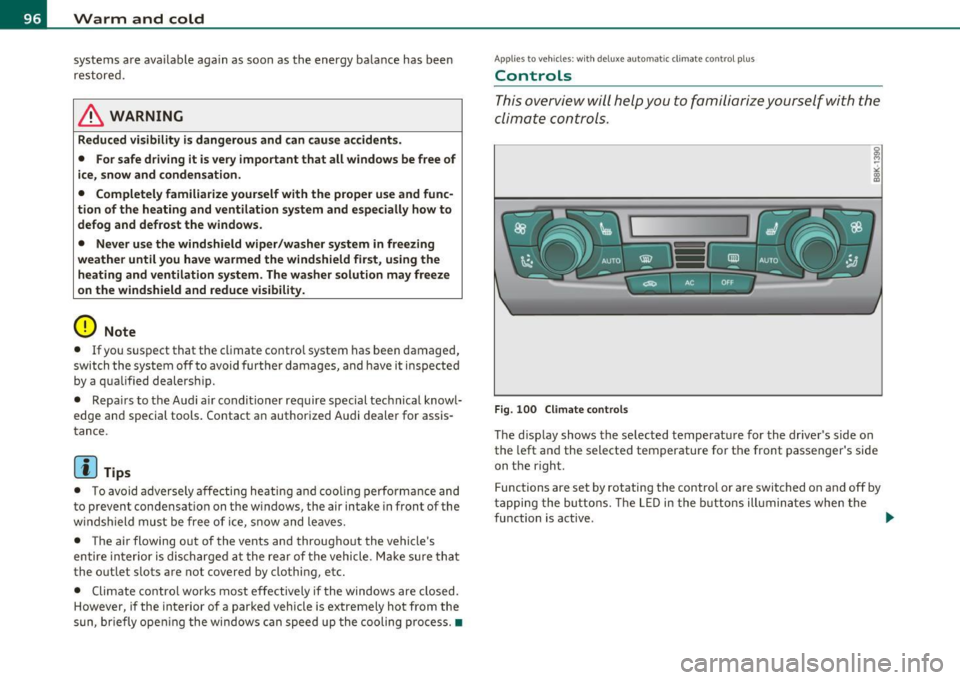
Th is overview will help you to familiarize yourself with the
climate controls.
Fig . 100 Cli mate c ontrols
The d isp lay shows the se lected temperat ure for the drive r's side on
the left and the selected temperature for the front passenger's side
on t he right.
Functions are set by rotating the contro l or are switched on and off by
t apping the bu tto ns. Th e L ED in the buttons ill umin ates when the
function is active. ..,_
Page 114 of 364
![AUDI A5 CABRIOLET 2011 Owners Manual ""L___::O:::.:., n:....:: t.:..:h :.:e :...:.. r.:::o :.::a :.: d=--------------------------------------------------
(I] Tips
For s afety reasons, t he pa rking br ake is r eleased automatical](/img/6/57571/w960_57571-113.png "AUDI A5 CABRIOLET 2011 Owners Manual \"\"L___::O:::.:., n:....:: t.:..:h :.:e :...:.. r.:::o :.::a :.: d=--------------------------------------------------
(I] Tips
For s afety reasons, t he pa rking br ake is r eleased automatical")
""L___::O:::.:., n:....:: t.:..:h :.:e :...:.. r.:::o :.::a :.: d=--------------------------------------------------
(I] Tips
For s afety reasons, t he pa rking br ake is r eleased automatically only
when the driver 's safety belt is engaged in the buck le .•
Starting off with a trailer
To prevent rolling back unintenti onally on an incline, do
the following :
-Keep the switch pu lled and depress the accelerator. T he
parking brake stays a pp lied and prevents the vehic le from
ro lling backward.
- You can re lease the switch once you are sure tha t you are
deve lopi ng enough driving force at t he wheels by
depressing the accelerator .
Depending on the we ight of the rig (vehicle and trailer) and the
sever ity o f the in cl ine, you may roll backwa rds as you start . You can
prevent roll ing backwards by holding the park ing brake sw itch pulled
out and accele ra ting -just as you wou ld when starting on a hill wi th a
conventional hand brake .•
Emergency braking
In the event that the conventional brake system fails or
locks .
-In an emergen cy , pull t he sw itch and contin ue to pull it to
slow your vehic le down with t he p arking brake.
- As soon as you re lease t he swi tch or acce lerate, the
bra king process s tops.
If you pull the switch and hold it above a speed of about 5 mph (8
km/h), the emergency braking fu nction is initiated . The vehicle is braked at all four wheels by activating the
hydraulic brake system.
Th e b rake pe rformance is s imila r to mak ing an eme rge ncy sto p .=>
&
In order not to act ivate the emergency brak ing by m istake, an audib le
warning tone (buzzer) sounds when the switch is pulled. As soon as
t he swi tch is re leased, or the acce lerator pedal is dep ressed , emer
gency braking stops .
& WARNING
Emergency braking should only be used in an eme rgency , when
the normal foot brake has failed or the brake pedal is obstructed .
Using the parking brake to perform emergency braking will slow
your vehicle down as if you had made a full brake application . The
laws of physics cannot be suspended e ven with ESP and its associ ·
at ed components (ABS, ASR, EDS ). In corners and when road or
weather conditions are bad , a full brake application can cause the
vehicle to skid or the rear end to break away· ri sking an accid ent. •
Driver messages in the instrument cluster
Warning Vehicle incline i s excessive
Th is message appears when the parking brake is applied on an incline
t ha t exceeds abo ut 3 0%.
I n th is case the braking power of the parking brake may
not be
adequate
to prevent the vehicle from rolling unintentionally.
Pl ease release parking brak e
Please note that for safety reasons the pa rking brake is re leased auto
matically on ly if the d river's seat be lt is fully engaged i n the buck le .
To relea se the parking brake pre ss the brake pedal
Th is dr iver message appears when the switch to release the parking
brake was pressed . The par king brake can only be released if you s tep
on the brake peda l and at the same time p ress the switc h or you auto- _.,
Page 115 of 364
On the road -_______________ __.
matically release the pa rking brake w ith the starting assist
==;, page 111 .
,
Parking b rake!
Thi s driver message appea rs together wi th t he ye llow J symbol
when there is a parking brake malfunction .
Malfunction starting assi st
Th is driver message appears if there is a starting assist malfunction .
T he automati c re lease of the park ing brake w hen s tarting is malfunc
tioning. You have to release the parking brake manually by pressing
t he swi tch . Have the problem correc ted by an author ized A udi
dealer. •
Cruise control
Applies to veh icl es: w it h cru ise co ntro l
Switching on
The cruise control system makes it possible to drive at a
constant speed starting at 20 mph (30 km/h).
A--
Con tro ls a nd e quip
m en t
Fig. 11 2 Control lever
w ith push -butt on
Vehicle OP-eration
Radici'WXRK
Fig. 11 3 Disp la y:
Se lect ed spee d
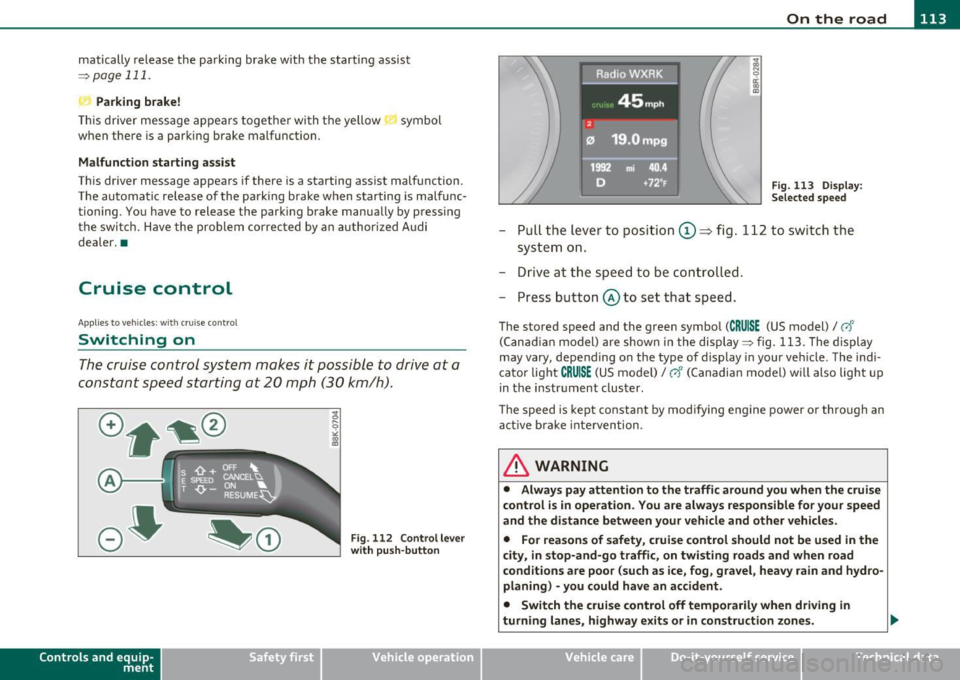
-Pull the lever to position ©~ fig . 112 to sw itch the
system on .
- Drive at th e spee d to be con troll ed .
- Press button @ to set that speed.
The stored speed and the green symbol (CRUISE (US model)/ 0"
(Can ad ian model) are shown in the display ==;, fig. 113. The display
may
vary, depend ing on the type of display in your ve hicle . The indi
cato r light
CRUISE (US model)/ vf (Canadian model) w ill also light u p
in t he instr ument cluster.
The speed is kept constant by modifying engine power or through an act ive brake inte rvention .
& WARNING
• Alway s pay attention to the traffic around you when th e cruise
c ontrol is in operation . You are alwa ys respon sible for your speed
and th e di st a nce betwe en your vehicle and oth er vehicl es.
• Fo r rea sons of safet y, crui se contr ol should not be u sed in the
city, in stop-and-go traffi c, on twisting road s and when road
c ond ition s are poor (su ch as ice , fog , gra vel, he avy rain and hy dro
planing ) -you could hav e an ac cident.
• Switch the crui se c ontrol off temporaril y when dri ving in
turning lane s, highw ay ex it s or in construction zones .
Vehicle care Do-it-yourselt service iTechnical data
Page 119 of 364
____________________________________________ A_ d_ a.._p _t_ i_ v _e_ c_r_u _ i_ s _e_ c_o_ n_ t_r _o _l __ ffl'II
& WARNING (co ntinued )
• Always turn off adaptive crui se control when entering turn
lanes, highway ex it lanes and con struction zones or similar situa
tions because the vehicle will automatically accele rate to the
stored speed .
• Never rest your foot on the accelerator pedal, especially when
the adaptive cruise control is being u sed because doing so will
override the braking function and prevent the brakes from being
applied by the system when it detect s a situation when the brake s
must be applied.
• Alway s remember that the adaptive cruise control has limits -
it does not react when you drive towards an obstacle or something
else on or near the road that is not moving, such as vehicles
stopped in a traffic jam , a stalled or disabled vehicle .
• Always remember that the adaptive cruise control cannot
detect a veh icle th at i s driving towards you in your traffic lane and
that it cannot detect narrow vehicles such as motorcycles and bicy
cles .
[ i] Tips
• For safety reasons, the stored speed is deleted when the ignition
is turned off.
• The Electronic Stabilization Program (ESP) and the Ant i-Slip Regu
la tio n (A SR) c anno t be de activated when the adaptive cruise cont rol
is sw itched on .
If the ESP and the Anti -S lip Regulation (ASR) has been
de activ at ed an d yo u the n switch on the ad apt ive cruise cont rol, the
ESP fu nction w ill also be activated automatically.
• Dam age cau sed by accide nts (e.g. if the vehicle is dam age d whe n
park ing) can affect the rada r sensor settings. This can cause t he
sys tem to malfunc tion or switch off comple tely.
• The radar sensor cover is heated. In w inter conditions, you should
st ill ch eck befor e dr iv in g to make s ure i t is free of ice and s now. If
necessary, clean the area nea r the rada r sensor carefully=>
page 116,
fig. 114 .
Controls and equip
ment Safety first
•
To ensure that the radar sensor is not blocked , fore ign objects
(e .g. st ickers, add -on par ts) m ust no t cover the are a ne ar th e radar
sensor=>
page 116, fig . 114 . The area near t he radar sensor must not
be painted, either .
• For Declaration of Compliance to United States FCC and Industry
C an ada regula tions =>
page 34 6. •
App lies to ve hicle s: with adap tiv e crui se contro l
How does adaptive cruise control work?
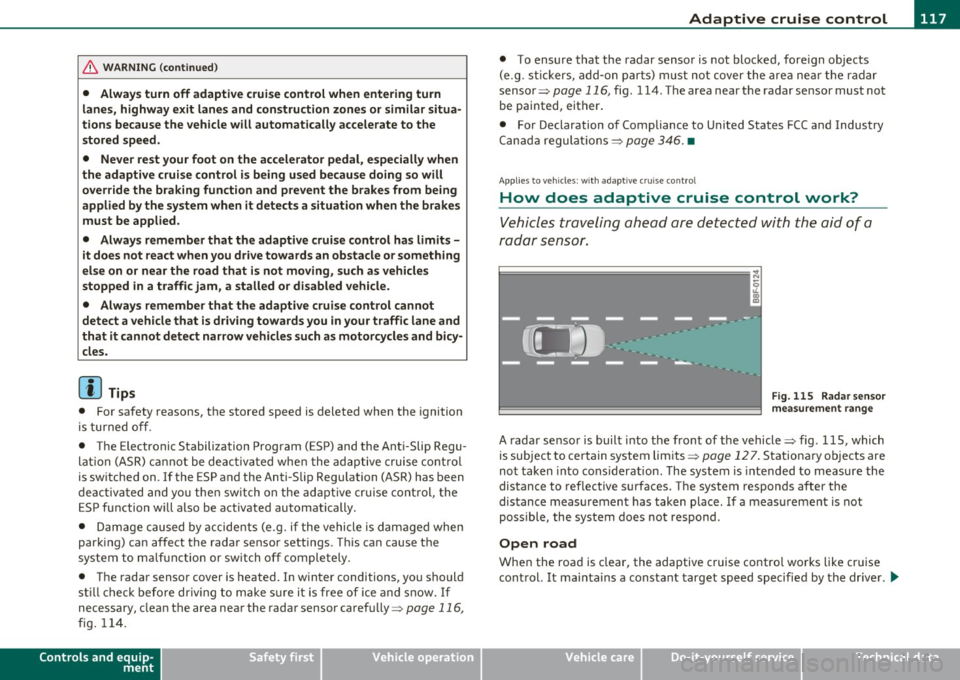
Vehicles traveling ahead are de tec ted w ith the aid of a
ra dar sens or.
I;= =;. =============== --~
~
l8
Fig. 115 Radar sen sor
mea sureme nt r an ge
A radar sensor is buil t into the front of the vehicle=> fig. 115, which
is subject to ce rtain system limits =>
page 12 7 . Stationary o bjects are
not taken into cons iderat ion. The system is intended to measure the
distance to reflective s urfaces. The system responds after the
dis tance measuremen t has taken place. If a meas urement is not
poss ible, the system does not respond.
Open road
When the road is clear, the adaptive c ruise contro l works like cr uise
cont rol. It ma inta ins a constant target speed specified by the drive r.
~
Vehicle care Technical data
Page 124 of 364
-Adaptive cruise control .Ml..___,___ _____________ _
Driving pro
gram
Dis tance 1
Distance 2
Distance 3
& WARNING
dynamic
1
2
2
3
standard
2
3
3
4
comfort
3
4
4
5
-
When setting the distance, the dri ver is responsible for adhering
to the respect ive national and country -specific regulations .
• Following other vehicles too closely increase s the risk of colli
sions and serious personal injury.
• Setting short distance s to the traffic ahead reduce s the time
and d istanc e av ailable to bring your vehicle to a safe stop and
makes it even more neces sary to pay clo se attention to traffi c.
• Always use good judgment and select a safe following distance
for the traffic , road and weather condition s.
(I] Tips
The d istance setting is reset to the factory default DISTANCE 3 the
next time the ignition is t urned on .•
Driver information
Ap plies to veh icles: w it h ad aptiv e c ru is e co ntro l
Displays in the instrument cluster
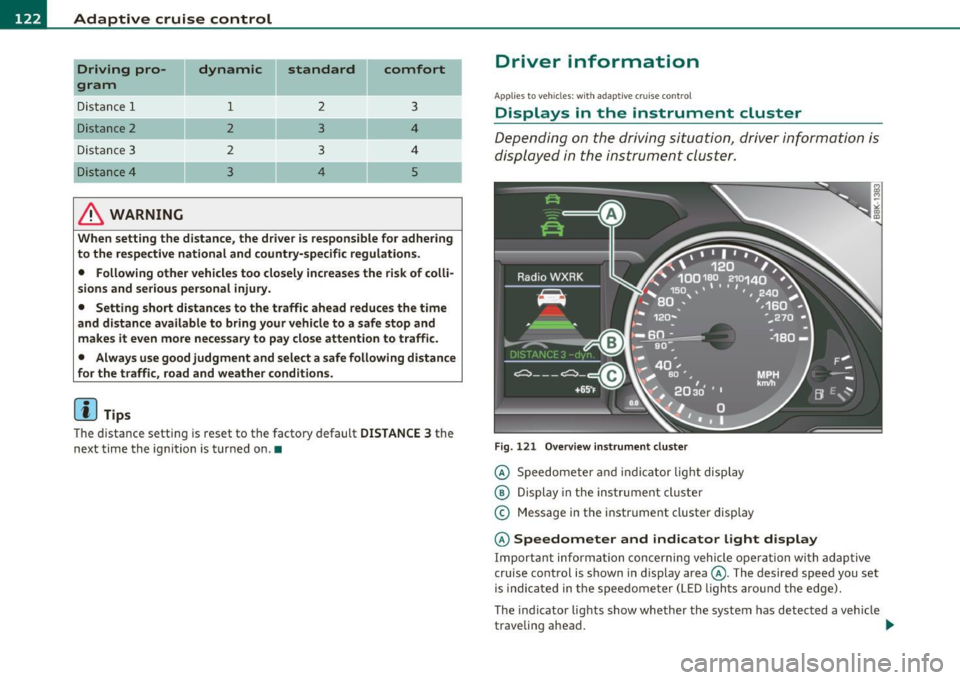
Depending on the driving situation, driver information is
displayed in the instrument cluster.
Fig. 1 21 O verv iew i nstrum ent clu ste r
© Speedomete r and indicator light disp lay
@ Display in the ins trument cluste r
© Message in the instr ument cluster disp lay
© Speedometer and indicator light d isplay
Important informa tion concerning vehicle ope ration wi th adap tive
cruise control is shown in display area@. The desired speed you set
is indica ted in the speedome ter (L ED ligh ts aro und the edge).
T he indicator lights show whether the system has detected a veh icle
traveling ahead . .,,.